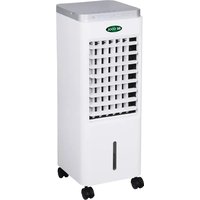
BC6AC2001FTL - Air Conditioning Be Cool - Free user manual and instructions
Find the device manual for free BC6AC2001FTL Be Cool in PDF.


| Brand | Be Cool |
| Model | BC6AC2001FTL |
| Product type | Evaporative air cooler (mobile air conditioning) |
| Rated voltage | 220 V ~ 240 V |
| Frequency | 50 Hz |
| Rated input power | 65 W |
| Water tank capacity | 6 L |
| Maximum air flow | 14.9 m³/min |
| Fan power consumption | 58.43 W |
| Sound power level | 63 dB(A) |
| Maximum air speed | 2.32 m/s |
| Standby power consumption | 0 W |
| Fan speeds | 3 (low, medium, high) |
| Timer | 30 min to 7.5 h (in 30 min steps) |
| Operating modes | Normal, Natural, Sleep |
| Oscillation | Yes (horizontal) |
| Water cooling function | Yes (water pump + ice packs) |
| Remote control | Yes (button cell included) |
| Castors | Yes (4 castors, 2 with brakes) |
| Ice packs supplied | 2 |
| Warranty | 2 years (valid in Austria, conditions apply) |
| Filter maintenance | Weekly cleaning recommended |
| Water tank cleaning | Every 2 to 3 weeks |
Frequently Asked Questions - BC6AC2001FTL Be Cool
User questions about BC6AC2001FTL Be Cool
0 question about this device. Answer the ones you know or ask your own.
Ask a new question about this device
Download the instructions for your Air Conditioning in PDF format for free! Find your manual BC6AC2001FTL - Be Cool and take your electronic device back in hand. On this page are published all the documents necessary for the use of your device. BC6AC2001FTL by Be Cool.
USER MANUAL BC6AC2001FTL Be Cool
natural_image
White air conditioner unit with grid ventilation slots and wheels (no visible text or symbols)Luftkühler BC6AC2001FTL
RÜCKSEITE:
INBETRIEBNAHME
HINWEIS
| Important Information about Safety, Site Location and Electrical Connections | 16 – 18 |
| Recycling, Waste Management, Declaration of Conformity | 18 |
| Scope of Supply | 19 |
| Description of Appliance | 19 |
| Commissioning | 20 – 21 |
| Remote control | 22 |
| Setting the functions | 23 – 24 |
| Tips for correct application | 24 |
| Maintenance and cleaning | 25 – 26 |
| Activities at the beginning/end of the season | 26 |
| Tracking and fixing problems | 27 |
| Technical informations | 27 |
| Warranty | 28 |
PLEASE READ THE OPERATING MANUAL CAREFULLY BEFORE BEGINNING INSTALLATION, MONITORING, OPERATING, OR MAINTENANCE. PROTECT YOURSELF AND OTHERS BY FOLLOWING THE SAFETY INSTRUCTIONS. FAILURE TO COMPLY WITH INSTRUCTIONS MAY RESULT IN PERSONAL INJURY AND/OR PROPERTY DAMAGE AND/OR LOSS OF WARRANTY CLAIMS!
IMPORTANT INFORMATION ABOUT SAFETY, SITE LOCATION AND ELECTRICAL CONNECTIONS.


Use this appliance exclusively under the guidelines of this operating manual. Any other use not recommended by the manufacturer may cause fire, electrical shock, or personal injury.
- This appliance is intended exclusively for the cooling of living spaces in households and may not be used for any other purpose.
- The appliance is not suitable for continuous and precision operation and should not be used for cooling electrical systems (e.g. in server rooms).
- Remove the packing and make sure that the appliance is not damaged. In case of doubt, do not use the appliance, and contact the service centre or your dealer.
- If the appliance has a defect, switch it off and contact either your dealer or the customer hotline
BE COOL
-
If the power supply cable is damaged, it must be replaced by the manufacturer or an authorised service centre to avoid all possible risks.
-
For any repairs, always contact the customer service offices authorised by the manufacturer. You can access the customer service centres online at www.becool.at.
-
Before connecting it to the mains power supply, check that the mains voltage and the type of electrical current matches the information provided on the type plate on the appliance.
-
The electrical outlet that the appliance must be connected to, must not be defective or loose and must be suitable for the current load required, and, above all, must be reliably earthed. In case of doubt, have your electrical installation checked by a qualified electrician.
-
Avoid using an extension cable, because this could overheat and cause a fire.
-
It is forbidden to adapt or modify the characteristics of this appliance in any way. Use only replacement parts and accessories recommended by the manufacturer (failure to comply will result in the loss of the guarantee and warranty).
-
Children must not be allowed to play with the appliance.
-
Do not let small children play with the packaging – THERE IS A DANGER OF SUFFOCATION ON SMALL PARTS!
-
Children under 8 years of age and persons with limited physical, psychological, sensory or mental abilities, as well as a lack of experience and knowledge, may only use this appliance under appropriate supervision and if this appliance is used for detailed instructions on both using this appliance in a safe manner and describing any existing hazards.
-
Do not operate the appliance unattended. Whenever you leave the room, always switch off the appliance.
-
Do not twist, buckle or snap off the power supply cable.
-
Do not use the appliance with wet hands.
-
Do not use the appliance outdoors.
-
Never cover the appliance.
-
Do not operate the appliance in rooms where gas, oil or sulphur are present.
-
Do not use the appliance near water or high humidity, e.g. in damp cellars, or next to swimming pools, bathtubs or showers. Make sure that water does not get into the appliance.
-
Do not place the appliance near heat sources (e.g. next to heating systems) and avoid direct sunlight.
-
Keep a minimum distance of at least 50 cm from combustible substances (e.g. alcohol) or pressurised vessels (e.g. spray containers).
-
Do not place any heavy or hot objects on top of the appliance.
-
Place the appliance on a solid and even support surface.
-
Never insert fingers, pins or other objects into the appliance and make sure that the air entry and outlet are never blocked.
-
Change the water regularly.
-
Always fill the water tank above the minimum level, but never above the maximum level.
-
If you want to move the appliance, always make sure that the locking brakes are released.
-
If there is water in the water tank, do not move the appliance quickly to avoid any leakage(s) or splashing any water.
-
To avoid high humidity, do not use the appliance in "COOL" mode for long periods of time in a closed area without ventilation.
-
The cool packs are not a toy – keep children and animals away from them.
-
Never attempt to open the cool packs for any reason. The liquid contained in it can be harmful to health.
-
Remove the plug and empty the water tank, when the appliance is not in use.
-
Always switch the appliance off, before unplugging it.
-
Do not pull the mains cable to disconnect the appliance from the mains supply. Always pull the plug to pull out the mains cable.
BE COOL
- To avoid electric shocks, do not handle the plug with wet or damp hands.
When not in use, keep the appliance vertical in a safe, dry place that is inaccessible for children, and do not cover the appliance with plastic packaging.
- Maintain the appliance in good condition by maintaining and cleaning it. If you have any questions about maintenance, contact the customer hotline/service centre authorised by the manufacturer.
RECYCLING

The packaging materials can be recycled. Therefore, it is recommended to dispose of them in sorted waste.
WASTE MANAGEMENT
The pictogram with the crossed out dustbin points to the requirement for separate disposal of electrical and electronic appliances (WEEE). Electrical and electronic appliances can contain hazardous and environmentally hazardous materials. Therefore, do not dispose of these in the unsorted residual waste, but at a registered collection centre for waste electrical and electronic equipment. By doing so, you will help to conserve resources and protect the environment. For further details, please consult your dealer or your local authorities.
DECLARATION OF CONFORMITY

We hereby confirm that this article complies with the essential requirements, regulations and guidelines of the EU. The detailed declaration of conformity can be viewed at any time via following link: www.becool.at/downloads/doc/bc6ac2001ftl.pdf
Specifications are subject to change without prior notice.
www.becool.at
SCOPE OF DELIVERY
The SHE cooler comes with:
- 1x air cooler
- 4x transport wheels
- 2x cool packs
- 1x operating manual
DESCRIPTION OF THE APPLIANCE
Description of the individual components
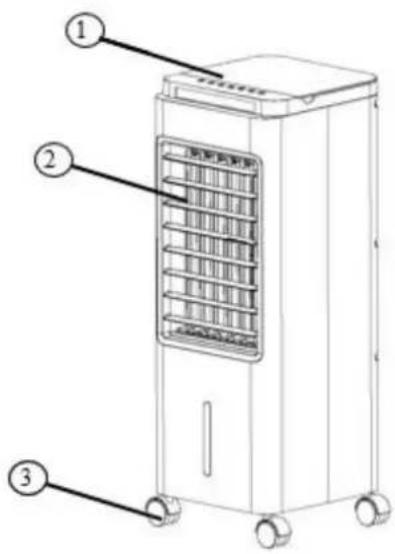
FRONT:
- Control panel, display & top loader
- Air outlet grille
- Transport wheels
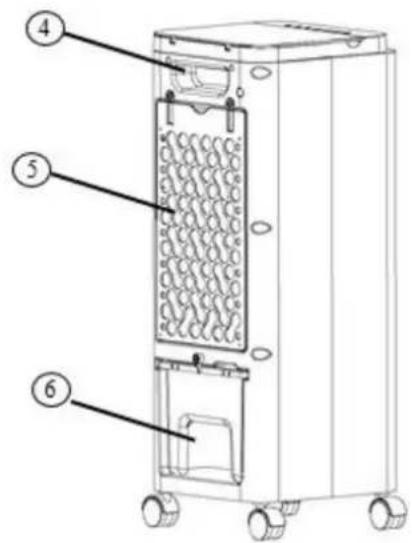
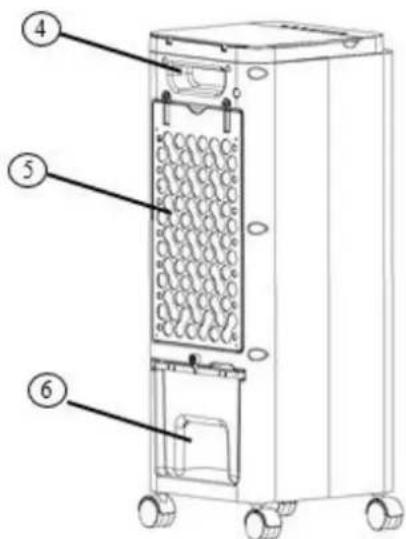
BACK:
- Handle
- Radiator cover grid + dust filter
- Water tank blowout latch
- Water tank
COMMISSIONING
BEFORE USING THE APPLIANCE FOR THE FIRST TIME
Unpacking the Appliance
- Open the carton and take out the appliance.
- Remove all packaging from the appliance.
- Unwind the mains cable completely and make sure not to damage it.
Transport wheels
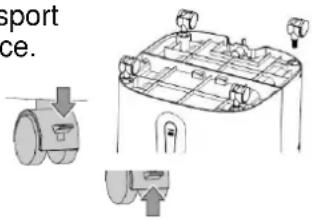
For easier transport, the appliance is equipped with transport wheels.
In addition, two rollers are equipped with a locking brake to guarantee that they remain firmly in position.
- After the appliance has been carefully unpacked, insert the transport rollers into the designated notches on the bottom of the appliance.
- To adjust the locking brakes, press the levers as follows:
PRESS DOWNWARDS → to fix the brake
PUSH UPWARDS→ to release the brake
INSTALLATION
Please note the following points for installation.
- Place the appliance on a level and solid surface and adjust the locking brakes so that the appliance stands firmly in position.
- There must be at least a 50 cm gap to walls or other objects.
- Before using the appliance, make sure that both the air inlet and the air outlet are free of obstacles and are not blocked.
- Connect the appliance to an earthed outlet.
FILLING THE WATER TANK
The air cooler can be filled with water in two different ways:
| TOP OF THE APPLIANCE (TOP LOADER) | BACK OF THE APPLIANCE: |
| Open the cover at the top of the appliance and pour water into it: | Push the blowout latch located above the water tank upwards, so that the water tank can be filled: |
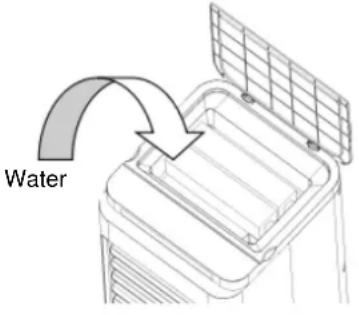 | 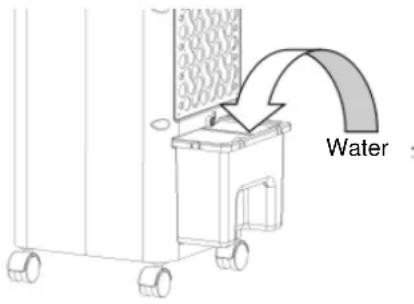 |
| Always observe the MIN and MAX markings when filling the water:MIN mark → The water tank must be filled to above the MIN mark so that the pump can function properlyMAX mark → The water tank must not be filled over the MAX mark, otherwise water could enter the inside of the appliance and thus damage electronic parts. | |
| Close the cover again. | Make sure the water tank is not damp or wet on the outside, and if so, wipe it dry. Then carefully push the tank back into the air cooler and turn the safety latch back. |
COOL PACKS
You will receive two cool packs that can be put into the water tank for a further cooling effect.
When using the cool packs, please note the following:
- Before use, place the cool packs in a freezer for at least 3-4 hours.
- The water tank should be filled with water before inserting the cool packs.
- When inserting the cool packs into the tank, make sure that the MAX mark is not exceeded.
NOTE
Ice cubes can also be filled into the water tank.
When doing so, please make sure that the MAX mark is not exceeded.
REMOTE CONTROL
PREPARING REMOTE CONTROL – INSERTING OR REPLACING BATTERIES
Please follow the steps below to make it operate correctly:
- To operate the remote control, please insert the button cell provided.
- To do so, pull out the battery holder on the back of the remote control and insert the battery:

flowchart
graph LR
    A["Top-Left Device"] --> B["Top-Right Device"]
    B --> C["Bottom-Left Device"]
    C --> D["Bottom-Right Device"]
    style A fill:#f9f,stroke:#333
    style B fill:#ccf,stroke:#333
    style C fill:#cfc,stroke:#333
    style D fill:#fcc,stroke:#333
- Please always pay attention to the polarity markings (+/-) on the battery and the battery holder:
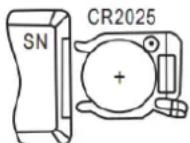
- Then insert the battery holder back into the remote control.
NOTE
The buttons of the remote control are labelled as shown in the illustration below. All functions of the remote control work identically with the manual operation on the appliance.
HOW TO CORRECTLY USE THE REMOTE CONTROL
Point the remote directly at the front of the appliance and make sure there are no obstacles between the remote control and the appliance.
NOTE
Please handle the remote control carefully.
Do not expose the remote control to direct sunlight and keep it away from heat sources.
SETTING THE FUNCTIONS
All functions can be set directly on the appliance as well as by using the remote control.

SWITCHING ON THE APPLIANCE
- Press the ON/OFF button to switch the appliance on.
NOTE
As soon as the appliance is switched on, it runs at medium speed.

SETTING THE SPEED
- Use the SPEED button to set and adjust the speed of the blower.
- The respective display lights up on the control panel:
Press:
1 x press
→ Medium speed
2 x press
→ High speed
3 x press
→ Low speed

OSCILLATION
- Use the SWING button to activate the oscillation of the appliance. The display lights up on the control panel.
• To deactivate the function, press the SWING button again.
NOTE
This function allows the blown-out air to be distributed to the left and right. This enables horizontal air distribution in the room.

TIMER
- Use the TIMER button to switch off the appliance in a time-controlled way.
- With each press on the timer button, the operating time is gradually extended by half an hour each time, from 30 minutes to 7.5 hours.
- Pay attention to the four indicators on the appliance:
○ 1x press → 30 minutes → 0.5H lights up
○ 2x press → 1 hour → 1H lights up
○ 3x press → 1.5 hours → 0.5H + 1H lights up
○ Etc.
BE COOL

MODES
- Use the MODE button to select between the following modes:

→ Normal Mode
→ Runs in the function that has been set.

→ Nature Mode
→ Simulates a breeze to create pleasant, natural airflow.

→ Sleep Mode
→ Simulates a gentle breeze to generate an airflow adapted to sleep requirements.
- The respective display lights up on the control panel.

COOL AIR
- Use the COOL button to start the function.
- Make sure that the water level indicator is above the MIN level.
- As soon as the button is pressed, the appliance starts pumping water against the water filter to create cold and moist air, that is then blown out of the appliance.

DISPLAY
- This function allows you to turn the display on and off.
TIPS FOR CORRECT APPLICATION
Here are some tips to get the very best out of the air cooler:
Protect the room from direct sunlight with curtains, blinds or shutters. This saves you energy.
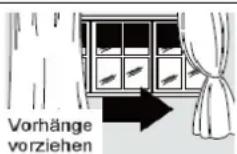
Do not place any objects on to the appliance, and do not obscure the air outlet.
Keep the grilles clear.
Make sure that no heat sources are operating in the room.
Never use the appliance in very humid rooms (e.g. laundry rooms).
Do not use the appliance outdoors.
Make sure that the appliance is on level flooring and that the locking brakes are applied.
MAINTENANCE AND CLEANING
CLEANING DUST FILTERS
To ensure that the air cooler operates efficiently, you should clean the dust filter after each week of operation.
-
Before cleaning the appliance, switch it off, then wait a few minutes, and then unplug it to disconnect the appliance from the mains power supply.
-
Unscrew the safety screw ① and press the tabs to remove the cover grille.
-
Then remove the underlying dust filter ② from the appliance.
-
Use a vacuum cleaner to remove the dust accumulated in the filter.
-
If the filter is very dirty, immerse it in warm water and rinse it several times – but the water temperature must not exceed 40 °C.
-
Before putting the dust filter back into the cover grille, allow it to dry out well after washing.
-
Reattach the cover grille and tighten the safety screw into the cover.
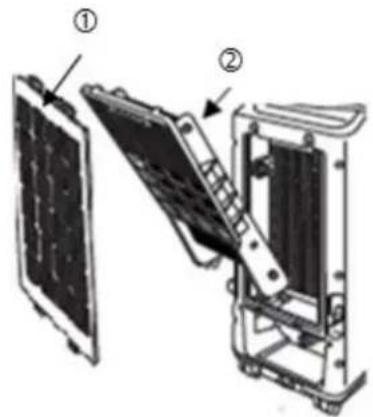
NOTE
Never use the appliance without a filter.
CLEANING THE HOUSING
Before cleaning the appliance, switch it off, then wait a few minutes, and then unplug it to disconnect the appliance from the mains power supply.
Clean the appliance with a moderately damp cloth, then wipe it with a dry cloth.
- Never use benzene, alcohol or solvents to clean the appliance – this could be dangerous.
- Do not spray insecticides or similar agents on to the air cooler.
CLEANING THE WATER TANK
It is recommended to clean the water tank every 2-3 weeks during use.
- Push the blowout latch located above the water tank upwards, so that the water tank can be pulled out.
- Then release the water pump from the safety holder and remove the water tank completely from the appliance.
- Clean the tank both inside and outside with a soft cloth that has been previously immersed in soapy water.
- Then rinse the tank with warm and clean water.
- Allow the tank to dry completely and then put the water pump back into the safety holder before re-filling the water tank.
ACTIVITIES AT THE BEGINNING/END OF THE SEASON
ACTIVITIES AT THE END OF THE SEASON
- Switch off the appliance and disconnect the mains plug.
- Carefully empty and clean the water tank.
- Clean the filter and reinsert it after drying (see section "Cleaning Dust Filters").
- Pack away the appliance and store it in a cool, dry place.
INSPECTIONS AT THE BEGINNING OF THE SEASON
- Verify that the power supply cable is in order and that the earthing is functioning.
- Follow the installation and safety instructions carefully.
TRACKING AND FIXING PROBLEMS
Before contacting our customer hotline/service centre, please check whether the error can be rectified using the instructions below.
| PROBLEM | POSSIBLE CAUSE | SOLUTION |
| The air cooler does not switch on. | Power failure | Wait for the power supply to be restored. |
| The remote control batteries are dead. | Please replace the batteries or use the control panel instead. | |
| The appliance is not connected to the power supply. | Connect/plug the appliance to the power supply and wait for a minimum of 30 mins!! | |
| The air cooler works only for a short amount of time. | The water tank is empty. | Fill the water tank. |
| Something is blocking the air outlet. | Check and remove all obstacles that are blocking the air supply. | |
| During operation, an unpleasant odour is emerging from the room. | The air filter or water tank is dirty. | Clean the air filter(s) and/or water tank in accordance with the description. |
| The appliance is very loud. | The floor that the air cooler is located on is not level. | Place the air cooler in a different location. |
| Technical Information | |||
| Nominal voltage | 220 V ~ 240 V | ||
| Frequency | 50 Hz | ||
| Rated power input | 65 W | ||
| Water tank capacity | 61 | ||
| Description | Symbol | Value | Unit |
| Maximum volume flow | F | 14,9 | m3/min |
| Fan power input | P | 58.43 | W |
| Fan sound power level | LWA | 63 | dB(A) |
| Maximum air velocity | C | 2.32 | m/s |
| Consumption in standby mode | PSB | 0 | W |
| Contact addresses for more information and Serviceline: | Schuss Home Electronic GmbHScheringgasse 3, A-1140 Vienna, AustriaTel: +43 (1) 97 0 21 – 0Serviceline: +43 (1) 97 0 21 – 502www.becool.atFB no.: 236974 t / FB court: Vienna | ||
WARRANTY
By purchasing this BE COOL quality product means that you have decided to place trust in durability, reliability and innovation.
For this BE COOL appliance, we grant a warranty period of 2 years from the date of purchase valid in Austria!
If, contrary to expectations, service work on your appliance is still necessary during this period, we hereby guarantee either free repairs (spare parts and working time) or (at the discretion of Schuss) that we will replace the product. If it is not possible to either repair or exchange the product for economic reasons, we reserve the right to create a time value credit.
For air conditioners, please contact the customer hotline as a first step (see the labels on the appliance or title page of the operating manual), for fans, contact your specialist dealer or directly contact us. We would like to point out that repair work that has not been performed by the authorised contract workshop in Austria will immediately terminate the validity of this warranty.
This warranty does not cover:
- In case of improper use, we do not assume any consequential damage
- Repair or replacement of parts due to normal wear and tear
- Damage resulting from failure to follow the operating manual
- Appliances that are used commercially, even in part
- Appliances mechanically damaged due to external influence (any fall(s), impact(s), breakage(s), improper use, etc.) as well as signs of wear and tear of an aesthetic nature.
- Appliances that have been improperly treated
- Appliances that have not been opened by our authorised service workshop.
- Unfulfilled consumer expectations.
- Damage caused by force majeure, water, lightning and overvoltage.
- Appliances that have had their type designation and/or serial number on the appliance changed, deleted, made illegible or removed.
- Services outside our contract workshops, the transport costs to either an authorised workshop or to us and back, and the associated risks.
We would like to expressly point out that a fixed amount of € 60 (indexed basis CPI 2010, June 2015) will be charged within the warranty period in the event of operating errors or if no error has been detected.
The provision of a warranty service (repairs or replacement of the appliance) does not extend the absolute warranty period of 2 years from the date of purchase.
The 2-year warranty is only valid upon presentation of the proof of purchase (must include the name and address of the dealer as well as the complete appliance designation) and the corresponding warranty certificate, on which the appliance type and the serial number (on the box and on both the back and underside of the appliance) are to be noted! Without presenting the warranty certificate, only the legal warranty applies!
We would like to expressly point out that the statutory warranty rights are unaffected by this warranty and continue unabated.
A liability for damage on the part of Schuss Home Electronic GmbH and its vicarious agents only exists in the event of gross negligence or intent. In any event, liability for lost profits, expected but not occurred savings, consequential damage and damage arising from claims of third parties is excluded. Damage to or for recorded data are always excluded from the liability for damage.
Congratulations on making your choice. We wish you a lot of pleasure with your BE COOL appliance!
ADDRESS
SHE Vertrieb
Schuss Home Electronic GmbH
A-1140 Vienna (Austria),
Scheringgasse 3
In the event of a warranty claim, this warranty certificate must be handed over with the appliance to the authorised service workshop or the dealer which you purchased the appliance from!
SOMMAIRE
FR
DÉCLARATION DE CONFORMITÉ

FACE ARRIÈRE :
MISE EN SERVICE
AVANT LA MISE EN SERVICE INITIALE
Déballer l'appareil
AVIS
PARTE POSTERIOR:
PUESTA EN MARCHA
NOTA
RETRO:
MESSA IN FUNZIONE
ACCENSIONE DEL DISPOSITIVO
AVVISO
ZADNÍ STRANA:
BE COOL
UVEDENÍ DO PROVOZU
PŘED PRVNÍM UVEDENÍM DO PROVOZU
Vybalení přístroje
flowchart
graph LR
    A["Top Left Panel"] --> B["Side Panel"]
    B --> C["Side Panel with Cover"]
    C --> D["Bottom Right Panel"]
    D --> E["Top Right Panel with Cover"]
UPOZORNĚNÍ
HÁTOLDAL:
BE COOL
ÜZEMBE HELYEZÉS
natural_image
Diagram of a multi-level structure with labeled components and directional arrows, no readable text or symbols present.TELEPÍTÉS
MEGJEGYZÉS
TYLNA STRONA:
BE COOL
URUCHOMIENIE
PRZED PIERWSZYM URUCHOMIENIEM
natural_image
Technical line drawing of a vehicle dashboard with control panel and valve (no text or symbols)INSTALACJA
WSKAZÓWKA
POLEDINA:
BE COOL
PUŠTANJE U POGON
PRIJE PRVOG PUŠTANJA U POGON
Raspakiranje uređaja
NAPOMENA
ZADNJA STRANA:
- Drška
- Zaštitna rešetka + filter prašine
- Sigurnosna poluga rezervoara za vodu
- Rezervoar za vodu
PUŠTANJE U RAD
PRE PRVOG PUŠTANJA U RAD
Raspakujte uređaj
NAPOMENA
Ne koristite nikada uređaj bez filtera.
ČIŠĆENJE KUĆIŠTA
Pre čišćenja isključite uređaj, zatim pričekajte nekoliko minuta, a onda izvucite utikač, da biste isključili uređaj iz mreže.
ARKA TARAF:
İŞLETİME ALMA
KURULUM
flowchart
graph LR
    A["Front Panel"] --> B["Side Panel"]
    B --> C["Display Unit"]
    C --> D["Back panel with + and - indicators"]
NOT
- Luftkühler BC6AC2001FTL
- RÜCKSEITE:
- INBETRIEBNAHME
- HINWEIS
- BE COOL
- RECYCLING
- WASTE MANAGEMENT
- DECLARATION OF CONFORMITY
- SCOPE OF DELIVERY
- DESCRIPTION OF THE APPLIANCE
- Description of the individual components
- FRONT:
- BACK:
- COMMISSIONING
- BEFORE USING THE APPLIANCE FOR THE FIRST TIME
- Unpacking the Appliance
- Transport wheels
- INSTALLATION
- FILLING THE WATER TANK
- COOL PACKS
- NOTE
- REMOTE CONTROL
- PREPARING REMOTE CONTROL – INSERTING OR REPLACING BATTERIES
- HOW TO CORRECTLY USE THE REMOTE CONTROL
- SETTING THE FUNCTIONS
- SWITCHING ON THE APPLIANCE
- SETTING THE SPEED
- Press:
- OSCILLATION
- TIMER
- MODES
- COOL AIR
- DISPLAY
- TIPS FOR CORRECT APPLICATION
- MAINTENANCE AND CLEANING
- CLEANING DUST FILTERS
- CLEANING THE HOUSING
- CLEANING THE WATER TANK
- ACTIVITIES AT THE BEGINNING/END OF THE SEASON
- ACTIVITIES AT THE END OF THE SEASON
- INSPECTIONS AT THE BEGINNING OF THE SEASON
- TRACKING AND FIXING PROBLEMS
- WARRANTY
- For this BE COOL appliance, we grant a warranty period of 2 years from the date of purchase valid in Austria!
- This warranty does not cover:
- SOMMAIRE
- FR
- DÉCLARATION DE CONFORMITÉ
- FACE ARRIÈRE :
- MISE EN SERVICE
- AVANT LA MISE EN SERVICE INITIALE
- Déballer l'appareil
- AVIS
- PARTE POSTERIOR:
- PUESTA EN MARCHA
- NOTA
- RETRO:
- MESSA IN FUNZIONE
- ACCENSIONE DEL DISPOSITIVO
- AVVISO
- ZADNÍ STRANA:
- UVEDENÍ DO PROVOZU
- PŘED PRVNÍM UVEDENÍM DO PROVOZU
- Vybalení přístroje
- UPOZORNĚNÍ
- HÁTOLDAL:
- ÜZEMBE HELYEZÉS
- TELEPÍTÉS
- MEGJEGYZÉS
- TYLNA STRONA:
- URUCHOMIENIE
- PRZED PIERWSZYM URUCHOMIENIEM
- INSTALACJA
- WSKAZÓWKA
- POLEDINA:
- PUŠTANJE U POGON
- PRIJE PRVOG PUŠTANJA U POGON
- Raspakiranje uređaja
- NAPOMENA
- ZADNJA STRANA:
- PUŠTANJE U RAD
- PRE PRVOG PUŠTANJA U RAD
- Raspakujte uređaj
- ČIŠĆENJE KUĆIŠTA
- ARKA TARAF:
- İŞLETİME ALMA
- KURULUM
- NOT
Brand : Be Cool
Model : BC6AC2001FTL
Category : Air Conditioning