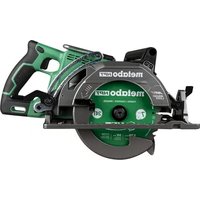
C3607DWAQ4 - Saw METABO - Free user manual and instructions
Find the device manual for free C3607DWAQ4 METABO in PDF.


| Product Type | Cordless Rear Handle Circular Saw |
| Brand | Metabo |
| Model | C3607DWAQ4 |
| Rated Voltage | 36 V DC |
| Motor Type | Brushless DC Motor |
| No Load Speed | 5,100 RPM |
| Blade Diameter | 185 mm (7-1/4") |
| Blade Bore | 15.9 mm (5/8") |
| Maximum Cutting Depth | 62 mm (2-7/16") |
| Maximum Bevel Angle | 0° to 53° |
| Weight (with BSL36B18 battery) | 4.7 kg (10.4 lbs) |
| Power Source | 36 V Li-ion BSL36B18 battery or ET36A AC adapter (optional) |
| Compatible Charger | UC18YSL3 (120 V, 60 Hz) |
| Charging Time (BSL36B18) | Approximately 52 minutes at 20°C |
| Safety Features | Electric brake, lower guard, safety switch, overload and overheat protection |
| Recommended Uses | Cutting wood and derived materials |
| Maintenance | Regular cleaning of ventilation slots, blade inspection, no lubrication required |
| Included Accessories | Saw blade, wrench, dust sensor, charger, battery, battery cover, bag |
| Optional Accessories | Guide (rip fence), ET36A AC adapter |
| Repairability | Repairs by Metabo HPT authorized service center only |
| Operating Temperature | -10°C to 40°C (adapter) |
Frequently Asked Questions - C3607DWAQ4 METABO
User questions about C3607DWAQ4 METABO
0 question about this device. Answer the ones you know or ask your own.
Ask a new question about this device
Download the instructions for your Saw in PDF format for free! Find your manual C3607DWAQ4 - METABO and take your electronic device back in hand. On this page are published all the documents necessary for the use of your device. C3607DWAQ4 by METABO.
USER MANUAL C3607DWAQ4 METABO
Designed for operating in USA & Canada only.
When this product is used in areas other than the USA & Canada, we cannot guarantee the product quality and performance.
Model
Modèle
Modelo
C 3607DWA
Cordless Rear Handle Circular Saw
natural_image
Technical line drawing of a mechanical assembly with no visible text or symbolsSAFETY INSTRUCTIONS AND INSTRUCTION MANUAL
WARNING
IMPROPER OR UNSAFE use of this power tool can result in death or serious bodily injury! This manual contains important information about product safety. Please read and understand this manual BEFORE operating the power tool. Please keep this manual available for other users and owners before they use the power tool. This manual should be stored in safe place.
INSTRUCTIONS DE SECURITE ET MODE D'EMPLOI
⚠ AVERTISSEMENT
IMPORTANT SAFETY INFORMATION
Read and understand all of the safety precautions, warnings and operating instructions in the Instruction Manual before operating or maintaining this power tool.
Most accidents that result from power tool operation and maintenance are caused by the failure to observe basic safety rules or precautions. An accident can often be avoided by recognizing a potentially hazardous situation before it occurs, and by observing appropriate safety procedures.
Basic safety precautions are outlined in the "SAFETY" section of this Instruction Manual and in the sections which contain the operation and maintenance instructions.
Hazards that must be avoided to prevent bodily injury or machine damage are identified by WARNINGS on the power tool and in this Instruction Manual.
NEVER use this power tool in a manner that has not been specifically recommended by metabo HPT.
MEANINGS OF SIGNAL WORDS
WARNING indicates a potentially hazardous situations which, if ignored, could result in death or serious injury.
CAUTION indicates a potentially hazardous situations which, if not avoided, may result in minor or moderate injury, or may cause machine damage.
NOTE emphasizes essential information.
SAFETY
GENERAL POWER TOOL SAFETY WARNINGS
WARNING
Read all safety warnings, instructions, illustrations and specifications provided with this power tool. Failure to follow all instructions listed below may result in electric shock, fire and/or serious injury.
Save all warnings and instructions for future reference.
The term "power tool" in the warnings refers to your mains-operated (corded) power tool or battery-operated (cordless) power tool.
1) Work area safety
a) Keep work area clean and well lit. Cluttered or dark areas invite accidents.
b) Do not operate power tools in explosive atmospheres, such as in the presence of fl ammable liquids, gases or dust. Power tools create sparks which may ignite the dust or fumes.
c) Keep children and bystanders away while operating a power tool. Distractions can cause you to lose control.
2) Electrical safety
a) Power tool plugs must match the outlet. Never modify the plug in any way. Do not use any adapter plugs with earthed (grounded) power tools. Unmodified plugs and matching outlets will reduce risk of electric shock.
b) Avoid body contact with earthed or grounded surfaces such as pipes, radiators, ranges and refrigerators.
There is an increased risk of electric shock if your body is earthed or grounded.
c) Do not expose power tools to rain or wet conditions. Water entering a power tool will increase the risk of electric shock.
d) Do not abuse the cord. Never use the cord for carrying, pulling or unplugging the power tool.
Keep cord away from heat, oil, sharp edges or moving parts. Damaged or entangled cords increase the risk of electric shock.
e) When operating a power tool outdoors, use an extension cord suitable for outdoor use. Use of a cord suitable for outdoor use reduces the risk of electric shock.
f) If operating a power tool in a damp location is unavoidable, use a residual current device (RCD) protected supply. Use of an RCD reduces the risk of electric shock.
English
3) Personal safety
a) Stay alert, watch what you are doing and use common sense when operating a power tool. Do not use a power tool while you are tired or under the influence of drugs, alcohol or medication.
A moment of inattention while operating power tools may result in serious personal injury.
b) Use personal protective equipment. Always wear eye protection.
Protective equipment such as a dust mask, non-skid safety shoes, hard hat or hearing protection used for appropriate conditions will reduce personal injuries.
c) Prevent unintentional starting. Ensure the switch is in the off-position before connecting to power source and/or battery pack, picking up or carrying the tool. Carrying power tools with your finger on the switch or energising power tools that have the switch on invites accidents.
d) Remove any adjusting key or wrench before turning the power tool on.
A wrench or a key left attached to a rotating part of the power tool may result in personal injury.
e) Do not overreach. Keep proper footing and balance at all times. This enables better control of the power tool in unexpected situations.
f) Dress properly. Do not wear loose clothing or jewellery. Keep your hair and clothing from moving parts.
Loose clothes, jewellery or long hair can be caught in moving parts.
g) If devices are provided for the connection of dust extraction and collection facilities, ensure these are connected and properly used.
Use of dust collection can reduce dust-related hazards.
h) Do not let familiarity gained from frequent use of tools allow you to become complacent and ignore tool safety principles.
A careless action can cause severe injury within a fraction of a second.
4) Power tool use and care
a) Do not force the power tool. Use the correct power tool for your application.
The correct power tool will do the job better and safer at the rate for which it was designed.
b) Do not use the power tool if the switch does not turn it on and off.
Any power tool that cannot be controlled with the switch is dangerous and must be repaired.
c) Disconnect the plug from the power source and/or remove the battery pack, if detachable, from the power tool before making any adjustments, changing accessories, or storing power tools.
Such preventive safety measures reduce the risk of starting the power tool accidentally.
d) Store idle power tools out of the reach of children and do not allow persons unfamiliar with the power tool or these instructions to operate the power tool.
Power tools are dangerous in the hands of untrained users.
e) Maintain power tools and accessories. Check for misalignment or binding of moving parts, breakage of parts and any other condition that may affect the power tool's operation. If damaged, have the power tool repaired before use.
Many accidents are caused by poorly maintained power tools.
f) Keep cutting tools sharp and clean.
Properly maintained cutting tools with sharp cutting edges are less likely to bind and are easier to control.
g) Use the power tool, accessories and tool bits etc. in accordance with these instructions, taking into account the working conditions and the work to be performed.
Use of the power tool for operations different away from those intended could result in a hazardous situation.
h) Keep handles and grasping surfaces dry, clean and free from oil and grease.
Slippery handles and grasping surfaces do not allow for safe handling and control of the tool in unexpected situations.
5) Battery tool use and care
a) Recharge only with the charger specified by the manufacturer.
A charger that is suitable for one type of battery pack may create a risk of fire when used with another battery pack.
b) Use power tools only with specifically designated battery packs.
Use of any other battery packs may create a risk of injury and fire.
c) When battery pack is not in use, keep it away from other metal objects, like paper clips, coins, keys, nails, screws or other small metal objects, that can make a connection from one terminal to another.
Shorting the battery terminals together may cause burns or a fire.
English
d) Under abusive conditions, liquid may be ejected from the battery; avoid contact. If contact accidentally occurs, fl ush with water. If liquid contacts eyes, additionally seek medical help.
Liquid ejected from the battery may cause irritation or burns.
e) Do not use a battery pack or tool that is damaged or modified. Damaged or modified batteries may exhibit unpredictable behaviour resulting in fi re, explosion or risk of injury.
f) Do not expose a battery pack or tool to fi re or g) excessive temperature. Exposure to fi re or temperature above 265 °F may cause explosion.
g) Follow all charging instructions and do not charge the battery pack or tool outside the temperature range specified in the instructions.
Charging improperly or at temperatures outside the specified range may damage the battery and increase the risk of fire.
6) Service
a) Have your power tool serviced by a qualified repair person using only identical replacement parts. This will ensure that the safety of the power tool is maintained.
b) Never service damaged battery packs. Service of battery packs should only be performed by the manufacturer or authorized service providers.
- WARNING -
To reduce the risk of injury, user must read instruction manual.
CORDLESS REAR HANDLE CIRCULAR SAW SAFETY WARNINGS
Cutting procedures
a) ⚠️ DANGER: Keep hands away from cutting area and the blade. Keep your second hand on sub handle.
If both hands are holding the saw, they cannot be cut by the blade.
b) Do not reach underneath the workpiece.
The guard cannot protect you from the blade below the workpiece.
c) Adjust the cutting depth to the thickness of the workpiece.
Less than a full tooth of the blade teeth should be visible below the workpiece.
d) Never hold the workpiece in your hands or across your leg while cutting. Secure the workpiece to a stable platform.
4
It is important to support the work properly to minimise body exposure, blade binding, or loss of control.
e) Hold the power tool by insulated gripping surfaces, when performing an operation where the cutting tool may contact hidden wiring.
Contact with a "live" wire will also make exposed metal parts of the power tool "live" and could give the operator an electric shock.
f) When ripping, always use a rip fence or straight edge guide.
This improves the accuracy of cut and reduces the chance of blade binding.
g) Always use blades with correct size and shape (diamond versus round) of arbour holes.
Blades that do not match the mounting hardware of the saw will run off-centre, causing loss of control.
h) Never use damaged or incorrect blade washers or bolt.
The blade washers and bolt were specially designed for your saw, for optimum performance and safety of operation.
Kickback causes and related warnings
- kickback is a sudden reaction to a pinched, jammed or misaligned saw blade, causing an uncontrolled saw to lift up and out of the workpiece toward the operator;
- when the blade is pinched or jammed tightly by the kerf closing down, the blade stalls and the motor reaction drives the unit rapidly back toward the operator;
- if the blade becomes twisted or misaligned in the cut, the teeth at the back edge of the blade can dig into the top surface of the wood causing the blade to climb out of the kerf and jump back toward the operator.
Kickback is the result of saw misuse and/or incorrect operating procedures or conditions and can be avoided by taking proper precautions as given below.
a) Maintain a firm grip with both hands on the saw and position your arms to resist kickback forces. Position your body to either side of the blade, but not in line with the blade.
Kickback could cause the saw to jump backwards, but kickback forces can be controlled by the operator, if proper precautions are taken.
b) When blade is binding, or when interrupting a cut for any reason, release the trigger and hold the saw motionless in the material until the blade comes to a complete stop.
Never attempt to remove the saw from the work or pull the saw backward while the blade is in motion or kickback may occur.
Investigate and take corrective actions to eliminate the cause of blade binding.
c) When restarting a saw in the workpiece, centre the saw blade in the kerf so that saw teeth are not engaged into the material.
If a saw blade binds, it may walk up or kickback from the workpiece as the saw is restarted.
d) Support large panels to minimise the risk of blade pinching and kickback.
Large panels tend to sag under their own weight. Supports must be placed under the panel on both sides, near the line of cut and near the edge of the panel.
e) Do not use dull or damaged blades.
Unsharpened or improperly set blades produce narrow kerf causing excessive friction, blade binding and kickback.
f) Blade depth and bevel adjusting locking levers must be tight and secure before making the cut. If blade adjustment shifts while cutting, it may cause binding and kickback.
g) Use extra caution when sawing into existing walls or other blind areas.
The protruding blade may cut objects that can cause kickback.
Lower guard function
a) Check the lower guard for proper closing before each use. Do not operate the saw if the lower guard does not move freely and close instantly. Never clamp or tie the lower guard into the open position.
If the saw is accidentally dropped, the lower guard may be bent.
Raise the lower guard with the retracting handle and make sure it moves freely and does not touch the blade or any other part, in all angles and depths of cut.
b) Check the operation of the lower guard spring. If the guard and the spring are not operating properly, they must be serviced before use. Lower guard may operate sluggishly due to damaged parts, gummy deposits, or a build-up of debris.
c) The lower guard may be retracted manually only for special cuts such as "plunge cuts" and "compound cuts".
Raise the lower guard by the retracting handle and as soon as the blade enters the material, the lower guard must be released.
For all other sawing, the lower guard should operate automatically.
d) Always observe that the lower guard is covering the blade before placing the saw down on bench or floor.
An unprotected, coasting blade will cause the saw to walk backwards, cutting whatever is in its path. Be aware of the time it takes for the blade to stop after switch is released.
Others
- ALWAYS wear proper apparel. Do not wear loose clothing, gloves, neckties, rings, bracelets or other jewelry which may get caught in moving parts to lead personal injury. Wear protective hair covering to contain long hair.
- ALWAYS wear eye protection. Any power tool can throw foreign objects into eyes and could cause permanent eye damage. ALWAYS wear Safety Goggles (not glasses) that comply with ANSI Safety standard Z87.1. Everyday eyeglasses have only impact-resistant lenses. They ARE NOT safety glasses.
- Wear suitable personal protective equipment when necessary, this could include:
● hearing protection to reduce the risk of induced hearing loss;
- eye protection;
● respiratory protection which are approved by NIOSH/OSHA to reduce the risk of inhalation of harmful dust; -
gloves for handling saw blades (saw blades shall be carried in a holder wherever practicable) and rough material.
-
Keep alert. Never operate the saw when you feel tired or when you are under the influence of any drugs, alcohol or medication that could affect your ability to use the tool properly.
- Keep the working environment well ventilated. Some dust created by power sanding, sawing, grinding, drilling and other construction activities contains chemicals to cause cancer, birth defects or other reproductive harm. Therefore, work in a well ventilated area, and work with approved safety equipment, such as those dust masks that are specially designed to filter out microscopic particles.
- Avoid prolonged contact with dust from power sanding, sawing, grinding, drilling, and other construction activities. Wear protective clothing and wash exposed areas with soap and water. Allowing dust to get into your mouth, eyes, or lay on the skin may promote absorption of harmful chemicals.
- To prevent from fire or toxic reactio, never use gasoline, naphtha acetone, lacquer thinner or similar highly volatile solvents to clean the saw.
SPECIFIC SAFETY RULES
- Adjustments. Before cutting be sure depth and bevel adjustments are tight.
- Avoid cutting nails. Inspect for and remove all nails from work piece before cutting.
- When operating the saw, keep the cord away from the cutting area and position it so that it will not be caught on the workpiece during the cutting operation.
Operate with proper hand support, proper workpiece support, and supply cord routing away from the work area.
WARNING
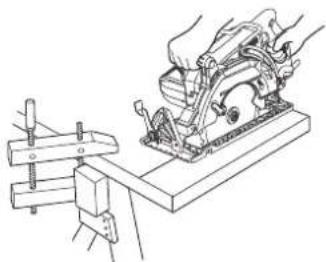
It is important to support the work piece properly and to hold the saw firmly to prevent loss of control which could cause personal injury. Fig. 1 illustrates typical hand support of the saw.
natural_image
Technical line drawing of a manual cutting machine with hands operating it (no text or symbols present)A TYPICAL ILLUSTRATION OF PROPER HAND SUPPORT WORKPIECE SUPPORT.
Fig. 1
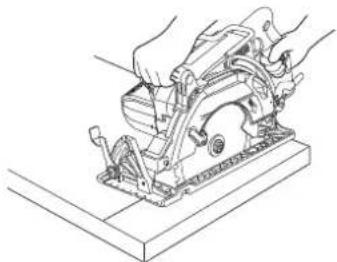
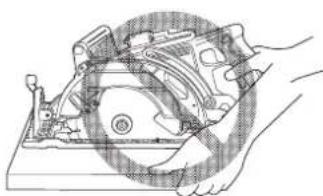
- Place the wider portion of the base on that part of the work piece which is solidly supported, not on the section that will fall off when the cut is made.
As examples, Fig. 2 illustrates the RIGHT way to cut off the end of board, and Fig. 3 the WRONG way. If the work piece is short or small, clamp it down.
DON'T TRY TO HOLD SHORT PLACES BY HAND!
natural_image
Line drawing of hands operating a manual cutting machine on a workbench (no text or symbols)Fig. 2
natural_image
Technical line drawing of a mechanical assembly with hands operating a component (no text or symbols visible)Fig. 3
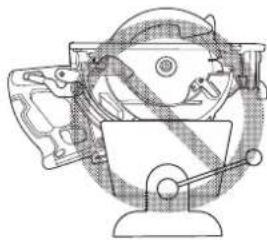
- Never attempt to saw with the circular saw held upside down in a vise.
This is extremely dangerous and can lead to serious accidents. (Fig. 4)
natural_image
Technical line drawing of a mechanical device with no visible text or symbolsFig. 4
-
Before setting the tool down after completing a cut, be sure that the lower (telescoping) guard has closed and the blade has come to a complete stop.
-
Never touch moving parts.
Never place your hands, fingers or other body parts near the tool's moving parts.
- Never operate without all guards in place.
Never operate this tool without all guards or safety features in place and in proper working order. If maintenance or servicing requires the removal of a guard or safety feature, be sure to replace the guard or safety feature before resuming operation of the tool.
- Use right tool.
Don't force small tool or attachment to do the job of a heavy-duty tool.
Don't use tool for purpose not intended —for example— don't use circular saw for cutting tree limbs or logs.
- Never use a power tool for applications other than those specified.
Never use a power tool for applications other than those specified in the Instruction Manual.
- Handle tool correctly.
Operate the tool according to the instructions provided herein. Do not drop or throw the tool. Never allow the tool to be operated by children, individuals unfamiliar with its operation or unauthorized personnel.
- Definitions for symbols.
V ....volts
—......direct current
no....no load speed
---/min......revolutions or reciprocation per minute
Hz......hertz
A.....amperes
-
Do not run the saw while carrying it at your side.
-
Keep all screws, bolts and covers tightly in place.
Keep all screws, bolts, and plates tightly mounted. Check their condition periodically.
- Do not use power tools if the plastic housing or handle is cracked.
Cracks in the tool's housing or handle can lead to electric shock. Such tools should not be repaired.
- Blades and accessories must be securely mounted to the tool.
Prevent potential injuries to yourself or others. Blades, cutting implements and accessories which have been mounted to the tool should be secure and tight.
- Never use a tool which is defective or operating abnormally.
If the tool appears to be operating unusually, making strange noises, or otherwise appears defective, stop using it immediately and arrange for repairs by a metabo HPT authorized service center.
- Carefully handle power tools.
Should a power tool be dropped or struck against hard materials inadvertently, it may be deformed, cracked, or damaged.
- Do not wipe plastic parts with solvent.
Solvents such as gasoline, thinner benzine, carbon tetrachloride, and alcohol may damage and crack plastic parts. Do not wipe them with such solvents.
Wipe plastic parts with a soft cloth lightly dampened with soapy water and dried thoroughly.
-
Never wear gloves made of material liable to roll up such as cotton, wool, cloth or string, etc.
-
Keep motor air vent clean.
The tool's motor air vent must be kept clean so that air can freely flow at all times. Check for dust build-up frequently.
- NEVER leave tool running unattended. Turn power off.
Don't leave tool until it comes to a complete stop.
-
NEVER touch the blade with bare hands after operation.
-
Because the cordless circular saw operates by battery power, be aware of the fact that it can begin to operate at any time.
-
When working at elevated locations, clear the area of other people and aware of conditions below you.
-
Do not give a strong shock to the switch panel or break it. It may lead to a trouble.
-
Do not use the product if the tool or the battery terminals (battery mount) are deformed. Installing the battery could cause a short circuit that could result in smoke emission or ignition.
-
Keep the tool's terminals (battery mount) free of swarf and dust.
Prior to use, make sure that swarf and dust have not collected in the area of the terminals.
During use, try to avoid swarf or dust on the tool from falling on the battery.
When suspending operation or after use, do not leave the tool in an area where it may be exposed to falling swarf or dust.
u Deingusd could cause a short circuit that could result in smoke emission or ignition.
IMPORTANT SAFETY INSTRUCTIONS FOR CHARGER OR ADAPTER
The term "charger or adapter" in the safety instructions refers to your battery charger or AC/DC adapter.
WARNING
Death or serious bodily injury could result from improper or unsafe use of charger or adapter. To avoid these risks, follow these basic safety instructions:
READ ALL INSTRUCTIONS
-
This manual contains important safety and operating instructions for battery charger Model UC18YSL3 or AC/DC adapter Model ET36A.
-
Before using charger or adapter, read all instructions and cautionary markings on (1) charger or adapter, (2) battery, and (3) product using battery.
-
When charging the battery with a battery charger, reduce the risk of injury by charging metabo HPT rechargeable battery multi volt type series and BSL18 series. Other type of batteries may burst causing personal injury and damage.
-
Do not expose charger or adapter to rain or snow.
-
Use of an attachment not recommended or sold by the charger or adapter manufacturer may result in a risk of fire, electric shock, or injury to persons.
-
To reduce risk of damage to electric plug and cord, pull by plug when disconnecting charger or adapter.
-
Make sure cord is located so that it will not be stepped on, tripped over, or otherwise subjected to damage or stress.
-
An extension cord should not be used unless absolutely necessary. Use of improper extension cord could result in a risk of fire and electric shock. If extension cord must be used make sure:
a. That blades of extension cord are the same number, size, and shape as those of plug on charger or adapter:
b. That extension cord is properly wired and in good electrical condition; and
c. That wire size is large enough for AC ampere rating of charger or adapter as specified in Table 1.
Table 1
RECOMMENDED MINIMUM AWG SIZE FOR
EXTENSION CORDS FOR CHARGER OR ADAPTER
| AC Input Rating Amperes* AWG Size of Cord | ||
| Equal to or greater than | but less than | Length of Cord, Feet (Meter)25 (7.5) 50 (15) 100 (30) 150 (45) |
| 02 18 18 18 16 | ||
| 23 18 18 16 14 | ||
| 34 18 18 16 14 | ||
* If the input rating of a charger or adapter is given in watts rather than in amperes, the corresponding ampere rating is to be determined by wattage rating by the voltage rating-for example:
$$ \frac {1 , 2 5 0 \text { watts }}{1 2 5 \text { volts }} = 1 0 \text { amperes } $$
-
Do not operate charger or adapter with damaged cord or plug-replace them immediately.
-
Do not operate charger or adapter if it has received a sharp blow, been dropped, or otherwise damaged in any way; take it to a qualified serviceman.
-
Do not disassemble charger or adapter; take it to a qualified serviceman when service or repair is required. Incorrect reassembly may result in a risk of electric shock or fire.
-
To reduce risk of electric shock, unplug charger or adapter from receptacle before attempting any maintenance or cleaning. Removing the battery will not reduce this risk.
-
This AC/DC adapter is for use only with specific tools, including C3607DWA. The adapter might be suitable for use with other metabo HPT battery operated tools. It is necessary to confirm suitability by referencing the instruction manual of the specific tool or by consulting our web site https://www.metabo-hpt.com/. Failure to confirm suitability before using the adapter with specific tools could result in fire hazard.
IMPORTANT SAFETY INSTRUCTIONS FOR USE OF THE BATTERY AND CHARGER OR ADAPTER
You must charge the battery before you can use the power tool. Before using the model UC18YSL3 battery charger, be sure to read all instructions and cautionary statements on it, the battery and in this manual.
CAUTION
USE ONLY metabo HPT BATTERY MODELS OF THE MULTI VOLT SERIES. OTHER MODELS OF BATTERIES MAY BURST AND CAUSE INJURY!
Follow these instructions to avoid the risk of injury:
WARNING
Improper use of the battery or battery charger can lead to serious injury. To avoid these injuries:
-
NEVER disassemble the battery or AC/DC adapter.
-
NEVER incinerate the battery or AC/DC adapter, even if it is damaged or is completely worn out. The battery can explode in a fire.
-
NEVER short-circuit the battery or AC/DC adapter.
-
NEVER insert any objects into the charger or adapter's air vents. Electric shock or damage to the charger or adapter may result.
-
NEVER use outdoors. Keep the battery or AC/DC adapter away from direct sunlight and use only where there is low humidity and good ventilation.
-
NEVER charge when the temperature is below 32°F (0°C) or above 104°F (40°C). (UC18YSL3) NEVER use when the temperature is below 14°F (-10°C) or above 104°F (40°C). (ET36A)
-
NEVER connect two charger or adapter together.
-
NEVER insert foreign objects into the hole for the battery or the charger or adapter.
-
NEVER use a booster transformer.
-
NEVER use DC power.
-
NEVER store the battery or charger or adapter in places where the temperature may reach or exceed 104^ F ( 40^ C) such as inside metal box or car.
-
NEVER expose the battery or charger or adapter to rain or wet conditions.
-
ALWAYS operate charger or adapter on standard household electrical power (120 volts). Using the charger or adapter on any other voltage may overheat and damage the charger.
-
ALWAYS wait at least 15 minutes between charges to avoid overheating the charger. (UC18YSL3)
-
ALWAYS disconnect the power cord from its receptacle when the charger or adapter is not in use.
English
[The information below applies only to ET36A]
-
Do not use the product if the tool or the AC/DC adapter terminals (AC/DC adapter mount) are deformed. Installing the AC/DC adapter could cause a short circuit that could result in smoke emission or ignition.
-
Keep the tool's terminals (AC/DC adapter mount) free of swarf and dust.
○ Prior to use, make sure that swarf and dust have not collected in the area of the terminals.
During use, try to avoid swarf or dust on the tool from falling on the AC/DC adapter.
When suspending operation or after use, do not leave the tool in an area where it may be exposed to falling swarf or dust.
Doing so could cause a short circuit that could result in smoke emission or ignition.
-
The product is intended for Use in Pollution Degree 2 or PD2 environments. Operate only in areas of non-conductive pollution. A temporary conductivity caused by condensation is normally expected.
-
This is a precision machine so do not drop or expose to impact.
-
Do not use this product near a pacemaker or other similar implanted device, which may be affected by a magnetic fi eld produced by this product.
-
The adapter, power supply box and the inside of the DC cord generates a boosted high voltage of 380 V so please be careful of the following.
○ Do not disassemble the product.
- Do not drop or expose to impact. In the event the product is damaged from strong impact, do not use the product.
○ Do not use the product in areas exposed to rain, snow, iron powder or wet condition.
○ Do not touch the product with wet hands.
○ Do not pull the cord with excessive force.
○ Use the product in a well-ordered work environment.
CAUTION
-
When the mesh of the vent is plugged by objects such as wood shavings, try to keep the objects out when you clear the mesh. (If not properly maintained, the temperature protective feature could shut the product off)
-
When the temperature protective feature frequently cuts the power off, do not overload the machine with continued work, but let the machine rest for a little before continuing operation.
-
The machine does get hot. However, this does not indicate an abnormality. Keep the electricity running and operate the internal fan to cool the machine before carrying it elsewhere. When carrying the product, make sure to use the cord armor. The case may be hot so please be careful.
-
During use, do not pull the cord to move the Box. Doing so may result in damage.
-
Do not use more that a single cord reel of 30 meters. Doing so may result in damage.
-
During use, if the machine stops running after the Box's LED lamp blinks, confi rm the power supply environment.
-
Do not drag the cord when using or carrying the machine. Doing so may tear the cord insulation or break the cord which could result in electric shock.
-
Do not stretch the cord out any more than required. When using tools such as gardening clippers or circular saws, always make sure of the power cord's position to avoid cutting the cord during operation.
-
To use the AC/DC adapter after it shuts down due to high temperature, disconnect the box's power plug, wait for the LED lamp to go out and then reconnect the box's power plug.
If the machine cuts off even after sufficiently cooling it off with the built-in fan, discontinue use as there may be a problem with the machine.
-
Do not use this product near a radio. Doing so could cause noise from the radio, making it difficult to listen to a broadcast.
-
This is a power source for multi volt products. Do not use with 18 V products or chargers. Doing so could result in damage.
-
Overload behavior may differ when compared with BSL36B18 battery use.
With the battery where the LED should blink on the main unit, the LED on the AC/DC adapter may blink instead.
PRECAUTIONS FOR AC/DC ADAPTER
The adapter equips with the protection function to stop the output. In the cases of 1 to 2 described below, when using this product, even if you are pulling the switch, the motor may stop. This is not the trouble but the result of protection function.
-
If the tool is overloaded, output may stop. In this case, release the switch of tool and eliminate causes of overloading.
-
If the adapter is overheated under overload work, output may stop. In situations like this, discontinue use of the adapter and detach it from the tool. Allow the adapter to cool in a location such as a shaded area with good air circulation.
CAUTION ON LITHIUM-ION BATTERY
To extend the lifetime, the lithium-ion battery equips with the protection function to stop the output.
In the cases of 1 to 3 described below, when using this product, even if you are pulling the switch, the motor may stop. This is not the trouble but the result of protection function.
- When the battery power remaining runs out, the motor stops.
In such case, charge it up immediately.
-
If the tool is overloaded, the motor may stop. In this case, release the switch of tool and eliminate causes of overloading. After that, you can use it again.
-
If the battery is overheated under overload work, the battery power may stop.
In this case, stop using the battery and let the battery cool. After that, you can use it again.
Furthermore, please heed the following warning and caution.
WARNING
In order to prevent any battery leakage, heat generation, smoke emission, explosion and ignition beforehand, please be sure to heed the following precautions.
- Make sure that swarf and dust do not collect on the battery.
During work make sure that swarf and dust do not fall on the battery.
○ Make sure that any swarf and dust falling on the power tool during work do not collect on the battery.
○ Do not store an unused battery in a location exposed to swarf and dust.
Before storing a battery, remove any swarf and dust that may adhere to it and do not store it together with metal parts (screws, nails, etc.).
-
Do not pierce battery with a sharp object such as a nail, strike with a hammer, step on, throw or subject the battery to severe physical shock.
-
Do not use an apparently damaged or deformed battery.
-
Do not use the battery in reverse polarity.
-
Do not connect directly to an electrical outlets or car cigarette lighter sockets.
-
Do not use the battery for a purpose other than those specified.
-
If the battery charging fails to complete even when a specified recharging time has elapsed, immediately stop further recharging.
-
Do not put or subject the battery to high temperatures or high pressure such as into a microwave oven, dryer, or high pressure container.
-
Keep away from fire immediately when leakage or foul odor are detected.
-
Do not use in a location where strong static electricity generates.
-
If there is battery leakage, foul odor, heat generated, discolored or deformed, or in any way appears abnormal during use, recharging or storage, immediately remove it from the equipment or battery charger, and stop use.
- Do not immerse the battery or allow any fluids to flow inside. Conductive liquid ingress, such as water, can cause damage resulting in fire or explosion. Store your battery in a cool, dry place, away from combustible and flammable items. Corrosive gas atmospheres must be avoided.
CAUTION
-
If liquid leaking from the battery gets into your eyes, do not rub your eyes and wash them well with fresh clean water such as tap water and contact a doctor immediately.
If left untreated, the liquid may cause eye-problems. -
If liquid leaks onto your skin or clothes, wash well with clean water such as tap water immediately. There is a possibility that this can cause skin irritation.
-
If you find rust, foul odor, overheating, discolor, deformation, and/or other irregularities when using the battery for the first time, do not use and return it to your supplier or vendor.
WARNING
If an electrically conductive foreign object enters the terminals of the lithium ion battery, a short-circuit may occur resulting in the risk of fire. Please observe the following matters when storing the battery.
Do not place electrically conductive cuttings, nails, steel wire, copper wire or other wire in the storage case.
○ Either install the battery in the power tool or store by securely pressing into the battery cover until the ventilation holes are concealed to prevent short-circuits (See Fig. 7).
REGARDING LITHIUM-ION BATTERY TRANSPORTATION
When transporting a lithium-ion battery, please observe the following precautions.
WARNING
Notify the transporting company that a package contains a lithium-ion battery, inform the company of its power output and follow the instructions of the transportation company when arranging transport.
- Lithium-ion batteries that exceed a power output of 100 Wh are considered to be in the freight classification of Dangerous Goods and will require special application procedures.
- For transportation abroad, you must comply with international law and the rules and regulations of the destination country.
- If the BSL36B18 is installed in the power tool, the power output will exceed 100 Wh and the unit will be classified as Dangerous Goods for freight classification.
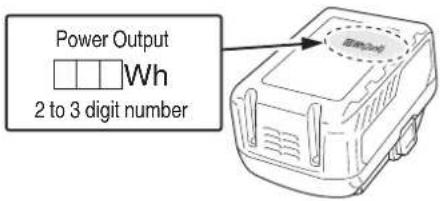
Fig. 5
USB DEVICE CONNECTION PRECAUTIONS
When an unexpected problem occurs, the data in a USB device connected to this product may be corrupted or lost. Always make sure to back up any data contained in the USB device prior to use with this product. Please be aware that our company accepts absolutely no responsibility for any data stored in a USB device that is corrupted or lost, nor for any damage that may occur to a connected device.
SAVE THESE INSTRUCTIONS AND MAKE THEM AVAILABLE TO OTHER USERS AND OWNERS OF THIS TOOL!
FUNCTIONAL DESCRIPTION
NOTE
The information contained in this Instruction Manual is designed to assist you in the safe operation and maintenance of the power tool.
NEVER operate, or attempt any maintenance on the tool unless you have first read and understood all safety instructions contained in this manual.
Some illustrations in this Instruction Manual may show details or attachments that differ from those on your own power tool.
NAME OF PARTS
- Cordless Rear Handle Circular Saw (C3607DWA)
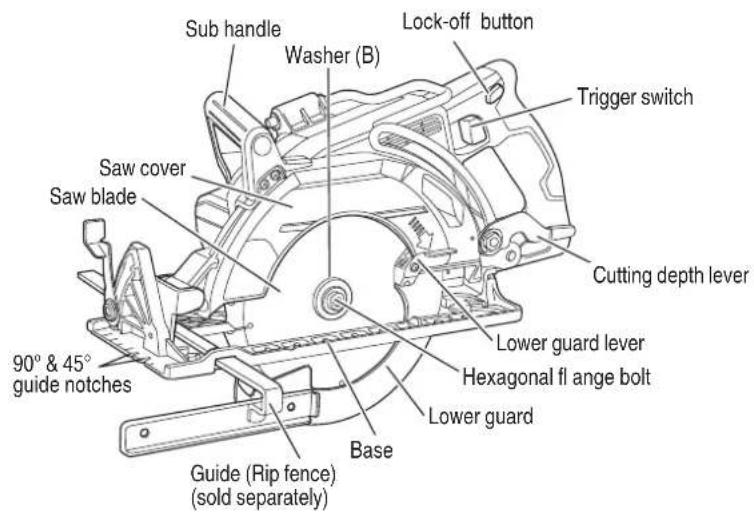
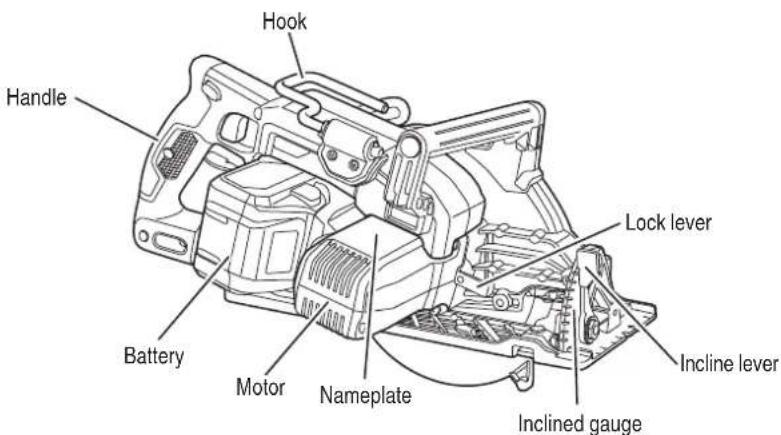
Fig. 6
12
English
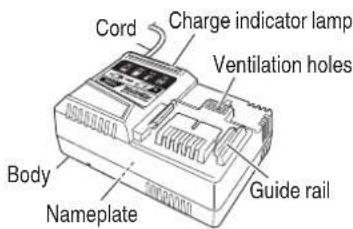
- Battery 3. Battery Charger
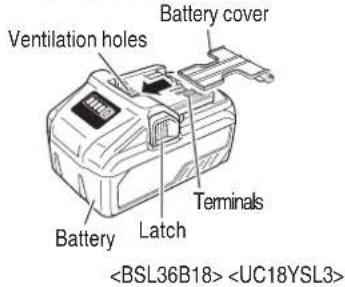
Fig. 7 Fig. 8
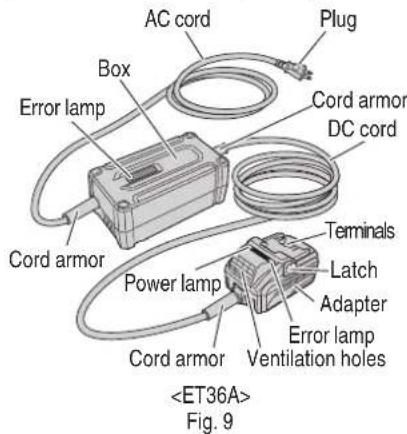
- AC/DC Adapter
(optional accessories...sold separately)
SPECIFICATIONS
- Cordless Rear Handle Circular Saw
| Model C3607DWA | ||
| Voltage 36 V | ||
| Motor DC brushless motor | ||
| No-load speed 5,100 /min | ||
| Blade Size 7-1/4" (185 mm) D × 5/8" (15.9 mm) H | ||
| Max. Cutting Depth 2-7/16" (62 mm) | ||
| Max. Blade Angle | Adjustable 0°–53° | |
| Power supply | Type* | Li-ion battery Model BSL36B18 /AC/DC adapter Model ET36A (sold separately) |
| Voltage | 36 V | |
| Weight | 10.4 lbs. (4.7 kg) (BSL36B18 attached) | |
* Existing batteries (BSL3660/3626/3620, BSL18xx and BSL14xx series, etc.) cannot be used with this tool. If using the AC/DC adapter, please read and understand its manual before operating the power tool.
English
- Battery Charger
| Model UC18YSL3 | |
| Input power source Single phase: AC 120 V | 60 Hz |
| Charging time(At a temperature of 68°F (20°C)) | BSL36B18 : Approx. 52 min |
| Charging voltage DC 14.4–18 V | |
| Charging current DC 8.0 A | |
| Weight 1.3 lbs. (0.6 kg) |
NOTE: The charging time may vary according to temperature and power source voltage.
- AC/DC Adapter
| Model ET36A | |
| Input power source Single phase: AC 120 V 60 Hz | |
| Output voltage 36 V | |
| Operating temperature range 14°F (-10°C)-104°F (40°C) | |
| Weight | Adapter : 1.8 lbs. (0.8 kg)Box : 2.6 lbs. (1.2 kg) |
Electronic control
○ Soft-start
○ Overload protection
This protection feature cuts off the power to the motor in the event of overloading of motor or a conspicuous reduction in rotational speed during operation.
When the overload protection feature has been activated, the motor may stop.
In this case, release the tool switch and eliminate causes of overloading.
After that you can use it again.
○ Overheat protection
This protection feature cuts off the power to the motor and stops the power tool in the event of overheating of motor during operation.
When the overheat protection feature has been activated, the motor may stop.
In this case, release the tool switch and cool it down in a few minutes.
After that you can use it again.
ASSEMBLY AND OPERATION
APPLICATIONS
○ Cutting various types of wood.
WARNING
- Use extra caution when cutting freshly cut green lumber, hardwood, wet wood, composite wood, pressure treated wood, wood containing knots or having other characteristics which may put a heavy load on the saw or blade. If this occurs, do not force the tool. Push the tool more slowly, but with enough force to keep working without much decrease in speed.
● To avoid serious injury, do not cut the metal with a metal cutting blade attached. Also, do not use for applications other than wood cutting.
REMOVAL AND INSTALLATION METHOD OF BATTERY
○ How to install the battery.
Align the battery with the groove in tool handle and slip it into place.
Always insert it all the way until it locks in place with a little click, If not, it may accidentally fall out of the tool, causing injury to you or someone around you (Fig. 10).
○ How to remove the battery.
Withdraw battery from the tool handle while pressing the latch (2 pcs) of the battery (Fig. 10).
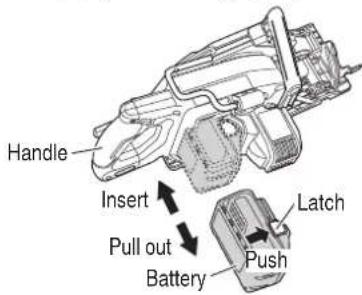
Fig. 10
CHARGING METHOD
NOTE
Before plugging into the receptacle, make sure the following points.
○ The power source voltage is stated on the nameplate.
○ The cord is not damaged.
WARNING
Do not charge at voltage higher than indicated on the nameplate.
If charged at voltage higher than indicated on the nameplate, the charger will burn out.
- Connect the charger's power cord to a receptacle. When the power cord is connected, the charge indicator lamp will blink in red. (At 1-second intervals)
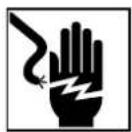
WARNING
Do not use the electrical cord if damaged. Have it repaired immediately.
- Insert the battery to the battery charger.
Firmly Insert the battery into the battery charger as shown in Fig. 11.
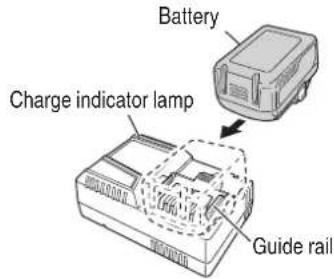
Fig. 11
- Charging
When inserting a battery in the charger, the charge indicator lamp will blink in blue.
When the battery becomes fully recharged, the charge indicator lamp will light up in green.(See Table 2)
(1) Charge indicator lamp indication
The indications of the charge indicator lamp will be as shown in Table 2, according to the condition of the battery charger or the battery.
Table 2
| Indications of the charge indicator lamp | ||||
| Charge indicator lamp (RED / BLUE / GREEN / PURPLE) | Before charging | Blinks (RED) | Lights for 0.5 seconds. Does not light for 0.5 seconds. (off for 0.5 seconds) | Plugged into power source |
| While charging | Blinks (BLUE) | Lights for 0.5 seconds. Does not light for 1 second. (off for 1 second) | Battery capacity at less than 50% | |
| Blinks (BLUE) | Lights for 1 second. Does not light for 0.5 seconds. (off for 0.5 seconds) | Battery capacity at less than 80% | ||
| Lights (BLUE) | Lights continuously | Battery capacity at more than 80% | ||
| Charging complete | Lights (GREEN) | Lights continuously(Continuous buzzer sound: about 6 seconds) | ||
| Overheat standby | Blinks (RED) | Lights for 0.3 seconds. Does not light for 0.3 seconds. (off for 0.3 seconds) | Battery overheated. Unable to charge. (Charging will commence when battery cools) | |
| Charging impossible | Flickers (PURPLE) | Lights for 0.1 seconds. Does not light for 0.1 seconds. (off for 0.1 seconds)(Intermittent buzzer sound: about 2 seconds) | Malfunction in the battery or the charger | |
(2) Regarding the temperature of the rechargeable battery.
The temperatures for rechargeable batteries are as shown in the Table 3, and batteries that have become hot should be cooled for a while before being recharged.
Table 3
| Rechargeable batteries | Temperatures at which the battery can be recharged |
| BSL36B18 | 32^-122^ (0^-50^) |
(3) Regarding recharging time (At 68°F (20°C))
Table 4 Charging time
| Battery\Charger | UC18YSL3 |
| BSL36B18 Approx. 52 min | |
NOTE
The recharging time may vary according to the ambient temperature.
- Disconnect battery charger from the receptacle.

CAUTION
Do not pull the plug out of the receptacle by pulling on the cord.
Make sure to grasp the plug when removing from receptacle to avoid damaging cord.
- Remove the battery from the battery charger.
Supporting the battery charger with hand, pull out the battery from the battery charger.
NOTE
Be sure to pull out the battery from the battery charger after use, and then keep it.
Regarding electric discharge in case of new batteries, etc.
As the internal chemical substance of new batteries and batteries that have not been used for an extended period is not activated, the electric discharge might be low when using them the fi rst and second time. This is a temporary phenomenon, and normal time required for recharging will be restored by recharging the batteries 2–3 times.
English
How to make the batteries perform longer
(1) Recharge the batteries before they become completely exhausted.
When you feel that the power of the tool becomes weaker, stop using the tool and recharge its battery. If you continue to use the tool and exhaust the electric current, the battery may be damaged and its life will become shorter.
(2) Avoid recharging at high temperatures.
A rechargeable battery will be hot immediately after use. If such a battery is recharged immediately after use, its internal chemical substance will deteriorate, and the battery life will be shortened. Leave the battery and recharge it after it has cooled for a while.
CAUTION
- When the battery charger has been continuously used, the battery charger will be heated, thus constituting the cause of the failures. Once the charging has been completed, give 15 rest until the next charging.
- If the battery is charged while it is heated because it has been left for a long time in a location subject to direct sunlight or because the battery has just been used, the charge indicator lamp of the charger lights for 0.3 seconds, does not light for 0.3 seconds (off for 0.3 seconds). In such a case, first let the battery cool, then start charging.
- When the charge indicator lamp flickers (at 0.2-second intervals), check for and take out any foreign objects in the charger's battery installation hole. If there are no foreign objects, it is probable that the battery or charger is malfunctioning. Take it to your authorized Service Center.
HOW TO RECHARGE USB DEVICE
When an unexpected problem occurs, the data in a USB device connected to this product may be corrupted or lost. Always make sure to back up any data contain USB device prior to use with this product.
Please be aware that our company accepts absolutely no responsibility for any data stored in a USB device that is corrupted or lost, nor for any damage that may occur to a connected device.
When the product is not being used, cover the USB port with the rubber cover.
Buildup of dust etc. in the USB port can cause smoke emission or ignition.
NOTE
The time required for charging will be longer when a USB device and battery are being simultaneously charged.
There may be an occasional pause during USB recharging.
When a USB device is not being charged, turn the USB power switch OFF and remove the USB device from the charger.
Failure to do so may not only reduce the battery life of a USB device, but may also result in unexpected accidents.
(1) Select a charging method
Depending on the charge method selected, either the battery is inserted into the charger or the power cord is plugged into an outlet.
○ Charging a USB device by battery (Fig. 12-a)
○ Charging a USB device from a electrical outlet (Fig. 12-b)
○ Charging a USB device and battery from a electrical outlet (Fig. 12-c)
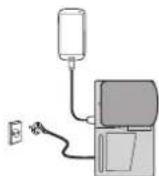
a

b
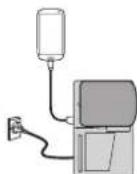
C
Fig. 12
(2) Turn the USB power switch ON (Fig. 13)
When you turn the USB power switch ON, the USB power indicator lamp will light up.
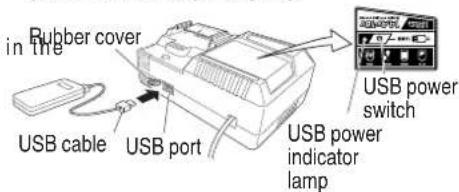
Fig. 13
WARNING
○ Prior to use, check the connecting USB cable for any defect or damage.
Using a defective or damaged USB cable can cause smoke emission or ignition.
English
(3) Connect the USB cable. (Fig. 13)
Pull back the rubber cover and firmly plug commercially available USB cable (appropriate to the device being charged) into the USB port.
When the power cord is not plugged into an outlet and the battery runs out of power, power output will stop and the USB power indicator lamp will shut off.
When the USB power indicator lamp goes out, change the battery or plug the power cord into an electrical outlet.
(4) When charging is completed
○ The USB power indicator lamp will not go out when a USB device has been completely charged.
To verify charge status, check the USB device.
○ Turn the USB power switch OFF and unplug the power cord from the electrical outlet. (Fig. 13)
○ Remove the battery from the charger and place the rubber cover over the USB port.
PRIOR TO OPERATION
CAUTION
To avoid serious accident, ensure the switch is in the OFF position, and pull out the battery.
- Check the work area environment Check the work area to make sure that it is clear of debris and clutter.
Clear the area of unnecessary personnel. Ensure that lighting and ventilation is adequate.
- Mounting the Saw Blade (Fig. 14)
WARNING
- Do not use a blade larger than 7-1/4" (185 mm) in diameter. To avoid injury from an accidental start, ensure the switch is in the OFF position and make sure to pull out the battery.
● Make sure the blade is installed correctly and is tight before operating. - If the hexagonal flange bolt is worked using other tools than the provided wrench, excessive tightening and insufficient tightening may take place, resulting in injury.
(1) Thoroughly remove any sawdust which has accumulated on the spindle, bolt and washers.
(2) For mounting saw blade, the concave sides of both washers (A) and (B) must be fitted to the saw blade sides. Mount the saw blade on the spindle, and finally affix washer (B) (See Fig. 14)
(3) To assure proper rotation direction of the saw blade, n athe arrow direction on the saw blade must coincide with the arrow direction on the blade cover.
(4) Using the fingers, tighten the hexagonal bolt retaining the saw blade as much as possible. Then depress the lock lever, lock the spindle, and thoroughly tighten the bolt.
(5) Confirm that the lock lever is in the original position.
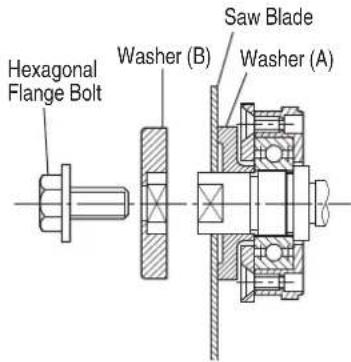
Fig. 14
CAUTION
After mounting the saw blade, reconfirm that the lock button is firmly secured in the prescribed position.
- Dismounting the saw blade
WARNING
The tool becomes hot after tool operation.
To avoid burns, the blade replacement work should be done after tool has cooled sufficiently.
CAUTION
Never touch the saw blade immediately after use. The metal is hot and can easily burn your skin.
English
(1) Set the cutting volume at maximum, and place the Circular Saw as shown in Fig. 15.
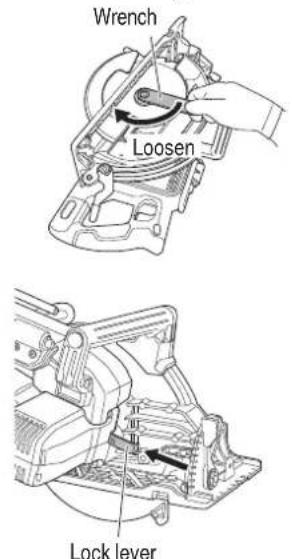
Fig. 15
(2) Depress the lock lever, lock the spindle, and remove the hexagonal fl ange bolt and washer (B) with the wrench.
(3) While holding the lower guard lever to keep the lower guard fully retracted into the saw cover, remove the saw blade (Fig. 16).
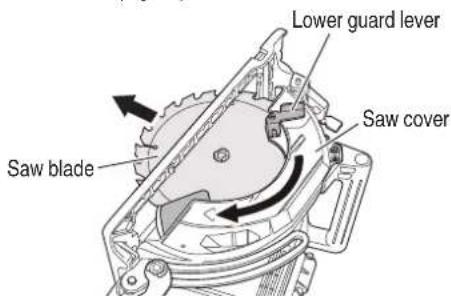
Fig. 16
4. Check performance of lower guard
WARNING
Make absolutely sure that the lower guard is not fixed. Also, check and see if it can move smoothly. If the saw blade is kept exposed, injury can result.
The lower guard (refer to Fig. 17) serves to protect your body from coming into contact with the saw blade. Make absolutely certain that the cover smoothly performs to cover the saw blade. If the lower guard should not move smoothly, never use it without repairing it.
In such a case, get in touch with the store where you bought the circular saw or the metabo HPT AUTHORIZED SERVICE CENTER for necessary repair.
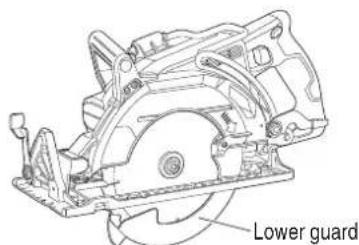
Fig. 17
- Check for proper operation of the brake This circular saw features an electric brake that functions when the switch is released. Before using the circular saw, ensure that the electric brake functions properly. If it does not, bring the tool to a metabo HPT AUTHORIZED SERVICE CENTER.
- Prepare a wooden work bench (Fig. 18) Since the saw blade will extend beyond the lower surface of the lumber, place the lumber on a work bench when cutting. If a square block is utilized as a work bench, select level ground to ensure it is properly stabilized. An unstable work bench will result in hazardous operation.
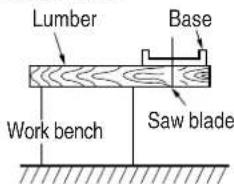
Fig. 18
CAUTION
To avoid possible accident, always ensure that the portion of lumber remaining after cutting is securely anchored or held in position.
- Check if the cutting depth lever and incline lever are tightened.
If the cutting depth lever to adjust cutting depth (Fig. 21) and the incline lever to adjust angle of inclination (Fig. 22) are loose, injury can result. Make sure that they are tightened securely.
English
- Eye protection
Always wear eye protection with side shields that meets the requirements of ANSI Standard Z87.1. Ordinary eyeglasses do not provide adequate protection.
WARNING
Operating the tool without wearing proper eye protection may result in serious injury.
- Check battery insertion
WARNING
If the battery is inserted while the power switch is in the ON position, the power tool will start operating immediately, inviting serious accident.
CAUTION
Until the battery locks in place with a little click, if not, it may accidentally fall out of the tool causing injury to you or someone around you.
- Trial run
After confirming that no one is standing behind, the power tool start and confirm that no operating abnormalities exist before attempting a cutting operation.
- Inspect the rotating stability of the saw blade.
For precise cutting, rotate the saw blade and check for deflection to confirm that the blade is not noticeably unstable; otherwise vibrations might occur and cause an accident.
- Using hook
WARNING
To reduce the risk of injury from the saw falling on operators or bystanders, make sure the saw is supported securely when using the hook to hang the saw from a rafter, joist or other elevated support.
(1) Turn the hook away from the saw body to hang the saw from a rafter, joist or other elevated support. (Fig. 19)
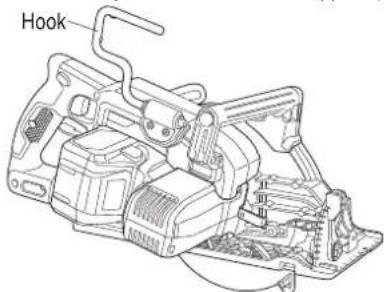
Fig. 19
20
WARNING
To reduce the risk of injury, do not use the saw with the hook rotated below the base.
(2) When not in use, return the hook back to the storage position until it latches against the saw body.
- Using sub handle
When operating the saw, use both hands to hold the saw firmly, one hand on the sub handle and the other hand on the handle, to increase the stability of the saw operation to avoid the possible kickback occurred.
Sub handle
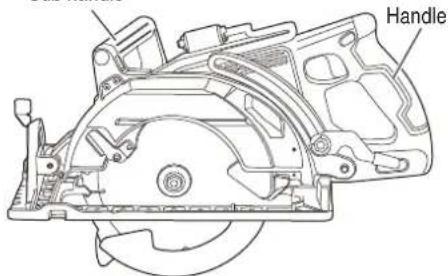
Fig. 20
ADJUSTSING THE SAW PRIOR TO USE
WARNING
To avoid serious accidents, ensure the switch is in OFF position, and pull out the battery.
- Adjusting the cutting depth (Fig. 21)
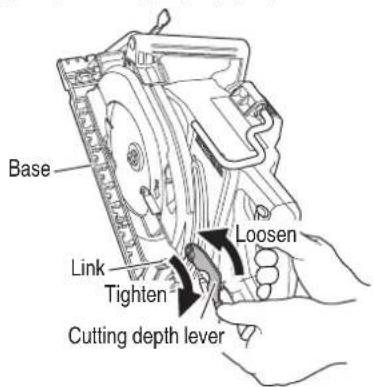
Fig. 21
WARNING
If the cutting depth lever is loose, injury can result. Tighten it securely after adjustment.
To adjust cutting depth, loosen the cutting depth lever and, while holding the base with one hand, move the main body up and down to obtain the prescribed cutting depth. After adjusting to the prescribed cutting depth, tighten the cutting depth lever securely.
NOTE
The scale on the side of the base is accurate only with the maximum cutting depth.
- Adjusting the angle of inclination
WARNING
If the incline lever is loose, injury can result. Tighten it securely after adjustment.
You can incline saw blade from 0^ to a maximum angle of 53^ in relation to the base.
As shown in Fig. 22 by loosing the incline lever on the bevel scale, the saw blade may be inclined to an angle of 45^ in relation to the base.
If you use inclination angle of over 45^ , as shown in Fig. 23 move the incline lever to outside, the saw blade may be inclined to a maximum angle of 53^ in relation to the base.
Always ensure that the incline lever is thoroughly tightened after making the desired adjustment.
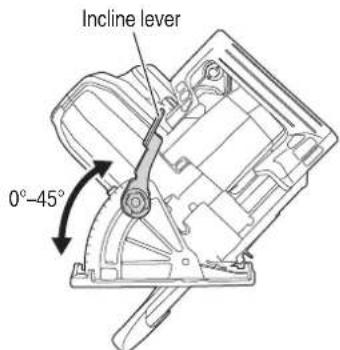
Fig. 22
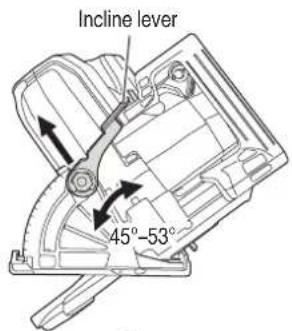
Fig. 23
- 90° (0°) Bevel adjustment (Fig. 24)
WARNING
To ensure accurate cuts, alignment should be checked and adjustments made prior to use.
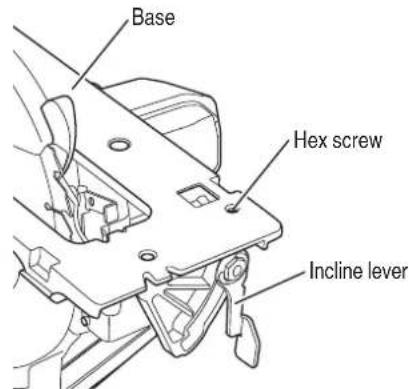
Fig. 24
(1) Lift the incline lever to set the saw to 90^ ( 0^ ) and then tighten the lever.
(2) Retract the lower guard and place the saw upside down.
(3) Place a combination square against the blade and base to check whether the blade is 90^ to the base.
(4) If the blade is not 90^ to the base, turn the hex screw on the bottom of the base by using 3 mm hex wrench to adjust.
(5) Check the accuracy of the adjustment by an actual cut on a scrap piece of material.
OPERATION
WARNING
● Never touch the moving parts.
● Never operate the circular saw with the saw blade turned upward or to the side.
- Do not fix and secure the lock-off button. Besides, keep your finger off the trigger switch when the circular saw is being carried around. Otherwise, the main body switch can be inadvertently turned ON, resulting in unexpected accidents.
● Do not use any abrasive wheels.
● Use only blade diameter specified on the product nameplate.
● Should the saw blade be stopped or make an abnormal noise during operation, turn off the switch immediately.
- Don't remove circular saw from workpiece during a cut while the saw blade is moving.
● Always wear eye protection with side shields that meets the requirements of ANSI Standard Z87.1. Ordinary eyeglasses do not provide protection.
● Avoid cutting any material like metal, etc., that give off sparks.
CAUTION
● Pull out the battery after completing operation.
● To extend the lifetime, the lithium-ion battery equips with the protection function to stop the output. Therefore, if the tool is overloaded, the motor may stop. However, this is not the trouble but the result of protection function. In this case, release the switch of tool and eliminate the causes of overloading.
● Before use, check to see if the lock-off button moves smoothly.
NOTE
Take care not to lock the motor. If the motor is locked, immediately turn the power off. If the motor is locked for a while, the motor or battery may be burnt.
1. Check if saw blade is tightened
While the saw blade is tightened securely for immediate use when it is assembled at the factory, be sure to check it out again for caution's sake. A bolt can be tightened when it is turned clockwise. Use the provided wrench to check it out. For further details, refer to the item of [PRIOR TO OPERATION] on Page 18.
- Check if the lever is tightened
If the cutting depth lever (Fig. 21) is loose, injury can result. Make sure that it is tightened securely. - Switch operation (Fig. 25)
For safe operation of the machine, a "lock-off button" is provided on the side of a handle. If the "trigger switch" is pulled in a state where "lock-off button" is pressed in the direction of the arrow mark, the main switch can be turned ON. After the switch is on, the saw blade will continue to operate as long as you pull on the trigger switch, even if you release the lock-off button.
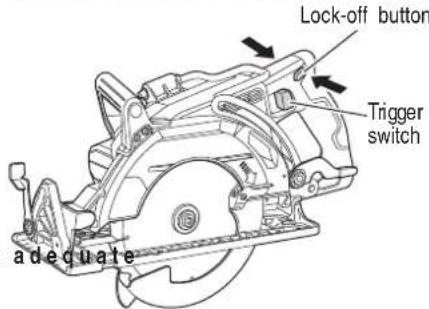
Fig. 25
- About Remaining Battery Indicator
You can check the battery's remaining capacity by pressing the remaining battery indicator switch to light the indicator lamp. (Fig. 26, Table 5)
The indicator will shut off approximately 3 seconds after the remaining battery indicator switch is pressed. It is best to use the remaining battery indicator as a guide since there are slight differences such as ambient temperature and the condition of the battery. Also, the remaining battery indicator may vary from those equipped to a tool or charger.
Remaining battery indicator lamp
Remaining battery indicator switch
![Display panel N] on](/content/2026/04/684287/images/146e59c7124397f284d92e0635991fd4e590878c386217d329e37d28b09e8bc6.jpg)
Fig. 26
English
Table 5
| State of lamp Battery Remaining Power | |
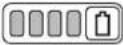 | Lights;The battery remaining power is over 75% |
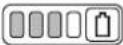 | Lights;The battery remaining power is 50%-75%. |
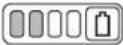 | Lights;The battery remaining power is 25%-50%. |
 | Lights;The battery remaining power is less than 25% |
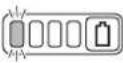 | Blinks;The battery remaining power is nearly empty. Recharge the battery soonest possible. |
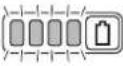 | Blinks;Output suspended due to high temperature. Remove the battery from the tool and allow it to fully cool down. |
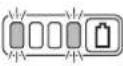 | Blinks;Output suspended due to failure or malfunction. The problem may be the battery so please contact your dealer. |
(2) When the base is not inclined, use the right side of the notch.
If the base is inclined (45 degrees), use the left side of the notch (Fig. 27).
45° guide 90° guide notch notch
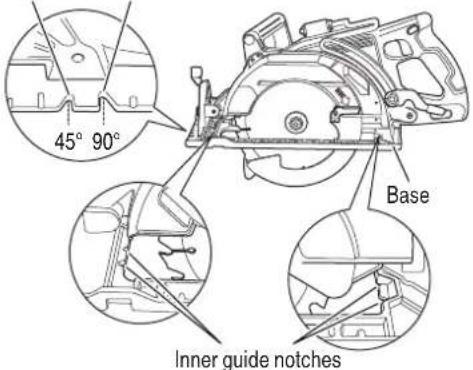
Fig. 27
NOTE
When using the saw at the inclination of 45 degrees, use both the marks of on the bevel plate and [45] on the inclined gauge of the base (Fig. 28).
What's more, if it is absolutely essential to use the saw at a precise angle, make adjustment using a protractor, etc.
Bevel plate
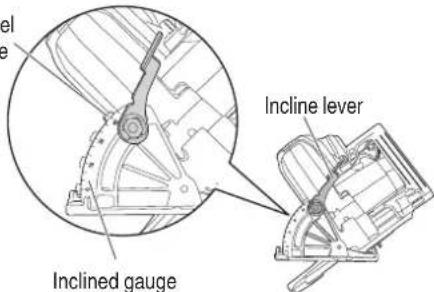
Fig. 28
As the remaining battery indicator shows somewhat differently depending on ambient temperature and battery characteristics, read it as a reference.
NOTE
Do not give a strong shock to the switch panel or break it. It may lead to a trouble.
- Cutting procedures
CAUTION
● Recheck that the saw blade is securely clamped.
- Confir rm that the incline lever and the cutting depth lever are adjusted correctly.
(1) The front of the base has a 90^ guide notch and a 45^ guide notch for vertical and bevel cutting. The guide notches enable you to guide the saw along the cutting lines marked on the workpiece.
Also, the saw has the inner guide notches located on the insides of the base as shown in Fig. 27 to keep the straight cutting.
English
(3) Ensure that the switch is turned to the ON position
before the saw blade comes in contact with the lumber. The switch is turned ON when the trigger switch is squeezed; and OFF when the trigger switch is released. Moving the saw straight at a constant speed will produce optimum cutting. (Fig. 29)
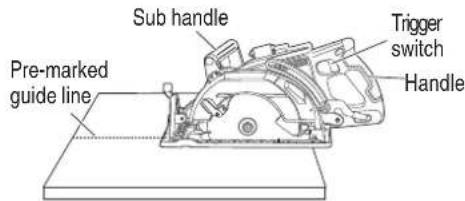
Fig. 29
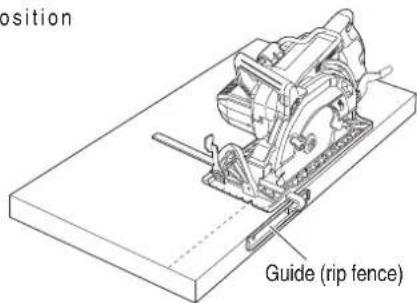
Fig. 30
- Pocket cutting
CAUTION
● Before starting to saw, ensure that the saw blade has reached full speed revolution.
- When fi nished with a job, pull out the battery from the main body.
● To avoid abnormal heating of the blade tip or damage to the saw blade, do not twist or apply excessive force to the saw blade when cutting. Let the blade move forward smoothly.
- In the situation where the circular saw is continuously operated while replacing the battery with stocked spare batteries one after another, the motor tends to overheat. Therefore, whenever the housing becomes hot, give the saw a break for a while.
● Avoid cutting operation in a state where the base bottom is afloat from the material being cut. Otherwise, the motor can get locked.
- Ripping cut
WARNING
To avoid serious accident, make sure that the guide (rip fence) does not touch the saw blade before use.
Ripping means to cut wider boards into narrower strips - cutting grain lengthwise. Therefore, it is recommended to use the metabo HPT guide (rip fence) (optional accessory, refer to page 31) to provide the support and cut boards into the same width. (Fig. 30)
WARNING
● Never secure the lower guard in a raised position. Never move the saw backwards when pocket cutting. This may cause the saw to raise up off the work surface which could cause injury.
● To avoid serious accident, ensure the switch is in the OFF position, and pull out the battery before any adjustment.
● Never tie or wedge the lower guard in a raised position.
(1) Mark the desired cutting area clearly with lines all side. (See Fig. 31)
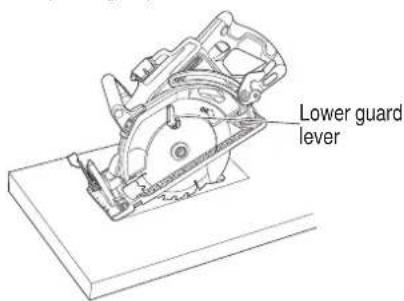
Fig. 31
(2) Set depth adjustment according to material to be cut.
(3) Push the lower guard lever all the way back so the blade is exposed as shown in Fig. 31.
(4) Tilt the saw forward and align the notch (Fig. 27) with the pre-marked guide line.
(5) Release the lower guard lever. When the lower guard contacts the work piece surface, it will be in the proper position to open freely when cutting is commenced.
English
(6) Holding the saw in position, with the blade not contacting the work piece surface, pull the trigger switch.
(7) After the saw has reached full speed, gradually lower rear end of the saw until its base rests on the work surface.
(8) Advance saw along the cutting line up to the corner.
(9) Release the trigger switch and allow the blade to stop completely before withdrawing the blade from the work piece.
Never under any circumstances pull the saw backwards while the blade is in motion, as kickback may result.
(10) Use a jig saw or hand saw to cut the corners out clean.
(11) When starting each new cut, repeat as above.
WARNING
Never hold the workpiece in your hands or across your leg while cutting. Secure the workpiece to a stable platform. It is important to support the work properly to minimise body exposure, blade binding, or loss of control.
- Appropriate support for cutting large workpiece
DON'T support the large workpiece away from the cut.
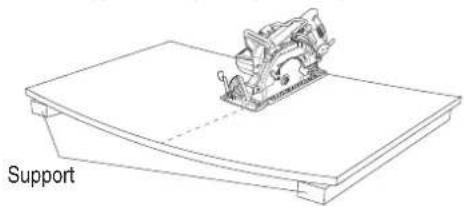
Fig. 32-a
ALWAYS support the large workpiece near the cut.
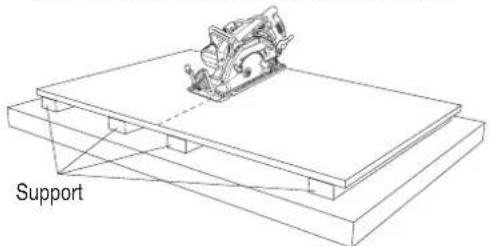
Fig. 32-b
When the support is away from the cutting path, it may cause the large workpiece to be curved. In such case, the blade is likely to be bound, causing a kickback and increasing the load to the motor. (Fig. 32-a)
Therefore, to avoid the possible personal injury or kickback occurred, ALWAYS cut the large workpiece with the appropriate support which shall be near the cutting path. (Fig. 32-b)
- Regulating the guide (Rip fence) (sold separately) Install the wing bolt and lock spring on the base. Insert the guide into the base, move it left and right and adjust the cutting position. Tighten the wing bolt and fi x the guide. The guide can be installed either from the left or the right side of the main body.
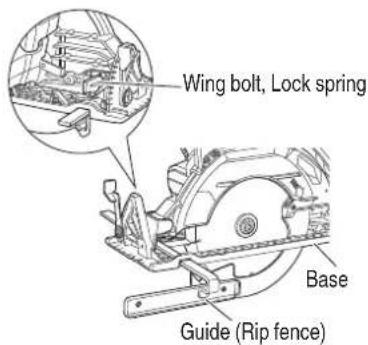
Fig. 33
- Using the dust collector
To use the vacuum cleaner to gather up saw dust, attach the suction hose to the dust collector which is attached to the main unit by M4 screw.
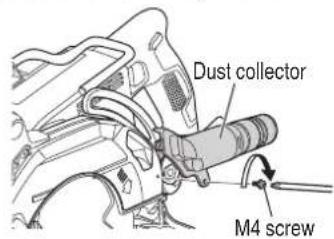
Fig. 34
ABOUT ERROR LAMP OF AC/DC ADAPTER
Table 6
| Indications of the indicator lamp | |||||
| Status | Power Lamp (GREEN) | Error lamp (RED) | Indicates | ||
| Adapter | Before use | Blinks | Light off | Plugged into power source | |
| Power on | Lights | Light off | Tool can be used | ||
| Power suspended | Blinks Lights Lights | Blinks | Lights for 0.5 seconds. Does not light for 0.5 seconds. (off for 0.5 seconds) | Adapter cannot be used due to high temperature.(Can be used once the adapter is cooled) | |
| Lights for 0.1 seconds. Does not light for 0.1 seconds. (off for 0.1 seconds) | Overload | ||||
| Box | Power suspended |  | Lights for 0.5 seconds. Does not light for 0.5 seconds. (off for 0.5 seconds) | Cannot be used because the temperature in the box is too high(Can be used once the box is cooled) | |
MAINTENANCE AND INSPECTION
WARNING
Be sure to turn off the switch and pull out the battery before doing any inspection or maintenance.
- Inspecting the saw blade
Continued use of a dull or damaged blade will result in reduced cutting efficiency and may cause overloading of the motor. Replace the blade with a new one as soon as excessive abrasion is noted.
CAUTION
If a dull saw blade is used, reactive force is increased during cutting operation. Avoid the use of the dull saw blade without repair.
- Check the Screws
Loose screws are dangerous. Regularly inspect them and make sure they are tight.
CAUTION
Using this power tool with loosen, screws is extremely dangerous.
- Motor unit maintenance
The motor winding is an important part of this tool. Avoid damaging and be careful to avoid contact with cleaning oil or water.
After 50 hours of use, clean the motor by blowing into the ventilation holes of the motor housing with dry air from an air gun or other tool (Fig. 35). Dust or particle accumulation in the motor can result in damage.
- Inspecting and maintaining the lower guard Always make sure that the lower guard moves smoothly.
In the event of any malfunction, immediately repair the lower guard.
For cleaning and maintenance, use an air gun or other tool to blow clean the space between the lower guard and gear cover as well as the rotation part of the lower guard with dry air (Fig. 35). Doing so is effective for the emission of chips or other particles.
Accumulation of chips or other particles around the lower guard may result in malfunction or damage.
WARNING
To prevent dust inhalation or eye irritation, wear protective safety goggles and a dust mask when using an air gun or other tool to clean the lower guard, ventilation holes or other parts of the product.
Ensure smooth
movement of lower guard
Rotation part of the lower guard
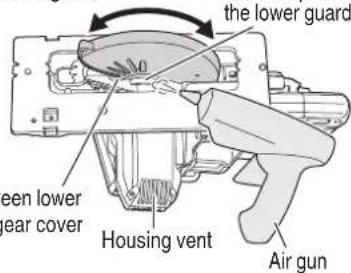
Fig. 35
-
Clean inside the saw cover Periodically inspect and clean the saw cover to ensure that there is no accumulation of chips or other particles.
-
Check for dust Dust may be removed with a clean rag or a cloth dampened with soapy water. Do not use bleach, chlorine, gasoline or thinner, for they may damage the plastics.
-
Inspection of terminals (tool and battery) Check to make sure that swarf and dust have not collected on the terminals. On occasion check prior, during and after operation.
CAUTION
Remove any swarf or dust which may have collected on the terminals.
Failure to do so may result in malfunction.
- Lubrication
The bearings in this tool have been sufficiently lubricated with quality lubricating oil, taking into account the expected life of this tool under normal operating conditions. As a result, no further lubrication is necessary.
English
- Disposal of the exhausted battery
WARNING
Do not dispose of the exhausted battery. The battery may explode if it is incinerated. The battery is recyclable. At the end of it's useful life, under various state and local laws, it may be illegal to dispose of this b a municipal waste stream. Check with your local solid waste off cials for details in your area for recycling options or proper disposal.
Important notice on the batteries for the metabo HPT cordless power tools
Please always use one of our designated genuine batteries. We cannot guarantee the safety and performance of our cordless power tool when used with batteries other than these designated by us, or when the battery is disassembled and modified (such as disassembled and replacement of cells or other internal parts).
- Storage
Storing in a place below 104°F (40°C) and out of the reach of children.
NOTE
Storing lithium-ion batteries
Make sure the lithium-ion batteries have been fully charged before storing them.
Prolonged storage (3 months or more) of batteries with a low charge may result in performance deterioration, signifi cantly reducing battery usage time or rendering the batteries incapable of holding a charge. However, significantly reduced battery usage time may be recovered by repeatedly charging and using the batteries two to fi ve times. If the battery usage time is extremely short despite repeated charging and use, consider the batteries dead and purchase new batteries.
- Service and repairs
All quality power tools will eventually require servicing or replacement of parts because of wear from normal use. To assure that only genuine replacement parts must be used, all service and repairs must be performed by a metabo HPT AUTHORIZED SERVICE CENTER, ONLY.
MODIFICATIONS:
metabo HPT Power Tools are constantly being improved and modified to incorporate the latest technological advancements.
Accordingly, some parts may be changed without prior notice.
TROUBLESHOOTING GUIDE
WARNING
● To avoid injury from an accidental start, turn the switch OFF and pull out the battery from the power source or remove the battery from the main body before making any adjustments.
● All electrical or mechanical repairs should be done only by qualified service technicians. Contact metabo HPT Authorized Service Center.
- Power tool
| Symptom Possible cause Remedy | ||
| Tool doesn't run No remaining battery power Charge the battery. | ||
| Battery isn't fully installed. Push the battery in until you hear a click. | ||
| Tool suddenly stopped Tool was overburdened Get rid of the problem causing the overburden. | ||
| Overload protection is in operation. | ||
| The battery is overheated. Let the battery cool down. | ||
| Cannot be inclined | The incline lever is not loosened. | Try inclining after loosening the incline lever. Tighten the loosened parts after making the necessary adjustments. |
| Doesn't cut well | The saw blade is worn or missing teeth. | Replace with a new saw blade. |
| The bolt is loose. | Firmly tighten the bolt. | |
| The saw blade is installed backwards. | Install the saw blade in the proper direction. | |
| Switch can't be pulled | The lock-off button is not pushed in enough. | Push the lock-off button in all the way. |
| Sawdust discharge is poor | Sawdust has accumulated in the saw cover. | Remove the sawdust inside the saw cover. |
| Battery cannot be installed | Attempting to install a battery other than that specified for the tool. | Please install a multi volt type battery. |
- Charger
| Symptom Possible cause Remedy | ||
| The charge indicator lamp is rapidly flickers purple, and battery charging doesn't begin. | The battery is not inserted all the way. | Insert the battery firmly. |
| There is foreign matter in the battery terminal or where the battery is attached. | Remove the foreign matter. | |
| The charge indicator lamp blinks red, and battery charging doesn't begin. | The battery is not inserted all the way. | Insert the battery firmly. |
| The battery is overheated. If left alone, the battery will automatically begin charging if its temperature decreases, but this may reduce battery life. It is recommended that the battery be cooled in a well-ventilated location away from direct sunlight before charging it. | ||
| Battery usage time is short even though the battery is fully charged. | The battery's life is depleted. | Replace the battery with a new one. |
English
| Symptom Possible cause Remedy | ||
| The battery takes a long time to charge. | The temperature of the battery, the charger, or the surrounding environment is extremely low. | Charge the battery indoors or in another warmer environment. |
| The charger's vents are blocked, causing its internal components to overheat. | Avoid blocking the vents. | |
| The cooling fan is not running. Contact a metabo HPT Authorized Service Center for repairs. | ||
| The USB power lamp has switched off and the USB device has stopped charging. | The battery's capacity has become low. Replace the battery with one that has capacity remaining. | |
| USB power lamp does not switch off even though the USB device has fi nished charging. | The USB power lamp lights up green to indicate that USB charging is possible. | This is not a malfunction. |
| It is unclear what the charging status of a USB device is, or whether its charging is complete. | The USB power lamp does not switch off even when charging is complete. | Examine the USB device that is charging to confi rm its charging status. |
| Charging of a USB device pauses midway. | The charger was plugged into an electrical socket while the USB device was being charged using the battery as the power source. | This is not a malfunction.The charger pauses USB charging for about 5 seconds when it is diff erentiating between power sources. |
| A battery was inserted into the charger while the USB device was being charged using a power socket as the power source. | ||
| Charging of the USB device pauses midway when the battery and the USB device are being charged at the same time. | The battery has become fully charged. This is not a malfunction.The charger pauses USB charging for about 5 seconds while it checks whether the battery has successfully completed charging. | |
| Charging of the USB device doesn't start when the battery and the USB device are being charged at the same time. | The remaining battery capacity is extremely low. | This is not a malfunction.When the battery capacity reaches a certain level, USB charging automatically begins. |
- AC/DC adapter
| Problem Possible Cause Possible Solution | ||
| The adapter's error lamp is blinking red and the tool does not operate when switched on. | Output is suspended because the tool or the AC/DC adapter is overheated. | Allow the tool and AC/DC adapter to sufficiently cool down. |
| The adapter's error lamp rapidly blinks red and the motor does not operate when the tool is switched on. | Output is suspended because the tool is overloaded. | Remove the cause of the overload. |
| During protective operation, the LED will blink differently for AC/DC adapter use and battery use. | This is not a malfunction. | |
30
ACCESSORIES
WARNING
ALWAYS use Only authorized metabo HPT replacement parts and accessories. Never use replacement parts or accessories which are not intended for use with this tool. Contact metabo HPT if you are not sure whether it is safe to use a particular replacement part or accessory with your tool.
The use of any other attachment or accessory can be dangerous and could cause injury or mechanical damage.
NOTE
Accessories are subject to change without any obligation on the part of the metabo HPT.
STANDARD ACCESSORIES
| C3607DWA(WCK) | 1. Saw Blade ....1 | ||
| External Dia. Hole | Dia. Code No. | ||
| 7-1/4" (185 mm) 5/8" | (15.9 mm) 115750M | ||
| 2. Wrench (Code No. 957683)....13. Dust collector set (Code No. 324887) (includes (4))....14. Battery charger (UC18YSL3)....15. Battery (BSL36B18)....16. Battery cover (Code No. 329897)....17. Bag (Code No. 371108)....1 | |||
| C3607DWA(NN) | Battery, battery charger, battery cover and bag are not contained. | ||
OPTIONAL ACCESSORIES......SOLD separately
(1) Guide (rip fence) (Code No. 378052)
(4) M4 screw (for dust collector) (Code No. 935196)
(2) Wing Bolt (Code No. 301806)
(5) AC/DC adapter (ET36A)
(3) Lock Spring (Code No. 947859)
(1)
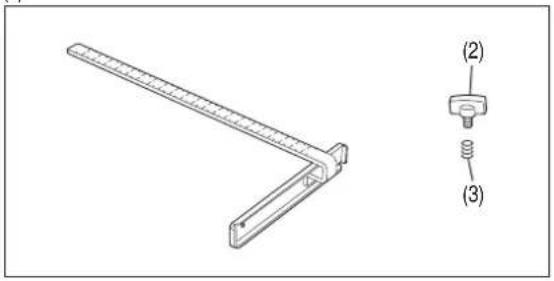
natural_image
Technical line drawing of a mechanical bracket with two labeled parts (2) and (3), no text or symbols present.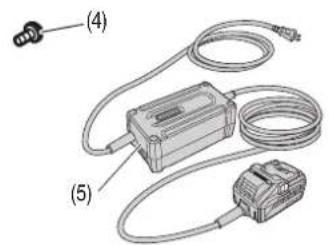
NOTE
Specifications are subject to change without any obligation on the part of the metabo HPT.
INFORMATIONS IMPORTANTES DE SÉCURITÉ
natural_image
Line drawing of hands operating a mechanical tool on a workbench (no text or symbols)Fig. 2
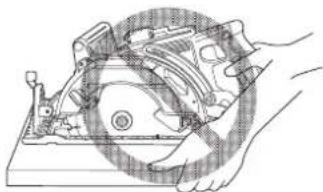
natural_image
Technical line drawing of a mechanical assembly with hands operating a component (no text or symbols visible)Fig. 3
natural_image
Technical line drawing of a mechanical device with gears and housing (no text or symbols)Fig. 4
natural_image
Mechanical assembly diagram showing a lever mechanism with no visible text or symbolsnatural_image
Technical line drawing of a mechanical assembly on a flat base, labeled 'Soutien' (no other text or symbols)Fig. 32-a
(No. de code 935196)
(3) Ressort de verrouillage (No. de code 947859)
natural_image
Technical line drawing of a manual cutting machine with hands operating it (no text or symbols present)natural_image
Line drawing of hands operating a mechanical tool on a workbench (no text or symbols)Fig. 2
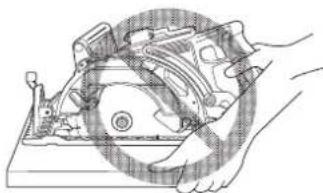
natural_image
Technical line drawing of a mechanical assembly with hands operating a component (no text or symbols)Fig. 3
natural_image
Technical line drawing of a mechanical device with no visible text or symbolsFig. 4
natural_image
Mechanical assembly diagram showing a bracket with mounting base and internal components (no text or labels)natural_image
Technical line drawing of a mechanical bracket with two labeled parts (2) and (3), no text or symbols present.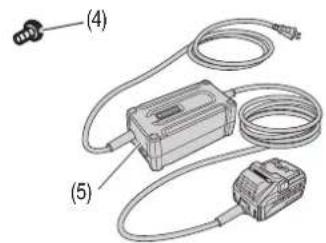
NOTA
natural_image
Simple line drawing of a quill pen with inkwell, isolated on white background (no text or symbols)
98
00Book_C3607DWA_NA.indb 98
2021/06/10 16:52:02
natural_image
Simple line drawing of a quill pen with inkwell, isolated on white background (no text or symbols)
99
2021/06/10 16:52:02
WARNING:
Some dust created by power sanding, sawing, grinding, drilling, and other construction activities contains chemicals known to the State of California to cause cancer, birth defects or other reproductive harm. Some examples of these chemicals are:
- Lead from lead-based paints.
- Crystalline silica from bricks and cement and other masonry products, and
- Arsenic and chromium from chemically-treated lumber.
Your risk from these exposures varies, depending on how often you do this type of work. To reduce your exposure to these chemicals: work in a well ventilated area, and work with approved safety equipment, such as those dust masks that are specially designed to filter out microscopic particles.
AVERTISSEMENT:
Please contact Koki Holdings America Ltd. at 1-800-59-TOOLS (toll free), or metabo HPT AUTHORIZED POWER TOOL SERVICE CENTER regarding COLLECTION.
Pour le RAMASSAGE, contacter Koki Holdings America Ltd. au 1-800-59-TOOLS (appel gratuit), ou UN SERVICE APRÈS-VENTE D'OUTILS ÉLECTRIQUE AGREÉ PAR metabo HPT.
Minato-ku, Tokyo 108-6020, Japan
Distributed by
Koki Holdings America Ltd.
1111 Broadway Ave,
Braselton, Georgia, 30517
Koki Holdings America Ltd. Canadian Branch
3405 American Drive, Units 9-10,
Mississauga, ON, L4V 1T6
108
Code No. C99263561 G
Printed in China