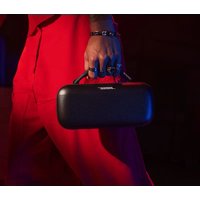
SoundLink Max - Speaker BOSE - Free user manual and instructions
Find the device manual for free SoundLink Max BOSE in PDF.


| Product Type | Portable Bluetooth Speaker |
| Brand | Bose |
| Model | SoundLink Max |
| Model Number | 442368 |
| Power Input | 5/9/15/20 V ---, 3 A max (USB-C) |
| Power Output | 5 V ---, 3 A (external device charging) |
| Battery | Rechargeable lithium-ion; up to 20 hours battery life; charge time: 5 hours |
| Wireless connectivity | Bluetooth (multipoint up to 2 simultaneous devices) |
| Audio codec | Snapdragon Sound (aptX Adaptive) |
| Ports | 1 x USB-C (charging and output), 1 x 3.5 mm AUX jack |
| Water resistance rating | IP64 (dust and splash resistant) / IP67 (immersion up to 1 m for 30 min) |
| Controls | On/Off, Bluetooth, volume +/-, play/pause, programmable shortcut button |
| App | Bose (iOS/Android): setup, settings, updates |
| Voice prompt | Yes, multilingual (French available) |
| Special features | SimpleSync (connection to compatible Bose products), external device charging, removable handle |
| Auto-off | Yes, after 20 min of inactivity (adjustable via app) |
| Software update | Via Bose app or Bose Updater (USB) |
| Care | Clean with a soft, damp cloth; do not use solvents; dry USB-C port before charging |
| Safety | Do not expose to water while charging; do not open; keep out of reach of children under 3 years (choking hazard) |
| Package contents | Speaker, USB-C cable, documentation |
| Warranty | Bose limited warranty (details at worldwide.Bose.com/Warranty) |
Frequently Asked Questions - SoundLink Max BOSE
User questions about SoundLink Max BOSE
0 question about this device. Answer the ones you know or ask your own.
Ask a new question about this device
Download the instructions for your Speaker in PDF format for free! Find your manual SoundLink Max - BOSE and take your electronic device back in hand. On this page are published all the documents necessary for the use of your device. SoundLink Max by BOSE.
USER MANUAL SoundLink Max BOSE
Please read and keep all safety and use instructions.

Bose Corporation hereby declares that this product is in compliance with the essential requirements and other relevant provisions of Directive 2014/53/EU and all other applicable EU directive requirements. The complete declaration of conformity can be found at: ____ www.Bose.cc

This product conforms to all applicable Electromagnetic Compatibility Regulations 2016 and all other applicable UK regulations. The complete declaration of conformity can be found at: ____ www.Bose.com/compliance
Bose Corporation hereby declares that this product is in compliance with the essential requirements per Radio Equipment Regulations 2017 and all applicable UK regulations. The complete declaration of conformity can be found at: ____ www.Bose.com/compliance
Important Safety Instructions
Do not block any ventilation openings. Install in accordance with the manufacturer's instructions.
If the speaker is exposed to salt or chlorinated water, gently rinse with fresh water following the exposure to remove residue. Make sure the connector port is fully dried out before charging.
Only use attachments/accessories specified by the manufacturer.
Refer all servicing to qualified personnel. Servicing is required when the apparatus does not operate normally, or has been physically damaged.
WARNINGS/CAUTIONS

Contains small parts which may be a choking hazard. Not suitable for children under age 3.

This product contains magnetic material. Consult your physician on whether this might affect your implantable medical device.
- Keep the product away from fire and heat sources. Do NOT place naked flame sources, such as lighted candles, on or near the product.
- Do NOT make unauthorized alterations to this product.
- Use this product only with an agency-approved LPS power supply that meets local regulatory requirements (e.g., UL, CSA, VDE, CCC).
- The battery provided with this product may present a risk of fire, explosion or chemical burn if mishandled, incorrectly replaced or replaced with an incorrect type.
- Do not expose products containing batteries to excessive heat (e.g. from storage in direct sunlight, fire or the like).
- If the battery leaks, do not allow the liquid to come in contact with the skin or eyes. If contact is made, seek medical advice.
- The product label is located on the bottom of the product.
NOTE: This equipment has been tested and found to comply with the limits for a Class B digital device, pursuant to Part 15 of the FCC Rules. These limits are designed to provide reasonable protection against harmful interference in a residential installation. This equipment generates, uses, and can radiate radio frequency energy and, if not installed and used in accordance with the instructions, may cause harmful interference to radio communications. However, there is no guarantee that interference will not occur in a particular installation. If this equipment does cause harmful interference to radio or television reception, which can be determined by turning the equipment off and on, the user is encouraged to try to correct the interference by one or more of the following measures:
- Reorient or relocate the receiving product or antenna.
- Increase the separation between the equipment and receiver.
- Connect the equipment into an outlet on a circuit different from that to which the receiver is connected.
- Consult the dealer or an experienced radio/TV techniciwan for help.
Changes or modifications not expressly approved by Bose Corporation could void the user's authority to operate this equipment.
This device complies with FCC and ISED Canada radiation exposure limits set forth for general population. This equipment should be installed and operated with a minimum distance of 20 cm between radiator and your body. This transmitter must not be co-located or operating in conjunction with any other antenna or transmitter.
CAN ICES-3(B)/NMB-3(B)
For Europe: Frequency band of operation 2400 to 2483.5 MHz. I Maximum transmit power less than 20 dBm EIRP.
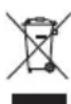
This symbol means the product must not be discarded as household waste, and should be delivered to an appropriate collection facility for recycling. Proper disposal and recycling helps protect natural resources, human health and the environment. For more information on disposal and recycling of this product, contact your local municipality, disposal service, or the shop where you bought this product.
Low-power Radio-frequency Devices Technical Regulations: Without permission granted by the NCC, any company, enterprise, or user is not allowed to change frequency, enhance transmitting power or alter original characteristic as well as performance to a approved low power radio-frequency devices. The low power radio-frequency devices shall not influence aircraft security and interfere legal communications; If found, the user shall cease operating immediately until no interference is achieved. The said legal communications means radio communications is operated in compliance with the Telecommunications Management Act. The low power radio-frequency devices must be susceptible with the interference from legal communications or ISM radio wave radiated devices. The low power radio-frequency devices must be susceptible with the interference from legal communications or ISM radio wave radiated devices.
DON'T attempt to remove the rechargeable lithium-ion battery from this product. Contact your local Bose retailer or other qualified professional for recycling and disposal.

Please dispose of used batteries properly, following local regulations. Do not incinerate.

China Restriction of Hazardous Substances Table
| Names and Contents of Toxic or Hazardous Substances or Elements | ||||||
| Toxic or Hazardous Substances and Elements | ||||||
| Part Name | Lead (Pb) | Mercury (Hg) | Cadmium (Cd) | Hexavalent (CR(VI)) | Polybrominated Biphenyl (PBB) | Polybrominated diphenylether (PBDE) |
| PCBs X O O O O O | ||||||
| Metal Parts X O O O O O | ||||||
| Plastic Parts O O O O O O | ||||||
| Speakers X O O O O O | ||||||
| Cables X O O O O O | ||||||
| This table is prepared in accordance with the provisions of SJ/T 11364.O: Indicates that this toxic or hazardous substance contained in all of the homogeneous materials for this part is below the limit requirement of GB/T 26572. |  | |||||
| X: Indicates that this toxic or hazardous substance contained in at least one of the homogeneous materials used for this part is above the limit requirement of GB/T 26572. | ||||||
Taiwan Restriction of Hazardous Substances Table
| Equipment name: Bluetooth Speaker Type designation: 442368 | ||||||
| Restricted substances and its chemical symbols | ||||||
| Unit | Lead (Pb) | Mercury (Hg) | Cadmium (Cd) | Hexavalent chromium (Cr+6) | Polybrominated biphenyls (PBB) | Polybrominated diphenylethers (PBDE) |
| PCBs | — | ○ | ○ | ○ | ○ | ○ |
| Metal Parts | — | ○ | ○ | ○ | ○ | ○ |
| Plastic Parts | ○ | ○ | ○ | ○ | ○ | ○ |
| Speakers | — | ○ | ○ | ○ | ○ | ○ |
| Cables | — | ○ | ○ | ○ | ○ | ○ |
| Note 1: “○” indicates that the percentage content of the restricted substance does not exceed the percentage of reference value of presence. Note 2: The “-” indicates that the restricted substance corresponds to the exemption. | ||||||
Date of Manufacture: The eighth digit in the serial number indicates the year of manufacture; "4" is 2014 or 2024.
Importers: Bose Electronics (Shanghai) Company Limited, Level 6, Tower D, No. 2337 Gudai Rd. Minhang District, Shanghai 201100 | Bose Products B.V., Gorslaan 60, 1441 RG Purmerend, The Netherlands | Bose de México S. de R.L. de C.V., Avenida Prado Sur #150, Piso 2, Interior 222 y 223, Colonia Lomas de Chapultepec V Sección, Miguel Hidalgo, Ciudad de México, C.P. 11000 Phone Number: +5255 (5202) 3545 | Bose Limited (H.K.), 9F., No.10, Sec. 3, Minsheng E. Road, Zhongshan Dist. Taipei City 10480, Phone Number: +886-2-2514 7676 | Bose Limited, Bose House, Quayside Chatham Maritime, Chatham, Kent, ME4 4QZ, United Kingdom
Input Rating: 5/9/15/20V ---, 3A Max. | Output Rating: 5V ---, 3A
Model number: 442368. The CMIIT ID is located on the bottom of the speaker.
This product is covered by a limited warranty from Bose, available atworldwide.Bose.com/Warranty
License Disclosures: To view the license disclosures that apply to the third-party software packages included as components of the Bose SoundLink Max Portable Speaker, use the Bose app. You can access this information from the Settings menu.
Apple, the Apple logo, iPad, and iPhone are trademarks of Apple Inc., registered in the U.S. and other countries. App Store is a service mark of Apple Inc. The trademark "iPhone" is used in Japan with a license from Aiphone K.K.
Use of the Made for Apple badge means that an accessory has been designed to connect specifically to the Apple product(s) identified in the badge, and has been certified by the developer to meet Apple performance standards. Apple is not responsible for the operation of this device or its compliance with safety and regulatory standards.
The Bluetooth ^® word mark and logos are registered trademarks owned by Bluetooth SIG, Inc. and any use of such marks by Bose Corporation is under license.
Android and Google Play are trademarks of Google LLC.
Snapdragon Sound is a product of Qualcomm Technologies, Inc. and/or its subsidiaries. Qualcomm, Snapdragon and Snapdragon Sound are trademarks or registered trademarks of Qualcomm Incorporated.
USB Type-C ^® and USB-C ^® are registered trademarks of USB Implementers Forum.
Bose, the B logo, SimpleSync, and SoundLink are trademarks of Bose Corporation. | Bose Corporation Headquarters: 1-877-230-5639 | ©2024 Bose Corporation. No part of this work may be reproduced, modified, distributed, or otherwise used without prior written permission.
Please complete and retain for your records
The serial number is located on the back of the speaker. The model number is located on the bottom of the speaker.
Serial number: ____
Model number: 442368
Please keep your receipt. Now is a good time to register your Bose product. You can easily do this by going to ____worldwide.Bose.com/ProductRegistration
WHAT'S IN THE BOX
Contents 9
GETTING STARTED
Initial setup.... 10
BLUETOOTH® CONNECTIONS
Connect to a device.... 12
Using your device's Bluetooth settings 12
Using the Bose app.... 13
Reconnect to a device 14
Reconnect to the most recently-connected device.... 14
Reconnect to a different device.... 14
Connect an additional device.... 15
Identify connected devices 15
Switch between two connected devices.... 15
Disconnect a device 16
Clear the speaker device list.... 16
Android™ devices only.... 17
Connect using Fast Pair 17
Snapdragon Sound™ technology 18
SPEAKER CONTROLS
Power on/off.... 19
Auto-off timer.... 20
Media playback and volume 21
SHORTCUTS
Use your shortcut.... 22
Change or disable your shortcut.... 22
BATTERY
Charge the speaker.... 23
Charging time.... 24
Hear the battery level.... 24
View the battery level 24
Charge your device 25
STATUS
Power light 26
Bluetooth light 27
AUX light 27
WIRED CONNECTION
Connect an audio cable.... 28
CONNECT BOSE PRODUCTS
Connect to a Bose Smart Speaker or Soundbar.... 29
Compatible products.... 29
Connect using the Bose app.... 30
Connect using the product controls 31
Reconnect to a Bose Smart Speaker or Soundbar.... 31
PORTABILITY
Remove the handle.... 32
Attach a new handle or carry strap 33
WATER AND DUST RESISTANCE 34
CARE AND MAINTENANCE
Update the speaker 35
Clean the speaker 35
Store the speaker 35
Replacement parts and accessories.... 35
Limited warranty 35
TROUBLESHOOTING
Try these solutions first.... 36
Other solutions.... 36
Reset the speaker 39
Restore the speaker.... 40
CONTENTS
Confirm that the following parts are included:
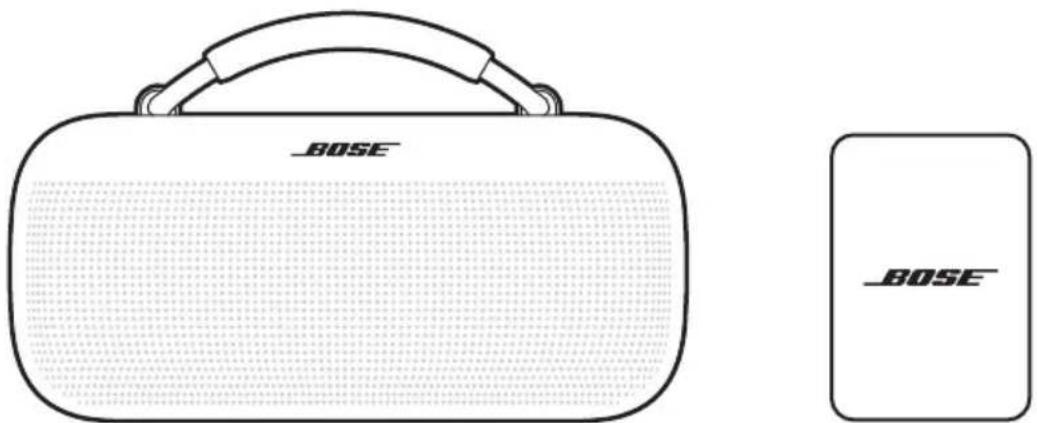
Bose SoundLink Max Portable Speaker USB Type-C® power supply
(Not available in all regions.)
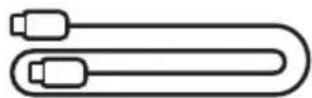
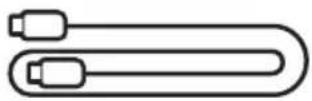
USB-C® cable
NOTE: If any part of your product appears to be missing or damaged, don't use it. Visit support.Bose.com/sl-max for troubleshooting articles, videos, and product repair or replacement.
The speaker ships with a partial charge. Before using the speaker for the first time, connect it to a power supply. The speaker doesn't need to be fully charged, but it does require the initial connection to activate the battery.
INITIAL SETUP
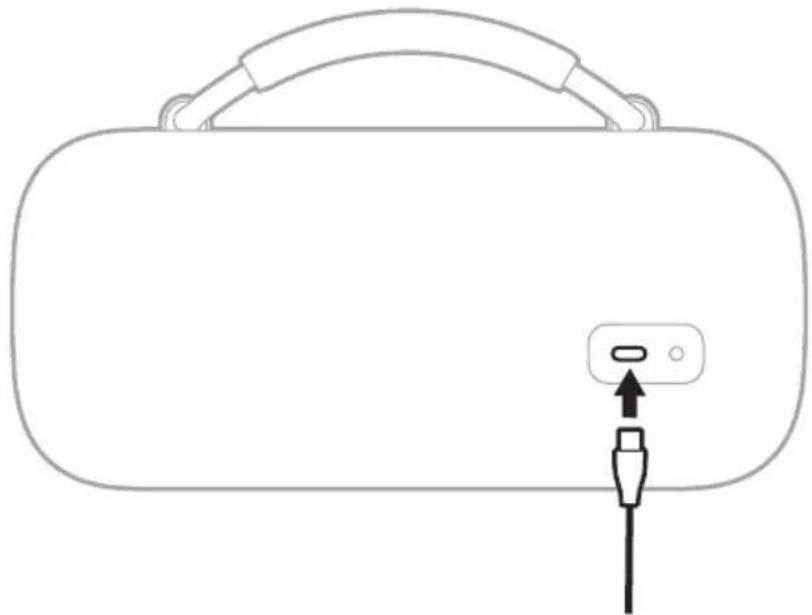
- Connect one end of the USB-C cable to the USB-C port on the back of the speaker.
natural_image
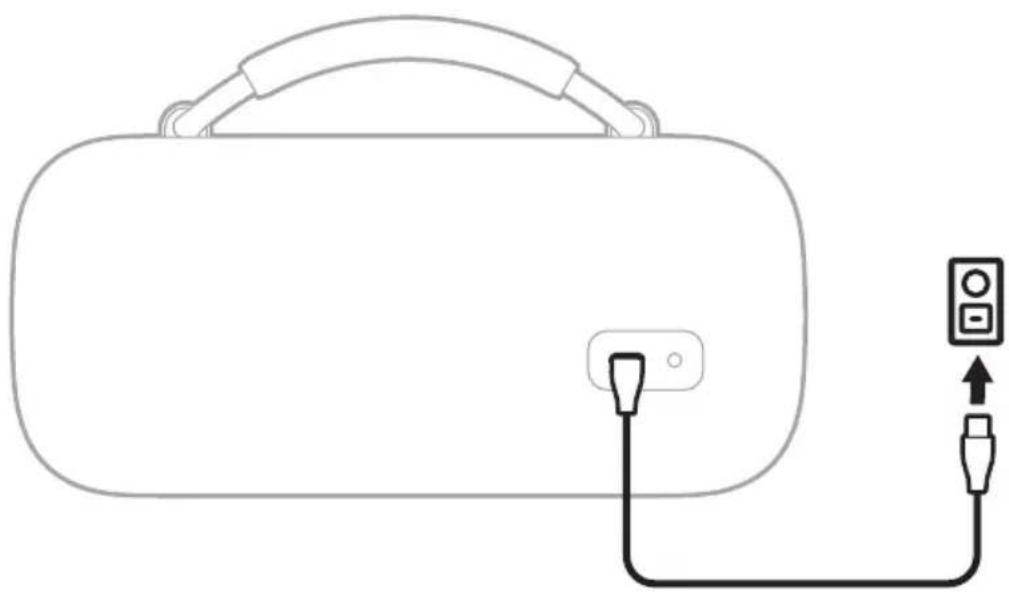
Line drawing of a device with a handle and plug, no text or symbols present- Connect the other end of the cable to a USB-C power supply.
natural_image
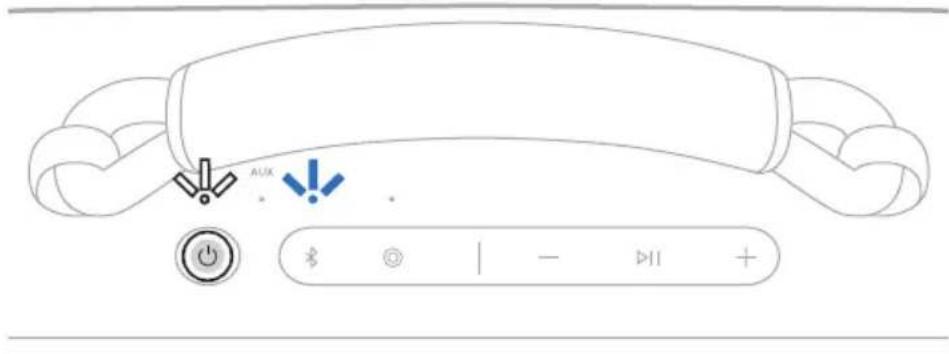
Line drawing of a device with a handle and connected to a plug and outlet (no text or symbols)3. Press the Power button ⏻.
The Power light slowly blinks white. You hear the battery level followed by "Ready to connect." The Bluetooth light slowly blinks blue.
- Connect to your device (see page 12).
You can store up to eight devices in the speaker device list, and the speaker can be actively connected to up to two devices at a time. You can play audio from only one device at a time.
CONNECT TO A DEVICE
You can connect the speaker to your device using any of the following:
- Your device's Bluetooth settings (see "Using your device's Bluetooth settings")
• The Bose app (see page 13) - Fast Pair (Android devices only) (see page 17)
Using your device's Bluetooth settings
- Press and hold the Bluetooth button ✝ until you hear "Ready to connect" and the Bluetooth light slowly blinks blue.
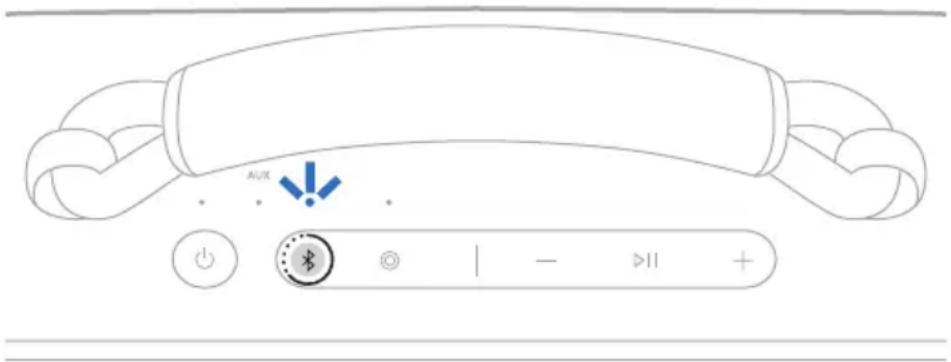
NOTE: If a device is already connected, you hear "Ready to connect another device."
- On your device, access Bluetooth settings.
- Select the speaker from the list of available products.
NOTE: Look for the name you entered for your speaker in the Bose app. If you didn't name the speaker, the default name appears.
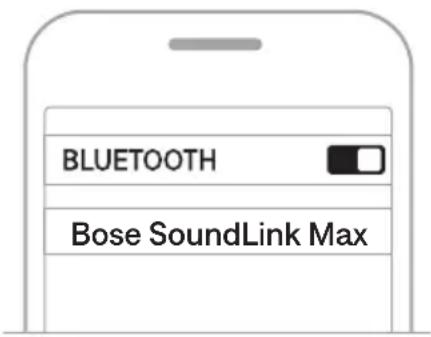
The speaker appears in the list of connected products. The Bluetooth light glows solid white (see page 27).
Using the Bose app
The Bose app lets you set up and control the speaker from any mobile device, such as a smartphone or tablet.
Using the app, you can manage Bluetooth connections, manage speaker settings, adjust the audio, choose your voice prompt language, and get any future updates and new features made available by Bose.
NOTE: If you've already downloaded the Bose app for another Bose product, you can add the speaker from the product list screen.
- On your device, download the Bose app.

- Follow the app instructions to add the speaker.
RECONNECT TO A DEVICE
Reconnect to the most recently-connected device
When powered on, the speaker connects to the two most recently-connected devices.
NOTES:
- The devices must be within range (30 ft or 9 m) and powered on.
- Make sure the Bluetooth feature is enabled on your devices.
Reconnect to a different device
NOTE: The device must be within range (30 ft or 9 m) and powered on.
- Press the Bluetooth button ✝ and release to hear which devices are currently connected.
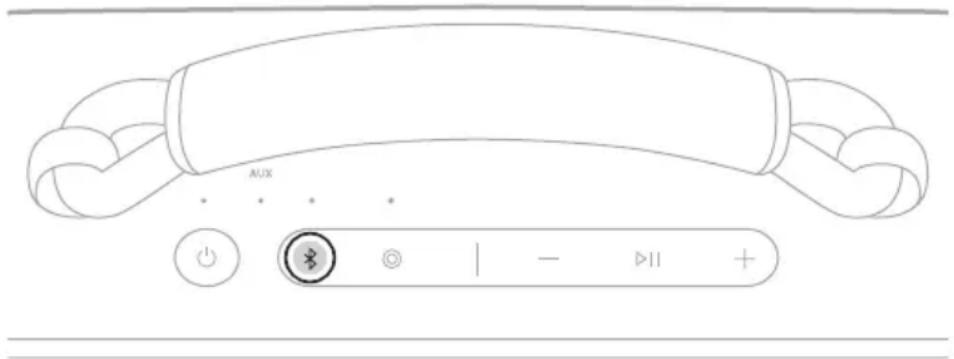
- Within 2 seconds, press the Bluetooth button ✗ again to hear the name of the next device in the speaker device list.
- Repeat until you hear the correct device name.
- Play audio on the connected device.
TIP: You can also reconnect a different device using the device Bluetooth settings or the Bose app (see page 13).
NOTE: If two devices are already connected to the speaker, the newly-connected device replaces the older of the two connections.
CONNECT AN ADDITIONAL DEVICE
The speaker can be actively connected to two devices at a time (multi-point connection).
To connect an additional device, see page 12.
NOTES:
- You can only play audio from one device at a time.
- To manage or disable the multi-point connection feature, use the Bose app. To access this option, tap Source on the product control screen.
- Disabling the multi-point connection feature disconnects the second connected device.
IDENTIFY CONNECTED DEVICES
- Press the Bluetooth button ✝ and release to hear which devices are currently connected.
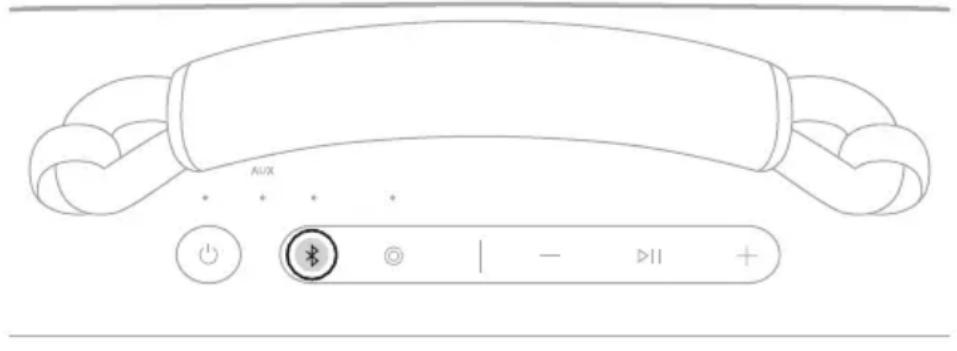
- Within 2 seconds, press the Bluetooth button ✗ again to hear the name of the next device in the speaker device list.
SWITCH BETWEEN TWO CONNECTED DEVICES
- Pause audio on your first device.
- Play audio on your second device.
DISCONNECT A DEVICE
Use the device's Bluetooth settings or the Bose app.
NOTE: Disabling the Bluetooth feature on your device disconnects the speaker and all other Bluetooth-connected products.
CLEAR THE SPEAKER DEVICE LIST
- Press and hold the Bluetooth button ✝ for 15 seconds until you hear "Bluetooth device list cleared. Ready to connect" and the Bluetooth light slowly blinks blue.
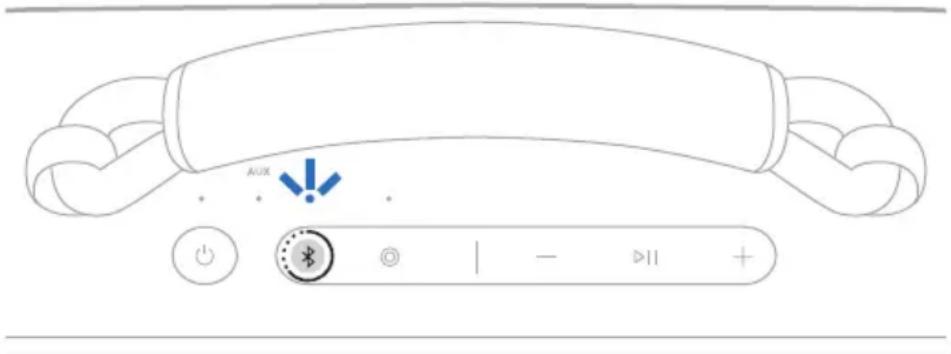
- Delete the speaker from your device's Bluetooth settings.
All devices are cleared, and the speaker is ready to connect (see page 12).
ANDROID DEVICES ONLY
If you have an Android device, you can access the following additional connection features.
Connect using Fast Pair
In one tap, the speaker enables quick, effortless Bluetooth pairing with your Android device.
NOTES:
- To use Fast Pair, you need an Android device running Android 6.0 or higher.
-
Your Android device must have the Bluetooth and Location features enabled.
-
Press and hold the Bluetooth button ✝ until you hear "Ready to connect" and the Bluetooth light slowly blinks blue.
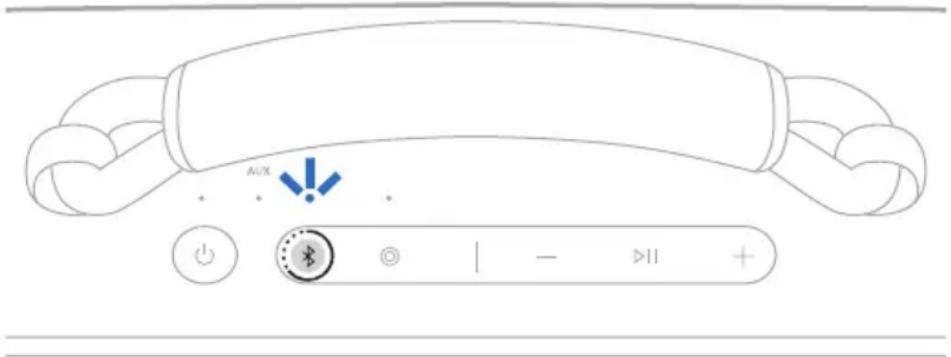
NOTE: If a device is already connected, you hear "Ready to connect another device."
- Place the speaker next to your Android device.
A notification displays on your device prompting you to pair the speaker.
NOTE: If you don't see a notification, check that notifications are enabled for the Google Play Services app on your device.
- Tap the notification.
Once the speaker is connected, a notification appears confirming that the connection is complete.
NOTE: You can also tap the button on the notification to download the Bose app and finish setting up the speaker.
Snapdragon Sound technology
Bose SoundLink Max Portable Speaker features Snapdragon Sound technology. Snapdragon Sound optimizes Qualcomm® audio technologies across connected devices to ensure the best sound quality, connection stability, and latency for your streaming audio.
To experience Snapdragon Sound, you need a Snapdragon Sound-certified device, such as a compatible Android device. Once you connect the speaker, your device will automatically stream audio using the aptX Adaptive Bluetooth codec.
NOTE: To see which Snapdragon Sound features the speaker supports and check if your device is compatible, visit: support.Bose.com/sl-max
Controls are located on the top of the speaker.
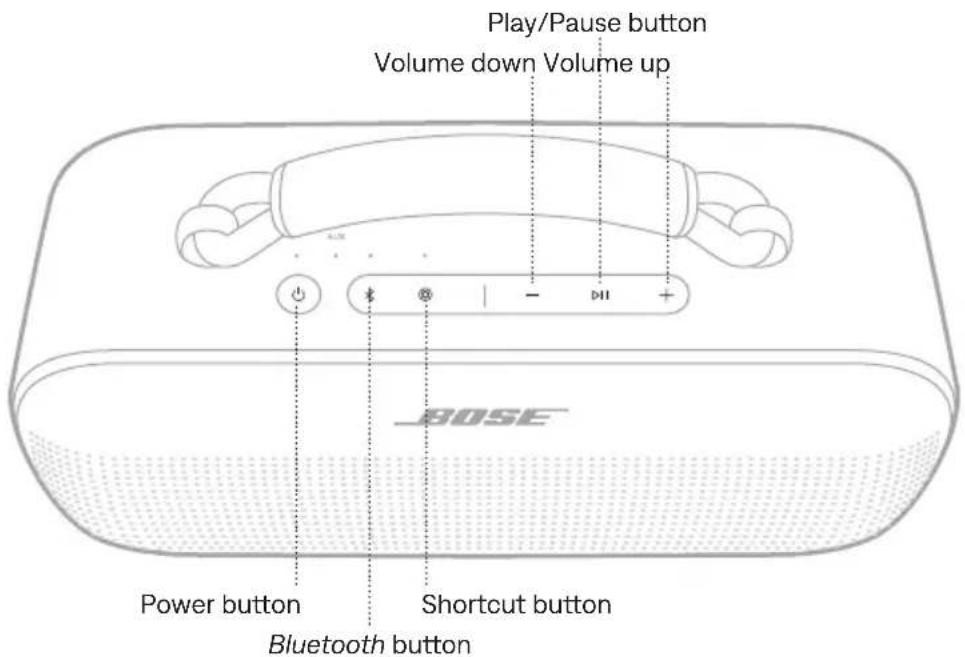
POWER ON/OFF
Press the Power button ⏻.
When powered on, a voice prompt announces the battery level. The Power light glows according to the current battery level (see page 26).
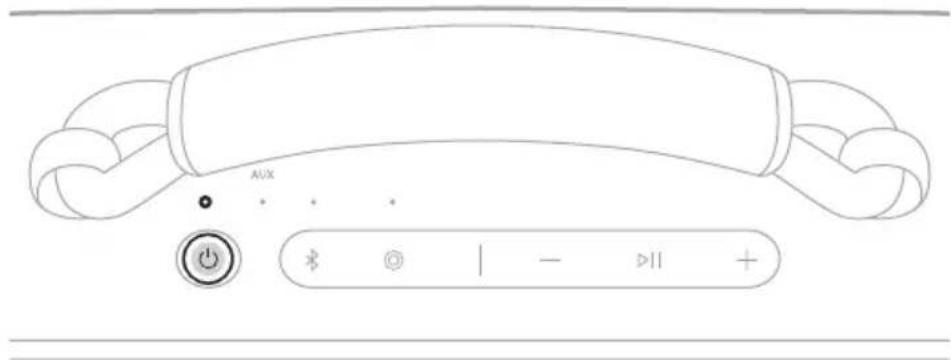
TIP: You can also power off the speaker using the Bose app. You can access this option on the product control screen.
Auto-off timer
The auto-off timer conserves the battery when the speaker is operating on battery power. The speaker switches off when audio has stopped and buttons have not been pressed for 20 minutes.
To wake the speaker, press the Power button ⏻ or the Bluetooth button ✝.
NOTE: To change the timer setting, use the Bose app. You can access this option from the Settings menu.
Disable the auto-off timer
Press and hold the Play/Pause button ▷|| and the Volume up + button simultaneously. You hear "Auto-off disabled."
Repeat to re-enable the auto-off timer.
TIP: You can also disable the auto-off timer using the Bose app.
MEDIA PLAYBACK AND VOLUME
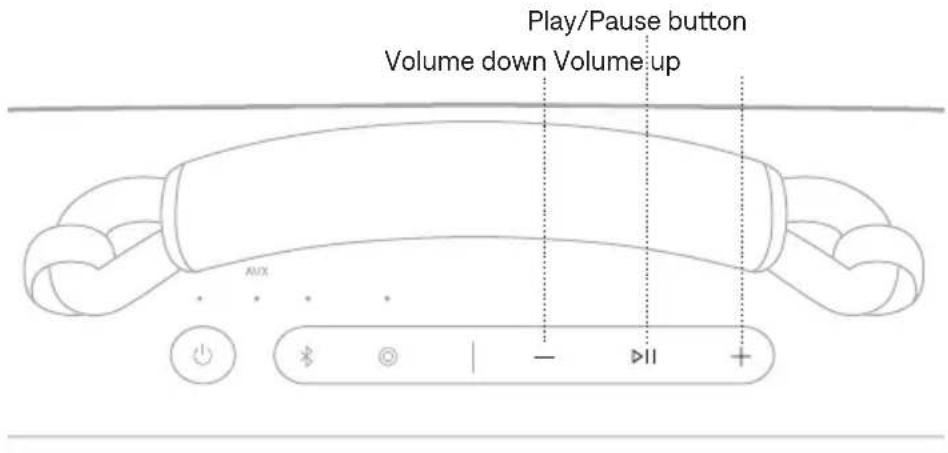
FUNCTION WHAT TO DO
| Play/Pause Press ▷II. | |
| Skip forward Double-press ▷II. | |
| Skip backward Triple-press ▷II. | |
| Volume up | Press + NOTES:To quickly increase the volume, press and hold+.When the maximum volume is reached, theBluetooth light or AUX light (depending on your source) blinks white 2 times. |
| Volume down | Press — NOTES:To quickly decrease the volume, press and hold—.When the minimum volume is reached, theBluetooth light or AUX light (depending on your source) blinks white 2 times. |
TIP: You can also increase or decrease the volume using the volume controls on your device or in the Bose app. You can access this option on the product control screen.
The programmable Shortcut button @enables you to quickly and easily access one of the following functions:
- Switch to wired connection (default)
- Access Spotify
USE YOUR SHORTCUT
Press the Shortcut button ©
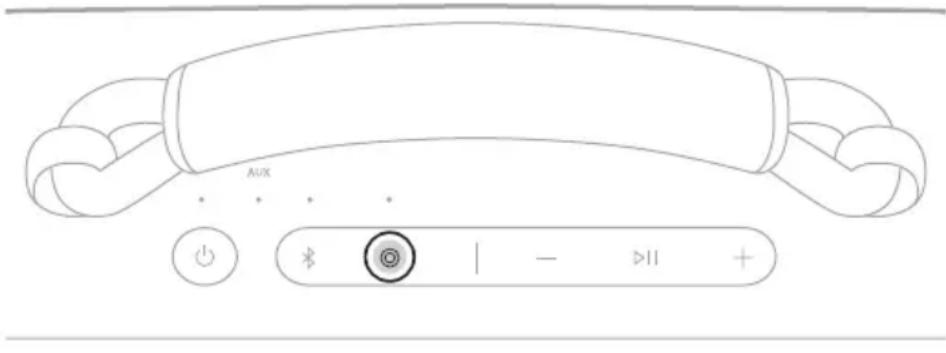
CHANGE OR DISABLE YOUR SHORTCUT
To change or disable your shortcut, use the Bose app. To access this option, tap Shortcut on the product control screen.
To switch back to a Bluetooth connection, press the Bluetooth button ✝.
CHARGE THE SPEAKER
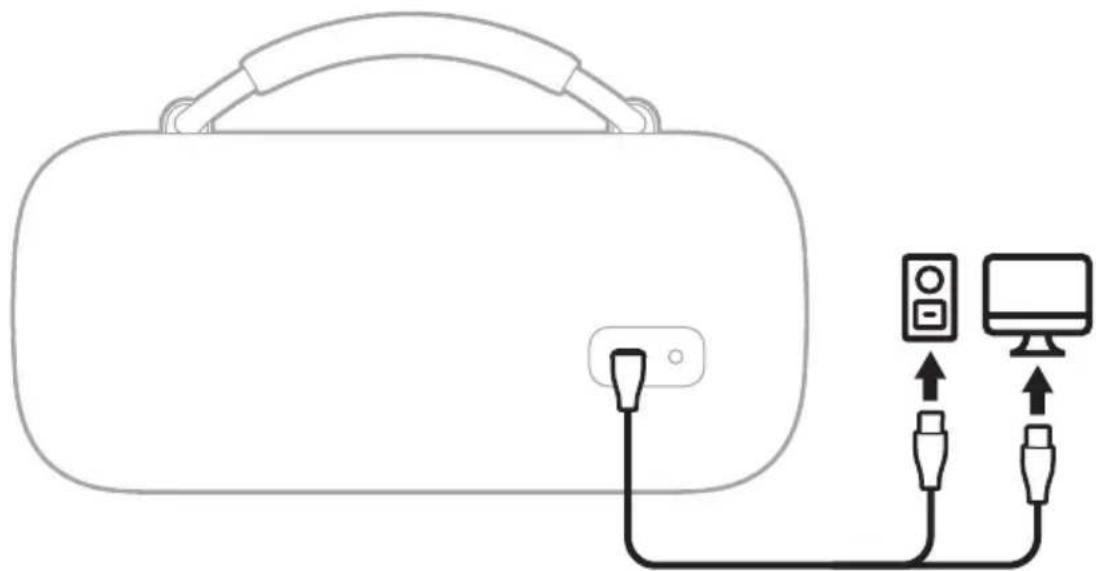
CAUTION: Do not attempt to charge the speaker while the speaker is wet. Doing so may cause damage to the speaker. The speaker is waterproof, but the USB-C port must be fully dried out before charging. If moisture is detected, the Power light slowly blinks white and amber (see page 26).
NOTE: Make sure you're using the Bose-provided USB-C cable or a similar USB-C cable providing a minimum of 5V =, 3A.
- Connect one end of the USB-C cable to the USB-C port on the back of the speaker.
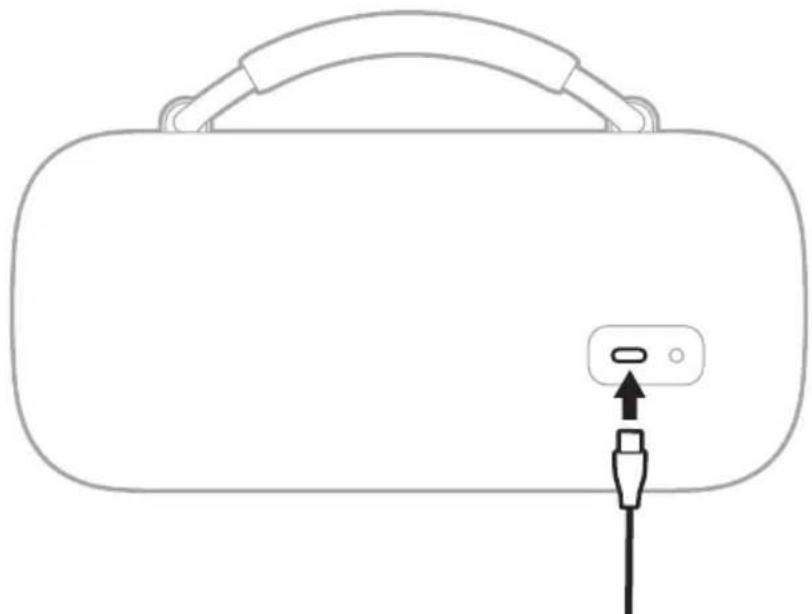
natural_image
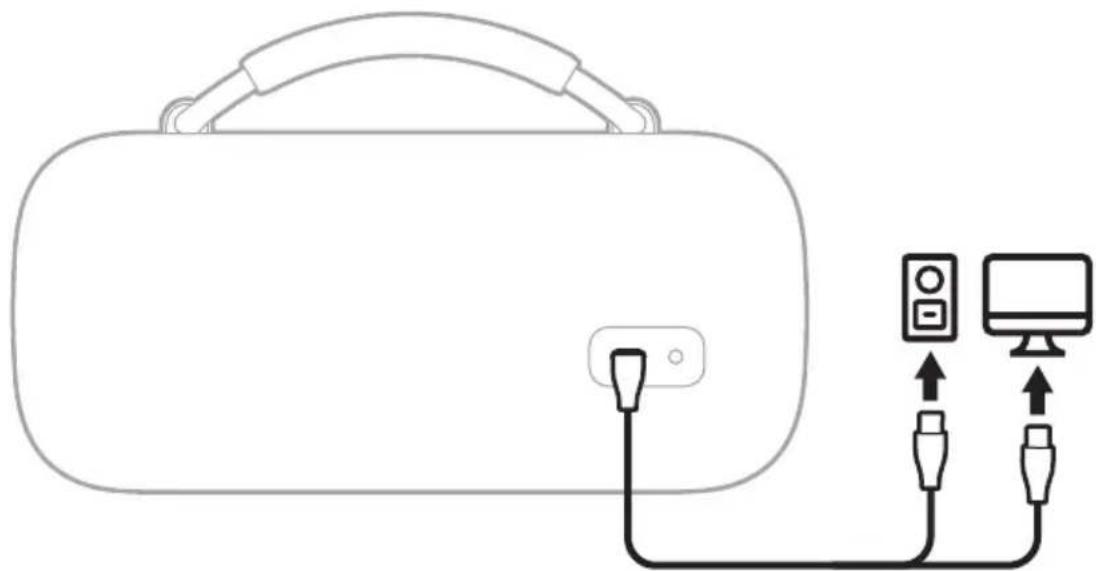
Line drawing of a device with a handle and plug inserted into a socket (no text or symbols)- Connect the other end of the cable to a power source such as a USB-C power supply or a computer.
natural_image
Line drawing of a VR headset connected to two connected devices (no text or symbols)The Power light slowly blinks white. When the battery is fully charged, the Power light glows solid white.
Charging time
Allow up to 5 hours to fully charge the battery ^1 .
A full charge powers the speaker up to 20 hours. ^2 At maximum volume, the battery lasts up to 3 hours. ^3
Charging time and battery performance vary with the USB power supply capability, music content, speaker volume, and if charging an external device.
Hear the battery level
Each time you power on the speaker, a voice prompt announces the battery level. When the speaker is in use, a voice prompt announces if the battery needs to be charged.
While using the speaker, press and hold the Power button ⏻ until you hear a voice prompt announce the battery level.
View the battery level
The Power light glows according to the battery level (see page 26).
NOTE: You can also view the battery level using the Bose app. You can access this option on the product control screen.
CHARGE YOUR DEVICE
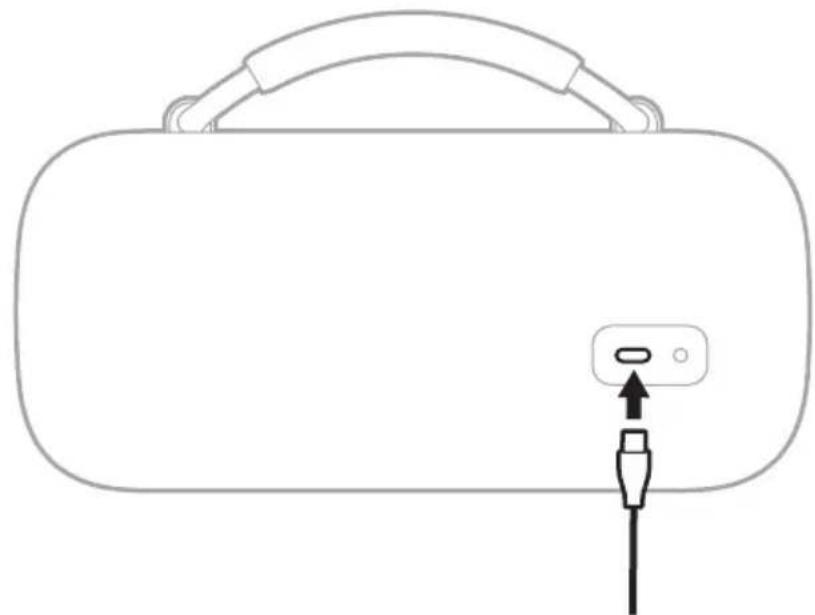
CAUTION: Do not attempt to charge your device while the speaker is wet. Doing so may cause damage to the speaker. The speaker is waterproof, but the USB-C port must be fully dried out before charging. If moisture is detected, the Power light slowly blinks white and amber (see page 26).
- Connect one end of the USB-C cable to the USB-C port on the back of the speaker.
natural_image
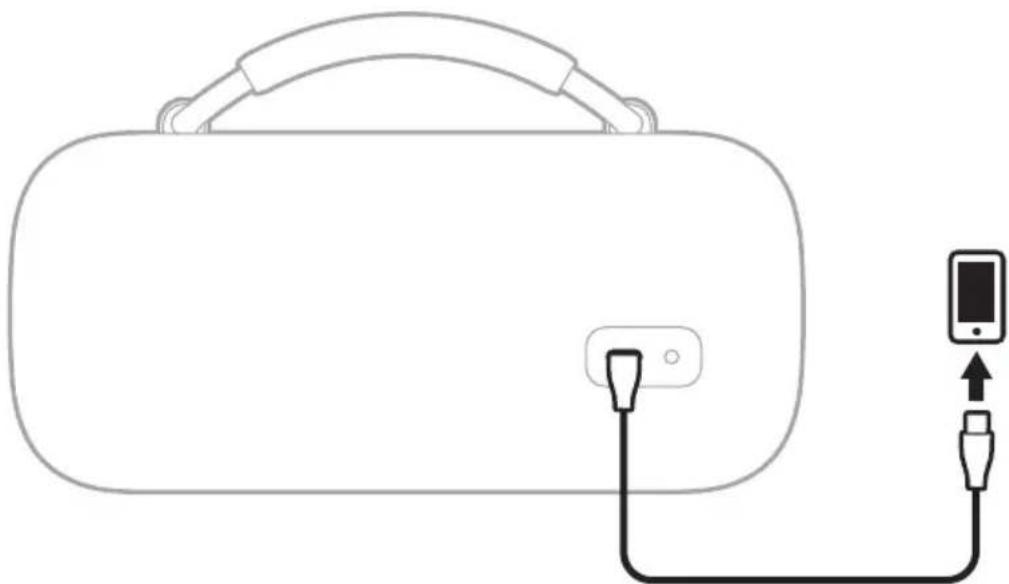
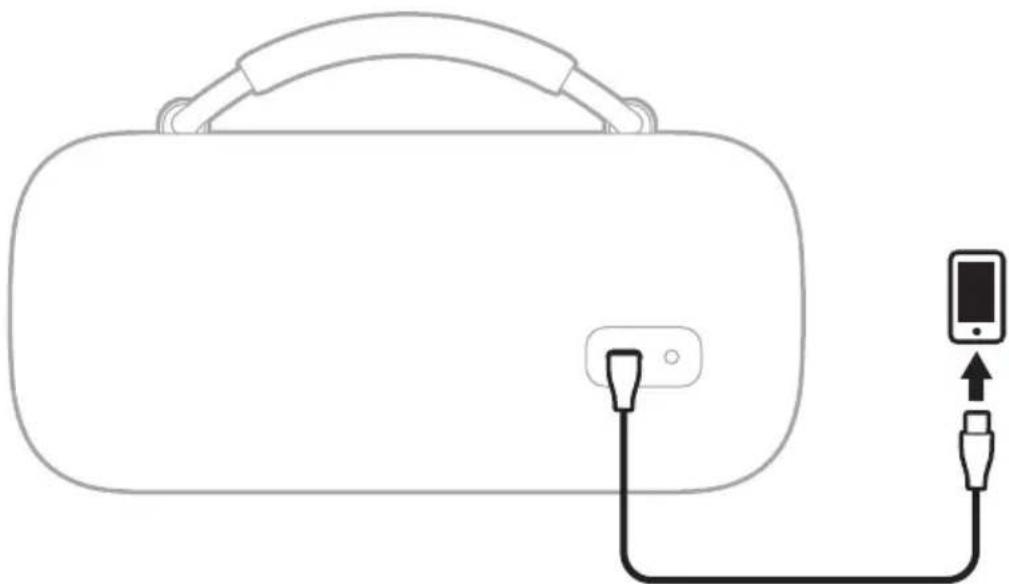
Line drawing of a device with a handle and plug inserted into a socket (no text or symbols)- Connect the other end of the cable to the USB-C port on your device.
natural_image
Line drawing of a device with a handle and plug, connected to a smartphone (no text or symbols)Charging status displays on your device.
The Power, AUX, Bluetooth, and Shortcut lights are located on the top of the speaker.
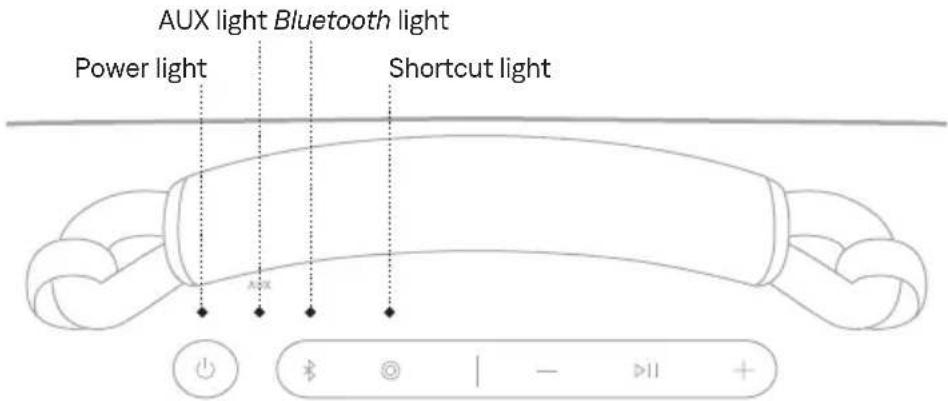
POWER LIGHT
Shows the battery, charging, update, and error status.
LIGHT ACTIVITY SYSTEM STATE
| Solid white Full charge | |
| Solid amber Low charge | |
| Blinks amber Need to charge | |
| Slowly blinks white Charging | |
| Blinks white 3 times (repeated) Updating software (wirelessly) | |
| Quickly blinks white (10 seconds) Updating software (USB-C port) | |
| Quickly blinks white (3 seconds) Restore complete | |
| Slowly blinks white and amber(alternating) | Moisture detected - fully dry the USB-C port before charging |
| Quickly blinks white and amber(alternating) | Error - contact Bose customer service |
BLUETOOTH LIGHT
Shows the Bluetooth connection status.
LIGHT ACTIVITY SYSTEM STATE
| Slowly blinks blue Ready to connect | |
| Quickly blinks blue Connecting | |
| Solid white Connected | |
| Blinks white 2 times Device list cleared |
AUX LIGHT
Shows the AUX connection status.
LIGHT ACTIVITY SYSTEM STATE
| Solid white Connected |
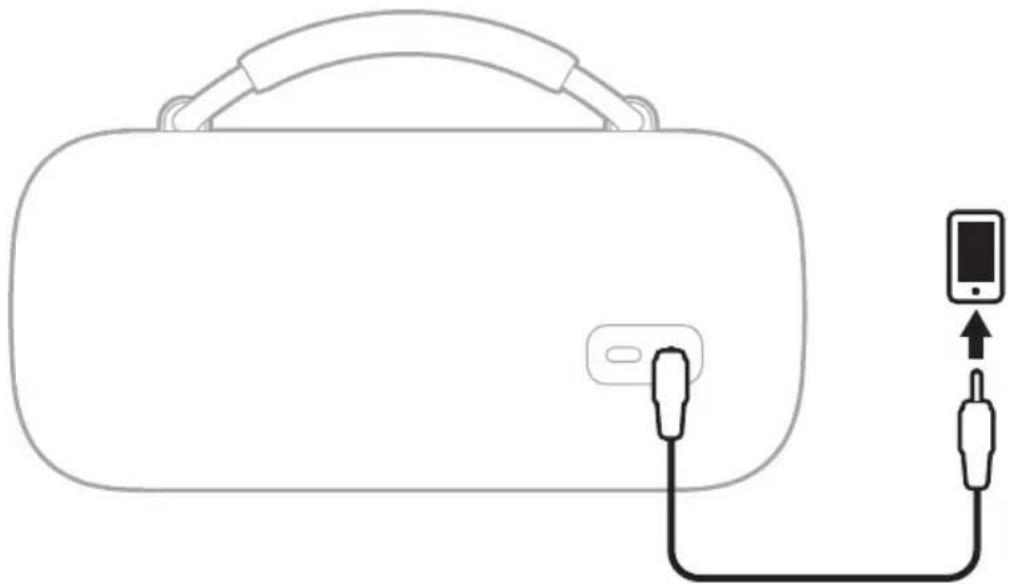
CONNECT AN AUDIO CABLE
You can connect an audio cable (not provided) to the speaker to listen to audio on your device.
Connect one end of an audio cable to the 3.5 mm port on the back of the speaker and the other end to the port on your device.
natural_image
Line drawing of a device with a handle and plug, connected to a smartphone (no text or symbols)The AUX light glows solid white.
NOTE: To switch to a Bluetooth connection, press the Bluetooth button ✝. To switch back to a wired connection, press the Shortcut button Ⓞ or disconnect then reconnect the audio cable.
CONNECT TO A BOSE SMART SPEAKER OR SOUNDBAR
With Bose SimpleSync technology, you can connect the speaker to a Bose Smart Speaker or Bose Smart Soundbar to listen to the same audio in two different rooms at the same time.
NOTE: SimpleSync technology has a Bluetooth range of up to 30 ft (9 m). Walls and construction materials can affect reception.
Compatible products
You can connect the speaker to any Bose Smart Speaker or Bose Smart Soundbar.
Popular compatible products include:
- Bose Smart Ultra Soundbar/Bose Ultra Soundbar
- Bose Smart Soundbar 900
- Bose Smart Soundbar 700/Bose Soundbar 700
- Bose Smart Soundbar 600
- Bose Soundbar 500
- Bose Smart Speaker 500/Bose Home Speaker 500
- Bose Home Speaker 300
- Bose Portable Smart Speaker/Bose Portable Home Speaker
New products are added periodically. For a complete list and more information, visit: ____support.Bose.com/Groups
Connect using the Bose app
- Press and hold the Bluetooth button ✝ until you hear "Ready to connect" and the Bluetooth light slowly blinks blue.
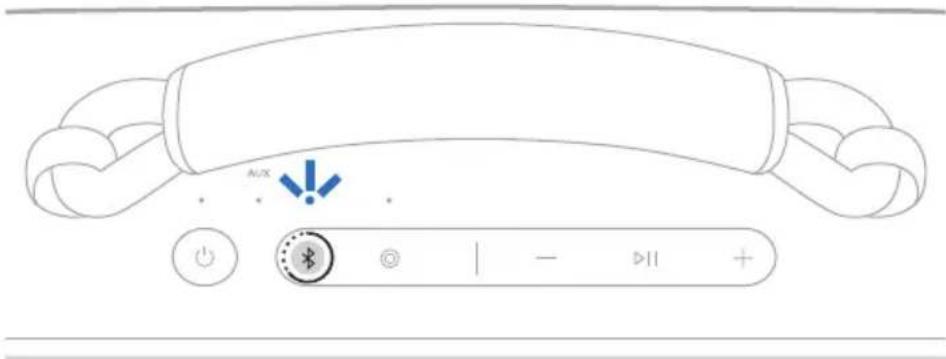
NOTE: If a device is already connected, you hear "Ready to connect another device."
- Use the Bose app to connect the speaker to a compatible Bose product. For more information, visit: ____ support.Bose.com/Groups
NOTES:
- It could take up to 30 seconds to connect.
• Make sure that the speaker is within 30 ft (9 m) of your speaker or soundbar. - You can connect the speaker to only one product at a time.
Connect using the product controls
- Press and hold the Bluetooth button ✝ until you hear "Ready to connect" and the Bluetooth light slowly blinks blue.
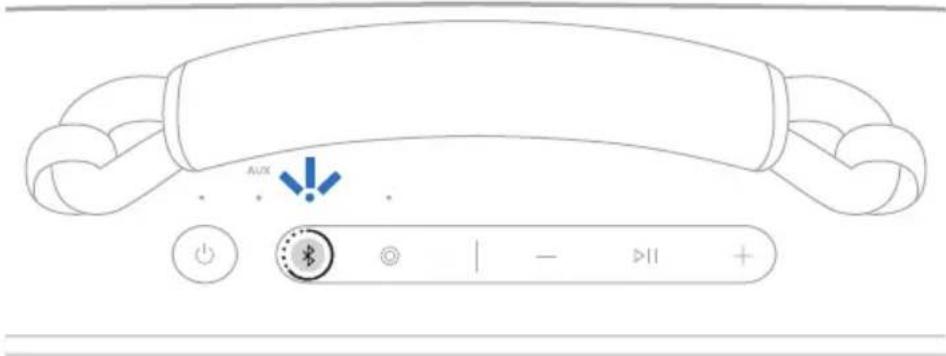
NOTE: If a device is already connected, you hear "Ready to connect another device."
- On your soundbar remote or the top of your speaker, press and hold the Bluetooth button until the light bar or light ring pulses blue.
The speaker connects to your soundbar or speaker, and you hear the same audio through both devices.
NOTES:
- It could take up to 30 seconds to connect.
• Make sure that the speaker is within 30 ft (9 m) of your speaker or soundbar. - You can connect the speaker to only one product at a time.
RECONNECT TO A BOSE SMART SPEAKER OR SOUNDBAR
Use the Bose app to reconnect the speaker to a previously-connected compatible Bose product. For more information, visit: ____ support.Bose.
NOTES:
- Your speaker or soundbar must be within range (30 ft or 9 m) and powered on.
- If the speaker doesn't connect, see "Speaker doesn't reconnect to a previously-connected Bose Smart Speaker or Soundbar" on page 38.
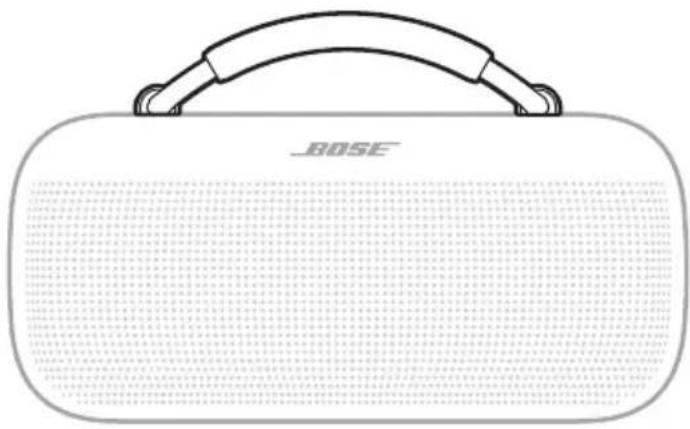
You can use the handle to easily carry the speaker.
natural_image
Illustration of a BOSE-branded cassette guitar with handle and mesh texture (no text or symbols on body)You can also replace the handle with a new handle or carry strap.
To order these optional accessories, visit: support.Bose.com/sl-max
REMOVE THE HANDLE
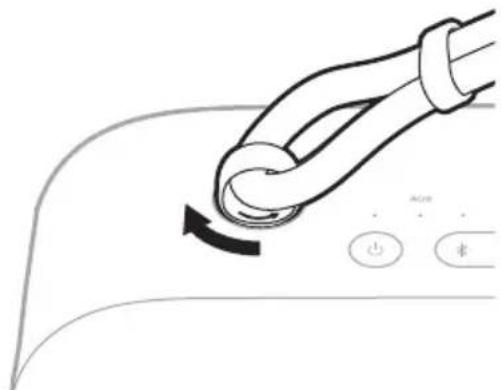
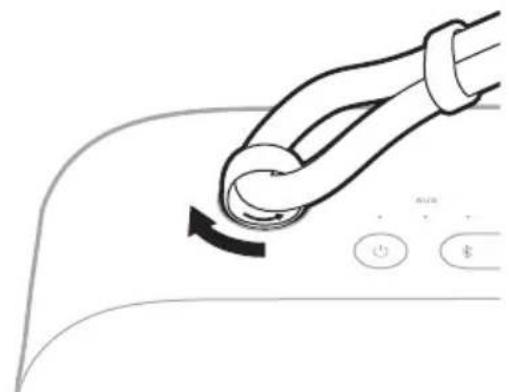
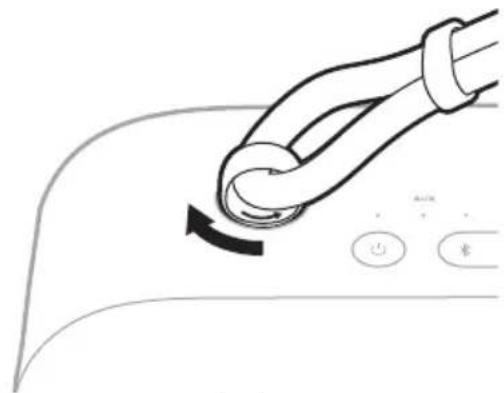
- Firmly turn the grommet on the end the handle to the left (counter-clockwise) _4 turn.
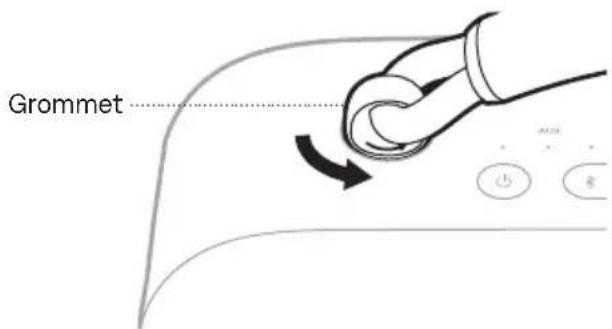
- Lift to remove the handle from the speaker.
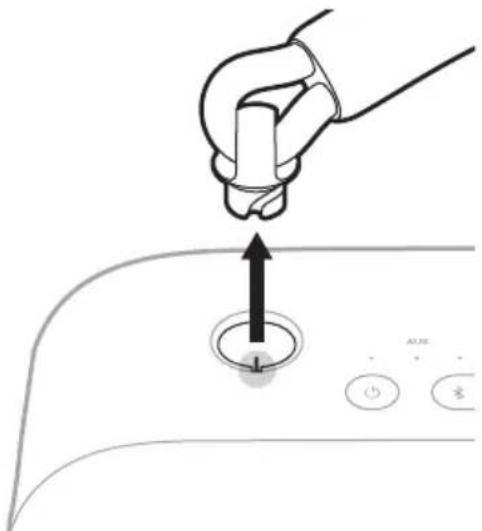
- Repeat steps 1 - 2 to remove the other side of the handle.
ATTACH A NEW HANDLE OR CARRY STRAP
- Align the notches in the grommet with the contacts in the opening and place the grommet inside the speaker.
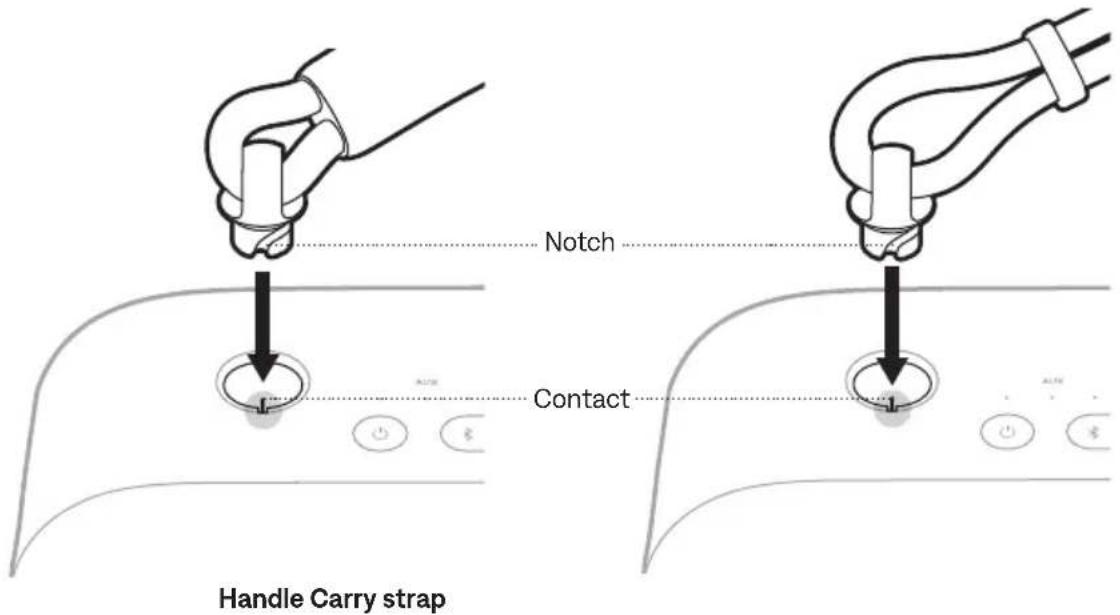
- Turn the grommet to the right (clockwise) 14 turn until you feel a click.
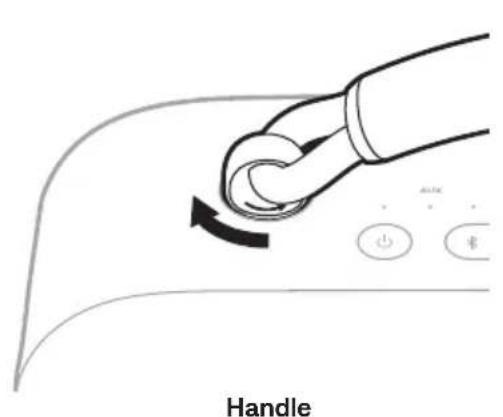
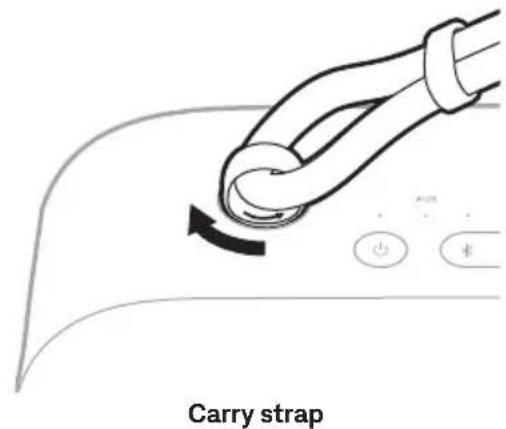
- Repeat steps 1 - 2 to attach the other side of the handle or carry strap.
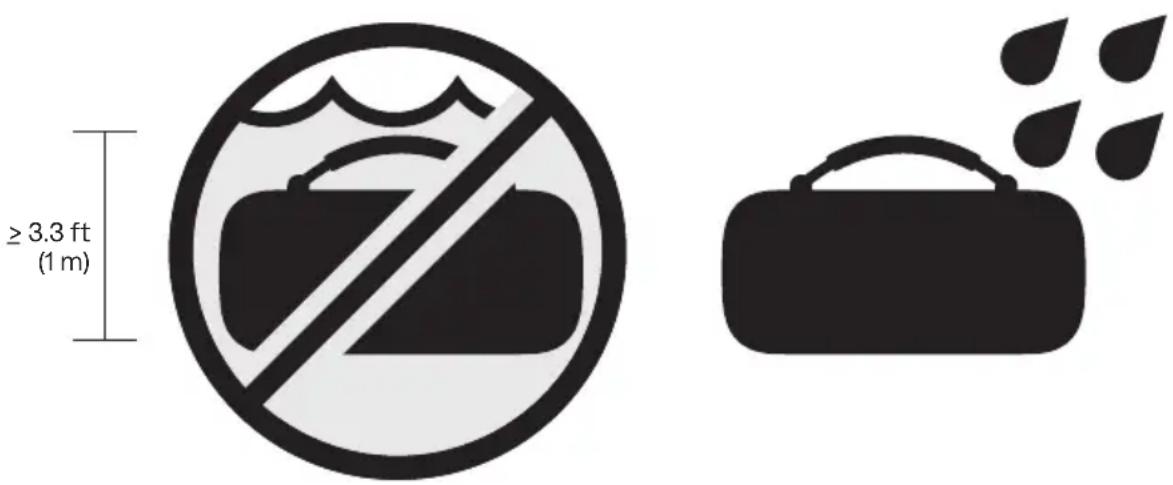
The speaker is waterproof, splash resistant, and dustproof. It's rated IP67 and IP64. You can submerge the speaker in water for up to 30 minutes at a depth of up to 3.3 ft (1 m). It can also be used while showering and in the rain or snow.
CAUTIONS:
- Do NOT submerge this speaker in any pool of water deeper than 3.3 ft (1 m).
- Avoid playing audio while the speaker is submerged.
- If the speaker is exposed to salt or chlorinated water, gently rinse with fresh water following the exposure to remove residue.
- Never attempt to charge the speaker or your device while the speaker is wet. Doing so may cause damage to the speaker. The speaker is waterproof, but the USB-C port must be fully dried out before charging. If moisture is detected, the Power light slowly blinks white and amber (see page 26).
UPDATE THE SPEAKER
The speaker begins updating automatically when connected to the Bose app and an update is available. Follow the app instructions. When the update begins, the Power light blinks white 3 times (repeated) until the update is complete.
You can also update the speaker using the Bose updater website. On your computer, visit: ____ btu.Bose.com and follow the on-screen instructions. When the update beg the Power light quickly blinks white for 10 seconds.
CLEAN THE SPEAKER
The speaker may require periodic cleaning.
- Clean the surface of the speaker with a soft, damp cloth (water only). Make sure the USB-C port is fully dried out before charging. If moisture is detected, the Power light slowly blinks white and amber (see page 26).
- Do not use any solvents, chemicals, or cleaning solutions containing alcohol, ammonia, or abrasives.
- If the speaker is exposed to salt or chlorinated water, gently rinse with fresh water following the exposure to remove residue.
STORE THE SPEAKER
When not in use, store the speaker in a cool place.
CAUTION: Do NOT store the speaker for extended periods when the battery is fully charged or has a low charge (see page 26).
REPLACEMENT PARTS AND ACCESSORIES
Replacement parts and accessories can be ordered through Bose customer service.
Visit: ____support.Bose.com/sl-max
LIMITED WARRANTY
The speaker is covered by a limited warranty. Visit our website at worldwide.Bose.com/Warranty for details of the limited warranty.
To register your product, visitworldwide.Bose.com/ProductRegistration for instructions. Failure to register will not affect your limited warranty rights.
TRY THESE SOLUTIONS FIRST
If you experience problems with the speaker:
• Power the speaker off and then on again (see page 19).
- Charge the speaker (see page 23).
- Check the status lights (see page 26).
- Make sure your device supports Bluetooth connections (see page 12).
- Increase the volume on the speaker, your device, and your music app.
- Move your device closer to the speaker (30 ft or 9 m) and away from any interference or obstructions.
- Connect another device (see page 12).
If you couldn't resolve your issue, see the table below to identify symptoms and solutions to common problems. You can also access troubleshooting articles, videos, and other resources at: ____support.Bose.com/sl-max
If you're unable to resolve your issue, contact Bose customer service.
Visit: ____ worldwide.Bose.com/contact
OTHER SOLUTIONS
SYMPTOM SOLUTION
| No power (battery) | Battery may be in protection mode or discharged. Connect the speaker to a power source (see page 23). |
| Speaker doesn’t connect with device | Clear the speaker device list (see page 16). Delete the speaker from the Bluetooth list on your device, including any duplicate listings labeled LE (Low Energy). Connect again (see page 12).Visit:support.Bose.com/sl-maxto see how-to videos. |
| Speaker doesn’t respond to multi-press functions | Vary the speed of presses. |
| No sound | Make sure voice prompts are on using the Bose app. Press the Bluetooth button & and release to hear the connected device.Make sure you’re using the correct device.Use a different music source.If two devices are connected, pause audio on the first device and play audio on the other device. |
SYMPTOM SOLUTION
| Poor sound quality from device connected by Bluetooth connection | Use a different music source.If two devices are connected, disconnect the second device.Disable any audio enhancement features on the device or music app.If the speaker was exposed to water, wait for the speaker to dry and try again. |
| Poor sound quality from a device connected by an audio cable | Make sure both ends of the audio cable are secure (see page 28).Disable any audio enhancement features on the device or music app.Try another audio cable (see page 28). |
| No sound from a device connected by an audio cable | Make sure both ends of the audio cable are secure (see page 28).Press play on your device to make sure audio is playing.Play audio from a different application or music service.Play audio from content stored directly on your device.Increase the volume on the speaker, then increase the volume on your device.Try another audio cable (see page 28).Restart your device. |
| Delayed audio | Play audio from a different application or music service.Close and re-open the application or music service.Try an audio cable (see page 28). |
| Speaker doesn't charge | Make sure both ends of the USB-C cable are secure (see page 23).Make sure you're using the Bose-provided USB-C cable or a similar USB-C cable providing a minimum of 5V ---, 3A.Try another charging source.If the speaker has been exposed to high or low temperatures, let it return to room temperature and then try charging again.If the speaker was exposed to water, wait for the speaker to dry and try again.Reset the speaker (see page 39). |
SYMPTOM SOLUTION
| Mobile device doesn't charge | Make sure both ends of the USB-C cable are secure (see page 25).If the speaker was exposed to water, wait for the speaker to dry and try again.Make sure your device can receive a charge from another device. Refer to your mobile device owner's guide.Disconnect the USB-C cable from the speaker and then reconnect. If your device still doesn't charge, disconnect the USB-C cable from your device and reconnect. If you're unable to resolve your issue, refer to your device owner's guide. |
| Speaker doesn't connect to a Bose Smart Speaker or Soundbar | Make sure you're using the Bose app (see page 13).Make sure your Bose Smart Speaker or Soundbar is running the latest software. Use the Bose app and run available software updates.Make sure you're connecting to a compatible Bose product. For a list of compatible products, visit: ____support.Bose.coPress and hold the Bluetooth button ✝ until you hear "Ready to connect" or "Ready to connect another device" and the Bluetooth light slowly blinks blue.Make sure that the speaker is within 30 ft (9 m) of your soundbar or speaker. |
| Speaker doesn't reconnecttoa previously-connected Bose Smart Speaker or Soundbar | On the speaker, press and hold the Bluetooth button ✝ until the Bluetooth light slowly blinks blue, and you hear "Ready to connect another device." Use the Bose app to connect the speaker to a compatible Bose product. For more information, visit: ____support.Bose.com/Groups |
| Delayed audio when connected to Bose Smart Speaker or Soundbar | Download the Bose app (see page 13) and run available softwareupdates.On a computer, check____ btu.Bose.com for USB updates. |
RESET THE SPEAKER
If the speaker is unresponsive, you can reset it.
Resetting the speaker resets the product controls and reboots the speaker. It doesn't clear any device settings.
NOTE: Make sure the USB-C cable isn't connected to the speaker.
- Press and hold the Power button ⏻ for up to 30 seconds until the speaker powers off.
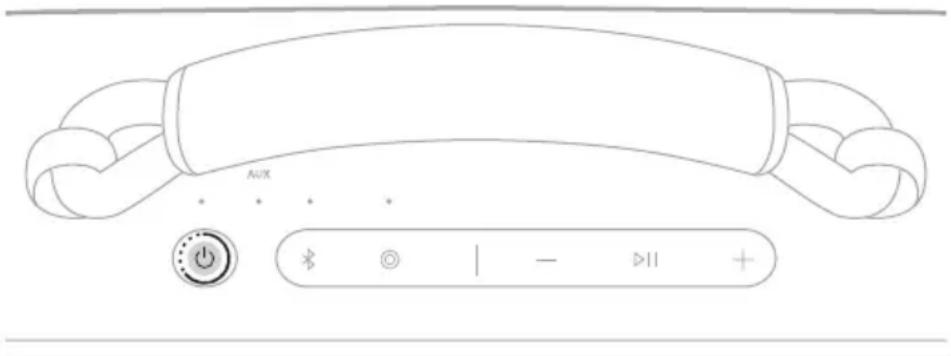
- Press the Power button ⏻.
The Power light glows according to the battery level (see page 26).
NOTES:
- If the USB-C cable is connected, you must remove it before you can reset the speaker.
- If you're unable to resolve your issue, additional troubleshooting and support is available at: ____ support.Bose.com/sl-max
RESTORE THE SPEAKER
Factory reset clears connected devices and language settings from the speaker and returns it to the original factory settings.
- Press and hold the Volume up button + and Volume down button — for 15 seconds until the Power light quickly blinks white for 3 seconds.
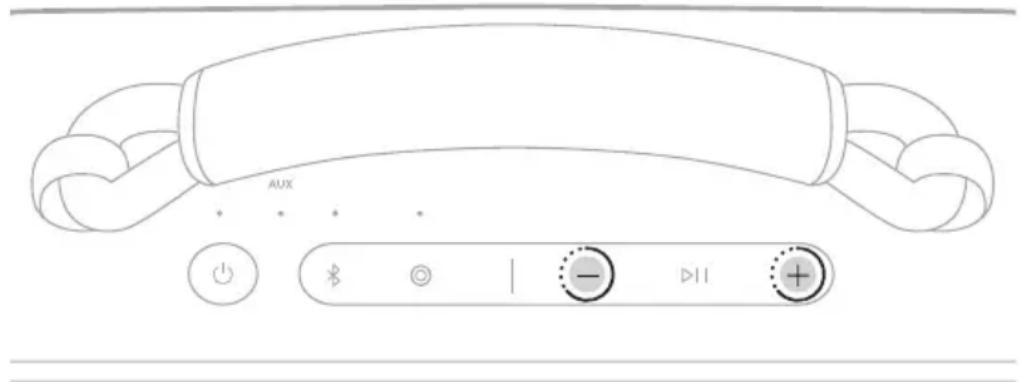
The speaker powers off.
- Press the Power button ⏻.
The Power light glows according to the battery level (see page 26). The Bluetooth light slowly blinks blue, and you hear “Ready to connect.”
NOTE: If you're unable to resolve your issue, additional troubleshooting and support is available at: ____support.Bose.com/sl-max
TILSLUT PRODUKTER FRA BOSE
Opret forbindelse til en Bose Smart Speaker eller Soundbar 29
Kompatible produkter.... 29
natural_image
Line drawing of a device with a connector inserted into a slot (no text or symbols)natural_image
Line drawing of a device with a plug and cable, no text or symbols presentSKIFT ELLER DEAKTIVER DIN GENVEJ
natural_image
Line drawing of a device with a handle and plug inserted into a socket (no text or symbols)natural_image
Line drawing of a VR headset connected to two connected devices (no text or symbols)natural_image
Line drawing of a device with a handle and plug inserted into a socket (no text or symbols)natural_image
Line drawing of a device with a handle and plug, connected to a smartphone (no text or symbols)natural_image
Line drawing of a device with a handle and plug, connected to a smartphone (no text or symbols)natural_image
Exterior view of a Boise brand airbox with handle and grid pattern (no text or symbols on body)natural_image
Hand holding a cylindrical object above a circular control dial with an arrow, no text or symbols presentnatural_image
Line drawing of a portable electronic device with a cable inserted into the socket (no text or symbols)natural_image
Line drawing of a device with a plug and cable, connected to an output port (no text or symbols)ENTFERNEN ODER ÄNDERN IHRES SHORTCUTS
natural_image
Line drawing of a device with a handle and plug, no text or symbols presentnatural_image
Line drawing of a VR headset connected to two connected devices (no text or symbols)natural_image
Line drawing of a device with a handle and plug inserted into a slot (no text or symbols)natural_image
Line drawing of a device with a handle and plug, connected to a smartphone (no text or symbols)natural_image
Line drawing of a device with a handle and plug, connected to a smartphone (no text or symbols)natural_image
Exterior view of a Boise brand airbox with handle and grid pattern (no text or symbols on body)natural_image
Line drawing of a device with a handle and plug, no text or symbols presentnatural_image
Line drawing of a device with a handle and plug, connected to a USB port (no text or symbols)natural_image
Line drawing of a portable electronic device with a cable inserted into the socket (no text or symbols)natural_image
Line drawing of a VR headset connected to two connected devices (no text or symbols)natural_image
Line drawing of a device with a handle and plug inserted into a slot (no text or symbols)natural_image
Line drawing of a device with a handle and plug, connected to a smartphone (no text or symbols)natural_image
Line drawing of a device with a handle and plug, connected to a smartphone (no text or symbols)natural_image
Exterior view of a BOSE-branded cassette guitar with handle and mesh grille (no text or symbols on body)natural_image
Line drawing of a BOSE-branded audio amplifier device with handle and grid-patterned body (no text or symbols beyond branding)natural_image
Line drawing of a device with a handle and plug, no text or symbols presentnatural_image
Line drawing of a device with a plug and cable, no text or symbols presentnatural_image
Line drawing of a portable electronic device with a cable inserted into the socket (no text or symbols)natural_image
Line drawing of a VR headset connected to two connected devices (no text or symbols)natural_image
Line drawing of a device with a handle and plug inserted into a slot (no text or symbols)natural_image
Line drawing of a device with a handle and plug, connected to a smartphone (no text or symbols)natural_image
Line drawing of a device with a handle and plug, connected to a smartphone (no text or symbols)natural_image
Front view of a Boise brand light case with handle and grid pattern (no text or symbols on body)Visite: worldwide.Bose.com/contact
OTRAS SOLUCIONES
SÍNTOMA SOLUCIÓN
natural_image
Line drawing of a device with a connector inserted into a slot (no text or symbols)natural_image
Line drawing of a device with a cable and two connected ports (no text or symbols)3. Paina virtapainiketta ⏻.
TOIMINTO TOIMINTAOHJEET
PIKAVALINNAN VAIHTAMINEN TAI POISTAMINEN KÄYTÖSTÄ
natural_image
Line drawing of a device with a handle and plug inserted into a socket (no text or symbols)natural_image
Line drawing of a VR headset connected to two connected devices (no text or symbols)natural_image
Line drawing of a device with a handle and plug inserted into a slot (no text or symbols)natural_image
Line drawing of a device with a handle and plug, connected to a smartphone (no text or symbols)natural_image
Line drawing of a device with a handle and plug, connected to a smartphone (no text or symbols)natural_image
Front view of a Boise brand electronic device with a handle and grid-patterned cover (no text or symbols on body)natural_image
Hand holding a cylindrical object above a circular dial with an arrow, pointing upward (no text or symbols visible)Enceinte portable Bose SoundLink Max Bloc d'alimentation USB Type-C®
natural_image
Line drawing of a portable electronic device with a plug inserted into the socket (no text or symbols)natural_image
Line drawing of a device with a plug and cable, no text or symbols presentMISE SOUS/HORS TENSION
natural_image
Line drawing of a device with a handle and plug, no text or symbols presentnatural_image
Line drawing of a VR headset connected to two connected devices (no text or symbols)natural_image
Line drawing of a device with a handle and plug, no text or symbols presentnatural_image
Line drawing of a device with a handle and plug, connected to a smartphone (no text or symbols)natural_image
Line drawing of a device with a handle and plug, connected to a smartphone (no text or symbols)natural_image
Illustration of a BOSE-branded audio device with a handle and grid-patterned cover (no text or symbols on body)natural_image
Hand holding a cylindrical object above a circular dial with an arrow, pointing upward (no text or symbols visible)Poignée
natural_image
Diagram of a hand holding a curved pipe with an arrow indicating clockwise motion, no text or symbols presentSangle de transport
natural_image
Line drawing of a device with a connector inserted into a slot (no text or symbols)natural_image
Line drawing of a device with a cable and two connected ports (no text or symbols)FUNZIONE AZIONE
CAMBIARE O DISABILITARE LA SCELTA RAPIDA
natural_image
Line drawing of a device with a handle and plug, no text or symbols presentnatural_image
Line drawing of a VR headset connected to two connected devices (no text or symbols)natural_image
Line drawing of a device with a handle and plug inserted into a slot (no text or symbols)natural_image
Line drawing of a device with a handle and plug, connected to a smartphone (no text or symbols)natural_image
Line drawing of a device with a handle and plug, connected to a smartphone (no text or symbols)support.Bose.com/Groups
NOTE:
natural_image
Illustration of a BOSE-branded cassette guitar with handle and grid pattern (no text or symbols on body)Visitare: worldwide.Bose.com/contact
ALTRE SOLUZIONI
SINTOMO SOLUZIONE
natural_image
Line drawing of a device with a handle and plug, no text or symbols presentnatural_image
Line drawing of a device with a cable and two connected ports (no text or symbols)A GYORSFUNKCIÓ MÓDOSÍTÁSA VAGY LETILTÁSA
natural_image
Line drawing of a device with a handle and plug, no text or symbols presentnatural_image
Line drawing of a VR headset connected to an audio device via cable (no text or symbols)natural_image
Line drawing of a device with a handle and plug inserted into a socket (no text or symbols)natural_image
Line drawing of a device with a handle, plug, and connected cable (no text or symbols)natural_image
Line drawing of a device with a handle and plug, connected to a smartphone (no text or symbols)natural_image
Exterior view of a BOSE-branded electronic device with handle and grid pattern (no text or symbols on body)KOBLE TIL BOSE-PRODUKTER
Koble til Bose Smart Speaker eller Soundbar 29
Kompatible produkter.... 29
Koble til med Bose-appen 30
STELL OG VEDLIKEHOLD
natural_image
Line drawing of a device with a handle and plug, no text or symbols presentnatural_image
Line drawing of a device with a connector and cable, no text or symbols presentKOBLE TIL EN ENHET PÅ NYTT
Koble til den sist tilkoblede enheten på nytt
ENDRE ELLER DEAKTIVERE SNARVEIEN
natural_image
Line drawing of a device with a plug inserted into a slot (no text or symbols)- Koble den andre enden av kabelen til en strømkilde, for eksempel en USB-C-strømforsyning eller en datamaskin.
natural_image
Line drawing of a VR headset connected to two connected devices (no text or symbols)natural_image
Line drawing of a device with a handle and plug inserted into a socket (no text or symbols)- Koble den andre enden av kabelen til USB-C-porten på enheten.
natural_image
Line drawing of a device with a handle and plug, connected to a smartphone (no text or symbols)Ladestatusen vises på enheten.
KOBLE TIL EN LYDKABEL
natural_image
Line drawing of a device with a handle and plug, connected to a smartphone (no text or symbols)AUX-indikatoren lyser hvitt.
KOBLE TIL EN BOSE SMART SPEAKER ELLER SOUNDBAR PÅ NYTT
natural_image
Exterior view of a Boise brand light case with handle and grid pattern (no text or symbols on body)natural_image
Hand holding a cylindrical object above a circular dial with an arrow, pointing to a button (no text or symbols visible)KONFIGURACJA WSTĘPNA
natural_image
Line drawing of a device with a plug inserted into a slot (no text or symbols)natural_image
Line drawing of a device with a cable and two connected ports (no text or symbols)FUNKCJA PROCEDURA
ZMIANA LUB WYŁĄCZENIE SKRÓTU
natural_image
Line drawing of a portable electronic device with a cable inserted into the socket (no text or symbols)natural_image
Line drawing of a VR headset connected to two connected devices (no text or symbols)natural_image
Line drawing of a device with a handle and plug inserted into a socket (no text or symbols)natural_image
Line drawing of a device with a handle, plug, and connected plug (no text or symbols)natural_image
Line drawing of a device with a handle and plug, connected to a smartphone (no text or symbols)natural_image
Exterior view of a BOSE brand light bulb device (no text or symbols on body)worldwide.Bose.com/Warranty.
ANSLUTA BOSE-PRODUKTER
Anslut till en Bose Smart Speaker eller soundbarhögtalare.... 29
Kompatibla produkter.... 29
natural_image
Line drawing of a device with a connector inserted into a slot (no text or symbols)natural_image
Line drawing of a device with a plug and cable, no text or symbols presentBYT ELLER INAKTIVERA GENVÄGEN
natural_image
Line drawing of a device with a handle and plug inserted into a socket (no text or symbols)natural_image
Line drawing of a VR headset connected to two connected devices (no text or symbols)natural_image
Line drawing of a device with a handle and plug inserted into a socket (no text or symbols)natural_image
Line drawing of a device with a handle, plug, and connected plug (no text or symbols)natural_image
Line drawing of a device with a handle and plug, connected to a smartphone (no text or symbols)natural_image
Exterior view of a Boise brand light case with handle and grid pattern (no text or symbols on body)UPPDATERA HÖGTALAREN
natural_image
Line drawing of a BOSE brand portable speaker with handle and textured body (no text or symbols beyond branding)natural_image
Line drawing of a device with a handle and plug, no text or symbols presentnatural_image
Line drawing of a device with a plug and cable, connected to an audio jack (no text or symbols)- 전원 버튼 ⏻을 누릅니다.
natural_image
Line drawing of a device with a handle and plug inserted into a socket (no text or symbols)natural_image
Line drawing of a VR headset connected to two connected devices (no text or symbols)natural_image
Line drawing of a device with a handle and plug inserted into a slot (no text or symbols)natural_image
Line drawing of a device with a handle and plug, connected to a small electronic device (no text or symbols)충전 상태가 장치에 표시됩니다.
natural_image
Line drawing of a device with a handle and plug, connected to a small screen (no text or symbols)natural_image
Line drawing of a BOSE brand light case with handle and grid pattern (no text or symbols beyond branding)natural_image
Hand holding a cylindrical object above a circular dial with an arrow, pointing upward (no text or symbols visible)손잡이
natural_image
Illustration of a hand holding a curved pipe with a black arrow indicating clockwise motion, next to control buttons (no text or symbols)휴대용 스트랩
natural_image
Line drawing of a Bose-branded audio amplifier device with handle and mesh grille (no text or symbols)Bose SoundLink Max 便携式扬声器
natural_image
Line drawing of a device with a handle and plug, no text or symbols presentnatural_image
Line drawing of a device with a plug and cable, connected to an output port (no text or symbols)- 按下电源按钮 ⏻。
natural_image
Line drawing of a device with a handle and plug, no text or symbols presentnatural_image
Line drawing of a VR headset connected to two connected devices (no text or symbols)natural_image
Line drawing of a device with a handle and plug inserted into a slot (no text or symbols)natural_image
Line drawing of a device with a handle and two connected cables (no text or symbols)设备上会显示充电状态。
natural_image
Line drawing of a device with a handle and connected plug, showing connection to a small screen (no text or symbols)AUX 指示灯发出稳定白色光。
natural_image
Product illustration of a BOSE brand light case with handle and grid pattern (no text or symbols on body)您也可以将拎手更换成新的拎手或手提带。
- 重复步骤1-2,取下另一侧拎手。
安装新的拎手或手提带
natural_image
Line drawing of a Bose-branded audio amplifier device with handle and mesh grille (no text or symbols)Bose SoundLink Max Portable Speaker
natural_image
Line drawing of a device with a handle and plug, no text or symbols presentnatural_image
Line drawing of a device with a plug and cable, connected to an output port (no text or symbols)3. 按下電源按鈕 ⏻。
natural_image
Line drawing of a device with a handle and plug inserted into a slot (no text or symbols)natural_image
Line drawing of a VR headset connected to two connected devices (no text or symbols)natural_image
Line drawing of a device with a handle and plug inserted into a socket (no text or symbols)natural_image
Line drawing of a device with a USB cable and connected to a smartphone (no text or symbols)裝置顯示充電狀態。
natural_image
Line drawing of a device with a handle and plug, connected to a smartphone (no text or symbols)AUX 指示燈將恆亮白色光。
natural_image
Illustration of a BOSE-branded electronic device with a handle and grid-patterned surface (no text or symbols on body)您也可以用新的提手或手提带替换提手。
如需訂購這些可選配件,請造訪 support.Bose.com/sl-max
取下提手
- 重複步驟1-2,取下另一側提手。
安装新的提手或手提带
natural_image
Line drawing of a BOSE-branded audio amplifier device with handle and mesh pattern (no text or symbols beyond branding)natural_image
Line drawing of a device with a connector inserted into a slot (no text or symbols)natural_image
Line drawing of a device with a cable and two connected ports (no text or symbols)- 電源ボタン ⏻を押します。
natural_image
Line drawing of a portable electronic device with a cable inserted into the socket (no text or symbols)natural_image
Line drawing of a VR headset connected to two connected devices (no text or symbols)natural_image
Line drawing of a device with a handle and plug inserted into a slot (no text or symbols)natural_image
Line drawing of a device with a handle and plug, connected to a smartphone (no text or symbols)機器に充電状態が表示されます。
natural_image
Line drawing of a device with a handle and connected to a small screen (no text or symbols)AUXインジケーターが白く点灯します。
natural_image
Exterior view of a Boise brand light switch (no text or symbols on the device body)natural_image
Line drawing of a BOSE-branded audio amplifier device with handle and textured body (no text or symbols beyond branding)Bose SoundLink Max Usage Resource USB Type
USB-C® كبل
natural_image
Line drawing of a device with a handle and plug, no text or symbols presentnatural_image
Line drawing of a device with a plug and cable, connected to an output port (no text or symbols)3 . . ⏻ قة
Android Exporting Bluetooth Exporting Bluetooth Exporting Bluetooth Exporting Bluetooth Exporting Bluetooth Exporting Bluetooth Exporting Bluetooth Exporting Bluetooth Exporting Bluetooth Exporting Bluetooth Exporting Bluetooth Exporting Bluetooth Exporting Bluetooth Exporting Bluetooth Exporting Bluetooth Exporting Bluetooth Exporting Bluetooth Exporting Bluetooth Exporting Bluetooth Exporting Bluetooth Exporting Bluetooth Exporting Bluetooth Exporting Bluetooth Exporting Bluetooth Exporting Bluetooth Exporting Bluetooth Exporting Bluetooth Exporting Bluetooth Exporting Bluetooth Exporting Bluetooth Exporting Bluetooth Exporting Bluetooth Exporting Bluetooth Exporting Bluetooth export
ملاحظات:
• أو أعلى A
لخاص بك.
natural_image
Line drawing of a device with a handle and plug inserted into a slot (no text or symbols)natural_image
Line drawing of a VR headset connected to two connected devices (no text or symbols)natural_image
Line drawing of a device with a handle and plug inserted into a slot (no text or symbols)natural_image
Line drawing of a VR headset connected to a device via cable (no text or symbols)natural_image
Line drawing of a device with a handle and connected plug, showing connections to a smartphone (no text or symbols)support.Bose.com/Groups
natural_image
Line drawing of a BOSE brand airbox with handle and grid pattern (no text or symbols)support.Bose.com/Slmax:الل PALBUNIYAN
إزالة المبيض
natural_image
Hand holding a knob above a circular dial with an arrow, pointing to a button (no text or symbols visible)natural_image
Hand holding a curved pipe with an arrow indicating clockwise motion, next to control buttons (no text or symbols)م伙伴关系
hzام حمل

- Please read and keep all safety and use instructions.
- Important Safety Instructions
- WARNINGS/CAUTIONS
- Please complete and retain for your records
- WHAT'S IN THE BOX
- GETTING STARTED
- BLUETOOTH® CONNECTIONS
- SPEAKER CONTROLS
- SHORTCUTS
- BATTERY
- STATUS
- WIRED CONNECTION
- CONNECT BOSE PRODUCTS
- PORTABILITY
- CARE AND MAINTENANCE
- TROUBLESHOOTING
- CONTENTS
- INITIAL SETUP
- Press the Power button ⏻.
- CONNECT TO A DEVICE
- Using your device's Bluetooth settings
- Using the Bose app
- RECONNECT TO A DEVICE
- Reconnect to the most recently-connected device
- NOTES:
- Reconnect to a different device
- CONNECT AN ADDITIONAL DEVICE
- IDENTIFY CONNECTED DEVICES
- SWITCH BETWEEN TWO CONNECTED DEVICES
- DISCONNECT A DEVICE
- CLEAR THE SPEAKER DEVICE LIST
- ANDROID DEVICES ONLY
- Connect using Fast Pair
- Snapdragon Sound technology
- POWER ON/OFF
- Auto-off timer
- Disable the auto-off timer
- MEDIA PLAYBACK AND VOLUME
- USE YOUR SHORTCUT
- CHANGE OR DISABLE YOUR SHORTCUT
- CHARGE THE SPEAKER
- Charging time
- Hear the battery level
- View the battery level
- CHARGE YOUR DEVICE
- POWER LIGHT
- BLUETOOTH LIGHT
- AUX LIGHT
- CONNECT AN AUDIO CABLE
- CONNECT TO A BOSE SMART SPEAKER OR SOUNDBAR
- Compatible products
- Connect using the Bose app
- Connect using the product controls
- RECONNECT TO A BOSE SMART SPEAKER OR SOUNDBAR
- REMOVE THE HANDLE
- ATTACH A NEW HANDLE OR CARRY STRAP
- CAUTIONS:
- UPDATE THE SPEAKER
- CLEAN THE SPEAKER
- STORE THE SPEAKER
- REPLACEMENT PARTS AND ACCESSORIES
- LIMITED WARRANTY
- TRY THESE SOLUTIONS FIRST
- OTHER SOLUTIONS
- RESET THE SPEAKER
- RESTORE THE SPEAKER
- TILSLUT PRODUKTER FRA BOSE
- SKIFT ELLER DEAKTIVER DIN GENVEJ
- ENTFERNEN ODER ÄNDERN IHRES SHORTCUTS
- OTRAS SOLUCIONES
- Paina virtapainiketta ⏻.
- PIKAVALINNAN VAIHTAMINEN TAI POISTAMINEN KÄYTÖSTÄ
- MISE SOUS/HORS TENSION
- CAMBIARE O DISABILITARE LA SCELTA RAPIDA
- NOTE:
- ALTRE SOLUZIONI
- A GYORSFUNKCIÓ MÓDOSÍTÁSA VAGY LETILTÁSA
- KOBLE TIL BOSE-PRODUKTER
- STELL OG VEDLIKEHOLD
- KOBLE TIL EN ENHET PÅ NYTT
- Koble til den sist tilkoblede enheten på nytt
- ENDRE ELLER DEAKTIVERE SNARVEIEN
- KOBLE TIL EN LYDKABEL
- KOBLE TIL EN BOSE SMART SPEAKER ELLER SOUNDBAR PÅ NYTT
- KONFIGURACJA WSTĘPNA
- ZMIANA LUB WYŁĄCZENIE SKRÓTU
- ANSLUTA BOSE-PRODUKTER
- BYT ELLER INAKTIVERA GENVÄGEN
- UPPDATERA HÖGTALAREN
- 安装新的拎手或手提带
- 按下電源按鈕 ⏻。
- 取下提手
- 安装新的提手或手提带
Brand : BOSE
Model : SoundLink Max
Category : Speaker