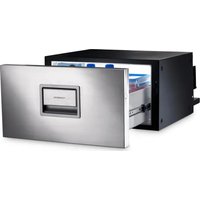
CoolMatic CD 20S - Fridge DOMETIC - Free user manual and instructions
Find the device manual for free CoolMatic CD 20S DOMETIC in PDF.


User questions about CoolMatic CD 20S DOMETIC
0 question about this device. Answer the ones you know or ask your own.
Ask a new question about this device
Download the instructions for your Fridge in PDF format for free! Find your manual CoolMatic CD 20S - DOMETIC and take your electronic device back in hand. On this page are published all the documents necessary for the use of your device. CoolMatic CD 20S by DOMETIC.
USER MANUAL CoolMatic CD 20S DOMETIC
natural_image
Exterior view of a black rectangular electronic device labeled 'PEOSMETIC' (no other text or symbols visible)CD20, CD30
EN Drawer Fridge
Installation and Operating Manual.....6
© 2020 Dometic Group. The visual appearance of the contents of this manual is protected by copyright and design law. The underlying technical design and the products contained herein may be protected by design, patent or be patent pending. The trademarks mentioned in this manual belong to Dometic Sweden AB. All rights are reserved.
1
2
text_image
L = 1,5 m3
text_image
COOLLECTRIC MIN 0 MAY4
text_image
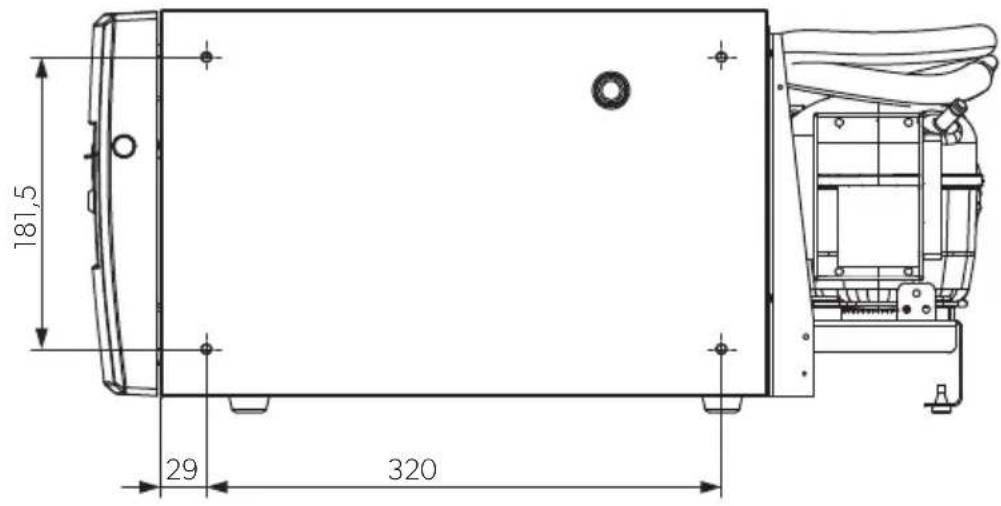
181,5 29 3205
text_image
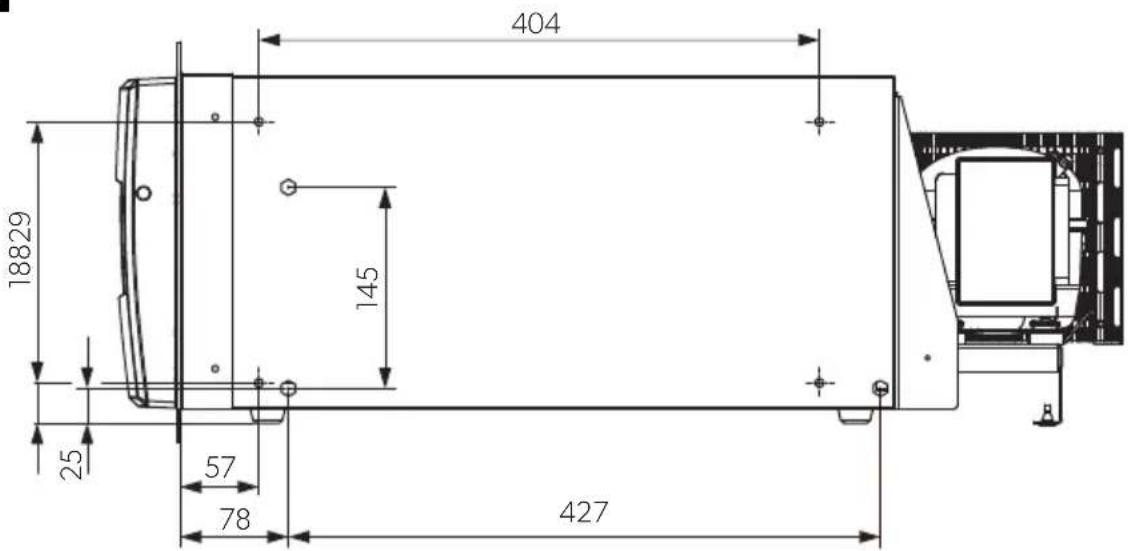
404 18829 145 25 57 78 427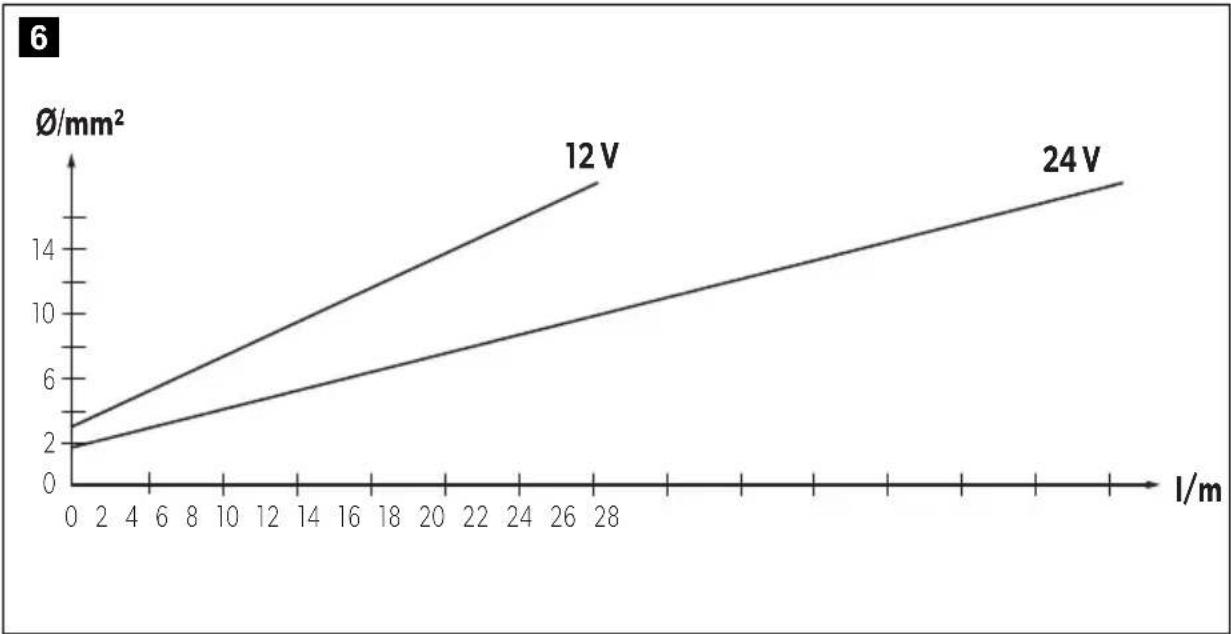
line
| I/m | 12V (Ø/mm²) | 24V (Ø/mm²) | | --- | ----------- | ----------- | | 0 | 2 | 2 | | 28 | 16 | 14 |Please read this manual carefully before starting the device. Keep it in a safe place for future reference. If the device is passed on to another person, this manual must be handed over to the user along with it.
The manufacturer cannot be held liable for damage resulting from improper usage or incorrect operation.
Contents
1 Explanation of symbols....6
2 Safety instructions....7
3 Scope of delivery 9
4 Proper use ....10
5 Technical description ....10
6 Installation....11
7 Operation 12
8 Cleaning and care....14
9 Warranty ....14
10 Disposal....14
11 Troubleshooting....14
12 Technical data....17
1 Explanation of symbols

DANGER!
Safety instruction: Indicates a hazardous situation that, if not avoided, will result in death or serious injury.

WARNING!
Safety instruction: Indicates a hazardous situation that, if not avoided, could result in death or serious injury.

CAUTION!
Safety instruction: Indicates a hazardous situation that, if not avoided, could result in minor or moderate injury.

NOTICE!
Indicates a situation that, if not avoided, can result in property damage.

NOTE
Supplementary information for operating the product.
2 Safety instructions

WARNING! Failure to obey these warnings could result in death or serious injury.
Electrocution hazard
- Do not operate the cooling device if it is visibly damaged.
- If this cooling device's power cable is damaged, it must be replaced by the manufacturer, customer service or a similarly qualified person in order to prevent safety hazards.
- If this cooling device's power cable is damaged, it must be replaced to prevent safety hazards.
- This cooling device may only be repaired by qualified personnel. Improper repairs can lead to considerable hazards.
Fire hazard
- When positioning the device, ensure the supply cord is not trapped or damaged.
- Do not locate multiple portable socket-outlets or portable power supplies at the rear of the device.
Health hazard
- This device can be used by children aged from 8 years and above and persons with reduced physical, sensory or mental capabilities or lack of experience and knowledge if they have been given supervision or instruction concerning use of the device in a safe way and understand the hazards involved.
• Children shall not play with the device. - Cleaning and user maintenance shall not be made by children without supervision.
- Children aged from 3 to 8 years are allowed to load and unload cooling devices.
Explosion hazard
- Do not store any explosive substances such as spray cans with a flammable propellant in the cooling device.

CAUTION! Failure to obey these cautions could result in minor or moderate injury.
Electrocution hazard
- Before starting the cooling device, ensure that the power supply line and the plug are dry.
- Disconnect the cooling device from the power supply – before each cleaning and maintenance – after every use
Health hazard
- Please check if the cooling capacity of the device is suitable for storing the food or medicine you wish to cool.
- Food may only be stored in its original packaging or in suitable containers.
- Opening the cooling device for long periods can cause significant increase of the temperature in the compartments of the device.
- Clean regularly surfaces that can come in contact with food and accessible drainage systems.
- Store raw meat and fish in suitable containers in the device, so that it is not in contact with or can drip onto other food.
• If the device is left empty for long periods: - Switch off the device.
- Defrost the device.
- Clean and dry the device.
- Leave the lid open to prevent mould developing within the device.

NOTICE! Damage hazard
- Check that the voltage specification on the type plate corresponds to that of the energy supply.
- Only connect the cooling device to a DC power supply in the vehicle with the DC cable.
• Never pull the plug out of the socket by the cable. -
Disconnect the cooling device and other power consuming devices from the battery before connecting a quick charging device.
-
Disconnect the cooling device or switch it off when you turn off the engine. Otherwise you may discharge the battery.
- The cooling device is not suitable for transporting caustic materials or materials containing solvents.
- The insulation of the cooling device contains flammable cyclopentane and requires special disposal procedures. Deliver the cooling device at the end of its life-cycle to an appropriate recycling center.
- Do not use electrical devices inside the cooling device unless they are recommended by the manufacturer for the purpose.
- Do not place the cooling device near naked flames or other heat sources (heaters, direct sunlight, gas ovens etc.).
- Risk of overheating!
Ensure at all times that there is a minimum of 50 mm ventilation on all four sides of the cooling device. Keep the ventilation area free of any objects that could restrict the air flow to the cooling components.
Do not place the cooling device in closed compartments or areas with none or minimal air flow.
- Ensure that the ventilation openings are not covered.
- Do not fill the inner container with ice or fluids.
• Never immerse the cooling device in water. - Protect the cooling device and cables against heat and moisture.
• For HGV operation:
Empty the coolbox and switch the device off (see chapter "Switching off the coolbox" on page 13), before the driver's cabin is tipped up.
3 S c o p e o f d
Quantity Description
1 Drawer coolbox
4 Mounting bracket
1 Operating instructions
4 P r o p e r u s e
The drawer coolers CD20 and CD30 are suitable for use in HGVs, boats or caravans and has been designed for a maximum permanent inclination of 30^ .
An optimum cooling capacity is guaranteed at ambient temperatures between +16 °C and +32 °C and at a maximum air humidity of 90 %.

NOTE
Before exposing the cooling device to extreme conditions, please contact the manufacturer.

CAUTION! Health hazard!
- Please check if the cooling capacity of the device is suitable for storing the food or medicine you wish to cool.
- Food may only be stored in its original packaging or in suitable containers.
5 Technical description
The cooling devices can cool goods or keep goods cool in a temperature range from 0^ C to +15°C (CD20) or -2°C to +12°C (CD30).
The coolbox is equipped with a battery monitor which switches the compressor off and on again and thereby protects both the battery and compressor against damage. The switch-off and switch-on points measured at the connection terminals of the compressor are listed in the chapter “Technical data” on page 17.
5.1 Control elements
No. in
fig. 3,
page 4
Explanation
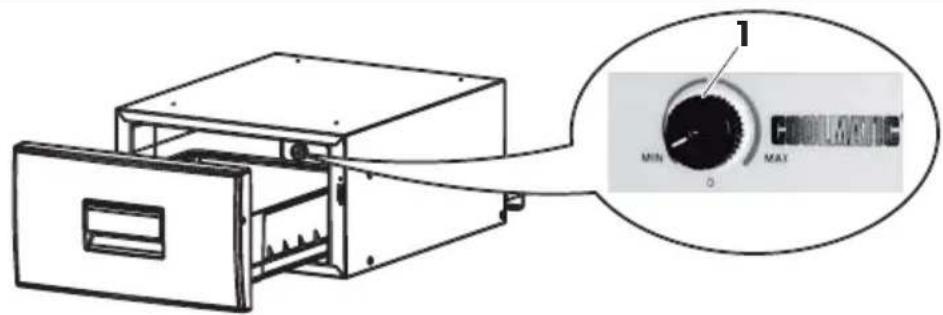
1 Thermostat
6 Installation

CAUTION! Health hazard
To avoid a hazard due to instability of the device, it must be fixed in accordance with the instructions.

NOTICE!
- Ensure that the positive cable is connected to the positive terminal and the negative cable to the negative terminal.
- When choosing the installation location, ensure that the air heated by the liquefier can be drawn off.

NOTE
- To avoid voltage loss and therefore a drop in performance, the cable route should be kept as short as possible and should not be interrupted if this is possible. For this reason avoid additional switches, plug or power strips.
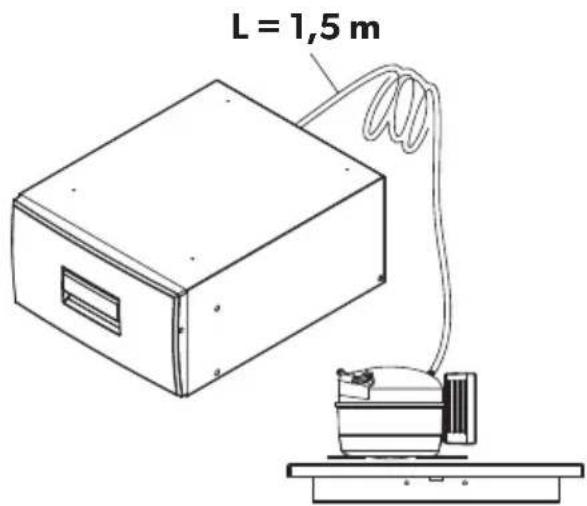
- You can detach the compressor from the cooling device and mount it in another place on the cooling device, or separately from it (fig. 2, page 3). Make sure that the refrigerant line is 1.5 m (CD20)/1.5 m (CD30) long.
Please observe the following instructions:
▶Determine the required cross section of the cable in relation to the cable length according to fig. 6, page 5.
Key to fig. 6, page 5
Co-ordinate axis Meaning Unit
| Cable length m
∅ Cable cross section mm²
Connect your cooling device as directly as possible to the battery terminal or to an outlet with a fuse of at least 15 A (12 V) or 7.5 A (24 V).
▶ Fix the device in place using the screwing holes (see fig. 4, page 4 and fig. 5, page 4).
7 O p e r a t i o n

NOTE
Before starting your new cooling device for the first time, you should clean it inside and outside with a damp cloth for hygienic reasons (please also refer to the chapter “Cleaning and care” on page 14).
7.1 Energy saving tips
- Choose a well ventilated location which is protected from direct sunlight.
- Allow warm food to cool down first before placing it in the cooling device to keep cool.
- Do not open the cooling device more often than necessary.
- Do not leave the cooling device open for longer than necessary.
• Defrost your cooling device as soon as a layer of ice forms. - Avoid unnecessarily low temperatures.
- Clean the condenser of dirt (dust etc.) at regular intervals.
7.2 Switching on the coolbox
▶Open the coolbox drawer.
▶To switch on the coolbox, turn the thermostat knob clockwise (see fig. 3 1, page 4).
√The coolbox starts cooling the interior.

NOTE
Ensure that the objects placed in the coolbox are suitable for cooling/warming to the selected temperature.
7.3 Selecting the temperature
The switch on the thermostat (see fig. 3 1, page 4) displays the selected temperature.
| Switch position | Temperature range (dependent of ambient temperature) |
| CD20 CD30 |
MAX approx. -2^ in interior
MIN
approx. +12 °C in interior
▶ If you wish to set the temperature to cooling, turn the thermostat knob (see fig. 3 1, page 4), to the desired temperature range.
7.4 Switching off the coolbox

NOTE
If you wish to leave the cooling device switched off for a longer period, clean it and leave the drawer slightly open. This will prevent unpleasant odours from forming.
▶Open the coolbox drawer.
To switch off the coolbox, turn the thermostat knob (see fig. 3 1, page 4) to the "0" position.
√The coolbox is switched off.
▶ If you wish to stop using the coolbox, disconnect the connecting cable from the battery.
7.5 Defrosting
Humidity can form frost in the interior of the cooling device. This reduces the cooling capacity. Defrost the device in good time to avoid this.

NOTICE!
Do not remove the layer of ice with hard or sharp tools. These can damage the plastic of the vaporiser.
▶Take the food or other objects out of the device and place it in another cooling device to keep it cool, if necessary.
▶Switch the cooling device off (see chapter "Switching off the coolbox" on page 13) and leave the drawer open.
▶Wipe off the water resulting from defrosting or – if present – empty the collecting tray.
8 Cleaning and care

NOTICE! Damage hazard
• Never clean the cooler under running water or in dish water.
- Do not use abrasive cleaning agents or hard objects during cleaning as these can damage the cooler.
▶ Occasionally clean the device interior and exterior with a damp cloth.
▶Make sure that the air inlet and outlet vents on the device are free of any dust and dirt, so that heat can be released and the device is not damaged.
9 W a r r a n t y
The statutory warranty period applies. If the product is defective, please contact the manufacturer's branch in your country (see dometic.com/dealer) or your retailer.
For repair and warranty processing, please include the following documents when you send in the device:
• A copy of the receipt with purchasing date
• A reason for the claim or description of the fault
10 Disposal
▶Place the packaging material in the appropriate recycling waste bins wherever possible.
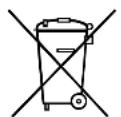
If you wish to finally dispose of the product, ask your local recycling centre or specialist dealer for details about how to do this in accordance with the applicable disposal regulations.
11 Troubleshooting

WARNING!
This device may only be repaired by specialist personnel. Inadequate repairs can lead to considerable hazards.
Compressor does not run
Feature Possible cause Remedy
| U_Term=0 Volt There is an interruption in the connection between the battery and the electronics | Establish a connection | |
| Main switch faulty (if installed) Replace the main switch | ||
| Additional supply line fuse has blown (if installed) Replace the supply line fuse | ||
| U_Term≤ U_ON | Battery voltage is too low Charge the battery | |
| During attempted start up U_Term≤ U_OFF | Loose cable connection Poor contact (corrosion) | Establish a connection |
| Cable cross section too small Replace the cable (fig. 6, page 5) | ||
| Battery capacity too low Replace the battery | ||
| During attempted start up U_Term≥ U_ON | Ambient temperature too high – | |
| Insufficient ventilation and/or air supply | Move the refrigerator to another location | |
| Condensor is dirty Clean the condenser | ||
| Electric circuit between the pins in the compressor interrupted | Defective compressor Replace the compressor | |
U_Term Voltage between the positive and negative electronic terminals
U_ON Switch on voltage of the electronic connection terminals (see chapter "Technical description" on page 10)
U_OFF Switch off voltage of the electronic connection terminals (see chapter "Technical description" on page 10)
Interior temperature too low in the "MIN" thermostat setting
Feature Possible cause Remedy
| Compressor runs continuously | Thermostat sensor has no contact to the vaporiser | Secure the sensor |
| Short circuit in the thermostat line Change the thermostat defective | the thermostat | |
| Compressor runs for a long time | Large quantities have been frozen in the vaporiser compartment |
Cooling capacity drops, interior temperature rises
Feature Possible cause Remedy
| Compressor runs for a long time/continuously | Vaporiser iced over Defrost the vaporiser |
| Cooling area insulation is insufficient (moist/wet) Adjust/replace the drawer seal | |
| Ambient temperature too high | |
| Insufficient ventilation Ensure that the device is sufficiently ventilated | |
| Condensor is dirty Clean the condenser | |
| Fan defective (if installed) Replace the fan | |
| Compressor does not run often | Battery capacity exhausted Charge the battery |
Unusual noises
Feature Possible cause Remedy
| Loud humming A component of the refrigerant circuit cannot move freely (touching the wall) | Bend the component carefully away from the obstruction |
| Foreign body jammed between the cooling unit and the wall | Remove the foreign body |
| Fan noise – |
Radio or television interference in the vehicle
Feature Possible cause Remedy
| Reception interference when the compressor is running | The electronic connection of the cooling device is not directly clamped on to the battery | Connect the cooling device as directly as possible to the battery |
12 Technical data
| CD20 CD30 | ||
| Connection voltage: | 12 V---/24 V--- | |
| Switch-off voltage: 10.4 V at 12 V--- | 22.8 V at 24 V--- | |
| Switch-on voltage: 11.7 V at 12 V--- | 24.2 V at 24 V--- | |
| Rated current: | 12 V---: 3 A24 V---: 1.5 A | |
| Cooling capacity: -2 °C bis +12 °C | ||
| Capacity: 20 l | 30 l | |
| Climatic class: | N | |
| Ambient temperature: | +16 °C to +32 °C | |
| Relative humidity: | max. 90 % | |
| Permanent inclination: | max. 30° | |
| Refrigerant quantity: | 35 g | 42 g |
| CO2 equivalent: | 0.050 t | 0.060 t |
| Global warming potential (GWP): | 1430 | |
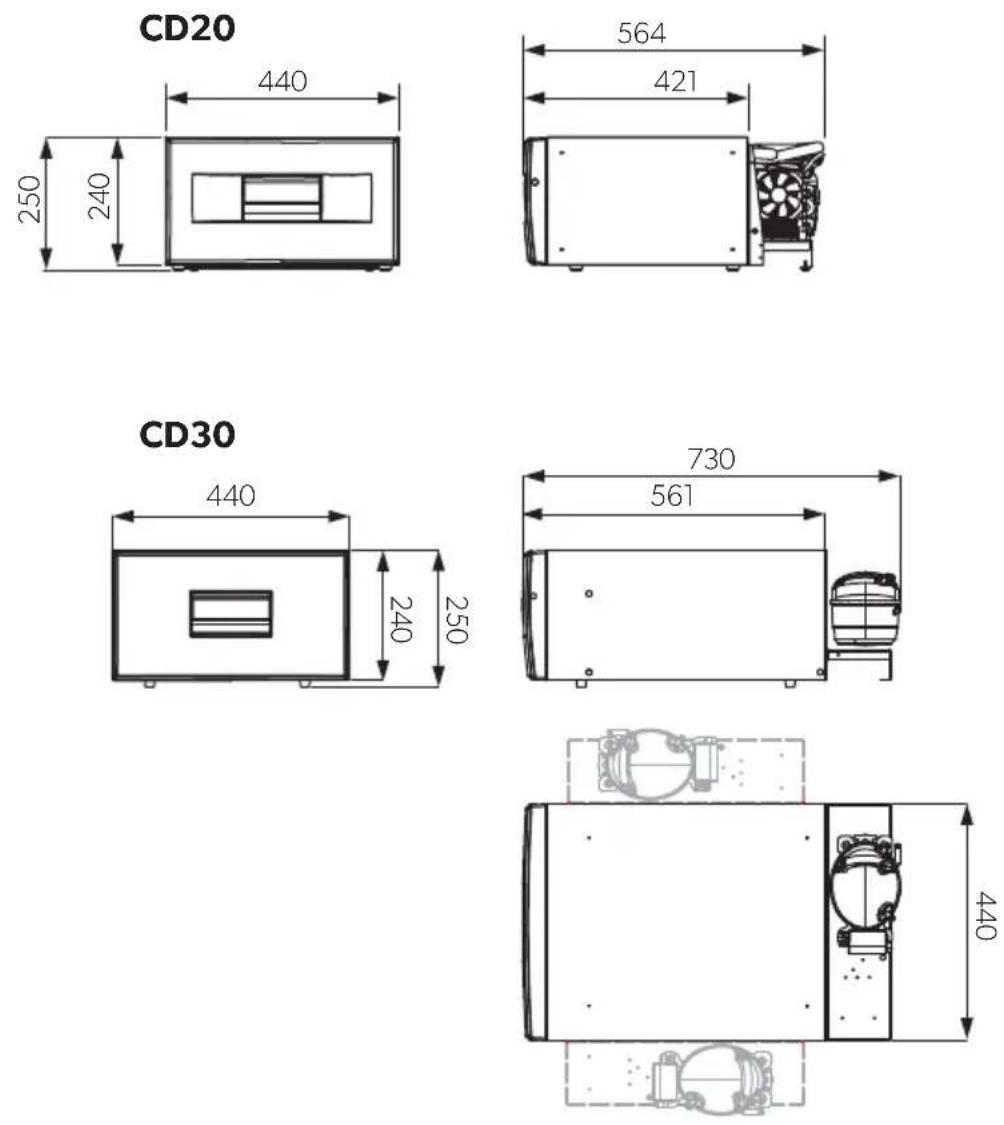
| Dimensions: | fig. 1, page 3 | |
| Weight: 16.1 kg | 18 kg | |
| Test/certificates: |  | |
The refrigerant circuit contains R134a.
Contains fluorinated greenhouse gases
Hermetically sealed equipment
5 Description technique
PASS PÅ! Fare for skade
• Fare for overoppheting!
dometic.com/sales-offices