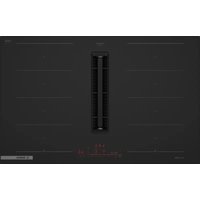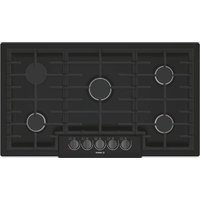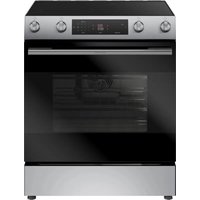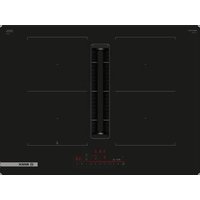
NGM5059UC - Cooker BOSCH - Free user manual and instructions
Find the device manual for free NGM5059UC BOSCH in PDF.


User questions about NGM5059UC BOSCH
0 question about this device. Answer the ones you know or ask your own.
Ask a new question about this device
Download the instructions for your Cooker in PDF format for free! Find your manual NGM5059UC - BOSCH and take your electronic device back in hand. On this page are published all the documents necessary for the use of your device. NGM5059UC by BOSCH.
USER MANUAL NGM5059UC BOSCH
Fridge-freezer combination
B36.D5..
[en-us] Use and Care Manual Fridge-freezer combination 2
Further information and explanations are available online:
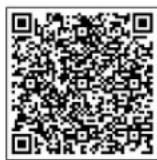
Table of contents
1 Safety.... 4
1.1 Safety definitions.... 4
1.2 General information.... 4
1.3 Intended use 4
1.4 Restrictive Use.... 4
1.5 Safe transport 4
1.6 Safe installation.... 4
1.7 Safe use.... 5
1.8 Damaged appliance 5
1.9 State of California Proposition 65 Warnings ...... 6
2 Preventing material damage 7
3 Environmental protection and energy-saving ..... 7
3.1 Disposal of packaging.... 7
3.2 Saving energy.... 7
4 Installation and connection.... 7
4.1 Included in delivery 7
4.2 Criteria for the installation location 8
4.3 Installing the appliance.... 8
4.4 Preparing the appliance for first use.... 8
4.5 Connecting the appliance to the drinking water connection 8
4.6 Connecting the appliance to the electricity supply ..... 8
5 Familiarizing yourself with your appliance .... 9
5.1 Appliance 9
5.2 Control panel.... 10
5.3 Controls (ice and water dispenser).... 11
6 Features.... 11
6.1 Shelf 11
6.2 Storage container.... 11
6.3 Fruit and vegetable container with humidity controller.... 11
6.4 Container divider.... 12
6.5 Frozen food pull-out container.... 12
6.6 Suspended frozen food container.... 12
6.7 Door tray.... 12
6.8 Ice storage container.... 12
7 Basic Operation 12
7.1 Switching on the appliance.... 12
7.2 Operating tips.... 13
7.3 Switching off the appliance.... 13
7.4 Setting the temperature unit.... 13
7.5 Setting the temperature.... 13
7.6 Keylock 13
8 Additional functions.... 13
8.1 Super cooling 13
8.2 Super freezing.... 14
8.3 Sabbath mode.... 14
8.4 Filter change notification.... 14
9 Alarm.... 14
9.1 Door alarm 14
9.2 Temperature alarm.... 14
10 Home Connect® 15
10.1 Setting up Home Connect®.... 15
10.2 Switching on the connection to the WLAN home network (Wi-Fi).... 15
10.3 Intelligently networking appliances using Matter ^1 .... 15
10.4 Switching off the connection to the WLAN home network (Wi-Fi).... 15
10.5 Installing updates for the Home Connect® software 15
10.6 Resetting the Home Connect® settings.... 16
10.7 Remote Diagnostics 16
10.8 Data Protection 16
11 Refrigerator compartment 16
11.1 Tips for storing food in the refrigerator compartment 16
11.2 Chill zones in the refrigerator compartment ..... 16
12 Freezer compartment.... 16
12.1 Tips for storing food in the freezer compartment .... 16
12.2 Tips for freezing fresh food.... 16
12.3 Defrosting methods for frozen food 17
13 Water system.... 17
13.1 Water filter.... 17
13.2 Filter change notification.... 18
13.3 Ice and water dispenser 18
14 Defrosting 19
14.1 Defrosting in the refrigerator compartment ..... 19
14.2 Defrosting in the freezer compartment.... 19
15 Cleaning and maintenance.... 19
15.1 Preparing the appliance for cleaning 19
15.2 Cleaning the appliance.... 20
15.3 Cleaning the drip tray.... 20
15.4 Removing the fittings.... 20
15.5 Removing the appliance components 22
16 Troubleshooting.... 25
16.1 Power failure.... 28
16.2 Conducting an appliance self-test 28
17 Storage and disposal.... 28
17.1 Taking the appliance out of operation 28
17.2 Disposal of your old appliance 29
18 Customer Service 29
18.1 Model number (E-Nr.), production number (FD) and consecutive numbering (Z-Nr.).... 29
19 Technical specifications.... 29
19.1 Information regarding Free and Open Source Software.... 29

IMPORTANT SAFETY INSTRUCTIONS READ AND SAVE THESE INSTRUCTIONS
Observe the following safety instructions.
1.1 Safety definitions
Here you can find explanations of the safety signal words used in this manual.

WARNING
This indicates that death or serious injuries may occur as a result of non-observance of this warning.

CAUTION
This indicates that minor or moderate injuries may occur as a result of non-observance of this warning.
NOTICE:
This indicates that damage to the appliance or property may occur as a result of non-compliance with this advisory.
Note: This alerts you to important information and/or tips.
1.2 General information
■ Read this manual carefully.
- Keep the manual and the product information in a safe place for future reference or for the next owner.
- Do not connect the appliance if it has been damaged in transit.
1.3 Intended use
Only use this appliance:
■ for chilling and freezing food, for dispensing ice and water.
■ for normal household use and in enclosed spaces in a residential environment.
■ Up to an altitude of 13,100 ft (4000 m) above sea level.
1.4 Restrictive Use
This appliance is not intended for use by persons (including children) with reduced physical, sensory or mental capabilities, or lack of experience and knowledge, unless they have been given supervision or instruction concerning use of the appliance by a person responsible for their safety.
Do not let children play with the appliance.
Cleaning and user maintenance must not be performed by children unless they are being supervised.
1.5 Safe transport
WARNING
The heavy weight of the appliance may result in injury when lifted.
▶ Do not lift the appliance on your own.
1.6 Safe installation
WARNING
To avoid risk of injury from incorrect installations, observe the following.
▶ Ensure all installation instructions are followed before use.
- Connect and operate the appliance only in accordance with the specifications on the rating plate.
- Connect the appliance to a power supply with alternating current only via a correctly installed socket outlet with grounding.
The protective conductor system of the domestic electrical installation must be properly installed.
▶ Never equip the appliance with an external switching device, e.g. a timer or remote control.
When the appliance is installed, the mains plug of the power cord must be freely accessible. If free access is not possible, an isolating switch must be integrated into the permanent electrical installation according to the installation regulations.
- When installing the appliance, check that the power cord is not trapped or damaged.
To avoid risk of injury from damaged insulation of the power cord, observe the following.
▶ Never let the power cord come into contact with heat sources.
WARNING
If the appliance's ventilation openings are closed off, a leak in the refrigeration circuit may result in a flammable mixture of gas and air.
- Keep ventilation openings in the appliance casing or in the integrated casing clear of obstruction.
WARNING
To avoid risk of injury from an extended power cord and non-approved adapters, observe the following.
▶ Do not use extension cords or multiple socket strips.
▶ Only use adapters and power cords approved by the manufacturer.

IMPORTANT SAFETY INSTRUCTIONS READ AND SAVE THESE INSTRUCTIONS
If the power cord is too short and a longer one is not available, please contact an electrician to have the domestic installation adapted.
Portable multiple socket strips or portable power supply units may overheat and cause a fire.
- Do not place portable multiple socket strips or power supply units on the back of the appliance.
1.7 Safe use
WARNING
Moisture intrusion may cause an electric shock.
▶ Use the appliance in enclosed spaces only.
▶ Never expose the appliance to intense heat or humidity.
▶ Do not use any steam cleaners or high-pressure cleaners to clean the appliance.
WARNING
Children may pull packaging material over their heads, or wrap themselves up in it and suffocate.
▶ Keep packaging material away from children.
- Do not allow children to play with packaging material. Children may breathe in or swallow small parts, causing them to suffocate.
▶ Keep small parts away from children.
▶ Do not allow children to play with small parts.
WARNING
If the cooling circuit is damaged, flammable refrigerant may escape and explode.
▶ To accelerate the defrosting process, do not use any other mechanical devices or means other than those recommended by the manufacturer.
▶ If food is stuck to the freezer compartment, loosen it with a blunt implement such as the handle of a wooden spoon.
Products which contain flammable propellants and explosive substances may explode, e.g. spray cans.
▶ Do not store products which contain flammable propellants (e.g. spray cans) or explosive substances in the appliance.
WARNING
Electrical devices placed inside the appliance may cause a fire, e.g. heaters or electric ice makers.
▶ Do not operate electrical devices within the appliance.
WARNING
Containers which contain carbonated drinks may burst.
▶ Do not store containers which contain carbonated drinks in the freezer compartment.
Injury to the eyes caused by escaping flammable refrigerant and hazardous gases.
- Do not damage the tubes of the refrigerant circuit or the insulation.
The appliance may tip.
▶ Do not stand or lean on the base, runners or doors.
WARNING
Contact with frozen food and cold surfaces may cause burns by refrigeration.
▶ Never put frozen food straight from the freezer compartment into your mouth.
- Avoid prolonged skin contact with frozen food, ice and surfaces in the freezer compartment.
CAUTION
To prevent food from being contaminated, you must observe the following instructions.
Leaving the door open for an extended period of time may lead to a considerable temperature increase in the compartments of the appliance.
▶ Regularly clean the surfaces that may come into contact with food and accessible drain systems.
▶ If water has not been dispensed for 5 days, flush the water system.
- Store raw meat and fish in suitable containers in the refrigerating appliance so that they do not touch or drip on other food.
If the fridge/freezer is empty for an extended period of time, switch off the appliance, defrost it, clean it and leave the door open to prevent the formation of mold.
Metal or metal-style parts in the appliance may contain aluminum. If acidic food comes into contact with aluminum in the appliance, aluminum ions may pass into the food.
▶ Do not consume soiled food.
1.8 Damaged appliance
WARNING
To avoid risk of injury from a damaged appliance or power cord, observe the following.
▶ Never operate a damaged appliance.
▶ Never pull on the power cord to unplug the appliance. Always unplug the appliance at the power outlet.

IMPORTANT SAFETY INSTRUCTIONS READ AND SAVE THESE INSTRUCTIONS
▶ If the appliance or the power cord is damaged, immediately unplug the power cord or switch off the breaker in the circuit breaker box and turn off the water tap.
▶ Call Customer Service. -Page 29
To avoid risk of injury from improper repairs, observe the following.
▶ Only qualified technicians or authorized service providers should perform repairs.
▶ Only genuine spare parts may be used to repair the appliance.
If the power cord or the appliance power cable of this appliance becomes damaged, it must be replaced with a special power cord or special appliance power cable, which is available from the manufacturer or the manufacturer's Customer Service.
WARNING


If the tubes are damaged, flammable refrigerant and harmful gases may escape and ignite.
- Keep open flames and ignition sources away from the appliance.
▶ Ventilate the room.
▶ Switch off the appliance. -Page 13
▶ Unplug the appliance from the power source or switch off the circuit breaker in the fuse box.
▶ Call Customer Service. -Page 29
1.9 State of California Proposition 65 Warnings
This product may contain a chemical known to the State of California, which can cause cancer or reproductive harm. Therefore, the packaging of your product may bear the following label as required by California:
STATE OF CALIFORNIA PROPOSITION 65 WARNING: / AVERTISSEMENT ISSUE DE LA PROPOSITION 65 DE L'ÉTAT DE LA CALIFORNIE:

WARNING / AVERTISSEMENT
Cancer and Reproductive Harm / Cancer et dommages à la reproduction • www.P65Warnings.ca.gov.
2 Preventing material damage
NOTICE:
The high weight of the appliance or, if not rolled in a straight line, the appliance's castors may damage the floor when the appliance is moved.
▶ Transport the appliance using a hand-cart.
- Use floor protection when moving the appliance, and do not move it in a zigzag fashion.
When the appliance door is closed, the mullion rail should be closed (flush with the door edge) or damage may occur.
▶ Never open the mullion rail manually.
▶ If the mullion rail has been opened, rotate it closed (flush with the door edge) before closing the appliance door.
Using the appliance, base, runners or doors as a seat or climbing surface may damage the appliance.
- Do not stand or lean on the appliance, base, runners or doors.
If the water pressure is too high or too low, this may impair functioning of the appliance.
▶ Make sure that the water pressure in the water supply system is at least 29 psi (200 kPa) and max. 116 psi (800 kPa).
▶ If the water pressure exceeds the maximum value specified, a pressure-reducing valve must be installed between the drinking water connection and the hose set of the appliance.
Modified or damaged water hoses may result in material damage and damage to the appliance.
▶ Never kink, crush, modify or cut through water hoses.
▶ Never re-use water hoses that have been used before.
- Never pull on the water hose on the rear panel of the appliance.
Contamination with oil or fat may cause plastic parts and door seals to become porous.
- Keep plastic parts and door seals free of oil and grease. Metal or metal-style parts in the appliance may contain aluminum. When aluminum comes into contact with acidic foods, it corrodes and discolors.
▶ Only store packaged food in the appliance. If you clean fittings and accessories in the dishwasher, this may cause them to become deformed or discolor.
▶ Never clean fittings and accessories in the dishwasher.
3 Environmental protection and energy-saving
3.1 Disposal of packaging
The packaging materials are environmentally compatible and can be recycled.
- Sort the individual components by type and dispose of them separately.
3.2 Saving energy
If you follow these instructions, your appliance will use less power.
Selecting the installation location
- Keep the appliance out of direct sunlight.
■ Install the appliance as far away as possible from heating elements, stoves and other heat sources: - Maintain a 1^1/4 (30 mm) clearance to electric or gas stoves.
- Maintain an 11^13/_16 (300 mm) clearance to oil or solid-fuel stoves.
■ Never cover or block the external ventilation openings.
Saving energy during use
Note: The arrangement of the fittings does not affect the energy consumption of the appliance.
- Open the appliance only briefly and then close it carefully.
■ Never cover or block the interior ventilation openings or the exterior ventilation openings.
■ Transport purchased food in a cooler and place quickly in the appliance. - Allow warm food and drinks to cool down before storing them.
■ Thaw frozen food in the refrigerator compartment to utilize the low temperature of the food.
■ Always leave some space between the food and to the back panel.
■ Vacuum the external ventilation grilles when they are dusty.
Control panel energy-saving mode
If the appliance is not being used, the control panel automatically switches to control panel energy-saving mode.
In control panel energy-saving mode, the selection option for the ice and water dispenser is shown with reduced brightness.
Notes
■ If Super cooling is switched on, "super" (Refrigerator compartment) lights up.
■ If Super freezing is switched on, "super" (Freezer compartment) lights up.
Control panel energy-saving mode is deactivated as soon as you operate the control panel, press the dispensing button, or open the door.
4 Installation and connection
4.1 Included in delivery
After unpacking all the parts, check for any damage in transit and for completeness of delivery.
If you have any concerns, contact your dealer or our Customer Service → Page 29.
The delivery consists of the following:
■ Free-standing appliance
■ Equipment and accessories ^1
■ Installation material
■ Installation instructions
■ User manual
■ Explanation of the limited product warranty
■ Warranty enclosure ^2
■ Energy label
■ Information about Home Connect®
4.2 Criteria for the installation location

WARNING
If the appliance is in a space that is too small, a leak in the refrigeration circuit may result in a flammable mixture of gas and air.
▶ Only install the appliance in a space with a volume of at least 35 ft^-3 ( 1 m^3 ) per 0.3 oz (8 g) refrigerant. The amount of refrigerant is indicated on the rating label.
→ "Appliance", Fig. 1/8, Page 10
The weight of the appliance from factory may be up to 335 lbs (150 kg) depending on the model.
The subfloor must be sufficiently stable to bear the weight of the appliance.
The surface must be level.
Over-and-under and side-by-side installation
If you want to install 2 refrigerating appliances one over the other or side by side, you must maintain a clearance of at least 150 mm between the appliances. Selected appliances can be installed without a minimum clearance. Ask your dealer or kitchen planner about this.
4.3 Installing the appliance
- Install the appliance in accordance with the enclosed installation instructions.
4.4 Preparing the appliance for first use
- Remove the information material.
- Remove the protective film and transit bolts, e.g. remove the adhesive strips and cardboard.
- Clean the appliance for the first time. → Page 20
4.5 Connecting the appliance to the drinking water connection
Requirements
■ A shut-off valve must be installed on the water connection and be freely accessible following installation of the appliance.
■ Ensure that the water coming from the water connection is potable.
■ The water hose has a sealing ring.
- Draw mains water from the domestic drinking water connection until the water is no longer cloudy and containers no deposits.
If the mains water is still cloudy or contains deposits, install an external water filter system.
- Install the water hose according to the enclosed installation instructions on the appliance.
4.6 Connecting the appliance to the electricity supply
- Insert the appliance plug of the power cord into the appliance.
- Insert the power plug of the appliance's power cord in a socket outlet with grounding nearby.
The connection data of the appliance can be found on the rating plate. → "Appliance", Fig. 1/8, Page 10 - Check the power plug is inserted properly.
√ The control panel shows an animation and is locked.
√ The appliance is ready to use once the animation has ended and the temperature displays light up.
^1 Depending on the appliance specifications ^2 Not in all countries
5 Familiarizing yourself with your appliance
5.1 Appliance
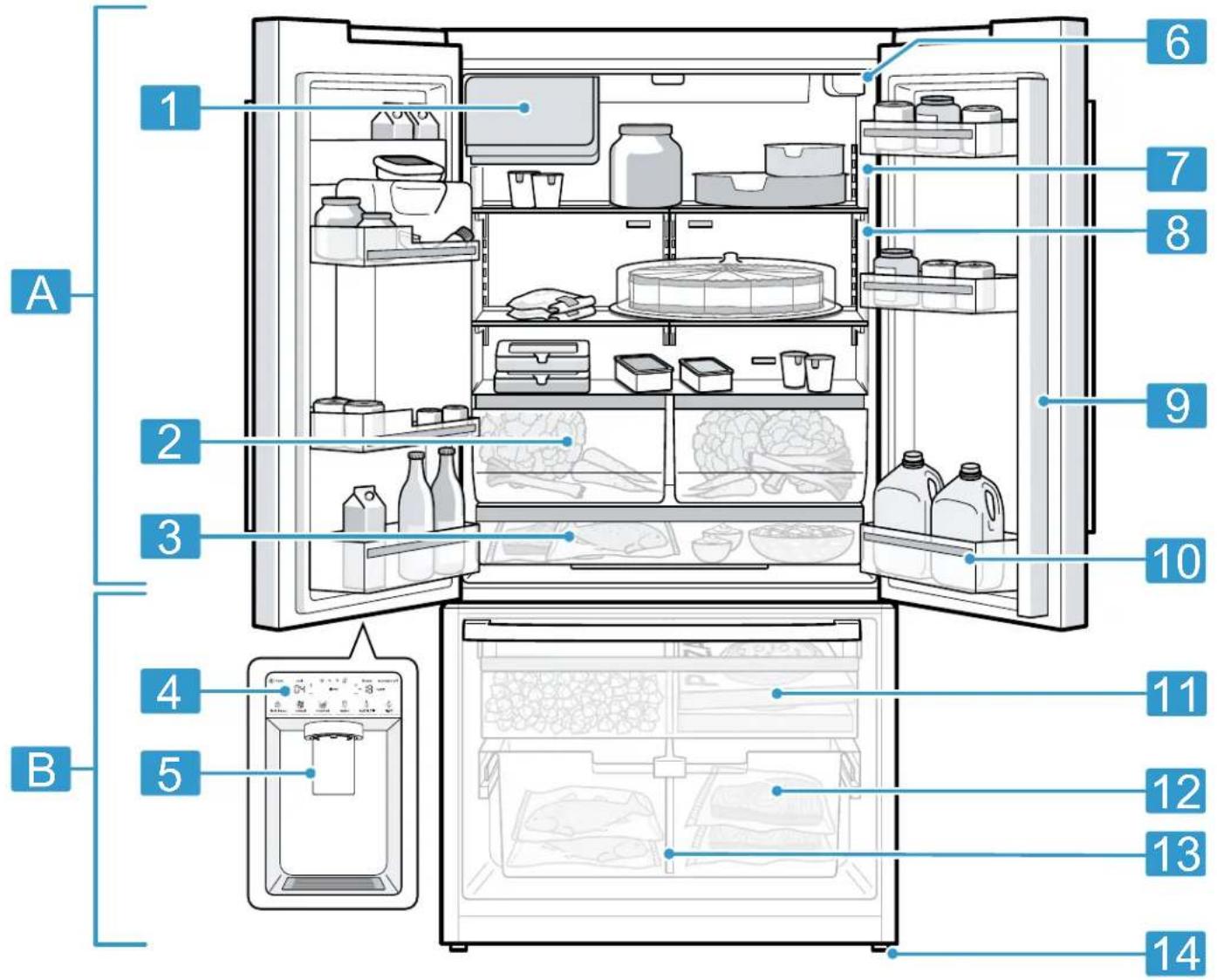
Here you can find an overview of the parts of your appliance.
text_image
A 1 2 3 4 5 6 7 8 9 10 B 11 12 13 14
Your appliance may differ from the diagrams with regard to cosmetic features and dimensions.
| A | Refrigerator compartment → Page 16 |
| B | Freezer compartment → Page 16 |
| 1 | Ice storage container |
| 2 | Fruit and vegetable container with humidity controller → Page 11 |
| 3 | Storage container → Page 11 |
| 4 | Control panel → Page 10 |
| 5 | Ice and water dispenser → Page 18 |
| 6 | Water filter → Page 17 |
| 7 | Interior lighting |
| 8 | Rating label → Page 29 |
| 9 | Mullion rail with condensation protection → Page 7 |
| 10 | Door tray for large bottles → Page 12 |
| 11 | Frozen food pull-out container → Page 12 |
| 12 | Suspended frozen food container → Page 12 |
| 13 | Container divider → Page 12 |
| 14 | Screw foot |
5.2 Control panel
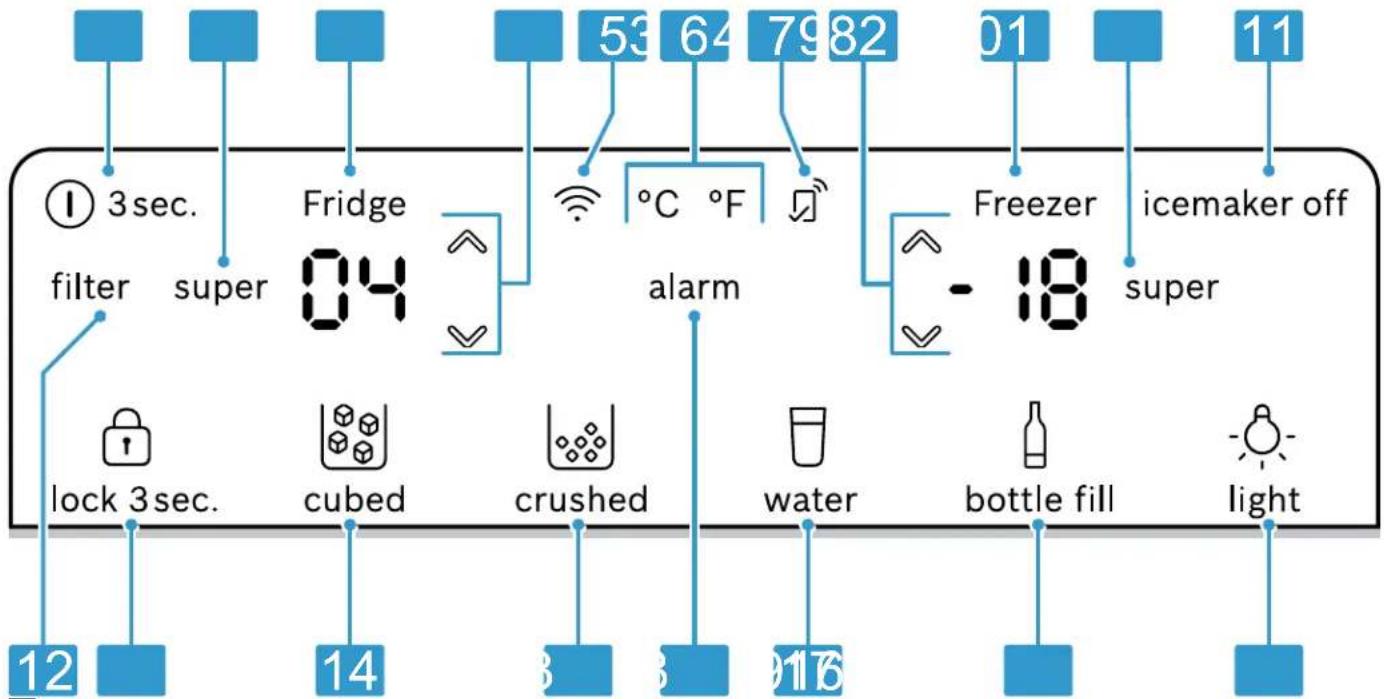
You can use the control panel to configure all functions of your appliance and to obtain information about the operating status.
flowchart
graph TD
    A["① 3 sec. filter"] --> B["super"]
    B --> C["Fridge 04"]
    C --> D["ângue"]
    D --> E["53 °C °F"]
    E --> F["79 82"]
    F --> G["Freezer -18"]
    G --> H["super"]
    H --> I["icemaker off"]
    J["lock 3 sec."] --> K["cubed"]
    K --> L["crushed"]
    L --> M["water"]
    M --> N["bottle fill"]
    N --> O["light"]
    P["12"] --> Q["14"]
    R["8"] --> S["8"]
    T["816"] --> U["816"]
2
| 1 | 1 3 sec. switches the appliance on or off. |
| 2 | super (Refrigerator compartment) switches Super cooling on or off. |
| 3 | Displays the set temperature for the refrigerator compartment in °F or °C. |
| 4 | √/(Refrigerator compartment) sets the temperature of the refrigerator compartment. |
| 5 | Switches the connection to the WLAN home network (Wi-Fi) on or off. |
| 6 | °C/°F converts the temperature unit. |
| 7 | lights up if user-defined settings have been set via the Home Connect® app. You can find more information in the Home Connect® app. |
| 8 | √/(Freezer compartment) sets the temperature of the freezer compartment. |
| 9 | Displays the set temperature for the freezer compartment in °F or °C. |
| 10 | super (Freezer compartment) switches Super freezing on or off. |
| 11 | icemaker off switches ice cube production off or on. |
| 12 | filter lights up when the filter needs to be replaced. |
| 13 | lock 3 sec. switches the button lock for the control panel on or off. |
| 14 | cubed sets dispensing to ice cubes. |
| 15 | crushed sets dispensing to crushed ice. |
| 16 | alarm switches the warning signal off. |
| 17 | water starts dispensing water. |
| 18 | bottle fill sets dispensing to a specific amount of water. |
| 19 | light switches the permanent light for the ice and water dispenser on or off. |
5.3 Controls (ice and water dispenser)
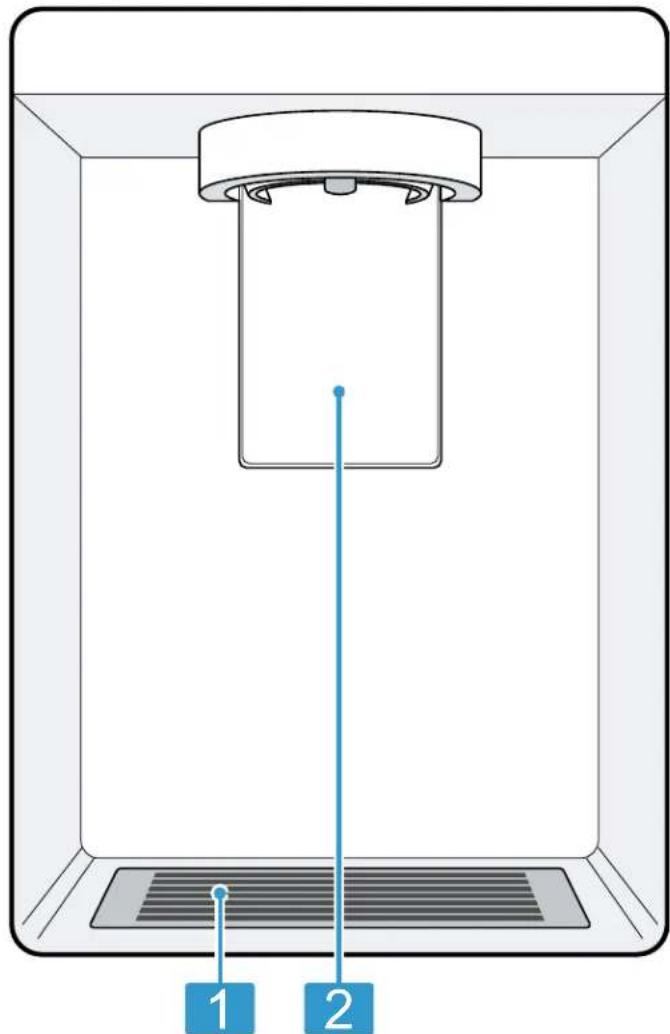
You can find an overview of the parts of your ice and water dispenser here.
text_image
Diagram of a device with labeled parts, showing a component inside a container and a vertical line indicating a measurement or reference point.3
1 Drip grate → Page 20
2 Dispensing button
6 Features
The features of your appliance depend on the model.
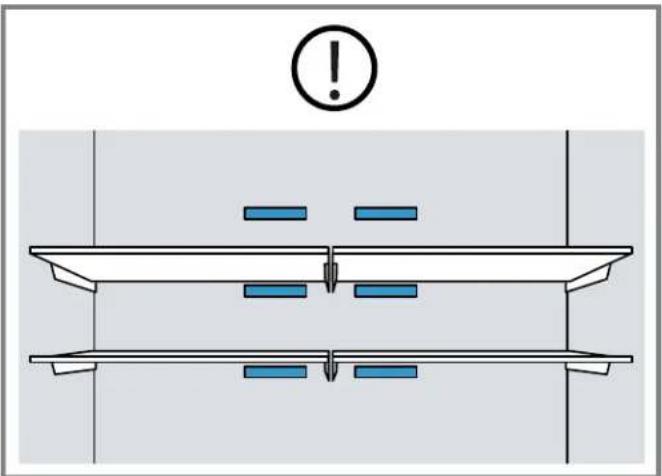
6.1 Shelf
NOTICE:
If fitted at an angle, the hooks on the shelf can scratch the rear panel of the refrigerator compartment.
- Ensure that the shelf is horizontal and that the hooks are properly fitted in place.
To vary the shelf as desired, you can remove the shelf and re-insert it elsewhere.
→ "Removing the shelf", Page 20
Note
To avoid impeding the circulation of air, do not cover the inner ventilation openings.
text_image
Diagram showing a mechanical or electrical setup with labeled components and an exclamation mark above6.2 Storage container
The temperatures in the storage container are lower than in the refrigerator compartment. Temperatures below 32 °F ( 0 °C ) may occur occasionally.
In order to reach temperatures close to 0 °C (32 °F) in the storage container, set the refrigerator compartment temperature to 2 °C (34 °F). → Page 13
Use the lower temperatures in the storage container to store highly perishable food, e.g. fish, meat and sausages.
6.3 Fruit and vegetable container with humidity controller
Store fresh fruit and vegetables loose in the fruit and vegetable container.
Cover any chopped fruit and vegetables, or store in air-tight packaging.
You can adjust the humidity in the fruit and vegetable container using the humidity controller and a special seal. This allows fresh fruit and vegetables to be stored up to twice as long as with conventional storage.
The air humidity in the fruit and vegetable container can be set according to the type and amount of food to be stored by moving the humidity controller:
■ Move to the left for low humidity when primarily storing fruit or mixed items, or if the appliance is very full.
■ Move to the right for high humidity when primarily storing vegetables or when the appliance is not very full.
Condensation may form in the fruit and vegetable container depending on the food and quantity stored. Remove the condensation with a dry cloth and adjust the air humidity to a lower setting using the humidity controller.
To ensure that the quality and aroma are retained, store fruit and vegetables that are sensitive to cold outside of the appliance at temperatures of approximately 46 °F
(8 °C) to 54 °F (12 °C), e.g. pineapple, bananas, citrus fruits, cucumbers, zucchini, bell peppers, tomatoes and potatoes.
6.4 Container divider
WARNING
Children may climb into the appliance and suffocate.
- Never remove the container divider from the suspended frozen food container.
NOTICE:
The container divider for the suspended frozen food container will be damaged if removed.
- Never remove the container divider from the suspended frozen food container.
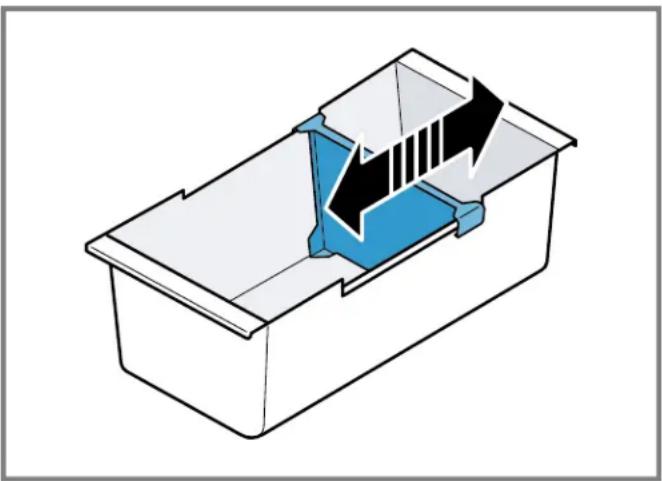
To vary the division of the suspended frozen food container you can move the container divider.
natural_image
3D diagram of a container with internal blue and black components, no text or symbols present6.5 Frozen food pull-out container
In order to achieve an improved overview and to remove frozen food more quickly, remove the frozen food pull-out container.
6.6 Suspended frozen food container
Store large frozen items in the suspended frozen food container.
6.7 Door tray
To adjust the door tray as desired, you can remove the door tray, and re-insert it elsewhere.
→ "Removing the door tray", Page 20
6.8 Ice storage container
If the ice and water dispenser is switched on, the ice cubes that are produced are automatically stored in the ice storage container.
WARNING
Reaching into the dispenser opening of the ice storage container can cause cuts.
- Never reach into the dispenser opening of the ice storage container.
WARNING
Contact with ice cubes and cold surfaces may cause burns by refrigeration.
- Avoid prolonged contact between the skin and ice cubes or metal surfaces in the ice storage container.
NOTICE:
The ice and water dispenser may become blocked or damaged by food or objects stored in the ice storage container.
▶ Never store food or objects in the ice storage container.
- Never use the ice storage container to store ice cubes that were not made using the ice cube maker.
Tips
■ Remove larger quantities of ice cubes from the ice storage container or store them in the frozen food pull-out container. → Page 21
■ Use both hands to pull out the ice storage container as this is heavy when full.
7 Basic Operation
7.1 Switching on the appliance
- Connect the appliance to the electricity supply.
→ Page 8
Note: If the appliance has been previously switched off using the control panel, press and hold ③ sec. for 3 seconds.
√ The control panel shows an animation and is locked.
√ The appliance is ready to use once the animation has ended and the temperature displays light up.
√ The motor starts after a delay of up to 5 minutes.
√ The appliance begins to cool.
√ A warning tone sounds and the temperature display (freezer compartment) and "alarm" flash because the freezer compartment is still too warm.
- Switch off the warning tone using alarm.
√ "alarm" goes out as soon as the set temperature has been reached.
- Set the desired temperature. → Page 13
7.2 Operating tips
■ Once you have switched on the appliance, the set temperature is only reached after several hours. Do not put any food in the appliance until the set temperature has been reached.
■ The front and side panels of the housing heat up occasionally. This prevents condensation from forming.
- When closing the door, make sure that the door is not blocked by stored items.
- When you close the door, a vacuum may be created. The door is then difficult to open again. Wait a moment until the vacuum is offset.
■ The temperature in the appliance varies due to the following conditions:
– How often the appliance is opened
- Load capacity
– Temperature of newly stored food
– Ambient temperature
- Direct sunlight
7.3 Switching off the appliance
- To activate setting mode, touch the upper area of the control panel.
- Press and hold ⑬ sec. for 3 seconds.
7.4 Setting the temperature unit
You can choose between the temperature unit °F and °C.
-
To activate setting mode, touch the upper area of the control panel.
-
Press °C/°F.
7.5 Setting the temperature
Setting the refrigerator compartment temperature
- To activate setting mode, touch the upper area of the control panel.
- Press √(Refrigerator compartment) repeatedly until the temperature display (refrigerator compartment) shows the desired temperature setting.
The recommended temperature in the refrigerator compartment is 37 ^ ( 3 ^ ).
Setting the freezer compartment temperature
- To activate setting mode, touch the upper area of the control panel.
- Press √ Freezer compartment) repeatedly until the temperature display (freezer compartment) shows the desired temperature setting.
The recommended temperature in the freezer compartment is 0 °F (-18 °C).
7.6 Keylock
The button lock prevents the appliance from being operated accidentally or incorrectly while running.
Switching on the keylock
- To activate setting mode, touch the lower area of the control panel.
- Press and hold 🔒 lock 3 sec. for 3 seconds.
√ "lock 3 sec." lights up.
Switching off the keylock
▶ Press and hold lock 3 sec. for 3 seconds.
√ 🔒 "lock 3 sec." goes out.
8 Additional functions
Find out which additional functions can be used for your appliance. Additional functions can be set via the Home Connect® app.
8.1 Super cooling
With Super cooling, the refrigerator compartment cools as cold as possible.
Switch on Super cooling before placing large quantities of food in the refrigerator compartment.
Note: When Super cooling is switched on, increased noise may occur.
Switching on Super cooling
- To activate setting mode, touch the upper area of the control panel.
- Press super (Refrigerator compartment).
√ "super" (Refrigerator compartment) lights up.
Note: After approximately 6 hours, the appliance switches to normal operation.
Switching off Super cooling
- To activate setting mode, touch the upper area of the control panel.
- Press super.
√ The previously set temperature is displayed.
8.2 Super freezing
With Super freezing, the freezer compartment cools as cold as possible.
Switch on Super freezing 1 to 2 hours before placing food weighing 4.4 lbs (2 kg) or more into the freezer compartment.
Use Super freezing to accelerate ice cube production.
Note: When Super freezing is switched on, increased noise may occur.
Switching on Super freezing
- To activate setting mode, touch the upper area of the control panel.
- Press super (Freezer compartment).
"super" (Freezer compartment) lights up.
Note: After approximately 8 hours, the appliance switches to normal operation.
Switching off Super freezing
- To activate setting mode, touch the upper area of the control panel.
- Press super (Freezer compartment).
√ The previously set temperature is displayed.
8.3 Sabbath mode
To ensure that you can also use the appliance on the Sabbath, the Sabbath mode switches off all non-essential functions.
During Sabbath mode, the following functions are switched off:
■ Super cooling
■ Super freezing
- Alarm
■ Water dispensing
■ Ice cube production and ice cube dispensing
■ Interior lighting
Audible signals
■ Messages on the control panel
Note: The control panel lighting is switched off during Sabbath mode. "super" (Freezer compartment) lights up at a reduced brightness level.
Switching on Sabbath mode
- To activate setting mode, touch the upper area of the control panel.
- Press and hold super (Freezer compartment) for 15 seconds until an audible signal sounds.
√ "super" (Freezer compartment) lights up.
Note: After approx. 74 hours, the appliance switches to normal mode.
Switching off Sabbath mode
-
To activate setting mode, touch the upper area of the control panel.
-
Press and hold super (Freezer compartment) for 15 seconds until an audible signal sounds.
8.4 Filter change notification
Every 6 months, the filter change notification will come on. "filter" lights up.
Note: Increased water consumption switches the filter change notification on sooner.
Switching off the filter change notification
- Replace the water filter.
The bypass cap does not need to be replaced. - Press filter.
"filter" goes out.
√ The filter change status is reset.
9 Alarm
9.1 Door alarm
If the appliance door is open for a while, the door alarm switches on.
A warning tone sounds, "alarm" flashes and the set temperature for the affected compartment flashes.
Switching off the door alarm
- Close the appliance door or press alarm.
√ The warning tone is switched off.
9.2 Temperature alarm
If the freezer compartment becomes too warm, the temperature alarm will switch on.
A warning tone sounds, "alarm" flashes and the set temperature for the affected compartment flashes.
CAUTION
During the thawing process, bacteria may multiply and spoil the frozen food.
- Do not refreeze partly or completely thawed food.
▶ Refreeze food only after cooking. - The frozen items should no longer be stored for the maximum storage period.
The temperature alarm can be switched on in the following cases:
■ The appliance is switched on.
Do not store any food until the appliance has reached the set temperature.
■ Large quantities of fresh food are being placed inside. Switch on Super freezing before placing large quantities of food in the appliance.
■ The freezer compartment door is open for too long. Check whether the frozen food has defrosted or thawed.
Switching off the temperature alarm
▶ Press alarm.
√ The warning tone is switched off.
√ The temperature display (freezer compartment) briefly indicates the warmest temperature reached in the freezer compartment. The temperature display (freezer compartment) then indicates the set temperature again.
√ From this time on, the warmest temperature is recalculated and saved.
√ "alarm" lights up until the set temperature is reached again.
10 Home Connect®
This appliance is network-capable. Connecting your appliance to a mobile device lets you control its functions via the Home Connect® app.
The Home Connect® services are not available in every country. The availability of the Home Connect® function depends on the availability of the Home Connect® services in your country. You can find information on this at: www.home-connect.com.
To be able to use Home Connect®, you must first set up the connection to the WLAN home network (Wi-Fi ^1 ) and to the Home Connect® app.
After switching on the appliance, wait at least 3 minutes until internal device initialization is complete. Only then should you set up Home Connect®.
The Home Connect® app guides you through the entire registration process. Follow the instructions, noting the information in the Home Connect® app.
Notes
Note the safety information in this instruction manual and ensure that it is also observed when operating the appliance using the Home Connect® app. → "Safety", Page 4
- Operating the appliance on the appliance itself always takes priority. It is not possible to operate the appliance using the Home Connect® app during this time.
10.1 Setting up Home Connect®
Requirement: The appliance receives signals from the WLAN home network (Wi-Fi) at its installation location.
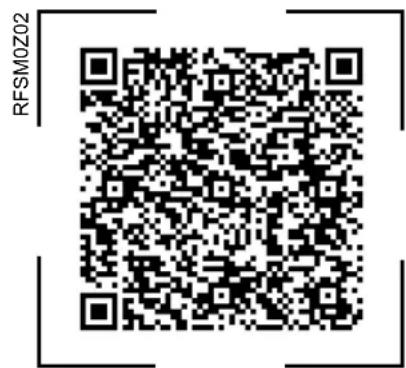
- Scan the following QR code.
text_image
RFSM0Z02You can install the Home Connect® app and connect your appliance via the QR code.
- Follow the instructions in the Home Connect® app.
10.2 Switching on the connection to the WLAN home network (Wi-Fi)
▶ Press
10.3 Intelligently networking appliances using Matter ^2
The universal Matter standard makes it possible to network smart appliances from different manufacturers. You can network smart appliances using a voice assistant or other central control units, for example.
Note: Not all appliances support the Matter standard. Check in the Home Connect® app whether your appliance supports the Matter standard.
Requirements
- The appliance is connected to the Wi-Fi home network and the Home Connect® app.
■ An app that supports the Matter standard for home appliances has been installed on your mobile device. - Follow the instructions in the Home Connect® app to add your appliance to your Matter network.
10.4 Switching off the connection to the WLAN home network (Wi-Fi)
▶ Press
10.5 Installing updates for the Home Connect® software
Note: If an update of the Home Connect® software is available, a message appears in the Home Connect® app.
To install the update for the Home Connect® software, follow the instructions in the Home Connect® app.
√ The control panel is partially locked during the installation.
10.6 Resetting the Home Connect® settings
If your appliance experiences connection problems with the WLAN home network (Wi-Fi) or your appliance wants to log into a different WLAN home network (Wi-Fi), you can reset the Home Connect® settings.
- Press and hold for 7 seconds until goes out.
√ The Home Connect® settings have been reset.
10.7 Remote Diagnostics
Customer Service can access your appliance via Remote Diagnostics if you ask them to do so, provided your appliance is connected to the Home Connect® server and Remote Diagnostics is available for your appliance and country. For more information on Remote Diagnostics' availability in your country, visit the Service/Support section of your local website: www.home-connect.com.
Please be aware that while Remote Diagnostics can assist in troubleshooting select issues, there may be instances where an on-site service visit is required if the problem cannot be resolved remotely.
10.8 Data Protection
Please read this information on data protection. The first time your appliance is registered on a home network connected to the Internet, your appliance transmits the following types of data to the Home Connect® server (initial registration):
- Unique appliance identification (consisting of appliance codes as well as the MAC address of the installed Wi-Fi communication module).
■ Security certificate of the Wi-Fi communication module (to ensure a secure data connection).
■ The current software and hardware version of your home appliance.
■ Status of any previous reset to factory settings.
This initial registration prepares the Home Connect® functions for use and is only required when you want to use the Home Connect® functions for the first time.
Note: Please note that the Home Connect® functions can only be used in conjunction with the Home Connect® app. Information on data protection can be retrieved in the Home Connect® app.
11 Refrigerator compartment
You can keep dairy products, eggs, prepared meals, pastries, open preserves and hard cheese in the refrigerator compartment.
The temperature can be set from 33 ^ ( 1 ^ ) to 43 ^ ( 6 ^ ).
The refrigerator compartment can also be used to store highly perishable foods in the short to medium term. The lower the selected temperature, the longer the food remains fresh.
11.1 Tips for storing food in the refrigerator compartment
■ Only store food when fresh and undamaged.
■ Store food covered or in air-tight packaging.
- To avoid impeding the circulation of air and to prevent food from freezing, do not place food in front of the inner ventilation openings or in direct contact with the back wall.
- Allow hot food and drinks to cool down first before placing in the appliance.
- Observe the best-before date or expiration date specified by the manufacturer.
11.2 Chill zones in the refrigerator compartment
The air recirculation cooling system allows the air to circulate evenly in the refrigerator compartment and ensures a constant temperature at all shelves.
Coldest zone
The coldest zone is in the storage container.
Tip: Store highly perishable food such as fish, sausages and meat in the coldest zone.
12 Freezer compartment
You can store frozen food, freeze food and make ice cubes in the freezer compartment.
The temperature can be set from 6 °F (-14 °C) to -7 °F (-22 °C).
Long-term storage of food should be at 0 °F ( -18 °C ) or lower.
The freezer compartment can be used to store perishable foods long-term. The low temperatures slow down or stop the spoilage.
12.1 Tips for storing food in the freezer compartment
■ Store food in air-tight packaging.
- Do not bring food which is to be frozen into contact with frozen food.
■ Distribute the food over a wide area in the suspended frozen food container.
12.2 Tips for freezing fresh food
■ Freeze fresh and undamaged food only.
■ Freeze food in portions.
- Cooked food is more suitable for freezing than food that can be eaten raw.
■ Vegetables: Wash, chop up and blanch before freezing.
■ Fruit: Wash, pit and perhaps peel, possibly add sugar or ascorbic acid solution.
- Food that is suitable for freezing includes baked items, fish and seafood, meat, game, poultry, eggs without shells, cheese, butter and curd cheese, prepared meals and leftovers.
- Food that is unsuitable for freezing includes lettuce, radishes, eggs in shells, grapes, raw apples and pears, yogurt, sour cream, crème fraîche and mayonnaise.
Packing frozen food
If you select suitable packaging material and the correct type of packaging, you can determine the product quality and prevent freezer burn.
- Place the food in the packaging.
- Squeeze out the air.
- Pack food airtight to prevent it from losing flavor or drying out.
- Label the packaging with the contents and the date of freezing.
12.3 Defrosting methods for frozen food
CAUTION
During the thawing process, bacteria may multiply and spoil the frozen food.
- Do not refreeze partly or completely thawed food.
▶ Refreeze food only after cooking. - The frozen items should no longer be stored for the maximum storage period.
■ Defrost animal-based food, such as fish, meat, cheese, curd cheese, in the refrigerator compartment.
■ Defrost bread at room temperature.
■ Prepare food for immediate consumption in the microwave, in the oven, or on the cooktop.
13 Water system
Your appliance is equipped with water-carrying components.
The water system only works if a water filter or a bypass cap is installed.
Switch off ice cube production before disconnecting the appliance from the drinking water connection.
13.1 Water filter
The water filter filters particles and the taste of chlorine out of the water.
The water filter reduces further contamination, e.g. from chloramines, lead and pharmaceutical products.
Note: The water filter does not filter bacteria or microbes out of the water.
Change the water filter:
■ Every 6 months.
■ If "filter" lights up.
■ If the water output has visibly reduced.
■ If ice cube production has visibly reduced.
Tips
■ A new water filter can be purchased from our customer service, your dealer or our website.
If you do not want to use a water filter in your appliance or an external water filter system is installed, you can permanently replace the water filter with a bypass cap. The bypass cap filters only large particles out of the water and can be cleaned as required.
A bypass cap can be purchased from customer service or our website.
Changing the water filter or replacing it with a bypass cap
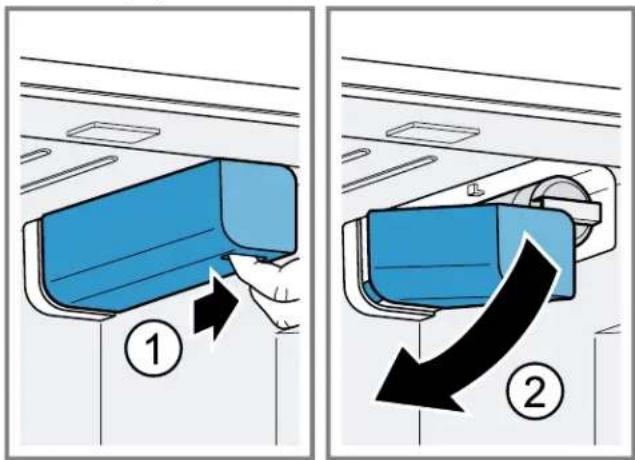
- Reach into the recess below the filter cover, pull it forward slightly ① and then down to the left . ②
text_image
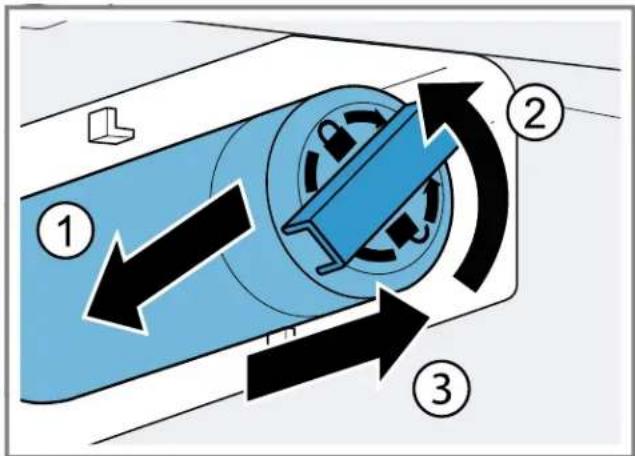
Diagram illustrating airflow or ventilation process with labeled steps ① and ② showing directional arrows and component placement.- Pull the water filter down to the left ①turn it counterclockwise by 90^ ②and remove it .③
- Remove the water filter with care as it is under pressure.
text_image
Diagram illustrating a mechanical or fluid system with three labeled components and directional arrows indicating flow or movement.Note: When removing it, a small amount of water may drip out of the water filter. Remove the drips of water with a dry cloth.
Tip: You can dispose of the old water filter with your household garbage.
-
Insert the new water filter or the bypass cap all the way into the filter opening, turn it 90° clockwise all the way and fold it up to the right.
-
Move the filter cover up to the right and slide it back all the way.
- Discard the ice cubes produced during the first 24 hours, and dispense water for 5 minutes and discard.
13.2 Filter change notification
Every 6 months, the filter change notification will come on. "filter" lights up.
Note: Increased water consumption switches the filter change notification on sooner.
Switching off the filter change notification
- Replace the water filter.
The bypass cap does not need to be replaced.
- Press filter.
√ "filter" goes out.
√ The filter change status is reset.
13.3 Ice and water dispenser
Use the ice and water dispenser to dispense ice cubes, crushed ice, and chilled water.
To achieve maximum ice cube production of up to 12 lbs (5.4 kg) within a period of 24 hours:
■ Set the freezer compartment to the coldest temperature.
■ Empty the ice storage container every 3 hours.
The quantity of ice cubes produced can vary due to the following conditions:
■ How often the appliance is opened
■ Amount of food stored
■ Ambient temperature and ambient humidity
■ Water pressure and condition of the water filter
Note: The ice and water dispenser is locked when the appliance door is open.
Using the ice and water dispenser
Notes
■ Ice cube production starts as soon as the appliance is switched on and the freezer compartment has reached the set temperature.
- As soon as the freezer compartment reaches the set temperature, the first batch of ice cubes will be ready in approximately 4 hours.
■ Once the appliance has been connected or a new water filter has been installed, there will be air in the water system.
Requirement: The appliance is connected to the drinking water connection.
- Keep dispensing water until it contains no more air bubbles.
Remove any splashes of water with a dry cloth.
- For hygiene reasons, dispense water for 5 minutes and discard.
- For hygiene reasons, discard the ice cubes produced within the first 24 hours.
Dispensing ice or water
- To activate setting mode, touch the lower area of the control panel.
- Press the desired selection option ① and press the glass against the dispensing button ②
- Flush the water system if water has not been drawn for 5 days. To flush the water system, dispense 2 liters of water.

text_image
① lock 3 sec. cubed crushed water bottle fill light ②Tip: Hold the glass directly under the dispenser opening.
Notes
■ After a while of continuous dispensing, the ice or water stops being dispensed. Wait a few seconds before dispensing ice or water again.
■ After ice or water has been dispensed several times consecutively, it stops being dispensed. Wait a few minutes before dispensing ice or water again.
- When changing from 🎨 cubed to 🎨 crushed, a few ice cubes may be released the next time you dispense.
- When changing from ⚙ crushed to ⚙ cubed, a small amount of crushed ice may be released the next time you dispense.
Bottle fill option
You can dispense a specific amount of water with the bottle fill option.
Note: The factory-set amount of water is approx. 500 ml.
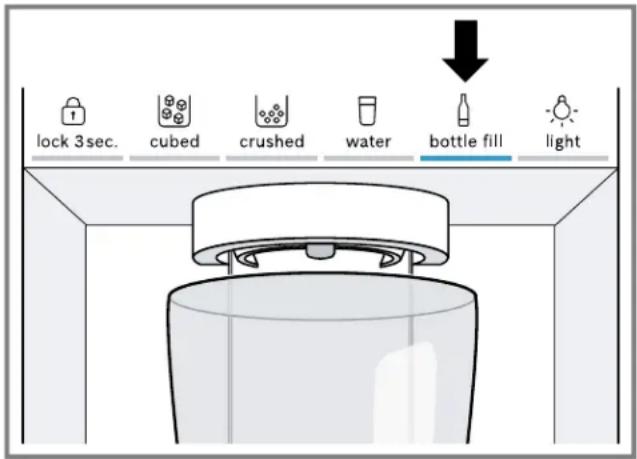
Filling a bottle
- Press bottle fill.
- Place a bottle or jug under the dispenser opening.
3. Press bottle fill.
text_image
lock 3sec. cubed crushed water bottle fill light√ The set amount of water is dispensed.
Tips
■ To stop dispensing early, press any touch field on the control panel.
■ To start dispensing again, press bottle fill.
Note: If you do not fill a bottle for some time, the selection option changes to ☐water.
Setting the amount of water for the bottle fill option
Note: The maximum fill time is 60 seconds.
- Press bottle fill.
- Place a bottle or jug under the dispenser opening.
- Select one of the options:
- Press and hold ⚡ bottle fill at the same time until the desired amount of water is dispensed.
- Press √ Freezer compartment) repeatedly until the temperature display (freezer compartment) shows the desired water dispensing time in seconds.
√ The new amount of water is saved and will be dispensed for the bottle fill option.
Permanent light
If you do not dispense ice or water for some time, the light switches itself off.
You can permanently switch on the light on the ice and water dispenser.
Switching on the permanent light
- To activate setting mode, touch the lower area of the control panel.
- Press light.
√ light lights up.
Switching off the permanent light
- To activate setting mode, touch the lower area of the control panel.
- Press light.
√ light goes out.
Switching on ice cube production
- To activate setting mode, touch the upper area of the control panel.
- Press icemaker off.
√ Ice cube production starts and the selection option that was last used lights up.
Switching off ice cube production
- To activate setting mode, touch the upper area of the control panel.
- Press icemaker off.
√ The ice dispenser and ice cube production stop.
14 Defrosting
14.1 Defrosting in the refrigerator compartment
The refrigerator compartment in your appliance defrosts automatically.
14.2 Defrosting in the freezer compartment
The fully automatic NoFrost system ensures that the freezer compartment remains frost-free. Defrosting is not required.
15 Cleaning and maintenance
Note: The Statement of Limited Product Warranty covers defects in materials and workmanship. Cleaning and maintenance is not covered by the warranty and a charge will apply. See the Statement of Limited Product Warranty for more details.
Customer Service must clean inaccessible points.
Cleaning by Customer Service can give rise to costs.
15.1 Preparing the appliance for cleaning
- Switch off the appliance. → Page 13
- Disconnect the appliance from the power supply.
Unplug the appliance from the power source or switch off the circuit breaker in the fuse box.
- Take out all of the food and store it in a cool place.
Place ice packs (if available) onto the food. - Remove all fittings and accessories from the appliance. → Page 20
- Remove the telescopic rails. → Page 22
- Remove the shelf above the fruit and vegetable container. → Page 23
- Remove the shelf above the storage container. → Page 23
- Remove the fruit and vegetable container cover. → Page 23
15.2 Cleaning the appliance

WARNING
Moisture intrusion may cause an electric shock.
- Do not use any steam cleaners or high-pressure cleaners to clean the appliance.
NOTICE:
Unsuitable cleaning agents may damage the surfaces of the appliance.
▶ Do not use hard scouring pads or cleaning sponges.
- Do not use strong or abrasive cleaning agents.
- Do not use cleaning agents with a high alcohol content.
- Do not use stainless-steel cleaning agents on the outside of the appliance.
If you clean fittings and accessories in the dishwasher, this may cause them to become deformed or discolor.
▶ Never clean fittings and accessories in the dishwasher.
- Prepare the appliance for cleaning. → Page 19
-
Clean the outside of the appliance, the inside of the appliance, the fittings, the accessories and the door seals with a dish cloth, lukewarm water and a little pH-neutral dish soap.
-
Dry thoroughly with a soft, dry cloth.
-
Insert the fittings and install the removable appliance parts.
-
Connect the appliance to the electricity supply. → Page 8
-
Put the food into the appliance.
15.3 Cleaning the drip tray
Regularly check the drip tray for water spillages and clean as necessary.
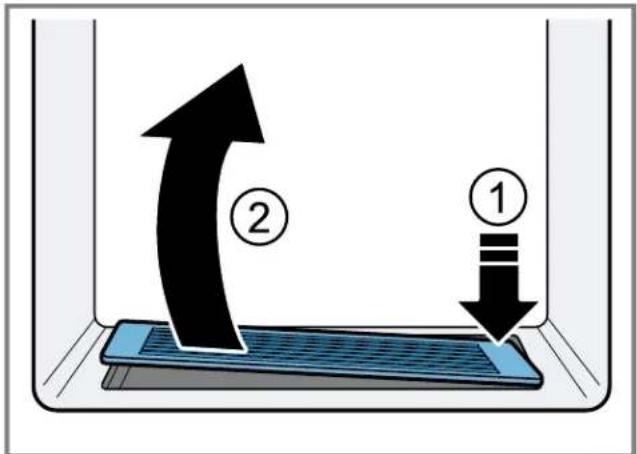
- Press down on the top right corner of the drip grate ① and remove it ②
text_image
Diagram illustrating fluid flow with labeled arrows and components, showing fluid movement from component 1 to component 2 inside a container.- Wipe out the drip tray with a sponge or absorbent cloth.
15.4 Removing the fittings
If you want to clean the fittings thoroughly, remove these from your appliance.
Removing the shelf
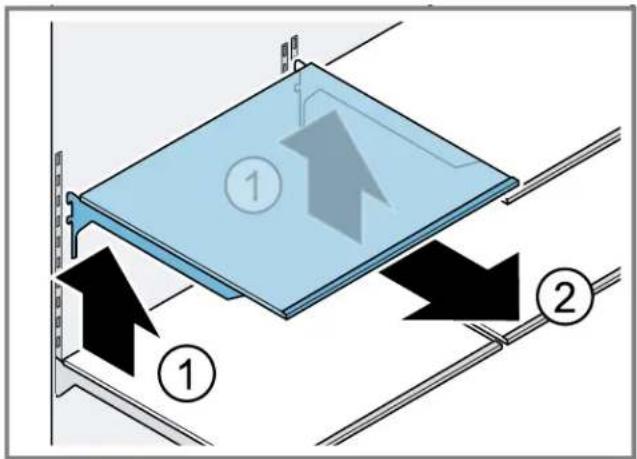
▶ Lift the shelf ① and remove it ②
text_image
Diagram showing two labeled components (① and ②) with directional arrows indicating movement or flow, likely illustrating a mechanical or electrical system.Removing the door tray
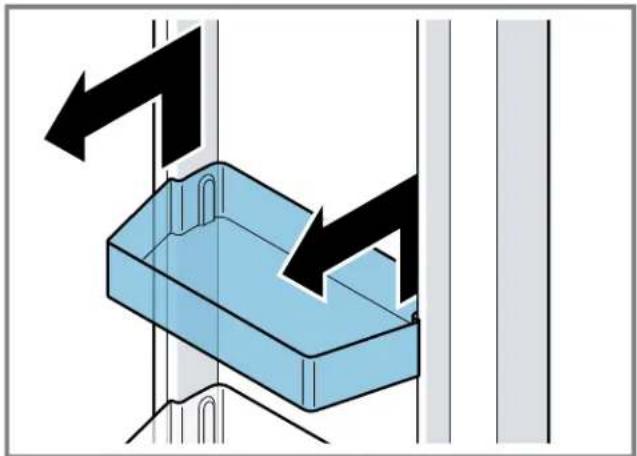
▶ Lift the door tray and remove it.
natural_image
Diagram of a blue plastic container with black arrows indicating direction, mounted on a vertical wall (no text or symbols)Removing the storage container
-
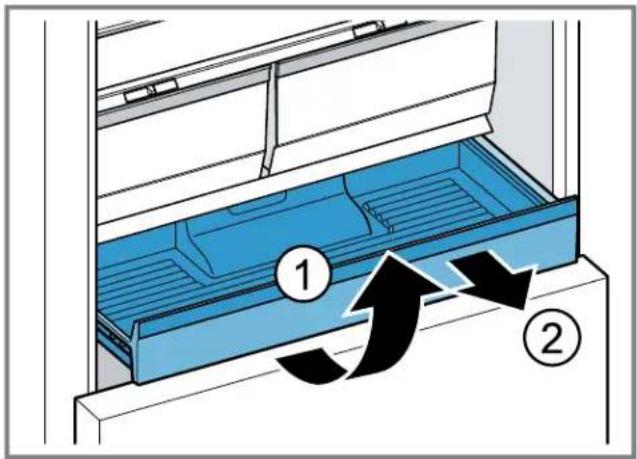
Pull the storage container out all the way.
-
Lift the storage container at the front ① and remove it ②.
text_image
Diagram showing a blue storage tray with labeled components and directional arrows indicating flow or movement.Removing the fruit and vegetable container
- Pull out the fruit and vegetable container as far as it will go.
- Lift the fruit and vegetable container at the front ①and remove it ②
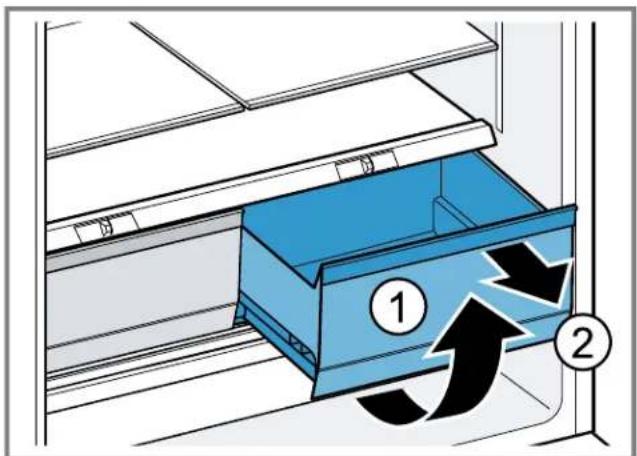
text_image
Diagram showing a blue drawer with numbered arrows indicating flow or movement, labeled ① and ②.Removing the frozen food pull-out container
-
Pull out the frozen food pull-out container as far as it will go.
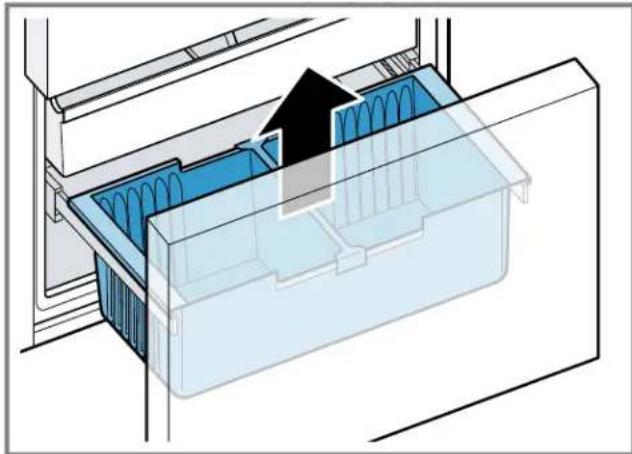
-
Lift the frozen food pull-out container at the front and remove it.
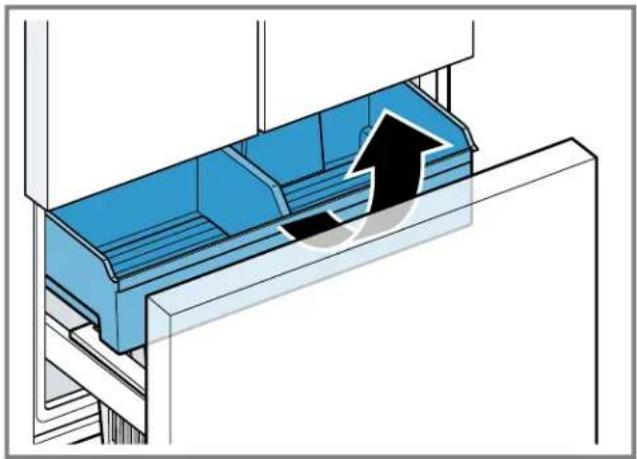
natural_image
Diagram of a blue industrial machine with a black upward arrow indicating flow or movement (no text or symbols present)Removing the ice storage container

WARNING
Reaching into the dispenser opening of the ice storage container can cause cuts.
▶ Never reach into the dispenser opening of the ice storage container.
- Reach into the left and right recesses below the ice storage container and pull it out toward the front.
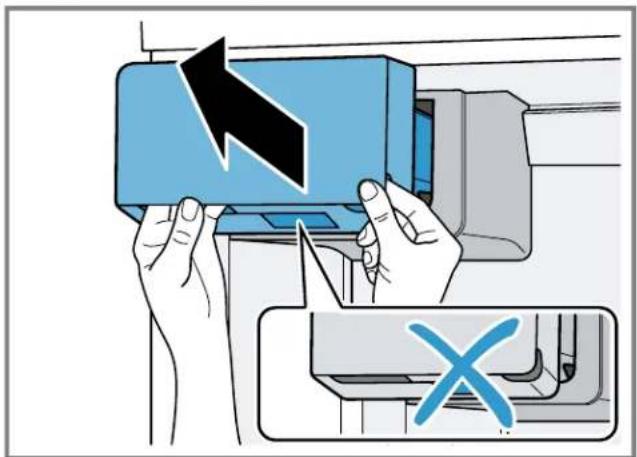
text_image
Diagram showing hands operating a printer with a black arrow indicating the process, and a blue X symbol highlighting a specific area.Tips
■ If the ice storage container cannot be reinserted, turn the auger on the ice storage container and try again.
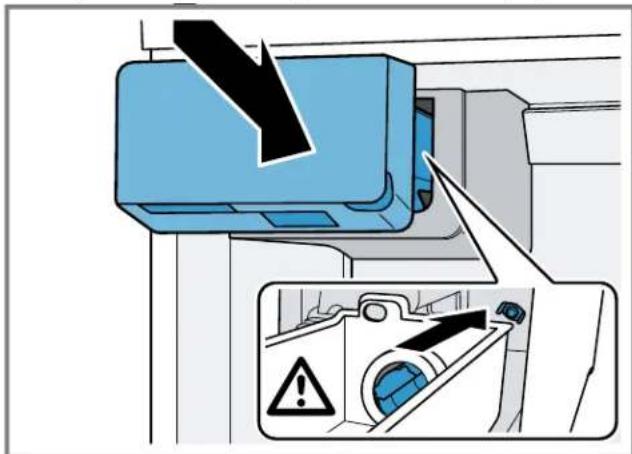
text_image
Diagram showing a blue air conditioner unit with a black downward arrow and warning symbol, alongside an inset image of a device with warning labels.If, during installing, the ice storage container is blocked, remove excess ice cubes from the ice storage container opening.
Removing the suspended frozen food container
▶ Lift out the suspended frozen food container.
natural_image
3D diagram of a refrigerator interior with blue plastic casing and black arrow indicating airflow or movement (no text or symbols)15.5 Removing the appliance components
If you want to clean your appliance thoroughly, you can remove certain components from your appliance.
Telescopic rails
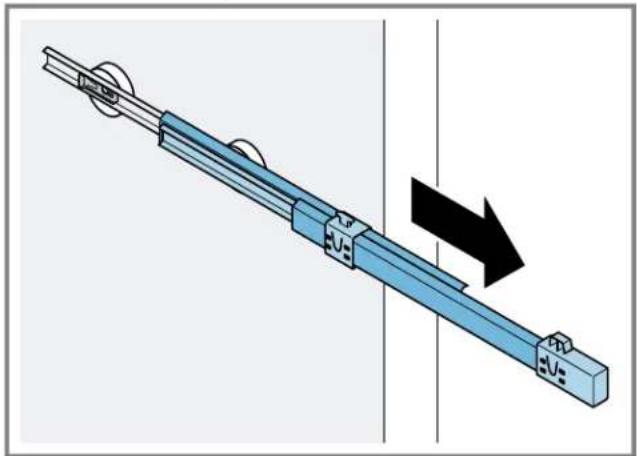
You can remove the telescopic rails in order to clean them thoroughly.
Removing the telescopic rails
- Pull out the telescopic rail.
natural_image
Mechanical assembly diagram showing a blue rail with pulleys and a black arrow indicating motion direction (no text or symbols)- Move the lock in the direction of the arrow ① and loosen the pin from the rear ②

text_image
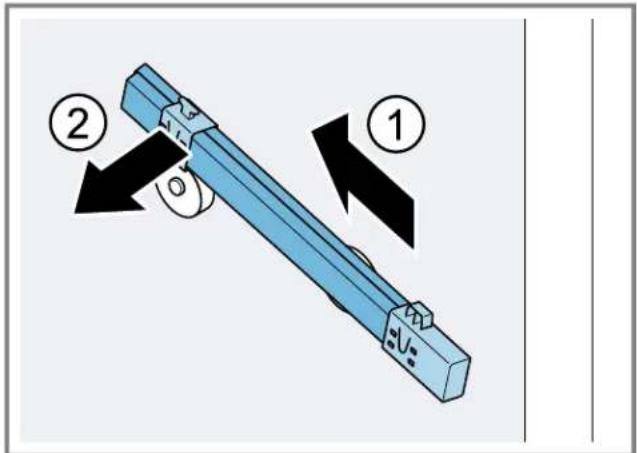
Diagram illustrating two steps of a mechanical device with labeled components and directional arrows indicating motion or assembly.-
Push in the telescopic rail.
-
Push the telescopic rail backwards above the rear pin ① and disengage ②
text_image
Diagram showing a mechanical component with numbered parts and directional arrows indicating motion or assembly.Installing the telescopic rails
- Place the extended telescopic rail on the front pin ① and pull it forwards slightly to lock in place ②
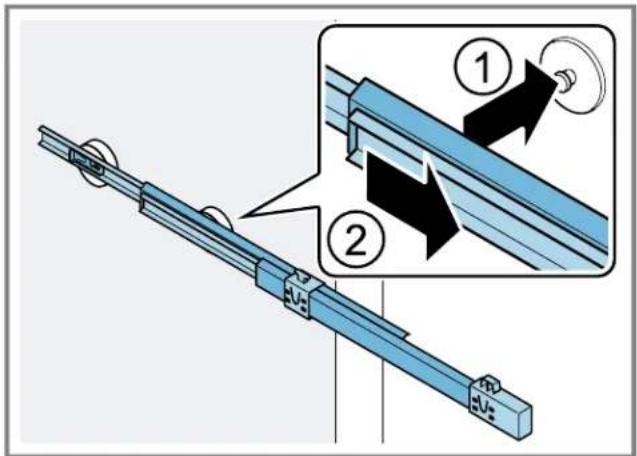
text_image
Technical diagram showing a mechanical assembly with labeled parts and directional arrows indicating motion or assembly steps.- Place the telescopic rail on the rear pin ① and push the locking mechanism back ②
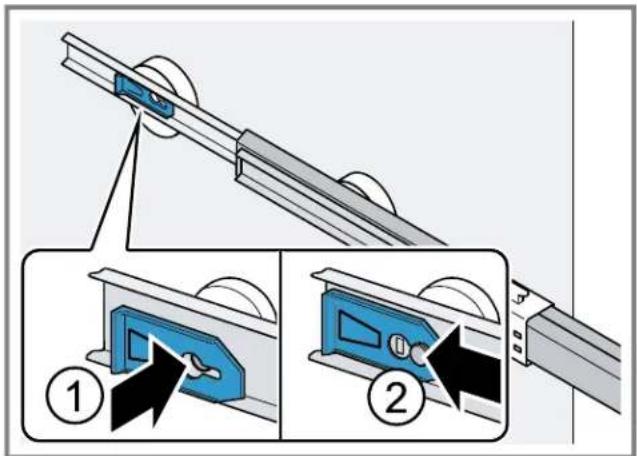
text_image
Diagram illustrating a mechanical device with labeled steps and component illustrationsRemoving the shelf above the fruit and vegetable container
- Pull the fruit and vegetable container out all the way.
- Lift the shelf above the fruit and vegetable container at the front ①and remove it .②
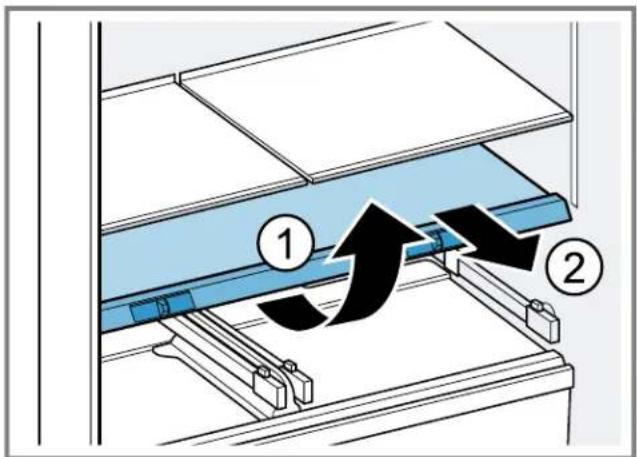
text_image
Diagram showing a mechanical assembly with labeled components and directional arrows indicating motion or flow.Removing the shelf above the storage container
- Pull the storage container out all the way.
- Lift the shelf above the storage container at the front ① and remove it ②
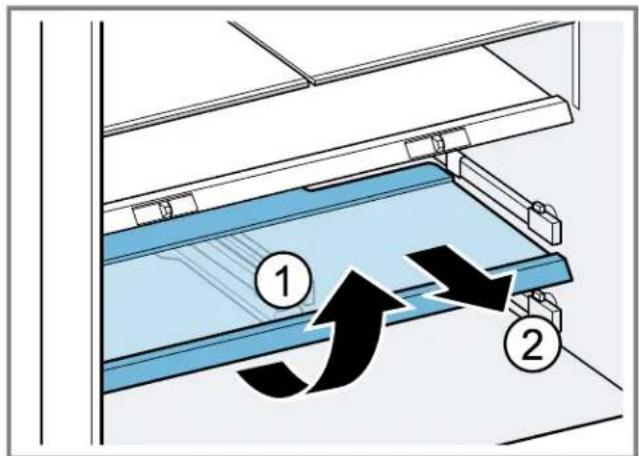
text_image
Diagram showing airflow or ventilation system with labeled components and directional arrows indicating flow directionFruit and vegetable container cover
To clean the fruit and vegetable container cover thoroughly, you can remove it.
Removing the fruit and vegetable container cover
- Remove the fruit and vegetable container. → Page 21
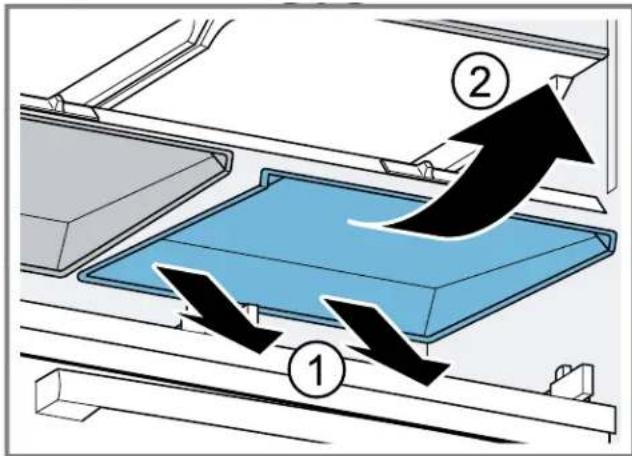
- Bend the fruit and vegetable container cover upwards slightly at the middle ① then pull out one side and then the other towards the front ②
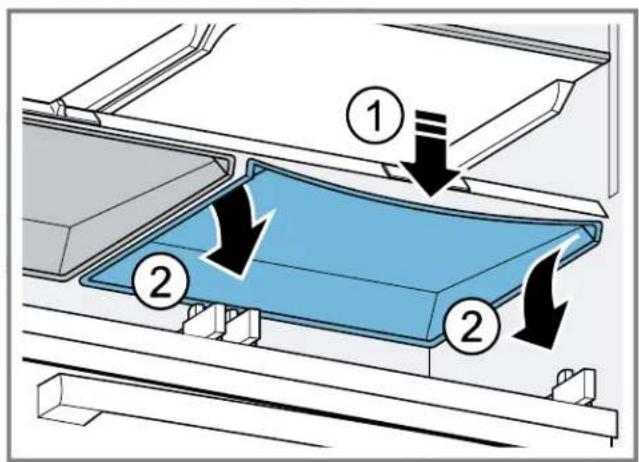
text_image
Diagram showing a blue plastic component being inserted into a rack, with numbered arrows indicating flow or movement.- Pull out the fruit and vegetable container cover at the rear ①and remove it .②
text_image
Diagram illustrating airflow or fluid flow through a container with numbered arrows and labeled componentsFitting the fruit and vegetable container cover
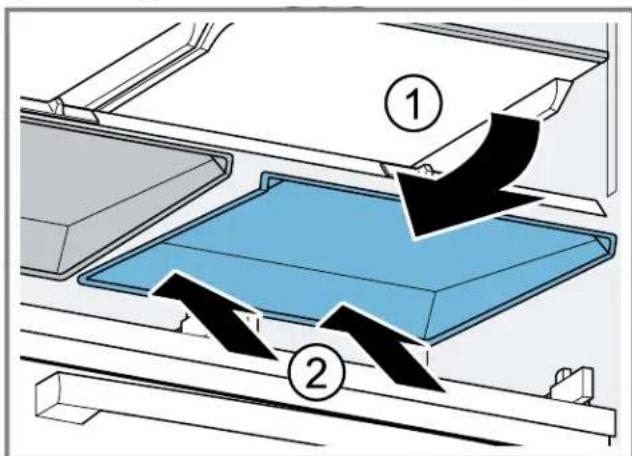
- Slide the fruit and vegetable container cover symmetrically toward the rear ①and clip it into place .②
text_image
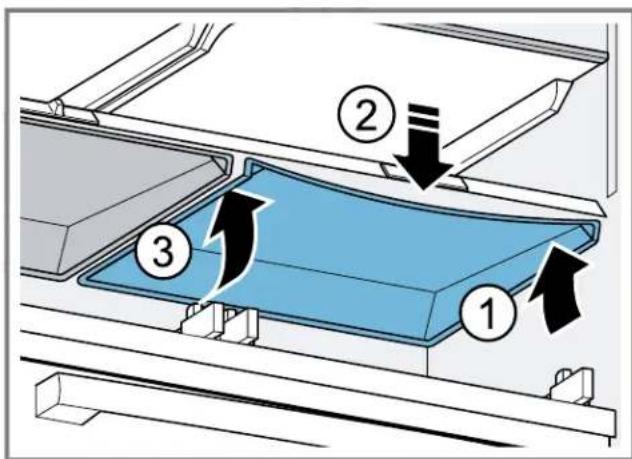
Diagram showing a blue tray with arrows labeled ① and ② indicating flow or movement, likely illustrating a process or system in a container.- Clip in one side of the fruit and vegetable container cover at the front ① then bend it downward slightly at the middle ② and then clip in the other side at the front ③
text_image
Diagram showing a blue plastic component being inserted into a rack, with numbered arrows indicating process flow.If the fruit and vegetable container cover is still bent, move the humidity regulator to and fro until the fruit and vegetable container cover clips into place.
16 Troubleshooting
You can eliminate minor issues on your appliance yourself. Please read the information on eliminating issues before contacting Customer Service. This may avoid unnecessary repair costs.

WARNING
To avoid risk of injury from improper repairs, observe the following.
- Only qualified technicians or authorized service providers should perform repairs.
- Only genuine spare parts may be used to repair the appliance.
If the power cord or the appliance power cable of this appliance becomes damaged, it must be replaced with a special power cord or special appliance power cable, which is available from the manufacturer or the manufacturer's Customer Service.
Issue Cause and troubleshooting
| The appliance is not cooling, the displays and lighting are lit. | Showroom mode is switched on.1. Disconnect the appliance from the power supply.Unplug the power plug or switch off the circuit breaker in the fuse box.2. Reconnect the appliance after 5 minutes.3. Wait at least 30 seconds and then press super (Refrigerator compartment) for 15 seconds.√ appears briefly on the control panel.4. After a short time, check whether your appliance is cooling. |
| The LED lighting does not work. Various causes are possible.► Call customer service.→ "Customer Service", Page 29 | |
| The refrigeration unit is switching on more frequently and for longer. | The appliance has been opened frequently.► Do not open appliance door unnecessarily. |
| External ventilation openings are covered up.► Remove any obstructions from in front of the external ventilation openings. | |
| Not a fault. Modern refrigeration machines switch on more frequently and have different power levels to cool more efficiently.► Remove any obstructions from in front of the external ventilation openings.► Install the appliance as far away as possible from heating elements, cookers and other heat sources. Avoid prolonged exposure of the appliance to direct sunlight.► Only open the appliance door as briefly as necessary.► Allow hot food and drinks to cool down first before storing in the appliance. | |
| A layer of frost forms on the back wall of the refrigerator compartment. | Not a fault. Modern refrigeration machines ensure a more even temperature in the refrigerator compartment. The back wall of the refrigerator compartment is defrosted automatically at regular intervals.► Only open the appliance door as briefly as necessary.► Pack the food airtight or cover it.► Allow hot food and drinks to cool down first before storing in the appliance.► Always leave some space between the food and the interior walls. |
| Home Connect® is not working properly. | Various causes are possible.► Go to www.home-connect.com. |
| "E" or "d" appears on the temperature display. | The electronics have detected a fault.1. Switch off the appliance. → Page 132. Disconnect the appliance from the power supply.Unplug the power plug or switch off the circuit breaker in the fuse box.3. Reconnect the appliance after 5 minutes.4. If the message still appears on the display, call Customer Service.→ "Customer Service", Page 29 |
| Issue Cause and troubleshooting | ||
| A warning signal sounds and "alarm" flashes. The door alarm is switched on. | The appliance door is open. ▶ Close the appliance door. | |
| A warning tone sounds and the temperature display (freezer compartment) and "alarm" flash. The temperature alarm is switched on. | Various causes are possible. 1. Press alarm. √ The alarm is switched off. 2. After several hours, check whether the set freezer compartment temperature has been reached again. | |
| External ventilation openings are covered up. ▶ Remove any obstructions from in front of the external ventilation openings. | ||
| Large quantities of fresh food have been placed inside. ▶ Switch on Super freezing before placing a larger amount of food in the appliance. → "Switching on Super freezing", Page 14 | ||
| All temperature displays and "alarm" light up. | A sensor is defective. ▶ Call customer service. → "Customer Service", Page 29 | |
| The temperature differs greatly from the setting. | Various causes are possible. 1. Switch off the appliance. → Page 13 2. Switch the appliance back on after approximately 5 minutes. → Page 12 - If the temperature is too warm, check the temperature again after a couple of hours. - If the temperature is too cold, check the temperature again on the following day. | |
| Water is leaking out of the appliance. | The water connection or water hose is not leak-tight. ▶ Check if the water connections are fastened firmly and the water hose is undamaged. If necessary, replace the water hose. | |
| The drip tray is overflowing. ▶ Clean the drip tray. → Page 20 | ||
| Water output is reduced. Low water pressure. | Check the pressure of the water supply system or the external water filter system, e.g. reverse osmosis system. Connect the appliance only to a water connection with sufficient water pressure. → Page 7 | |
| The water filter is blocked. ▶ Change the water filter. → Page 17 | ||
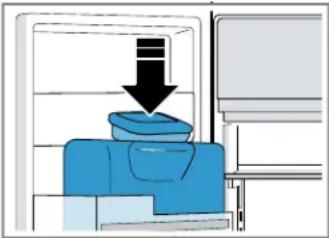
| Water is dripping from the ice and water dispenser. | Air is in the water system. ▶ Keep dispensing water until it contains no more air. | |
| Ice residue is melting in the ice chute. ▶ Remove the ice residue from the ice chute, for example using a wooden spoon. | ||
 | ||
| Condensation forms at the ice storage container's outlet opening and the ice shaft. | The water contained in warm and humid air condenses on the colder surfaces of the appliance.▸ Do not open appliance door unnecessarily. | |
| Ice residue is melting in the ice chute.1. Wipe away the condensation water with a soft, dry cloth.2. Open the appliance as briefly as possible.3. Ensure that the appliance is always closed properly. | ||
| Ice cube production is low. The appliance has only recently been connected.▸ Wait approximately 4 hours until the first batch of ice cubes is ready. | ||
| The freezer compartment has been opened frequently or for an extended period of time.▸ Check ice cube production after a few hours. | ||
| Low water pressure.▸ Check the pressure of the water supply system or the external water filter system, e.g. reverse osmosis system.Connect the appliance only to a water connection with sufficient water pressure.→ Page 7 | ||
| The water filter is blocked.▸ Change the water filter. → Page 17 | ||
| The ice and water dispenser is not functioning. | Ice cube production is switched off.▸ Switch on ice cube production. | |
| The keylock is switched on▸ Switch off the keylock. → Page 13 | ||
| The ice storage container is not fully inserted.▸ Fully insert the ice storage container. → Page 21 | ||
Ice cubes are frozen together in the ice chute.▸ Remove the ice cubes from the ice chute, for example using a wooden spoon.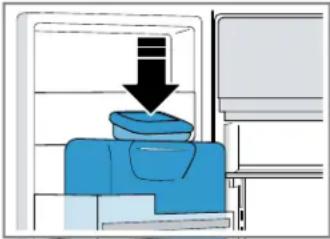 | ||
| Low water pressure.▸ Check the pressure of the water supply system or the external water filter system, e.g. reverse osmosis system.Connect the appliance only to a water connection with sufficient water pressure.→ Page 7 | ||
| The water filter is blocked.▸ Change the water filter. → Page 17 | ||
| There is no water being supplied to the appliance.▸ Ensure that there is a water supply and that the shut-off valve on the water connection is open.Contact an installer if necessary. | ||
| Kink in the water hose.▸ Turn off the water supply and straighten the kink in water hose.If necessary, replace the water hose. | ||
| The ice and water dispenser is not functioning. | Fault in the ice and water dispenser.1. Switch off the appliance. → Page 132. Disconnect the appliance from the power supply.Unplug the power plug or switch off the circuit breaker in the fuse box.3. Reconnect the appliance after 5 minutes.4. If the fault persists, call customer service. → Page 29 | |
| The appliance hums, bubbles, buzzes, gargles, clicks, crackles or rumbles. | Not a fault. A motor is running, e.g. refrigerating unit, fan. Refrigerant is flowing through the pipes. The motor, switches, solenoid valves or water valves are switching on or off. Automatic defrosting is running. Ice cubes fall into the ice storage container.No action required. | |
| The appliance makes noises. The appliance is not level.► Align the appliance using a bubble level and the screw feet. | ||
16.1 Power failure
During a power failure, the temperature in the appliance rises; this reduces the storage time and the quality of the frozen food.
Notes
- Open the appliance as little as possible during a power failure and do not place any other food in the appliance.
16.2 Conducting an appliance self-test
Your appliance has an appliance self-test which displays faults that can be eliminated by your customer service.
- Switch off the appliance. → Page 13
- Disconnect the appliance from the power supply. Unplug the appliance from the power source or switch off the circuit breaker in the fuse box.
- Connect the appliance to the electricity supply after 5 minutes. → Page 8
√ The control panel shows an animation and is locked.
- One minute after switching on, press and hold super (Refrigerator compartment) for 3 to 5 seconds until an audible signal sounds.
√ The appliance self-test starts.
√ If, at the end of the appliance self-test, 2 audible signals sound and the temperature display indicates the set temperature, the temperature sensors on your appliance are OK. The appliance switches to normal operation.
√ If, at the end of the appliance self-test, 5 audible signals sound, inform customer service.
- Check the quality of the food immediately after a power failure.
- Dispose of any frozen food that has defrosted and is warmer than 41 °F (5 °C).
-
Cook or fry slightly thawed frozen food, and then either consume it or freeze it again.
-
Press super (Freezer compartment) so that the appliance skips to normal operation.
√ The temperature displays show the set temperatures → Page 13
17 Storage and disposal
17.1 Taking the appliance out of operation
- Switch off the appliance. → Page 13
- Disconnect the appliance from the power supply. Unplug the appliance from the power source or switch off the circuit breaker in the fuse box.
- Disconnect the appliance from the drinking water connection.
- Remove all of the food.
- Remove the water filter. → Page 17
-
Clean the appliance. → Page 20
-
NOTICE: Objects jammed between the door and the housing may damage the door hinge.
▶ Open the door until it remains open by itself.
- Do not insert any objects between the door and the housing.
To ensure the ventilation inside the appliance, leave the appliance open.
17.2 Disposal of your old appliance
Environmentally compatible disposal allows valuable raw materials to be recycled.

WARNING
Children can lock themselves in the appliance, thereby putting their lives at risk.
- Remove the appliance doors and the appliance drawer.
- To prevent children from climbing in, leave shelves and containers in the appliance.
- Keep children away from the discarded appliance.

WARNING
If the tubes are damaged, flammable refrigerant and harmful gases may escape and ignite.
- Do not damage the tubes of the refrigerant circuit or the insulation.
- Unplug the appliance from the power supply.
- Cut through the power cord.
- Remove the appliance doors and the appliance drawer.
- Dispose of the appliance in an environmentally responsible manner.
Information about current disposal methods can be obtained from your specialist dealer or local authority.
18 Customer Service
With any warranty repair, we will make sure your appliance is repaired by an authorized service provider using genuine replacement parts. We use only genuine replacement parts for all repairs.
Detailed information on the warranty period and terms of warranty can be found in the Statement of Limited Product Warranty, from your retailer, or on our website.
USA:
1-800-944-2904
www.bosch-home.com/us/owner-support/get-support www.bosch-home.com/us/shop
CA:
1-800-944-2904
www.bosch-home.ca/en/service/get-support
www.bosch-home.ca/en/service/cleaners-and-accessories
For assistance with connecting to Home Connect®, you can also view instructions here:
www.home-connect.com/us/en/help-support/set-up
18.1 Model number (E-Nr.), production number (FD) and consecutive numbering (Z-Nr.)
If you contact Customer Service, you will need the product number (E-Nr.), production number (FD), and consecutive numbering (Z-Nr.), which you can find on the appliance's rating label.
→ "Appliance", Fig. 1/8, Page 10
Making a note of your appliance's details and the Customer Service telephone number will enable you to find them again quickly.
19 Technical specifications
Refrigerant, cubic capacity and further technical specifications can be found on the rating plate.
→ "Appliance", Fig. 1/8, Page 10
19.1 Information regarding Free and Open Source Software
This product includes software components that are licensed by the copyright holders as free or open source software.
The applicable license information is stored on your home appliance. You can also access the applicable license information via your Home Connect® app: "Profile -> Legal information -> License Information".¹ You can also download the license information on the brand product website. (Please search on the product website for your appliance model and additional documents). Alternatively, you can request the relevant information from ossrequest@bshg.com or BSH Hausgeräte GmbH, Carl-Wery-Str. 34, 81739 Munich, Germany.
The relevant source code will be made available to you on request.
Please send your request to ossrequest@bshg.com or BSH Hausgeräte GmbH, Carl-Wery-Str.34, 81739 Munich, Germany.
Subject: „OSSREQUEST“
The cost of performing your request will be charged to you. This offer is valid for three years from the date of purchase or at least as long as we offer support and spare parts for the relevant appliance.
12 Compartiment congélation.... 45
text_image
Diagram of a device with labeled parts, showing a vertical line and two numbered components.3
text_image
Diagram showing a warning symbol with an exclamation mark above a structural section, featuring blue rectangular blocks and a downward arrow.natural_image
Isometric diagram of a container with internal blue and black components, no text or symbols present12 Compartiment congélation
text_image
Diagram illustrating airflow or ventilation process with labeled steps ① and ② showing directional arrows and component placement.text_image
Diagram illustrating a mechanical or fluid system with three labeled components (1, 2, 3) showing directional flow arrows.text_image
① lock 3 sec. cubed crushed water bottle fill light ②text_image
lock 3 sec. cubed crushed water bottle fill lighttext_image
Diagram illustrating fluid flow in a container with labeled arrows and componentstext_image
Diagram showing two labeled arrows pointing to a blue rectangular device with an upward arrow, indicating direction of movement or assembly.Retirer le compartiment de contre-porte
natural_image
Diagram of a blue plastic container with black arrows indicating direction, mounted on a vertical wall (no text or symbols)text_image
Diagram showing a blue storage tray with labeled components and directional arrows indicating flow or movement.text_image
Diagram showing a blue drawer with numbered arrows indicating flow or movement, labeled ① and ②.natural_image
Diagram of a blue industrial machine with an upward arrow indicating motion or force, no text or symbols presenttext_image
Diagram showing hands installing a printer with a black arrow and a blue X symbol, indicating a process or installation.Conseils
text_image
Diagram showing a blue air conditioner unit with warning symbol and an inset warning mechanism highlighting a device.natural_image
3D diagram of a blue plastic appliance with internal components and a black arrow indicating direction (no text or symbols)natural_image
Mechanical assembly diagram showing a blue rail rod with attached components and a black arrow indicating direction (no text or symbols)text_image
Diagram illustrating a mechanical device with two steps: adding a component to a rail, and adding a component to a cable.text_image
Diagram showing a blue mechanical component with two labeled directional arrows (① and ②) indicating movement or force directions.text_image
Technical diagram showing a mechanical assembly with labeled parts and directional arrows indicating motion or assembly steps.text_image
Diagram illustrating a mechanical device with labeled steps and component views, showing assembly or installation instructions.text_image
Diagram showing a mechanical assembly with labeled components and directional arrows indicating motion or flow.text_image
Diagram showing a mechanical or structural assembly with numbered components and directional arrows indicating flow or movement.text_image
Diagram showing a blue plastic component being lifted by two different parts, labeled with arrows and numbered regions.text_image
Diagram illustrating a mechanical or fluid system with labeled components and directional arrows indicating flow or movement.text_image
Diagram showing a blue tray with arrows labeled ① and ② indicating flow or movement, likely illustrating a process or system in a machine.text_image
Diagram of a refrigerator interior with numbered components and directional arrows indicating movement or flow.www.bosch-home.com/us/owner-support/get-support www.bosch-home.com/us/shop
CA:
1-800-944-2904
www.bosch-home.ca/en/service/get-support
www.bosch-home.ca/en/service/cleaners-and-accessories
text_image
QR code image containing encoded data, no visible human-readable textBOSCH
text_image
Diagram of a device with labeled parts, showing a vertical line and two numbered components.3
text_image
Diagram showing a mechanical or electrical setup with labeled components and an exclamation mark abovenatural_image
3D diagram of a container with internal blue and black arrows indicating flow or movement (no text or symbols)text_image
Diagram illustrating airflow or ventilation process with labeled steps ① and ② showing directional arrows and component placement.text_image
Diagram illustrating a mechanical or fluid system with three labeled components (1, 2, 3) and directional arrows indicating flow or movement.text_image
① lock 3sec. cubed crushed water bottle fill light ②text_image
lock 3sec. cubed crushed water bottle fill lighttext_image
Diagram illustrating fluid flow in a container with labeled arrows and componentstext_image
Diagram showing two labeled arrows pointing to a blue rectangular object with an upward arrow, indicating directional movement or flow.natural_image
Diagram of a blue plastic container with black arrows indicating direction, mounted on a vertical wall (no text or symbols)text_image
Diagram showing a blue drawer with labeled components and directional arrows indicating flow or movement.text_image
Diagram showing a blue drawer with numbered arrows indicating flow or movement, labeled ① and ②.natural_image
Diagram of a blue industrial machine with an upward arrow indicating flow or movement (no text or symbols present)text_image
Diagram showing hands operating a printer with a downward arrow and a blue X symbol, indicating a process or warning.Recomendaciones
text_image
Diagram showing a blue industrial machine with a warning symbol and an inset safety warning label in Chinese.natural_image
3D diagram of a blue plastic appliance with internal components and a black arrow indicating direction (no text or symbols)natural_image
Diagram of a blue mechanical rail system with pulleys and a directional arrow indicating motion (no text or symbols)text_image
Diagram illustrating a mechanical device with two steps: adding a component to a rail, and adding a component to a cable.text_image
Diagram showing a blue mechanical component with two labeled arrows (1 and 2) indicating directional movement or assembly.text_image
Technical diagram showing a mechanical assembly with labeled parts and directional arrows indicating motion or assembly steps.text_image
Diagram illustrating a mechanical device with labeled steps and component illustrationstext_image
Diagram showing a mechanical assembly with labeled parts and directional arrows indicating motion or flow.text_image
Diagram showing airflow or ventilation system with labeled components and directional arrows indicating flow directiontext_image
Diagram showing a blue plastic component being inserted into a rack, with numbered arrows indicating flow or movement.text_image
Diagram illustrating airflow or fluid flow between two containers with numbered arrows and directional arrows indicating movement.text_image
Diagram showing two labeled components (① and ②) of a mechanical or electronic component with directional arrows indicating flow or movement.text_image
Diagram of a refrigerator interior with numbered parts and directional arrows indicating movement or flowwww.bosch-home.com/us/owner-support/get-support
www.bosch-home.com/us/shop
CA:
1-800-944-2904
www.bosch-home.ca/en/service/get-support
www.bosch-home.ca/en/service/cleaners-and-accessories
www.home-connect.com/us/en/help-support/set-up
Register your appliance to enjoy customized benefits.
Thank you for being a Bosch customer!
Simply create a MyBosch account, then register your appliance.
You'll find a variety of customized information in MyBosch such as:
• Discounts for filters, cleaners, accessories & parts
- Easy access to manuals & appliance specifications
- Easy access to part lists
- Customized offer for the Bosch Appliance Service Plan (sent by mail after appliance registration)
Register here:
www.bosch-home.com/us/owner-support/mybosch
BOSCH HOME APPLIANCES SERVICE
Looking for help?
You'll find it here.
No matter what, no matter when: Bosch is here to support you.
We're here to assist with usage instructions, cleaning tips, accessories & parts, troubleshooting, and repairs.
Find online resources such as FAQs, how-to-videos, manuals, warranties and authorized Bosch servicers at:
www.bosch-home.com/us/owner-support/get-support
Contact us:
Please have your Model Number (E-Nr) ready when contacting us.
1-800-944-2904
www.bosch-home.com/us/owner-support/contact-us
BSH Home Appliances Corporation
1901 Main Street, Suite 600
Irvine, CA 92614
USA
www.bosch-home.com
1-800-944-2904
© 2025 BSH Home Appliances Corporation

9001806139 (051106)
en-us, fr-ca, es-mx