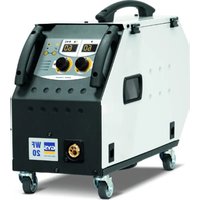
Gyspot PTI Premium PRO 400V - Welding machine GYS - Free user manual and instructions
Find the device manual for free Gyspot PTI Premium PRO 400V GYS in PDF.


User questions about Gyspot PTI Premium PRO 400V GYS
0 question about this device. Answer the ones you know or ask your own.
Ask a new question about this device
Download the instructions for your Welding machine in PDF format for free! Find your manual Gyspot PTI Premium PRO 400V - GYS and take your electronic device back in hand. On this page are published all the documents necessary for the use of your device. Gyspot PTI Premium PRO 400V by GYS.
USER MANUAL Gyspot PTI Premium PRO 400V GYS
natural_image
Technical line drawing of a mechanical device with wheels and a handle (no text or symbols)FR 2-8 / 9-29 / 89-100
EN 2-8 / 30-49 / 89-100
DE 2-8 / 50-69 / 89-100
ES 2-8 / 70-90 / 89-100
GYSPOT PTI PREMIUM PRO
400 V
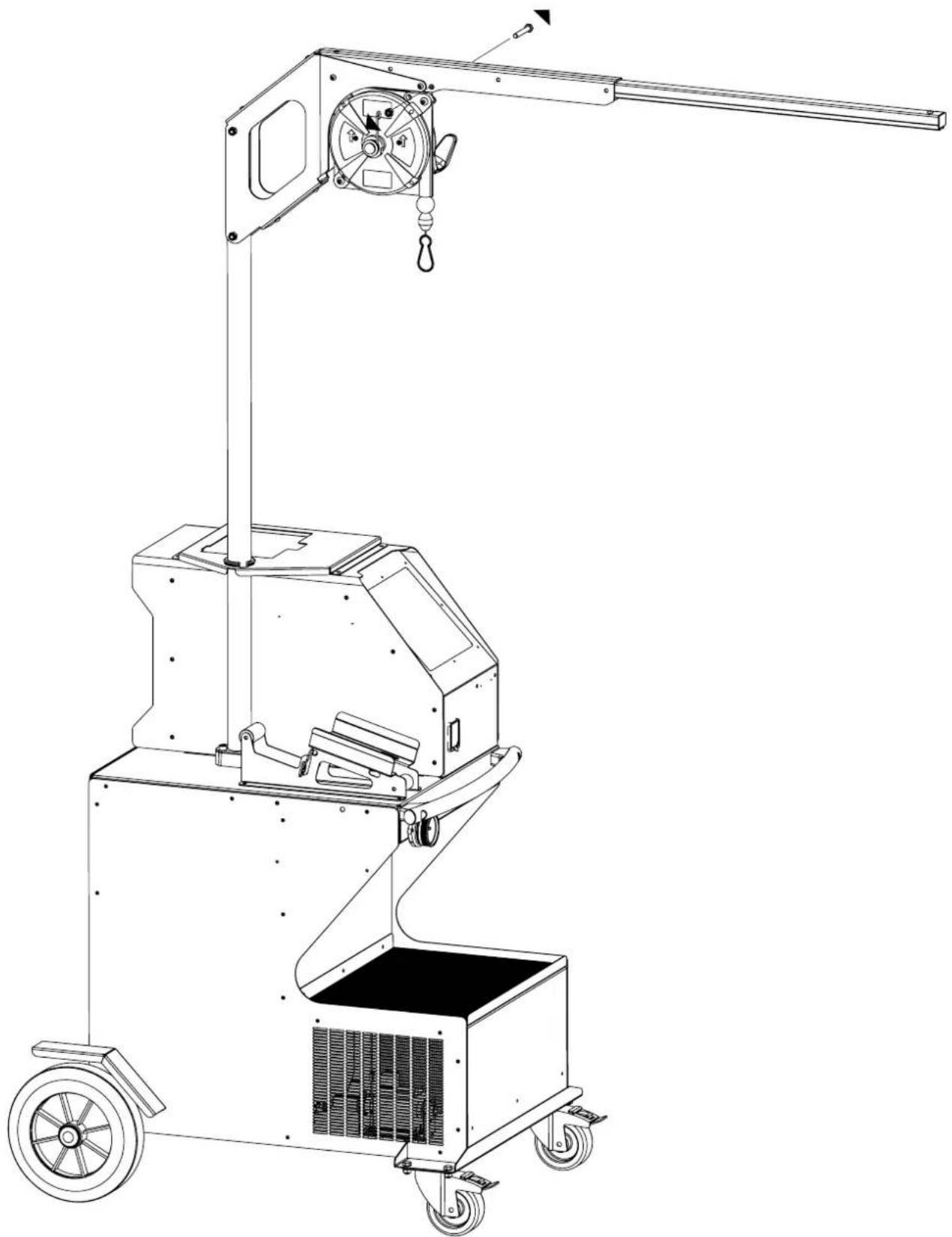
MONTAGE SUPPORT / ASSEMBLY OF SUPPORT / MONTAGE HALTERUNG / MONTAJE DEL SOPORTE / MONTÁŽ PODPĚRY
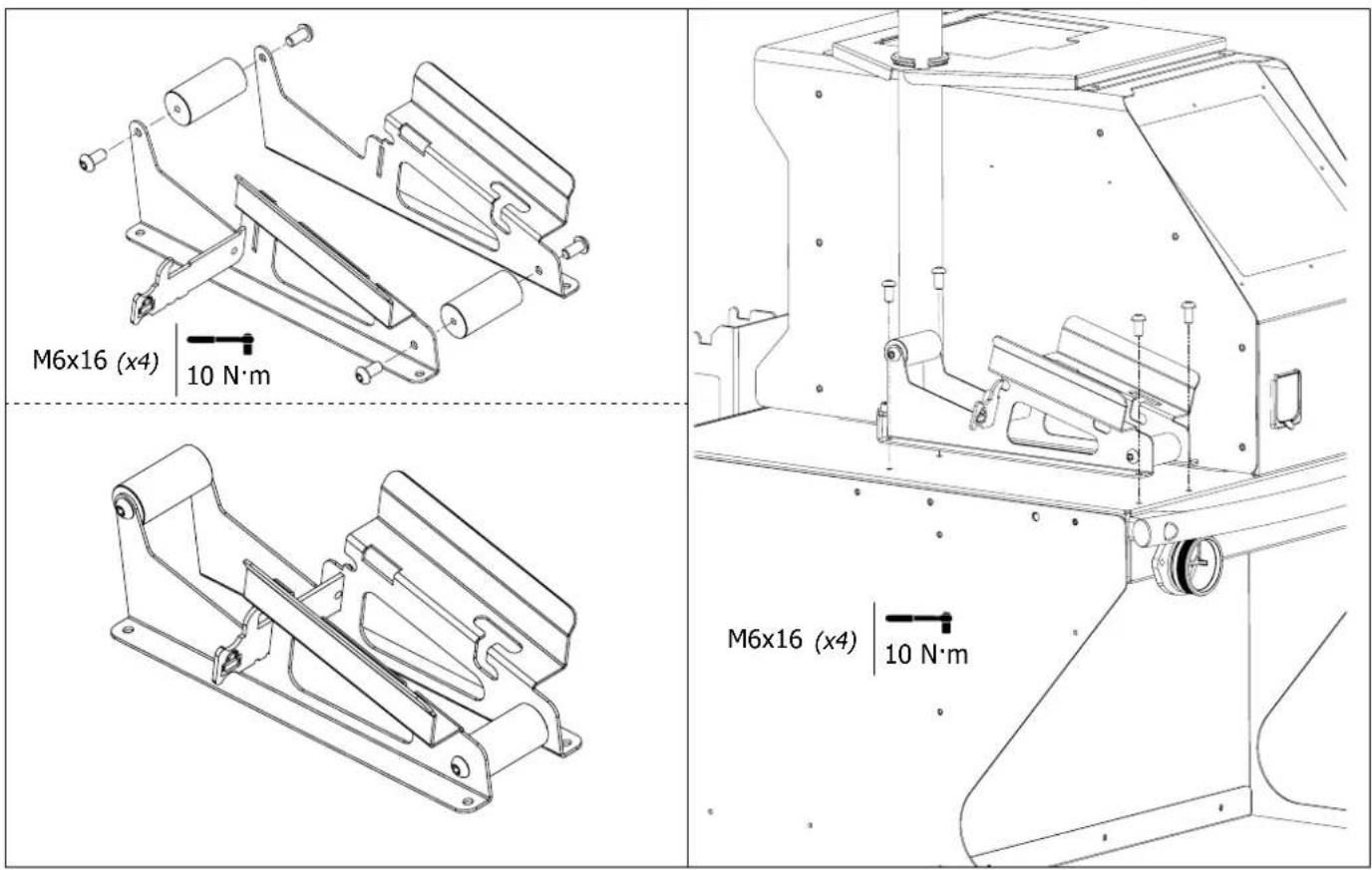
MONTAGE SUPPORT BRAS / ASSEMBLY OF ARM SUPPORT / MONTAGE ARM / MONTAJE DEL SOPORTE PARA BRAZO / MONTÁŽ PODPĚRY PAŽE

text_image
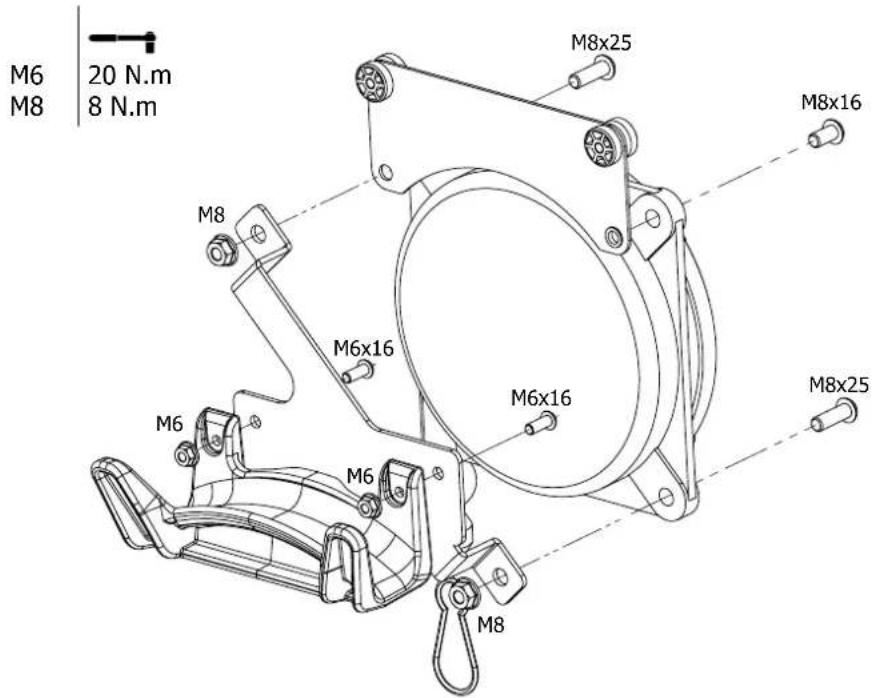
M5x12 (x10) | 6 N·mMONTAGE POTENCE / ASSEMBLY OF OVERHANGING ARM / MONTAGE AUSLEGER / MONTAJE DEL SOPORTE GRÚA / MONTAGE DŘÍKU

x2 : M6 x 16

x2 : M6

x2 : M8 x 25

x2 : M8

x1 : M8 x 16
text_image
M6 20 N.m M8 8 N.m M8x25 M8x16 M6x16 M6x16 M6x25 M6 M6 M6 M8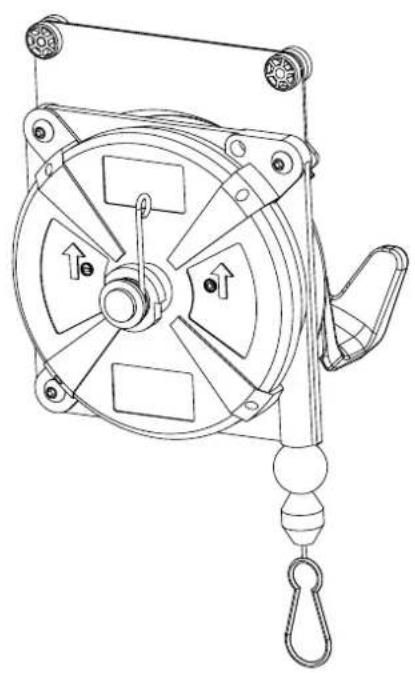
natural_image
Technical line drawing of a mechanical pulley or switch device with no visible text or symbols
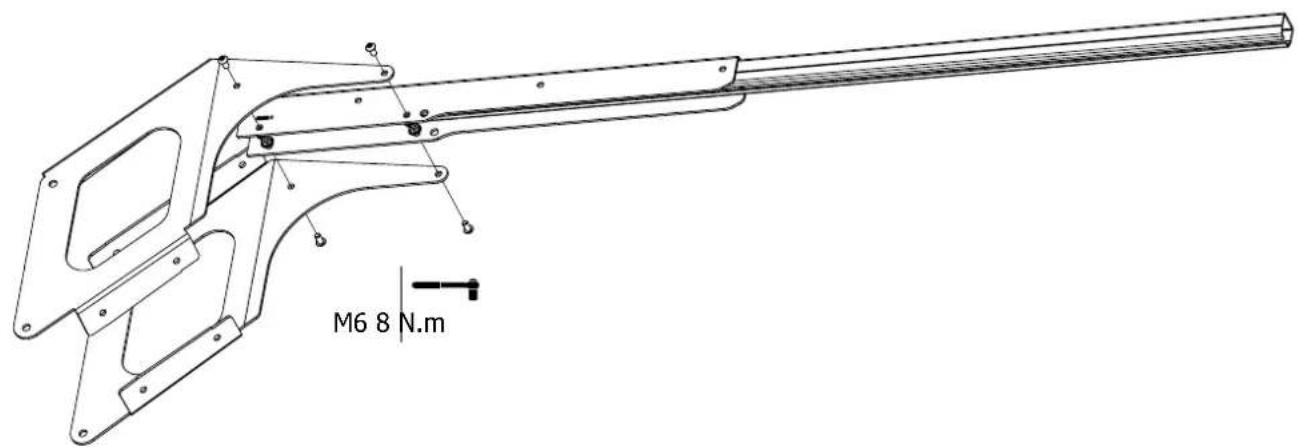
x4 : M6 x 12

x4 : M6
text_image
M6 8 N.m
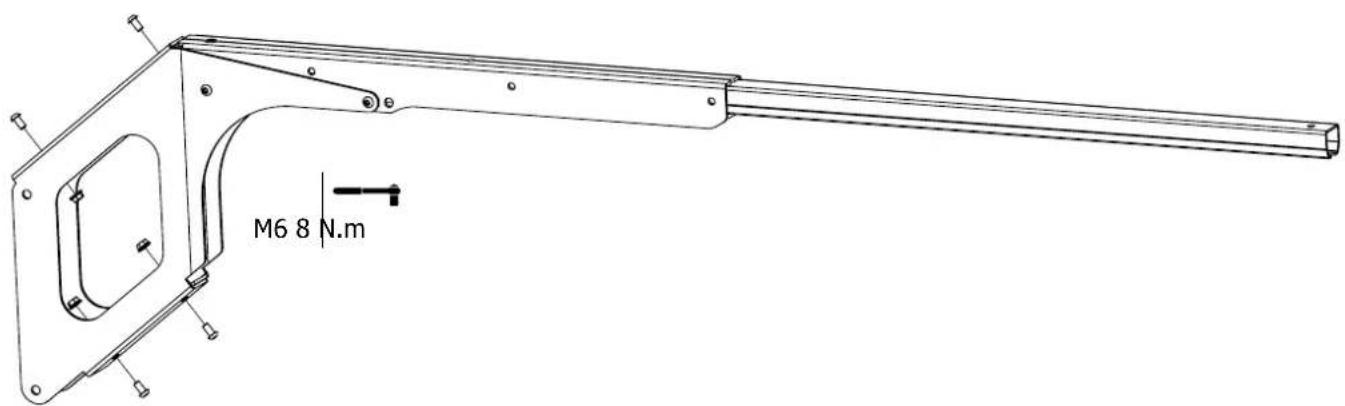
x4 : M6 x 12

x4 : M6
text_image
M6 8 N.m

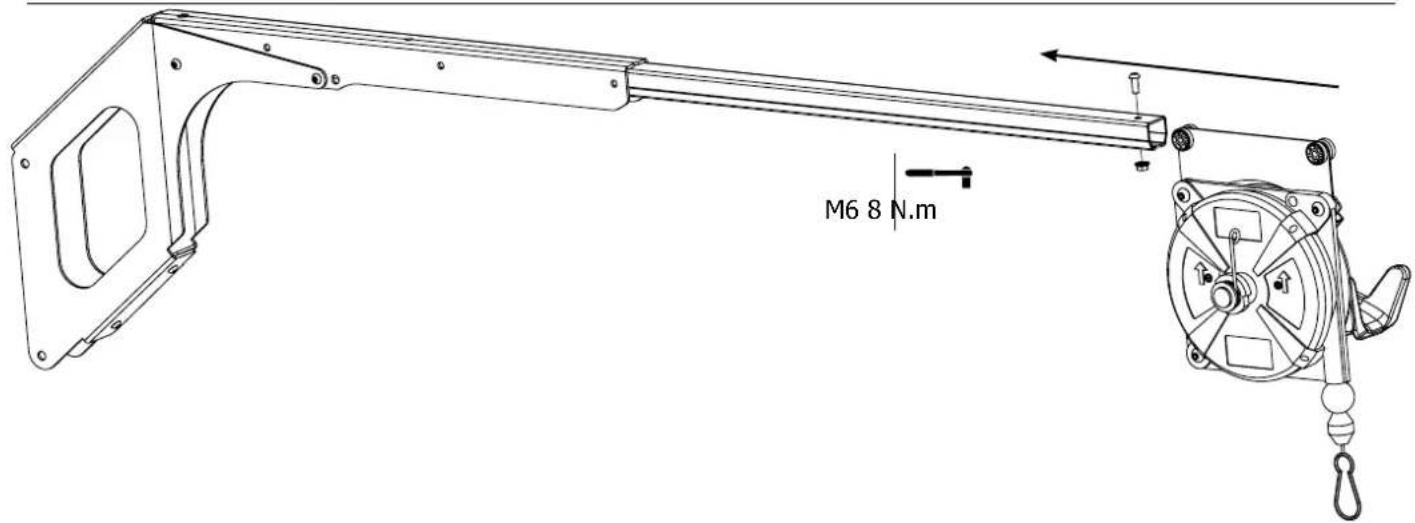
x1 : M6 x 16

x1 : M6
text_image
M6 8 N.m

x3:M8×60

x3 : M8

x1
text_image
Technical diagram of a mechanical device with labeled parts and an inset view showing close-up details.
text_image
M8 20 N·m
text_image
① ②61
text_image
250 cm max. 99 inch max. 14 kg max. 31 lb max.To adjust the tension of the cable in the pulley system, the user must place the clamp on the cable.
natural_image
Illustration of a person using a mechanical device with lock and warning symbols (no text or labels)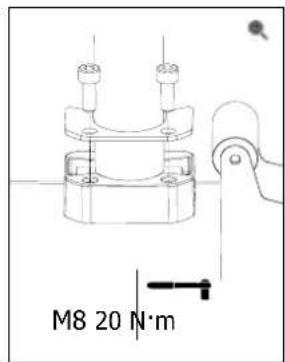
text_image
M8 20 N·m9
natural_image
Technical line drawing of a mechanical device with wheels and a handle (no text or symbols)FIG-1
text_image
Technical diagram of a mechanical device with numbered components and directional arrows indicating flow or movement.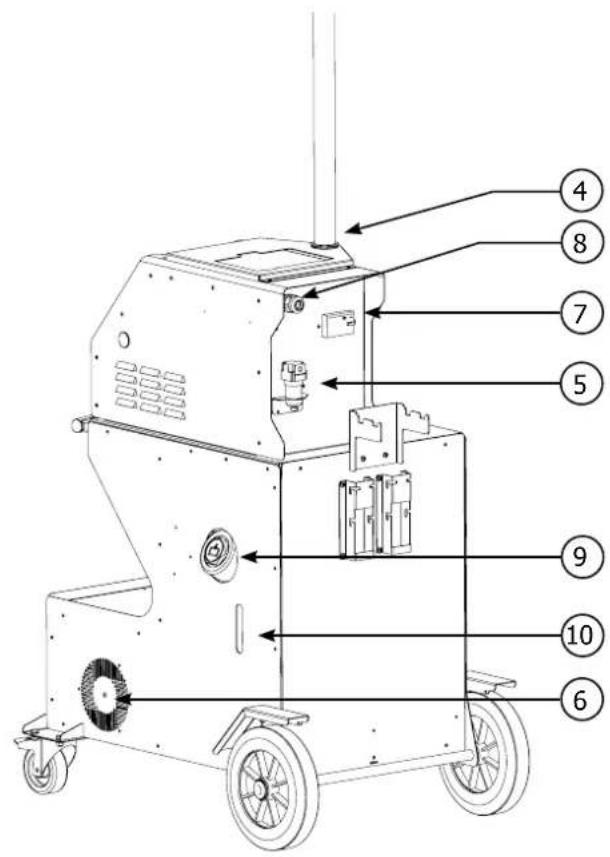
text_image
Technical diagram of a mechanical device with numbered parts labeled for identification.FIG-2
text_image
Technical diagram of a mechanical device with numbered parts labeled 2, 43, 5, 61, and others.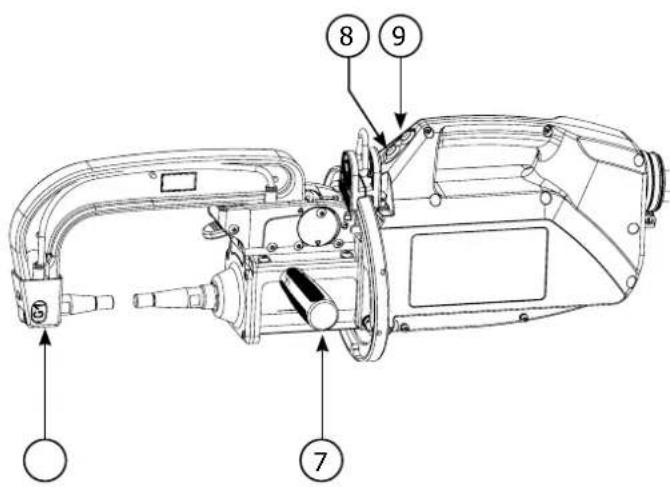
text_image
Technical diagram of a mechanical device with numbered components labeled 7, 8, and 9AVERTISSEMENTS - RÈGLES DE SÉCURITÉ
CONSIGNE GÉNÉRALE

text_image
A F A F A Anatural_image
Two black-and-white photos showing a cable being held, one with a checkmark and the other with an 'X' symbol (no text or symbols present)natural_image
Close-up of a cable with connectors and a control panel (no visible text or symbols)Rouge / red / rot /rojo
INSTALLATION - FONCTIONNEMENT PRODUIT
G8 (550 daN) - ref. 022836 G11 - ref. 071766
REMLISSAGE DU RÉSERVOIR DE LIQUIDE DE REFROIDISSEMENT

INTERFACE HOMME MACHINE
text_image
MODE NORMAL 10/02/08 - 24h30 ① 66C PRESS 2+ 1.0... THLE 200... ② REPORTING - + MEMORY ③ ④ ⑤ ⑥ ⑦
Touche

text_image
ENERGY ETALONNAGE A VIDE I --- 5Ω E --- 10Ω ΔZ 0 ΦΩ C1 100Ωnatural_image
Technical line drawing of a mechanical device with no visible text or symbolsnatural_image
Technical line drawing of a mechanical device with no visible text or symbols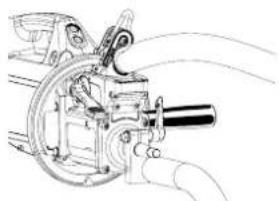
natural_image
Technical line drawing of a mechanical device with motion lines indicating airflow or movement (no text or symbols)natural_image
Technical line drawing of a mechanical assembly with no visible text or symbolstext_image
MANUEL I 2.4 T 48 E100text_image
Beav more visibletext_image
Pression faible I em: 7.2 in F: 479 out T: 350 =text_image
CATALOGUE S 100% 25 ©text_image
Identification UserButton OK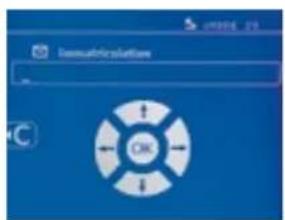
text_image
Iosmuthrisulation OKtext_image
Module verification OK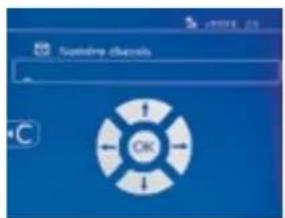
text_image
Customing Documents OK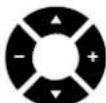
text_image
CATALOGUE JOB1 JOB2 JOB3 JOB4 JOB5 JOB6text_image
数据 A B C D E F G H I J K L M N O P Q R S T U V W X Y Z A B C D E F G H I J K L M N O P Q R S T U V W X Y Ztext_image
Technical diagram of a mechanical assembly with numbered components for identificationSUR-OUVERTURE MÉCANIQUE DU BRAS
text_image
Technical diagram of a mechanical assembly with numbered components and directional arrows indicating motion or movement.GYROSCOPE
natural_image
Technical line drawing of a mechanical assembly with gears and shafts (no text or symbols)natural_image
Technical line drawing of a mechanical assembly with gears and housing (no text or symbols)natural_image
Technical line drawing of a mechanical assembly with no visible text or symbols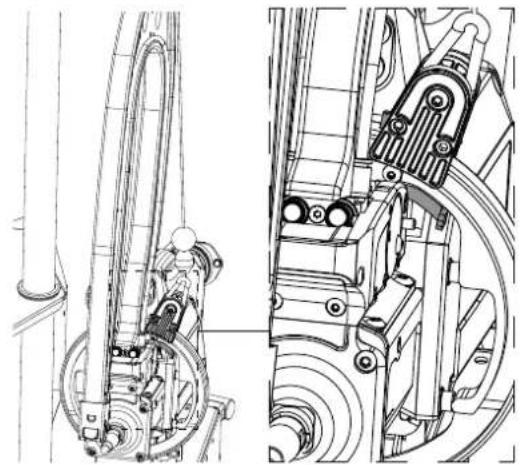
natural_image
Technical line drawing of mechanical components, showing front and side views (no text or symbols)LOGICIEL GYSPOT SUR PC
ANOMALIES, CAUSES, REMEDES
Read and understand the following safety instructions before use. Any modification or updates that are not specified in the instructions manual should not be undertaken. Please store this manual safely.
The manufacturer is not liable for any injury or damage due to a non-compliance with the instructions featured in this manual.
In the event of problems or uncertainties, please consult a qualified person to handle the installation properly. The instructions cover the material in the condition it was delivered. It is the responsibility of the user to analyse the risks taken when not following the instructions published by GYS.
ENVIRONMENT
This equipment must only be used for welding operations in accordance with the limits indicated on the descriptive panel and/or in the user manual. Safety instructions must be followed. In case of improper or unsafe use, the manufacturer cannot be held liable.
This equipment must be used and stored in a room free from dust, acid, flammable gas or any other corrosive agent. Operate the machine in an open, or well-ventilated area.
Operating temperature:
Use between -10 and +40°C (+14 and +104°F).
Storage between -20 and +55°C (-4 and 131°F).
Air humidity:
Lower or equal to 50% at 40°C (104°F).
Lower or equal to 90% at 20°C (68°F).
Altitude : Up to 1000 m above sea level (3280 feet).
INDIVIDUAL PROTECTION & OTHERS
Resistance welding can be dangerous and cause serious injuries or even death. It needs to be used by a qualified technician with training relevant to the machine.
Welding exposes the user to dangerous heat, arc rays, electromagnetic fields, risk of electric shock, noise and gas fumes. People wearing pacemakers are advised to consult a doctor before using the welding machine.
To protect oneself as well as others, ensure the following safety precautions are taken:

In order to protect you from burns and radiations, wear clothing without turn-up or cuffs. These clothes must be insulating, dry, fireproof, in good condition and cover the whole body.

Wear protective gloves which guarantee electrical and thermal insulation.

Use sufficient welding protective gear for the whole body: hood, gloves, jacket, trousers... (varies depending on the application/operation). Protect the eyes during cleaning operations. Contact lenses are prohibited during use.
It may be necessary to install fireproof welding curtains to protect others against arc rays, weld spatters and sparks. Ask people around the working area to look away from at the arc or the molten metal, and to wear protective clothing.

Ensure ear protection is worn by the operator if the work exceeds the authorised noise limit (the same applies to any person in the welding area).
Keep mobile parts at a distance (fan, electrodes...) from hands, hair and clothing.
Never remove the safety covers from the cooling unit when the machine is plugged in. The manufacturer is not liable for any injury or damage caused due to non-compliance with the safety precautions.

Parts that have just been welded will be hot and may cause burns when touched. During maintenance work on the torch or the electrode holder, you should make sure it's cold enough and wait at least 10 minutes before any intervention. When using a water-cooled torch, make sure that the cooling unit is switched on to avoid any burns caused by the liquid.
It is important to secure the working area before leaving it to ensure protection of the goods and the safety of people.
WELDING FUMES AND GASES

Fumes, gas and dust produced during welding are hazardous to health. It is mandatory to ensure adequate ventilation and/or extraction to keep fumes and gas away from the work area. Using an air fed welding helmet is recommended in case of insufficient ventilation in the workplace.
Check that the air supply is effective by referring to the recommended safety regulations.
Precautions must be taken when welding in small areas, and the operator will need supervision from a safe distance. Welding certain pieces of metal containing lead, cadmium, zinc, mercury or beryllium can be extremely toxic. The user will also need to degrease the workpiece before welding.
Gas cylinders must be stored in an open or ventilated area. They must be stored vertically and held by a support or trolley to limit the risk of fall. Do not weld in areas where grease or paint are stored.
- This welding equipment produces fumes and gases that contain chemicals considered by the State of California as a source of congenital malformations and potentially, cancers (refer to the California Health Code, chapter 25249.5 and after).
- This equipment contains chemicals, including lead, identified by the state if California as a potential cause of cancers and congenital malformations or other issues in relation to procreation. Wash your hands after handling.
FIRE AND EXPLOSION RISKS

Protect the entire welding area. Flammable materials must be moved to a minimum safe distance of 11 meters. A fire extinguisher must be readily available near the welding operations.
Be careful of weld spatter and sparks, even through cracks. If not careful then this could potentially lead to a fire or an explosion.
Keep people, flammable materials/objects and containers that are under pressure at a safe distance.
Welding in closed containers or pipes should be avoided and, if they are opened, they must be emptied of any flammable or explosive material (oil, fuel, gas ...).
Grinding operations should not be carried out close to the power supply or any flammable materials.
ELECTRICAL SAFETY

The electrical mains used must have an earth terminal. An electric shock could cause serious injuries or potentially even deadly accidents.
Never make contact with live parts inside or outside the current source (cables, electrodes, arms, guns...) as they are connected to the welding circuit. Before opening the device, it is imperative to disconnect it from the mains and wait 2 minutes, so that all the capacitors are discharged.
Damaged cables and torches must be changed by a qualified and skilled professional. Make sure that the cable cross section is adequate with the usage (extensions and welding cables). Always wear dry clothes which are in good condition in order to be isolated from the welding circuit. Wear insulating shoes, regardless of the workplace/environment in which you work in.

Warning! Very hot surface. Risk of burns.
- The parts and pieces that have just been heated are hot and may cause burns when manipulated.
- Do not touch any hot parts with your hands.
- Wait for the parts and pieces to cool down before handling them.
- In case of burn, rinse thoroughly with water and consult a doctor as soon as possible.
EMC MATERIAL CLASSIFICATION
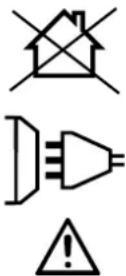
This Class A machine is not intended to be used on a residential site where the electric current is supplied by the domestic low-voltage power grid. There may be issues in ensuring electromagnetic compatibility on these sort of sites, due to conducted interferences as well as radiation.
This equipment does not comply with IEC 61000-3-12 and is intended to be connected to private low-voltage systems interfacing with the public power grid only at the medium- or high-voltage level. If connected to a public low-voltage power grid, the installer or user of the machine has to ensure, by checking with the network operator, that the device can be connected.
ELECTROMAGNETIC INTERFERENCES
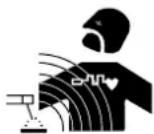
The electric current flowing through any conductor causes electrical and magnetic fields (EMF). The welding current generates an EMF around the welding circuit and the welding equipment.
The EMF electromagnetic fields can interfere with certain medical implants, such as pacemakers. Protective measures must be taken for people having medical implants. For example, by restricting access to passers-by or conducting an individual risk evaluation for the welders.
All welders should take the following precautions in order to minimise exposure to the electromagnetic fields (EMF) generated by the welding circuit:
- position the welding cables together – if possible, attach them;
- keep your head and upper body as far as possible from the welding circuit;
- never wrap the cables around your body;
- never position your body between the welding cables. Hold both welding cables on the same side of your body;
- connect the earth clamp as close as possible to the welding area;
- do not work too close to, do not lean and do not sit on the welding machine
- do not weld when transporting the welding machine or its wire feeder.

People wearing pacemakers are advised to consult their doctor before using this device.
Exposure to electromagnetic fields while welding may have other health effects which are not yet identified.
RECOMMENDATIONS FOR WELDING AREA ASSESSMENT AND WELDING
Miscellaneous
The user is responsible for the correct installation and usage of the welding material based on the instructions supplied by the manufacturer. If electromagnetic disturbances are detected, it is the user's responsibility to resolve the situation with the manufacturer's technical assistance. In some cases, this corrective action may be as simple as earthing the welding circuit. In other cases, it may be necessary to construct an electromagnetic shield around the welding power source and around the entire piece by fitting input filters. In all cases, electromagnetic interferences must be reduced until they are no longer inconvenient.
Welding area assessment
Before installing the machine, the user must evaluate the possible electromagnetic problems that may arise in the area where the installation is planned. The following must be taken into account:
a) the presence (above, below and next to the arc welding machine) of other power cables, remote cables and telephone cables;
b) television transmitters and receivers;
c) computers and other hardware;
d) critical safety equipment such as industrial machine protections;
e) the health and safety of people in the area especially if they are using pacemakers or hearing aids;
f) calibration and measuring equipment;
g) the isolation of other pieces of equipment which are in the same area.
The operator has to ensure that the devices and equipment used in the same area are compatible with each other. This may require extra precautions; h) the time of day during the welding or other activities have to be performed.
The dimension of the cutting area that has to be considered depends on the size and shape of the building and the type of work undertaken. The area taken into consideration might go beyond the limits of the installations.
Review of the welding installation
Reviewing the welding installations can be useful to determine and resolve any case of electrical disturbances. The assessment of emissions must include in situ measurements as specified in Article 10 of CISPR 11: 2009. In situ measurements can also be used to confirm the effectiveness of mitigation measures.
RECOMMENDAED METHODS TO REDUCE ELECTROMAGNETIC EMISSIONS
a. National power grid: The arc welding machine must be connected to the national power grid in accordance with the manufacturer's recommendation. In case of interferences, it may be necessary to take additional precautions such as the filtering of the power supply network. Consideration should be given to shielding the power supply cable in a metal conduit or equivalent of permanently installed arc welding equipment. It is necessary to ensure the electrical continuity of the frame along its entire length. The shielding should be connected to the welding current source to ensure a good electrical contact between the conduit and the casing of the welding current source.
b. Maintenance of the resistance welding equipment: The resistance welding machine should be subject to a routine maintenance check in line with the recommendations of the manufacturer. All accesses, service doors and covers should be closed and properly locked when the arc welding equipment is on. The arc welding equipment must not be modified in any way, except for the changes and settings covered in the instructions.
c. Welding cables: Cables must be as short as possible, close to each other and close to the ground, if not on the ground.
d. Equipotential bonding: consideration should be given to bond all metal objects in the surrounding area. However, metal objects connected to the workpiece increase the risk of electric shock if the operator touches both these metal elements and the electrode. It is necessary to insulate the operator from such metal objects.
e. Earthing of the welded part: When the part is not earthed - due to electrical safety reasons or because of its size or location (which is the case with ship hulls or metallic building structures), the earthing of the part can, in some cases but not systematically, reduce emissions It is preferable to avoid the earthing of parts that could increase the risk of injury to the users or damage other electrical equipment. If necessary, it is appropriate that the earthing of the part is done directly, but the safety rules in some countries may not allow such a direct connection and it is appropriate that the connection is made using a capacitor selected according to national regulations.
f. Protection and shielding: The selective protection and shielding of other cables and devices in the area can reduce perturbation issues. The protection of the entire welding area can be considered for specific situations.
TRANSPORT AND TRANSIT OF THE WELDING MACHINE

The top of the machine is equipped with handles for movement by hand. Be careful not to underestimate the weight of the machine. The handles cannot be used to lift the product.
Do not use the cables or torch to move the machine. Do not place/carry the unit over people or objects.
EQUIPMENT INSTALLATION
- Put the machine on the floor (maximum incline of 10^ ).
- The machine must be placed in a sheltered area away from rain or direct sunlight.
- The machine protection level is IP20, which means :
- Protection against access to dangerous parts from solid bodies of a diameter ≥12.5mm and,
- Protection against water projections.
Power cables, extension leads and welding cables must be fully uncoiled to prevent overheating.

The manufacturer does not accept any liability in relation to damages caused to objects or harm caused to persons as the result of incorrect and/or dangerous use of the machine.
MAINTENANCE / RECOMMENDATIONS
- The operators must have received suitable training in order to use the machine at its maximum potential and weld correctly.
- Check which welding process is authorised by the manufacturer before attempting any vehicle repair.

The maintenance and repair of the machine can only be undertaken by the manufacturer. Any work undertaken by a third party on the machine will invalidate the warranty. The manufacturer will not accept liability in the event of an incident that would occur after this work was undertaken.

Ensure the machine is unplugged from the mains, and then wait 2 minutes before carrying out maintenance work. Inside the machine, voltage and current levels are high and dangerous.
- Prior to any work on the machine, turn the air supply off and depressurise the circuit of the machine.
- Make sure to purge the filter of the dehumidifier located at the back of the machine regularly.
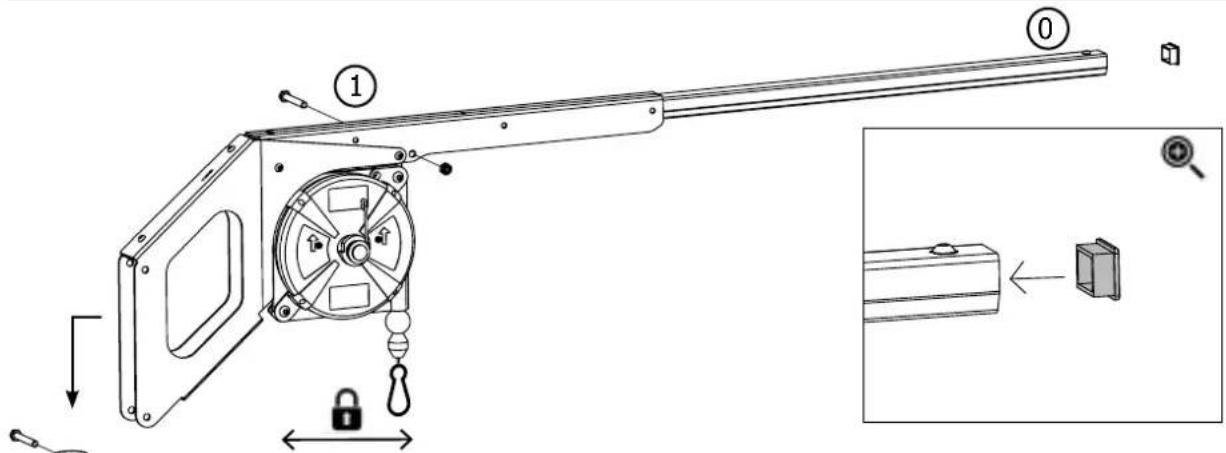
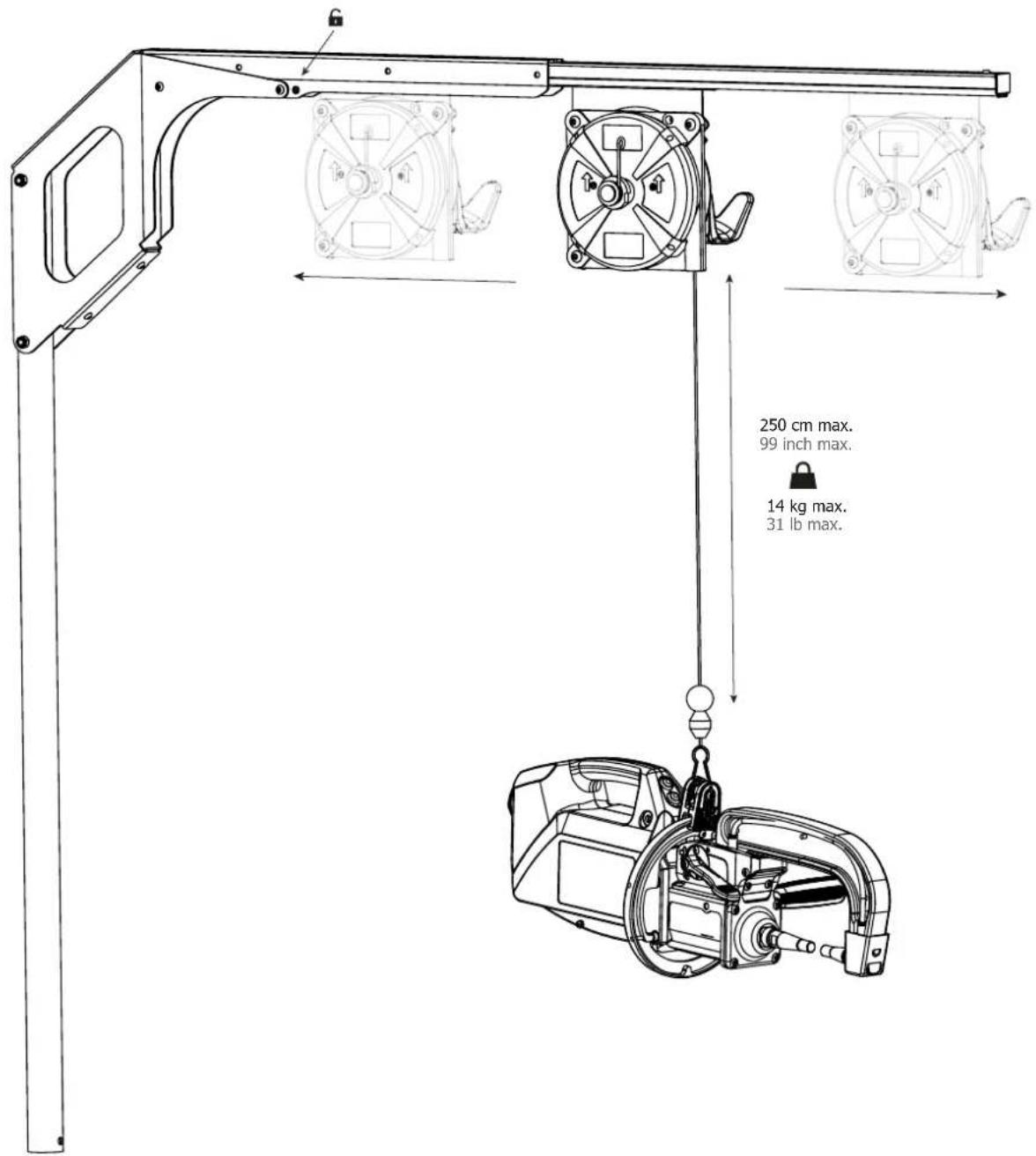
- The device is fitted with a balance system designed for easier handling. However, it is not recommended to leave the clamp hanging at the end of the cable of the balancing system for prolonged periods of time as it might increase wear. Do not drop the clamp repetitively or it might damage the balancing system.
- It is possible to adjust the tension of the balancing system spring using the spanner provided.
- The level of the cooling liquid is important for the machine to work correctly. It must always be between the «minimum» and «maximum» marks on the machine. Regularly check the level and top-up when needed.
- It is recommended to renew the cooling liquid every 2 years.
- All the welding tools will wear off with use. Ensure that these tools are clean to get the best results.
FIG-3
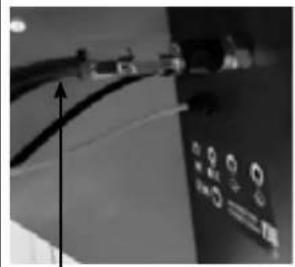
natural_image
Close-up of a cable with connectors and a control panel (no visible text or symbols)Rouge / red / rot / rojo
Take the reference followed by ND if the clamp beam is equipped with a red hose
- Prior to using the pneumatic clamp, check the condition of the electrodes/caps (regardless if they are round or flat). If that is not the case, clean them using sand paper (thin grain) or replace them (see explanation on the machine).
- To ensure an efficient welding spot, it is necessary to replace the caps every 200 spots. In order to do so :
- Remove the caps using the caps removing wrench (ref. 050846)
- Fit the caps and apply contact grease (ref. 050440)
- Caps type A (ref : 049987)
• Caps type F (ref : 049970) - Caps bevelled (ref : 049994)
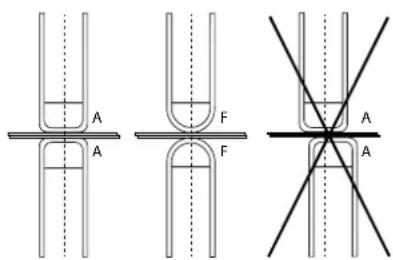
text_image
A F A F A AWarning : the caps must be perfectly aligned. If this is not the case, check the alignment of the electrodes (cf. chapter «Assembly and replacement of the arms» P. 46)
- Prior to using the gun, check the condition of the different tools (star, single sided electrode, carbon electrode...) and clean or replace if required.
- Remove regularly the casing and any excess of dust. Take this opportunity to have the electrical connections checked by a qualified person, with an insulated tool.
- Regularly review the condition of the power cable and welding connection cables. In case of visible signs of damage, organise for them to be replaced by the manufacturer or a qualified technician.

After each use make sure that the harness is not left twisted. A constantly twisted harness leads to its premature deterioration and can present an electrical hazard to the user.
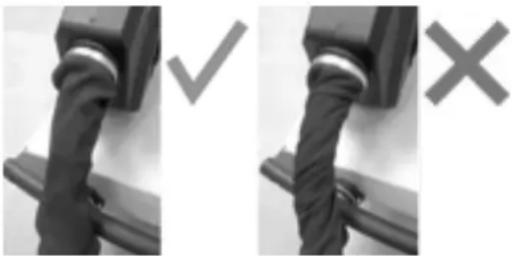
natural_image
Two black-and-white photos showing a mechanical component with a checkmark and an 'X' mark, no visible text or symbols.- Ensure the vents of the device are not blocked to allow adequate air circulation.
INSTALLATION – PRODUCT OPERATION
Only qualified personnel authorised by the manufacturer should perform the installation of the welding equipment. During the installation, the operator must ensure that the machine is disconnected from the mains. Connecting generators in serial or in parallel is forbidden.
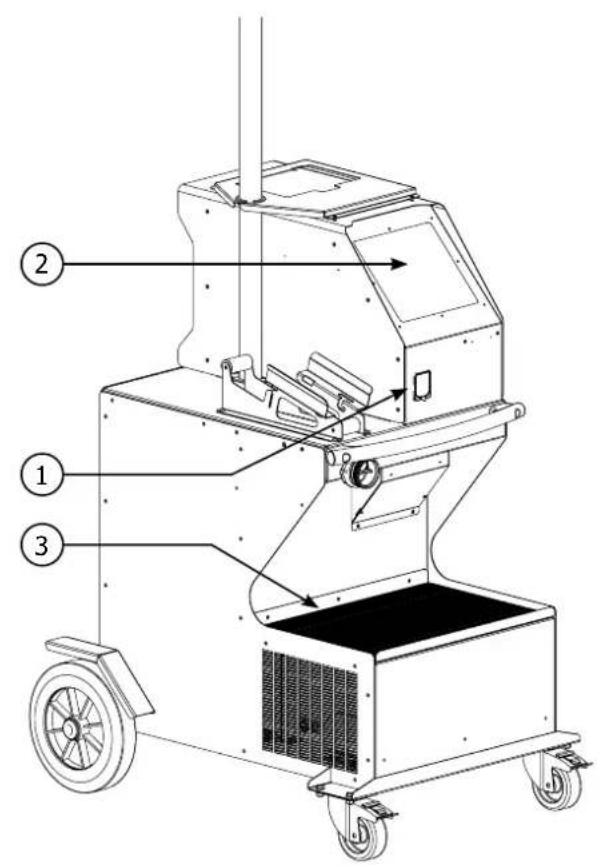
EQUIPMENT DESCRIPTION (FIG-1)
This machine is designed to carry out the car body repair operations described below :
- spot welding on sheets using a pneumatic clamp,
- welding of sheets using a gun,
- welding of nails, rivets, washers, studs, mouldings,
- repair of bumps and impacts (hail impacts with the pliers option).
1- SD card reader 6- Fan
2- Interface (MMI) 7- Power-on switch
3- Cooling unit 8- Power cord
4- Overhanging arm locking support 9- Filling cap
5- Filter 10- Cooling liquid gauge
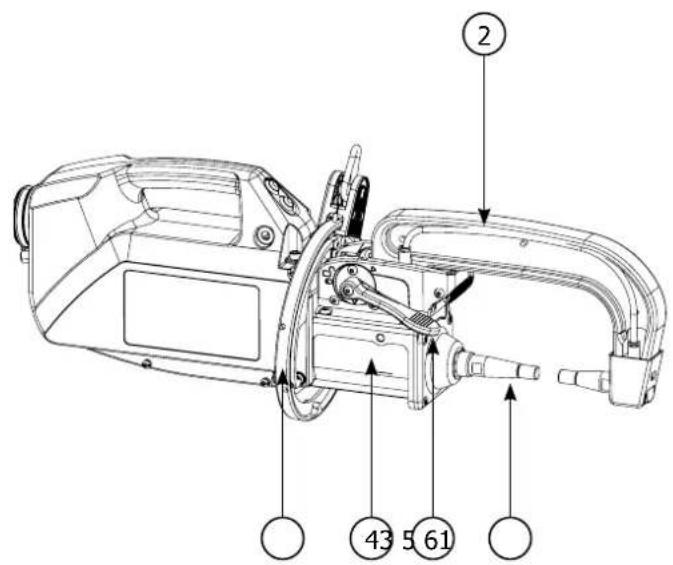
DESCRIPTION OF THE G CLAMP (FIG-2)
1- Arm locking/unlocking lever 6- Mobile arm
2- Cooling pipe 7- Side handle
3- Gyroscope
4- Pneumatic body
5- Electrode
8- Remote settings button
9- Spot welding button
POWER SUPPLY
- This material is designed to be powered by a 3-phase 400V power supply only (50-60 Hz) with four wires with a neutral one connected to the earth and fitted with a 25 A D-rated circuit breaker (or aM type fuse).
The permanent current absorbed (I1p or ILp) displayed in the section «technical specifications» of this manual relates to use at maximum power. Check that the power supply and its protection (fuse and/or circuit breaker) are compatible with the current needed by the machine. In some countries, it may be necessary to change the plug to allow the use at maximum settings.
• Power supply recommendations :
In order to limit the voltage drop in the power supply line and to avoid any risk of disconnection of the protection, it is imperative to connect the equipment to a «dedicated» socket. This plug must be connected to the electrical panel and only power this equipment.
When using an extension cord, it must have a length and cross-section appropriate to the voltage of the equipment. Use an extension cord that complies with national regulations.
Power supply cable Plug 400 V / 3 phases + earth
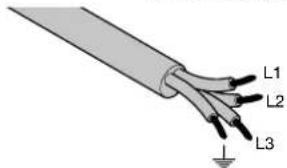
text_image
L1 L2 L3L1 : Phase 1
L2 : Phase 2
L3 : Phase 3
⊥ : Earth (Green/Yellow or green)
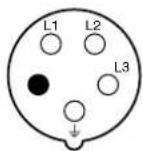
● Neutral (not used)
- The device turns into protection mode if the power supply tension is below or above the 15% . To indicate this default, the screen displays an error code.
- In order to ensure optimal functioning of the equipment, check that the compressed air circuit can supply 8 bar (116 Psi) and then connect the air supply to the back of the machine. The machine must not be used on an air network with a pressure under 4 bar (58 Psi) or over 10 bar (145 Psi).
CONNECTION TO A GENERATOR
The equipment is not protected against the regular overvoltage waves emitted by the power generator. It is therefore not recommended to connect them on this type of power supply.
ACCESSORIES AND OPTIONS
 | 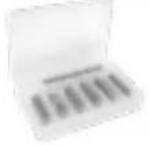 |  |  |  | 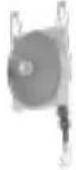 |
| Coolant5 l : 06251110 l : 052246 | 40 caps048935 050068 050853 050914 059696 | x 10 x 18 x 18 x 6 | Protective cover SD card including automatic programs | Overhanging balancing system 10>14 kg | |
 Caps sharpener Pressure sensor Welding test case 048966 052314 050433 052758 067318 Caps sharpener Pressure sensor Welding test case 048966 052314 050433 052758 067318 |  |  |  |  | |
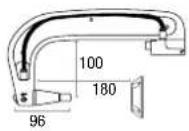 G1 (550 daN) - ref. 022768 INCLUDED G1 (550 daN) - ref. 022768 INCLUDED | 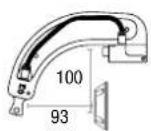 G2 (300 daN) - ref. 022775 G2 (300 daN) - ref. 022775 | 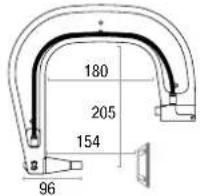 G3 (550 daN) - ref. 022782 G3 (550 daN) - ref. 022782 | |||
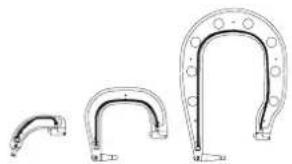 G2 + G3 + G4 - ref. 022898 G2 + G3 + G4 - ref. 022898 | 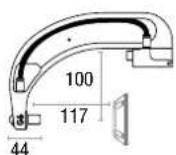 G6 (550 daN) - ref. 022812 G6 (550 daN) - ref. 022812 | 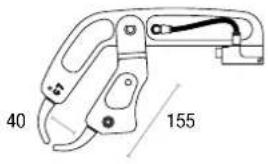 G7 (150 daN) - ref. 022829 G7 (150 daN) - ref. 022829 | |||
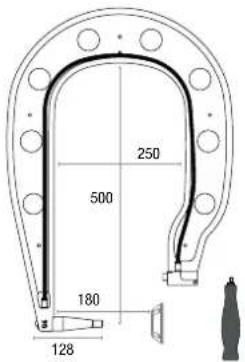
text_image
250 500 180 128G4 (550 daN) - ref. 022799
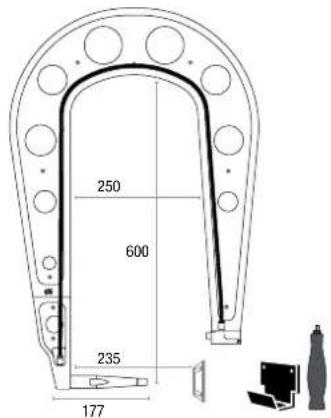
text_image
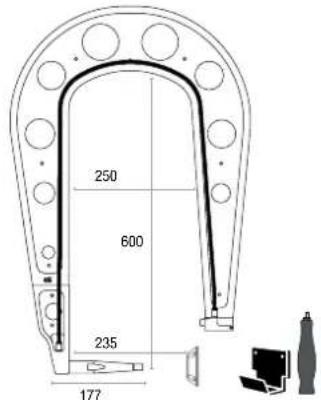
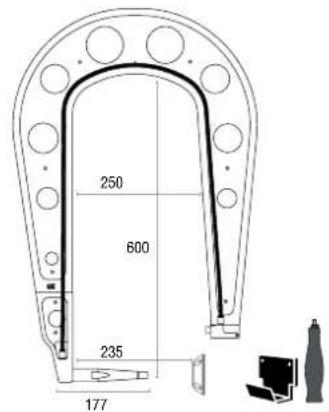
250 600 235 177G5 (550 daN) (6.25 kg) - ref. 022805
G10 (400 daN) (5 kg) - ref. 067165
text_image
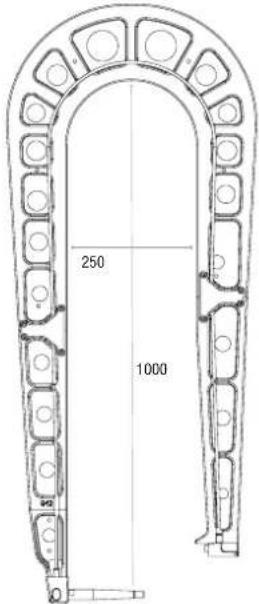
250 1000G12 (550 daN) - ref. 075238
text_image
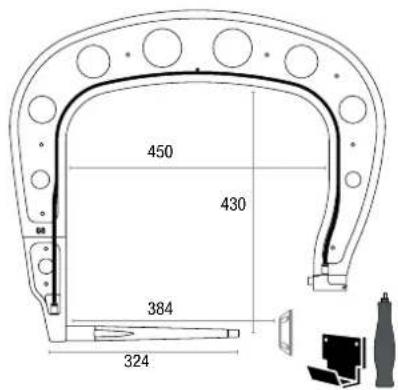
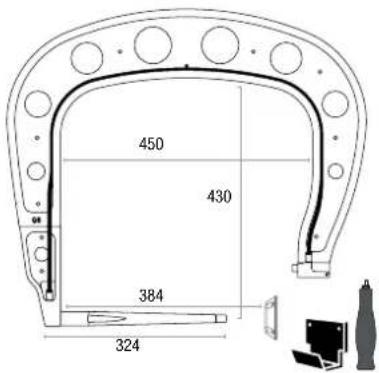
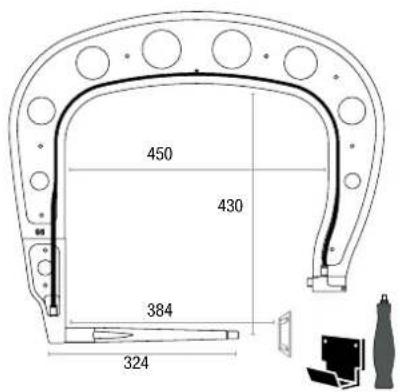
450 430 384 324G8 (550 daN) - ref. 022836 G11 - ref. 071766
text_image
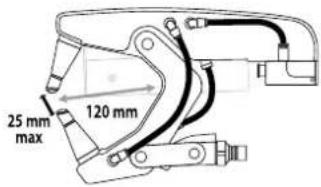
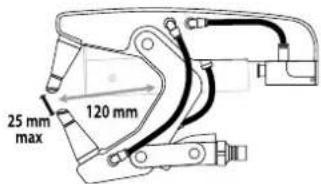
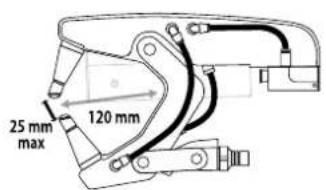
25 mm max 120 mmREFILL OF THE COOLING LIQUID TANK

The cooling liquid recommended by GYS must be used:
5 l: ref. 062511 • 10 l : ref. 052246
The use of other cooling liquids, especially standard automotive liquid, can lead, through electrolysis, to the accumulation of solid deposits in the cooling system, reducing the cooling, and may even lead to system block. Any damage to the machine caused by the use of another coolant is excluded from the warranty.
Using purely the recommended coolant provide antifreeze protection down to -20^ . It can be diluted, but only by using de-ionised water; do not use tap water to mix with the coolant! In all cases, at least one 10-litre bottle must be used to provide minimum protection for the cooling system.
30 litres of liquid (8 US Gal) protection antifreeze down to -20°C (-4°F)
| 20 litres of liquid (5 US Gal) + 10 litres of deionised water (3 US Gal) | protection antifreeze down to -13° (-9°F) |
| 10 litres of liquid (3 US Gal) + 20 litres of deionised water (5 US Gal) | protection antifreeze down to -5° (23°F) |
Any damage resulting from frost will not be covered by the warranty.
To refill the cooling liquid tank, proceed as follows :
- Put the pneumatic clamp on its support.
- Pour 30 litres of liquid (8 US Gal) to reach half of the level indicated.

Safety data concerning the liquid:
- in case of contact with eyes, remove contact lenses if worn and rinse thoroughly using clear water for several minutes. Seek medical advice if complications occur.
- in case of contact with the skin, clean thoroughly using soap and remove any contaminated clothing immediately. Seek medical advice if the skin gets irritated.
- in case of the liquid being swallowed, rinse the mouth abundantly using clear water. Drink plenty of water. Seek medical advice.
Maintenance : See chapter «PRECAUTIONS AND MAINTENANCE».
STARTING THE MACHINE
- Start the machine by switching the switch on ON (Fig 1 - 7), and stop it by switching to OFF. Warning! Never disconnect the power supply
when the welding electrical distribution is in operation. The PCB inside the machine starts a test cycle and initiate the settings which takes around 10 seconds. At the end of that cycle, the machine is ready to be used. - As soon as the machine is powered, the liquid starts circulating in the cables. check for potential leaks.
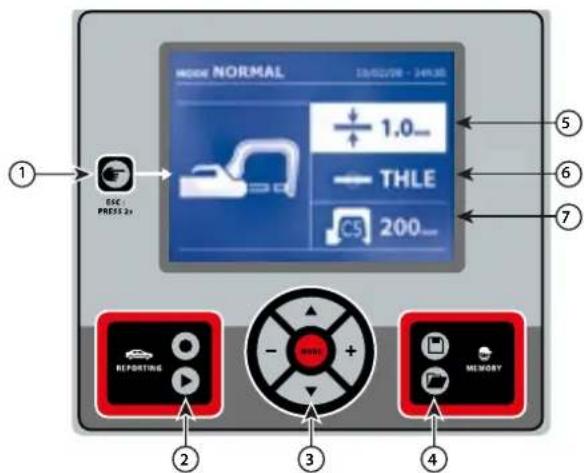
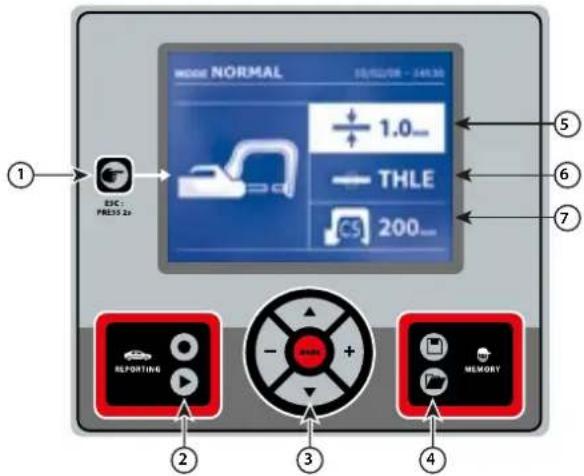
MAN TO MACHINE INTERFACE
text_image
MOSK NORMAL 1.0 THLE 200 ESC: PRESS 2a REPORTING MEMORY
Button

- Push briefly the button to choose between the modes clamp, gun or «clamp settings».
- Push the button for 2 seconds to return to the «normal» mode from all the other modes.
- Push the button for 2 seconds to reset the spot count when it is on display.
- Push the button for 2 seconds to return to the «Settings» menu.
- Push briefly twice to erase the log displayed in the log view mode.
- Push briefly the button, in the programs saving mode, erase the program selected.

Saving a report
This function is detailed in the corresponding chapter.
Button ●activates or deactivates the creation of a report.
Button is used to view the points completed.

Using the different modes
Button is used to move through the different welding modes. A prolonged push on the mode button activates the settings mode used to select the language, set the date and activate the warning sound for «current too low» or «pressure too low». Buttons (▲r) are used to navigate through and select the value that needs to be adjusted, and then buttons + and - are used to increase or decrease that value.

Saving the settings
- Button is used to save a machine setting (these are the settings that have been adjusted through the manual mode: current, duration and tightening).
- Button is used to re-establish a setting saved previously under the same name. The machine starts automatically in manual mode using the welding settings (current, duration and tightening) and the tool (clamp or gun saved).

Setting the thickness of the plate
The value to be entered is in relation to the thickness of the sheets being welded on. The selection of the thickness is done using the + and - buttons, the different thicknesses available are 0.6, 0.8, 1.0, 1.2, 1.5, 1.8, 2.0, 2.5 and 3.0 mm.

Setting the type of plate
This setting is used to specify the type of metal plate being welded on, the different choices are : coated steel, HLE/THLE steel, UHLE steel and bore/USIBOR steel. This setting can also be adjusted using the + and - buttons.

Setting up the arm
SETTING UP THE G CLAMP

Lock the G arm in place using the lever (FIG 2 - 1).
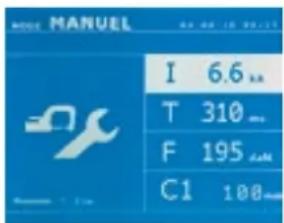
text_image
MANUEL I 6.6 T 310 F 195 C1 100Use the button in order to select the clamp setting function. The «clamp setting» function is used to close the clamp and to apply the pressure pre-selected at the electrodes without power going through. The clamp remains closed while the trigger is pressed. This function is designed to verify the centering of the end bits.
Push the button 📋 for 2 seconds to return to the AUTO mode.
For the GYSPOT INVERTER PTI, always ensure to be in that mode to stop the pump when changing the arms. The electrode retracts into the clamp. The red indicator on the button lights up when the pump stops.
THE DIFFERENT WELDING MODES
For all the models :
The buttons (▲ or ▼) are used to select the settings that need to be adjusted. Each adjustment is done by pressing the side keys + and -.
The button on the clamp is used to remotely adjust the welding settings (thickness, type of steel):
- Long push : change of setting (to go from one setting to another)
- Short push : modification of the value
This button does not allow to change the arm on the screen. To change the arm (G1 to G2 for instance), the user must use the machine keypad.
Insufficient network pressure :
If the input pressure is insufficient to provide the correct pressure, the machine shows an error message before the weld «Insufficient network pressure». Pressing the trigger a second time is used to «force» the spot weld using the available pressure.
Low current :
If the current obtained during the spot weld is below the expected value (<6 %), the machine displays «low current» after the weld which means that the weld must be checked.
In any case, a message is displayed at the end of the weld indicating the current and pressure measured. This message remains on display on the screen until the user pushes a button on the keypad or carries on welding.

The welding conditions must be reviewed at the start of each new job. «Test» weld spots must be carried out on metal panels or sheets similar to the new job being undertaken. Carry our two spot weld with appropriate space in between, in line with the requirement of the job. Test the strength of the second weld. The test is successful if, when pulling the spot out, the panel breaks and the centre is extracted. The centre must have a minimum diameter in line with the specifications of the make of the vehicle.
AUTO mode
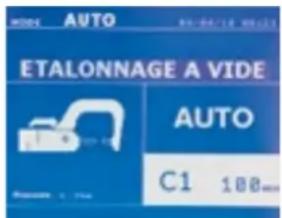
text_image
ETALONNAGE A VIDE AUTO C1 100mmThis mode is displayed by default when the machine starts.
This mode is used to weld sheets/panels without having to specify any settings on the screen. The machine sets the appropriate settings automatically.

In order to use this mode, do a blank spot weld (without any sheet/panel between the electrodes), as prompted on the display. Push the button. The message «Do a spot without a load» is displayed on the screen. Push the button again to calibrate. Once the calibration is done, the machine shows all the settings to zero, and is ready to weld. Close the clamp on the area to weld and weld automatically, without entering any parameters in the machine. Every 30 spots, a new calibration will be required.
This mode can be used when using all arms except the C10.
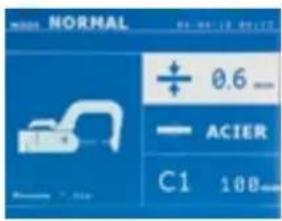
text_image
NORMAL + 0.6 - ACIER C1 10B-This mode determines the welding settings based on the thickness of the sheets/panels and the type of steel.
The settings that need to be set when using this mode are:
- Thickness of the sheets/panels, with a range between 0.60 mm and 3.00 mm.
When 2 sheets/panels are being welded together, enter the thickness of the thinnest sheet.
When 3 sheets/panels are welded together, use the total cumulated thickness and divide by 2.
- Type of steel (coated steel, HLE/THLE steel, UHLE steel, bore steel (BORON)).
When welding a mix of different types of steel, select the strongest one.
- Reference of the arm used.
Push the button for 2 seconds to return to the AUTO mode.
MANUAL mode
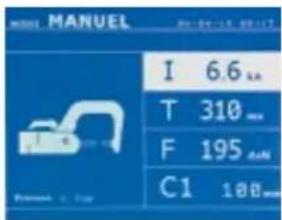
text_image
MANUEL I 6.6 L T 310 mm F 195 dN C1 188 mmThis mode is used to select the parameters of the spots by following the instructions of a repair book.
The parameters to set in this mode are:
- Current
- Duration
- Pressure
- Reference of the arm used.
Push the button 2 seconds to return to the AUTO mode.
MULTI mode
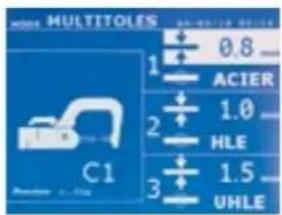
text_image
MULTITOLES ACIER 0.8 1 2 3 1.0 HLE 1.5 UHLEThis mode is used to set precisely the thickness and type of steel for each sheet/panel.
The first element (thickness of sheet 1) is selected. The keys up and down are used to select the setting that needs to be adjusted, where the keys right and left are used to increase or decrease the value. Highlight the setting that needs to be adjusted.
The settings that need to be set when using this mode are:
- Thickness of the sheets/panels, with a range between 0.60 mm and 3.00 mm.
- Type of steel (coated steel, HLE/THLE steel, UHLE steel, bore steel (BORON)).
When welding a mix of different types of steel, select the strongest one. - To activate the sheet/panel 3, press the scroll keys (▲r) ▼ highlight sheet/panel 3. Then use they keys + and - to select the thickness of the sheets/panels.
- Reference of the arm used.
Push the button 2 seconds to return to the AUTO mode.
GYSTEEL mode
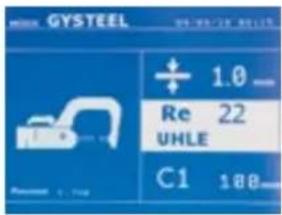
text_image
GYSTEEL Re 22 UHLE C1 188The GYSTEEL mode is optional; it can be modified using the « Settings» menu.
This mode is similar to the standard mode except that the user enters the elasticity of the metal (Re). This value «Re» can be found using a tool like the GYSTEEL Vision.
Re : 1-10 is for mild steels.
Re : 11-18 is for HLE/THLE steels.
Re : 19-35 is for UHLE steels.
Re : 36-99 is for bore/boron steels.
The settings that need to be set when using this mode are:
- Thickness of the sheets/panels, with a range between 0.60 mm and 3.00 mm.
When 2 sheets/panels are being welded together, enter the thickness of the thinnest sheet.
When 3 sheets/panels are welded together, use the total cumulated thickness and divide by 2. - Reference of the arm used.
Push the button for 2 seconds to return to the AUTO mode.
MANUFACTURER mode
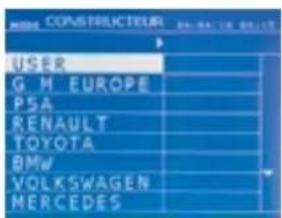
text_image
HOMA CONSTRUCTEUR USER G M EUROPE PSA RENAULT TOYOTA BMW VOLKSWAGEN MERCEDESThe MANUFACTURER mode is optional; it can be modified using the « Settings » menu.
This mode is used to name a pre-registered spot based on the repair book issued by the manufacturer.
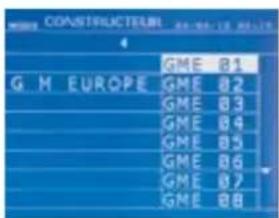
text_image
COASTRIELICHEL G M EUROPE GME B1 GME B2 GME B3 GME B4 GME B5 GME B6 GME B7 GME B8
text_image
CONSTRUCTEUR USER PULSE1 PULSE2Spot welds programmed by the user can be recalled by selecting USER in the manufacturers list. Welding spots can be programmed using the GYSPOT software and the welding spots settings module.
Push the button 📋 for 2 seconds to return to the AUTO mode.
ENERGY mode
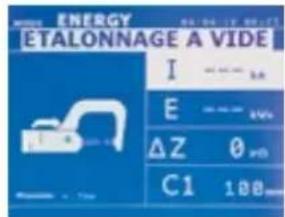
text_image
ENERGY ETALONNAGE A VIDE I E ΔZ C1 100 100 100 100 100 100 100 100 100 100 100 100 100 100 100 100 100 100 100 100 100 100 100 100 100 102 102 102 102 102 102 102 102 102 102 102 102 102 102 102 102 102 102 102 102 102 102 102 102 102 103 103 103 103 103 103 103 103 103 103 103 103 103 103 103 103 103 103 103 103 103 103 103 103 103 104 104 104 104 104 104 104 104 104 104 104 104 104 104 104 104 104 104 104 104 104 104 104 104 104 105The ENERGY mode is optional and can be set using the «Settings» menu. This mode is used to control the energy transmitted during the weld. This mode is not designed to be used during repairs but for the benefit of manufacturers and quality control organisations conducting tests.

text_image
EFFECTUER UN POINT À VIDE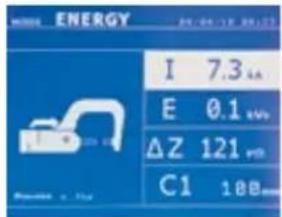
text_image
ENERGY I 7.3 kA E 0.1 kW ΔZ 121 mV C1 10BTo enable this mode, first perform a weld without a load. Push the button (F-9). The message «Do a spot without a load» is displayed on the screen. Push the button again to calibrate. Once the calibration has been done, the machine displays the last values used in this mode for current and energy. The use can then modify the welding current, energy and resistance. The duration of the weld will vary based on the time required for the machine to reach the energy level required. If it is taking too long, the machine will display the error message «maximum duration reached».
Push the button 📋 for 2 seconds to return to the AUTO mode.
SETTINGS MENU
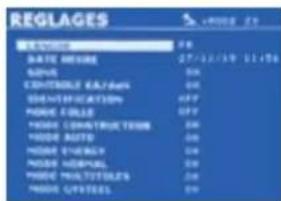
text_image
REGLAGES S W DATE NAME: 27/11/2014 11:56 ADDRESS: 000 CONTROL DATA: 000 DESCRIPTION: APP MODEL NAME: APP MODEL CONSTRUCTION: 000 MODEL AUTO: 000 MODEL EQUITY: 000 MODEL MANUAL: 000 MODEL MULTIDISTERS: 000 MODEL OPUESTERS: 000This menu is accessible by pressing and holding the button for 2 seconds.
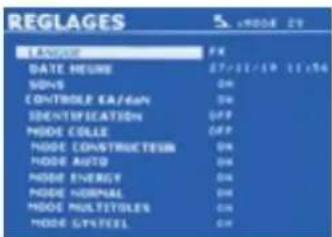
The language used in the menu can amended on line 1. The date and the time can be programmed on line 2.
The modes GYSTEEL, MANUFACTURER, AUTO, ENERGY, NORMAL et MULTISHEETS can be activated or deactivated using this menu.
text_image
REGLAGES LANGUAGE: PR DATE: HOURS 27/11/19 11/14 SONS: ON CONTROL: EAT/DAN: ON IDENTIFICATION: OFF MODE: COLLE: OFF MODE CONSTRUCTURE: ON MODE AUTO: ON MODE ENERGY: ON MODE NORMAL: ON MODE MULTITORIES: ON MODE SYSTEM: ONThis setting allows you to activate or control the clamping force of the clamp during a weld.
GLUE mode:
On the SETTINGS screen below, the user can specify the presence glue between the panels/sheets. When this mode is in use, a pre-spot is performed before the weld. The duration of this pre-spot is set in milliseconds, from 0 to 400 ms, with 50 ms thresholds. When the glue mode is selected, la word « GLUE » is displayed in the menus of the NORMAL, MANUAL, MULTI or GYSTEEL welding modes.
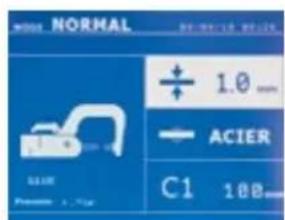
text_image
NORMAL ± 1.0 mm ACIER C1 10B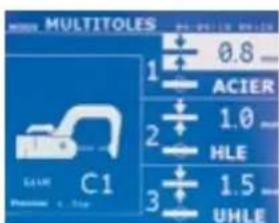
text_image
MULTITOLES ACIER 0.8 1 2 3 1.0 HLE 1.5 UHLE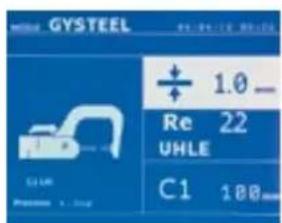
text_image
GYSSTEEL + 1.0 Re 22 UHLE C1 100mm 100mmUSE OF THE GUN (OPTION)
- Select the GUN tool using the button

natural_image
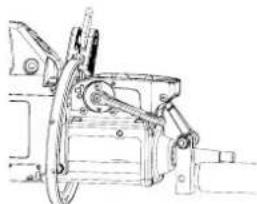
Technical line drawing of a mechanical device with hoses and components (no text or symbols)Attach the gun grounding cable to the mobile electrode. Slide and tighten the knurl.
natural_image
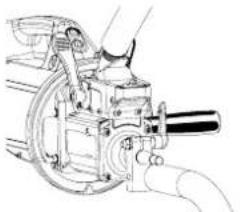
Technical line drawing of a mechanical device with hands operating it (no text or symbols visible)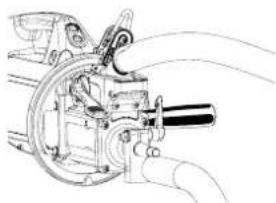
natural_image
Technical line drawing of a mechanical device with motion lines indicating movement (no text or symbols)Remove the arm from the clamp and fix, in its place, the gun cable.
natural_image
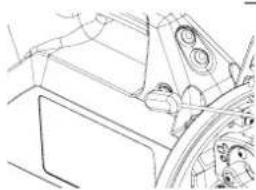
Technical line drawing of a vehicle interior showing dashboard, steering wheel, and gear mechanism (no text or symbols)Connect the control cable to the jack plug.
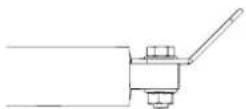
Check that the screw connecting the shoe to the cable lug is tight.
- Fix the earth pad firmly and as close to the weld as possible.
In the case of a monopoint weld, always place the earth on the sheet/panel that is not in contact with the welding electrode (in order for the current to go through the two sheets to be welded). - Weld starting with the furthest spot away from the earth and work towards it.
- The normal welding mode using the stars is the one used by default.
- The gun can be used in normal or manual mode.
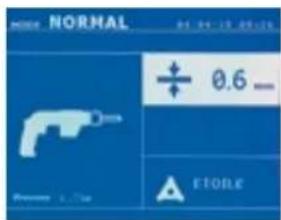
text_image
NORMAL 04 04-10 09:16 + 0.6 - Store STOREIn normal mode, the gun will be limited to 1.5mm thick sheets.
Using the gun, the operator can choose between different tools (mono point, star, impact, heat, dowel pin, rivet, nut, toothed wheel). Select the desired tool using the + and - keys.
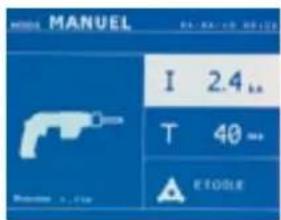
text_image
MANUEL I 2.4 L. T 40 # STOLEIn Manual mode, the maximum possible intensity is 8 kA for a maximum duration of 500 ms. The settings showing on the screen will not exceed these values.
Set the generator by indicating the thickness of the sheet/panel to weld using + and - keys. It is possible to adjust the current and time settings when in manual mode.
Press the 📄 button for 2 seconds to get back to the NORMAL mode.
ERROR MANAGEMENT
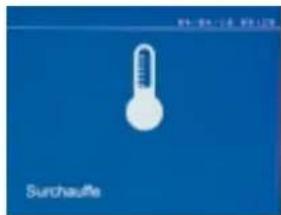
text_image
SurchauffeVarious elements may produce errors. They can be split into 4 categories :
1/ Warning messages designed to warn the operator of overheating, lack of pressure or power, etc. These messages are displayed on the screen and remain visible until a button is pressed.
2/ The faults that occur in relation to insufficient air pressure or power supply.
3/ The serious faults that block the machine. In this case, contact the service department
4/ The thermal protection is linked by a thermistance on the diode bridge and when it activates the machine is locked and the message «overheating» is displayed.
Low battery

text_image
Battery failureThe message «Battery low» is displayed when the machine is switched on and it indicates that the battery on the command board is low. This battery is used to record the date and time when the machine is switched off.
Invalid tool

text_image
Outil non valideThe message «Invalid tool» is displayed when the machine is switched on and indicates that a button is pushed in, the trigger is pushed in or a permanent short-circuit. Check the trigger or the buttons on the clamps to remove the message.
Invalid arm

text_image
Beas more validThe arm used is not compatible with the welding mode selected.
Current too low

text_image
Courant trop failure1/ Check the weld
If the current obtained during a spot weld is lower than the expected value (6%), the machine displays the warning message «Low current, check the weld».
2/ Check the sheets
If the machine cannot deliver the current required, the error message «Low current, check the sheets» is displayed. The weld does not happen and the fault must be skipped for the weld to happen.
Insufficient air pressure

text_image
24-06-15 09:50 Provision risseau insuffisante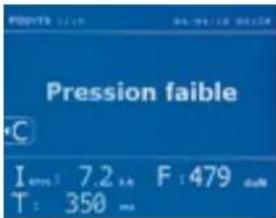
text_image
Pression faible I: 7.2 in F: 479 cm T: 350 mmIf the input pressure is insufficient to deliver the tightening requested, the machine beeps and displays, before the weld, the error message «Insufficient air pressure».
Pressing the trigger a second time is used to «force» the spot weld using the available pressure. If the tightening recorded is insufficient, the machine displays «Low pressure».
«p low» is also recorded in the active report.
SPOT COUNT
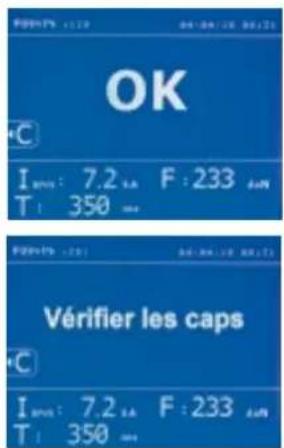
A spot count tool keeps count of the different spot weld done using the same cap. If there is no problem during the welding, the following message is displayed.
The count is displayed at the top left corner of the screen. Press the button 📋 for 2 seconds to reset the count after changing the caps.
The machine counts the number of points achieved with each arm independently. A warning message appears on the screen when the limit of the points made by the headings is reached. The message remains displayed after each point until the counter is reset.

If the caps are not changed after the warning message is displayed and the count is simply reset, they can deteriorate and have a negative impact on the quality of the weld.
RECORDING FEATURES
The Identification mode is optional and can be activated using the «settings» menu.
The log allows to store the parameters of the spots made using the clamp. It is available in all the modes by pressing the 2 buttons ● and ▶
The user program is available in all modes by pressing the ☐ and Buttons.
Report (log)
text_image
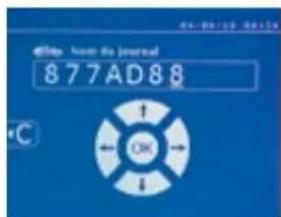
© http://www.journal 877AD88Saving a report allows you to retrieve the data of a series of spot made with using the clamp, and to save them on the memory card so that they can be retrieved from a PC for example. GYS provides a software called GYSPOT to read the SD card and edit the logs on a PC. This GYSPOT software is stored on the SD card as well as the user manual.
By default, this feature is disabled when the machine is switched on. Pressing the recording button (on/off) and the «mode» button starts recording the report in the selected log. Pressing the record button again (on/off) stops the current recording.
The log created contains: an ID entered by the user, as well as for each spot performed, the tool and arm used, the machine settings (power and pressure). It also contains the following possible error messages that may have occurred during its recording: I LOW, P LOW, PB CAPS.
The ID is entered using the 4 keys +, - ▲ or ▼. When entering an identifier already in use, the machine will record the new points in succession, without deleting the previous ones.
The button is used to retrieve a previously saved report and read it back on the screen.
The current recording must be stopped by pressing the ● button before it can be displayed on the screen. The □ button is used to exit the report view mode.
To delete the contents of a report, you must display it on the screen using the button ▶.
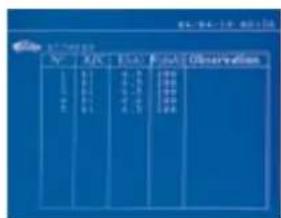
Then press the button. The following message appears on the screen.
text_image
N Date Factor Observation 1 2 3 4 5 6 7 8 9 10 11 12 13 14 15 16 17 18 19 20 21 22 23 24 25 26 27 28 29 30 31 32 33 34 35 36 37 38 39 40 41 42 43 44 45 46 47 48 49 50 51 52 53 54 55 56 57 58 59 60 61 62 63 64 65 66 67 68 69 70 71 72 73 74 75 76 77 78 79 80 81 82 83 84 85 86 87 88 89 90 91 92 93 94 95 96 97 98 99 100
text_image
CATALOGUE CWhen the triangle is displayed, a second press on the ⏻ button erases the content of the report displayed.
The triangle disappears from the screen automatically after 3 seconds.
Identification mode
text_image
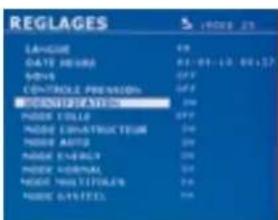
REGLAGES LANGUAGE NAME DATE DATE 01-01-10 00:57 WORKS CONTROL PRECISION PROMSTATION HORN TOLER HORN CUSTRICTION HORN AUTO HORN ENERGY HORN WATER HORN MULTITOLATION HORN GATELLIf the identification mode is set to «ON», all mandatory fields in the repair order must be entered to allow the weld to go ahead or the machine will display «identification fault».
To activate and deactivate the identification mode, an SD identification card must be inserted in the BP card reader instead of the SD card containing the programs.
The settings screen is activated by pressing and holding down the MODE button for 2 seconds.
text_image
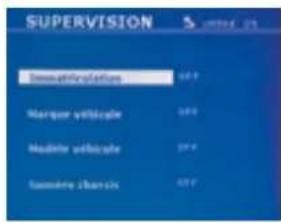
SUPERVISION Immaterification Marquer venticale Modérion venticale Summary chartWhen the SD card «identification» is inserted and «identification ON» is selected, the supervision screen is displayed.
This screen is used to make the fields «registration, vehicle make, vehicle model, vehicle model, chassis number» mandatory fields when entering the repair order.
To exit the screen, press the MODE button for 2 seconds. Then, it is necessary to put the SD card containing the programs back into the machine card reader.
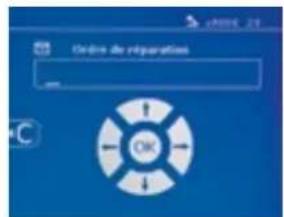
List of screens used to enter a repair order :
If a repair order has already been created, it cannot be changed or deleted on the machine. To delete it, use the Gyspot software on the PC. The user can create a maximum of 100 repair orders.
Repair order User identification Registration (optional)
text_image
Ordire de réparation OK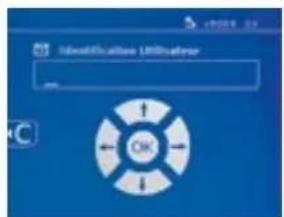
text_image
Identification UserLogin OK
text_image
Immaterization OKVehicle make Vehicle model Chassis number (optional)
text_image
Marquer willpower OK
text_image
Modify website OK
text_image
Automotive Esteroids OK
The arrow keys (▲ or ▼) are used to change the letters or numbers. The keys - and + are used to move the cursor inside the field. Press the button briefly to clear the field. The button allows you to scroll through the fields for editing or reading.
Catalogue

text_image
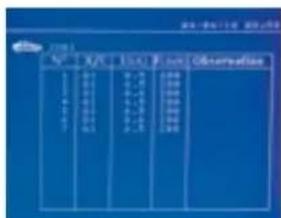
CATALOGUE JOB1 JOB2 JOB3 JOB4 JOB5 JOB6The button is used to consult the repair orders. The page number is displayed (max. 13)
text_image
City City Location ObservationThe keys - and + are used to change pages. The keys ▲ at ▼ used to select previous or next job. The MODE button displays the selected repair order.
The button key is used to exit the report view mode.
- The SD card management library allows you to manage your SD cards over 2 GB.
- For each repair order, a log file xxx.dat is associated (with xxx=identifier from 001 to 100). In each log, a maximum of 500 welding points can be recorded. On consultation, the names of the repair order and the user are displayed.
- The page number is indicated at the top left.
- All repair orders are stored in the file called catalog.GYS.
- This file contains the total number of repair orders, the name of each repair order and the name of each user. There is a maximum of 100 repair orders.
User programs
Saving the settings allows you to define a user program in order to easily find its settings for future use. 20 memory slots are available. Each of them contains the following settings: tool, arm, welding power, welding time and pressure.
A program can be associated to the clamp or gun.
The button is used to save the current settings of the manual mode (power, time and pressure). The 20 memory slots are then indicated by their identifier (for those used) or by a symbol» ---» for free slots.
The ID is entered using the 4 keys. When entering an ID that has already been used, the machine will delete the settings that were previously stored.
The button is used to access the settings previously saved. Choosing an empty location has no effect.
Briefly pressing key ⬆ deletes the selected program from the list of saved programs.
The key MODE exits the program selection mode, switches the machine to manual mode with the parameters and tool saved in the program.
To deactivate a program, simply change the value of a parameter in one of the three modes manual, normal or multiplate or change the tool (clamp, gun) using the button.
The key allows you to view a previously saved report and read it back on the screen.
SD memory card (ref. 050914)
This card allows the user to link the machine to a PC in order to:
- Retrieve logs (reports), keep a record of the work done, and eventually send it to an insurance company.
- Update welding parameters, add new languages.
- The GYSPOT software for editing parameters on a PC is stored on the SD memory card.
- The instructions are is stored on the SD memory card.
text_image
Designer To carnte 80The memory space is sufficient to ensure an autonomy of more than 65,000 points.
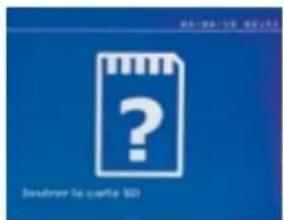
The machine can operate without a memory card in «manual» mode only.
If the memory card is not inserted in the card reader, the following message appears. The machine must be stopped and restarted after inserting the SD card.
Important : It is necessary to turn off the power to the machine before removing the SD card from its reader and restart the machine only after inserting the SD card into its reader, otherwise the data saved on the SD card may be lost.
ASSEMBLY AND REPLACEMENT OF THE ARMS ON THE G CLAMP

The warranty does not cover anomalies and damages due to improper assembly of the G-clamp arms.
IMPORTANT :
- do not use copper grease on the arms.
- keep the arm base and arm support on the clamp clean to ensure a good flow of current between the parts in contact.
- If not used for a long time, always store the machine with an arm mounted on the clamp to avoid dust on the arm support.
Procedure for changing the arms :
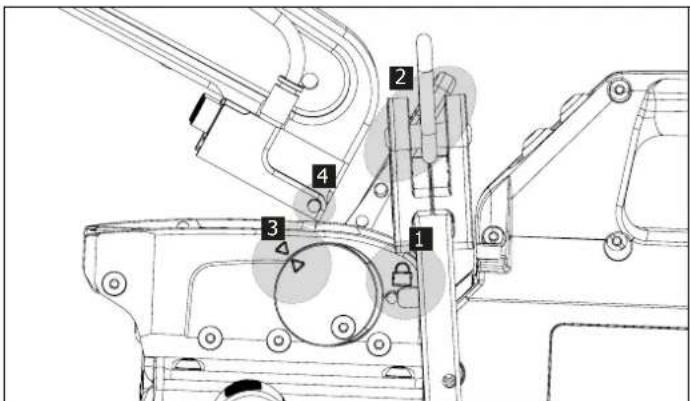
During the replacement of the arms on the clamp, the cooling circuit pump must be switched off. To do this, place yourself in the «Clamp Setting» mode on the machine; the red light on the clamp button (FIG 2-8) indicates that the pump is off. The electrode retracts into the clamp to allow the arm to be removed.
1 The latch sticks out on the lock side
2 The lever must be in the rear position stop ( 120°)
3 The arrows must be aligned
4 Tilt the arm about 15° and remove it from its housing (the pins must slide into the groove)
text_image
Technical diagram of a mechanical assembly with numbered components for identification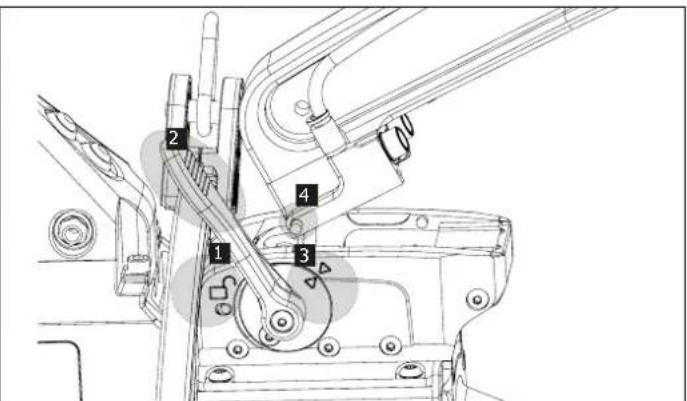
text_image
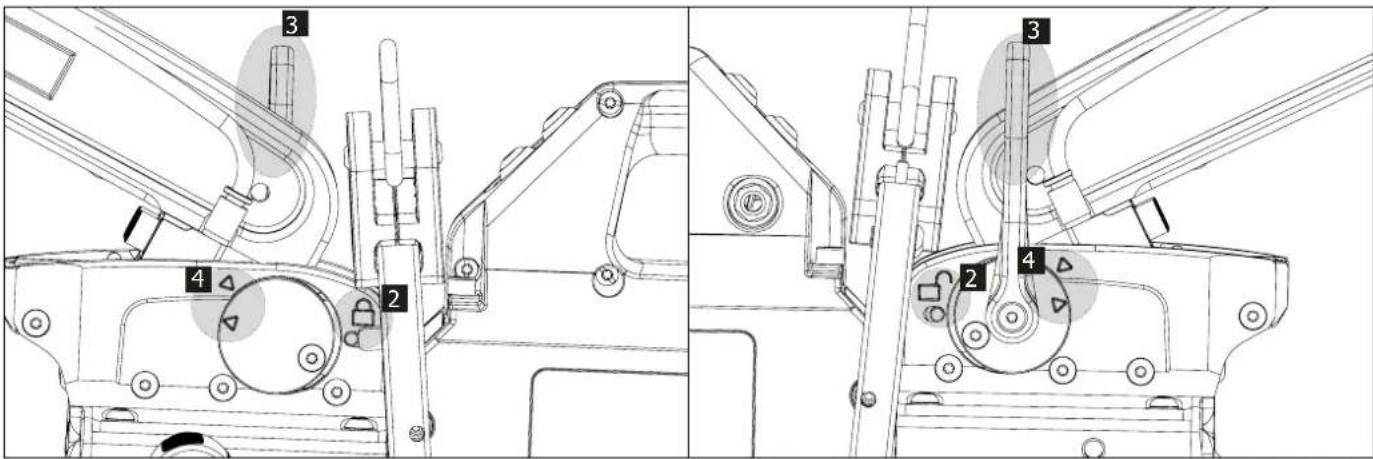
Technical diagram of a mechanical assembly with numbered components for identificationMECHANICAL OVER-OPENING OF THE ARM
2 The latch sticks out on the open lock side
3 The lever must be open ( 90^ ) at the stop on the latch.
4 The arrows must not be aligned
Incline the arm.
text_image
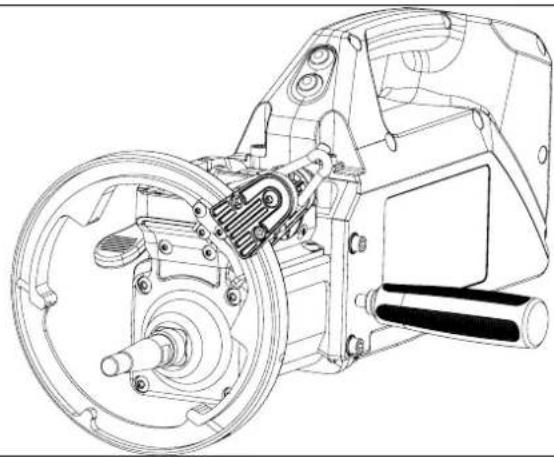
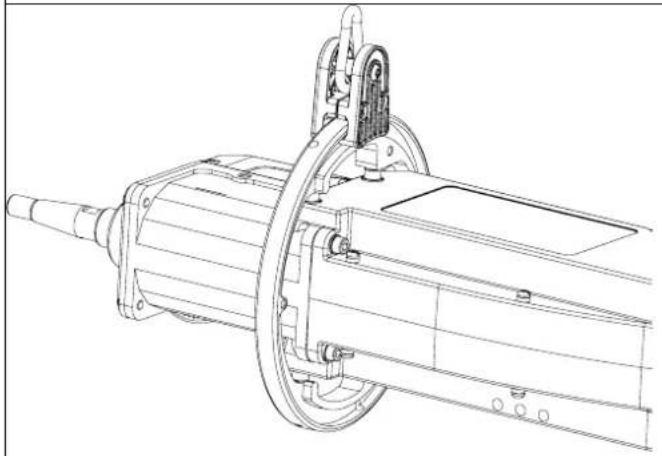
Technical diagram of a mechanical assembly with numbered components, likely for engineering or manufacturing documentation.THE GYROSCOPE
| Remove the plastic handle, tilt the gyro as shown and slide it to the shell. | Fix the gyro with 4 M5x10 headless screws. |
 |  |
| It can rotate around the clamp 360°. | The stop on the gyro can be raised or lowered. It is used to shift the balancer cable so that a large arm can be engaged more easily. |
 |  |
GYSPOT SOFTWARE ON PC
The purpose of this software is to edit and save the spot weld reports made using a GYSPOT equipped with an SD card reader. To use this software, the PC must be equipped with an SD card reader.
The GYSPOT software can be installed from files on the SD card. In the directory \GYSPOT V X.XX, double click on the file INSTALL.EXE, and follow the instructions to install the software on your PC. A GYSPOT icon is automatically installed on your PC desktop.
1 - Language selection
The software supports several languages. Currently, the available languages are:
French, English, German, Spanish, Dutch, Danish, Finnish, Italian, Swedish, Russian, Turkish.
To select a language, from the menu, click on Options and then on Languages.
Note that once the language has been selected, it is necessary to close and open the GYSPOT software again so that the language can be taken into account.
2 - User identity
In order to personalise the editions with your personal information, some information is required. To give the required information, in the menu, click on Options then on Identity. A new window appears with the following information:
Company name
Address / Post code / City
Telephone / Fax / Email / Website
Logo
The information will then be displayed on the editions.
3 - Traceability
By default, the GYSPOT software opens in «Traceability» mode. In «Point Setting» mode, click on Traceability in the Options menu.
3.1 - Importing point reports from an SD card :
To import the point reports made with a GYSPOT into your PC, insert the SD card into the card reader on your PC and start the GYSPOT software.
Then select the reader into which your SD card is inserted and click on the button
When the import is performed, the weld spots performed are grouped by the maintenance order identifier. This identifier corresponds to the name of the report specified in the welding machine. This identifier is displayed in the Current tab.
Once the reports have been imported, it is possible to search, edit or archive each report. To visualise the spot completed in a report, select a report. The spots completed are displayed in the table.
To perform a search, fill in the search field and click on the button
To edit a report, select a report and click on the button
To archive a report, select a report and click on the button 📋. Warning, please note that imported reports cannot be deleted until they have been archived.
3.2 - Consult the archived spot reports:
To view the archived reports, click on the Archives tab. The reports are grouped by year and month.
To view the spots completed, select a report. The spots completed are displayed in the table.
For archived reports, it is possible to search, edit or delete a report.
Be careful, a report archived and then deleted will be imported again when importing data from an SD that has not been cleared.
To perform a search, fill in the search field and click on the button 9.
To edit a report, select a report and click on the button. To delete a report, select a report and click on the button ✗.
3.3 - Clearing an SD card:
Clearing the card will erase all completed spot reports recorded on the SD card.
To clear an SD card, insert the SD card into the PC card reader and then, in the menu, click on Options and purge the SD card.
Be careful, when clearing, the spot reports completed that have not yet been imported will be automatically imported.
3.4 - To complete the information in a report:
Each report can be filled in with the following information:
Operator,
Type of vehicle,
Repair order,
Registration,
Date of first registration,
Intervention,
Comments.
To enter this data, select a report and enter the information in the report header.
3.5 - Printing a report :
To print a report, select a report and click on the button 📄. A preview of the edition is displayed. Click on the button 📄
3.6 - Exporting the edition in PDF format:
To export an edition in PDF format, select a folder, then click on the button. A preview of the edition is displayed. Click on the button An example of saving the parameters printed using the GYSPOT software is given below.

4 - Spot parameters
To switch to «Spot Parameter» mode, click on Spot Parameter in the Options menu.
The «Spot parameter» mode allows to use the operator to use spots set by the manufacturers. This mode also allows the user to choose his own welding parameters.
- Insert the SD card supplied with the GYSPOT spot welder into the reader of your PC and select the correct disk in the drop-down menu.
- GYSPOT spot welders support up to 16 files that can contain up to 48 spot settings.
- The first file called «USER» cannot be deleted. It allows the user to add, modify or delete a spot parameter.
- The other files are reserved for the spot set by the manufacturers.
4.1 - Import a manufacturer spot parameter file :
| USER | user | |
| GM EUROPE | ||
| PSA | ||
| RENAULT | ||
| TOYOTA |
Double-click in the first column and enter a manufacturer name.
| USER | user | |
| GM EUROPE | ctrl] | |
| PSA | ||
| RENAULT | ||
| TOYOTA |
Then double-click in the second column to select a manufacturer file previously downloaded from our website.
| GME 01 | |
| GME 02 | |
| GME 03 | |
| GME 04 | |
| GME 05 |
The list of spots set by the manufacturer is displayed in the second list. Select a configured point to view the chronogram and configured parameters.
4.2 - Add a configured spot in the USER file :
| USR001 |
To add a spot to the USER file, select the USER file from the file list and click on the button + to the right of the list of configured spots. Enter the name of the spot and press the TAB key or click outside the list of configured spots to configure the welding parameters.
For a spot to be configured, it is possible to configure:
The pre-tightening stage
The pre-heating stage
The different pulses (4 pulses maximum)
And the hot and cold forging stage.
To change the settings, click on the buttons
When the operator changes a parameter, the spot chronogram is updated.
To validate the spot configuration, click on the button √.
To cancel the spot configuration, click on the button ↗.
4.3 - Modify a spot configured in the USER file:
To change the settings of a spot, select a spot from the list and then change the welding settings.
To validate the changes, click on the button √.
To cancel the changes, click on the button ↩.
4.4 - Delete a configured point in the USER file:
Select a spot parameter from the list and click on the button ✗ to the right of the list.
| Raisonsociale: JBDC Télèphone: 0243510101Adresse: ZI,134BddesLoges Télécopie: 0243510102Codepostal: 53941 Email:contact@companyname.comVille: Saint-Berthevin www.companyname.comSiteWeb: | ||||||||||
| Intervenant: OPERATEUR Marque: PEUGEOTOrdredéréparation: 977AC92 Modèle: 308SWDatedujournal: 05/04/2018 N°chàssis: 12365849Intervention: AILEARRIERE Immatriculation: 1450UT53Commentaires: Commentaires Miseencirculation: 01/01/2017 | ||||||||||
| GYSPOTBP.LG(1712009013) | ||||||||||
| Id | DateMode | Outil | Consignes | Mesures | Etat | |||||
| Temps (ms) | Intensité(kA) | Serrage (daN) | Intensité(kA) | Serrage (daN) | Epaisseeur (mm) | |||||
| 1 | AutoPinceenCn°1 | PointOk6309,43259,43263 | 505/04/1810:22 | |||||||
| 2 | AutoPinceenCn°1 | PointOk6309,43259,33253 | 505/04/1810:22 | |||||||
| 3 | AutoPinceenCn°2 | PointOk4906,22408,22402 | 005/04/1810:22 | |||||||
| 4 | AutoPinceenCn°1 | PointOk5108,32508,22452 | 105/04/1810:22 | |||||||
| 5 | AutoPinceenCn°1 | PointOk5108,32508,32452 | 105/04/1810:22 | |||||||
| 6 | 05/04/1810:23 | Normal | PinceenCn°1Point Ok3507 | 32257,3225 | - | |||||
| 7 | 05/04/1810:23 | Normal | PinceenCn°1Point Ok3507 | 32257,2225 | - | |||||
| 8 | 05/04/1810:23 | Normal | PinceenCn°1Point Ok4008 | 12658,0265 | - | |||||
| 9 | 05/04/1810:23 | Normal | PinceenCn°1Point Ok4008 | 12658,1260 | - | |||||
| 10 | 05/04/1810:23 | Normal | PinceenCn°1Point Ok4008 | 12658,1270 | - | |||||
| 11 | 05/04/1810:23 | Manuel | Pince en C n°1 | 400 | 8,1 | 510 | 8,1 | 440 | - | Pression faible |
SAFETY AND MAINTENANCE
User training
People operating this machine must receive suitable training in order to get the most out of the machine capabilities and carry out good quality repairs (examples: car body work training).
Preparation of the parts to be assembled
It is essential to clean and accost the area to be welded.
In the case of a protective application, make sure that it is conductive by first testing a sample.
Monopoint electrode welding
When repairing a vehicle, check that the manufacturer allows this type of welding process.
Using the underwing arm
The maximum pressure is 100 daN.
Quantity and quality of the coolant
The coolant level is important for the correct operation of the machine. It must always be between the minimum and maximum level indicated on the trolley. Top up with demineralized water if necessary.
Replace the coolant every 2 years :
TROUBLESHOOTING
| TROUBLESHOOTING | CAUSES | SOLUTIONS | |
| Clamp welding | The spot made does not hold or does not enough | The caps are worn out. | Change the caps. |
| The sheets are not clean enough. | Check the preparation work. | ||
| The arm selected does not match the one mounted. | Check the arm selected in the software. | ||
| The machine makes a hole in the sheet. | The caps are worn out. | Change the caps. | |
| Insufficient air pressure. | Check the air pressure (min. 8 bar) | ||
| The surface is not properly prepared. | Prepare/clean the surface to be worked on | ||
| Lack of power | Power supply problem. | Check the stability of the mains voltage | |
| Caps blackened or damaged. | Change the caps. | ||
| Incorrect arm locking. | Refer to the chapter "Assembly and changing the arms". | ||
| - Fast overheating of the machine.- Power cable inflation. | No or poor circulation of the coolant. | Open the cart tank cap and observe the movement of the coolant and correct return. | |
| Gun | Abnormal heating of the gun | Incorrect tightening of the chuck. | Check the tightness of the chuck, the star holder chuck, and the condition of the sheathing. |
| Gun sheathing loose. | Replace the sheathing in order for the air cooling to reach the inside of the gun | ||
| Incorrect positioning of the earth pad. | Check that the ground pad is in contact with the right sheet metal. | ||
| Lack of power in the gun | Poor contact of the earth pad. Check the earth contact | ||
| Incorrect tightening of the chuck or accessories. | Check the tightness of the chuck and accessories, and the condition of the sheathing | ||
| Damaged consumables. Replace the consumables | |||
WARRANTY
The warranty covers faulty workmanship for 2 years from the date of purchase (parts and labour).
The warranty does not cover:
- Transit damage.
- Normal wear of parts (eg.: cables, clamps, etc..).
- Damages due to misuse (power supply error, dropping of equipment, disassembling).
- Environment related failures (pollution, rust, dust).
In case of failure, return the unit to your distributor together with:
- The proof of purchase (receipt etc ...)
- A description of the fault reported
natural_image
Close-up of a cable with connectors and a directional arrow, no visible text or symbolsRouge / red / rot / rojo
text_image
A F A F A Anatural_image
Two black-and-white photos showing a hand holding a cable, one with a checkmark and the other with an 'X' symbol (no text or symbols present)G4 (550 daN) - ref. 022799
text_image
250 600 235 177G5 (550 daN) (6.25 kg) - ref. 022805
G10 (400 daN) (5 kg) - ref. 067165
text_image
450 430 384 324G8 (550 daN) - ref. 022836 G11 - ref. 071766
text_image
25 mm max 120 mm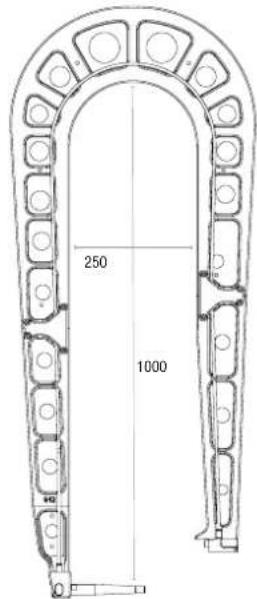
text_image
250 1000G12 (550 daN) - ref. 075238
text_image
MANUEL I 6.6 T 310 F 195 C1 100text_image
ENERGY ETALONNAGE A VIDE I --- 5A E --- 90V ΔZ 0 VD C1 100mmtext_image
REGLAGES STATE NAME: 2701-09-11 CONTROL RA/turn: 00 CONTROL POSITION: 00 MODE CLOSE: 00 MODE CONSTRUCTURE: 00 MODE AUTO: 00 MODE EADYABLE: 00 MODE ADDITIONAL: 00 MODE MULTICOLATION: 00 MODE DIFFIDUAL: 00natural_image
Technical line drawing of a mechanical device with no visible text or symbolsnatural_image
Technical line drawing of a mechanical assembly with hands operating a tool (no text or symbols visible)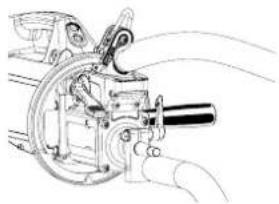
natural_image
Technical line drawing of a mechanical device with motion lines indicating movement (no text or symbols)natural_image
Line drawing of a vehicle interior with dashboard and steering wheel (no text or symbols)text_image
MANUEL I 2.4 L T 40 ... ELOGEtext_image
©File Audio by Journal 877AD88 C OKtext_image
Identification UserButton OK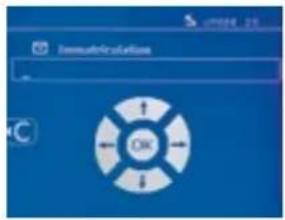
text_image
Immaterification OKtext_image
Marker voltage OK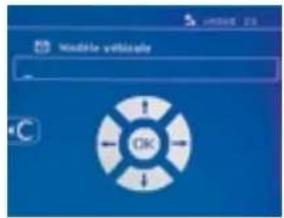
text_image
Name of device OK
text_image
CATALOGUE JOB1 JOB2 JOB3 JOB4 JOB5 JOB6text_image
Desktop for certificate IDtext_image
Technical diagram of a mechanical assembly with numbered components for identificationARMBÜGEL-ÖFFNUNG
text_image
Technical diagram of a mechanical assembly with numbered components, likely for engineering or manufacturing documentation.360°-ORBITALFÜHRUNG
natural_image
Close-up of a black cable with connectors and a control panel (no visible text or symbols)Rouge / red / rot /rojo
text_image
A F A F A Anatural_image
Two black-and-white photos showing a cable being held, one with a checkmark and the other with an 'X' symbol (no text or symbols present)G4 (550 daN) - ref. 022799
text_image
250 600 235 177G5 (550 daN) (6.25 kg) - ref. 022805
G10 (400 daN) (5 kg) - ref. 067165
text_image
450 430 384 324G8 (550 daN) - ref. 022836 G11 - ref. 071766
text_image
25 mm max 120 mm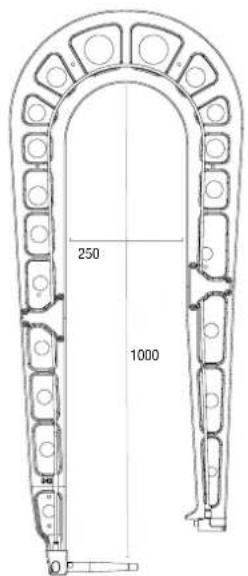
text_image
250 1000G12 (550 daN) - ref. 075238
text_image
MANUEL I 6.6 T 310 F 195 C1 100natural_image
Technical line drawing of a mechanical device with gears and levers (no text or symbols)natural_image
Technical line drawing of a mechanical device with hands operating it (no text or symbols visible)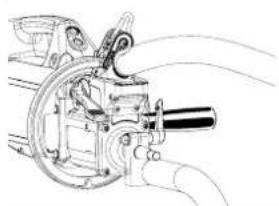
natural_image
Technical line drawing of a mechanical device with motion lines indicating motion (no text or symbols)natural_image
Line drawing of a vehicle's front dashboard and steering wheel (no text or symbols)Conecte el cable de control a la clavija.

text_image
MANUEL I 2.4 kg T 40 gm STOCKStext_image
R-100, R-120 Surchauffetext_image
Battery faulttext_image
Courant trap failure1/ Compruebe la red
text_image
N M Data Final Observation
text_image
CATALOGUE Ctext_image
Identification UserBuilder OK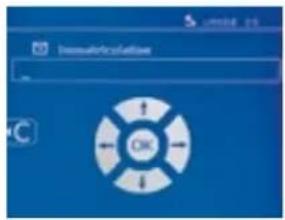
text_image
ImmuneReculation OKtext_image
Harque syllable OK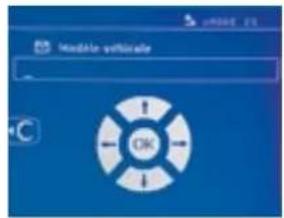
text_image
Modulate verification OK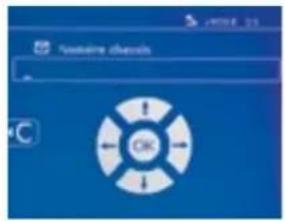
text_image
Custome devices OK
text_image
CATALOGUE JOB1 JOB2 JOB3 JOB4 JOB5 JOB6text_image
My Line Front Informationtext_image
institute for certificate IDtext_image
Technical diagram of a mechanical assembly with numbered components for identification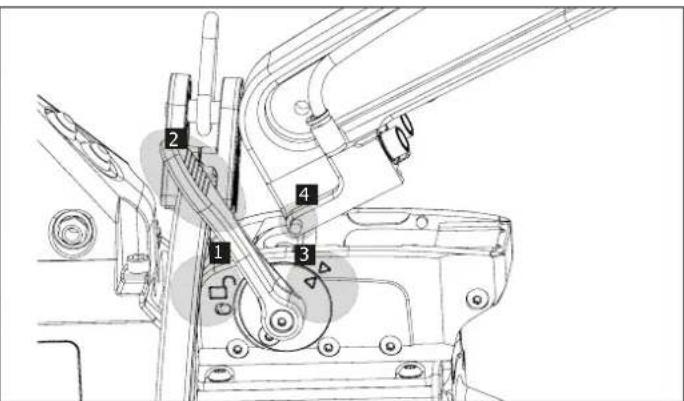
text_image
Technical diagram of a mechanical assembly with numbered components for identificationSOBREAPERTURA MECÁNICA DEL BRAZO
text_image
Technical diagram of a mechanical assembly with numbered components labeled 2, 3, and 4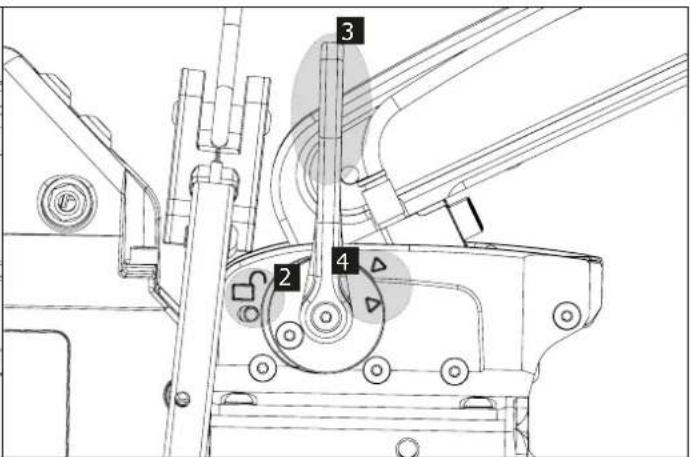
text_image
Technical diagram of a mechanical assembly with numbered components labeled 2, 3, and 4GIROSCOPIO
natural_image
Technical line drawing of a mechanical assembly with gears and shafts (no text or symbols)natural_image
Technical line drawing of a mechanical assembly with gears and housing (no text or labels)natural_image
Technical line drawing of a mechanical assembly with no visible text or symbols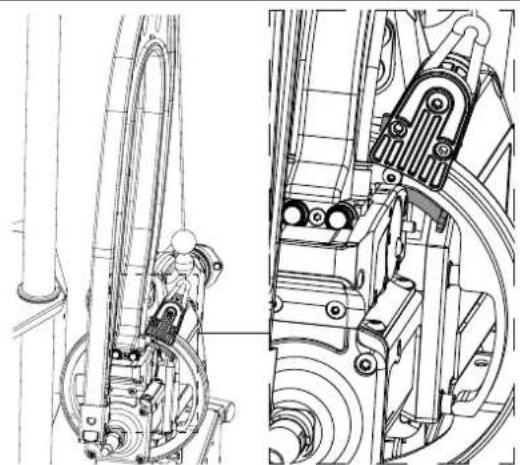
natural_image
Technical line drawing of mechanical components, showing front and side views (no text or symbols)PROGRAMA GYSPOT SOBRE PC
text_image
Technical diagram of a curved mechanical component with numbered parts labeled 19 and 20| G2 | ||
| 19 | Tuyau anti-étincelles / Anti-spark hose / Funkengeschützte Leitung / Conducto anti-chispas / Hadice proti jiskření G2 | 93801 |
| 20 | Électrodes 4 positions / 4-position electrodes / Elektroden 4 Positionen / Electrodos de 4 posiciones / 4 polohové elektrody | 90148 |
| 21 | Socle bras équipé / Equipped arm base / Ausgestatteter Arm-Einschubsockel / Base de brazo equipad / Vybavení základny ramene | 94183 |
G7
natural_image
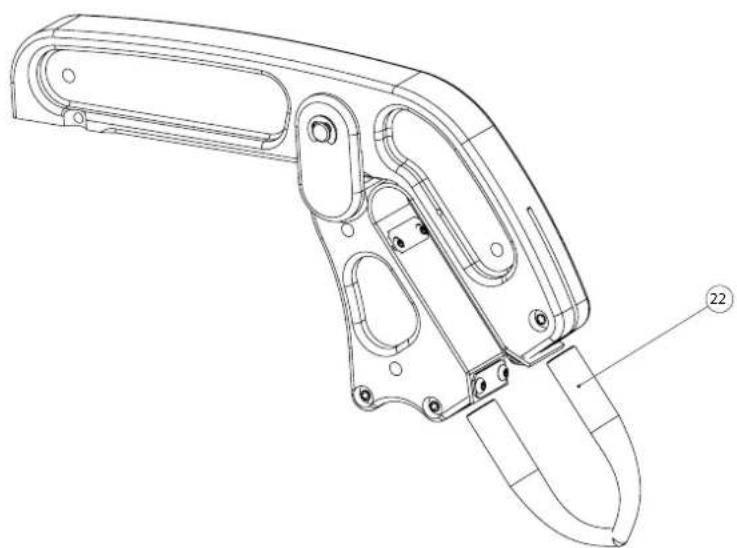
Technical line drawing of a mechanical device with labeled part (22), showing internal components and mounting holes (no text or symbols beyond label)| G7 | ||
| 22 | 2 électrodes pour bras accès difficile / 2 electrodes for difficult access arm / 2 Elektroden für schwer zugänglichen Arm / 2 electrodos para el brazo de difícil acceso / 2 elektrody pro těžko přístupné paže | 051614 |
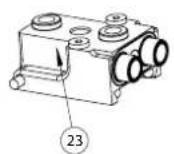
| 23 | Socle bras équipé / Equipped arm base / Ausgestatteter Arm-Einschubsockel / Base de brazo equipado / Vybavení základny ramene | 94172 |
G1
G3
G4
G5
G6
G8
G10
G12
text_image
Technical diagram of a mechanical component with numbered parts and an inset view of its internal structure.| G1/G3/G4/G5/G6/G8/G10/G12 | ||
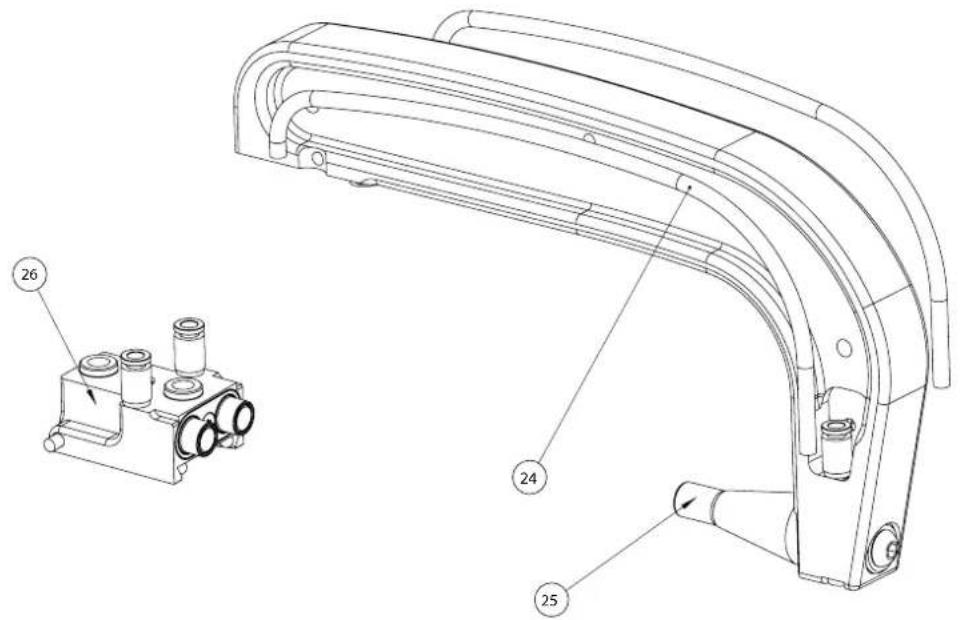
| 24 | Tuyau anti-étincelles / Anti-spark hose / Funkengeschützte Leitung / Conducto anti-chispas / Hadice proti jiskření | G1 91264 |
| G3 91265 | ||
| G4 91266 | ||
| G5 93803 | ||
| G6 91269 | ||
| G8 93804 | ||
| G10 F0231 | ||
| G12 F0668 | ||
| 25 | Caps type A13 / Kappen Typ A13 / Gorras tipo A13 77027 | |
| 26 | Socle bras équipé / Equipped arm base / Ausgestatteter Arm-Einschubsockel / Base de brazo equipado / Vybavení základny ramene | 94183 |
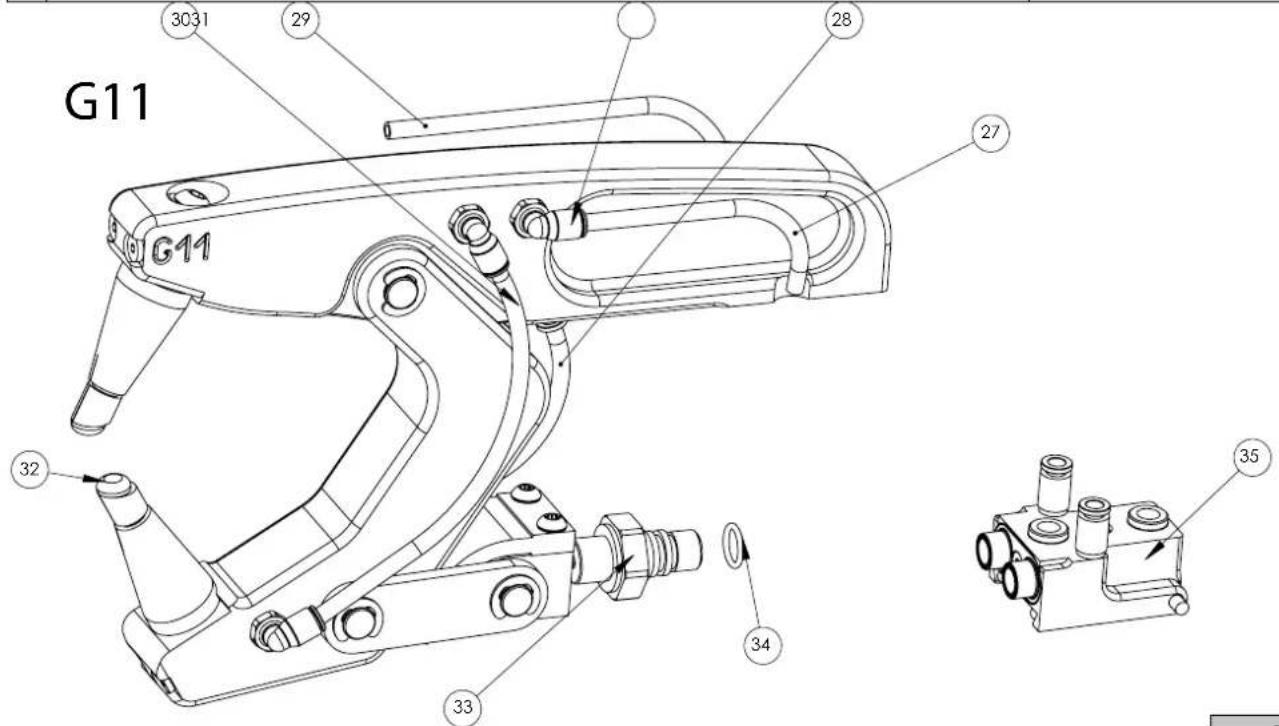
text_image
G11 3031 29 28 27 G11 32 34 35 33| G11 | ||
| 27 | Tuyau anti-étincelles 125 mm / Anti-spark hose 125 mm / Funkengeschützte Leitung 125 mm / Conducto anti-chispas 125 mm / Hadice proti jiskření 125 mm | F0504 |
| 28 | Tuyau anti-étincelles 115 mm / Anti-spark hose 115 mm / Funkengeschützte Leitung 115 mm / Conducto anti-chispas 115 mm / Hadice proti jiskření 115 mm | F0505 |
| 29 | Tuyau anti-étincelles 150 mm / Anti-spark hose 150 mm / Funkengeschützte Leitung 150 mm / Conducto anti-chispas 150 mm / Hadice proti jiskření 150 mm | F0506 |
| 30 | Tuyau anti-étincelles 195 mm / Anti-spark hose 195 mm / Funkengeschützte Leitung 195 mm / Conducto anti-chispas 195 mm / Hadice proti jiskření 195 mm | 94512 |
| 31 | Raccord coudé ∅6 / Elbow fitting ∅6 / Winkelstück ∅6 / Racor codo ∅6 / Kolenové šroubení ∅6 | 71463 |
| 32 | Caps incliné 22° / Inclined caps 22° / Caps geneigt 22° / Tapas inclinadas de 22° 77029 | |
| 33 | Allonge pince G 11 / Clamp extension G 11 / Verlängerung Zange G 11 / Extensión de la pinza G 11 / Prodloužení svorky G 11 | 90622 |
| 34 | Joint 12x2 / Seal 12x2 / Gelenk 12x2 / Junta 12x2 / Těsnění 12x2 55121 | |
| 35 | Socle bras équipé / Equipped arm base / Ausgestatteter Arm-Einschubsockel / Base de brazo equipado / Vybavení základny ramene | 94183 |
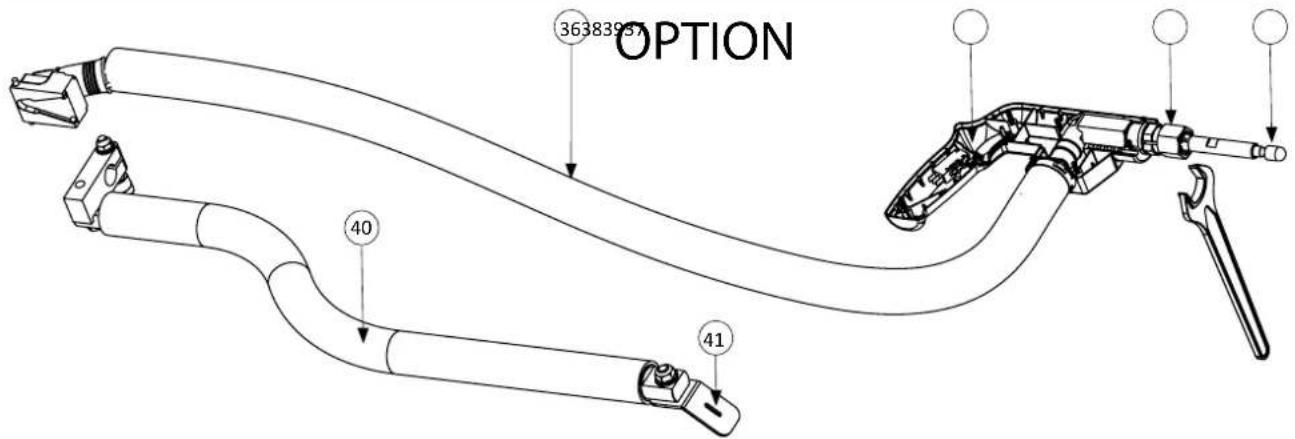
text_image
OPTION 36383957 40 41KIT (067226) Gun
| 36 | Cable pistolet / Gun cable / Pistolenkabel / Cable de la pistola / Kabelová pistole A0071 | |
| 37 | Switch pistolet 0.1A 125VAC / Pistol switch 0.1A 125VAC / Pistolenschalter 0,1A 125VAC / Interruptor de pistola 0,1A 125VAC | 77053 |
| 38 | Ecrou pour mandrin gyspot / Nut for gyspot chuck / Mutter für Gyspot-Futter / Tuerca para mandril gyspot / Matice pro sklíčidlo gyspot | 51198 |
| 39 | Caps type F / Kappen Typ F / Tapas tipo F / Typické uzávěry F 77028 | |
| 40 | Cable masse / Ground cable / Erdungskabel / Cable de tierra / Uzemňovací kabel | A0070 |
| 41 | Plaque Cuivre masse / Copper ground plate / Grundplatte aus Kupfer / Placa de tierra de cobre / Měděná uzemňovací deska | 91197 |
text_image
Technical diagram of a mechanical device with numbered parts for identification and assembly reference.| 42 | Bouchon de remplissage / Filling cap / Behälterverschluss / Tapón de envase / Пробка заправочного отверстия / Vul-dop / Plnicí uzávěr | 71327 |
| 43 | Réservoir 33 litres / Tank 33 litres/ Flüssigkeitbehälter 33 Liter / Depósito de 33 litros / 33-литровый бак / Reservoir 33 liter / 33litrová nádrž | 71759 |
| 44 Pompe / Pump / Pumpe / Bomba / Hacoc / Pomp / Čerpadlo 71772 | ||
| 45 Silent Bloc / Stiller Block / Bloque silencioso / Tichý blok 71136 | ||
| 46 | Roue pivotante / Rotating wheel / Lenkrolle / Rueda giratoria / Поворотное колесо / Zwenkwieltje / Otočné kolo | 71362 |
| 47 | Radiateur / Radiator / Kühlkörper / Radiador / Radiator / Radiator / Radiátor | 71778 |
| 48 | Ventilateur / Fan / Ventilator / Ventilador / Вентилятор / Ventilator / Ventilátor | 51001 |
| 49 | Axe de roue / Wheel axle / Radachse / Eje de la rueda / Osa kola | 98128ST |
| 50 | Embout axe de roue / Wheel axle end cap / Endkappe der Radachse / Tapa del eje de la rueda / Koncovka nápravy kola | 71382 |
| 51 | Roue arrière / Rear wheel / Hinterrad / Rueda trasera / Zadní kolo | 71376 |
Générateur 400 V
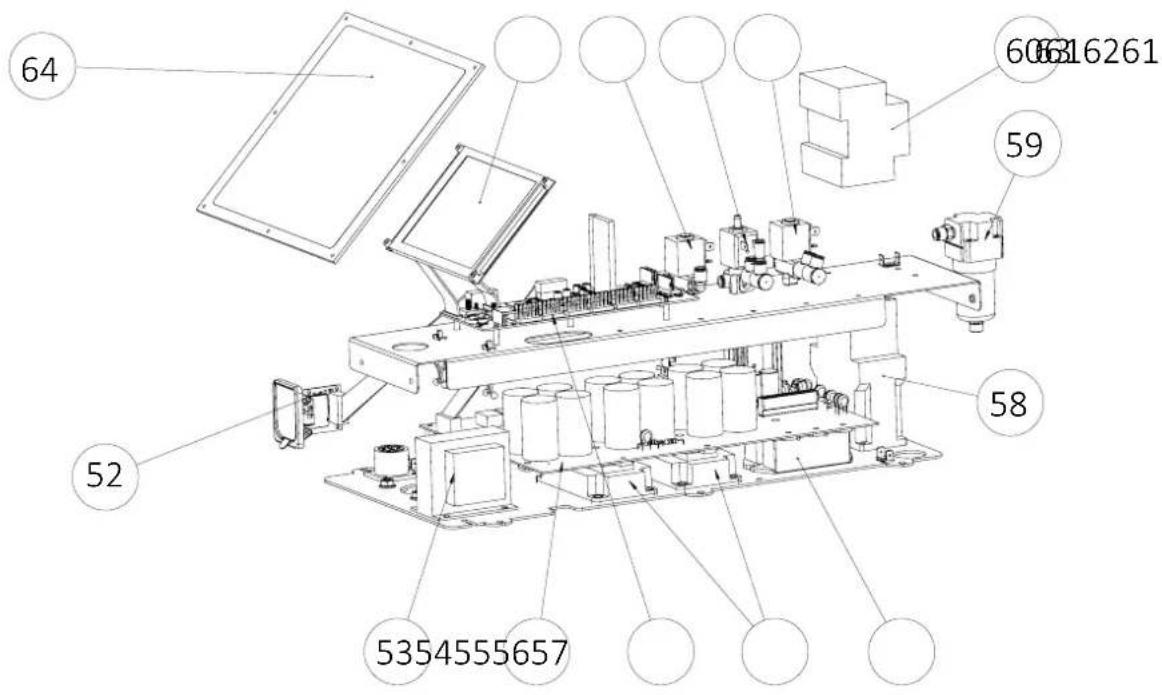
text_image
64 60616261 59 58 52 5354555657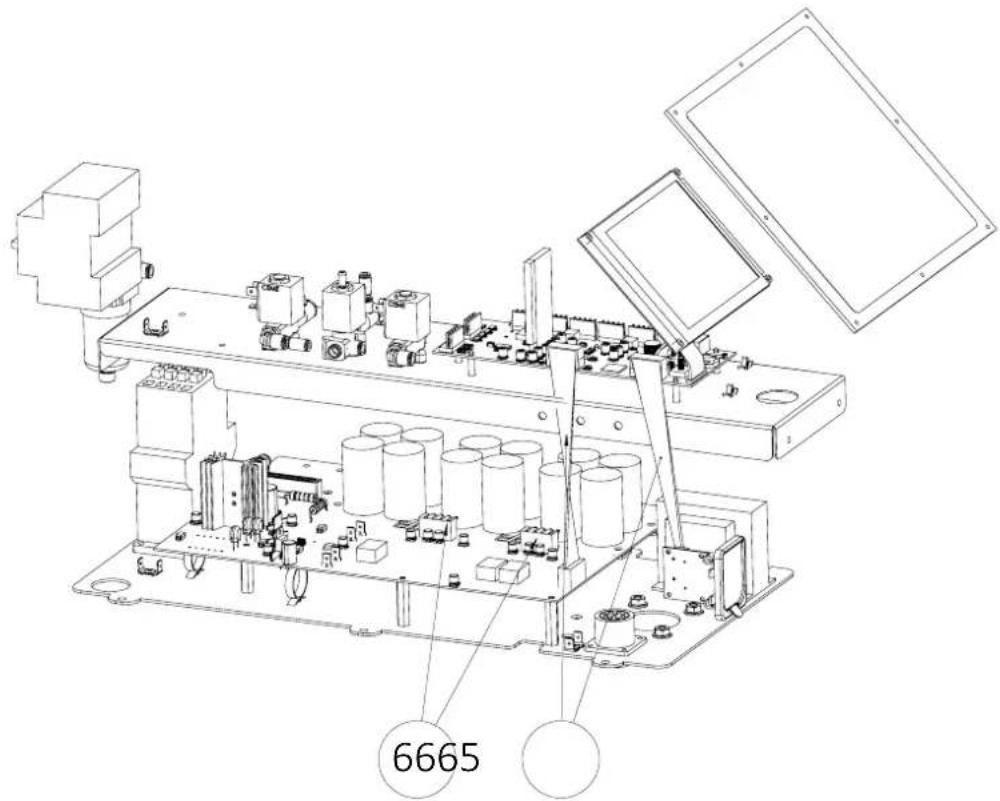
text_image
6665| 52 | Circuit carte SD / SD card circuit / SD-Karten-Schaltung / Circuito de la tarjeta SD / Obvod karty SD | 97028C | |||||
| 53 | Transformateur Transformator Transformador2 références sont possible en fonction de la version du faisceau (Fig.3). | 2 references are possible depending on the beam version (Fig.3). | Je nach Version des Bündels sind 2 Referenzen möglich (ABB.3). | ТрансформаторВ зависимости от версии луча возможны 2 ссылки | TransformátorSon posibles 2 referencias en función de la versión de la viga (IMAGEN.3). | Transformator | 96019 ou 96181 (ND) |
| 54 | Carte de puissance / Power board / Leistungsplatine / Tarjeta de potencia / Силовая плата / Vermogens printplaat / Napájecí karta | 97027C | |||||
| 55 | Carte de commande / Control card / Steuerplatine / Placa de mando / Плата управления / Besturingskaart / Objednáv-ková karta | E0158C | |||||
| 56 | Module IGBT / IGBT module / IGBT-Modul / Módulo IGBT / Модуль IGBT / IGBT Module / Modul IGBT | 52200 | |||||
| 57 | Pont de diode BP / Diode bridge / Gleichrichter BP / Puente de diodos BP / Диодный мост BP / Diode brug BP / Diodový můstek BP | 52194 | |||||
| 58 | Contacteur / Contactor / Schütz / Contactor 51131 | ||||||
| 59 | Filtre régulateur / Regulation filter / Filterregler / Filtro regulador / Фильтр регулятор / Filter / Regulátor filtru | 71462 | |||||
| 60 | Interrupteur / Switch / Schalterschalter / Interruptor / Переключатель / Schakelaar / Přepínač | 52344 | |||||
| 61 | Électrovannes 2 voies / 2-way solenoid valves / 2-Wege-Magnetventile / Electroválvulas de 2 vías / Dvoucestné elektromagnetické ventily | 71538 | |||||
| 62 | Électrovannes 3 voies / 3-way solenoid valves / 3-Wege-Magnetventile / Electroválvulas de 3 vías / 3cestné elektromagne-tické ventily | 71537 | |||||
| 63 | Afficheur LCD / Display LCD / LCD-Anzeige / Pantalla LCD / ЖК-экран / LCD display / LCD displej | 51905 | |||||
| 64 | Clavier / Keypad / Bedienfeld / Teclado / Панель управления / Bedieningspaneel / Klávesnice | 51968 | |||||
| 65 | Nappe / Ribbon connector / Flachbandkabel / Banda / Шлейф / Kleed / Ubrus | 53100 | |||||
| 66 | Faisceau 4 fils / 4-wire harness / 4-Draht-Kabelbaum / Arnés de 4 hilos / 4vodičový svazek | S91551 | |||||
SCHÉMA FAISCEAUX / CABLE ASSEMBLY SCHEMATICS / SCHLAUCHPAKET SCHALTPLAN / ESQUEMA CABLEADO / DIAGRAM FAISCEAUX
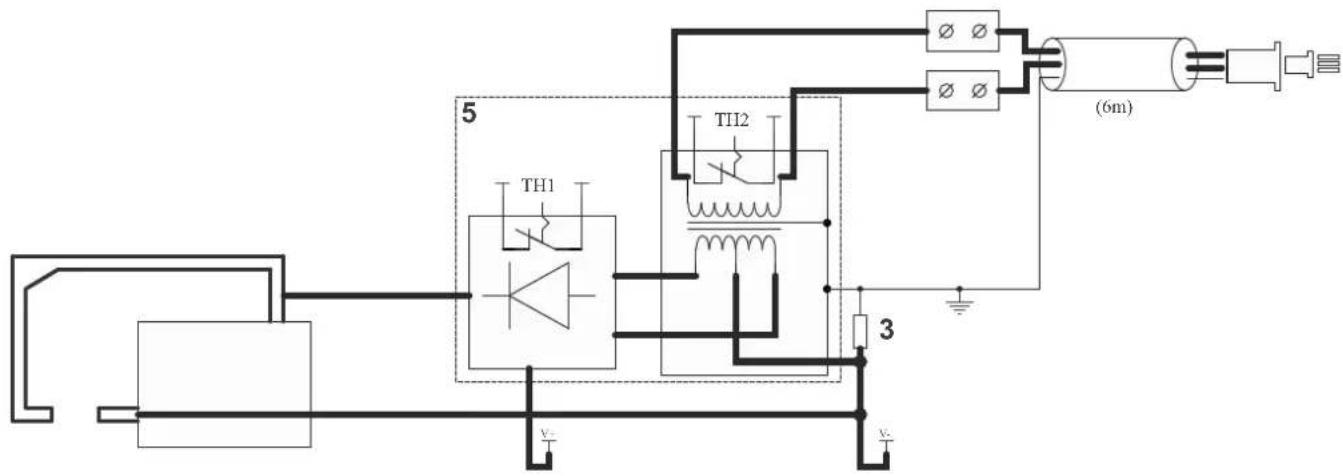
text_image
5 TH1 TH12 (6m) 3 v-SCHÉMAS ÉLECTRIQUE / CIRCUIT DIAGRAM / SCHALTPLÄNE / ESQUEMAS ELÉCTRICOS / ELEKTRICKÁ SCHÉMATA
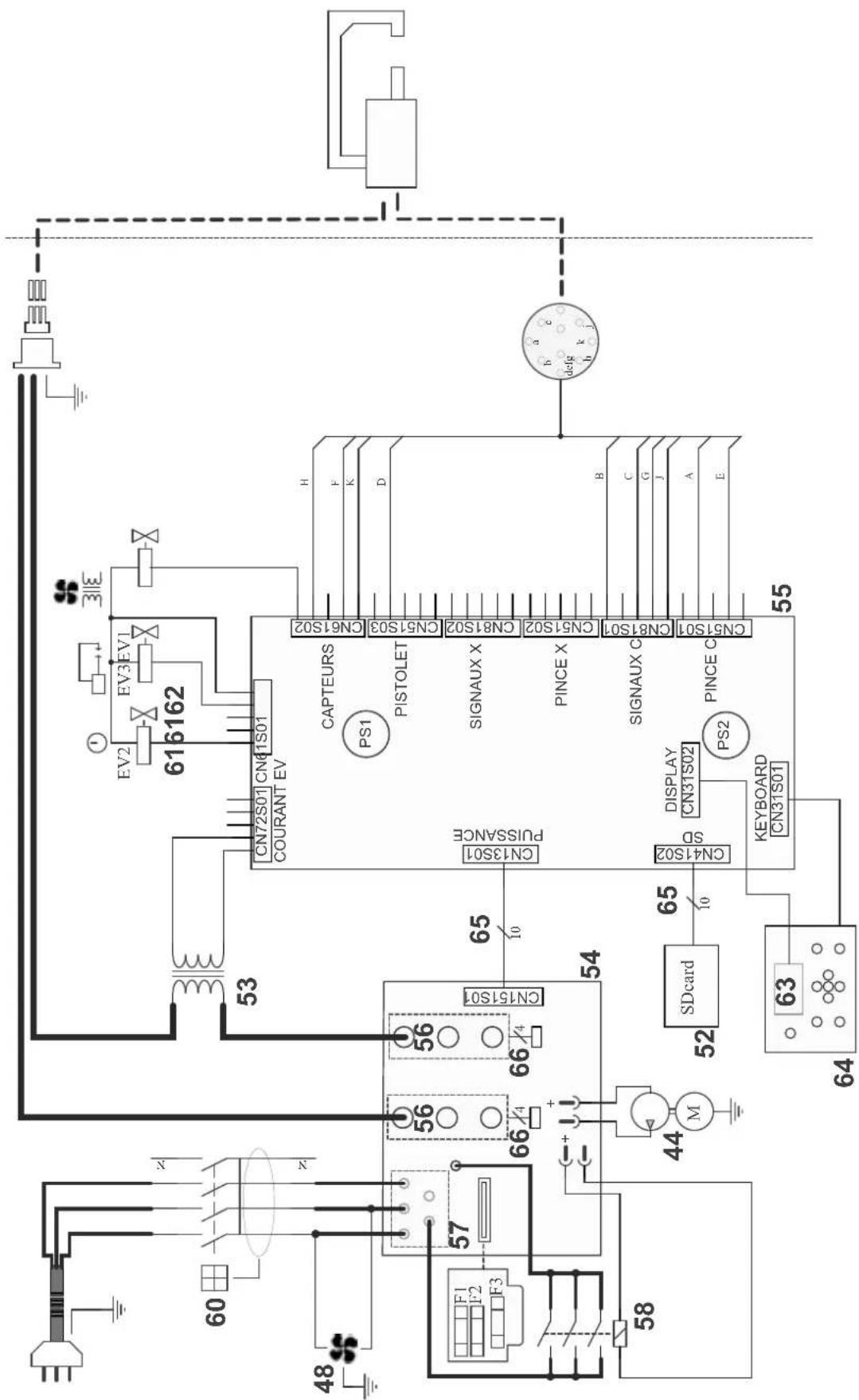
text_image
616162 EV2 EV3 EV1 CN72S01 CN41S01 COURANT EV 53 H F K D CAPTEURS CN61S02 CN51S03 PISTOLET CN51S02 SIGNAUX X CN81S01 CN51S02 PINCE X CN51S01 CN81S01 PINCE C 55 PS1 PULSEANCE CN3S01 CN31S02 SD 65 10 DISPLAY CN31S02 PS2 KEYBOARD CN31S01 64 63 52 SDcard 54 66/4 56 56 66/4 44 M M 48 F1 F2 F3 57 58SPÉCIFICATIONS TECHNIQUES / TECHNICAL SPECIFICATIONS / TECHNISCHE DATEN / ESPECIFICACIONES TÉCNICAS / TECHNICKÉ SPECIFIKACE
| 400 V | |||
| Caractéristiques électriques / Electrical specifications / Elektrische Daten / Caracteristicas electricas / Elektrické vlastnosti | |||
| Tension nominal d'alimentation / Nominal supply voltage / Eingangsspannung U | 1N 3~ 400 V | ||
| Fréquence secteur / Mains frequency / Netzfrequenz / Frecuencia F 50 / 60 Hz | |||
| Courant d'alimentation permanent / Permanent power supply / Dauerhafter Versorgungsstrom | ILP 21 A | ||
| Puissance à 50 % de facteur de marche / Power at 50% duty cycle / Nennleistung bei 50% ED | S50 21 kVA | ||
| Puissance permanente / Permanent stable power / Max. Dauerleistung S | p 13.2 kVA | ||
| Puissance maximale instantanée / Instant peakl power / Max. Schweißleistung S | max 110 kVA | ||
| Tension secondaire / Secondary voltage / Sekundärspannung U | 2d 7.3 V | ||
| Courant maximal de court-circuit primaire permanent / Maximum permanent primary short-circuit current / Maximaler permanenter Primärkurzschlussstrom | ILCC 159 A | ||
| Courant secondaire en court-circuit / Secondary current in short-circuit / Max. Kurzschlussstrom | I2cc 14 500 A | ||
| Courant secondaire permanent / Continuous secondary current / Max. Permanentstrom I | 2P 1950 A | ||
| Disjoncteur ou fusible (aM) | 25 A (Type D) | ||
| Différentiel | 30 mA | ||
| Facteur de marche / Duty cycle / Einschaltdauer | 1.8 % | ||
| Fusible F1/F2/F3 (ref. 051363) | 5x20 mm T4A - 250 VAC | ||
| Fusible F4 (ref. 051409) | 5x20 mm T5A - 450 VDC | ||
| Caractéristiques thermiques / Thermal specifications / Thermische bedingungen / Caracteristicas termicas | |||
| Température de fonctionnement / Operating temperature / Betriebstemperatur / Temperature de funcionamiento | 5°C > 40°C+41°F → +104°F | ||
| Température de stockage / Storage temperature / Lagerungstemperatur / Temperatura de almacenaje | -25°C → +55°C-13°F → +131°F | ||
| Hygrométrie / Hygrometry / Max. Luftfeuchtigkeit | @ 40°C (104°F) | < 50 % | |
| @ 20°C (68°F) | < 90 % | ||
| Altitude / Altitude / Max. Höhenlage | 1 000 m3800 ft | ||
| Protection thermique par thermistance sur le pont de diodes / Thermal protection by thermistor on the diodes bridge / Überhitzungsschutz durch Thermoastat am Gleichrichter | 70°C158°F | ||
| Caractéristiques mécaniques / Mechanical specifications / Mechanische daten / Caracteristicas mecanicas | |||
| Degré de protection / Protection level / Schutzgrad / Grado de protección | IP20 | ||
| Dimensions (Lxlxh) / Dimensions (Lxlxh) / Abmessung (LxBxH) / Dimensiones (Lxlxh) | 65 x 80 x 230 cm | ||
| Poids / Weight / Gewicht / Peso | 93 kg | ||
| Longueur du câble réseau / Network cable length / Länge Netzkabel | 8 m26 ft | ||
| Longueur du câble de la pince/ clamp cable length / Kabellänge der Zange | 6 m20 ft | ||
| Plage d'écartement des bras / Arm aperture dimension / Abstandsbereich der Arme | e | 40 > 450 mm1.5 to 17.7 inch | |
| Plage de longueur des bras / Arm length dimension / Längebereich der Arme | l | 20 > 1000 mm0.7 to 39.4 inch | |
| Caractéristiques pneumatiques / Pneumatic specifications / Pneumatische merkmale / Caracteristicas pneumaticas | |||
| Pression maximale / Maximum pressure / Maximaler Druck | P1 max | 10 bar145 Psi | |
| Pression minimale / Minimum pressure / Minimaler Druck | P1 min | 8 bar116 Psi | |
| Débit du liquide de refroidissement / Cooling liquid debit / Kühlfüssigkeitsdurchfluss | Q | 1 l/min0.26 US gpm | |
| Perte de charge du fluide de refroidissement / Loss of cooling liquid / Druckverlust der Kühlfüssigkeit | Δp | 3 bar44 Psi | |
| Force minimale de soudage / Minimum welding force / Min. regulierter Anpressdruck | F1min | 100 daN225 Lbf | |
| Effort maximal régulé avec la pince en C / Maximum force regulated with the C clamp / Max regulierter Anpressdruck mit C-Zange | Fmax | 550 daN1236 Lbf | |