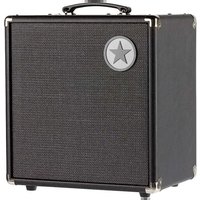
Unity U60 - Guitar amp BLACKSTAR - Free user manual and instructions
Find the device manual for free Unity U60 BLACKSTAR in PDF.


| Product Type | Bass Amplifier |
| Power (RMS) | 60 Watts (estimated from U60 model) |
| Preamp Voicings | Classic, Modern, Flat |
| Saturation Types | Overdrive, Distortion, Fuzz |
| Equalization | Semi-parametric 3-band (Low, Mid, High) with variable mid frequency |
| Response Control | Linear, 6L6, 6550 (power stage simulation) |
| Compressor | Built-in with level adjustment and activation |
| Built-in Effects | Chorus (fixed speed) and Octave (lower and upper) |
| USB Output | Mini-B for multitrack recording (4 channels) and reamping |
| XLR Line Output | Balanced with Em. Out selection (cabinet simulation) or D.I. (raw signal) |
| Headphone Output | 6.35 mm stereo jack, muted with Master at zero |
| Auxiliary Input | 3.5 mm mini-jack for MP3/line in |
| Effects Loop | Send and return (mono) |
| Included Footswitch | FS-13 two-button (saturation and effect switching) |
| Optional Footswitch | FS-12 five-button (voicing, saturation, chorus, octave, tuner) |
| Active Cabinet Output | XLR for connection to U250ACT cabinet (250 W additional) |
| Thermal Protection | Automatic shutdown in case of overheating, restores after cooling |
| Safety | Disconnect before maintenance, do not open, avoid moisture |
| Maintenance | Clean with a dry cloth only |
| Repairability | No user-serviceable parts, contact qualified technician |
Frequently Asked Questions - Unity U60 BLACKSTAR
User questions about Unity U60 BLACKSTAR
0 question about this device. Answer the ones you know or ask your own.
Ask a new question about this device
Download the instructions for your Guitar amp in PDF format for free! Find your manual Unity U60 - BLACKSTAR and take your electronic device back in hand. On this page are published all the documents necessary for the use of your device. Unity U60 by BLACKSTAR.
USER MANUAL Unity U60 BLACKSTAR
THE NEW FACE OF BASS
Blackstar Amplification Ltd, Beckett House, 14 Billing Road, Northampton, NN1 5AW, UK For the latest information go to: www.blackstaramps.com
Wht the information contained herein is corred at:the time of publication, due to our policy of constant improvement and development; Blackstar Amplification Ltd receives the right to alter specifications without prior notice.
Blackstar
AMPLIFICATION
91/0 L-WOZgZGL

·UNITY·
PRO BASS SYSTEM
U30, U60, U120
Owner's Manual
the sound in your head
IMPORTANT SAFETY INSTRUCTIONS
- Read these instructions.
- Keep these instructions.
- Heed all warnings.
- Follow all instructions.
- Do not use this apparatus near water.
- Clean only with dry cloth.
- Do not block any ventilation openings.
- Install in accordance with the manufacturer's instructions.
- Do not install near any heat sources such as radiators, heat registers, stoves, or other apparatus (including amplifiers) that produce heat.
- Do not defeat the safety purpose of the polarized or grounding-type plug. A polarized plug has two blades with one wider than the other. A grounding type plug has two blades and a third grounding prong. The wide blade or the third prong are provided for your safety. If the provided plug does not fit into your outlet, consult an electrician for replacement of the obsolete outlet.
- Protect the power cord from being walked on or pinched particularly at plugs, convenience receptacles, and the point where they exit from the apparatus.
- Only use attachments/accessories specified by the manufacturer.
- Unplug this apparatus during lightning storms or when unused for long periods of time.
- Refer all servicing to qualified service personnel. Servicing is required when the apparatus has been damaged in any way, such as power-supply cord or plug is damaged, liquid has been spilled or objects have fallen into the apparatus, the apparatus has been exposed to rain or moisture, does not operate normally, or has been dropped.
"TO COMPLETELY DISCONNECT THIS APPARATUS FROM THE AC MAINS, DISCONNECT THE POWER-SUPPLY CORD PLUG FROM THE AC RECEPTACLE." "WARNING: TO REDUCE THE RISK OF FIRE OR ELECTRIC SHOCK, DO NOT EXPOSE THIS APPARATUS TO RAIN OR MOISTURE. THE APPARATUS SHALL NOT BE EXPOSED TO DRIPPING OR SPLASHING AND THAT OBJECTS Filled WITH LIQUIDS, SUCH AS VASES, SHALL NOT BE PLACED ON APPARATUS."

This symbol is intended to alert the user to the presence of important operation and maintenance (servicing) instructions in the literature accompanying the appliance.

This symbol is intended to alert the user to the presence of uninsulated "dangerous voltage" within the product's enclosure that may be of sufficient magnitude to constitute a risk of electric shock to persons.
BLACK
Warning!
Important safety information!
READ THE FOLLOWING INFORMATION CAREFULLY. SAVE ALL INSTRUCTIONS FOR FUTURE REFERENCE!
Follow all warnings and instructions marked on the product! Danger! High Internal operating voltages.
Do not open the equipment case. There are no user serviceable parts in this equipment. Refer all servicing to qualified service personnel.
Clean only with a dry cloth.
Condensation can form on the inside of an amplifier if it is moved from a cold environment to a warmer location. Before switching the unit on, it is recommended that the unit be allowed to reach room temperature.
Unauthorised modification of this equipment is expressly forbidden by Blackstar Amplification Ltd.
Never push objects of any kind into ventilation slots on the equipment casing.
Do not expose this apparatus to rain, liquids or moisture of any type.
Avoid placing vessels filled with liquid on top of the amplifier.
Do not place this product on an unstable trolley, stand or table. The product may fall, causing serious damage to the product or to persons!
Do not cover or block ventilation slots or openings.
This product should not be placed near a source of heat such as a stove, radiator, or another heat producing amplifier.
Use only the supplied power cord which is compatible with the mains voltage supply in your area.
Power supply cords should always be handled carefully and should be replaced if damaged in any way.
Never break off the earth (ground) pin on the power supply cord.
The power supply cord should be unplugged when the unit is to be unused for long periods of time.
Before the unit is switched on, the loudspeaker should be connected as described in the handbook using the lead recommended by the manufacturer.
Always replace damaged fuses with the correct rating and type.
Never disconnect the protective mains earth connection.
High loudspeaker levels can cause permanent hearing damage. You should therefore avoid the direct vicinity of loudspeakers operating at high levels. Wear hearing protection if continuously exposed to high levels.
If the product does not operate normally when the operating instructions are followed, then refer the product to a qualified service engineer.
BLACK
The U.S. Government's Occupational Safety and Health Administration (OSHA) has specified the following permissible noise level exposures:
Duration Per Day In Hours:Sound Level dBA,Slow Response
8 90
6 92
4 95
3 97
2.100
12 102
1
%
14 or less 115
According to OSHA, any exposure in excess of the above permissible limits could result in some hearing loss.
Ear plug protectors in the ear canals or over the ears must be worn when operating this amplification system in order to prevent a permanent hearing loss if exposure is in excess of the limits as set forth above. To ensure against potentially dangerous exposure to high sound pressure levels, it is recommended that all persons exposed to equipment capable of producing high sound pressure levels such as this amplification system be protected by hearing protectors while this unit is in operation.

All electrical and electronic products should be disposed of separately from the municipal waste stream via designated collection facilities appointed by the government or the local authorities.

BLACK
Introduction
Thank you for purchasing this Blackstar Unity Pro Bass amplifier.
Like all our products, this amp is the result of countless hours of painstaking Research and Development by our world-class design team. Based in Northampton (UK), the Blackstar team are all experienced musicians themselves and the sole aim of the development process is to provide assists with products which are the ultimate tools for self-expression.
All Blackstar products are subjected to extensive laboratory and road testing to ensure that they are truly uncompromising in terms of reliability, quality and above all TONE.
Please read through this handbook carefully to ensure you get the maximum benefit from your new Blackstar product.
If you like what you hear and want to find out more about the Blackstar range of products please visit our website at www.blackstaramps.com.
Thanks!
The Blackstar Team
Features
Unity Pro Bass System is the result of countless hours of technical research and benchmarking against the most iconic historic references. Designed from the ground up by bass players, for bass players they are straight forward and powerful. The new Unity Pro Bass System's deceptively simple controls allow you to quickly and easily create your tone, with rock solid bass, detailed dynamics and innovative features in a compact package from 30 Watts to 500 Watts.
With three distinct preamp voicings, a powerful 3-band semi-parametric EQ and selectable Compressor, Unity produces infinitely flexible bass tone and exceptional feel, whatever your playing style.
From the organic response of classic valve amps, to a modern clean platform, Unity brings together the ultimate in bass tone.
Front Panel
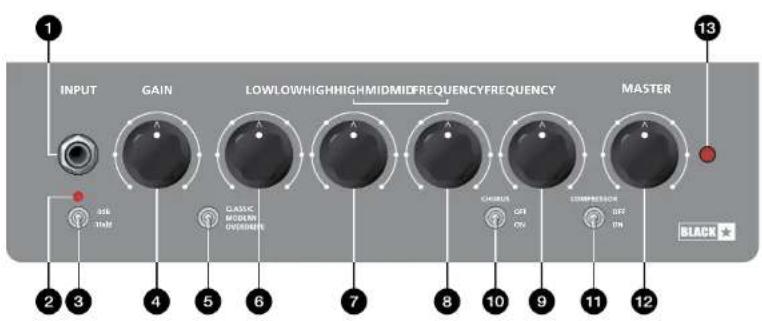
1. Input
Plug your bass guitar in here. Always use a good quality screened instrument cable.
2. Clip Indicator
This LED illuminates to indicate that the Input stage is being driven into clipping. The Pad Switch (3), Gain (4) and the volume control on your instrument all affect this signal level and at which point the input stage clips. Clipping the input stage (Clip Indicator Illuminating) will not cause any damage to your amplifier, and may be desirable depending on your tonal preference.
3. Pad Switch
Select a gain range according to your instrument pickup using the Pad switch. As a guide, try the 0dB setting for a passive pickup, and the -10dB for an active pickup.
4. Gain
This controls the gain of the input signal to the preamp stage. For a pristine clean tone turn up the Gain whilst playing hard until the Clip Indicator (2) LED illuminates, then reduce it slightly until the LED no longer lights. When using Overdrive (5) use the Gain control to vary the amount of distortion. Clipping the input stage will not cause any damage to your amplifier, and may be desirable depending on your tonal preference.
5. Voice Select
Select between three distinct prep voices:
CLASSIC - Valve-inspired growth
MODERN-High headroom with punchy dynamics
OVERDRIVE - Smooth, open overdrive with a harmonically-rich bite
The Overdrive Voice can also be selected via an optional 2-button latching footswitch (16).
6. Low
This control adjusts the amount of bass frequencies in your tone, providing ± 10dB of adjustment at 80Hz . The low frequency output is flat at the centre position. Increase this control for a deeper, more resonant sound.
7.Mid
This control adjusts the amount of middle frequencies in your tone, providing ± 12dB of adjustment at the specified frequency (8). The mid frequency output is flat at the centre position. Lower settings of this control will result in a more scooped, contoured sound. Increase this control for a sound with more 'body' which helps to cut through a live mix.
8. Frequency
This control allows you to adjust the frequency at which the Mid control (7) affects your sound, ranging from 200Hz at minimum to 2KHz at maximum. If the Mid control (7) is in the centre position sweeping the Mid Frequency with this control will have no audible effect.
9. High
This control adjusts the amount of treble frequencies in your tone, providing ± 15dB of adjustment at 5kHz. The high frequency output is flat at the centre position. Increase this control for a brighter, more percussive sound.
10. Chorus Select
Switch the CHORUS effect ON and OFF using this toggle switch. This introduces a subtle amount of 'shimmer' which is often used to lift the bass sound in a live or recorded mix. The Chorus can also be switched on and off via an optional 2-button latching footswitch (16).
11. Compressor Select
Switch the fixed-threshold Compressor ON and OFF. The Compressor input can be pushed hard with higher levels of Gain (4) and is often used to 'fatten' your sound when playing at lower volume levels.
12. Master Volume
This controls the overall output volume of your amplifier. Turning it clockwise increases the volume. Setting the Master Volume to zero allows for 'silent' practice or recording via one of the Line Out connections on the rear panel.
The level of the Cabinet Link XLR output (22) on the rear panel is also controlled by the Master Volume.
13. Power Indicator
The Power Indicator will be illuminated when the amplifier is switched on.
Rear Panel
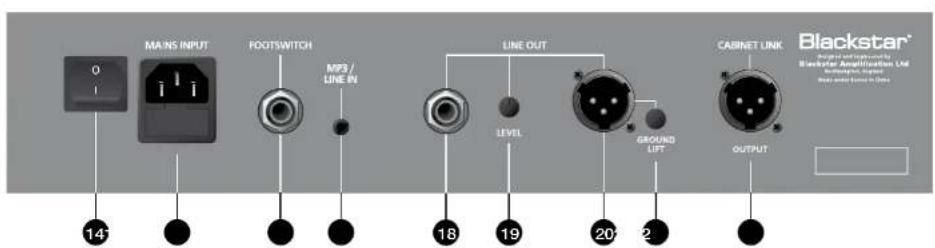
14. Power Switch
This switch is used to turn the amplifier on and off.
15. Mains Input
The supplied detachable mains power cable is connected here. Always ensure the Power Switch (14) is in the OFF position before applying mains power. The cable should only be connected to a power outlet that is compatible with the voltage, power and frequency requirements stated on the rear panel. Never break off the earth (ground) pin on the mains cable. If in doubt get advice from a qualified technician.
16. Footswitch
Connect any 2 button latching footswitch (e.g. Blackstar FS-8, sold separately) here. The 'Tip' connection (usually the left-hand button) will switch between the currently active Voice (5) and the Overdrive Voice. The 'Ring' connection (usually the right-hand button) will toggle the Chorus effect ON and OFF.
17. MP3 / Line In
Play audio from any device with a 3.5mm output (e.g. your phone, MP3 player, tablet, laptop etc.) through your Unity Bass amplifier using a 3.5mm (1/8") AUX cable (sold separately). Adjust the volume on your playback device to match that of your bass guitar to enable you to play along. The volume to the internal speaker is controlled by the Master Volume knob (12). The MP3 / Line In signal is also mixed to the 14 Line Out (16) and XLR Line Out (20).
18. 14 Line Out
This is a dual-mono 14^ output for direct recording or connecting your headphones for monitoring and 'silent' practice. The output level is defined by the position of the Line Out Level knob (19). Set the Master Volume knob (12) to zero for 'silent' practice.
19. Line Out Level
This is a separate volume control for the 14^th Line Out (18) and XLR Line Out (20), used to set a suitable output level for recording or monitoring via headphones. This control has no effect on the internal speaker volume.
20. XLR Line Out
This is a balanced output for connection to a PA, mixing desk or interface for recording and monitoring. Using a good quality screened cable, the balanced XLR connection provides a high quality signal, free of noise. The output level is defined by the position of the Line Out Level knob (19).
NOTE: Your Unity Bass amplifier will NOT be damaged by applying Phantom power to the XLR Line Out, and will have no effect on the operation of the amplifier
21. Ground Lift
This switch can be used to remove the circuit-to-chassis ground connection of the XLR Line Out (20), which can help if experiencing hum or noise upon connecting to an external device. If you do experience a hum engage the Ground Lift by depressing the button to lift the ground on the circuit.
BLACK
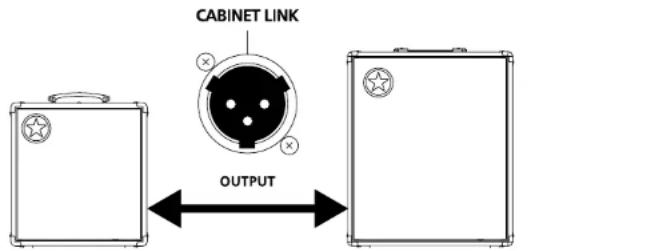
22. Cabinet Link
Extend your setup by connecting a Blackstar Unity Pro Bass U250ACT Active Cabinet (sold separately) to the Cabinet Link output using an XLR cable. Multiple U250ACT Active Cabinets can be linked together to create a near-limitless power, modular setup, where each U250ACT adds up to 250W of additional power through a custom-designed 15^ Eminence speaker.
The Cabinet Link output level is controlled by the Master Volume (12).
UNITY 250ACT
EXTEND YOUR SETUP
The UNITY 250ACT 1 × 15^ active cab is the easy way to add 250 Watts of extra stage power to any UNITY combo.
UNITY 250ACTUNITY BASS COI
For more information on the uses and setup of the U250ACT, please see the dedicated handbook at www.blackstaramps.com/uk/product-handbooks
BLACK
Technical Specification
Unity Pro Bass U30
Power (RMS): 30 Watts
Weight (kg): 10
Dimensions (mm): 395(W) x 435(H) x 285(D)
Footswitch (not Included): FS-8, or any equivalent latching 2-button footswitch
Unity Pro Bass U60
Power (RMS): 60 Watts
Weight (kg): 12
Dimensions (mm): 410(W) x 465(H) x 295(D)
Footswitch (not included): FS-8, or any equivalent latching 2-button footswitch
Unity Pro Bass U120
Power (RMS): 120 Watts
Weight (kg): 15
Dimensions (mm): 445(W) x 515(H) x 325(D)
Footswitch (not included): FS-8, or any equivalent latching 2-button footswitch
Warning!
Unity Pro Bass U250ACT Active Cabinet
4. Cabinet Link/Line Input
5. Cabinet Link/Line Thru
Unity Pro Bass U250ACT
FS-12 + FS-13, 7 boutons de commutation
Dimensions (mm): 485 (L) x 572 (H) x 361 (P)
Dimensions (mm): 485 (L) x 572 (H) x 361 (P)
Unity Pro Bass U250ACT
Puissance (RMS): 250 Watts
Poids (kg): 19.5
Dimensions (mm): 485 (L) x 572 (H) x 361 (P)
All electrical and electronic products should be disposed of separately from the municipal waste stream via designated collection facilities appointed by the government or the local authorities.

BLACK
Introducción
Panel Frontal (U250, U500)
1. ENTRADA
2. INDICADOR LUMINOSO "CLIP"
Rear Panel (U250, U500)
18. SELECTOR DE ENCENDIDO
Unity Pro Bass U250ACT
Potencia (RMS): 250 Watts
Peso (kg): 19.5
Duration Per Day In Hours. Sound Level dBA, Slow Response
697
4 95
3 97
2 150
132
16.110
1 or 115
All electrical and electronic products should be disposed of separately from the municipal waste stream via designated collection facilities appointed by the government or the local authorities.
介绍
4. Cabinet Link/Line Input
Unity Pro Bass U250ACT
功率(RMS):250Watts
重量(kg):19.5
IMPORTANT SAFETY INSTRUCTIONS
- Read these instructions.
- Keep these instructions.
- Heed all warnings.
- Follow all instructions.
- Do not use this apparatus near water.
- Clean only with dry cloth.
- Do not block any ventilation openings.
- Install in accordance with the manufacturer's instructions.
- Do not install near any heat sources such as radiators, heat registers, stoves, or other apparatus (including amplifiers) that produce heat.
- Do not defeat the safety purpose of the polarized or grounding-type plug. A polarized plug has two blades with one wider than the other. A grounding type plug has two blades and a third grounding prong. The wide blade or the third prong are provided for your safety. If the provided plug does not fit into your outlet, consult an electrician for replacement of the obsolete outlet.
- Protect the power cord from being walked on or pinched particularly at plugs, convenience receptacles, and the point where they exit from the apparatus.
- Only use attachments/accessories specified by the manufacturer.
- Unplug this apparatus during lightning storms or when unused for long periods of time.
- Refer all servicing to qualified service personnel. Servicing is required when the apparatus has been damaged in any way, such as power-supply cord or plug is damaged, liquid has been spilled or objects have fallen into the apparatus, the apparatus has been exposed to rain or moisture, does not operate normally, or has been dropped.
"TO COMPLETELY DISCONNECT THIS APPARATUS FROM THE AC MAINS, DISCONNECT THE POWER-SUPPLY CORD PLUG FROM THE AC RECEPTACLE." "WARNING: TO REDUCE THE RISK OF FIRE OR ELECTRIC SHOCK, DO NOT EXPOSE THIS APPARATUS TO RAIN OR MOISTURE. THE APPARATUS SHALL NOT BE EXPOSED TO DRIPPING OR SPLASHING AND THAT OBJECTS Filled WITH LIQUIDS, SUCH AS VASES, SHALL NOT BE PLACED ON APPARATUS."

This symbol is intended to alert the user to the presence of important operation and maintenance (servicing) instructions in the literature accompanying the appliance.

This symbol is intended to alert the user to the presence of uninsulated "dangerous voltage" within the product's enclosure that may be of sufficient magnitude to constitute a risk of electric shock to persons.

Warning!
Important safety information!
READ THE FOLLOWING INFORMATION CAREFULLY. SAVE ALL INSTRUCTIONS FOR FUTURE REFERENCE!
Follow all warnings and instructions marked on the product! Danger! High Internal operating voltages.
Do not open the equipment case. There are no user serviceable parts in this equipment. Refer all servicing to qualified service personnel.
Clean only with a dry cloth.
Condensation can form on the inside of an amplifier if it is moved from a cold environment to a warmer location. Before switching the unit on, it is recommended that the unit be allowed to reach room temperature.
Unauthorised modification of this equipment is expressly forbidden by Blackstar Amplification Ltd.
Never push objects of any kind into ventilation slots on the equipment casing.
Do not expose this apparatus to rain, liquids or moisture of any type.
Avoid placing vessels filled with liquid on top of the amplifier.
Do not place this product on an unstable trolley, stand or table. The product may fall, causing serious damage to the product or to persons!
Do not cover or block ventilation slots or openings.
This product should not be placed near a source of heat such as a stove, radiator, or another heat producing amplifier.
Use only the supplied power cord which is compatible with the mains voltage supply in your area.
Power supply cords should always be handled carefully and should be replaced if damaged in any way.
Never break off the earth (ground) pin on the power supply cord.
The power supply cord should be unplugged when the unit is to be unused for long periods of time.
Before the unit is switched on, the loudspeaker should be connected as described in the handbook using the lead recommended by the manufacturer.
Always replace damaged fuses with the correct rating and type.
Never disconnect the protective mains earth connection.
High loudspeaker levels can cause permanent hearing damage. You should therefore avoid the direct vicinity of loudspeakers operating at high levels. Wear hearing protection if continuously exposed to high levels.
If the product does not operate normally when the operating instructions are followed, then refer the product to a qualified service engineer.
BLACK
The U.S. Government's Occupational Safety and Health Administration (OSHA) has specified the following permissible noise level exposures:
Duration Per Day In Hours:Sound Level dBA,Slow Response
8 90
6 92
4 95
3 97
2.100
12 102
1
%
14 or less 115
According to OSHA, any exposure in excess of the above permissible limits could result in some hearing loss.
Ear plug protectors in the ear canals or over the ears must be worn when operating this amplification system in order to prevent a permanent hearing loss if exposure is in excess of the limits as set forth above. To ensure against potentially dangerous exposure to high sound pressure levels, it is recommended that all persons exposed to equipment capable of producing high sound pressure levels such as this amplification system be protected by hearing protectors while this unit is in operation.

All electrical and electronic products should be disposed of separately from the municipal waste stream via designated collection facilities appointed by the government or the local authorities.

BLACK
はしの上
Technical Specification
Unity Pro Bass U30
出力(RMS):30Watts
U30,U60,U120FrontPanel
U30,U60,U120 Rear Panel

- THE NEW FACE OF BASS
- Blackstar
- IMPORTANT SAFETY INSTRUCTIONS
- Warning!
- Important safety information!
- READ THE FOLLOWING INFORMATION CAREFULLY. SAVE ALL INSTRUCTIONS FOR FUTURE REFERENCE!
- Follow all warnings and instructions marked on the product! Danger! High Internal operating voltages.
- Introduction
- Features
- Front Panel
- Input
- Clip Indicator
- Pad Switch
- Gain
- Voice Select
- Low
- 7.Mid
- Frequency
- High
- Chorus Select
- Compressor Select
- Master Volume
- Power Indicator
- Rear Panel
- Power Switch
- Mains Input
- Footswitch
- MP3 / Line In
- 14 Line Out
- Line Out Level
- XLR Line Out
- Ground Lift
- Cabinet Link
- UNITY 250ACT
- EXTEND YOUR SETUP
- Technical Specification
- Unity Pro Bass U250ACT Active Cabinet
- Cabinet Link/Line Input
- Cabinet Link/Line Thru
- FS-12 + FS-13, 7 boutons de commutation
- Introducción
- Panel Frontal (U250, U500)
- ENTRADA
- INDICADOR LUMINOSO "CLIP"
- Rear Panel (U250, U500)
- SELECTOR DE ENCENDIDO
- 介绍
- Unity Pro Bass U250ACT
- はしの上
Brand : BLACKSTAR
Model : Unity U60
Category : Guitar amp