SOPS60TM-1 - Oven Porter & Charles - Free user manual and instructions
Find the device manual for free SOPS60TM-1 Porter & Charles in PDF.


| Product type | Built-in oven |
| Brand | Porter & Charles |
| Model | SOPS60TM-1 |
| Width | 60 cm |
| Height | 60 cm |
| Depth | 55 cm |
| Net weight | 35 kg |
| Power supply voltage | 230 V ~ 50 Hz |
| Total power | 2.5 kW |
| Number of functions | 11 |
| Cooking functions | Traditional cooking, Grill, Maxi Grill, Bottom Heat, Convection Fan, True Pizza, ECO, Defrost, Steam Clean Assist, Rapid Preheat |
| Control type | Touch electronic with programmable clock |
| Assisted cleaning | Steam Clean Assist® (steam cleaning) |
| Child safety | Key lock |
| Interior material | Enamel |
| Door | Inner glass, hinges, removable gasket |
| Included accessories | Grill, tray, tray support |
Frequently Asked Questions - SOPS60TM-1 Porter & Charles
User questions about SOPS60TM-1 Porter & Charles
0 question about this device. Answer the ones you know or ask your own.
Ask a new question about this device
Download the instructions for your Oven in PDF format for free! Find your manual SOPS60TM-1 - Porter & Charles and take your electronic device back in hand. On this page are published all the documents necessary for the use of your device. SOPS60TM-1 by Porter & Charles.
USER MANUAL SOPS60TM-1 Porter & Charles
Instructions for Use
EN Simplified instructions for Use
natural_image
Front view of a modern kitchen oven with control knobs and a blank door (no visible text or symbols)
ESPAÑOL

Before using your oven for the first time, please carefully read the installation and maintenance instructions that come with it.
Depending on the model, the accessories included in your oven may vary from those shown in the pictures.
FRANÇAIS

natural_image
3D rendering of a metallic bucket pouring liquid into a rectangular container (no text or symbols visible)PROGRAMAR A FUNÇÃO STEAM CLEAN ASSIST®

ATENÇÃO
natural_image
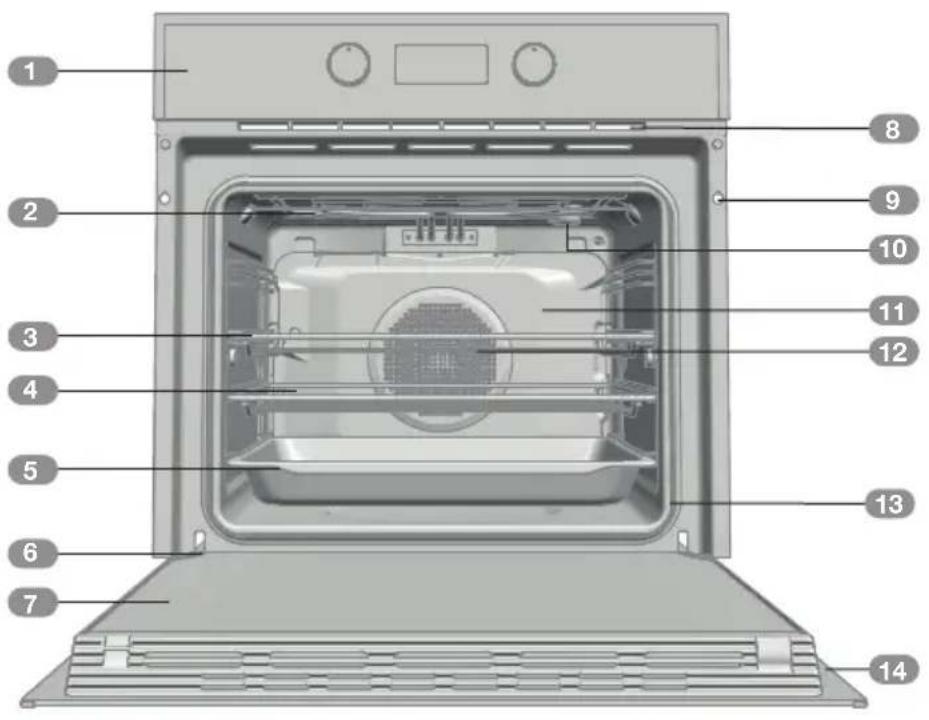
Close-up of a metallic cup pouring liquid into a white rectangular container (no text or symbols visible)Description of the oven
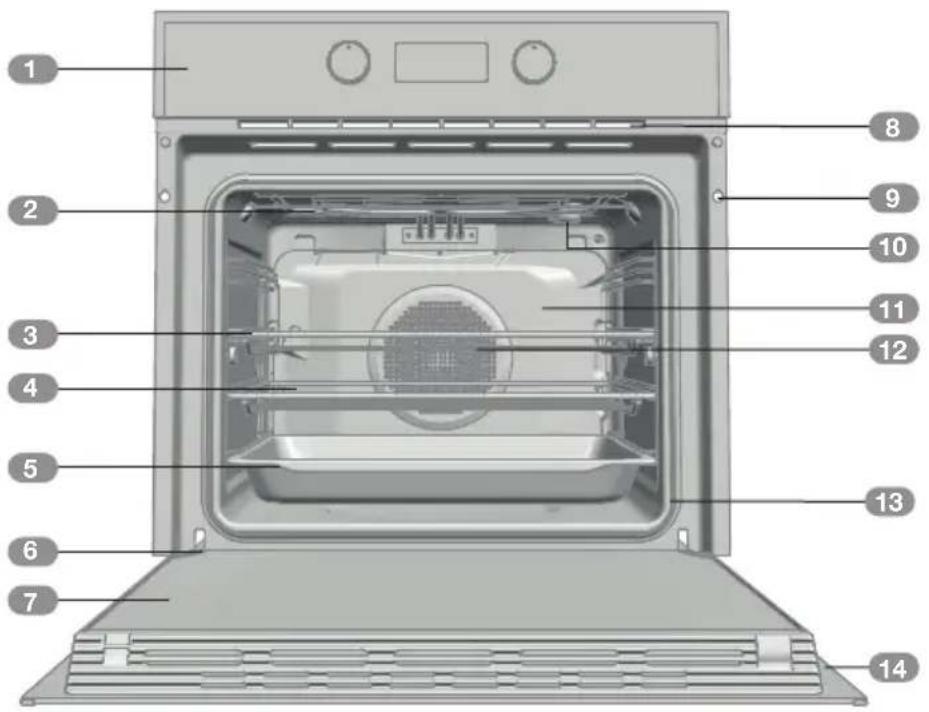
1 Control panel
2 Grill element
3 Tray supports
4 Grid shelf
5 Tray
6 Hinge
7 Inner Glass
8 Air cooling outlet
9 Unit mounting
10 Lamp
11 Back Wall Panel
12 Fan
13 Oven Seal
14 Door
Control Panel
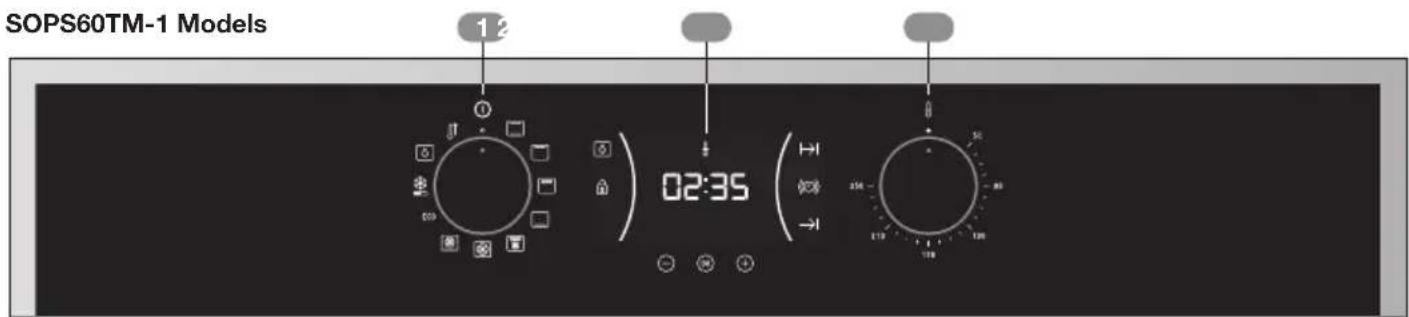
1 Function control dial
2 Electronic clock/timer
3 Temperature control dial
Function selector symbols

SOPS60TM-1 Model

Oven functions

INFORMATION
For a description of how to use each of the features, see the cooking guide that comes with your oven.
- OVEN SWITCH-OFF

CONVENTIONAL

GRILL

MAXIGRILL

LOWER ELEMENT

MAXIGRILL WITH FAN

TRUE FAN CONVECTION

PIZZA
ECO
ECO

DEFROSTING

STEAM CLEAN ASSIST

FAST PREHEATING
Electronic clock/timer description
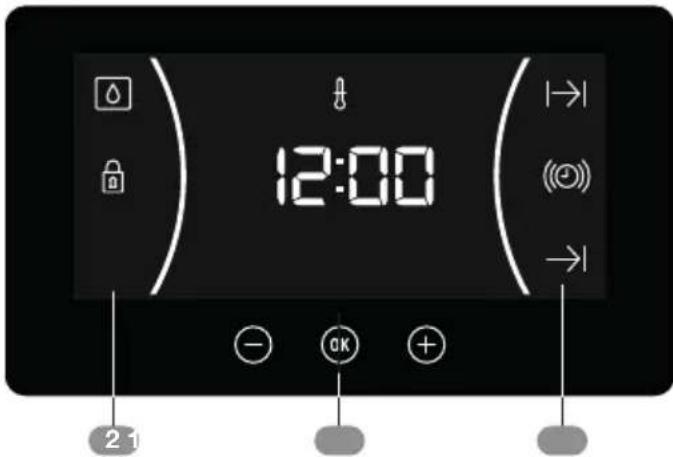
To activate control display turn oven on using function control dial on control panel.
1 KEYS
-, and : Enable you to programme the electronic clock/timer functions.
OK: For models with electronic temperature control, press this button to see the temperature during cooking.
2 SYMBOLS
Clock Settings
((a)) TIMER: Lights up when the clock/ timer is selected. Generates an acoustic signal when the time is up. The oven does not turn off at the end of the timer period. This function can also be used while the oven is cooking.
|→| and -PROGRAMMING: Light up to indicate that the oven is programmed (cooking time, stop time or total).
- I→I Cooking Time: This function allows you to programme the cooking time, after which the oven will turn off automatically.
- →l Cooking Stop Time: This setting allows you to programme the time for cooking to stop, after which the oven will turn off automatically.
- I→I and →Cooking Time and Cooking Stop Time: This setting allows you to programme the cooking time and cooking stop time. The oven switches on automatically at the set time and operates for the selected cooking time (Cooking Time). It then
switches off automatically at the indicated time (Cooking Stop Time).

CLOCK/TIMER LOCK: Indicates that the touch keys for the clock/timer are locked, preventing modifications by small children.
Other functions
HEATING: Indicates that the oven is transmitting heat to the food.

STEAM CLEAN ASSIST: Lights up while the Steam Clean Assist® function is in progress.

WARNING
The sensitivity of the touch keys adapts continually to environmental conditions. Make sure the surface of the control panel is clean and free of obstacles when plugging in the oven.
If the clock does not respond correctly when you touch the keys, unplug the oven for a few seconds and then plug it in again. Doing this causes the sensors to adjust automatically so that they will react once more to fingertip control.
SETTING THE TIME
- To set the time on the oven, the function and temperature dials must be in the ○ position.
- When you plug in the oven, you will see the clock flashing 12:00.
- Touch ⏻ or Ⓕ to adjust the hours and then the minutes. You will hear a double beep confirming the time is set.
- If you wish to modify the time, touch ⏻ or Ⓕ until the time starts flashing. Touch Ⓞ and follow the instructions in the previous point.

NOTE
The clock light has a night mode so the display light will dim between 00:00 and 6:00 hours.

WARNING
In the event of a power failure, your electronic clock/timer settings will be erased.
If this happens, turn the function and temperature dials to the ○ position.
The indication 12:00 will show, and you will then be able to set the time as described above.
If the oven door was locked before the power cut, the locked symbol will show until it is unlocked.
This may take several minutes, depending on the temperature inside the oven, and during this time you cannot reset the time.
Once the door is unlocked, you can set the time as described above.
Oven use
MANUAL OPERATION
- After setting the clock, the oven is ready for use. Select a cooking function and temperature.

INFORMATION
In models with an electronic temperature control, when the selector switch is turned, the clock display will show the temperature.
After selecting the temperature, the clock display will automatically reappear.
To see the temperature again during cooking, press the ⓄK button and turn the temperature dial if you want to change it.
- You will notice that the ♂ symbol lights up during cooking to indicate that heat is being transmitted to the food. This symbol disappears when the selected temperature has been reached.
- Set the controls to turn off the oven.

INFORMATION
When you start cooking, your oven will show the time the oven has been cooking.
Programming the Buzzer
-
Touch ⊖ or ⓣtntil the symbol on the display starts flashing, then press ⓄK. The indication '00:00' will appear on the display.
-
Select the time after which you want the alarm to sound by pressing ⊖ or ⊕You will hear 2 beeps to confirm that the time has been set and the clock will start counting down from the selected time. The (○) symbol will flash slowly.
-
Once the time has expired, an acoustic signal will sound for 90 seconds and the (①) symbol will flash quickly.

NOTE
With the Buzzer function, the oven will not turn off when the time expires.
- Touch any key to stop the alarm. The (○) symbol will then disappear.
If you wish to modify the time on the buzzer, repeat the steps shown. Upon entering the timer control, the time currently remaining will appear, which you will be able to adjust.

NOTE
With the Buzzer function, the remaining time will show permanently on the display. With this programmed function, it is not possible to view the time or the total programmed cooking time.
Programming Cooking Time
- Touch ⊖ or ⓣ until the symbol on the display starts flashing, then press OK. The indication '00:00' will appear on the display.
- Select the time after which you want the alarm to sound by pressing ⊖ or ⊕You will hear 2 beeps to confirm that the time has been set and the clock will start counting down from the selected time.The |→| symbol will flash slowly.
- Select a function and a cooking temperature using the oven commands.
- Once the cooking time is up, the oven will turn off, an alarm will sound and the → symbol will flash quickly.
- Touch any key to stop the alarm and turn off the → symbol. The oven will switch on again.
- Set the controls to the ○ position to turn off the oven.
You can change the remaining cooking time at any time by touching ⊖ or ⊕ until the |→| symbol starts to flash quickly. Now press OK to change the time.

NOTE
With the Cooking Time function, the remaining time will show permanently on the display. You cannot see the current time on the display when this function is set.
Programming the Cooking Stop Time
- Touch ⊙ or ⓣt until the symbol on the display starts to flash and press OK. You will see the current time on the timer display.
- Select the time after which you want the alarm to sound by pressing ⏻ or ⒶYou will hear 2 beeps to confirm that the time has been set and the clock will start counting down from the selected time. The → symbol will flash slowly.
- Select a cooking function and temperature.
- When the cycle is finished, the oven will turn itself off, a buzzer will sound and → symbol will flash quickly.
- Touch any sensor to stop the alarm and to turn off the → 1, symbol. The oven will switch on again.
- Set the controls to the ○ position to turn off the oven.
You can change the remaining cooking time at any time by touching ⏻ or Ⓗ until the → symbol starts to flash quickly. Now press ⓄK to change the time.
Programming Cooking Time and Cooking Stop Time
- Touch ⊙ or ⓣ until the symbol on the display starts flashing, then press OK. The indication '00:00' will appear on the display.
- Select the cooking time by touching ⊖ or ⊕. Next, a double beep will sound, the remaining time will appear on the display and the I→I symbol will flash slowly.
-
Touch ⏻ or Ⓐ until the symbol on the display starts flashing, then press Ⓞ. You will see the expected completion time on the timer display.
-
Select the cooking end time by touching ⏻ or ⊕. Next, a double beep will sound and the current time will be displayed on the display.
-
Select a cooking function and temperature. The oven will remain disconnected with the → and → symbols lit up. The oven is now programmed.
-
When it is time to start cooking, the oven will turn on and will operate for the programmed cooking time.
-
While cooking, the cooking time remaining will be displayed and the → symbol will flash slowly.
-
When the cooking time is up, the oven will turn off, a buzzer will sound, and the → symbol will flash quickly.
- Touch any sensor to stop the buzzer and turn off the → symbol. The oven will switch on again.
- Set the controls to the ○ position to turn off the oven.
You can change the remaining cooking time at any time by touching ⏻ or Ⓗ until the ⪰ symbol starts to flash quickly. Now press ⓄK to change the time.
Safety instructions
CHILD SAFETY LOCK
This function can be selected at any time while using the oven.
To activate the function, touch and hold OK key for several seconds util you hear a beep and the 🔒 symbol appears on the display. The clock/timer is locked.
If the oven is off and you activate the child safety function, the oven will not work even if a cooking function is selected.
If this function is activated while you are cooking, it will only lock the electronic clock/timer settings.
To disable the function, press OK key for several seconds until you hear a beep.
Steam Clean Assist® function
This function makes it easy to remove grease and other food debris that may have stuck to the sides of the oven.
For easier cleaning, do not allow dirt to accumulate. Clean the oven frequently.
PROGRAMMING THE STEAM CLEAN ASSIST® FUNCTION

WARNING
Do not pour water into a hot oven as this can damage the enamel of the oven.
Always run the cycle on a cold oven. The result could be affected and the varnish damaged if it is run when the oven is too hot.
First remove the trays and all accessories from the oven interior, including the tray supports.
To do this, follow the instructions in the installation and maintenance guide accompanying the oven.
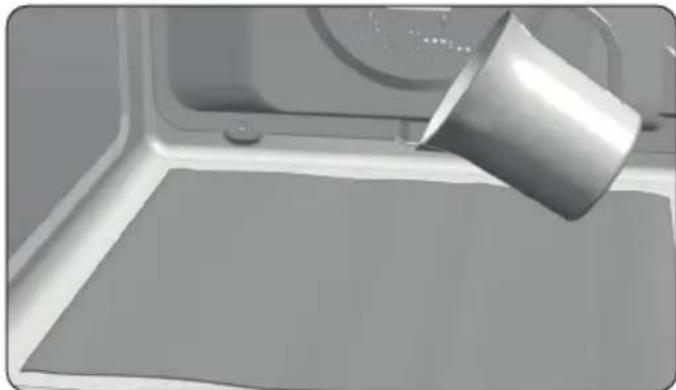
- With the oven cold, spread a cloth out on the bottom of the oven.
natural_image
3D rendering of a metal cup pouring liquid into a rectangular container (no text or symbols visible)- Gently pour 200 ml of water into the bottom of the oven cavity.

INFORMATION
For best results, add a teaspoon of mild washing up detergent to the glass of water before pouring onto the cloth.
-
Turn the control dial to the 🔒 position.
-
You will hear a beep indicating that the Steam Clean Assist® cycle has started. The symbol will flash slowly and the time remaining to complete the cycle will appear on the display.

IMPORTANT
The duration of this cycle cannot be changed. To stop the cycle before it is finished, turn the control dial to the ○ position.
- When the cycle is finished, the oven will turn itself off, an alarm will sound and the symbol will flash quickly.

IMPORTANT
Do not open the oven door until the Steam Clean Assist® function is complete.
The cooling cycle is necessary for the function to work properly.
-
Touch any sensor with your fingertip to stop the alarm and turn off the ⏻ symbol.
-
Turn the control dial to the ○ position.
-
Any traces of dirt and excess water can now be removed from the oven with the damp cloth.
The Steam Clean Assist ® function takes place at a low temperature. However, cooling times can vary depending on the room temperature.

WARNING
Before touching the inside surface of the oven, make sure that it has cooled properly.
If a deeper clean is required after using the Steam Clean Assist® function, use neutral detergents and non-abrasive sponges.
Description du four
FONCTIONNEMENT MANUEL
natural_image
3D rendering of a metallic bucket pouring liquid into a rectangular basin (no text or symbols visible)natural_image
3D rendering of a metallic bucket pouring liquid into a white container (no text or symbols visible)

- Instructions for Use
- ESPAÑOL
- FRANÇAIS
- PROGRAMAR A FUNÇÃO STEAM CLEAN ASSIST®
- ATENÇÃO
- Description of the oven
- Control Panel
- Function selector symbols
- Oven functions
- INFORMATION
- Electronic clock/timer description
- KEYS
- SYMBOLS
- Clock Settings
- Other functions
- WARNING
- SETTING THE TIME
- NOTE
- Oven use
- MANUAL OPERATION
- Programming the Buzzer
- Programming Cooking Time
- Programming the Cooking Stop Time
- Programming Cooking Time and Cooking Stop Time
- Safety instructions
- CHILD SAFETY LOCK
- Steam Clean Assist® function
- PROGRAMMING THE STEAM CLEAN ASSIST® FUNCTION
- IMPORTANT
- Description du four
- FONCTIONNEMENT MANUEL
Brand : Porter & Charles
Model : SOPS60TM-1
Category : Oven