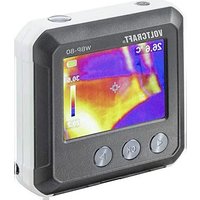
WBP-80 - Measuring equipment VOLTCRAFT - Free user manual and instructions
Find the device manual for free WBP-80 VOLTCRAFT in PDF.


| Product type | Pocket thermal imager |
| Brand | Voltcraft |
| Model | WBP-80 |
| Dimensions (L x W x H) | 76 x 76 x 24 mm |
| Weight | Approximately 113 g |
| Power supply | Li-Po rechargeable battery 3.7 V, 1300 mAh, 4.81 Wh (integrated, non-replaceable) |
| Temperature range | -10 °C to +400 °C |
| IR sensor resolution | 80 x 60 pixels (bolometer matrix) |
| Display resolution | 320 x 240 pixels |
| LCD screen size | 48 x 36 mm |
| Accuracy | ±3.5 °C or ±3.5% |
| Adjustable emissivity | 0.01 to 0.99 (default 0.95) |
| Storage | MicroSD card (max 32 GB, not SDHC/SDXC compatible) |
| Color palettes | Iron, rainbow, gray |
| Main functions | High/low temperature alarms, hot/cold spot tracking, image capture, rapid thermal tracking |
| Maintenance and cleaning | Clean with a dry, lint-free cloth; do not use harsh chemicals or isopropyl alcohol |
| Safety | Do not expose to moisture, shocks, extreme temperatures; keep out of reach of children |
| Spare parts and repairability | Integrated non-replaceable battery; no spare parts available; contact an expert in case of malfunction |
| Operating conditions | 0 to +50 °C, <85% RH (non-condensing) |
| Storage conditions | -20 to +60 °C, <85% RH (non-condensing) |
| Package contents | Thermal camera, USB cable, 16 GB microSD card, software CD-ROM, storage pouch, instruction manual |
Frequently Asked Questions - WBP-80 VOLTCRAFT
User questions about WBP-80 VOLTCRAFT
0 question about this device. Answer the ones you know or ask your own.
Ask a new question about this device
Download the instructions for your Measuring equipment in PDF format for free! Find your manual WBP-80 - VOLTCRAFT and take your electronic device back in hand. On this page are published all the documents necessary for the use of your device. WBP-80 by VOLTCRAFT.
USER MANUAL WBP-80 VOLTCRAFT
GB Operating Instructions
WBP-80 Pocket Thermal Camera
Item No. 2161942 Page 28 - 49
F Mode d'emploi
- Introduction 31
- Explanation of symbols 32
- Intended use 32
- Delivery content 33
- Features and functions 33
- Safety instructions 34
a) General information 34
b) LiPo batteries 35
- Operating and display elements 36
- Setting up 38
a) Charge the battery. 38
b) MicroSD. 38
- Getting started 38
a) Power on/off 38
b) Temperature calibration 38
c) Set the emissivity value 39
d) Capture screen image 39
10.Navigating menus 39
11. Menu Settings 40
a) Temperature unit selection 40
b) Center point position and high/low temperature tracking 40
c) Colour palette selection 41
d) View saved images/image data. 42
e) Settings 43
-
Included software 45
13.Emissivity 45 -
Care and cleaning 47
- Disposal 47
- Technical data 48
1. Introduction
Dear customer,
Thank you for purchasing this product.
This product complies with the statutory national and European requirements.
To maintain this status and to ensure safe operation, you as the user must observe these operating instructions!

These operating instructions are part of this product. They contain important notes on commissioning and handling. Also consider this if you pass on the product to any third party. Therefore, retain these operating instructions for reference!
If there are any technical questions, please contact: www.conrad.com/contact
2. Explanation of symbols

The symbol with the exclamation mark in the triangle is used to indicate important information in these operating instructions. Always read this information carefully.
The arrow symbol indicates special information and advice on operation.
3. Intended use
The product is a pocket-sized thermal imager. It can be used to find hidden hot spots, energy leaks, structural defects, pipe jams, HVAC faults and other problems that can be discovered through thermal surface imaging. It can display temperatures up to 400^ and show results on an LCD screen in real time. Data can be recorded and saved to a microSD card.
Contact with moisture must be avoided under all circumstances.
For safety and approval purposes, you must not rebuild and/or modify this product. If you use the product for purposes other than those described above, the product may be damaged. In addition, improper use can result in other hazards. Read the instructions carefully and store them in a safe place. Make this product available to third parties only together with its operating instructions.
All company names and product names are trademarks of their respective owners. All rights reserved.
4. Delivery content
Thermal camera
USB cable
16 GB Micro SD card
- Software CD ROM
Storage pouch - Operating instructions
Up-to-date operating instructions
Download the latest operating instructions at www.conrad.com/downloads or scan the QR code shown. Follow the instructions on the website.
5. Features and functions
High and low temperature alarms
- Capture data
- 320 × 240 pixel resolution
48× 36 mm LCD
6. Safety instructions

Read the operating instructions carefully and especially observe the safety information. If you do not follow the safety instructions and information on proper handling in this manual, we assume no liability for any resulting personal injury or damage to property. Such cases will invalidate the warranty/guarantee.
a) General information
- The device is not a toy. Keep it out of the reach of children and pets.
- Do not leave packaging material lying around carelessly. This may become dangerous playing material for children.
- Protect the device from extreme temperatures,
direct sunlight, strong jolts, high humidity, moisture, flammable gases, steam and solvents.
- Do not place the product under any mechanical stress.
-
If it is no longer possible to operate the product safely, take it out of operation and protect it from any accidental use. Safe operation can no longer be guaranteed if the product:
-
is visibly damaged,
- is no longer working properly,
- has been stored for extended periods in poor ambient conditions or
-
has been subjected to any serious transport-related stresses.
-
Please handle the product carefully. Jolts, impacts or a fall even from a low height can damage the product.
-
Consult an expert when in doubt about the operation, safety or connection of the device.
- Maintenance, modifications and repairs must only be completed by a technician or an authorised repair centre.
- If you have questions which remain unanswered by these operating instructions, contact our technical support service or other technical personnel.
b) LiPo batteries
- The rechargeable battery is permanently built into the product and cannot be replaced.
-
Never damage the rechargeable battery. Damaging the casing of the rechargeable battery might cause an explosion or a fire! Unlike conventional batteries/rechargeable batteries (e.g. AA or AAA type), the casing of the LiPo rechargeable battery does not consist of a thin sheet but rather a sensitive plastic film only.
-
Never short-circuit the contacts of the rechargeable battery. Do not throw the battery or the product into fire. There is a danger of fire and explosion!
- Charge the rechargeable battery regularly, even if you do are not using the product. Due to the rechargeable battery technology being used, you do not need to discharge the rechargeable battery first.
- Never charge the rechargeable battery of the product unattended.
- When charging, place the product on a surface that is not heat-sensitive. It is normal that a certain amount of heat is generated during charging!
7. Operating and display elements
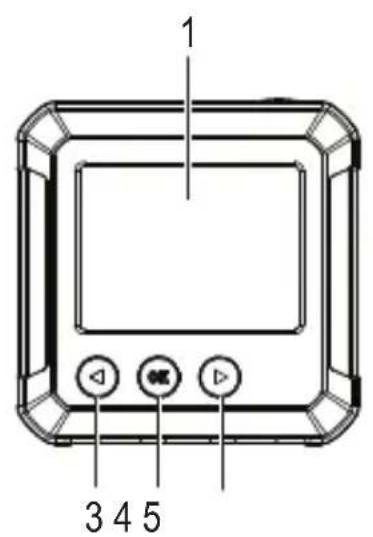
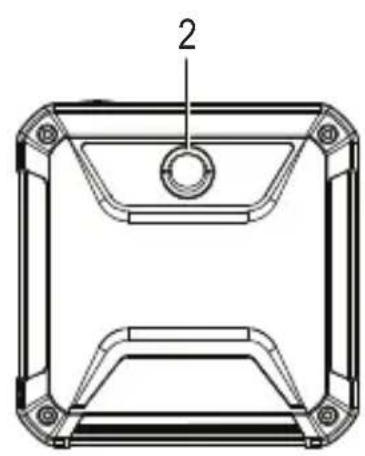
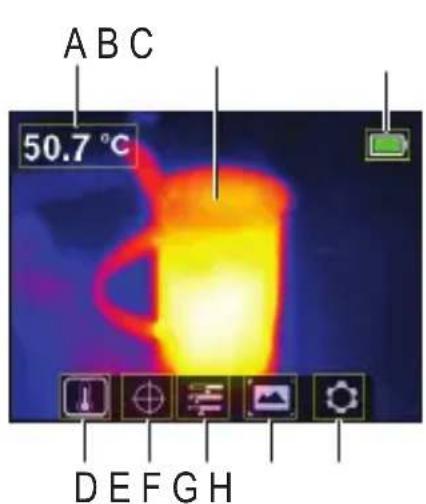
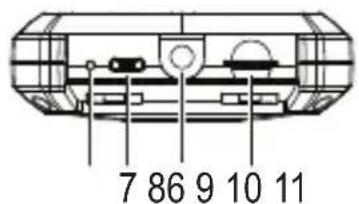
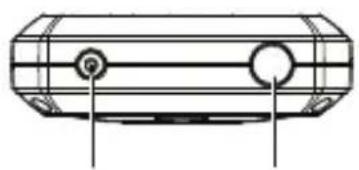
Thermal camera
1 Display
2 Thermal sensor
3 Left/temperature calibration button
4 OK:Selection button
5▶:Right/fast thermal tracking button
6 LED charging indicator
7 Micro USB port (charging/data transfer)
8 Tripod mount
9 Micro SD card slot
10 Power button (long press to turn ON/OFF)
11 Take photo/back button
Display elements
A Measured temperature
B Thermal image display area
C Battery level
D Temperature unit selection
E Temperature tracking options
F Colour palette selection
G View saved images/data
H General settings
8. Setting up
a) Charge the battery
- Lift the cover flap marked to access the micro USB port (7).
- Using the included cable, connect one end to the micro USB port and the other end to a suitable USB-A power source.
The LED charging indicator (6) and the display (1) will show the battery status. Charging (red)/fully charged (green)
b) MicroSD
- Lift the cover flap marked to access the microSD card slot (9).
- Insert the card in the direction shown on the cover. It should "click" into place.
- Replace the cover.
You may need to restart the device for the SD card to register. When using an SD card the first time please format it. For further details see sections 11.e) "Settings", "Format SD" and 16. "Technical data".
9. Getting started
a) Power on/off
Press and hold the power button (10) to turn the power on or off.
b) Temperature calibration
The inherent temperature drift of the thermal sensor can affect the accuracy of measurements.
To calibrate the sensor, turn the power on (10) then press the left button (3). The display will show "calibrating" to indicate that the temperature has been calibrated.
c) Set the emissivity value
For accurate temperature readings, it is important to select an emissivity value to match the emissivity of the surface being measured.
See section 11. e) "Settings", "Emissivity" for how to change emissivity values.
See section 13. "Emissivity" for a list of values for common objects.
d) Capture screen image
Press the photo button (11) to capture the image and data shown on the display (1).
- Press the right button (5) to save the image.
- Press the left button (3) to discard the image

It is recommended not to store more than 5000 images as this may affect the image storage speed.
10. Navigating menus
| Button Action | |
| OK | • Press to enter menu and submenus. • Press to confirm a selection. |
| Press to move left. | |
| Press to move right. | |
| Back (11) Press to return to the previous menu. | |

11. Menu Settings
a) Temperature unit selection
Navigate to the temperature unit selection (D) menu, then choose ^ C or ^ F units of measurement.
b) Center point position and high/low temperature tracking
Navigate to the temperature tracking options (E) menu. You can activate one or both options at the same time.
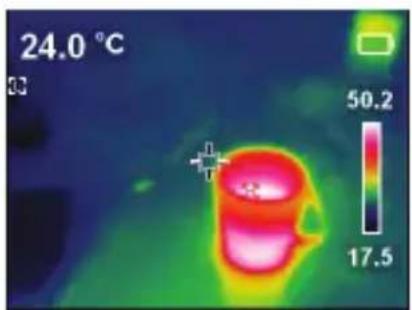
- Center point : the target in the middle of the screen is where the temperature is being measured. The value is shown at the top left of the display.
- High/low temperature tracking The highest and lowest temperature values on the screen are marked by dynamic indicators: [H] High, [L] Low
The bar on the right shows high/low values and the corresponding colour.
c) Colour palette selection
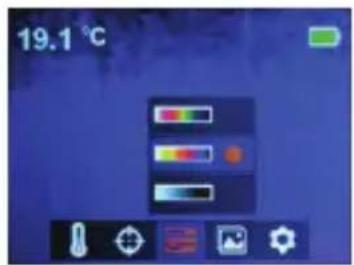
- Navigate to the colour palette selection (F) menu, then select between iron red, rainbow, and grey.
- If the colour palette does not change, check that you have not activated "fast thermal tracking" (see below).
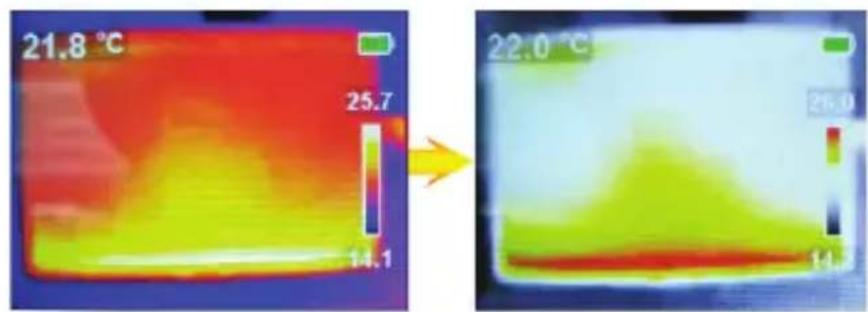
Fast thermal tracking visually increases the contrast between high and low temperatures. From the main page, press the right button (5) to toggle between the selected colour palette and "fast thermal tracking".
d) View saved images/image data
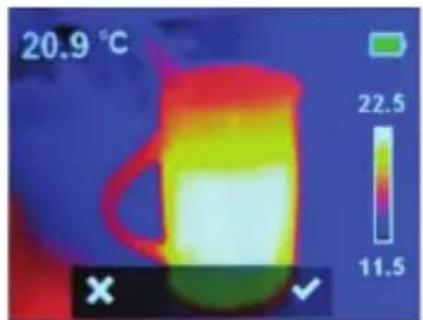
Navigate to the view saved images (G) menu, then scroll left right to find the desired image. Press OK (4) to select the image.
- Select
to view image data.
- Select to delete the selected image
- Press to delete, to keep

e) Settings
- Navigate to the general settings (H) menu and press OK to enter.
- Scroll up /down to find the desired setting.
- Press OK to make a selection and the back button (11) to return to the previous menu.
| Menu Description | |
| Temp Bar Show or hide the high/low temperature bar on the main display. | |
| Time&Date Set | time format, date, and time. |
| Emissivity | Change the emissivity value (0.01 to 0.99), the default value is 0.95. → For accurate temperature readings, it is important to select an emissivity value to match the emissivity of the surface being measured. Please refer to section 12. “Emissivity” for a list of values for common objects. |
| Auto Power Off | • Set the auto power off interval (5, 10, 30 min). • Set to “Off” to deactivate auto power off. |
| Brightness Adjust the screen brightness (low, medium, high). | |
| HI/LO alert | ·Turn the high or low temperature alert ON/OFF ·Set the temperature threshold that triggers the alert. →When a threshold is reached, an alert icon will appear on the display: H=High, L=Low. |
| Local Info View the SD card capacity (MB). | |
| Recovery Return all settings to factory defaults. | |
| Format SD | Format the SD card. Make sure to backup any important files before formatting. Formatting the card will erase all images and other files on the card |
12. Included software
- Use the included software to manage files, mark images up, and analyze data.
- Software installation and use instructions are provided on the included CD ROM.
- Use the included cable to connect the micro USB port (7) to an available USB-A port on your computer.
13. Emissivity
When using the thermal camera, always consider the emissivity of what you are looking at.
Emissivity is a measure of how well an object radiates the heat, which affects how accurate the temperature measurement reflected off that object is.
Emissivity values range from 0 (reflects all energy) to 1 (perfectly absorbs and reflects all energy).
An object can be cool to the touch but look hot if it reflects a nearby source of heat, or feel warm but appear cooler than other surfaces of the same temperature.
Emissivity of common objects
| Material Emissivity | Material Emissivity | ||
| Wood 0.85 Black paper | 0.86 | ||
| Water 0.96 Polycarbonate | 0.80 | ||
| Brick 0.75 Concrete | 0.97 | ||
| Stainless steel 0.14 Copper oxide | 0.78 | ||
| Tape 0.96 Cast iron | 0.81 | ||
| Adhesive tape 0.09 Rust | 0.80 | ||
| Copper plate 0.06 Gypsum | 0.75 | ||
| Dark aluminium | 0.95 Paint | 0.90 | |
| Human skin 0.98 Rubber | 0.95 | ||
| Asphalt | 0.96 Soil | 0.93 | |
| PVC material 0.93 |
14. Care and cleaning

Do not use any aggressive cleaning agents, rubbing alcohol or other chemical solutions as they can cause damage to the housing and malfunctioning.
- Disconnect the USB cable before each cleaning.
- Clean the product with a dry, fibre-free cloth.
15. Disposal
Electronic devices are recyclable waste and must not be disposed of in the household waste. At the end of its service life, dispose of the product in accordance with applicable regulatory guidelines.
You thus fulfill your statutory obligations and contribute to the protection of the environment.
16. Technical data
Charging voltage/current 5 V/DC via USB
Battery Li-Po 3.7 V, 1300 mAh, 4.81 Wh
Operating current consumption 300 mA
Temperature range -10 to +400^
Accuracy. ±3.5 °C or 3.5 %
Resolution. 0.1 °C
Emissivity. Default: 0.95
Adjustable: 0.01 - 0.99
NETD .≤150mk
Geometric resolution (IFOV). 1 mrad
IR sensor resolution. .80 x 60 bolometer matrix
Auto shut off 5, 10, 30 mins
Pallettes.....Iron, rainbow, grey
FOV. 51^(H)× 38^(V)
Image frequency.. 9 Hz
Image...........Bitmap (BMP), 320 x 240 pixels
LCD size 48 x 36 mm
Storage card max. 32 GB Micro SD card
not compatible with SDHC and SDXC)
Operating altitude 0 - 2000 m
Supported OS.......WindowsXP or above (16 and 32 bit variations)
Operating conditions. 0 to 50^, < 85% RH (non-condensing)
Storage conditions. -20 to +60^, < 85% RH (non-condensing)
Dimensions (L× W× H) 76x76x24mm
Weight approx. 113 g
Table des matieres

Page
Chere cliente, cher client,
France (email): technique@conrad-france.fr
Tension/courant de charge 5 V/CC, via micro USB
Image...........Bitmap (BMP), 320 x 240 pixels
Copyright 2021 by Conrad Electronic SE.
This is a publication by Conrad Electronic SE, Klaus-Conrad-Str. 1, D-92240 Hirschau (www.conrad.com).
All rights including translation reserved. Reproduction by any method, e.g. photocopy, microfilming, or the capture in electronic data processing systems require the prior written approval by the editor. Reprinting, also in part, is prohibited. This publication represents the technical status at the time of printing.
Copyright 2021 by Conrad Electronic SE.
Copyright 2021 by Conrad Electronic SE.
Copyright 2021 by Conrad Electronic SE.
- Introduction
- Explanation of symbols
- Intended use
- Delivery content
- Up-to-date operating instructions
- Features and functions
- Safety instructions
- a) General information
- b) LiPo batteries
- Operating and display elements
- Thermal camera
- Display elements
- Setting up
- a) Charge the battery
- b) MicroSD
- Getting started
- a) Power on/off
- b) Temperature calibration
- c) Set the emissivity value
- d) Capture screen image
- Navigating menus
- Menu Settings
- a) Temperature unit selection
- b) Center point position and high/low temperature tracking
- c) Colour palette selection
- d) View saved images/image data
- e) Settings
- Included software
- Emissivity
- Care and cleaning
- Disposal
- Technical data
- Table des matieres
- Page
Brand : VOLTCRAFT
Model : WBP-80
Category : Measuring equipment