SYMASTER151B - Monitor SAMSUNG - Free user manual and instructions
Find the device manual for free SYMASTER151B SAMSUNG in PDF.


User questions about SYMASTER151B SAMSUNG
0 question about this device. Answer the ones you know or ask your own.
Ask a new question about this device
Download the instructions for your Monitor in PDF format for free! Find your manual SYMASTER151B - SAMSUNG and take your electronic device back in hand. On this page are published all the documents necessary for the use of your device. SYMASTER151B by SAMSUNG.
USER MANUAL SYMASTER151B SAMSUNG
SyncMaster 151S/151B/151BM/151V/151Q/151N/150N/152N/153N
text_image
SAMSUNG ELECTRONICS SyncMaster Monitor 08/19/2016 14:00 15:00/17 12:30 12:50 15:50/17 15:00/18 15:30/18 15:50/19 15:00/20 15:30/18 15:50/19 15:00/20 15:30/18 15:50/20 15:00/21 15:30/18 15:50/20 15:00/21 15:30/18 15:50/20 15:00/21 15:30/18 15:50/20 15:00/21 15:30/18 15:50/20 SAMSUNG DIGITCELL everyone's invited Natural ColorIndex

Page Principale Affichage Sur Ecran

natural_image
Cartoon illustration of a smiling hospital worker with a red cross and a panda bear, no text or symbols present.Avertissement/Précaution

text_image
Safety warning illustration showing a hand holding a device with a sad face and warning symbolnatural_image
Illustration of a computer monitor with a cartoon character and warning symbols (no readable text)natural_image
Illustration of a computer monitor with a sad face, accompanied by a cartoon brain and a medical device (no text or symbols)natural_image
Illustration of two mechanical clamps with red lightning bolts and a warning symbol (no text or labels)natural_image
Cartoon illustration of a computer monitor with a sad face and floating speech bubbles (no text or symbols)natural_image
Illustration of two people interacting with a computer monitor displaying a cartoon face (no text or symbols present)natural_image
Illustration of a hand pointing at a computer screen displaying a face with sound waves, surrounded by expressive gestures (no text or symbols)natural_image
Cartoon illustration of a smiling computer monitor with a smile and a hand cleaning it (no text or symbols)natural_image
Cartoon illustration of a computer monitor with a sad face and surrounding icons (no text or symbols)natural_image
Front view of a white CRT computer monitor with a black screen and a U-shaped base (no visible text or symbols)SyncMaster 151BM
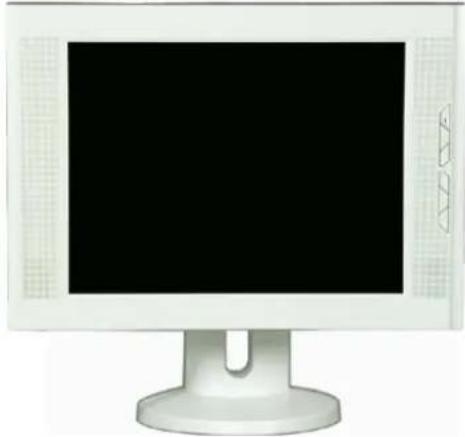
natural_image
Front view of a white CRT computer monitor with a blank screen and side button (no text or symbols visible)natural_image
Exterior view of a gray mechanical component with a circular cutout and a small circular inset (no text or symbols)- Fil électrique
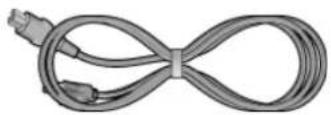
- Câble de signal
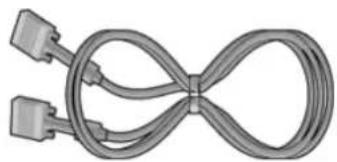
natural_image
Coiled cable with two connectors, no text or symbols visible• Cable de Audio (SyncMaster 151BM)
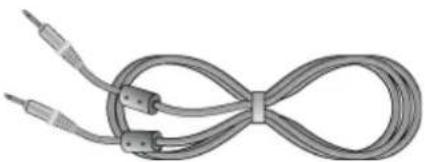
natural_image
Coiled cable with two connectors and a loop, no text or symbols visiblenatural_image
Black computer monitor with U-shaped base and 'SAMSUNG' branding on top (no readable text on screen)natural_image
3D rendered image of a gray plastic mechanical component with a circular cutout, alongside a CD/DVD disc (no text or symbols)Fil électrique
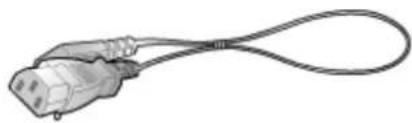
natural_image
Illustration of a cable with a plug connector (no text or symbols)Câble de signal
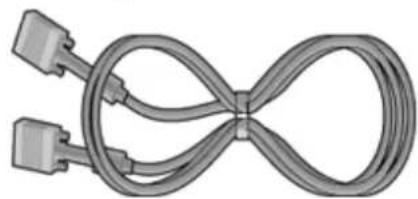
natural_image
Pure diagram of a twisted cable with two connectors, no text or symbols presentnatural_image
Front view of a white CRT computer monitor with a black screen and stand (no visible text or symbols)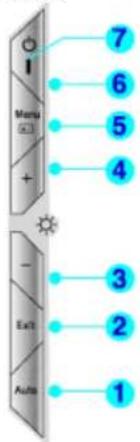
text_image
7 6 5 4 - 3 2 1SyncMaster 151BM
text_image
7 6 5 4 - 3 2 1text_image
Diagram of a device with labeled parts, showing front view and internal components with numbered annotations.text_image
Diagram of a computer monitor with labeled parts showing front, back, and top views with numbered annotations.http://www.samsungusa.com/monitor/ (USA)
http://www.sec.co.kr/monitor/ (Korea)
http://www.samsungmonitor.com.cn/ (China)

Windows ME
text_image
Samsung Monitor Setup for Windows ME58/55 Pick the display adapter which you want to install the monitor: S3 Inc. Savage4 Pick the monitor which you want to install SyncMaster 703DFX/753DFX SyncMaster 753DFpQ/783DFpQ/783DFpQ, MagicSyncMaster 0 SyncMaster 755DFPQ Cancel OKtext_image
Warning: Select the monitor name that exactly matches the name printed on the front of your monitor or on the back label. If you select the wrong monitor, restart Windows in the "Safe Mode" and use this CD-ROM again to select the correct monitor.text_image
Warning Select the monitor name that exactly matches the name printed on the front of your monitor or on the back label. If you select the wrong monitor, restart Windows in the "Safe Mode" and use this CD-ROM(or Diskette) again to select the correct monitor.text_image
Hardware Installation The software you are installing for this hardware: SyncMaster 171S/175S/170S, MagicSyncMaster CX175S has not passed Windows Logo testing to verify its compatibility with Windows XP. (Tell me why this testing is important.) Continuing your installation of this software may impair or destabilize the correct operation of your system either immediately or in the future. Microsoft strongly recommends that you stop this installation now and contact the hardware vendor for software that has passed Windows Logo testing. Continue Anyway STOP Installationhttp://www.samsungusa.com/monitor/ (USA)
http://www.sec.co.kr/monitor/ (Korea)
http://www.samsungmonitor.com.cn/ (China)

text_image
park Internet Outlook Express E-mail Outlook Express FCT 10.0 Netropod Font Windows Media Player MSN Explorer Windows Movie Maher All Programs My Documents My Recent Documents > My Pictures My Music My Computer Control Panel Printers and Passes Help and Support Search Run... Log Off Twin Off Computer start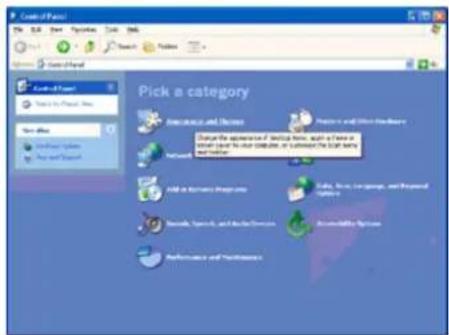
text_image
Control Panel File Edit View Options Tools Help Search Favorites Control Panel Select to Project New Show the View History Find and Print Pick a category Accessories and Settings Describe the appearance of Service Name, plus a Text in Microsoft Word for our Computer, or to understand the TCP/IP system Settings Add to Windows Progrs.com Edit, Save, Create, Language, and Format Settings Remove, Paste, and Audio Services Accessibility Options Performance and Performancetext_image
Apply color and Pattern OK Apply Apply Save Print Help Apply color and Pattern Pick a task... Design the colorless's icon Design the colorless image. Design the colorless image. or pick a Control Panel icon Show: Find it up to Show the colorless of our info with the colorless image, colorless image, color, text, and colors.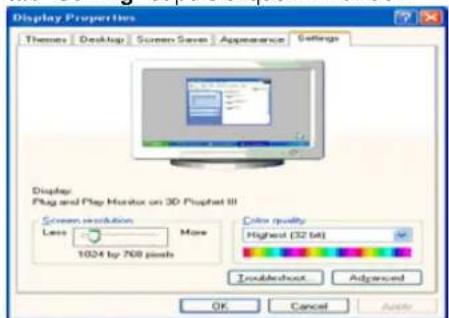
text_image
Display Properties Themes Desktop Screen Screen Appearance Settings Display Plug and Play Monitor on 3D Physchat III Screen resolution More Less 1024 by 768 pixels Color quality Highest (32.64) Troubleshoot Advanced OK Cancel Helptext_image
Plug and Play Monitor and 3D Prophet III Properties GeForce3 Device Selection Color Connection General Adapter Monitor Troubleshoot Color Management Monitor type Plug and Play Monitor Properties Monitor settings Screen refresh rate: 60 Hertz Hide modes that this monitor cannot display Clearing this check box allows you to select display modes that this monitor cannot display correctly. This may lead to an unusable display and/or damaged hardware. OK Cancel Help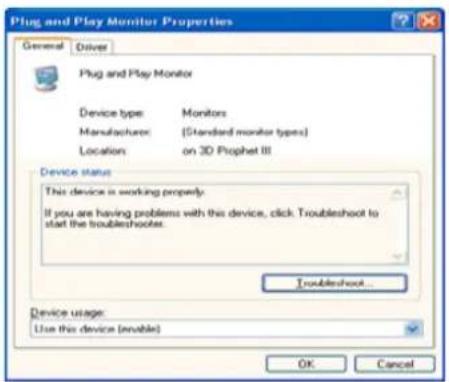
text_image
Plug and Play Monitor Properties General Driver Plug and Play Monitor Device type: Monitors Manufacturer: (Standard monitor types) Location:on 3D Prophet III Device status This device is working properly. If you are having problems with this device, click Troubleshoot to start the troubleshoots. Troubleshoot... Device usage: Use this device (enable) OK Canceltext_image
Plug and Play Monitor Properties General Driver Plug and Play Monitor Driver Provider: Microsoft Driver Date: 6/6/2001 Driver Version: 5.1.2001.0 Digital Signor: Microsoft Windows XP Publisher Driver Details To view details about the driver files. Update Driver To update the driver for this device. Roll Back Driver If the device falls after updating the driver, roll back to the previously installed driver. Uninstall To uninstall the driver (Advanced) OK Cancel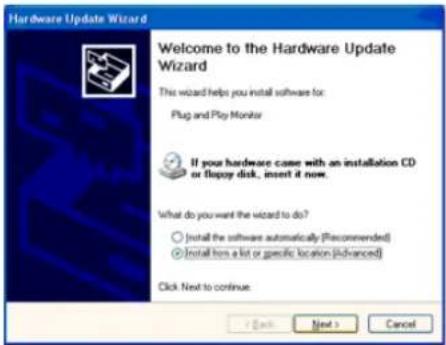
text_image
Hardware Update Wizard Welcome to the Hardware Update Wizard This wizard helps you install software for: Plug and Play Monitor If your hardware came with an installation CD or floppy disk, insert it now. What do you want the wizard to do? ○ Install the software automatically (Recommended) ● Install from a list or specific location (Advanced) Click Next to continue.text_image
Hardware Update Wizard Please choose your search and installation options. Search for the best driver in these locations. Use the check boxes below to limit or expand the default search, which includes local paths and removable media. The best driver found will be installed. Search removable cards (Ricky, CD-ROM...) Include this location in the search: A1 Browse Don't search. I will choose the driver to install. Choose this option to select the device driver from a list. Windows does not guarantee that the driver you choose will be the best match for your hardware. < Back Next > Cancel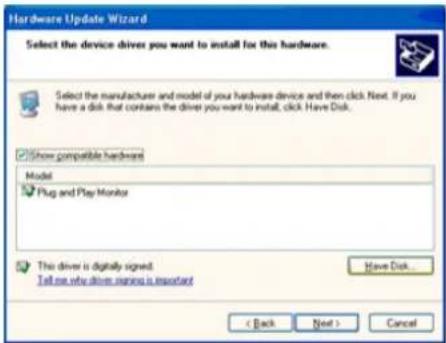
text_image
Hardware Update Wizard Select the device drivers you want to install for this hardware. Select the manufacturer and model of your hardware device and then click Next. If you have a disk that contains the driver you want to install, click Have Disk. Show compatible hardware Model Plug and Play Monitor This driver is digitally signed. Tell me new drive names is important Have Disk... < Back Next > Canceltext_image
Install From Disk Insert the manufacturer's installation disk, and then make sure that the correct drive is selected below. OK Cancel Copy manufacturer's files from: OK Browse...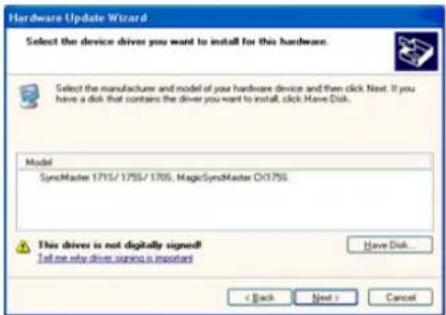
text_image
Hardware Update Wizard Select the device drivers you want to install for this hardware. Select the manufacturer and model of your hardware device and then click Next. If you have a disk, that contains the driver you want to install, click Have Disk. Model SyncMaster 1715/1755/1705, MagicSyncMaster D01755 This driver is not digitally signed! I tell me why driver signs is important < Back Next > CancelInstallation
text_image
Hardware Installation The software you are installing for this hardware: SyncMaster 1715/1755/1705, MagicSyncMaster CX1755 has not passed Windows Logo testing to verify its compatibility with Windows XP. (Tell me why this testing is important.) Continuing your installation of this software may impair or destabilize the correct operation of your system either immediately or in the future. Microsoft strongly recommends that you stop this installation now and contact the hardware vendor for software that has passed Windows Logo testing. Continue Anyway STOP Installationtext_image
Hardware Update Wizard Completing the Hardware Update Wizard The wizard has finished installing the software for SyncMaster 1715/1755/1705, MagicSyncMaster C:\1755 Click Finish to close the wizard.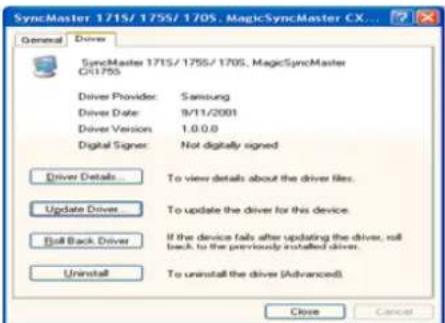
text_image
SyncMaster 1715/1755/1705, MagicSyncMaster CX... General Driver SyncMaster 1715/1755/1705, MagicSyncMaster CR1755 Driver Provider: Samsung Driver Date: 9/11/2001 Driver Version: 1.0.0.0 Digital Signer: Not digitally signed Driver Details To view details about the driver files. Update Driver To update the driver for this device. Ball Back Driver If the device fails after updating the driver, roll back to the previously installed driver. Uninstall To uninstall the driver (Advanced). Close Cancel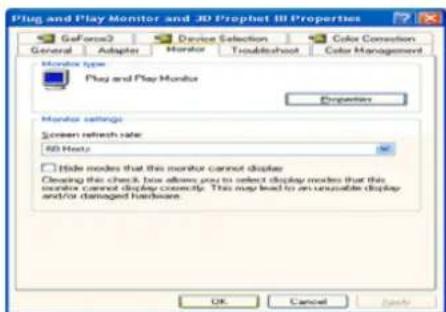
text_image
Plug and Play Monitor and 3D Prophet III Properties GoForce2 Device Selection Color Connection General Adaptor Monitor Troubleshoot Color Management Monitor type Play and Play Monitor Properties Monitor settings Screen refresh rate: 3D Hertz Hide modes that this monitor cannot display Clearing this check box allows you to select display modes that this monitor cannot display correct. This may lead to an unusable display and/or damaged hardware. OK Cancel Helptext_image
Diagram of a computer monitor with labeled components and directional arrows indicating alignment or measurement pointsRetrait du support
text_image
Diagram showing two labeled components (1 and 2) of a device with control panels and a mechanical assembly, likely illustrating a mechanical or electrical setup.natural_image
Computer monitor with blue connecting lines pointing to a labeled point 'a' (no text or symbols on the monitor itself)natural_image
Two views of a computer monitor with labeled components, showing front and side views (no text or symbols on the devices themselves)SyncMaster151S/151B/151V/151Q
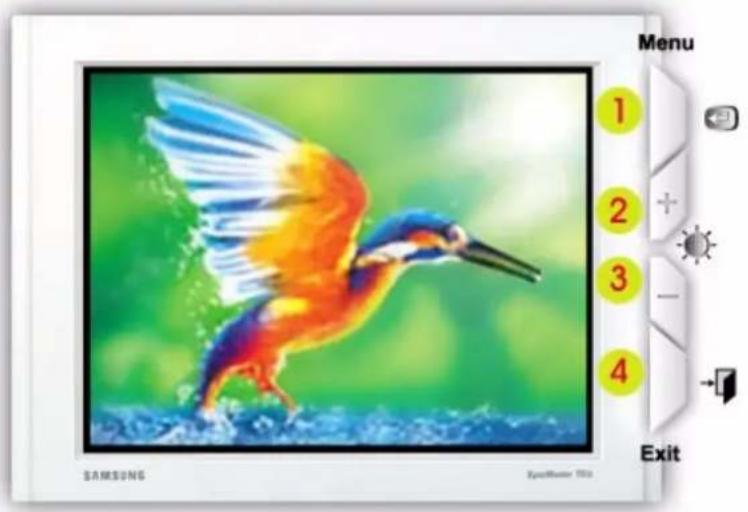
text_image
SAMSUNG ZooMaster TV32 Menu 1 2 3 4 ExitSyncMaster151BM
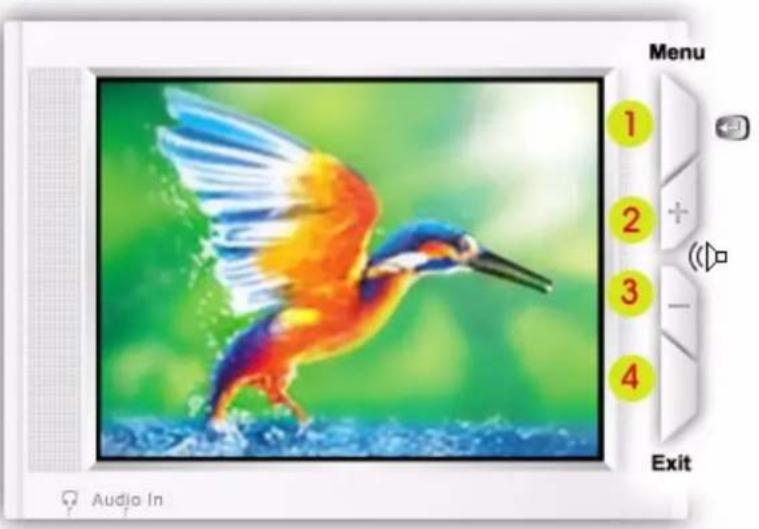
text_image
Menu 1 2 3 4 Audio In ExitSyncMaster151N/150N/152N/153N
natural_image
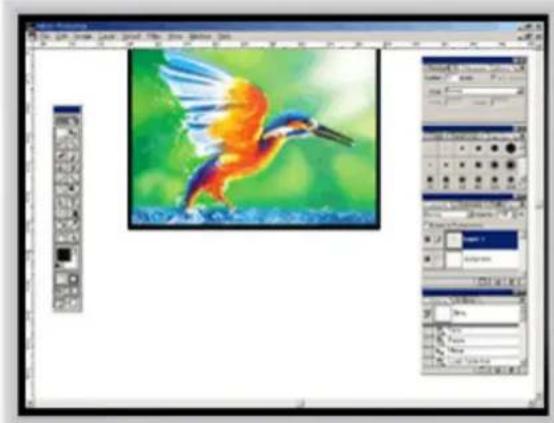
Screenshot of a photo editing software interface displaying a colorful bird in flight against a green watercolor background (no text or symbols on the bird or canvas)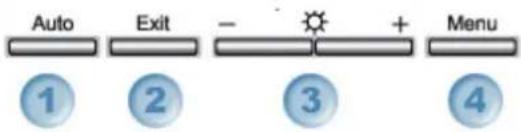
text_image
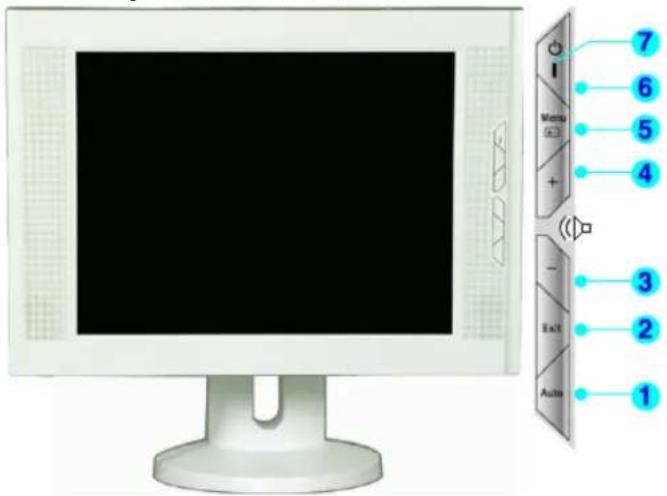
Auto Exit - + Menu ① ② ③ ④1 Use this button to auto adjustment direct access.
2 Use this button to Exit the active menu or the OSD.
3 These buttons allow you to highlight and adjust items in the menu.
4 Use this button to open the OSD and activate a highlighted menu item.
Dépannage
Liste à Vérifier

VESA Interface de support
VESA Interface de support
VESA Interface de support
VESA Interface de support
VESA Interface de support
natural_image
Cartoon illustration of a book with a rising graph and question marks above it, set against a blue lightning bolt background (no text or symbols)Samsung Electronics Canada Inc.
7037 Financial Drive
Mississauga, Ontario L5N 6R3
< European Service Center & National Service >
Stafford Park 12 Telford, Shropshire, TF3 3BJ
Customer Response Centre
7 Parkview Drive, Homebush Bay NSW 2127
Tel : 1300 362 603
http://www.samsung.com.au/
ESPAÑA :
Samsung Electronics Comercial Iberica, S.A.
Ciencies, 55-65 (Poligono Pedrosa) 08908
Hospitalet de Llobregat (Barcelona)
Tel. : (93) 261 67 00
Fax. : (93) 261 67 50
http://samsung.es/
THAILAND :
HAI SAMSUNG SERVICE CENTER
MPA COMPLEX BUILDING,1st-2nd Floor
175 SOI SUEKSA VIDHAYA SATHON SOI 12
SILOM ROAD, SILOM, BANGRAK
BANGKOK 10500
TEL:0-2635-2567
FAX:0-2635-2556
Information
Service
SOUTH AFRICA :
Samsung Electronics, 5 Libertas Road, Somerset Office Park,
Bryanston Ext 16. Po Box 70006, Bryanston, 2021, South Africa
Tel: 0027-11-549-1621
Fax:0027-11-549-1629
http://www.samsung.co.za/
SWEDEN/DENMARK/NORWAY/FINLAND :
Samsung Electronics AB
Box 713
S-194 27 UPPLANDS VÄSBY
SVERIGE
The Federal Communications Commission Radio Frequency Interference Statement includes the following warning:
Note: This equipment has been tested and found to comply with the limits for a Class B digital device, pursuant to Part 15 of the FCC Rules. These limits are designed to provide reasonable protection against harmful interference in a residential installation. This equipment generates, uses, and can radiate radio frequency energy and, if not installed and used in accordance with the instructions, may cause harmful interference to radio communications. However, there is no guarantee that interference will not occur in a particular installation. If this equipment does cause harmful interference to radio or television receptions, which can be determined by turning the equipment off and on, the user is encouraged to try to correct the interference by one or more of the following measures:
• Reorient or relocate the receiving antenna.
- Increase the separation between the equipment and receiver.
- Connect the equipment into an outlet on a circuit different from that to which the receiver is connected.
- Consult the dealer or an experienced radio/TV technician for help.
User Information
Changes or modifications not expressly approved by the party responsible for compliance could void the user's authority to operate the equipment. If necessary, consult your dealer or an experienced radio/television technician for additional suggestions. You may find the booklet called How to Identify and Resolve Radio/TV Interference Problems helpful. This booklet was prepared by the Federal Communications Commission. It is available from the U.S. Government Printing Office, Washington, DC 20402, Stock Number 004-000-00345-4.
The party responsible for product compliance:
SAMSUNG ELECTRONICS CO., LTD
America QA Lab of Samsung
3351 Michelson Drive.
Suite #290, Irvine, CA92612 USA
Tel) 949-975-7310
Fax) 949-922-8301
Warning
User must use shielded signal interface cables to maintain FCC compliance for the product.
Provided with this monitor is a detachable power supply cord with IEC320 style terminations. It may be suitable for connection to any UL Listed personal computer with similar configuration. Before making the connection, make sure the voltage rating of the computer convenience outlet is the same as the monitor and that the ampere rating of the computer convenience outlet is equal to or exceeds the monitor voltage rating.
For 120 Volt applications, use only UL Listed detachable power cord with NEMA configuration 5-15P type (parallel blades) plug cap. For 240 Volt applications use only UL Listed Detachable power supply cord with NEMA configuration 6-15P type (tandem blades) plug cap.
VCCI
This is a Class B product based on the standard of the Voluntary Control Council for Interference by Information Technology Equipment (VCCI). If this is used near a radio or television receiver in a domestic environment, it may cause radio interference. Install and use the equipment according to the instruction manual.
Information
Regulatory
• IC Compliance Notice
This Class B digital apparatus meets all requirements of the Canadian Interference-Causing Equipment Regulations of ICES-003.
This monitor complies with SWEDAC(MPR II) recommendations for reduced electric and magnetic fields.
• European Notice(Europe Only)
Products with the CE marking comply with the EMC Directive(89/336/EEC), (92/31/EEC), (93/68/EEC) and the Low Voltage Directive (73/23/EEC) issued by the Commission of the European Community.
Compliance with these directives implies conformity to the following European Norms:
• EN55022:1998+A1:2000 - Radio Frequency Interference
• EN55024:1998 - Electromagnetic Immunity of Information Technology Equipment
• EN61000-3-2:1995+A1/A2:1998 - Power Line Harmonics
• EN61000-3-3:1995 - Voltage Fluctuations
- PCT Notice

АЯ46
Information
Regulatory
• TCO'95-Ecological requirements for personal computers (TCO applied model only)

AB general requirements
AB2 Written Eco-document accompanying the products
Congratulations! You have just purchased a TCO'95 approved and labelled product! Your choice has provided you with a product developed for professional use. Your purchase has also contributed to reducing the burden on the environment and to the further development of environmentally-adapted electronic products.
Why do we have environmentally-labelled monitors?
In many countries, environmental labelling has become an established method for encouraging the adaptation of goods and services to the environment. The main problem as far as monitors and other electronic equipment are concerned is that environmentally harmful substances are used both in the products and during their manufacture. Since it has not been possible so far for the majority of electronic equipment to be recycled in a satisfactory way, most of these potentially damaging substances sooner or later enter Nature.
There are also other characteristics of a monitor, such as energy consumption levels, that are important from both the working and natural environment viewpoints. Since all types of conventional electricity generation have a negative effect on the environment (acidic and climate-influencing emissions, radioactive waste, etc.) it is vital to conserve energy. Electronic equipment in offices consumes an enormous amount of energy, since it is often routinely left running continuously.
What does labelling involve?
This product meets the requirements for the TCO'95 scheme, which provides for international environmental labelling of monitors. The labelling scheme was developed as a joint effort by the TCO (The Swedish Confederation of Professional Employees), Naturskyddsforeningen (The Swedish Society for Nature Conservation) and NUTEK (The National Board for Industrial and Technical Development in Sweden).
The requirements cover a wide range of issues: environment, ergonomics, usability, emission of electrical and magnetic fields, energy consumption and electrical and fire safety.
The environmental demands concern among other things restrictions on the presence and use of heavy metals, brominated and chlorinated flame retardants, CFCs (freons), and chlorinated solvents. The product must be prepared for recycling and the manufacturer is obliged to have an environmental plan, which must be adhered to in each country where the company conducts its operations policy. The energy requirements include a demand that the monitor after a certain period of inactivity shall reduce its power consumption to a lower level, in one or more stages. The length of time to reactivate the monitor shall be reasonable for the user. Labelled products must meet strict environmental demands, for example in respect of the reduction of electric and magnetic fields, along with physical and visual ergonomics and good usability.
Information
Regulatory
What does labelling involve?(continue)
TCO Development Unit 1996-11-29 On the page this folder you will find a brief summary of the environmental requirements met by this product. The complete environmental criteria document may be ordered from:
TCO Development Unit
S-11494 Stockholm
Sweden
Fax: +46 8 782 92 07
E-mail (Internet): development@tco.se
Current information regarding TCO'95-approved and labelled products may also be obtained via the Internet, using the address:
http://www.tco-info.com/
TCO'95 is a co-operative project between(3 logos)
Environmental Requirements
Brominated flame retardants are present in printed circuit boards, cables, wires, casings and housings. In turn, they delay the spread of fire. Up to thirty percent of the plastic in a computer casing can consist of flame retardant substances. These are related to another group of environmental toxins, PCBs, which are suspected to give rise to similar harm, including reproductive damage in fish eating birds and mammals, due to the bioaccumulative processes. Flame retardants have been found in human blood and researchers fear that disturbances in foetus development may occur. TCO'95 demand requires that plastic components weighing more than 25 grams must not contain organically bound chlorine and bromine.
Lead
Lead can be found in picture tubes, display screens, solders and capacitors. Lead damages the nervous system and in higher doses, causes lead poisoning. TCO'95 requirement Permits the inclusion of lead since no replacement has yet been developed.
Cadmium
Cadmium is present in rechargeable batteries and in the colour generating layers of certain computer displays. Cadmium damages the nervous system and is toxic in high doses. TCO'95 requirement states that batteries may not contain more than 25 ppm (parts per million) of cadmium. The colour-generating layers of display screens must not contain any cadmium.
Mercury
Mercury is sometimes found in batteries, relays and switches. Mercury damages the nervous system and is toxic in high doses. TCO'95 requirement states that batteries may not contain more than 25 ppm (parts per million) of mercury. It also demands that no mercury is present in any of the electrical or electronics components concerned with the display unit.
CFCs (freons)
CFCs (freons) are sometimes used for washing printed circuit boards and in the manufacturing of expanded foam for packaging. CFCs break down ozone and thereby damage the ozone layer in the stratosphere, causing increased reception on Earth of ultraviolet light with consequent increased risks of skin cancer (malignant melanoma).
- The relevant TCO'95 requirement: Neither CFCs nor HCFCs may be used during the manufacturing of the product or its packaging.
Information
Regulatory
• TCO'99-Ecological requirements for personal computers (TCO applied model only)

Congratulations!
You have just purchased a TCO'99 approved and labelled product! Your choice has provided you with a product developed for professional use. Your purchase has also contributed to reducing the burden on the environment and also to the further development of environmentally adapted electronics products.
This product meets the requirements for the TCO'99 scheme which provides for an international environmental and quality labelling labelling of personal computers. The labelling scheme was developed as a joint effort by the TCO(The Swedish Confederation of Professional Employees), Svenska Naturskyddsforeningen(The Swedish Society for Nature Conservation), Statens Energimyndighet(The Swedish National Energy Administration) and SEMKO AB.
The requirements cover a wide range of issue: environment, ergonomics, usability, reduction of electric and magnetic fields, energy consumption and electrical safety.
Why do we have environmentally labelled computers?
In many countries, environmental labelling has become an established method for encouraging the adaptation of goods and services to the environment. The main problem, as far as computers and other electronics equipment are concerned, is that environmentally harmful substances are used both in the products and during their manufacture. Since it is not so far possible to satisfactorily recycle the majority of electronics equipment, most of these potentially damaging substances sooner or later enter nature.
There are also other characteristics of a computer, such as energy consumption levels, that are important from the viewpoints of both the work (internal) and natural (external) environments. Since all methods of electricity generation have a negative effect on the environment (e.g. acidic and climate-influencing emissions, radioactive waste), it is vital to save energy. Electronics equipment in offices is often left running continuously and thereby consumes a lot of energy.
What does labelling involve?
The environmental demands has been developed by Svenska Naturskyddsforeningen (The Swedish Society for Nature Conservation). These demands impose restrictions on the presence and use of heavy metals, brominated and chlorinated flame retardants, CFCs(freons)and chlorinated solvents, among other things. The product must be prepared for recycling and the manufacturer is obliged to have an environmental policy which must be adhered to in each country where the company implements its operational policy.
The energy requirements include a demand that the computer and/or display, after a certain period of inactivity, shall reduce its power consumption to a lower level in one or more stages. The length of time to reactivate the computer shall be reasonable for the user.
Below you will find a brief summary of the environmental requirements met by this product. The complete environmental criteria document may be ordered from:
Information
Regulatory
TCO Development
SE-114 94 Stockholm, Sweden
Fax: +46 8 782 92 07
Email (Internet): development@tco.se
Current information regarding TCO'99 approved and labelled products may also be obtained via the Internet, using the address: http://www.tco-info.com/
Environmental requirements Flame retardants
Flame retardants are present in printed circuit boards, cables, wires, casings and housings. Their purpose is to prevent, or at least to delay the spread of fire. Up to 30% of the plastic in a computer casing can consist of flame retardant substances. Most flame retardants contain bromine or chloride, and those flame retardants are chemically related to another group of environmental toxins, PCBs. Both the flame retardants containing bromine or chloride and the PCBs are suspected of giving rise to severe health effects, including reproductive damage in fish-eating birds and mammals, due to the bio-accumulative* processes. Flame retardants have been found in human blood and researchers fear that disturbances in foetus development may occur.
The relevant TCO'99 demand requires that plastic components weighing more than 25 grams must not contain flame retardants with organically bound bromine or chlorine. Flame retardants are allowed in the printed circuit boards since no substitutes are available.
Cadmium\*\*
Cadmium is present in rechargeable batteries and in the colour-generating layers of certain computer displays. Cadmium damages the nervous system and is toxic in high doses. The relevant TCO'99 requirement states that batteries, the colour-generating layers of display screens and the electrical or electronics components must not contain any cadmium.
Mercury\*\*
Mercury is sometimes found in batteries, relays and switches. It damages the nervous system and is toxic in high doses. The relevant TCO'99 requirement states that batteries may not contain any mercury. It also demands that mercury is not present in any of the electrical or electronics components associated with the labelled unit. There is however one exception. Mercury is, for the time being, permitted in the back light system of flat panel monitors as today there is no commercially available alternative. TCO aims on removing this exception when a Mercury free alternative is available.
CFCs (freons)
The relevant TCO'99 requirement states that neither CFCs nor HCFCs may be used during the manufacture and assembly of the product. CFCs (freons) are sometimes used for washing printed circuit boards. CFCs break down ozone and thereby damage the ozone layer in the stratosphere, causing increased reception on earth of ultraviolet light with e.g. increased risks of skin cancer (malignant melanoma) as a consequence.
Lead\*\*
Lead can be found in picture tubes, display screens, solders and capacitors. Lead damages the nervous system and in higher doses, causes lead poisoning. The relevant TCO'99 requirement permits the inclusion of lead since no replacement has yet been developed.
Information
Regulatory
• Medical Requirement

Classifications:
In accordance with UL 2601-1/IEC 60601-1, the product is cssified as Continuous duty Class I equipment, which is not protected against ingress of liquids. The product is not suitable for use in the presence of a flammable anaesthetic mixture with air or with oxygen or nitrous oxide.
EMC
This equipment has been tested and found to comply with the limits for medical devices to the IEC 601-1-2:1994. These limits are designed to provide reasonable protection against harmful interference in a typical medical installation. This equipment generates, uses and can radiate radio frequency energy and, if not installed and used in accordance with the instructions, may cause harmful interference to other devices in the vicinity. However, there is no guarantee that interference will not occur in a particular installation. If this equipment does cause harmful interference to other devices, which can be determined by turning the equipment off and on, the user is encouraged to try to correct the interference by one or more of the following measures:
-Reorient or relocate the receiving device.
-Increase the separation between the equipment.
-Connect the equipment into an outlet on a circuit different from that to which the other device(s) are connected.
-Consult the manufacturer or field service technician for help.
Video In / RS 232 / Video Out
Accessories equipment connected to the analog and digital interfaces must be certified to the respective IEC standards (i.e. IEC 950 for data processing equipment and IEC 601-1 for medical equipment.) Furthermore all configurations shall comply with the system standard IEC 601-1-1. Everybody who connects additional equipment to the signal input part or signal output part configures a medical system, and is therefore, responsible that the system complies with the requirements of the system standard IEC 601-1-1. If in doubt, consult the technical services department or your local representative.
Transport and Storage Limitations:
Temperature Range of -40°C to +70°C
Relative Humidity of 10 -95%, non-condensing
* Bio-accumulative is defined as substances which accumulate within living organisms.
** Lead, Cadmium and Mercury are heavy metals which are Bio-accumulative.