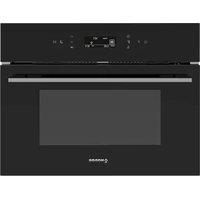
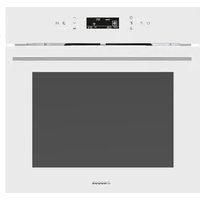
NorChef MO 4800 DB - Oven NODOR - Free user manual and instructions
Find the device manual for free NorChef MO 4800 DB NODOR in PDF.


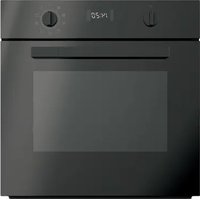
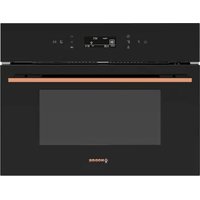
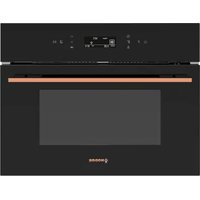
| Product type | Built-in oven |
| Brand | Nodor |
| Model | NorChef MO 4800 DB |
| Capacity | 38 liters |
| Dimensions (W x H x D) | 436 x 215 x 410 mm |
| Electrical supply | 220-240 V, 50 Hz, single-phase |
| Maximum power | Approximately 2500 W |
| Installation type | Built-in |
| Cooking functions | Fan-forced, full grill, medium grill, natural convection, defrost, intensive cooking, fan-assisted grill |
| Interior lighting | Yes, 15 W, E14 socket |
| Programming | 24h clock, timer, delayed start, automatic stop |
| Display | 4-digit digital display with symbols |
| Child safety | Safety lock |
| Door | Removable for cleaning, double glazing |
| Cleaning | Manual (damp cloth), no steam cleaner |
| Lamp replacement | 15 W bulb, E14, accessible after removing lamp cover |
| Included accessories | Grid, drip tray |
| Repairability | Original spare parts available, contact approved after-sales service |
Frequently Asked Questions - NorChef MO 4800 DB NODOR
User questions about NorChef MO 4800 DB NODOR
0 question about this device. Answer the ones you know or ask your own.
Ask a new question about this device
Download the instructions for your Oven in PDF format for free! Find your manual NorChef MO 4800 DB - NODOR and take your electronic device back in hand. On this page are published all the documents necessary for the use of your device. NorChef MO 4800 DB by NODOR.
USER MANUAL NorChef MO 4800 DB NODOR
natural_image
Line drawing of an open oven with labeled components (no text or symbols beyond labels)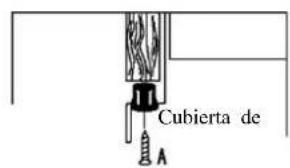
natural_image
Diagram of a ladder leaning against an inclined plane, with arrows indicating motion direction (no text or symbols)Figs.11-2
Instrucció n de la puerta con acristalamiento extraí ble
natural_image
Technical diagram of a mechanical assembly with labeled components A and B, showing no text or symbols beyond labels.Fig. 1
natural_image
Pure technical line drawing of a layered mechanical assembly with no text or symbolsFig. 2
Read carefully all the instructions contained in this booklet. It provides you with important information regarding the safe installation, use and maintenance of the appliance as well as useful advice for getting the best out of your oven. Keep this booklet in a safe place for future reference.
After removing the packing, check that the appliance is not damaged in any way.
Be careful not to leave the packing materials (plastic sheeting, expanded polystyrene etc.) where children can get at them, as they can be dangerous.
IMPORTANT: do not use the oven door handle to move the appliance, such as to remove it from the packaging
ATTENTION
• The oven is an appliance which, for its nature, becomes hot, especially in correspondence of the
- glass door.
It is therefore a good rule that children do not approach the oven when it is functioning,
particularly when the grill in used.
The first time you switch the oven on, acrid smelling smoke may appear. This is caused by the heating of the adhesive used on the insulation panels surrounding the oven. There is nothing unusual about this. If it happens, simply wait until the smoke disappears before putting any food in the oven. Never roast or bake on the oven base.
SAFETY
All installation work must be carried out by a suitably qualified person, strictly following local
building regulations and these instructions.
- Warning: Ensure that the appliance is switched off at the fused spur before replacing the lamp to avoid the possibility of electric shock.
- Warning: Accessible parts may become hot during use. Children should be kept away.
- Warning: If the door or door seals are damaged, the oven must not be operated until it has been repaired. Contact Customer Services for advice.
- During installation do not allow the supply cord to touch the hot parts of the appliance. - Make sure that the supply cord is not caught under or in the appliance and avoid damage to the supply cord.
- Do not install the appliance outdoors in a damp place or in an area which may be prone to
water leaks such as under or near a sink unit. In the event of a water leak allow the machine to
dry naturally. Do not use and contact Customer Services for advice.
- Please dispose of the packing material carefully.
- Do not use flammable sprays in close vicinity to the
appliance.Warning: This appliance can be
used by children aged from 8 years and above and persons with reduced physical, sensory or
mental capabilities or lack of experience and knowledge if they have been given supervision
or instruction concerning use of the appliance in a safe way and understand the hazards involved.
Children shall not play with the appliance.
- Cleaning and user maintenance shall not be made by children without supervision. Keep the
appliance and its supply cord out of the reach of children less than 8 years old.
- If the supply cord becomes damaged, it must be replaced by the manufacturer, its serviceagent or similarly qualified persons in order to avoid a danger or injury.
- The appliance is not intended to be operated by means of an external timer or separated remote control system.
- The appliance is for domestic use only and only for cooking food. Do not use this appliance as a source of heat.
- The manufacturer declines all liability for personal or material damage as a result of misuse or incorrect installation of this appliance.
- Danger of burns! During use the appliance becomes hot. Care should be taken to avoid
touching heating elements inside the oven.
- Do not lean on the door or place any objects on the door of the appliance. This can damage the door hinges.
- The oven must be installed in accordance with installation instructions and all dimensions must be followed.
- Before connecting the appliance to the power supply, check that the power supply voltage and current rating corresponds with the power supply details shown on the appliance rating label.
- Never use a damaged appliance! Disconnect the appliance from the electrical outlet and contact your retailer if it is damaged.
- Danger of electric shock! Do not attempt to repair the appliance yourself. In case of malfunction, repairs are to be conducted by qualified personnel only.
- To avoid damaging the cord, do not squeeze, bend or chafe it on Sharp edges. Keep it away
from hot surfaces and open flames.
- Lay out the cord in such a way that no unintentional pulling or tripping over it is possible.
Keep the appliance and its cord out of reach of children. Do not operate the appliance with wet hands or while standing on a wet floor. Always turn the appliance off before disconnecting it from the power supply.
- Disconnect the oven from the power supply when not in use and before cleaning.
- Warning: This appliance is supplied with a three core supply cord and must be connected
direct to the mains electricity supply via a omni-polar or double pole switch having a 3mm
minimum contact gap on each connector.
- The fused spur should be installed in an easily reachable place so that in case of emergency
the appliance can be disconnected from power immediately.
- The fixed wiring must be protected against heat surfaces.
- Do not hang any objects on the handle of the oven door.
- Caution: Do not cover the bottom of the oven with aluminium foil or other objects. There is a
risk of fire and damage to the enamel in the oven!
- Do not allow aluminium foil, plastic, paper or fabric contact with heating elements. Never leave
the appliance unattended during use, especially when cooking with flammable substances
(e.g. hot oil, fat, etc.).
- Do not store or never use harsh chemicals, sprays, flammable or non-food in or near the oven.
- This oven is designed specifically for heating or cooking food. The use of corrosive chemicals
in heating or cleaning will damage the unit and may cause injury.
- Should any food inside the oven catch fire, keep the door closed.
Switch the oven off and disconnect the power supply. Always exercise caution when opening the door.
- Move to the side, and open the door slowly to vent the hot air and/or steam. Make sure your
face is away from the opening and make sure there are no children or pets near the oven.
- 5 Only use utensils that are suitable for use in this type of oven.
- 5 The oven should be cleaned regularly and any food deposits removed.
- Do not use harsh abrasive cleaners or sharp metal scrapers to clean the oven door glass. They
can scratch the surface, which may result in shattering of the glass.
- A steam cleaner is not to be used.
- Warning: The appliance and its accessible parts become hot during use. Care should be taken
to avoid touching heating elements.
• Children less than 8 years of age shall be kept away unless
continuously supervised.
- The appliance must not be installed behind a decorative door in order to avoid overheating.
Safety is a good habit to get into
5 This appliance is designed for non-professional, household use and its functions must not be changed.
5 The electrical system of this appliance may be used safely only when it is correctly connected to an efficient earthling system in compliance with the safety standards currently in effect.
5 The manufacturer will not be held liable for any damages that might arise out of incorrect installation or improper, incorrect or unreasonable use of the appliance.
The following items are potentially dangerous, and therefore, appropriate measures must be taken to prevent children and the disabled from coming into contact with them:
- Controls and the appliance in general;
- Packaging (bags, polystyrene, nails, etc.);
- The appliance immediately after use of the oven or grill due to the heat generated;
- The appliance when no longer in use (potentially dangerous parts must be made safe).
Avoid the following:
- Touching the appliance with wet parts of the body;
- Using the appliance when barefoot;
- Pulling on the appliance or the supply cord to unplug it from the electrical outlet;
- Obstructing the ventilation or heat dissipation slots;
- Allowing power supply cords for small appliances to come into contact with the hot parts of the appliance;
- Exposing the appliance to atmospheric agents (rain, sun);
- Using the oven for storage purposes;
- Using flammable liquids near the appliance;
- Using adaptors, multiple sockets and/or extension cords;
- Attempting to install or repair the appliance without the assistance of qualified personnel.
WARNING
- Accessible parts will become hot when in use. To avoid burns and scalds children should be kept away
- During usage, the appliance becomes hot, care should be taken to avoid touching heating elements inside the oven.
Qualified personnel must be contacted in the following cases:
- Installation (following the manufacture's instructions);
- When in doubt about operating the appliance;
- Replacing the electrical outlet when it is not compatible with the plug for the appliance.
Service Centers authorized by the manufacturer must be contacted in the following cases:
- If in doubt about the soundness of the appliance after removing it from the packaging;
- If the power supply cord has been damaged or needs to be replaced;
- If the appliance breaks down or functions poorly; ask for original spare parts.
It is a good idea to do as the following:
- Only use the appliance to cook food, nothing else;
- Check the soundness of the appliance after it has been unpacked;
- Unplugged the appliance from the electrical mains if it is not functioning properly and before cleaning or performing maintenance;
- When the appliance is not used for an extended period of time, unplugged the appliance and close the gas cock (it present);
- Use cooking gloves to place cookware in the oven or when removing it;
- Always grasp the oven door in the centre because the ends may be hot due to the escape of hot air;
- Make sure that the control knobs are on the "o" setting when the appliance is not in use;
- Unplug the appliance when you decide not to use the appliance any longer.
5 The manufacturer may not be held responsible for any damage due to: incorrect installation, improper, incorrect and irrational use.
SPECIFICATION
The ovens are designed to operate with a monophase alternating current of 220-240V 50Hz. anyway, before the installation of the appliance, we suggest you to check always these specifications on the rating label applied on the outside rear part.
| Accessories according to models | |||||
| Oven lower heating el. | 1050Watt | Total grill heating el. | 1400 Watt | synchronmotor | 4 Watt |
| Circle heating el. | 1600Watt | Shaded motor (top) | 15Watt | Shaded motor (back) | 25 Watt |
| Oven light | 15Watt | ||||
Overall dimensions for oven volume: width 436mm-height 215mm-depth 410mm=38 liters
INDICATOR LIGHTS
The indicator lights situated above the control panel go on and off when the heating elements are inserted or removed. During the thermostatic functioning of the oven, the neon light remains on until the pre-chosen temperature is reached and when it goes out, this is a sign that the temperature has been reached. When the oven cools, the thermostat determines the re-insertion of the heating elements with consequent re-lighting of the indicator lights. In models the internal oven light, which is always on when any function is in operation, is considered as an operation, is considered as an operating warning light.
INSTALLING THE APPLIANCE
IMPORTANT: Unplug your oven before
performing installation or maintenance!
Installation should be carried out according to the instructions by a professionally qualified person.
The manufacturer declines all responsibility for any damage to persons, animals or things due to a wrong installation.
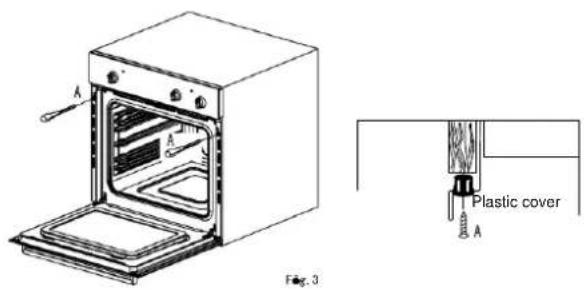
FITTING THE APPLIANCE
- Fit the appliance into its surround (beneath a work-top or above another appliance) by inserting screws into the 4 holes that can be seen in the frame of the oven when the door is open.
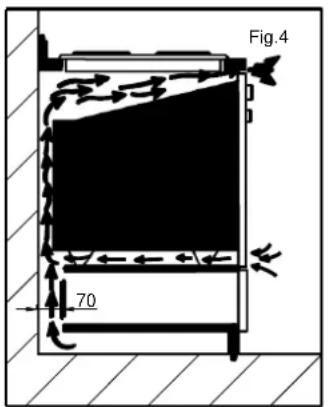
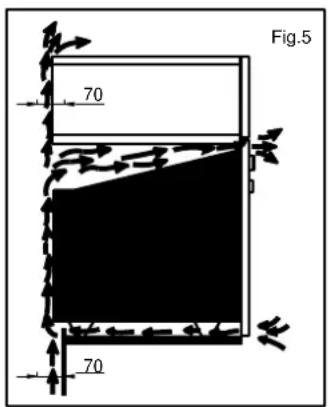
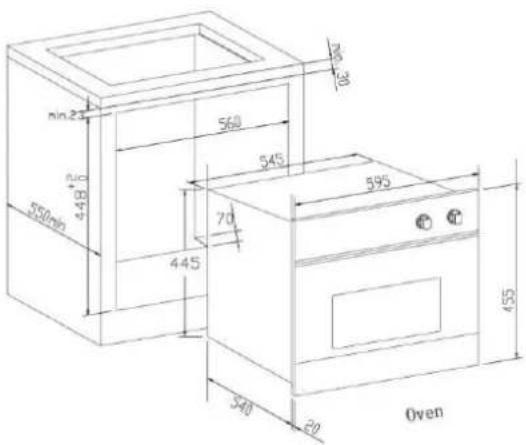
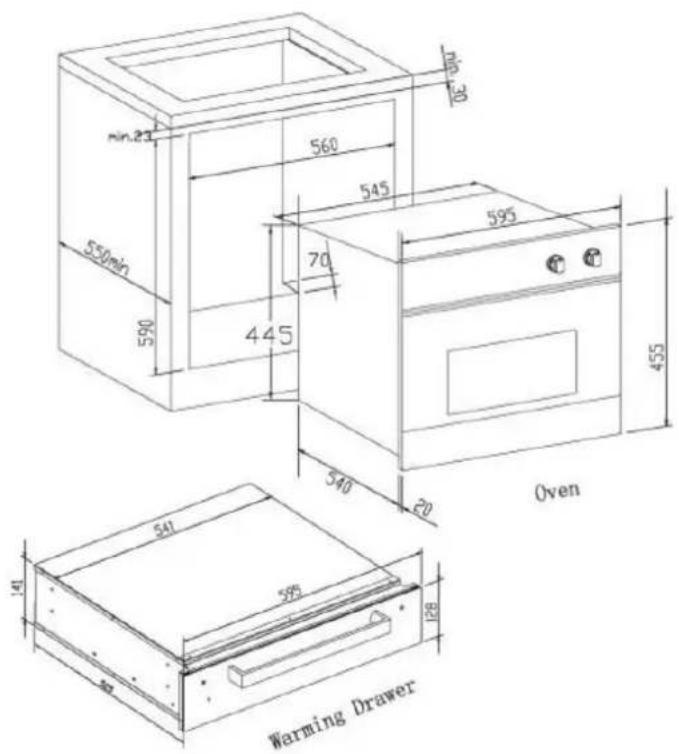
- For the most efficient air circulation, the oven should be fitted according to the dimensions shown in fig. 1-2 of page 2.
- The rear panel of the cabinet must be removed so that air can circulate freely. The panel to which the oven is fitted should have a gap of at least 70 mm at the rear.
NB: where ovens are to be matched with hobs, it is essential to follow the instructions contained in the booklet supplied with the other appliance.
IMPORTANT
- During use the appliance becomes hot, Care should be taken to avoid touching heating elements inside the oven.
- Accessible parts may become hot during use. Yong children should be kept away.
- Do not use harsh abrasive cleaners or sharp metal scrapers to clean the oven door glass since they can scratch the surface, which may result in shattering of the glass.
For a built-in oven to work well the cabinet must be of the right type.
The panels of the adjoining furniture should be heat resistant. Particularly when the adjoining furniture is made of veneered wood, the adhesives should be able to withstand a temperature of 120€. Plastic materials or adhesive which cannot withstand this temperature will become deformed or unstuck.
To comply with safety regulations, once the appliance has been fitted it should not be possible to make contact with the electrical parts.
All parts which offer protection should be fixed in such a way that they cannot be removed without the use of a tool.
Ensure that the appliance is switched off before replacing the lamp to avoid the possibility of electric shock.
CONNECTION TO THE MAINS SUPPLY
THE APPLIANCE MUST BE CONNECTED ACCORDANCE WITH THE RULES CURRENTLY. IT CAN ONLY BE HANDLEDBY AN AUTHORIZED ELECTRICAL INSTALLER IF IN FORCE.
WARNING: THIS APPLIANCE MUST BE EARTHED
- Check that the power rating of the mains supply and of the sockets are suitable for the maximum power of the appliance as indicated on the specification plate.
- plug should be accessible after installation. Fit the plug into a socket fitted with a third contact which corresponds with the earth connection. This should be properly connected.
- If the appliance just fitted with supply leads but does not come already fitted with a plug, then permanently connect to fixed wiring as follow:
- The “yellow/green” earth wire, which must be connected to terminal, has to be about 10mm longer than the other wires; the “blue” neutral wire has to be connected to the terminal marked with letter N.
“Black, brown, red” live wires have to be connected to terminal L. Mains connection can also be made by fitting a double pole switch with a minimum gap between the contacts of 3mm, proportionate to the load and complying with the regulations in force.
The yellow/green earth wire should not be controlled by the switch.
The plug or a double pole switch used for mains supply connection should be easy to get at, once the appliance is in position.
IMPORTANT :
position the mains supply cable so that it is never subjected to a temperature which is more than 50€ above ambient temperature.
- The electrical safety of the appliance can only be guaranteed when it has been correctly connected to an efficient earthed power supply, as laid down in the regulations for electrical safety.
- The manufacturer cannot be held responsible for any damage to persons or objects due to lack of an earth connection.
flowchart
graph TD
    A["CALENTAMIENTO INFERIOR + VENTILADOR"] --> B["/ LJ KW"]
    C["CALENTAMIENTO SUPERIOR + CALENTAMIENTO INFERIOR + VENTILADOR"] --> D["' HIURVW"]
    E["CALENTAMIENTO SUPERIOR + INFERIOR"] --> F["% RWARP □+ HDWHU"]
    G["CALENTAMIENTO INTERNO SUPERIOR"] --> H["CALENTAMIENTO CI"]
 | Lights in Cavity |
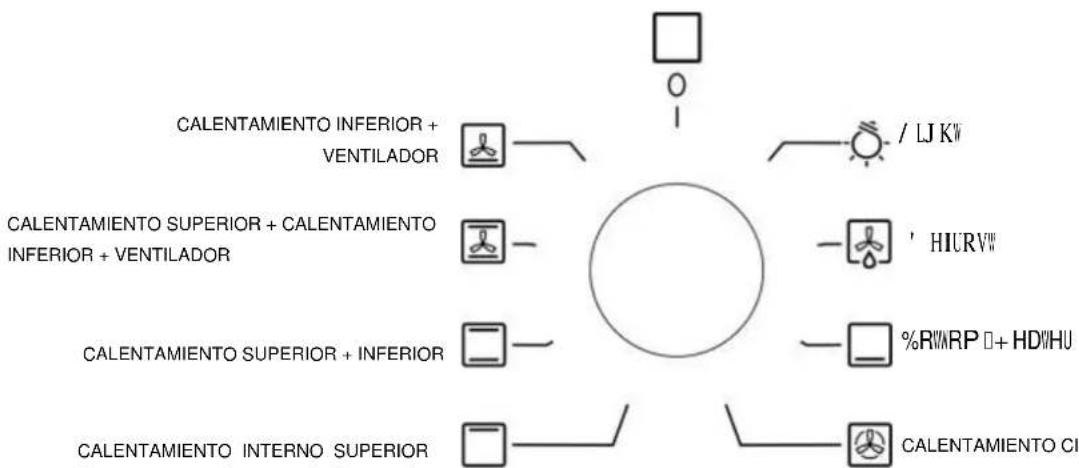
 | DDoeffroossttiinngg wwiitthh ffaannThe air at ambient temperature is distributed inside the oven for defrosting food more quickly and without proteins adulteration. |
 | Bottom HeaterThis function is particularly indicated for cooking from the bottom, warming up food or sterilizing glass jars. It is also indicated for food requiring long and slow cooking, i.e. casserole. This function can be used between 50 and MAX°C. |
 | Fan ovenBoth the fan and the circular heating element operate together. The hot air adjustable between 50 and MAX°C is evenly distributed inside the oven. This is ideal for cooking several types of food (meat, fish) at the same time without affecting taste and smell. It is indicated for delicate pastries. |
 | Top HeaterIt is indicated for grilling and gratinating small quantities of traditional food. This function can be used with closed door for very short times (5-10 minutes). For longer times, this function must always be used with half-open door and control protection in position. |
 | Conventional oven with rotisserieA conventional oven works on the principle that heat rises. It is hotter at the top than at the bottom - ideal for cooking meat in different side simultaneously. |
 | Intensive BakeThe oven is heated by top and bottom elements and the fan mounted in the back panel helps to distribute heat throughout the oven. Suitable for perfect pastry, no need to blind bake. |
 | Lower heating element + FanThe air which is heated by the lower heating element is circulated by the fan and so helps to distribute the heat between 50 and 200°C. This function can be used for sterilizing glass jars. |
- Features
24 hours clock with automatic programme and minutes counter
● Functions
Cooking time, cooking end time, manual position, clock, minutes counter, times to be set up to 23 hours 59 minutes.
- Display
4-figures, 7 segments display for cooking times and time of day.
Cooking time and manual function = saucepan symbol
Automatic function =AUTO
Minutes counter =bell symbol
The symbols light up when the corresponding function isselected
- Setting
To set. Press and release the desired function, and set the time with +and buttons within 5 seconds.
● Key + and -
The +and buttons increase or decrease the time at a speed depending on how long button is pressed
- Setting the time
Press any two buttons (cooking time, end time, minutes counter) at the same time, and + or button to set the desired time. This deletes any previously set programme.
The contacts are switched off and the AUTO symbol flashes.
- Manual use
By pressing the manual button the relay contacts switch on, the AUTO symbol switches off and saucepan symbol lights up. Manual operation can only be enabled after the automatic programme is over or it has been cancelled.
● Automatic use
Press the cooking time or endtime button to automatically form the manual to the automatic function.
- Semi-automatic use with cooking time setting
Press the cooking time button and set the desired time with +or-, the AUTO and cooking time symbols light up continuously. The relay switches on immediately. When the cooking end time corresponds to the time of day, the relay and the cooking time symbol switch off. The sound signal rings and the AUTO symbol flashes.
- Semi-automatic use with end time setting
Press the end time button. The time of day appears on the display. Set the cooking end time with +button. The AUTO and cooking time symbols light up continuously. The relay contacts switch on. When the cooking end time corresponds to the time of day, the relay and the cooking time symbol switch off. When the cooking time is up. The AUTO symbol flashes, the sound signal rings and both the relay and the cooking time button switch off.
● Automatic use with cooking time and end time setting
Press the cooking time button and select the length of the cooking time with +or button. The AUTO and cooking time symbols light up continuously. The relay switches on. By pressing the cooking end time button the next cooking end time appears on the display. Set the cooking end time with +button. The relay and the cooking time symbol switch off. The symbol lights up again when the time of day corresponds to the cooking start time. When the cooking time is up, the AUTO symbol flashes, the sound signal rings, the cooking time symbol and the relay switch off
- Minutes counter
Press the minutes counter button and set the cooking time with +or button.
The bell symbol lights up when the minutes counter is operating, when the set time is up, the sound rings and the bell symbol switches off.
- Sound signal
The sound signal starts at the end of a programme or of the minutes counter function and it lasts for 15 minutes.
To stop it, push any functions button.
- Start programme and check
The programme will start in 4 seconds after it has been set. The programme can be checked at any time by pressing the corresponding button.
- Setting error
A setting error is made if the time of day on the clock falls within the cooking start and end times. To correct the setting error, change the cooking time or cooking end time therelays switch off when a setting error is made.
- Cancelling a setting
To cancel a setting, press the cooking time button and then press the button until 00:00 appears on the display. A set programme will be automatically cancelled on completion.
Display Panel
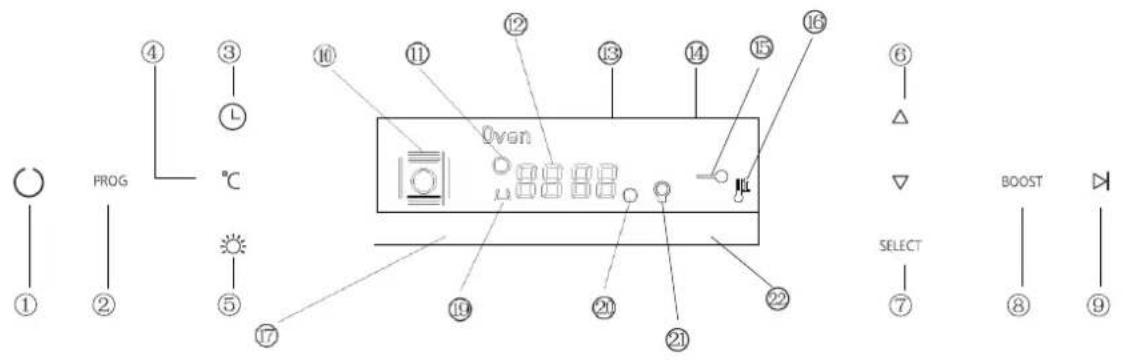
Touch Button Description
①Power
②Function
③Timer
④Temperature
⑤Light
⑥Plus/Minus
⑦ OK
⑧Rapid Heat-up
⑨Start / Pause
Display Description
⑩ Function
⑪ Time
⑫ Actual Temperature/Time
⑬ Set Temperature
⑭ Current Time
⑮ Safety Lock
⑯ Rapid Heat-up
⑰ Cooking Duration Time
⑲ Alarm
⑳ Heating Indicator
②1 Light
② Cooking End Time
Operation
- Power Switch. To turn on/off the display panel. Will show current time when turn on the display.
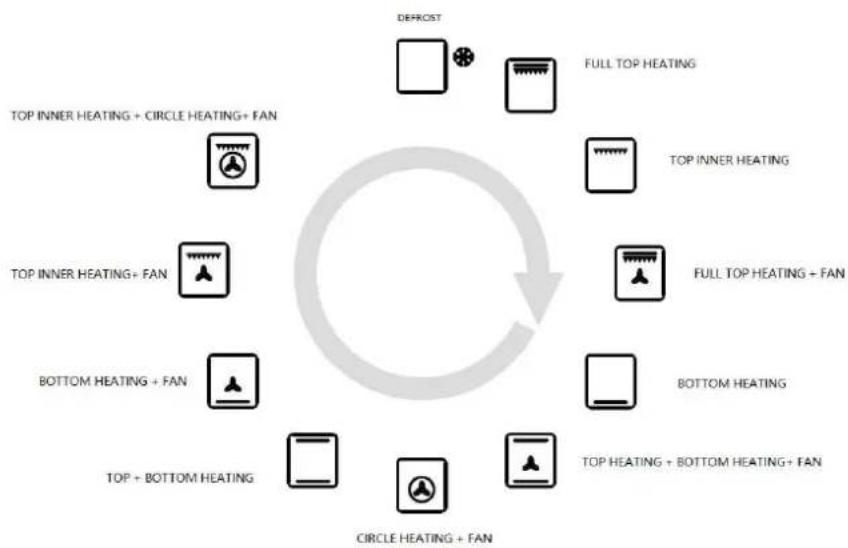
- Function Switch. Pressing it to shift to different function. When you shift to new function, current function will stop and cooking time must be reset. Function list as following,
flowchart
graph TD
    A["DEFROST"] --> B["FULL TOP HEATING"]
    C["TOP INNER HEATING + CIRCLE HEATING + FAN"] --> D["FULL TOP HEATING + FAN"]
    E["TOP INNER HEATING + FAN"] --> F["FULL TOP HEATING + FAN"]
    G["BOTTOM HEATING + FAN"] --> H["TOP HEATING + BOTTOM HEATING + FAN"]
    I["TOP + BOTTOM HEATING"] --> J["CIRCLE HEATING + FAN"]
    K["FULL INNER HEATING"] --> L["FULL INNER HEATING"]
    M["TOP HEATING"] --> N["FULL TOP HEATING"]
    O["TOP + BOTTOM HEATING"] --> P["CIRCLE HEATING + FAN"]
- Start/Pause Switch . When you shift to new function, press it to start cooking.
During start status, display show current oven temperature. For example,

While display show current time during pause status. For example,
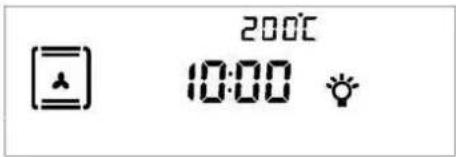
- Time Switch.
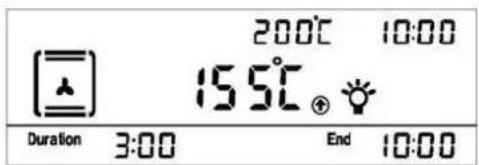
a/ Press switch for 3S to set current time. Adjust time number by pressing + / - . And press SELECT to confirm setting.
b/ Alarm setting. Press switch until ⏻ keep flashing. Display will show"0:00". Adjust time number by pressing + / - . And press SELECT to confirm setting. Set time number back to "0:00" to cancel alarm.
c/ Set the cook time. Press switch until display show "Duration" and "End". Adjust time number by pressing + / - . And press _ to confirm setting. Start working time = End time - Duration time.
-
Safety Lock Pressing for 5S to enter or cancel safety lock.
-
Temperature Setting. After function is selected, press °C to set temperature. Adjust temperature number by pressing +/−. And press SELECT to confirm setting.
-
Rapid Heat-up BOOST. If temperature is set more than 100°C, can press this key to heat up oven faster.
Display will show
- Light Light will be off if no operation in 3 minutes.
How to keep Your Oven in Shape
This appliance is for household use only, don't use it outdoors!
Important: Unplug your oven before cleaning, or performing maintenance!
To extend the life of your oven, it must be cleaned frequently, keeping in mind that:
5 Do not uses steam equipment to clean the appliance.
5 To protect against the risk of electrical shock, do not immerse the unit, cord or plug in water or other liquid or sprinkle water to clean the appliance!
5 Don't clean the appliance when it still hot! The inside and external surface of the oven should preferably be cleaned by damp cloth when it is cooled down.
5 Wash all accessories in hot sudsy water or in a dishwasher, wipe dry with a paper or cloth towel.
5 If you use your oven for an extended period of time, condensation may form. Dry it using a soft cloth.
5 There is a rubber seal surrounding the oven opening which guarantees its perfect functioning. Check the condition of this seal on a regular basis. If necessary, clean it and avoid using abrasive products or objects to do so. Should it become damaged, please contact your nearest After-sales Service Centre. We recommend you avoid using the oven until it has been repaired.
5 Never line the oven bottom with aluminium foil, as the consequent accumulation of heat could compromise the cooking and even damage the enamel.
5 Clear the glass door using damp cloth and dry it with a soft cloth.
Do not use harsh abrasive cleaners or sharp metal scrapers to clean the oven door glass since they can scratch the surface, which may result in shattering of the glass.
Replacing the Lamp in the Oven
5 Unplug your oven!
5 Remove the glass cover of the lamp-holder.
5 Remove the light bulb and replace it with a similar one
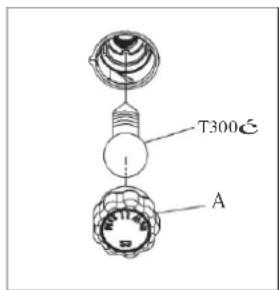
- Voltage: AC220V-240V
- Wattage: 15W
- Cap: E14
5 Remount the glass cover and reconnect the appliance to the power supply.
! Do not touch the light bulb directly with your hands.
WARNING: Ensure that the appliance is unplugged before replacing the lamp to avoid the possibility of electric shock.
Warning: Do not operate appliance with damaged cord or plug or after the appliance malfunctions, or has been damaged in any manner, return appliance to the nearest Authorized Service Center for examination. Repair, or adjustment!
USEFUL NOTES FOR COOKING
In the following table, some indicative hints for cooking:
| FAULTS | CAUSES | REMEDIES |
| The upper crust is dark and the lower part too pale | Not enough heat from the bottom | - Use the natural convection position- Use deeper cake tins- Lower the temperature- Put the cake on a lower shelf |
| The lower part is dark and the upper crust too pale | Excessive heat from the bottom | - Use the natural convection position- Use lower side tins- Lower the temperature- Put the cake on a higher shelf |
| The outside is too cooked and the inside not cooked enough | Too high temperature | - Lower the temperature and increase the cooking time |
| The outside is too dry even though of the right color | Too low temperature | - Increase the temperature and reduce the cooking time. |
Protective kit
During operation, the oven glass door and adjacent parts of the appliance become hot. Make sure, therefore, that children do not touch the appliance.
This appliance is not intended for use by persons (including children) with reduced physical, sensory or mental capabilities or lack of experience and knowledge, unless they have been given supervision or instruction concerning use of the appliance by a person responsible for their safety.
Children should be supervised to ensure that they do not play with the appliance.
For greater safety, an additional child-safety device is available from our Head Office and our Authorised Service Centres (see enclosed list). When ordering this, please give the code: BAB-followed by the appliance model. The model is stamped on the plate which is visible on the front part of the oven upon opening the door.
Disassembling/assembling the oven door
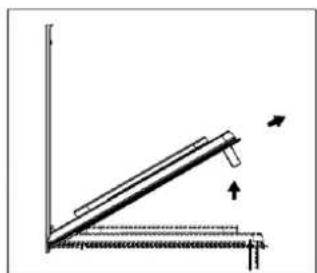
To make it easier to clean the inside of your oven, the oven door can be removed, by proceeding as follows (fig. 11):
s Open the door completely and lift the 2 levers "B" (fig.11-1);
5 Now, shutting the door slightly, you can lift it out by pulling out the hooks "A" as shown in figure 2.
To reassemble the door:
5 With the door in a vertical position, insert the two hooks "A" into the slots;
5 Ensure that seat "D" is hooked perfectly onto the edge of the slot (move the oven door backwards and forward slightly);
5 Keep the oven door open fully, unhook the 2 levers "B" downwards and then shut the door again.
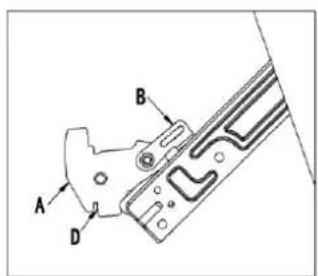
Fig.11-1
natural_image
Simple line drawing of a ladder leaning against a wall, with arrows indicating motion direction (no text or symbols)Fig.11-2
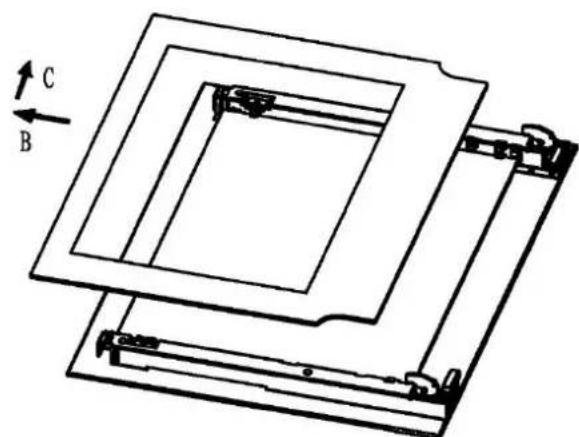
Instruction of Removable Glazing Door
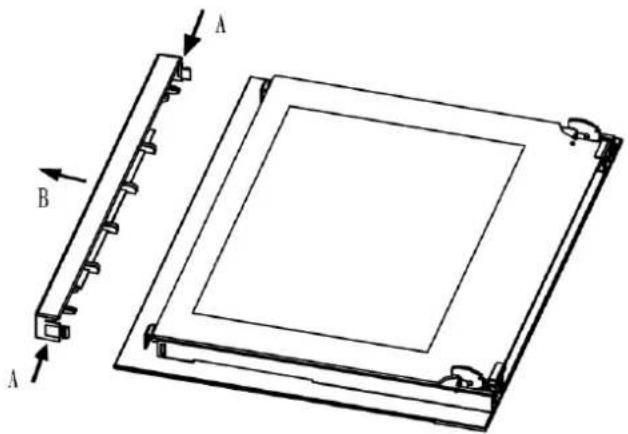
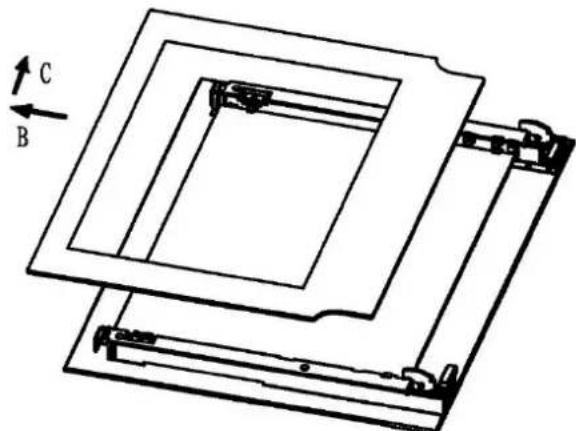
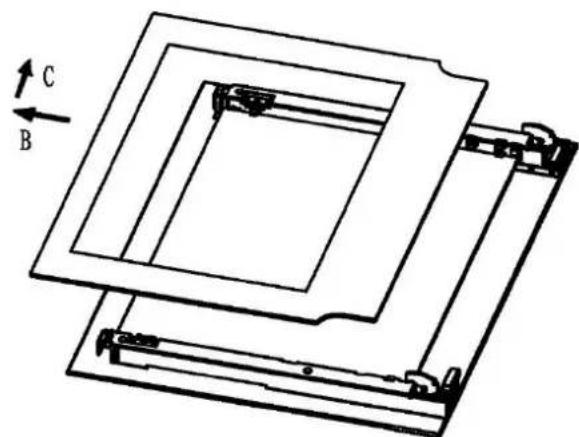
The oven door is made up of 2 panes of glass and has vents at the top and bottom. When the oven is operating, air is circulated through the door to keep the outer pane cool. If condensation has worked its way in between the glass panes, the door can be dismantled in order to clean in between the panes.
Remove the door as per above instruction and place it on a protective surface (e.g. on a table cloth) to prevent it getting scratched. The door handle should line up with the edge of the table. Make sure the glass lies flat to avoid breakage of glass during cleaning.
- Press the button on left and right side of door, take out top rail. (Fig.1)
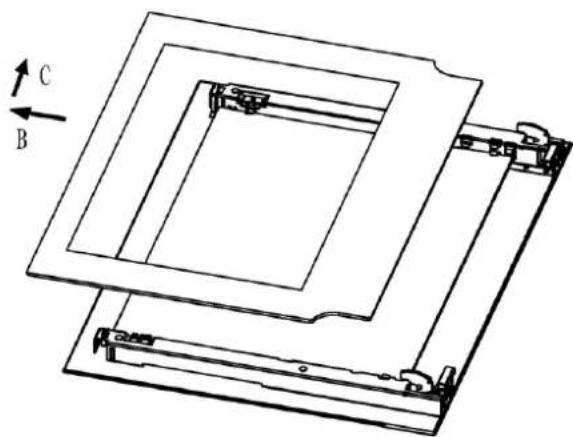
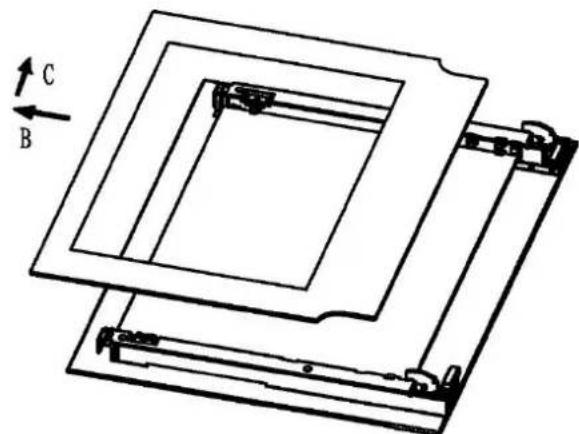
- Take out inner glass slowly (Fig.2)
Clean the glass panes and other parts with a damp microfibre cloth.
or a clean sponge and a solution of hot water with a little washing-up liquid. Wipe dry using a softcloth.
natural_image
Technical line drawing of a square electronic component with labeled parts A and B (no text or symbols beyond labels)Fig.1
natural_image
Technical line drawing of a mechanical assembly with labeled components A, B, and C (no text or symbols beyond labels)Fig.2
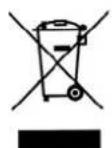
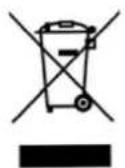
This product must not be disposed together with the domestic waste. This product has to be disposed at an authorized place for recycling of electrical and electronic appliances.
By collecting and recycling waste, you help save natural resources, and make sure the product is disposed in an environmental friendly and healthy way.
Important: if you decide not to use the oven any more, it should be made inoperable by cutting the power supply cable, after unplugging it from the power supply. Disused appliances can be a safety risk as children often play with them. For this reason it is advisable to make the oven safe.
FOUR ÉLECTRIQUE
45 cm
MANUEL D'INSTRUCTIONS
INSTRUCTIONS D'UTILISATION
AVERTISSEMENTS GÉNÉRAUX
natural_image
Technical line drawing of an oven with labeled components (no text or symbols beyond labels)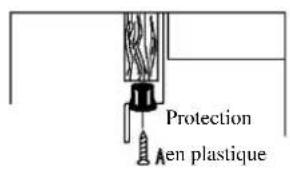
natural_image
Diagram of a ladder leaning against an inclined plane, with arrows indicating direction (no text or symbols)Fig. 11-2
natural_image
Technical diagram of a rectangular electronic component with labeled parts A and B, showing internal structure and mounting points (no text or symbols beyond labels)Fig. 1
natural_image
Technical line drawing of a mechanical assembly with labeled components A, B, and C (no text or symbols beyond labels)Fig. 2
MANUAL DE INSTRUÇÕES
natural_image
Diagram of a ladder leaning against an inclined plane, with arrows indicating motion direction (no text or symbols)Fig.11-2
natural_image
Technical diagram of a rectangular electronic component with labeled parts A and B, showing internal structure and mounting points (no text or symbols beyond labels)Fig. 1
natural_image
Technical line drawing of a layered mechanical assembly with labeled components A, B, and C (no text or symbols beyond labels)Fig. 2
natural_image
Line drawing of an oven with labeled components (A and C), no text or symbols present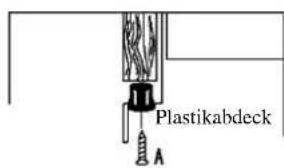
EINBAU DES GERÄTS
natural_image
Diagram of a ladder leaning against a vertical wall, with arrows indicating upward motion (no text or symbols)Abb. 11-2
natural_image
Technical diagram of a rectangular electronic component with labeled parts A and B, showing internal structure and mounting points (no text or symbols beyond labels)Abb. 1
natural_image
Technical line drawing of a layered mechanical assembly with labeled components A, B, and C (no text or symbols beyond labels)Abb. 2
- Instrucció n de la puerta con acristalamiento extraí ble
- ATTENTION
- SAFETY
- Safety is a good habit to get into
- Avoid the following:
- WARNING
- Qualified personnel must be contacted in the following cases:
- Service Centers authorized by the manufacturer must be contacted in the following cases:
- It is a good idea to do as the following:
- SPECIFICATION
- INDICATOR LIGHTS
- INSTALLING THE APPLIANCE
- IMPORTANT: Unplug your oven before
- performing installation or maintenance!
- FITTING THE APPLIANCE
- IMPORTANT
- CONNECTION TO THE MAINS SUPPLY
- WARNING: THIS APPLIANCE MUST BE EARTHED
- The yellow/green earth wire should not be controlled by the switch.
- IMPORTANT :
- - Features
- ● Functions
- - Display
- - Setting
- ● Key + and -
- - Setting the time
- - Manual use
- ● Automatic use
- - Semi-automatic use with cooking time setting
- - Semi-automatic use with end time setting
- ● Automatic use with cooking time and end time setting
- - Minutes counter
- - Sound signal
- - Start programme and check
- - Setting error
- - Cancelling a setting
- Display Panel
- Touch Button Description
- Display Description
- Operation
- How to keep Your Oven in Shape
- Do not uses steam equipment to clean the appliance.
- Replacing the Lamp in the Oven
- USEFUL NOTES FOR COOKING
- Protective kit
- Instruction of Removable Glazing Door
- INSTRUCTIONS D'UTILISATION
- AVERTISSEMENTS GÉNÉRAUX
- EINBAU DES GERÄTS
Brand : NODOR
Model : NorChef MO 4800 DB
Category : Oven