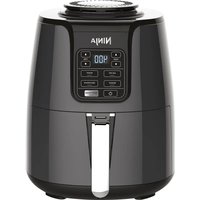
AF101 - Deep fryer NINJA - Free user manual and instructions
Find the device manual for free AF101 NINJA in PDF.


| Brand | Ninja |
| Model | AF101 |
| Product Type | Air Fryer |
| Voltage | 120 V, 60 Hz |
| Power | 1550 W |
| Basket Capacity | 5.5 L (approx) |
| Dimensions (W × D × H) | 30 × 30 × 30 cm (approx) |
| Weight | 5 kg (approx) |
| Cooking Functions | Air Frying, Roasting, Reheating, Dehydrating |
| Basket Material | Ceramic Coating |
| Maximum Temperature | 204 °C (400 °F) |
| Timer | Integrated, adjustable up to 23 minutes |
| Recommended Preheating | 3 minutes |
| Sleep Mode | After 10 minutes of inactivity |
| Basket Cleaning | Dishwasher safe (basket and tray) |
| Main Unit Cleaning | Wipe with a damp cloth |
| Safety | Auto shut-off, cool-touch handle, overheat protection |
| Included Accessories | Crisper plate |
| Spare Parts Available | Yes (ninjaaccessories.com) |
| Warranty | 1 year limited |
Frequently Asked Questions - AF101 NINJA
User questions about AF101 NINJA
0 question about this device. Answer the ones you know or ask your own.
Ask a new question about this device
Download the instructions for your Deep fryer in PDF format for free! Find your manual AF101 - NINJA and take your electronic device back in hand. On this page are published all the documents necessary for the use of your device. AF101 by NINJA.
USER MANUAL AF101 NINJA
natural_image
Black Ninja air fryer with control panel and side arm (no visible text or symbols on device body)THANK YOU
for purchasing the Ninja® Air Fryer

REGISTER YOUR PURCHASE

registryourninja.com

n QR code using mobile device
RECORD THIS INFORMATION
Model Number:
Serial Number:
Date of Purchase:
(Keep receipt)
Store of Purchase:
TECHNICAL SPECIFICATIONS
Voltage: 120V, 60Hz
Watts: 1550W
TIP: You can find the model and serial numbers on the QR code label located on the back of the unit by the power cord.
CONTENTS
Important Safeguards ....3
Parts 5
Getting to Know Your Air Fryer 6
Function Buttons 6
Operating Buttons 6
Before First Use....6
Using Your Air Fryer....7
Using the Cooking Functions....7
Air Fry 7
Roast 9
Reheat 10
Dehydrate....11
Cleaning & Maintenance 12
Cleaning Your Air Fryer....12
Helpful Tips 12
Replacement Parts 12
Troubleshooting Guide 13
Warranty 14
IMPORTANT SAFEGUARDS
HOUSEHOLD USE ONLY • READ ALL INSTRUCTIONS BEFORE USE
Read all instructions before using your Ninja Air Fryer.
When using electrical appliances, basic safety precautions should always be followed, including the following:
⚠ WARNING
1DONOT use an extension cord.
A short power-supply cord is used to reduce the risk of children grabbing the cord or becoming entangled and to reduce the risk of people tripping over a longer cord.
2 This appliance has a polarized plug (one blade is wider than the other). To reduce the risk of electric shock, this plug is intended to fit into a polarized outlet only one way. If the plug does not fit fully into the outlet, reverse the plug. If it still does not fit, contact a qualified electrician. DO NOT attempt to modify the plug in any way.
3 To eliminate a choking hazard for young children, remove and discard the protective cover fitted on the power plug of this appliance.
4 ALWAYS ensure the appliance is properly assembled before use.
5 DO NOT touch hot surfaces. Appliance surfaces are hot during and after operation. To prevent burns or personal injury, ALWAYS use protective hot pads or insulated oven mitts and use available handles and knobs.
6 Intended for countertop use only. DO NOT place the appliance near the edge of a countertop during operation. Ensure the surface is level, clean, and dry.
7 DO NOT place on or near a hot gas or electric burner or in a heated oven.
8 Extreme caution must be used when moving an appliance containing hot oil or other hot liquids.
9 To protect against electrical shock DO NOT immerse cord, plugs, or main unit housing in water or other liquid.
10 Unplug from outlet when not in use and before cleaning. Allow to cool before putting on or taking off parts.
11 Extreme caution must be used when the appliance contains hot food. Improper use may result in personal injury.
12 Extreme caution must be used when moving an appliance containing hot oil or other hot liquids.
13 DO NOT use this appliance for deep-frying with oil.
14 ALWAYS ensure basket is properly closed before operating.
15 DO NOT allow young children to operate the appliance or use as a toy. Close supervision is necessary when any appliance is used near children.
16 Regularly inspect the appliance and power cord. DO NOT use the appliance if there is damage to the power cord or plug. If the appliance malfunctions or has been damaged in any way, immediately stop use and call Customer Service. Return the appliance to SharkNinja Operating LLC for examination, repair, or adjustment.
17 The use of accessory attachments not recommended or sold by SharkNinja may cause fire, electric shock, or injury.
18 This appliance is for household use only. DO NOT use this appliance for anything other than its intended use. DO NOT use in moving vehicles or boats. DO NOT use outdoors. Misuse may cause injury.
19 DO NOT clean with abrasive cleaners, steel wool, or scouring pads.
20 Spilled food can cause serious burns. Keep appliance and cord away from children. DO NOT let cord hang over edges of tables or counters or touch hot surfaces. NEVER use an outlet below counter, and NEVER use with an extension cord.
21 To prevent food contact with the heating elements, DO NOT overfill the basket.
22 DO NOT cover the air intake vent or air outlet vent while unit is operating. Doing so will prevent even cooking and may damage the unit or cause it to overheat.
23 The crisper plate becomes extremely hot during the cooking process. Avoid hot steam and air while removing the basket from the appliance. ALWAYS place plate on a heat-resistant surface after removing. DO NOT touch accessories during or immediately after cooking.
24 NEVER connect this appliance to an external timer switch or separate remote-control system.
25 Should the unit emit black smoke, unplug immediately and wait for smoking to stop before removing the cooking basket.
26 Let the appliance cool for approximately 30 minutes before handling, cleaning, or storing.
27 When using this appliance, provide adequate space above and on all sides for air circulation.
28 Make sure the unit is clean before using.
29 Please refer to the Cleaning & Maintenance section for regular maintenance of the appliance. Return the appliance to SharkNinja Operating LLC for any other servicing.
30 Outlet voltages can vary, affecting the performance of your product. To prevent possible illness, use a thermometer to check that your food is cooked to the temperatures recommended by the Food and Drug Administration.
SAVE THESE INSTRUCTIONS
PARTS & ACCESSORIES
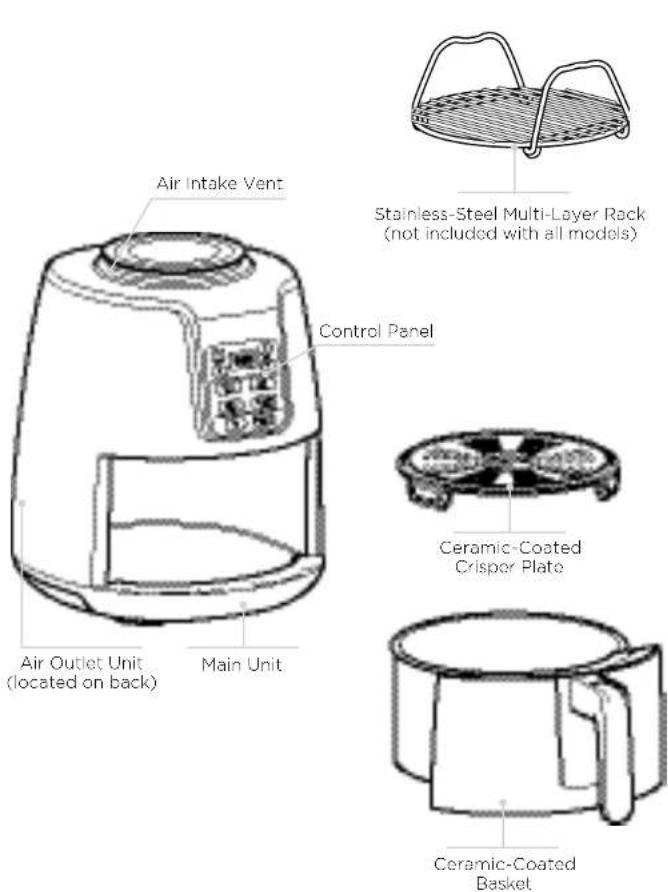
GETTING TO KNOW YOUR AIR FRYER
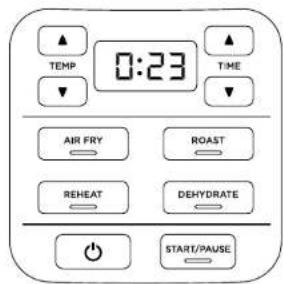
When setting time, the digital display shows HH:MM. Display currently reads 23 minutes.
FUNCTION BUTTONS
AIR FRY: Use this function to give your food crispiness and crunch with little to no oil.
ROAST: Use the unit as a roaster oven for tender meats, baked treats, and more.
DEHYDRATE: Dehydrate meats, fruits, and vegetables for healthy snacks.
REHEAT: Revive leftovers by gently warming them, leaving you with crispy results.
OPERATING BUTTONS
TEMP arrows: Use the up and down TEMP arrows to adjust the cook temperature before or during cooking.
TIME arrows: Use the up and down TIME arrows to adjust the cook time in any function.
START/PAUSE button: After selecting the time and temperature, start cooking by pressing the START/PAUSE button. You can stop cooking at any time by pressing this button again.
Power button: The Power button shuts off the unit and stops all cooking modes.
STANDBY MODE
After 10 minutes with no interaction with the control panel, the unit will enter standby mode. The Power button will be dimly lit.
BEFORE FIRST USE
1 Remove and discard any packaging material, promotional labels, and tape from the unit.
2 Remove all accessories from the package and read this manual carefully. Please pay particular attention to operational instructions, warnings, and important safeguards to avoid any injury or property damage.
3 Wash the ceramic-coated basket and crisper plate in hot, soapy water, then rinse and dry thoroughly. NEVER clean the man unit in the dishwasher.
USING YOUR AIR FRYER
USING THE COOKING FUNCTIONS
To turn on the unit, first plug the power cord into a wall outlet. Press the power button.
Air Fry
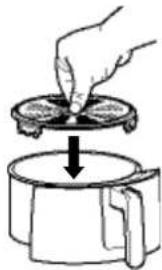
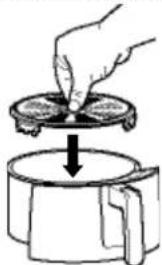
1 Ensure the crisper plate is in the basket.
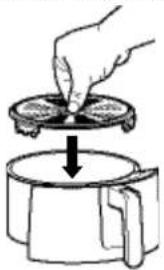
natural_image
Illustration of a hand pressing down on a circular object into a container (no text or symbols)2 Press Air Fry button. The default temperature setting will display. Use the TEMP up and down arrows to set your desired temperature.
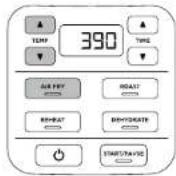
NOTE: It is recommended to let the unit preheat for 3 minutes before adding ingredients. If preheating, skip step 4, insert the basket, and press the START/PAUSE button to begin.
3 Press the TIME up and down arrow buttons to set your desired cook time.
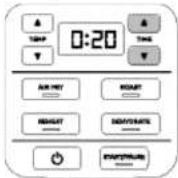
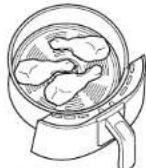
4 Place ingredients on the crisper plate that is assembled in the basket. Insert the basket in the unit.
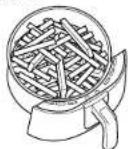
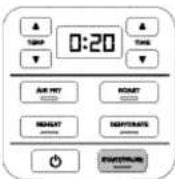
5 Press START/PAUSE to begin cooking.
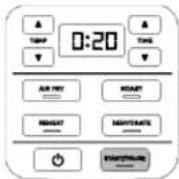
NOTE: To shake or toss ingredients during cooking, press START/PAUSE to pause cooking. Remove basket and shake it back and forth to toss ingredients. Reinsert basket and press START/PAUSE to resume cooking.
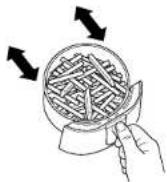
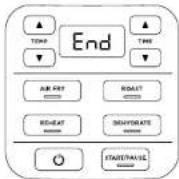
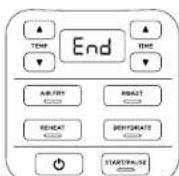
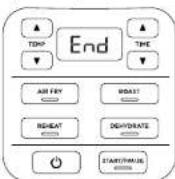
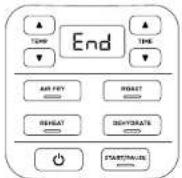
6 When cooking is complete, the unit will beep and END will appear on the control panel display.
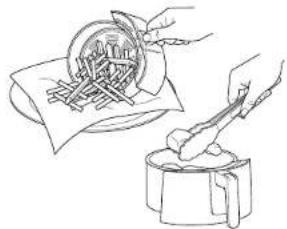
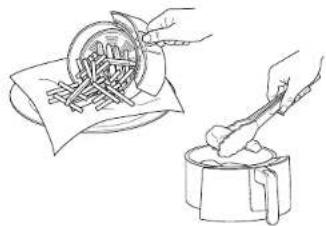
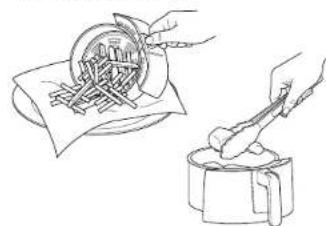
7 Remove ingredients by dumping them out or by using oven mitts or silicone-tipped tongs/utensils.
natural_image
Illustration of hands preparing food with a bowl and utensils (no text or symbols)USING YOUR AIR FRYER - CONT.
Roast
1 Ensure the crisper plate is in place if needed. If you are using a baking dish, the crisper plate is not needed.
natural_image
Illustration of a hand pressing down on a circular object into a container (no text or symbols)2 Press the ROAST button. The default temperature setting will display. Use the TEMP up and down arrow buttons to set your desired temperature.
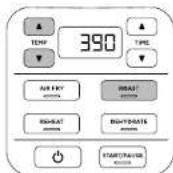
NOTE: It is recommended to let the unit preheat for 3 minutes before adding ingredients. If preheating, skip stop 4, insert the basket, and press the START/PAUSE button to begin.
3 Press the TIME up and down arrows to set your desired cook time.
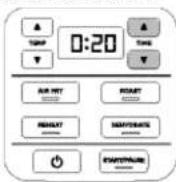
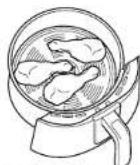
4 Add ingredients to the basket. Insert the basket in the unit.
5 Press START/PAUSE to begin cooking.
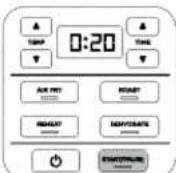
6 When cooking is complete, the unit will beep and END will appear on the control panel display.
7 Remove ingredients by dumping them out or by using oven mitts or silicone-tipped tongs/utensils.
natural_image
Illustration of two hands using a tool to clean or prepare food items, one pouring into a bowl and the other holding a container (no text or symbols visible)Reheat
1 Ensure the crisper plate is in the basket.
natural_image
Hand pouring liquid into a container with a downward arrow indicating flow (no text or symbols)2 PresstheREHEAT button. The default temperature setting will display. Use the TEMP up and down arrow buttons set your desired temperature.
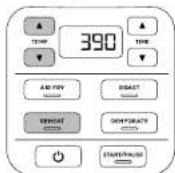
NOTE: It is recommended to let the unit preheat for 3 minutes before adding ingredients. If preheating, skip step 4, insert the basket, and press the START/PAUSE button to begin.
3 Press the TIME up and down arrows to set your desired cook time.
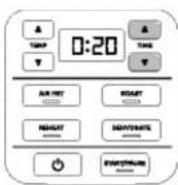
4 Add ingredients to the basket. Insert the basket in the unit.
5 Press the START/PAUSE button to begin cooking.
6 When cooking is complete, the unit will beep and END will appear on the control panel display.
7 Remove ingredients by dumping them out or by using oven mitts or silicone-tipped tongs/ulensils.
natural_image
Line drawing showing hands using a tool to cut or spread food items on a plate, with no visible text or symbols.9 10ningjakitchen.com
USING YOUR AIR FRYER - CONT.
Dehydrate
1 Place your first layer of ingredients in the bottom of the basket. Then install the crisper plate inside the basket and set a second layer of ingredients on the crisper plate.
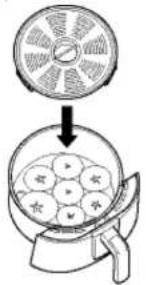
2 Insert the basket in the unit.
3PresstheDEHYDRATE button. The default temperature will display. Use the TEMP up and down arrow buttons to set your desired temperature.
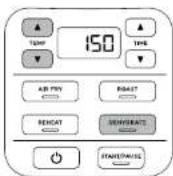
4 Press the TIME up and down arrow buttons to set your desired cook time.
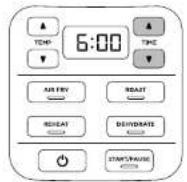
5 Press the START/PAUSE button to start dehydrating.
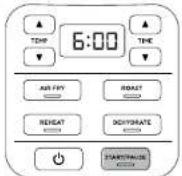
6 When dehydrating is complete, the unit will make a beep sound and END will appear on the control panel display.
NOTE: You can increase your dehydrating capacity with the multi-layer rack. If the rack is not included with your model, it is available for purchase at ninjaaccessories.com
CLEANING & MAINTENANCE
Cleaning Your Air Fryer
The unit should be cleaned thoroughly after every use.
1 Unplug the unit from the wall outlet before cleaning.
NOTE: NEVER immerse the main unit in water or any other liquid. NEVER clean the main unit in a dishwasher.
2 To clean the main unit and the control panel, wipe them clean with a damp cloth.
3 The basket, crispor plate, and any accessories can be washed in the dishwasher.
4 If food residue is stuck on the crisper plate or basket, place them in a sink filled with warm, soapy water and allow to soak.
5 Air-dry or towel-dry all parts after use.
6 Clean the heating element with a cleaning brush to remove any food residues.
HELPFUL TIPS
1 For consistent browning, make sure ingredients are arranged in an even layer on the bottom of the basket with no overlapping. If ingredients are overlapping, make sure to shake them halfway through the set cook time.
2 Cook time and temperature can be adjusted at any time during cooking. Simply press the up and down TIME or TEMP arrows to adjust the time or temperature.
3 To convert recipes from your conventional oven, reduce the temperature of the Air Fryer by 25°F. Check food frequently to avoid overcooking.
4 We recommend 3 minutes of preheating. You can use the built-in timer to set a 3-minute countdown.
5 Occasionally, the fan from the air fryer will blow lightweight foods around. To alleviate this, secure foods (like the top slice of bread on a sandwich) with toothpicks
6 The crisper plate elevates ingredients in the basket so air can circulate under and around them for oven, crisp results.
7 After a cooking function is selected, you can press the START/PAUSE button to begin cooking immediately. The unit will run at the default temperature and time.
8 For best results, remove food immediately after the cook time is complete to avoid overcooking.
9 For best results with fresh vegetables and potatoes, use at least 1 tablespoon of oil. Add more oil as desired to achieve the preferred level of crispiness.
10 For best results, check progress throughout cooking, and remove food when desired level of brownness has been achieved. We recommend using an instant-road thermometer to monitor internal temp of proteins. After the cook time is complete remove food immediately to avoid overcooking.
REPLACEMENT PARTS
To order additional parts and accessories, visit ninjaaccessories.com or contact Customer Service at 1-877-646-5288.
TROUBLESHOOTING GUIDE
- Why won't my temperature go any higher?
The max temperature is 400 °F
- How long does it take to preheat, and how will I know when it's done?
We recommend 3 minutes of preheating. You can use the built-in timer to set a 3-minute countdown.
- Should I add my Ingredients before or after preheating?
It is recommended to let the unit preheat for 3 minutes before adding ingredients.
- Do I need to defrost frozen foods before air frying?
It depends on the food! Follow package instructions.
• How do I make the countdown pause?
Press START/PAUSE
• Is the basket safe to put on my countertop?
The basket will heat during cooking. Use caution when handling, and place on heat-safe surfaces only.
• How do I know when to use the crisper plate?
Use the crisper plate when you want food to come out crispy. The crisper plate allows for food to be elevated in the basket allowing for air to go under the plate and evenly crisp ingredients.
• My food didn't cook.
Make sure the basket is fully inserted during cooking. For consistent browning, make sure ingredients are arranged in an even layer on the bottom of the basket with no overlapping. Shake loose ingredients for even crispiness. Cook time and temperature can be adjusted at any time during cooking. Simply press the up and down TIME or TEMP arrows to adjust the time or temperature.
• My food is burned.
For best results, check progress throughout cooking, and remove food when desired level of brownness has been achieved. Remove food immediately after the cook time is complete to avoid overcooking.
• Why is my food blowing around when air frying?
Occasionally, the fan from the air fryer will blow lightweight foods around. To alleviate this, secure foods (like the top slice of bread on a sandwich) with toothpicks.
• Can I air fry wet battered ingredients?
Yes, but use the proper breading technique. It is important to coat foods first with flour, then with egg, and then with bread crumbs. Be sure to press the bread crumbs onto the food with your hands. Because the air fryer has a powerful fan as part of its mechanism, breading can sometimes be blown off. Pressing the bread crumbs firmly on will help them adhere.
• The unit is beeping.
Your food is done cooking.
• The screen went black.
The unit is in standby mode. Press the power button to turn it back on.
- An "E" message appears on display screen.
The unit is not functioning properly. Please contact Customer Service at 1-877-646-5288
Shark | NINJA ONE (1) YEAR LIMITED WARRANTY
The 1-Year Limited Warranty applies to purchases made from authorized retailers of SharkNinja Operating LLC. Warranty coverage applies to the original owner and to the original product only and is not transferable.
SharkNinja warrants that the unit shall be free from defects in material and workmanship for a period of 1 year from the date of purchase when it is used under normal household conditions and maintained according to the requirements outlined in this instruction manual, subject to the following conditions and exclusions.
What is covered by my warranty?
-
The original unit and/or non-wearable components deemed defective, in SharkNinja's sole discretion, will be repaired or replaced for up to 1 year from the original purchase date.
-
In the rare event that a replacement unit is issued, the warranty coverage ends 6 months after the receipt date of the replacement unit or the remainder of the existing warranty, whichever is greater. If the unit is replaced, SharkNinja reserves the right to replace the unit with one of equal or greater value.
What is not covered by my warranty?
Our Customer Service and Product Specialists are available to provide all the warranty service options available to you, including the possibility of upgrading to our VIP Warranty Service Options for select product categories.
- Normal wear and tear of wearable parts (including removable basket, crisper plate, racks, and pans) that require regular maintenance and/or replacement to ensure the proper functioning of your unit are not covered by your warranty.
- Any unit that has been tampered with or used for commercial purposes.
- SharkNinja will cover the cost for the customer to send the unit to us for repair or replacement. A fee of \$19.95 for return shipping costs will be charged at the time of return shipment of the repaired or replacement unit.
- Damage caused by misuse, abuse, or negligent handling, or damage due to mishandling in transit.
- Consequential and incidental damages.
- Defects caused by or resulting from damages from shipping or from repairs, service, or alteration to the product or any of its parts that have been performed by a repair person not authorized by SharkNinja.
- Products purchased, used, or operated outside of North America.
Problems with your unit/How to get service:
If your appliance fails to operate properly while in use under normal household conditions within the warranty period, visit ninjelkitchen.com for product care/maintenance self-help. Our Customer Service and Product Specialists are also available at 1-877-646-5288 to assist with product support and warranty service options.
How to initiate a warranty claim:
You can call 1-877-646-5288 to have a Customer Service Specialist assist you. Please note, you must call 1-877-646-5288 to initiate a warranty claim. Return and packing instruction information will be provided at that time.
For Customer Service hours, visit ninjakitchen.com.
Replacement parts are available for purchase at ninjaaccessories.com. For more information on what are classified as wearable and non-wearable parts, visit ninjakitchen.com/warranty. This warranty gives you specific legal rights, and you may also have other rights that vary from state to state.
Some states do not permit the exclusion or limitation of incidental or consequential damages, so the above may not apply to you.
MERCI
natural_image
Simple geometric diagram with intersecting diagonal lines and a black arrow pointing downward (no text or symbols)natural_image
Two overlapping gray squares with diagonal lines forming a cross pattern (no text or symbols)UTILISATION DE VOTRE FRITEUSE À L'AIR CHAUD - SUITE
Roast (rôtir)
natural_image
Simple geometric diagram with diagonal lines and a black arrow, no text or symbols presentnatural_image
Two overlapping gray squares with diagonal lines forming an X-shape (no text or symbols)Réchauffer
natural_image
Simple diagram with two diagonal lines and a central arrow, no text or symbols presentnatural_image
Two overlapping gray squares with diagonal lines forming an X-shape (no text or symbols)9 10nijakitchen.com
UTILISATION DE VOTRE FRITEUSE À L'AIR CHAUD - SUITE
natural_image
Simple geometric diagram of two intersecting diagonal lines within a rectangle (no text or symbols)Reheat (recalentar)....10
Dehydrate (deshidratar) 11
natural_image
Simple geometric diagram with intersecting diagonal lines and a black arrow pointing downward (no text or symbols)natural_image
Two overlapping gray squares with diagonal lines forming triangles (no text or symbols)CÓMO USAR SU FREIDORA DE VAPOR - CONT.
Roast (rostizar):
natural_image
Simple geometric diagram with diagonal lines and a black arrow pointing downward (no text or symbols)natural_image
Two overlapping gray squares with diagonal lines forming a cross pattern (no text or symbols)Reheat (recalentar)
natural_image
Simple geometric diagram with diagonal lines and a central arrow (no text or symbols)natural_image
Two overlapping gray squares with diagonal lines forming a cross pattern (no text or symbols)9 10nijakitchen.com
CÓMO USAR SU FREIDORA DE VAPOR - CONT.
Dehydrate (deshidratar)
natural_image
Simple geometric diagram with two diagonal lines crossing inside a rectangle (no text or symbols)© 2018 SharkNinja Operating LLC AF101_IB_EN_FR_SP_MP_Mv1 IMPRIMÉ EN CHINE
SharkNinja Operating LLC EE. UU.: Needham, Massachusetts 02494 1-877-646-5288 ninjakitchen.com
© 2018 SharkNinja Operating LLC AF101_IB_EN_FR_SP_MP_Mv1 IMPRESO EN CHINA
SharkNinja Operating LLC US: Needham, MA 02494 1-877-646-5288 ninjakitchen.com
Illustrations may differ from actual product. We are constantly striving to improve our products, therefore the specifications contained herein are subject to change without notice.
NINJA is a registered trademark of SharkNinja Operating LLC.
For SharkNinja U.S. Patent information, visit sharkninja.com/uspatents.
© 2018 SharkNinja Operating LLC AF101_IB_EN_FR_SP_MP_Mv1 PRINTED IN CHINA
- THANK YOU
- REGISTER YOUR PURCHASE
- RECORD THIS INFORMATION
- TECHNICAL SPECIFICATIONS
- CONTENTS
- IMPORTANT SAFEGUARDS
- ⚠ WARNING
- SAVE THESE INSTRUCTIONS
- PARTS & ACCESSORIES
- GETTING TO KNOW YOUR AIR FRYER
- FUNCTION BUTTONS
- OPERATING BUTTONS
- STANDBY MODE
- BEFORE FIRST USE
- USING YOUR AIR FRYER
- USING THE COOKING FUNCTIONS
- Air Fry
- USING YOUR AIR FRYER - CONT.
- Roast
- Reheat
- Dehydrate
- CLEANING & MAINTENANCE
- Cleaning Your Air Fryer
- HELPFUL TIPS
- REPLACEMENT PARTS
- TROUBLESHOOTING GUIDE
- Shark | NINJA ONE (1) YEAR LIMITED WARRANTY
- What is covered by my warranty?
- What is not covered by my warranty?
- Problems with your unit/How to get service:
- How to initiate a warranty claim:
- MERCI
- UTILISATION DE VOTRE FRITEUSE À L'AIR CHAUD - SUITE
- Roast (rôtir)
- Réchauffer
- CÓMO USAR SU FREIDORA DE VAPOR - CONT.
- Roast (rostizar):
- Reheat (recalentar)
- Dehydrate (deshidratar)
- SharkNinja Operating LLC EE. UU.: Needham, Massachusetts 02494 1-877-646-5288 ninjakitchen.com
- SharkNinja Operating LLC US: Needham, MA 02494 1-877-646-5288 ninjakitchen.com
Brand : NINJA
Model : AF101
Category : Deep fryer