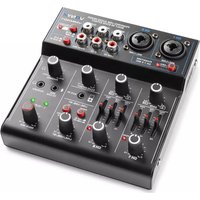
VMM401 - Mixer Vonyx - Free user manual and instructions
Find the device manual for free VMM401 Vonyx in PDF.


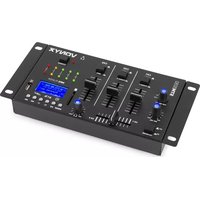
| Product Type | Mixing Console |
| Brand | Vonyx |
| Model | VMM401 |
| Power Supply | 220-240 V~, 50 Hz (mains); USB 5V/0.5A min. |
| Bluetooth Connectivity | Yes, range up to 10 m without obstacles |
| Microphone Inputs | 2 channels with XLR and 6.35 mm jack combo connectors |
| Line Inputs | 2 RCA pairs (stereo) for line sources |
| Auxiliary Input | 3.5 mm stereo jack |
| USB Input | USB 2.0 type B for computer or power supply |
| Main Output | RCA stereo |
| Headphone Output | 3.5 mm stereo jack |
| Phantom Power | +48 V on channels 1 and 2 (switchable) |
| Equalization | Adjustable treble and bass per channel |
| Echo Effect | Adjustable |
| Pan Control | Yes, per channel |
| LED Indicators | Clip, phantom power, saturation |
| Usage | Indoor only, temperature 5-35°C |
| Cleaning | Dry cloth, no chemicals |
| Safety | Do not open, keep out of reach of children, do not expose to water |
| Repairability | Entrust to a qualified technician, original parts mandatory |
Frequently Asked Questions - VMM401 Vonyx
User questions about VMM401 Vonyx
0 question about this device. Answer the ones you know or ask your own.
Ask a new question about this device
Download the instructions for your Mixer in PDF format for free! Find your manual VMM401 - Vonyx and take your electronic device back in hand. On this page are published all the documents necessary for the use of your device. VMM401 by Vonyx.
USER MANUAL VMM401 Vonyx
Congratulations to the purchase of this Vonyx product. Please read this manual thoroughly prior to using the product in order to benefit fully from all features.
Read the manual prior to using the product. Follow the instructions in order not to invalidate the warranty. Take all precautions to avoid fire and/or electrical shock. Repairs must only be carried out by a qualified technician in order to avoid electrical shock. Keep the manual for future reference.
- Prior to using the product, please ask advice from a specialist. When the product is switched on for the first time, some smell may occur. This is normal and will disappear after a while.
- The product contains voltage carrying parts. Therefore do NOT open the housing.
- Do not place metal objects or pour liquids into the product. This may cause electrical shock and malfunction.
- Do not place the product near heat sources such as radiators, etc. Do not place the product on a vibrating surface. Do not cover the ventilation holes.
- The product is not suitable for continuous use.
- Be careful with the mains lead and do not damage it. A faulty or damaged mains lead can cause electrical shock and malfunction.
- When unplugging the product from a mains outlet, always pull the plug, never the lead.
- Do not plug or unplug the product with wet hands.
- If the plug and/or the mains lead are damaged, they need to be replaced by a qualified technician.
- If the product is damaged to such an extent that internal parts are visible, do NOT plug the product into a mains outlet and DO NOT switch the unit on. Contact your dealer. Do NOT connect the product to a rheostat or dimmer.
- To avoid fire and shock hazard, do not expose the product to rain and moisture.
- All repairs should be carried out by a qualified technician only.
- Connect the product to an earthed mains outlet (220-240Vac/50Hz) protected by a 10-16A fuse.
- During a thunderstorm or if the product will not be used for a longer period of time, unplug it from the mains. The rule is: Unplug it from the mains when not in use.
- If the product has not been used for a longer period of time, condensation may occur. Let the unit reach room temperature before you switch it on. Never use the product in humid rooms or outdoors.
-
To prevent accidents in companies, you must follow the applicable guide lines and follow the instructions.
-
Do not repeatedly switch the product on and off. This shortens the life time.
- Keep the product out of the reach of children. Do not leave the product unattended.
- Do not use cleaning sprays to clean switches. The residues of these sprays cause deposits of dust and grease. In case of malfunction, always seek advice from a specialist.
- Do not force the controls.
- If this product is with speaker inside which can cause magnetic field. Keep the product at least 60cm away from computer or TV.
- If this product have a built-in lead-acid rechargeable battery. Please recharge the battery every 3 months if you are not going to use the product for a long period of time. Otherwise the battery may be permanently damaged.
- If the battery is damaged please replace with same specifications battery. And dispose the damaged battery environment friendly.
- If the product has fallen, always have it checked by a qualified technician before you switch the product on again.
- Do not use chemicals to clean the unit. They damage the varnish. Only clean the product with a dry cloth.
- Keep away from electronic equipment that may cause interference.
- Only use original spares for repairs, otherwise serious damage and/or dangerous radiation may occur.
- Switch the product off prior to unplugging it from the mains and/or other equipment. Unplug all leads and cables prior to moving the product.
- Make sure that the mains lead cannot be damaged when people walk on it. Check the mains lead before every use for damages and faults!
- The mains voltage is 220-240Vac/50Hz. Check if power outlet match. If you travel, make sure that the mains voltage of the country is suitable for this product.
- Keep the original packing material so that you can transport the product in safe conditions.

This mark attracts the attention of the user to high voltages that are present inside the housing and that are of sufficient magnitude to cause a shock hazard.

This mark attracts the attention of the user to important instructions that are contained in the manual and that he should read and adhere to.
The product has been certified CE. It is prohibited to make any changes to the product. They would invalidate the CE certificate and their guarantee!
NOTE: To make sure that the product will function normally, it must be used in rooms with a temperature between 5ircC / 41ircF and 35ircC / 95ircF .

Electric products must not be put into household waste. Please bring them to a recycling centre. Ask your local authorities or your dealer about the way to proceed. The specifications are typical. The actual values can slightly change from one unit to the other. Specifications can be changed without prior notice.
Do not attempt to make any repairs yourself. This would invalid your warranty. Do not make any changes to the product. This would also invalid your warranty. The warranty is not applicable in case of accidents or damages caused by inappropriate use or disrespect of the warnings contained in this manual. Vonyx cannot be held responsible for personal injuries caused by a disrespect of the safety recommendations and warnings. This is also applicable to all damages in whatever form.
UNPACKINGINSTRUCTION
CAUTION! Carefully unpack the box upon receipt. Check the contents to ensure that all parts are present and have been received in good condition. Notify the shipper immediately and retain packaging material if any parts appear damaged from shipping or the package itself shows signs of mishandling. Save the package and all packaging materials. If the product must be returned, it is important that the product is returned in the original factory box and packaging.
If the device has been exposed to drastic temperature fluctuation (e.g. after transportation), do not switch it on immediately. The arising condensation water might damage your device. Leave the device switched off until it has reached room temperature.
POWERSUPPLY
On the label on the backside of the equipment is indicated on this type of power supply must be connected. Check that the mains voltage corresponds to this, all other voltages than specified, the equipment can be irreparably damaged. The equipment must also be directly connected to the mains and may be used. No dimmer or adjustable power supply.
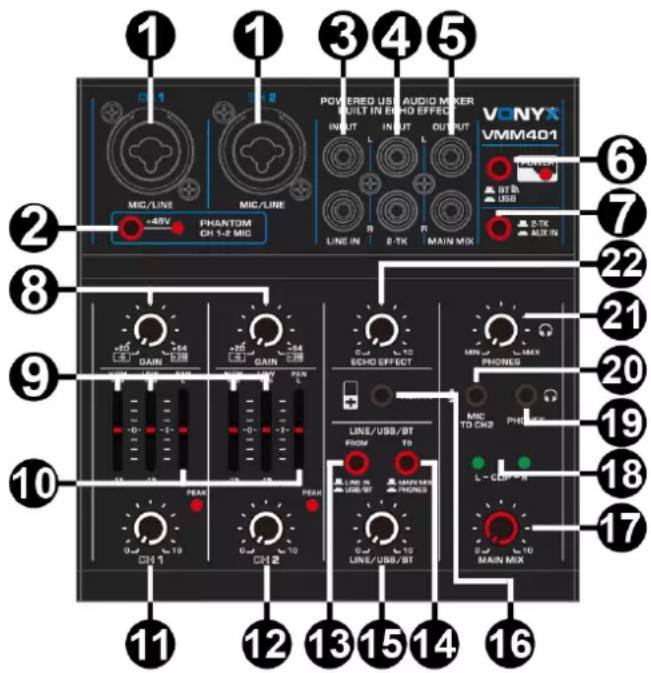
FRONT PANEL
1. MIC & LINE INPUTS
Combo input jacks for mono signal (for example XLR microphones or 1/4" line input devices).
2. PHANTOM SWITCH
Use to activate phantom power on the XLR mono microphone connectors of channel 1 & 2 (+48V phantom power). Turn this on when using a condenser microphone. The LED will light up when turned on.
3. STEREO RCA LINE INPUT
Stereo RCA input jacks. Connect with the output of an audio source with line signal, such as a CD player, tape deck, etc.
4. 2-TK RCA INPUT
Stereo RCA input jacks. Connect with the output of an audio source with line signal, such as a CD/MP3 player, etc.
5. STEREO RCA OUTPUT (MAIN MIX)
Stereo RCA output jacks. Connect with the input of an amplifier or a recorder.
6. BT/USB SELECTOR
Change between BT and USB input.
7. 2-TK/AUX SELECTOR
Change between 2-TK and AUX input.
8. CHANNEL 1 & 2 GAIN CONTROL
Turn to determine the gain level of both channel 1 and channel 2.
9. TREBLE & BASS CONTROL
Adjust the high and low tones/frequencies for channel 1 and channel 2.
10. PAN CONTROL
Pan(orama)/balancing control to determine the position of the channel signal within the stereo image.
You can use the pan controller to assign the signal to just a single output, which provides flexibility in recording situations.
11. CHANNEL 1 VOLUME CONTROL
Turn to adjust the volume for channel 1 (1). The led-indicator lights up when the input signal is too high.
12. CHANNEL 2 VOLUME CONTROL
Turn to adjust the volume for channel 2 (1). The led-indicator lights up when the input signal is too high.
13. INPUT SELECTOR SWITCH
Change the input signal source between LINE-IN and USB/BT.
14. OUTPUT SELECTOR SWITCH
Change the output destination between MAIN MIX and PHONES.
15. LINE/USB/BT CHANNELS VOLUME CONTROL
Turn to adjust the volume for LINE/USB/BT channels.
16. AUX STEREO IN
3.5mm stereo jack AUX input for connecting a variety of external audio devices. Volume can be controlled by the MAIN MIX controller or the connected audio device.
17. MAIN VOLUME CONTROL
Turn to adjust the volume of the MAIN- (5) and USB channel (23).
18. CLIP LEDs
Will light up when MAIN MIX output signal is too high (left and right channel separately).
19. HEADPHONE JACK
3.5mm output jack, supporting stereo headphone plugs.
20. MIC TO CH2 JACK
3.5mm input microphone jack. Input signal is sent to CH2.
21. HEADPHONES VOLUME CONTROL
Turn to adjust the volume of the headphones channel.
22. ECHO EFFECT
Turn to adjust the echo effect.
REAR PANEL
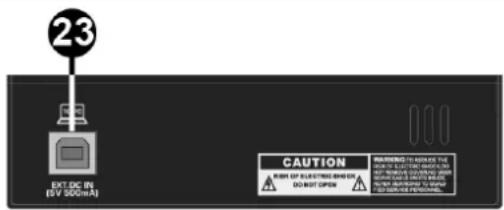
23. USB 2.0 TERMINAL
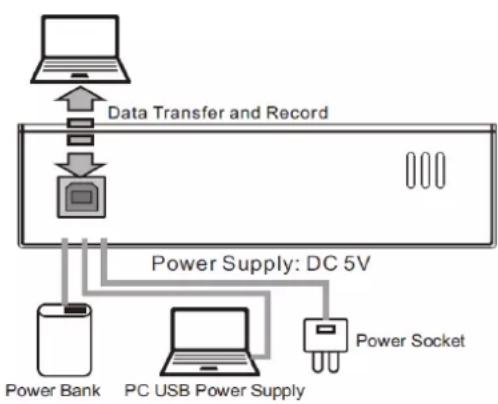
Use the included USB 2.0 cable to connect with a computer. The computer supplies power to the mixer and audio data can be sent between the two. Alternatively, the terminal can be used as a USB power socket (mains power or USB power bank) to supply the mixer with power. Obviously, utilizing the terminal for this purpose, data cannot be transferred or recorded. Using external power supply must meet the following requirements:
Output voltage: 4.8V to 5.2V
Output current: 0.5A or more
BT CONNECTION
BT
- Activate the BT-function on your device (mobile phone, tablet etc.) from which you want to play the music. See the operating instructions for that device.
- Select "VMM" on your BT-device and make the BT-connection. No password is required.
Attention: The BT distance is approx. 10 meter without any barrier.
Input connections: 3.5mm jack, 6.3mm jack, RCA, XLR (3-pin)
Output connections: 3.5mm jack, RCA, USB
Frequency response: 20Hz - 20KHz
THD: <0.5%
Equalizer: 2-Bands
Equalizer low: +/- 15dB
Equalizer high: +/- 15dB
Power supply: 100~240VAC 50/60Hz (5V USB)
Dimensions: 136 x 134 x 41 mm
Weight: 0,55kg
The specifications are typical. The actual values can slightly change from one unit to the other. Specifications can be changed without prior notice.
The products referred to in this manual conform to the European Community Directives to which they are subject:
European Union
Tronios B.V.,
7602KR Almelo, The Netherlands
2014/35/EU
2014/30/EU
2011/65/EC
2014/53/EU

United Kingdom
Tronios Ltd.,
130 Harley Street,
London W1G 7JU, United Kingdom
S.I. 2016:1101
S.I. 2016:1091
S.I. 2012:3032
S.I. 2017:1206

Specifications and design are subject to change without prior notice.
www.tronios.com
Copyright © 2022 by TRONIOS the Netherlands
- UNPACKINGINSTRUCTION
- POWERSUPPLY
- FRONT PANEL
- MIC & LINE INPUTS
- PHANTOM SWITCH
- STEREO RCA LINE INPUT
- 2-TK RCA INPUT
- STEREO RCA OUTPUT (MAIN MIX)
- BT/USB SELECTOR
- 2-TK/AUX SELECTOR
- CHANNEL 1 & 2 GAIN CONTROL
- TREBLE & BASS CONTROL
- PAN CONTROL
- CHANNEL 1 VOLUME CONTROL
- CHANNEL 2 VOLUME CONTROL
- INPUT SELECTOR SWITCH
- OUTPUT SELECTOR SWITCH
- LINE/USB/BT CHANNELS VOLUME CONTROL
- AUX STEREO IN
- MAIN VOLUME CONTROL
- CLIP LEDs
- HEADPHONE JACK
- MIC TO CH2 JACK
- HEADPHONES VOLUME CONTROL
- ECHO EFFECT
- REAR PANEL
- USB 2.0 TERMINAL
- BT CONNECTION
- European Union
- United Kingdom
Brand : Vonyx
Model : VMM401
Category : Mixer