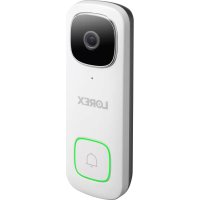
Lorex B451AJDU-K8 - Doorbells

B451AJDU-K8 - Doorbells Lorex - Free user manual and instructions

Find the device manual for free B451AJDU-K8 Lorex in PDF.

English EN Download 💬 AI Question 10 questions ⚙️ Specs
📄

Document temporarily unavailable

The manual is currently being transferred to our new server. It will be accessible again in a few hours. Thank you for your patience.

View the manual : Français FR English EN Español ES
Pick your language and provide your email: we'll send you a specifically translated version.
Product Type 2K QHD Video Doorbell
Brand Lorex
Model B451AJDU-K8
Video Resolution 2K QHD
Power Supply 16-24 VAC (via wiring) or USB 5V 2A (setup)
Wi-Fi Connectivity 2.4 GHz / 5 GHz
Motion Detection Yes, with adjustable zones and sensitivity
Audio Built-in microphone and speaker, two-way communication
Night Vision Yes (automatic mechanical IR filter)
Local Storage microSD card (pre-installed, expandable up to 128 GB)
LED Indicator Multicolor (red, green, blue) for status
Mounting Included 15° horizontal and 5° vertical bracket
Mobile App Lorex Home (iOS / Android)
Night Light Yes, programmable via the app
Quick Responses Customizable pre-recorded voice messages
Access Sharing Yes (shared users with account)
Dimensions (approx.) 125 x 50 x 30 mm
Weight (approx.) 200 g
Material Weather-resistant plastic
Operating Temperature -20°C to 50°C
Safety Power off before installation, sheltered outdoor use
Certifications FCC Part 15
Warranty See Lorex website (lorex.com/warranty)

Frequently Asked Questions - B451AJDU-K8 Lorex

How to reset the video doorbell to factory settings?
Remove the microSD slot cover on the back, insert a pin into the RESET hole for 10 seconds until you hear an audible sound confirming the reboot.
The video doorbell does not power on, what to do?
Check that the circuit breaker is on and the power source provides 16-24 VAC. Test with the supplied USB cable and a 5V 2A wall adapter (not included) to isolate the issue.
How to insert or remove the microSD card?
Remove the cover on the back, insert the card (label side down) until it clicks. To remove, gently push the card to eject it.
Why am I receiving so many notifications?
Adjust the motion zones and sensitivity in the Lorex Home app. You can also set a notification schedule in device settings.
How to keep the night light on at night?
In the app, go to Device Settings > Motion Detection Settings > Light Settings, enable Night Light Mode, and adjust the schedule as needed.
How to record a custom quick response?
In Device Settings > Doorbell Quick Responses, tap the + at the top right, record your message, then name it and save.
What is the wireless range of the doorbell?
The doorbell connects to a 2.4 GHz or 5 GHz Wi-Fi network near the router. Range depends on your environment, but it should be in the same area as your phone during setup.
What is the supplied USB cable for?
The USB cable powers the doorbell temporarily during app setup before permanent installation. Use a USB 5V 2A wall adapter (not included).
How to connect the doorbell to the Lorex Home app?
Download the app, create an account, tap + to add a device, then scan the QR code on the box or back of the doorbell. Follow the instructions.
How to adjust motion detection?
In the app, select the doorbell, go to Motion Detection Settings. You can draw zones and adjust sensitivity to reduce false alerts.

User questions about B451AJDU-K8 Lorex

0 question about this device. Answer the ones you know or ask your own.

Ask a new question about this device

The email remains private: it is only used to notify you if someone responds to your question.

No questions yet. Be the first to ask one.

Download the instructions for your Doorbells in PDF format for free! Find your manual B451AJDU-K8 - Lorex and take your electronic device back in hand. On this page are published all the documents necessary for the use of your device. B451AJDU-K8 by Lorex.

USER MANUAL B451AJDU-K8 Lorex

Manual assistant
Powered by Anthropic
Waiting for your message
Product information

Brand : Lorex

Model : B451AJDU-K8

Category : Doorbells