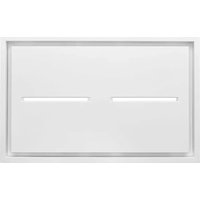
HBC143EWH - Range hood BEST - Free user manual and instructions
Find the device manual for free HBC143EWH BEST in PDF.


| Brand | BEST |
| Model | HBC143EWH |
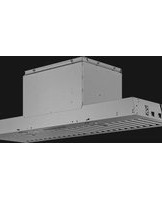
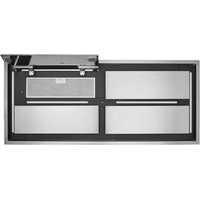
| Product Type | Ceiling range hood, domestic use |
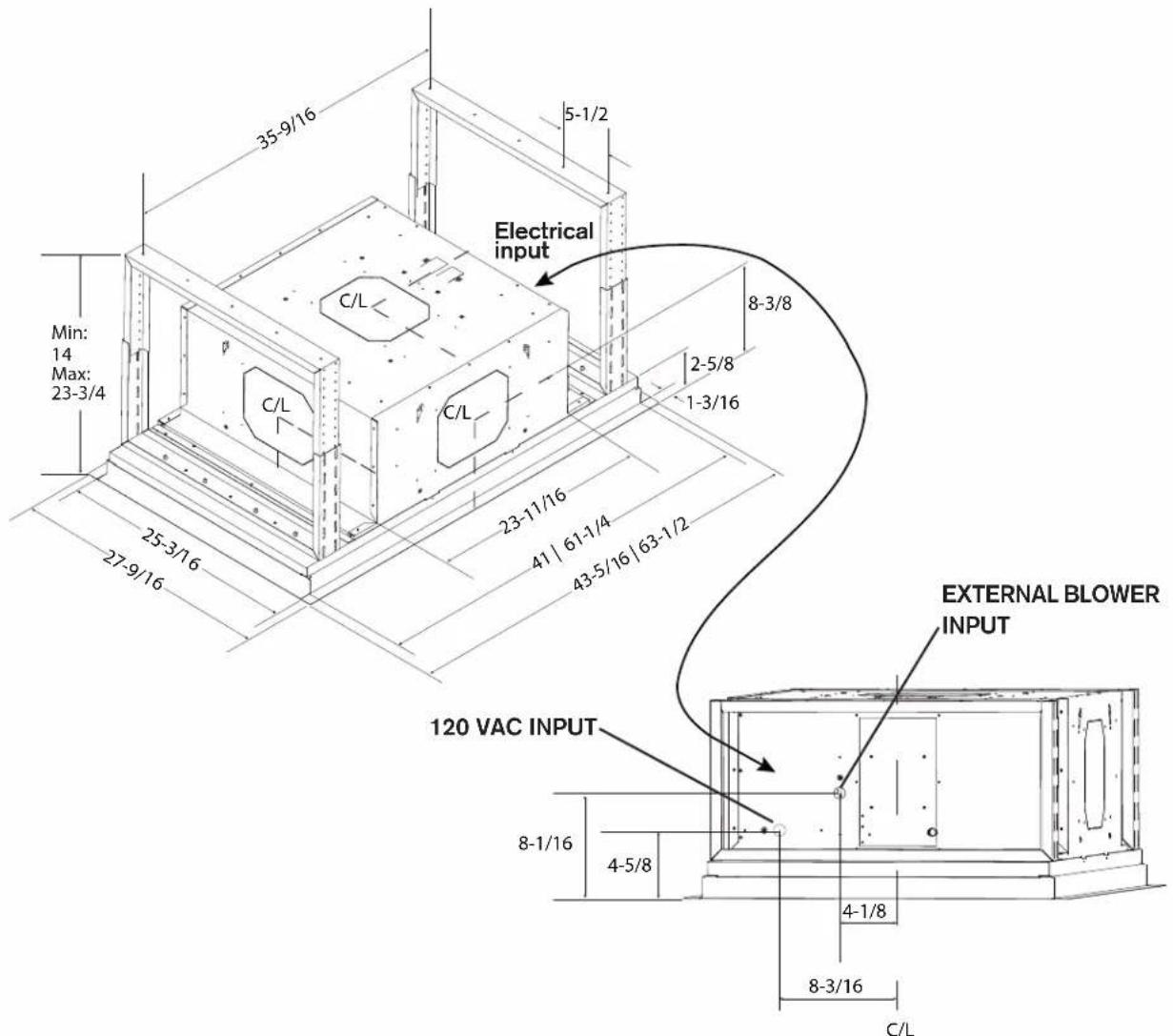
| Dimensions (W x D x H) | 1054 mm (41 1/2 in) x 654 mm (25 3/4 in) x 140 mm (5 1/2 in) approx. |
| Weight | 43 kg (95 lb) |
| Power Supply | 120 VAC, 60 Hz |
| Duct Diameter | 8 in or 10 in round (metal required) |
| Control Type | Touch pad with 4 speeds, delayed shut-off (10 min), dimmable light |
| Remote Control | Included |
| Filter Type | Mesh grease filters (2), dishwasher safe |
| Lighting | LED module (1), adjustable intensity (3 levels) |
| Compatible Fan | Internal PM6 (600 CFM) or PM12; external EB9/EB15; in-line ILB6/ILB9/ILB11 |
| Discharge Positions | Top, front, rear, side |
| Installation Height | Minimum 48 in, recommended maximum 84 in above cooking surface |
| Thermal Protection | Yes, automatic shut-off in case of overheating, automatic restart after cooling |
| Grounding | Required |
| Maintenance | Clean filters regularly; stainless steel: mild soap, rinse and dry |
| Replacement Parts | Fan (S97021509), 8 in adapter/damper (SV08543), filters (S1106835), LED module (S1106827), remote control (S1106833) |
| Warranty | 5-year limited (parts and labor) |
Frequently Asked Questions - HBC143EWH BEST
User questions about HBC143EWH BEST
0 question about this device. Answer the ones you know or ask your own.
Ask a new question about this device
Download the instructions for your Range hood in PDF format for free! Find your manual HBC143EWH - BEST and take your electronic device back in hand. On this page are published all the documents necessary for the use of your device. HBC143EWH by BEST.
USER MANUAL HBC143EWH BEST
INSTALLATION, USE & CARE INSTRUCTIONS
natural_image
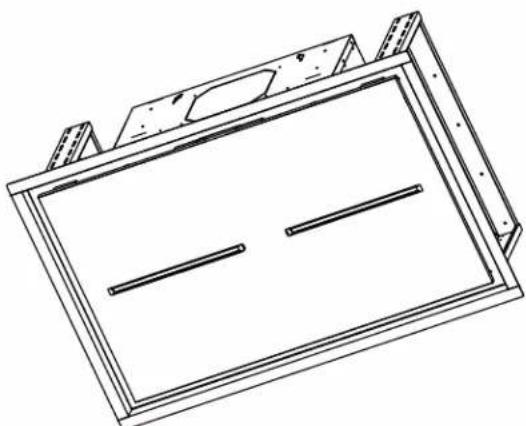
Technical line drawing of a rectangular frame with two horizontal lines and mounting brackets (no text or symbols)Serial number:
best®
Safety 3-4
Installation 5-11
Recommended Tools and Accessories 5
Hood Specifications....5
Install the Ductwork....6
Blower Outlet Position....6
Prepare the Ceiling Opening and the Hood Support .....7
Install the Hood....8
Prepare the Hood for Wiring Connection and Blower Installation . . . . . . . . . . . . . . . . . . . . . . . . . . . . . . . . . . . . . . . . . . . . . . . . . 8
Wiring. 9
Blower Installation....10-11
External Blower Programming Procedure 11
Operation 12
Maintenance and Cleaning ....13
Grease Filters
Stainless Steel Cleaning
Service Parts ....14
Warranty 15
To register your product, please visit our website:
In the United States - BestRangeHoods.com
In Canada - BestRangeHoods.ca
For Technical Support, call:
In the United States - 800-558-1711
In Canada - 800-567-3855
Installer: Leave this manual with the homeowner.
READ AND SAVE THESE INSTRUCTIONS
Intended for domestic cooking only
WARNING

TO REDUCE THE RISK OF FIRE, ELECTRIC SHOCK, OR INJURY TO PERSONS, OBSERVE THE FOLLOWING:

- Use this unit only in the manner intended by the manufacturer. If you have questions, contact the manufacturer at the address or telephone number listed in the warranty.
- Before servicing or cleaning unit, switch power off at service panel and lock the service disconnecting means to prevent power from being switched on accidentally. When the service disconnecting means cannot be locked, securely fasten a prominent warning device, such as a tag, to the service panel.
- Installation work and electrical wiring must be done by qualified person(s) in accordance with all applicable codes and standards, including fire-rated construction codes and standards.
- Sufficient air is needed for proper combustion and exhausting of gases through the flue (chimney) of fuel burning equipment to prevent backdrafting. Follow the heating equipment manufacturer's guidelines and safety standards such as those published by the National Fire Protection Association (NFPA), and the American Society for Heating, Refrigeration and Air Conditioning Engineers (ASHRAE), and the local code authorities.
- When cutting or drilling into wall or ceiling, do not damage electrical wiring and other hidden utilities.
- Ducted fans must always be vented to the outdoors.
- Do not use this unit with any separate solid-state speed control device.
- To reduce the risk of fire, use only metal ductwork.
• This unit must be grounded.
- When installing, servicing or cleaning the unit, it is recommended to wear safety glasses and gloves.
- When applicable local regulations comprise more restrictive installation and/or certification requirements, the aforementioned requirements prevail on those of this document and the installer agrees to conform to these at his own expense.
WARNING

TO REDUCE THE RISK OF A RANGE TOP GREASE FIRE:
A. Never leave surface units unattended at high settings. Boilovers cause smoking and greasy spillovers that may ignite. Heat oils slowly on low or medium settings.
B. Always turn hood ON when cooking at high heat or when flambeing food (i.e. Crepes Suzette, Cherries Jubilee, Peppercorn Beef Flambé).
C. Clean ventilating fans frequently. Grease should not be allowed to accumulate on fan or filter.
D. Use proper pan size. Always use cookware appropriate for the size of the surface element.
TO REDUCE THE RISK OF INJURY TO PERSONS IN THE EVENT OF A RANGE TOP GREASE FIRE, OBSERVE THE FOLLOWING:\*
- SMOTHER FLAMES with a close-fitting lid, cookie sheet, or metal tray, then turn off the burner. BE CAREFUL TO PREVENT BURNS. If the flames do not go out immediately, EVACUATE AND CALL THE FIRE DEPARTMENT.
- NEVER PICK UP A FLAMING PAN - You may be burned.
- DO NOT USE WATER, including wet dishcloths or towels - This could cause a violent steam explosion.
- Use an extinguisher ONLY if:
A. You know you have a Class ABC extinguisher and you already know how to operate it.
B. The fire is small and contained in the area where it started.
C. The fire department has been called.
D. You can fight the fire with your back to an exit.
* Based on "Kitchen Fire Safety Tips" published by NFPA.
CAUTION

- For indoor residential use only.
- To reduce risk of fire and to properly exhaust air, be sure to duct air outside. Do not vent exhaust air into spaces within walls or ceilings or into attics, crawl spaces, or garages.
• Take care when using cleaning agents or detergents. - Avoid using food products that produce flames under the range hood.
- For general ventilating use only. Do not use to exhaust hazardous or explosive materials and vapors.
- To avoid motor bearing damage and noisy and/or unbalanced impellers, keep drywall spray, construction dust, etc. off power unit.
- Your hood motor has a thermal overload which will automatically shut off the motor if it becomes overheated. The motor will restart when it cools down. If the motor continues to shut off and restart, have the hood serviced.
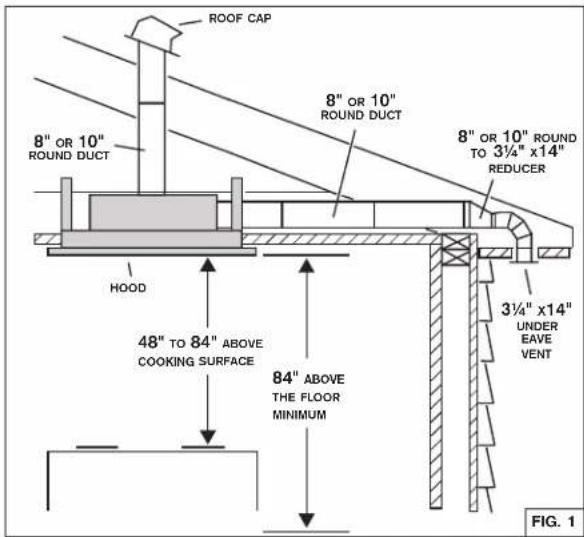
- The bottom of the hood MUST NOT BE LESS than 48" and recommended at a maximum of 84" above the cooktop for best capture of cooking impurities.
- Please read specification label on product for further information and requirements.
RECOMMENDED TOOLS AND ACCESSORIES
- Measuring tape
• Phillips screwdriver no. 2 - Nut driver or socket 3/8"
- Flat blade screwdriver (to open knockout holes)
- Saw
- Sheet metal shears
- Pliers
• Metal foil duct tape
• Scissors (to cut metal foil duct tape)
- Pencil
- Wire stripper
- Strain relief(s), 7/8" diameter (one to secure house wiring cable to the hood and another one to secure external blower cable to the hood)
- Drill and 1/8" drill bit
HOOD SPECIFICATIONS
INSTALL THE DUCTWORK
NOTE: To reduce the risk of fire, use only metal ductwork.
- Decide where the ductwork will run between the insert and the outside (FIG. 1).
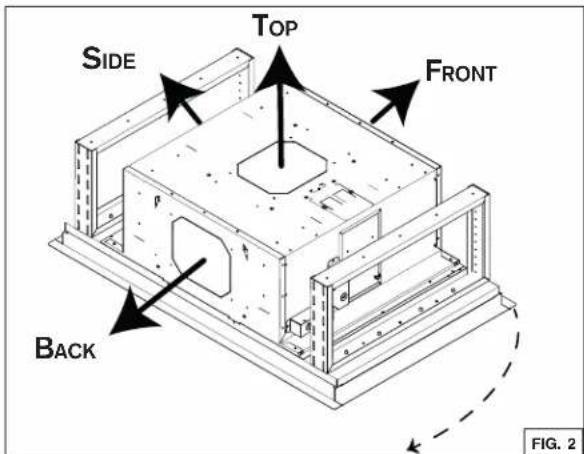
- Choose desired blower outlet position (FIG. 2).
- A straight, short duct run using 8" round damper (included with blower kit) for single internal blower and 10" round damper (included with the hood) for all other blower types will allow the hood to perform most efficiently.
- Long duct runs, elbows and transitions will reduce the performance of the hood. Use as few of them as possible.
- Install wall cap or roof cap (sold separately). Connect metal ductwork to cap and work back towards the hood location. Use 2" foil duct tape to seal the joints between ductwork sections.
There are four (4) possible outlet positions:
- Top
- Front
- Back
- Side
The damper can be installed on the housing prior to install the hood in the ceiling with Side and Top outlet positions only.
In the case of Front and Back outlet positions, the damper has to be installed on the housing once the hood is installed in the ceiling.
10" damper included with the hood needs to be used for all exterior blower setup and internal blower PM12. With external blower, ducting is to be connected directly on the damper (no rough-in plate required).
8" damper is needed only with PM6 internal blower. It is included in the PM6 blower kit.
PREPARE THE CEILING OPENING AND THE HOOD SUPPORT
CAUTION
Ducting through side/front/back may have restrictions. Please take support frame into consideration and leave enough space between support frame and the ducting chosen. Refer to Hood Specifications section for hood dimensions and ducting position.
NOTE: Support frame shown in this document is only an example. Follow local building code as required.
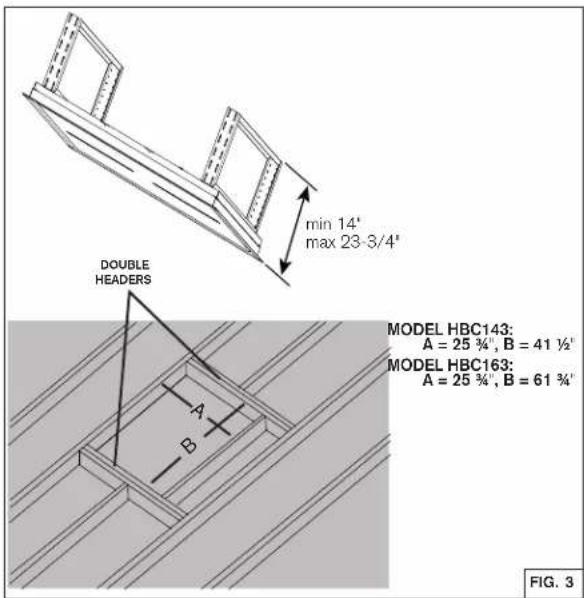
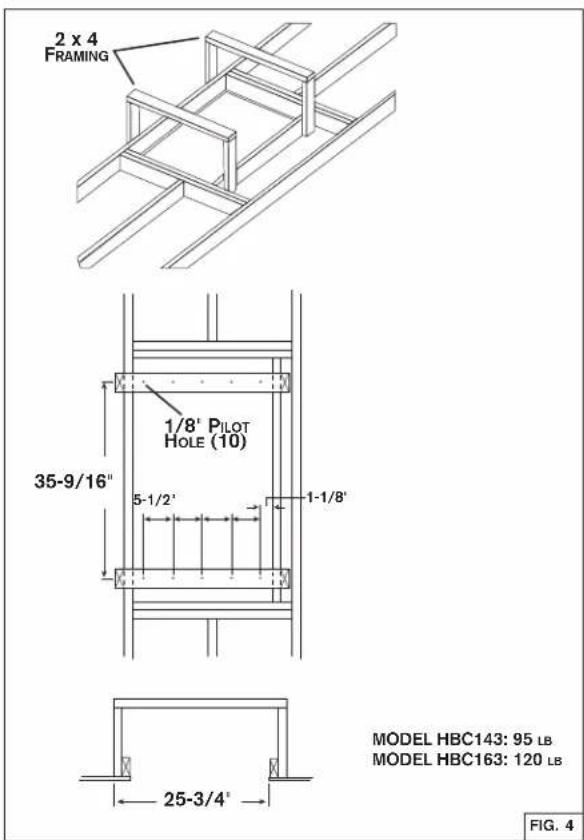
The hood should always be centered over the cooktop. Make sure there is adequate space in the ceiling structure to install the hood and ductwork. The bottom of the hood MUST NOT BE LESS than 48" and recommended at a maximum of 84" above the cooktop for best capture of cooking impurities. Construct a wood framing suitable for your installation (ex. shown in FIG.3 and 4). Refer to Hood Specifications section at page 5 for more details. The structure must be capable of supporting its own weight plus the weight of the hood.
INSTALL THE HOOD
CAUTION
At least three installers are recommended because of the large size and weight of this range hood.
- Adjust height of the telescoping support frame to ensure a tight fit between the hood and finished ceiling. The telescoping support frame height must be the same as the wood support height.
- Lift range hood into the ceiling opening.
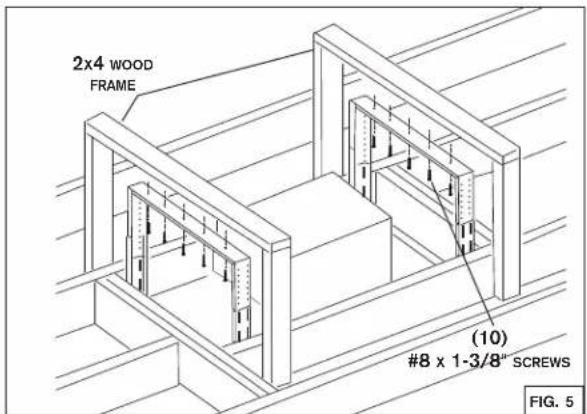
- Secure each support frame to the wooden hood support frame using 10 # 8 x 1-3/8" screws provided. See FIG. 5.
- Connect ductwork. Duct tape all joints to ensure an air tight seal.
- Make all needed electrical connections. See WIRING section.
PREPARE THE HOOD FOR WIRING CONNECTION AND BLOWER INSTALLATION
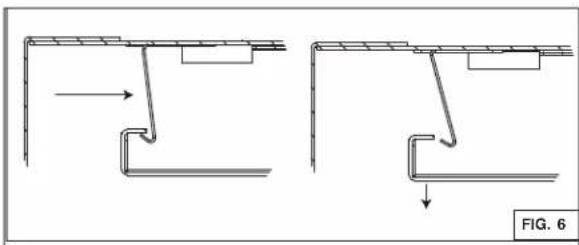
- Push in lock tabs (2) on the ends of perimeter panel. See FIG. 6.
- Open the panel and remove the mesh filters. See FIG. 7.
- To ease access for blower installation, remove the central panel by unscrewing the 3/16 x ¼" screws. See FIG. 7.
CAUTION
Re-install the aluminum mesh filters and central panel as needed (See FIG. 7). Make sure lock tabs are back in place once installation is done (See FIG. 6).
natural_image
Technical diagram showing two mechanical assembly steps with arrows indicating direction (no text or symbols)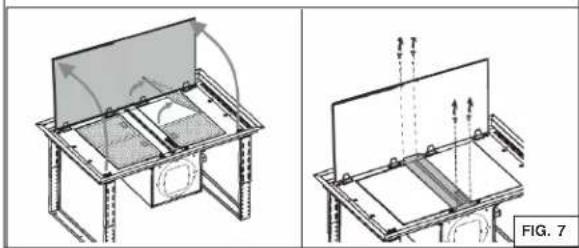
natural_image
Technical line drawing of a mechanical assembly with two views (top and side), no text or symbols present.WIRING
WARNING
Risk of electric shock. Electrical wiring must be done by qualified personnel in accordance with all applicable codes and standards. Before connecting wires, switch power off at service panel and lock service disconnecting means to prevent power from being switched on accidentally.
Home Power Wiring
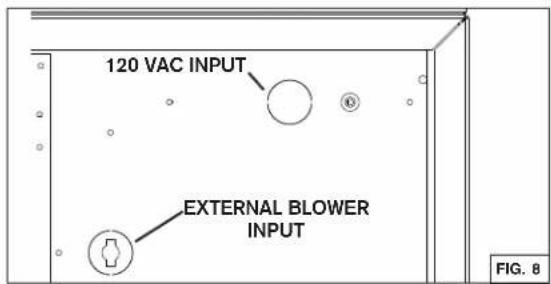
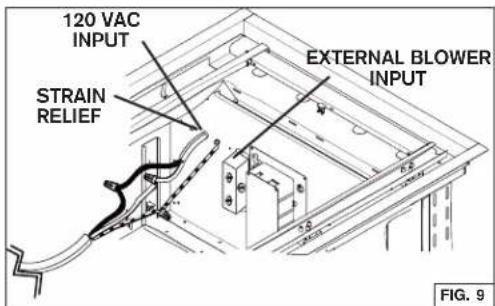
- Locate home power junction box (see FIG. 8 and 9) then remove the junction box cover.
- Install a UL approved 7/8" strain relief (not included) on the house power cable. Run the power cable in the housing then use the strain relief to secure it.
- Connect power cable using included wire connectors. Connect BLACK to BLACK, WHITE to WHITE and GREEN or BARE WIRE to GREEN. DO NOT FORGET TO CONNECT THE GROUND. See FIG. 9.
- Reinstall the junction box cover. Make sure all wires are inside the junction box cover.
External Blower Wiring
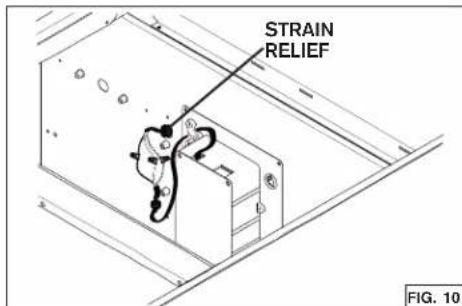
- Locate external blower junction box (see FIG. 8 and 10) then remove the junction box cover. Remove the knock-out from the housing. See FIG. 8 for knock-out position. Remove wire protection.
- Install a UL approved 7/8" strain relief (not included) on the external blower cable. Run the external blower cable in the housing then use the strain relief to secure it.
- Connect external blower cable using included wire connectors. Connect BLACK to BLACK, WHITE to WHITE and GREEN or BARE WIRE to GREEN. DO NOT FORGET TO CONNECT THE GROUND. See FIG. 10.
- Reinstall the junction box cover. Make sure all wires are inside the junction box cover.
CAUTION
Take care not to pinch wires while reinstalling wiring cover.
BLOWER INSTALLATION
This hood is compatible with the following blowers. Select a blower model among these: internal blower - PM6 or PM12, exterior blower - EB9 or EB15, in-line blower - ILB6, ILB9 or ILB11. For exterior and in-line blowers, refer to the installation instructions provided with the blower for more details.
NOTE: Rough-in plate included with exterior blower kit is not needed for ceiling hood application.
PM6 OR PM12 BLOWER INSTALLATION
PM6 Blower Plate Installation
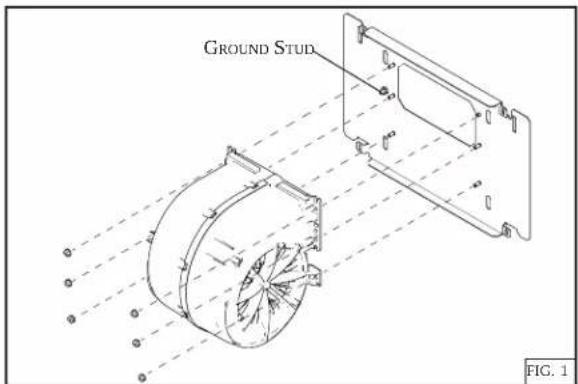
- Attach blower to mounting plate with (6) 10-24 Hex Nuts (included).
- Attach ground wire from blower to ground stud with (1) 10-24 Hex Nut (included).
PM12 Blower Plate Installation
-
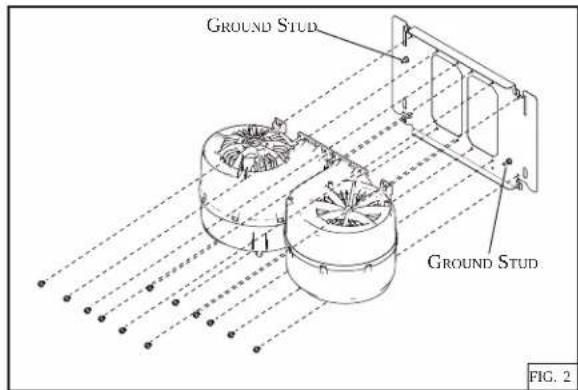
Attach blowers to mounting plate with (12) 10-24 Hex Nuts (included).
-
Attach ground wires from blowers to ground studs with (2) 10-24 Hex Nut (included).
NOTES: There are four (4) possible outlet positions for PM6 and PM12: top, front, back and side. Remove selected knock-out from the housing prior to install blower in the hood. The blower can be installed before or after hood installation in the ceiling. However, it is easier to install the hood in the ceiling without internal blower installed. The damper can be installed on the housing prior to install the hood in the ceiling with Side and Top outlet positions only. Otherwise, install the damper once the hood is mounted in the ceiling. Position the damper on the exterior of the hood using 8-18 screws (included).
10" damper (included with the hood) when using PM12, 8" damper (included with PM6 blower kit) when using PM6.
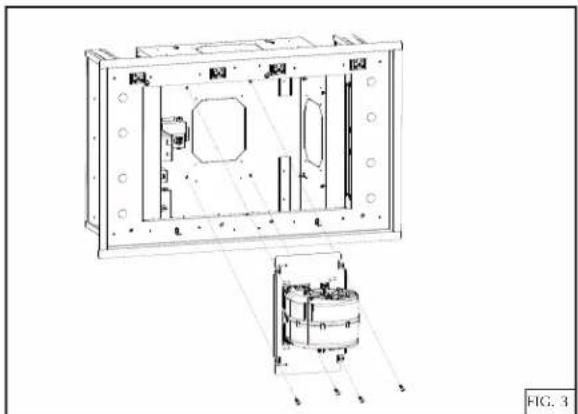
Top Discharge Blower Installation (PM6 shown in FIG. 3 & 5). Follow same method for PM12.
natural_image
Technical line drawing of a mechanical assembly with internal components and mounting holes (no text or symbols)- Attach blower plate to hood with (4) 10-24 screws (included) as illustrated above.
Front/Back Discharge Blower Installation (PM12 Front shown in FIG. 4 & 6). Follow same method for Side Discharge and when using PM6 blower.
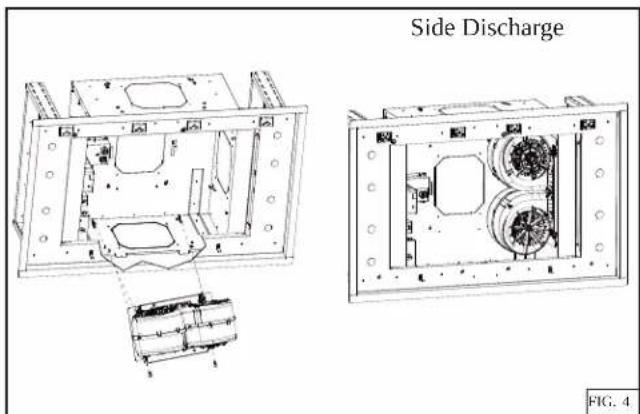
- Attach blower plate to hood by inserting the hooks in the slots and using (2) 10-24 screws (included) as illustrated above.
PM6 Blower Connection
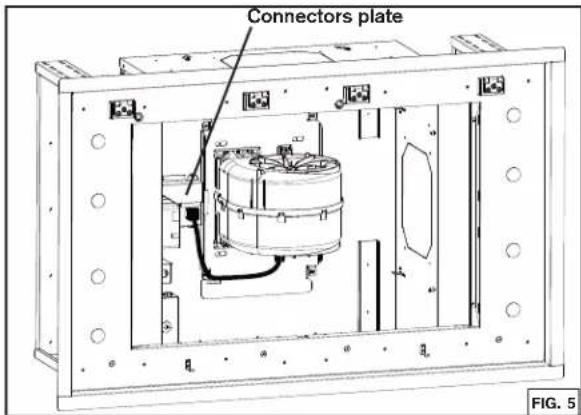
- Swivel the connectors plate to unhide a connector.
- Plug the blower power cord in the connector as illustrated above.
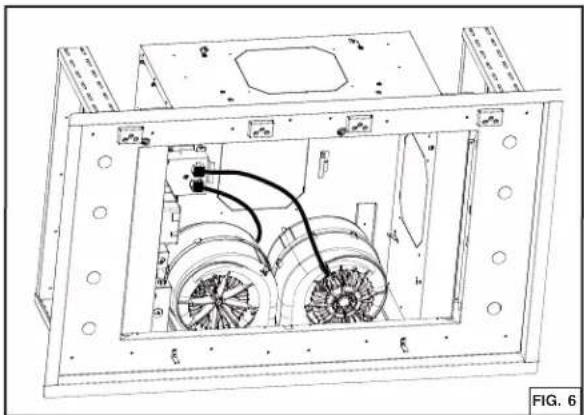
PM12 Blowers Connection
natural_image
Technical line drawing of an internal air duct system with fan blades and ventilation ducts (no text or symbols)- Remove the connectors plate.
- Plug each blower power cord in a connector as illustrated above.
Service parts:
BLOWER (1) 600 CFM: S97021509
ADAPTER/DAMPER 8" ROUND: SV08543
EXTERNAL BLOWER PROGRAMMING PROCEDURE
This range hood is designed to work with several different blower models. Before using the hood, the control must first be programmed for your blower model in order to achieve proper operating speed:
- Find the SETUP number that corresponds to the blower model that is installed with your range hood.
| SETUP 1 SETUP 2 SETUP 3 (by default) | ||
| ILB6 | EB15 EB9 | |
| ILB9 ILB11 | ||
NOTE: If no button is touched for more than 3 seconds while the hood is in programming mode, the hood will exit the programming mode without saving the changes.
- There must be power to the hood but the blower and lights must be turned off.
-
To change the setup, press and hold BLOWER and LIGHT buttons simultaneously for 6 seconds and release, then: To set the range hood at SETUP 1, press BLOWER button until button 1 alone lights up.
To set the range hood at SETUP 2, press BLOWER button until both buttons 1 and 2 light up. -
Press DELAY OFF button to save and leave programming mode.
-
If needed, verify which setting the hood is currently in. To do so: Press and hold BLOWER and LIGHT buttons simultaneously for 6 seconds and release. Different combinations of SPEED buttons (1 to 4) will turn ON for 3 seconds, depending on the setting.
If set at SETUP 3, SPEED buttons 1, 2, 3 and 4 will light up.
If set at SETUP 2, SPEED buttons 1 and 2 will light up.
If set at SETUP 1, SPEED button 1 will light up.
NOTE: To reset to default, press and hold BLOWER and LIGHT buttons simultaneously for 6 seconds and release. Different combinations of SPEED buttons (1 to 4) will turn ON for 3 seconds. Press and hold LIGHT button for 3 seconds then SPEED buttons will flash 3 times. Setting is back to original status.
CONTROL
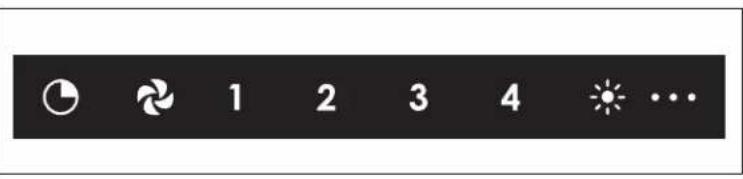

DELAY OFF BUTTON
When activated, the icon lights up and blower current speed remains active for 10 min, then the blower turns off. Blower speed can be changed within the 10 min delay.
To deactivate the delay off function, press on the delay off button.

BLOWER BUTTON
When activated, the icon lights up and the blower turns on at the last saved speed. If there was no speed saved, the blower will be set at speed 1.
To change the blower speed, press on the desired speed button 1, 2, 3 or 4. The current speed button will light up.
To turn off the blower, press on the blower button or press on the current speed button activated.

LIGHT BUTTON
When activated, the icon lights up as well as the dot(s) at the right of the icon that represent(s) the light intensity. By pressing once on the icon, the first dot will light on. By pressing twice on the icon, the first and the second dots will light on. By pressing three times on the icon, all three dots will light on.
To turn off the light, press a fourth time on the button.
NOTE: A remote control is included with the hood. See instructions included with the remote control for more details.
MAINTENANCE
ALWAYS SWITCH OFF THE ELECTRICITY SUPPLY BEFORE CARRYING OUT ANY OPERATIONS ON THE APPLIANCE.
Grease Filters
The grease filters should be cleaned frequently. Use a warm dishwashing detergent solution. Grease filters are dishwasher safe.
Clean the filters in the dishwasher using a non-phosphate detergent. Discoloration of the filters may occur if using phosphate detergents, or as a result of local water conditions - but this will not affect filter performance. This discoloration is not covered by the warranty. To minimize or prevent discoloration, hand wash filters using a mild detergent.
Motor
The motor is permanently lubricated and never needs oiling. If the motor bearings make excessive or unusual noise, replace the motor with the exact service motor. The impeller should also be replaced.
STAINLESS STEEL CLEANING
Do:
- Regularly wash with clean cloth or rag soaked with warm water and mild soap or liquid dish detergent.
- Always clean in the direction of original polish lines.
- Always rinse well with clear water (2 or 3 times) after cleaning. Wipe dry completely.
- You may also use a specialized household stainless steel cleaner.
Don't:
- Use any steel or stainless steel wool or any other scrapers to remove stubborn dirt.
- Use any harsh or abrasive cleansers.
- Allow dirt to accumulate.
- Let plaster dust or any other construction residues reach the unit. During construction/ renovation, cover the unit to make sure no dust sticks to the stainless steel surface.
Avoid when choosing a detergent:
- Any cleaners that contain bleach will attack stainless steel.
- Any products containing: chloride, fluoride, iodide, bromide will deteriorate surfaces rapidly.
- Any combustible products used for cleaning such as acetone, alcohol, ether, benzol, etc., are highly explosive and should never be used close to a range.
best®
HBC143, HBC163
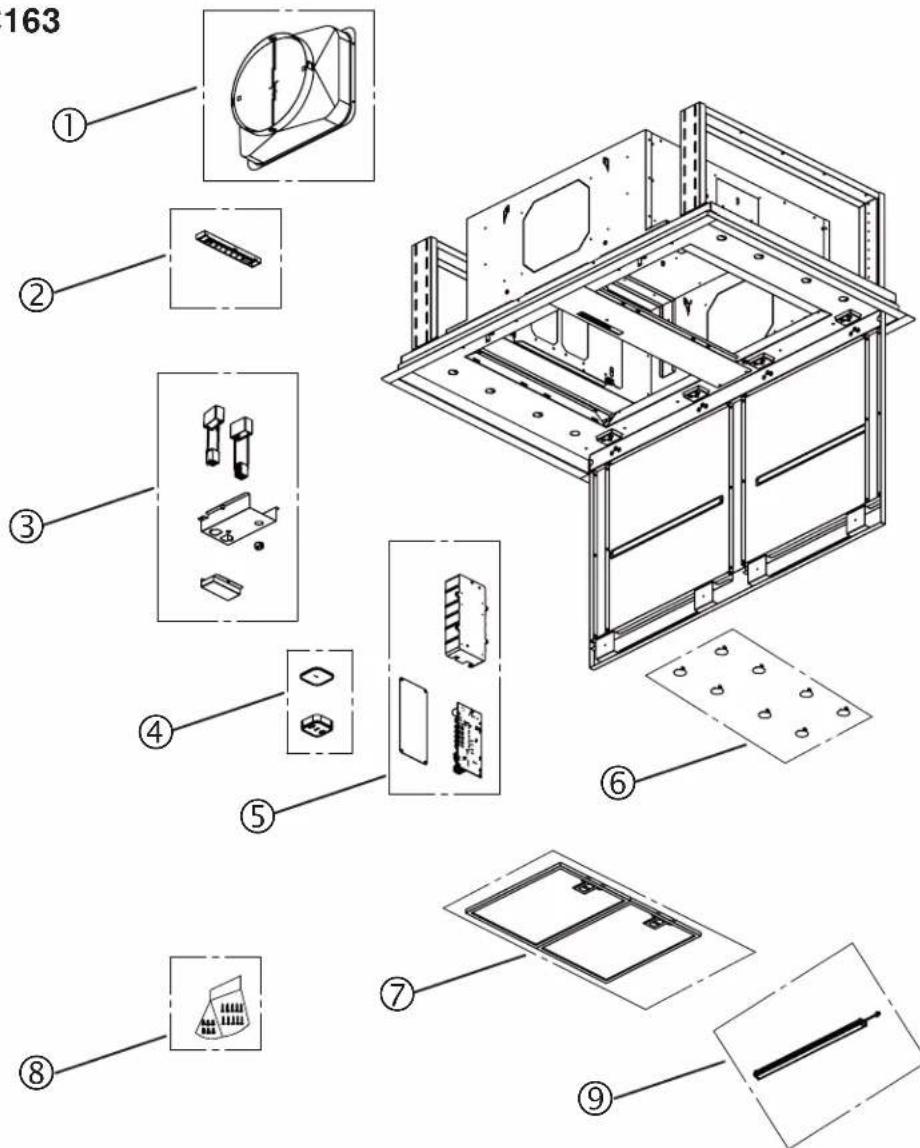
| KEY NO. | PART NUMBER | DESCRIPTION | QTY. |
| 1 S11 | 06832 10" R | OUND ADAPTOR WITH DAMPER | 1 |
| 2 S11 | 06831 USER INTERFACE 1 | ||
| 3 S11 | 06829 CAPACITOR ASSEMBLY 1 | ||
| 4 S11 | 06833 REMOTE CONTROL KIT 1 | ||
| 5 | S1106828 | POWER UNIT ASSEMBLY | 1 |
| 6 S11 | 06836 P | LASTIC CAP (8) 1 | |
| 7 S11 | 06835 F | ILTERS (SET OF 2) 1 | |
| 8 S11 | 06834 P | ARTS BAG (6 WIRE NUTS AND 10 SCREWS) | 1 |
| 9 S11 | 06827 LED M | ODULE (1) | 1 |
Limited Warranty
Warranty Period and Exclusions: Broan-NuTone LLC (the "Company") warrants to the original consumer purchaser of its product ("you") that the product (the "Product") will be free from material defects in the materials or its workmanship for a period of five (5) years from the date of original purchase (or such longer period as may be required by applicable law) or a period of two (2) years from the date of service for any labor provided on the Product. The limited warranty period for any replacement parts provided by the Company and for any Products repaired or replaced under this limited warranty shall be the remainder of the original warranty period (or such longer period as may be required by applicable law).
THIS WARRANTY DOES NOT COVER FLUORESCENT LAMP STARTERS, TUBES AND BULBS, FUSES, FILTERS, DUCTS, ROOF CAPS, WALL CAPS AND OTHER ACCESSORIES FOR DUCTING. This warranty does not cover (a) normal maintenance and service, (b) normal wear and tear, (c) any Products or parts which have been subject to misuse, abuse, abnormal usage, negligence, accident, improper or insufficient maintenance, storage or repair (other than repair by the Company), (d) damage caused by faulty installation, or installation or use contrary to recommendations or instructions, (e) any Product that has been moved from its original point of installation, (f) damage caused by exposure to salt air, (g) damage in transit, (h) natural wear of finish, (i) Products in commercial or nonresidential use, or (j) damage caused by fire, flood or other act of God or (k) Products with altered, defaced or removed serial numbers. This warranty covers only Products sold to consumers in North America.
This warranty supersedes all prior warranties and, subject to applicable law, is not transferable from the original consumer purchaser.
No Other Warranties: This Limited Warranty contains the Company's sole obligation and your sole remedy for defective products. The foregoing warranties are exclusive and in lieu of any other warranties and conditions, express or implied. TO THE MAXIMUM EXTENT PERMITTED BY APPLICABLE LAW, THE COMPANY DISCLAIMS AND EXCLUDES ALL OTHER EXPRESS WARRANTIES AND CONDITIONS, AND DISCLAIMS AND EXCLUDES ALL WARRANTIES AND CONDITIONS IMPLIED BY LAW, INCLUDING WITHOUT LIMITATION THOSE OF MERCHANTABILITY AND FITNESS FOR A PARTICULAR PURPOSE. To the extent that applicable law prohibits the exclusion of implied warranties or conditions, the duration of any applicable implied warranty or condition is limited to the period specified for the express warranty above. Some jurisdictions (which may include the eProvince of Québec or specific US states) do not allow limitations on how long an implied warranty lasts, so the above limitation may not apply to you. Any oral or written description of the Product is for the sole purpose of identifying it and shall not be construed as an express warranty.
Whenever possible, each provision of this Limited Warranty shall be interpreted in such manner as to be effective and valid under applicable law, but if any provision is held to be prohibited or invalid, such provision shall be ineffective only to the extent of such prohibition or invalidity, without invalidating the remainder of such provision or the other remaining provisions of the Limited Warranty.
Remedy: During the applicable limited warranty period, the Company will, at its option, provide replacement parts for, or repair or replace, without charge, any Product or part thereof, to the extent the Company finds it to be covered by and in breach of this limited warranty under normal use and service. The Company will ship the repaired or replaced Product or replacement parts to you at no charge. You are responsible for all costs for removal, reinstallation and shipping, insurance or other freight charges incurred in the shipment of the Product or part to the Company. If you must send the Product or part to the Company, as instructed by the Company, you must properly pack the Product or part—the Company is not responsible for damage in transit. The Company reserves the right to utilize reconditioned, refurbished, repaired or remanufactured Products or parts in the warranty repair or replacement process. Such Products and parts will be comparable in function and performance to an original Product or part and warranted for the remainder of the original warranty period (or such longer period as may be required by applicable law).
Company reserves the right, in its sole discretion, to refund the money actually paid by you for the Product. If the Product or component is no longer available, replacement may be made with a similar product of equal or greater value, at Company's sole discretion. This is your sole and exclusive remedy for breach of this limited warranty.
Exclusion of Damages: THE COMPANY'S OBLIGATION TO PROVIDE REPLACEMENT PARTS, OR REPAIR, REPLACE OR REFUND, AT THE COMPANY'S OPTION, SHALL BE YOUR SOLE AND EXCLUSIVE REMEDY UNDER THIS LIMITED WARRANTY AND THE COMPANY'S SOLE AND EXCLUSIVE OBLIGATION. THE COMPANY SHALL NOT BE LIABLE FOR INCIDENTAL, INDIRECT, CONSEQUENTIAL OR SPECIAL DAMAGES ARISING OUT OF OR IN CONNECTION WITH THE PRODUCT, ITS USE OR PERFORMANCE.
Some jurisdictions do not allow the exclusion or limitation of incidental or consequential damages, so the above limitation or exclusion may not apply to you. This warranty gives you specific legal rights, and you may also have other rights, which vary from jurisdiction to jurisdiction. The disclaimers, exclusions, and limitations of liability under this warranty will not apply to the extent prohibited by applicable law.
This warranty covers only replacement or repair of defective Products or parts thereof at the Company's main facility and does not include the cost of field service travel and living expenses.
Any assistance the Company provides to or procures for you outside the terms, limitations or exclusions of this limited warranty will not constitute a waiver of such terms, limitations or exclusions, nor will such assistance extend or revive the warranty.
The Company will not reimburse you for any expenses incurred by you in repairing or replacing any defective Product, except for those incurred with the Company's prior written permission.
How to Obtain Warranty Service: To qualify for warranty service, you must (a) notify the Company at the address or telephone number stated below within seven (7) days of discovering the covered defect, (b) give the model number and part identification and (c) describe the nature of any defect in the Product or part. At the time of requesting warranty service, you must present evidence of the original purchase date. If you cannot provide a copy of the original written limited warranty, then the terms of the Company's most current written limited warranty for your particular product will control.
PRODUCT SPECIFICATIONS
All illustrations and specifications in this catalog are based on the latest product information available at time of production. Broan-NuTone LLC and Best® reserves the right to make changes at any time, without notice, in prices, colors, materials, specifications and models, place of manufacture and to discontinue models or equipment.
BEST 926 West State Street, Hartford, Wisconsin, USA 53027 BestRangeHoods.com 800-558-1711
BEST 550 Lemire Blvd., Drummondville, Québec, Canada J2C 7W9 BestRangeHoods.ca 800-567-3855
best®
Hottes pour plafond
Série HBC1
DIRECTIVES D'INSTALLATION, D'UTILISATION ET D'ENTRETIEN
natural_image
Technical line drawing of a rectangular frame with two horizontal lines and mounting brackets (no text or symbols)Numéro de série :
best®
Sécurité 18-19
Installation 20-26
Au Canada - BestRangeHoods.ca
natural_image
Technical diagram showing two mechanical assembly steps with arrows indicating direction (no text or symbols)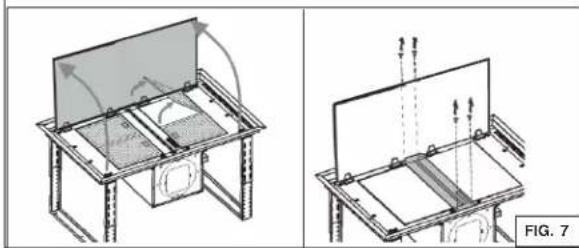
natural_image
Technical line drawing of a mechanical assembly with two views (top and side), no text or symbols present.BRANCHEMENT
AVERTISSEMENT
natural_image
Technical line drawing of a mechanical assembly with internal components and mounting holes (no text or symbols)natural_image
Technical line drawing of an internal air duct system with fan blades and ventilation ducts (no text or symbols)SPÉCIFICATIONS DU PRODUIT
BEST 926 West State Street, Hartford, Wisconsin USA 53027 BestRangeHoods.com 800-558-1711
BEST 550 boul. Lemire, Drummondville, Québec, Canada J2C 7W9 BestRangeHoods.ca 800-567-3855
best®
Campanas para techo
Serie HBC1
natural_image
Technical line drawing of a rectangular frame with two horizontal lines and mounting brackets (no text or symbols)Número serial:
best®
Seguridad 33-34
Instalación 35-41
natural_image
Technical diagram showing two mechanical assembly steps with arrows indicating direction (no text or symbols)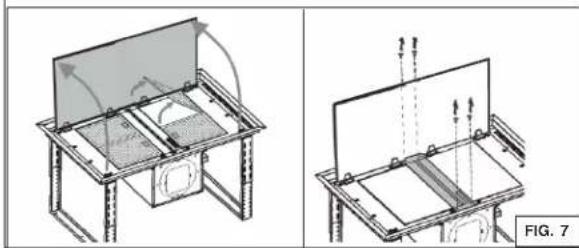
natural_image
Technical line drawing of a mechanical assembly with two views (top and side), no text or symbols present.CONEXIÓN ELÉCTRICA
ADVERTENCIA
natural_image
Technical line drawing of a mechanical assembly with internal components and mounting holes (no text or symbols)natural_image
Technical line drawing of an internal air duct system with fan blades and ventilation ducts (no text or symbols)BEST 926 West State Street, Hartford, Wisconsin 53027 BestRangeHoods.com 800 558-1711
BEST 550 Lemire Blvd., Drummondville, Québec, Canada J2C 7W9 BestRangeHoods.ca 800 567-3855

- best®
- Safety 3-4
- Installation 5-11
- Operation 12
- Maintenance and Cleaning ....13
- Service Parts ....14
- Warranty 15
- READ AND SAVE THESE INSTRUCTIONS
- Intended for domestic cooking only
- WARNING
- TO REDUCE THE RISK OF FIRE, ELECTRIC SHOCK, OR INJURY TO PERSONS, OBSERVE THE FOLLOWING:
- TO REDUCE THE RISK OF A RANGE TOP GREASE FIRE:
- TO REDUCE THE RISK OF INJURY TO PERSONS IN THE EVENT OF A RANGE TOP GREASE FIRE, OBSERVE THE FOLLOWING:\*
- CAUTION
- RECOMMENDED TOOLS AND ACCESSORIES
- INSTALL THE DUCTWORK
- PREPARE THE CEILING OPENING AND THE HOOD SUPPORT
- INSTALL THE HOOD
- At least three installers are recommended because of the large size and weight of this range hood.
- PREPARE THE HOOD FOR WIRING CONNECTION AND BLOWER INSTALLATION
- WIRING
- Home Power Wiring
- External Blower Wiring
- BLOWER INSTALLATION
- PM6 OR PM12 BLOWER INSTALLATION
- Service parts:
- EXTERNAL BLOWER PROGRAMMING PROCEDURE
- CONTROL
- DELAY OFF BUTTON
- BLOWER BUTTON
- LIGHT BUTTON
- MAINTENANCE
- Grease Filters
- Motor
- STAINLESS STEEL CLEANING
- Do:
- Don't:
- Avoid when choosing a detergent:
- Limited Warranty
- PRODUCT SPECIFICATIONS
- Hottes pour plafond
- Sécurité 18-19
- Installation 20-26
- BRANCHEMENT
- AVERTISSEMENT
- SPÉCIFICATIONS DU PRODUIT
- Campanas para techo
- Seguridad 33-34
- Instalación 35-41
- CONEXIÓN ELÉCTRICA
- ADVERTENCIA
Brand : BEST
Model : HBC143EWH
Category : Range hood