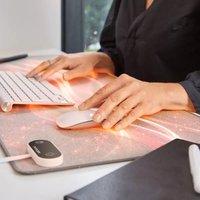
Heating Desk Pad - Heated blanket/cushion LANAFORM - Free user manual and instructions
Find the device manual for free Heating Desk Pad LANAFORM in PDF.


| Product type | Heating pad / Heated cushion |
| Brand | Lanaform |
| Model | Heating Desk Pad |
| Reference | LA180503 |
| Dimensions | 33 x 80 cm |
| Power supply | AC 220V |
| Power | 80 W |
| Heating zones | 3 zones (H1, H2, H3) |
| Adjustable temperatures | 40°C, 45°C, 50°C |
| Memory function | Yes, saves the last setting |
| Automatic shut-off | After 4 hours of use |
| Hourly reminder | Flashing every 60 minutes |
| Cover material | Cotton |
| Usage | Indoor, on flat surface (desk, table) |
| Additional functions | Can be used as a mouse pad |
| Use for feet | Yes, with caution (remove shoes, do not stand on it) |
| Safety | Overheat protection, automatic shut-off |
| Cleaning | Soft damp cloth; hand vacuum for cotton |
| Maintenance | Do not use corrosive detergents |
| Included accessories | AC adapter, instruction manual |
| Warranty | 2 years (excluding misuse) |
| Reparability | Only by Lanaform after-sales service |
Frequently Asked Questions - Heating Desk Pad LANAFORM
User questions about Heating Desk Pad LANAFORM
0 question about this device. Answer the ones you know or ask your own.
Ask a new question about this device
Download the instructions for your Heated blanket/cushion in PDF format for free! Find your manual Heating Desk Pad - LANAFORM and take your electronic device back in hand. On this page are published all the documents necessary for the use of your device. Heating Desk Pad by LANAFORM.
USER MANUAL Heating Desk Pad LANAFORM
natural_image
Red textured rectangular panel with a small black control knob on the right (no visible text or symbols)EN ENGLISH HEATING DESK PAD
FR FRANÇAIS SOUS-MAIN CHAUFFANT
NL NEDERLANDS VERWARMDE BUREAUMAT
Contents of the packaging
• 1 Heating Desk Pad
- 1 AC adapter
• 1 instruction manual
Precautions for use
⚠️ Please read all the instructions before using your product, in particular these few fundamental safety instructions.
The photographs and other product images in these instructions and on the packaging are as accurate as possible but do not claim to be a perfect reproduction of the product.
Warning
Only use this device in accordance with the instructions given in this manual. This device is not intended to be used in a hospital environment, but for use in the home only. The Heating Desk Pad should be placed on a flat surface, such as a desk or table. This product is intended for indoor use and in an environment of 0 \~ 40°C. Do not carry this device around by its power cable and do not use this cable as a handle. Always unplug the device after use or before cleaning it. To disconnect the device, press the POWER button for 3 seconds, then remove the plug from the power socket. Before plugging in your device, check that your mains voltage is the same as that of the device. This Heating Desk Pad should not be used by children under 3 years old as they may not react if it overheats. This heated product must not be used by young children (between 3 and 8 years old) unless a parent or a guardian has set the stop time and the child has been given enough information to use the Heating Desk Pad safely. This device can be used by children aged 8 years and over and by people with reduced physical, sensory or mental capacities, or lack of experience and knowledge, providing they are supervised or have been instructed on the safe use of the device and understand the risks involved. Children must not be allowed to play with the device. Cleaning and maintenance by the user must not be carried
out by children without supervision. Examine the device frequently for signs of damage or wear to the product. If you notice any signs of wear or damage, stop using this product and return it to the supplier or its after-sales department. Do not use accessories that are not recommended by Lanaform or that are not supplied with this device. If the power cable is damaged, it must be replaced by a special cable or similar, available from the supplier or its after-sales department. Do not use this device if the plug is damaged, if the device is not working properly, has been dropped on the floor, if it is damaged or if it has fallen into water. In that case, have the device examined and repaired by the supplier or their after-sales department. If a device falls into water unplug it immediately, before retrieving it. An electrical device must never be left plugged in and unattended. Unplug it whenever you are not using it. Use your heated product only with the electric plug provided. Do not fold the power cable or use the Heating Desk Pad while the cable is squashed, coiled or folded. Never use this device in a room in which aerosols (sprays) are used or in a room in which oxygen is administered. Do not use safety pins and do not scratch the Heating Desk Pad with any sharp objects. Do not attach the device using drawing pins or other metal objects. Never allow anything to fall into and never insert any object into any of the openings. Do not expose your heated product to sunlight and do not iron it. This will prevent you from damaging the insulation on the electrical circuit. Do not use the Heating Desk Pad with other heating devices or to heat other things (hot water bottle, heated blanket etc.) Disconnect the Heating Desk Pad if it becomes abnormally hot. If you are concerned about your health, consult a doctor before using this device. Take every precaution to avoid burns. When using the Heating Desk Pad, if you notice signs of abnormal redness on the skin, or even a feeling of discomfort or pain, stop using it for at least one hour. If the phenomenon persists,
postpone use of the heat pad and consult your doctor immediately, as necessary. Never use this device in contact with any part of the body that is swollen, inflamed, or if you have a rash. This device should not be used by young children, people who are insensitive to heat or on animals. The product can also be used to warm your feet. In this case, please observe these instructions scrupulously:
- Place the product flat on a hard, flat surface (avoid placing on a rug or a sloped surface)
- Do not stand up on the product
- Do not place the foot of a chair or any other object on the product
- Sit down behind the product
- Ensure you remove your shoes first, then place your feet flat on the product.
- Position the power cable out of the way to avoid creating a trip hazard
- Start using the product on the lowest intensity, then increase it if necessary.
- Failure to follow the above instructions may void the warranty.
Presentation
Thank you for choosing Lanaform's Heating Desk Pad. Enjoy the comforting warmth that your Heating Desk Pad will bring to your winter days! With 3 different heat zones and 3 different temperatures, your Heating Desk Pad adapts to your needs. Thanks to its memory function, when the device is turned on again it will remember the zone and temperature of its last use. Lightweight, non-slip, aesthetically pleasing: Heating Desk Pad is your solution for this winter. You'll never want to be without it!
Description
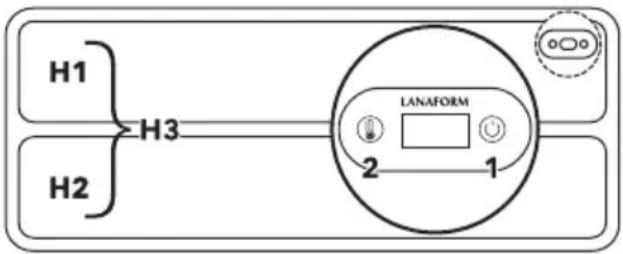
1 :on/off
a Press and hold: on/off
b Brief press: change heat zone
- H1: heat zone 1
- H2: heat zone 2
• H3: heat zones 1 and 2
2: temperature selection (40°C, 45°C, 50°C)
flowchart
graph LR
    H1 --> H3
    H2 --> H3
    H3 --> LANAFORM["LANAFORM"]
    LANAFORM --> 1
    LANAFORM --> 2
    style LANAFORM fill:#f9f,stroke:#333
Preparation before use
Place the Heating Desk Pad on a flat surface, such as a desk or table. If you want to place a laptop on the Heating Desk Pad, please put it on the upper half of the device and select the H2 zone, to avoid overheating your laptop or the Heating Desk Pad. If you work with a keyboard and mouse, you can place them directly
onto the Heating Desk Pad and choose your preferred heating zone. The product has been designed to be used as a mouse mat.
If you wish to use the product to warm your feet, ensure you place the product on a flat surface, do not stand up on the mat, do not put the foot of a chair on it, do not wear shoes or snag the control pad.
Instructions
1 On/Off: connect the desk pad plug to the power supply. Press the ON/OFF button for 3 seconds, the digital display flashes 2 times. To turn off the device, press the ON/OFF button for 3 seconds and the digital display will turn off.
2 When the device is on, press the ON/OFF button briefly to select zone H1, H2 or H3. (see DESCRIPTION)
3 When you have selected your heat zone (H1, H2 or H3), press the temperature button to choose your temperature: 40°C, 45°C or 50°C.
The device has 3 functions:
4 Reminder function: the digital display flashes for 30 seconds every hour.
5 Memory function: the desk pad will retain the zone and the temperature last used when it is restarted.
6 For safety reasons, the Heating Desk Pad will switch itself off after 4 hours of use.
Cleaning
Before cleaning, please turn off the power supply and disconnect the plug. Wipe the surface of the screen with a soft, damp cloth, do not use hard cleaning agents or corrosive detergents (e.g. disinfectant) to avoid scratching and damaging the surface. The Heating Desk Pad is made of cotton, so you can use a hand-held vacuum to clean it. If liquid has spilled on the desk pad, use a damp cloth to clean the surface and wait for the cotton to dry.
Storage
If you are not using the desk pad for a long time, it is advisable to store it in its original packaging in a dry place and do not place any objects on top of it. Also, avoid folding it.
Troubleshooting
| Problem Reason Solution | 😊 | |
| The screen does not light up | The plug is not connected to the power supply. | Please plug it in. |
| Only the upper/low-er section of the desk pad is heating up. | The H1 or H2 zone has been selected. | If you would like the upper section to heat up, select H1 mode. For the lower section, select H2 mode. To heat up the entire Heating Desk Pad, choose H3 mode. If the zone you have selected does not heat up, it means that the heating surface has been damaged. Return it to the supplier or their after-sales department. |
Technical data
• Product reference: LA180503
- Voltage: 220V AC
- Power: 80 W
• Dimensions: 33 x 80 cm
Adviceregarding the disposal of waste
All the packaging is composed of materials that pose no hazard for the environment and which can be disposed of at your local sorting centre to be used as secondary raw materials. The cardboard may be disposed of in a paper recycling bin. The packaging film must be taken to your local sorting and recycling centre.
When you have finished using the device, please dispose of it in an environmentally friendly way and in accordance with the law.
Limited warranty
Lanaform guarantees this product against any material or manufacturing defect for a period of two years from the date of purchase, except in the circumstances described below.
The Lanaform guarantee does not cover damage caused as a result of normal wear to this product. In addition, the guarantee covering this Lanaform product does not cover damage caused by abusive or inappropriate or incorrect use, accidents, the use of unauthorized accessories, changes made to the product or any other circumstance, of whatever sort, that is outside Lanaform's control.
Lanaform may not be held liable for any type of circumstantial, indirect or specific damage.
All implicit guarantees relating to the suitability of the product are limited to a period of two years from the initial date of purchase as long as a copy of the proof of purchase can be supplied.
On receipt, Lanaform will repair or replace your appliance at its discretion and will return it to you. The guarantee is only valid through Lanaform's Service Centre. Any attempt to maintain this product by a person other than Lanaform's Service Centre will render this guarantee void.
Contenu du packaging
flowchart
graph LR
    H1 --> H3
    H2 --> H3
    H3 --> LANAFORM
    LANAFORM --> 1
    LANAFORM --> 2
natural_image
Rectangular device with pink textured surface and a small black button on the right (no visible text or symbols)LANAFORM
Heating Desk Pad
LA180503 / LOT 001
Manufacturer & Importer
Lanaform SA