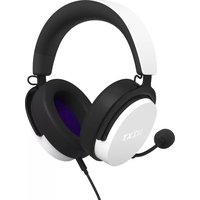
Relay Headset - Memory reader NZXT - Free user manual and instructions
Find the device manual for free Relay Headset NZXT in PDF.


| Product Type | Closed-back over-ear wired stereo headset |
| Brand | NZXT |
| Model | Relay Headset |
| Weight | Approximately 300 g (estimated) |
| Dimensions | Not specified precisely |
| Drivers | 40 mm (estimated) |
| Frequency Response | 20 Hz - 20 kHz |
| Impedance | 32 Ω (estimated) |
| Sensitivity | 100 dB (estimated) |
| Power | Passive via 3.5mm jack; USB adapter for CAM software |
| Microphone | Unidirectional, removable, flexible adjustable boom |
| Connectivity | 3.5mm jack (4-pole), USB adapter, Y-splitter for PC |
| Built-in Controls | Volume wheel and mute button with red LED on cable |
| Software | NZXT CAM (via USB adapter) |
| Compatibility | PC, Mac, portable consoles, smartphones, tablets with 3.5mm jack |
| Included Accessories | Audio cable with controls, USB adapter, Y-splitter, removable microphone |
| Maintenance and Cleaning | Clean with a soft, dry cloth; avoid liquids |
| Spare Parts and Repairability | Microphone, cables, and adapters available via support.nzxt.com |
| Safety | Adjust volume before use to prevent hearing damage |
| Warranty | Contact: service@nzxt.com |
| Environment | WEEE compliant (directive 2002/96/EC) |
Frequently Asked Questions - Relay Headset NZXT
User questions about Relay Headset NZXT
0 question about this device. Answer the ones you know or ask your own.
Ask a new question about this device
Download the instructions for your Memory reader in PDF format for free! Find your manual Relay Headset - NZXT and take your electronic device back in hand. On this page are published all the documents necessary for the use of your device. Relay Headset by NZXT.
USER MANUAL Relay Headset NZXT
natural_image
Line drawing of a NBXT headset with adjustable head and antenna (no text or symbols on the headset body)RELAY
WIRED STEREO HEADSET
TABLE OF CONTENTS
VERSION 1.0, 2022/10/18
INTRODUCTION 01
ABOUT THE NZXT RELAY HEADSET 03
PACKAGE CONTENTS & DESCRIPTION 06
SETTING UP THE NZXT HEADSET 08
CONNECTING THE HEADSET TO AN AUDIO SOURCE 17
BASIC TROUBLESHOOTING 20
HAZARDOUS SUBSTANCES.... 23
REGULATORY STATEMENT 24
NZXT WARRANTY, SUPPORT & SERVICE 25
INTRODUCTION
INTRODUCCIÓN
INTRODUCTION
EINLEITUNG
INTRODUZIONE
INTRODUÇÃO
소개
はじめに
简介
簡介
natural_image
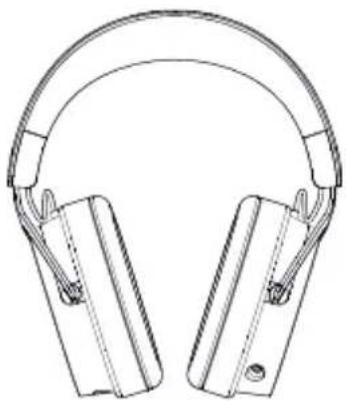
Line drawing of a pair of hardcover headphones (no text or symbols)Introduction
Congratulations on your purchase of an NZXT Headset! Whether you are a professional streamer, a casual player, or a hardcore gamer; we'd like to welcome you to the NZXT family of high-end gaming peripherals.
The NZXT Headset comes with audio cables to connect virtually any type of audio product or gaming device, and the removable cable and microphone offer unique versatility. This manual will help you set up your headset and sort out any trouble with a troubleshooting guide. It also contains important warranty information.
Introducción
ABOUT THE NZXT RELAY HEADSET
ACERCA DE LOS AURICULARES RELAY DE NZXT
À PROPOS DU CASQUE RELAY NZXT
ÜBER DAS NZXT RELAY-HEADSET
INFORMAZIONI SULLE CUFFIE RELAY NZXT
SOBRE OS AUSCULTADORES NZXT RELAY
NZXT Relay 헤드셋 소개
About The NZXT Relay Headset
The NZXT Relay Headset was designed to be a highly comfortable and long-wearing headset thanks to its soft, oversized circumaural earcups and lightweight design. The unidirectional microphone and Hi-Res drivers provide exceptional performance no matter what your favorite game genre might be.
This headset is designed around the “Closed” audio principle: the outer earcups are solid/closed off and the earpads are designed to seal around your ears. This provides you with an isolated audio experience (and prevents neighboring listeners from being bothered by your audio). The closed design also benefits by having a slightly enhanced lower octave (bass response).
About Using The NZXT Headset With The NZXT Relay System
The complete NZXT Audio System consists of the NZXT Relay Headset (described in this guide), the NZXT SwitchMix, and NZXT Relay Speaker System. All of the NZXT Relay System components are high-end desktop PC gaming audio products by themselves, but combined together, they unlock additional functionality and performance. Learn more about the NZXT Relay System at www.nzxt.com.
Acerca De Los Auriculares Relay De NZXT
ABOUT THE NZXT RELAY HEADSET
ACERCA DE LOS AURICULARES RELAY DE NZXT
À PROPOS DU CASQUE RELAY NZXT
ÜBER DAS NZXT RELAY-HEADSET
INFORMAZIONI SULLE CUFFIE RELAY NZXT
SOBRE OS AUSCULTADORES NZXT RELAY
NZXT Relay 헤드셋 소개
ABOUT THE NZXT RELAY HEADSET
ACERCA DE LOS AURICULARES RELAY DE NZXT
À PROPOS DU CASQUE RELAY NZXT
ÜBER DAS NZXT RELAY-HEADSET
INFORMAZIONI SULLE CUFFIE RELAY NZXT
SOBRE OS AUSCULTADORES NZXT RELAY
NZXT Relay 헤드셋 소개

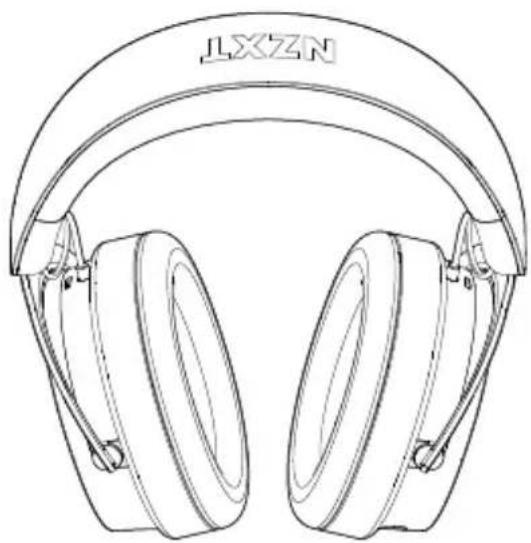
Relay Wired Stereo Headset
×1
natural_image
Line drawing of a pair of outdoor headphones with 'LXZN' branding on the head (no additional text or symbols)
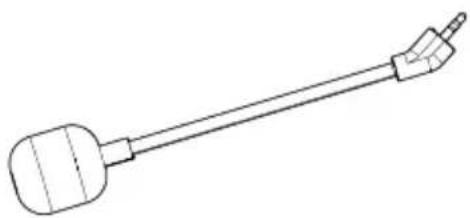
Detachable Microphone Boom with Adjustable Directional Microphone
×1
natural_image
Line drawing of a cylindrical object with a pointed tip and handle, resembling a stylized musical instrument or tool (no text or symbols)
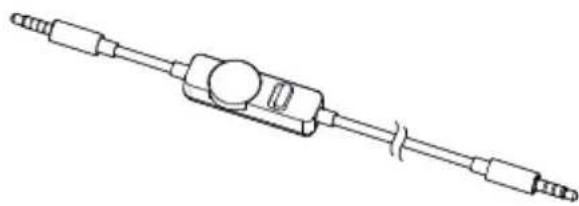
Audio Cable with Volume/Mute Remote Control
×1
natural_image
Line drawing of a mechanical component with multiple ports and a central hub (no text or symbols)
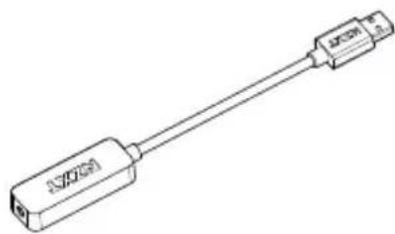
USB Adapter
×1
natural_image
Line drawing of a USB cable connector (no text or symbols)
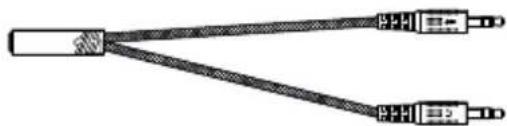
Dual-jack Adapter
×1
natural_image
Pure electrical circuit lines without any symbols
SETTING UP THE NZXT HEADSET
INSTALACIÓN DE LOS ALTAVOCES RELAY CONFIGURATION DE TES HAUT-PARLEURS RELAY EINRICHTEN DER RELAY-LAUTSPRECHER CONFIGURAZIONE DEGLI ALTOPARLANTI A RELÈ CONFIGURAR AS SUAS COLUNAS RELAY
CONNECT INCLDUED 5-POLE CABLE WITH VOLUME/MUTE REMOTE
The NZXT RELAY Headset comes with a headset cable with Mute/Volume controls included in-line on the cable. The side of the cable nearest to the controls should be the side inserted into the headset.
The Volume Wheel controls the volume of the headset – turn the wheel clockwise to increase volume and counter-clockwise to decrease it. Note that the inline volume control acts as a master – if the wheel is set to a low volume (or off), the sound will not be heard.
The mute control has a bright red indicator when in the mute (Voice OFF) position.
This cable is mobile-friendly and can be used in various PCs, laptops, mobile phones, portable gaming, and music devices if they have a 3.5mm headphone connector.
IMPORTANT: Keep the headset cable fully inserted and seated into the 3.5mm connector on the right of the headset for proper operation. An incorrectly seated cable may cause feedback or other interference.
WARNING: Always adjust the volume of the NZXT Relay Headset to a safe level BEFORE putting it on! Permanent hearing loss may occur if headphones or earbuds are used at a high volume for an extended period of time.
CONECTA EL CABLE DE 5 POLOS INCLUIDO CON EL MANDO DE VOLUMEN/SILENCIO
1.ヘッドセット用
You'll find a slotted audio jack at the bottom of the left earcup. Carefully insert the microphone into the slot until a firm connection is made.
IMPORTANT: For proper performance of the MICROPHONE BOOM, make sure that it is FULLY SEATED in the headset receptacle. Insert the connector into the socket while making sure the positioning key is aligned properly. Check to make sure that it is fully seated.
The microphone boom is flexible, so after connecting the microphone and 7 making sure that it is fully seated in the 2.5mm jack, position the microphone by bending it about 1-2 inches away from the corner of your mouth for best performance.
MONTA EL BRAZO DEL MICRÓFONO
Connect the Microphone and Audio Cable to the headsetSize Adjustment
Ajuste del tamaño
natural_image
Technical line drawing of a pair of hardcover head panels with mounting holes and side brackets (no text or symbols)natural_image
Illustration of a pair of headphones with labeled parts (C, B), no text or symbols present.Flexible Microphone Boom Arm Bend the Microphone Towards the Mouth
natural_image
Line drawing of a headset with attached sensors and a purple directional arrow indicating rotation (no text or symbols)natural_image
Line drawing of a pair of headphones with a purple headset and earbell, showing sound waves (no text or symbols)
flowchart
graph LR
    A["Server"] --> B["NZXT"]
    B --> C["NZXT"]
    C --> D["Headset"]
Headset InputTo USB
To unlock software features included with your Relay Headset, or if the laptop or desktop PC does not have a 3.5mm output (or if it is located in an inconvenient location), use the included USB adapter to connect your headset.
To access software features, please visit www.nzxt.com/software/cam to download CAM. Once installed, CAM will recognize your headset via the USB adapter.
CONECTA EL ADAPTADOR USB PARA DESBLOQUEAR LAS CARACTERÍSTICAS DEL SOFTWARE
CONNECTING THE NZXT RELAY HEADSET TO AN AUDIO SOURCE
CONEXIÓN DE LOS AURICULARES RELAY DE NZXT A UNA FUENTE DE AUDIO CONNECTER LE CASQUE RELAY NZXT À UNE SOURCE AUDIO ANSCHLIESSEN DES HEADSETS AN EINE AUDIOQUELLE COLLEGAMENTO DELLE CUFFIE RELAY NZXT A UNA FONTE AUDIO LIGAR OS AUSCULTADORES NZXT RELAY A UMA FONTE DE ÁUDIO
Connect the HEADSET CABLE into the front 3.5mm female audio connection on the front of the Mixer. Make sure that the connector is fully inserted and seated into the jack.
USO DE LOS AURICULARES RELAY DE NZXT CON SWITCHMIX
natural_image
Technical diagram of a mechanical device with a cylindrical component and a connected rod, showing no text or symbols.OPTION 2

USING THE NZXT RELAY HEADSET WITH A PC
Insert your audio cable into the 3.5mm audio port of your PC. If your PC does not have an audio output, or if it is located in an inconvenient location, insert the included audio cable into the 3.5mm female side of the USB Adapter and the USB connector into your USB port. Your PC should immediately begin to configure the driver for the adapter. Consult your PC's motherboard and/or sound card manual for further information.
USO DE LOS AURICULARES RELAY DE NZXT CON UN PC
natural_image
Diagram of a gaming controller connected to a game controller via cable (no text or symbols)USING THE NZXT RELAY HEADSET WITH A STANDARD AUDIO SOURCE
When using the 4-pole HEADSET CABLE, any device that has a 3.5mm stereo output like mp3 players, portable gaming systems, and mobile devices can be connected and the NZXT headset can be used as a normal headset.
USO DE LOS AURICULARES RELAY DE NZXT CON UNA FUENTE DE AUDIO ESTÁNDAR
BASIC TROUBLESHOOTING
IF YOUR NZXT HEADSET HAS NO SOUND, CHECK...
Is the audio cable firmly pushed into the 3.5mm port on the right side of the headset?
Is the volume level of the device you are connected to set to minimum or muted?
Is the volume level of the inline control set to minimum or muted (all the way counter-clockwise)?
If you are connected to a PC with the USB adapter: Is the audio cable properly inserted into the 3.5mm input (female) on the adapter? Make sure the cable is fully inserted and the volume of the inline control is properly adjusted. Also, check your PC's audio output settings to make sure it's selected for the USB Adapter.
IF THE MICROPHONE DOES NOT OPERATE PROPERLY, CHECK...
Is the MUTE on the inline Mute/Volume control engaged? (the switch indicates RED when the mic is muted)
Is the MICROPHONE BOOM properly inserted and seated? (check the alignment of the positioning key, and firmly insert the microphone boom)
Is the audio cable firmly pushed into the 3.5mm port on the right side of the headset?
SI NO SALE NINGÚN SONIDO DE TUS AURICULARES NZXT, COMPRUEBA LO SIGUIENTE:
BASIC TROUBLESHOOTING
RESOLUCIÓN DE PROBLEMAS BÁSICOS DÉPANNAGE ÉLÉMENTAIRE EINFACHE FEHLERBEHEBUNG RISOLUZIONE DEI PROBLEMI DI BASE RESOLUÇÃO DE PROBLEMAS BÁSICA
BASIC TROUBLESHOOTING
RESOLUCIÓN DE PROBLEMAS BÁSICOS DÉPANNAGE ÉLÉMENTAIRE EINFACHE FEHLERBEHEBUNG RISOLUZIONE DEI PROBLEMI DI BASE RESOLUÇÃO DE PROBLEMAS BÁSICA
This device complies with Part 15 of the FCC Rules. Operation is subject to the following two conditions: (1) This device may not cause harmful interference, and (2) this device must accept any interference received, including interference that may cause undesired operation.
CAN ICES-003(B) / NMB-003(B)
REGULATORY STATEMENT

To protect the global environment and as an environmentalist, NZXT must remind you that:
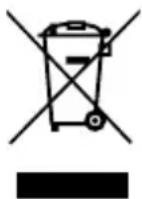
Under the European Union ("EU") Directive on Waste Electrical and Electronic Equipment,
Directive 2002/96/EC, which takes effect on August 13, 2005, products of "electrical and electronic equipment" cannot be discarded as municipal waste anymore and manufacturers of covered electronic equipment will be obligated to take back such products at the end of their useful life. NZXT will comply with the product take back requirements at the end of life of NZXT-branded products that are sold into the EU. You can return these products to local collection points.
EU REACH SVHC Disclosure on Candidate List
REACH (Registration, Evaluation, Authorization and Restriction of Chemicals, EC 1907/2006) is the European Union's (EU) chemical substances regulatory framework. REACH requires NZXT Inc. to provide customers with sufficient information on Substances of Very High Concern (SVHC) contained in products in concentration above 0.1% weight by weight (w/w) to allow safe use of the product.
RoHS Statement
This product is compliant to implemented RoHS (Restriction of Hazardous Substances) type regulations worldwide, including but not limited to China, India, Japan, Korea and European Union.
CE Statement
The device complies with the requirements set out in the Council Directives relevant Union harmonization legislation:
• EMC Directive 2014/30/EU
• LVD Directive 2014/35/EU
• RoHS Directive 2011/65/EU & (EU) 2015/863
• Turkish EEE Directive
UKCA Statement
The object of the declaration described above is in conformity with the relevant UK harmonisation legislation:
• Electromagnetic Compatibility Regulations 2016
• Electrical Equipment (Safety) Regulations 2016
• The Restriction of the Use of Certain Hazardous Substances in Electrical and Electronic Equipment Regulations 2012
FCC Statement
The device complies with part 15 of the FCC Rules. Operation is subject to the following two conditions:
(1) This device may not cause harmful interference, and (2) this device must accept any interference received, including interference that may cause undesired operation.
NZXT GLOBAL WARRANTY POLICY
This NZXT Global Warranty Policy governs the sale of products by NZXT to you.

I. WARRANTY LENGTH
New NZXT Product Warranty Length
Audio 2 Years
Any replacement product will be covered under warranty for the remainder of the warranty period or thirty days, whichever is longer. Proof of purchase is required for warranty service.
II. WHO IS PROTECTED
The Warranty covers only NZXT products purchased by the original consumer.
III. WHAT IS AND IS NOT COVERED
Please note that our warranty is not an unconditional guarantee. If the product, in NZXT's reasonable opinion, malfunctions within the warranty period, NZXT will provide you at its sole discretion with a repaired or replacement product, either new or refurbished, with a similar function that is equal or greater in value depending on supply. Our warranty does not cover the following:
- any product or serial number/warranty sticker modification applied without permission from NZXT;
- any damage that is not a manufacturing defect;
- damage, deterioration or malfunction resulting from: accident, abuse, misuse, neglect, fire, water, lightning, or other acts of nature, unauthorized product modification or failure to follow instructions included with the product;
- improper installation, unauthorized alterations or modifications, or repair or attempted repair by anyone not authorized by NZXT;
- shipping or transport damage (claims must be made with the carrier);
- normal wear and tear.
NZXT does not warrant that this product will meet your requirements. It is your responsibility to determine the suitability of this product for your purpose. For NZXT Store orders, we cover two way return shipping for all exchanges and returns. For all other authorized dealers, NZXT Support does not cover return shipping and only covers one way shipping from NZXT back to the end user for exchanges. Two way expedited shipping is provided for all PSUs covered under the Less Than Three program, indiscriminate of purchase location, provided the location is an approved NZXT reseller.
IV. EXCLUSION OF DAMAGES (DISCLAIMER)
NZXT's sole obligation and liability under this warranty is limited to the repair or replacement of a defective product with either a new or refurbished product with a similar function that is equal or greater in value at our option. NZXT shall not, in any event, be liable for any incidental or consequential damage, including but not limited to damages resulting from interruption of service and loss of data, business, or for liability in tort relating to this product or resulting from its use or possession.
V. LIMITATIONS OF IMPLIED WARRANTIES
There are no other warranties, expressed or implied, including but not limited to those of merchantability or fitness for a particular purpose. The duration of implied warranties is limited to the warranty length specified in Paragraph I.
VI. TO OBTAIN TECHNICAL SUPPORT
If you have already referenced your product owner's manual and still need help, you may contact us by phone at +1 (800) 228-9395, by email at service@nzxt.com, or visit the NZXT Support site at nzxt.com/customer-support.
VII. HOW TO OBTAIN A WARRANTY SERVICE FROM NZXT
To receive a warranty service for your product when purchased directly from NZXT, you must submit a request via the NZXT Support site outlining the problem. If a technician deems the product defective or requiring testing, you will be required to provide a copy of your proof of purchase, which will enable you to submit a Return Merchandise Authorization "RMA" request.
Once approved, you'll receive an RMA number, upon which you will be asked to ship the defective item back to NZXT with the RMA number clearly marked or labelled on the package. NZXT recommends that appropriate measures are taken to safeguard the product from damage during shipping.
VIII. APPLICABLE LAW AND ADDITIONAL LEGAL RIGHTS FOR CONSUMERS
This warranty gives you specific legal rights. These conditions are governed and construed in accordance with the laws of California (with exception of its conflict of law provisions), and the application of the United Nations Convention of Contracts for the International Sale of Goods is expressly excluded. The non-exclusive jurisdiction of the courts of California is agreed, which means that you may bring a claim to enforce your consumer protection rights in connection with this Global Warranty in the country which you have your habitual residence where you may have additional rights. These rights may vary.
For original consumers who are covered by consumer protection laws or regulations in their country, state, or province of purchase or, if different, their country, state, or province of residence, the benefits conferred by this warranty are in addition to all rights and remedies conveyed by such consumer protection laws and regulations. To the extent that liability under such consumer laws can be limited, NZXT's liability is limited, and its sole option, to repair or replacement, either new or refurbished, with a similar function that is equal or greater in value depending on supply.
In the United Kingdom:
• For NZXT products sold to customers in the UK, during the expected lifespan of your product your legal rights entitle you to the following:
Up to 30 days: if your goods are faulty, then you can get an immediate refund.
Up to six months: if your goods can't be repaired or replaced, then you're entitled to a full refund, in most cases.
Up to six years: if your goods do not last a reasonable length of time you may be entitled to some money back.
- If the person seeking to rely on the guarantee is not the original consumer, the NZXT Warranty will cover the product in relation to that person provided that they are able to provide proof of the transfer of the benefit of the guarantee from the original consumer.
- The implied warranties under the Consumer Rights Act 2015 says that your goods must be as described, fit for all purposes for which such goods are usually supplied, and of satisfactory quality.
In the EU:
- If you are a consumer and have your habitual residence in the EU, you additionally enjoy the protection afforded to you by provisions that cannot be derogated from by agreement by virtue of the law where you have your habitual residence.
IX. WARRANTY SERVICE FROM RESELLERS
In the event that a warranty service is sought, you must provide proof of purchase (store receipt or invoice) in order to receive the service and if deemed necessary, repair or replacement product.
In North America:
Within the first 60 days after purchase, please return your product (or for power supplies installed within our enclosures, just the failed power supply) to your dealer or reseller for a replacement. If the product is still within warranty and you can no longer return it to your dealer, please contact NZXT Customer Support (see above) for assistance and instructions. NZXT will not accept returns without prior approval and an RMA number.
In Europe:
Within the first year after purchase, please return your product (or for power supplies installed within our enclosures, just the failed power supply) to your dealer or reseller for a replacement. If the product is still within warranty and you can no longer return it to your dealer, please contact NZXT Customer Support (see above) for assistance and instructions. NZXT will not accept returns without prior approval.

In Australasia:
Within the first two years after purchase, please return your product (or for power supplies installed within our enclosures, just the failed power supply) to your dealer or reseller for a replacement. If the product is still within warranty and you can no longer return it to your dealer, please contact NZXT Customer Support (see above) for assistance and instructions. NZXT will not accept returns without prior approval.
The cost of shipping will be borne at the first instance by you; however, if the purchased item is defective, NZXT will reimburse reasonable postage or transportation of costs.
Outside North America, Europe, and Australasia:
If your product needs to be returned within the warranty period, please contact the retailer or distributor from whom you purchased the product.
X. NZXT.COM STORE RETURNS/EXCHANGE POLICY
Eligible products under this NZXT Warranty qualify for a full refund or exchange only with an authorized RMA number and if the item is returned to the NZXT.com store inventory within 30 days of purchase. Returns are not allowed beyond 30 days of the purchase date. The NZXT.com Store reserves the right to deny any return or exchange. Refunds will be credited to the original method of payment. To initiate a return, simply submit a request via NZXT support site.
Visit nzxt.com/warranty and support.nzxt.com for information on warranty coverage and service.
Visite el sitio Web nzxt.com/warranty y support.nzxt.com para obtener información sobre la cobertura y el servicio de la garantía.
Visitez nzxt.com/warranty et support.nzxt.com pour les informations de la couverture de la garantie et du service.
Informationen zu Geltungsbereich und Service der Garantie finden Sie unter support.nzxt.com und nzxt.com/warranty.
Visitare il sito nzxt.com/warranty e support.nzxt.com per informazioni sulla copertura e sul servizio della garanzia.
Visite nzxt.com/warranty e support.nzxt.com para obter informações sobre a cobertura da garantia e assistência.
제품 보증 범위와 서비스 정보를 확인하시려면 nzxt.com/warranty 또는 support.nzxt.com 을 방문해 주시기 바랍니다.
保証範囲およびサービスに関する情報については、support.nzxt.comとnzxt.com/warrantyにアクセスしてください。
请造访 nzxt.com/warranty 和 support.nzxt.com 了解保修范围和服务的信息。
請訪問 nzxt.com/warranty 和 support.nzxt.com 了解產品保固範圍和更多服務訊息。
NZXT, Inc. | 15736 E. Valley Blvd, City of Industry, CA 91744, USA
NZXT UK Ltd. | First Floor 5 Fleet Place London EC4M 7RD, GB United Kingdom
+1 (800) 228-9395 / service@nzxt.com / nzxt.com

SUPPORT AND SERVICE

SUPPORT AND SERVICE
If you have any questions or problems with the NZXT product you purchased, please don't hesitate to contact us using our support system. service@nzxt.com support.nzxt.com
Please include a detailed explanation of your problem and your proof of purchase. For comments and suggestions, you can e-mail our design team, designer@nzxt.com.
Lastly we would like to thank you for your support by purchasing this product. For more information about NZXT, please visit us online. NZXT Website: NZXT.com
SOPORTE Y SERVICIO
NZXT, Inc. | 15736 E. Valley Blvd, City of Industry, CA 91744, USA
NZXT UK Ltd. | First Floor 5 Fleet Place London EC4M 7RD, GB United Kingdom
+1 (800) 228-9395 / service@nzxt.com / nzxt.com
- TABLE OF CONTENTS
- INTRODUCTION
- Introducción
- ABOUT THE NZXT RELAY HEADSET
- About Using The NZXT Headset With The NZXT Relay System
- Acerca De Los Auriculares Relay De NZXT
- SETTING UP THE NZXT HEADSET
- CONNECT INCLDUED 5-POLE CABLE WITH VOLUME/MUTE REMOTE
- CONECTA EL CABLE DE 5 POLOS INCLUIDO CON EL MANDO DE VOLUMEN/SILENCIO
- MONTA EL BRAZO DEL MICRÓFONO
- Connect the Microphone and Audio Cable to the headsetSize Adjustment
- Flexible Microphone Boom Arm Bend the Microphone Towards the Mouth
- Headset InputTo USB
- CONECTA EL ADAPTADOR USB PARA DESBLOQUEAR LAS CARACTERÍSTICAS DEL SOFTWARE
- CONNECTING THE NZXT RELAY HEADSET TO AN AUDIO SOURCE
- USO DE LOS AURICULARES RELAY DE NZXT CON SWITCHMIX
- OPTION 2
- USING THE NZXT RELAY HEADSET WITH A PC
- USO DE LOS AURICULARES RELAY DE NZXT CON UN PC
- USING THE NZXT RELAY HEADSET WITH A STANDARD AUDIO SOURCE
- USO DE LOS AURICULARES RELAY DE NZXT CON UNA FUENTE DE AUDIO ESTÁNDAR
- BASIC TROUBLESHOOTING
- IF YOUR NZXT HEADSET HAS NO SOUND, CHECK...
- IF THE MICROPHONE DOES NOT OPERATE PROPERLY, CHECK...
- SI NO SALE NINGÚN SONIDO DE TUS AURICULARES NZXT, COMPRUEBA LO SIGUIENTE:
- REGULATORY STATEMENT
- RoHS Statement
- CE Statement
- UKCA Statement
- FCC Statement
- NZXT GLOBAL WARRANTY POLICY
- WARRANTY LENGTH
- New NZXT Product Warranty Length
- WHO IS PROTECTED
- WHAT IS AND IS NOT COVERED
- EXCLUSION OF DAMAGES (DISCLAIMER)
- LIMITATIONS OF IMPLIED WARRANTIES
- TO OBTAIN TECHNICAL SUPPORT
- HOW TO OBTAIN A WARRANTY SERVICE FROM NZXT
- APPLICABLE LAW AND ADDITIONAL LEGAL RIGHTS FOR CONSUMERS
- In the United Kingdom:
- In the EU:
- WARRANTY SERVICE FROM RESELLERS
- In North America:
- In Europe:
- In Australasia:
- Outside North America, Europe, and Australasia:
- NZXT.COM STORE RETURNS/EXCHANGE POLICY
- SUPPORT AND SERVICE
- SOPORTE Y SERVICIO
Brand : NZXT
Model : Relay Headset
Category : Memory reader