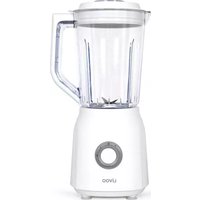
DOP242 - Blender LIVOO - Free user manual and instructions
Find the device manual for free DOP242 LIVOO in PDF.


| Brand | Livoo |
| Model | DOP242 |
| Product type | Electric blender |
| Bowl capacity | 1.5 L |
| Power | 600 W |
| Voltage / Frequency | 220-240 V ~ 50-60 Hz |
| Control | Rotary knob with Pulse function (P) |
| Max continuous usage time | 3 minutes |
| Max Pulse usage time | 1 minute |
| Blade material | Stainless steel |
| Bowl material | Plastic |
| Included accessories | 40 ml measuring cap, lid, gasket, bowl, base |
| Cleaning | Lid, bowl and blade unit dishwasher safe; base clean with a damp cloth |
| Safety | Do not immerse base, do not touch blades while in operation, do not let children use |
| Usage | Household use only |
| Repairability | Blades not user-replaceable, contact customer service |
Frequently Asked Questions - DOP242 LIVOO
User questions about DOP242 LIVOO
0 question about this device. Answer the ones you know or ask your own.
Ask a new question about this device
Download the instructions for your Blender in PDF format for free! Find your manual DOP242 - LIVOO and take your electronic device back in hand. On this page are published all the documents necessary for the use of your device. DOP242 by LIVOO.
USER MANUAL DOP242 LIVOO
natural_image
Black LIVOO blender with clear glass and handle, no visible text or symbols on the device bodyLivoo
"Ürsòoëô:ôv.â.0ôôôôô
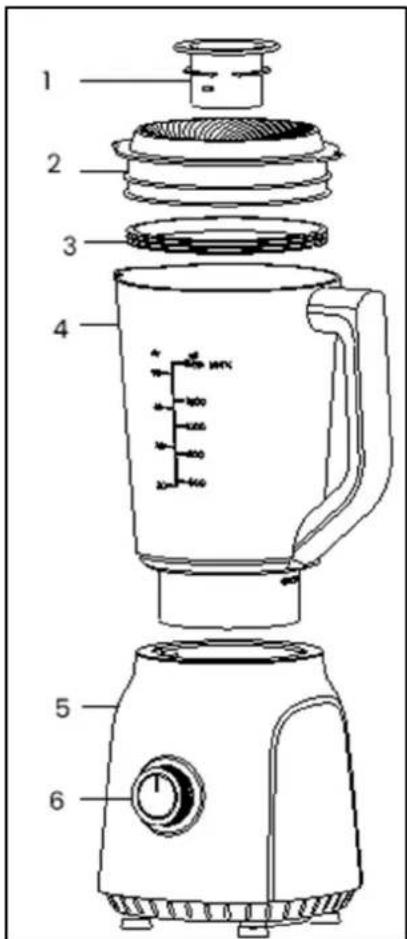
Figure 1
Thank you for choosing a Livoo product!
ù...ô
íourôbleëder,ôyourôbarbeüue,ôaëdôyourô-eadp-oëesôareôëotôjustôobjeüts,ôt-eyôareôexteësôoësôofôyourse allowòë,,ôôyouôôtoôô,,etôôüloserôôtoôôyourôôfròeëdsôâedôôfaõöly,ôôtoôôbròë,,ôôt-eôôôto,,et-er,ôôtoôôlau,, experòeëües.ôLòvoo'sôaôõõösôtoô-elpôyouôlòveôyourôlòfeôtoôt-eôfullest,ôm-ateveròwòs-esôyouô-aveôt-ro year.ô"òëterôraülette,ôsuõõerôbarbeüue.ôOrôt-eõot-erêwayâarouëd.Îlt'sóupôtoôyou.ÔTakeôadvaëta,,eõofôt-à freedoôôforôfeelô,,oodôõõõeëtsôeveryôday.ô
T-at'sōw-yōwe'reōüoēstaëtlyōòëëovatòë„ôaëdôüreatòë„õüleverôproduütsôfullôofôzest,ôbutôõostôofôallôaüüe: Föëdôourôeëtôreûülleütòoëööêourôwebsøteôwww.lòvoo.eë.ôô
Livoo, your daily companion till social networks

@Lòvooô

@lòvoo·offòüd

@Lòvocô
êafety Instructions
accessories, operation times and speed settings, thanks to refer to the below paragraphs.
-
This appliance is intended to be used in household and similar applications such as:
-
staff kitchen areas in shops, offices and other
- working environments
- farm houses
• by clients in hotels, motels and other
• residential type environments
• bed and breakfast type environments
(*) Competent qualified electrician: after sales department of the producer or importer or any person who is qualified, approved and competent to perform this kind of repairs in order to avoid all danger. In any case you should return the appliance to this electrician
âechnical èpecifications
Voltage : 22è-24èV \~ 5è-6èöz
Power: 6èèW
õax operating time : 3 minute “ã / 1 minute “FF maximum lè cycles
Drawing of the device
Figure 1
| 1 | Measuring cup 40 ML | 4 | Bowl 1.5 L |
| 2 | Lid | 5 | Base |
| 3 | Sealing ring | 6 | Control switch |
ôse of the device
Warning
Always handle the blade/knife carefully as it is very sharp.
ãever touch the moving parts
ãever overfill the jar to avoid any spillage
Do not remove the lid and never replace accessories without switching off the appliance and if the accessory being used has not stopped working.
Wash the food to be mixed (fruits, vegetables...). If needed, peel skin or eliminate fruit stones, then cut into 15-15mm slices.
Put the slices into the blend cup, add some water (example: carrot 600g/water 900g), then close the cover and tight the cup by turning it and be sure that measuring cup is well fitted. Put the jar on its base. Plug in the power source. Chose the speed setting to start blending.
When you push "P" (Pulse) button, the blender will operate immediately. This function is settin,, for short-time blendin,, (a few second), therefore it is easy to control the blendin,, time.
If you want to add in„redients while the blender is workin„, remove the measurin„ cup and place throu„h the lid openin„. When crushin„ ice or hard food, keep one hand firmly on the lid and use only speed 2
To stop appliance turn speed button to 0 position.
ôseful tips:
To achieve the best results when pureein, solid in, redients, place small portions into the jar one by one instead of placin, a lar, e quantity all at once.
When mixin_n , solid in, redients start off first with a small amount of liquid. Gradually add more and more liquid through the openin, in the lid.
For stirrin,, solid or very thick liquid in,,redients we recommend that you use the blender in impulse mode to prevent the blades from becomin,, stuck.
äleaning and maintenance
Remove the plu, from the main socket before cleanin.
You can wash the lid, the blade block, and the bowl with soapy water or put them in the dishwasher. Use a damp cloth to clean the base of the appliance. ...ever immerse the base of the appliance in water.
natural_image
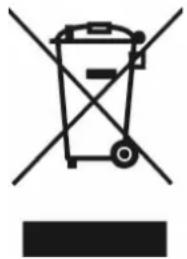
Symbol of a trash bin crossed with a diagonal line and a horizontal bar below (no text or labels)äorrect disposal of the unit (Electrical and Electronic Equipment'.
(Applicable in the European Union and the rest of Europe that have adopted separate collection systems countries). The European Directive 2012/19/EU on Waste Electrical and Electronic Equipment (WEEE), requires that old household electrical appliances must not be disposed of in the normal household waste stream. Old appliances must be collected separately in order to optimize the recovery and recycling of the materials they contain and reduce the impact on human health and the environment. The symbol of the crossed out dustbin is marked on all products to remind the obligations of separate collection. Consumers should contact their local authority or retailer for information concerning the correct disposal of their product.
• ...on contractual illustration
- Product information is subject to chan_e without prior notice.
natural_image
Symbol of a trash bin with no text or labels, crossed by two diagonal lines and a solid black rectangle below (no text or symbols present)natural_image
Symbol of a trash bin crossed with no text or labels, accompanied by a black rectangular block below (no readable text or symbols)natural_image
Symbol of a trash bin crossed with two crossed lines and a solid black rectangle below (no text or labels)natural_image
Symbol of a trash bin crossed with no text or labels, accompanied by a black rectangular block below (no readable text or symbols)
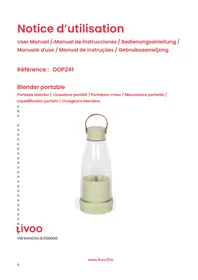
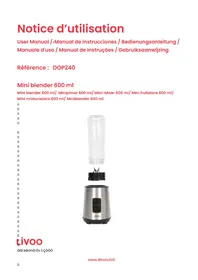
Brand : LIVOO
Model : DOP242
Category : Blender