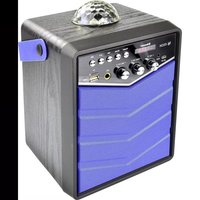
Bobby Joey Rockstar - Loudspeaker X4 Tech - Free user manual and instructions
Find the device manual for free Bobby Joey Rockstar X4 Tech in PDF.


| Product type | Portable speaker with LED party lights |
| Brand | X4 Tech |
| Model | Bobby Joey Rockstar |
| Dimensions (L x H x D) | 16,5 x 18,5 x 26 cm |
| Weight | Approximately 2,04 kg (speaker), 46 g (power adapter) |
| Power supply | Built-in lithium-ion battery 7,4 V / 2 x 2000 mAh, charging via micro-USB DC 5 V, 2 A |
| Battery life | Approximately 4 hours at max volume with party lights |
| Charging time | Approximately 4 hours for a full charge |
| Power | 20 watts RMS |
| Impedance | 4 ohms |
| Frequency response | 90 Hz - 18 kHz |
| Connectivity | Bluetooth 4.2 (range ≤ 10 m), USB (FAT32, up to 64 GB), micro SD (up to 64 GB), AUX-IN 3,5 mm, microphone input 6,3 mm |
| Supported audio formats | MP3 (playback from USB or micro SD) |
| Main features | Bluetooth, USB, micro SD, AUX playback; microphone with volume and echo controls; LED party lights synchronized to music |
| Housing material | PC, ABS plastic, wood |
| Care and cleaning | Clean with a soft, dry cloth; do not use solvents |
| Safety | Do not expose to heat or moisture; do not look directly at the LEDs; risk of epilepsy for sensitive individuals; do not leave children unattended |
| Spare parts and repairability | The batteries are built-in and not user-replaceable; contact customer service for any repairs |
| Package contents | Bobby Joey Rockstar speaker, USB charger, USB cable, AUX cable, user manual |
Frequently Asked Questions - Bobby Joey Rockstar X4 Tech
User questions about Bobby Joey Rockstar X4 Tech
0 question about this device. Answer the ones you know or ask your own.
Ask a new question about this device
Download the instructions for your Loudspeaker in PDF format for free! Find your manual Bobby Joey Rockstar - X4 Tech and take your electronic device back in hand. On this page are published all the documents necessary for the use of your device. Bobby Joey Rockstar by X4 Tech.
USER MANUAL Bobby Joey Rockstar X4 Tech
DE
EN
IT
FR
Bobby Joey Rockstar
BEDIENUNGSANLEITUNG
USER MANUAL
MANUALE D'USO
MODE D'EMPLOI
DE - Inhalt
Information on this user manual 23
Liability....23
Designated Use....23
Declaration of conformity....23
General Notes....24
Signal Words 24
Safety Guide 24
Packing contents 27
Specifications 27
Power supply....28
Battery operation 28
Operation with USB power adapter .....28
Battery / Rechargeable Battery.....29
General operating instructions....29
On/Off 29
Volume / ECHO-function....30
USB-/micro-5D card operation....30
Bluetooth....31
Changing the Mode....31
Using the Party Light 31
Connecting a Microphone....32
Connection via AUX-IN....33
Trouble shooting....33
Disposal 34
Guarantee....35
IT - Indice
Casque auditive ....57
We are pleased that you have decided to buy our product and wish you an enjoyable and successful use.
Information on this user manual
This user manual contains important information for the safe use of the product. Therefore, for your own safety and for a successful use, please read this user manual completely before assembling and using the product. Please keep this operating manual for reference. If you pass on the product to anyone else, please hand over the operating manual as well.
Liability
We do not accept liability for any damage to property or for personal injury that is due to improper use or failure to follow the instructions in this operating manual and the safety advice. In such cases any claim under the guarantee is null and void!
Designated Use
The X4-TECH Bobby Joey Rockstar is designed to play music from USB-Sticks, AUX-IN or via Bluetooth in indoor environments. The device has no recording function. The integrated party light serves as light decoration indoors. It is not suitable as household lighting. The LED lamps cannot be changed in the luminaire.
The designated use is defined by the instruction manual and in following the appliance and the warnings mentioned in this user manual. This product is not suitable for commercial usage.
Declaration of conformity
This product meets the requirements of both current national and European guidelines. The declaration of conformity can be found at https://secure.productip.com/public/view/file/id/7b0f9
General Notes
All mentioned company and product names are registered trademarks under the rights of their owners. © All rights reserved.
No liabilities will be taken for damages or claims resulting out of not reading and/or not following the user guide and/or any form of modification on or in the product. Under these circumstances, no warranty services will be given. Liability cannot be taken for consequential damages.
The contents of this user manual may differ from the product. If so, please consult additional manuals in the packing. Keep this user manual in a safe place. If you give this product away to a third party, make sure that you also pass on the user manual.
For the reason of safety and CE-licensing it is not allowed to modify this unit in any way and/or use it for functions, other than the designated use.
Signal Words

CAUTION! High risk! Disregard of this regulation may result in danger to life or physical condition.

WARNING! Medium risk! Disregard of this regulation may cause material damage.

ATTENTION! Low or no risk! Facts to follow for the designated use of this product.
Safety Guide

CAUTION!
The power adapter is not a toy!

CAUTION! Danger of hearing damage! To avoid hearing
damage, do not listen to music at maximum volume for a long period of time.

CAUTION! Risk of strangulation! The cables of this product may become a danger for children.

CAUTION! Danger of suffocation! The device contains small parts that can be ingested. Packaging and protective foils can situte a suffocation hazard.

CAUTION!
Not suitable for children under the age of 3
» Danger of suffocation due to small parts.
» Danger of strangulation due to long cables.
» The toy must be kept out of reach of children under 3 years!

CAUTION!
To be used under the direct supervision of an adult!

WARNING! Misuse may cause risk of damage. Incorrect use of the device may lead to damages.
» The product may not be subjected to extreme heat or cold. Do not expose the product to intense sunlight, open fire or other heat sources: Storage temperature: 0°C to 40°C; Working temperature: 0°C to 40°C.
» This device is equipped with two integrated 2.000 mAh lithium ion batteries. Batteries and rechargeable batteries must be kept out of the reach of children. Leaking or damaged batteries can cause acid burns if they come into contact with the skin.
» Fully charge the battery before storage and every 6 months when the product is not in use.
» Charge the battery completely before starting the device for the first time (approx. 4 hours).
The following safety and danger references/notices serve not only the protection of the product, but also the protection of your safety and health. Please read all following instructions carefully.
» Avoid high volumes to protect your and your children's hearing. High volumes may cause irreparable damage to children's ears.
» This device contains small parts and cables which can be swallowed. The device is not suitable for children under 3 years.
» NEVER let anyone, especially children, put objects into the holes, slots or openings of this device. This may lead into death due to electric shock. The device must only be opened by a qualified service technician.
» Beware of small pieces and batteries – do not swallow them. They can be hazardous to your health and lead into suffocation. Make sure to keep small parts and batteries out of reach of children.
» Never leave packaging material lying around unsupervised – this can become a hazardous toy for children and/or pets and lead to serious injuries, e.g. suffocation.
» The ventilation system must be clear of objects at all times. Do not obstruct the ventilation of this device. Make sure that no curtains, newspapers, furniture or any other types of objects are blocking the ventilation system of this device. Overheating may lead into serious damage of the device and reduce its performance and lifespan.
» Do not expose the device to direct sunlight. Make sure that the device is not exposed to direct heat sources such as heaters or open fire.
» Contact a service technician if there is any reason to believe that the operation or safety of the device has been impaired. Please adhere to the additional safety information found in the individual chapters of this instruction manual. Should you be in doubt of the correct operation of this device or questions arise that are not explained within this manual, please contact our technical hotline
or a service technician for further information.
» Only use the included power adapter for charging the device.
If there is any doubt in the safety of this device (e.g. because of damage to the enclosure, cables, the power adapter or the internal transformer), the device should not be used until the damage has been properly removed.
Packing contents
Bobby Joey Rockstar, Manual, USB power adapter, Micro-USB cable, AUX-cable
Specifications
| Power Supply: 7,4 V / 2x 2.000 mAh Li-Ion rechargeable battery |
| Power adapter: DC 5 V, 2 A |
| Dimensions: 16,5 x 18,5 x 26 cm (W x H x D) |
| Output: 20 Watt RMS |
| Impedance: 4 Ohm |
| Frequency: 90 Hz - 18 kHz |
| 3 volume controls (Volume, Echo, Microphone) |
| LED party light |
| Weight |
| approx. 2,04 kg (Rockstar) |
| approx. 46 g (power adapter) |
| Outlets |
| Microphone connector: 1x 6,3 mm |
| micro SD card (up to 64 GB) |
| 3,5 mm AUX-IN |
| USB slot (up to 64 GB) |
| micro-USB slot DC 5 V for charging |
USB: Playback of MP3 files; the volume has to be formatted in FAT32; capacities of up to 64 GB are supported
Bluetooth: Can be linked to your smartphone or other devices
Bluetooth range: ≤ 10 meters
Power supply
Battery operation

Important notice: Fully charge the integrated battery before first use!
» The device has two built-in rechargeable Li-Ion batteries, which can be charged with the included power adapter. The battery- and charging-status are shown on the LED display and when the red charging LED is shining. One complete charging takes approx. 4 hours. The runtime with maximum volume and switched on party light is approx. 4 hours.
» The red charging LED is shining during the recharging process. After the product is completely recharge, the LED turns off.

The battery may only be charged under the direct supervision of adults.
Operation with USB power adapter
» Only use the included original power adapter.
» Connect the power adapter with the DC 5 V jack and a mains socket.
» Afterwards switch on the device by using the Power button. The battery is now being recharged, which is shown with the battery status on the LED display.
» The red charging LED is shining during the recharging process. After the product is completely recharged, the LED turns off.

Wrong usage of the transformer may lead to electric shock.
The transformator used for this product has to be checked for damages to the housing, connector, cable and other parts. If there is
any damage, the transformator must not be used.

If there is any doubt in the safety of this device (e.g. because of damage to the enclosure, cables or the power adapter),
the device should not be used until the damage has been properly removed.

This device may only be connected to the provided power adapter. The usage of other kinds of power adapters may change the device.
Battery / Rechargeable Battery

WARNING! Children are at risk of injury!
» If the batteries are handled by children or adults unable to assess the risk, they run the risk of injury, which could even be life-threatening.
» Do lot leave batteries lying around. There is a risk that children or pets might swallow them. Seek medical assistance immediately if this occurs.
» Batteries must not be exposed to excessive temperatures, such as arise in direct sunlight, in a fire or an oven. There is an explosion risk.
» Make sure that the batteries are not shortcircuited. Further more, they must not be charged. There is an explosion risk.
General operating instructions
On/Off
» Switch on the unit by using the Power button.
» The unit automatically switches into Bluetooth-pairing mode. The display shows „blue“ and the Bluetooth symbol starts blinking. The unit is ready to be linked to another device.
» Press the power button once again to turn the unit off.
Volume / ECHO-function

CAUTION! Danger of hearing damage!
To avoid hearing damage, do not listen to music at maximum time for a long period of time.
Turn the VOLUME-/ECHO-VOLUME / MIC-VOLUME control clockwise to raise the volume or echo effect. Turn it counter-clockwise to lower the volume or echo effect.
PROTECT YOUR CHILDREN FROM HEARING IMPAIRMENT
» Determine and retain a pleasant volume level. As the hearing gets accustomed to a certain volume level and the volume perceived by the human ear decreases over time, there is a tendency to increase the volume regularly.
» This procedure will inevitably lead to hearing impairment.
» The higher the volume levels are set, the faster the hearing of your child will be damaged.
USB-operation / micro-SD card operation

USB-sticks have to be formatted in FAT32! Copy your MP3
files to the USB-stick. If there are no preceded consecutive
numbers (01_title..., 02_title...) the files will be played in alphabetical order.
» Plug the USB-stick/the micro-SD card into the relevant connector.
» After a few seconds, the device will automatically recognize the attached USB-stick/micro SD card and shows the total number of tracks on the LED display.
» Press >|| playback and pause button once to start the playback from track one or from the last played track. The LED display shows the number of the currently played track.
» To pause the track, press >|| once again.
» Press >>| shortly to get to the next track. Keep on pressing this button to fast forward through the track.
» Press |<< shortly to get back to the beginning of the track or to
start the previous track. Keep on pressing this button to navigate backwards through the track.

Note on copy protection. Under applicable law it is forbidden to copy, transfer, lease or make available any material
protected by copyright without a permit of the right-holder.
Bluetooth
» Turn on the unit as described in chapter „ON/OFF“.
» The unit will automatically switch into Bluetooth pairing mode, if no other device is connected and the display shows „blue“.
» Activate Bluetooth on your smartphone/tablet.
» Search for new devices on your smartphone/tablet and choose „X4-TECH Rockstar“.
» The LED display continues to show „blue“.
» Choose the music on your smartphone/tablet to start the playback via the loudspeaker.
» The product searches automatically for old matches. If no old connection can be found, the product connects to new devices.
» To pause the track, press >|| once.
» Press >>| shortly to get to the next track.
» Press |<< shortly to get back to the beginning of the track or to start the previous track.
» Optionally you can choose the tracks or fast forward and backward with your smartphone/tablet.
Changing the Mode
» If two devices are connected at once you can switch between these by pressing the MODE button.
» Shortly press this button until the MODE switches to the desired connected device.
Using the Party Light
» Turn on the unit as described in chapter „ON/OFF“.
» Press the button MODE for about 3 seconds until the light is turned
on and switches slowly between red, green, blue and yellow.
» When music is played, the party light automatically reacts to it.
» To turn off the party light press the button again for about 3 seconds.
» The party light can be used with and without music, as well as it's possible to play music without the party light switched on.
WARNING! You must not, under any circumstances, look directly into the emitted light as this may cause permanent damage to your eyes. Never point the LED light directly towards other people or animals.
People suffering from photo-sensitive epilepsy, are susceptible to epileptic seizures or loss of consciousness if exposed to flashing lights or light patterns. If symptoms such as dizziness, blurred vision, eye or muscle twitching, loss of awareness, disorientation, any involuntary movement or convulsion should occur, the light effect should be switched off or the person should leave the room/place.
Connecting a Microphone
» The unit is equipped with one 6,3 mm microphone socket, that can be used with or without music.
» Please read and follow all safety instructions and manuals carefully that are provided with the microphones.
» It is not possible to connect condenser microphones.
» Connect the microphone with the MIC jack to the unit.
» Switch on the microphone according to the manual of the manufacturer.
» Turn on the unit as described in chapter „ON/OFF“.
» Regulate the volume with MIC VOLUME and VOLUME to an appropriate sound level.
» Now you can speak or sing into the microphone.
DANGER! Take care that you don't place the microphone too close to the speaker – otherwise an acoustic feedback (squealing from the speakers) can happen. Higher settings of the microphone volume will result in greater sensitivity for acoustic feedbacks.
Connection via AUX-IN
» Plug the provided 3,5 mm cable into the socket of a personal media player like the headphone input of your smartphone and plug the other end into the AUX-IN jack of the unit.
» Turn on the unit as described in chapter „ON/OFF“.
Start the music on the personal media player. The loudspeaker will immediately start the playback. To switch between tracks, use your personal media player. To pause the track press >ll shortly. To switch modes press the mode button shortly.
Trouble shooting
| Error Solution | |
| The loudspeaker does not turn on after pressing the power button. | Check if the battery is sufficiently charged. If not, recharge the battery completely and try again turning on the product afterwards. |
| The loudspeaker turns off after pressing the power button. | |
| No bluetooth connection can be set up (no music is played). | Check if you chose the correct bluetooth device. PCs support A2DP. |
| The music is very low. Check if the volume is set properly and adjust it with -VOL+. | |
Disposal

Electrical- and electronic devices must never be disposed of in the regular household waste! Consumers are legally obligated and responsible for the proper disposal of electronic and electrical devices by returning them to collecting sites designated for the recycling of electrical and electronic equipment waste. For more information concerning disposal sites, please contact your local authority or waste management company.

Do not dispose of batteries and rechargeable batteries with your household waste! Customers are legally obliged to return used and rechargeable batteries, whether they contain harmful substances* or not, to designated disposal sites or collecting sites in shops selling batteries. By doing so you are contributing to a better and cleaner environment.
* Identification mark: Cd= Cadmium; Hg= Mercury; Pb= Plumb

Guarantee
COPYRIGHT
Lived non food GmbH, all rights reserved. No liability will be taken for modifications or mistakes regarding the technical data or product features described in this user manual. All rights reserved. Any reproduction, transfer, duplication or filing of this user manual or parts of it, as well as the translation into a foreign language or computer language is prohibited without the explicit approval of the manufacturer. Due to the fast advancement of these products, no guarantee of completeness can be given. Modifications in technique and configuration are subject to change at any time. To receive a digital copy of this user manual, please contact our service department.
GUARANTEE AND SERVICE CONDITIONS
You receive a voluntary 2-year manufacturer guarantee, starting at purchase date, for material and production defects of the product. This guarantee is applicable in Germany, Austria and Switzerland. The receipt counts as a proof of guarantee. Within the guarantee period we will repair all material and manufacturer defects free of charge. Your statutory warranties remains unaffected by this guarantee.
THE GUARANTEE DOES NOT COUNT:
- in case of damages which have arisen after improper use
- for wear parts / accessories that are subject to natural wear and tear
- for defects that are known to the customer at purchase
- in case of damages that occurred due to repair or intervention of the buyer or an unauthorized third party
- in case the device was connected to a higher voltage as stated on the device
- when dropping the device or single
elements of it
- for improper transportation or packaging
- damages that occurred due to force majeure
- for non-observance of valid safety precautions
- for non-observance of the manual
BATTERIES / RECHARGEABLE BATTERIES
Batteries / rechargeable batteries are not covered by the guarantee as they are parts of consumption. In case of a guarantee claim, the date of sale has to be proven by receipt or invoice. Replacements for reasons covered by the guarantee do not lead to an extension of the original guarantee period, neither for the device itself nor for any replaced components. If you are claiming a valid guarantee, we are entitled to choose whether we will repair the device free of charge or exchange it for a new device. Any further claims are excluded. Parts replaced will pass into our property. We reserve the right to change defective parts or products against follow-up models.
SUPPORT
Please always contact us before you return your product. Provided that a return shipment has been agreed upon, send the defective product securely packaged at your own cost to our service department.
It is absolutely necessary that you add a copy of your receipt to your return shipment. Repairs carried out after the guarantee period are subject to a charge. We will not accept freight collect shipments and will return them to the sender.
Manuale d'uso | Bobby Joey Rockstar | Italiano
*Marque Cd = Cadmium, Hg = Mercure, Pb = Plomb

Conditions de garantie
DROIT D'AUTEUR
LA GARANTIE NE COUVRE PAS:
X4-TECH
Service Adresse
Lived non food GmbH | Friedrich-Seele-Straße 20
DE-38122 Braunschweig, Germany
+49 (0) 531 224356-82 | service@x4-tech.de

www.x4-tech.de
Hersteller / Manufacturer / Fabbricante / Fabrikant / Fabricant
Lived non food GmbH | Friedrich-Seele-Straße 20
DE-38122 Braunschweig, Germany
info@lived-non-food.de | www.lived-non-food.de
- De - inhalt
- It - indice
- Information on this user manual
- Liability
- Designated use
- Declaration of conformity
- General notes
- Signal words
- Safety guide
- Caution
- Packing contents
- Power supply
- Battery operation
- Operation with usb power adapter
- Battery / rechargeable battery
- General operating instructions
- On/off
- Volume / echo-function
- Caution! danger of hearing damage
- Protect your children from hearing impairment
- Usb-operation / micro-sd card operation
- Bluetooth
- Changing the mode
- Using the party light
- Connecting a microphone
- Connection via aux-in
- Disposal
- Guarantee
- Copyright
- Guarantee and service conditions
- The guarantee does not count
- Batteries / rechargeable batteries
- Support
- Manuale d'uso | bobby joey rockstar | italiano
- Conditions de garantie
- Droit d'auteur
- La garantie ne couvre pas
Brand : X4 Tech
Model : Bobby Joey Rockstar
Category : Loudspeaker