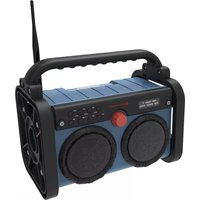
DAB85 - Radio Soundmaster - Free user manual and instructions
Find the device manual for free DAB85 Soundmaster in PDF.


| Brand | Soundmaster |
| Model | DAB85 |
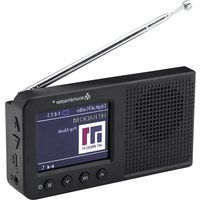
| Product type | DAB+/FM radio with Bluetooth and hands-free |
| Power supply | Supplied mains adapter (compatible mains voltage) |
| Internal battery | Rechargeable, charge indicator, unspecified battery life |
| Output power | Not specified (stereo speakers) |
| Reception | DAB+ and FM with telescopic antenna |
| Connectivity | Bluetooth, AUX input (3.5mm jack), mains adapter socket |
| Main functions | Automatic DAB/FM search, presets (40 stations), equalizer (Normal, Classic, Pop, Jazz, Rock), snooze timer, auto standby, LED light, hands-free function |
| Display | Text screen with station info, time, date, signal strength |
| Controls | Buttons and volume wheel, navigation, menu |
| Maintenance and cleaning | Clean with a dry cloth, do not use detergents or abrasive cloths |
| Safety | Do not open (risk of electric shock), do not expose to moisture, do not block ventilation grills, use only the supplied adapter, keep batteries out of reach of children |
| Operating conditions | Dry indoor, moderate climates, avoid direct light and heat sources |
| Package contents | Main radio, mains adapter, antenna, adhesive strips, instruction manual |
| Weight and dimensions | Not specified (compact model with smartphone compartment) |
| Batteries | Coin cell battery present (not user-replaceable?), do not swallow |
Frequently Asked Questions - DAB85 Soundmaster
User questions about DAB85 Soundmaster
0 question about this device. Answer the ones you know or ask your own.
Ask a new question about this device
Download the instructions for your Radio in PDF format for free! Find your manual DAB85 - Soundmaster and take your electronic device back in hand. On this page are published all the documents necessary for the use of your device. DAB85 by Soundmaster.
USER MANUAL DAB85 Soundmaster
natural_image
Black portable electronic device with two speakers and a portable fan, no visible text or symbols on the device body.DEUTSCH
ENGLISH
FRANÇAIS
NEDERLANDS
ITALIANO
ČEŠTINA
SLOVENSKÝ
• DRC (Dynamic range compression)
Festsender speichern
Copyright by Woerlein GmbH, 90556 Cadolzburg, www.soundmaster.de
Do not dispose of this product with the normal household waste at the end of its life cycle. Return it to a collection point for the recycling of electrical and electronic devices. This is indicated by the symbol on the product, user manual or packaging
The materials are recyclable according to their labeling. By reusing materials or other forms of recycling old devices and packaging, you are making an important contribution to protecting our environment. If necessary, remove batteries and personal data before disposal free of charge and ask your local authority about the responsible disposal point
| WARNING | ! | |
| Risk of electric shockDo not open! |
Caution: To reduce the risk of electric shock, do not remove the cover (or back). There are no user serviceable parts inside. Refer servicing to qualified service personnel.

This symbol indicates the presence of dangerous voltage inside the enclosure, sufficient enough to cause electric shock.
This symbol indicates the presence of important operating and maintenance instructions for the device
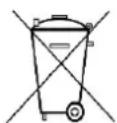
Used batteries are hazardous waste and NOT to be disposed of with the household waste! As a consumer you are legally obligated to return all batteries for environmentally responsible recycling – no matter whether or not the batteries contain harmful substances*)
Return batteries free of charge to public collection points in your community or shops selling batteries of the respective kind. Only return fully discharged batteries ^* marked Cd = cadmium, Hg = mercury, Pb = lead
- Only use mercury and cadmium-free batteries.
- Used batteries are hazardous waste and NOT to be disposed of with the household waste!!!
- Keep batteries away from children. Children might swallow batteries.
- Contact a physician immediately if a battery was swallowed.
- Check your batteries regularly to avoid battery leakage.
- Batteries shall not be exposed to excessive heat such as sunshine, fire or the like.
- CAUTION: Danger of explosion if battery is incorrectly replaced
- Replace only with the same or equivalent type

WARNING
DO NOT INGEST BATTERY, CHEMICAL BURN HAZARD
This product contains a coin/button cell battery. If the coin/button cell battery is swallowed, it can cause severe internal burns in just 2 hours and can lead to death. Keep new and used batteries away from children. If the battery compartment does not close securely, stop using the product and keep it away from children.
If you think batteries might have been swallowed or placed inside any part of the body, seek immediate medical attention.
Safety, Environmental and Setup Instructions
- Use the device in dry indoor environments only.
- Protect the device from humidity.
- This apparatus is for moderate climates areas use, not suitable for use in tropical climates countries.
- No objects filled with liquids, such as vases, shall be placed on the apparatus.
- The mains plug or an appliance coupler is used as the disconnect device, the disconnect devices shall remain readily operable.
- Connect this device to a properly installed and earthed wall outlet only. Make sure the mains voltage corresponds with the specifications on the rating plate.
- Make sure the mains cable stays dry during operation. Do not pinch or damage the mains cable in any way.
- A damaged mains cable or plug must immediately be replaced by an authorized service center.
- In case of lightning, immediately disconnect the device from the mains supply.
- Children should be supervised by parents when using the device.
- Clean the device with a dry cloth only.
- Do NOT use CLEANING AGENTS or ABRASIVE CLOTHS!
- Do not expose the device to direct sunlight or other heat sources.
• Install the device at a location with sufficient ventilation in order to prevent heat accumulation.
- Do not cover the ventilation openings!
- Install the device at a safe and vibration-free location.
- Install the device as far away as possible from computers and microwave units; otherwise radio reception may be disturbed.
- Do not open or repair the enclosure. It is not safe to do so and will void your warranty. Repairs only by authorized service/ customer center.
- No naked flame sources, such as lighted candles, should be placed on the unit.
- When you are necessary to ship the unit store it in its original package. Save the package for this purpose.
- In case of malfunction due to electrostatic discharge or fast transient (burst), remove and reconnect the power supply.
- If the unit is not using for a long period of time, disconnect it from the power supply by unplugging the power plug. This is to avoid the risk of fire.
LOCATION OF CONTROLS
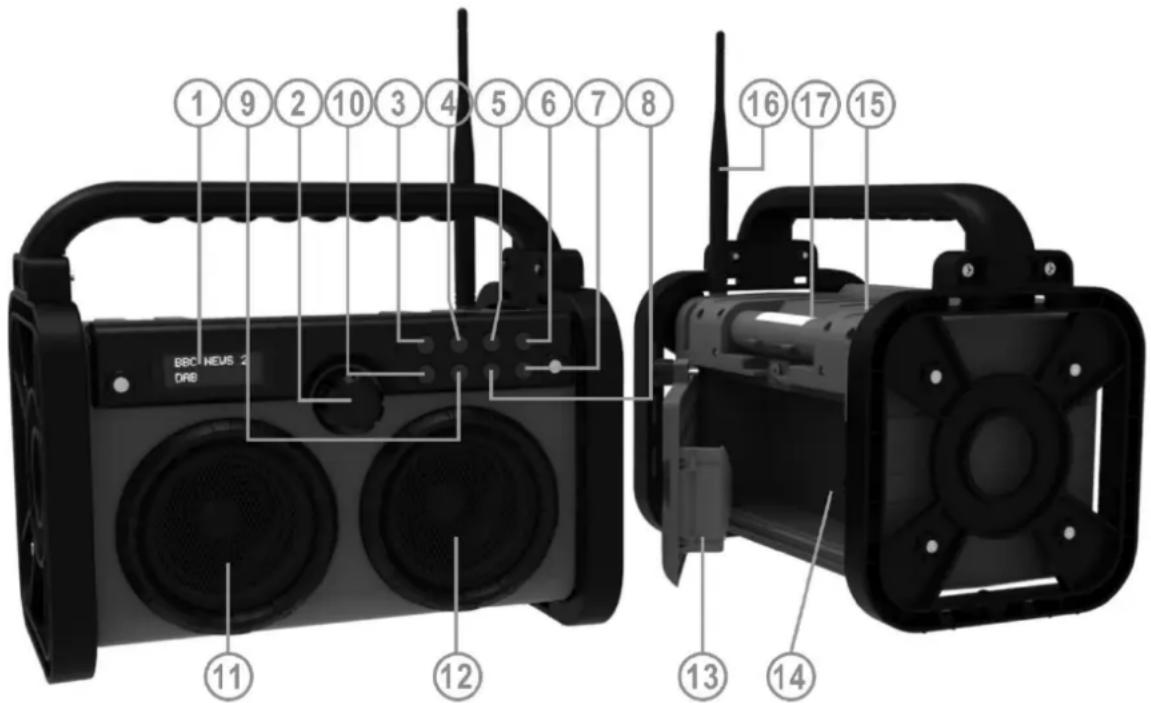
1 Display Show all information of the device
2 VOL-/VOL+ Rotate for volume adjustment and selection values
ENTER /
Press for confirming selection,
FM fine tuning (press and hold when frequency indication flash you can adjust the frequency
Press for accept / ending an incoming call
Press and hold for reject incoming call.
3 ⏻ / MODE Press to turn on; press and hold to switch off.
In on mode press to select the source
4 INFO/MENU In on mode: Press to show information, press and hold to open menu
In Standby mode: Press to open menu
5 FAV/SCAN Short press: Open preset memory
Press and hold: Start station scan
6 NAP/EQ In standby: Open the NAP timer
In on mode: open EQ menu for selection
7 PRE+/ Go to next station (DAB) / preset station or next song in BT
Press and hold for FM search upwards
8 ▷/PAIR Play/pause BT playback
In BT mode long press to disconnect BT device
9 🕐/ PRE- Go to previous station (DAB) / preset or previous song in BT
Press and hold for FM search downwards
10 LIGHT/ST. Press to switch on/off the LED light
Press and hold for FM Stereo/Mono selection
11 Left speaker 12 Right speaker
13 Mobile phone compartment 14 AUX IN jack
15 DC jack 16 DAB/FM antenna
17 LED work light
INSTALLATION
CONTENT OF DELIVERY
▶ Main unit
AC Adapter
Instruction Manual
Antenna
▶ 2 x adhesive strips
If necessary, stick the supplied adhesive tapes on the underside of the frame for better slip and stability.
POWER SUPPLY
Use only the supplied power adapter!
➢ Ensure that the voltage is the same as that indicated on the AC adapter identification plate.
Connect the supplied AC adapter to a properly installed safety power socket and the plug of the cable into the DC IN jack at the back side of the unit.
Charge the built-in battery completely before using it for the first time!
BATTERY POWER INDICATOR
While the device is playing in battery mode, press the "INFO/MENU" button repeatedly until the display show "Battery xx" (xx = Battery level).
When the battery power is low and need to re-fill, the battery icon in the right corner of the display is flashing and the display show "Battery Low".
ERP power management
The unit will turn off automatically after about 15 minutes in standby mode if there is no audio signal. To turn on the unit again press the “/MODE” button.
BASIC OPERATIONS
POWER ON / OFF (Power supply operation)
Press “○ / MODE” to switch the unit on; press and hold “○ / MODE” to switch into standby.
POWER ON / OFF (Battery operation)
Press the “/ MODE” button to turn the unit in standby. The display show “Welcome to Digital Radio” and then the time and date is shown.
In standby, press the “ ⏻ / MODE” button to turn on the unit.
In on mode, press and hold the “ ⏻ / MODE” button to turn the unit in standby. The time and date are shown in the display.
In standby, press and hold the “○ / MODE” button to turn the unit in power saving mode.
Note: In standby mode, if you don't press any button, the unit will automatically turn off into power saving mode after about 15 seconds.
SELECTING MODES
During playing mode, press the “ ⏻ / MODE” button repeatedly to switch between the modes.
ADJUSTING VOLUME
To increase or decrease the volume, rotate the "VOL-/VOL+" knob.
DAB
- Select the mode "DAB".
- If you start the radio the first time, the unit will start an automatic scan and store all receivable radio stations.
- Press the “◀/▶” button to select a radio station from the station list and press “ENTER” to confirm the selection.
Automatic Search
Press and hold the "FAV/SCAN" button to start the automatic scan. All found stations will be stored in the station list.
Store preset station
You can store up to 40 DAB radio stations
- Select the desired radio station.
- Press the "FAV/SCAN" button "Preset store
- Select with the “◀/▶” button the station number and press “FAV/SCAN” to confirm.
Recall preset station
- Press "FAV/SCAN". The display show "Preset
- Select with the “◀ / ▶” button the station number and press “ENTER” to confirm.
Information (Info)
When the radio station is playing, press the "INFO/MENU" button repeatedly to cycle through the information broadcasted by the radio as follow:
➢ DLS (Dynamic Label Segmenting)
▶ Audio Bit Rate
▶ Signal strength
Mains Power/Battery
▶ PTY (Program Type)
Time
Channel/Frequency
Date
▶ Signal Error
DAB Menu
- Press and hold the "INFO/MENU" button until the display show "DAB
. - Select with the “◀/▶” button the following settings:
- Full scan
Start an automatic scan.
- Manual tune
Select the desired channel and search only the selected channel.
• DRC (Dynamic range compression)
If you are listening to music with a high dynamic range in a noisy environment, you may wish to compress the audio dynamic range. This makes quiet sounds louder, and loud sounds quieter. You can change DRC as off, low or high.
- Prune
Delete all radio stations which are not receivable anymore.
• TA
When "On" is selected, the radio will receive traffic announcement on some area if the radio station will provide this service.
- Sleep – (also available in the other sources when you press and hold “INFO/MENU”) Select the function “Sleep”. Choose from sleep off, 15 mins, 30 mins, 45 mins, 60 mins or 90 mins. Sleep function is
FM
- Select the mode "FM".
- Press and hold the "FAV/SCAN" button to start an automatic scan. The radio store all local radio stations.
Automatic tune
Press and hold the “◀/▶” button to start the automatic tune. The radio stops at the next receivable radio station.
Manual tune
Press and hold "ENTER" until frequency indication is flashing. Rotate to the wanted reception frequency.
Store preset station
You can store up to 40 FM radio stations.
Is the same as in DAB mode.
Recall preset station
is the same as in DAB mode.
Mono/Stereo selection
Press and "LIGHT/ST" select listening feeling between Mono or Stereo, display will appear "Forced Mono" or "Stereo Allowed" by selection.
Information (Info)
When the radio station is playing, press the "INFO/MENU" button repeatedly to cycle through the information broadcasted by the radio as follow:
Radio Text
Mains Power/Battery
▶ PTY (program Type)
Time
Name
Date
FM Menu
- Press and hold the "INFO/MENU" button until the display show "FM
. - Select with the "◀/▶" button the following settings:
- Scan setting
By default, FM scans stop at any available station. This may result in a poor signal-to-noise ratio (hiss) from weak stations. To change the scan settings to stop only at stations with good signal strength, select "Strong station only".
BLUETOOTH®
If you are using a Bluetooth audio device, make sure the working distance is within 10 meters. Different environment may have effect on the working distance.
- Select the mode "Bluetooth" ("Bluetooth Pairing" is shown in the display).
- Activate the Bluetooth function on your Bluetooth device and select "DAB85". When the connection was successful the display show "Bluetooth Connected".
- Press the “▶” button to start or pause the playback.
- Press the “◀/▶” to skip to the previous or next track.
This unit contains also a hands-free function.
If you have connected a mobile phone by Bluetooth and you get a call, press the "ENTER" button to pick-up the call.
To hang-up the call, press the "ENTER" button.
To reject the call, press and hold the "ENTER" button during ringing.
AUX
- Select the mode "AUX" ("AUX" is shown in the display).
- Connect your external device with an AUX cable with Aux jack at the backside of the unit (Therefore you have to open the phone compartment door).
- Start the playback on your external device.
EQUALIZER
Press in on mode the "NAP/EQ" button and select with "◀/▶" one of the installed sound settings: Normal, Classic, Pop, Jazz, Rock.
NAP
When stay on standby mode, press "NAP/EQ", the display show NAP Timer < off>.
Press the button repeatedly to select the desired time 10, 15, 30, 45, 60, 90, 120, off and press "ENTER" to confirm.
LED LIGHT
Press the "LIGHT/ST" button to switch on or off the LED light.
NOTE: To avoid eye damage you will not see directly into the light while the LED is on.
SYSTEM SETTINGS
In standby mode press "INFO/MENU", "System" is shown on the display – confirm it with with "ENTER"
Press “◀/▶” or rotate “VOL-/VOL+” to select the desired function / value and press “ENTER” to confirm.
- Time
Select the function "Set Time/Date", "Auto update", "Set 12/24 hour", "Set date format" to adjust the time and date settings.
- Language
Adjust the desired menu language.
- Factory Reset
A factory reset resets all user settings to default values.
- SW Version
Show the installed software version
The current instruction manual can be downloaded from www.soundmaster.de. Technical changes and misprints reserved.
Copyright by Woerlein GmbH, 90556 Cadolzburg, www.soundmaster.de
Duplication only with the permission of Woerlein GmbH


PROTECTION DE L'ENVIRONNEMENT

D 90556 Cadolzburg, Germany
Hereby, Wörlein GmbH declares that this device is in compliance with the essential requirements and other relevant provisions of Directive 2014/53/EU.
A copy of the declaration of conformity can be obtained from the above address.

- Festsender speichern
- WARNING
- DO NOT INGEST BATTERY, CHEMICAL BURN HAZARD
- LOCATION OF CONTROLS
- INSTALLATION
- CONTENT OF DELIVERY
- POWER SUPPLY
- BATTERY POWER INDICATOR
- ERP power management
- BASIC OPERATIONS
- SELECTING MODES
- ADJUSTING VOLUME
- DAB
- Automatic Search
- Store preset station
- Recall preset station
- Information (Info)
- DAB Menu
- - Full scan
- - Manual tune
- • DRC (Dynamic range compression)
- - Prune
- • TA
- FM
- Automatic tune
- Manual tune
- Mono/Stereo selection
- FM Menu
- - Scan setting
- BLUETOOTH®
- AUX
- EQUALIZER
- NAP
- LED LIGHT
- SYSTEM SETTINGS
- PROTECTION DE L'ENVIRONNEMENT
Brand : Soundmaster
Model : DAB85
Category : Radio