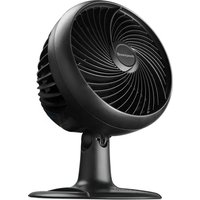
Turbo Force HT-906 - Fan HONEYWELL - Free user manual and instructions
Find the device manual for free Turbo Force HT-906 HONEYWELL in PDF.



| Product Type | Turbo Force High-Velocity Oscillating Electric Fan |
| Brand | Honeywell |
| Model | HT-906 |
| Power Supply | 120 V AC, 60 Hz |
| Safety Fuse | 2.5 A, 125 V (replaceable) |
| Speeds | High (III), Medium (II), Low (I) |
| Oscillation | Yes, push-button (press to activate) |
| Angle Adjustment | Yes, manual tilt |
| Carrying Handle | Yes, concealed on outer rim |
| Usage | Indoor household use only |
| Warranty | 1-year limited |
| Maintenance and Cleaning | Soft cloth, vacuum, or cotton swab; do not immerse or use solvents |
| Safety | Polarized plug; safety fuse; do not use with speed control |
| Spare Parts | Replacement fuse 2.5 A/125 V included in plug |
| Energy Savings | Up to 20% on energy costs by improving air circulation |
Frequently Asked Questions - Turbo Force HT-906 HONEYWELL
User questions about Turbo Force HT-906 HONEYWELL
0 question about this device. Answer the ones you know or ask your own.
Ask a new question about this device
Download the instructions for your Fan in PDF format for free! Find your manual Turbo Force HT-906 - HONEYWELL and take your electronic device back in hand. On this page are published all the documents necessary for the use of your device. Turbo Force HT-906 by HONEYWELL.
USER MANUAL Turbo Force HT-906 HONEYWELL
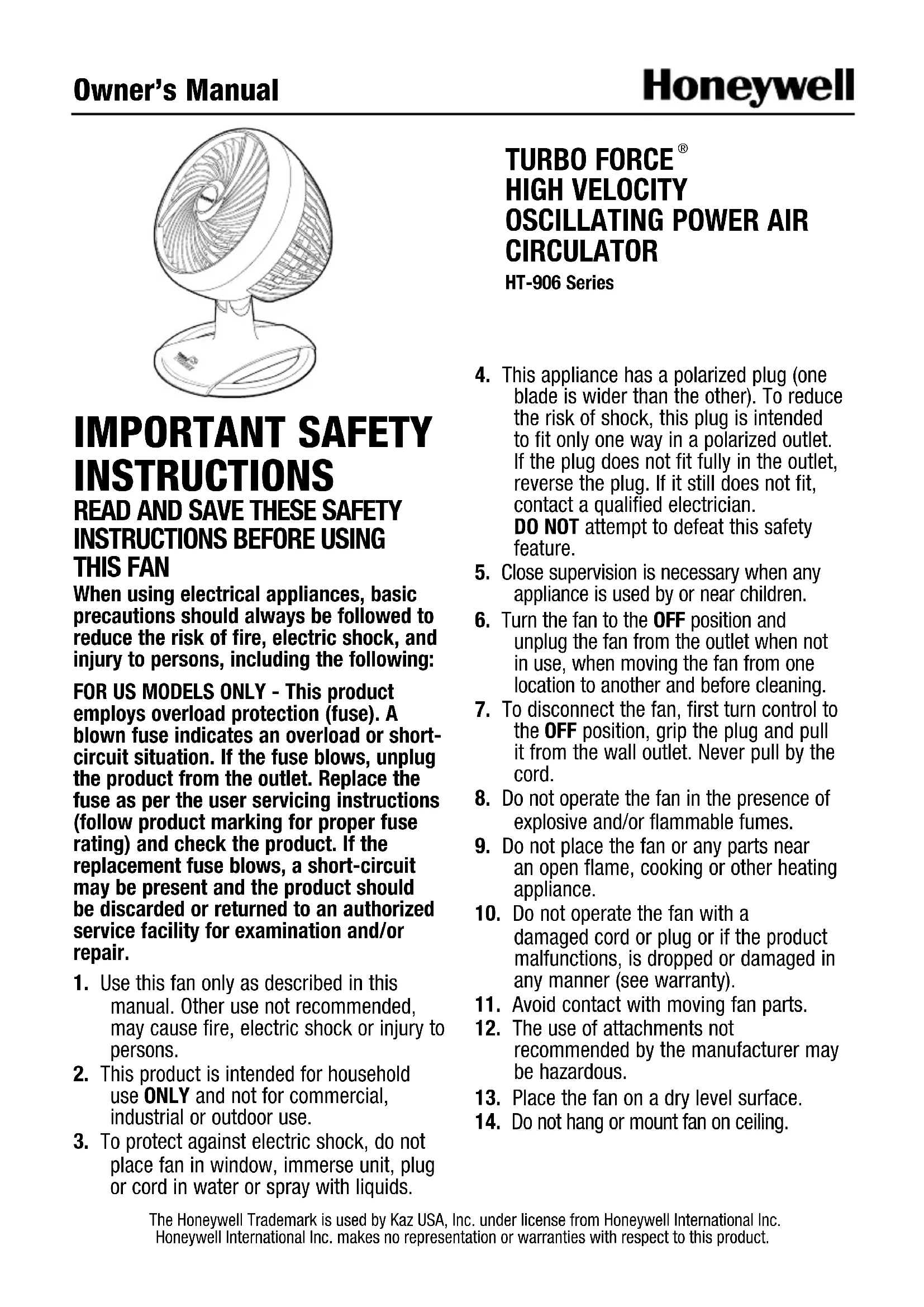
natural_image
Line drawing of a standard office fan with spiral blades and base (no text or symbols)IMPORTANT SAFETY INSTRUCTIONS
READ AND SAVE THESE SAFETY INSTRUCTIONS BEFORE USING THIS FAN
When using electrical appliances, basic precautions should always be followed to reduce the risk of fire, electric shock, and injury to persons, including the following:
FOR US MODELS ONLY - This product employs overload protection (fuse). A blown fuse indicates an overload or short-circuit situation. If the fuse blows, unplug the product from the outlet. Replace the fuse as per the user servicing instructions (follow product marking for proper fuse rating) and check the product. If the replacement fuse blows, a short-circuit may be present and the product should be discarded or returned to an authorized service facility for examination and/or repair.
- Use this fan only as described in this manual. Other use not recommended, may cause fire, electric shock or injury to persons.
- This product is intended for household use ONLY and not for commercial, industrial or outdoor use.
- To protect against electric shock, do not place fan in window, immerse unit, plug or cord in water or spray with liquids.
TURBO FORCE® HIGH VELOCITY OSCILLATING POWER AIR CIRCULATOR
HT-906 Series
- This appliance has a polarized plug (one blade is wider than the other). To reduce the risk of shock, this plug is intended to fit only one way in a polarized outlet. If the plug does not fit fully in the outlet, reverse the plug. If it still does not fit, contact a qualified electrician. DO NOT attempt to defeat this safety feature.
- Close supervision is necessary when any appliance is used by or near children.
- Turn the fan to the OFF position and unplug the fan from the outlet when not in use, when moving the fan from one location to another and before cleaning.
- To disconnect the fan, first turn control to the OFF position, grip the plug and pull it from the wall outlet. Never pull by the cord.
- Do not operate the fan in the presence of explosive and/or flammable fumes.
- Do not place the fan or any parts near an open flame, cooking or other heating appliance.
- Do not operate the fan with a damaged cord or plug or if the product malfunctions, is dropped or damaged in any manner (see warranty).
- Avoid contact with moving fan parts.
- The use of attachments not recommended by the manufacturer may be hazardous.
- Place the fan on a dry level surface.
-
Do not hang or mount fan on ceiling.
-
Do not operate if the fan housing is removed or damaged.
- A loose fit between the AC outlet (receptacle) and plug may cause overheating and a distortion of the plug. Contact a qualified electrician to replace loose or worn outlet.
-
Do not operate any fan with a damaged cord or plug. Discard any damaged fan, or return the fan to the retailer where the fan was purchased, or request a return authorization to return to Kaz USA, Inc. for examination and/or repair.
-
Do not run fan cord under carpeting. Do not cover cord with throw rugs, runners, or similar coverings. Do not route cord under furniture or appliances. Arrange cord away from traffic areas and where it will not be tripped over.
WARNING: To Reduce The Risk of Fire or Electric Shock, Do Not Use This Fan With Any Solid State Speed Control Device
FUSED SAFETY PLUG - FOR US MODELS ONLY
This fan features a fused safety plug which is designed to cut off electric current to the fan if an electrical fault occurs. Please see below for more information on how to properly use your fan and replace the safety plug fuse, if needed.
USER SERVICING INSTRUCTIONS
- Grasp plug and remove from the receptacle or other outlet device. Do not unplug by pulling on cord.
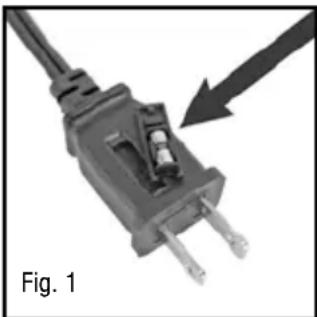
- If your fan loses power and you suspect that the fuse on your fan has blown, you should first remove the spare fuse holder attached to the cord plug (Fig. 1). Remove the spare fuse from the plastic spare fuse holder, and set the spare fuse aside (Fig. 2).
- You can gain access to the blown fuse by sliding open the door found on the side of the plug. Slide the door outward until the blown fuse is fully visible (Fig. 3).
- Remove the blown fuse and snap the replacement fuse into place. Risk of fire. Replace fuse only with 2.5 Amp, 125 volt fuse (provided with product). Fully close the fuse door by sliding back into place. Discard the blown fuse. The plug should now be ready for normal use
- Risk of fire. Do not replace attachment plug. Contains a safety device (fuse) that should not be removed. Discard product if the attached plug is damaged.
- If you need further information on how or when to replace the fuse in the safety plug, please contact Kaz Consumer Relations Department by visiting our website at www.HoneywellFanSavings.com or calling 1-800-477-0457.
natural_image
Close-up of a black electrical plug with two terminal pins, showing a fuse and a black arrow pointing to it (no text or symbols on the plug itself)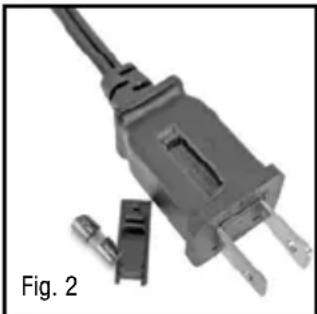
natural_image
Close-up of a black electrical plug with two terminal leads and a separate connector, labeled 'Fig. 2' (no text on the plug itself)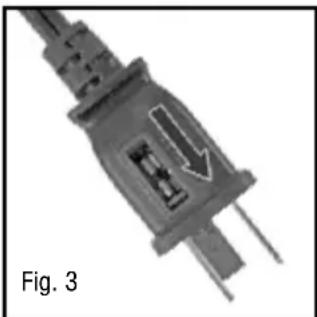
natural_image
Close-up of a black electrical plug with a white arrow indicating a component, labeled 'Fig. 3' (no other text or symbols)INTRODUCTION
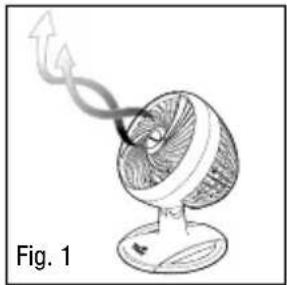
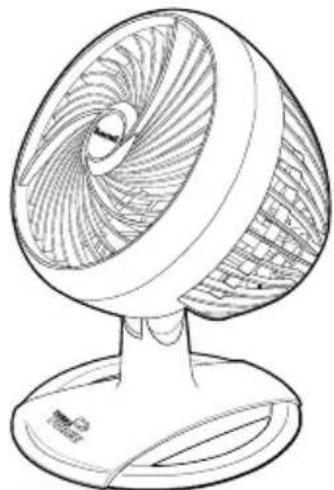
The Turbo Force® High Velocity Air Circulator Fans are aerodynamically designed to give you the versatility of changing this fan's angular direction simply by adjusting the fan to the desired angular output (Fig.1). Upon using this fan, you will feel a strong and powerful air stream that will quickly move air to provide a cooling effect.
natural_image
Illustration of a desktop fan with airflow lines indicating motion (no text or symbols)
FOR ENERGY SAVINGS ALL YEAR
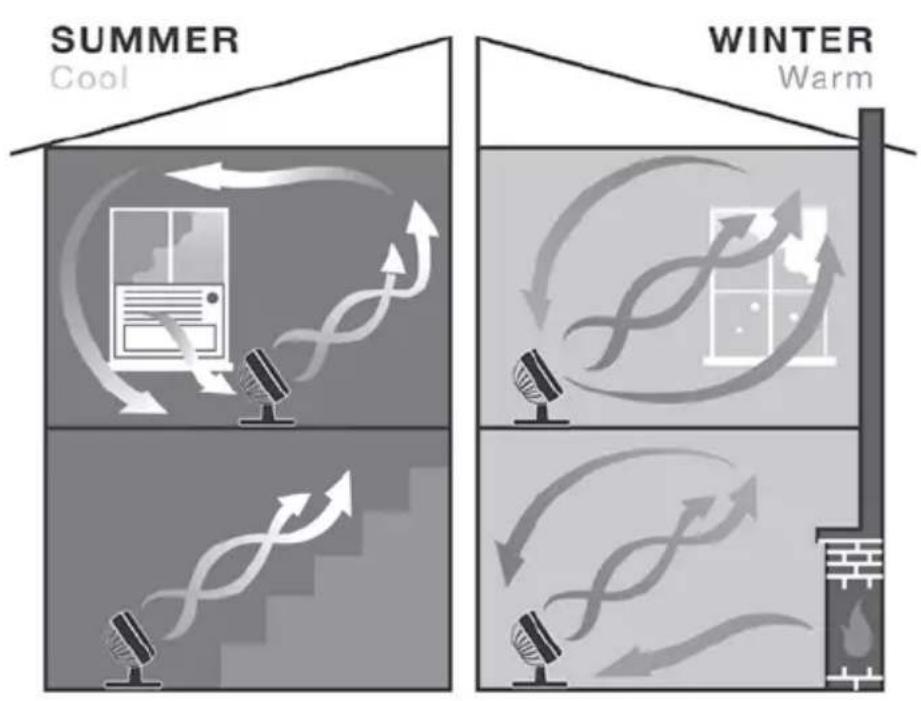
Honeywell Air Circulator Fans can help save energy and can lower monthly utility bills all year round. Our air circulators increase distribution of cooler air from your air conditioner or warmer air from your heating system, creating a vortex of air flow for increased comfort. Increased air flow allows the air conditioning and heating systems to be used at lower settings to help save you money.

In the summer:
Circulate cool air by using with window or central air conditioning.
Circulate cool air upstairs.
flowchart
graph TD
    A["Summer Cool"] --> B["Device with Airflow"]
    B --> C["Microphone with Airflow"]
    C --> D["Device with Airflow"]
    D --> E["Microphone with Airflow"]
    E --> F["Device with Airflow"]
    F --> G["Device with Airflow"]
    G --> H["Device with Airflow"]
    H --> I["Device with Airflow"]
    I --> J["Device with Airflow"]
    J --> K["Device with Airflow"]
    K --> L["Device with Airflow"]
    L --> M["Device with Airflow"]
    M --> N["Device with Airflow"]
    N --> O["Device with Airflow"]
    O --> P["Device with Airflow"]
    P --> Q["Device with Airflow"]
    Q --> R["Device with Airflow"]
    R --> S["Device with Airflow"]
    S --> T["Device with Airflow"]
    T --> U["Device with Airflow"]
    U --> V["Device with Airflow"]
    V --> W["Device with Airflow"]
    W --> X["Device with Airflow"]
    X --> Y["Device with Airflow"]
    Y --> Z["Device with Airflow"]
    Z --> AA["Device with Airflow"]
    AA --> AB["Device with Airflow"]
    AB --> AC["Device with Airflow"]
    AC --> AD["Device with Airflow"]
    AD --> AE["Device with Airflow"]
    AE --> AF["Device with Airflow"]
    AF --> AG["Device with Airflow"]
    AG --> AH["Device with Airflow"]
    AH --> AI["Device with Airflow"]
    AI --> AJ["Device with Airflow"]
    AJ --> AK["Device with Airflow"]
    AK --> AL["Device with Airflow"]
    AL --> AM["Device with Airflow"]
    AM --> AN["Device with Airflow"]
    AN --> AO["Device with Airflow"]
    AO --> AP["Device with Airflow"]
    AP --> AQ["Device with Airflow"]
    AQ --> AR["Device with Airflow"]
    AR --> AS["Device with Airflow"]
    AS --> AT["Device with Airflow"]
    AT --> AU["Device with Airflow"]
    AU --> AV["Device with Airflow"]
    AV --> AW["Device with Airflow"]
    AW --> AX["Device with Airflow"]
    AX --> AY["Device with Airflow"]
    AY --> AZ["Device with Airflow"]
    AZ --> BA["Device with Airflow"]
    BA --> BB["Device with Airflow"]
    BB --> BC["Device with Airflow"]
    BC --> BD["Device with Airflow"]
    BD --> BE["Device with Airflow"]
    BE --> BF["Device with Airflow"]
    BF --> BG["Device with Airflow"]
    BG --> BH["Device with Airflow"]
    BH --> BI["Device with Airflow"]
    BI --> BJ["Device with Airflow"]
    BJ --> BK["Device with Airflow"]
    BK --> BL["Device with Airflow"]
    BL --> BM["Device with Airflow"]
    BM --> BN["Device with Airflow"]
    BN --> BO["Device with Airflow"]
    BO --> BP["Device with Airflow"]
    BP --> BQ["Device with Airflow"]
    BQ --> BR["Device with Airflow"]
    BR --> BS["Device with Airflow"]
    BS --> BT["Device with Airflow"]
    BT --> BU["Device with Airflow"]
    BU --> BV["Device with Airflow"]
    BV --> BW["Device with Airflow"]
In the winter:
Circulate warm air. Position your air circulator in an open location for upward air movement.
Run it on a low setting to move the hotter air from the ceiling and circulate the warmer air throughout the room.
Increase Heating Source Efficiency: Use with other heat sources, such as wood stoves, baseboard heaters, and or vents to help circulate the warm air throughout the room.
OPERaT10n
- Be sure the fan is in the OFF position.
- Place your fan on a dry, level surface.
- Plug the power cord into a polarized 120 volt AC wall outlet.
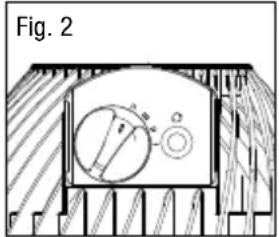
- To operate, turn the control knob to the desired fan speed: HIGH (III), MEDIUM (II) or LOW (I) (Fig. 2).
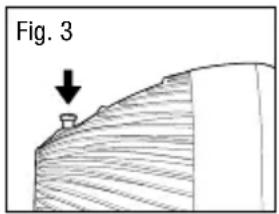
- For wide area oscillation, push down on the oscillation knob. To stop it, pull up on the knob. (Fig. 3)
- Adjust the fan to the desired angular air output direction.
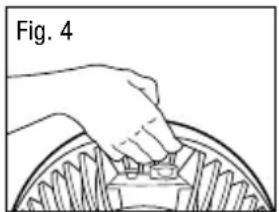
- To move the fan, turn the fan OFF and pick it up by the concealed handle that is located on the outside rim of the fan (Fig. 4).
natural_image
Illustration of a hand pressing down on a circular mechanical component (no text or symbols)UsER sERVICInG InsTRUCTIOns
CLEanInG and sTORaGE
- Turn the fan off and unplug it before cleaning.
- Use only a soft cloth or cotton swab to gently wipe the fan clean.
- To clean between the grilles, we recommend using a pipe cleaner, vacuum cleaner, flexible dustwand or compressed air to gently remove the dust.
- DO NOT immerse the fan in water and never allow water to drip into the motor housing.
- DO NOT use gasoline, paint thinner or other chemicals to clean the fan.
CONSUMER RELATIONS
Mail questions or comments to:
Kaz USA, Inc.
Consumer Relations Dept.
250 Turnpike Road
Southborough, MA 01772
Call us toll-free at: 1-800-477-0457
E-mail: consumerrelations@kaz.com
Or visit our website at:
www.HoneywellFanSavings.com
Please be sure to specify a model number.
NOTE: IF YOU EXPERIENCE A PROBLEM, PLEASE CONTACT CONSUMER RELATIONS FIRST OR SEE YOUR WARRANTY. DO NOT RETURN TO THE ORIGINAL PLACE OF PURCHASE. DO NOT ATTEMPT TO OPEN THE MOTOR HOUSING YOURSELF, DOING SO MAY VOID YOUR WARRANTY AND CAUSE DAMAGE TO THE FAN OR PERSONAL INJURY.
1 YEAR LIMITED WARRANTY
You should first read all instructions before attempting to use this product.
A. This 1 year limited warranty applies to repair or replacement of product found to be defective in material or workmanship. This warranty does not apply to damage resulting from commercial, abusive, unreasonable use or supplemental damage. Defects that are the result of normal wear and tear will not be considered manufacturing defects under this warranty.
Kaz USA, Inc. IS NOT LIABLE FOR INCIDENTAL OR CONSEQUENTIAL DAMAGES OF ANY NATURE. ANY IMPLIED WARRANTY OF MERCHANTABILITY OR FITNESS FOR A PARTICULAR PURPOSE ON THIS PRODUCT IS LIMITED IN DURATION TO THE DURATION OF THIS WARRANTY.
Some jurisdictions do not allow the exclusion or limitation of incidental or consequential damages or limitations on how long an implied warranty lasts, so the above limitations or exclusions may not apply to you. This warranty gives you specific legal rights, and you also may have other rights which vary from jurisdiction to jurisdiction. This warranty applies only to the original purchaser of this product from the original date of purchase.
B. This warranty does not cover damage resulting from any unauthorized attempts to repair or from any use not in accordance with the instruction manual.
C. Return defective product to Kaz USA, Inc. with a brief description of the problem. Include proof of purchase and a \10 US/\15.50 CAN check or money order for handling, return packing and shipping charges. Please include your name, address and a daytime phone number.
You must prepay shipping charges. We suggest having tracking or delivery confirmation. Send to:
In U.S.A.:
Kaz USA, Inc.
Attn: Returns Department
4755 Southpoint Drive
Memphis, TN 38118
USA
In Canada:
Kaz Canada, Inc.
Attn: Returns Department
510 Bronte Street South
Milton, ON L9T 2X6
Canada
Please go to www.HoneywellFanSavings.com and register your product under the Customer Care Center and receive product information updates and new promotional offers.
natural_image
Line drawing of a standard office fan with a spiral blade and base (no text or symbols)IMPORTANTES CONSIGNES DE SÉCURITÉ
LIRE ET CONSERVER CES CONSIGNES DE SÉCURITÉ AVANT D'UTILISER CE VENTILATEUR
natural_image
Close-up of a black electrical plug with two terminal pins, showing a black arrow pointing to its internal structure (no text or symbols visible)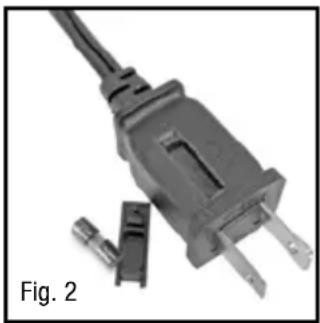
natural_image
Close-up of a black electrical plug with two leads and a separate plastic clip, labeled 'Fig. 2' (no other text or symbols)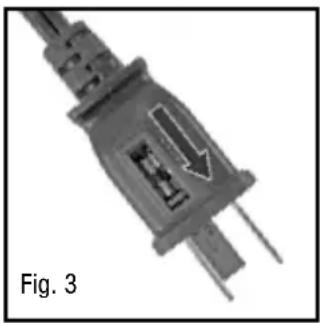
natural_image
Close-up of a black electrical plug with a white arrow indicating a component, labeled 'Fig. 3' (no other text or symbols)PRÉSENTATION
natural_image
Illustration of a desktop fan with a curved arrow indicating motion or airflow (no text or symbols)
POUR DES ÉCONOMIES D'ÉNERGIE TOUTE L'ANNÉE
flowchart
graph TD
    A["ÉTÉ Frais"] --> B["Microphone with bidirectional arrow"]
    C["HIVER Chaud"] --> D["Microphone with bidirectional arrow"]
    B --> E["Device with bidirectional arrow"]
    D --> F["Device with bidirectional arrow"]
L'hiver :
RELATIONS AVEC LES CONSOMMATEURS
Consumer Relations Dept.
250 Turnpike Road
Southborough, MA 01772
Attn: Returns Department
4755 Southpoint Drive
Memphis, TN 38118
USA
Au Canada :
Kaz Canada, Inc.
Attn: Returns Department
510 Bronte Street South
Milton (ON) L9T 2X6
Canada
natural_image
Line drawing of a standard electric fan with a spiral blade and base (no text or symbols)natural_image
Close-up of a black electrical plug with two terminal pins and a black arrow pointing to its internal structure (no text or symbols)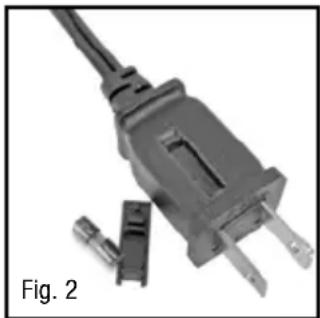
natural_image
Close-up of a black electrical plug with two terminal leads and a separate plastic clip, labeled 'Fig. 2' (no other text or symbols)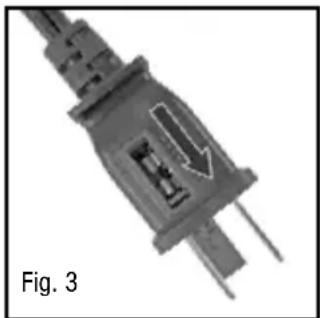
natural_image
Close-up of a gray electrical plug with a black arrow pointing to its internal structure, labeled 'Fig. 3' (no other text or symbols)INTRODUCCIÓN
natural_image
Illustration of a desktop fan with a coiled cable or filament, labeled as Fig. 1 (no text or symbols on the diagram itself)
flowchart
graph TD
    subgraph VERANO
        A["Device with monitor"] --> B["Data flow with arrows"]
    end
    subgraph INVIERNO
        C["Device with monitor"] --> D["Data flow with arrows"]
    end
En invierno:
natural_image
Hand placing a small component into a circular mechanical component (no text or symbols visible)LIMPIEZA Y ALMACENAMIENTO
Consumer Relations Dept.
250 Turnpike Road
Southborough, MA 01772
Attn: Returns Department
4755 Southpoint Drive
Memphis, TN 38118
USA
Para Canadá :
Kaz Canada, Inc.
Attn: Returns Department
510 Bronte Street South
Milton, ON L9T 2X6
Canada

- IMPORTANT SAFETY INSTRUCTIONS
- READ AND SAVE THESE SAFETY INSTRUCTIONS BEFORE USING THIS FAN
- TURBO FORCE® HIGH VELOCITY OSCILLATING POWER AIR CIRCULATOR
- FUSED SAFETY PLUG - FOR US MODELS ONLY
- USER SERVICING INSTRUCTIONS
- INTRODUCTION
- FOR ENERGY SAVINGS ALL YEAR
- In the summer:
- In the winter:
- OPERaT10n
- CLEanInG and sTORaGE
- CONSUMER RELATIONS
- YEAR LIMITED WARRANTY
- You should first read all instructions before attempting to use this product.
- IMPORTANTES CONSIGNES DE SÉCURITÉ
- LIRE ET CONSERVER CES CONSIGNES DE SÉCURITÉ AVANT D'UTILISER CE VENTILATEUR
- PRÉSENTATION
- POUR DES ÉCONOMIES D'ÉNERGIE TOUTE L'ANNÉE
- L'hiver :
- RELATIONS AVEC LES CONSOMMATEURS
- Au Canada :
- INTRODUCCIÓN
- En invierno:
- LIMPIEZA Y ALMACENAMIENTO
- Para Canadá :
Brand : HONEYWELL
Model : Turbo Force HT-906
Category : Fan