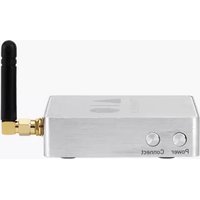
AIO C - Music receiver TRIANGLE - Free user manual and instructions
Find the device manual for free AIO C TRIANGLE in PDF.


User questions about AIO C TRIANGLE
0 question about this device. Answer the ones you know or ask your own.
Ask a new question about this device
Download the instructions for your Music receiver in PDF format for free! Find your manual AIO C - TRIANGLE and take your electronic device back in hand. On this page are published all the documents necessary for the use of your device. AIO C by TRIANGLE.
USER MANUAL AIO C TRIANGLE
MANUFACTURE ELECTROACOUSTIQUE

natural_image
Three basic geometric shapes: a triangle, a vertical line, and a circle on black background (no text or symbols)
text_image
CONNECTMode d'emploi & Garantie Owner's manual & Warranty
_
| _
一
1
INSTRUCTIONS DE SÉCURITÉ
WARNING : Read carefully all the safety instructions before using the device.
- Keep these safety instructions for future references.
▶Do not use this apparatus near water or liquid.
▶Only clean with a dry and soft cloth.
▶Do not block any aperture (vents) of the device.
Do not install near any heat sources such as radiators, stoves, or any other apparatus (including amplifiers) that produce heat.
▶Only use accessories specified by the manufacturer.
▶ Be sure that the stand/table/furniture is strong enough to support the apparatus.
▶ Protect the power cord from being walked on or pinched particularly at the plugs and also protect the connector where it exit from the apparatus.
▶ Unplug the apparatus during lightning storms or when it's unused for long periods of time.
The plug of the apparatus must fit with the outlet. Never modify the plug in any way. Apparatus should be connected to a mains socket outlet with protective earthing connection.
▶ Refer to your authorized TRIANGLE dealer or qualified service personnel if the apparatus is damaged in any way, such as power supply cord or plug is damaged, liquid has been spilled or objects have fallen on the apparatus, the apparatus has been exposed to rain or moisture, does not operate normally, or has been dropped.
www.trianglehifi.com
support.trianglehifi.com
SUPPORT & FAQ

facebook.com/triangle.electroacoustique

twitter.com/trianglehifi
SOMMAIRE / SUMMARY
GARANTIE / WARRANTY 4
MODE D'EMPLOI - FRANÇAIS 7
▶Déballage 8
▶Foire aux Questions 20
USER MANUAL - ENGLISH 23
▶Unpacking 24
▶Device description 25
▶Network setup guide 26
▶ Audio Connections / Network installation 27
▶App overview 29
▶ Troubleshooting 35
▶ Frequently Asked Questions 36
INFORMATIONS TECHNIQUES / TECHNICAL INFORMATIONS 38
GARANTIE / WARRANTY
Thanks for buying a TRIANGLE product.
We want you to enjoy your purchase to the fullest. The first step is an easy registration of your products. By doing this, you will benefit from helpful tips, products support, special offers and 2 years warranty.
1- Online registration
Register your product easily online at the following address : http://register.trianglehifi.com/
2- Warranty card
You can also register your product and validate your warranty by filling the warranty card and sending it to :
TRIANGLE DISTRIBUTION FRANCE
44 rue Barreyre - CS 40099
33300 Bordeaux Cedex FRANCE
Note on the warranty
Your TRIANGLE loudspeakers are warranted for 2 years. This warranty takes effect from the date of purchase and covers any manufacturing defect or damage your loudspeakers could suffer as a result of these same defects. This warranty is granted solely to the first owner of the product, and is not transmittable in the case of resale. To validate your warranty, you will need to register online or mail the warranty coupon to TRIANGLE. Please note, this warranty is voided if any fault arises from ill-treatment or careless handling of the product.
The following are not guaranteed :
▶A burned voice-coil caused by overloading the driver
▶Any fault occurring from professional usage (public sound systems, PA systems, etc.)
▶Any fault resulting from storage in areas of high humidity
▶A pierced or torn membrane
▶A torn suspension
▶Any fault resulting from a mechanical shock (ex if dropped or handled roughly)
▶Any fault arising from servicing by anyone other than an authorized TRIANGLE service technician
▶ Damaged cabinets due to mishandling
natural_image
Illustration of various electronic components including a switch, plug-in socket, and audio cable (no text or symbols present)
text_image
TRIANGLE MACHINE PROCESSED A 10 Made in steps to a Granite Dust of a manual & Remanery www.triangle.comPRÉCAUTIONS D'INSTALLATION
text_image
Power Connect 4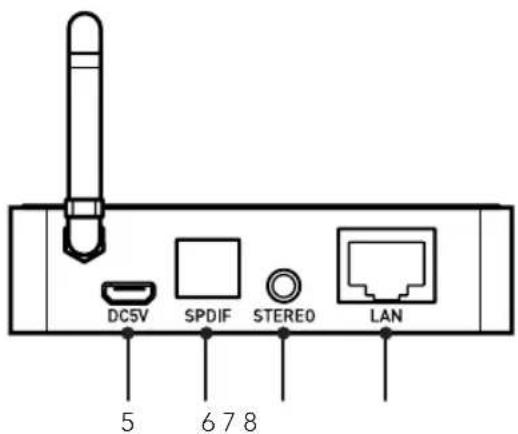
text_image
DC5V SPDIF STEREO LAN 5 678FR
GUIDE D'INSTALLATION RÉSEAU
natural_image
Diagram of a device showing two USB connectors connected by a cable (no text or symbols visible)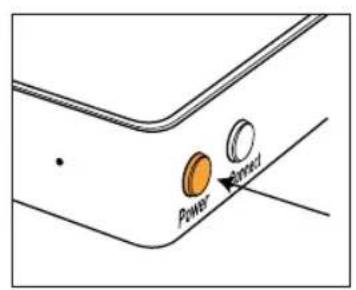
text_image
Power Pensified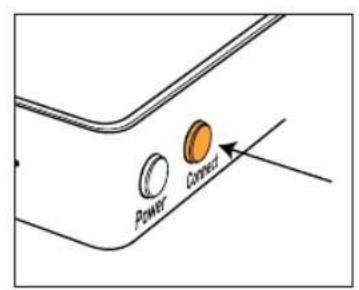
text_image
Power Connect
text_image
Flow Un Mix based on video footage Charts Recommendations Mixes Gerves AIC Thunderbird AGOCPlaylist par titre
text_image
DATE PAPER Movie: The New Roman Empire - Penerator Box The Late Things Right: Cafe Can: The New Roman Empire - Seaside Box Chicago Top: The New Roman Empire First Time Top: The New Roman Empire - Life First Stream Top: The New Roman Empire - Life First Re-imax Top: The New Roman Empire - 40 Ltr Cloud Power: The New Roman Empire - Penerator Box Top: The New Roman Empire - World Pioneer Top: The New Roman Empire - World Pioneer Top: The New Roman Empire - World Cape Web: The New Roman Empire - World Cape Web: The New Roman Empire - World Lions New Roman Empire Wings Original Wings Original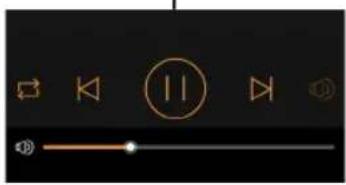
text_image
User interface control panel with playback, navigation, and control iconsOpen the box and take out the device.
If you notice any defects in one of the elements as you unpack, please get in touch with your reseller. Your device is fragile and it is recommended to handle it carefully.
Before disposing of the packaging, make sure there is nothing left inside.
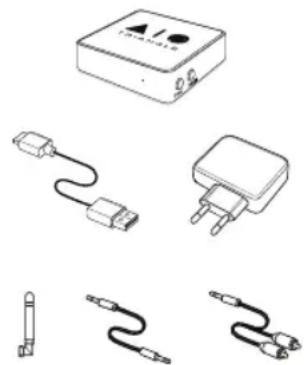
EACH BOX CONTAINS:
▶An AIO C and its antenna
▶User manual
▶1x USB Cable
▶1x USB Power Adapter
▶1x Mini Jack - Mini Jack stereo cable
▶1x RCA - Mini Jack stereo cable
natural_image
Illustration of various electronic components including a rectangular device, two connected cables, and three wires (no text or symbols present)
Before the installation
Before connecting your AIO C, check the stability of the surface you want to install it on and reduce the distance between the speaker and your router as much as possible.
Moving the device
Always remove the power cord and disconnect the cables between all audio components when moving the device. This will prevent a short-circuit or the damage to the plugs or connection cables.
Locations to avoid
Avoid humid locations or direct sunlight. It is preferable to install your speaker in a temperate place.
Recycling
Protection of the environment: your products contain valuable materials which can be recovered or recycled. Take them to the appropriate collection points.

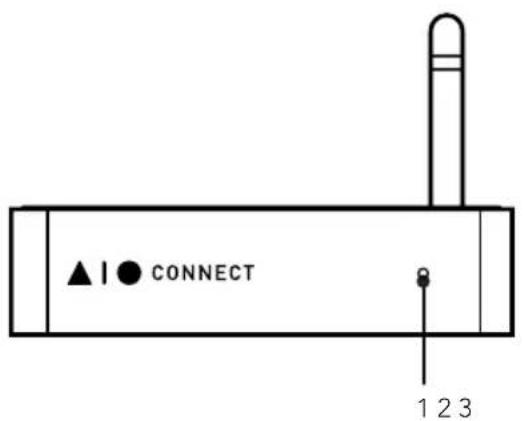
DEVICE DESCRIPTION
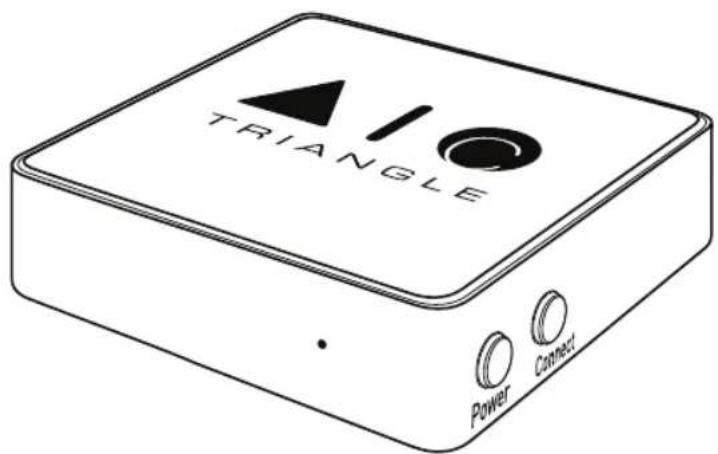
- Control LED
- Power switch
- Network pairing
-
Wifi antenna
-
AC outlet
- Optical input
- Stereo Jack input
- Ethernet cable input
text_image
▲ | ● CONNECT 1 2 3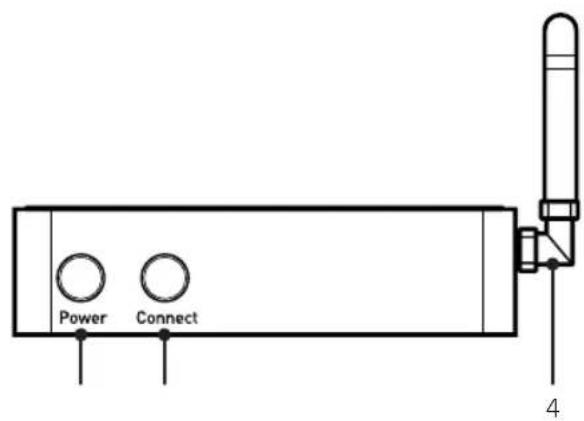
text_image
Power Connect 4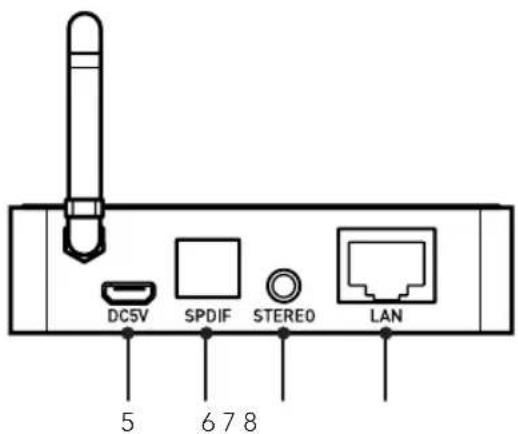
text_image
DC5V SPDIF STEREO LAN 5 678EN
NETWORK SETUP GUIDE
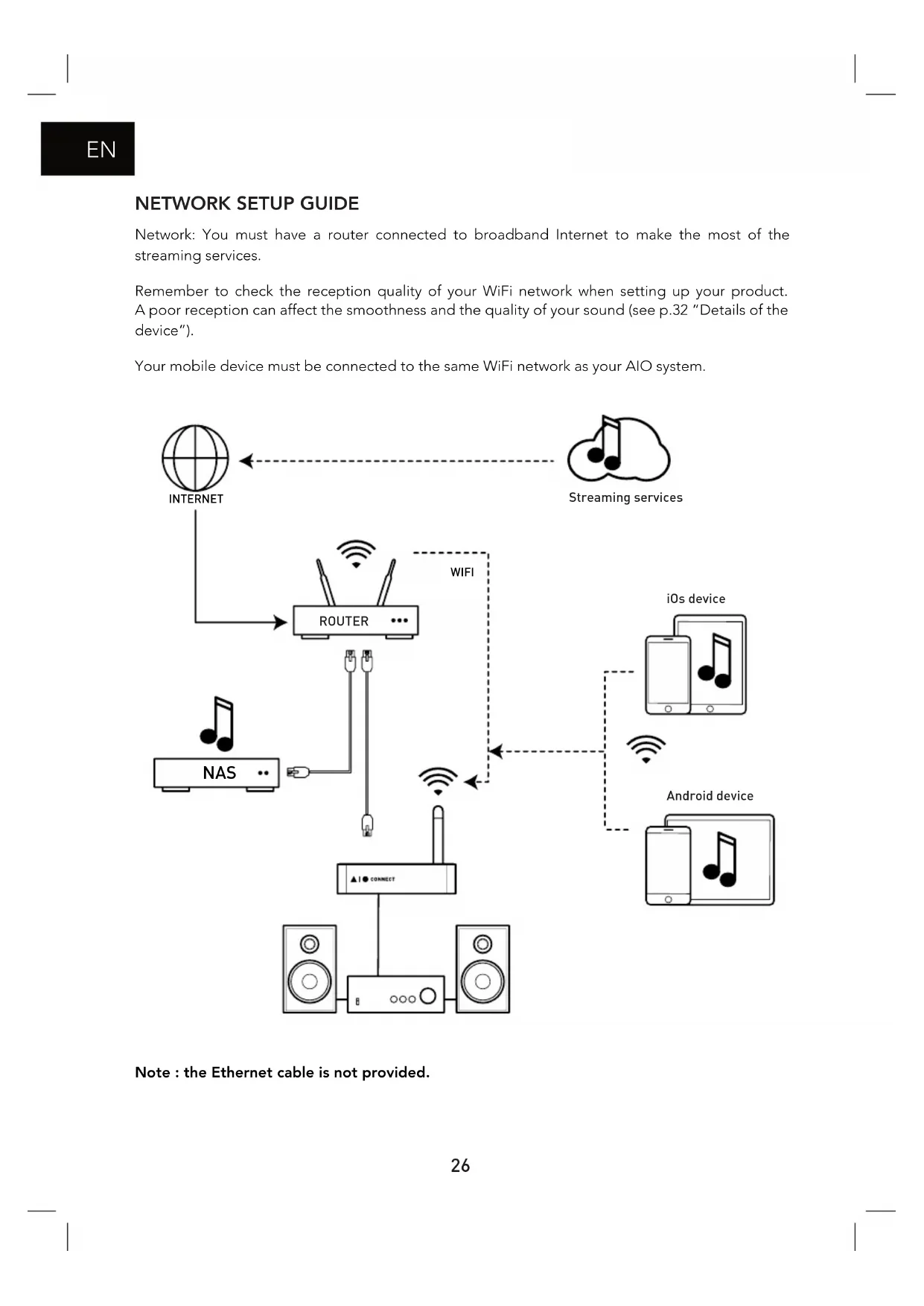
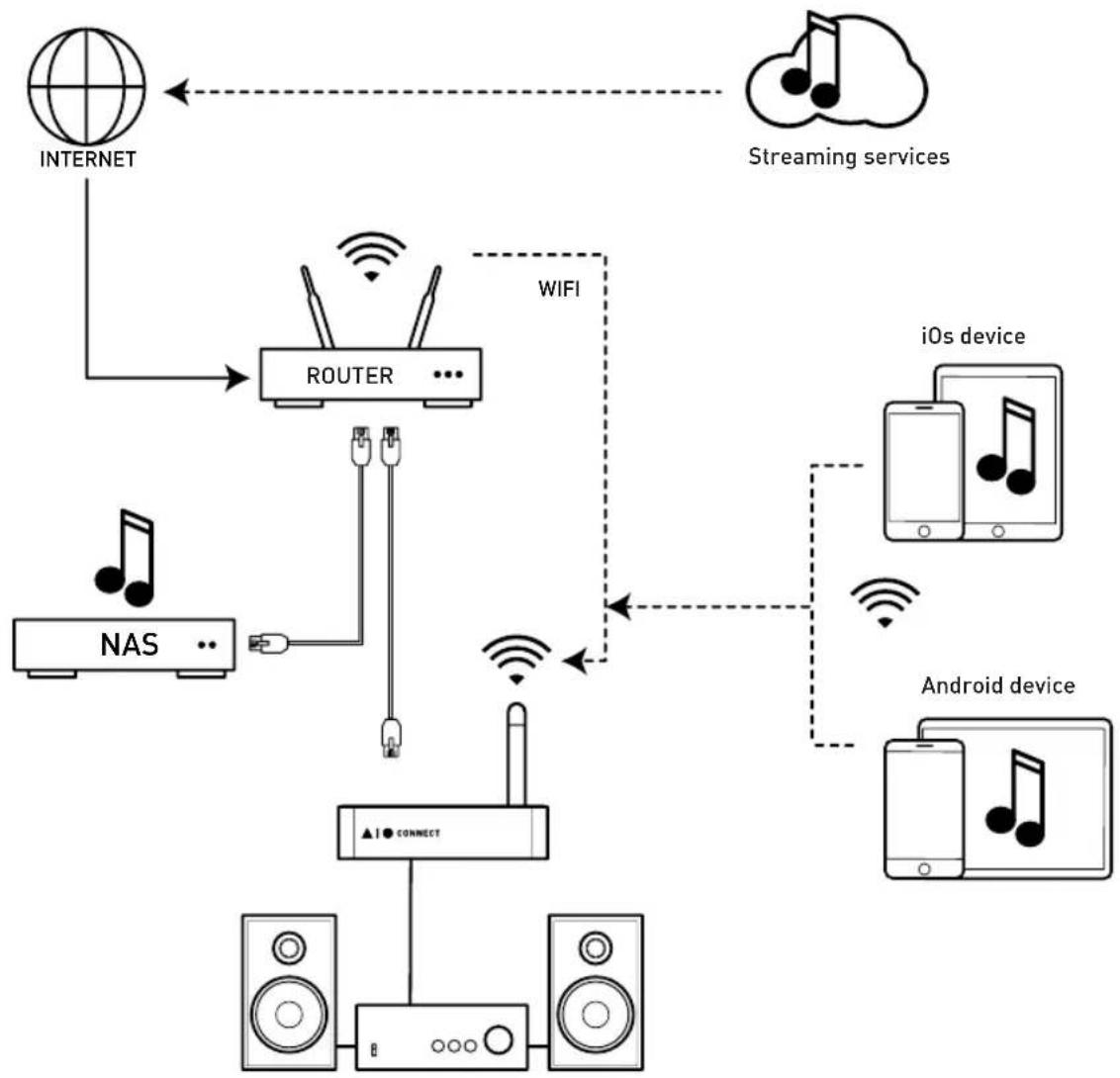
Network: You must have a router connected to broadband Internet to make the most of the streaming services.
Remember to check the reception quality of your WiFi network when setting up your product. A poor reception can affect the smoothness and the quality of your sound (see p.32 "Details of the device").
Your mobile device must be connected to the same WiFi network as your AIO system.
flowchart
graph TD
    A["INTERNET"] --> B["ROUTER"]
    C["NAS"] --> B
    B --> D["Connect"]
    D --> E["Siemens"]
    D --> F["Siemens"]
    D --> G["Siemens"]
    H["Streaming services"] --> B
    I["iOS device"] --> J["Smartphone"]
    K["Android device"] --> L["Smartphone"]
    B -->|WIFI| D
    style A fill:#f9f,stroke:#333
    style C fill:#ccf,stroke:#333
    style H fill:#cfc,stroke:#333
    style I fill:#fcc,stroke:#333
    style K fill:#cff,stroke:#333
Note : the Ethernet cable is not provided.
AUDIO CONNECTIONS
There are 2 types of connection possible:
- JACK 3.5MM :
Connect a 3.5mm/2xRCA Jack or 3.5mm/3.5mm Jack cable (depending on the type of input available on your amplifier), then select the source on your amplifier to enjoy your AIO C.
• OPTIQUE :
Connect an optical cable between your AIO C and your amplifier; the optical cable allows a better quality of listening if this input is available on your amplifier. Then select the optical source on your amplifier.
NETWORK INSTALLATION
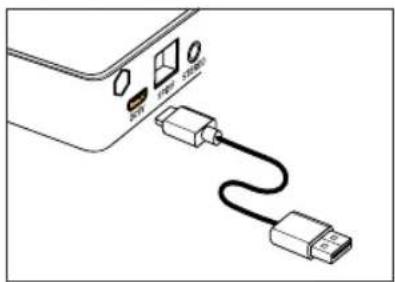
Plug your AIO's power cord into a power outlet.
▶Connection by WiFi :
▶Press the Power button.
▶Press the Connect button on your AIO C.
▶Connexion with an Ethernet cable :
Connect the Ethernet cable. In this case, your AIO C will automatically be recognized on your network without any necessary configuration.
natural_image
Diagram of a device showing an external connector with USB cable and ports (no text or symbols)
text_image
Power Retrod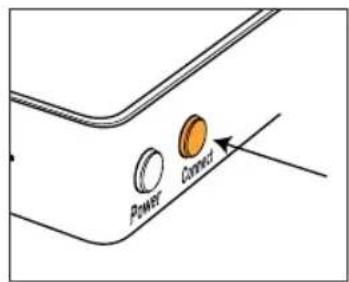
text_image
Power Connect
Download the app
Go to your store (App Store or Google Play) and download the app TRIANGLE AIO.
Launch the app and follow the instructions.
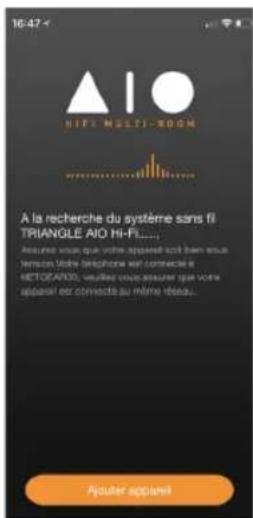
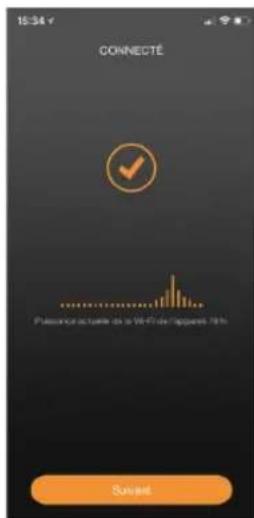
- Once you are connected to the WiFi of your AIO, go back to the app. Select your WiFi network and enter the password.
text_image
15:34 v CONNECTÉ Passive actuelle de la Wi-Fi de appara 70%- Your AIO C is ready to operate.
APP OVERVIEW
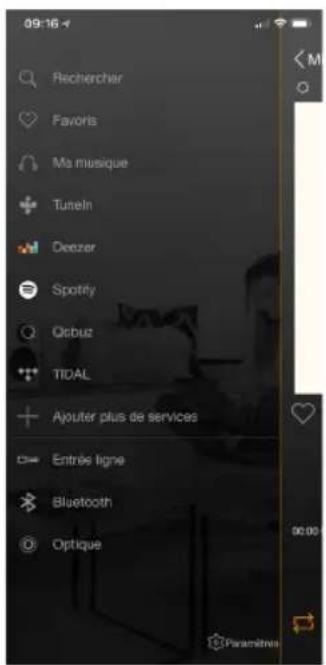
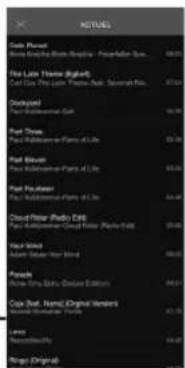
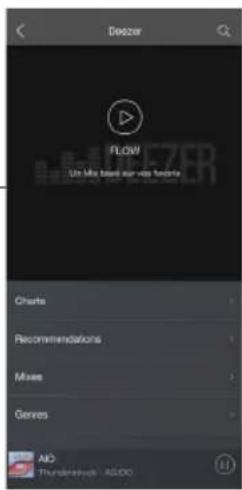
The navigation is in 3 panels. Just swipe the screen from left to right to make them appear.
EN
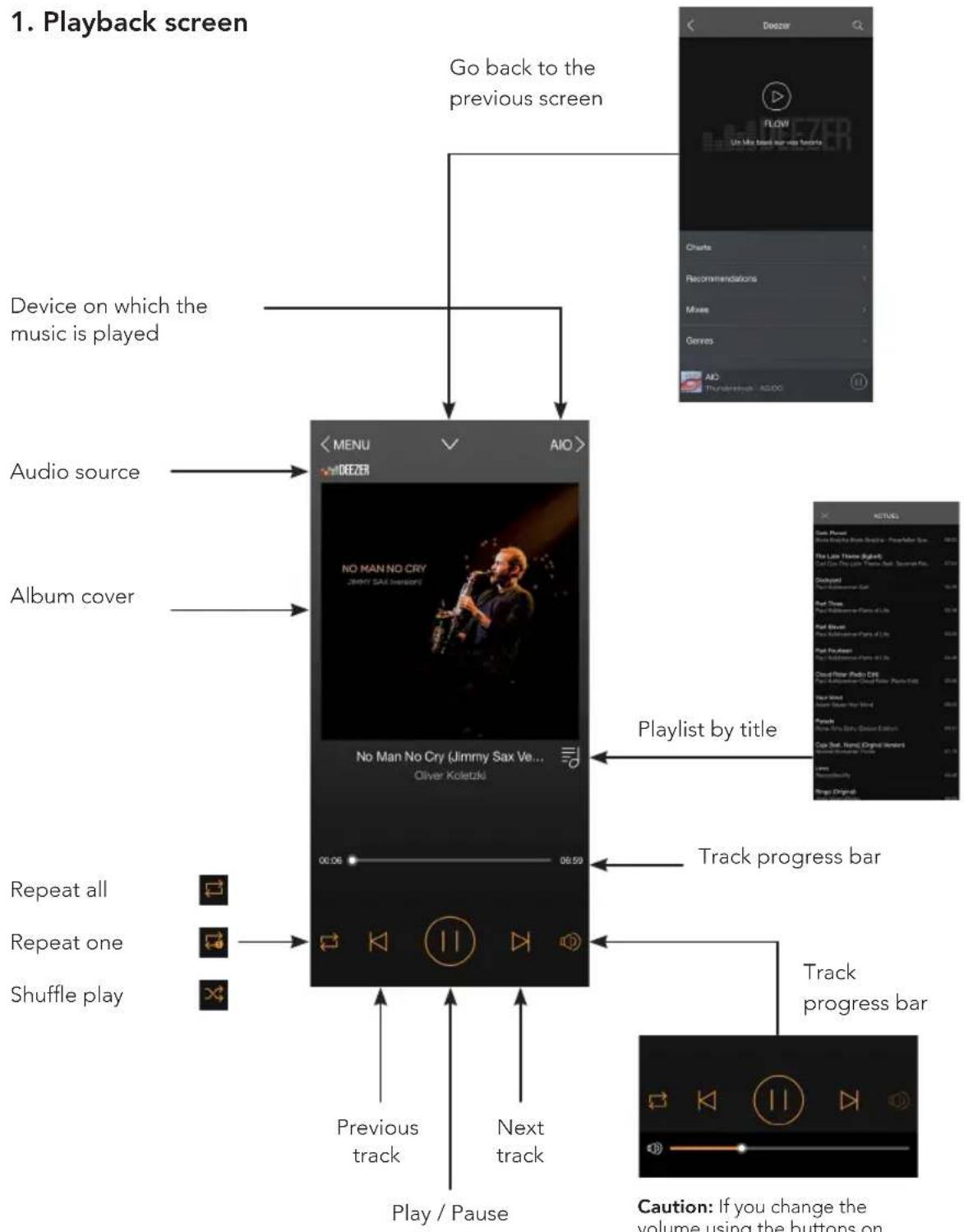
flowchart
graph TD
    A["Device on which the music is played"] --> B["<MENU >"]
    C["Audio source"] --> D["No Man No Cry (Jimmy Sax Ve... Oliver Koletzki)"]
    E["Album cover"] --> F["No Man No Cry (Jimmy Sax Ve... Oliver Koletzki)"]
    G["Repeat all"] --> H["Previous track"]
    I["Repeat one"] --> J["Play / Pause"]
    K["Shuffle play"] --> L["Next track"]
    M["Playlist by title"] --> N["Track progress bar"]
    O["Track progress bar"] --> P["Caution: If you change the volume using the buttons on"]
    Q["Go back to the previous screen"] --> R["Charts"]
    Q --> S["Recommendations"]
    Q --> T["Mixes"]
    Q --> U["Genres"]
    Q --> V["AO"]
text_image
Flow Un Mix based on video footage Charts Recommendations Mixes Gerves AIC Thunderbird AGOC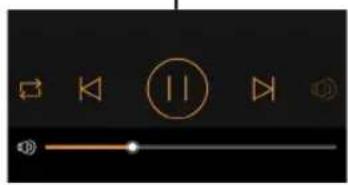
text_image
User interface control panel with playback controls and playback buttonsCaution: If you change the volume using the buttons on your mobile device, there may be some latency and large increments. For fine adjustments, use the screen of the app.
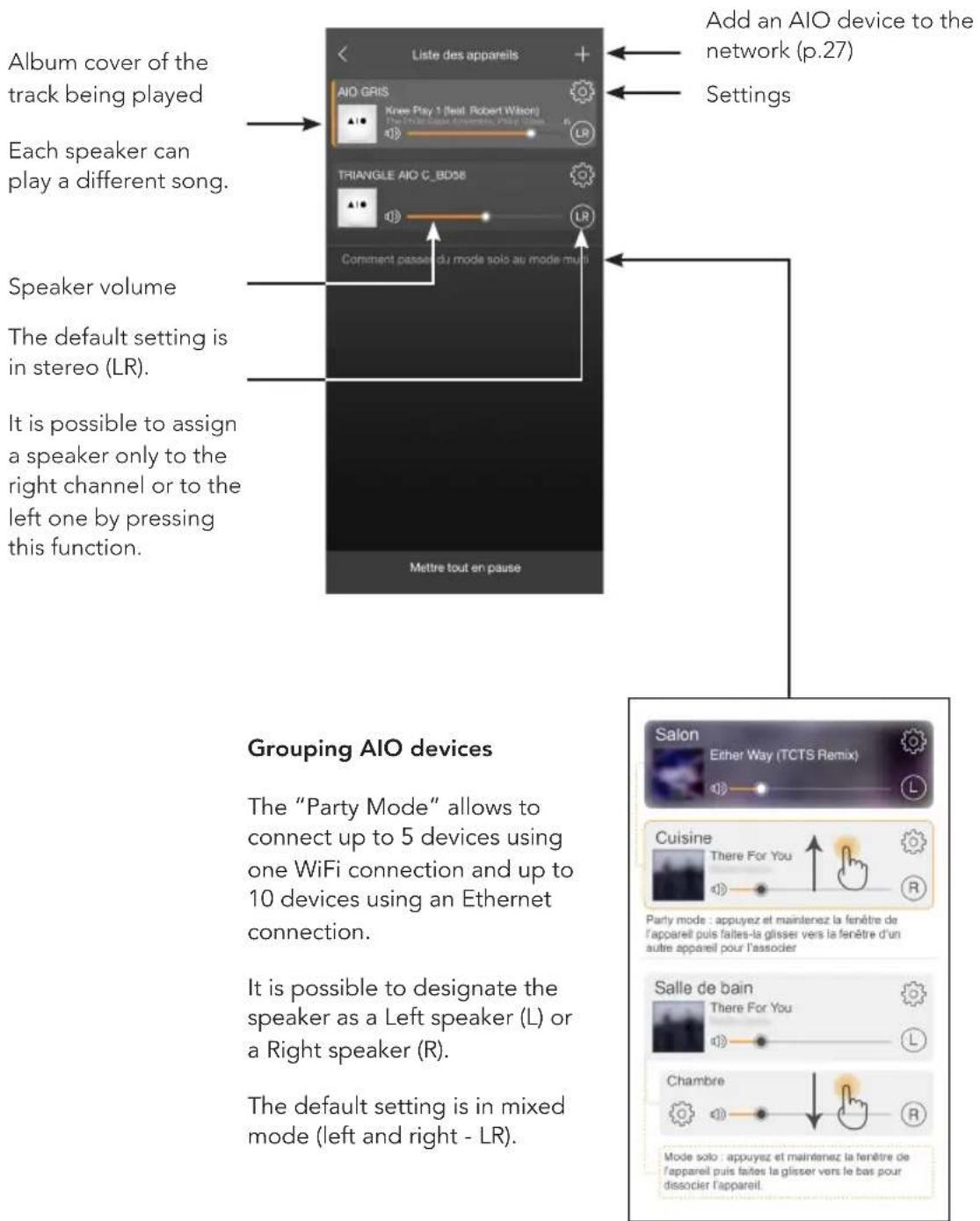
2. List of connected AIO
text_image
Album cover of the track being played Each speaker can play a different song. Speaker volume The default setting is in stereo (LR). It is possible to assign a speaker only to the right channel or to the left one by pressing this function. Liste des appareils Add an AIO device to the network (p.27) Settings Comment passe au mode solo au mode minus Mettre tout en pause Grouping AIO devices The "Party Mode" allows to connect up to 5 devices using one WiFi connection and up to 10 devices using an Ethernet connection. It is possible to designate the speaker as a Left speaker (L) or a Right speaker (R). The default setting is in mixed mode (left and right - LR). Salon Ether Way (TCTS Remix) Cuisine There For You Party mode : appuyez et maintenez la fenêtre de l'appareil puis faites-le glisser vers la fenêtre d'un autre appareil pour l'associer Salle de bain There For You Chambre Mode solo : appuyez et maintenez la fenêtre de l'appareil puis faites la glisser vers le bas pour dissocier l'appareil.EN
3. Settings
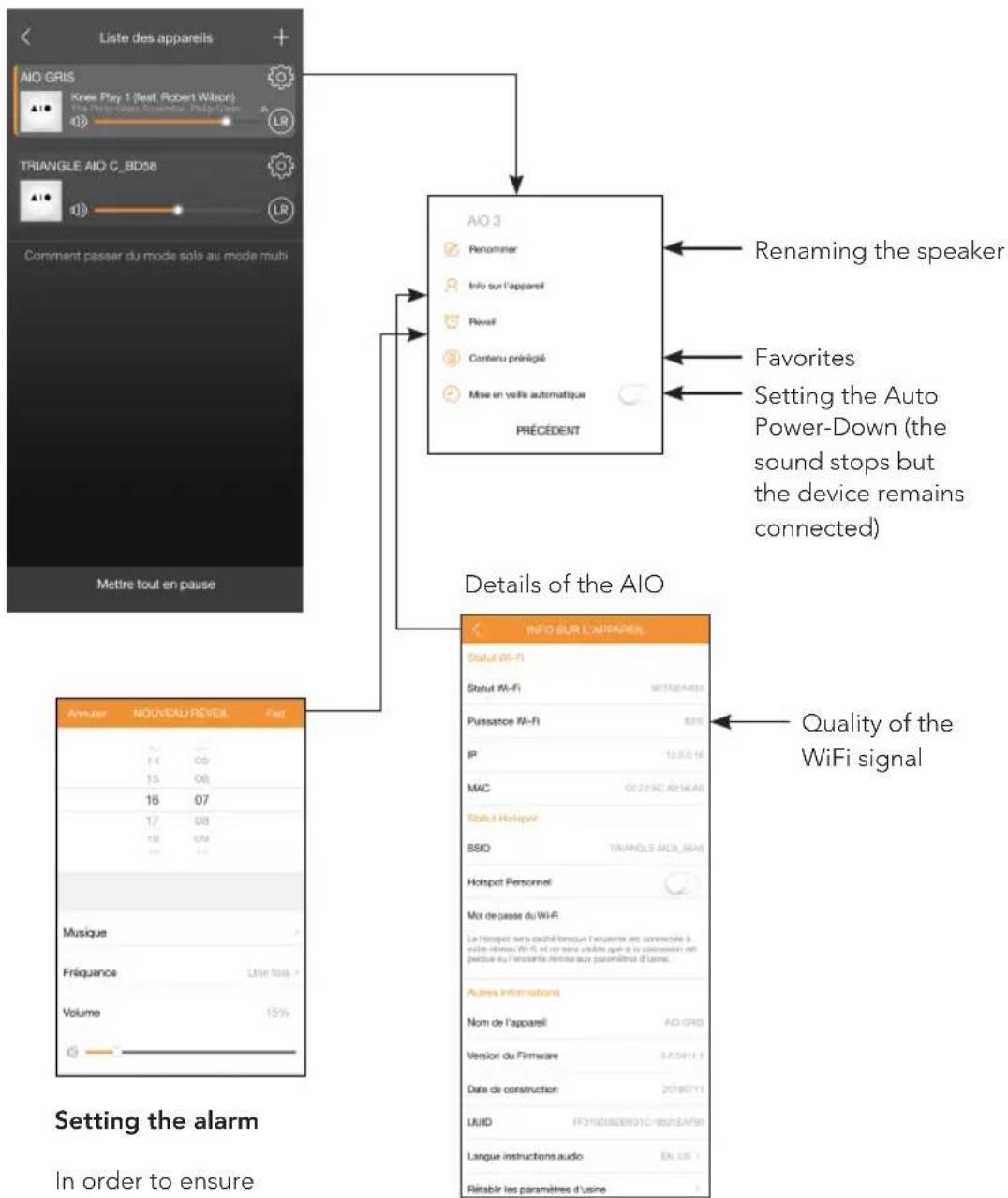
In order to ensure that the alarm works, leave your device turned on.
4. Sources
text_image
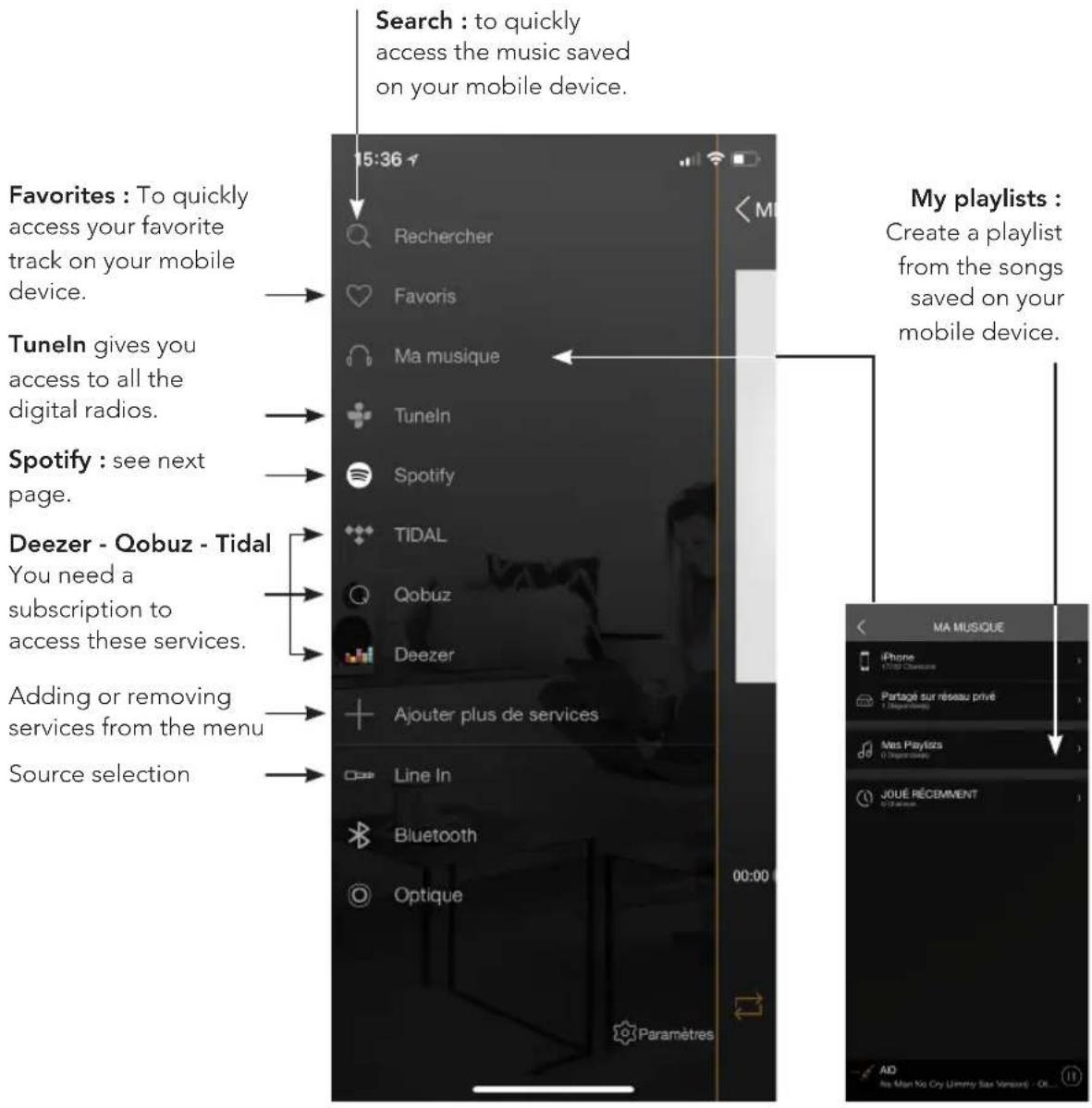
Search : to quickly access the music saved on your mobile device. Favorites : To quickly access your favorite track on your mobile device. Tuneln gives you access to all the digital radios. Spotify : see next page. Deezer - Qobuz - Tidal You need a subscription to access these services. Adding or removing services from the menu Source selection My playlists : Create a playlist from the songs saved on your mobile device. Line In Bluetooth Optique 00:00 Paramètres MA MUSIQUE iPhone 11/24 Chancette Paragé sur réseau privé 1 Disparanties Nes Playlists 0 Disparanties JOUÉ RÉCEMMENT 01/24 Chancette AD Ms Man No Cry Jimmy Sav Versus (- OL...)My music : The AIO speaker lets you play music you downloaded on your phone and access the music stored on a NAS drive on your network or on your connected USB drive.
You must allow the app to read the musical content on your mobile device (see Settings of the TRIANGLE AIO app in the general menu on your mobile device depending on your iOS or Android system).
To be able to access your songs, they must be saved directly on your phone. Some tunes might be protected by DRM technology which will prevent you from playing them.
EN
Spotify:
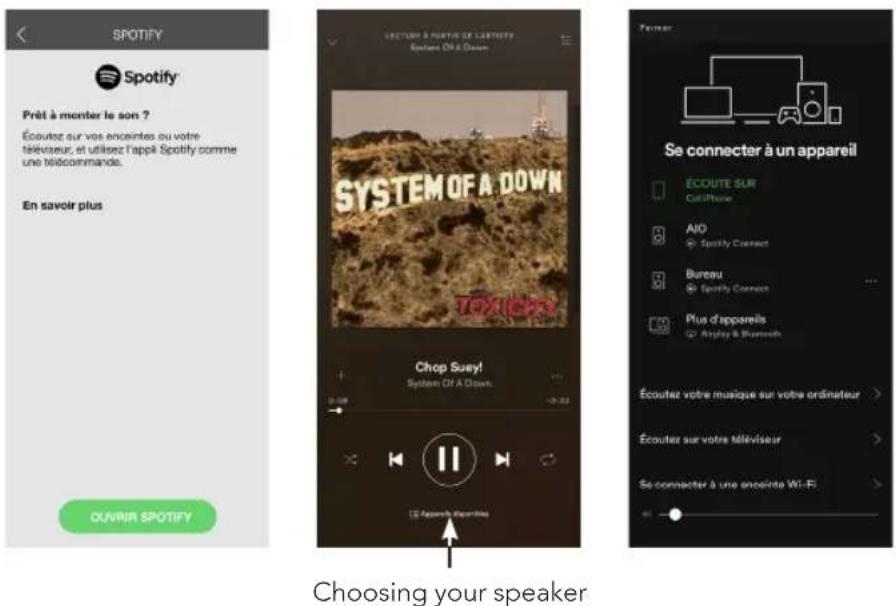
▶ You need a Spotify Premium subscription. Once selected, the Spotify app will start.
▶Choose a song.
▶Select your speaker.
▶Then go back to the app if necessary.
- Your AIO C is now a Spotify Connect speaker. You can play your music directly from the Spotify app, without using the TRIANGLE AIO app.
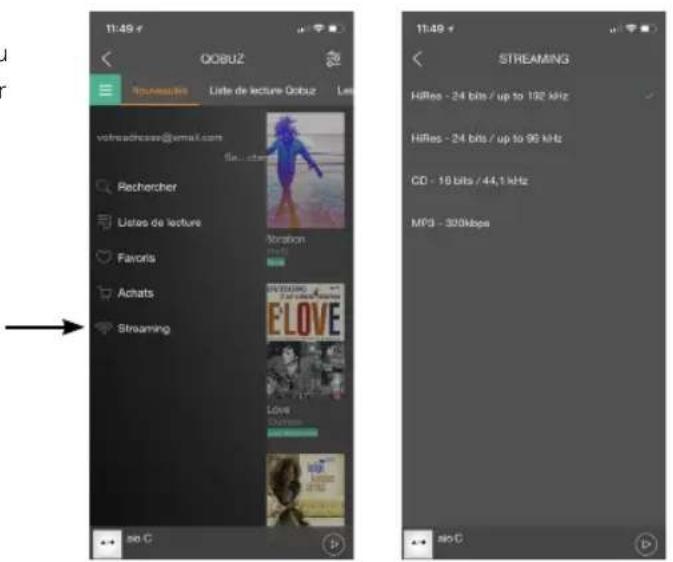
Listening yo music in high definition:
To listen to music in high definition, you must have a subscription with a provider and set up the dedicated app.
Example on the Qobuz app >>
text_image
11:49 OGBUZ Iguadette Liste de lecture OGBUZ Léo vofmcdresse@email.com Rechercher Listes de lecture Ahorizon Favoris Achats Streaming 11:49 STREAMING HiRes - 24 bits / up to 192 kHz HiRes - 24 bits / up to 96 kHz CD - 10 bits / 44.1 kHz MPD - 300kbps ao CTROUBLESHOOTING
If the device does not work correctly, check the points listed below. If the problem persists, the device may not operate normally. Unplug the power cord immediately and get in touch with your reseller.
OBSERVATION SOLUTION
| My AIO does not connect to the network. | Check that your mobile device is connected to the network on which you are trying to connect your AIO. |
| Place your AIO closer to the router. | |
| Connect an Ethernet cable between your router and the AIO. | |
| Check that your app is up to date, or reinstall it. | |
| Restart your mobile phone and your network. | |
| The music is cutting out or jerky. | Check the Internet connection. |
| Make sure your network or another device is not using a large part of your bandwidth. | |
| Check the quality of the WiFi signal (see p.29) | |
| Check that your app is up to date, or reinstall it. | |
| Restart your mobile phone and your network. |
FREQUENTLY ASKED QUESTIONS
| How many speakers can I group? | AIO can group up to 5 speakers in WiFi, 10 via Ethernet, if the quality of the connection is good enough. |
| What happens when I get a call on my mobile phone while I use the app? | The music continues to play on your speaker without interruption. |
| Can the AIO play songs in high resolution (High Res)? | The AIO can play songs up to 24 bit/192 kHz, but be careful, you must have a good Internet connection and your streaming app must be set-up correctly. |
CAUTION
To avoid the risk of electric shock, do not open the device.
AIO CONNECT
| Spécifications techniquesTechnical specifications | AIO C |
| Connectivité / Connectivity | |
| Réseau sans filWireless network | IEEE 8.2.11b/g/n 2.4GHz Ethernet |
| BranchementWired connectivity | Single 10/100M RJ45 Jack |
| FréquenceFrequency Response | 20Hz - 20KHz |
| AlimentationPower input | 5V-1A |
| Entrée audioAudio input | USB 2.0 |
| Formats audioMusic file formats | MP3 - AAC+ALAC - FLAC - AOE - WAV |
| Dimensions | L80 x P80 x H20 mmL3.15 x W3.15 x H0.79" |
| PoidsWeight | 160g0.35 lbs |
text_image
TRIANGLE Power ConnectAIO C