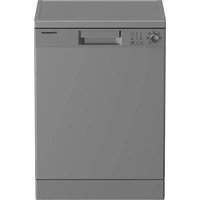
TDW4714SL - Dishwasher THOMSON - Free user manual and instructions
Find the device manual for free TDW4714SL THOMSON in PDF.



| Product type | Dishwasher |
| Brand | Thomson |
| Model | TDW4714SL |
| Capacity | 14 place settings |
| Dimensions (H x W x D) | 85 x 60 x 60 cm |
| Power supply | 220-240 V ~ 50 Hz, 1800-2100 W |
| Water pressure | 0.03 - 1.00 MPa |
| Energy class | D (EEI 49.9) |
| Energy consumption (eco program) | 0.849 kWh per cycle |
| Water consumption (eco program) | 11.5 L per cycle |
| Duration of eco program | 3 h 10 min |
| Noise level | 47 dB(A) - Class C |
| Washing programs | Eco 50°C, Intensive 70°C, Clean&Dry 65°C, Quick&Dry 60°C, Mini 35°C |
| Additional functions | Half load, All-in-1 tablet, SelfDry (automatic door opening), Delayed start (up to 9 h) |
| Water softening system | Adjustable according to hardness, with regenerating salt reservoir |
| Detergent types | Powder, liquid/gel, tablets |
| Rinse aid | Integrated reservoir, dose adjustment (levels 1 to 5) |
| Basket material | Stainless steel (upper and lower basket) |
| Filters | Micro filter, coarse filter, metal/plastic filter |
| Cleaning and maintenance | Weekly cleaning of filters and spray arms; monthly interior cleaning |
| Safety | Mandatory grounding, automatic shut-off, child protection (not specified) |
| Warranty | 2 years |
| After-sales service | FNAC DARTY (0978 970 970, www.darty.com); spare parts within 15 working days |
| Repairability | Do not repair yourself; contact a qualified professional |
Frequently Asked Questions - TDW4714SL THOMSON
User questions about TDW4714SL THOMSON
0 question about this device. Answer the ones you know or ask your own.
Ask a new question about this device
Download the instructions for your Dishwasher in PDF format for free! Find your manual TDW4714SL - THOMSON and take your electronic device back in hand. On this page are published all the documents necessary for the use of your device. TDW4714SL by THOMSON.
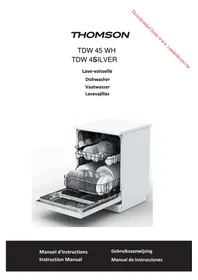
USER MANUAL TDW4714SL THOMSON
natural_image
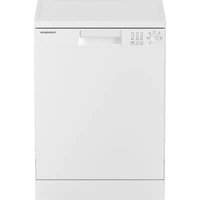
White THOMSON washing machine with control panel and door (no visible text or symbols on body)




TABLE DES MATIÈRES
MISES EN GARDE IMPORTANTES....p. 04
DESCRIPTION DU PRODUIT....p. 08
INSTALLATION....p. 10
natural_image
Close-up of a mechanical device with a circular component and rotational arrow, no visible text or symbolsnatural_image
Person pouring liquid into a conical flask on a kitchen appliance (no visible text or symbols)natural_image
3D model of a device casing with labeled component A, showing internal structure and mounting points (no text or symbols beyond label)FR-21
natural_image
Illustration of a hand inserting a device into a device casing (no text or symbols visible)natural_image
Diagram of a printer with an arrow indicating rotation, no text or symbols presentnatural_image
Diagram of a device being inserted into a device housing (no text or symbols visible)natural_image
3D diagram of a mechanical component with labeled part B, showing internal structure without any text or symbols.FR-23
natural_image
Diagram of a 3D grid structure with a central circular object and an X-marked cross symbol (no text or labels)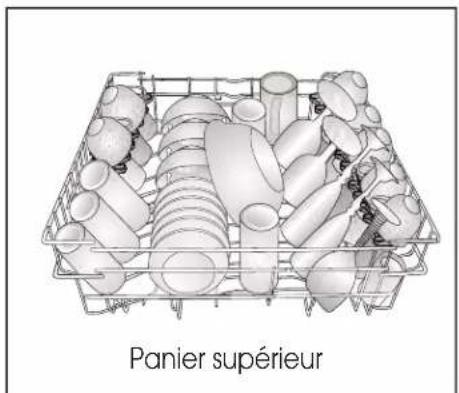
natural_image
Illustration of a cage filled with eggs and a cross symbol (no text or labels)natural_image
3D rendering of a gray plastic basket with handle and side panel, no text or symbols visible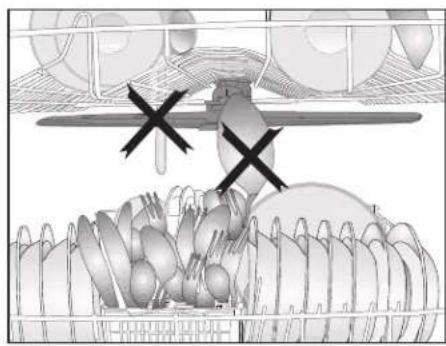
natural_image
Diagram of a mechanical or agricultural system with multiple components and a central valve, no visible text or symbols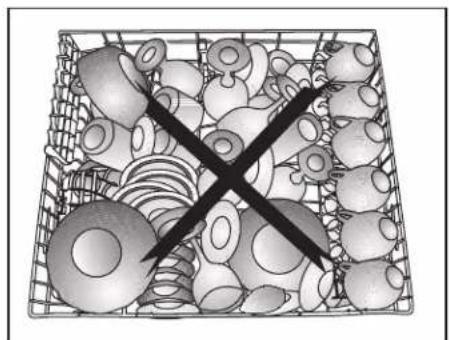
natural_image
Black cross symbol crossed over a grid of irregular objects, no text or symbols presentPanier à couverts
natural_image
3D wireframe model of a shopping cart with labeled points A and B, showing internal structure and platform (no text or symbols beyond labels)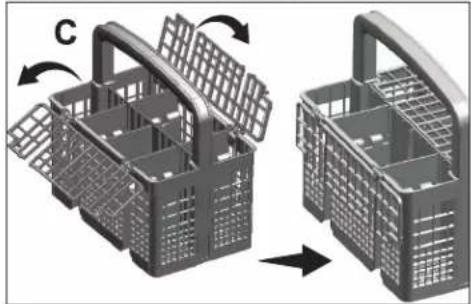
natural_image
3D illustration of a wire basket being opened into a closed container, showing structural changes (no text or symbols)natural_image
Diagram of a conveyor belt system with a cart and material, showing directional arrows (no text or labels)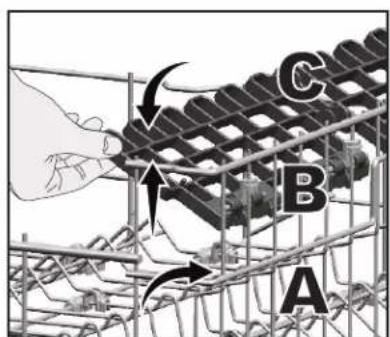
FR-27
natural_image
3D wireframe model of a mechanical or structural component with grid-like sections (no text or symbols)natural_image
Illustration of a shopping cart with an upward arrow, no text or symbols presentnatural_image
Mechanical component with grid structure and downward arrow indicator (no text or symbols)FONCTIONNEMENT DE L'APPAREIL
natural_image
Mechanical assembly diagram showing a rotating component with arrows indicating motion (no text or symbols)natural_image
Mechanical assembly diagram showing a rotating component with labeled parts (no text or symbols present)natural_image
Simple line drawing of a mechanical component with a cylindrical top and base (no text or symbols)natural_image
Mechanical assembly diagram showing a bolted joint with a flanged base and a dial indicator (no text or symbols present)natural_image
Architectural or engineering diagram showing a grid structure with an arrow indicating direction (no text or symbols present)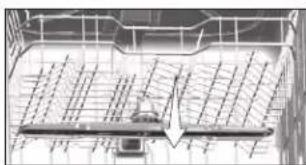
natural_image
Architectural line drawing of a building facade with grid lines and a central arrow indicating direction (no text or symbols)GUIDE DE DÉPANNAGE
-bed-and-breakfasts.
correct is ingesteld.
natural_image
Close-up of a mechanical device with a circular component and directional arrow, no visible text or symbolsnatural_image
Illustration of a hand pouring liquid into a funnel with a base, next to a sewing machine (no text or symbols visible)natural_image
3D model of a device casing with labeled component A, showing internal structure and mounting points (no text or symbols beyond label)natural_image
Illustration of a hand inserting a device into a device casing (no text or symbols visible)natural_image
Diagram of a device with a scroll and a directional arrow indicating rotation (no text or symbols)natural_image
Illustration of a device being inserted into a device casing, showing internal components and wiring (no text or symbols)natural_image
3D diagram of a printer or scanner device with labeled component B, showing internal structure and no readable text or symbols.natural_image
Diagram of a basket filled with various circular objects, labeled 'Onderrek' at the bottom (no other text or symbols)Verkeerde plaatsing
natural_image
Diagram of a grid-based structure with a central circular element marked by an 'X' and arrows, no readable text or symbols present.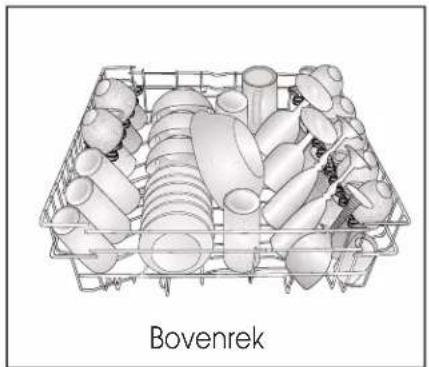
natural_image
3D wireframe model of a Bovenrek plastic crate filled with cylindrical and cylindrical components (no text or symbols)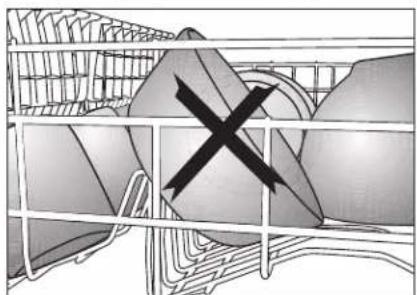
natural_image
Cross-sectional diagram of a cage with internal structures and a central black X mark (no text or symbols)Verkeerde plaatsing
natural_image
3D rendering of a gray plastic basket with cutouts and handles, no visible text or symbols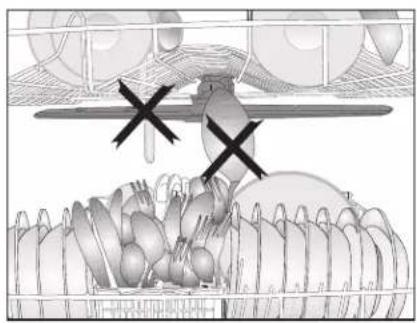
natural_image
Illustration of a bird feeding from a basket with birds in the background (no text or symbols)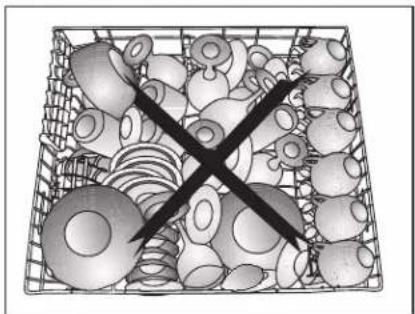
natural_image
Black-and-white illustration of a basket filled with various small objects, with one object crossed out by a diagonal line (no text or symbols)Zilverserviesmandje
natural_image
3D diagram of a shopping cart with labeled points A and B, showing internal structure and furniture (no text or symbols beyond labels)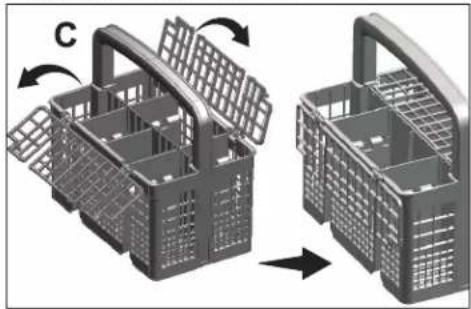
natural_image
3D illustration of a plastic basket being opened into a closed container, showing structural changes (no text or symbols)Bovenrek in de hoogte verstelbaar rek
natural_image
Diagram of a conveyor belt system with rotating components and directional arrows (no text or labels)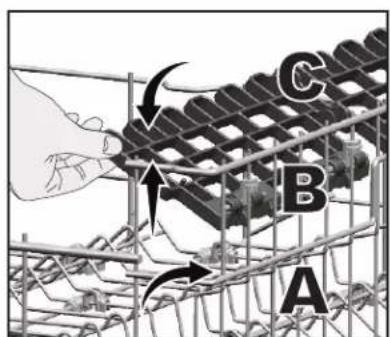
NL-75 75
Bovenste mandje multifunctioneel servicerek
natural_image
3D wire mesh structure of a metal grate or container (no text or symbols visible)natural_image
Illustration of a shopping cart with an upward arrow, no text or symbols presentnatural_image
3D model of a shopping cart with a downward arrow indicating price or cost (no text or symbols)NL-76
BEDIENING VAN HET PRODUCT
natural_image
Mechanical assembly diagram showing a rotating component with arrows indicating motion (no text or symbols)natural_image
Mechanical assembly diagram showing a lever mechanism with a numbered component (3), no visible text or symbols.natural_image
Simple line drawing of a mechanical valve or pump assembly with a handle and base (no text or symbols)natural_image
Mechanical assembly diagram showing a bracket with bolts and a bolt head, no visible text or symbolsSproeiarm boven
natural_image
Diagram of a grid structure with directional arrows and a small labeled component (no readable text or symbols)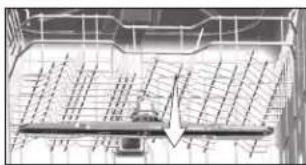
natural_image
Diagram of a vehicle under load with grid lines and an arrow indicating direction (no text or symbols)PROBLEEMOPLOSSING
Machine start niet.
Adjusting the water softening system....p. 111
Adding salt....p. 114
Detergent....p. 116
Adding detergent....p. 116
Tablet detergents....p. 118
Rinse aid....p. 119
Items not suitable for washing in the dishwasher....p. 120
Placing the dishes into the dishwasher....p. 120
Cutlery basket....p. 122
Upper basket height adjustable rack....p. 122
Upper basket multipurpose service rack......p. 123
OPERATION OF THE PRODUCT......p. 124
CLEANING AND MAINTENANCE....p. 132
Thomson and the Thomson logo are trademarks of Technicolor (S.A.) or its affiliates and are used under license by Ets Darty et Fils (S.A.).
IMPORTANT SAFETY INSTRUCTIONS
PLEASE READ THE FOLLOWING INSTRUCTIONS CAREFULLY BEFORE USING THE APPLIANCE AND KEEP FOR FUTURE REFERENCE.
WARNINGS
- This appliance is intended to be used in household and similar applications such as:
-staff kitchen areas in shops, offices and other working environments;
-farm houses;
-by clients in hotels, motels and other residential type environments;
-bed and breakfast type environments.
- If the supply cord is damaged, it must be replaced by the manufacturer, its service agent or similarly qualified persons in order to avoid a hazard.
- This appliance can be used by children aged from 8 years and above and persons with reduced physical, sensory or mental capabilities or lack of experience and knowledge if they have been given supervision or instruction concerning use of the appliance in a safe way and understand the hazards involved.
Children shall not play with the appliance.
Cleaning and user maintenance shall not be made by children without supervision.
- Regarding the instructions for the method and frequency of cleaning, refer to the section "CLEANING AND MAINTENANCE" in pages 132-134.
- The openings must not be obstructed by a carpet.
- The new hose-sets supplied with the appliance are to be used; old hose-sets should not be reused.
- The maximum number of place settings to be washed by this dishwasher is 14 place settings.
• The door should not be left in the open position since this
could present a tripping hazard.
- Regarding the detailed instructions on how to load the dishwasher, refer to the section "Placing the dishes into the dishwasher" in pages 120-121.
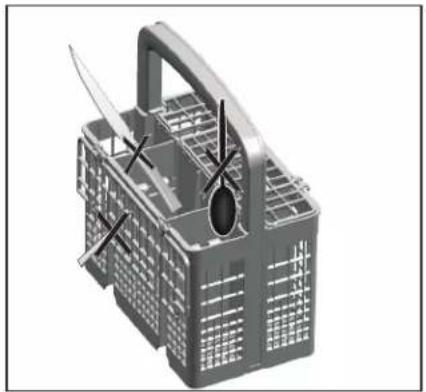
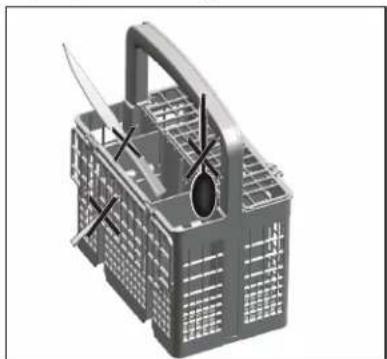
- WARNING: Knives and other utensils with sharp points must be loaded in the basket with their points down or placed in a horizontal position.
- The minimum permissible inlet water pressure is 0.03 MPa.
- The maximum permissible inlet water pressure is 1 MPa.
- The plug must be remained easily accessible after installation of the appliance.
Safety Precautions
• Installation and repair can only be carried out by a qualified technician.
• This appliance is for indoor household use only.
- To protect against the risk of electrical shock, do not immerse the appliance, cord or plug in water or any other liquid.
- Turn off and unplug the appliance before cleaning and performing maintenance.
- Do not sit on, or stand on the door or dish rack of the dishwasher.
- Do not operate your dishwasher unless all enclosure panels are properly in place.
- Carefully open the door when the dishwasher is operating because there might be a risk of water squirting out.
- Do not place any heavy object on or stand on the door when it is open. The appliance could tip forward.
- Some dishwasher detergents are strongly alkaline. They can be extremely dangerous if swallowed. Avoid contact with the skin and eyes and keep children away from the dishwasher when the door is open.
- Do not wash plastic items unless they are marked "dishwasher safe" or the equivalent.
- Use only detergent and rinse agents recommended for use in an automatic dishwasher.
- Never use soap, laundry detergent, or hand washing detergent in your dishwasher.
- The door should not be left open, since this could increase the risk of tripping.
- Do not tamper with controls.
• Earthing Instructions:
-This appliance must be earthed. In the event of a malfunction or breakdown, earthing will reduce the risk of an electric shock by providing a path of least resistance of electric current. This appliance is equipped with an earthing conductor plug.
-The plug must be plugged into an appropriate outlet that is installed and earthed in accordance with all local codes and ordinances.
-Improper connection of the equipment-earthing conductor can result in the risk of an electric shock.
-Check with a qualified electrician or service representative if you are in doubt whether the appliance is properly grounded.
-Do not modify the plug provided with the appliance. If it does not fit the outlet, have a proper outlet installed by a qualified electrician.
PRODUCT OVERVIEW
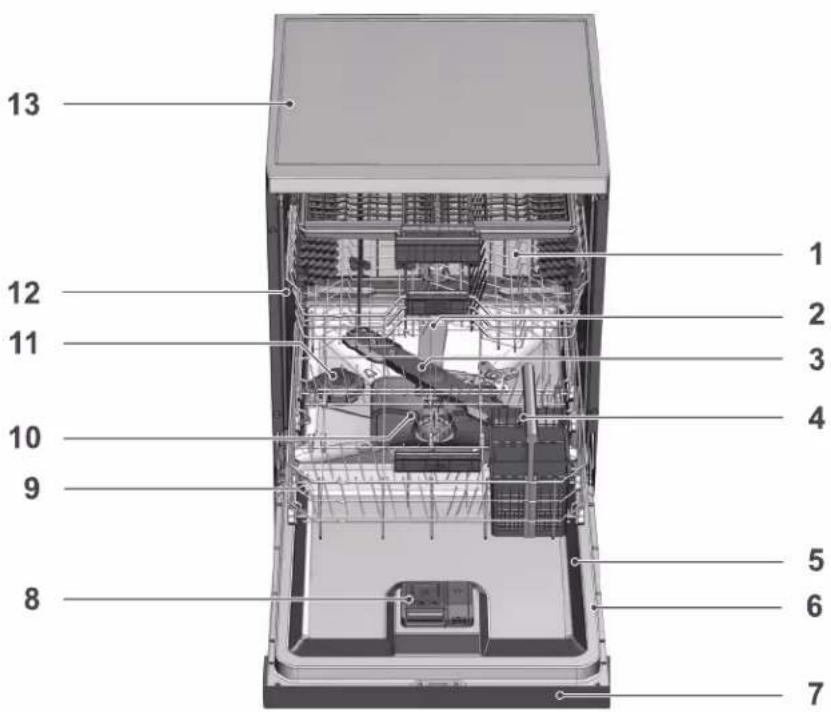
- Upper basket
- Upper impeller
- Lower impeller
- Cutlery basket
- Door
- Rating Label
-
Control panel
-
Detergent dispenser
- Lower basket
- Filters
- Salt reservoir lid
- Upper basket rail
- Tabletop



Control Panel
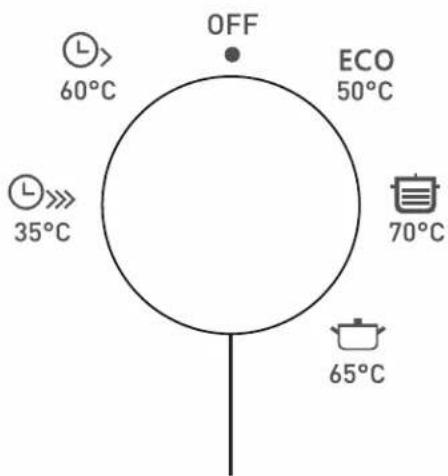
On-Off / Program Selection knob


1/2
3sec.

3sec.

Cancel 3sec.
1/2
3sec.

3sec.

Cancel 3sec.
Half Load function key / Tablet detergent function key 3 sec
Delay function key / auto door open key
Start / Pause / Cancel key
 Low salt warning indicator Low salt warning indicator | ONOn/Off Control light | ||
 Rinse aid indicator Rinse aid indicator | Program Monitoring Indicators | Washing Indicator | |
 Half load indicator Half load indicator | Drying Indicator | ||
 Tablet detergent indicator Tablet detergent indicator | Door open indicator | Program Ended Indicator | |
EN-106
INSTALLATION
Installation procedures must always be performed by the manufacturer, authorised service agent or a qualified person specified by the importer. To make the product ready for use, make sure that the electricity, tap water supply and water drainage systems are appropriate before calling the authorised service agent. If they are not, call a qualified technician and plumber to have the necessary arrangements carried out.
i Preparation of the location and electrical, tap water and waste water installations at the place of installation is under customer's responsibility.
⚠️ Installation and electrical connections must be carried out by the authorised service agent. Manufacturer shall not be held responsible for damages arising from processes carried out by unauthorised persons.
⚠️ Prior to installation, check if the product has any defects on it. If the product is damaged, do not have it installed. Damaged products cause risks for your safety.
i Make sure that the water inlet and discharge hoses are not folded, pinched or crushed while pushing the product into its place after installation or cleaning procedures.
i The front of the appliance may not be removed on free-standing or under-the-counter models.
When placing the product, pay attention not to damage the floor, walls, piping, etc. Do not hold the product from its door or panel to move it.
Appropriate installation location
In the area where this product is installed, there must not be a lockable, sliding or hinged door that will restrict full opening of the product's door.
i Make sure that you select a location that will allow you to load and unload the dishes in a fast and comfortable manner.
- Place the product on a solid and flat floor that has sufficient load carrying capacity! The product must be installed on a flat surface in order for the door to be closed properly and securely.
- Do not install the product at places where temperature may fall below 0^ C.
- Place the product on a hard floor. Do not place it on a long pile rug or similar surfaces.
Do not place the product on the power cable.
- Make sure that you select a location that will allow you to load and unload the dishes in a fast and comfortable manner.
- Install the product at a place close to the tap and the drain hole. Select the installation location by considering that it will not be changed after the connections are made.
Connecting water supply
We recommend installing a filter at the water inlet in order to prevent the dirt (sand, clay, rust) in the mains or water installation of your home from damaging the machine or the dishes.
Permitted water temperature: up to 25°C
The dishwasher may not be connected to open warm water devices or flow-through water heaters.
NOTICE Do not use an old or used water inlet hose on the new product. Use the new water inlet hose supplied with the product.
Do not make extension at the hoses.
NOTICE Connect the water inlet hose directly to the water tap. Pressure coming from the tap should be 0.3 bars minimum and 10 bars maximum. If the water pressure exceeds 10 bars, a pressure relief valve should be installed in between.
NOTICE The water supply and draining hoses must be securely fastened and remain undamaged.
NOTICE Open the taps completely after making the connections to check for water leaks.
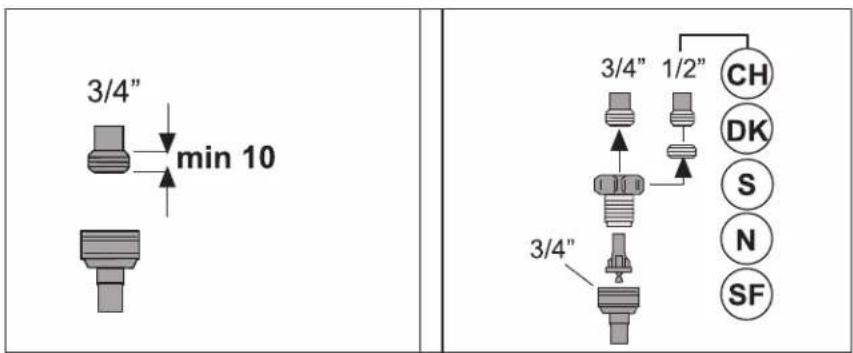
Connection to the drain
Water discharge hose can directly be connected to the drain hole or sink's drainage.
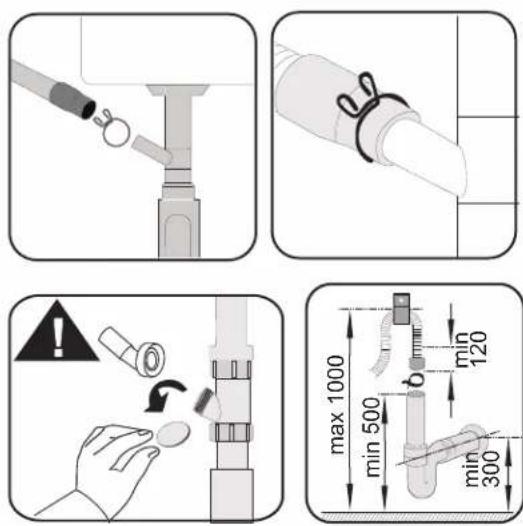
i Drain pipe must be connected to the sewage system and it should not be connected to any surface water.
Adjusting the feet
If the door of the product cannot be closed properly or if the product rocks when you push it slightly, then you need to adjust the feet of the product.
⚠️ Steam may escape if the door of the dishwasher is not adjusted properly. Hot steam may cause serious burns and injuries and damage your furniture.
Electrical connection
The installation of electrical equipment should be done by professionals.
- Do not use an extension cord or an adapter plug with this appliance.
- Do not, under any circumstances, cut or remove the earthing connection from the power cord.
Ensure the voltage and frequency of the dishwasher correspond to those indicated on the rating plate. Only insert the plug into an electrical socket which is earthed properly. If the electrical socket to which the appliance must be connected is not appropriate for the plug, replace the socket, rather than using a adaptors or the like as they could cause overheating and burns.
Ensure that proper earthing exists before use.
PREPARATION
Tips for energy saving
Following information will help you use the product in an ecological and energy-efficient manner.
Wipe away any coarse food remnants on the dishes before putting them in the product.
i Manual pre-rinsing of tableware items leads to increased water and energy consumption and is not recommended.
i Washing tableware in a household dishwasher usually consumes less energy and water in the use phase than hand dishwashing when the household dishwasher is used according to the manufacturer's instructions.
Operate the product after filling it completely. When selecting a programme, consider the table of "Programme data and average consumption values".
Do not put more detergent than suggested on the detergent package.
Water softening system
The product is equipped with a water softening system which reduces the hardness of incoming water. This system softens the supply water to a level that will allow washing the dishes with the required quality.
The mains water hardness must be softened if it is over 7^ dH. Otherwise, hardness ions will accumulate on the dishes that are washed and may affect the washing, rinsing and drying performances of the machine.
Adjusting the water softening system
Washing performance will increase when water softening system is adjusted properly.
Washing, rinsing and drying performance of your dishwasher will improve
when the water softening system is adjusted correctly.
To adjust the system, first learn the water hardness in your region and adjust as indicated below.
- Unpack the test strip.
- Open the tap and let the water flow for approx. 1 minute.
- Dip in the test strip into the water for 1 second.
• Take out the strip from the water and shake it. - Wait for 1 minute.
- Make the necessary adjustment according to the test strip
| Level 0 | |
| Level 1 | |
| Level 2 | |
| Level 3 | |
| Level 4 | |
| Level 5 |
After the determination of the water hardness :
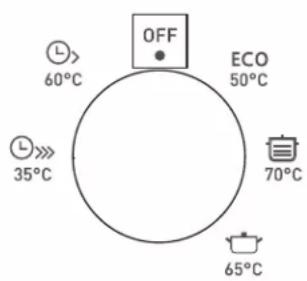
- While the Program Selection Knob is "OFF", press and hold ▶II and rotate the Program Selection Knob one step clockwise and keep ▶II pressed for 3 seconds; the machine shall switch to regeneration setting mode after this period.
- The regeneration level in the memory is illuminated for 5 seconds when you enter the regeneration setting mode.
- For setting a new Water Hardness Level, bring the Program Selection Knob to the proper position for the hardness level of your mains water. (See Water Hardness Level Setting Table)
- Press ▶II to record the selected setting in the memory.
- Bring the Program selection knob to "OFF" position.
EN-112
Water hardness level setting table
| Hardness Level | English Hardness °dE | German Hardness °dH | French Hardness °dF | Level of program selection knob * | Water Hardness Level Indicator |
| 0. Level | 0-5 0-4 0-8 1 | The Washing light on the panel illuminates. | |||
| 1. Level | 6-9 5-7 9-13 1 | ||||
| 2. Level | 10-15 8-12 14-22 | 2 | The Drying light on the panel illuminates. | ||
| 3. Level | 16-19 | 13-15 | 23-27 | 3 | The End light on the panel illuminates. |
| 4. Level | 20-24 | 16-19 | 28-34 | 4 | The Washing, Drying and End lights on the panel illuminate. |
| 5. Level | 25-62 | 20-50 | 35-90 | 5 | The Washing, Drying and End lights on the panel flashes with intervals of 1 second. |
After detecting the water hardness:
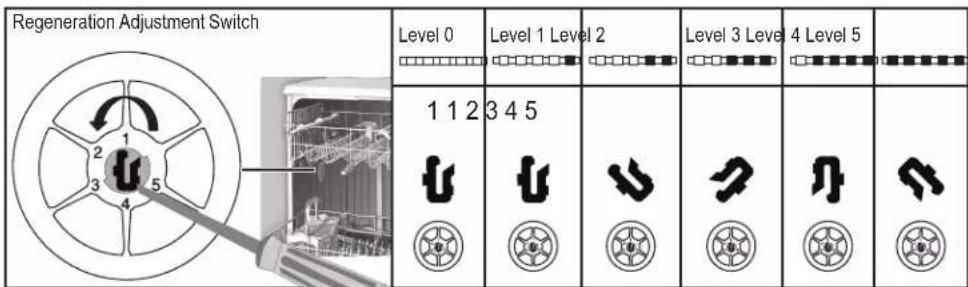
Perform the same hardness level adjustment that you have set on the control panel also with the regeneration adjustment switch. For example, if you have adjusted to "3" in the control panel, also set the regeneration adjustment switch to 3.
- If the hardness level of the water that you use is above 50^ dH or if you are using well water, than it is recommended to use filter and water purification devices.
EN-113
- If the hardness level of the water that you use is below 7°dH, there is no need to use salt in your dishwasher. In this case, the Salt Indicator light on the control panel of your dishwasher will light continuously.
- If the water hardness is set to level 1, the Salt Indicator will light continuously although it is not necessary to use salt. If you use salt under this condition, salt will not be consumed and the lamp will not illuminate.
When moving, you will need to set the water hardness level of your dishwasher again according to the information above, depending on the water hardness of the place you have moved to. If the water hardness level of your machine is adjusted previously, your machine will display the most recent hardness level adjustment.
The regeneration of the water softening system can be done in all programmes during drying step. When regeneration occurs, duration, energy and water consumption of the programme increase.
For regeneration process; frequency of regeneration cycle, maximum additional duration, water and energy consumption are given in table below depending on ECO 50°C programme water consumption, when the dishwasher is run under standard conditions with 14 dH water supply on its ECO 50°C programme :
| ECO 50°C water consumption (l) | Regeneration after ... cycles | Additional duration (min) | Additional water consumption (l) | Additional energy consumption (kWh) |
| 12,3 - 14,7 5 5 | 3,0 0,05 | |||
| 9,6 - 12,2 6 5 3 | 0 0,05 | |||
| 9,0 - 9,5 7 5 3 | 0 0,05 | |||
| 8,0 - 9,0 8 5 3 | 0 0,05 | |||
| 7,0 - 7,9 9 5 3 | 0 0,05 |
Adding salt
Water softening system needs to be regenerated in order for the product
to operate with the same performance continuously. Dishwasher salt is used for this purpose.
i Use only special softening salts produced particularly for the dishwashers in your machine.
It is recommended to use granule- or powder-formed softening salts in the water softening system. Do not use salts that do not completely dissolve in water such as table salt or rock salt. Otherwise the performance of the system may deteriorate in time.
Salt reservoir will be filled with water when you start the product. For this reason, add salt before operating the machine.
- Firstly, take the lower basket out to add softening salt.
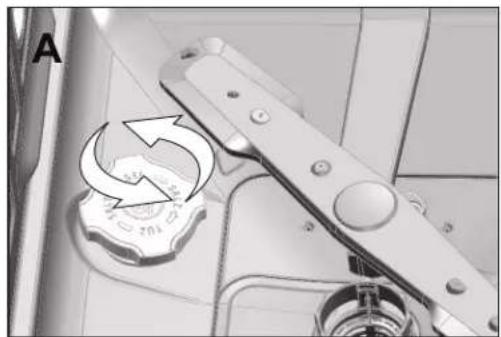
- Turn the salt reservoir lid counterclockwise to open it (A).
natural_image
Close-up of a mechanical device with a circular component and directional arrow, no visible text or symbols- Add 1 liter of water to salt reservoir of your machine only in initial use.
- Fill the salt reservoir with salt by using the salt funnel (D). To speed up dissolution rate of salt in water, stir it with a spoon.
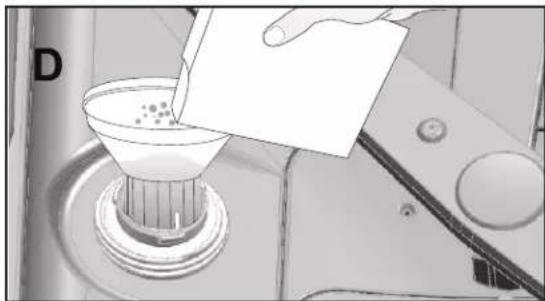
natural_image
Person pouring liquid into a funnel on a machine (no text or symbols visible)EN-115
You can put about 2 kg of softening salt into the salt reservoir.
- Replace the lid and tighten it when the reservoir is full.
You need to add salt right before starting the machine. Thus, the overflowing salty water will be flushed immediately, preventing the risk of corrosion in machine. In cases where you would not start washing immediately, run your machine empty in the shortest programme.
i Since different salt brands in the market have different particle sizes and since the water hardness may vary, dissolution of the salt in water may take a couple of hours. Therefore, Salt Indicator remains on for a while after adding salt into the machine.
Detergent
You can use powder, liquid/gel or tablet detergents in the machine.
Only use detergents produced particularly for use with dishwashers. Note that detergents that contain chlorine and phosphate can be harmful for the environment. Liquid detergents without chlorine may not remove tea and coffee stains from cups.
Adding detergent
i Pay attention to the warnings on the detergent packaging to get better washing and drying results.
Do not put solvents into the detergent dispenser. There is the risk of explosion!
Put the detergent into the detergent dispenser just before operating the machine as illustrated below.
- Push the latch to right to open the detergent dispenser lid (A).
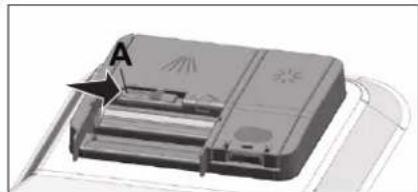
natural_image
3D rendering of a device with labeled component A, showing internal structure and no visible text or symbols- Put suggested amount of powder, liquid/gel or tablet detergent in the reservoir.
i Inside the detergent dispenser there are level markings that help you use appropriate amount of powder detergent. When brimful, detergent dispenser will contain 45 cm³ of detergent. Fill detergent up to 15 cm³ or 25 cm³ level marks in the detergent dispenser according to fullness of the machine and/or soiling degree of the dishes. One tablet is enough if you are using detergent tablets.

- Push the lid of the detergent dispenser to close it. A "click" will be heard when the lid is closed.
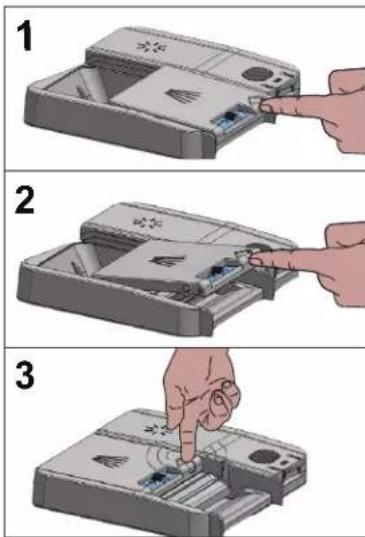
EN-117
Use powder or liquid/gel detergent in short programmes without prewash since the solubility of the tablet detergent changes depending on the temperature and time.
Tablet detergents
In addition to the conventional tablet detergents, there are also commercially available detergent tablets that show water softening salt and/or rinse aid effect. Some types of these detergents contain special purpose components such as glass and stainless steel protectors. These tablets show their effects up to a certain water hardness level (21°dH). Water softening salt and rinse aid must also be used together with the detergent if the water hardness level is above the mentioned level.
The best washing performance in dishwashers is obtained by using detergent, rinse aid and water softening salt individually.
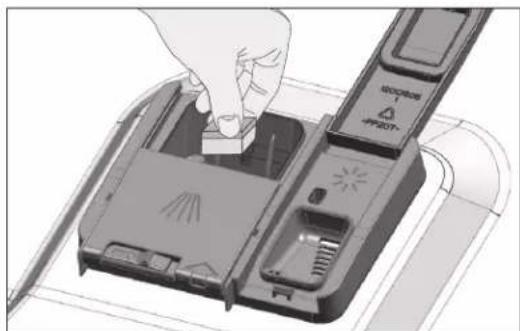
natural_image
Illustration of a hand inserting a device into a device casing (no text or symbols visible)i Observe the instructions of the detergent manufacturer on the package when using tablet detergents.
i Contact the detergent manufacturer if your dishes are wet and/or if you notice limescale spots particularly on your glasses after the washing programme is over when using a tablet detergent.
When you switch to powder detergent from tablet detergent:
-
Make sure that salt and rinse aid reservoirs are full.
-
Set the water hardness to the highest level and perform an empty
run.
- After the empty washing cycle, review the user manual and readjust the water hardness level so as to suit the water supply.
- Make the appropriate rinse aid settings.
Rinse aid
The rinse aid used in dishwashers is a special combination that aims to increase drying efficiency and prevent water or lime stains on the washed items. For this reason, care must be paid to have rinse aid in the rinse aid reservoir and to use rinse aids produced specially for dishwashers only.
- Open the lid of the rinse aid reservoir with the help of the latch.
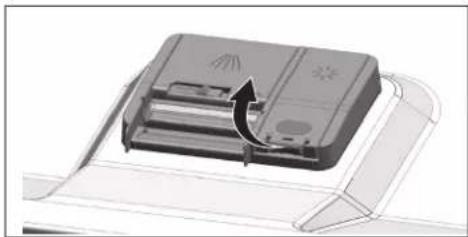
natural_image
Diagram of a printer or printer device with a paperclip and arrow indicating rotation (no text or symbols present)- Fill the reservoir until "MAX" level.
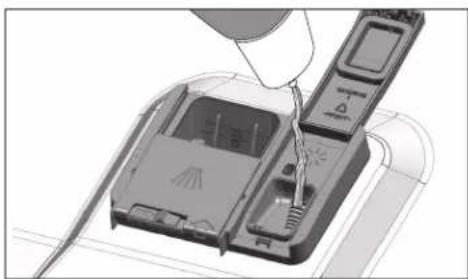
natural_image
Diagram of a device being inserted into a housing, showing internal components and wiring (no text or symbols)- Slightly press the point (B) of the reservoir lid to close it.
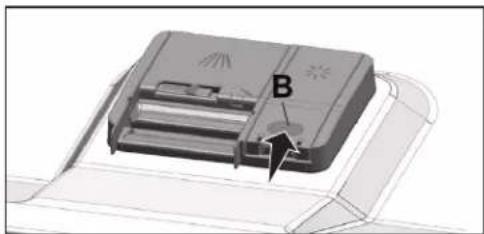
natural_image
3D diagram of a device with labeled component B, showing internal structure and mounting bracket (no text or symbols beyond label)EN-119
- If there are stains on tableware items after washing, level must be increased and if there is a blue trace after wiping them by hand, it must be decreased. This is set to position 3 as factory default.
The rinse aid adjustment is described under "Adjusting the amount of rinse aid" in the section for operating the machine.
Wipe clean any spilled rinse aid outside the reservoir. Rinse aid that spilled accidentally will cause foaming and it will eventually decrease washing performance.
Items not suitable for washing in the dishwasher
- Never wash dishes soiled by cigarette ash, candle remnants, polish, dyestuff, chemicals, etc. in your dishwasher.
- Do not wash silverware and cutlery with wooden or bone stems, glued pieces, or pieces that are not resistant to heat, as well as copper and tinplated containers in the dishwasher.
i Decorative prints of chinaware as well as aluminium and silver items may get discoloured or tarnished after washing in the dishwasher just as it happens in handwashing as well. Some delicate glass types and crystals may become dull in time. We strongly recommend you to check if the tableware you are going to purchase is suitable for washing especially in the dishwasher.
Placing the dishes into the dishwasher
Depending on the capacity of your dishwasher, you can use your dishwasher in the optimum way with respect to energy consumption and washing and drying performance only if you place the dishes in an orderly way.
- Wipe away any coarse food remnants (bones, seeds, etc.) on the dishes before placing them in the dishwasher.
- Place thin, narrow pieces in the middle sections of baskets if possible.
- Place the heavily soiled and bigger items in the lower basket and smaller, delicate and light items in the upper basket.
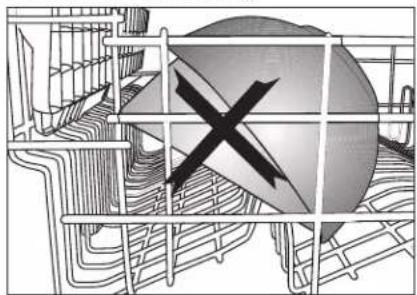
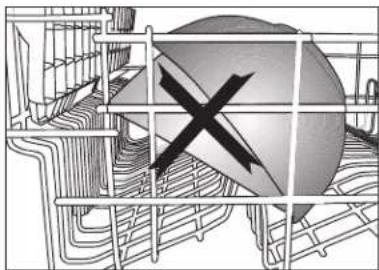
- Place the hollowed dishes such as bowls, glasses and pans upside down in the dishwasher. Thus, accumulation of water in deep hollows is prevented.
To prevent possible injuries, always place the sharp and pointed dishes such as service fork, bread knife, etc. upside down so as their pointed ends will face down or lay them horizontally in the dish basket. Unload dishes in the lower basket first and then the dishes in the upper basket.
Suggestions for loading the dishwasher
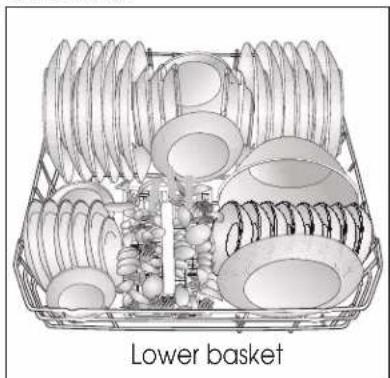
natural_image
Illustration of a basket containing various kitchen utensils and dish items (no text or symbols)Improper Loading Of Dishware
natural_image
Abstract diagram with a central cross symbol surrounded by grid lines and curved boundaries (no text or labels)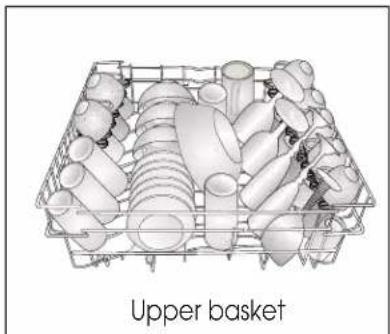
natural_image
3D wireframe illustration of an upper basket filled with various plastic components (no text or symbols)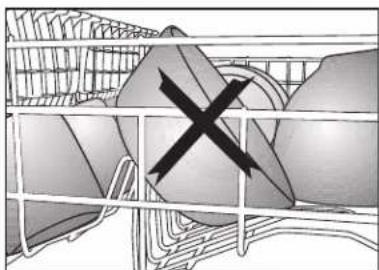
natural_image
Illustration of a cage with an X mark symbol, no text or labels presentImproper Loading Of Dishware
natural_image
3D model of a gray plastic basket with handles and compartments, no visible text or symbols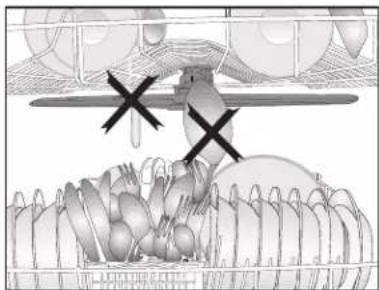
natural_image
Illustration of a bird feeding from a net with birds in the background (no text or symbols)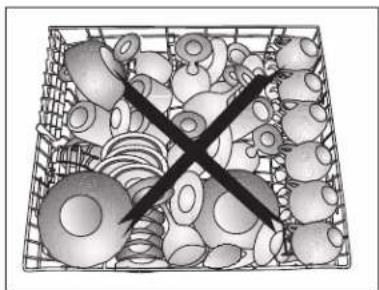
natural_image
Black-and-white illustration of a basket filled with various small objects, no text or symbols present.Cutlery basket
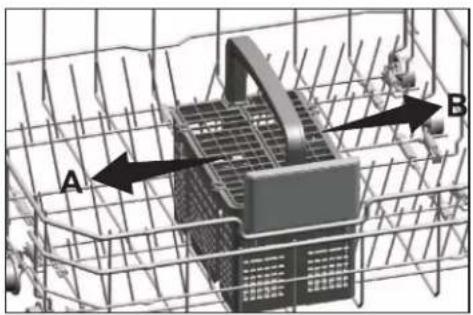
Cutlery basket is designed to wash your dishes such as knife, fork, spoon, etc. in an efficient manner.
Since the cutlery basket can be moved (A, B), you can create more space while placing your dishes in the lower basket and free up space for your dishes of different sizes.
natural_image
3D diagram of a mechanical assembly with labeled components A and B, no readable text or symbols present
natural_image
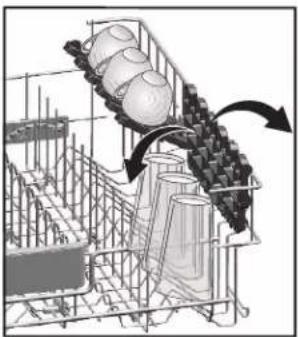
3D illustration of a plastic basket being opened into a closed container, showing structural changes (no text or symbols)Upper basket height adjustable rack
Use the lower and upper parts of the heightadjustable racks in the upper basket of the machine by sliding them down or up according to the heights of the glasses, cups or etc. (A, B, C).
natural_image
Diagram of a conveyor belt system with arrows indicating motion, no text or symbols present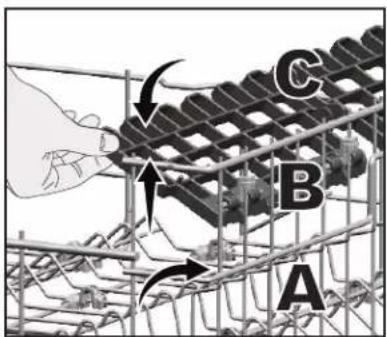
EN-122
Upper basket multipurpose service rack
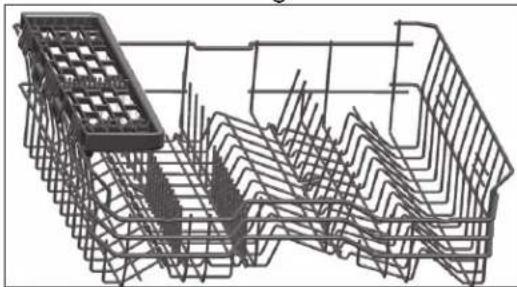
This accessory located at the upper basket of your machine allows you to easily wash pieces such as extra long ladles and bread knives.
natural_image
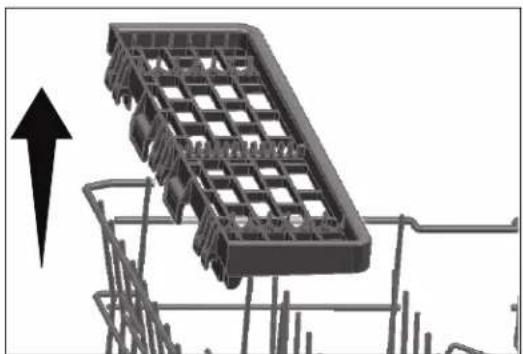
3D wireframe model of a mechanical cage or rack structure (no text or symbols visible)You can lift up the upper basket multipurpose service rack to remove it if you do not want to use it.
natural_image
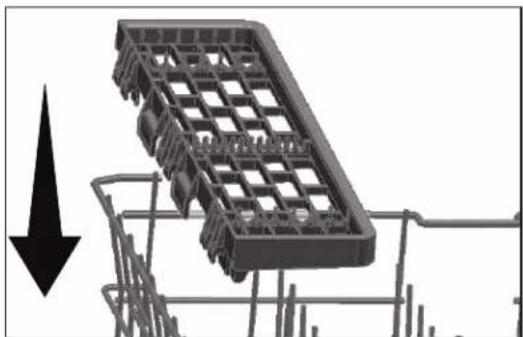
Illustration of a shopping cart with an upward arrow, no text or symbols presentIf you want to use the upper basket multipurpose service rack again, you can easily attach it to the side section of your upper basket.
natural_image
Mechanical component with grid structure and downward arrow indicator (no text or symbols)OPERATION OF THE PRODUCT
On-Off / Program Selection knob
When you select a program with the On-Off / Program Selection knob, On Warning control light is illuminated, and it is turned off when you bring the knob to Off position.

Cancel 3sec.
Start / Pause / Cancel key
Used for starting, holding or cancelling the selected program.

3sec.
Time Delay key
It is used to set the time delay duration.
Preparation of the machine
- Open the door of the dishwasher.
- Load your dishes as described in the user manual.
- Ensure that lower and upper propellers are rotating freely.
- Add adequate amount of detergent in the detergent compartment.
- Inspect whether low salt and low rinse aid indicators are illuminated; and add salt and/or rinse aid if required.
- Close the door of the dishwasher.
Program selection
- Turn on your dishwasher with the On-Off / Program Selection knob.
- Select the proper washing program for your dishes considering the program information and average consumption values table.
- Select the program you have determined with the program selection knob.
| Programme Data and Average Consumption Values Table | |||||
| Programme | ECO50°C | 70°CIntensive | 65°CClean&Dry | 60°CQuick&Dry | 35°CMini (#) |
| Cleaning temperature | 50°C 70°C | 65°C 60°C 35°C | |||
| Degree of Soiling | Suitable for washing dishes with normal amount of soil. It is the most efficient program in terms of combined power and water consumption. This is used for assessing the compliance with EU's eco-design directive. | Suitable for heavily soiled dishes, pots and pans. | Daily washing programme for normally soiled dishes. | Daily washing programme for normally soiled dishes in the fastest way. | Suitable for lightly soiled daily dishes that are scraped or pre-cleaned |
| Medium High | Medium Medium Low | ||||
| Prewash++ | +--- | ||||
| Wash+++ | ++ | ||||
| Dry | ++++- | ||||
| Duration (min) | 190 133 | 135 79 | 76 | ||
| Water (l) | 11,5 | 17,6 16,2 | 11,8 | 11,8 | |
| Energy (kWh) | 0,849 | 1,5 | 1,2 | 1 | 0,8 |
EN-125
Loading Capacity: 14
The consumption values shown in the table were determined under standard conditions. Differences may therefore occur under practical conditions. * Reference programme for testing institutes.
The tests in accordance with EN 50242/60436 must be carried out with a full water softener salt dispenser and a full rinse aid reservoir, and using the test programme. The values given for programmes other than Eco 50°C programme are indicative only. (#) Additional functions might cause changes in programme durations.
Auxiliary functions
Washing programmes of your dishwasher are designed to obtain the best cleaning effect, considering the type of the soiling, soiling degree and properties of the dishes to be washed.
Auxiliary functions are provided in order to enable you to save time, water and energy and to perform a more comfortable washing with conditions specific to you.
i Auxiliary functions may cause changes in the programme duration.
i Some auxiliary functions cannot be used together.
Auxiliary functions are not suitable for all washing programmes. Indicator of the auxiliary function that is not compatible with the programme will not be active.
To add auxiliary function to the programme:
- Select the desired washing programme by pressing the programme selection key.
- In the selected washing programme, if auxiliary function is selected, its symbol will be displayed on the screen. If the function key is pressed again, the symbol will disappear and selection is cancelled.
Half Load function
It is used to operate the machine without loading it completely.
- Load your dishes in the machine as you like.
-
Turn the machine on with On/Off key.
-
Select the desired programme and press the Half Load key 12 . While the function is enabled, the Half Load indicator 12 will come on in the function selection indicator and on the display.
- Start the programme by pressing ▶II Cancel 3sec.
i With the Half Load function you can save both water and power while using the lower and upper baskets of the machine.
Tablet detergent function
Allows to obtain a better drying performance from the multi-purpose detergents called as all in one detergents such as 2in1, 3in1, 4in1, 5in1 and etc., depending on the hardness level of the tap water.
Press and hold the tablet function button 12 on the panel to activate the tablet function for appropriate programmes. Selecting the tablet function will light the Tablet Detergent indicator ■.
If you have used the Tablet features during the last washing programme you used, Tablet function will remain active in the next washing programme you will select. If you do not want to use these functions in the new program you have selected, press the Tablet Detergent key until the indicator of the relevant function turns off.
i Tablet Detergent function may cause change in the programme duration.
SelfDry
"SelfDry" feature of your machine increases drying efficiency of your machine and saves energy. There are two options: "OFF" and "ON".
To activate the feature of SelfDry:
- Press SelfDry button . When the function is active, the indicator showing the selection of the function lights up.
- SelfDry is activated.
When you activate this function, the door of your machine opens automatically at the end of the washing program.
To deactivate the feature of SelfDry:
-
Press the button of SelfDry 3sec. When the function is deactivated, the indicator showing the selection of the function turns off.
-
SelfDry is deactivated.
i SelfDry opens the door of the machine at the end of the washing circle, thanks to the "door opening shafts". This process takes approximately 2 minutes. If the power fails while the shafts are moving out, do not force to close the door. When the power is back, the process shall be completed, and the shafts shall return to their initial position.
i The function of SelfDry may change the duration of the selected program.
Programming the Washing Period
Time Delay key
You may delay the start time of the program up to 9 hours with the Delay key. Press ▶II after delaying. Program starts automatically when the delay period is over.
With each press on the Delay key 3-6-9 hours indicators start to flash. When you press ▶while the delay indicator you have selected is flashing, the delay indicator illuminated continuously and the count down starts. When the delay period is over, the delay indicator is turned off and the washing program you have selected starts.
The delay indicators are turned off if you press the Delay key while the 9-hour delay lamp is flashing. When you press ▶ll while the delay indicators are off, the program you have selected shall start without delay.
You may monitor the remaining time on the delay from the delay indicators. For example: When you select the 9-hour delay option, 6-hour indicator shall start to illuminate when the remaining time for the start of
washing program is 6 hours.
To cancel the delay function:
When you press ▶II for 3 seconds while the delay function is active, the delay process shall be cancelled.
Starting of the program
Press ▶II to start your machine after selecting the program and additional functions.
i Machine softens the water as per the hardness of the mains water. The washing period may differ due to the water softening process. Moreover, program period may also change while the program is being executed as a result of the room temperature, mains water temperature and the amount of dishes.
i Care to avoid opening of the door while the machine is being operated. If you need to open the door, stop the machine by pressing ▶II . Then open the door of the machine. Be careful as steam may come out when you open the door of the machine. Press ▶II again after closing the machine door. Program shall be resumed. Cancel 3sec.
To ensure that the water remaining on the dishes and inside the machine is completely drained and that the water softener is removed after rinsing operation, your machine resumes operation at drying cycle after keeping silent for a while.
Monitoring of Program
You may monitor the current program step of the program you have selected from the program step monitoring indicators on the control panel.
If the drying indicator is illuminated, machine shall perform drying silently for approximately 30 to 60 minutes. After this period, the drying indicator is turned off and End indicator shall be illuminated. The End light is illuminated when the washing program you have selected is complete.
Cancelling the program
- Press ▶ for 3 seconds to cancel the program.
- Release the key when Washing and Drying indicators start to flash. The water inside the machine shall be drained within 45 seconds. Program shall be cancelled when the Washing and Drying indicators are turned off and End indicator is illuminated. Then, you may select a new program and start it.
Detergent or rinse aid may remain inside the machine and/or the dishes being washed as per the step of the program you have cancelled.
When the Program Selection Knob is brought to "Off" position, the washing program is ended and machine becomes ready for selection of program again. Water and detergent may remain inside the machine if the washing is ended in such a way.
Low Salt Warning indicator
Check the low salt warning indicator to determine if the softening salt available in your machine is adequate. You shall add salt to the salt compartment when the low salt warning indicator starts to illuminate.
Low Rinse Aid Warning indicator
Check the low rinse aid warning indicator to determine if the rinse aid available in your machine is adequate. You shall add rinse aid to the rinse aid compartment when the low rinse aid warning indicator starts to illuminate.
Setting the Rinse aid Amount
- While the Program Selection Knob is "Off", press and hold 3sec. of your machine and rotate the Program Selection Knob one step clockwise and keep the function key pressed for 3 seconds. Machine switches to rinse aid setting mode.
- When the rinse aid setting mode is activated, the rinse aid level in the memory is indicated by the program monitoring LEDs for 5 seconds.
- Bring the Program selection knob to the proper position for the new rinse aid amount setting.
-
Press ▶II once to record the selected setting in the memory.
-
Machine returns to normal mode when you bring the Program Selection knob to "Off" position again.
| Rinse Aid Amount | Level of program selection knob | Rinse Aid Setting Indicator |
| Applies 1 dose of rinse aid. | 1 | The washing indicator on the panel illuminates. |
| Applies 2 dose of rinse aid. | 2 | The drying indicator on the panel illuminates. |
| Applies 3 dose of rinse aid. | 3 The End indicator on the panel illuminates. | |
| Applies 4 dose of rinse aid. | 4 | The Washing, Drying and End indicators on the panel illuminate. |
| No dose of rinse aid is applied. | 5 | The Washing, Drying and End indicators on the panel flashes with intervals of 1 second. |
End of Program
Program End indicator illuminates when the washing program has ended.
-
Turn off your machine with the On-Off / Program Selection knob.
-
Turn off the tap.
-
Remove the plug from the outlet.
i After washing your dishes, keep them inside the machine for cooling for approximately 15 minutes. Your dishes shall dry faster if you leave the door of your machine ajar within this period. This shall improve the drying efficiency of the machine.
CLEANING AND MAINTENANCE
⚠️ Unplug the product and turn off the tap before attempting any cleaning procedures.
Do not use abrasive substances for cleaning.
i Clean the filter and impellers at least once a week in order for the machine to operate efficiently.
Cleaning the outer surface of the product
NOTICE Clean the outer surface and door gaskets of the product gently with a mild cleaning material and damp cloth. Wipe the "control panel" only with a damp cloth.
Cleaning the interior of themachine
- Clean the interior of the machine by operating the machine in the programme running at the highest possible temperature with detergent or special machine cleaning agents monthly. This operation will help removal of leftovers and limescale from the interior of the machine.
- If water has remained in the machine, drain the water by performing the procedures under the topic "Cancelling a programme". If the water cannot be discharged, remove the filters as specified in the "Cleaning the filters" section and check if there are any leftover deposits that have accumulated at the bottom of the machine, blocking the water path. Clean if necessary.
Cleaning the filters
Clean the filters at least once a week in order for the machine operates efficiently.
Check if food residues are left on the filters. If there are food residues on filters, take them out and clean well under running water.
- Turn the micro filter (1) and coarse filter (2) assembly counter clockwise and pull it out from its seating.
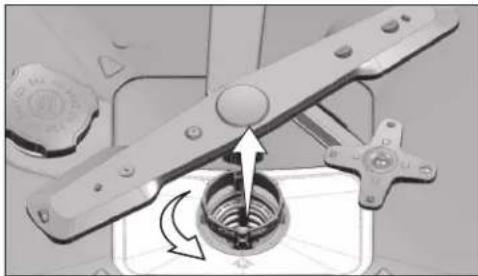
natural_image
Mechanical assembly diagram showing a rotating component with arrows indicating motion (no text or symbols)- Pull out the metal/plastic filter (3) from the seating.
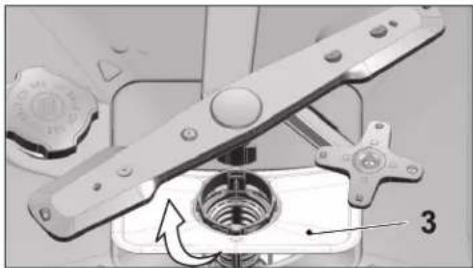
natural_image
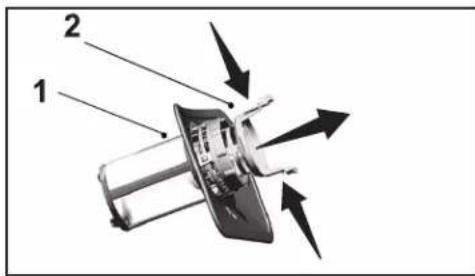
Mechanical assembly diagram showing a rotating component with labeled parts (no readable text or symbols)- Press the two pawls on the coarse filter inwards and separate the coarse filter from the assembly.
- Clean all three filters under tap water by means of a brush.
- Place the metal/plastic filter.
- Place the coarse filter into the micro filter. Make sure that it is properly seated. Turn the coarse filter clockwise until a "click" sound is heard.
i Do not use the dishwasher without filter.
i Incorrect placement of the filters will reduce washing efficiency.
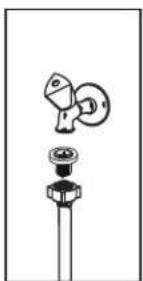
Cleaning the hose filter
Damages on the machine that may be caused by impurities coming
from the urban supply water or your own water installation (such as sand, dirt, rust, etc.) can be prevented by means of the filter attached to the water inlet hose. Check the filter and the hose regularly and clean them if necessary.
- Turn off the tap and remove the hose.
- After taking out the filter, clean it under running tap water.
- Place the cleaned filter back to its seat in the hose.
- Install the hose to tap.
natural_image
Simple line drawing of a mechanical component with a knob and housing (no text or symbols)Cleaning the impellers
Clean the impellers at least once a week in order for the machine operates efficiently.
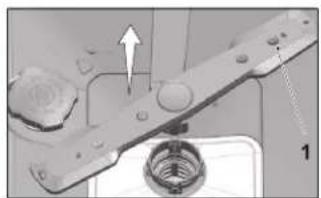
Lower impeller
Check if the holes on the lower impeller (1) are clogged. If they are clogged, remove and clean the impeller. You can pull the lower impeller up to remove it.
natural_image
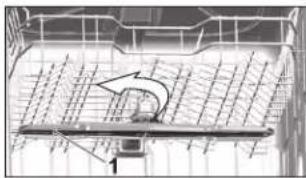
Mechanical assembly diagram showing a bolted joint with a bearing and housing (no text or symbols)Upper impeller
Check if the holes on the upper impeller (1) are clogged. If they are clogged, remove and clean the impeller. Turn its nut to left to remove the upper impeller.
Make sure that the nut is tightened well when installing the upper impeller.
natural_image
Diagram of a grid-based structure with an arrow indicating direction, no visible text or symbols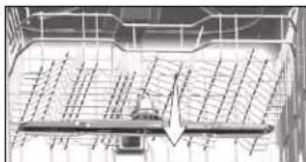
natural_image
Architectural or engineering diagram showing a grid layout with directional arrows and a central arrow (no text or symbols)TROUBLESHOOTING
Machine does not start.
- Power cable is unplugged. >>> Check if the power cable is plugged in.
- Fuse is blown. >>> Check the fuses in your house.
• Water is cut. >>> Make sure that the water inlet tap is open. - Door of the machine is open. >>> Make sure that you have closed the door of the machine.
- On / Off button is not pressed. >>> Make sure that you have turned on the machine by pressing the On / Off button.
Dishes are not washed clean
- Dishes are not placed orderly in the machine. >>> Load the dishes as described in the user manual.
- Selected programme is unsuitable. >>> Select a programme with a higher temperature and cycle time.
- Impellers are stuck. >>> Prior to starting the programme, turn the lower and upper impellers by hand to make sure that they rotate freely.
- Impeller holes are clogged. >>> Lower and upper impeller holes might be clogged with food remnants such as lemon pips. Clean the impellers regularly as illustrated in section "Cleaning and Care".
- Filters are clogged. >>> Check if the filter system is clean. Clean the filter system regularly as illustrated in section "Cleaning and Care".
- Filters are installed incorrectly. >>> Check the filter system and make sure that it is installed correctly.
- Baskets are overloaded. >>> Do not overload the baskets in excess of their capacity.
- Detergent is stored under unsuitable conditions. >>> If you are using powder detergent, do not store the detergent package in humid places. Keep it in a closed container if possible. For ease-of-storing, we recommend you to use tablet detergents.
- Detergent is not sufficient. >>> If you are using powder detergent, adjust the amount of detergent according to the soiling degree of
your dishes and/or programme definitions. We recommend you to use tablet detergents for optimum results.
- Rinse aid is not sufficient. >>> Check the rinse aid indicator and add rinse aid if necessary. Increase the rinse aid setting if there is enough amount of rinse aid in the machine.
- Detergent dispenser lid is left open. >>> Make sure that the detergent dispenser lid is closed tightly after adding detergent.
Dishes are not dry at the end of cycle
- Dishes are not placed orderly in the machine. >>> Place your dishes in a way that no water will accumulate in them. Rinse aid is not sufficient. >>> Check the rinse aid indicator and add rinse aid if necessary. Increase the rinse aid setting if there is enough amount of rinse aid in the machine.
- Machine is unloaded right after the programme is over. >>> Do not unload your machine right after washing process is completed. Slightly open the door and wait for evacuation of the steam inside for a while. Unload the dishes after the pieces cool down to a touchable level. Start unloading process from the lower basket. Thus, dropping of water remained on a piece at upper basket onto the pieces at lower basket is prevented.
- Selected programme is unsuitable. >>> Since rinsing temperature is low at programmes with short duration, drying performance will also be low. Select programmes with longer duration for a higher drying performance.
- Surface quality of the kitchen utensils is deteriorated. >>> Desired washing performance can not be obtained on kitchen utensils with deteriorated surfaces and it is not suitable to use such utensils in terms of hygiene as well. Also, water can not flow easily on deteriorated surfaces. It is not recommended to wash such kitchen utensils in dishwasher.
i It is normal that drying complaints can be experienced with Teflon kitchen utensils. It is associated with the structure of Teflon. Since the surface tensions of Teflon and water are different, water droplets will remain as beads on the Teflon surface.
Tea, coffee or lipstick stains remain on dishes.
- Selected programme is unsuitable. >>> Select a programme with a higher temperature and cycle time.
- Surface quality of the kitchen utensils is deteriorated. >>> Tea and coffee stains or other dye spots may not be cleaned in dishwasher when they have penetrated in deteriorated surfaces. Desired washing performance can not be obtained on kitchen utensils with deteriorated surfaces and it is not suitable to use such utensils in terms of hygiene as well. It is not recommended to wash such kitchen utensils in dishwasher.
- Detergent is stored under unsuitable conditions. >>> If you are using powder detergent, do not store the detergent package in humid places. Keep it in a closed container if possible. For ease-of-storing, we recommend you to use tablet detergents.
Lime traces remain on dishes and glassware gains a misty appearance
- Rinse aid is not sufficient. >>> Check the rinse aid indicator and add rinse aid if necessary. Increase the rinse aid setting if there is enough amount of rinse aid in the machine.
- Water hardness setting is low or salt level is insufficient >>> Measure the hardness of the supply water appropriately and check the water hardness setting.
- Salt leakage exists. >>> Pay attention not to spill salt around the salt filling hole while adding salt. Make sure that the salt reservoir lid is tightly closed after finishing the filling process. Run the prewash programme to remove the salt that spilled inside the machine. Since the salt granules that will remain under the lid will dissolve during prewash, causing the lid loosen, check the lid once again at the end of the programme.
There is a different odour in the machine
A new machine has a peculiar odour. It will fade out after a couple of washes.
- Filters are clogged. >>> Check if the filter system is clean. Clean the filter system regularly as illustrated in section "Cleaning and Care".
- Dirty dishes are kept in dishwasher for 2-3 days. >>> If you are not going to start the machine right after you have put the dishes into it, remove the remnants on the dishes and run the Prewash programme without detergent every 2 days. In such cases, do not close the door of the machine completely in order to avoid odour build up in machine. You can also use commercially available odour removers or machine cleaners.
Rust, discoloration or surface deterioration occurs on dishes
- Salt leakage exists. >>> Salt may cause deterioration and oxidation on metal surfaces. Pay attention not to spill salt around the salt filling hole while adding salt. Make sure that the salt reservoir lid is tightly closed after finishing the filling process. Run the prewash programme to remove the salt that spilled inside the machine. Since the salt granules that will remain under the lid will dissolve during prewash, causing the lid loosen, check the lid once again at the end of the programme.
- Salty food remnants have remained on dishes for a long time. >>> If cutlery soiled with such foods will be kept waiting in machine, dirt must be removed by prewash or dishes must be washed without being kept waiting.
- Electric installation is not grounded. >>>Check if your machine is connected to the actual grounding line. Otherwise, the static electric created in the product causes arcs on the surfaces of metal items creating pores, removing the protective cover on the surface and causing discoloration.
- Intensive cleansers such as bleaches are used. >>> Protective cover on metal surfaces gets damaged and looses its efficiency in time when it gets in contact with cleansers such as bleach. Do not wash your dishes with bleach.
- Metal items particularly knives are used for purposes other than their intended uses. >>> Protective cover on the edges of knives may get damaged when they are used for purposes such as opening cans. Do not use metal kitchen utensils out of their intended uses.
- Cutlery are made of low quality stainless steel. >>> Corrosion on such
items is inevitable; they should not be washed in dishwashers.
- Kitchen utensils that are already corroded are washed in dishwasher. >>> Rust on a corroded item can migrate to other stainless steel surfaces and cause corrosion on those surfaces as well. Such items should not be washed in dishwashers.
Detergent remains in detergent dispenser.
- Detergent dispenser was damp when adding detergent. >>> Make sure that the detergent dispenser is dried well prior to filling it with detergent.
- Detergent is added long before the washing process. >>> Pay attention to add detergent shortly before start-up of the washing. Opening of the detergent dispenser lid is prevented during washing. >>> Place the dishes in a way that will not prevent the detergent dispenser lid from opening and the water going into the machine from impellers.
- Detergent is stored under unsuitable conditions. >>> If you are using powder detergent, do not store the detergent package in humid places. Keep it in a closed container if possible. For ease-of-storing, we recommend you to use tablet detergents.
- Impeller holes are clogged. >>> Lower and upper impeller holes might be clogged with food remnants such as lemon pips. Clean the impellers regularly as illustrated in section "Cleaning and Maintenance".
Decorations and ornaments on kitchen utensils are being erased.
i Decorated glasses and decorated lustre porcelains are not suitable for washing in the dishwasher. Manufacturers of some glassware and porcelain tableware items do not recommend washing such kitchen utensils in the dishwashers either.
Dishes are scratched.
Kitchen utensils that contains or are made of aluminium should not be washed in dishwasher.
- Salt leakage exists. >>> Pay attention not to spill salt around the salt filling hole while adding salt. Spilled salt can cause scratches. Make
sure that the salt reservoir lid is tightly closed after finishing the filling process. Run the prewash programme to remove the salt that spilled inside the machine. Since the salt granules that will remain under the lid will dissolve during prewash, causing the lid loosen, check the lid once again at the end of the programme.
- Water hardness setting is low or salt level is insufficient >>> Measure the hardness of the supply water appropriately and check the water hardness setting.
- Dishes are not placed orderly in the machine. >>> When placing the glasses and other glassware into the basket lean them not against other dishes but the edges or racks of the basket or the glass support tines. Striking of the glasses to each other or to other dishes due to the impact of water during washing can cause breaks, or scratches on their surfaces.
A smear remains on glasses that resembles milk stain which can not be removed when wiped by hand. A bluish / rainbow appearance occurs when the glass is pointed to light.
- Excessive rinse aid is used. >>>Lower rinse aid setting. Clean the spilled rinse aid when adding rinse aid.
- Corrosion has occurred on glass due to soft water. >>> Measure the hardness of the supply water appropriately and check the water hardness setting. If your supply water is soft (<5 dH), do not use salt. Choose programmes that wash in higher temperatures (e.g. 60-65°C). You can also use glass protective detergents that are commercially available.
Foam forms in the machine.
- Dishes are washed with hand-wash detergent by hand but not rinsed before placing them into the machine. >>> Hand-wash detergents do not contain antifoam. There is no need to hand-wash the dishes before placing them into the machine. Removing the coarse soil on the dishes under tap water, with a tissue paper or fork will be sufficient.
- Rinse aid has spilled into the machine when adding rinse aid. >>> Take care that rinse aid is not spilled in the machine when you are
filling it. Clean any spilled rinse slit with the help of a tissue paper/towel.
- Lid of the rinse aid reservoir is left open. >>> Make sure that the lid of the rinse aid reservoir is closed after adding rinse aid.
Kitchen utensils are broken.
- Dishes are not placed orderly in the machine. >>> Load the dishes as described in the user manual.
- Baskets are overloaded. >>> Do not overload the baskets in excess of their capacity.
Water remains in the dishwasher at the end of the programme.
- Filters are clogged. >>> Check if the filter system is clean. Clean the filter system regularly as illustrated in section "Cleaning and Care".
- Discharge hose is clogged/blocked. >>> Check the discharge hose. If necessary, remove the discharge hose, clear the blockage and insert is as illustrated in the user manual.
If you cannot eliminate the problem although you follow the instructions in this section, consult your dealer or the Authorised Service Agent. Never try to repair a nonfunctional product yourself.
| Product Information SheetCOMMISSION DELEGATED REGULATION (EU) 2019/2017 with regard to energy labelling of household dishwashers | ||||
| Supplier's name or trade mark: Etablissements Darty & fils © | THOMSON | ||||
| Supplier's address: 9 Rue des Bateaux-Lavoirs, 94200 Ivry-sur-Seine, France | ||||
| Model identifier: TDW4714WH, TDW4714SL, TDW4714BK | ||||
| General product parameters: | ||||
| Parameter Value Parameter Value | ||||
| Rated capacity (°) (ps) | 14 | Dimensions in cm | Height 85 | |
| Width 60 | ||||
| Depth 60 | ||||
| EEI (°) | 49,9 | Energy efficiency class (°) | D | |
| Cleaning performance index (°) | 1,130 | Drying performance index (°) | 1,070 | |
| Energy consumption in kWh (per cycle), based on the eco programme using cold water fill. Actual energy consumption will depend on how the appliance is used. | 0,849 | Water consumption in litres (per cycle), based on the eco programme. Actual water consumption will depend on how the appliance is used and on the hardness of the water. | 11,5 | |
| Programme duration (°)(h:min) | 3:10 | Type | free-standing | |
| Airborne acoustical noise emissions (°)(dB(A) re 1 pW) | 47 | Airborne acoustical noise emission class (°) | C | |
| Off-mode (W) (if applicable) | 0,50 | Standby mode (W) (if applicable) | 1,00 | |
| Delay start (W)(if applicable) | 4,00 | Networked standby (W)(if applicable) | N/A | |
| Minimum duration of the guarantee offered by the manufacturer: 24 months |
| Additional information: |
| Weblink to the supplier's website, where the information in point 6 of Annex II to Commission Regulation (EU) 2019/2022 is found: www.darty.com |
(°) for the eco programme.
To find the model information in the product database:
Click the link
https://eprel.ec.europa.eu/screen/product/dishwashers2019/1188401
https://eprel.ec.europa.eu/screen/product/dishwashers2019/1188410
https://eprel.ec.europa.eu/screen/product/dishwashers2019/1188413
| Rated voltage / frequency 220-240V ~ 50Hz | |
| Rated power 1800-2100 W | |
| Water pressure 0.03 - 1.00 MPa | |
REPAIR AND SPARE PARTS SERVICE
Do not disassemble or repair the appliance by yourself. Failure to do so may result in an electric shock or personal injury.
To access to professional repair and order spare parts, please get the support from FNAC DARTY after-sales service.
Spare parts for your appliances will be delivered within 15 working days after having received the order.
Please Note!
All appliances have a 2-year warranty.
Warranty does not cover damages caused due to improper installation, unauthorized modification, self-repair or non-professional repair.
Contact us at :
Vanden Borre
in alle vertrouwen

www.darty.com
0978 970 970
24 Hours
7 Days a week

a responsible retailer we care about the environment.
As such we urge you to follow the correct disposal procedure for the appliance and packaging materials. This will help conserve natural resources and ensure that it is recycled in a manner that protects health and the environment.
You must dispose of this appliance and its packaging according to local laws and regulations.
Because this appliance contains electronic components, the appliance and its accessories must be disposed of separately from household waste when the appliance reaches its end of life.
Contact your local authority to learn about disposal and recycling.
The appliance should be taken to your local collection point for recycling.
Some collection points accept appliance free of charge.
We apologise for any inconvenience caused by minor inconsistencies in these instructions, which may occur as a result of product improvement and development.
EU Declaration of Conformity
Product Description:
natural_image
Front view of a white disposable water dispenser appliance (no visible text or labels)Marque -
Brand /Merk /Marca:
THOMSON
TDW4714BK TDW4714SL TDW4714WH
The object of the declaration described above is in conformity with the relevant Union
harmonisation legislation:
Low Voltage Directive (LVD)
Eco design requirements for energy-related products (ErP)
RoHS
EMC:
EN 55014-1:2017+A11:2020
EN 55014-2:2015
EN 61000-3-2:2019
EN 61000-3-3:2013+A1:2019
EN 61000-4-2:2009
EN 61000-4-3:2006+A1:2008+A2:2010
EN 61000-4-5:2014+A1:2017
EN 61000-4-6:2014
EN 61000-4-11:2020
LVD :
AS/NZS 60335-1:2020
AS/NZS 60335-2-5:2014+A1:2015+A2:2018+A3:2020
ErP :
(EU) 2019/2017
(EU) 2019/2022
(EU) 2021/340
(EU) 2021/341
EN 60436:2020
This declaration of conformity is drawn up under the sole responsibility of the manufacturer.
The person responsible for this declaration is:
Place, Date / Lieu :










- TABLE DES MATIÈRES
- FR-23
- Panier à couverts
- FONCTIONNEMENT DE L'APPAREIL
- GUIDE DE DÉPANNAGE
- Zilverserviesmandje
- Bovenrek in de hoogte verstelbaar rek
- Bovenste mandje multifunctioneel servicerek
- BEDIENING VAN HET PRODUCT
- Sproeiarm boven
- PROBLEEMOPLOSSING
- Machine start niet.
- IMPORTANT SAFETY INSTRUCTIONS
- PLEASE READ THE FOLLOWING INSTRUCTIONS CAREFULLY BEFORE USING THE APPLIANCE AND KEEP FOR FUTURE REFERENCE.
- WARNINGS
- Safety Precautions
- PRODUCT OVERVIEW
- INSTALLATION
- Appropriate installation location
- Connecting water supply
- Permitted water temperature: up to 25°C
- Connection to the drain
- Adjusting the feet
- Electrical connection
- PREPARATION
- Tips for energy saving
- Water softening system
- Adjusting the water softening system
- After the determination of the water hardness :
- After detecting the water hardness:
- EN-113
- Adding salt
- EN-115
- Detergent
- Adding detergent
- Tablet detergents
- When you switch to powder detergent from tablet detergent:
- Rinse aid
- EN-119
- Items not suitable for washing in the dishwasher
- Placing the dishes into the dishwasher
- Cutlery basket
- Upper basket height adjustable rack
- Upper basket multipurpose service rack
- OPERATION OF THE PRODUCT
- On-Off / Program Selection knob
- Start / Pause / Cancel key
- Time Delay key
- Preparation of the machine
- Program selection
- Loading Capacity: 14
- Auxiliary functions
- To add auxiliary function to the programme:
- Half Load function
- Tablet detergent function
- SelfDry
- To activate the feature of SelfDry:
- To deactivate the feature of SelfDry:
- Programming the Washing Period
- To cancel the delay function:
- Starting of the program
- Monitoring of Program
- Cancelling the program
- Low Salt Warning indicator
- Low Rinse Aid Warning indicator
- Setting the Rinse aid Amount
- End of Program
- CLEANING AND MAINTENANCE
- Cleaning the outer surface of the product
- Cleaning the interior of themachine
- Cleaning the filters
- Cleaning the hose filter
- Cleaning the impellers
- Lower impeller
- Upper impeller
- TROUBLESHOOTING
- Machine does not start.
- Dishes are not washed clean
- Dishes are not dry at the end of cycle
- Tea, coffee or lipstick stains remain on dishes.
- Lime traces remain on dishes and glassware gains a misty appearance
- There is a different odour in the machine
- Rust, discoloration or surface deterioration occurs on dishes
- Detergent remains in detergent dispenser.
- Decorations and ornaments on kitchen utensils are being erased.
- Dishes are scratched.
- Foam forms in the machine.
- Kitchen utensils are broken.
- Water remains in the dishwasher at the end of the programme.
- REPAIR AND SPARE PARTS SERVICE
- Please Note!
- Vanden Borre
- THOMSON
- EMC:
- LVD :
- ErP :
Brand : THOMSON
Model : TDW4714SL
Category : Dishwasher