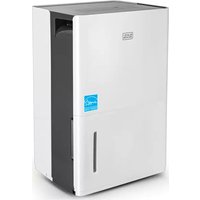
BD50MWSA - Dehumidifier BLACK & DECKER - Free user manual and instructions
Find the device manual for free BD50MWSA BLACK & DECKER in PDF.



| Product Type | Dehumidifier |
| Brand | Black & Decker |
| Model | BD50MWSA |
| Dehumidification Capacity | 50 pints/day (estimated) |
| Power Supply | 120 V ~ 60 Hz |
| Main Functions | Continuous dehumidification, Turbo mode, 24-hour timer, Comfort mode, auto restart, auto defrost, full bucket auto shut-off |
| Control Panel | Digital with humidity display, buttons for modes and settings |
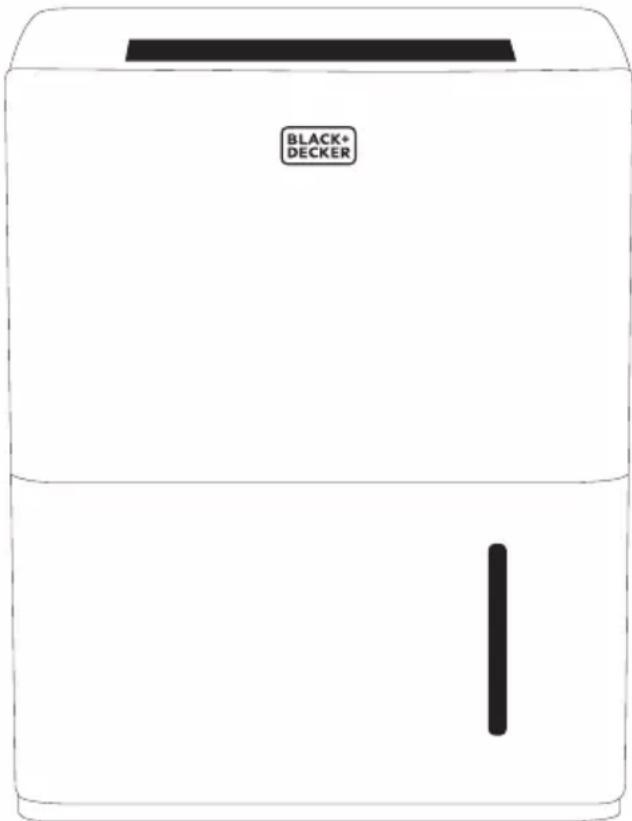
| Water Tank | Removable bucket with water level window |
| Continuous Drainage | Yes, via included hose |
| Built-in Pump | No (model without pump) |
| Operating Temperature Range | 5 °C to 32 °C (41 °F to 90 °F) |
| Relative Humidity Range | 35% to 85% RH |
| Air Filter | Washable, cleaning recommended every 250 hours of operation |
| Minimum Clearance | 11.8 inches around the unit, 17.7 inches above |
| Safety | Grounding required, auto shut-off if bucket full or removed, overload protection |
| Included Accessories | Drain hose, adapter, cord loop, air filter |
| Warranty | 1 year limited (parts and labor) |
Frequently Asked Questions - BD50MWSA BLACK & DECKER
User questions about BD50MWSA BLACK & DECKER
0 question about this device. Answer the ones you know or ask your own.
Ask a new question about this device
Download the instructions for your Dehumidifier in PDF format for free! Find your manual BD50MWSA - BLACK & DECKER and take your electronic device back in hand. On this page are published all the documents necessary for the use of your device. BD50MWSA by BLACK & DECKER.
USER MANUAL BD50MWSA BLACK & DECKER
PORTABLE DEHUMIDIFIER
INSTRUCTION MANUAL
CATALOG NUMBER
BD22MWSA
BD30MWSA
BD50MWSA
BD50PMWSA
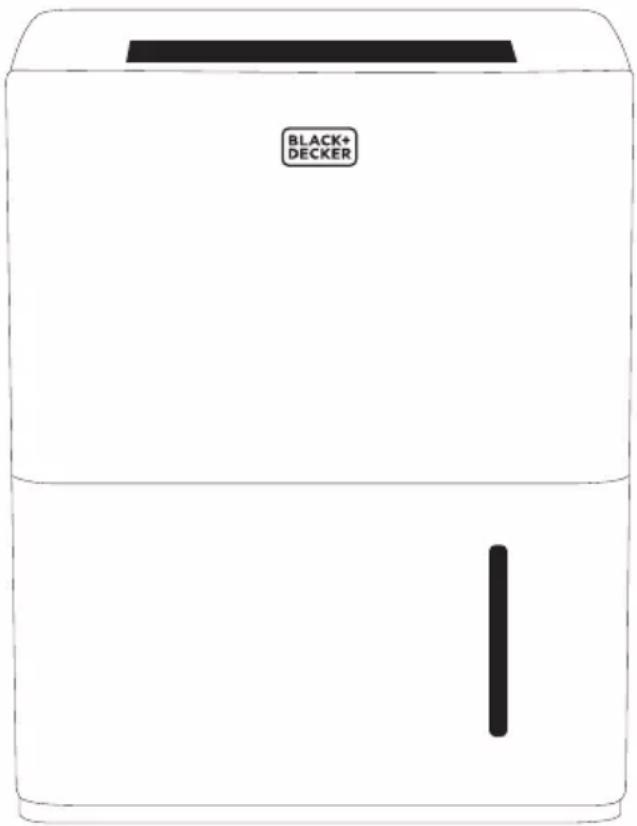
Thank you for choosing BLACK+DECKER!
PLEASE READ BEFORE RETURNING THIS PRODUCT FOR ANY REASON.
If you have a question or experience a problem with your BLACK+DECKER purchase, go to www.blackanddecker.com/instantanswers If you can't find the answer or do not have access to the Internet, call 844-299-0879 from 10:30 a.m. to 6:30 p.m. EST Mon. - Fri. to speak with an agent. Please have the catalog number available when you call.
SAVE THIS MANUAL FOR FUTURE REFERENCE.
CONTENTS
SAFETY INFORMATION
Important Safety Instructions....3-4
Grounding Instructions....4
Safety Guidelines ....4
Power Cord Operation....4-5
SET UP & USE
Parts & Features 6-7
Control Panel 8
Operation Instructions 9-13
CLEANING & CARE 14
TROUBLE SHOOTING & WARRANTY
Before You Call For Service....15
Customer Service....15
Troubleshooting....16-17
Limited Warranty....18
PRODUCT REGISTRATION
Thank you for purchasing our BLACK+DECKER product. This easy-to-use manual will guide you in getting the best use of your portable dehumidifier.
Remember to record the model and serial numbers. They are on a label on the rear.
Model number
Serial number
Date of purchase
Staple your receipt to your manual. You will need it to obtain warranty service.

DANGER
DANGER - Immediate hazards which WILL result in severe personal injury or death

WARNING
WARNING - Hazards or unsafe practices which COULD result in severe personal injury or death

CAUTION
CAUTION - Hazards or unsafe practices which COULD result in minor personal injury
IMPORTANT SAFETY INSTRUCTIONS

WARNING
When using electrical appliances, basic safety precautions should be followed, including the following
- To reduce risk of injury, read this guide before using the appliance.
- Always place the unit on a level surface strong enough to support the unit with a full bucket of water.
- Never use or store gasoline or other flammable vapor or liquid near this unit.
- Minimum installation clearance: 11.8 inches around the unit and 17.7 inches above the unit. Do not block or cover air inlet or outlet grills.
- The unit must be connected to a correctly grounded power supply.
- Do not start or stop the unit by inserting or pulling out the power plug.
- Do not use the unit in the immediate surroundings of a bath, a shower, swimming pool or clothes dryer.
- Do not insert anything into the air outlet.
- If the supply cord is damaged, it must be replaced by the manufacturer, its service agent or similar qualified person in order to avoid a hazard.
- When cleaning the unit, always turn the unit off and unplug the power cord.
- Do not use outdoors. Intended for indoor use only.
- Place the dehumidifier in an area where the temperature will not fall below 41^ Fahrenheit. The coils can become covered with frost if the room temperature is too low, which may reduce performance.
- The appliance shall be installed in accordance with national wiring regulations.
- The appliance is not intended for use by persons (including children) with reduced physical, sensory or mental capabilities, or lack of experience and knowledge, unless they have been given supervision or instruction concerning the use of the appliance by a person responsible for their safety.
SAVE THESE INSTRUCTIONS
HOUSEHOLD USE ONLY
SAFETY INFORMATION
GROUNDING INSTRUCTIONS
ELECTRICAL REQUIREMENTS
In the event of malfunction or breakdown, grounding provides a path of least resistance for electric current to reduce the risk of electric shock. The appliance must be connected to a cord having an equipment-grounding conductor and a grounding plug. The plug must be plugged into an appropriate outlet that is properly installed and grounded in accordance with all local codes and ordinances.
DANGER - Improper connection of the equipment grounding conductor can result in a risk of electric shock. The conductor with insulation having an outer surface that is green with or without yellow stripes is the equipment grounding conductor. If repair or replacement of the cord or plug is necessary, do not connect the equipment-grounding conductor to a live terminal. Check with a qualified electrician or service person if the grounding instructions are not completely understood, or if in doubt as to whether the appliance is properly grounded. Do not modify the plug connected to the appliance – if it will not fit the outlet, have a proper outlet installed by a qualified electrician.
FOR GROUNDED, CORD-CONNECTED APPLIANCE RATED LESS THAN 15A AND INTENDED FOR USE ON A NOMINAL 120V SUPPLY CIRCUIT
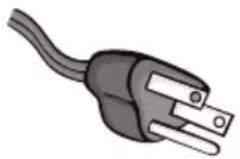
The appliance is for use on a nominal 120V circuit and should be connected to a grounding outlet that looks like the one illustrated below. The use of a temporary adaptor is not recommended.
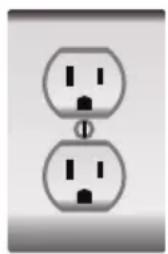
natural_image
Two identical electrical socket icons with black terminals, no text or symbols presentPOWER SUPPLY CORD
- Extreme care must be exercised with the use of an extension cord:
a) Use only a grounding type 3-wire extension cord that has a 3-blade grounding plug and a 3-slot receptacle that will accept the plug on the appliance.
b) The marked electrical rating of the cord set or extension cord must equal to or greater than the electrical rating of the appliance. The longer cord should be arranged so that it will not drape over the counter top or table top where it can be pulled on by children or tripped over unintentionally.
NOTE: Neither BLACK+DECKER nor the dealer can accept any liability for damage to the product or personal injury resulting from failure to observe the electrical connection procedures.
SAFETY INFORMATION
USE OF EXTENSION CORDS WITH DEHUMIDIFIER
Only use a grounded extension cord that is rated at least 7.8 amps and has a third-wire ground. When a long extension cord is used to connect the dehumidifier, a voltage drop occurs. The longer the cord, the greater the voltage drop. This results in less voltage being supplied to the dehumidifier and increases the amount of current (amp) draw or reduces performance. A heavier cord with a larger wire size will reduce the voltage drop. Be sure to choose a cord that will supply enough voltage to operate the dehumidifier. The table below indicates appropriate gauge for extension cords.
| Minimum Gauge for Cord Sets | ||||||
| Ampere Rating | Volts | Total Length of Cord in Feet (meters) | ||||
| 120V 25 (7.6) | 50 (15.2) 100 | (30.5) 150 (45.7) | ||||
| 240V 50 (15.2) | 100 (30.5) 2 | 00 (61.0) 300 | (91.4) | |||
| More than | Not more than | AWG | ||||
| 0 6 18 16 16 14 | ||||||
| 6 10 18 16 14 | 12 | |||||
| 10 12 16 16 14 | 12 | |||||
| 12 16 14 12 Not Recommended | ||||||

WARNING: Keep electrical cords in good condition. Do not use worn, bare, or frayed cords because they can cause electrical shock.

WARNING: Operating equipment at low voltage can cause it to overheat. Using an excessively long extension cord can cause the cord to overheat.
PARTS & FEATURES
MODELS: BD22MWSA BD30MWSA
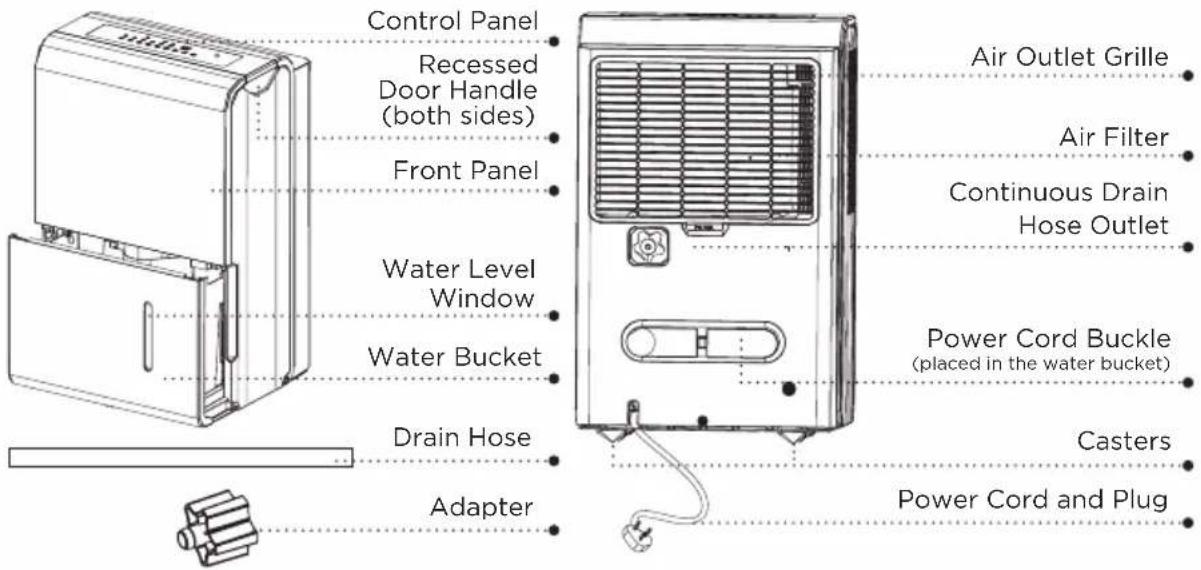
FOR MODELS: BD50MWSA BD50PMWSA
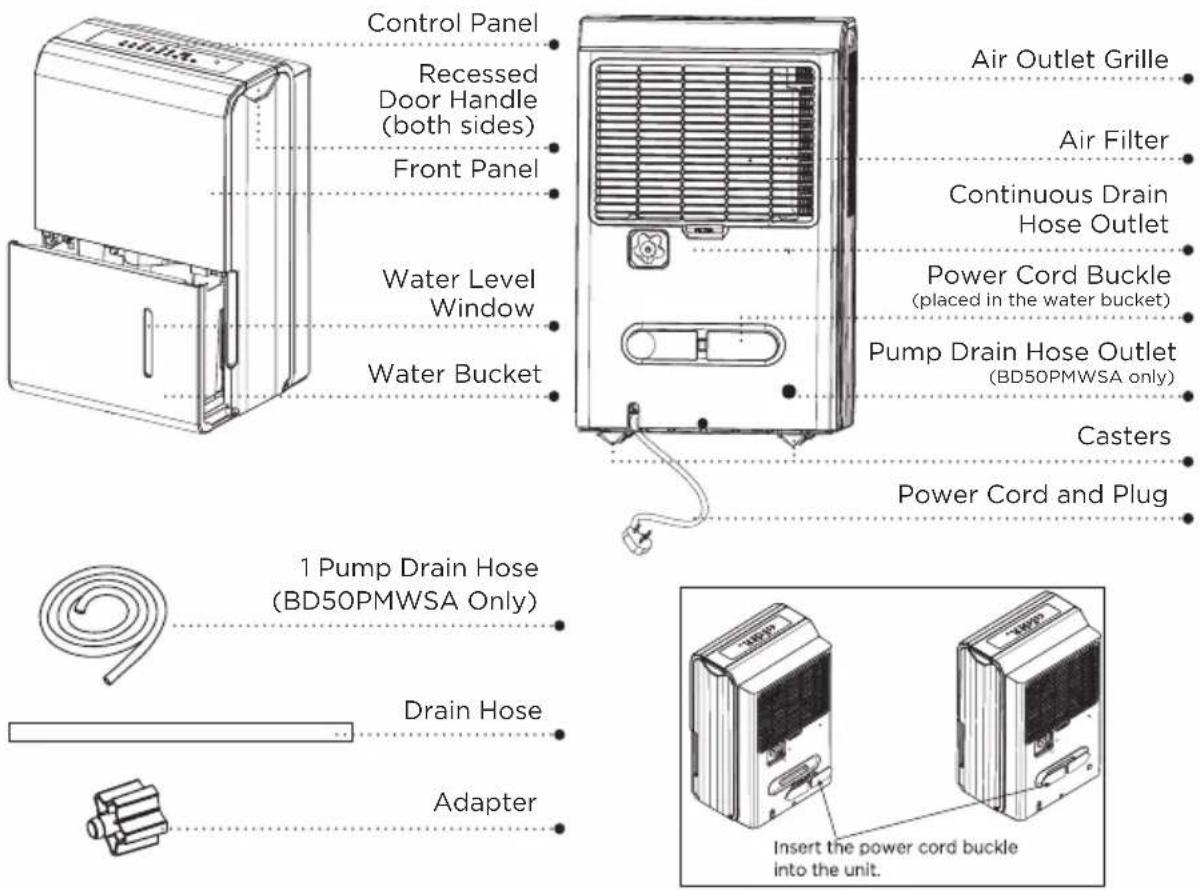
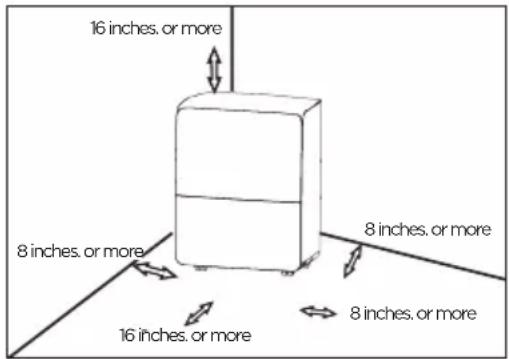
POSITIONING THE UNIT
Casters
(At four points on the bottom of unit)
- Casters can move freely.
- Do not force casters to move over the carpet.
- Do not move the unit with water in the bucket. The unit may tip over and water may spill.
- Do not use outdoors.
- This dehumidifier is intended for indoor residential applications only. This dehumidifier should not be used for commercial or industrial applications.
- Place the dehumidifier on a smooth, level floor strong enough to support the unit with a full bucket of water.
- Allow at least 8 in. of air space on all sides of the unit for good air circulation (at least 16 in. of air space on air outlet).
- Place the unit in an area where the temperature will not fall below 41^(5^) . The coils can become covered with frost at temperatures below 41^(5^) , which may reduce performance.
- Place the unit away from the clothes dryer, heater or radiator.
- Use the unit to prevent moisture damage anywhere books or valuables are stored.
- The dehumidifier must be operated in an enclosed area to be most effective. Close all doors, windows and other outside openings to the room.
WHEN USING THE UNIT
- When first using the dehumidifier, operate the unit continuously for 24 hours. Make sure the plastic cover on the continuous drain hose outlet is installed properly so there are no leaks.
- This unit is designed to operate with a working environment between 41°F/5°C and 90°F/32°C, and between 35% to 85% relative humidity.
- If the unit has been switched off and needs to be switched on again, allow approximately three minutes for the correct operation to resume.
- Do not connect the dehumidifier to a multiple socket outlet, which is also being used for other electrical appliances.
- Select a suitable location, making sure you have easy access to an electrical outlet into an electrical socket.
- Plug the unit into an electrical socket outlet.
- Make sure the water bucket is correctly fitted otherwise the unit will not operate properly.
NOTE: When the water in the bucket reaches a certain level, please be careful when moving the machine to avoid it falling and spilling.
SET UP & USE
CONTROL PANEL
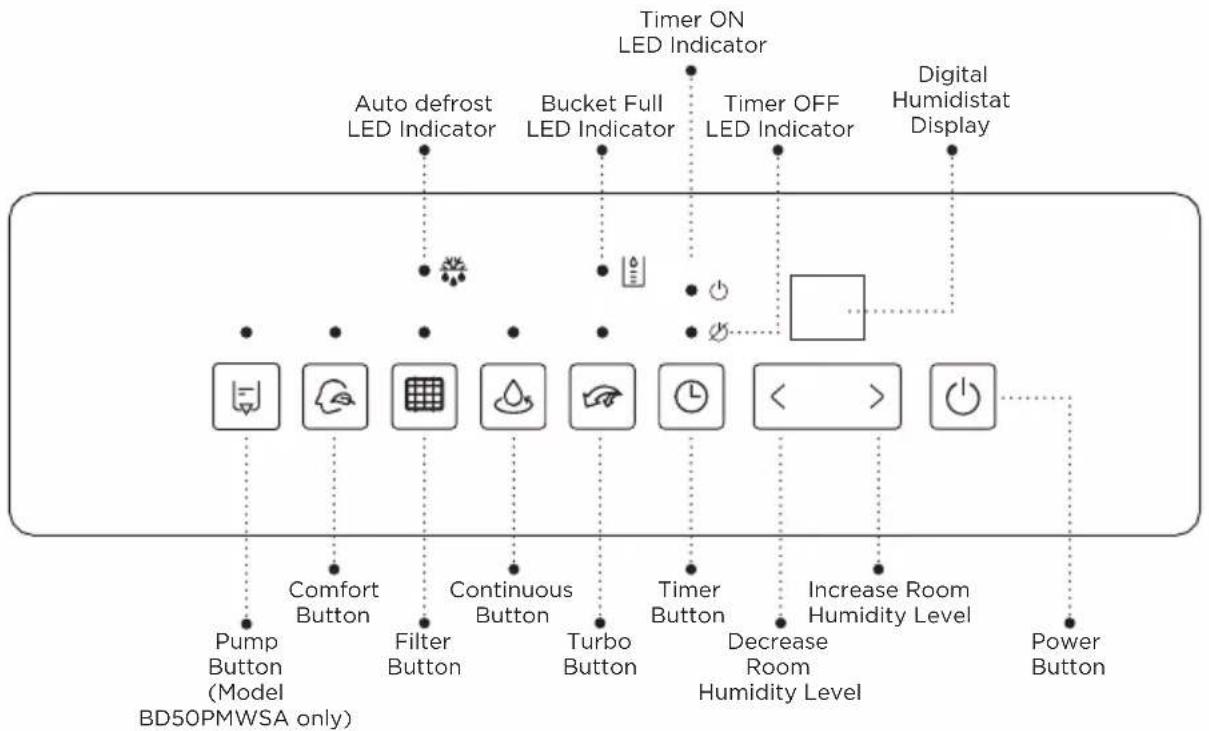
flowchart
graph TD
    A["Timer ON LED Indicator"] --> B["Auto defrost LED Indicator"]
    A --> C["Bucket Full LED Indicator"]
    A --> D["Timer OFF LED Indicator"]
    A --> E["Digital Humidistat Display"]
    F["Pump Button (Model BD50PMWSA only)"] --> G["Comfort Button"]
    H["Filter Button"] --> I["Continuous Button"]
    J["Turbo Button"] --> K["Timer Button"]
    L["Decrease Room Humidity Level"] --> M["Power Button"]
    N["Decrease Room Humidity Level"] --> O["Power Button"]
Error Codes and Protection Code:
- AS-Humidity sensor error--Unplug the unit and plug it back in. If error repeats, call for service.
- ES-Tube Temperature sensor of the evaporator error--Unplug the unit and plug it back in. If error repeats, call for service.
- P2-Bucket is full or bucket is not in right position--Empty the bucket and replace it in the right position.(only available for the unit with no pump feature.)
- Eb-Bucket is removed or not in right position-- Replace the bucket in the right position.(only available for the unit with pump feature.)
NOTE: When one of the above malfunctions occurs, turn off the unit, and check for any obstructions. Restart the unit, if the malfunction is still present, turn off the unit and unplug the power cord. Contact the manufacturer or its service agents or a similar qualified person for service.
FILTER
The check filter feature is a reminder to clean the Air Filter for more efficient operation. The Filter indicator light will illuminate after 250 hours of operation. Clean the filter with warm, soapy water and dry thoroughly before putting back in place. Once filter is back in the unit, press the FILTER button to reset the filter indicator.

CAUTION: Do not operate the dehumidifier without the included filter in place. Unit should be turned off and unplugged to change filter.
TURBO BUTTON
Control the fan speed. Press to select either High or Low fan speed. Set the fan control to High for maximum moisture removal. When the humidity has been reduced and quiet operation is preferred, set the fan control to Low.
CONTINUE BUTTON
Press to activate the continuous dehumidifying operation. This function will keep the unit operating without having to empty the bucket. For this function, the drain hose will need to be attached to the back of the unit.
TIMER BUTTON
Press to initiate the Auto start and Auto stop feature, in conjunction with the
INCREASE/DECREASE BUTTONS
Humidity Set Control buttons
The humidity level can be set within a range of 35% RH (Relative Humidity) to 85%RH (Relative Humidity) in 5% increments. For drier air, press the < button and set to a lower percent value (%). For damper air, press the > button and set a higher percent value (%).
Timer Set Control buttons
Use the Up/Down buttons to set the Auto start and Auto stop time from 0.0 to 24.
POWER BUTTON
Press to turn the dehumidifier on and off.
COMFORT BUTTON
Press to start/stop the comfort dehumidifying operation. This function will automatically adjust the humidity level based on the temperature of the room. The humidity level cannot be adjusted in this setting, it will stabilize between 45%-55%. Press the comfort button or the humidity adjust buttons to cancel this feature.
PUMP BUTTON (only BD50PMWSA)
Press to activate the pump operation. NOTE: Make sure the pump drain hose is installed into the unit before the pump operation is activated. When the bucket is full, the pump starts to work. Refer to the next pages for removing the collected water. Do not use this operation when the outdoor temperature is equal to or less than 32^ F ( 0^ C).
DISPLAY
Shows the set % humidity level from 35% to 85% or auto start/stop time (0\~24) while setting, then shows the actual (35% accuracy) room % humidity level in a range of 30% RH (Relative Humidity) to 90%RH.
SET UP & USE
OTHER FEATURES
Bucket Full Light
When the water collection bucket is full, the unit will shut off automatically, make a beeping noise and the BUCKET FULL indicator will light. The dehumidifier will not run again until the bucket is emptied and properly placed back inside the unit.
Auto Defrost
When frost builds up on the evaporator coils, the compressor will cycle off and the fan will continue to run until the frost disappears.
Auto Shut Off
The dehumidifier shuts off when the bucket is full, or when the bucket is removed or not replaced in the proper position. The fan motor will continue to run for 30 seconds.
Wait 3 minutes before resuming operation. This is to protect the unit. Operation will automatically start after 3 minutes.
Auto-Restart
If the unit turns off unexpectedly due to a power outage, it will restart with the previous function setting automatically when the power resumes.
Setting the Timer
To program the unit to automatically turn ON, press the TIMER button when the unit is OFF. Press the < or > to increase the timer in 30 minute increments up to 10 hours, After 10 hours, each increase will run in 1 hour increments up to 24 hours. Once the desired time is reached, the unit will automatically turn ON.
To program the unit to automatically turn OFF, press the TIMER button when the unit is ON. Each press of the < or > buttons will change the timer setting in 30 minute increments up to 10 hours. After 10 hours, each press will increase or decrease the timer in 1 hour increments up to 24 hours. Once the desired time is over, the unit will automatically power OFF.
When the Auto Start & Auto Stop times are set, within the same program sequence, Timer On Off indicator lights illuminate identifying both On and Off times are now programmed.
Turning the unit On or Off at any time or adjusting the timer setting to 0.0 will cancel the Auto Start/Stop function.
When LED display window displays the code of P2, the Auto Start/Stop function will also be cancelled.
SET UP & USE
REMOVING THE COLLECTED WATER
There are three ways to remove collected water.
- Use the bucket
- When the unit is off, if the bucket is full, the Full indicator light will light.
- When the unit is on, if the bucket is full, the compressor and the fan turn off, and the Full indicator light will light, the digital display shows P2.
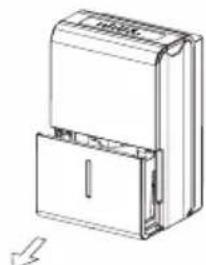
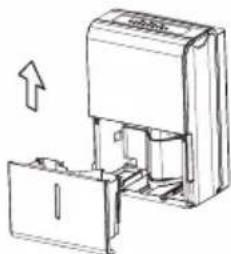
- Slowly pull out the bucket. Grip the left and right handles securely, and carefully pull out straight so water does not spill. Do not put the bucket on the floor because the bottom of the bucket is uneven. Otherwise the bucket will fall and cause the water to spill.
- Throw away the water and replace the bucket. The bucket must be in right place and securely seated for the dehumidifier to operate.
- The machine will re-start when the bucket is restored in its correct position.
a. Pull out the bucket a little.
natural_image
Technical line drawing of a mechanical device with a lid and mounting bracket (no text or symbols)b. Hold both sides of the bucket with even strength, and pull it out from the unit.
natural_image
Technical line drawing of a mechanical device with an arrow indicating upward motion (no text or symbols)c. Pour the water out.
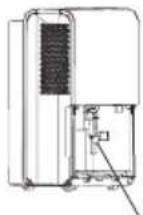
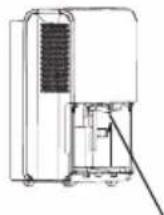
Pump hose drops Reinstall pump hose properly
NOTE:
- When you remove the bucket, do not touch any parts inside of the unit. Doing so may damage the product.
- Be sure to push the bucket gently all the way into the unit. Banging the bucket against anything or failing to push it in securely may cause the unit not to operate.
- If the pump hose drops when you remove the bucket, you must reinstall the pump hose properly to the unit before replacing the bucket into the unit.
- When you remove the bucket, if there is some water in the unit you must dry it.
- When the unit is on, if the bucket is removed, the compressor and the fan turn off, then the unit will beep 8 times and the digital display shows Fb.
- When the unit is off, if the bucket is removed, the unit will beep 8 times and the digital display shows Eb.
SET UP & USE
2. Continuous draining
- Water can be automatically emptied into a floor drain by attaching the unit with a drain hose (included).
-
Remove the plastic cover from the back drain outlet of the unit and set aside, then insert the drain hose through the drain outlet of the unit and lead the drain hose to the floor drain or a suitable drainage facility.
-
When you remove the plastic cover, if there is some water in the back drain outlet of the unit you must dry it. Make sure the hose is secure so there are no leaks and the end of the hose is level or down to let the water flow smoothly.
- Direct the hose toward the drain, making sure that there are no kinks that will stop the water flowing. Make sure the water hose is lower than the drain hose outlet of the unit.
- Select the desired humidity setting and fan speed on the unit for continuous draining to start.
NOTE: When the continuous draining feature is not being used, remove the drain hose from the outlet, and dry the water in the continuous drain hose outlet.
3. Pump draining (model BD50PMWSA)
- Water can be automatically emptied into a floor drain or a suitable drainage facility by attaching the pump drain outlet with a pump drain hose.
- Remove the continuous drain hose from the unit and install the plastic cover to the continuous drain hose outlet of the unit by clockwise rotation.
- Reset the pump drain hose into the pump drain hose outlet for depth of 15mm at least, then lead the water hose to the floor drain or a suitable drainage facility.
- Press the pump pad of the unit to activated the pump operation. When the bucket is full the pump starts to work.
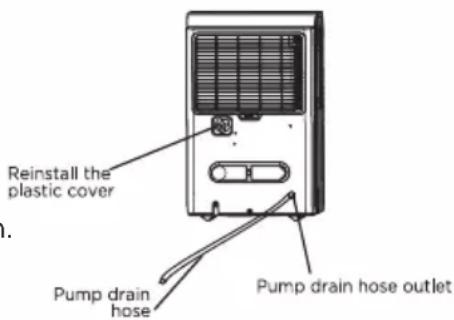
NOTE: The pump may make a loud noise when it starts to work for 3-5 minutes. It is a normal phenomenon.
- Make sure the hose is secure so there are no leaks.
- Direct the hose toward the drain, making sure that there are no kinks that will stop the water flowing.
- Place the end of the hose into the drain and make sure the end of the hose is level or down to let the water flow smoothly.
- Select the desired humidity setting and fan speed on the unit for pump draining to start.
SET UP & USE
NOTE: The pump operation light blinks every second when the pump is failing to operate. Please turn off the unit and plug the power cord out. Check the following things:
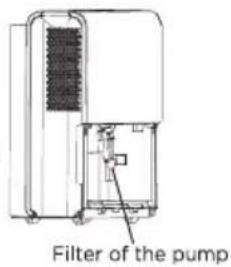
- Cleaning the filter of the pump. Remove the bucket from the unit, take down the pump and clean the filter of the pump.
• Empty the water of the bucket.
- Reinstall the pump hose if it drops and reinstall the bucket properly. Turn on the unit.
NOTE: Do not use this operation when the outdoor temperature is equal to or less than 32^ F ( 0^ C), otherwise the water will freeze and will cause the water hose to be blocked and the unit will fail to operate. Make sure to empty the bucket once a week when using the pump draining feature. When the pump draining feature is not being used, remove the pump drain hose from the outlet.
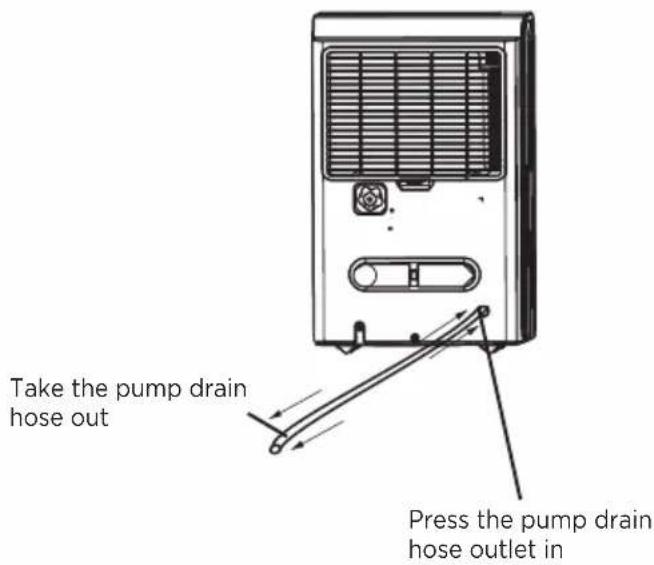
- Press the pump drain hose outlet in and take the pump drain hose out from it. Make sure to not let the water in the pump hose drip to the floor.
CARE & CLEANING
CARE AND MAINTENANCE
Care and cleaning of the dehumidifier.

CAUTION - Turn the dehumidifier off and remove the plug from the wall outlet before cleaning.
CLEAN THE GRILLE AND CASE
- Use water and a mild detergent. Do not use bleach or abrasives.
- Do not splash water directly onto the main unit. Doing so may cause an electrical shock, cause the insulation to deteriorate, or cause the unit to rust.
- The air intake and outlet grilles get soiled easily, so use a vacuum attachment or brush to clean.
CLEAN THE BUCKET
- Every few weeks, clean the bucket to prevent growth of mold, mildew and bacteria. Partially fill the bucket with clean water and add a little mild detergent. Swish it around in the bucket, empty and rinse.
NOTE: Do not use a dishwasher to clean the bucket. After clean, the bucket must be in place and securely seated for the dehumidifier to operate.
CLEAN THE AIR FILTER
- Remove the filter every two weeks based on normal operating conditions.
- To remove the filter, pull filter outwards.
- Wash the filter with clean water then dry.
- Re-install the filter, replace Bucket.

CAUTION: DO NOT operate the dehumidifier without a filter because dirt and lint will clog it and reduce performance.
Unit should be turned off and unplugged to clean filter.
WHEN NOT USING THE UNIT FOR LONG TIME PERIODS
• After turning off the unit, wait one day before emptying the bucket.
- Clean the main unit, water bucket and air filter.
- Wrap the cord with the power cord buckle.
- Cover the unit with a plastic bag.
- Store the unit upright in a dry, well-ventilated place.
TROUBLESHOOTING & WARRANTY
BEFORE YOU CALL FOR SERVICE
IF THE APPLIANCE FAILS TO OPERATE:
A) Check to make sure that the heater/fan is plugged in securely. If it is not, remove the plug from the outlet, wait 10 seconds and plug it in again securely.
B) Check for a blown circuit fuse or a tripped main circuit breaker. If these seem to be operating properly, test the outlet with another appliance.
IF NONE OF THE ABOVE SOLVES THE PROBLEM, CONTACT A QUALIFIED TECHNICIAN. DO NOT TRY TO ADJUST OR REPAIR THE APPLIANCE YOURSELF.
IMPORTANT
DO NOT RETURN THIS PRODUCT TO THE STORE
If you have a problem with this product, please contact the BLACK+DECKER Customer Satisfaction Center at 844-299-0879 or service@equitybrands.com
DATED PROOF OF PURCHASE, MODEL # AND SERIAL # REQUIRED FOR WARRANTY SERVICE
TROUBLESHOOTING & WARRANTY
Troubleshoot your problem by using the chart below. If the dehumidifier still does not work properly, contact W Appliance Co. customer service center or the nearest authorized service center. Customers must never troubleshoot internal components.
TROUBLE POSSIBLE CAUSE POSSIBLE REMEDY
| Dehumidifier does not start | The dehumidifier is unplugged Make | sure the dehumidifier's plug is pushed completely into the outlet |
| The fuse is blown/circuit breaker is tripped | Check the house fuse/circuit breaker box and replace fuse or reset breaker | |
| Dehumidifier has reached its present level or the bucket is full | The dehumidifier automatically turns off when either condition occurs. Change to a lower setting or empty the water bucket and replace properly | |
| Bucket is not in the proper position T | the bucket must be in place and securely seated for the dehumidifier to operate | |
| Power failure There is a protective time delay (up to 3 min.)to prevent tripping of the compressor overload. For this reason, the unit may not start normal dehumidification for 3 minutes after it is powered back on | ||
| Dehumidifier does not dry the air as it should | Not enough time allowed for unit to remove moisture | When first installed, allow at least 24 hours to maintain the desired dryness |
| Airflow is restricted Make sure there are no curtains, blinds, or furniture blocking the front or back of the dehumidifier | ||
| Dirty filter See the FILTER CLEANING section | ||
| The humidity control may not be set low enough | For drier air, press the <button to lower the percent humidity desired in the room | |
| Doors and windows may not be closed tightly | Check that all doors, windows and other openings are securely closed | |
| Clothes dryer may be blowing moist air into the room | Install the dehumidifier away from the dryer. The dryer should be vented outside. | |
| Room temperature is too low Moisture removal is best at higher room temperatures. Lower room temperatures will reduce the moisture removal rate. This model is designed to operate at temperatures above 41°F | ||
| Dehumidifier runs too much | The area is too large for the capability of the dehumidifier | The capacity of your dehumidifier may not be adequate for the room size |
| Doors and windows are open Close | all doors and windows to the outside | |
| Frost appears on the coils | The dehumidifier has recently been turned on or the room temperature is below 41°F | This is normal. Frost will usually disappear within 60 minutes. For details, see “AUTO DEFROST” section |
| Controls cannot be set | The compressor will turn off and the fan will automatically continue to run for approximately 3 minutes at a fixed setting | This is normal. Wait approximately 3 minutes and set the fan speed at the desired level |
| Fan noise Air is moving through the unit This is normal | ||
| Water on the floor | Hose connection may be loose Check | the hose connection. See the CONTINUOUS DRAINAGE SECTION |
| Hose is attached but not draining into a drain | Disconnect the hose if using the bucket or place the hose near a drain | |
TROUBLESHOOTING & WARRANTY
Troubleshoot your problem by using the chart below. If the dehumidifier still does not work properly, contact W Appliance Co. customer service center or the nearest authorized service center. Customers must never troubleshoot internal components.
TROUBLE POSSIBLE CAUSE POSSIBLE REMEDY
| Error Code “E1” The temperature sensor on the discharge pipe may be faulty and may need to be changed. | Contact the customer service center. | |
| Error Code “E2” Heat exchanger may be faulty and may need to be changed. | Contact the customer service center. | |
| Error Code “E3” The room temperature may be too high. | Check to make sure the room temperature is below 90°F. If the room temperature is too high, place the dehumidifier in a location where the room temperature is below 90°F for at least 2 hours before operating again. | |
| Error Code “EH” The humidity sensor may be faulty and may need to be changed | Contact the customer service center. | |
| Error Code “P1” (Model BD50PMWSA) | Bucket is not in the proper position. Make sure the bucket is in place and securely seated for the dehumidifier to operate. If error code reappears after adjusting the bucket, please contact the customer service department. | |
| Error Code “E5” (Model BD50PMWSA) | Didn't install the pump drainage kit before start pump function. | Install the pump drainage kit before start pump function. |
| Users use non-standard drainage pipes. (Manufacturers' original pipe) | Use the original pipe. | |
| The drain cover is not tightened. Tighten the cover. | ||
| The rubber washer is missing. Re-install the washer in cover. | ||
| Poor connection between drain pipe and drain cover. | Check the connection of pipe and drain cover. | |
TROUBLESHOOTING & WARRANTY
LIMITED WARRANTY
Any repair, replacement, or warranty service, and all questions about this product should be directed to BLACK+DECKER at 844-299-0879 from the USA or Puerto Rico.
BLACK+DECKER warrants to the original purchaser that the product will be free from defects in material, parts and workmanship for the period designated for this product. The warranty commences the day the product is purchased and covers up to a period of 1 year (12 months) for labor/1 year (12 months) for parts (manufacturing defects only).
BLACK+DECKER agrees that it will, at its option, replace the defective product with either a new or remanufactured unit equivalent to your original purchase during the warranty period.
Exclusions: This warranty does not apply to the below:
-
If the appearance or exterior of the product has been damaged or defaced, altered or modified in design or construction.
-
If the product original serial number has been altered or removed or cannot be readily determined.
-
If there is damaged due to power line surge, user damage to the AC power cord or connection to improper voltage source.
-
If damage is due to general misuse, accidents or acts of God.
-
If repair attempts are done by unauthorized service agents, use of parts other than genuine parts or parts obtained from persons other than authorized service companies.
-
On units that have been transferred from the original owner.
-
On products that have been purchased as refurbished, like new, second-hand, in a "As-Is" or "Final Sale" terms.
-
To products used in a commercial or rental setting.
-
To products used in settings other than ordinary household use or used other than in accordance with the provided instructions.
-
To damages for service calls for improper installations.
-
Transportation and shipping costs associated with the replacement of the unit.
-
Service calls to instruct you how to use your product.
-
Service calls to repair or replace the house fuse, reset the circuit breaker or correct the wiring in the house.
REPAIR OR REPLACEMENT AS PROVIDED UNDER THIS WARRANTY IS THE EXCLUSIVE REMEDY OF THE CUSTOMER; BLACK+DECKER. SHALL NOT BE LIABLE FOR ANY INCIDENTAL OR CONSEQUENTIAL DAMAGES FOR BREACH OF ANY EXPRESS OR IMPLIED WARRANTY ON THIS PRODUCT, EXCEPT TO THE EXTENT PROHIBITED BY APPLICABLE LAW. ANY IMPLIED WARRANTY OF MERCHANTABILITY OF FITNESS FOR A PARTICULAR PURPOSE ON THIS PRODUCT IS LIMITED TO THE DURATION OF THE WARRANTY.
Some states do not allow the exclusion or limitations of incidental or consequential damages, or limitations on how long the warranty lasts. In these cases the above exclusions or limitations may not apply to you. This warranty gives you specific legal rights and you may also have other rights which vary from state to state.
Obtaining Service: To obtain service, product literature, supplies or accessories please call 844-299-0879 to create a ticket for exchange/repair. Please make sure to provide the date of purchase, model number and a brief description of the problem. Our customer service representative will contact you or send detailed return instructions.
BLACK+DECKER does not warrant that the appliance will work properly in all environmental conditions, and makes no warranty and representation, either implied or expressed, with respect to the quality, performance, merchantability, or fitness for a particular purpose other than the purpose identified within this user's manual. BLACK+DECKER has made every effort to ensure that this user's manual is accurate and disclaims liability for any inaccuracies or omissions that may have occurred. Information in this user's manual is subject to change without notice and does not represent a commitment on the part of BLACK+DECKER. BLACK+DECKER reserves the right to make improvements to this user's manual and/or to the products described in this user's manual at any time without notice. If you find information in this manual that is incorrect, misleading, or incomplete, please contact us at 844-299-0879.
W Appliance Co.
1356 Broadway
New York, NY 10018
This device complies with part 15 of the FCC rules. Operation is subject to the following two conditions: 1) This device may not cause harmful interference, and 2) This device must accept any interference received, including interference that may cause undesired operation. This equipment has been tested and found to comply with the limits for a Class B digital device, pursuant to Part 15 of the FCC rules. These limits are designed to provide reasonable protection against harmful interference in a residential installation. This equipment generates, uses and can radiate radio frequency energy and, if not installed and used in accordance with the instructions, may cause harmful interference to radio communications. However, there is no guarantee that the interference will not occur in a particular installation. If this equipment does cause harmful interference to radio or television reception, which can be determined by turning the equipment off and on, the user is encouraged to try to correct the interference by one or more of the following measures: a) Reorient or relocate the receiving antenna. b) Increase the separation between the equipment and the receiver. c) Connect the equipment into an outlet different from that which the receiver is connected. d) Consult the dealer or an experienced radio/TV technician for help.
BLACK & DECKER, BLACK+DECKER, the BLACK & DECKER and BLACK+DECKER logos and product names and the orange and black color scheme are trademarks of The Black & Decker Corporation, used under license. All rights reserved.
Product in this box may differ slightly from that pictured. Does not affect function. Not all accessories shown in photography are included in this package.
Imported by W Appliance, Inc., 1356 Broadway, New York, NY 10018
BLACK+ DECKER®

DÉSHUMIDIFICATEUR PORTABLE
MANUEL D'INSTRUCTIONS
NUMÉRO DE CATALOGUE
BD22MWSA
BD30MWSA
BD50MWSA
BD50PMWSA
natural_image
Two identical electrical socket icons with black terminals, no text or symbols presentnatural_image
Technical line drawing of a mechanical device with a door and internal components (no text or symbols)natural_image
Technical line drawing of a mechanical device with an arrow indicating upward motion (no text or symbols present)c. Videz l'eau.
NE RETOURNEZ PAS CE PRODUIT AU MAGASIN
TROUBLE CAUSE POSSIBLE RECOURS POSSIBLE
TROUBLE CAUSE POSSIBLE RECOURS POSSIBLE
DESHUMIDIFICADOR PORTÁTIL
natural_image
Two identical electrical socket icons with black terminals, no text or symbols presentnatural_image
Technical line drawing of a mechanical device with a handle and internal components (no text or symbols)natural_image
Technical line drawing of a mechanical device with an arrow indicating upward motion (no text or symbols present)c. Tire el agua.


- PORTABLE DEHUMIDIFIER
- INSTRUCTION MANUAL
- PLEASE READ BEFORE RETURNING THIS PRODUCT FOR ANY REASON.
- CONTENTS
- SAFETY INFORMATION
- SET UP & USE
- TROUBLE SHOOTING & WARRANTY
- PRODUCT REGISTRATION
- DANGER
- WARNING
- CAUTION
- IMPORTANT SAFETY INSTRUCTIONS
- SAVE THESE INSTRUCTIONS
- HOUSEHOLD USE ONLY
- GROUNDING INSTRUCTIONS
- ELECTRICAL REQUIREMENTS
- POWER SUPPLY CORD
- USE OF EXTENSION CORDS WITH DEHUMIDIFIER
- PARTS & FEATURES
- Casters
- WHEN USING THE UNIT
- CONTROL PANEL
- Error Codes and Protection Code:
- FILTER
- TURBO BUTTON
- CONTINUE BUTTON
- TIMER BUTTON
- INCREASE/DECREASE BUTTONS
- Humidity Set Control buttons
- Timer Set Control buttons
- POWER BUTTON
- COMFORT BUTTON
- PUMP BUTTON (only BD50PMWSA)
- DISPLAY
- OTHER FEATURES
- Bucket Full Light
- Auto Defrost
- Auto Shut Off
- Auto-Restart
- Setting the Timer
- REMOVING THE COLLECTED WATER
- NOTE:
- Continuous draining
- Pump draining (model BD50PMWSA)
- CARE & CLEANING
- CARE AND MAINTENANCE
- CLEAN THE GRILLE AND CASE
- CLEAN THE BUCKET
- CLEAN THE AIR FILTER
- WHEN NOT USING THE UNIT FOR LONG TIME PERIODS
- TROUBLESHOOTING & WARRANTY
- BEFORE YOU CALL FOR SERVICE
- IMPORTANT
- DO NOT RETURN THIS PRODUCT TO THE STORE
- LIMITED WARRANTY
- BLACK+ DECKER®
- DÉSHUMIDIFICATEUR PORTABLE
- MANUEL D'INSTRUCTIONS
- NE RETOURNEZ PAS CE PRODUIT AU MAGASIN
- DESHUMIDIFICADOR PORTÁTIL
Brand : BLACK & DECKER
Model : BD50MWSA
Category : Dehumidifier