SL259 - Weather Station LIVOO - Free user manual and instructions
Find the device manual for free SL259 LIVOO in PDF.



| Product Type | Weather Station (thermometer/hygrometer) |
| Brand | Livoo |
| Model | SL259 |
| Power Supply | 2 AAA batteries (not included) |
| Temperature Range | -10°C to 70°C |
| Temperature Accuracy | ±1°C from 0°C to 50°C, ±2°C from -10°C to 0°C, ±4°C from 50°C to 70°C |
| Humidity Range | 20% to 95% |
| Humidity Accuracy | ±5% at 25°C (30-50% RH), ±10% at 25°C (20-29% and 51-95% RH) |
| Display | Temperature, humidity, max/min, trends, comfort scale |
| Comfort Scale | LOW (blue, <40%), OK (green, 40-70%), HIGH (red, >70%) |
| Max/Min Memory | Recorded over 24h |
| Trend Indicator | Up/down/horizontal arrows for temperature and humidity |
| Temperature Unit | Selectable °C/°F (rear button) |
| Reset Button | Yes, at the back |
| Stand | Foldable and integrated wall hook |
| Dimensions (estimated) | Approximately 100 x 100 x 20 mm |
| Weight (estimated) | Approximately 150 g (with batteries) |
| Use | Indoor only |
| Maintenance and Cleaning | Soft dry cloth |
| Safety | Do not immerse, avoid flames and excessive heat |
| Spare parts and repairability | Do not repair yourself; contact an authorized technician |
| General Information | User manual available on the Livoo website |
Frequently Asked Questions - SL259 LIVOO
User questions about SL259 LIVOO
0 question about this device. Answer the ones you know or ask your own.
Ask a new question about this device
Download the instructions for your Weather Station in PDF format for free! Find your manual SL259 - LIVOO and take your electronic device back in hand. On this page are published all the documents necessary for the use of your device. SL259 by LIVOO.
USER MANUAL SL259 LIVOO
Thank you for choosing a Livoo product!
EN
oeur'alBouBr,yeur'aorBcuB,oou'yeur'hOupheoBs'orB'oet'just'eaJcts,thBy'orB'xtbosoes'efyoursIf,
ollewoo,yyu"te"Bt'clesfr"te"yeur"frofous"oofoaoly,"te"aroo,thba"te,thhbr,"te"lou,h"oo"shor8
Bxprfoocbs.ovee's'ooa'os'te'Hlp'yueI'ovf'yeur'Iofst,whotbrwoshS'yeu'hovthreu,heuth
yBor. "oOtbr'roclBtB, suaAbr'aorBcuB. 'r'thE'ethBr'woy'oreuOu. It's up'te'yeu. ToEB'ouvooTo, Befthos
frβüeä'fér'fβfI,eeu'aeafots'fvbry'uoy.'
Thot's'whywB'r'ceostoo'tlyoovotoo,ooucrftoo,clBrvrpreuuctsfull'efzbst,aut'aest'efoll,ocbssoaIb.
Fouu'eur'botor'celIbctoeo'edeur'wbasotf'www.lovee.Bo."
Livooó your daily companion till social networks

@°övèë

@loveeelffocol

@°òvèé
Safety Instructions
PIBos, toEiToaI'TeRfoWbllthoOstructoeo'shBt'abferf'torstusooUpthafer'ofuturus.
e'aousf'efthfopploocfcoo'ooa,8ot'erhurtthfsusr.essur'thotyueusfth'opploocf'erthusf ferwhochotos'sofoB.1Rfusf'ooy'rbspeosoaolotbs'ss'ferth'ooa,8say'oo'ocerrctusf'er'oaoa aoopulotoe.o
- Ee'oet'oaaRsB'thB'preuuct'oovtSr.'
a. 'Bp'thos'preuuct'owoy'frea'ooEbu'floas'suchos'cooUlss.' - Thos'preuuct'sheul'äß'éoly'epBrotf'freA'th'B'typB'ef'pewBr'seurcB'ooocotB'eo'th' aorEo, 'loaBl.'
e. Ee'oet'ploCβ'thβ'preuuct'oouorβct'suol,ht'er'hSot." - MoEβ'surβ'thβ'preüuct'hos'plBöty'ef'vBötolötoeö.'
- Ee'oet'prBss'thB'autteos'tee'horru'os'ot'ceulu'uoao,3'thB'spreuuct."
- Ee'oet'usB'owt'clth'eo'thB'preuuct'ooU'EBp'ot'frBf'rea'ust.'
- Ee'oet'usB'chBaoCols'eo'thos'preuuct."
- Nβvβr'try'te'fpoor'thos'preuuctyeursIfaBcousot'ceulUBou'teBbctroc'sheCt, toEβ'otteoopprevsutfchoocoo."
Ic. "hfo'ts'uoot'soet'oos,aoEisurbsotos'ccrtlyturouu'effoo'steru'oo'ceel Ury'plocf." - Ee'oet'oosrftferfə, o'eaβcts'ooteth'preuuct."
là. èuult'supbrvòeö'os'rβceáβóüßwθth'cholurfo'usö, 'thos'préüuct.' - èveöü'ureppo, 'ot'os'hörsh'oapöcts'ceul'uöäö,β'thβ'préüuct.'
Technical Specifications
erawing of the device
| 1 | Maximum humidity rate | 8 | Temperature trend |
| 2 | Minimum humidity rate | 9 | Comfort scale |
| 3 | Maximum temperature rate | 10+11 | Celsius or Fahrenheit display |
| 4 | Minimum temperature rate | 12 | Reset button |
| 5 | Average humidity rate | 13 | Battery compartment |
| 6 | Humidity trend | 14 | Foldable stand |
| 7 | Average temperature | 15 | Wall attachment |
Use of the device
Your device is for indoor use only. You can place it on a flat surface thanks to its stand or hang it on the wall with the hook on the back of the device (Figure 1 points 14 and 15).
Insert the two AAA batteries into the battery compartment, respecting polarity (Figure 1 point 13). The maximum and minimum temperature and humidity values are displayed as soon as the unit is switched on. After 24 hours, the previous recordings will be deleted and the thermometer will update itself.
a button operation
C and F buttons on the back of the unit allow you to select the unit of temperature measurement. "C" for degrees Celsius or "F" for degrees Fahrenheit (Figure 1 items 10 and 11).
The third button allows you to reset the data (Figure 1 item 12).
Temperature ranges
From -10°C to 70°C
Accuracy of + or - 4°C from 50°C to 70°C
Accuracy of + or - 2°C from -10°C to 0°C
Accuracy of + or - 1°C from 0°C to 50°C
Humidity ranges
20% to 95% humidity rate
Accuracy of + or - 5% at 25°C and when humidity is between 30% and 50%
Accuracy of + or - 10% at a temperature of 25°C and when the rate is between 20 and 29%, 51% and 95%.
Comfort range display (Figure 1 point 9)
The comfort range is defined according to the ambient humidity.
| Too Low Blue color | < 40% | |
| OK | Green color | Between 40% and 70% |
| High Red color | > à 70% |
Temperature and humidity trend (Figure 1 points z and 8)
When the temperature ranges between +/-1°C a horizontal arrow is shown on the display.
"heo'the temperoture'vories'beyoou+/-1oc,the'orrow'is'eitherrisio,or'follioo.
"heö'the'humüity'roo,es'betweeno+/-5%ö'horizoo'tol'örrow'is'showo'othe'üispöy.'
'heo'thehmuityvories'beyoo+/-5%up'or'uwo,the'orris'up'or'uwo.'
Cleaning and maintenance
'eep'you'üevic'cleo'by'cleoioitwith'soft,ury'cloth.'
Battery advice and recycling
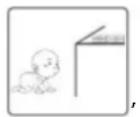
- "eep'the'bottery'out'of'ech'of'chilureo.'

*Do'ðot'mix'olü'ðöü'ðew'böttteries,'with'üffereðt'compositioö's'or'of'üffereðt'broöus' ió'orüer'to'preveðt'possible'leökö,e',explosioö.'
*Do'oo't'heo't'or'ueform'the'botteries'or'explore'to'fire.'
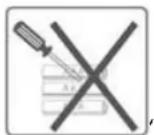
*oeste'botteries'shoulooitusposeuofwithhouseholuwoste.'
*Please check with your local authority for 'bottery' 'recyclio', 'ovice.'
Do'oo't'uispose"of'botteries"with"householu"woste."To"preserve"the"eoviroomeot', uispose' of 'botteries occoruio to'reulotioos.' Post them'io'the'oearest'bottery cootoi'er or brio,them'o to your store.Do oo't rechore the botteries,oo'oo tuissemble,oo'ootthrowthem'iotothe fire.Do oo't expose'to hi,h'temperotures'or uirect'suoliht.Do'oo'tiociorote.
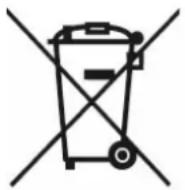
Correct disposal of the unit (electrical and electronic equipment).
(Applicable in the European Union and the rest of Europe that have adopted separate collection systems countries). The European Directive 2012/19/EU on Waste Electrical and Electronic Equipment (WEEE), requires that old household electrical appliances must not be disposed of in the normal household waste stream. Old appliances must be collected separately in order to optimize the recovery and recycling of the materials they contain and reduce the impact on human health and the environment. The symbol of the crossed out dustbin is marked on all products to remind the obligations of separate collection. Consumers should contact their local authority or retailer for information concerning the correct disposal of their product.
- Noo'cootroctuol'illustrtioo
- Prouuctiois'subjectto'choe'withoutpriorotice.

- Thank you for choosing a Livoo product!
- Livooó your daily companion till social networks
- Safety Instructions
- Technical Specifications
- Use of the device
- a button operation
- Temperature ranges
- Humidity ranges
- Comfort range display (Figure 1 point 9)
- Temperature and humidity trend (Figure 1 points z and 8)
- Cleaning and maintenance
- Battery advice and recycling
- Correct disposal of the unit (electrical and electronic equipment).
Brand : LIVOO
Model : SL259
Category : Weather Station