CG250 - Kitchen scales Duronic - Free user manual and instructions
Find the device manual for free CG250 Duronic in PDF.



| Product type | Coffee and spice grinder |
| Brand | Duronic |
| Model | CG250 |
| Maximum capacity | 75 g |
| Dimensions (L x W x H) | 21 x 11.5 x 11.5 cm |
| Power | 250 W |
| Supply voltage | 220-240 V / 50-60 Hz |
| Control type | Press on lid (touch sensors) |
| Container material | Plastic (food-grade) |
| Blades | Stainless steel blades |
| Recommended use | 30 seconds max, then 3 minutes rest; after 3 cycles, 30 minutes rest |
| Cleaning container and lid | Wash with warm soapy water (not dishwasher-safe) |
| Cleaning motor base | Damp cloth wrung out well (do not immerse) |
| Safety | Do not use without ingredients; do not leave children unsupervised; sharp blades |
| Warranty | 1 year (by Shine-Mart Ltd) |
| Included accessories | Container, lid, cleaning brush |
| Country of origin | Imported by Shine-Mart Ltd, RM3 8SB (EU) |
| Intended use | Domestic (indoor) |
Frequently Asked Questions - CG250 Duronic
User questions about CG250 Duronic
0 question about this device. Answer the ones you know or ask your own.
Ask a new question about this device
Download the instructions for your Kitchen scales in PDF format for free! Find your manual CG250 - Duronic and take your electronic device back in hand. On this page are published all the documents necessary for the use of your device. CG250 by Duronic.
USER MANUAL CG250 Duronic
Creative Consumer Products
natural_image
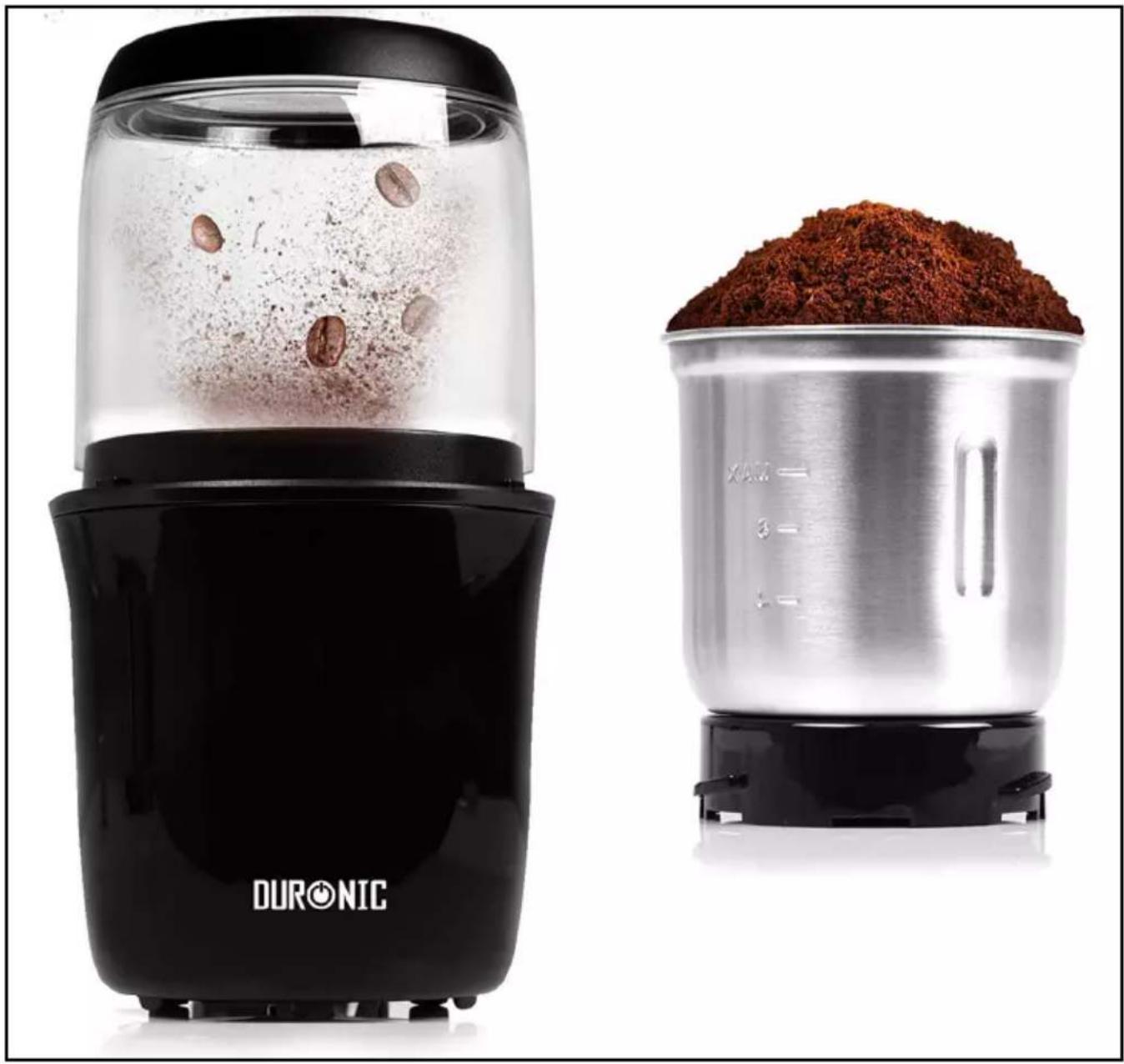
Two kitchen blisters: a black DURONIC blender with clear liquid and coffee beans, and a metallic blender filled with red powder (no text or symbols visible on the main objects)CG250
Coffee Grinder
PLEASE READ ALL THE INSTRUCTIONS BEFORE USE

duronic.com

duronic

@duronicmedia

Duronic

@duronicmedia
DURONIC
Contents
English Manual 5
Features and Specifications
| Model Number | Capacity Dimensions Power Voltage | |||
| CG250 75g | 21x11.5x11.5cm | 250W | 220-240V / 50-60Hz | |
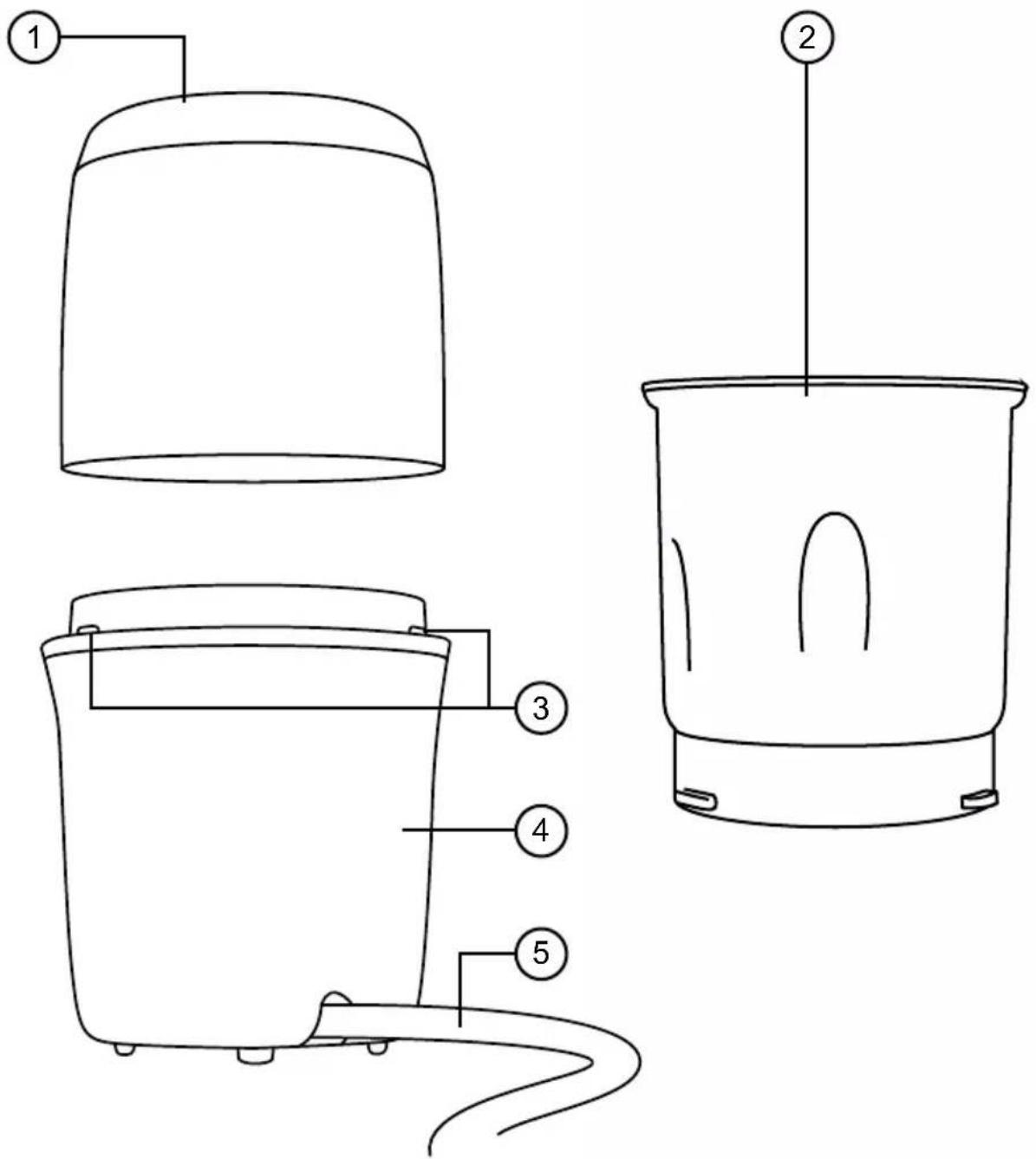
- Grinder cover
- Cup
-
Activation touch sensors
-
Grinder motor unit
- Power cable
DURONIC
Safety Information
PLEASE READ THIS MANUAL CAREFULLY AND RETAIN FOR FUTURE REFERENCE
- This appliance is for indoor/household use only. Do not use outdoors.
- This appliance is not designed for commercial or industrial use; it is for household use only.
- This appliance is not intended for use by persons (including children) with reduced physical, sensory or mental capabilities, or lack of experience and knowledge unless they have been given supervision or instruction concerning the use of the appliance by a person responsible for their safety.
- Children should be closely supervised at all times to ensure that they do not play with the appliance.
- Only use the grinder out of the reach of children because there are sharp blades inside the grinder cup. Store the grinder cup safely out of reach of children.
- Do not operate this appliance if the power cable or plug is damaged. If either is damaged, return it to Duronic for service or repair by a professional technician.
- Never try to replace the parts and repair the unit by yourself. Do not modify the appliance in any way that is not described in the instructions for use. The machine contains live parts. Repairs may only be carried out by Duronic, using original spare parts and accessories.
- If an extension lead/cable is needed to reach the appliance to a mains power socket that is too far away out of reach of the machine's accompanying cable, please ensure that:
- the marked electrical rating of the extension lead is at least as great as the electrical rating of the appliance.
- the extension lead is of the grounded type.
- no other appliance is plugged into the same extension lead.
DURONIC
- the extension cable is safely positioned to avoid it being pulled on by children or animals or being tripped over.
• Always operate the appliance on a dry, smooth, even and stable surface. Do not place the grinder on or next to a hot surface.
- Position the grinder and its power cable to the rear of the work surface, well out of reach of children.
- Disconnect the mains plug from the power socket if you are going to be absent for long periods.
- Never disconnect the plug by pulling on the power cable.
- Unplug from the mains plug outlet when not in use and before cleaning.
- This appliance is not intended to be operated using an external timer or separate remote-control system.
- Do not let the power cable hang over the edge of the table or counter, or touch hot surfaces.
- Do not use the appliance for anything other than grinding.
- Do not operate the grinder with wet hands.
- To clean, wipe the machine body with a well-wrung wet cloth. Do not submerge it in water or other liquids. Wash the cup and grinder cover with warm water and soap. Dry properly before placing the cup back into the machine.
- Do not switch the grinder on if the cup is empty or use the grinder for more than 30 seconds at a time as this will overheat the motor.

Caution: The blades inside the grinder cup are sharp. Be careful when emptying and cleaning the cup.
Introduction
Grind your own coffee beans to create fresher and more aromatic coffee, or grind up spices for better favour in your cooking and baking.
Grinding your own ingredients at home can save money, eliminate unnecessary excess packaging from store-bought jars and packets, and more importantly, will enable you to prepare tastier ingredients to use in your kitchen!
Before First Use
- Remove all of the packaging materials. Check that there are no parts missing.
- Clean the outside of the grinder body by wiping it with a wet well-wrung sponge or cloth.
- Wash the cup and grinder cover with warm soapy water and dry thoroughly.
- Ensure all parts are thoroughly dry before reassembling again.
DURONIC
Operating Instructions
- Place your grinder base onto your kitchen countertop positioned to the rear of the surface. Plug the power cable into the closest mains plug socket. Do not switch it on yet.
- Select which grinding cup to use and place it onto the machine base, turning it clockwise to lock it in place.
- Fill the cup with the ingredients you want to grind and place the lid on top. Then place the grinder cover on top.
- Switch the machine on at the plug. To start grinding, press down on the top of the lid and release when you wish to stop. The contents can be ground finely or coarsely depending on how long you run the grinder for.
Note: Do not use the grinder continuously for more than 30 seconds at a time. The recommended run time is 30 seconds on, 3 minutes off. After 3 cycles of this, leave the grinder to cool down for 30 minutes to avoid the motor overheating.

Caution:
- Do not add ingredients to the cup while the grinder is switched on at the plug.
- If the rotation of the blade becomes obstructed, switch the grinder off at the plug and unplug from the wall socket before attempting to clean the obstruction.
DURONIC
Cleaning and Maintenance
It is essential to keep your grinder clean so that you can enjoy the best results every time you use it.
Coffee beans contain oils that will naturally collect in the grinder, particularly around the blade, and these can quickly become stale. The stale oils and residue can taint the taste of anything else you grind in the grinder, so it is important to clean the cups regularly.
Switch off and unplug the grinder before cleaning.
- Remove the cup from the motor unit.
- To clean the motor unit, wipe the outside of it with a well-wrun wet cloth. Dry with a dry cloth or leave to air dry.
- To clean the cup, empty out any dry grounds or residue from under the blades. Then use warm soapy water and a soft cloth to gently clean the lid, inside of the cup and around the blade.
- Dry properly before placing the cup back into the motor unit or before storing away.

Caution:
- Be careful when cleaning the blade as it is sharp and can cause injury!
- The cup should not be washed in a dishwasher OR submerged in very hot water.
- Do not reassemble the grinder when parts are wet as this may create a fire hazard. Ensure each part is dry before reassembling or storing away.
Troubleshooting Guide
| Problem | Possible Cause | Suggested Solutions |
| The grinder does not work after being switched on | The grinder lid was not properly in place so it did not connect with the power activating buttons on the motor unit. | Check the grinder lid and ensure it is properly in place. |
| The 3 touch sensors on the top of the motor unit may be obstructed by something. | Check and clean/clear the 3 sensors if they are dirty or have anything obstructing them. | |
| The grinder stops working during operation | Check if the power cable/ plug is loose. | If the power cable is loose, push it back into the socket and switch it on. |
| Check if the motor unit is too hot. | If the motor unit has overheated the grinder will need to rest and cool down before you can continue using it. If it does not work after cooling down, please contact Duronic for further advice. | |
| The machine starts to make a bad smell | With new products that contain a motor it is normal for it to emit a smell upon first use. | The smell should fade upon use of the grinder. If the smell persists after a few uses, contact Duronic for advice. |
| Abnormal vibration or noise | Unstable positioning of the grinder unit. | Reposition the grinder on a smooth even surface. |
| The lid, grinding pot, blade or base is loose or damaged. | If any parts are damaged, do not use the grinder. Contact Duronic directly where you should be able purchase the replacement part you need. |
DURONIC
Warranty
1 Year Guarantee from Shine-Mart Ltd, Trademark owners of Duronic Products. NOTE: THESE STATEMENTS DO NOT AFFECT YOUR STATUTORY RIGHTS AS A CONSUMER
This product has been manufactured under the strictest or quality control procedures, and using the highest quality of materials, to ensure excellent performance and reliability. It will give very good and long lasting service, provided it is properly used and maintained. The product is guaranteed for 1 years from the date of original purchase. If any defect arises due to a faulty materials or poor workmanship, the faulty product must be returned to the original place of purchase. Refund or replacement is at the discretion of that company.
Duronic Products are offered with a 1 year guarantee under the following conditions:
- The product must be returned to the retailer with original proof of purchase.
- The product must be installed and used in accordance with the instructions contained in this operating manual.
- It must be used only for domestic purposes.
- It does not cover wear and tear, malicious damage, misuse, neglect, inexpert repairs or consumable parts.
- Shine-Mart Ltd has no responsibilities for accidental or consequential loss or damage.
- Shine-Mart Ltd are not liable to carry out any type of servicing work, under the guarantee
- Valid in the UK only
This product is fitted with CE:1363 plug and fuse Imported by Shine-Mart Ltd, RM3 8SB

Information on waste Disposal for Consumers of Electrical & Electronic Equipment.
This mark on a product and/or accompanying documents indicates that when it is to be disposed of, it must be treated as Waste Electrical & Electronic Equipment, (WEEE).
Any WEEE marked products must not be mixed with general household waste, but kept separate for the treatment, recovery and recycling of the materials used.
For proper treatment, recovery and recycling; please take all WEEE marked waste to your Local Authority Civic waste site, where it will be accepted free of charge.
If customers dispose of Waste Electrical & Electronic Equipment correctly, they will be helping to save valuable resources and preventing any potential negative effects upon human health and the environment, of any hazardous materials that the waste may contain.
Follow Us





Features and Specifications
Features and Specifications
| Model Number | Capacity Dimensions Power Voltage | |||
| CG250 75g | 21x11.5x11.5cm | 250W | 220-240V / 50-60Hz | |
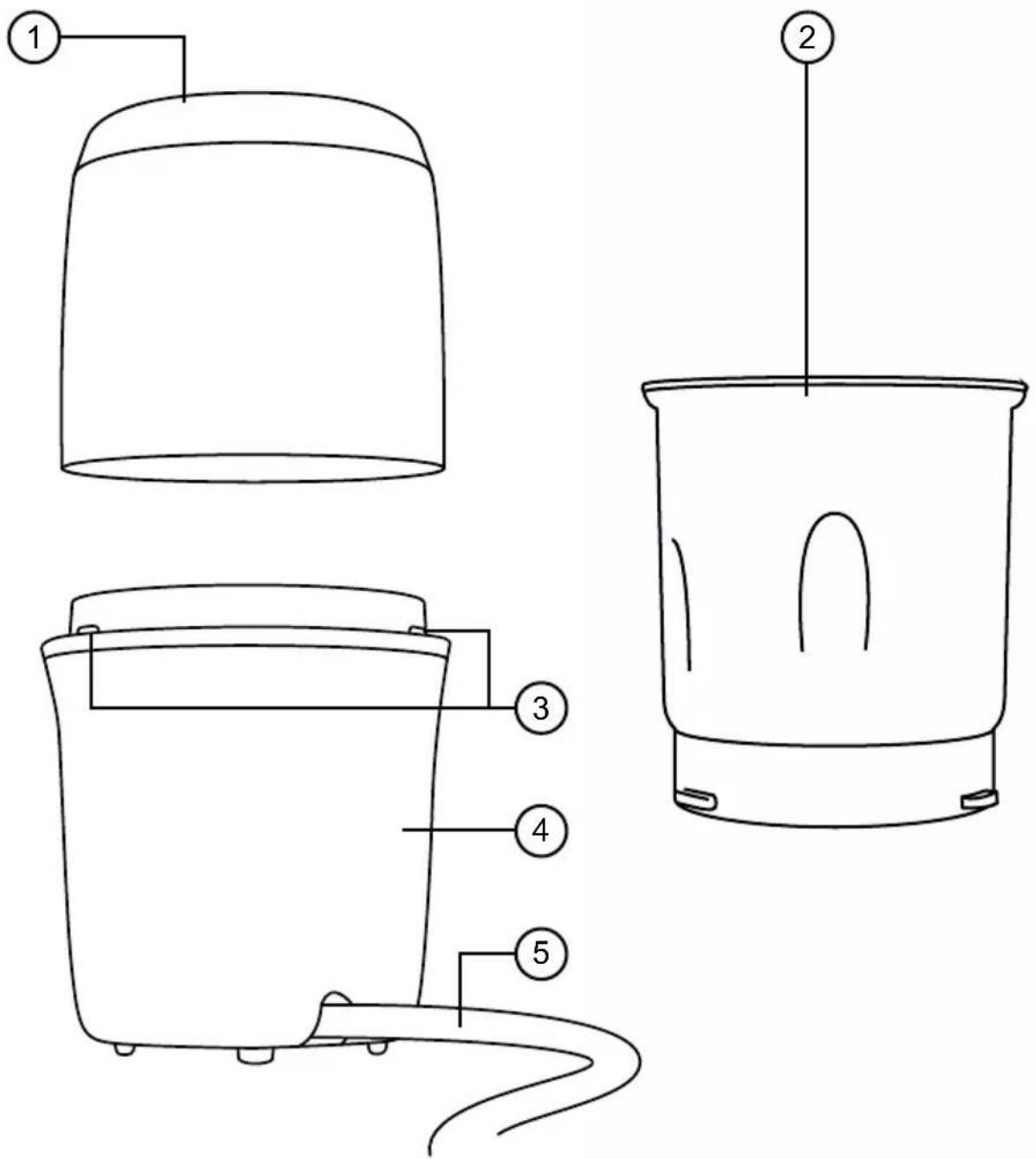
- Grinder cover
- Cup
-
Activation touch sensors
-
Grinder motor unit
- Power cable
DURONIC
Safety Information
PLEASE READ THIS MANUAL CAREFULLY AND RETAIN FOR FUTURE REFERENCE
- This appliance is for indoor/household use only. Do not use outdoors.
- This appliance is not designed for commercial or industrial use; it is for household use only.
- This appliance is not intended for use by persons (including children) with reduced physical, sensory or mental capabilities, or lack of experience and knowledge unless they have been given supervision or instruction concerning the use of the appliance by a person responsible for their safety.
- Children should be closely supervised at all times to ensure that they do not play with the appliance.
- Only use the grinder out of the reach of children because there are sharp blades inside the grinder cup. Store the grinder cup safely out of reach of children.
- Do not operate this appliance if the power cable or plug is damaged. If either is damaged, return it to Duronic for service or repair by a professional technician.
- Never try to replace the parts and repair the unit by yourself. Do not modify the appliance in any way that is not described in the instructions for use. The machine contains live parts. Repairs may only be carried out by Duronic, using original spare parts and accessories.
- If an extension lead/cable is needed to reach the appliance to a mains power socket that is too far away out of reach of the machine's accompanying cable, please ensure that:
- the marked electrical rating of the extension lead is at least as great as the electrical rating of the appliance.
- the extension lead is of the grounded type.
- no other appliance is plugged into the same extension lead.
DURONIC
- the extension cable is safely positioned to avoid it being pulled on by children or animals or being tripped over.
• Always operate the appliance on a dry, smooth, even and stable surface. Do not place the grinder on or next to a hot surface.
- Position the grinder and its power cable to the rear of the work surface, well out of reach of children.
- Disconnect the mains plug from the power socket if you are going to be absent for long periods.
- Never disconnect the plug by pulling on the power cable.
- Unplug from the mains plug outlet when not in use and before cleaning.
- This appliance is not intended to be operated using an external timer or separate remote-control system.
- Do not let the power cable hang over the edge of the table or counter, or touch hot surfaces.
- Do not use the appliance for anything other than grinding.
- Do not operate the grinder with wet hands.
- To clean, wipe the machine body with a well-wrung wet cloth. Do not submerge it in water or other liquids. Wash the cup and grinder cover with warm water and soap. Dry properly before placing the cup back into the machine.
- Do not switch the grinder on if the cup is empty or use the grinder for more than 30 seconds at a time as this will overheat the motor.

Caution: The blades inside the grinder cup are sharp. Be careful when emptying and cleaning the cup.
Introduction
Grind your own coffee beans to create fresher and more aromatic coffee, or grind up spices for better favour in your cooking and baking.
Grinding your own ingredients at home can save money, eliminate unnecessary excess packaging from store-bought jars and packets, and more importantly, will enable you to prepare tastier ingredients to use in your kitchen!
Before First Use
- Remove all of the packaging materials. Check that there are no parts missing.
- Clean the outside of the grinder body by wiping it with a wet well-wrung sponge or cloth.
- Wash the cup and grinder cover with warm soapy water and dry thoroughly.
- Ensure all parts are thoroughly dry before reassembling again.
DURONIC
Operating Instructions
- Place your grinder base onto your kitchen countertop positioned to the rear of the surface. Plug the power cable into the closest mains plug socket. Do not switch it on yet.
- Select which grinding cup to use and place it onto the machine base, turning it clockwise to lock it in place.
- Fill the cup with the ingredients you want to grind and place the lid on top. Then place the grinder cover on top.
- Switch the machine on at the plug. To start grinding, press down on the top of the lid and release when you wish to stop. The contents can be ground finely or coarsely depending on how long you run the grinder for.
Note: Do not use the grinder continuously for more than 30 seconds at a time. The recommended run time is 30 seconds on, 3 minutes off. After 3 cycles of this, leave the grinder to cool down for 30 minutes to avoid the motor overheating.

Caution:
- Do not add ingredients to the cup while the grinder is switched on at the plug.
- If the rotation of the blade becomes obstructed, switch the grinder off at the plug and unplug from the wall socket before attempting to clean the obstruction.
DURONIC
Cleaning and Maintenance
It is essential to keep your grinder clean so that you can enjoy the best results every time you use it.
Coffee beans contain oils that will naturally collect in the grinder, particularly around the blade, and these can quickly become stale. The stale oils and residue can taint the taste of anything else you grind in the grinder, so it is important to clean the cups regularly.
Switch off and unplug the grinder before cleaning.
- Remove the cup from the motor unit.
- To clean the motor unit, wipe the outside of it with a well-wrun wet cloth. Dry with a dry cloth or leave to air dry.
- To clean the cup, empty out any dry grounds or residue from under the blades. Then use warm soapy water and a soft cloth to gently clean the lid, inside of the cup and around the blade.
- Dry properly before placing the cup back into the motor unit or before storing away.

Caution:
- Be careful when cleaning the blade as it is sharp and can cause injury!
- The cup should not be washed in a dishwasher OR submerged in very hot water.
- Do not reassemble the grinder when parts are wet as this may create a fire hazard. Ensure each part is dry before reassembling or storing away.
Troubleshooting Guide
| Problem | Possible Cause | Suggested Solutions |
| The grinder does not work after being switched on | The grinder lid was not properly in place so it did not connect with the power activating buttons on the motor unit. | Check the grinder lid and ensure it is properly in place. |
| The 3 touch sensors on the top of the motor unit may be obstructed by something. | Check and clean/clear the 3 sensors if they are dirty or have anything obstructing them. | |
| The grinder stops working during operation | Check if the power cable/ plug is loose. | If the power cable is loose, push it back into the socket and switch it on. |
| Check if the motor unit is too hot. | If the motor unit has overheated the grinder will need to rest and cool down before you can continue using it. If it does not work after cooling down, please contact Duronic for further advice. | |
| The machine starts to make a bad smell | With new products that contain a motor it is normal for it to emit a smell upon first use. | The smell should fade upon use of the grinder. If the smell persists after a few uses, contact Duronic for advice. |
| Abnormal vibration or noise | Unstable positioning of the grinder unit. | Reposition the grinder on a smooth even surface. |
| The lid, grinding pot, blade or base is loose or damaged. | If any parts are damaged, do not use the grinder. Contact Duronic directly where you should be able purchase the replacement part you need. |