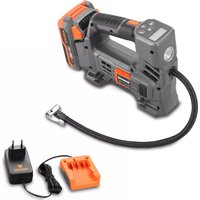
FX-E1CI20 - Compressor Fuxtec - Free user manual and instructions
Find the device manual for free FX-E1CI20 Fuxtec in PDF.



| Product type | Cordless battery compressor |
| Brand | Fuxtec |
| Model | FX-E1CI20 |
| Power supply | Lithium-ion battery (20 V, not included) |
| Maximum pressure | 1034 kPa (150 PSI) |
| Pressure units | PSI, BAR, KPA, KG/CM² |
| Main functions | Tire inflation, mattresses, balls, buoys; digital pressure gauge; LED work light |
| Included nozzles | Balloon needle, Presta valve adapter, various adapters |
| Usage | Domestic, private |
| Safety | Automatic shutdown in case of overload or low battery; overheat protection |
| Maintenance | Clean ventilation slots; do not use water; store in a dry place |
| Recycling | Do not dispose of with household waste; battery and device must be recycled separately |
| Warranty | According to manufacturer's conditions (not detailed in the manual) |
Frequently Asked Questions - FX-E1CI20 Fuxtec
User questions about FX-E1CI20 Fuxtec
0 question about this device. Answer the ones you know or ask your own.
Ask a new question about this device
Download the instructions for your Compressor in PDF format for free! Find your manual FX-E1CI20 - Fuxtec and take your electronic device back in hand. On this page are published all the documents necessary for the use of your device. FX-E1CI20 by Fuxtec.
USER MANUAL FX-E1CI20 Fuxtec
natural_image
Line drawing of a mechanical device with no visible text or symbolsnatural_image
Close-up of an FUXTEC 20V power supply device with orange and black buttons, no visible text or symbols on the device itself.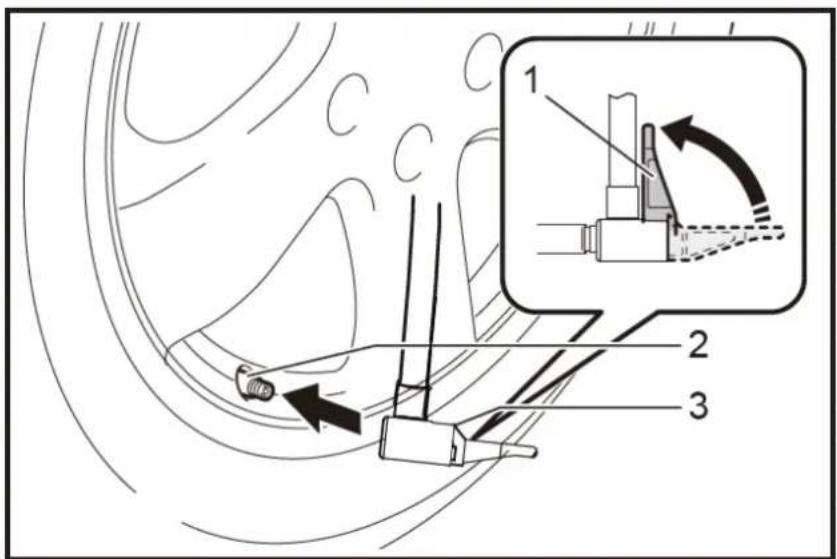
Entsorgung

WARNUNG!
Introduction and safety 18
Intended Use.... 18
General safety instructions for power tools.... 18
Workplace Safety 18
Electrical Safety.... 18
Safety of Persons 19
Use and treatment of the power tool.... 19
Use and handling of the cordless tool 20
Safety instructions for battery compressor 20
General Safety Instructions.... 20
Before Use.... 21
During Operation 21
After use....21
Safety instructions for the charger 22
Safety Instructions for Li-Ion Batteries 22
Safety instructions for working with the cordless compressor 22
Use 23
Using the battery 23
Pressure gauge (pressure measuring device) 25
Stow the adapter 26
Use of the various adapters.... 27
Disposal 28
Technical Data.... 29
Introduction and safety
Never allow children or persons unfamiliar with these instructions to use the tool. Children should be supervised to ensure that they do not play with the appliance.
Intended Use
This device is intended exclusively for inflating pneumatic tyres, mattresses, etc. in the private sector. The device must be used following the descriptions
The device must be used following the descriptions and safety instructions given in this user manual. Unauthorized use will invalidate the warranty and override any responsibility on the part of the manufacturer. The user is liable for all damages to third parties and their property. Operate the device only in the technical condition prescribed and delivered by the manufacturer. Unauthorized modifications to the device exclude the manufacturer's liability for any resulting damage.
General safety instructions for power tools
WARNING!
Read all safety notices and instructions. Failure to follow the safety instructions and instructions can cause electric shock, fire, and/or severe injury.
Keep all safety notes and instructions for future reference.
The term power tool used in the safety instructions refers to mains operated power tools (with power cord) and cordless power tools (without power cord).
Workplace Safety
Keep your work area clean and well lit. Clutter or unlit work areas can lead to accidents.
Do not work with the power tool in explosive environments containing flammable liquids, gases, or dust. Power tools produce sparks that can ignite the dust or fumes.
Keep children and other persons away while using the power tool. If distracted, you may lose control of the device.
Electrical Safety
The plug of the power tool must fit into the socket. The cap must not be changed in any way. Do not use adapter plugs together with grounded power tools. Unchanged plugs and suitable sockets reduce the risk of electric shock.
Avoid physical contact with grounded surfaces such as pipes, heaters, stoves, and refrigerators. There is an increased risk of electric shock if your body is grounded.
If you use a power tool outdoors, only use extension cables that are suitable for outdoor use. The use of an extension cable suitable for outdoor use reduces the risk of electric shock.
If you use a power tool outdoors, only use extension cables that are suitable for outdoor use. The use of an extension cable suitable for outdoor use reduces the risk of electric shock.
Safety of Persons
Be alert, pay attention to what you are doing, and use common sense when working with a power tool. Do not use a power tool if you are tired or under the influence of drugs, alcohol, or medication. A moment of inattention while utilizing the power tool can cause serious injury.
Wear personal protective equipment and always protective goggles. Wearing personal protective equipment, such as a dust mask, non-slip safety shoes, safety helmet, or hearing protection, depending on the type and use of the power tool reduces the risk of injury.
Avoid unintentional commissioning. Make sure that the power tool is switched off before connecting it to the power supply and/or battery, picking it up or carrying it. If you have your finger on the switch when carrying the power tool or if you connect the device to the power supply while it is switched on, this can lead to accidents.
Remove adjustment tools or wrenches before turning on the power tool. A tool or key that is in a rotating part of the device can cause injury.
Avoid abnormal posture. Make sure you have a secure
Stand and keep your balance at all times. This allows you to better control the power tool in unexpected situations.
Wear suitable clothing. Do not wear loose clothing or jewellery. Keep hair, clothing, and gloves away from moving parts. Loose clothing, jewellery, or long hair can be caught by moving parts.
Use and treatment of the power tool
Do not overload the device. Use the appropriate power tool for your work. With the right power tool, you will work better and safer in the specified power range.
Do not use a power tool whose switch is defective. A power tool that can no longer be switched on or off is dangerous and must be repaired.
Unplug the power cord and/or remove the battery before making any adjustments to the device, changing
accessories, or putting the device away. This precaution prevents unintentional starting of the power tool.
Keep unused power tools out of the reach of children. Do not allow persons to use the device which is not familiar with it or have not read
these instructions. Power tools are dangerous if they are used by inexperienced persons.
Maintain power tools with care. Check that moving parts function correctly and do not jam, that parts are not broken or damaged in such a way that the function of the power tool is impaired. Have damaged parts repaired before using the device? Many accidents are caused by poorly maintained power tools.
Keep cutting tools sharp and clean. Carefully maintained cutting tools with sharp cutting edges jam less and are easier to guide.
Use power tools, accessories, insertion tools, etc. according to these instructions. Take into account the working conditions and the job to be performed. The use of power tools for applications other than those intended can lead to dangerous situations.
Use and handling of the cordless tool
Charge the batteries only with chargers recommended by the manufacturer. A charger that is suitable for a particular type of battery poses a fire hazard when used with other batteries.
Only use the batteries provided in the power tools. Using other batteries may result in personal injury and fire hazards.
Keep the unused battery away from paper clips, coins, keys, nails, screws, or other small metal objects that could cause the contacts to bridge. A short circuit between the battery contacts can cause burns or fire.
- The liquid may leak from the battery if misused. Avoid any contact with it. In case of accidental contact, rinse with water. If the liquid gets into your eyes, seek additional medical attention. Leaking battery fluid may cause skin irritation or burns.
Safety instructions for battery compressor
General Safety Instructions
For your safety and the safety of others, read this user manual and its safety instructions before using the device. Please keep the user manual and its safety instructions in a safe place for later use and regard them as
keep them handy for any purpose.
Pass on the operating instructions with the device if there is a change of ownership.
Persons operating the device must not be under the influence of intoxicating substances (e.g., alcohol, drugs, or medicines).
Operate the device only in the technical condition prescribed and delivered by the manufacturer.
Unauthorized modifications to the device exclude the manufacturer's liability for any resulting damage.
Only use the device in daylight or under good artificial lighting.
Only use the device in dry weather conditions. Keep it away from rain or moisture. The penetration of water into the device increases the risk of electric shock.
Switch off the device and remove the battery in the following conditions:
if the device is left unattended;
before checking, cleaning or other work on the device;
if the device starts to vibrate excessively.
Before Use
Familiarize yourself with the device and its functions and controls before starting work.
Check the device for signs of wear or damage before starting up and after a collision.
Do not use a device whose switch is defective and can no longer be switched on or off.
Check that all nuts, bolts, and screws are tight to ensure that the device is operated safely.
Never use a device with damaged or missing parts. Have them repaired or replaced if necessary by a qualified specialist or workshop.
Always wear appropriate personal protective equipment when working with or on the device (safety goggles, ear protection, non-slip work gloves, etc.) The wearing of personal protective equipment reduces the risk of injury.
During Operation
Do not switch on the device if persons (especially children) or animals are in the immediate vicinity. Make sure that children do not play with the device.
Make sure that you have a firm stand and work calmly and carefully. Use the appropriate saw blades according to the working material (wood, metal, brick, plaster, etc.). An incorrect selection can lead to slipping and injury. Wear hearing protection when using the device. Exposure to noise can lead to hearing loss. Hold the power tool by the insulated grip surfaces.
When carrying out your work, you may come into contact with concealed cables, and this may result in electric shock if you do not hold the saw properly.
After use
Switch off the device and remove the battery from the saw. Then place the unit in a safe place.
Do not store the device within reach of children. Make sure that the ventilation slots in the device are clean.
Please do not clean the dirt with water. The electrical device may be damaged.
Safety instructions for the charger
Keep the charger away from rain or moisture. The penetration of water into a charger increases the risk of electric shock.
Keep the charger clean. There is a risk of electric shock from soiling.
Check the charger, cable, and plug before each use. Do not use the charger if you notice any damage. Do not open the charger yourself and have it repaired only by qualified personnel and only with original spare parts. Damaged chargers, cables, and connectors increase the risk of electric shock.
Do not place objects on the charger or place them on soft surfaces. There is a risk of fire.
Always check that the mains voltage corresponds to the voltage indicated on the charger's nameplate.
Never open the charger under any circumstances. Take it to a specialist workshop in the event of a fault.
Safety Instructions for Li-Ion Batteries
Do not open the battery. There is a danger of a short circuit.
Protect the battery from heat, including continuous exposure to sunlight, fire, water, and moisture. There is a danger of explosion.
Vapours may escape if the battery is damaged or misused. Supply fresh air and consult a doctor if you have any complaints. The vapours may irritate the respiratory tract.
The liquid may leak from the battery if misused. Avoid any contact with it. In case of accidental contact, rinse with water. If the liquid gets into your eyes, seek additional medical attention. Leaking battery fluid may cause skin irritation or burns.
Only use original rechargeable batteries with the voltage specified on the rating plate of your power tool. When using other batteries, e.g., imitation reconditioned batteries or batteries from different manufacturers, there is a risk of injury and material damage due to exploding batteries.
The battery voltage must match the battery charging voltage of the charger. Otherwise, there is a risk of fire and explosion.
Charge the batteries only with chargers recommended by the manufacturer. A charger that is suitable for a particular type of battery poses a fire hazard when used with other batteries.
The battery can be damaged by pointed objects such as nails or screwdrivers or by an external force. An internal short circuit may occur, and the battery may burn, smoke, explode or overheat.
Safety instructions for working with the cordless compressor
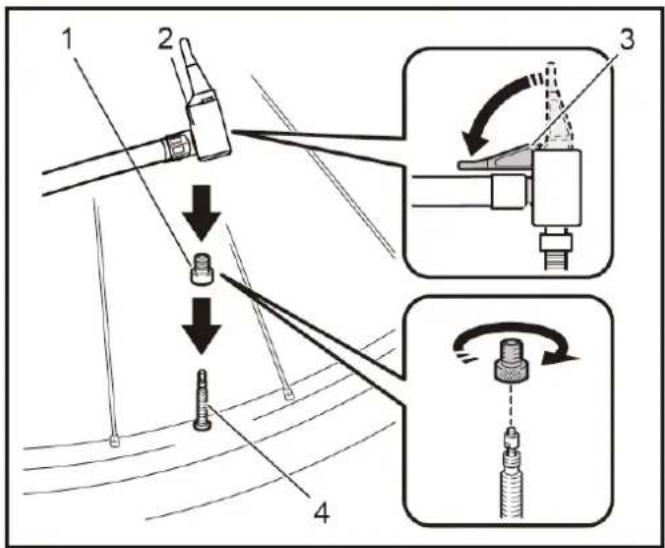
- Connect the air adapter and the valve firmly when inflating objects.
- Otherwise, the object, the hose, the air tensioning device or the adapter may be damaged and you may injure yourself - Release the air pressure slowly. When you remove the hose after inflating objects, hold the object, the hose and the air tensioning device firmly.
- The object, the air tensioning device or the adapter can be hit by the escaping air and cause injury.
- Do not inflate the object beyond the maximum pressure of the object. Otherwise, the tool or object may be damaged and you may injure yourself. Do not use the tool above the maximum outlet pressure of the tool. Using the tool with a higher pressure than the maximum outlet pressure of the tool can cause the object or the tool to burst.
- Only inflate objects that are intended for this purpose by the manufacturer, such as tyres, sports balls or small floating tubes. Inflating other objects can damage them and cause injury.
- When inflating objects, check the pressure gauge, the condition of the tool and the object and ensure that there are no leaks. Otherwise, the tool or object may be damaged and this may result in injury.
- Hold on to the handle of the appliance when carrying it. Do not carry the appliance by the hose or pull on it. The tool can be damaged and this can lead to injuries.
- After inflating objects, check the air pressure with a reliable and calibrated measuring device. Only use the pressure gauge on the device as a reference.
-- After using the appliance continuously for 5 minutes, interrupt operation for at least 5 minutes to allow it to cool down. Do not use the appliance beyond the permitted continuous operating time. Otherwise, the appliance may be damaged and this may result in injury. - Do not use the appliance on sand or dusty surfaces. Foreign objects can get inside the appliance and cause a malfunction.
- Do not point the outlet of the hose at yourself or others. Objects can be blown away and cause injury.
- Do not point the outlet of the hose at dust or similar. The dust can be whirled up and cause injury.
- Do not inflate objects with a large capacity. If you inflate an object with a large capacity, the appliance can become very hot and you could burn your skin.
- Do not touch the device, the hose, the air tensioning device or the adapter directly after inflating objects. The metal parts can become extremely hot and burn your skin.
- Do not use the appliance with wet hands.
- When folding the air chamber clamp, make sure that you do not pinch your fingers between the air chamber and the clamp.
- Make sure that the hose does not become entangled. A tangled hose can lead to loss of balance and cause injury.
- Never leave the appliance unattended when the hose is installed on the object or during operation.
- Do not use the device as a breathing apparatus.
- Do not use the appliance to spray chemicals. Inhaling toxic vapours can damage your lungs.
- Operate the appliance in an open area that is at least 50 cm away from walls or objects that could obstruct the air flow to the ventilation openings.
- Do not dismantle the device.
- Only use the standard accessories supplied by FUXTEC. The use of other accessories or attachments may pose a risk of injury to persons. This appliance is intended for domestic use only.
Use
Using the battery
Always switch off the device before inserting or removing the battery.
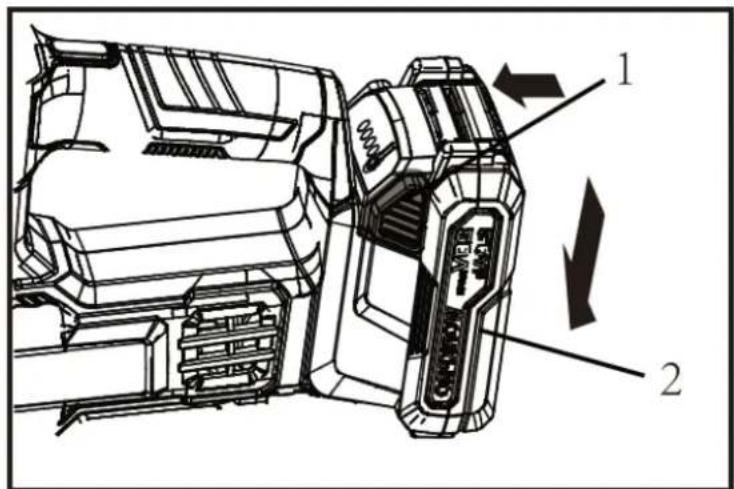
- To remove the battery from the device, press and hold the safety button (see image, point 1) and pull the battery from the device.
- To insert the battery, insert the battery into the rail provided and push the battery as far as it will go until it clicks into place.
natural_image
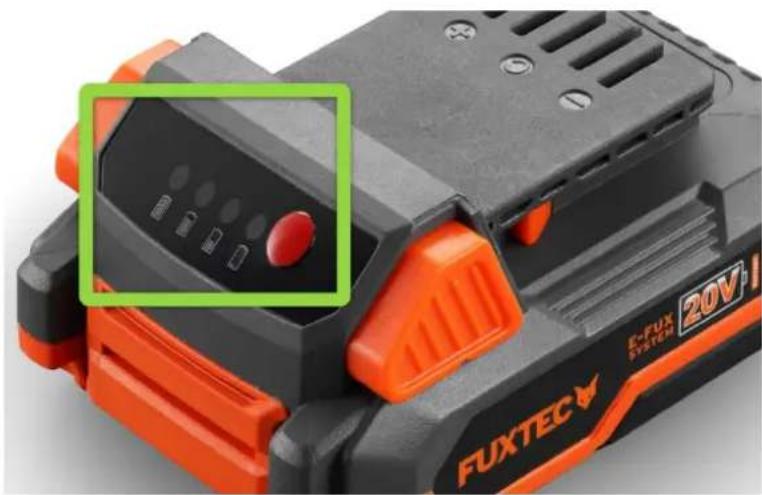
Close-up of a FUXTEC 20V battery with orange and black buttons, showing control panel and indicator lights (no readable text beyond branding)- Press the test button on the battery indicator to display the remaining battery capacity. The indicator lights light up for a few seconds.
- If all lights light up, the battery has a capacity of approx. 75% - 100%
-
With three lights, the battery has a capacity of approx. 50% - 75%
-
With two lights, the battery has a capacity of approx. 25% -50%
- With one light, the battery has a capacity of approx. 0% - 25%
The appliance is equipped with a battery protection system. This system automatically interrupts the power supply to the motor to extend the service life of the battery. The appliance switches off automatically during operation if the appliance and/or the battery are placed in one of the following conditions:
Overload:
The tool is being operated in such a way that it is drawing an unusually high current. In this case, switch off the device and end the application that caused the device to be overloaded.
Then switch the device on to restart it. If the device does not start, the battery has overheated.
In this case, allow the battery to cool down before switching the device back on.
Low battery voltage:
The remaining battery capacity is too low and the appliance is not working. When you switch the device on, the motor starts running again but soon stops. In this case, remove the battery and recharge it.
Pressure gauge (pressure measuring device)
If the object to be inflated is connected to the tool, the air pressure of the object is displayed on the pressure gauge when you switch on the device. If nothing is connected to the tool, the pressure gauge displays "0".
You can set the air pressure on the pressure gauge. To change the unit, press the unit button.
To increase the pressure, press the plus button. To decrease the pressure value, press the minus button.
You can set the pressure value between 0 kPa and 1034 kPa (150 PSI).
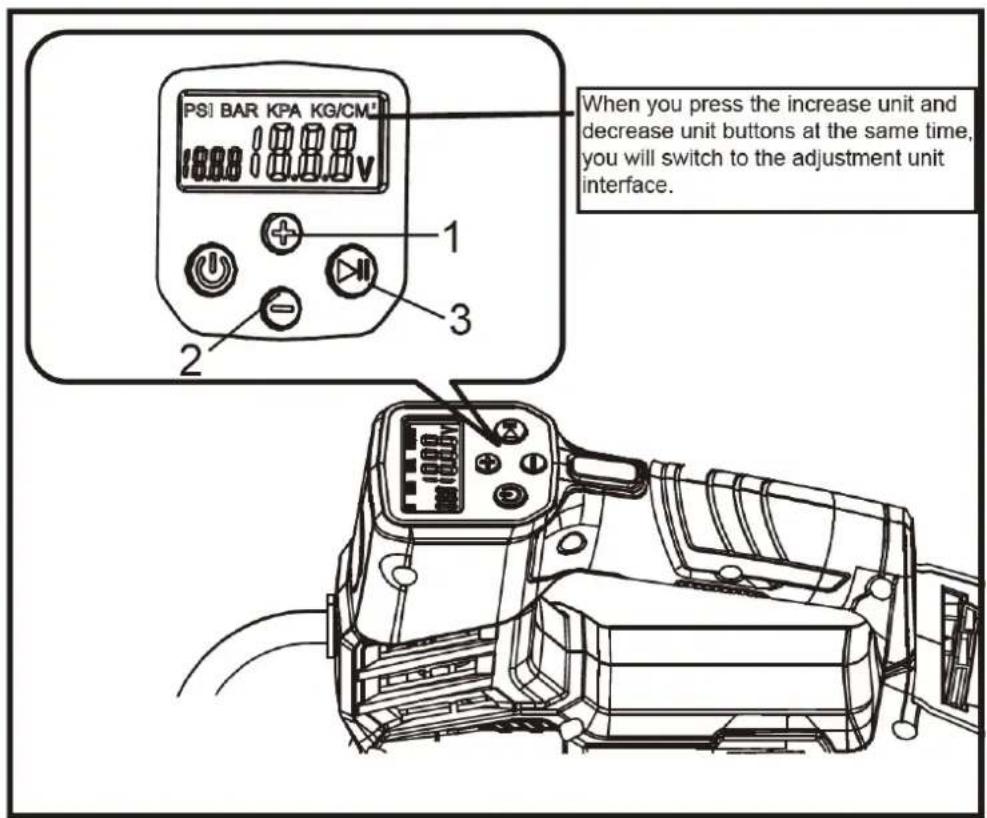
The compressor has a working light. When you switch on the appliance by pressing the main switch, the lamp lights up. When you switch off the appliance by pressing the main switch, the light goes out. If the lamp starts to flicker during operation, the appliance has overheated. Switch off the appliance, remove the battery and allow both to cool down.
Caution:
Please do not look directly into the light, your eyes may be damaged.
Stow the adapter
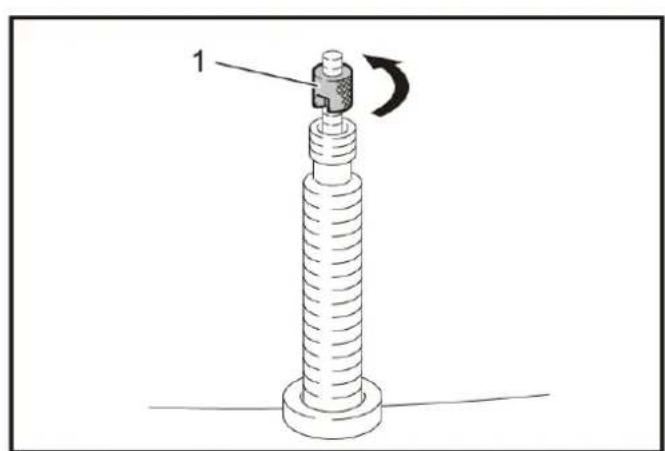
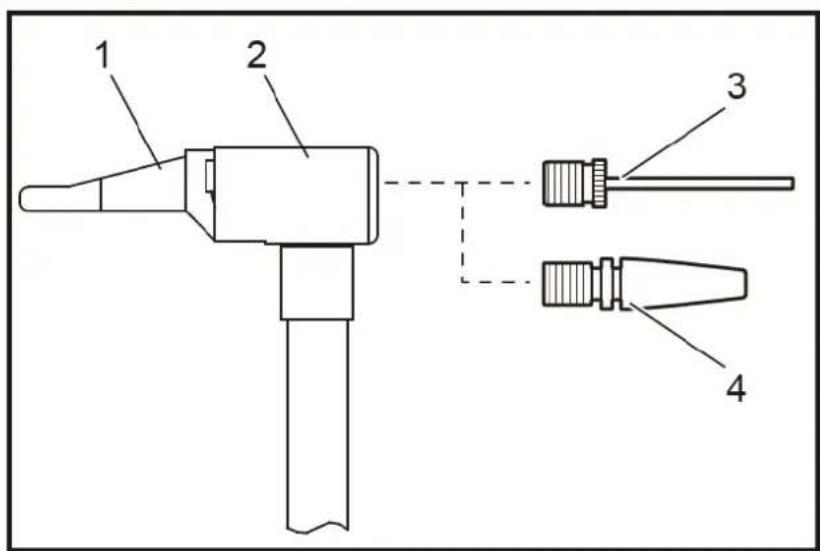
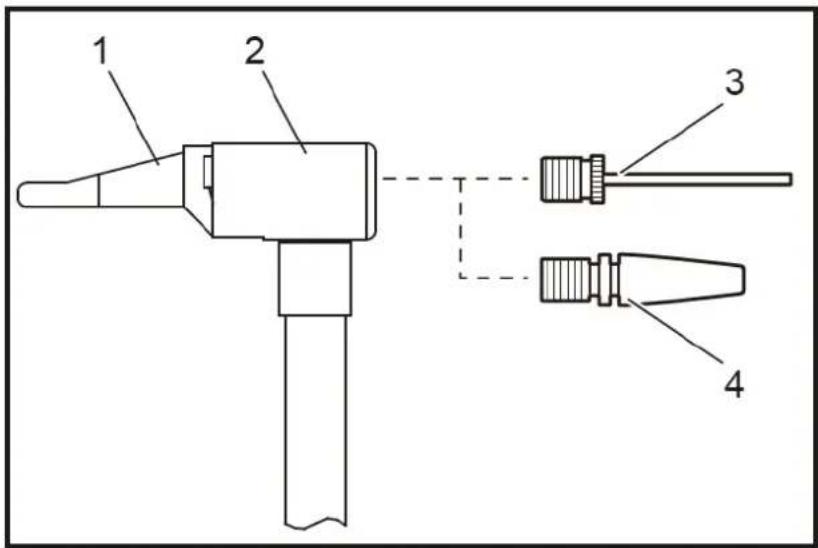
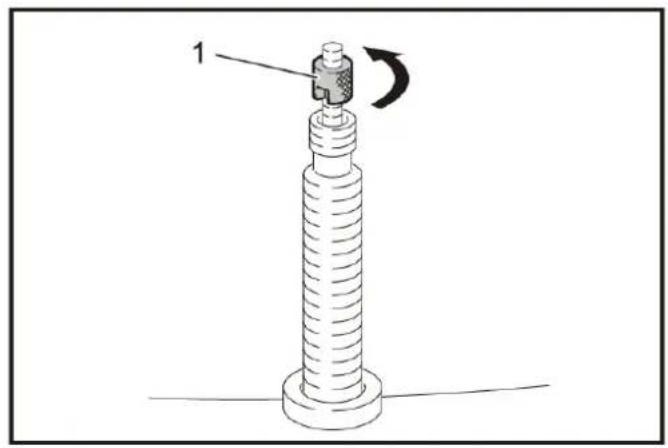
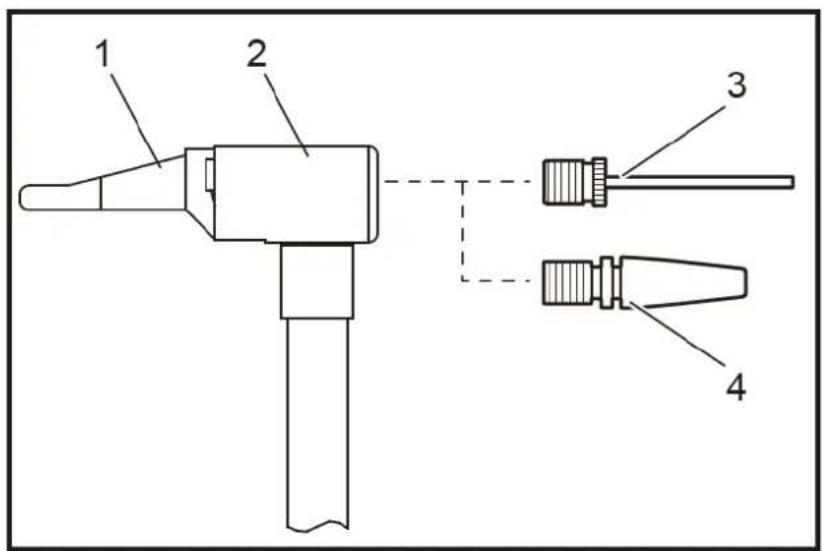
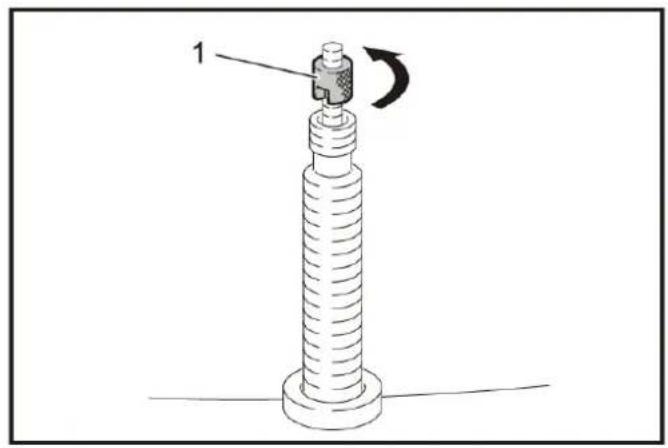
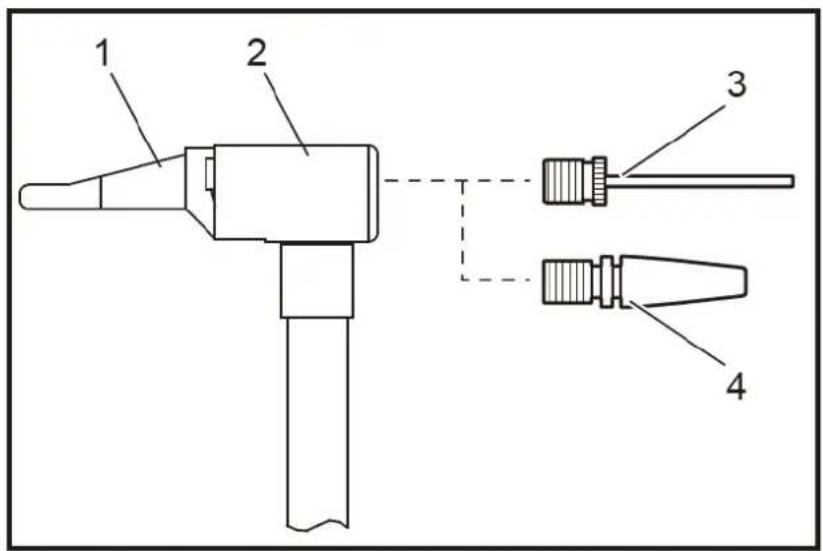
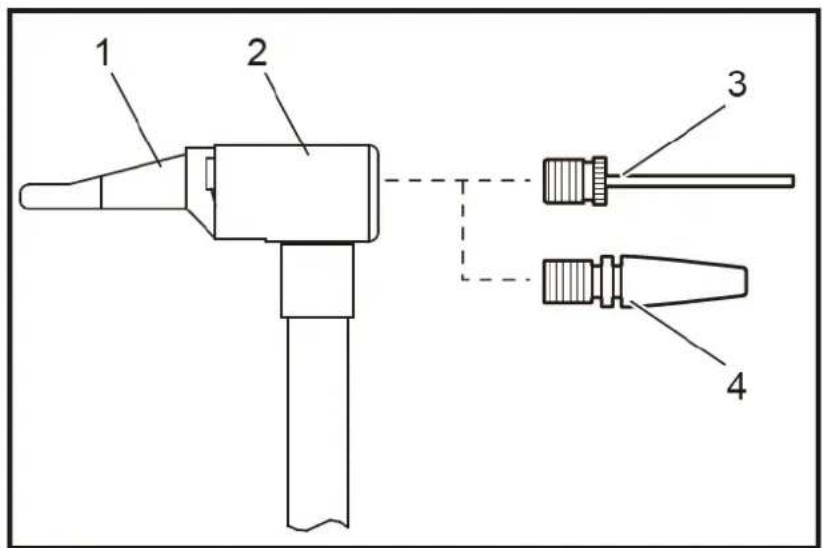
The compressor is supplied with various adapters. You can store these in the adapter holder of the tool (see following image). Please ensure that you insert the needle for inflating balls into the Presta valve adapter before storing the two adapters.
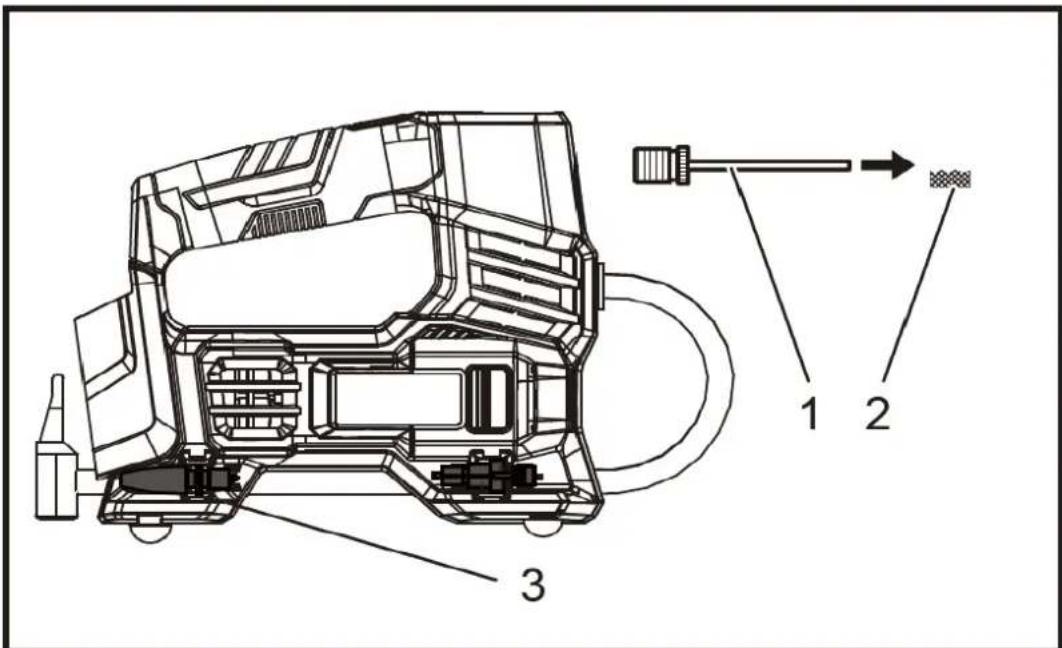
1: Needle for inflating balls
2: Presta Ventil Adapter
3: Storage space for storing the adapters
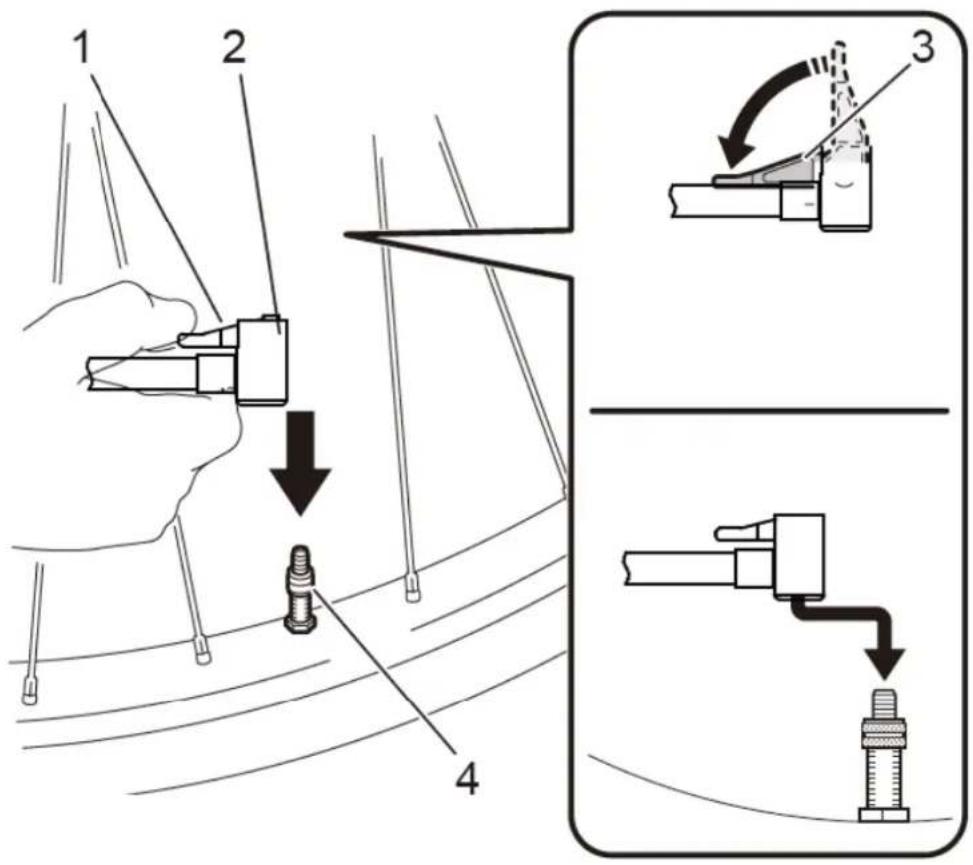
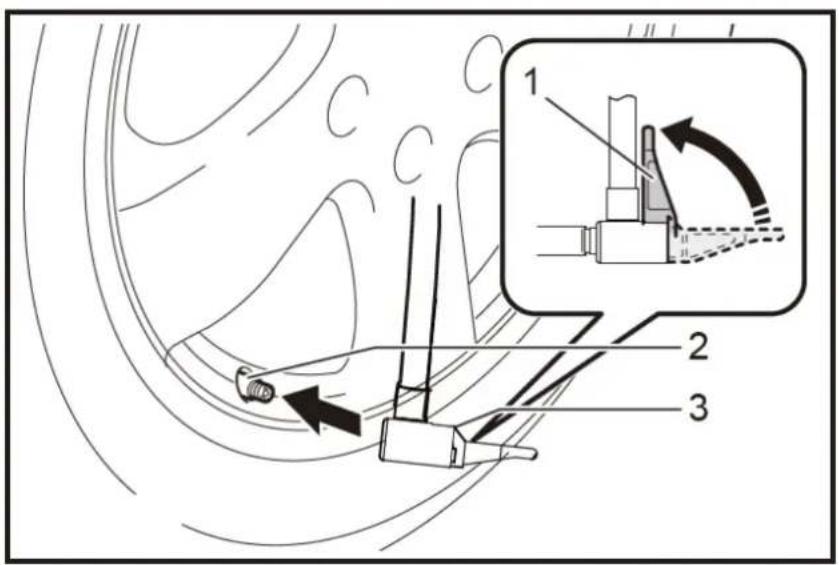
Use of the various adapters
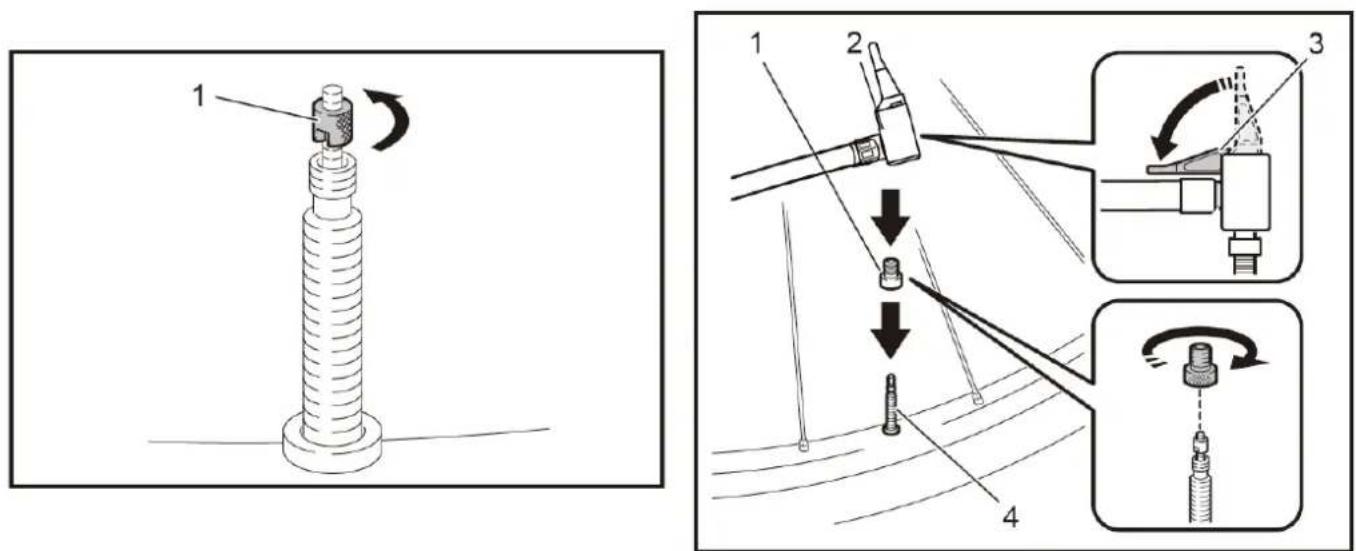
Disposal

WARNING!
Make used power tools unusable before disposal:
- mains-operated power tools by removing the connecting plug,
• cordless power tools by removing the battery.

For EU countries only
Do not throw power tools in household waste! According to the European Directive 2012/19/EC on waste electrical and electronic equipment and its implementation in national law, used electrical equipment must be collected separately and sent for environmentally sound recycling. Recovery of raw materials instead of waste disposal. The device, accessories, and packaging should be recycled

in an environmentally friendly manner. Plastic parts are marked for recycling according to type.
WARNING!
Do not throw batteries in the household waste, fire, or water. Do not open worn-out batteries. Batteries should be collected, recycled, or disposed of in an environmentally friendly manner.
For EU countries only: According to Directive 2006/66/EC, defective or exhausted batteries must be recycled.
i NOTE
Please contact your local authority/city for information on disposal options,
Recycling raw materials instead of waste disposal.
Technical Data
Battery device
Nominal voltage 20 V
Idle speed 17.000 (r/min)
Hereby we declare that the above-mentioned machine meets the essential safety and health requirements of the above stated EC directives. Any manipulation or change of the machine not being explicitly authorized by us in advance renders this document null and void.
Herrenberg, 25 ^th of May 2024
C. Jille
natural_image
Close-up of an orange FUXTEC 20V battery with control panel and indicator lights (no readable text beyond branding)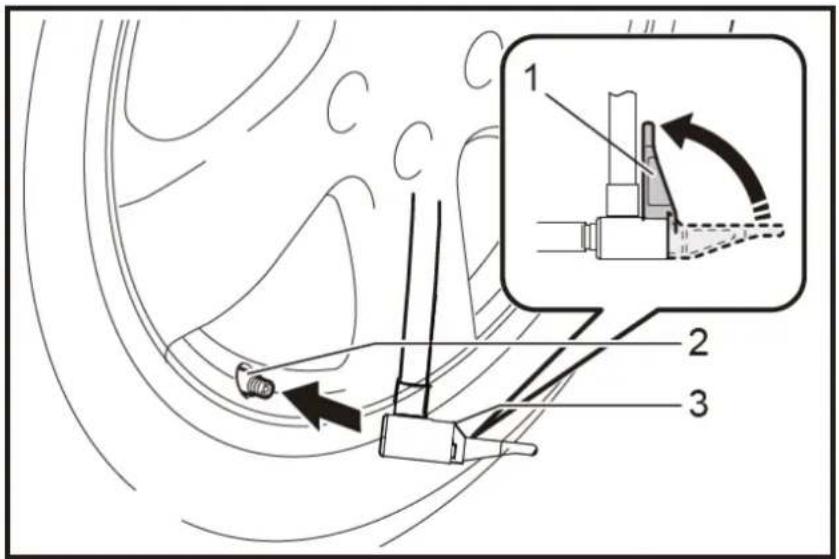
natural_image
Diagram of a mechanical component with a cylindrical shaft and threaded end, labeled with number 1 and rotation arrow (no text or symbols beyond labels)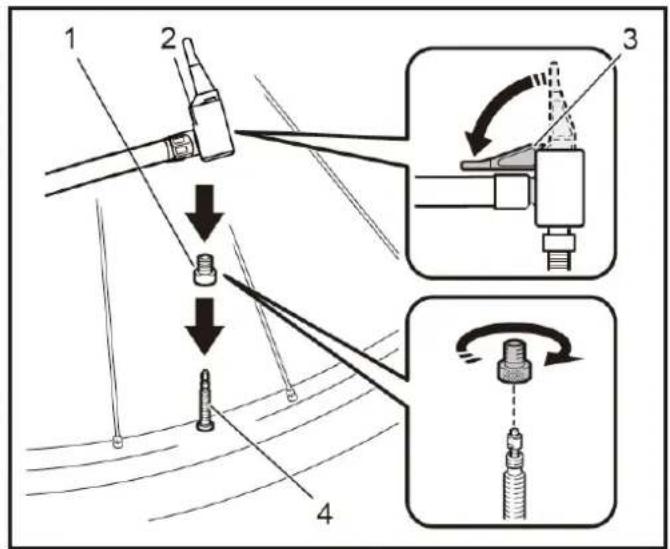
natural_image
Abstract icon of a person walking with arrows, enclosed in a circular frame (no text or symbols)ÉLÉMENTS D'EMBALLAGE À SÉPARER ET À DÉPOSER DANS LE BAC DE TRI

Données techniques
Appareil à batterie
Tension nominale 20 V
Hub pro Minute 1000 - 2400 (U/min)
Hereby we declare that the above mentioned machine meet the essential safety and health requirements of the above stated EC directives. Any manipulation or change of the machine not being explicitly authorized by us in advance renders this document null and void.
Conservation des documents techniques : Fuxtec GmbH, Kappstraße 69, 71083 Herrenberg, Allemagne, L. Zirkler, Gérant / CEO
Herrenberg, 25.04.2024
C. Jille
Leonhard Zirkler
Contenuto
natural_image
Close-up of an orange FUXTEC 20V battery with control panel and indicator lights (no readable text beyond branding)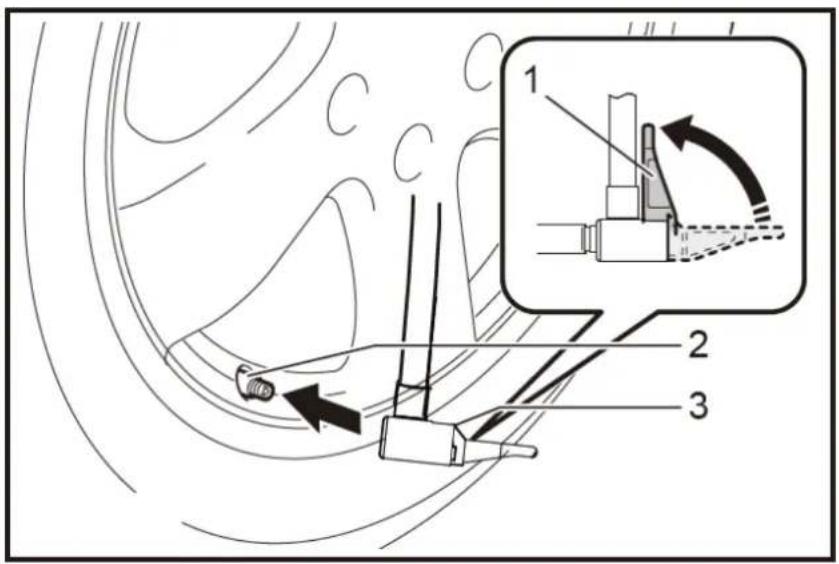
natural_image
Diagram of a mechanical component with a cylindrical shaft and threaded end, labeled with number 1 and rotation arrow (no text or symbols beyond labels)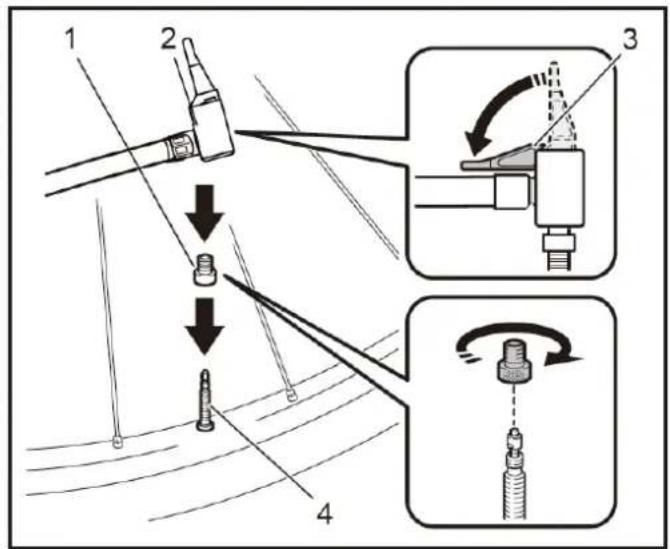
Smaltimento

ATTENZIONE!
Email: info@fuxtec.it
Web: www.fuxtec.it
Norme applicate / applicable standard
EN ISO 62841-1:2015
EN 1012-1:2010
EN ISO 12100:2010
EN55014-2:2015
Hereby we declare that the above mentioned machine meet the essential safety and health requirements of the above stated EC directives. Any manipulation or change of the machine not being explicitly authorized by us in advance renders this document null and void.
natural_image
Close-up of a FUXTEC 20V power supply device with orange and black buttons, no visible text or symbols on the device itself.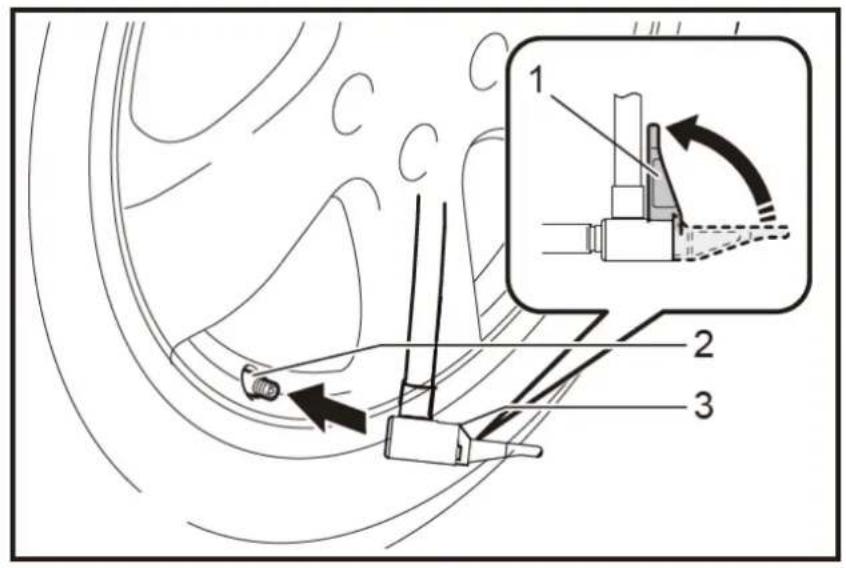
natural_image
Diagram of a mechanical component with a threaded shaft and connector, labeled with number 1 (no text or symbols on the object itself)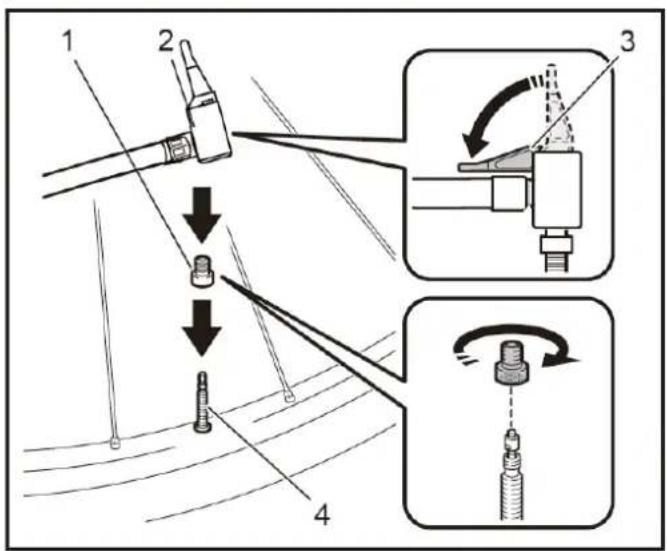
Eliminación

¡ATENCIÓN!
Hereby we declare that the above mentioned machine meet the essential safety and health requirements of the above stated EC directives. Any manipulation or change of the machine not being explicitly authorized by us in advance renders this document null and void.



- Entsorgung
- WARNUNG!
- Introduction and safety
- Intended Use
- General safety instructions for power tools
- WARNING!
- Workplace Safety
- Electrical Safety
- Safety of Persons
- Use and treatment of the power tool
- Use and handling of the cordless tool
- Safety instructions for battery compressor
- General Safety Instructions
- Before Use
- During Operation
- After use
- Safety instructions for the charger
- Safety Instructions for Li-Ion Batteries
- Safety instructions for working with the cordless compressor
- Use
- Always switch off the device before inserting or removing the battery.
- Overload:
- Low battery voltage:
- Pressure gauge (pressure measuring device)
- Caution:
- Stow the adapter
- Disposal
- For EU countries only
- i NOTE
- Technical Data
- Battery device
- Données techniques
- Contenuto
- Smaltimento
- ATTENZIONE!
- Norme applicate / applicable standard
- Eliminación
- ¡ATENCIÓN!
Brand : Fuxtec
Model : FX-E1CI20
Category : Compressor