ManualGo.com
HCM-315 - Humidifier HONEYWELL - Free user manual and instructions
Find the device manual for free HCM-315 HONEYWELL in PDF.



Download the instructions for your Humidifier in PDF format for free! Find your manual HCM-315 - HONEYWELL and take your electronic device back in hand. On this page are published all the documents necessary for the use of your device. HCM-315 by HONEYWELL.
USER MANUAL HCM-315 HONEYWELL
READ AND SAVE THESE SAFETY
INSTRUCTIONS BEFORE USING THIS
HUMIDIFIER When using electrical appliances, basic precautions should always be followed to reduce the risk of fire, electric shock, and injury to persons, including the following: 1. Always place this humidifier on a firm, flatand level surface. This humidifier may notwork properly on an uneven surface.2. Place this humidifier in an area where it is notaccessible to children.3. Do not place the humidifier near any heatsources such as stoves, radiators, andheaters.4. Do not use the humidifier outdoors.5. Before using the humidifier, check the powercord for any signs of damage. If the cord is found to be damaged, DO NOT USE and return the humidifier to the manufacturerunder the warranty agreement for repair.6. This appliance has a polarized plug (oneblade is wider than the other). To reduce therisk of shock, this plug is intended to fit onlyone way in a polarized outlet. If the plug doesnot fit securely in the outlet, reverse the plug.If it still does not fit, contact a qualified electrician. DO NOT attempt to defeat this safety feature.7. To disconnect the humidifier, first turncontrols to the OFF position, then grip theplug and pull it from the wall outlet. Neverpull by the cord.8. A loose fit between the AC outlet (receptacle)and plug may cause overheating and adistortion of the plug. Contact a qualifiedelectrician to replace loose or worn outlet.9. The humidifier should always be unpluggedand emptied when not in operation or whilebeing serviced or cleaned.10. Never tilt or attempt to move the humidifierwhile it is operating or filled with water.UNPLUG the humidifier before moving.11. This humidifier requires regular cleaning.Refer to the CLEANING instructions provided.Never clean the humidifier in any mannerother than as instructed in this manual.12. Do not direct moisture flow directly atindividuals, walls or furniture.13. When a humidifier is used in a closed room orsmall rooms, check periodically for properventilation, as excessive humidity can causecondensation stains on walls.14. Turn the humidifier OFF if you notice moistureon the inside of your windows. For properhumidity reading use a hygrometer, which isavailable in many hardware and departmentstores, or by ordering one from themanufacturer.The sealed UV bulbs contain a smallamount of mercury. Dispose of these itemsat household hazardous waste collectionsites only. If the UV bulb breaks, do notvacuum or handle with your bare hands.The Honeywell trademark is used by Kaz, Inc. under license from Honeywell Intellectual Properties, Inc. HCM-300T_HCM-310T_OM.qxd 5/22/06 5:56 PM Page 1HOW IT WORKS Quiet Care Technology – Dry air is pulled through the humidifier and the QuietCare
fan blows out invisible, moisture- balanced air. Unwanted minerals and bacteria from the water are trapped inside the filter. When the unit is running you WILL NOT see or feel a “mist.” You will know your humidifier is putting moisture into the air as the water level decreases in the tank throughout the day. Protec
Antimicrobial Treated Filter – Your filter has been treated with Protec
antimicrobial which helps prevent surface growth and migration of mold, mildew, algae, fungus and odor-causing bacteria in the filter for its life – approximately 1-3 months*. Keep in mind, depending on your water quality, mineral deposits can still clog or discolor the filter, affecting its life and that of the humidifier. Air Washing Technology – Unique air washing system which helps “wash the air as it humidifies.” The unique pre-filter in combination with an ionizer helps capture dust, dirt, and pollen while freshening the air**. UV Water Sanitizing Technology – The UV germicidal bulb located inside the main housing of the humidifier shines on the water passing through the chamber. This technology reduces the likelihood of harmful microorganisms***. HCM-300T
** The antimicrobial agent contained in the filter is intended to prolong filter life only by inhibiting the growth of unsightly mold, mildew and algae, as well as controlling odor from odor causing bacteria. The antimicrobial in the filter does not protect the user or others against bacteria, germs, viruses or other disease causing organisms. Always follow manufacturer’s instructions regarding cleaning, maintenance and service of your humidifier. ** From the air that passes through the pre-filter. Also note the pre-filter may slightly decrease humidity output. *** Based on independent testing, report 3095045-01. Results are based on microbial reduction rate testing performed using tap water in the water tray. The following listed microorganism growth reduction was maintained after 2 hours of continuous exposure to the ultraviolet light in the humidifier. Bacteria: Escheria Coli - 99% Pseudomonas fluorescens - 99% Mold: Aspergillus niger - 99% Fungus: Penecillium pinophilum - 99% Virus: MS2 - 99%
Your humidifier is made up of these parts: It is recommended that you disinfect your humidifier prior to first use. See CLEANING Instructions.
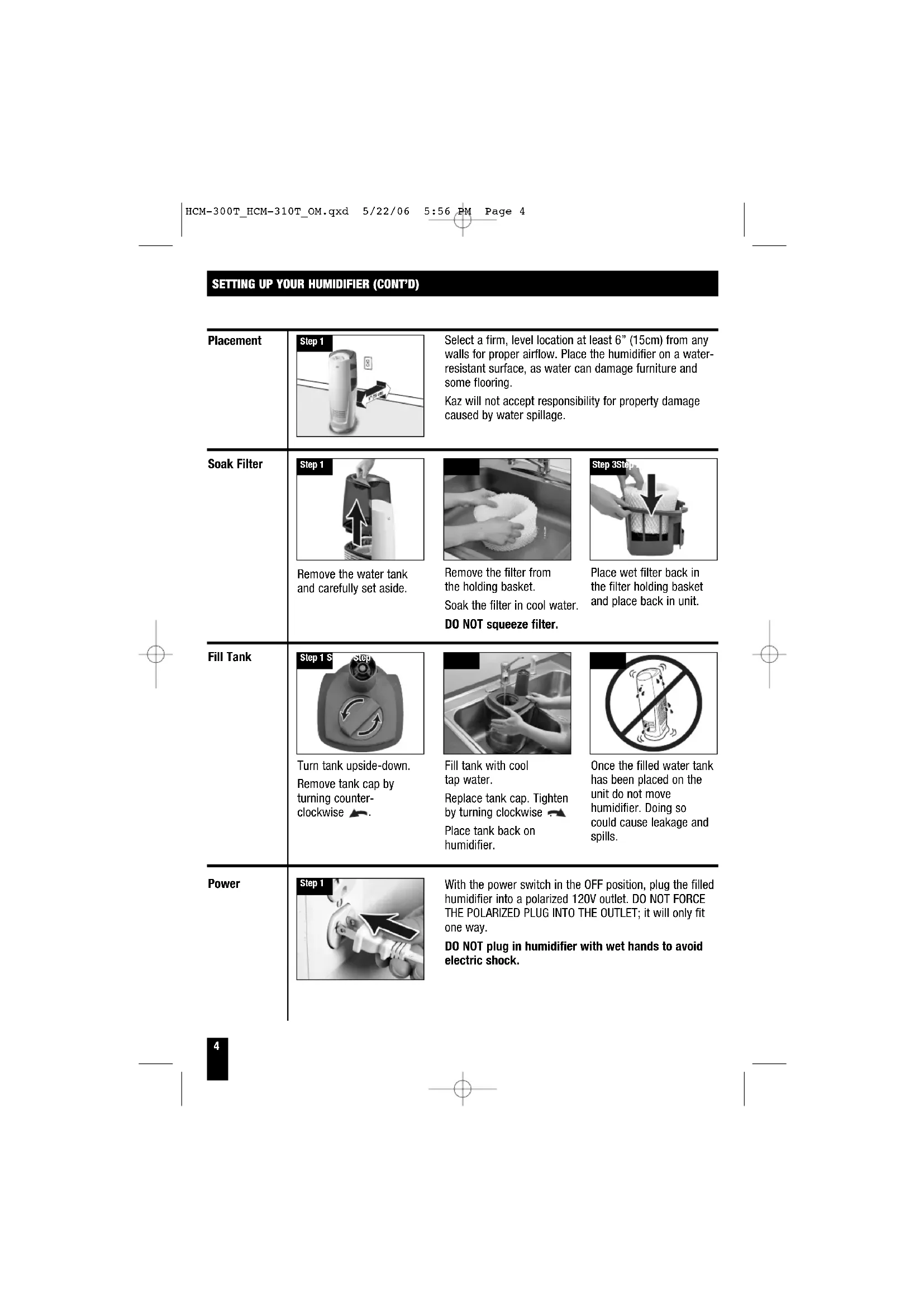
HCM-300T_HCM-310T_OM.qxd 5/22/06 5:56 PM Page 3Step 1 Step 3Step 2 Fill tank with cool tap water. Replace tank cap. Tighten by turning clockwise . Place tank back on humidifier. Remove the filter from the holding basket. Soak the filter in cool water. DO NOT squeeze filter. Place wet filter back in the filter holding basket and place back in unit. SETTING UP YOUR HUMIDIFIER (CONT’D) Placement Soak Filter Power Fill Tank Remove the water tank and carefully set aside. Turn tank upside-down. Remove tank cap by turning counter- clockwise
Once the filled water tank has been placed on the unit do not move humidifier. Doing so could cause leakage and spills. With the power switch in the OFF position, plug the filled humidifier into a polarized 120V outlet. DO NOT FORCE THE POLARIZED PLUG INTO THE OUTLET; it will only fit one way. DO NOT plug in humidifier with wet hands to avoid electric shock. Select a firm, level location at least 6” (15cm) from any walls for proper airflow. Place the humidifier on a water- resistant surface, as water can damage furniture and some flooring. Kaz will not accept responsibility for property damage caused by water spillage.
HCM-300T HCM-310T/ HCM-315T Model # Output/Fan Speed Control Set Humidity Set fan speed to desired output: High () Fast Humidifying Medium () Everyday moisture control Low () Nighttime or maintenance use Turn the humidistat knob clockwise to the highest setting ( ). Run on high for at least 1 hour or until room has reached a comfortable humidity level. Then slowly turn the humidistat knob counter- clockwise until the humidifier shuts off. The desired humidity light will illuminate. Once set, the humidifier will automatically cycle on and off based on your setting. Max: 55% Min: 35% Use the (+) up or (–) down button to set desired humidity. The unit will operate until the selected humidity is reached or the unit is turned off. When desired humidity is reached, the fan will shut off but LED will remain lit. The fan will turn back on when the room humidity drops below the set level. NOTE: To go back to continuous run mode, turn your unit off and on again. NOTE: The UV bulb can be turned off and on using the button. Press power to start unit in high speed. Push (+) Up button or (–) Down button to select the output level. Step 1 Step 2 Step 1 Step 1 Step 2
CHANGING THE UV BULB
The filter should be changed every 1-3 months depending on your water quality. Keep in mind, depending on your water quality, mineral deposits can still clog or discolor the filter, affecting it’s life and that of the humidifier. It is recommended you change your filter in the bathroom or kitchen. Keep in mind your filter may be damp depending on your last usage. To change the filter: Step 2 Step 3 Uses replacement filter HAC-504 or HAC- 504AW. Turn off and unplug your humidifier. Remove the water tank and carefully set aside. Remove filter holding basket and discard old filter. Step 1 Step 2 Step 3 Turn off and unplug your humidifier. Remove the water tank and carefully set aside. Press on the button located on the side of the UV bulb. Carefully use your other hand to pull the UV cartridge away from the unit. Step 5 Step 6 Step 7 Soak new filter in cool water. Do not squeeze out. Insert new filter into holding basket and place filter holding basket back in unit. Replace the water tank. NOTE: It is recommended that all maintenance be done in the kitchen or bathroom on a water resistant surface. Remove water tank from unit before moving.
CHANGING THE UV BULB (CONT’D.) CLEANING Cleaning involves two steps, SCALE REMOVAL and DISINFECTING. Be sure to perform these in the proper order to avoid harmful chemical interactions. SCALE REMOVAL NOTE: REMOVE FILTER BEFORE CLEANING. Failure to remove filter during cleaning will destroy the filter. NOTE: Discard the old UV bulb cartridge at a household hazardous waste collection site. Bulb and bulb housing are not intended for use with any other product or purpose. Lamp contains mercury. Manage in accordance with disposal laws. See www.lamprecycle.org or call 1-800-895-8842. Step 4 Step 5 Place your replacement UV bulb in the unit by pressing the UV bulb firmly into the opening. Be certain the prongs locate on the back of the bulb are lined up with the receptacle in the UV holder. Place filter basket and replace the water tank in the humidifier. Step 1 Step 2 Step 3 Step 4 Turn off and unplug your humidifier. Remove the water tank and carefully set aside. Remove filter basket. Remove filter from basket. Failure to do so will destroy the filter. Place basket in sink or tub and fill the bottom of the basket with undiluted vinegar. Let stand for 20 minutes. With vinegar in the basket, wipe surface with a soft cloth or brush. Rinse the filter basket thoroughly with water to remove scale and cleaning solution. Step 8 Step 6
Step 4 Step 5 Remove the water tank and carefully set aside. Remove filter holding basket. Remove filter and set aside. Failure to do so will destroy the filter. Fill water tank with 1 tsp. of household bleach and 1 gallon of cool water Step 6 Step 7 Pour some solution into the filter basket. Let stand for 20 minutes. Rinse with water until the smell of bleach is gone.
END-OF-SEASON CARE AND STORAGE
- Follow the CLEANING instructions when the humidifier will not be used for at least one week or more, or at the end of the season.
- At the end of the season, remove and throw away the filter; do not store with a used filter.
- Dry the humidifier completely before storing. DO NOT store with water inside the Base or Water Tank.
- Pack the unit in its original carton and store in a cool, dry location.
- Before next use, remember to clean your humidifier and install a new filter. CONSUMER RELATIONS Mail questions or comments to: Kaz, Incorporated Consumer Relations Dept. 250 Turnpike Road, Southborough, MA 01772 Please be sure to specify model number. Call us toll-free at: 1-800-477-0457; E-mail: consumerrelations@kaz.com Or visit our website at: www.kaz.com Purchase replacement filter part number HAC-504AW or HAC-504 and UV bulb part number 22LP300T000. Step 1 NOTES: The use of other water treatment products and chemicals may cause deterioration of the filter or damage the humidifier, thereby hindering the humidifier’s effectiveness.
Series models are rated at 120V, 60 Hz. NOTE: IF YOU EXPERIENCE A PROBLEM, PLEASE RETURN THE HUMIDIFIER TO THE ORIGINAL PLACE OF PURCHASE OR SEE YOUR WARRANTY. DO NOT ATTEMPT TO OPEN THE MOTOR HOUSING YOURSELF. DOING SO MAY VOID YOUR WARRANTY AND CAUSE DAMAGE TO THE HUMIDIFIER OR PERSONAL INJURY. TROUBLESHOOTING Q: I hear the fan turning, but I don’t see any mist. Is my humidifier operating properly? A: Dry air is pulled through the system and a fan disperses invisible, moisture balanced air. There is no “mist” emitted. When operating normally you will feel only cool air coming from the unit. Monitor the water level in your Tank/ Base. If you notice a decrease in the Water Tank over 24 hours then the unit is operating normally. Q: My unit has been running for several hours. I hear the fan spinning, but I do not notice the water level in the tank decreasing. A: First, check the filter to ensure it is wet. If the pad appears dry, remove it from the Base and gently rinse under cool water. Reposition wet filter in the Base. You may also want to note the current moisture level in your home. If the humidity level is over 60% the unit will not put out much moisture as your air is already saturated. Q: The humidifier is not running (the fan is not even spinning), but all (or some) of the lights are on. (Model HCM-300T) A: If the Desired Humidity light is ON: The Advanced Mist
Humidistat knob may be set too low. Moving the knob clockwise to the end should restart the unit. Q: The Advanced Mist
Humidistat knob was set according to the manual, but the humidifier never seems to turn back on. Is something wrong? (Model HCM-300T) A: The Humidistat knob may be set too low. Moving the Humidistat knob to the end clockwise should restart the unit. Q: The Advanced Mist
Humidistat knob was set according to the manual, but the humidifier never seems to turn off. Is something wrong? (Model HCM-300T) A: The Humidistat knob may be set too high. Reset the Advanced Mist
Humidistat knob following the instructions under FEATURES. Q: My filter has turned light brown and rust colored. Do I need a new filter? A: Probably not. Since your filter has been made with Protec
antimicrobial the change in color indicates only a mineral deposit. Soak filter in a sink full of cool water to help break up deposits. The discoloration may remain but will not affect the humidifier’s performance. Q: My humidifier doesn’t appear to be as clean as when I first purchased and/or I’m smelling an unpleasant odor. What should I do? A: If you have been using your humidifier regularly for over 30 days, follow the cleaning instructions.
HCM-300T_HCM-310T_OM.qxd 5/22/06 5:56 PM Page 9©2006 Kaz, Incorporated All Rights Reserved. P/N: 31IM300T190 You should first read all instructions before attempting to use this product. A. This 3 year limited warranty applies to repair or replacement of product found to be defective in material or workmanship. This warranty does not apply to damage resulting from commercial, abusive, unreasonable use or supplemental damage. It also does not apply to the filter or Protec
Cleaning Cartridge. Defects that are the result of normal wear and tear will not be considered manufacturing defects under this warranty. KAZ IS NOT LIABLE FOR INCIDENTAL OR
CONSEQUENTIAL DAMAGES OF ANY
NATURE. ANY IMPLIED WARRANTY OF
MERCHANTABILITY OR FITNESS FOR A
PARTICULAR PURPOSE ON THIS PRODUCT
IS LIMITED IN DURATION TO THE DURATION OF THIS WARRANTY. Some jurisdictions do not allow the exclusion or limitation of incidental or consequential damages or limitations on how long an implied warranty lasts, so the above limitations or exclusions may not apply to you. This warranty gives you specific legal rights, and you also may have other rights which vary from jurisdiction to jurisdiction. This warranty applies only to the original purchaser of this product from the original date of purchase. B. At its option, Kaz will repair or replace this product if it is found to be defective in material or workmanship. Defective product should be returned to the place of purchase in accordance with store policy. Thereafter, while within the warranty period defective product may be returned to Kaz. C. This warranty does not cover damage resulting from any unauthorized attempts to repair or from any use not in accordance with the instruction manual. D. Return defective product to Kaz, Incorporated with a brief description of the problem. Include proof of purchase and a $10 US/$15.50 CAN check or money order for handling, return packing and shipping charges. Please include your name, address and a daytime phone number. You must prepay shipping charges. Send to