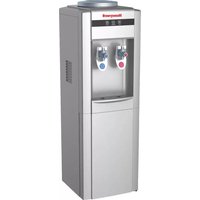
HWBAP1052 - Water dispenser HONEYWELL - Free user manual and instructions
Find the device manual for free HWBAP1052 HONEYWELL in PDF.


User questions about HWBAP1052 HONEYWELL
0 question about this device. Answer the ones you know or ask your own.
Ask a new question about this device
Download the instructions for your Water dispenser in PDF format for free! Find your manual HWBAP1052 - HONEYWELL and take your electronic device back in hand. On this page are published all the documents necessary for the use of your device. HWBAP1052 by HONEYWELL.
USER MANUAL HWBAP1052 HONEYWELL
natural_image
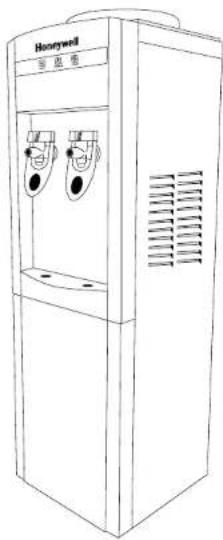
Line drawing of a water dispenser with two cups and a label 'Honeywell' (no text or symbols on the device itself)FREE STANDING WATER COOLER
OWNER'S MANUAL
Read and save these
instructions before use
MODEL
HWBAP1052 Series
For customer service please contact:
1-855-687-2223
ANTIBACTERIAL

Helps to inhibit bacteria growth

This system has been tested and certified by WQA against NSF/ANSI 42 for Bacteriostasis
Mitrana Group HK Ltd.
Suite B, 10/F., Hong Kong Diamond
Exchange Building, Nos 8-10 Duddell
Street, Central, Hong Kong.
For general inquires about Mitrana Group HK Ltd.
or Honeywell Water Coolers please contact
the toll free number:
1-855-HWHELP1 (1-855-494-3571).
International rates may apply.
Of visit: www.honeywellwatercoolers.com
:rotubirtsiD SU
SCA Imports LLC
848 Brickell Ave
Suite 302
Miami, Fl 33131
Customer Service:1-855-687-2223
© 2016 Mitrana Group HK Ltd. All rights reserved.
IM02-HWBAP1052-W/S/B-2016-06.
The Honeywell Trademark is used under license from
Honeywell International Inc.
Honeywell International Inc. makes no representations
or warranties with respect to this product.
This product is manufactured by Mitrana Group HK Ltd.
CONTENTS
- Before First Use 3
- Parts and Features....4
- Important Safety Instructions....5
- Function Buttons 6
- Indicator Lights....7
- Installation Guidelines....7
- Installing Your Water Cooler For The First Time 8
- Instructions For Loading The Water Bottle....11
- Cold Water Thermostat Adjustment 13
- Maintenance....14
- Technical Specification....14
- Performance Data Sheet 15
- Troubleshooting Guide....16
2
1. BEFORE FIRST USE
Read all instructions carefully before setting up and operating the unit. Please keep this instruction manual for future reference. This manual is designed to provide you with important information needed to operate and maintain your water dispenser. If you don't understand something or you need more assistance please contact us. Failure to follow these instructions may damage and/or impair operation and void the warranty.
Keep proof of the original purchase date with this guide to establish the warranty period. Keep a copy of the sales receipt.
Write down the model and serial numbers which can be found on a label located on the side of the water cooler.
Please write the information here:
Date of Purchase:
Model Number: HWBAP1052
Color: ( ) White ( ) Silver ( ) Black
Serial Number:
WARNING: BEFORE CONNECTING THE APPLIANCE TO THE POWER SOURCE, LET IT STAND UPRIGHT FOR APPROXIMATELY 24 HOURS. THIS WILL REDUCE THE POSSIBILITY OF A MALFUNCTION IN THE COOLING SYSTEM FROM MISHANDLING DURING DELIVERY.
3
2. PARTS AND FEATURES
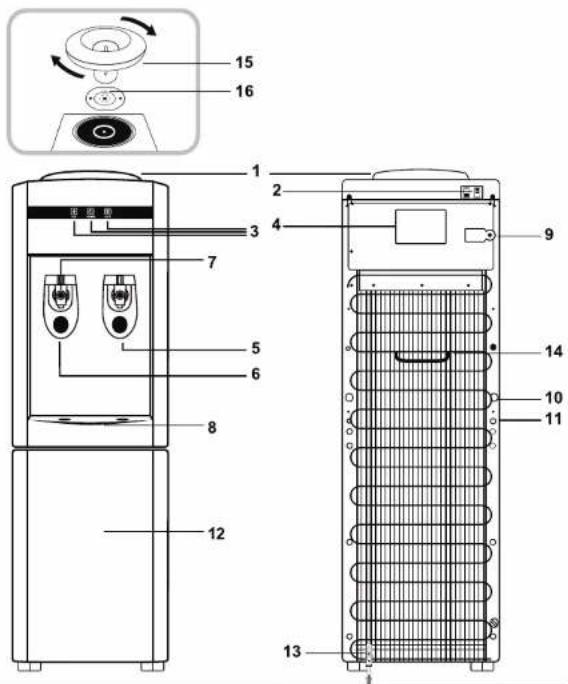
| No | Name | No | Name |
| 1 | Water Funnel | 9 | Cold Water Thermostat Adjustment |
| 2 | Hot and Cold Power Switches | 10 | Power Cord |
| 3 | Indicator Lights | 11 | Drain Cap |
| 4 | Rating Label | 12 | Storage Cabinet |
| 5 | Cold Water Faucet Tap | 13 | Bracket Kit |
| 6 | Hot Water Faucet Tap | 14 | Handle |
| 7 | Safety Lock | 15 | Hot Water Funnel |
| 8 | Drip Tray | 16 | Antibacterial Disc |
3. IMPORTANT SAFETY INSTRUCTIONS
WARNING To reduce the risk of fire, electrical shock, or injury when using your appliance, follow these basic precautions:
- Read and understand all instructions before using the water cooler.
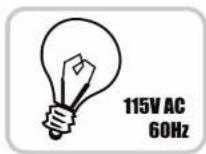
- Your water cooler runs on 115 Volt AC, 60 Hz current. Do not plug this product to 220V current.
- Before operating the product remove it from its packaging and check if it is in good condition.
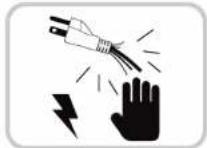
- DO NOT operate any product with a damaged cord or plug. Using an extension cord is not recommended with this appliance.
- Make sure the water cooler is plugged into an exclusive properly installed GFCI (Ground-fault Circuit-interrupter) wall outlet. Do not cut or remove the third (ground) prong from the power cord under any circumstances. Any questions concerning power and/or grounding should be directed toward a certified electrician. Improper use of the grounded plug can result in the risk of electrical shock. If the power cord is damaged, have it replaced by an authorized service center.
- DO NOT run power cord under carpeting or cover it with rugs or runners. Keep the cord away from areas where it may be tripped over.
- Always unplug the appliance from the power source before cleaning, servicing or relocating the unit.
- Make sure to turn OFF the unit when the hot and cold water tanks are empty. Always have water inside the tanks before turning ON any switch. Overlook of this warning may cause permanent damage to the unit from overheating.
- Remove the power cord from the electrical receptacle by grasping and pulling on the power cord plug-end only, never pull the cord.
- DO NOT attempt to repair or adjust any electrical or mechanical functions of the unit, as this may void the warranty.
• DO NOT let children play with this appliance, packaging or plastic bags. - If the unit is damaged or it malfunctions, do not continue to operate it. Refer to the troubleshooting section and/or please seek professional advice.
- Never locate the product where it may fall into a bathtub or other water container.
• DO NOT use in bathrooms or outdoors.
3. IMPORTANT SAFETY INSTRUCTIONS
- This appliance is not intended for use by persons (including children or elderly) with reduced physical, sensory or mental capabilities, or lack of experience and knowledge, unless they have been given supervision or instruction concerning use of the appliance by a person responsible for their safety.
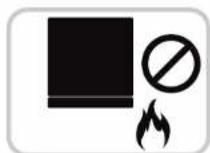
- Never clean parts with flammable fluids. The fume can create a fire hazard or explosion.
- Do not store or use gasoline or any other flammable vapors and liquids in the vicinity of this or any other water dispenser. The fumes can create a fire hazard or explosion.
- CAUTION: To prevent accidental tip hazard, the water cooler must be securely anchored to the floor as shown in section "Installing Your Water Cooler For The First Time"
- Keep this instructions handy for future reference.
4. FUNCTION BUTTONS
POWER:
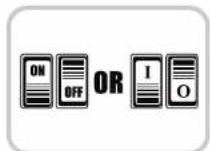
Press on the hot or cold switches on the back of the unit to turn on the hot and cold functions. DO NOT turn on both switches at the same time. Please refer to INSTALLING YOUR WATER COOLER FOR THE FIRST TIME section.
WATER TAPS:
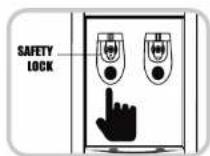
Push in the hot or cold water levers with a cup or container to dispense the desire water temperature. To use the hot lever, press the middle red button (safety lock) and simultaneously push in the lever.
DRAIN CAP:
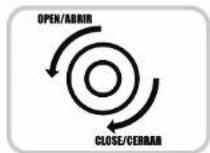
Turn counterclockwise to remove the drain cap to drain the water from the tanks. Turn clockwise to close the drain cap.
5. INDICATOR LIGHTS
This unit features a power light to indicate the water cooler is ON.
Additionally, it has two Indicator Lights for the hot and cold water respectively, which will light up while the feature is working. Once the water has reached the minimum temperature, the Indicator Lights will turn OFF.

6. INSTALLATION GUIDELINES
- Remove the exterior and interior packing.
- With both hands, one under the front panel between the faucets and the other in the handle located in the back, move the unit and place it in the desired location, provided it is a leveled surface.
- BEFORE CONNECTING THE UNIT TO THE POWER SOURCE let it stand upright for approximately 24 hours. This will reduce the possibility of a malfunction in the cooling system from mishandling during delivery.
- This unit is for indoor use only and must be installed in a cool, ventilated area.
- Place the unit on a level surface that is strong enough to support the dispenser.
- Keep area around the unit free of dust and dirt.
- Locate the unit away from direct sunlight and sources of heat (stove, heater, radiator, etc.).
- Direct sunlight may affect the unit over time and heat sources may increase electrical consumption. Extreme cold ambient temperatures may also cause the appliance not to perform properly.
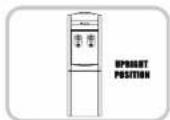
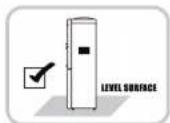
6. INSTALLATION GUIDELINES
- Direct sunlight may also cause algae to grow inside your water bottle that may later cause product malfunction.
- DO NOT locate the unit in areas where the temperature may fall below freezing (32°F / 0°C).
- Allow 6 inches of space between the unit and the wall, to allow for proper air circulation to cool the compressor.
- CAUTION: To prevent accidental tip hazard, the water cooler must be securely anchored to the floor as shown in section "Installing Your Water Cooler For The First Time"
- Please follow the instructions to load the water bottle before plugging the unit to the power source.
- Make sure the hot and cold water power switches are in the OFF position before plugging the unit to the power source.
• Do not use an adapter plug with this unit. - Do not use an extension cord with this unit. If the power cord is too short, have a qualified electrician or service technician install an outlet near the appliance.
- Plug the unit into an exclusive properly installed grounded wall outlet. Do not cut or remove the third (ground) prong from the power cord under any circumstances. Any questions concerning power and/or grounding should be directed toward a certified electrician.
ATTENTION: If you do not plan to use the water heating function for more than three days, we recommend that you turn off the hot water power switch.
7. INSTALLING YOUR WATER COOLER FOR THE FIRST TIME
IMPORTANT STEPS BEFORE USING YOUR WATER COOLER
BEFORE CONNECTING THE APPLIANCE TO THE POWER SOURCE, let it stand upright for approximately 24 hours. This will reduce the possibility of a malfunction in the cooling system from mishandling during delivery.
WARNING: Please make sure to turn OFF the unit when the hot and cold water tanks are empty. Always have water inside the tanks before turning ON any switch.
The water cooler is pre-cleaned at the factory but the reservoir, hot and cold water tanks and water lines must be flushed with fresh water before use as follows:
8
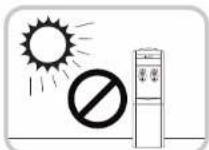
7. INSTALLING YOUR WATER COOLER FOR THE FIRST TIME
- Ensure the unit is unplugged.
- Remove the Funnel by turning it clockwise or counter-clockwise depending on the model. Make sure the Hot Water Funnel (semi-transparent plastic piece) is firmly sitting on the metal prong of the tank and the Antibacterial disc is adhered to the top surface of the Hot Water Funnel (Fig. 1)
- Fill the water reservoir with tap water full to capacity until it settles 1 inch above the Hot Water Funnel. Allow the water to rest in the hot and cold water tanks for 5 minutes. (Fig. 2)
- Push each water lever (hot and cold temperature) to ensure water is running through the unit. (Fig. 3)
- Plug the dispenser unit into the electrical outlet. Please review the IMPORTANT SAFETY INSTRUCTIONS and INSTALLATION GUIDELINES before doing so.
- Turn ON the hot water switch, wait a couple of minutes and turn ON the cold water switch. Allow the unit to reach the minimum cold and hot water temperatures. This will take approximately 60 minutes and the Indicator Lights will turn OFF. (Fig. 4)
- Test the water temperatures by pushing once again on the water levers.
- Turn OFF both hot and cold water switches and unplug the unit from the electrical outlet.
- Proceed to drain the water from the faucets one at a time by pushing on the hot and cold levers until no more water remains.
- Turn counterclockwise to open the drain cap and drain the water from the tanks. Do not tilt the unit to drain the water. (Fig. 5)
- Close the drain cap by turning it clockwise.
- Place the Funnel back in its original position.
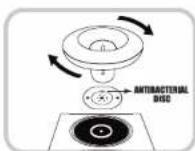
Fig.1
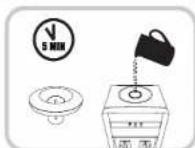
Fig.2
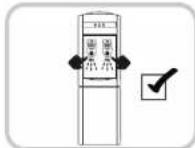
Fig.3
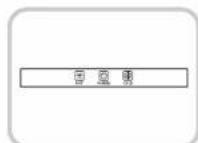
Fig.4
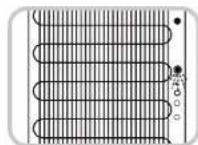
Fig.5
9
7. INSTALLING YOUR WATER COOLER FOR THE FIRST TIME
-
Installing the floor Bracket Kit (Fig. 6) Note: All hardware is included. Set up requires a drill and a Phillips screwdriver (not included).
-
Using a Phillips screwdriver remove the screw (3) on the lower left side of the condenser, place the L-shaped bracket (2) in the same position and secure it using the same small screw.
-
Drill a hole in the floor 6 inches away from the wall. Choose the appropriate
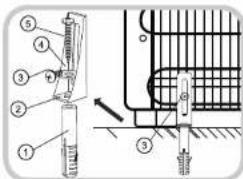
Fig.6
drill bit depending on your floor type (tile, concrete or wood). Use the size 3/8" diameter to drill a hole 2 inches deep.
-
Place the anchor (1) in the hole so that it is flush with the floor level.
-
Align the L-shaped bracket (2) to the anchor and use the washer (4) and the long screw (5) to secure the unit to the floor.
-
Your unit is ready to be used. Please proceed with the water bottle loading instructions.
8. INSTRUCTIONS FOR LOADING THE WATER BOTTLE
WARNING: Only use 3 or 5 gallon water bottles on this water cooler.
WARNING: Please make sure to turn OFF the unit when the hot and cold water tanks are empty. Always have water inside the tanks before turning ON any switch.
Loading bottles with spill proof cap
- This unit contains a funnel with a prong to avoid spills when using bottles with spill proof cap.
- Carefully lift the bottle (approx. 40 lbs. for the 5 gallon bottle). Bend your knees to lift the bottle, not your back. Do not place hands over the opening of the bottle while placing it on the unit. Please seek help if you are unable to lift the water bottle.
- Invert the 3 or 5 gallon water bottle over the unit and gently let the neck of the bottle slide into the funnel, making sure the spill proof cap slides down into the prong.
- The prong will break the spill proof cap allowing the water from the bottle to go down into the funnel and into the main reservoir without any spills.
- Allow the water to fill all tanks of the unit for approximately one minute.
- Push in on all water levers to make sure water flows from all faucets.
• Plug the unit back into the electrical outlet. - Turn ON the hot water switch, wait a couple of minutes and turn ON the cold water switch. Allow the unit to reach the minimum cold and hot water temperatures. This will take approximately 45 minutes and the Indicator Lights will turn OFF.
- Test the water temperatures by pushing once again on the water levers.
- Your water cooler is now ready for use.
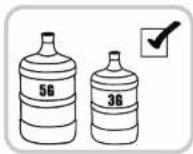
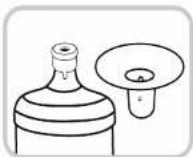
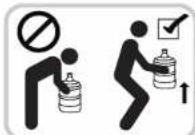
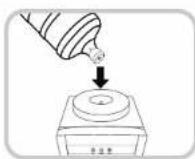
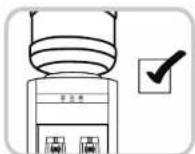
8. INSTRUCTIONS FOR LOADING THE WATER BOTTLE
Loading bottles without spill proof cap
- Remove the cap from the 3 or 5 gallon water bottle and use a clean cloth to wipe off the neck of the bottle.
- Carefully lift the bottle (approx. 40 lbs. for the 5 gallon bottle). Bend your knees to lift the bottle, not your back. Do not place hands over the opening of the bottle while placing it on the unit. Please seek help if you are unable to lift the water bottle.
- Invert the 3 or 5 gallon water bottle over the unit and gently let the neck of the bottle slide into the funnel, making sure the prong goes into the neck of the bottle.
- Allow the water to fill all tanks inside the unit for approximately one minute.
- Push in on all water levers to make sure water flows from all faucets.
• Plug the unit back into the electrical outlet. - Turn ON the hot water switch, wait a couple of minutes and turn ON the cold water switch. Allow the unit to reach the minimum cold and hot water temperatures. This will take approximately 45 minutes and the indicator lights will turn OFF.
- Test the water temperatures by pushing once again on the water levers.
- Your water cooler is now ready for use.
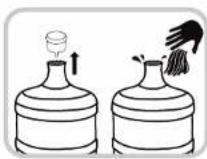
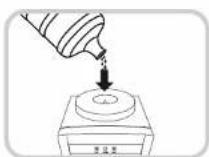
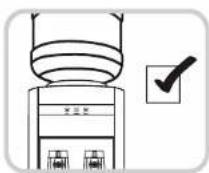
Steps To Replace Water Bottles
WARNING: Please make sure to turn OFF the unit when the hot and cold water tanks are empty. Always have water inside the tanks before turning ON any switch.
• Turn OFF the hot and cold water switches.
- Unload the empty bottle from the water cooler.
- Proceed to load the new bottle following the INSTRUCTIONS FOR LOADING THE WATER BOTTLE.
9. COLD WATER THERMOSTAT ADJUSTMENT
At the back of the unit there is a yellow label that covers the screw to adjust the cold water thermostat.
WARNING: Adjust the cold water thermostat only if absolutely necessary. Over adjustment may cause compressor failure and void the warranty.
Factory default temperature setting is 42.8°F (6°C). In order to adjust the cold water thermostat, break the seal and using a flat screwdriver turn the cold water thermostat screw NO MORE than 45° clockwise to adjust the default setting to 41°F (5°C). DO NOT turn over 45°.
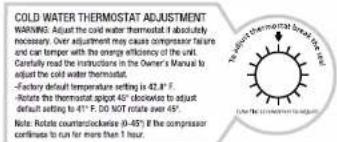
TO ADJUST COLD WATER THERMOSTAT BREAK THE SEAL
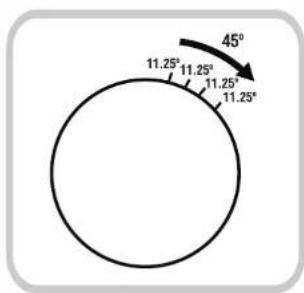
(Use a flat screwdriver to adjust)

Example of 45°.
Position of the screw will vary per unit.
Therefore starting turning point will differ per unit
NOTE: If the compressor runs continuously for more than 1 hour turn the screw counterclockwise a few degrees (0-45°) until the compressor stops (allow 10 minutes timeframe after each adjustment for the compressor to stop).
10. MAINTENANCE
CAUTION:
- Before cleaning the unit, switch the hot and cold switches to the OFF position and remove the plug from the power socket.
- Never use corrosive elements or any chemicals to clean this product.
- When the product is not in use, store the unit in a dry place out of direct sunlight.
Cleaning the outside of the water cooler
- To clean the outside of the unit, use a soft cloth with warm water. Avoid abrasive cleaners or hard materials to prevent damage and or scratches to the unit.
- Clean the drip tray regularly to avoid water buildup. To remove the drip tray simply lift it up and outward. Do not use a dishwasher to clean the drip tray.
- To clean the back of the machine, clean with a duster such as a micro fiber cloth and/or vacuum the coils using the duster attachment of the vacuum (please refer to your vacuum cleaner owner's manual).
Storing your Water Cooler
Please follow these instructions to store the water cooler when it will not be used for an extended period of time.
- Turn OFF the hot and cold water switches. Unplug the power cord from the power supply.
- Drain the water through the faucets and draining cap.
- The unit must be stored in the upright position and protected from dust.
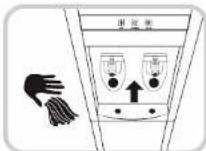
- TECHNICAL SPECIFICATION
| Model No | HWBAP1052 Series |
| Voltage and Frequency | 115V/60Hz |
| Rated Total Power | 485W |
| Heating Power | 400W |
| Cooling Power | 85W |
| Heating Capacity | 4L/h - ≥ 90°C (1.06 G/h - ≥ 194°F) |
| Cooling Capacity | 2L/h - ≤ 10°C (0.53 G/h - ≤ 50°F) |
| Compressor Refrigerant | Eco Friendly R134a |
12. PERFORMANCE DATA SHEET
- Do not use with water that is unsafe or of unknown quality without adequate disinfection before or after the system.
- While testing was performed under laboratory conditions, actual performance may vary.
- This system has been tested according to NSF/ANSI 42 for bacteriostasis. The concentration of the indicated substances in water entering the system was unchanged under the permissible limits for water leaving the system, as specified in NSF/ANSI 42.
| Influent Challenge | Challenge requirement* |
| Native bacteria in water +/-20% |
* Influent Challenge Concentration of 1.0 x 10 CFU/ML - 1.5 x 10 CFB/ML, actual levels remained the same within a variation from -9.57% to 2.82%
13. TROUBLESHOOTING GUIDE
IF THE UNIT IS NOT WORKING PROPERLY, PLEASE REFER TO THE TABLE BELOW TO SOLVE MOST COMMON PROBLEMS:
| Issue | Possible Cause | Solution |
| No water comes out from the faucets | • No water inside the tanks.• Tanks or tubes inside the unit are clogged.• Levers not working properly. | • Make sure the tanks are filled with water.• Contact customer service. |
| No hot water | • Hot switch is OFF.• The unit may have overheated.• Hot switch is damaged. | • Turn ON the hot switch. Check the temperature 45 minutes later.• Turn OFF the hot switch and allow the unit to rest for 1 hour. Turn ON the hot switch again (make sure there is water inside the tank).• Contact customer service. |
| No cold water | • Cold switch is OFF.• The unit may have overheated.• Cold switch is damaged.• Hot water funnel is not properly placed. | • Turn ON the cold switch. Check the temperature 45 minutes later.• Turn OFF the hot and cold switches and allow the unit to rest for 1 hour. Turn ON both switches again (make sure there is water inside the tank).• Place the Hot Water Funnel firmly on the metal prong.• Contact customer service. |
| Water leaking from the unit | • Drip tray is full.• The water bottle was not properly loaded.• Water leakage inside of the unit. | • Empty the drip tray.• Turn OFF the cold and hot water switches and dry the unit on the outside and its surroundings.• If the problem continues, contact customer service. |
| Odor in the water | • New machine.• The unit has not been used for a long time.• There may be an algae issue. | • Please proceed with First Time Instructions on page 8.• If the problem continues, contact customer service. |
| Low Electric shocks | • The unit is not properly grounded.• The power cord is damaged. | • Please call a professional electrician to assist you with any electrical problem.• If the problem continues, contact customer service. |
For any issue not shown on the table, please contact customer service. 1-855-687-2223
Do not attempt to disassemble the unit yourself. The manufacturer will not undertake any responsibility from damages or incidents resulting from it. This action will void the manufacturer's warranty.
Honeywell
natural_image
Line drawing of a water dispenser with two side outlets and ventilation grilles (no text or symbols)REFROIDISSEUR D'EAU SUR PIED
MANUEL D'UTILISATION
Exchange Building, Nos 8-10 Duddell
Street, Central. Hong Kong.
For general inquires about Mitrana Group HK Ltd.
or Honeywell Water Coolers please contact
the toll free number
1-855-HWHELP1 (1-855-494-3571).
International rates may apply
Or visit: www.honeywellwatercoolers.com
:rotubirtsiD SU
SCA Imports LLC
848 Brickell Ave
Suite 302
Miami, Fl 33131
Customer Service: 1-855-687-2223
© 2016 Mitrana Group HK Ltd. All rights reserved.
IM02-HWBAP1052-W/S/B-2016-06.
The Honeywell Trademark is used under license from
Honeywell International Inc
Honeywell International Inc. makes no representations
or warranties with respect to this product
This product is manufactured by Mitrana Group HK Ltd.
TABLE DES MATIÈRES
Fig.6
8. INSTRUCTIONS DE CHANGEMENT DE LA BOUTEILLE D'EAU
Exchange Building, Nos 8-10 Duddell
Street, Central, Hong Kong.
For general inquires about Mitrana Group HK Ltd.
or Honeywell Water Coolers please contact
the toll free number:
1-855-HWHELP1 (1-855-494-3571).
International rates may apply.
Or visit: www.honeywellwatercoolers.com
:rotubirtsiD SU
SCA Imports LLC
848 Brickell Ave
Suite 302
Miami, Fl 33131
Customer Service:1-855-687-2223
© 2016 Mitrana Group HK Ltd. All rights reserved.
IM02-HWBAP1052-W/S/B-2016-06
The Honeywell Trademark is used under license from
Honeywell International Inc.
Honeywell International Inc. makes no representations
or warranties with respect to this product.
This product is manufactured by Mitrana Group HK Ltd.
CONTENIDO
Fig.6