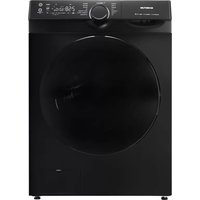
VWM8010B - Washing machine INVENTUM - Free user manual and instructions
Find the device manual for free VWM8010B INVENTUM in PDF.



| Product type | Washing machine |
| Brand | Inventum |
| Model | VWM8010B |
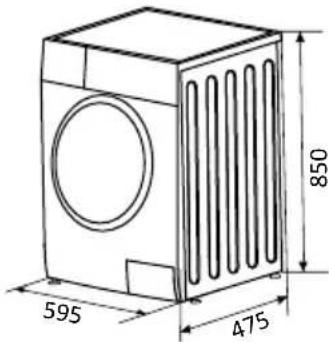
| Dimensions (W x D x H) | 595 x 475 x 850 mm |
| Net weight | 63 kg |
| Power supply | 220-240 V~, 50 Hz, 1950 W |
| Rated current | 10 A |
| Water pressure | 0.05 - 1 MPa (0.5 - 10 bar) |
| Maximum washing capacity | 8 kg (cotton) |
| Maximum spin speed | 1400 rpm (adjustable) |
| Number of programs | 13 (Cotton, Synthetic, Mix, Bedding, Allergy, 20°C, Rapid 15 min, Sterile 70°C, ECO 40-60, Wool, Rinse and spin, Spin and drain, Drum clean) |
| Special functions | Delayed start, Quick wash, Steam cleaning, Pre-wash, Extra rinse, Silent, Dirt level, Child lock, Add laundry, Calibration |
| Motor | Inverter motor (10-year warranty) |
| Safety | Overflow protection, Aqua Stop system, Child safety, Door lock |
| Maintenance | Drain pump filter, Water inlet filter, Drum cleaning (program), Door seal and detergent drawer cleaning |
| Features | Soundproofing strips, Digital display, Adjustable feet |
| Warranty | 5 years (product), 10 years (inverter motor) |
| Energy class | Not specified |
Frequently Asked Questions - VWM8010B INVENTUM
User questions about VWM8010B INVENTUM
0 question about this device. Answer the ones you know or ask your own.
Ask a new question about this device
Download the instructions for your Washing machine in PDF format for free! Find your manual VWM8010B - INVENTUM and take your electronic device back in hand. On this page are published all the documents necessary for the use of your device. VWM8010B by INVENTUM.
USER MANUAL VWM8010B INVENTUM
natural_image
Line drawing of a front-loading washing machine with lid, vent, and door (no text or symbols)- safety instructions page 29
- product description page 35
- installation and connection page 36
- operation page 38
- Maintenance page 47
general terms and conditions of service and warranty page 103
Deutsch
Symbole
Seite 52
INSTALLATIELOCATIE EN OMGEVING
WATERTOEVOER EN -AFVOER


natural_image
Line drawing of a washing machine with a 2x speed indicator and a 2x mark (no text or symbols on the device itself)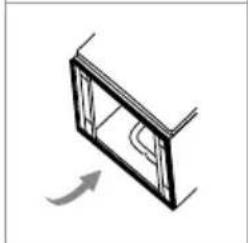
natural_image
Simple line drawing of a window frame with an arrow indicating rotation (no text or symbols)natural_image
Close-up of a wrench and circular mechanical component with an arrow indicating rotation (no text or symbols visible)natural_image
Close-up of a mechanical component with a metallic part inserted, showing a circular feature and an arrow pointing to it (no text or symbols visible)natural_image
Close-up of a dark circular object with an arrow pointing to it, against a blurred background (no text or symbols)HET APPARAAT WATERPAS ZETTEN

WAARSCHUWING!
natural_image
Close-up of a mechanical component with a curved arrow indicating rotation (no text or symbols)DE WATERTOEVOERSLANG AANSLUITEN

WAARSCHUWING!
natural_image
Two-step diagram showing a pipe valve mechanism and a valve assembly with directional arrows (no text or symbols)DE WATERAFVOERSLANG AANSLUITEN

WAARSCHUWING!
natural_image
Diagram showing a container with plastic bags and a bag being folded, with arrows indicating process flow (no text or symbols)natural_image
Illustration of a garment pattern with cutouts and accessories (no text or symbols)natural_image
Two handbags with circular designs, one wrapped in a blanket and the other in a sack (no text or symbols)natural_image
Simple line drawing of a bag with a patterned interior and small figures inside (no text or symbols)natural_image
Line drawing of a knitted sweater with three arms (no text or symbols)natural_image
Hand pointing at a button with a play symbol (no text or numbers present)natural_image
Technical line drawing of a mechanical component with no visible text or symbols
PAS OP!
natural_image
Line drawing of a hand washing a washing machine (no text or symbols)DE TROMMEL REINIGEN
natural_image
Line drawing of a hand gripping a curved object (no text or symbols)HET INLAATFILTER REINIGEN

LET OP!
natural_image
Diagram of a mechanical valve assembly with rotating components (no text or symbols)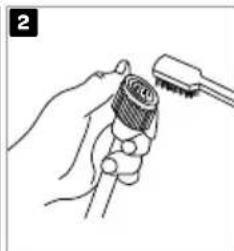
natural_image
Line drawing of a hand holding a tool with a screwdriver inserted (no text or symbols)natural_image
Illustration of a hand using a tool to adjust or install a component, with no visible text or symbols.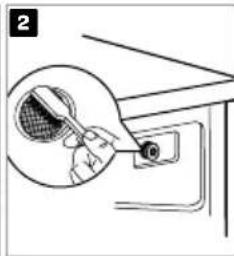
natural_image
Line drawing of a hand holding a tennis racket above a table with a switch (no text or symbols)DE WASMIDDELLADE REINIGEN
natural_image
Technical line drawing of a mechanical assembly with no visible text or symbols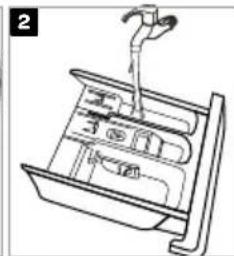
natural_image
Line drawing of a mechanical device with a lever and internal components (no text or symbols)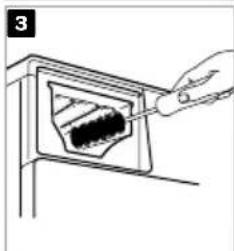
natural_image
Line drawing of a hand using a tool to clean or store contents inside a container (no text or symbols visible)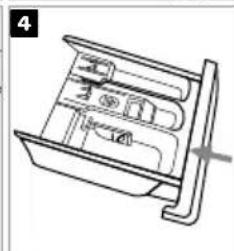
natural_image
Technical line drawing of a mechanical device with internal compartments and a handle (no text or symbols)
natural_image
Simple line drawing of a mechanical component with a circular feature and rotation arrow (no text or symbols)natural_image
Line drawing of a washing machine with a dial and base (no text or symbols)natural_image
Line drawing of a washing machine with a side sink and control panel (no text or symbols)natural_image
Technical line drawing of a mechanical assembly with a cylindrical component mounted on a base plate (no text or symbols)Symbols used in this document
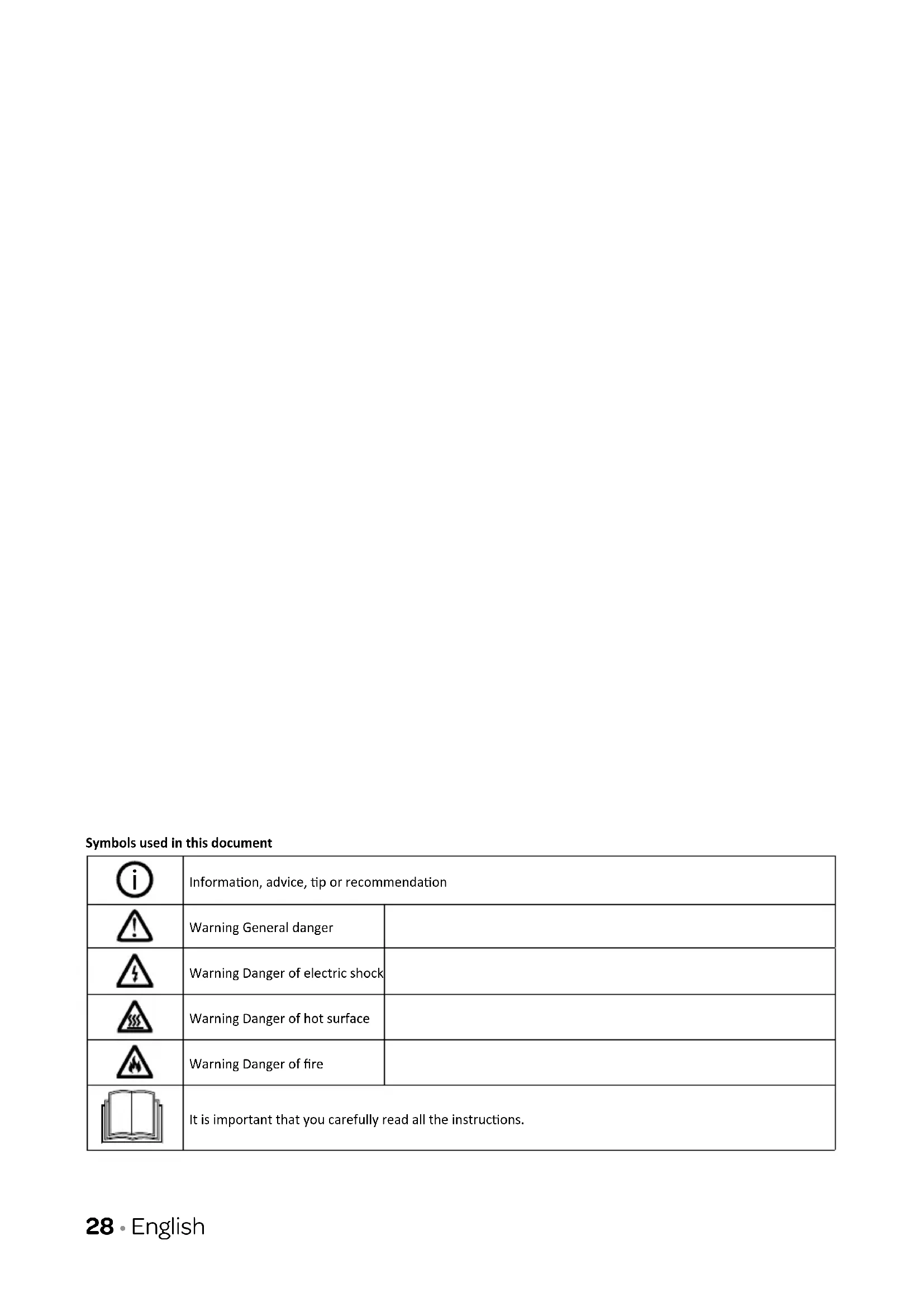
 | Information, advice, tip or recommendation | |
 | Warning General danger | |
 | Warning Danger of electric shock | |
 | Warning Danger of hot surface | |
 | Warning Danger of fire | |
 | It is important that you carefully read all the instructions. | |
safety instructions1
- Please read these instructions before operating the appliance and retain for future use.
Please, do not use the washing machine without reading the instructions for use first.
- Check for any damage to the packaging or the appliance during transportation. Never use a damaged appliance, but contact your supplier.
- Failure to observe the instructions for use or inappropriate use of the appliance may result in damage to the laundry or the appliance, or injury to the user. Keep the instruction manual handy, near the appliance.
- Keep the appliance clear from heat sources and direct sunlight to avoid plastic and rubber parts to corrode.
- Do not install the appliance in a room where the temperature can drop below 5°C, as the parts of the appliance may be damaged in case of water freezing.
Do not install the appliance in humid environments or rooms containing explosive or caustic gas. In case of water leakage or water splashes let the appliance dry in the open air.
- Never use flammable sprays or substances in the immediate proximity of the appliance.
INSTALLATION
- Place the appliance on a level and stable solid (concrete) base.
- Adjust the appliances adjustable feet to ensure the appliance is standing level and balanced.
- Before the first use of the appliance, remove the transport bolts, as switching on a blocked appliance can result in serious damage. The manufacturer will not be responsible for any damage in cases of such damage.
- Before connecting the appliance to the power mains, wait for at least 2 hours until it reaches room temperature.
- The door cannot be opened during washing machine operation.
-
Before washing clothes for the first time, the appliance shall be operated once with a full programme without any clothes inside.
-
After the washing cycle, close the water tap and pull out the plug from the power socket. Never pull the cord itself.
- Dispose the packing materials according to local regulations. Keep the material out of reach of children. Danger of suffocation.
- Before using the appliance, it must be calibrated. Follow the instructions in this manual.
ELECTRICAL INSTALLATION
- Connect the appliance to a grounded power socket protected by a fuse complying with the values on the rating plate.
- Pay special attention and be sure that the appliance is not placed on the power cord.
To avoid danger, a damaged power cord may only be replaced by the manufacturer, its service agent or similarly qualified persons.
⚠️ If the appliance is damaged, it must not be operated unless repaired by the manufacturer, its service agent or similarly qualified persons.
- The appliance may not be connected to the power mains using an extension cord.
Do not connect the appliance to the power mains using an external switch device such as a programme timer, or connect it to power mains that is regularly switched on and off by the power supply provider.
- Do not connect the appliance to an electrical outlet intended for an electric shaver or hair dryer.
- The mains plug must be accessible after installation.
⚠️ Never use an extension cord or a multiple plugs for making a connection.
Do not pull the plug out of the power socket if there is flammable gas around.
⚠️ Never pull out the plug with wet hands.
Always unplug the appliance when it is not being used and close the watertap.
- Connection to water and power supply has to be executed by an adequately trained technician or expert.
- Any repair and maintenance pertaining to safety or performance should be done by trained experts.
- In case of a defect, only use approved spare parts by authorized manufacturers.
- In case of incorrect appliance connection, incorrect use, or servicing by an unauthorized person, Inventum will not be responsible for any damage as such damage will not be covered by warranty.
WATER INSTALLATION
- The appliance is equipped with a single inlet valve and can be connected to the cold water supply only.
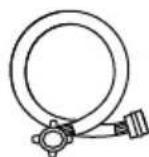
- To connect the appliance to the water supply, make sure to use the supplied water supply hose and gaskets.
The water pressure has to be between 0.05 and 1.0 MPa (0.5 - 10 bar).
- Always use the supplied new water supply hose to connect the appliance to the water supply; do not reuse an old water supply hose.
- The end of the water discharge hose should reach into a water drain line.
- Check the connections of the water supply hose, the water tap and the water discharge hose for possible problems due to changes of water pressure. If the connections loosen or leak, close the water tap and get it repaired. Do not use the appliance before the pipes and hoses are installed properly by authorized persons.
At higher washing temperatures, the door glass will heat up. Be careful to avoid burns. Keep children and animals far away from the machine while it is operating.
Do not remove the drain pump filter while there is still water in the appliance. Big quantities of water can leak out, and there is a risk of scalding due to hot water.
WATER OVERFLOW PROTECTION
- If the water level in the appliance rises above normal level, then the excess water level protection will be activated. It will shut off the water supply and start pumping out the water. The program is interrupted and an error is reported.
CHILD SAFETY
- Before closing the appliance door and running the programme, make sure there is nothing except laundry in the drum (e.g. if a child or animal climbed into the appliance drum).
- Keep the detergents and softeners out of reach of children.
- Do not let children aged 3 years and under come near the appliance, unless they are under constant supervision.
- This appliance may be used by children aged 8 years and above and by persons with reduced physical, sensory or mental capabilities or lack of experience and knowledge if they have been given supervision or instruction concerning use of the appliance in a safe way and if they understand the hazards of inappropriate use. Children are not allowed to play with the appliance.
- The appliance may not be cleaned or maintained by children, unless this is done under supervision.
- Children should be supervised that they do not play with the appliance.
- Do not climb or sit on the appliance.
- The appliance is made in compliance with all relevant safety standards.
Do not use detergents that contain solvents as this could lead to release of poisonous gases, damage to the appliance, and risk of fire and explosion.
- Only use the appliance for washing laundry as described in the instruction manual. The machine is not intended for dry cleaning.
- Only use agents for machine washing and care of laundry. Inventum will not be responsible for any damages or discolouration of gaskets and plastic parts resulting from incorrect use of bleaching or colouring agents.
- In case of a defect, only use approved spare parts by authorized manufacturers.
- Make sure that all pockets are emptied. Sharp and rigid items such as coins, brooches, nails, screws, stones etc. may cause serious damages to this machine.
- Remove all objects from pockets such as lighters and matches before use the appliance.
- Fabric softeners or similar products should be used as recommended in their instructions.
- Never try to open the door forcefully. The door will unlock shortly after the end of a cycle.
- Please do not close the door with excessive force. If it is found difficult to close the door, please check if the clothes are properly inserted and distributed.
-
In case of incorrect appliance connection, incorrect use, or servicing by an unauthorized person, the user shall bear the cost of any damage as such damage shall not be covered by warranty.
-
When cleaning the appliance, only use non-corrosive descaling agents. Follow the manufacturer's instructions of the cleaning agent. Finish the descaling process with several rinse cycles in order to remove any residual acid (e.g. vinegar etc.).
- The warranty does not cover consumables, minor deviations in colour, increased noise that results from appliance age and which does not affect the functionality of the appliance, and aesthetic defects on components, which do not affect the functionality and safety of the appliance.
TRANSPORT/TRANSPORT AFTER INSTALLATION
- If you intend to move the appliance after it has been installed, then it should be blocked by inserting at least one transport bolt. Before inserting the transport bolt, disconnect the appliance from the power mains.
- Accumulated water must be drained out of the appliance.
- The appliance is heavy. Transport with care. Never hold any protruding part of the appliance when lifting. The door of the appliance cannot be used as a handle.
INTENDED USE
- The appliance is intended solely for household use. If the appliance is used for professional, for-profit purpose or purpose exceeding normal use in a household, or if the appliance is used by a person who is not a consumer, the warranty period shall be equal to the shortest warranty period required by relevant legislation.
- This appliance is intended to be used in household and similar applications such as:
- staff kitchen areas in shops, offices or residential type environments;
- farm houses;
- by clients in hotels, motels and other residential type environments;
- bed & breakfast type environments;
- areas for communal use in blocks of flats or in launderettes.
- The appliance is not intended for use by persons (including children) with physical or mental impairments, or persons with lacking experience and knowledge. These persons should be instructed about the use of the appliance by a person responsible for their safety.
OLD APPLIANCE
- Remove the door or deactivate the lock when disposing of the appliance. Children are known to have gotten themselves locked in old appliances. To forestall such a situation, break your appliance's door lock and tear off the electrical cables.
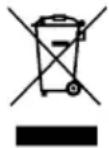
This marking indicates that this product should not be disposed with other household wastes throughout the EU. To prevent possible harm to the environment or human health from uncontrolled waste disposal, recycle it responsibly to promote the sustainable reuse of material resources. To return your used device, please use the collection systems or contact the retailer where the product was purchased. They return and can take this product for environmental safe recycling.
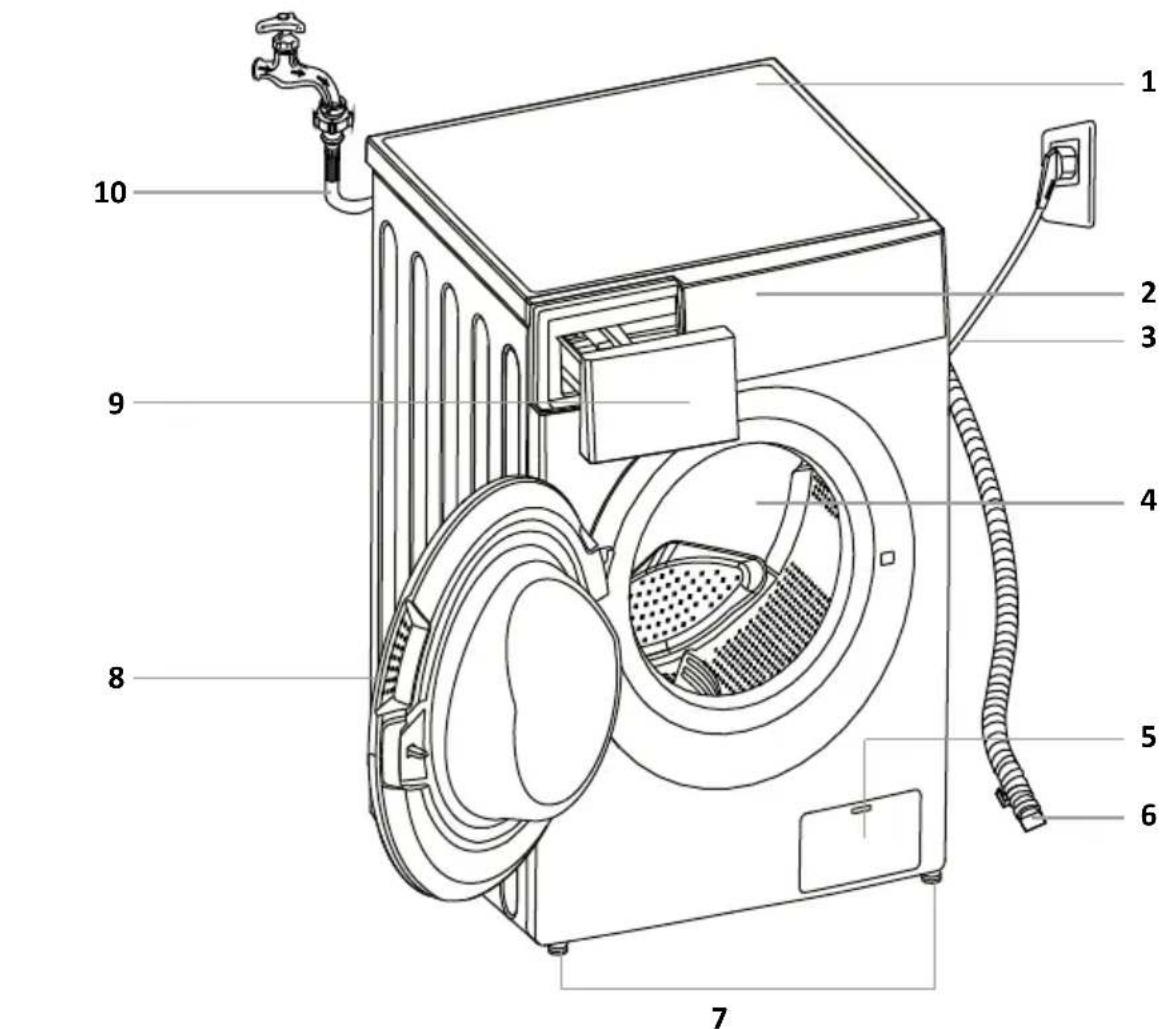
2 product description
- Top cover
- Control panel
- Power supply cord
- Drum
- Pump filter
- Water discharge hose
- Adjustable feet
- Door
- Dispenser tray
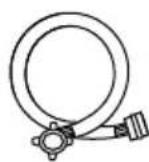
- Water supply hose

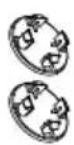
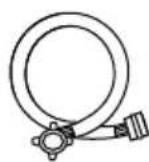
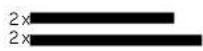
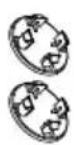
4 x cover caps 1 x user manual 1 x supply hose for cold water
Acoustic sponges
3 installation and connection
REQUIRED SPACE FOR INSTALLING

WARNING!
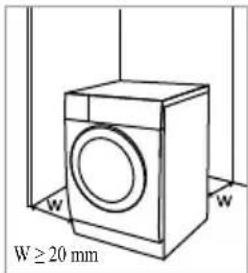
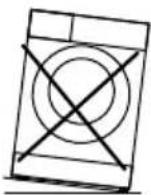
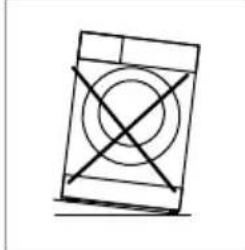
- Stability is important to prevent the product from sliding across the installation site! Make sure to level the appliance and install it on a stable base in longitudinal and traverse direction by rotating the adjustable feet.
- Make sure the appliance doesn't stand onto the power cord.
- Make sure to observe the minimum required clearances from the walls as indicated in the figure.

The room in which the appliance is placed must meet the following requirements:
- Dry, level and stable solide base
- Avoid direct sunlight
- Sufficient ventilation
-
Room temperature is above 5°C
-
Keep far away from heat sources such as coal, gas or wood burning appliances.
UNPACKING THE APPLIANCE

WARNING!
- Move the appliance with at least two people and wear protective clothing, such as sturdy gloves.
- Packaging material (e.g. films, styrofoam) can be dangerous for children.
-
There is a risk of suffocation! Keep all packaging away from children.
-
Remove the cardboard box and the styrofoam packing.
- Lift the washing machine and remove the base packaging. Make sure the small triangle foam [A] is removed with the bottom packaging together. If not, lay the appliance down on one side and carefully remove it manually.
- Remove the tape securing the power supply cord and water discharge hose.
- Take the water supply hose out of the drum.
ACOUSTIC SPONGES

NOTE:
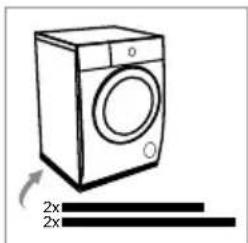
- Make sure to stick the acoustic sponges on the bottom side of the machine. The sponges effectively reduce the noise produced by the machine.
- Place the machine on its side on the floor. Attention: first, lay down a blanket or clothes to protect the floor and your machine.
- Stick the two longer sponges on the long edges of the bottom of the machine and stick the two shorter sponges on the short edges of the bottom of the machine.
- Place the machine upright again.
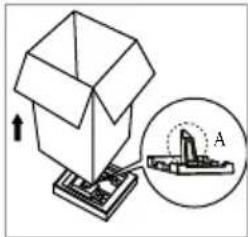
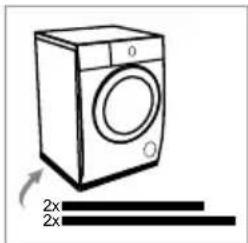
natural_image
Line drawing of a washing machine with two 2x horizontal bars below it (no text or symbols on the machine itself)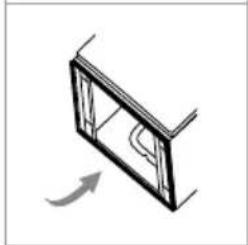
natural_image
Simple line drawing of a window frame with an arrow indicating rotation (no text or symbols)REMOVING THE TRANSPORT BOLTS

WARNING!
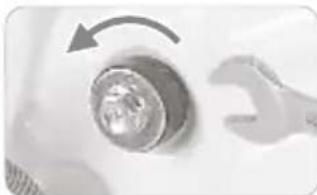
Before the first use of the appliance, the transport bolts must be removed from the back of the appliance. A blocked appliance may be damaged when it is switched on for the first time. The warranty does not apply in cases of such damage!
natural_image
Close-up of a wrench turning a circular button with an arrow, no visible text or symbolsLoosen the 4 transport bolts with a spanner.
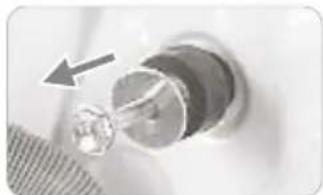
natural_image
Close-up of a mechanical component with a circular feature and an arrow pointing to it (no visible text or symbols)Remove the bolts including the rubber parts and keep them for future use
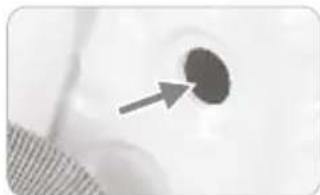
natural_image
Close-up of a dark circular object with an arrow pointing to it, against a light background (no text or symbols)Close the holes using the cover caps
LEVELLING THE APPLIANCE

WARNING!
- The lock nuts on all four feet must be screwed tightly against the housing to ensure the appliance stands steady on its feet.
Use a level and a spanner to level the appliance.
- Loosen the lock nut with a spanner.
- Turn the foot until it reaches the floor.
- Level the appliance in longitudinal and traverse direction by rotating the adjustable feet.
- After adjusting the feet, firmly tighten the lock nuts with a spanner against the housing.
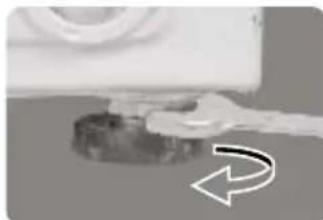
natural_image
Close-up of a mechanical component with a curved arrow indicating rotation (no text or symbols visible)CONNECTING THE WATER SUPPLY HOSE

WARNING!
To prevent leakage or water damage, follow the instructions in this chapter.
- Make sure not to kink, crush or modify the water supply hose.

Tighten the water supply hose by hand, firmly enough for the be to have a good seal. After connecting the hose, the seal must checked for any leaks. Do not use pliers or similar tools when necting the water supply hose as this could damage the nut thread.
- Connect the water supply hose to the water inlet valve on the back of the appliance.
- Connect the other end of the water supply hose with the aqua stop to a water tap with cold water.
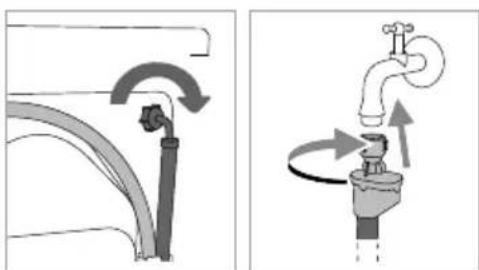
natural_image
Diagram showing two different plumbing or plumbing system behaviors: one with a pipe valve and circular flow arrows, the other with a faucet handle and directional arrows (no text or symbols)CONNECTING THE WATER DISCHARGE HOSE

WARNING!
- Make sure not to kink or protract the water discharge hose.
- Connect the water discharge hose properly, otherwise it could result in damage of water leakage.
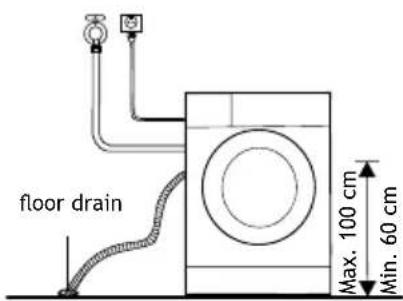
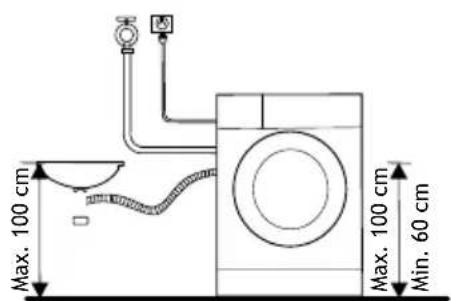
Feed the water discharge hose into a drain pipe, wash basin or floor drain. Be careful not to feed the water discharge hose too deep in the drain. Otherwise the waste water can not flow freely. The vertical distance from the floor to the end of the discharge hose may no more be than 100 cm and no less than 60 cm.
-
Put the water discharge hose in a floor drain.
-
Connect the water discharge hose to a drain pipe.
CONNECTING THE APPLIANCE TO THE POWER MAINS

WARNING!
- Before connecting the appliance to the power mains, wait for at least 2 hours until it reaches room temperature.
- Connect the appliance to a grounded power outlet. After installation, the wall outlet must be freely accessible. The outlet must be fitted with an earth contact (in compliance with the relevant regulations).
• Information on your appliance is indicated on the rating plate.

WARNING!
• Using an over-voltage protection to protect the appliance in case of a lighting strike, is recommended.

WARNING!
- Do not connect the appliance to the power mains using an extension cord.

- Do not connect the appliance to an electrical outlet intended for an electric shaver or hair dryer.
- Any repair and maintenance pertaining to safety or performance must be done by trained experts.
- A damaged power cord may only be replaced by a person authorized by the manufacturer.
4 operations
- QUICK START

CAUTION!
- Before washing, please make sure the appliance is properly installed.
- Your appliance was thoroughly checked before it left the factory. To remove any residual water and to neutralize potential odors, it's recommended to clean your appliance before the first use. To do so, please run the Drum clean program without laundry and detergent. See the chapter WASHING.

CALIBRATING THE APPLIANCE!
It's recommended to calibrate the appliance before using it, so that it provides the best performance. The appliance is able to detect the amount of laundry that is loaded in the drum. This function will optimize the appliance's performance by minimizing energy and water consumption, saving you money and time. Therefore it's recommended to calibrate the appliance for the best use.
- Remove all accessories from the drum and close the door.
- Insert the mains plug to the power outlet.
- Switch on the appliance and press START DELAY and TEMP simultaneously for 10 seconds until [t19] is displayed.
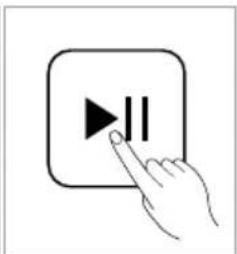
- Press ▶II to start the appliance. The drum will spin in order to calibrate it.
- Wait till the drum stops spinning and a [random number] is displayed.
- Switch the appliance off.

English
BEFORE EACH WASHING
- The ambient temperature of the appliance should be 5-40°C. If used under 0°C, the inlet valve and draining system may be damaged. If the appliance is installed under freezing conditions, it should be transferred to a normal ambient temperature environment to ensure the water supply hose and the water discharge hose can unfreeze before use.
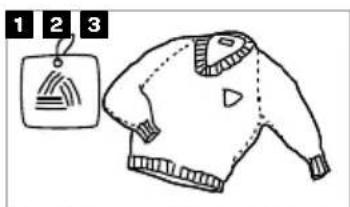
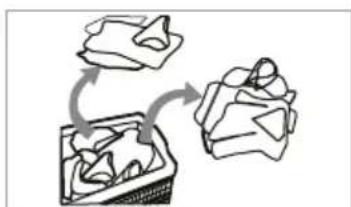
- Before each washing, sort your laundry by reading the wash labels and the detergent use instructions. Use non-foaming or less-foaming detergent suitable for machine washing.
natural_image
Diagram showing a container with internal objects and a moving object, no text or symbols present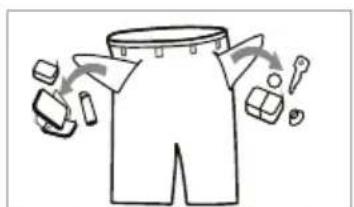
natural_image
Illustration of a garment with cutouts and accessories, no text or symbols presentCheck the care label Sort the laundry according
to color and textile type
Turn the pockets inside out, making sure there are no items left inside
natural_image
Illustration of two fabric bags with a bow and a belt, labeled 4 to 6 (no text or symbols on the bags themselves)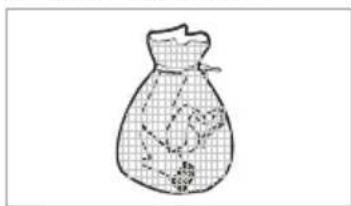
natural_image
Simple line drawing of a bag with a patterned interior and small objects inside (no text or symbols)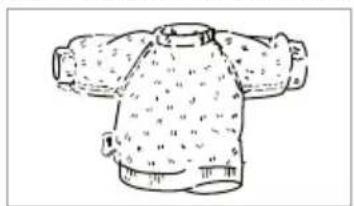
natural_image
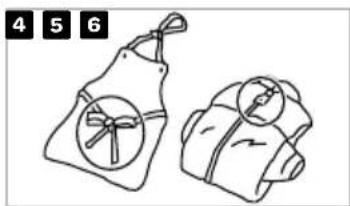
Line drawing of a knitted sweater with pleated collar and side ribs (no text or symbols)Tie any ribbons or belts and close buttons and zippers
Put small items and delicate clothing into a special laundry bag
Turn easy-pilling and long-pile fabric inside out

WARNING!
- Do not wash clothes that have been cleaned, washed, soaked in or dabbed with combustible or explosive substances like wax, oil, paint, gasoline, alcohol, kerosene or other flammable materials.
- Washing single items may easily create big eccentricity and cause vibrations and noise due to unbalance. Therefore it is suggested to add one or two more laundry items to the wash so that spinning can be done smoothly.
• WASHING
PREPARING BEFORE WASHING
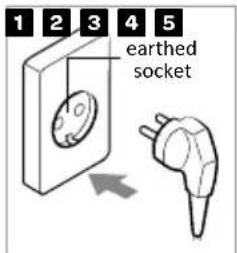
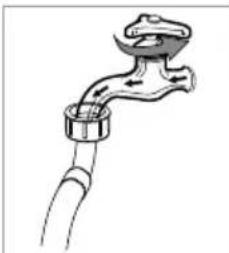
natural_image
Line drawing of a faucet with a handle and tubing (no text or symbols)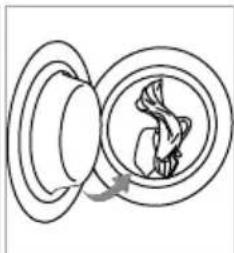
natural_image
Diagram of a mechanical or electrical component with concentric rings and internal curved structure (no text or symbols)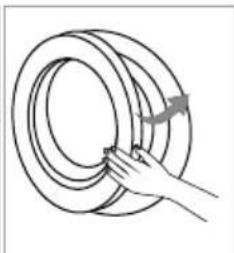
natural_image
Hand holding a coiled rope or rope with a curved arrow indicating rotation (no text or symbols)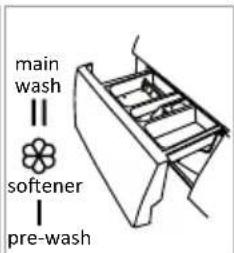
Plug in Add deterge@close@floorOpen the door and load

NOTE!
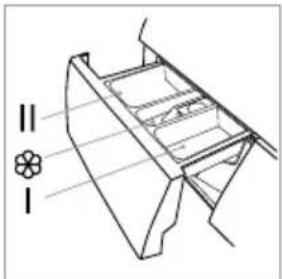
• Additional detergent needs to be added in compartment I if the pre-wash function is selected.
WASHING
Switch on the appliance
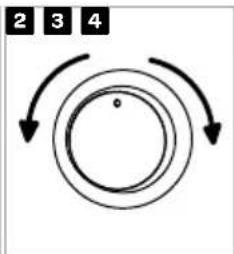
flowchart
graph TD
    A["2"] --> B["3"]
    B --> C["4"]
    C --> A
    style A fill:#f9f,stroke:#333
    style B fill:#f9f,stroke:#333
    style C fill:#f9f,stroke:#333
    style D fill:#ccf,stroke:#333
Select a program
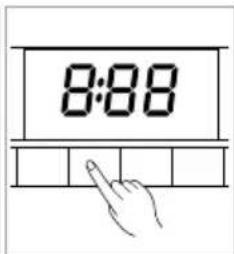
Select settings and/or additional functions
natural_image
Hand pointing at a button with a play symbol (no text or numbers present)Press Start/Pause to start the program
AFTER WASHING
When the program is finished and the appliance is ready, a buzzer will sound and on the display [End] appears for a few seconds before the display goes out.
DISPENSER TRAY
Pre-wash Main wash Softener
natural_image
Technical line drawing of a mechanical component with no visible text or symbolsi CAUTION!
• Additional detergent needs to be added in compartment I if the pre-wash function is selected.
- It is not necessary to add detergent for all programs. Check the table below for more information.
- Do not put laundry beads into the detergent dispenser.
| Program | I | II | |
| Favorite | |||
| Cotton | |||
| Synthetic | |||
| Mix | |||
| Bed linen | |||
| Allergy | |||
| 20°C ● |
| Program | I | II | |
| Fast 15 min. ● | ○○ | ||
| Sterile 70°C ● | ○○ | ||
| ECO 40-60 ● | ○○ | ||
| Wool ● | ○○ | ||
| Rinse & spin | ○○ | ||
| Spin & drain | |||
| Drum clean |
● Means detergent 'obligatory'
○ ○ Means detergent/softener optional
i NOTE!
- Before adding hardened lumps of powder detergent or a thick stringy liquid detergent or additive into the dispenser tray, it can be diluted in some water before pouring it in, as this may clog the piping in the appliance and cause a water overflow.
- Choose a suitable type of detergent, fitting to the selected washing temperature and fabric, to get the maximum washing performance and a minimum of water and energy consumption.
- Add powder or liquid detergents according to the manufacturer's instructions, considering the washing temperature, washing program, how soiled the laundry is, and water hardness.
CONTROL PANEL
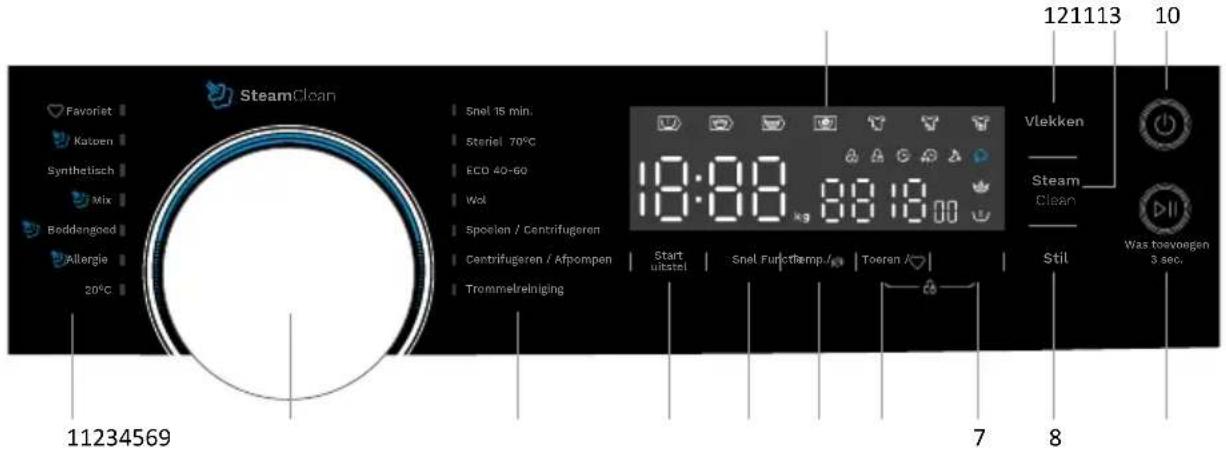
| Nr. | Symbol Button or | indicator Description | |
| 1. | Programs | Available programs (see the programs table for more information). | |
| 2. |  | Program selector knob | Turn the program selector knob left or right to select the desired program. |
| 3. | Start uitstel | Start delay | Use this function to start the washing cycle after a certain amount of time has elapsed. |
| 4. | Snel | Fast | Use this function to decrease the washing time. |
| 5. | Te  | Temperature | When needed, the washing temperature can be adjusted by pressing the temperature button. There are 6 settings: Cold - 20°C - 30°C - 40°C - 60°C - 90°C |
| 6. | Toeren / | Spinning rate | When needed, the spinning rate can be adjusted by pressing the spinning rate button.There are 7 settings: 0 - 400 - 600 - 800 - 1000 - 1200 - 1400 |
| 7. | Functie | Function | Push this button to select one or more additional functions., such as pre wash and extra rinse. |
| 8. | Stil | Silent | If the selected spinning rate is more than 800rpm, it will be reduced to 800rpm. When selecting this function, the sound of the controls will be canceled. |
| 9. |  Was toevoegen 3 sec. Was toevoegen 3 sec. | Start/pause button | Press the button to start or pause the washing cycle. |
| Adding wash 3 sec. | Hold the button for 3 seconds to add or remove wash. See the paragraph Adding Laundry for more information. | ||
| 10. |  | Power on/off | Press the button to turn the appliance on or off. |
| 11. | SteamClear | Steam Clean | The steam clean function can be selected when choosing one of the following programs: Cotton, Mix, Bed Linen or Allergy. |
| 12. | Vlekken | Soil level | This function allows you to select the degree of how soiled your wash is. The selected soil level will increase or decrease the washing time. |
| 13. |  | Display | The display shows the settings, estimated time remaining, options and status messages for your appliance. The display will remain on during the cycle. |
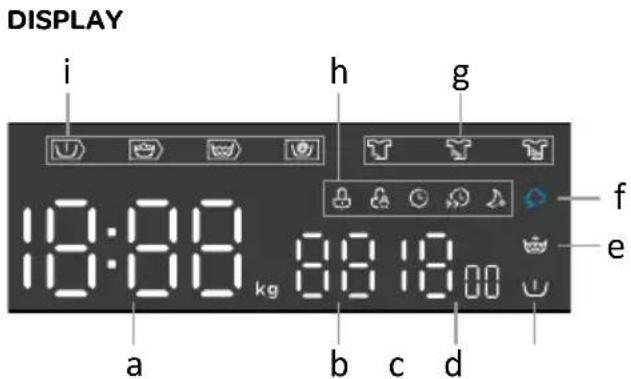
| Letter Symbol Button or indicator Description | |||
| a | 18:88 | Indicates the wash time, delay time, error codes and End | |
| b | 88 | Temperature indicator | |
| c | 1400 | Spinning rate indicator | |
| d Pre Wash | When this indicator light is lit, the pre wash function is added. | ||
| e Extra rinse | When this indicator light is lit, the extra rinse function is added. | ||
| f Steam clean | When this indicator light is lit, the steam clean function is added. | ||
| g |  | Light | The selected soil level will light up. |
| [528B] | Medium | ||
| [2A2T] | Heavy | ||
| h |  | Door lock | When this indicator light is lit, the door of the appliance is locked and cannot be opened. |
 | Child lock | When this indicator light is lit, the child lock is activated. | |
| [7K40] | Start delay | When this indicator light is lit, the start delay function is activated. | |
| [93Y2] | Speed wash | When this indicator light is lit, the speed wash function is activated. | |
| [2D20] | Silent | When this indicator light is lit, the silent function is activated. | |
| i |  | Pre wash | Depending on which indicator is lit, it shows the stage of the washing program. |
 | Washing | ||
 | Rinsing | ||
 | Spinning | ||
Use this function to start the washing cycle after a certain amount of time has elapsed. Proceed as follows:
- Start the appliance and select a program.
- Press the START DELAY button to choose the delaying time. Set the hours by repeatedly pressing or holding the START DELAY button. It can be set from 0 up to 24 hours.
- Press START /PAUSE button to start the delay.

NOTE!
- When using the START DELAY, preferably use a washing powder instead of a liquid detergent.
Canceling start delay
To cancel the START DELAY function, press the START DELAY button, before the washing program is started, until the display shows 0 H.
Snel Fast
When needed, the washing time can be decreased by pressing the fast button.
It depends on
the selected program how much faster it will be.
Temp./
Temperature
When needed, the washing temperature can be adjusted by pressing the temperature button.
There are 6 settings: Cold - 20°C - 30°C - 40°C - 60°C - 90°C.
Toeren / ♡
Spinning rate
When needed, the spinning rate can be adjusted by pressing the spinning rate button.
There are 7 settings: 0 - 400 - 600 - 800 - 1000 - 1200 - 1400,
Functie Functions
Push this button to select one or more additional functions, such as pre wash and extra rinse.

Pre-wash
Before the main washing cycle starts, the laundry will be extra washed to increase the washing performance. Particularly suitable for heavily soiled laundry with stubborn superficial stains. Note: Don't forget to also add detergent to compartment I.

Extra rinse
The laundry will undergo an extra rinse after selecting this function.
Stil Silent
If the selected spinning rate is more than 800rpm, it will be reduced to 800rpm. The sound of the controls will be automatically be canceled, when selecting this function.

SteamClean
Steam clean
The steam clean function can be added to the following programs: Cotton, Mix, Bed Linen and Allergy. The steam clean function is added at the end of the program and helps to eliminate bacteria and dust mites f.i..
Vlekken
Soil level
The soil level will automatically be set to medium. Check your laundry and adjust the soil level if needed. When selecting the light soil level, the washing time can decrease, while choosing the heavy soil level, the washing time can increase.

It is possible to add or remove laundry during a washing cycle. After a certain period of time, the appliance door can be opened if the water level and temperature are below a predefined threshold. If the conditions below are met, then the electronic door lock is released and the appliance door can be opened:
• water temperature in the drum has to be suitable;
• water level in the drum has to be below a certain value.
i CAUTION!
When the drum is still rolling and there is a large amount of water with high temperature in the drum, the state is unsafe and the door cannot be opened forcefully.
- Don't use the ADDING LAUNDRY function when the water level is over the edge of the inner drum or when the water temperature is high.
In order to add or remove laundry from the drum during a washing cycle, proceed as follows:
- Press the START PAUSE button for 3 seconds.
- Wait until the drums stops rotating.
- The door will unlock.
- Open the door and add or remove the laundry.
- Close the door and press the START PAUSE button. The washing cycle will resume.
i CAUTION!
- If a considerable amount of laundry is added during the washing cycle, the laundry could be washed less effectively, since the appliance initially sensed a lower weight of the laundry load and added a smaller amount of water. Insufficient amount of water relative to the amount of laundry could also cause damage to the laundry (rubbing of dry laundry), and the washing time can be longer.
- The washing time will resume from the point at which the washing program was interrupted.
OTHER FUNCTIONS

Child lock
This function is a safety feature and prevents children from misusing the control panel.
Activating the child lock
- Press the SPINNING RATE and FUNCTION button simultaneously for 3 seconds until the buzzer beeps. The child lock indicator switches on, the display will alternately show [CL] and the remaining time, when the appliance is running a washing program.
Deactivating the child lock
- Press the SPINNING RATE and FUNCTION button simultaneously for 3 seconds until the buzzer beeps. The child lock indicator switches off.
i CAUTION!
When the CHILD LOCK is activated, the display will alternately show [CL] and the remaining time, when the appliance is running a washing program.
Pressing any button will cause the CHILD LOCK indicator to flash for 3 seconds. When the program ends, [CL] and [END] will alternate on the display for 10 seconds, then the indicator will flash for 3 seconds.
The child lock deactivates the function of all buttons except the on/off knob and the child lock button combination!
Only the simultaneous pressing of the two buttons SPINNING RATE and FUNCTION can deactivate the child lock.
Please deactivate the child lock before selecting a new program!
Temp./Muting the buzzer
The sound of the buzzer can be muted.
How to mute the buzzer
- Choose any program.
- Press the TEMPERATURE button for 3 seconds. The buzzer is muted.
Activating the buzzer
-
Choose any program.
-
Press the TEMPERATURE button for 3 seconds. The buzzer is activated again.
i CAUTION!
• After muting the buzzer function, be aware that there are no sounds activated anymore.
❤️ Favoriet Favorite
The program favorite allows you to store your most frequently used program with selected options. How to store your favorite program:
Select your program and choose your setting and options. Press the SPINNING RATE button for 3 seconds, before starting the program and your favorite program is stored. The default setting is the Cotton program.
Display
The display shows the settings, estimated time remaining, spinning rate, temperature, start delay, options and status messages for your appliance. The display will remain on during the cycle.
| Wash time Start delay End | ||
| 125 | 2h | End |
| Spinning rate Temperature Error | ||
| 400 | 30 | E30 |
PROGRAMS
| Program | Max. load | Program description |
| Cotton 8,0 kg Washing program | for normally or heavily soiled laundry, white or coloured.The temperature can be set separately; therefore, observe the instructions indicated on the clothing.Spinning rate and temperature can be set to your preference. | |
| Synthetic 4,0 kg Washing program | for synthetic clothes, for example: shirts, coats or blending.While washing knitted textiles, reduce the detergent quantity, as it will easily form bubbles due to its loose thread construction.Spinning rate and temperature can be set to your preference. | |
| Mix 8,0 kg Washing program for clothing made of mixed fibres or viscose and cotton.Spinning rate and temperature can be set to your preference. | ||
| Bed linen 8,0 kg Washing program | mma specially designed for washing duvets or bed sheets.Spinning rate and temperature can be set to your preference. | |
| Allergy | 8,0 kg | Washing program used to wash normal to heavily soiled clothes that require special care, such as clothes for people with highly sensitive skin or skin allergies. It is recommended to turn the clothing inside out, as this will thoroughly wash out skin or other residues.Spinning rate and temperature can be set to your preference. |
| 20°C 4,0 kg 20°C is the default temperature. Cold water is also an option. Can be used for washing silk or garments that require manual washing. Spinning rate can be set to your preference. | ||
| Fast 15 min. 2,0 kg Extra short w washing program suitable for a small amount of lightly soiled clothes. Spinning rate and temperature can be set to your preference. | ||
| Sterile 70°C | 4,0 kg | Washing program that keeps the washing temperature above 60 degrees for more than 30 minutes, effectively removing harmful bacteria.Spinning rate can be set to your preference. |
| ECO 40-60 | 8,0 kg | Washing program, which is able to clean normally soiled cotton laundry which can be washed at 40°C or 60°C, according to the care label.Spinning rate and temperature can not be changed. |
| Wool 2,0 kg Gentle washing program for washing wool.Spinning rate and temperature can be set to your preference. | ||
| Rinse & spin | 8,0 kg For | an extra rinse cycle and spin.Spinning rate can be set to your preference. |
| Spin & drain | 8,0 kg | Extra spin cycle with selected spinning rate.Spinning rate can be set to your preference. |
| Drum clean | - kg | Special program for cleaning your appliance at 90°C. Add a special cleaning agent. Do not add any laundry. |
- The ECO 40-60 program is able to clean normally soiled cotton laundry declared to be washable at 40^ C or 60^ C, together in the same cycle. This program is used to assess the compliance with the regulation (EU) 2019/2023.
- The most efficient programs in terms of energy consumption are generally those that perform at lowe temperatures and longer duration.
- Loading the household washing machine up to the capacity indicated for the respective programs will contribute to energy and water savings.
- Noise and remaining moisture content are influenced by the spinning speed: the higher the spinning speed in the spinning phase, the higher the noise and the lower the remaining moisture content.
i CAUTION!
- If there is a power failure in the power supply while the appliance is operating, a special memory stores the selected program. The appliance will continue the program when the power supply is re-established.
SELECTING ADDITIONAL FUNCTIONS
An additional function can be added to the main washing program before pressing the Start button. Select a program and then press the function button to add one or more desired additional function(s).
| Default temperature and program | Default spinning rate in rpm | Delay Night wash | Soil level | Pre-wash | Extra rinse | Speed wash | Steam clean |
| Cotton 1400 ● ● ● ● ● ● | ● | ||||||
| Synthetic 1200 ● ● ● ● ● | ● | ||||||
| Mix 1000 ● ● ● ● ● ● ● | |||||||
| Bed linen 1000 ● ● ● ● ● | ● ● | ||||||
| Allergy 1000 ● ● ● ● ● ● ● | ● | ||||||
| 20°C 1000 ● ● ● ● ● | |||||||
| Fast 15 min. 800 ● ● ● ● ● | |||||||
| Sterile 70°C 1000 ● ● ● ● ● | ● | ||||||
| Wool 600 ● ● ● ● | |||||||
| ECO 40-60 1400 ● | |||||||
| Rinse & spin 1000 ● ● | ● | ||||||
| Spin & drain | 1000 ● ● | ||||||
| Drum clean | 400 ● ● |
i
- For the maximum spinning rate, program time, and other details of the ECO 40-60 program, and other details of the ECO 40-60 program, please refer to the content on the Product Fiche.
• The table shows which cycle offers which options for adjustment. - Adding an additional function will prolong the program time.
- Keep pressing the function button to make the desired selection of additional functions.
Manual interruption
To stop and cancel a washing program, press the START PAUSE button and hold it for 3 seconds. Select the program SPIN & DRAIN and press the START PAUSE button. The appliance will run the program and at the end of the program, the appliance pumps the water out of the drum. When the water is pumped out, the door will be unlocked.
PAUSE button
The washing program can always be stopped by pressing the START PAUSE button. The washing program is temporarily paused when the time remaining until program completion is flashing on the display unit. If there is no water in the drum and water temperature is not too high, then the door will unlock after a certain period of time, and it can be opened. To resume the washing program, first close the door and then press the START PAUSE button.
ERRORS
In case of an error or fault, the program will be interrupted. An acoustic signal will warn about such occurrence and the error will be flashing on the display [E:XX]. See the TROUBLESHOOTING TABLE for more information.
Power supply failure
The washing program can always be stopped by pressing the START PAUSE button. The washing program is temporarily paused when the time remaining until program completion is flashing on the display unit. If there is no water in the drum and water temperature is not too high, then the door will unlock after a certain period of time, and they can be opened. To resume the washing program, first close the door and then press the START PAUSE button.
5
maintenance
• PROGRAM DURATION / TEMPERATURE / SPINNING RATE TABLE
| Program Max. | load | Default time | Default temp | Default RPM | Temperature options Max. | RPM |
| Cotton 8,0 kg 3:39 | 40°C 1400 | RPM | cold/20/30/40/60/90°C 14 | 00 | ||
| Synthetic 4,0 kg 3:18 | 40°C 120 | 0 RPM | cold/20/30/40/60°C 1200 | |||
| Mix 8,0 kg 1:20 | 40°C | 1000 RPM | cold/20/30/40/60/90°C 14 | 00 | ||
| Bed linen | 8,0 kg | 1:48 | 40°C | 1000 RPM | cold/20/30/40/60°C 1400 | |
| Allergy | 8,0 kg | 2:01 | 60°C | 1000 RPM | cold/20/30/40/60/90°C 12 | 00 |
| 20°C | 4,0 kg | 1:01 | 20°C 1000 | RPM | cold/20°C | 1200 |
| Fast 15 min. | 2,0 kg 0:15 | cold 800 RPM | cold/20/30°C | 800 | ||
| Sterile 70°C | 4,0 kg | 2:27 70°C | 1000 | RPM | not applicable | 1400 |
| ECO 40-60 8,0 kg | 3:38 | -- | 1400 RPM | not applicable | 1400 | |
| Wool | 2,0 kg | 0:59 | cold 600 | RPM | cold/20/30/40°C | 800 |
| Rinse & spin | 8,0 kg | 0:20 | -- | 1000 RPM | not applicable | 1400 |
| Spin & drain | 8,0 kg | 0:12 | -- | 1000 RPM | not applicable | 1400 |
| Drum clean | -- kg | 1:18 | 90°C | 400 RPM | not applicable | 400 |

CAUTION!
- Depending on the chosen temperature the washing time will change, shorter or longer.
• CLEANING AND CARE

WARNING!
• Always unplug the appliance and close the water tap before cleaning and maintenance.
CLEANING THE EXTERIOR OF THE APPLIANCE
Proper maintenance on the appliance can extend its useful life. Clean the appliances exterior and control panel using a soft damp cloth and water. If necessary, a diluted non-abrasive neutral cleaning agent can be used to clean the appliance.

CAUTION!
- Do not use abrasive or caustic agents, formic acids or its diluted solvents or similar substances, like alcohol or chemical products that could damage the appliance. Please observe the recommendations and warnings provided by the cleaning agent manufacturer.
- If there is any water overflow, use a cloth to wipe it off immediately.
- Do not clean the appliance with a jet of water.
- Do not use a sharp item to clean the appliance.
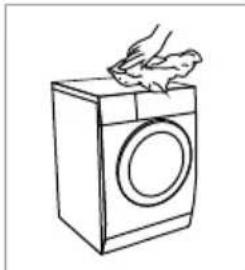
natural_image
Line drawing of a hand washing a washing machine (no text or symbols)CLEANING THE DRUM
Any rust stains left inside the drum by metal articles must be removed immediately using chlorine-free detergents.
Do not use steel wool for cleaning the drum!

NOTE!
- Keep laundry not near the appliance while cleaning the drum.
- When you often wash at 40°C or lower temperatures, or when you haven't used the appliance for a longer period of time, clean the drum. Run the Drum clean program without laundry. Preferably use a powder detergent or a special cleaning agent.
CLEANING THE RUBBER DOOR GASKET AND THE GLASS
Wipe the glass and rubber door gasket after each wash to remove lint and stains and to extend its useful life. If lint builds up, it can cause leakages.
Check the rubber door gasket to remove any coins, buttons or other objects after each wash.
Clean the rubber door gasket and the glass once a month to ensure normal operation of the appliance.
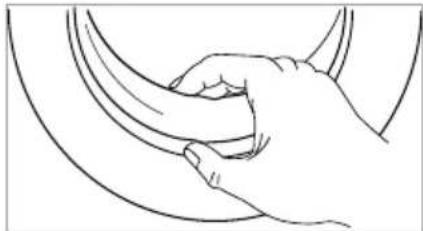
natural_image
Line drawing of a hand gripping a curved object (no text or symbols)CLEANING THE INLET FILTER

NOTE!
- A diminishing water flow is a sign that the inlet filter needs to be cleaned.
- Cleaning the inlet filter every 3 months ensures normal operation of the appliance.
Cleaning the inlet filter in the water tap
- Close the water tap and remove the water supply hose.
- Clean the inlet filter with a brush under running water.
- Reconnect the water supply hose to the water tap.
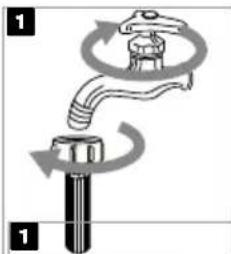
natural_image
Diagram of a mechanical valve or pump assembly with rotating arrows indicating flow direction (no text or symbols)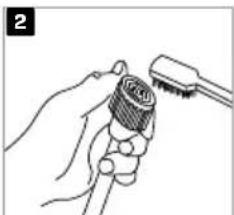
natural_image
Illustration of a hand holding a tool with a brush (no text or symbols)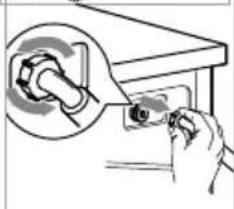
natural_image
Illustration of a hand inserting a device into a box with a magnified inset showing the internal structure (no text or symbols)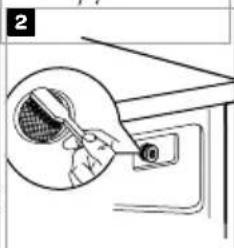
natural_image
Illustration of a hand holding a magnifying glass over a device with a small inset showing a grid pattern (no text or symbols)Cleaning the inlet filter at the back of the appliance
- Close the water tap.
- Unscrew the water supply hose from the back of the appliance.
- Pull out the filter with a long nose plier and clean the filter using a brush under running water.
- Reinstall the filter to the water inlet and reconnect the water supply hose.
- Open the water tap.
CLEANING THE DISPENSER TRAY
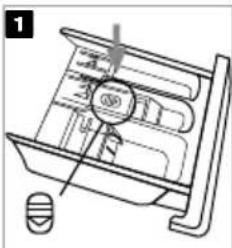
- Open the dispenser tray and press down the release [ ☐] on the cover of the softener compartment and pull the dispenser tray out of the recess.
- Lift the cover of the softener compartment of the dispenser tray. Wash both items, the cover and the complete dispenser tray under running water. Make sure not to forget to clean the drain hole of the softener compartment and the openings at the bottom of the dispenser tray.
- Clean the inside of the recess with a brush.
- Reinstall the cover of the softener compartment and push the dispenser tray back in the recess.
natural_image
Technical line drawing of a mechanical component with no visible text or symbols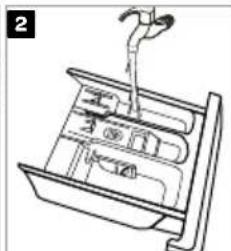
natural_image
Technical line drawing of a mechanical assembly with no visible text or symbols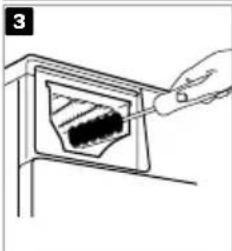
natural_image
Line drawing of a hand inserting a dark object into a rectangular frame (no text or symbols)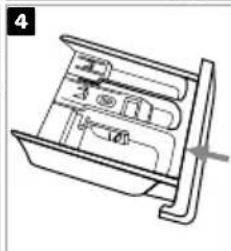
natural_image
Technical line drawing of a mechanical device with internal components (no text or symbols)
- Do not use abrasive or caustic agents to clean plastic parts.
- Cleaning the dispenser tray every 3 months ensures normal operation of the appliance.
CLEANING THE DRAIN PUMP FILTER
The pump filter can filter the yarns and small foreign matters from the washing. Especially after washing fleecy, woolly or very old laundry.

WARNING!
- Unplug the appliance to avoid electrical shock before cleaning.
- Be careful of hot water!
- Allow detergent solution to cool down.
- During cleaning, some water may be spilled. It is recommended to place an absorbent cloth on the floor.
natural_image
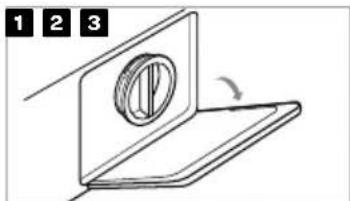
Simple line drawing of a mechanical component with a circular feature and rotation arrow (no text or symbols)Open the pump filter cap. Turn 90
natural_image
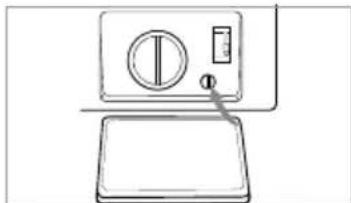
Line drawing of a kitchen appliance with a dial and counter (no text or symbols)0^ , pull out the emergy discharge hose and remove the cap.
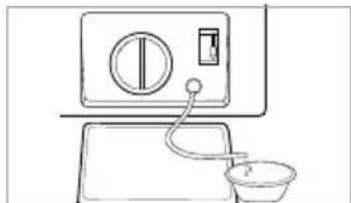
natural_image
Line drawing of a washing machine with a side sink and control panel (no text or symbols)When there's no more water coming out, put the emergy discharge hose back.
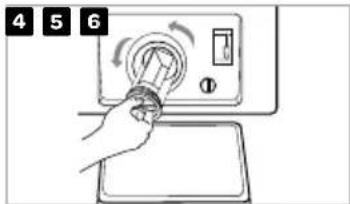
Open the pump filter by turning it counter clockwise. Clean the pump filter under running water.
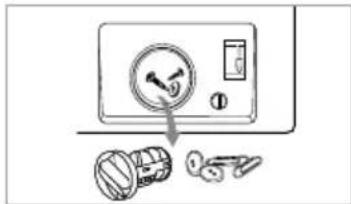
Remove any objects and impurities from the filter housing.
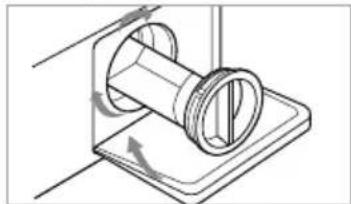
natural_image
Technical line drawing of a mechanical component with rotating arrows indicating motion (no text or symbols)Place the pump filter back and turn it clockwise to lock it. Close the pump filter cap.

WARNING!
- Never remove the pump filter cap during a washing cycle. Always wait until the appliance has finished the cycle, and is empty.
- When the appliance is in use and depending on the selected program, there can be hot water in the pump.
- When replacing the pump filter cap, ensure it is securely snapped in place.
OPENING THE DOOR MANUALLY IN CASE OF A POWER OUTAGE-IN CASE OF A PROGRAM PAUSE
In case of a power outage during a washing cycle, the program will resume after the power is restored in most cases. If not, you can manually open the door and remove the laundry.

WARNING!
- If there is still water in the appliance after a power outage, make sure not to open the door before you manually drain the water from the appliance via the pump filter (see the paragraph CLEANING THE DRAIN PUMP FILTER).
- When the program is paused or interrupted, open the pump filter cap.
- The door of the appliance can only be opened by simultaneously pulling the special lever - next to the filter -and the door handle.
- Open the door manually by pulling the handle towards you.
• TROUBLE SHOOTING
The appliance will automatically control the operation of particular functions during the washing cycle. If any irregularity occurs, this will be identified by reporting (E:XX) on the display. The appliance will report the error until it is switched off. Disturbances from the environment (e.g. the power grid) may result in various error reports. In such case:
- Switch off the appliance and wait for a few seconds.
- Switch the appliance on and repeat the washing program.
- Most errors during operation can be solved by the user.
- If the error persists, call the customer care service.
• Repairs may only be carried out by an adequately trained person. - Repair or any warranty claim resulting from incorrect connection or use of the appliance shall not be covered by the warranty. In such cases, the costs of repair shall be charged to the user.
- The warranty does not cover the errors of failures resulting from disturbances from the environment (lighting strike, power grid failures, natural disasters etc.).
TROUBLE SHOOTING TABLE
| Description | Possible cause | What to do? |
| The appliance does not start The do | or is not closed properly. Clothes are stuck. | Close the door properly and restart. Check the laundry. |
| The door can't be opened The safety | protection is activated. Disconnect the power and restart. | |
| The appliance does not fill with water. | The water tap is not open. A shut-off system in the aquastop is activated. The internal tube or the water supply hose is damaged. | Open the water tap completely. When the aquastop is acitvated, it cuts the water supply off. The control glass on the aquastop will be red. Replace the water supply hose. |
| Water leakage The connections are | not tight enough. | Check and fasten the water supply hose. Check and clean the water discharge hose. |
| Detergent residues in the dispenser tray | The detergent is damp and/or clotted. | Clean and wipe the dispenser tray dry. |
| Indicator or display does not work PC | board is not connected or harness has connection problems. | Switch off the power and check if the mains plug is connected properly. |
| Description | Possible cause | What to do? |
| Abnormal noise The transport bolts | are still in place. The floor is not solid or level | Check if the transport bolts have been removed. Make sure the appliance is installed on a solid and level floor. |
ERROR CODE TABLE
| Description | Possible cause | What to do? |
| E10 | Water injecting problem during the wash cycle | Check if the water pressure is high enough.Straighten the water supply hose.Clean the inlet filter. |
| E12 | Water overflow Restart the appliance. | |
| E21 | Overtime water draining Check the water discharge | hose for blockage. |
| E30 | The door is not closed properly Close the door | properly and restart. |
| EXX | Others Restart the appliance. If the problem persists,please contact the customer service. |
- CUSTOMER SERVICE
Spare parts for your appliance are available for a minimum of 10 years.
In case of questions, please contact the customer service.

WARNING!
Risk of electric shock
- Never try to repair an appliance which is defective or presumed to be defective. You may put your own and future users' lives in danger. Only authorised specialists are allowed to carry out this repair work.
- Improper repair will void the warranty and subsequent damages can't be recognized!
TRANSPORT
IMPORTANT STEPS WHEN MOVING THE APPLIANCE
- Unplug the appliance and close the water tap.
- Check, if the door and the dispenser tray are closed properly.
- Remove the water supply hose and the water discharge hose from the house installations.
- Let the water drain completely from the appliance.
- IMPORTANT: Re-install the 4 transport bolts in the back of the appliance.
- The appliance is heavy. Transport with care. Never hold any protruding part of the appliance when lifting. The door of the appliance cannot be used as a handle.
• TECHNICAL SPECIFICATIONS
Model VWM8010B
Washing capacity 8.0 kg
Power supply 220-240V\~, 50Hz
Rated power 1950 W
MAX. current 10A
Standard water pressure 0.05 MPa - 1 MPa
Dimension (WxDxH in mm) 595 x 475 x 850
Nett weight 63 kg


natural_image
Simple line drawing of a rectangular box with concentric circles and intersecting diagonal lines (no text or symbols)
natural_image
Close-up of a wrench and circular dial on a white surface, with an arrow indicating rotation (no text or symbols visible)natural_image
Close-up of a mechanical component with a metallic ring and a curved arrow pointing to it (no visible text or symbols)natural_image
Close-up of a dark circular object with an arrow pointing to it, against a light background (no text or symbols)natural_image
Close-up of a mechanical component with a curved arrow indicating rotation (no text or symbols visible)natural_image
Diagram showing two different plumbing or plumbing system behaviors: one with a pipe and valve, the other with a faucet and valve (no text or symbols present)natural_image
Diagram showing a container with internal objects and a moving object, no text or symbols presentnatural_image
Two handbags with bow designs, one wrapped in a circle and the other in a blanket (no text or symbols)natural_image
Line drawing of a money bag with a grid pattern and a small object inside (no text or symbols)natural_image
Line drawing of a knitted sweater with arms and buttons (no text or symbols)natural_image
Hand pointing at a button with a play symbol (no text or numbers present)natural_image
Technical line drawing of a mechanical component with no visible text or symbolsi ACHTUNG!
natural_image
Line drawing of a hand washing a washing machine (no text or symbols)DIE TROMMEL REINIGEN
natural_image
Line drawing of a hand gripping a curved object (no text or symbols)natural_image
Technical line drawing of a mechanical component with no visible text or symbols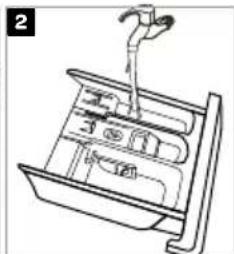
natural_image
Line drawing of a mechanical device with a lever and internal components (no text or symbols)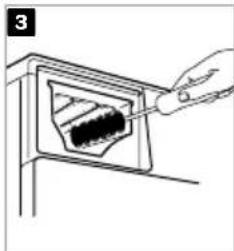
natural_image
Line drawing of a hand inserting a dark object into a wall-mounted device (no text or symbols)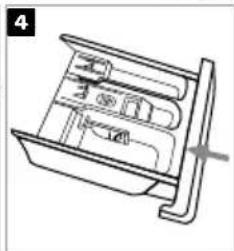
natural_image
Technical line drawing of a mechanical device with internal compartments and a handle (no text or symbols)i
natural_image
Simple line drawing of a mechanical component with a circular feature and an arrow indicating rotation (no text or symbols)natural_image
Simple line drawing of a washing machine with a dial and handle (no text or symbols)natural_image
Simple line drawing of a washing machine with a sink and a bowl (no text or symbols)natural_image
Technical line drawing of a mechanical component with rotational arrows indicating motion (no text or symbols)
natural_image
Line drawing of a washing machine with two 2x horizontal bars below it (no text or symbols on the machine itself)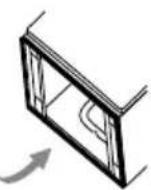
DÉPOSE DES BOULONS DE TRANSPORT

AVERTISSEMENT!
natural_image
Close-up of a wrench and circular mechanical component with an arrow indicating rotation (no text or symbols visible)natural_image
Close-up of a mechanical component with a metallic part inserted, showing a curved arrow pointing to a hole (no text or symbols visible)natural_image
Close-up of a dark circular object with an arrow pointing to it, against a light background (no text or symbols)natural_image
Close-up of a mechanical component with a curved arrow indicating rotation (no text or symbols visible)CONNEXION DU TUYAU D'ALIMENTATION D'EAU

AVERTISSEMENT!
natural_image
Diagram showing two different plumbing or plumbing system behaviors: one with curved pipe connection and another with valve mechanism (no text or symbols)CONNEXION DU TUYAU D'ÉVACUATION D'EAU

AVERTISSEMENT!
natural_image
Diagram showing a container with food items being folded into a box, with arrows indicating the process (no text or symbols present)natural_image
Line drawing of a person adjusting a short-sleeve shirt with accessories (no text or symbols)natural_image
Two handbags with circular designs, one wrapped in a blanket and the other in a blanket (no text or symbols)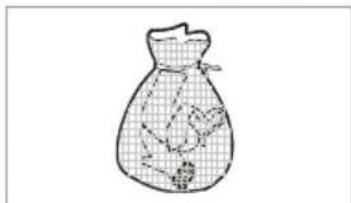
natural_image
Line drawing of a bag with a patterned interior and small objects inside (no text or symbols)natural_image
Line drawing of a knitted sweater with three arms (no text or symbols)natural_image
Hand pointing at a button with a play symbol (no text or numbers present)natural_image
Technical line drawing of a mechanical component with no visible text or symbols
ATTENTION!
natural_image
Line drawing of a hand washing a washing machine (no text or symbols)NETTOYAGE DU TAMBOUR
natural_image
Line drawing of a hand gripping a curved object (no text or symbols)NETTOYAGE DU FILTRE D'ENTRÉE
i REMARQUE!
natural_image
Diagram of a mechanical valve or pump assembly with rotating arrows indicating flow direction (no text or symbols)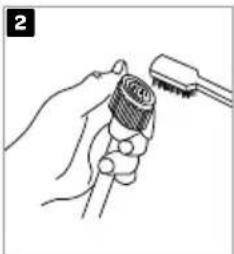
natural_image
Illustration of a hand holding a threaded object with a tool inserted (no text or symbols)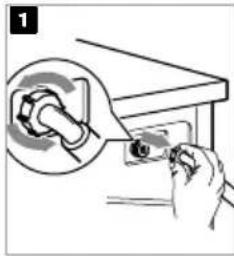
natural_image
Illustration of a hand using a tool to adjust or install a component, with a magnified inset showing the mechanical part (no text or symbols present)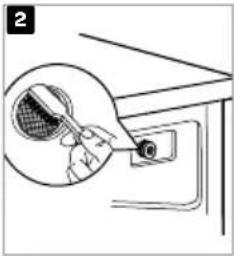
natural_image
Line drawing of a tennis racket being inserted into a table tennis receiver (no text or symbols)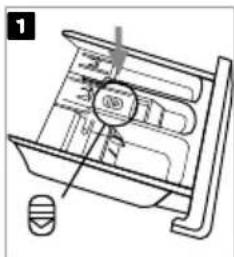
natural_image
Technical line drawing of a mechanical component with no visible text or symbols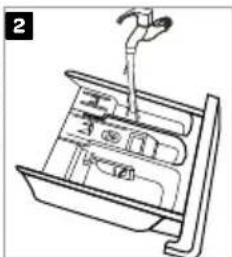
natural_image
Line drawing of a mechanical device with a lever and internal components (no text or symbols)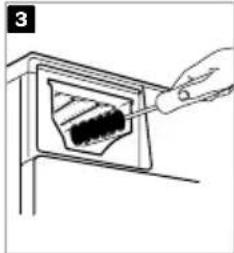
natural_image
Line drawing of a hand inserting a small object into a container (no text or symbols)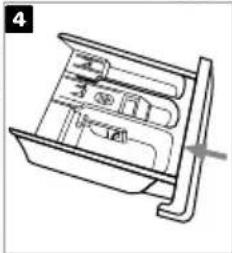
natural_image
Technical line drawing of a mechanical device with internal compartments and a handle (no text or symbols)i
natural_image
Simple line drawing of a mechanical component with a circular feature and rotation arrow (no text or symbols)natural_image
Simple line drawing of a washing machine with a dial and handle (no text or symbols)natural_image
Line drawing of a kitchen appliance with a sink, bowl, and control panel (no text or symbols)natural_image
Technical line drawing of a mechanical component with no visible text or symbolsGeneral terms and conditions of service and warranty
5-year Inventum warranty!
- Customers enjoy a 5-year full manufacturer's warranty on all Inventum products.
Customers even enjoy a 10-year Inventum warranty on the inverter motor of a washing machine. - Within this period, a defective product or part, which makes normal functioning of the product or part impossible, will always be repaired free of charge or, if repair is not possible and/or does not provide a solution, replaced (by the same or equivalent product). The assessment of this lies with Inventum.
- In order to make a claim under the 5-year Inventum warranty you must, within two months after discovering the fault or defect, either return the product to the shop where you bought it, or contact the Inventum customer service department by using the form at www.inventum.eu/service.
- The warranty period starts from the date stated on the product's original sales receipt.
- To invoke the warranty, you must always send a copy of the original proof of purchase with the service request and present the original proof of purchase to the service technician.
- The 5-year warranty applies only to normal domestic use of Inventum products within the Netherlands.
Warranty exclusions
- The 5-year Inventum guarantee does not apply in case of: normal wear and tear, consumables, improper use, insufficient or incorrect maintenance, incorrect and/or inexpert assembly and installation of the appliance, repairs by unauthorised third parties, business or commercial use, missing serial number, damage caused by an external cause. This enumeration is not exhaustive.
- B-choice products and products that have been built-in in a showroom are not covered by the 5-year Inventum warranty. All optical damage such as dents, scratches and slight traces of use are excluded from any warranty.
Reporting malfunctions on Inventum products
-
Faults or defects on Inventum products can be reported by using the service request form on the website www.inventum.eu/service or through the seller of the product.
-
A copy of the original proof of purchase must be included with the request.
-
Inventum's service department determines whether the product will be repaired or replaced, based on the request and the sales receipt.
Important to know
- Products sent without prior notification will not be accepted. Further to the notification you will be informed by Inventum whether a warranty applies and whether you must return the product.
- The replacement or repair of a defective product, or a part thereof, does not lead to an extension of the original warranty period.
- Products eligible for replacement or repair must be emptied and clean.
For a detailed explanation of the warranty conditions and items excluded from them, please visit Inventum's website www.inventum.eu/algemene-voorwaarden
These general warranty and service conditions apply to Inventum brand products purchased after 27 April 2022 and intended for use within the Netherlands.
For Inventum products used outside the Netherlands, but within a EU Member State, the warranty rules of that country apply. Inventum provides warranty and service by a white goods technician only in the Netherlands.
As a consumer, you are entitled by law to a properly working product. Does the product break down sooner than you might expect? This means that the product is not in conformity. In that case, the law offers you, the buyer, with a number of legal remedies for your protection. This legal protection is not affected by the above commercial warranty given by Inventum on Inventum products used within the Netherlands.
Modifications and errors reserved
facebook.com/inventum1908
pinterest.com/inventum1908
youtube.com/inventum1908
instagram.com/inventum1908



- Deutsch
- Symbole
- INSTALLATIELOCATIE EN OMGEVING
- WATERTOEVOER EN -AFVOER
- HET APPARAAT WATERPAS ZETTEN
- WAARSCHUWING!
- DE WATERTOEVOERSLANG AANSLUITEN
- DE WATERAFVOERSLANG AANSLUITEN
- PAS OP!
- DE TROMMEL REINIGEN
- HET INLAATFILTER REINIGEN
- LET OP!
- DE WASMIDDELLADE REINIGEN
- safety instructions1
- - Please read these instructions before operating the appliance and retain for future use.
- Please, do not use the washing machine without reading the instructions for use first.
- INSTALLATION
- ELECTRICAL INSTALLATION
- WATER INSTALLATION
- WATER OVERFLOW PROTECTION
- CHILD SAFETY
- TRANSPORT/TRANSPORT AFTER INSTALLATION
- INTENDED USE
- OLD APPLIANCE
- product description
- installation and connection
- REQUIRED SPACE FOR INSTALLING
- WARNING!
- UNPACKING THE APPLIANCE
- ACOUSTIC SPONGES
- NOTE:
- REMOVING THE TRANSPORT BOLTS
- LEVELLING THE APPLIANCE
- CONNECTING THE WATER SUPPLY HOSE
- CONNECTING THE WATER DISCHARGE HOSE
- CONNECTING THE APPLIANCE TO THE POWER MAINS
- operations
- - QUICK START
- CAUTION!
- CALIBRATING THE APPLIANCE!
- English
- BEFORE EACH WASHING
- • WASHING
- PREPARING BEFORE WASHING
- NOTE!
- WASHING
- AFTER WASHING
- DISPENSER TRAY
- i CAUTION!
- i NOTE!
- Canceling start delay
- Snel Fast
- Temp./
- Temperature
- Toeren / ♡
- Spinning rate
- Functie Functions
- Pre-wash
- Extra rinse
- Stil Silent
- SteamClean
- Steam clean
- Vlekken
- Soil level
- OTHER FUNCTIONS
- Child lock
- Activating the child lock
- Deactivating the child lock
- Temp./Muting the buzzer
- How to mute the buzzer
- Activating the buzzer
- ❤️ Favoriet Favorite
- Display
- SELECTING ADDITIONAL FUNCTIONS
- i
- Manual interruption
- PAUSE button
- ERRORS
- Power supply failure
- 5
- maintenance
- • CLEANING AND CARE
- CLEANING THE EXTERIOR OF THE APPLIANCE
- CLEANING THE DRUM
- CLEANING THE RUBBER DOOR GASKET AND THE GLASS
- CLEANING THE INLET FILTER
- Cleaning the inlet filter in the water tap
- Cleaning the inlet filter at the back of the appliance
- CLEANING THE DISPENSER TRAY
- CLEANING THE DRAIN PUMP FILTER
- OPENING THE DOOR MANUALLY IN CASE OF A POWER OUTAGE-IN CASE OF A PROGRAM PAUSE
- • TROUBLE SHOOTING
- - CUSTOMER SERVICE
- Risk of electric shock
- TRANSPORT
- IMPORTANT STEPS WHEN MOVING THE APPLIANCE
- • TECHNICAL SPECIFICATIONS
- i ACHTUNG!
- DIE TROMMEL REINIGEN
- DÉPOSE DES BOULONS DE TRANSPORT
- AVERTISSEMENT!
- CONNEXION DU TUYAU D'ALIMENTATION D'EAU
- CONNEXION DU TUYAU D'ÉVACUATION D'EAU
- ATTENTION!
- NETTOYAGE DU TAMBOUR
- NETTOYAGE DU FILTRE D'ENTRÉE
- i REMARQUE!
- General terms and conditions of service and warranty
- 5-year Inventum warranty!
- Warranty exclusions
- Reporting malfunctions on Inventum products
- Important to know
Brand : INVENTUM
Model : VWM8010B
Category : Washing machine