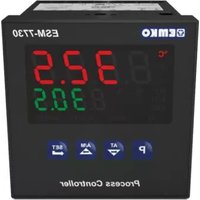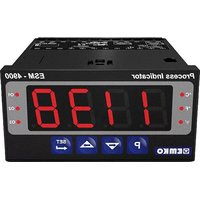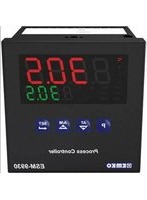
ESM-9930 - Thermostat Emko - Free user manual and instructions
Find the device manual for free ESM-9930 Emko in PDF.



| Product Type | Universal PID process controller (thermostat) |
| Brand | Emko |
| Model | ESM-9930 |
| Dimensions (W x H x D) | 96 x 96 x 87.5 mm |
| Panel cutout | 92 x 92 mm |
| Weight | 320 g |
| Power supply | 100-240 V~ (±10%), 50/60 Hz (standard); 24 V~ or 24 V= optional |
| Process display (PV) | Red LEDs 4 digits, height 19 mm |
| Setpoint display (SV) | Green LEDs 4 digits, height 10.8 mm |
| Process input | Universal: thermocouple (L, J, K, R, S, T, B, E, N, C), RTD PT-100, mV, V, mA |
| Accuracy | ±0.25% of full scale (TC, RTD, mV, V, mA) |
| Sampling cycle | 3 samples per second |
| Outputs | 2 relays 5A @ 250 V~ (resistive load) + 1 SSR driver max. 17 mA / 25 V= |
| Control types | ON/OFF, P, PI, PD, PID (programmable) |
| Automatic adjustments | Auto and adaptive PID |
| Operating temperature | 0 ... 50 °C |
| Relative humidity | 0-90% RH (non-condensing) |
| Protection rating | IP65 front, IP20 rear |
| Mounting | Panel mounting, secured by two elements |
| Warranty | 2 years (from delivery date) |
| Maintenance | Clean with a slightly damp cloth (water or ethyl alcohol). Do not use hydrocarbon solvents. |
| Safety | Installation by a qualified technician; disconnect power before wiring; do not open, disassemble or modify the device. |
| General information | Compatible with various sensors; two-point or multipoint calibration; high/low/deviation/band alarms; soft start. |
Frequently Asked Questions - ESM-9930 Emko
User questions about ESM-9930 Emko
0 question about this device. Answer the ones you know or ask your own.
Ask a new question about this device
Download the instructions for your Thermostat in PDF format for free! Find your manual ESM-9930 - Emko and take your electronic device back in hand. On this page are published all the documents necessary for the use of your device. ESM-9930 by Emko.
USER MANUAL ESM-9930 Emko
- 4 digit process (PV) and 4 digit set (SV) display
-Universal process input (TC, RTD, mV =, V =, mA =) - Dual or multi point calibration for —Voltage & —current inputs
- Programmable ON/OFF, P, PI, PD and PID control forms
- Auto-tune and Self-tune PID
- Manual/Automatic mode selection for control outputs
- Bumpless transfer
- Programmable heating, cooling and alarm functions for control outputs
SPECIFICATIONS PROCESS INPUT
Universal Input: TC, RTD, — Voltage/Current Thermocouple (TC): L(DIN 43710), J, K, R, S, T, B, E and N (IEC584.1)(ITS90), C (ITS90) Thermoresistance (RTD): PT-100 (IEC751)(ITS90)—— Input: mV, V, mA
Measurement Range : Please refer to Table-1 for selection of input type and scale
Accuracy:± 0.25% of full scale for thermocouple, thermoresistance, mV, V and mA input.
Cold Junction Compensation: Automatically ±0.1°C/1°C
Line Compensation: Maximum 10 Ohm
Sensor break protection: Upscale
Sampling Cycle:3 samples per second
Input Filter: 0.0 to 900.0 seconds
CONTROL
Control Form: ON/OFF, P, PI, PD or PID (Control form can be programmed by the user)
OUTPUT
Standard Relay Outputs : Two relays. 5A@250V\~(at resistive load)
(They can be programmed as Control or Alarm output)
SSR Driver Output : Maximum 17mA, Max. 25V ---
SUPPLY VOLTAGE
100-240 V ∼ 50/60 Hz (-15%; +10%), -6VA
24V ∼ 50/60 Hz (-15% ; +10%), -6VA
24V = (-15% ; + 10%), -6W
(Must be determined in order)
DISPLAY
Process Display :
ESM-4430 : 10.1 mm Red 4 Digits LED Display
ESM-4930 : 13.2 mm Red 4 Digits LED Display
ESM-7730 : 13.2 mm Red 4 Digits LED Display
ESM-9930 : 19 mm Red 4 Digits LED Display
ESM-9430 : 10.1 mm Red 4 Digits LED Display
Set Value Display :
ESM-4430 : 8 mm Green 4 Digits LED Display
ESM-4930 : 8 mm Green 4 Digits LED Display
ESM-7730 : 9.1 mm Green 4 Digits LED Display
ESM-9930 :10.8 mm Green 4 Digits LED Display
ESM-9430 : 8 mm Green 4 Digits LED Display
LEDS : AT(Auto Tune), M (Manual Mode), A (Automatic Mode),
PSET / ASET1 / ASET2 (Control or Alarm Set) Leds, PO, AO1, AO2
(Control or Alarm Status) °C / °F / V Leds
ENVIRONMENTAL RATINGS and PHYSICAL SPECIFICATIONS
Operating Temperature: 0...50°C
Humidity : 0-90%RH (none condensing)
Protection Class : IP65 at front, IP20 at rear
Mounting: Type-1 Enclosure Mounting
Installation: Fixed installation Category II
Over Voltage Category: II
Pollution Degree: II, office or workplace, none conductive pollution
Weight:
ESM-4430 : 170 gr.
ESM-4930 : 230 gr.
ESM-7730 : 230 gr.
ESM-9930 : 320 gr.
ESM-9430 : 230 gr.
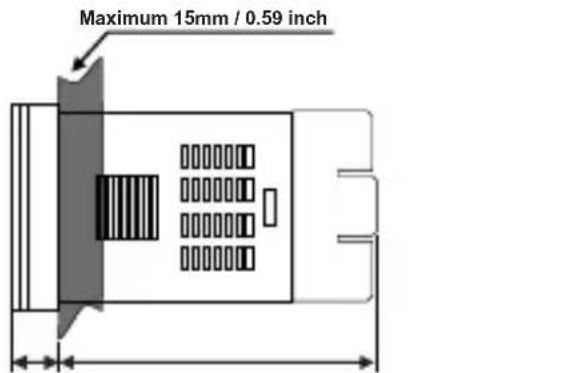
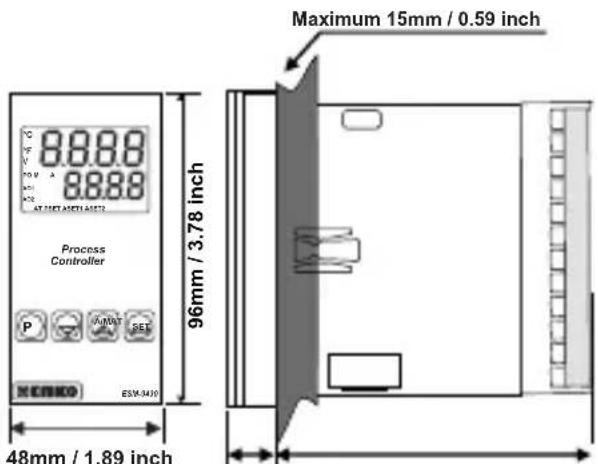
Dimensions / Panel Cut-Out:
ESM-4430 : (48 x 48mm, Depth:87.5 mm) / (46 x 46mm)
ESM-4930 : (96 x 48mm, Depth:86.5 mm) / (92 x 46mm)
ESM-7730 : (72 x 72mm, Depth:87.5 mm) / (69 x 69mm)
ESM-9930 : (96 x 96mm, Depth:87.5 mm) / (92 x 92mm)
ESM-9430 : (48 x 96mm, Depth:86.5 mm) / (46 x 92mm)
Minimum Distance Between Panel Cut-Out Centers:
ESM-4430 : X=65mm, Y=65mm
ESM-4930 : X=129mm, Y=65mm
ESM-7730 : X=97mm, Y=97mm
ESM-9930 : X=129mm, Y=129mm
ESM-9430 : X=65mm, Y=129mm
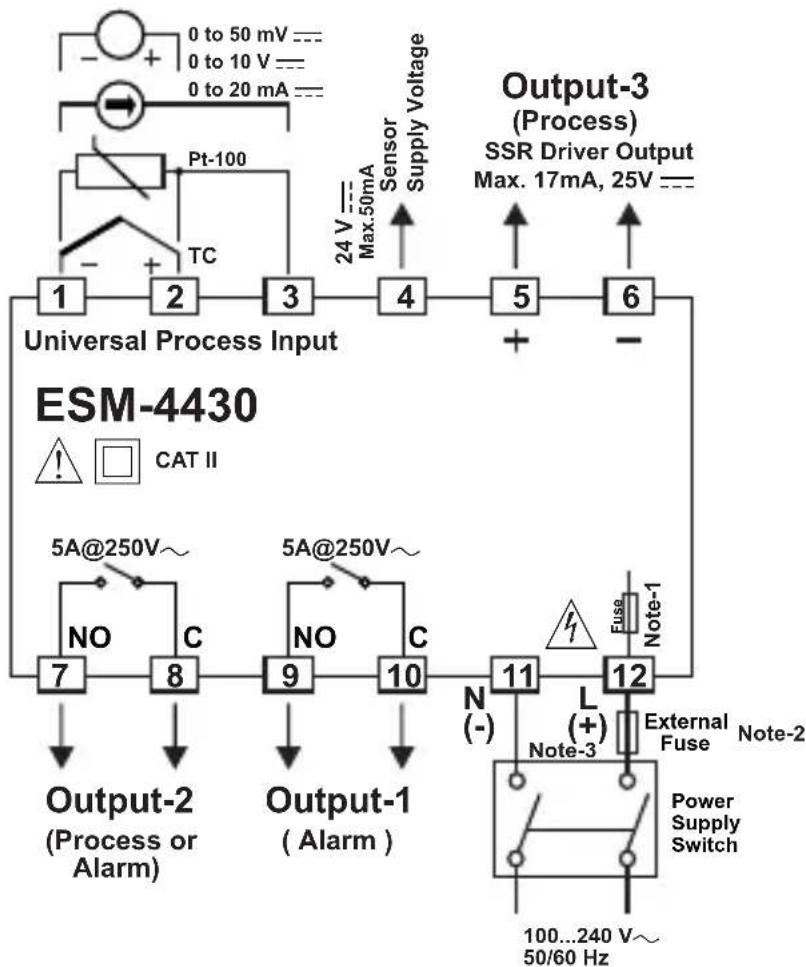
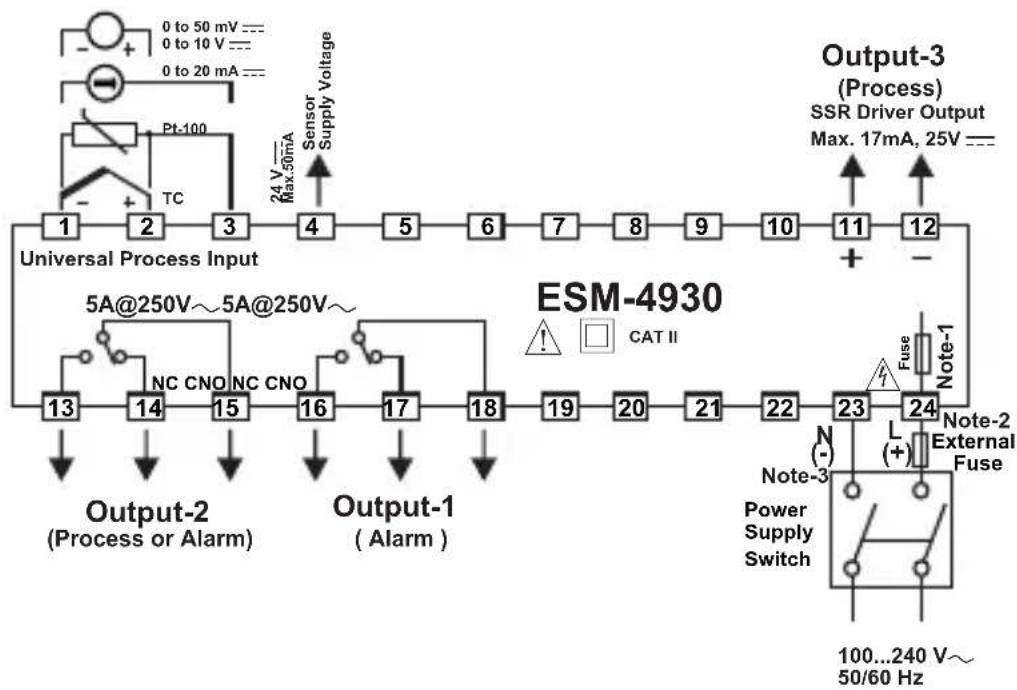
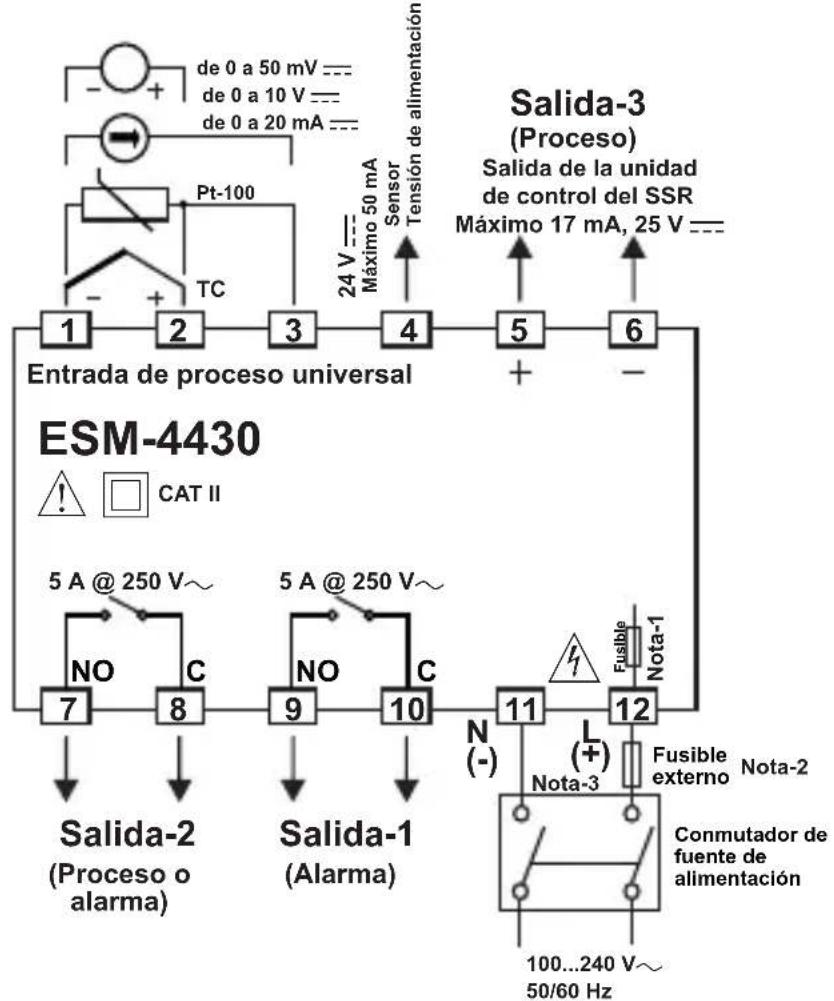
flowchart
graph TD
    A["Universal Process Input"] --> B["1"]
    A --> C["2"]
    A --> D["3"]
    A --> E["4"]
    A --> F["5"]
    A --> G["6"]
    H["ESM-4430"] --> I["Output-1 (Alarm)"]
    H --> J["Output-2 (Process or Alarm)"]
    H --> K["Output-3 (Process)"]
    I --> L["7"]
    I --> M["8"]
    J --> N["9"]
    J --> O["10"]
    K --> P["11"]
    K --> Q["12"]
    L --> R["Output-2"]
    M --> S["Output-2"]
    N --> T["Output-2"]
    O --> U["Output-2"]
    P --> V["Output-2"]
    Q --> W["Output-2"]
    style A fill:#f9f,stroke:#333
    style H fill:#ccf,stroke:#333
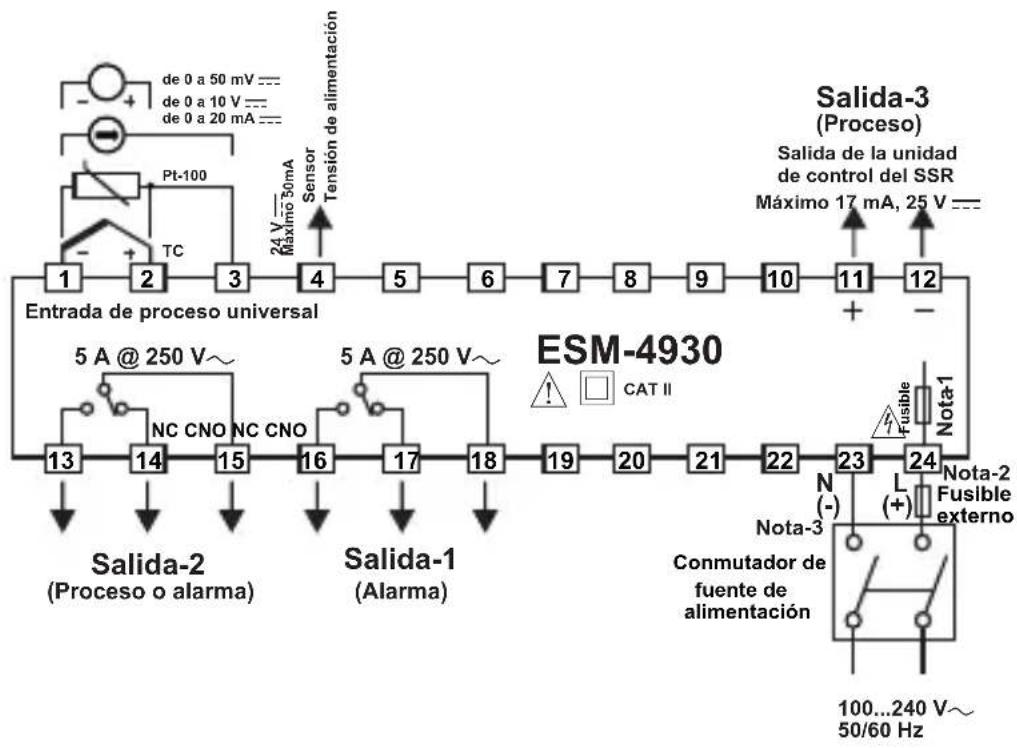
flowchart
graph TD
    A["Input: 0 to 50 mV --- 0 to 10 V --- 0 to 20 mA ---"] --> B["PT-100"]
    B --> C["TC"]
    C --> D["Sensor Supply Voltage"]
    D --> E["Output-3 (Process)"]
    E --> F["SSR Driver Output Max. 17mA, 25V ---"]
    F --> G["+"]
    G --> H["Output-2 (Process or Alarm)"]
    H --> I["NC CNO NC CNO"]
    I --> J["Output-1 (Alarm)"]
    J --> K["Output-2 (Process or Alarm)"]
    K --> L["NC CNO NC CNO"]
    L --> M["Output-1 (Alarm)"]
    M --> N["Output-2 (Process or Alarm)"]
    N --> O["NC CNO NC CNO"]
    O --> P["Output-1 (Alarm)"]
    P --> Q["Output-2 (Process or Alarm)"]
    Q --> R["NC CNO NC CNO"]
    R --> S["Output-1 (Alarm)"]
    S --> T["Output-2 (Process or Alarm)"]
    T --> U["NC CNO NC CNO"]
    U --> V["Output-1 (Alarm)"]
    V --> W["Output-2 (Process or Alarm)"]
    W --> X["NC CNO NC CNO"]
    X --> Y["Output-1 (Alarm)"]
    Y --> Z["Output-2 (Process or Alarm)"]
    Z --> AA["NC CNO NC CNO"]
    AA --> AB["Output-1 (Alarm)"]
    AB --> AC["Output-2 (Process or Alarm)"]
    AC --> AD["NC CNO NC CNO"]
    AD --> AE["Output-1 (Alarm)"]
    AE --> AF["Output-2 (Process or Alarm)"]
    AF --> AG["NC CNO NC CNO"]
    AG --> AH["Output-1 (Alarm)"]
    AH --> AI["Output-2 (Process or Alarm)"]
    AI --> AJ["NC CNO NC CNO"]
    AJ --> AK["Output-1 (Alarm)"]
    AK --> AL["Output-2 (Process or Alarm)"]
    AL --> AM["NC CNO NC CNO"]
    AM --> AN["Output-1 (Alarm)"]
    AN --> AO["Output-2 (Process or Alarm)"]
    AO --> AP["NC CNO NC CNO"]
    AP --> AQ["Output-1 (Alarm)"]
    AQ --> AR["Output-2 (Process or Alarm)"]
    AR --> AS["NC CNO NC CNO"]
    AS --> AT["Output-1 (Alarm)"]
    AT --> AU["Output-2 (Process or Alarm)"]
    AU --> AV["NC CNO NC CNO"]
    AV --> AW["Output-1 (Alarm)"]
    AW --> AX["Output-2 (Process or Alarm)"]
    AX --> AY["NC CNO NC CNO"]
    AY --> AZ["Output-1 (Alarm)"]
    AZ --> BA["Output-2 (Process or Alarm)"]
    BA --> BB["NC CNO NC CNO"]
    BB --> BC["Output-1 (Alarm)"]
    BC --> BD["Output-2 (Process or Alarm)"]
    BD --> BE["NC CNO NC CNO"]
    BE --> BF["Output-1 (Alarm)"]
    BF --> BG["Output-2 (Process or Alarm)"]
    BG --> BH["NC CNO NC CNO"]
    BH --> BI["Output-1 (Alarm)"]
    BI --> BJ["Output-2 (Process or Alarm)"]
    BJ --> BK["NC CNO NC CNO"]
    BK --> BL["Output-1 (Alarm)"]
    BL --> BM["Output-2 (Process or Alarm)"]
    BM --> BN["NC CNO NC CNO"]
    BN --> BO["Output-1 (Alarm)"]
    BO --> BP["Output-2 (Process or Alarm)"]
    BP --> BQ["NC CNO NC CNO"]
    BQ --> BR["Output-1 (Alarm)"]
    BR --> BS["Output-2 (Process or Alarm)"]
flowchart
graph TD
    A["Universal Process Input ESM-7730"] --> B["1"]
    B --> C["2"]
    C --> D["3"]
    D --> E["4"]
    E --> F["5"]
    F --> G["6"]
    G --> H["7"]
    H --> I["8"]
    I --> J["9"]
    J --> K["External Note-2"]

    subgraph ESM-7730
        L["10"] --> M["Output-2 (Process or Alarm)"]
        N["11"] --> M
        O["12"] --> M
        P["13"] --> Q["Output-1 (Alarm)"]
        R["14"] --> Q
        S["15"] --> Q
        T["16"] --> U["Note-3 Power Supply Switch"]
        V["17"] --> W["L (+"]]
        X["18"] --> Y["L (+)"]
        Z["Output-3 (Process)"] --> AA["Max. 17mA, 25V ---"]
    end

    style ESM-7730 fill:#f9f,stroke:#333
    style Output-3 fill:#ccf,stroke:#333
flowchart
graph TD
    A["Input: 0 to 50 mV --- 0 to 10 V --- 0 to 20 mA ---"] --> B["PT-100"]
    B --> C["TC"]
    C --> D["Universal Process Input"]
    D --> E["Output-2 (Process or Alarm)"]
    E --> F["Output-1 (Alarm)"]
    F --> G["External Note-2"]
    G --> H["Note-3 Power Supply Switch"]
    H --> I["Output-3 (Process) SSR Driver Output Max. 17mA, 25V ---"]
    style A fill:#f9f,stroke:#333
    style G fill:#bbf,stroke:#333
flowchart
graph TD
    A["Input: 0 to 50 mV ---, 0 to 10 V ---, 0 to 20 mA ---"] --> B["Pt-100"]
    B --> C["TC"]
    C --> D["Universal Process Input"]
    D --> E["4"]
    E --> F["5"]
    F --> G["6"]
    G --> H["7"]
    H --> I["8"]
    I --> J["9"]
    J --> K["10"]
    K --> L["11"]
    L --> M["12"]
    M --> N["Output-3 (Process)"]
    N --> O["SSR Driver Output Max. 17mA, 25V ---"]
    P["External Note-2"] --> Q["Note-3 Power Supply Switch"]
    Q --> R["100...240 V~50/60 Hz"]
    S["NC CNO NC CNO"] --> T["Output-2 (Process or Alarm)"]
    U["CAT II"] --> V["Output-1 (Alarm)"]
    W["N (-) (+)"] --> X["External Note-2"]
    Y["L"] --> Z["External Note-2"]
    style A fill:#f9f,stroke:#333
    style N fill:#ccf,stroke:#333
    style O fill:#cfc,stroke:#333
    style P fill:#fcc,stroke:#333
    style Q fill:#cff,stroke:#333
    style R fill:#ffc,stroke:#333
    style S fill:#fcc,stroke:#333
    style T fill:#ffc,stroke:#333
    style U fill:#fcc,stroke:#333
    style V fill:#ffc,stroke:#333
    style W fill:#fcc,stroke:#333
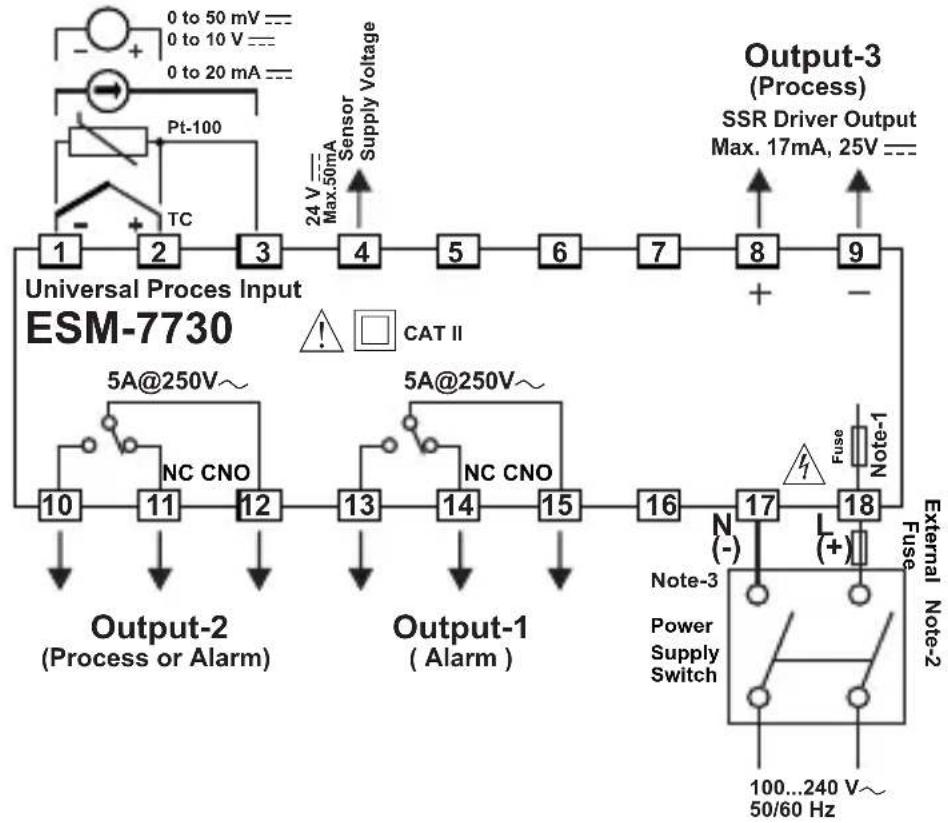
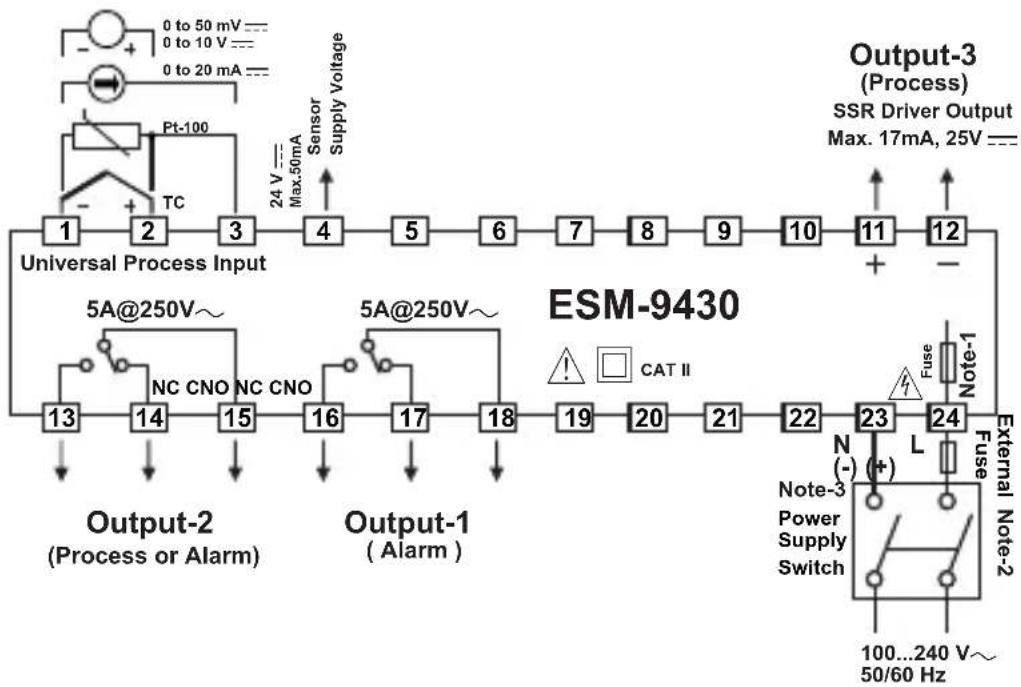
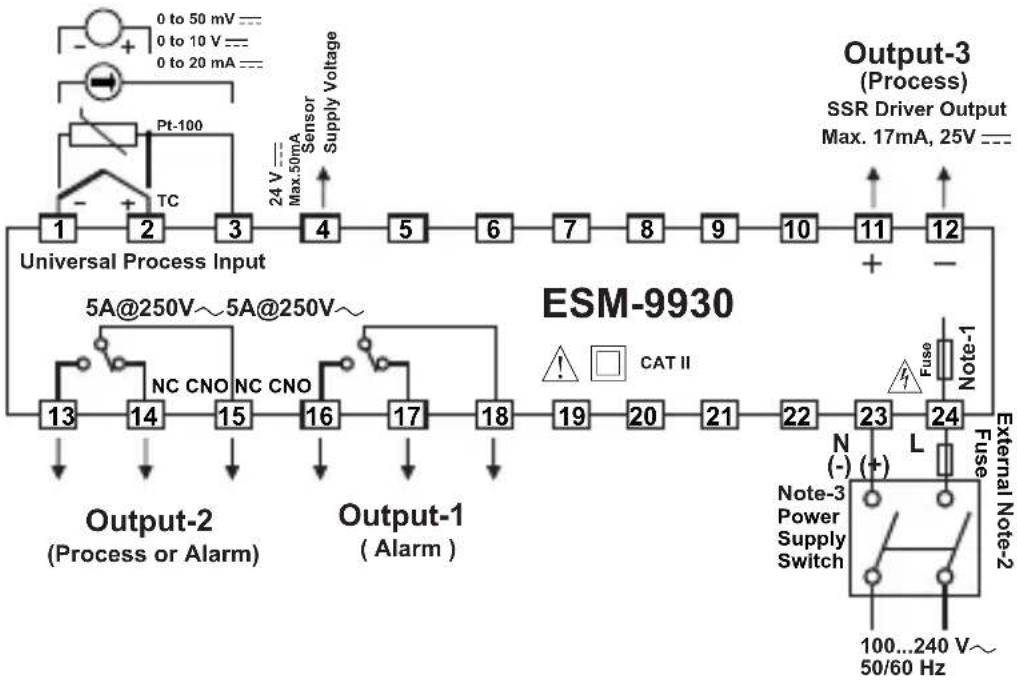
Note-1 : There is an internal fusible flameproof resistor.
Note-2 : External fuse is recommended.
1100..T for power supply 240 V\~ or 24V\~
1A——T for power supply 24V ——
Note-3: "L" is (+), "N" is (-) for 24V--- supply voltage
DIMENSIONS
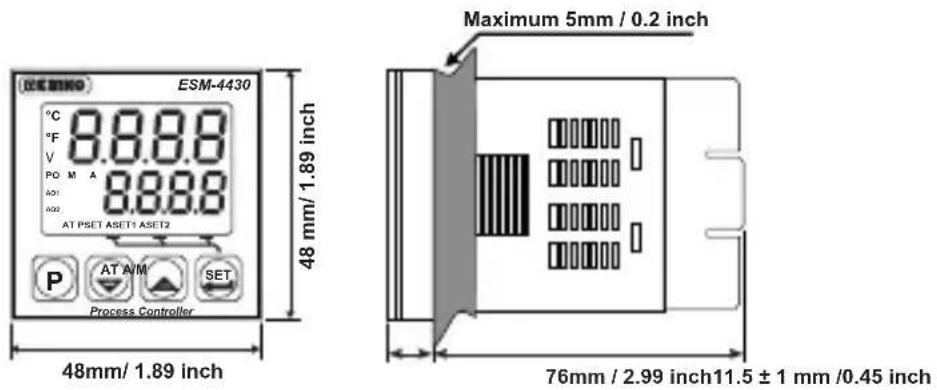
text_image
ESM-4430 °C 8.8.8.8 °F V PO M A 8.8.8.8 A01 A02 AT PSET ASET1 ASET2 P AT A/M SET Process Controller 48 mm/ 1.89 inch Maximum 5mm / 0.2 inch 76mm / 2.99 inch 11.5 ± 1 mm /0.45 inch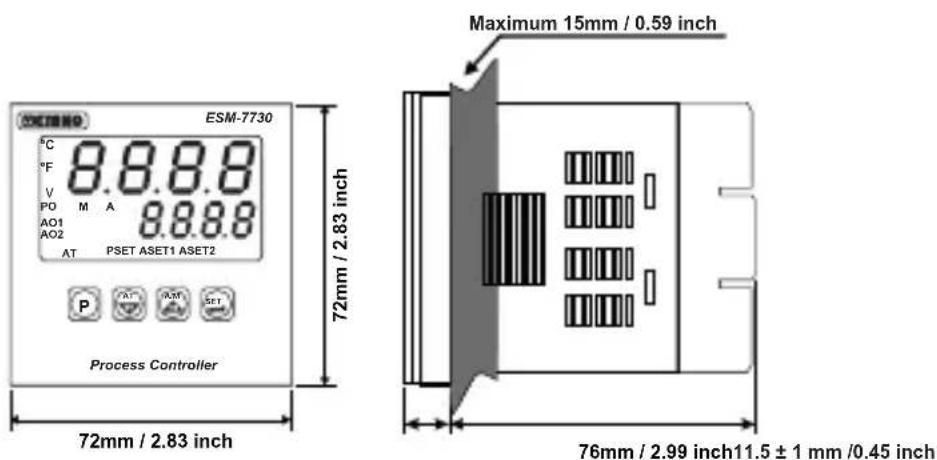
text_image
ESEM-7730 °C 8.8.8.8 °F V PO M A 8.8.8.8 AO1 AO2 AT PSET ASET1 ASET2 Process Controller 72mm / 2.83 inch 72mm / 2.83 inch Maximum 15mm / 0.59 inch 76mm / 2.99 inch 11.5 ± 1 mm /0.45 inch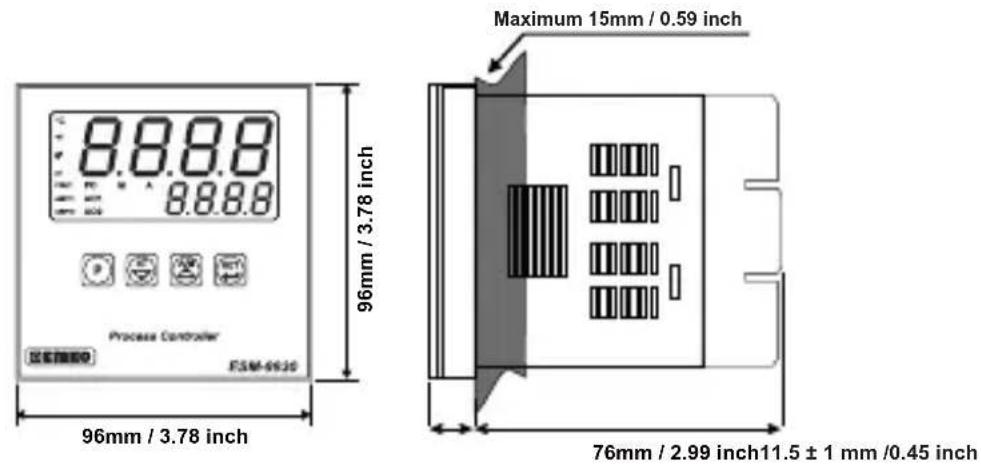
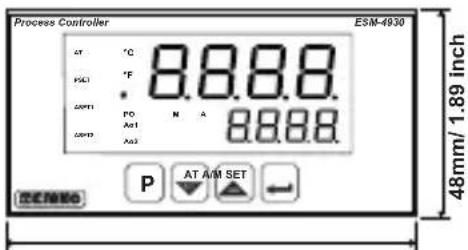
text_image
Process Controller AT °C PSC1 °F CAPT1 PD N A 8.8.8.8 CAPT2 AD1 8.8.8.8 P AT A/M SET 48mm/ 1.89 inch96mm / 3.78 inch
text_image
Maximum 15mm / 0.59 inch76mm / 2.99 inch10.5 ± 1 mm /0.41 inch
text_image
Process Controller 96mm / 3.78 inch Maximum 15mm / 0.59 inch 48mm / 1.89 inch10.5 ± 1 mm /0.41 inch 76mm / 2.99 inch
PANEL MOUNTING
text_image
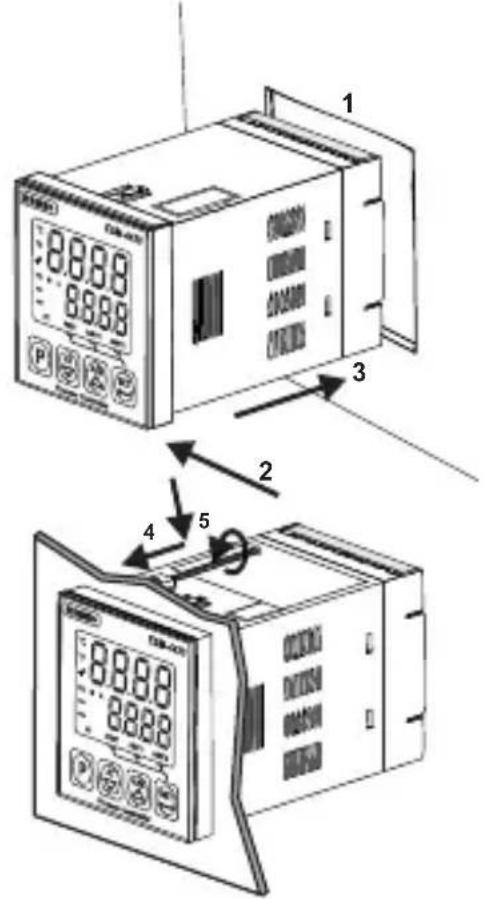
1 8.8.88 8.8.88 P 3 2 4 51-Before mounting the device in your panel, make sure that the panel cut-out is suitable.
2-Check front panel gasket position
3-Insert the device through the cut-out. If the mounting clamp are on the unit, put out them before inserting the unit to the panel.
4-Insert the unit in the panel cut-out from the front side.
5- Insert the mounting clamps to the holes that located top and bottom sides of device and screw up the fixing screws until the unit completely immobile within the panel
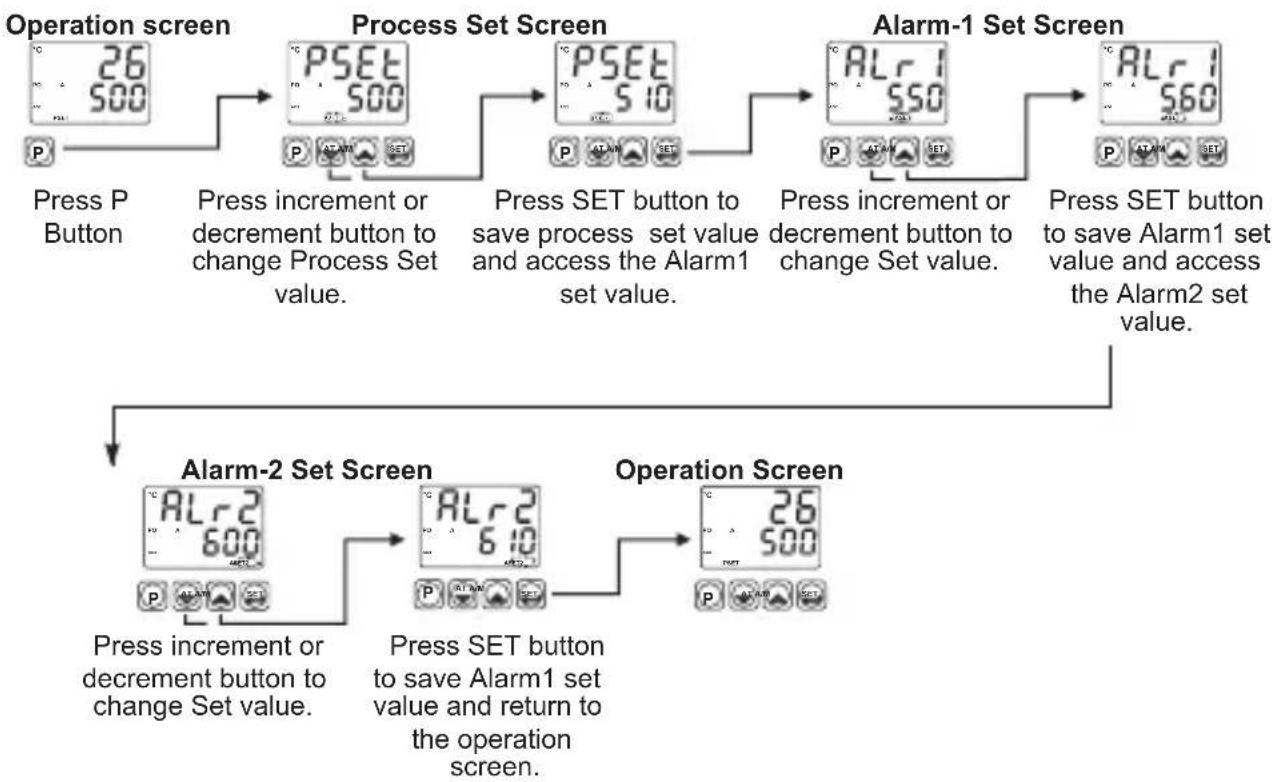
Access and change Set values
flowchart
graph TD
    A["Operation screen"] --> B["Process Set Screen"]
    B --> C["Alarm-1 Set Screen"]
    C --> D["Alarm-2 Set Screen"]
    D --> E["Operation Screen"]

    subgraph Process Set Screen
        F["P SET 500 P"]
        G["P SET 510 P"]
        H["P SET 560 P"]
    end

    subgraph Alarm-1 Set Screen
        I["ALr1 550 P"]
        J["ALr1 560 P"]
        K["ALr2 600 P"]
        L["ALr2 610 P"]
    end

    subgraph Alarm-2 Set Screen
        M["ALr2 600 P"]
        N["ALr2 610 P"]
        O["Operation Screen"]
    end

    F --> G --> H --> I --> J --> K --> L --> M --> N --> O
    M --> N --> O
    I --> J --> K --> L --> M --> N --> O
    style Process Set Screen fill:#f9f,stroke:#333
    style Alarm-1 Set Screen fill:#ccf,stroke:#333
    style Alarm-2 Set Screen fill:#cfc,stroke:#333
Note: User can exit from Set Value section without saving the values by pressing button. If no operation for 120 seconds, device automatically exits from Set Value section.
Easy access diagram for Program Parameters
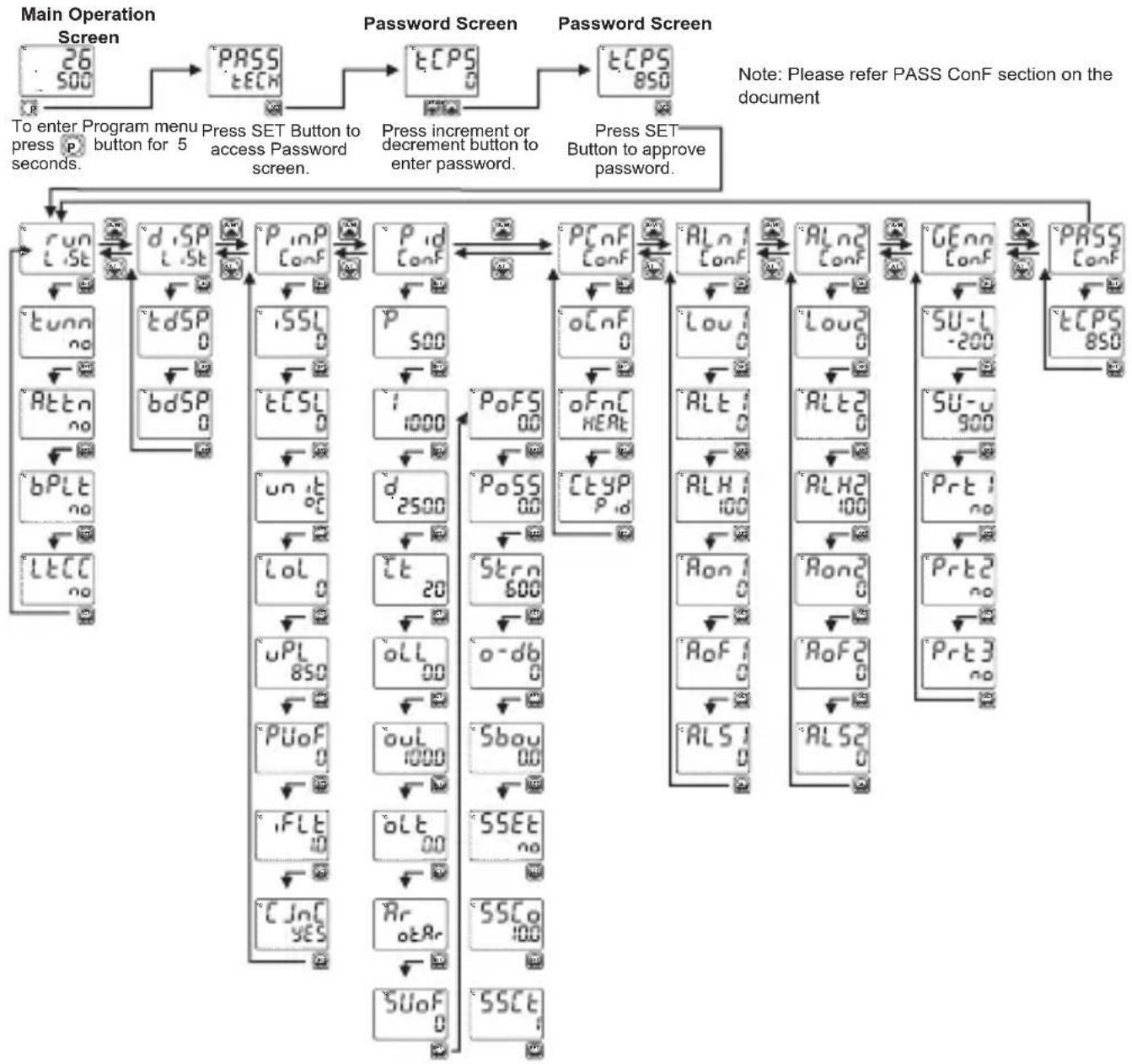
flowchart
graph TD
    A["Main Operation Screen"] --> B["To enter Program menu press to press 5 seconds."]
    B --> C["PASS tECN"]
    C --> D["Press SET Button to access Password screen."]
    D --> E["tCPS"]
    E --> F["Press increment or decrement button to enter password."]
    F --> G["tCPS 850"]
    G --> H["Password Screen"]
    H --> I["Press SET Button to approve password."]
    I --> J["run L.St"]
    I --> K["dSP L.St"]
    J --> L["tunn no"]
    J --> M["tdSP 0"]
    J --> N["bdSP 0"]
    K --> O["iSSL 0"]
    K --> P["iCSL 0"]
    K --> Q["un it 0c"]
    K --> R["Lol 0"]
    K --> S["uPL 850"]
    K --> T["PUoF 0"]
    K --> U["iFLT 10"]
    K --> V["CJnC YES"]
    L --> W["P_inP Conf"]
    M --> X["P_1d Conf"]
    N --> Y["P_2d Conf"]
    O --> Z["P_oFS 00"]
    P --> AA["P_oFS 00"]
    Q --> AB["P_oFS 00"]
    R --> AC["P_oFS 20"]
    S --> AD["P_oFS 20"]
    T --> AE["P_oFS 600"]
    U --> AF["P_oFS 00"]
    V --> AG["P_oFS 00"]
    W --> AH["ALn Conf"]
    X --> AI["ALn Conf"]
    Y --> AJ["ALn Conf"]
    Z --> AK["ALn Conf"]
    AA --> AL["ALn Conf"]
    AB --> AM["ALn Conf"]
    AC --> AN["ALn Conf"]
    AD --> AO["ALn Conf"]
    AE --> AP["ALn Conf"]
    AF --> AQ["ALn Conf"]
    AG --> AR["ALn Conf"]
    AH --> AS["ALn Conf"]
    AI --> AT["ALn Conf"]
    AJ --> AU["ALn Conf"]
    AK --> AV["ALn Conf"]
    AL --> AW["ALn Conf"]
    AM --> AX["ALn Conf"]
    AN --> AY["ALn Conf"]
    AO --> AZ["ALn Conf"]
    AP --> BA["ALn Conf"]
    AQ --> BB["ALn Conf"]
    AR --> BC["ALn Conf"]
    AS --> BD["ALn Conf"]
    AT --> BE["ALn Conf"]
    AU --> BF["ALn Conf"]
    AV --> BG["ALn Conf"]
    AW --> BH["ALn Conf"]
    AX --> BI["ALn Conf"]
    AY --> BJ["ALn Conf"]
    AZ --> BK["ALn Conf"]
    BA --> BL["ALn Conf"]
    BB --> BM["ALn Conf"]
    BC --> BN["ALn Conf"]
Run LiSt: Selection of PID Tune and Operation Form

TUNE SELECTION: By selecting one of the methods below, device can determine the PID parameters.

Device operates according to the defined PID parameters

Auto tune (Limit Cycle Tuning) operation

Self tune (Step Response Tuning) operation

Auto-Self Tune Tunning methods are performed according to system conditions by itself.

AUTOMATIC TUNE SELECTION

Device does not perform tuning.

Device does perform tuning.

BUMPLESS TRANSFER

When automatic mode changes to manual mode, the process output will be last saved manuel mode output percentage. Process output value in manual control is not taken into consideration while passing from manual control to automatic control. New control output that is measured in automatic control is applied to process output.

When automatic mode changes to manual mode, the process output will be last automatic mode output percentage. While passing from manual control to automatic control, last process output value in manual control is accepted as first process output value in automatic control.
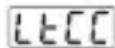
ALARM LATCH CANCELING

Alarm latch canceling is not performed.

If there is an alarm output with latching and there is no alarm status, latching operation will be finished by the device. This parameter becomes no automatically.
dISP LiSt: Function Selection for Top and Bottom Display
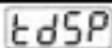
Top Display Function
This parameter determines which value is shown in top display.

Process value (PV) is shown in top display.

Difference between process set value and process value (SV-PV) is shown in top display.
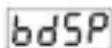
Bottom display Function
This parameter determines which value is shown in bottom display.

Process set value (SV) is shown in bottom display.

%Output value that is applied to process control output is shown in bottom display.
PinP ConF: Process Input Type and Relevant Parameters
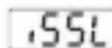
Process Input Type

TC input type selection

RTD input type selection

---Voltage / Current input type selection.
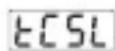
TC Input Selection
This parameter is active if TC input type is selected.
☐ L (-100°C;850°C) or (-148°F;1562°F)
L (-100.0°C;850.0°C) or (-148.0°F;999.9°F)
J (-200°C;900°C) or (-328°F;1652°F)
J (-199.9°C; 900.0°C) or (-199.9°F; 999.9°F)
K (-200°C; 1300°C) or (-328°F; 2372°F)
5 K (-199.9°C; 999.9°C) or (-199.9°F; 999.9°F)
6 R (0°C;1700°C) or (32°F;3092°F)
R (0.0°C;999.9°C) or (32.0°F;999.9°F)
6 S (0°C;1700°C) or (32°F;3092°F)
9 S (0.0°C;999.9°C) or (32.0°F;999.9°F)
T (-200°C;400°C) or (-328°F;752°F)
T (-199.9°C; 400.0°C) or (-199.9°F; 752.0°F)
12 B (44°C; 1800°C) or (111°F; 3272°F)
B (44.0°C; 999.9°C) or (111.0°F ; 999.9°F)
14 E (-150°C;700°C) or (-238°F;1292°F)
15 E (-150.0°C;700.0°C) or (-199.9°F;999.9°F)
16 N (-200°C; 1300°C) or (-328°F; 2372°F)
N (-199.9°C; 999.9°C) or (-199.9°F; 999.9°F)
18 C (0°C;2300°C) or (32°F;3261°F)
19 C (0.0°C; 999.9°C) or (32.0°F; 999.9°F)
rtd5 RTD Input Selection
This parameter is active if RTD input is selected.
☐ PT-100 (-200°C ; 650°C ) or (-328°F ; 1202°F)
PT-100 (-199.9°C ; 650.0°C ) or (-199.9°F ; 999.9°F)
vASL — voltage / Current Input Selection
This parameter is active if —Voltage / Current is selected.
0...50mV = (-1999; 9999)
0...5V = (-1999; 9999)
2 0...10V = (-1999; 9999)
3 0...20mA = (-1999; 9999)
4...20mA = (-1999; 9999)
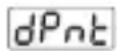
dPnt Display Point Position
Active if oltage / Current input is selected.—V
0 No point
Between first and second digits "0.0"
2 Between second and third digits "0.00"
3 Between third and fourth digits "0.000"
uCAL Display Value Adjustment Type
Active if oltage / Current input is selected.——V
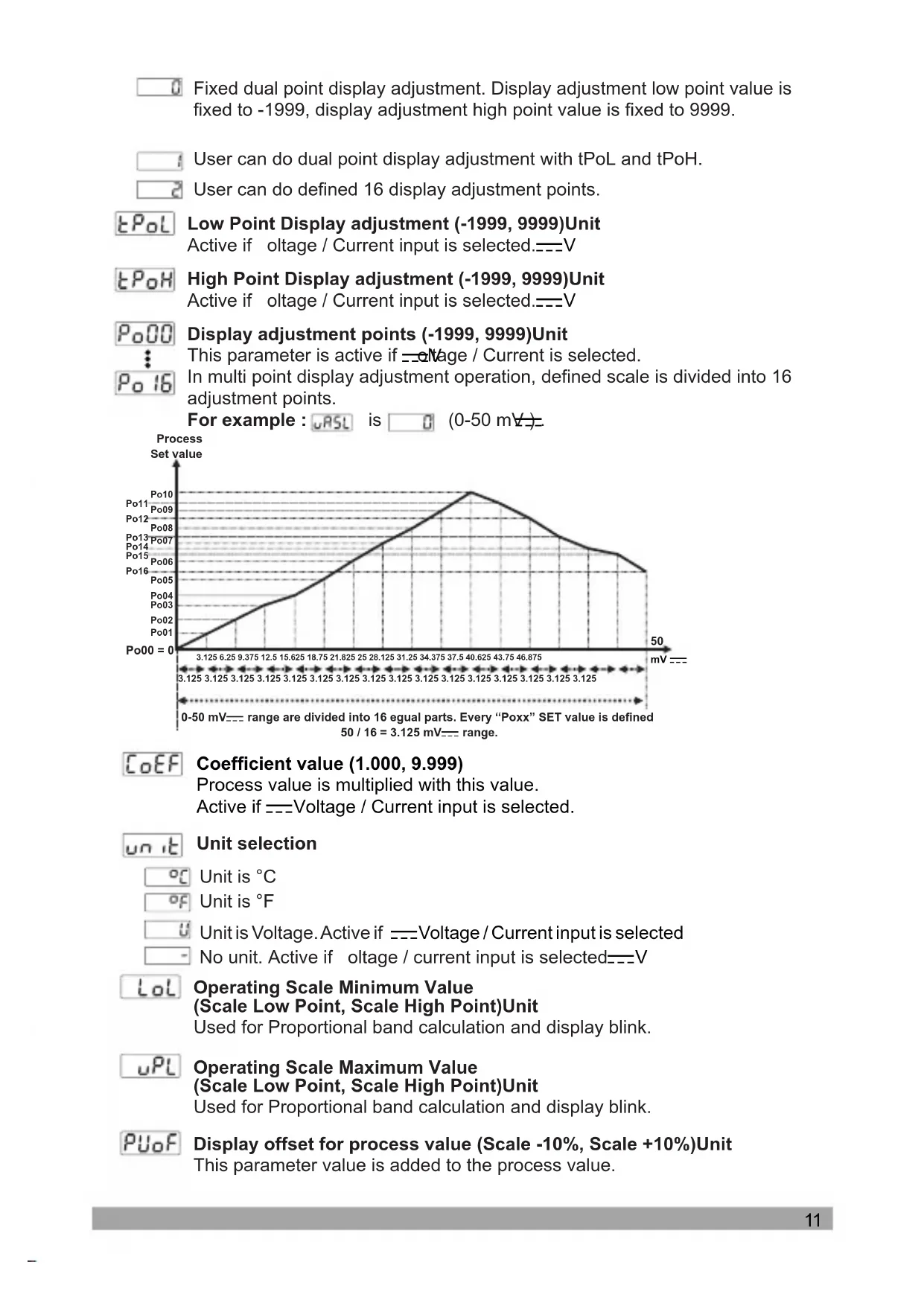
Fixed dual point display adjustment. Display adjustment low point value is fixed to -1999, display adjustment high point value is fixed to 9999.
User can do dual point display adjustment with tPoL and tPoH.
User can do defined 16 display adjustment points.
tPol Low Point Display adjustment (-1999, 9999)Unit Active if voltage / Current input is selected.——V
tPoH High Point Display adjustment (-1999, 9999)Unit Active if oltage / Current input is selected.——V
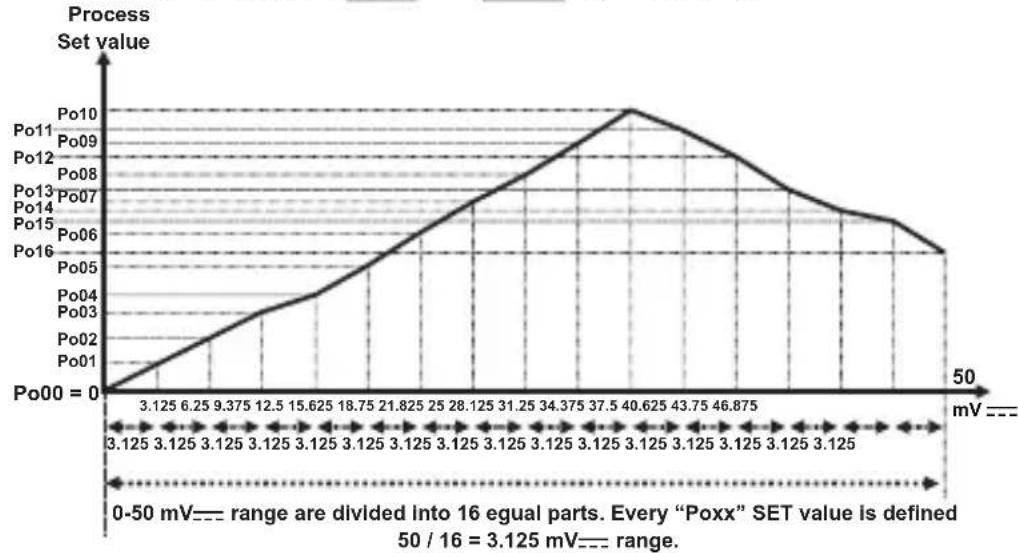
Po00 Display adjustment points (-1999, 9999)Unit ⋮ Po 16 This parameter is active if voltage / Current is selected. In multi point display adjustment operation, defined scale is divided into 16 adjustment points.
For example: WASL is 0 (0-50 mV)
line
| mV | Set value | | ------ | --------- | | 3.125 | 0 | | 6.25 | 1 | | 9.375 | 2 | | 12.5 | 3 | | 15.625 | 4 | | 18.75 | 5 | | 21.825 | 6 | | 25 | 7 | | 28.125 | 8 | | 31.25 | 9 | | 34.375 | 10 | | 37.5 | 11 | | 40.625 | 12 | | 43.75 | 11 | | 46.875 | 10 | | 50 | 9 |CoEF Coefficient value (1.000, 9.999)
Process value is multiplied with this value.
Active if ===Voltage / Current input is selected.
Unit selection
Unit is °C Unit is °F
Unit is Voltage. Active if ---Voltage / Current input is selected No unit. Active if voltage / current input is selected---V
Lol Operating Scale Minimum Value (Scale Low Point, Scale High Point)Unit
Used for Proportional band calculation and display blink.
uPL Operating Scale Maximum Value (Scale Low Point, Scale High Point)Unit
Used for Proportional band calculation and display blink.
PUoF Display offset for process value (Scale -10%, Scale +10%)Unit This parameter value is added to the process value.
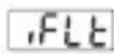
Filter Time (0.0, 900.0) Second
Defines filter time for display value.
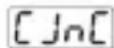
Cold Junction Compensation
This parameter is active if process input is selected TC input.

Cold junction compensation is active.

Cold junction compensation is not active.
Scale: The difference, between high point and low point of the process input type.
Example: If tCSL = 2 (low point is -200, high point is 900), then scale is 1100. If input type is Voltage/Current, then the scale is difference between tPoH and tPoL parameters.
Pid ConF: PID Configuration Parameters
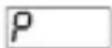
PROPORTIONAL BAND (0.0, 999.9)%
If = 1000^ , = 0^ and = 50.0 then,
Proportional Band = (uPL - LoL) *P / 100.0
Proportional Band = (1000-0)*50.0/100.0 = 500 °C
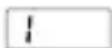
INTEGRAL TIME (0, 3600)Second
Can be changed by the user. After completed the tunning correctly, integral time value changes automatically. If it is 0, integral control is deactivated.

DERIVATIVE TIME (0.0, 999.9) Second
Can be changed by the user. After completed the tuning correctly, integral time value changes automatically. If it is 0, derivative control is deactivated.
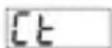
CONTROL PERIOD TIME (1, 150)Second
Process output period time
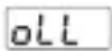
MINIMUM CONTROL OUTPUT (0.0, out) %
Even as a result of the PID calculation device calculates the %output value less than this parameter, heating or cooling output is active minimum for OLL parameter.
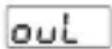
MAXIMUM CONTROL OUTPUT (oll, 100.0)%
Even as a result of the PID calculation device calculates the %output value greater than this parameter, heating or cooling output is active maximum for OUL parameter.
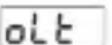
MINIMUM CONTROL OUTPUT TIME (0.0, [E])Second
Heating or cooling output can not be active less than this parameter. Even if this parameter is 0, this parameter is accepted as 50 msecs.
![Emko ESM-9930 - MINIMUM CONTROL OUTPUT TIME (0.0, [E])Second - 1](/content/2026/04/654857/images/b18831e7c079967cb2596c05c33f852179d92d1fc8594b5c752c425a418c70d2.jpg)
ANTI-RESET WINDUP (0, SCALE HIGH POINT)Unit
While PID operation is running if PSET - Ar <= process value <= PSET + Ar condition is true, integral value is calculated. If the condition is not true, integral value is not calculated and last calculated integral value is used. If Ar Parameter is selected otAr , heating proportional band is used for heating PID process instead of Ar Parameter and cooling proportional band is used for cooling PID process instead of Ar Parameter.
SUoF SET VALUE OFFSET
((- SCALE HIGH POINT / 2), (SCALE HIGH POINT / 2)) Unit PSET + SUoF is used as set value in PID calculations. This parameter is used for shifting the proportional band.
PoFS PID OUTPUT OFFSET
(FOR HEATING PID 0.0, 100.0)% (FOR COOLING PID -100.0, 0.0)%
This parameter is added to "Output %" which is calculated at the end of the PID.
Po55 OUTPUT OFFSET RELATED TO PID SET
(FOR HEATING PID 0.0, 100.0)% (FOR COOLING PID -100.0, 0.0)%
This parameter is added to the %process output that is calculated at the end of the PID according to process set value. PoSS * PSEt / (uPl - Lol)
5trn PROCESS VALUE STABILIZATION (1, SCALE HIGH POINT)Unit
It is used for controlling if process value oscillates or not when tunn Parameter is Rtun or AtSt If; PSET - Strn <= Process Value <= PSET + Strn condition is not true, then device start tunn operation automatically.
SCALE LOW POINT : Minimum process input value in Pt-100 and Tc inputs. -1999 for fixed dual point display adjustment used inputs, Scale low point is the lowest one from t_PoL or p_oH for selectable dual point display adjustment used inputs Scale low point is the lowest from P_oO or P_oF for multi point display adjustment used inputs
SCALE HIGH POINT : Maximum process input value in Pt-100 and Tc inputs. 9999 for fixed dual point display adjustment used inputs, Scale high point is the biggest one from tPoL or tPoH for selectable dual point display adjustment used inputs Scale high point is the biggest one from Po00 or Po15 for multi point display adjustment
a-db PROPORTIONAL BAND SHIFTING
((- SCALE HIGH POINT / 2), ( SCALE HIGH POINT / 2)) Unit
If cooling function is performed; Cooling process set value is calculated by adding set value PSET with parameter a-db Control form can be ON/OFF or PID.
If set value for heating = PSET + SUoF ;
Then set value for cooling = PSET + 5UoF + o-db
5bou SENSOR BREAK OUTPUT VALUE
(FOR HEATING PID 0.0, 100.0)%
(FOR COOLING PID -100.0, 0.0)%
When sensor breaks, controlling of the process can continue by entering %output value to Sbou parameter.
If this parameter 0.0, process control output does not perform an output when sensor breaks.
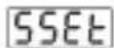
Soft Start Set value (0, 9999)Unit
If parameter is selected no. Soft start function becomes inactive.
When the device power on, if the Soft start set value different from no and temperature value is lower than soft start value on processes, device starts soft start operation, until temperature reaches soft start set value. On soft start device output period will be SSCt parameter value and device control output will be SSCo parameter value.
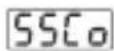
Soft Start Control Output (10.0, 90.0)%
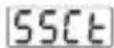
Soft Start Control Period (1, 100)Second
PCnF ConF: Process Output Configuration Parameters
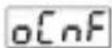
Output Configuration
Determines if Process Output (SSR Driver Output) and Alarm-2 Output operates together or not.
Process Output (SSR Driver Output) and Alarm-2 Output operates separately.
Process Output (SSR Driver Output) and Alarm-2 Output operates together. Alarm functions of Alarm-2 Output can not be used
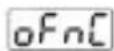
Process Output Function
HERE Heating
Cool Cooling
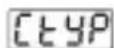
Process Output Control Type
onOF ON/OFF control algorithm
P, d PID control algorithm
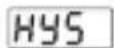
Hysteresis of Process Output (Scale 0%, Scale 50%)Unit
Active if ON/OFF control is selected.
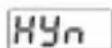
Operation form of hysteresis
Active if ON/OFF control is selected.
SV + HYS/2 and SV - HYS/2
SV and SV+HYS or SV and SV-HYS
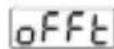
OFF Time (0.0, 100.0)Second
In ON/OFF operation, this time must be passed for the output to be energised again. (Active if ON/OFF control is selected)
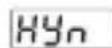
Operation form of hysteresis
Active if ON/OFF control is selected.
SV + HYS/2 and SV - HYS/2
SV and SV+HYS or SV and SV-HYS
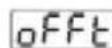
OFF Time (0.0, 100.0)Second
In ON/OFF operation, this time must be passed for the output to be energised again. (Active if ON/OFF control is selected)
Aln1 ConF: Alarm Output-1 Configuration Parameters
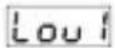
Logic Output-1
Determines logic output function for Alarm-1 Output

Alarm output

Manual / Automatic selection output

Sensor break alarm output

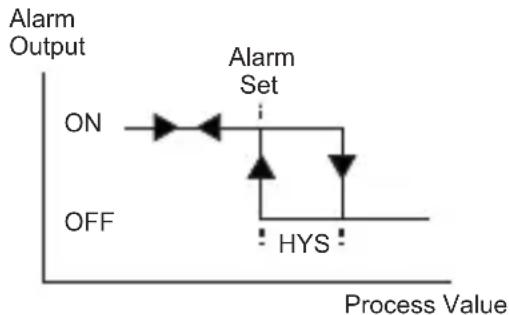
Output is active when the process value is out of the band which is defined with minimum value of operating scale and maximum value of operating scale
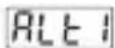
Alarm-1 Type
Determines alarm type for Output-1. Active if logic output function of Alarm-1 Output is alarm output.

Process high alarm

Process low alarm

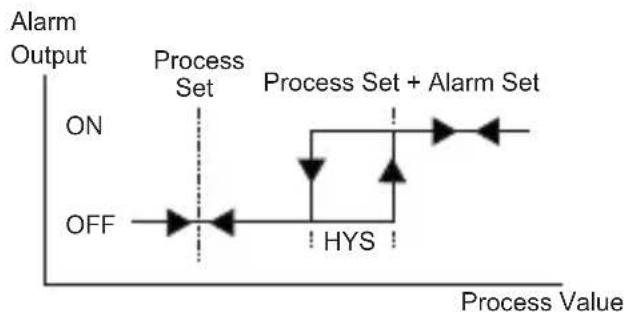
Deviation high alarm

Deviation low alarm

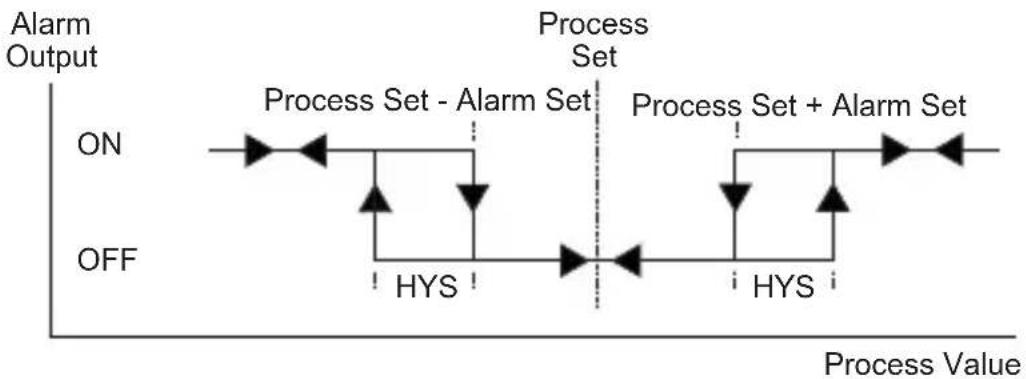
Deviation band alarm

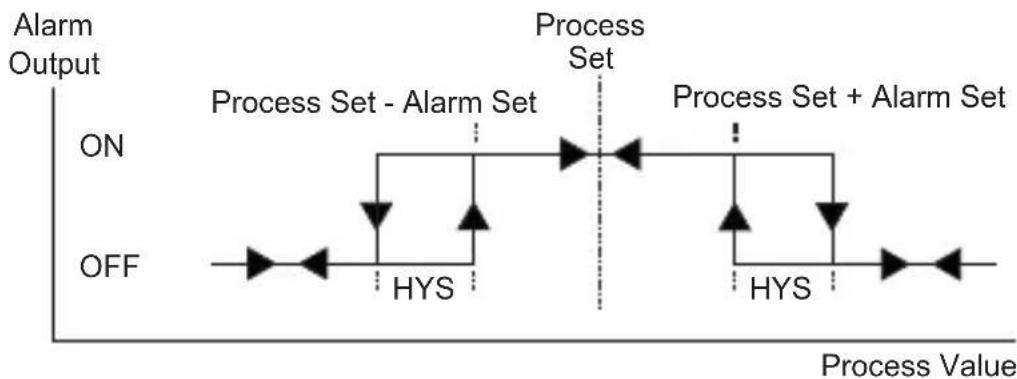
Deviation range alarm
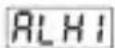
Alarm-1 hysteresis value(Scale 0%, Scale 50%)Unit
Active if logic output function of Alarm-1 Output is alarm output.
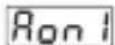
Alarm-1 On Delay Time (0, 9999\$second
Active if logic output function of Alarm-1 Output is alarm output.
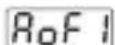
Alarm-1 Off Delay Time (0, 9998\$second
When the value is greater than 9998, LEEH is seen on the screen. It means alarm latching output is selected. Active if logic output function of Alarm-1 Output is alarm output.
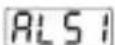
Alarm-1 Stabilization Time (0, 99)Second
Active if logic output function of Alarm-1 Output is alarm output. After the unit is power-on and Alarm Stabilisation Time is expired, if an alarm condition which is selected with Alt1 is present, then Alarm-1 output becomes active.
Aln2 ConF: Alarm-2 Output Configuration Parameters

"Aln2 Conf" Menu is accessible if
ConF" is 0
oCnF parameter in "PCnF
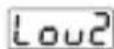
Logic Output-2
Determines logic output function for Alarm-2 Output

Alarm output

Manual / Automatic selsction output

Sensor break alarm output
3 Output is active when the process value is out of the band which is defined with minimum value of operating scale [Lol] and maximum value of operating scale uPl
ALt2 Alarm-2 Type
Determines alarm type for Output-2. Active if logic output function of Alarm-2 Output is alarm output.
Process high alarm
Process low alarm
2 Deviation high alarm
3 Deviation low alarm
4 Deviation band alarm
5 Deviation range alarm
ALH2 Alarm- 2 hysteresis value(Scale 0%, Scale 50%)Unit
Active if logic output function of Alarm-2 Output is alarm output.
Ron2 Alarm-2 On Delay Time (0, 9999) Second
Active if logic output function of Alarm-2 Output is alarm output.
RoF2 Alarm-2 Off Delay Time (0, 9998) Second
When the value is greater than 9998, LCHis seen on the screen. It means alarm latching output is selected. Active if logic output function of Alarm-2 Output is alarm output.
ALS2 Alarm-2 Stabilization Time (0, 99 Second
Active if logic output function of Alarm-2 Output is alarm output. After the unit is power-on and Alarm Stabilisation Time is expired, if an alarm condition which is selected with Alt2 is present, then Alarm-2 output becomes active.
Gen ConF: General Parameters
5U-L Process Set Value Low Limit (Scale Low Point, 5U-u) Unit
5U-u Process Set Value Up Limit (5U-L, Scale High Point)Unit
Prt1 Alarm Set Values Protection
no Alarm Set values can be changed
YES Alarm Set values can not be changed. Alarm set values parameters, ALr1 and ALr2, are not accessible
Prt2 AUTO / MANUAL Selection Button Protection
no Auto or Manual selection is possible with A/M button in Main Operation screen
YES Auto or Manual selection is not possible with A/M button in Main Operation screen
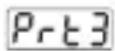
AT (AUTO TUNE) Button Protection

Limit Cycle Tuning operation can be activated or deactivated with AT (Auto Tune) Button in Operation screen

Limit Cycle Tuning operation can not be activated or deactivated with AT (Auto Tune) Button in Operation screen
PASS ConF: Password Parameters
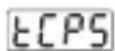
Technician Password (0, 9999)
Uses for protecting and accessing to the technician parameters.
If this parameter is ☐; there is no password protection while entering to the technician parameters.
If this parameter is different from "0" and user wants to access to the technician parameters;
1- If technician does not enter EIPS password correctly: It turns to operation screen without entering to technician parameters.
2- When ECPS in top display and 0 in bottom display, if technician presses SET button without entering ECPS password (For observing parameter)
Technician can see all menus and parameters except Technician Password menu (“Pass Conf”), but parameters can not be changed.
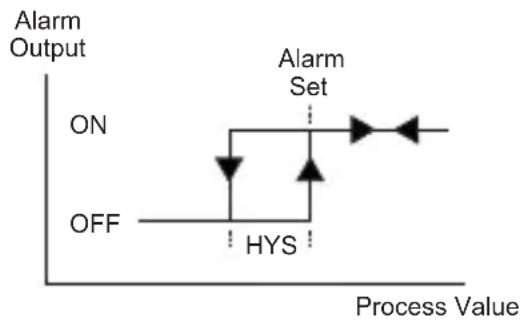
Alarm Types
Process high alarm
flowchart
graph TD
    A["ON"] --> B["HYS"]
    B --> C["Alarm Set"]
    C --> D["Process Value"]
    style A fill:#f9f,stroke:#333
    style C fill:#ccf,stroke:#333
    style D fill:#cfc,stroke:#333
Process low alarm
flowchart
graph TD
    A["ON"] --> B["Alarm Set"]
    B --> C["HYS"]
    C --> D["Process Value"]
    style A fill:#f9f,stroke:#333
    style B fill:#ccf,stroke:#333
    style C fill:#cfc,stroke:#333
    style D fill:#fcc,stroke:#333
Deviation high alarm
flowchart
graph LR
    A["Process Set ON"] --> B["Process Set OFF"]
    B --> C["HYS"]
    C --> D["Process Set + Alarm Set"]
    D --> E["Output"]
Deviation low alarm

flowchart
graph LR
    A["ON"] --> B["Process Set - Alarm Set"]
    B --> C["HYS"]
    C --> D["Process Set"]
    D --> E["OFF"]
    style A fill:#f9f,stroke:#333
    style B fill:#ccf,stroke:#333
    style C fill:#cfc,stroke:#333
    style D fill:#fcc,stroke:#333
    style E fill:#ffc,stroke:#333
Deviation Band Alarm
flowchart
graph LR
    A["ON"] --> B["Process Set - Alarm Set"]
    B --> C["Process Set"]
    C --> D["Process Set + Alarm Set"]
    D --> E["HYS"]
    E --> F["OFF"]
    style A fill:#f9f,stroke:#333
    style B fill:#ccf,stroke:#333
    style C fill:#cfc,stroke:#333
    style D fill:#fcc,stroke:#333
    style E fill:#ffc,stroke:#333
    style F fill:#cff,stroke:#333
Deviation Range Alarm
flowchart
graph LR
    A["Process Set - Alarm Set"] --> B["Process Set"]
    B --> C["Process Set + Alarm Set"]
    D["Process Set - Alarm Set"] --> E["HYS"]
    F["Process Set + Alarm Set"] --> G["HYS"]
    style A fill:#f9f,stroke:#333
    style B fill:#ccf,stroke:#333
    style C fill:#cfc,stroke:#333
    style D fill:#fcc,stroke:#333
    style E fill:#ffc,stroke:#333
    style F fill:#fcc,stroke:#333
    style G fill:#ffc,stroke:#333
Failure message in ESM-XX30 Process Controllers
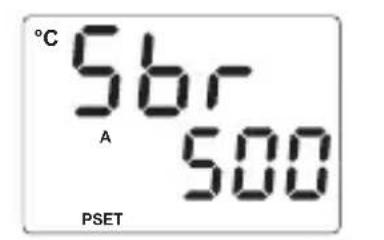
text_image
°C 56r A 500 PSET1 - Sensor failure in analogue input. Sensor connection is wrong or there is no sensor connection.
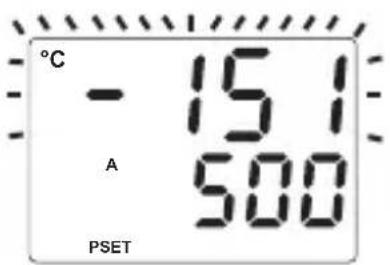
2 - If value on top display blinks : If analogue input value is less than minimum value of operating scale Lot, display value on the top display starts to blink.
text_image
°C - 15.1 A 500 PSET
3 - If value on top display blinks : If analogue input value is greater than maximum value of operating scale u^PL , display value on the top display starts to blink.
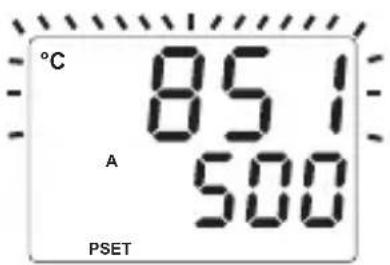
text_image
°C 851 A 500 PSET
4 - If technician password is different from "0" and technician accesses to the parameters by Set button without entering the technician password and wants to change a parameter, device does not allow to do any changes in parameters. If increment or decrement button is pressed, a warning message will appear on the bottom display as shown on the left.
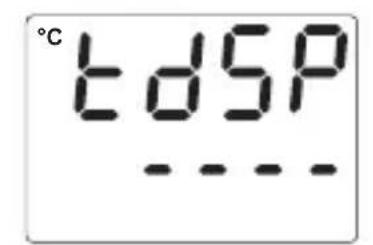
text_image
°C tDSP ---5 - If tuning operation can not be completed in 8 hours, AT led starts to blink.Blinking can be canceled by pressing Enter button.
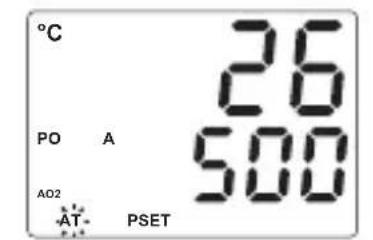
text_image
°C 26 PO A 500 AD2 AT- PSET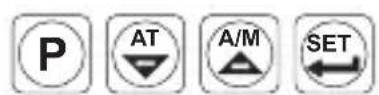
Installation

Before beginning installation of this product, please read the instruction manual and warnings below carefully.
In package,
- One piece unit
- Two pieces mounting clamp
- One piece instruction manual
A visual inspection of this product for possible damage occurred during shipment is recommended before installation. It is your responsibility to ensure that qualified mechanical and electrical technicians install this product.
If there is danger of serious accident resulting from a failure or defect in this unit, power off the system and separate the electrical connection of the device from the system.
The unit is normally supplied without a power switch or a fuse. Use power switch and fuse as required.
Be sure to use the rated power supply voltage to protect the unit against damage and to prevent failure.
Keep the power off until all of the wiring is completed so that electric shock and trouble with the unit can be prevented.
Never attempt to disassemble, modify or repair this unit. Tampering with the unit may results in malfunction, electric shock or fire.
Do not use the unit in combustible or explosive gaseous atmospheres.
During the equipment is putted in hole on the metal panel while mechanical installation some metal burrs can cause injury on hands, you must be careful.
Montage of the product on a system must be done with it's mounting clamp. Do not do the montage of the device with inappropriate mounting clamp. Be sure that device will not fall while doing the montage.
It is your responsibility if this equipment is used in a manner not specified in this instruction manual.
Warranty
EMKO Elektronik warrants that the equipment delivered is free from defects in material and workmanship. This warranty is provided for a period of two years. The warranty period starts from the delivery date.
This warranty is in force if duty and responsibilities which are determined in warranty document and instruction manual performs by the customer completely.
Maintenance
Repairs should only be performed by trained and specialized personnel. Cut power to the device before accessing internal parts. Do not clean the case with hydrocarbon-based solvents (Petrol, Trichlorethylene etc.). Use of these solvents can reduce the mechanical reliability of the device. Use a cloth dampened in ethyl alcohol or water to clean the external plastic case.
Other Informations
Manufacturer Information:
Emko Elektronik Sanayi ve Ticaret A.Ş.
Repair and maintenance service information:
Emko Elektronik Sanayi ve Ticaret A.Ş.
| Serial CommunicationD | |
| 0 | None |
| E | Output-1 (Alarm) |
| 1 | Relay Output (5A@250V~ at resistive load) |
| FG | Output-2 (Process or Alarm) |
| 01 | Relay Output (5A@250V~ at resistive load) |
| HI | Output-3 (Process) |
| 02 | SSR Driver Output (Maximum 17mA, 25V ---) |
Table-1
| BC | Input Type(TC) | Scale(°C) | Scale(°F) |
| 21 | L,Fe Const DIN43710 | -100°C,850°C | -148°F,1562°F |
| 22 | L,Fe Const DIN43710 | -100.0°C,850.0°C | -148.0°F,999.9°F |
| 23 | J,Fe CuNi IEC584.1(ITS90) | -200°C,900°C | -328°F,1652°F |
| 24 | J,Fe CuNi IEC584.1(ITS90) | -199.9°C,900.0°C | -199.9°F,999.9°F |
| 25 | K,NiCr Ni IEC584.1(ITS90) | -200°C,1300°C | -328°F,2372°F |
| 26 | K,NiCr Ni IEC584.1(ITS90) | -199.9°C,999.9°C | -199.9°F,999.9°F |
| 27 | R,Pt13%Rh Pt IEC584.1(ITS90) | 0°C,1700°C | 32°F,3092°F |
| 28 | S,Pt10%Rh Pt IEC584.1(ITS90) | 0°C,1700°C | 32°F,3092°F |
| 29 | T,Cu CuNi IEC584.1(ITS90) | -200°C,400°C | -328°F,752°F |
| 30 | T,Cu CuNi IEC584.1(ITS90) | -199.9°C,400.0°C | -199.9°F,752.0°F |
| 31 | B,Pt30%Rh Pt6%Rh IEC584.1(ITS90) | 44°C,1800°C | 111°F,3272°F |
| 32 | B,Pt30%Rh Pt6%Rh IEC584.1(ITS90) | 44.0°C,999.9°C | 111.0°F,999.9°F |
| 33 | E,NiCr CuNi IEC584.1(ITS90) | -150°C,700°C | -238°F,1292°F |
| 34 | E,NiCr CuNi IEC584.1(ITS90) | -150.0°C,700.0°C | -199.9°F,999.9°F |
| 35 | N,Nicrosil Nisil IEC584.1(ITS90) | -200°C,1300°C | -328°F,2372°F |
| 36 | N,Nicrosil Nisil IEC584.1(ITS90) | -199.9°C,999.9°C | -199.9°F,999.9°F |
| 37 | C,(ITS90) | 0°C,2300°C | 32°F,3261°F |
| 38 | C,(ITS90) | 0.0°C,999.9°C | 32.0°F,999.9°F |
| BC | Input Type(RTD) | Scale(°C) | Scale(°F) |
| 39 | PT 100,IEC751(ITS90) | -200°C,650°C | -328°F,1202°F |
| 40 | PT 100,IEC751(ITS90) | -199.9°C,650.0°C | -199.9°F,999.9°F |
| BC | Input Type(---Voltage and Current) | Scale | |
| 41 | 0...50 mV--- | -1999,9999 | |
| 42 | 0...5 V--- | -1999,9999 | |
| 43 | 0...10 V--- | -1999,9999 | |
| 44 | 0...20 mA--- | -1999,9999 | |
| 45 | 4...20 mA--- | -1999,9999 | |

This symbol is used for safety warnings. User must pay attention to these warnings.
This symbol is used to determine the dangerous situations as a result of an electric shock. User must pay attention to these warnings definitely.

This symbol is used to determine the important notes about functions and usage of the device


Thank you very much for your preference to use Emko Elektronik products, please visit our
Your Technology Partner web page to download detailed user manual.
www.emkoelektronik.com.tr
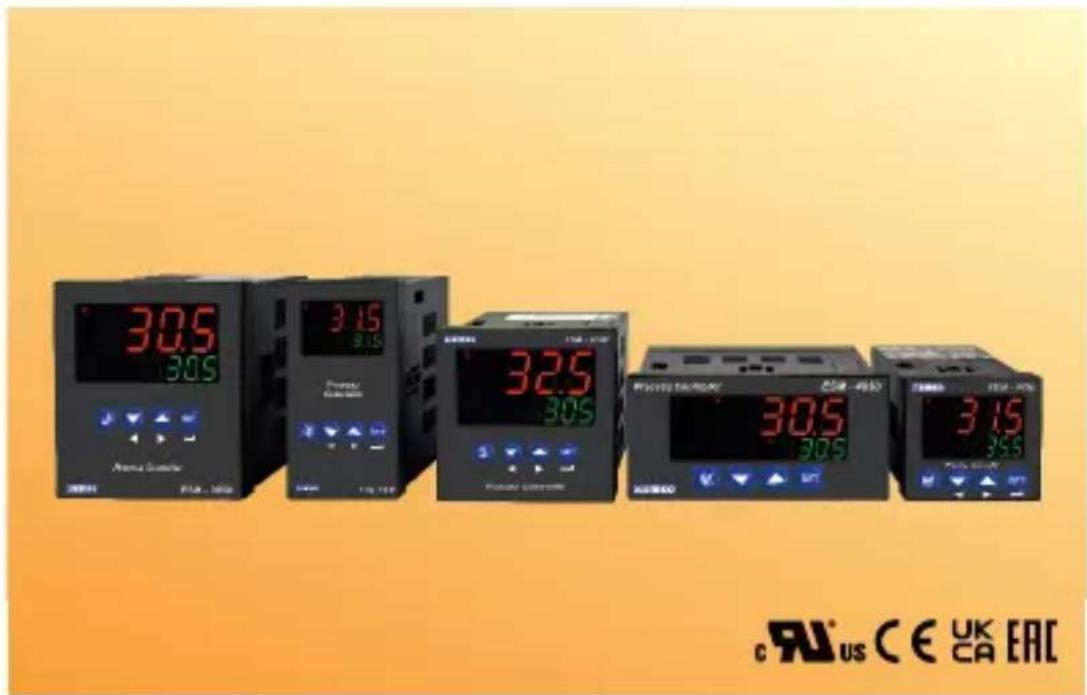
text_image
305 305 Atriau Gastroenter CE CA - 1982 3.15 3.15 325 305 RCAURO Gastroenter CE CA - 4950 305 305 315 CE CA - 4950 c RUS CE UK CA EAC0...50mV = (-1999; 9999)
0...5V = (-1999; 9999)
2 0...10V = (-1999; 9999)
3 0...20mA = (-1999; 9999)
4...20mA = (-1999; 9999)
line
| mV | Po00 | | ------ | ---- | | 0 | 0 | | 3.125 | 0 | | 6.25 | 0 | | 9.375 | 0 | | 12.5 | 0 | | 16.625 | 0 | | 18.75 | 0 | | 21.825 | 0 | | 26 | 0 | | 28.125 | 0 | | 31.25 | 0 | | 34.375 | 0 | | 37.5 | 0 | | 40.625 | 0 | | 43.75 | 0 | | 46.875 | 0 | | 50 | 0 |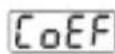
text_image
°C t dSP ---| A | BC | D | E | / | FG | HI | / | U | V | W | Z |
| 0 | 1 | / | 01 | 02 | / | 0 | 0 | 0 | 0 |
| A | Versorgungsspannung |
| 1 | 100-240V ~ (-15%;+10%) 50/60Hz |
| 2 | 24V ~ (-15%;+10%) 50/60Hz or 24V --- (-15%;+10%) |
| 9 | Kunde (Maximal 240V ~ (-15%;+10%))50/60Hz |
TENSION D'ALIMENTATION
100-240 V ∼ 50/60 Hz (-15%; +10%), -6VA
24V ∼ 50/60 Hz (-15%; +10%), -6VA
24V = (-15%; +10%), -6W
TRANSFERT TRANSPARENT
Termopar (TC): L(DIN 43710), J, K, R, S, T, B, E y N
(IEC584.1)(ITS90), C (ITS90)
Termorresistencia (RTD): PT-100 (IEC751)(ITS90)
Entrada: mV, V, mA
ESM-7730: X = 97 mm, Y = 97 mm
ESM-9930: X = 129 mm, Y = 129 mm
ESM-9430: X = 65 mm, Y = 129 mm
flowchart
graph TD
    A["De 0 a 50 mV"] --> B["Pt-100"]
    C["De 0 a 10 V"] --> B
    D["De 0 a 20 mA"] --> B
    B --> E["Entrada de proceso universal"]
    E --> F["Salida-2 (Proceso o alarma)"]
    E --> G["Salida-1 (Alarma)"]
    F --> H["7"]
    F --> I["8"]
    G --> J["9"]
    G --> K["10"]
    H --> L["5 A @ 250 V~"]
    I --> M["5 A @ 250 V~"]
    J --> N["11"]
    J --> O["12"]
    K --> P["N (-)"]
    K --> Q["L (+)"]
    Q --> R["Fusible externo"]
    R --> S["Nota-2"]
    S --> T["Conmutador de fuente de alimentación"]
    T --> U["100...240 V~ 50/60 Hz"]
    U --> V["Extrada de proceso universal"]
    V --> W["Sensor: Maximo 50 mA, Sensor: Tensión de alimentación"]
    W --> X["Salida-3 (Proceso)"]
    X --> Y["Salida de la unidad de control del SSR: Máximo 17 mA, 25 V="]
    Y --> Z["+"]
    Z --> AA["-"]
flowchart
graph TD
    A["De 0 a 50 mV ---"] --> B["Pt-100"]
    C["De 0 a 10 V ---"] --> D["Sensor Tensión de alimentación"]
    E["De 0 a 20 mA ---"] --> F["TC"]
    B --> G["Entrada de proceso universal"]
    D --> G
    G --> H["Salida-2 (Proceso o alarma)"]
    H --> I["Salida-1 (Alarma)"]
    I --> J["Salida-3 (Proceso)"]
    J --> K["Salida de la unidad de control del SSR"]
    K --> L["Máximo 17 mA, 25 V ---"]
    M["5 A @ 250 V~"] --> N["NC CNO NC CNO"]
    O["5 A @ 250 V~"] --> P["CN CNO"]
    Q["Conmutador de fuente de alimentación"] --> R["Letting to be Externo"]
    S["Nota-3"] --> T["Nota-2 Fusible externo"]
    U["+ -"] --> V["Noja-1"]
    W["N (-)"] --> X["L (+)"]
    Y["100...240 V~ 50/60 Hz"] --> Z["100...240 V~ 50/60 Hz"]
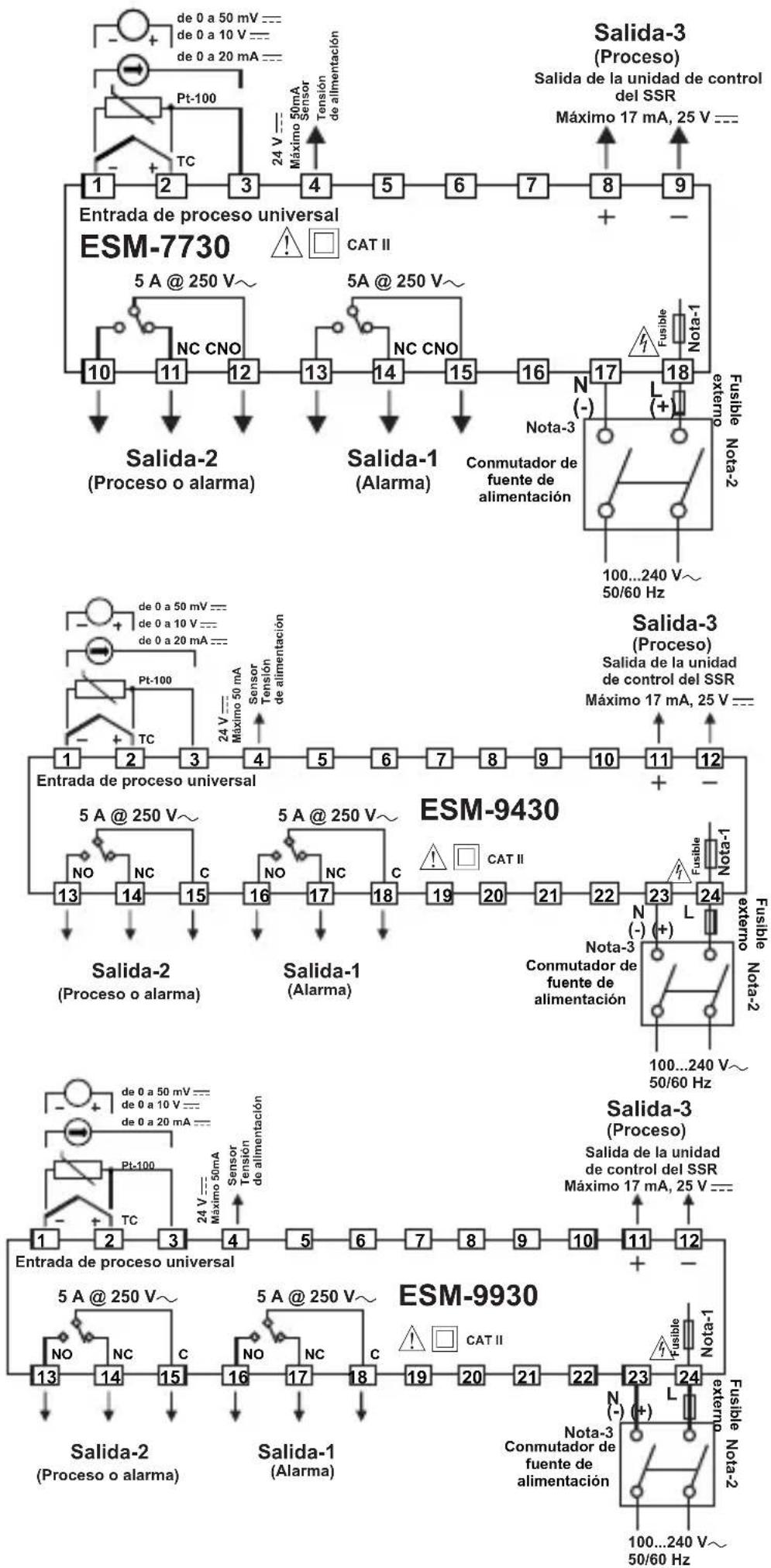
flowchart
Electrical circuit diagram for ESM-7730, ESM-9430, and ESM-9930 systems showing signal paths, voltage levels, and component connections.text_image
°C t dSP ---
INGRESSO DI PROCESSO
Termocoppia (TC): L(DIN 43710), J, K, R, S, T, B, E e N (IEC584.1)(ITS90), C (ITS90)
Termoresistenza (RTD): PT-100 (IEC751)(ITS90)
Ingresso: mV, V, mA
0...50mV = (-1999; 9999)

0...5V = (-1999; 9999)

0...10V = (-1999; 9999)

0...20mA = (-1999; 9999)

4...20mA = (-1999; 9999)
PoFS OFFSET USCITA PID
(PER PID RISCALDAMENTO 0,0,0, 100,0)% (PER IL PID RAFFREDDAMENTO -100,0, 0,0)%
PoSS OFFSET DI USCITA RELATIVO A IMPOSTA PID
(PER PID RISCALDAMENTO 0.0, 100.0)%.
(PER IL PID RAFFREDDAMENTO -100.0, 0.0)%.