SingBar - Soundbar Pure Acoustics - Free user manual and instructions
Find the device manual for free SingBar Pure Acoustics in PDF.


User questions about SingBar Pure Acoustics
0 question about this device. Answer the ones you know or ask your own.
Ask a new question about this device
Download the instructions for your Soundbar in PDF format for free! Find your manual SingBar - Pure Acoustics and take your electronic device back in hand. On this page are published all the documents necessary for the use of your device. SingBar by Pure Acoustics.
USER MANUAL SingBar Pure Acoustics
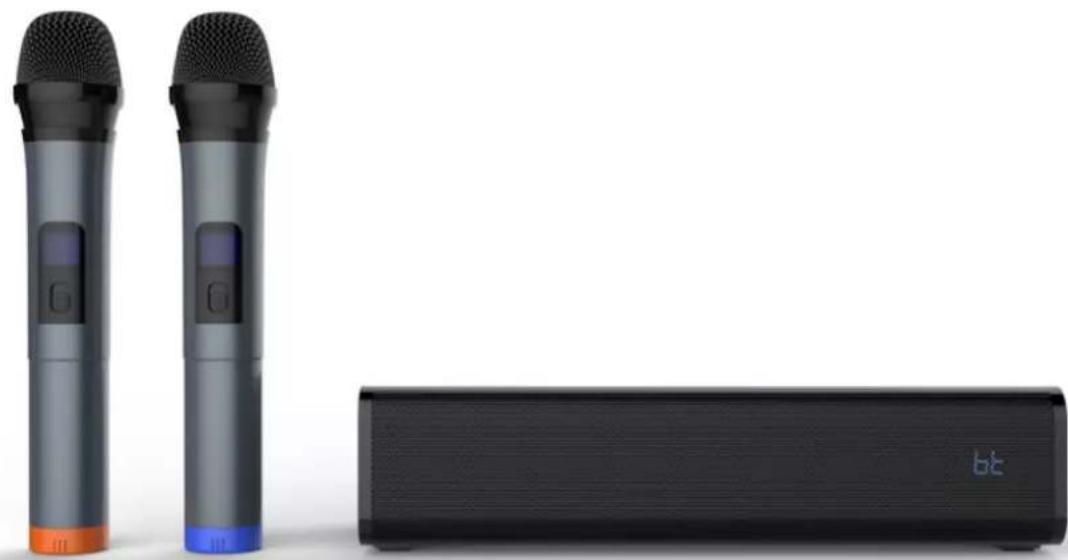
Multi-function Soundbar Karaoke Speaker with Wireless Microphones
natural_image
Two black wireless earphones and a black rectangular device with a 'bt' logo, shown against a white background (no text or symbols on devices)User Manual
pure acoustics®
The pure sound of life
Introduction
Thank you for purchasing Pure Acoustics' products, and welcome to the Pure Acoustics family of satisfied customers!
Pure Acoustics was established to fulfill the need for high quality speakers of exceptional design at an affordable price. After years of research and development, and by manufacturing all parts ourselves – from the voice-coil to the uniquely-designed crossover – Pure Acoustics is able to offer you speakers of superior value.
Each speaker component has been designed and engineered with first-rate materials to produce exceptional sound. Our speakers offer the best of it all – high-quality sound, hand-made solid construction, and a remarkably stylish appearance.
We welcome you to witness the results. Our team's dedication to quality, reliability and attractive design has created some of the best-value speakers you can find today.
Reading the complete manual will help you to set up your speaker properly and reward you with a fine listening experience. Pure Acoustics distribution centers in Europe, Asia, Australia and the Americas will be happy to assist you with any questions you may have. Please look for the distributor nearest you on our web site, www.pure-acoustics.com.
Limited one-year warranty
Pure Acoustics products have been designed and manufactured to the highest quality standards. However, in the event that something malfunctions, Pure Acoustics and your local authorized distributor warrant free of charge parts and labor (some exclusions may apply) for a period of one year. This warranty is only valid for the original owner. This warranty is limited to the repair of the product. This warranty will not apply to units that were subject to misuse, neglect, abuse, alteration or improper installation. This warranty will not cover damage due to fire, water, heat, lightning or any other cause beyond the control of Pure Acoustics. Retention of your original dated receipt is required in order to obtain warranty service from your local authorized Pure Acoustics Dealer.
Meet SingBar
• Advanced Bluetooth 5.0, can be paired with any device that supports Bluetooth functionality
• High capacity battery, for long playtime between charges
• Support high quality MP3 music files
• Wireless microphone Karaoke function
• Powerful, 3 D digital sound technology for amazing sound quality
- Connects to iPads, iPods, smartphones, computers, MP3, MP4 and other external audio device
Attention!
Please read this manual to learn proper use of this product, before use. The contents of this manual may change due to variation of product performance and functions without further notice.
To maintain better performance, DO NOT use in conditions of extreme cold, heat, dust or dampness. DO NOT expose to direct sunlight. DO NOT place speaker next to a heat source such as a heater, radiator, stove or open flame. DO NOT use near water. DO NOT drop the speaker. To
avoid accidents such as fire or electric shock, please check that the grid voltage is exactly the same as required by this device. DO NOT attempt repair of this speaker yourself as this may cause harm to you and/or the product and will terminate the warranty. Obtain product service only through an authorized Pure Acoustics dealer.
Panel Introduction
There are 8 buttons and inputs in total, defined as the following:
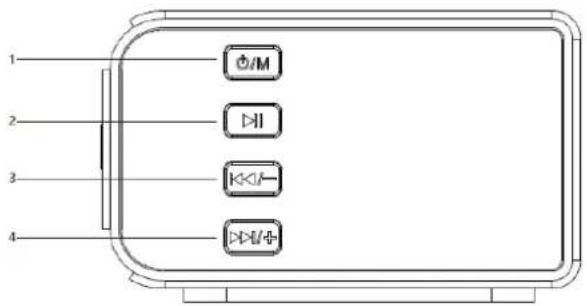
- ▶Press to play or pause music
- ⏻M: Long press to power on/off, short press to switch modes;
- ▷▶/◆: Long press to increase volume, short press to next song
- :Long press to decrease volume, short press to previous song
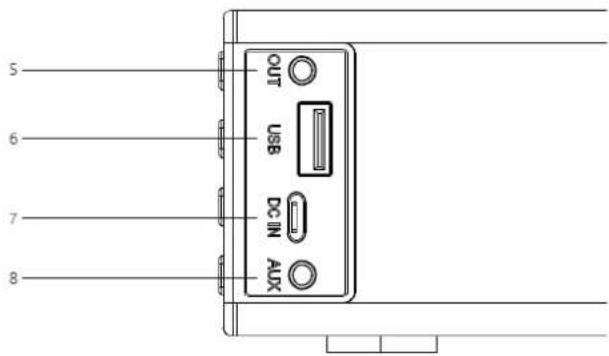
- OUT: Audio output
- USB: USB playback
- DC IN: Micro USB charging
- AUX: Audio input
Remote Control
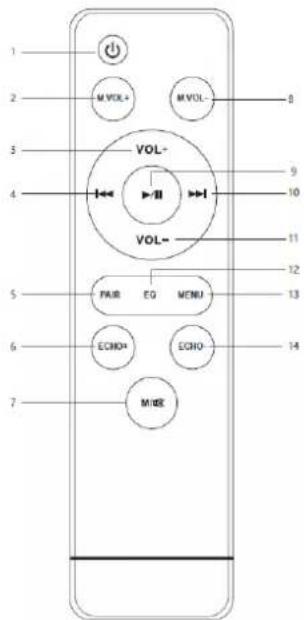
- : Short press to turn on or standby
- M.VOL+: Press to increase Mic volume
- VOL+: Press to increase volume
- : Previous track in Bluetooth mode
- PAIR: Press to Bluetooth pairing or Bluetooth disconnecting
- ECHO+: Press to increase Mic echo
- M/OK: Short press to change between AUX in/AUX out/USB mode, long press to mute on/off
- M.VOL-: Press to decrease Mic volume
- : Dress to play or pause music
- : Next track in Bluetooth mode
- VOL-: Press to decrease volume
- EQ: Adjust EQ sound
- MENU: Enter to adjust treble and bass effect
- ECHO-: Press to decrease Mic echo
Operating Instructions
Bluetooth Mode
- Long press ⏻M to power on the soundbar. It will enter the Bluetooth mode in default. The indicator light will flash in blue, waiting for pairing.
- Turn on the Bluetooth function on your devices and the device will start to search for the soundbar.
- Select "K008" from the list of found devices.
- If asked, enter the password "0000" and press OK.
- When successfully paired with your device, the indicator light will be lit steadily.
- Note: The Bluetooth playback is controlled by your device and the buttons on the remote control.
AUXIN Mode
After powering on, connect the external audio sources to the AUX IN jack of soundbar by using the 3.5mm audio cable, and then short press the " M" button on the soundbar or the " M/※" button on the remote control to switch to "AUX IN" mode. At this time, music from the external audio sources such as MP3/CD can be played. Please adjust the volume of the external audio sources to appropriate levels before connecting.
AUX OUT Mode
After powering on, connect the device to the AUX OUT jack of soundbar by using the 3.5mm audio cable, and then short press the "M" button on the soundbar or the "M" button on the remote control to switch to "AUX OUT" mode. At this time, the soundbar is as an audio source to play music from connected device.
USB Mode
After powering on, insert the USB into the USB jack of the soundbar. The soundbar will automatically go enter USB playback mode and play the music from the USB. Press the "▶" button to play and pause the music. Long press ▶▶▶ to increase volume, short press to next song; Long press ▶▶▶ to decrease volume, short press to previous song.
Karaoke Function
Karaoke function can be realized by turning on the microphone in any mode.
Device compatibility
The soundbar theoretically supports all mobile phones and other devices with Bluetooth functionality.
Specifications
| Product Name | SingBar |
| Output Power | 10W*2 |
| AC/DC Adaptor | 100-240V~50/60Hz |
| Speaker Frequency | 45Hz-20KHz |
| Bluetooth Version | 5.0,A2DP,AVRCP |
| Bluetooth Range | Up to 10m |
| Included in the Box | Soundbar, Remote control, Wireless microphone, Micro USB charging cable |
| Dimensions | Soundbar: 250*95*60mm |
Troubleshooting
| Problem | Solution |
| Volume to low or distortion | 1. Check the soundbar volume and adjust to proper volume2. Low battery, need to charge |
| LED Indiator is not working under Bluetooth mode | 1. Low battery, need to charge2. Re-power on the device |
| Music stops | 1. Obstruction exists between mobile devices and Bluetooth device. Remove obstructions.2. Do no exceed the valid connecting distance of 10 meters |
| Paired unsuccessfully | 1. Check whether mobile phone is in pairing status2. Delete the device name on the mobile phone and re-pair |