Jolt X225 - Media player Pure Acoustics - Free user manual and instructions
Find the device manual for free Jolt X225 Pure Acoustics in PDF.


User questions about Jolt X225 Pure Acoustics
0 question about this device. Answer the ones you know or ask your own.
Ask a new question about this device
Download the instructions for your Media player in PDF format for free! Find your manual Jolt X225 - Pure Acoustics and take your electronic device back in hand. On this page are published all the documents necessary for the use of your device. Jolt X225 by Pure Acoustics.
USER MANUAL Jolt X225 Pure Acoustics
Smart Android Music Controller 4inch Touch Screen Amplifier User Manual
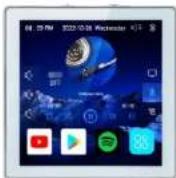
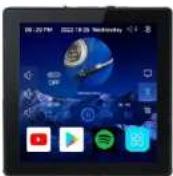
Please read this user manual carefully before use the device and keep the manual properly. Note : Appearance of the device and main interface of system are for reference only . Please refer to the actual product for details. The company continuously improves product performance, and design specifications are subject to change without notice.
Precautions
- This host is suitable for AC90-250 power supply, please install and debug under the guidance of professionals.
- Please read this manual carefully and follow the installation instructions strictly.
- Please check the binding posts carefully for speaker cables, power cables, and audio
- Make sure that all suggesting lines are accurate before burning on the computer.
- Please do not modify, dismantle, repair or upgrade the host by yourself.
- When not using the main unit for a long time, please turn off the main power switch.
Installation Instructions
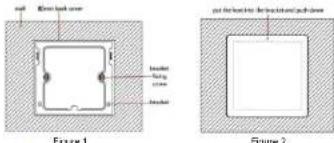
- Pre-embed attached back cover size 80x80mm, depth is 57mm.
- Tighten the bracket on the 86 cassette with bracket screws. (As shown in Figure 1)
- Tighten the wire inside the back cover to the corresponding function terminal on the device. Then insert the terminals into the binding post. Then put the device into the bracket and push down to fix the device. (As shown in Figure 2)
Technical Parameters
| System | Android 16.0 | CPU Model | Cortex 1.2G,1.2G Quad-Core |
| Network | WiFi | Speaker Output | 4-80 |
| Audio Source | WiFi,Bluetooth,USB/ TF Internet Radio | Output Power | 2x25W/4x25W |
| Touch Screen 4 inch | Capacitive Full-Screen Multi-touch | Display | 480*480 IPS Resolution |
| Frequency Range | 87.5-108MHz | Audio S/N Ratio | ≥6dB |
| Bluetooth Distance | 10 meters | 1R Remote Control Distance | 8 to 10 meters |
| Power Supply | AC 90V-250V/50Hz-60Hz | Product Dimension | 86*86*52mm |
| Packing list | Audio Wall Amplifier x1, Installation Box x1, Installation Bracket x1, Installation Screws x1,Remote Control x1;Optional: HIF Speakers(4-80), TF Card, USB disk, Volume Controller, Speaker Cables, Audio Cables | ||
Remote Control
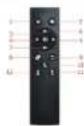
- Power key: on/off.
- Setting
2.Mute 9.Return
3.Pause/Play 10.Play by AUX Mode
4.Previous 11.Play by Bluetooth model
- Next 12. Play by USB/TF card
6.Volume +
7.Volume -
External Interface Diagram
2Channel
- Power Switch: turn right to power ON and turn left to power OFF.
- Host Switch Key: long press for 2 seconds to turn on, long press for 2 seconds to turn off, short press for lock screen/unlock.
- 3.5 Audio Input: 3.5mm Audio wire.
- Micro-USB: USB disk up to 32GB.
- TF Card: up to 32GB.
- Power Terminal: Compatible AC90-250V power supply, power cable with two strands of copper core wire, single strand copper core over 0.75mm ^2 .
- SPK R+ & SPK R-: 4 Speakers(each RMS25W/4-8Ω) Speaker wire 200cores.
RVH2X100, RVH2X200. - OUT R + OUT L + GND: for an extra amplifier or active subwoofer, audio output wire: Audio wire (three core shielded wire: commonly known as microphone wire). RVVP2X0.5, RVVP2X0.75mm².
-
AUX L + AUX R + GND: audio input wire: Audio wire (three core shielded wire: commonly known as microphone wire). RVVP2X0.5, RVVP2X0.75.
-
RJ45: Connect network cable
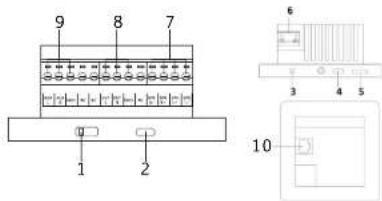
External Interface Diagram
4Channel
-
Power Switch: turn right to power ON and turn left to power OFF.
-
Host Switch Key: long press for 2 seconds to turn on, long press for 2
seconds to turn off, short press for lock screen/unlock.
-
3.5 Audio Input: 3.5mm Audio wire.
-
Micro-USB: USB disk up to 32GB.
-
TF Card: up to 32GB.
-
Power Terminal: Compatible AC90-250V power supply, power cable with two strands of copper core wire, single strand copper core over 0.75mm ^2 .
7,8. SPK R+ & SPK R-: 4 Speakers(each RMS25W/4-8Ω) Speaker wire 200cores. RVH2X100, RVH2X200.
-
OUT R + OUT L + GND: for an extra amplifier or active subwoofer, audio output wire: Audio wire (three core shielded wire: commonly known as microphone wire). RVVP2X0.5, RVVP2X0.75mm².
-
AUX L + AUX R + GND: audio input wire: Audio wire (three core shielded wire: commonly known as microphone wire). RVVP2X0.5, RVVP2X0.75.
11.RJ45: Connect network cable.
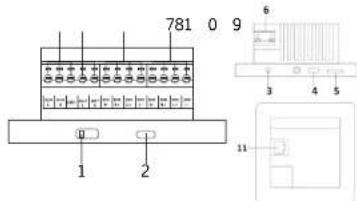
Functions
- Cortex 1.2G quad-core CPU with Android 10.0 system.
- Support DLNA, Airplay, Qplay and other protocols, you can push mobile phone
music, videos, pictures, files, APK to the host for playback or installation. - 4 inch multi-touch capacitive screen, 480*480 IPS HD resolution display.
- Scene linkage, automatic playback of music, regular playback of
- Support Amazon Alex voice control.
- Connect E-share applications to support remote control of mobile devices such as mobile phones and pads. Turn the mobile device into a wireless mouse, flying
squirrel, wireless trackpad, remote control, wireless keyboard, wireless camera and the same screen mirroring.
7. 4 channel speaker output, can connect up to 4 speakers.
8. Bluetooth: Support external bluetooth devices such as mobile phones to achieve
audio playback. Support customize bluetooth name and PIN directly in the device.
9、Wi-Fi Wireless connection and Ethernet connection.
10. Support multi-languages as setting.
11. Support audio input and audio output function.
12. Support multi-level timing switch function, time setting, optional timing to start default songs for playback;
13. Support TF card and MICRO-USB interface, USB can be external hard drive.
14. Support infrared remote control, distance 8 to 10 meters.
15. Video format support: MPEG-1, MPEG-2, MPEG-4, H.263, H.264, AVS, VC-1, RV, VP6/VP8, SorensonSpark, MVC, 3GP, AVI, MKV, WMV, MPG, VOB, FLV, SMF, MOV.
16. Support playback or audio files in various formats: MP3, AAC, FLAC, WAW, APE,
17. Setting: Basic, Network, Display, Time, Input, System.
Details Description of Main Interface Functions
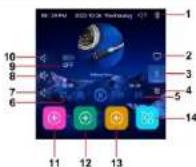
- Bluetooth icon: When the main interface displays the Bluetooth icon is white, it means that the Bluetooth has been turned on, and you can connect to the Bluetooth through the mobile phone. When the mobile phone is successfully connected, the Bluetooth icon will turn blue.
- System audio source mode.
- Bluetooth audio source mode
- Audio input mode.
- Local player song list: Click once to open the song list, you can select the source of the song, there are three sources of local player song, namely TF card, U disk, local.
- Play mode: Click to switch the play mode. There are 3 play modes to choose from, which are single loop play, all loop play, sequential play.
-
Volume
-
Mutc.
- Power on auto play switch.
- Volume +
11.12.13 Add app: Long press to add application. - More applications: Click to open more application interfaces.
FAULT ELIMINATION METHODS
| FAULT | REASON AND ELIMINATION METHODS |
| Turn on failure | 1. Check if power wire is installed correctly. 2. Check if power switch is turned on. 3. Check whether the backlight time is set. |
| No sound | 1. Check if speaker wire is installed correctly. 2. Check if mute is set. |
| Buttons have no effect | 1. Is the panel too dirty? Is there water in the button area* (If there is, outside screen it up before you operate). 2. Whether there is water on the hand during operation. 3. Turn off the power and restart. |
| TF card / U disk abnormal playback | 1. T card / U disk are unreliable. Change them to me read. 2. Check if song format is correct. |
| Failure connection to bluetooth | 1. Check if the host is connected to other device. 2. Check if searching for bluetooth devices is opened on the mobile phone. |
| No sound when playing Bluetooth | 1. Whether the mobile phone has been selected for Bluetooth playbook. (Apple phones need to choose to play for Bluetooth devices) 2. Whether the mobile terminal is set to mute. 3. Is the mute set on the host side? 4. Whether the song played on the mobile terminal is a lossless format song. (This version of the host does not support baseball playback) 5. The phone is too far away from the host. |
| FM exception not good | 1. The length of the radio signal antenna cannot be less than 2 motors. 2. The direction of the radio signal antenna is not the best direct (better put the radio signal antenna near outdoor) |
| FM not receive the radio on Tuesday afternoon | On Tuesday afternoon, the major radio stations will stop broadcasting and carry out various maintenance work of the radio stations. |
| During FM playback, the display is blank | During FM playback, the screen will be automatically blanked after 5 seconds to ensure better closing effect. The user can write any way to trigger the screen. |
| System halted | 1. Turn off the power switch and restart. 2. Press the reset key to reset. |
| Remote control is not sensitive | 1. The battery of the remote control is out of power. Please replace the battery. 2. Shorten the remote control distance, reduce the remote control angle and avoid obstacles. |
If the above method still fails to troubleshoot, please go to a nearby supplier for assistance, please do not disassemble the machine yourself.