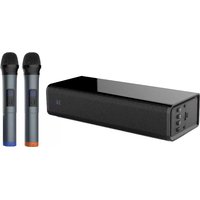
SBW-210 - Soundbar Pure Acoustics - Free user manual and instructions
Find the device manual for free SBW-210 Pure Acoustics in PDF.


User questions about SBW-210 Pure Acoustics
0 question about this device. Answer the ones you know or ask your own.
Ask a new question about this device
Download the instructions for your Soundbar in PDF format for free! Find your manual SBW-210 - Pure Acoustics and take your electronic device back in hand. On this page are published all the documents necessary for the use of your device. SBW-210 by Pure Acoustics.
USER MANUAL SBW-210 Pure Acoustics
natural_image
Exterior view of a black electronic device with a digital display and a rectangular unit (no visible text or symbols)User manual
&
Safety Guide
Thank you for choosing Pure Acoustics. We hope you enjoy each and every use of this product. We suggest that you read this user manual carefully before primary use in order to utilize all of the features in functions installed. Please store it in a safe place for future reference and pass it on to the next owner.
Caution & Safety Guide:
Please power off the unit when not in use. If the unit will not be in use for extended periods it is suggested that you disconnect the unit from its power source.
To prevent damage to the unit do not install in areas of extreme heat or in areas with direct exposure to sunlight.
Don't install the unit in or near a place where it may come in contact with rain, moisture or other liquids.
Install the unit on a horizontal, flat and firm surface with good ventilation. Never block the speaker, blocking these vents may cause damage to the speaker as a result of overheating.
To clean the unit, simply wipe it down using a dry, soft cloth. The unit should never be cleaned chemicals or detergent.
In the rear occurrence of malfunction do not attempt to repair the unit on your own. Contact a certified service professional for a proper diagnosis and repair.
Caution: Dismantling the unit on your own is dangerous and may cause damage to your person or property and will void the warranty.

The lighting flash is intended to alert the user to the presence of dangerous
voltage within the product's enclosure and touching the internal components may result in electric shock to your person.

The exclamatory mark is intended to alert the user to the presence of important operating instructions.
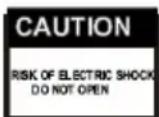
To reduce the risk of electric shock or fire, do not remove the cabinet cover simply contact a service professional.
Features:
- Bluetooth - stream and enjoy music wirelessly from any Bluetooth enabled device
- 2.1Ch Surround Sound Bar - full range cinematic sound that will fill the room with rich bass and real life sound effects
- Wireless Subwoofer - simple one step wireless connection is as simple as powering it up. This ergonomically designed slim line wireless subwoofer will deliver deep wide bass and life like sound effects that will amaze gamers on every level.
- Optical Input - Direct optical connection for enhanced sound effects and over all audio reproduction for gamers, action movies and more...
- Easy Setup - simple do it yourself plug and play connection will have you all setup in minutes.
- IR Remote Control –Full control over all modes features via IR remote control.
Main Chart of Panel
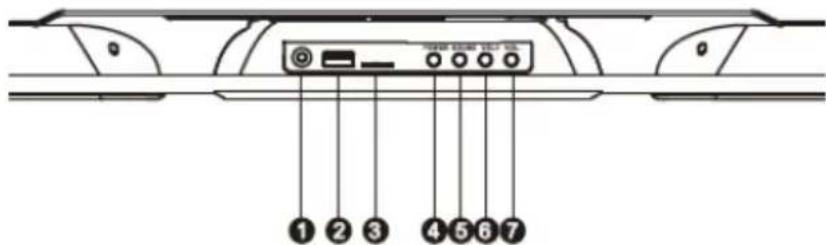
Top Panel:
1.Auxiliary Input
2.USB Port
3.Micro SD Port
4.Power Supply
5.Mode
6.Volume-
7.Volume+
natural_image
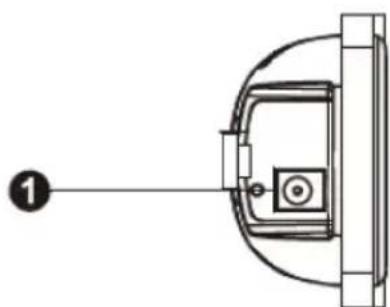
Diagram of a mechanical or electrical component with a numbered label (1) pointing to its edge, no text or symbols present.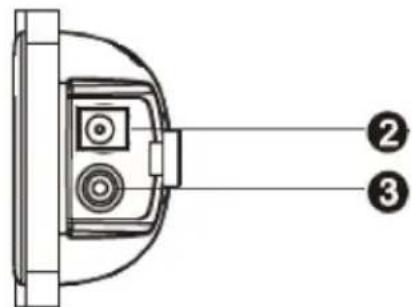
SUBWOOFER OUTPUT
1.DC Input
2. Optical Input
3. Coaxial Audio Input
Front Panel:

Connections
LINE IN
This unit has an extra group of audio input terminals You can input the analogue stereo audio signals from extra devices such as VCD, CD, VCR, MP3 player, etc...
Use the provided RCA audio cable (red for right, white for left) to connect the stereo audio output terminals of a VCD, CD, VCR player to the stereo input terminals LINE IN of this unit.
Its corresponding signal source is LINE IN which can be available by pressing (FUNCTION) on the top panel or pressing (AUX) on the remote control.
Subwoofer Output
Power on the subwoofer, the subwoofer is equipped with a wireless transmitter, the manufactured default setting is set to automatically connect to the surround bar, should a disconnect between the subwoofer and surround bar occur simply reset the connection by pushing the reset button on the back panel of the subwoofer.
Bluetooth Connection
To pair the SBW-210 with your Smartphone or other Bluetooth enabled device hit mode to enter Bluetooth mode. Enable the Bluetooth function on your Smartphone or other bluetooth enabled device and hit scan for Pure SBW-210. When found choose it from the list.
If prompted to input a password insert 0000, once successfully paired choose the Pure-SBW-216 from the list of paired devices in order to connect.
Coaxial Digital Audio
Use a coaxial cable to connect the coaxial input of this unit to the coaxial output of a power amplifier.
Optical Input
Use the optional optical cable to connect the optical output of your television or amplifier to the player.
USB/Micro SD Card
USB/Micro SD CARD maximum 32GB. Please note this unit will only read WMA/MP3 Audio files.
Remote Control Operation
Install the batteries into the remote control. Point the remote control at the remote sensor on the front panel. The remote control works within a distance of about 8 meters from the sensor and within an angle of about 30 degrees from the left and right side.
Battery Installation
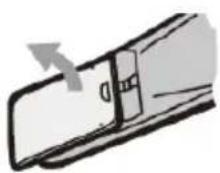
- Remove the battery compartment cover on the back of the remote control with co
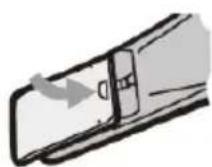
- Load two AAA.1.5V batteries into the battery compartment making sure that the batteries have been inserted ct polarities +/- indicated inside.
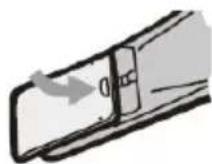
- Replacement
NOTE:
Remove the batteries when you don't intend to use the remote control for a long time. Do not mix new and used batteries, or different types of batteries.
Weak batteries can leak and severely damage the remote control.
Be environmentally friendly and dispose of batteries according to your government regulations.
Remote Control
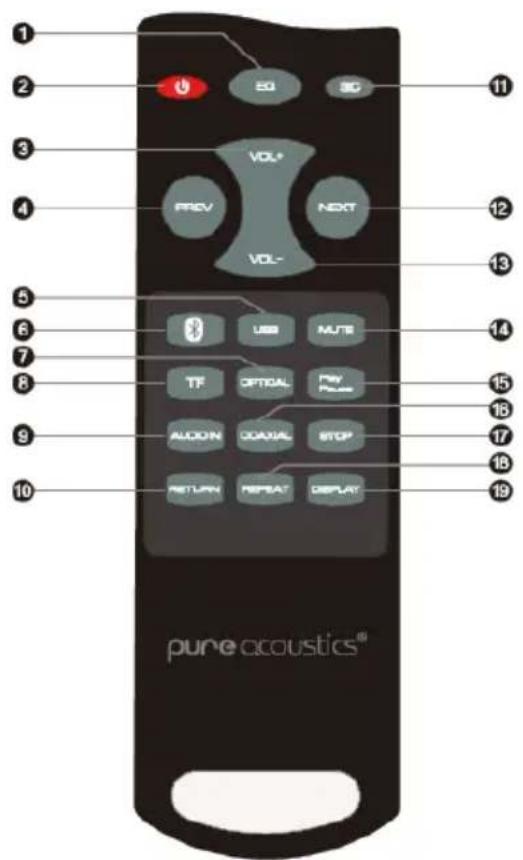
- Equalizer
- Standby
- Volume+
- Previous
- USB
- Bluetooth
- Optical
- Micro SD
- Audio Input
- Return
- 3D
- Next
- Volume-
- Mute
- Play/Pause
- Coaxial
- Stop
- Repeat
- Display
Trouble Shooting
Prior to contacting service professional we suggest trying the following troubleshooting procedures:
| Issue | Possible Causes | Solution |
| No power | The unit is not connected to the power supply or the power cable is not properly connected to the outlet. | Make sure the unit is connected to the power supply. Try connecting the cable to a different outlet. |
| No sound or distorted sound | 1.The audio cables aren’t properly connected.2.The volume is set to the minimum level.3.The sound is switched off | 1.Confirm that the audio cables are connected properly in the correct inputs.2.Turn up the Volume3.Press MUTE on the remote control to switch on the sound.4.Press Play/Pause |
| The buttons on the unit are not working. | The unit is being interfered with static electricity etc. | Switch off and unplug the unit.Then connect the plug to the power supply and switch on again. |
| The IR remote control is not functioning properly. | 1.Check to make sure that there are batteries inside and that they installed properly.2.The batteries installed are depleted and in need of replacement.3.The remote sensor is obstructed or the remote control is not pointed to the remote sensor4.The remote control is out of its operating range.5.The unit is powered off | 1.Install 2 AAA/1.5V batteries in it.2.Replace the batteries with new ones.3.Remove any obstructions and make sure that the remote control is pointed at the remote control sensor.4.Make sure the remote control is within the operating range5.Switch off the unit and disconnect it from the AC outlet. Then power the unit on again. |
Technical Specifications:
| Power Supply | DC 17V / 2A |
| Power consumption | 80W |
| Working environment(Temperature) | -10~+35C |
| Relative Humidity | 5%~90% |
| Power output(Max) | 15W*2 + 50W |
| Frequency response | +/- 3dB (40Hz~20KHz) |
In the Box
User manual

Remote control
Wall Mount

Audio Line cable
Once again we thank you for purchasing the SBW-210 sound bar and wireless subwoofer system. It is our hope that you enjoy this product every time it is put to use therefore, we suggest that you keep this user manual safe for future reference and so it may be passed on to the next owner.
Please feel free to visit our website www.pure-acoustics.com for information on this product as well as hundreds more
Enjoy!
pure acoustics®