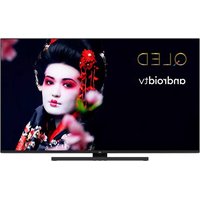
LT-50VAQ8135 - Television JVC - Free user manual and instructions
Find the device manual for free LT-50VAQ8135 JVC in PDF.


| Product type | 50-inch LED TV (127 cm) |
| Dimensions (without stand) | Approximately 112.5 x 65.5 x 8.5 cm |
| Weight (without stand) | Approximately 12.5 kg |
| Power supply | 220-240 V AC, 50 Hz |
| Power consumption | Standby: < 0.5 W, On: approx 100 W |
| Screen resolution | 3840 x 2160 pixels (4K UHD) |
| Tuner | DVB-T/T2, DVB-S/S2, DVB-C |
| Connectivity | Wi-Fi 802.11 a/b/g/n/ac, Bluetooth, Ethernet (LAN), HDMI x3, USB x2, Headphone jack, Optical audio output, CI+ |
| Main features | Smart TV (Android TV), Google Cast, Netflix, YouTube, HbbTV, USB recording, Program guide, HDR10, HLG, Dolby Vision, Dolby Audio, Voice search |
| Supported video formats | MPEG-2, MPEG-4, HEVC (H.265) up to 4K |
| Supported audio formats | MP3, AAC, AC3, EAC3 |
| Supported image formats | JPEG, PNG, BMP |
| Operating temperature | 5°C to 35°C |
| Operating humidity | 20% to 80% (non-condensing) |
| Included accessories | RC4390 remote control, AAA batteries x2, quick start guide, product sheet |
| Wall mount | VESA standard 400 x 200 mm |
| Care and cleaning | Unplug before cleaning. Use a soft, dry cloth. Do not use solvents. |
| Safety | Do not expose to water, do not block ventilation slots, use a stable stand, keep batteries out of reach of children. |
| Repairability | Spare parts available through after-sales service. Entrust any repair to qualified personnel. |
| Warranty | 2 years according to applicable law |
Frequently Asked Questions - LT-50VAQ8135 JVC
User questions about LT-50VAQ8135 JVC
0 question about this device. Answer the ones you know or ask your own.
Ask a new question about this device
Download the instructions for your Television in PDF format for free! Find your manual LT-50VAQ8135 - JVC and take your electronic device back in hand. On this page are published all the documents necessary for the use of your device. LT-50VAQ8135 by JVC.
USER MANUAL LT-50VAQ8135 JVC
1 Inserting the batteries into the remote
The remote may have a screw that secures the battery compartment cover onto the remote control (or this may be in a separate bag). Then remove the battery compartment cover to reveal the battery compartment. Insert two 1.5V size AAA batteries. Make sure the (+) and (-) signs match (observing correct polarity). Do not mix old and new batteries. Replace only with same or equivalent type. Place the cover back on and refit the screw.
-or-
Remove the screw that secure the battery compartment cover on the back side of the remote control first. Lift the cover gently. Insert two 1.5V - size AAA batteries. Make sure the (+) and (-) signs match (observe correct polarity). Do not mix old and new batteries. Replace only with same or equivalent type. Place the cover back on. Then screw the cover back on again.
-or-
Remove the back cover to reveal the battery compartment. You need to do the followings in order to do that:
- Place the tip of a pen or some other pointed object in the hole above the cover and press it down.
- Then press firmly on the cover and slide in the direction of the arrow.
Insert two 1.5V - size AAA batteries. Make sure the (+) and (-) signs match (observe correct polarity). Do not mix old and new batteries. Replace only with same or equivalent type. Place the cover back on.
2 Connections
Antenna
Connect the aerial or cable TV plug to the AERIAL INPUT (ANT) socket located on the left side of the TV or satellite plug to the SATELLITE INPUT (LNB) socket located on the rear side of the TV.
Rear side of the TV
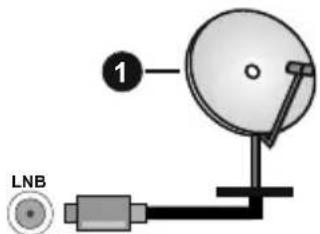
1.Satellite
Left side of the TV
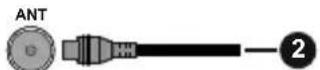
2.Aerial or cable

If you want to connect a device to the TV, make sure that both the TV and the device are turned off before making any connection. After the connection is done, you can turn on the units and use them.
Power
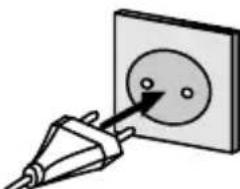
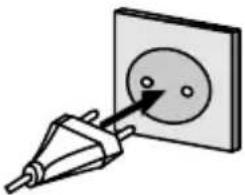
After unpacking, allow the TV set to reach the ambient room temperature before you connect the set to the mains. Plug the power cable to the mains socket outlet.
IMPORTANT: The TV set is designed to operate on a 220-240V AC, 50 Hz supply.
External Devices

PLEASE ENSURE BOTH UNITS ARE SWITCHED OFF BEFORE CONNECTING
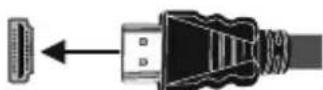
Use the proper cable to connect two units together. To select the desired input source, press the Source button on the remote control.
HDMI connection
rear side or rear-left side of TV
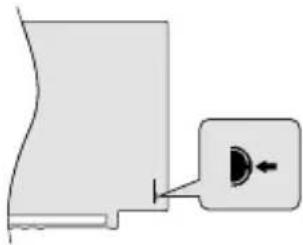
3 Switching on the TV
In order to turn the TV on from standby mode:
- Press the Standby button on the remote control
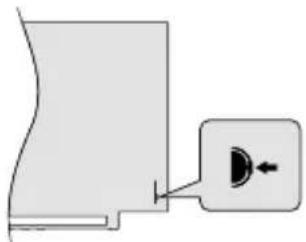
- Press the centre of the control switch inwards, located at the rear left hand side of the TV
-or-
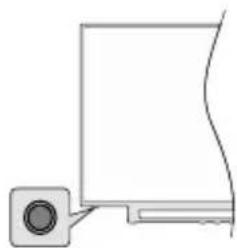
In order to turn the TV on from standby mode:
- Press the Standby button on the remote control
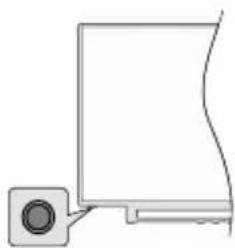
- Press the control button on the TV
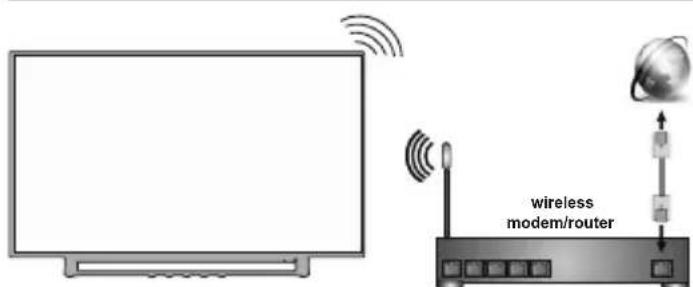
4 Internet connection
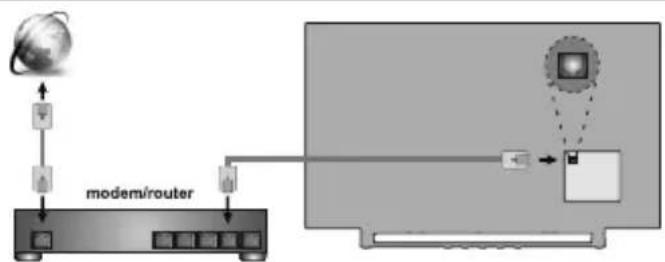
You can set up your TV so that it can access the Internet through your local area network (LAN) using a wired or wireless connection. Refer to full user manual for detailed instructions.
Wired Wireless
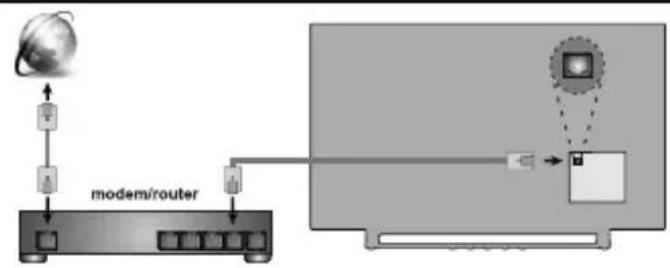
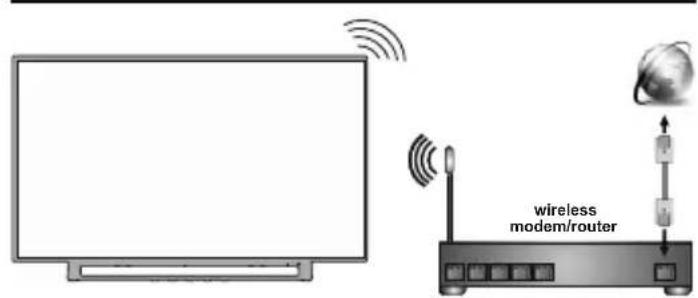
Note: The figures are for representation only
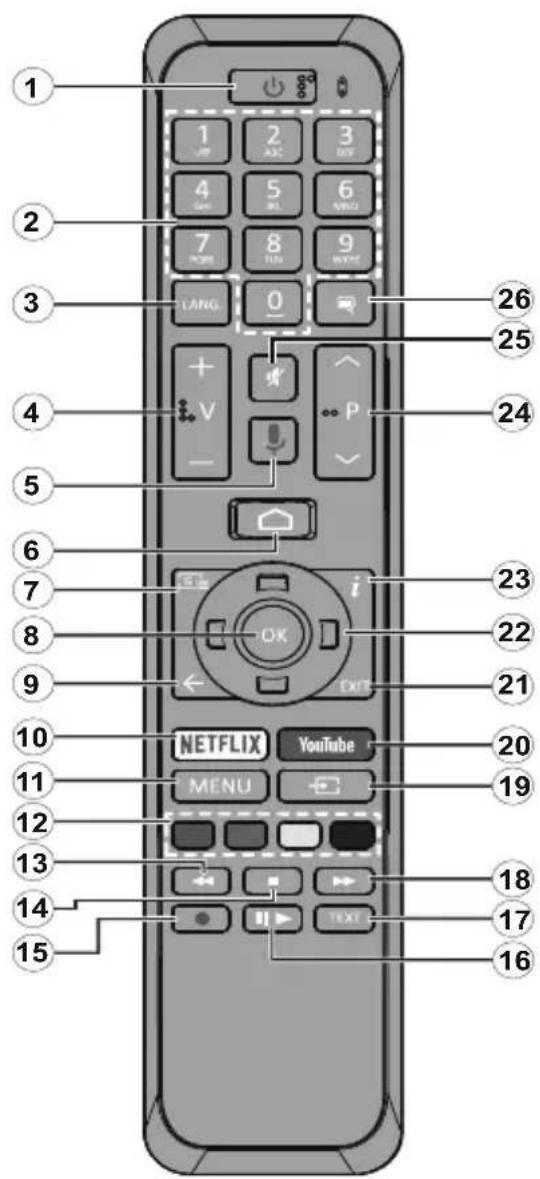
- Standby: Quick Standby / Stanby / On
- Numeric buttons: Switches the channel in Live TV mode, enters a number or a letter in the text box on the screen
- Language: Switches among sound modes (analogue TV), displays and changes audio language (digital TV, where available)
- Volume +/-
- Microphone: Activates the microphone on the remote
- Home: Opens the Home Screen
- Guide: Displays the electronic programme guide in Live TV mode
- OK: Confirms selections, enters to sub-menus, views channel list (in Live TV mode)
- Back/Return: Returns to previous menu screen, goes one step back, closes open windows, closes teletext (in Live TV-Teletext mode)
- Netflix: Launches the Netflix application
- Menu: Displays Live TV Settings menu in Live TV mode
- Coloured Buttons: Follow the on-screen instructions for coloured button functions
- Rewind: Moves frames backwards in media such as movies
- Stop: Stops the media being played
- Record: Records programmes in Live TV mode**
- Pause: Pauses the media being played, starts timeshift recording in Live TV mode** Play: Starts to play selected media
- Text: Opens and closes teletext (where available in Live TV mode)
- Fast forward: Moves frames forward in media such as movies
- Source: Shows all available broadcast and content sources in Live TV mode
- YouTube: Launches the YouTube application
- Exit: Closes and exits from displayed Live TV Settings menus, closes the Home Screen
- Directional buttons: Navigates menus, setting options, moves the focus or cursor etc., sets record time and displays the subpages in Live TV-Teletext mode when pressed Right or Left. Follow the on-screen instructions.
- Info: Displays information about on-screen content
- Programme +/-: Increases/Decreases channel number in Live TV mode
- Mute: Completely turns off the volume of the TV
- Subtitles: Turns subtitles on and off (where available)
(^**) If this feature is supported by your TV.
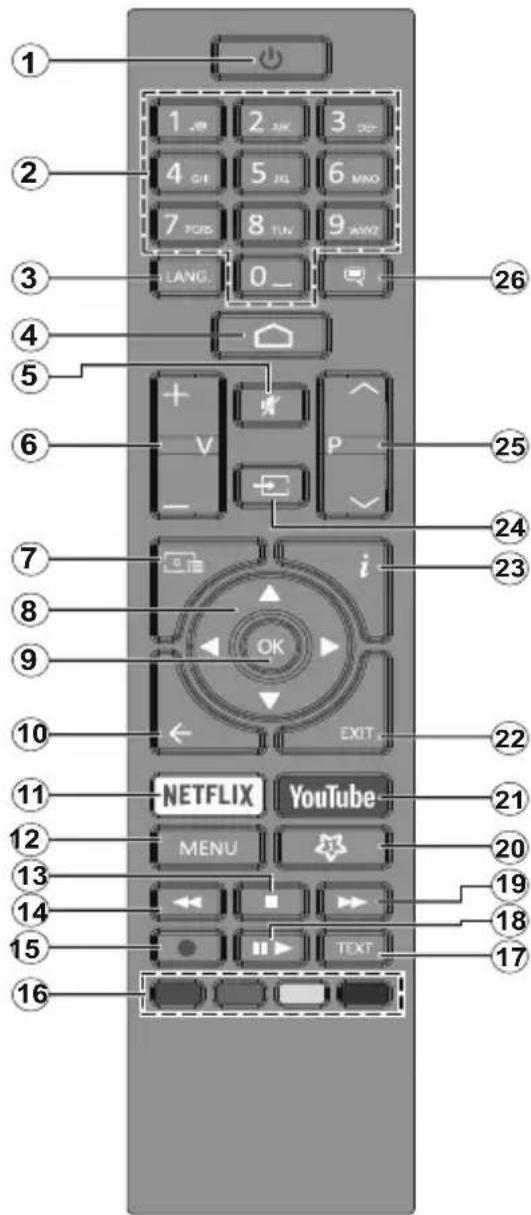
- Standby: Quick Standby / Standby / On
- Numeric buttons: Switches the channel in Live TV mode, enters a number or a letter in the text box on the screen
- Language: Switches among sound modes (analogue TV), displays and changes audio language (digital TV, where available)
- Home: Opens the Home Screen
- Mute: Completely turns off the volume of the TV
- Volume +/-
- Guide: Displays the electronic programme guide in Live TV mode
- Directional buttons: Navigates menus, setting options, moves the focus or cursor etc., sets record time and displays the subpages in Live TV-Teletext mode when pressed Right or Left. Follow the on-screen instructions.
- OK: Confirms selections, enters sub-menus, views channel list (in Live TV mode)
- Back/Return: Returns to previous menu screen, goes one step back, closes open windows, closes teletext (in Live TV-Teletext mode)
- Netflix: Launches the Netflix application
- Menu: Displays Live TV Settings menu in Live TV mode, displays available setting options such as sound and picture
- Stop: Stops the media being played
- Rewind: Moves frames backwards in media such as movies
- Record: Records programmes in Live TV mode**
- Coloured Buttons: Follow the on-screen instructions for coloured button functions
- Text: Opens and closes teletext (where available in Live TV mode)
- Pause: Pauses the media being played, starts timeshift recording in Live TV mode** Play: Starts to play selected media
- Fast forward: Moves frames forward in media such as movies
- MyButton1: Opens the picture mode setting menu on available sources
- YouTube: Launches the YouTube application
- Exit: Closes and exits from displayed Live TV Settings menus, closes running applications and/or the Home Screen and switches to last set source
- Info: Displays information about on-screen content
- Source: Shows all available broadcast and content sources, closes the Home Screen and switches to last set source
- Programme +/-: Increases/Decreases channel number in Live TV mode
26.Subtitles:Turns subtitles on and off (where available)
(^**) If this feature is supported by your TV.
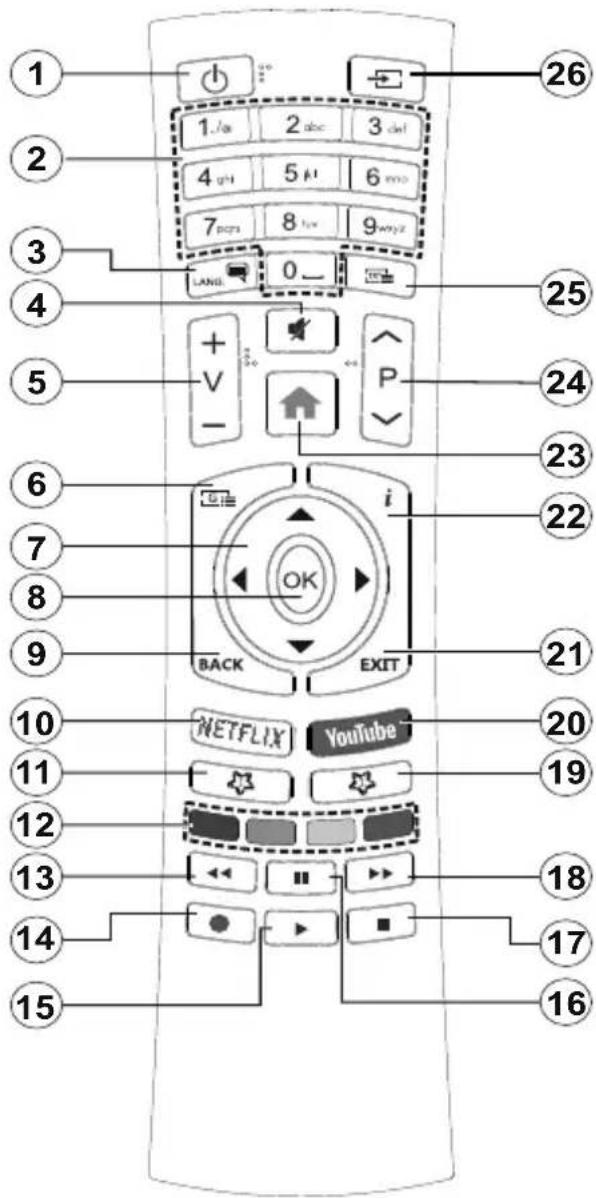
- Standby: Quick Standby / Standby / On
- Numeric buttons: Switches the channel in Live TV mode, enters a number or a letter in the text box on the screen
- Language: Switches among sound modes (analogue TV), displays and changes audio language (digital TV, where available)
- Mute: Completely turns off the volume of the TV
- Volume +/-
- Menu: Displays Live TV Settings menu in Live TV mode, displays available setting options such as sound and picture
- Directional buttons: Navigates menus, setting options, moves the focus or cursor etc., sets record time and displays the subpages in Live TV-Teletext mode when pressed Right or Left. Follow the on-screen instructions.
- OK: Confirms selections, enters sub-menus, views channel list (in Live TV mode)
- Back/Return: Returns to previous menu screen, goes one step back, closes open windows, closes teletext (in Live TV-Teletext mode)
- Netflix: Launches the Netflix application
- MyButton1: Opens the picture mode setting menu on available sources
- Coloured Buttons: Follow the on-screen instructions for coloured button functions
- Rewind: Moves frames backwards in media such as movies
- Record: Records programmes in Live TV mode**
- Play/Pause button (*)
- Play/Pause button (*)
- Stop: Stops the media being played
- Fast forward: Moves frames forward in media such as movies
- Guide: Displays the electronic programme guide in Live TV mode
- YouTube: Launches the YouTube application
- Exit: Closes and exits from displayed Live TV Settings menus, closes running applications and/or the Home Screen and switches to last set source
- Info: Displays information about on-screen content
- Home: Opens the Home Screen
- Programme +/-: Increases/Decreases channel number in Live TV mode
- Text: Opens and closes teletext (where available in Live TV mode)
- Source: Shows all available broadcast and content sources, closes the Home Screen and switches to last set source
() Play - Starts to play selected media
Pause - Pauses the media being played, starts timeshift recording in Live TV mode**
(^*) If this feature is supported by your TV.
When turned on for the first time, a search for accessories will be performed before the initial setup starts. Follow the on-screen informations to pair your remote control and other wireless accessories with your TV. To pair your remote press and hold the Source button for about 5 seconds. Press Exit to end adding accessories and start the setup. After that welcome screen will be displayed. Select your language and press OK. Follow the on screen instructions to set your TV and install channels. The installation wizard will guide you through the setup process. You can perform initial setup anytime using the Reset option in the Settings>Device Preferences menu. You can access the Settings menu from the Home Screen or from the TV options menu in Live TV mode.
Accessories Included
Remote Control
- Batteries: 2 x AAA
Quick Start Guide
Product Fiche
Feature Overview
Multi Media Player
Browse the media content stored on USB devices that are connected to your TV or on mobile devices that are connected to the same network as your TV using the MMP app
Common Interface
Decode encrypted digital TV channels with a Conditional Access Module(CAM) and a card provided by a digital TV service operator
USB Recording\*\*
Record your favourite TV programmes
Electronic Programme Guide
Display the scheduled digital TV programmes CEC
Control basic functions of the connected HDMI-CEC compatible audio/video devices with the remote control of the TV
HbbTV
Access to HbbTV services (services are dependant on broadcast)
Apps
Access the applications installed on your TV, add more from the market
Google Cast
With the built-in Google Cast technology you can cast the content from your mobile device straight to your TV.
Voice Search\*\*
You can start a voice search using your remote's built-in microphone
Bluetooth ^® (^**)
Connect audio devices or remote controller wirelessly to your TV.
(^**) Limited Models Only
High Dynamic Range (HDR) / Hybrid Log-Gamma (HLG)
Using this feature the TV can reproduce greater dynamic range of luminosity by capturing and then combining several different exposures. HDR/HLG promises better picture quality thanks to brighter, more realistic highlights, more realistic colour and other improvements. It delivers the look that filmmakers intended to achieve, showing the hidden areas of dark shadows and sunlight with full clarity, colour and detail. HDR/HLG contents are supported via native and market applications, HDMI, USB inputs and over DVB-S broadcasts.When the input source is set to the related HDMI input press the Menu button and set the HDMI EDID Version option in the TV Options>Settings>Device Preferences>Inputs menu as EDID 2.0 or Auto EDID in order to watch HDR/HLG content, if the HDR/HLG content is received through an HDMI input. The source device should also be at least HDMI 2.0a compatible in this case.
Dolby Vision
Dolby Vision™ delivers a dramatic visual experience, astonishing brightness, exceptional contrast, and vivid colour, that brings entertainment to life. It achieves this stunning image quality by combining HDR and wide colour gamut imaging technologies. By increasing the brightness of the original signal and using a higher dynamic colour and contrast range, Dolby Vision presents amazing true-to-life images with stunning detail that other post-processing technologies in the TV aren't able to produce. Dolby Vision is supported via native and market applications, HDMI and USB inputs. When the input source is set to the related HDMI input press the Menu button and set the HDMI EDID Version option in the TV Options>Settings>Device Preferences>Inputs menu as EDID 2.0 or Auto EDID in order to watch Dolby Vision content, if the Dolby Vision content is received through an HDMI input. The source device should also be at least HDMI 2.0a compatible in this case. In the Picture Mode menu two predefined picture modes will be available if Dolby Vision content is detected: Dolby Vision Bright and Dolby Vision Dark. Both allow the user to experience the content in the way the creator originally intended
with different ambient lighting conditions. To change the Picture Mode setting press the Menu button while watching the Dolby Vision content and go to Picture menu. Vision Content via an application, except YouTube, Netflix and Multi Media Player, you will not be able to access the Picture menu and set the Picture Mode.
Safety Information

CAUTION
RISK OF ELECTRIC SHOCK DO NOT OPEN

CAUTION: TO REDUCE THE RISK OF ELECTRIC SHOCK DO NOT REMOVE COVER (OR BACK). NO USER-SERVICEABLE PARTS INSIDE. REFER SERVICING TO QUALIFIED SERVICE PERSONNEL
In extreme weather (storms, lightning) and long inactivity periods (going on holiday) disconnect the TV set from the mains.
The mains plug is used to disconnect TV set from the mains and therefore it must remain readily operable. If the TV set is not disconnected electrically from the mains, the device will still draw power for all situations even if the TV is in standby mode or switched off.
Note: Follow the on screen instructions for operating the related features.
IMPORTANT - Please read these instructions fully before installing or operating
WARNING: This device is intended to be used by persons (including children) who are capable / experienced of operating such a device unsupervised, unless they have been given supervision or instruction concerning the use of the device by a person responsible for their safety.
- Use this TV set at an altitude of less than 5000 meters above the sea level, in dry locations and in regions with moderate or tropical climates.
- The TV set is intended for household and similar indoor use but may also be used in public places.
- For ventilation purposes, leave at least 5cm of free space around the TV.
- The ventilation should not be impeded by covering or blocking the ventilation openings with items, such as newspapers, table-cloths, curtains, etc.
-
The power cord plug should be easily accessible. Do not place the TV, furniture, etc. on the power cord. A damaged power cord/plug can cause fire or give you an electric shock. Handle the power cord by the plug, do not unplug the TV by pulling the power cord. Never touch the power cord/plug with wet hands as this could cause a short circuit or electric shock. Never make a knot in the power cord or tie it with other cords. When damaged it must be replaced, this should only be done by qualified personnel.
-
Do not expose the TV to dripping or splashing of liquids and do not place objects filled with liquids, such as vases, cups, etc. on or over the TV (e.g., on shelves above the unit).
- Do not expose the TV to direct sunlight or do not place open flames such as lit candles on the top of or near the TV.
- Do not place any heat sources such as electric heaters, radiators, etc. near the TV set.
- Do not place the TV on the floor and inclined surfaces.
- To avoid danger of suffocation, keep plastic bags out of the reach of the babies, children and domestic animals.
- Carefully attach the stand to the TV. If the stand is provided with screws, tighten the screws firmly to prevent the TV from tilting. Do not over-tighten the screws and mount the stand rubbers properly.
- Do not dispose of the batteries in fire or with hazardous or flammable materials.
WARNING
- Batteries must not be exposed to excessive heat such as sunshine, fire or the like.
- Excessive sound pressure from earphones or headphones can cause hearing loss.
ABOVE ALL - NEVER let anyone, especially children, push or hit the screen, push anything into holes, slots or any other openings in the case.
| Caution | Serious injury or death risk |
| Risk of electric shock | Dangerous voltage risk |
| Maintenance | Important maintenance component |
Markings on the Product
The following symbols are used on the product as a marker for restrictions and precautions and safety instructions. Each explanation shall be considered where the product bears related marking only. Note such information for security reasons.

Class II Equipment: This appliance is designed in such a way that it does not require a safety connection to electrical earth.

Hazardous Live Terminal: The marked terminal(s) is/are hazardous live under normal operating conditions.

Caution, See Operating Instructions: The marked area(s) contain(s) user replaceable coin or button cell batteries.

Class 1 Laser Product: This product contains Class 1 laser source that is safe under reasonably foreseeable conditions of operation.
WARNING
Do not ingest the battery, Chemical Burn Hazard This product or the accessories supplied with the product may contain a coin/button cell battery. If the coin/button cell battery is swallowed, it can cause severe internal burns in just 2 hours and can lead to death.
Keep new and used batteries away from children. If the battery compartment does not close securely, stop using the product and keep it away from children.
If you think batteries might have been swallowed or placed inside any part of the body, seek immediate medical attention.
A television may fall, causing serious personal injury or death. Many injuries, particularly to children, can be avoided by taking simple precautions such as:
- ALWAYS use cabinets or stands or mounting methods recommended by the manufacturer of the television set.
- ALWAYS use furniture that can safely support the television set.
- ALWAYS ensure the television set is not overhanging the edge of the supporting furniture.
- ALWAYS educate children about the dangers of climbing on furniture to reach the television set or its controls.
- ALWAYS route cords and cables connected to your television so they cannot be tripped over, pulled or grabbed.
- NEVER place a television set in an unstable location.
- NEVER place the television set on tall furniture (for example, cupboards or bookcases) without anchoring both the furniture and the television set to a suitable support.
- NEVER place the television set on cloth or other materials that may be located between the television set and supporting furniture.
- NEVER place items that might tempt children to climb, such as toys and remote controls, on the top of the television or furniture on which the television is placed.
- The equipment is only suitable for mounting at heights ≤ 2m .
If the existing television set is going to be retained and relocated, the same considerations as above should be applied.
Apparatus connected to the protective earthing of the building installation through the MAINS connection or through other apparatus with a connection to protective earthing - and to a television distribution system using coaxial cable, may in some circumstances create a fire hazard. Connection to a television distribution system has therefore to be provided through a device providing electrical isolation below a certain frequency range (galvanic isolator)
Using the special functions to change the size of the displayed image (i.e. changing the height/width ratio) for the purposes of public display or commercial gain may infringe on copyright laws.
The LCD display panels are manufactured using an extremely high level of precision technology; however, sometimes some parts of the screen may be missing picture elements or have luminous spots. This is not a sign of a malfunction.
The set should be operated only from a 220-240 V AC 50 Hz outlet. Ensure that the television is not standing on the mains lead. Do not cut off the mains plug from this equipment, this incorporates a special Radio Interference Filter, the removal of which will impair its performance. It should only be replaced by a correctly rated and approved type. IF IN DOUBT PLEASE CONSULT A COMPETENT ELECTRICIAN.
WALL MOUNTING WARNINGS
- Read the instructions before mounting your TV on the wall.
- The wall mount kit is optional. You can obtain from your local dealer, if not supplied with your TV.
- Do not install the TV on a ceiling or on an inclined wall.
- Use the specified wall mounting screws and other accessories.
- Tighten the wall mounting screws firmly to prevent the TV from fall. Do not over-tighten the screws.
Figures and illustrations in this user manual are provided for reference only and may differ from the actual product appearance. Product design and specifications may be changed without notice.
Licenses
The terms HDMI and HDMI High-Definition Multimedia Interface, and the HDMI Logo are trademarks or registered trademarks of HDMI Licensing Administrator, Inc. in the United States and other countries.

Dolby, Dolby Vision, Dolby Audio, and the double-D symbol are trademarks of Dolby Laboratories Licensing Corporation. Manufactured under license from Dolby Laboratories. Confidential unpublished works. Copyright © 1992-2020 Dolby Laboratories. All rights reserved.


Google, Android, Android TV, Chromecast, Google Play and YouTube are trademarks of Google LLC.
For DTS patents, see http://patents.dts.com. Manufactured under license from DTS Licensing Limited. DTS, the Symbol, DTS and the Symbol together, DTS-HD, and the DTS-HD logo are registered trademarks or trademarks of DTS, Inc. in the United States and/or other countries. © DTS, Inc. All Rights Reserved.


The Bluetooth® word mark and logos are registered trademarks owned by the Bluetooth SIG, Inc. and any use of such marks by Vestel Elektronik Sanayi ve Ticaret A.S. is under license. Other trademarks and trade names are those of their respective owners.
DVB is a registered trademark of the DVB Project.
[1] EIA/CEA-861-D compliance covers the transmission of uncompressed digital video with high-bandwidth digital content protection, which is being standardized for reception of high-definition video signals. Because this is an evolving technology, it is possible that some devices may not operate properly with the television.
This product contains technology subject to certain intellectual property rights of Microsoft. Use or distribution of this technology outside of this product is prohibited without the appropriate license(s) from Microsoft.
Content owners use Microsoft PlayReady™ content access technology to protect their intellectual property, including copyrighted content. This device uses PlayReady technology to access PlayReady-protected content and/or WMDRM-protected content.
If the device fails to properly enforce restrictions on content usage, content owners may require Microsoft to revoke the device's ability to consume PlayReady-protected content. Revocation should not affect unprotected content or content protected by other content access technologies. Content owners may require you to upgrade PlayReady to access their content. If you decline an upgrade, you will not be able to access content that requires the upgrade.
The "CI Plus" Logo is a trademark of CI Plus LLP.
This product is protected by certain intellectual property rights of Microsoft Corporation. Use or distribution of such technology outside of this product is prohibited without a license from Microsoft or an authorized Microsoft subsidiary.
Wireless LAN Transmitter Specifications
| Frequency Ranges | Max Output Power |
| 2400 - 2483,5 MHz (CH1-CH13) < 100 | mW |
| 5150 - 5250 MHz (CH36 - CH48) < 20 | mW |
| 5250 - 5350 MHz (CH52 - CH64) < 20 | mW |
| 5470 - 5725 MHz (CH100 - CH140) < 200 | mW |
Country Restrictions
This device is intended for home and office use in all EU countries (and other countries following the relevant EU directive) without any limitation except for the countries mentioned below.
| Country Restriction | |
| Bulgaria | General authorization required for outdoor use and public service |
| Italy | If used outside of own premises, general authorization is required |
| Greece | In-door use only for 5470 MHz to 5725 MHz band |
| Luxembourg | General authorization required for network and service supply(not for spectrum) |
| Norway | Radio transmission is prohibited for the geographical area within a radius of 20 km from the centre of Ny-Ålesund |
| Russian Federation | In-door use only |
| Israel | 5 GHz band only for 5180 MHz - 5320 MHz range |
The requirements for any country may change at any time. It's recommended that user checks with local authorities for the current status of their national regulations for 5 GHz wireless LAN's.
Disposal Information
[European Union]
These symbols indicate that the electrical and electronic equipment and the battery with this symbol should not be disposed of as general household waste at its end-of-life. Instead, the products should be handed over to the applicable collection points for the recycling of electrical and electronic equipment as well as batteries for proper treatment, recovery and recycling in accordance with your national legislation and the Directive 2012/19/EU and 2013/56/EU.
By disposing of these products correctly, you will help to conserve natural resources and will help to prevent potential negative effects on the environment and human health which could otherwise be caused by inappropriate waste handling of these products.
For more information about collection points and recycling of these products, please contact your local municipal office, your household waste disposal service or the shop where you purchased the product.
Penalties may be applicable for incorrect disposal of this waste, in accordance with national legislation.
[Business users]
If you wish to dispose of this product, please contact your supplier and check the terms and conditions of the purchase contract.
[Other Countries outside the European Union]
These symbols are only valid in the European Union.
Contact your local authority to learn about disposal and recycling.
The product and packaging should be taken to your local collection point for recycling.
Some collection points accept products free of charge.
Note: The sign Pb below the symbol for batteries indicates that this battery contains lead.
![JVC LT-50VAQ8135 - [Other Countries outside the European Union] - 1](/content/2026/04/652893/images/0d4edf262215c21b62245e1b76076cd08290c1ba9bab162612d235f574911749.jpg)
- Products
- Battery
3aHaTa CtpaHa nn 3aHaTa JraBa CtpaHa Ha TeJeBn3opa
![JVC LT-50VAQ8135 - [Other Countries outside the European Union] - 2](/content/2026/04/652893/images/f41e34ca48141a123ec5e2ed02ac3ed6cbf9dac6dbbc6f81778271e0ac2124f4.jpg)
BbHnHycTpoNCTBa

PENEIN CBbP3BAHE CE YBEPETE, YE IN DBATA YPEDA CA N3KJIIOUeHIN.
I3noI3BaIe InpaBnHnKa6eI, 3a Da CbpxKeTe DBe yCtpoIcTba.
3a da n36epete keenaHn BXOeH n3TOuHnK, HATNCHeTe 6yToHa Source Ha dNCTaHcUHnHO ynpabBHeHne.
3axpaHbAHe
Cne KaTO n3BaAnTe TeneBn3Opa OT ONaKOBkata, OCTaBeTe Ro Da DocTnRhe cTaHa TempePaTypa, IpeDn Da FO BKIOUHTe KbM eJIeKTPnueckata MpeXa. BKnIOUte UeIeCeJa Ha 3axpaHbAun Ka6en B KOHTaKTA.
BAXHO TeneBn3OpbTe npoeKtnpaH da pa60Tu npn HappeKeHne 220-240V AC c yeCTota 50Hz

BkIIOUeTe TeJIeBu3Op,
3a Da BkIIOUHTe TeJIeBUN3Opa OTepeKIM Ha RotOBHOCT:
- HatncheTe 6yToHa Standby OT DnCTaHcUHOHHOTy npabNeHne.
HaTnCHete eHTpaHnHaTa qact Ha npeBknIOuBaTeJra 3a ynpabHeHne HABbTppe, pa3noIoxeH B 3aHaTa JRA CtpaHa Ha TeneBn3Opa
-ⅢIⅣ-
3a Da BkHouHTe TeJebu3Opa O T peKIma Ha rTOBHOCT:
- HaTnCHeTe 6yToHa Standby OT DnCTaHcUHOHHOTy npaBHeHne.
HaTnCHTe KOHTPOHnHa 6yToH Ha TeJIeBu3Opa.

HTepHeT Bpb3Ka
Moxete da hactponTe TeJIeBn3opa Taka, Ye da nma doCTbI Do nHTepHET ppe3 BaWata JokaHa MPexa (LAN) c nomoxta Ha Ka6eJHa nn 6e3KnuHa Bpb3ka. BIXTe nbHOTOpbKOBOcTBO Ha notpe6nteJra 3a noDpo6Hn HnctpykCnn.
Ka6eJen Be3xNueH
Docbnpnnoxehnra, nHCTanipaHa Baunr TeleBn3Op, do6abRe He OT mara3nHa
Google Cast
C BrpaDeHata TexHoIorna Google Cast MoKeTe Da npedabate CbIbpxKaHneTo OT MObINHOTo Cn YcTpoiCTBO HAnpaBO KbM BaUNa TeneBu3Op.
TnacobTObpcHe\*\*
Mokete da 3anoHete rnaCobo TbpceHe, KATO n3noJ3BaTe Brpaedn MmKpOph Ha DnCTaHcNOHOTo Cn
Bluetooth ^()
BkIIOUeTe ayDIOOyCTPOINCTBOTo nIN dNCTaHcNOHOT O npabHeHne, 6e3 da n3PON3BaTe Baunr TeNeBn3Op.
(^**) Camo 3a orpaHneH moJeH
BHIMAHNE:3A DA HAMAJNTE ONACHOCTTA OT TOKOB YJAPHE CBALJNE KANAKA (NJIN TBPBA). BbTPE HRA MAA CACTN, KONTO NOTPBEBNTEJIY T A CEPBU3NPA. INPEDOCTABETE PEOHTNPAHETO HA KBAJNFUUPAHNA CEPBU3EH NEPCOHAI.
Pn loo BpeMe (6yn, rpbMOTeBnCn) n Dbltn nepnoDn 6e3 non3BaHe (3aMHHaBe H NouHBKa), N3KNUoyTe TeJeBu3Opa ot 3axpaHbAHeto.
IeNceJbT Ha Ka6eNa ce N3NoJ3Ba 3a N3KJIIOUbaHe Ha TeNEBn3Opa OT eNEKtpnueckata MpeXa N 3aTOBa ToI Tp8Ba Da e BnHarn rOedn 3a yNtpe6a. Ako TENEBn3OpbT He e N3KJIIOUeH OT eNEKtpnueckata MpeXa, ToI BCE OSe Ue KOHCymipa eNEKTPoEHePnra BB BCNUKn CNTyaUu, DOpN TeNEBn3OpbT Da e B peXm Ha rotOBHOCT Nn da e N3KJIIOUeH
3a6eJekka: CnedeBaumue uHcmpykuuume Ha ekpaHa, 3a da 3adeucmbame cbombemHume yHKuuu.
BAЖHO - Моля поче TeВнмателноTe3и Иструкци пpeДа ИнсталпатeИл n3рОЛЗВaTe урEDA
I PENEYIPEXJEHNE : ToBa e npedHa3NayeHo 3a ynoTpe6a ot Iuca (BKNIOHTeJIHO deua), KOnTO ca cnOcO6Hn/IMat ONNTa Da n3NOJ3BaT TaKINBa ycTpoiCTBa 6e3 HAd3Op, OCBeh aKO He ca 6NJn Ha6JIIODaBAHN IIN NHCtpyKTupaHn OTHOCHO yNoTpe6aTa Ha ycTpoiCTBOTO OT Iuice, OTROBOPHO 3a TExHata 6e3OnacHOcT.
- N3noJ3BaIte To3n TeJIeBn3Op Ha BnCOUHa HaMaJIko ot 5000 MeTp a HAD HApMOpCKoTo paBHIe, Ha cyXm MecTa n paOHOc yMepeH INIITpONuYeCKN KJIIMaT.
TeIeBn3OpbTe npedHa3HaueH 3a DomaHa n noD6Ha yNoTpe6a Ha 3akpHTo, Ho MoKe da ce H3noJ3Ba N Ha o6eCTBeH MeCTa.
3a Do6pa BeHTnlaun, octaBeTe noHe 5 cm CBO6oJHO npocTpaHCTBO OKOTo TeJIeBn3opa. -
BeHTnlaZnraTa He 6nBa Da ce npeKbcBa Ype3 NOCTaBHe Ha IpeDMeTu KaTo BEcTHnCn, NOKPNBKn, JIeKa Me6eI, NepDeTa, KINIMN INPocYe Bbpy NII6JLOknpaHe Ha BeHTnlaZnOHHnTe OTBOpN.
-
Ⅲe nBt Ha 3axpaHbAunKa6en Tpr6Ba Da e nechoDocTbneH. He noctabraIte TepeBn3opa, Me6en nn npyro Bbpxy 3axpaHbAun Ka6en. NOBpeDen 3axpaHbAun Ka6en/UnceN MoKe Da npEdu3Bnka NoXap nn Da BN ydpn TOKOB ydpn. Xbaaute 3axpaHbAun Ka6en 3a unceNa, He nKluOyBaTe TeJeBn3opa KaTO Dpnpate 3axpaHbAun Ka6en. Hkora He DokocBaIne 3axpaHbAun Ka6en/UnceNa C MOKpn Pbue, TbK KATO TOBA MoKe Da npEdu3Bnka Kbco CbeDInHeNe Hn IN TOKOB ydpn. Hkora He npaBeTe Bb3eHa 3axpaHbAun Ka6en H He Bpb3BaIne C Hero dpYn Ka6en. Ako ca nobpeDen, cmeHeTe r H3a6aBHO, KoTo Tpr6Ba Da ce n3BbPOn OT KBaJinPhiuipan nepcoHaI.
He n3laarTe TeJeBn3Opa Ha KaKn I npbckn OT TeuHocTn H He NoCTaBraIte PpeDMeTn, PbLnH C TeuHOCTn, KATO HApPmEp Ba3n, YaShn, N T.H. Bbpxy nn Na TeJeBn3Opa (Ha npImep Ha paTOBe Ha TeJeBn3Opa).
He n3naTe TeIeBn3Opa Ha npka CbHueBa CBETnHa nn He NoCTaBnTe OTKpntn PnAmbuc, KaTo HApnPmep 3anaJeH CBeuN, Bbpxy rOpHata Yact Ha nn 6n3o Do TeIeBn3Opa.
He nocTabraTe n3ToUHnCn Ha TOnJnHa, KaTo Hanpimep eIeKtpnueckn neuKn, paDnaTopn n dp. 6n3o do TeIeBn3opa.
He noctabraIte TeIeBn3opa Ha noDa nn Bbpxy HAKIOHEn NOBbpxHOCTN.
3a da n36erHete onacHOCTTa ot 3aDyUbaHe, DpbjXTe HauNoHOBNTe TopbNcKn Ha MeCTa, TpydnoOCTbNH 3a 6e6eta, Deua N Domaunn KINBOTNI.
BHNMaTeJIHO npIKpeIe TcOIIKaTc KbM TeJIeBUN3OpA. AKO cToIkaTa ce DoCTABc 6oNTOBe, 3aTeHHeTe 6oNTOBete 3dpaBO, 3a da npEJa3nTe TneBUN3Opa OT naDAHe. He npe3aTgAitE 6oNTOBete mOHTnpaIte npabINHO rymEnITE NOJIOKKn. - He n3xBbpyraTe 6aTeepnnte B orbH nIIN 3aeDHO c onaCHN 3anaJIIMM MaTePnaJI.
BHHMAHNE
- BaTePnIte He Tp6Ba Da ce n3Iarat Ha npEkoMePha ToJIHa, KaTo CJIbHcEBA CBETJIHa, OrBn I pyrN noO6Hn.
- -преекомерно 3BykoBO HaЯгане OT Сушалкite може дл пчини загьа на суха.
IPEIN BCNUKO - HNKORA He no3BOJBAuTe Ha HNKORO, oc6eHo Ha deca, da HATNCKaT Nn ydpT ekpaHa, da NOCTABT PpeDMETN B DyKNITE, cNOTOBete NIn OTBOPHTe Ha KUTra.
MapknpoBKn Bbpxny npOdykTa
CJIeHNHe CnMBOJN Ce n3noJ3BaT Bbpxy npOdykTa KaTo MapKeP 3a OrpaHnueHn I npEJa3n MepKn N yKa3aHnna 3a 6e3oNaChocT. BcAko oBcSHeHne Tp8Ba Da ce B3eMe npEdBnD cAmO TaM, KbTeTO Bbpxy npOdykTa nMa cBoTBeTHaTa MapKnpoBka. B3emTe Ta3n INΦopMaunI npEdBnD OT cbo6paJxHn 3a CNrpyHOCT.

ObopydBahe Knac II: To3n ypeJe npoeKtupan No TaKbB NaunH, Ye Da He n3NCKBa npedna3Ha Bpb3Ka KbM 3a
6e30nachocK bM eJektpueckcTo 3a3emBaHe.

Опасен Термнади На ХИВО: МаркupaНЯТ(Te) n3BOД(n) e/ca onaceH(n) ФаЗa(n) пр nHopMaJIHN yCLOBnHa ekCПноацИ.

BHHMaHHe, BHXTe HNCTpyKunTe 3a yNoTpe6a: MapknpaHaTa(nte) 3oHa(n) cbDbpxka(T) 6aTePN C cOpMaTa Ha KOnue/
KJTeTka, KOnTO NOTpeBnTeJIaT MoKe Da 3aMeHr.

Ja3epen npo4yKT Klac 1:To3n npo4yKT cblbpka Ja3epen n3TOUHnik Klac 1, KOto e 6e3onaceh npn HopmaJIHn ycIOBna Ha ynoTpe6a.
PPEyPPEXDEHNE
He bIaTe 6aTeepnTa, cIeCTByBa onaCHOcOT XmNuecko n3raprHe
To3 npOdyKT, nIN BkNIOUeHNTe B O6ema Ha DoCTaBkaT My akcecoapn, MORAT Da CbIbpxkat 6atepna TnT Ta6JETKa/6yTOH. Ako 6atepnaTa 6bIe NoRbJIHaT, TOBa MOKe Da ppei3BnKa TeKKn BbTpEshn N3rapHnB paMKInTe Ha 2 Yaca n MoKe Da DoBeDe Do CMBpt.
Ia3eTe HOBInTe n ynoTpe6BaHInTe 6aTePn nn daJIuee oI deua.
Ako OTdeneHneTo 3a 6atepnaTa He ce 3aTbapra Do6pe, cnpTe Da n3noJ3BaTe npOdykTa I ro DpbXkTe daanee ot Deca.
Ako Mucnnte, ye cTe NOrbIHaII 6aTepeHnte nn nCte rN NOCTabUN, KbDeTo I Da 6BnO B TAnOTo CN, NtbpceTe He3a6abHO MeuunHcKa NOMou.
TeneBn3OpbT MoKe Da NaHe N Da npuHnC cepNo3Hn HapaHraBaHn nn CmBpT. MHOr HapaHraBaHn, Oc6eHo npn DeaTa, MoRat Da 6bDat n36eHaTu C B3ImaHe Ha npocTn PpeDna3Hn MepKn, Kato Hanp.;
BINHAN n3noJ3BaIte uKaΦOBe nn CToKn nn MeTOOn 3a MOHTax, npenOpbuaHn OT npOn3BOuNTeJI Ha TeJeBu3Opa.
BUNHAFN u3noJ3BaIe Me6eNi, KOnTO cNoKoHOMorat Da noDdbPkaT TeJeBu3opa.
BINHAGIce yBepete,Ye TeIeBn3OpbT He HaDbNCBa p6a Ha Hocuata Me6en.
BINHAGn obyabaTe deaTa 3a onacHocnte OTKatepeHTo No Me6en, 3a Da DoCTurHaT Do TeNeBu3opaNNI KOHTPOJNTe My.
BINHAGN Cbbp3BaIte MappTyH N dpyn KaBeJN KbMaBaIy TeneBn3Op, Taka Ye Da He MoRaT Da Ce CnBbAT, N3dbpNBaT nn XBaUaT.
- HNKORA He noctabray Te TeneBn3opa Ha HeCTa6nHa OCHOBA.
- HNKOΓA He NOCTABRnTe TeBn3Opa Bbpxy BnCOK Me6eJn (Hanp. KkaΦObe nn 6n6jnoTeKn), 6e3 da cTe 3axBaHaJIr HenoDbNkHo Camnte Me6eJn n CToiKaTa Ha TeBn3Opa.
- HNKOFA He nocTabaIte TeIeBn3opa Bbpxy IlaTnnIpyrMaTepeNaJIN, NoCTaBeHm Mekdy TeIeBn3opa m6eJInte, KOnTO cIyKaT 3a HerOba Onopa.
- HNKOFA He noctabraye npedmetn, KOnto 6nxma Mornn Da n3kywaT decaTa da ce KaTepeRt, KaTo ngpaKu N DCtahunOHNo ynpaBJeHne, Bbpxy rOpHaTa Yact Ha TeNeBn3Opa nn Me6eJIne, Bbpxy KOnto e noctabeh TeNeBn3OpbT.
- O6OpyDbaHeto e noDxOJaIcMo 3a MoHTax Ha BnCOuHa ≤ 2 M.
Ako cbuectbByBaunr TeIeBn3Op 6bde 3ana3EH npemecTe, Tp6Ba Da ce npunaRaT cbuTe cbo6paKeHna KaTO no-rope.
Upei, KOIto e Cbbp3aH CbC 3aunTHOTo 3aemBaHe Ha crpaHaTaNCTaJauNraJype3 Ka6eJHa Bpb3ka nn npe3 dpYr ypei, HMaui 3aunTHO 3aemBaHe , KaKTo i KbM TeJeBn3HOHnHa pa3npedeJiaCnCTema, N3PON3BaUa KoakcnaneH Ka6en, MOKe B HnKOn cnyan Da cb3daDe onachocT OT noXap. Cbbp3BaHTo KbM CNCTema 3a TeJeBn3nA CneOBATeJHo Tp8Ba Da ce OcNpyu Ype3 ycTPOINCTBO, KOEt OcNpyraBe enEKTpuYeCKa N30aunr IOD ONpeDEnH YeCTOTeH Dnana3OH (raJIbaHHueH n30JaTOp).
Bb3MOxHO e n3nOJ3BaHeTo Ha cneuaJHnTe cyHKuHa 3a npomraHa pa3Mepa Ha n3BeJdaHna Ha ekpaH o6pa3 (T.e. npomraHa Ha cboTHoJHnETo BnCOUHa/ uInpHa) 3a ceJIte Ha npoxeKTnpaHe nped ny6nka Hn TbPROBcKO pa3npocTpAheHne Da DoBeDe Do HapuShaBaHe Ha aBTOpcKn nn CpOHN npaba.
DincnneTe c TeuHKnKpncTaN ca npoun3BeDeHN Upe3 BncoKo npeuzHa texHoJorN.Bbnpekn ToBa, NOHAKORA B HAKON yuaCTbUHa Ha DnCnJIe Moat Da JINCBaT qactn OT KapTuHHaTa NIn NbK da Ce NoBbT CBETNI neHa. Toba He e npun3HaK Ha DeΦeKT.
AnapaTbT Tp6Ba Da pa60Tu cMo C HanpeXeHne 220-240V AC n YecToTa Ha ToKa 50Hz. YBepTe ce, ye TeIeBn3OpbT He e NocTabeH Bbpxy 3axpaHbAun Ka6en. HE maxaIte Ka6enHnI yenceN ot ypeDa, Toi CbIbPjka paINO-nHTepΦePeHTeH φnITbp, 6e3 KOItO ypeDbT Hma Da pa60Tu npabInHo. Tp6Ba Da ce 3aMeHn C TnKabEn Cbc CbOTBeTHoN Ondo6peHo HOMHaJIHO HanpeXeHne. AKO HE CTE CNYPHN, CBbPXETE CE C BAUN EJEKTPOTEXHnik.
ИНСТРУКЦИ 3A MOHTИРАЕ HA CTEHA
-Прочетete Инстукшипte,пpeи дa моHTираTe TeleвиЗopa Ha CTeHata.
KOMnIeKtBt 3a MOHTax Ha CTeHa He e 3aDbIxKnteJen. MoXeTe Da ro 3akynite ot MecTHNIAINbP, Tb Kato He E BKNIOueH BOeMa Ha DoCTaBka Ha TeNeBuN3Opa.
- He MONTpaIte TeJeBn3opa Ha TaBaHa IJIN Ha HAKNoHeHa CTeHa.
- I3noI3BaIte cneuIaIIHITe 6oIIOBe 3a MoHTaK Ha CTeHaTa, KaKTo N dpyrIte akcecoapn.
3aterheTe 3pabo6oNTOBete 3a MOHTax Ha cteHata, 3a da npedna3nte TeIeBn3opa ot naDaHe. He npe3atraTe 6oTobete.
Φnrgypte n nIIOCTpaunTe B TOBa pBkoBOcTBO 3a ekCnloataqna ca cAmO 3a cnpaBka N MoRat Da ce pa3nUaBAT OT DeNCTBNTENH RA Ha npOdykTa. IIn3aHbT n CneuNfKaunTe Ha npOdykTa Morat Da 6bDat npomeHn H63 npEdu3BeCTne.
IinceH3n
TepMNHTe HDMI n HDMI High-Definition Multimedia Interface, Ioroto Ha HDMI n High-Definition Multimedia Interface ca TbproBcKn MapKn nn peRncTpnpaHn TbproBcKn MapKn Ha HDMI Licensing Administrator, Inc. B CbeDInHeHtE 5aTn n B dpyr n cTpaHn.

Dolby, Dolby Vision, Doly Audio, Inc. CBMOBbT C BoHd D ca TbproBcN MapKn Ha Dolby Laboratories. Licensing Corporation. Ppou3BeDen no NueH3 Ha Dolby Laboratories. NobepuTeHN HEny6kUyBaHn npou3BeHn. Copyright © 1992-2020 Dolby Laboratories. BcnuKn npaba 3ana3eHn.
Dolby Vision
Dolby Audio
Google, Android, Android TV, Chromecast, Google Play and YouTube ca TBproBckn Mapk n Ha Google LLC. 3a DTS nateHTnte BuxTe http://patents.dts.com. Ipon3BeDen noJnueH3a Ha DTS Licensing Limited. DTS, CmBOJbT, DTS n CmBOJbT 3aeDnO, DTS-HD n Noroto DTS-HD ca pernctpupaH TbproBckn Mapk n nn TBproBckn MapKn Ha DTS, Inc. B CbeDInHeHnte uatn / nn npytn cTpaHn. © DTS, Inc. BcnKn npaba 3ana3eHn.
dtssHD
CnoBhata Mapka n IoroTnInTe Bluetooth® ca pernctpupaHn TbproBckn MapKn, co6ctBeHoCT Ha Bluetooth SIG, Inc. n BcraKo n3non3BaHe ha TaknBa MapKn ot Vestel Elektronik Sanayi ve Ticaret A.S. e no liueH3. Dpyr n TbproBckn MapKn n TbproBCKn HAnMeHOBAHnca Te3n Ha CbOTBeTHInTe NM Co6CTBeHnIu.
DVB e pernctpupaHa TbproBcKa Mapka Ha DVB Project.
[1] EIA/CEA-861-D cneuФиkaunTa obXbaa npedabaHe Ha HeKOMnpescnPaHO uPpOBO BnDeo C c uPpOBA 3aUHTa Ha YeCTOTHaT a JeHTa, KOrTo e cTaHdapTN3PpAHa 3a npEMaHe Ha BnDeo CnHaNc BnCoka pa3dIeNTHa cnOCobocT. Tb' KaTO ToBa e pa3BnBaUca Ce TexHOJOrn, Bb3MOxHo e HЯKOn yCTpoiCTBa Da He pa6OTdT O6pe C TeNeBn3Opa.
To3n npoodykT cbdbpka TexHOJOrn, 6eKT Ha onpeJeHn npaba Ha nHTeJeKTyaHnHa Tc6CTBeHoCT Ha Microsoft. N3noJ3BaHeTO nn pa3npocTpaeHneTo Ha Ta3n TEXHOJOrn n3BbH To3n npOdykTe 3a6paHeHa 6e3 cBoTBetHn(Te) nIueH3(n) ot Microsoft.
Co6CTBHeHnCHTe Ha CbDbPxHaHne H3NOJ3BaT Microsoft PlayReadyTM TexHoNOrnTa 3a DoCTbN Do CbDbPxAHHe, 3a Da 3aUnTAT INTEKeKTyAnHaT aCn Co6CTBeHOCT, BKNIOUHTeJIHO CbDbPxAHne 3a ABTOPCKOTo npABO. ToBA yCTpOcTBO N3NOJ3Ba PlayReady TexHOnOrn 3a DoCTbN Do PlayReady-3aUnTeHO CbDbPxAHne n/nn WMDRM-3aUnTeHO CbDbPxAHne. Ako yCTpOcTBoTo He ycnee da npINLOXn PpaBNH OrpaHnueHnra TBApxy N3NOJ3BaHeto Ha CbDbPxAHne, Co6CTBHeHnCtHe Ha CbDbPxAHneTO MoRat Da n3NCKat OT Microsoft Da npemaxHe Bb3MOXHOCTTA Ha yCTpOcTBOTO
da n3no3Ba PlayReady-3aunTeHo cdbpbxahne. OtmHaTHe Tp6Ba Da 3acra He3aunTeHo cbdpxahne nn CbDpbxahne, 3aunTeHO OT dpyrTexHONOrn 3a DoCTbN DO cbDbPxAHne. Co6CTBeHNuTE Ha cbDpbXAHne MORa Da N3NCBAt OT Bac Da aKtyaJIN3npate PlayReady 3a Doctbn Do T8XHOTcBDbPxAHne.AKO OTKaXeTe Da HAnpaBtE aKtyaJIN3aunTa, HMa Da NoJyUte DoCTbN Do cbDbPxAHne, KOETO N3NCKBa aKtyaJIN3aunTa.
Jloroto "CI Plus" e TbproBcka Mapka Ha Cl Plus LLP.
To3n npOdyKT e 3aunTeH OT onpeJeHn npaba Ha nHTeJIekTyajHa co6CTBeHocT Ha Microsoft Corporation. N3noJ3BaHeTo nn pa3npocTpaeHneTo Ha TaKnBa TexHOJOrnN n3BbH To3n npOdyKT e 3a6paHeNo 6e3 JnueH3 OT Microsoft nn OToPn3npaH ot Microsoft dbuepHo dpyxecTBO.
CneuФикauи Ha 6e3xuHnA LAN TpaHcMntep
| Чектоchnу спektыри | Мак. ИсторICAL MOДСТ |
| 2400 - 2483,5 MHz (CH1-CH13) < 100 mW | |
| 5150 - 5250 MHz (CH36 - CH48) < 200 mW | |
| 5250 - 5350 MHz (CH52 - CH64) < 200 mW | |
| 5470 - 5725 MHz (CH100 - CH140) < 200 mW |
ДьркавиOrpaHnYeHn
ToBa yCtpoiCTBO e npEHa3HaueHo 3a DomaUHa n oOpnc yNoTpe6a BbB BCnKu DbPkaBn OT EC (N B dpyrn DbPkaBn B pe3yIITat Ha CbOTBeTHaT DaPeKTNaBa Ha EC) 6e3 HnKaBO OpAHHueHne, C N3KnOueHne Ha DbPkaBNTe, NocOueHn No-DoNY.
CLASS1 LASER PRODUCT
Laserski proizvod klase 1: Ovaj proizvod sadrži laserski izvor Klase 1 koji je siguran u razumnopredvidljivim uvjetima funkcioniranja.
UPOZORENJE
Nemojte gutati bateriju, opasnost od kemijsikh opekotina
Ovaj proizvod ili dodatna oprema isporučena uz ovaj proizvod mogu da sadrže dugmasti bateriju. Ukoliko se baterija proguta, moze dovesti do teške unutrasnje opekotine u samo 2 sata i moze dovesti do smrti. Držite stare i nove baterije dalje od djece. Ako se odjeljak baterije ne zatvara dobro, prekinuti upotrebu proizvoda i držati ga dalje od djece.
- Inserting the batteries into the remote
- Connections
- Antenna
- Rear side of the TV
- Left side of the TV
- Power
- External Devices
- HDMI connection
- Switching on the TV
- Internet connection
- Wired Wireless
- Accessories Included
- Feature Overview
- Multi Media Player
- Common Interface
- USB Recording\*\*
- Electronic Programme Guide
- HbbTV
- Apps
- Google Cast
- Voice Search\*\*
- Bluetooth ® (**)
- High Dynamic Range (HDR) / Hybrid Log-Gamma (HLG)
- Dolby Vision
- Safety Information
- CAUTION
- RISK OF ELECTRIC SHOCK DO NOT OPEN
- IMPORTANT - Please read these instructions fully before installing or operating
- WARNING
- Markings on the Product
- WALL MOUNTING WARNINGS
- Licenses
- Country Restrictions
- Disposal Information
- [European Union]
- [Business users]
- [Other Countries outside the European Union]
- BbHnHycTpoNCTBa
- 3axpaHbAHe
- BkIIOUeTe TeJIeBu3Op,
- HTepHeT Bpb3Ka
- Ka6eJen Be3xNueH
- TnacobTObpcHe\*\*
- Bluetooth ()
- BAЖHO - Моля поче TeВнмателноTe3и Иструкци пpeДа ИнсталпатeИл n3рОЛЗВaTe урEDA
- BHHMAHNE
- MapknpoBKn Bbpxny npOdykTa
- PPEyPPEXDEHNE
- ИНСТРУКЦИ 3A MOHTИРАЕ HA CTEHA
- IinceH3n
- Dolby Audio
- dtssHD
- ДьркавиOrpaHnYeHn
- UPOZORENJE
Brand : JVC
Model : LT-50VAQ8135
Category : Television