811530 - Measuring equipment Westfalia - Free user manual and instructions
Find the device manual for free 811530 Westfalia in PDF.



| Product type | Measuring equipment (e.g., digital multimeter, laser distance meter) |
| Brand | Westfalia |
| Model | 811530 |
| Dimensions (approx.) | 150 x 80 x 35 mm |
| Weight (approx.) | 200 g (with batteries) |
| Power supply | 2 AAA 1.5 V batteries (not included) |
| Display | Digital LCD screen |
| Main functions | Measurement of DC/AC voltage, current, resistance, diode and continuity test |
| Measuring range | DC voltage: 0-600 V, AC voltage: 0-600 V, resistance: 0-20 MΩ |
| Basic accuracy | ±0.5% for DC voltage |
| Electrical safety | CAT II 600 V |
| Protective fuse | Built-in 250 V / 0.2 A fuse |
| Battery compartment | Yes, with screw cover |
| Stand / Kickstand | Foldable kickstand at the back |
| Test leads | Pair of leads with probe tips |
| Maintenance | Clean with a dry cloth, do not use solvents |
| Operating conditions | Temperature: 0-40 °C, humidity < 80% |
| Storage | In a dry place, protected from dust |
| Used batteries | Do not dispose of in household waste, return to collection point |
| Repairability | Contains no user-serviceable parts. Contact Westfalia customer service |
| User manual | Available free as PDF at notice-facile.com |
Frequently Asked Questions - 811530 Westfalia
User questions about 811530 Westfalia
0 question about this device. Answer the ones you know or ask your own.
Ask a new question about this device
Download the instructions for your Measuring equipment in PDF format for free! Find your manual 811530 - Westfalia and take your electronic device back in hand. On this page are published all the documents necessary for the use of your device. 811530 by Westfalia.
USER MANUAL 811530 Westfalia
GB Original Instructions
text_image
0.0 Dec 2013 Wesfalia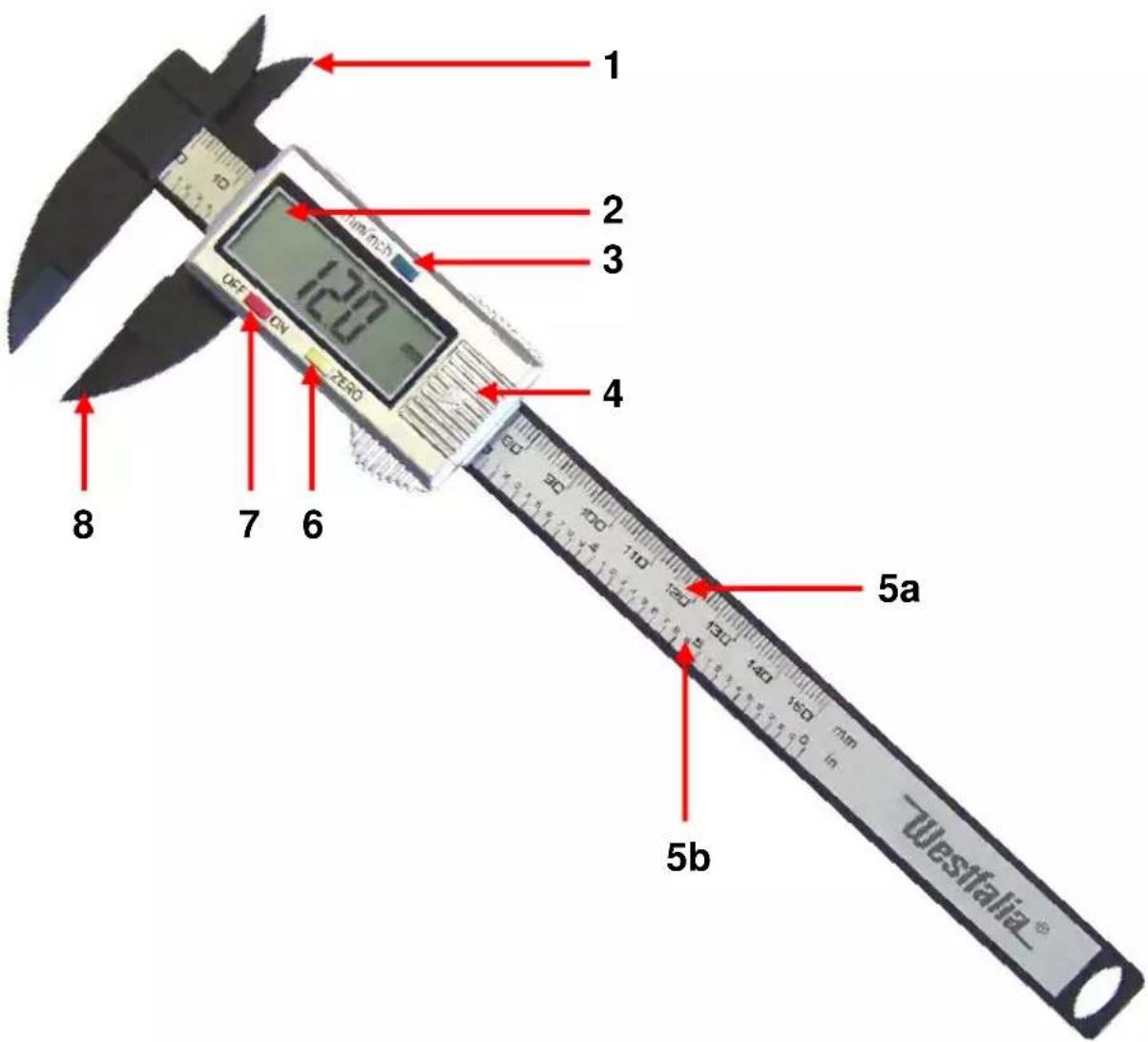
text_image
1 2 3 4 5a 5b 7 6 OFF CN 120 ISO mm Westfalia®Instruction manuals provide valuable hints for using your new device. They enable you to use all functions, and they help you avoid misunderstandings and prevent damage. Please take the time to read this manual carefully and keep it for future reference.
Chers clients,
text_image
Yellow triangular warning sign with black exclamation mark symboltext_image
Yellow triangular warning sign with black exclamation mark symbolnatural_image
Blue circular icon with a white silhouette of a person using a laptop (no text or symbols)natural_image
Close-up of a digital caliper measuring a coin, with a ruler visible on the right (no text or symbols on the main object)text_image
Yellow triangular warning sign with black exclamation mark symbolPlease note the included General Safety Notes and the following safety notes to avoid malfunctions, damage or physical injury:
- This manual belongs to the product. It contains important notes on operating the unit. Please pass it on along with the unit if it is handed over to a third party!
- Dispose of the packaging materials carefully; the plastic bags may become a deadly toy for children.
- The unit does not belong into the hands of children. Keep it out of reach of children and persons in need of supervision. Do not leave it lying around and make sure it cannot become a toy.
- Do not expose the unit to humidity, excessive temperatures or strong vibrations and avoid strong mechanical stresses. Never immerse the unit into liquids of any kind.
- Do not disassemble, burn, or short-circuit batteries and do not attempt to recharge non-rechargeable batteries.
- Do not disassemble the unit or attempt to repair it yourself. It does not contain parts serviceable by you. In case of questions or problems, turn to our customer support

Batteries do not belong in the household garbage.
For battery disposal please check with your local council.

OPERATION
Before first Use
Unpack the Digital Calliper and check it for any damage in transit. Dispose of packaging materials or store them out of reach of children. Plastic bags etc. may become a deadly toy for children.
Inserting/Replacing the Battery
-
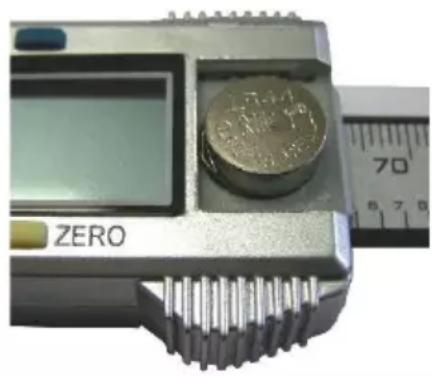
The battery compartment (4) is located right to the display (2) of the Digital Calliper. Slide the battery compartment cover in the direction indicated by the arrow icon and remove it from the device. Insert a new battery of the type SR44. Pay attention to the proper polarity of the battery. The plus pole has to face up.
-
Push the battery compartment cover back on the battery compartment and close it.
-
Replace the battery if the display readability gets weaker or if you get irreproducible measuring results.
natural_image
Close-up of a metal caliper with a coin resting on its surface, alongside a vernier caliper showing measurement scale (no text or symbols on the main subject)Taking Measurements
- Preparations: Before measuring clean the surface of the object to be measured and, if necessary, wipe the measuring scale of the Digital Calliper using a dry cloth.
- Press the ON/OFF key (7) or disperse the measuring jaws a little bit to switch on the Digital Calliper. The display shows any value.
- Use the unit toggle key (3) to display the measured values either in the unit "mm" or in the unit "inch".
- Entirely close the measuring jaws.
- Press the zero setting key (6) to set the display to zero.
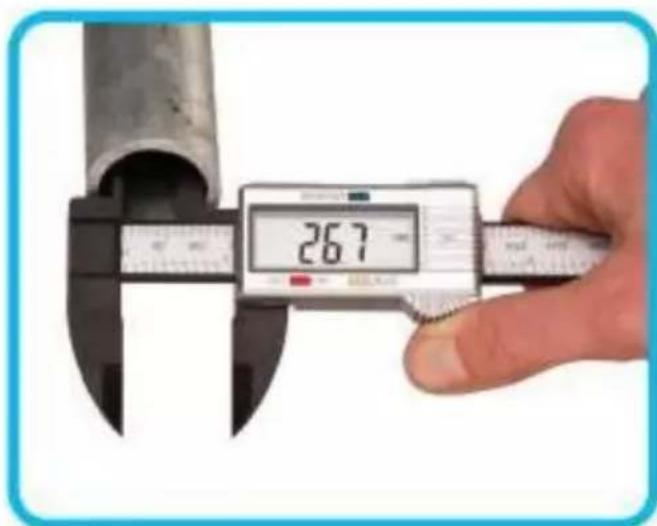
- Use the short internal measuring jaws (1) to measure internal dimensions (see figure below).
-
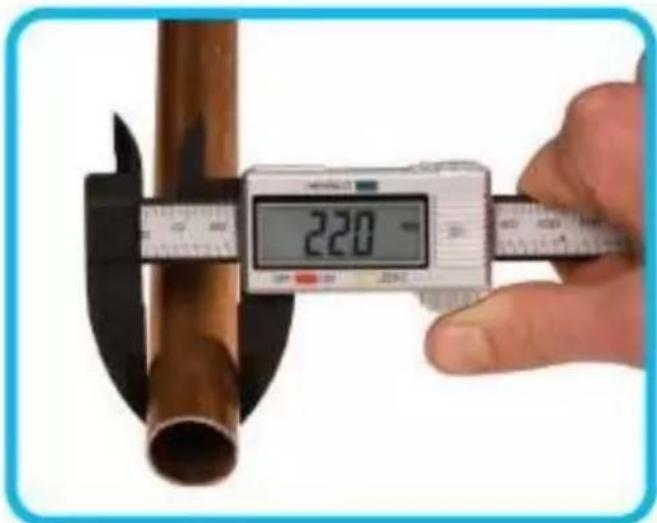
Use the long external measuring jaws (8) to measure external dimensions (see figure below).
-
Read the measured distance either on the display (2) or on the corresponding scale (5a) resp. (5b).
- Repeat steps 4 - 8 for further measurements.
- Press the ON/OFF key to switch off the Digital Calliper again. When not in use, the device automatically switches off after a few minutes.
text_image
26.7Measuring internal dimensions
text_image
220 mmMeasuring external dimensions
Cleaning and Storing
■ Only use a soft, lit free cloth to clean the unit. Do not use aggressive chemicals or abrasives and do not use liquids.
- If you do not plan to use the unit for some time, please remove the battery.
■ Store the unit indoors in a place that is protected from moisture, dust, dirt and extreme temperatures.
■ Store the unit out of reach of children.
TECHNICAL DATA
Name: Digital Calliper 150 mm
Battery: SR44 (or LR44 resp. AG13)
Measurement Range: 0 – 150 mm / 0 – 6"
Display Resolution: 0,1 mm and 0,01"
Error of Measurement: +/- 0,2 mm / 0,01"
Working Temperature: 0 – 40 °C
Storing Temperature: -20 to +70 °C
Humidity: ≤ 80 %
Dimensions: 243 x 76 x 17 mm
Weight: Approx. 58 g incl. Battery
EU-KONFORMITÄTSERKLÄRUNG EU DECLARATION OF CONFORMITY
Article No. 81 15 30
is according to the basic requirements, which are defined in the European Directives and their amendments.
2011/65/EU Restriction of the Use of certain hazardous Substances in electrical and electronic Equipment (RoHS)
natural_image
Symbol of a trash bin crossed with no text or labels, accompanied by a black rectangular block below (no readable text or symbols)Dear Customer,
Please help avoid waste materials.
If you at some point intend to dispose of this article, then please keep in mind that many of its components consist of valuable materials, which can
be recycled. Please do not discharge it in the rubbish bin, but check with your local council for recycling facilities in your area.