DH-128152.2 - Humidifier Emerio - Free user manual and instructions
Find the device manual for free DH-128152.2 Emerio in PDF.



| Product type | Dehumidifier |
| Brand | Emerio |
| Model | DH-128152.2 |
| Dehumidification capacity | 10 L/day (at 30°C, 80% RH) |
| Power supply | AC 220-240 V, 50 Hz |
| Rated power | 250 W |
| Rated current | 1.4 A |
| Refrigerant | R290 (flammable) |
| Main functions | Dehumidification, laundry drying, silent mode, timer (0-24h), Wi-Fi (Smart Life) |
| Fan speed | Low and high (depending on mode) |
| Humidity setting | 30-90% RH or continuous mode (Co) |
| Water drainage | Collection tank (4 L?) or continuous via hose |
| Full tank indicator | Yes, with automatic shut-off |
| Air filter | Washable, clean every 2 weeks |
| Operating temperature | 5°C to 35°C |
| Operating humidity | 10% to 95% RH |
| Safety distance around the appliance | ≥ 30 cm |
| Minimum room area | 4 m² |
| Compressor protection | 3-minute delay |
| Compatibility | Alexa, Google Assistant (via Wi-Fi) |
| Maintenance | Clean the tank, filter, and surface with a damp cloth |
| Safety | Do not immerse, do not cover, avoid ignition sources (R290) |
| Warranty | 2 years |
Frequently Asked Questions - DH-128152.2 Emerio
User questions about DH-128152.2 Emerio
0 question about this device. Answer the ones you know or ask your own.
Ask a new question about this device
Download the instructions for your Humidifier in PDF format for free! Find your manual DH-128152.2 - Emerio and take your electronic device back in hand. On this page are published all the documents necessary for the use of your device. DH-128152.2 by Emerio.
USER MANUAL DH-128152.2 Emerio
natural_image
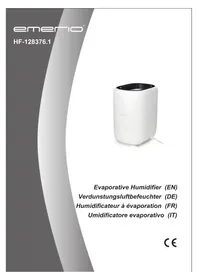
White portable air purifier device with a small indicator light (no visible text or symbols)Dehumidifier (EN)
Instruction manual – English ...... - 2 -
Before use make sure to read all of the below instructions in order to avoid injury or damage, and to get the best results from the appliance. Make sure to keep this manual in a safe place. If you give or transfer this appliance to someone else make sure to also include this manual.
In case of damage caused by user failing to follow the instructions in this manual the warranty will be void. The manufacturer/importer accepts no liability for damages caused by failure to follow the manual, a negligent use or use not in accordance with the requirements of this manual.
- Read and save these instructions. Attention: pictures in the instructions are for reference only.
- This appliance can be used by children aged from 8 years and above and persons with reduced physical, sensory or mental capabilities or lack of experience and knowledge if they have been given supervision or instruction concerning use of the appliance in a safe way and understand the hazards involved.
- Children shall not play with the appliance.
- Cleaning and user maintenance shall not be made by children without supervision.
- If the supply cord is damaged, it must be replaced by the manufacturer, its service agent or similarly qualified persons in order to avoid a hazard.
- Before inserting the plug into the mains socket, please check that the voltage and frequency comply with the specifications on the rating label.
- Disconnect the mains plug from the socket when the appliance is not in use and before cleaning.
- Ensure that the mains cable is not hung over sharp edges and keep it away from hot objects and open flames.
-
Do not immerse the appliance or the mains plug in water or other liquids. There is danger to life due to electric shock!
-
To remove the plug from the plug socket, pull the plug. Do not pull the power cord.
- Do not plug or unplug the appliance from the electrical outlet with a wet hand.
- Never attempt to open the housing of the appliance, or to repair the appliance yourself. This could cause electric shock.
- This appliance is not designed for commercial use. Indoor use only.
- Do not use the appliance for other than intended use.
- Do not wind the cord around the appliance and do not bend it.
- Do not use the unit in an area: near to source of fire; where oil is likely to splash; exposed to direct sunlight; where water is likely to splash; near a bath, a laundry, a shower or a swimming pool.
- Never insert your fingers, rods into the air outlet. Take special care to warn children of these dangers.
- Keep the unit upward while transport and storage, for the compressor locates properly.
- Before cleaning or moving the appliance, always turn off and disconnect the power supply.
- To avoid the possibility of fire disaster, the appliance shall not be covered.
- The appliance shall be installed in accordance with national wiring regulations.
- Details of type and rating of fuses: T, 250V AC, 2A or 3.15A.
- Contact authorized service technician for repair or maintenance of this unit.
- Do not pull, deform or modify the power supply cord, or immerse it in water. Pulling or misuse of the power supply cord can result in damage to the unit and cause electrical shock.
-
Compliance with national gas regulations shall be observed.
-
Servicing shall only be performed as recommended by the equipment manufacturer. Maintenance and repair requiring the assistance of other skilled personnel shall be carried out under the supervision of the person competent in the use of flammable refrigerants.
-
Do not operate or stop the unit by inserting or pulling out power plug, it may cause electric shock or fire due to heat generation.
-
Unplug the unit if strange sounds, smell, or smoke comes from it.
-
Always plug the appliance into an earthed plug socket.
-
Do not use means to accelerate the defrosting process or to clean, other than those recommended by the manufacturer.
-
The appliance shall be stored in a room without continuously operating ignition sources (for example: open flames, an operating gas appliance or an operating electric heater.)
-
Do not pierce or burn.
-
Be aware that refrigerants may not contain an odour.
-
If the appliance is installed, operated or stored in an unventilated area, the room must be designed to prevent to the accumulation of refrigerant leaks resulting in a risk of fire or explosion due to ignition of the refrigerant caused by electric heaters, stoves, or other sources of ignition.
-
The appliance must be stored in such a way as to prevent mechanical failure.
-
This appliance contains R290 refrigerant gas. R290 is a refrigerant gas that complies with the European directives on the environment. Do not puncture any part of the refrigerant circuit.
-
Individuals who operate or work on the refrigerant circuit must have the appropriate certification issued by an accredited organization that ensures competence in handling refrigerants according to a specific evaluation recognized by associations in the industry.
-
Regarding the instructions for repairing appliances containing R290, please kindly refer to below paragraphs.
- To avoid any damage, place the appliance in an upright position for at least 2 hours before initiation.

Warning: Risk of fire / Flammable materials.

Read instruction manuals.

Operator's manual; operating instructions.

Service indicator; read technical manual.
Warning: Keep ventilation openings clear of obstruction.
Warning: The appliance shall be stored in a well-ventilated area where the room size corresponds to the room area as specified for operation.
All working procedure that affects safety means shall only be carried out by competent persons.
The required distance around the unit should be at least 30cm.
Appliance shall be installed, operated and stored in a room with a floor area larger than 4 m^2 .
NOTICE BEFORE USE
- Please make sure the inlet and outlet ventilation are not blocked at all times.
- Operate this unit on a horizontal surface to avoid water leakage.
- Do not operate this unit in an explosive or corrosive atmosphere.
- When the unit is shut off, please wait at least 3 minutes before restarting this is to prevent the compressor from being damaged.
- Use separate power supply. Prohibit the sharing of a socket with other electrical appliances. Power outlet specifications should not be less than 10A. Sockets must be firmly safe.
- Do not submerge the unit in water, or place the unit close to water.
- Do not sit or stand on the unit.
- Do not operate the unit in a closed area such as inside a closet, as it may cause a fire.
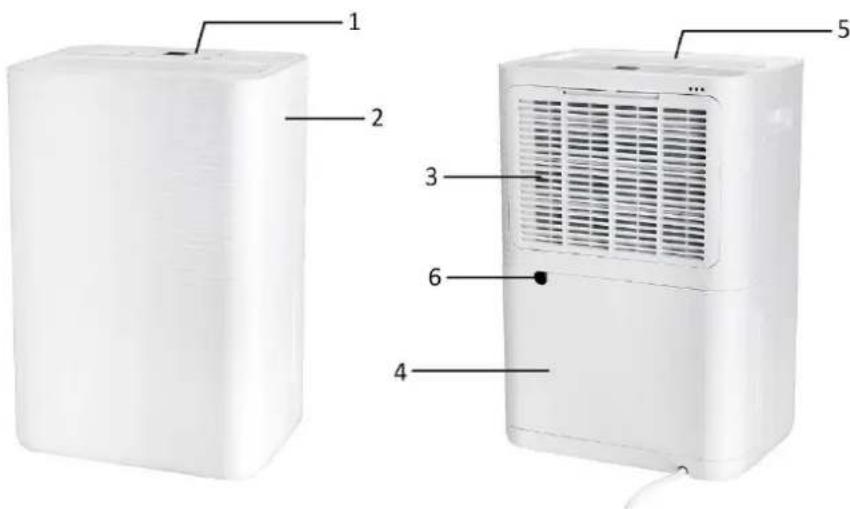
PARTS DESCRIPTION
text_image
1 2 3 4 5 6- Control panel
- Handle
- Air inlet and filter
- Water tank
- Air outlet
- Continuous drainage outlet
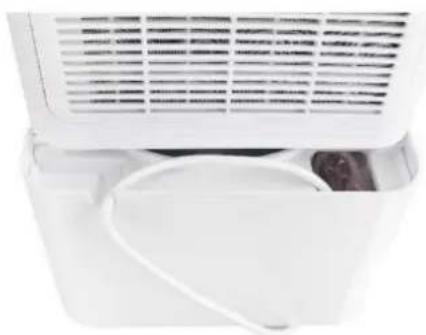
Important! The power cord is stored in the water tank to avoid damage during transport. Please draw out the water tank to release the power cord before use.
natural_image
Close-up of a white air conditioner unit with ventilation grilles and a partially open lid (no visible text or symbols)CONTROL PANEL

text_image
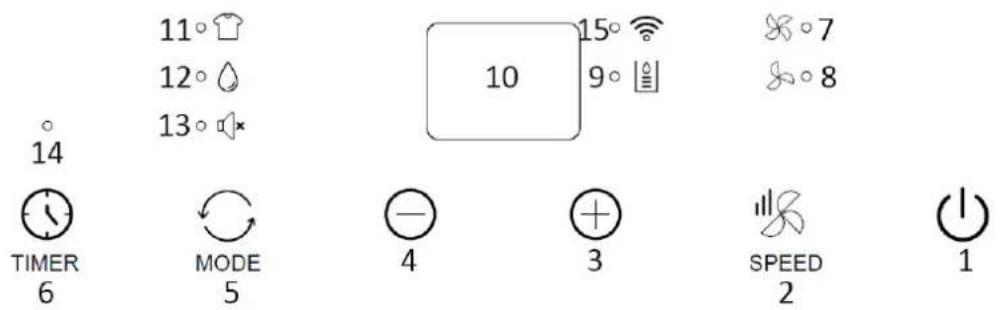
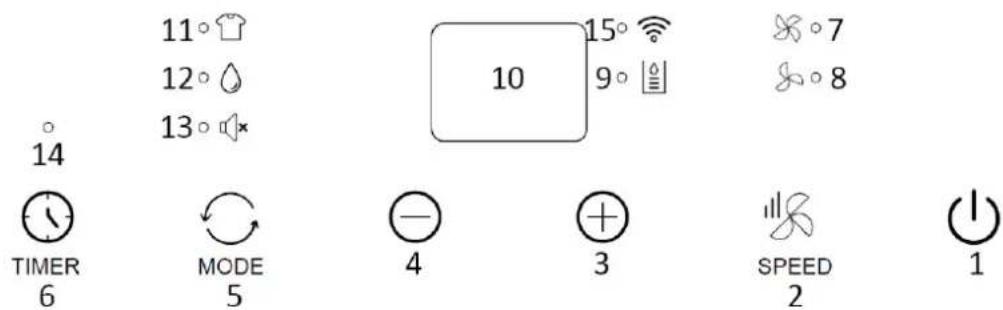
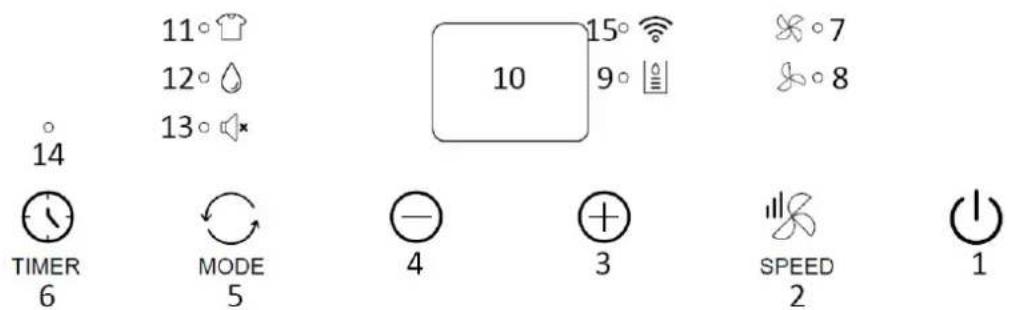
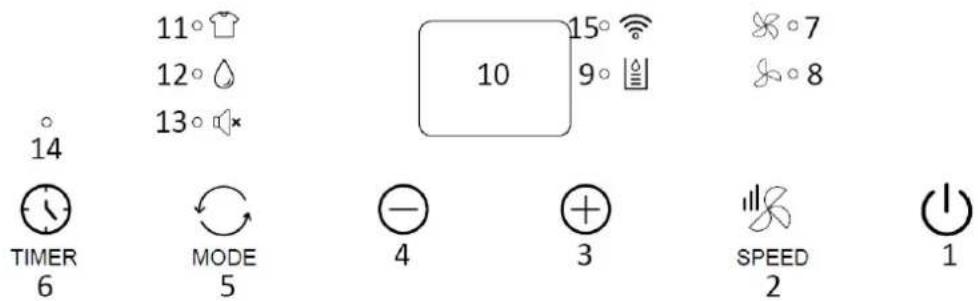
14 11° 12° 13° 10 15° 9° 7 8 TIMER 6 MODE 5 - 4 + 3 SPEED 2 1- Power button
- Fan speed button
- Increasing setting button
- Decreasing setting button
- Mode button
- Timer button
- High fan speed indicator light
- Low fan speed indicator light
- Water tank full indicator light (It also lights up when the water tank is not properly placed.)
- Digital display
- Clothes drying mode indicator light
- Dehumidification mode indicator light
- Silence mode indicator light
- Timer indicator light
- Wi-Fi indicator light
BEFORE FIRST USE
• To avoid any damage, place the appliance in an upright position for at least 2 hours before initiation.
• After removing the packaging, make sure that the appliance is in good condition.
- Do not allow children to play with the packaging materials as there is risk of suffocation.
The appliance shall be installed on a flat surface where the air inlet/outlet would not be blocked. The required distance around the unit should be at least 30cm. To save energy, keep windows and door closed when the appliance is running.
Note: If the dehumidifier gets interference from the household appliances, such as television and radio cassette player, please keep the equipment away from the dehumidifier for over 70cm.
USE
Plug in the appliance.
Power button
Press the power button to turn on the appliance. Press the button again to turn off the appliance.
Mode button
Press the mode button to select your desired mode: clothes drying mode, dehumidification mode or silence mode.
-
Clothes drying mode: the indicator light 📋 illuminates. The compressor keeps running continuously. The fan speed cannot be adjusted and the unit works at high fan speed by default. The humidity cannot be set and the room humidity is shown on the digital display.
-
Dehumidification mode: the indicator light ⚙ illuminates. The fan speed can be switched between low and high. The humidity can be set between 30-90%RH or set to "Co" (Continuous). Press the button "+" / "-" to adjust the setting. The setting will be in effect in approx. 10 seconds with no further operations. The digital display will turn back to show the room humidity.
1) When the room humidity ≥ set humidity + 3%, the compressor starts working and the fan keeps running at the set speed. After dehumidifying, when the room humidity ≤ set humidity - 3%, the compressor is turned off and the dehumidifying is stopped. Once the room humidity ≥ set humidity + 3% again, the compressor resumes working. Thus, the indoor humidity can be maintained at the set humidity according to the above cycle operations.
2) When the set humidity is "Co", the compressor runs continuously without the limitation of the set humidity, and the fan speed is adjustable.
- Silence mode: the indicator light illuminates. The fan speed cannot be adjusted and the unit works at a lower fan speed by default. Other operations follow the dehumidification mode.
Increasing/decreasing setting buttons
Press the buttons "+" / "-" to adjust the setting of humidity or timer.
Fan speed button
Press the fan speed button to select low or high fan speed. The corresponding indicator light will illuminate.
Timer button
Timer ON setting:
- When the appliance is off, press the button "TIMER", the corresponding indicator light will flash.
- Press the button “+” / ”-” to select a desired ON time from 0-24 hours. The value will flash on the digital display and the setting will be in effect in approx. 5 seconds.
- The appliance will automatically turn on once the set time has passed.
Timer OFF setting:
- When the appliance is working, press the button "TIMER", the corresponding indicator light will flash.
- Press the button “+” / ”-” to select a desired OFF time from 0-24 hours. The value will flash on the digital display and the setting will be in effect in approx. 5 seconds. The digital display will turn back to show the humidity.
- The appliance will automatically turn off once the set time has passed.
Note: Press the button "TIMER" again to check the remaining time. Continue to press the button "TIMER", the timer function will be cancelled.
Notice:
- The room humidity display range is 35\~95%RH (room humidity < 35%, display "Lo"; room humidity > 95%, display "Hi"). The working environment temperature of this appliance is 5\~35 °C, and the working environment humidity is 10\~95%RH.
- The compressor has a three-minute delay protection function. When the compressor is working and the power is cut off accidentally, the compressor will not restart immediately after turned on again. It will start to work in 3 minutes.
After switching mode or after the full water fault is removed, the compressor may enter the protection state too. You must wait for 3 minutes before the compressor can start again.
Wi-Fi CONNECTION GUIDE (This guide for the APP may not be up to date due to software version upgrade or other reasons. This instruction is used as a guide only. Below mobile phone interface uses English version in iOS as an example.):
- Search "Smart Life" in App Store (for iOS) or Google play (for Android) to download the application.
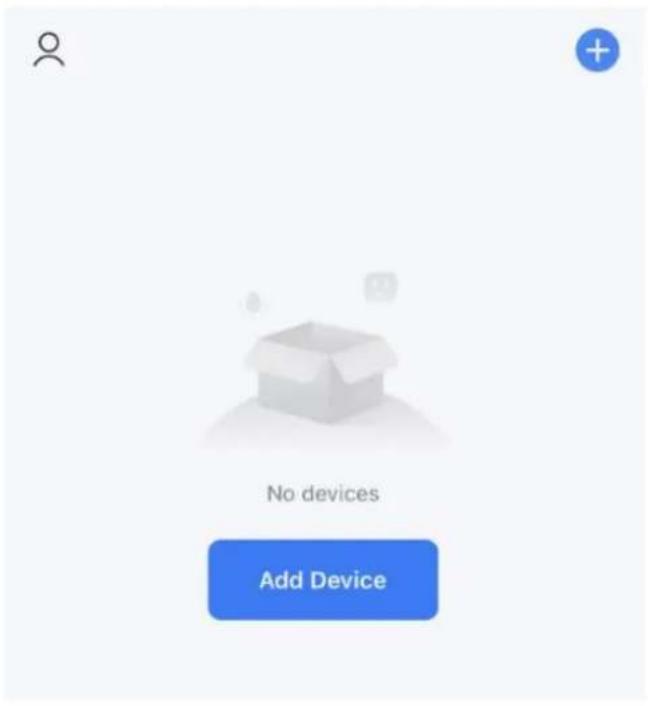
- Sign up or log in to your account on the APP. Tap the "+" at top right corner or button "Add Device" to add your device. (Fig.1)
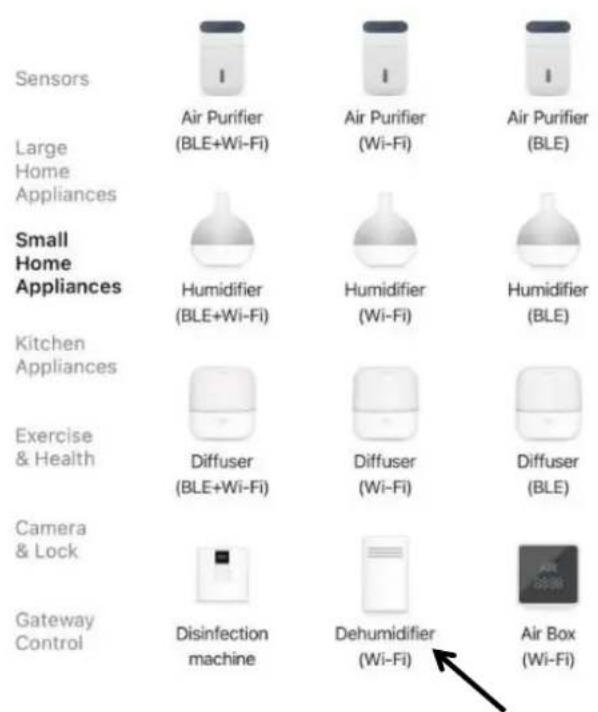
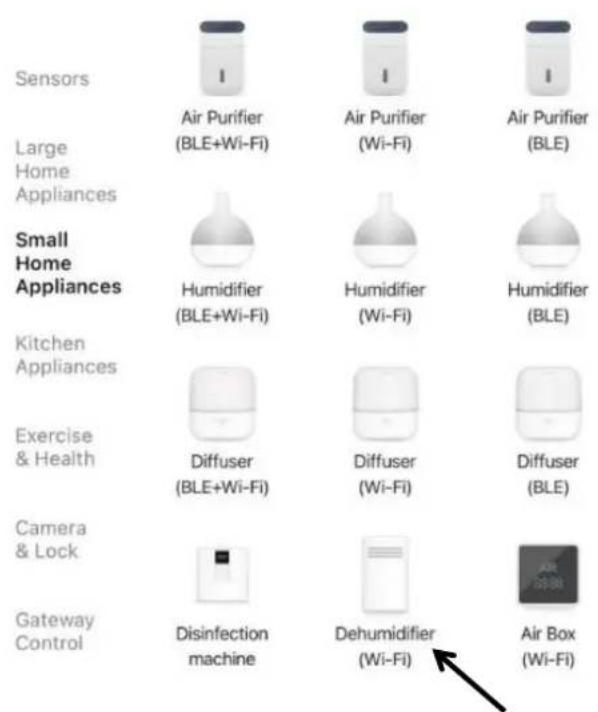
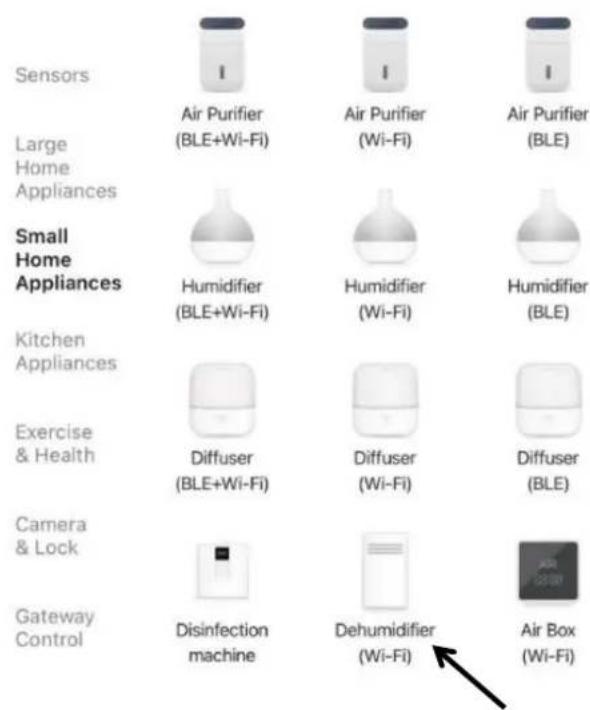
- Find "Small Home Appliances" and tap the icon "Dehumidifier (Wi-Fi)". (Fig.2)
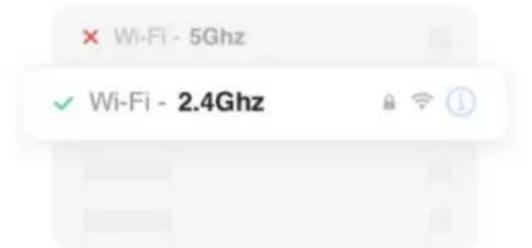
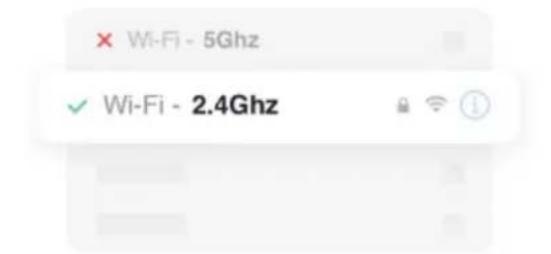
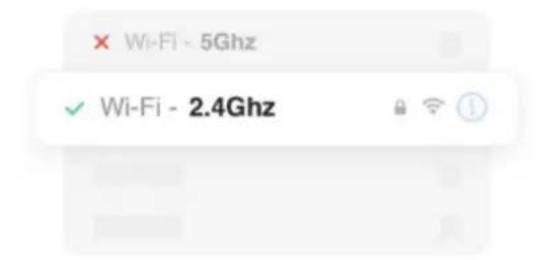
You will get the prompt that asks you to use 2.4 GHz Wi-Fi network and enter password. (Fig.3) Tap "Next" to get Fig.4.
Note: When setting up Wi-Fi function you need to select an available 2.4 GHz network and connect the appliance. Your mobile needs to be connected to the same network in order to set up Smart Life in the phone. When this is done you can access the appliance from your phone on any network.
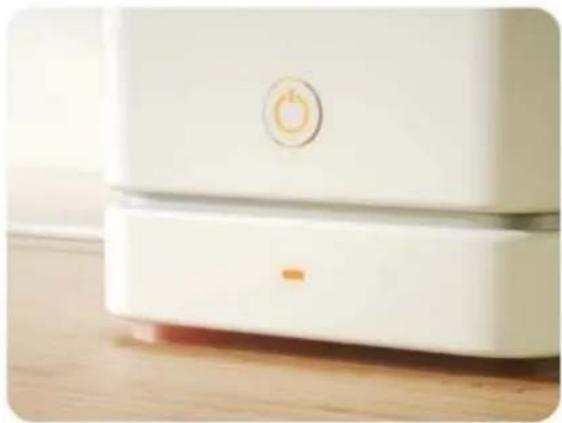
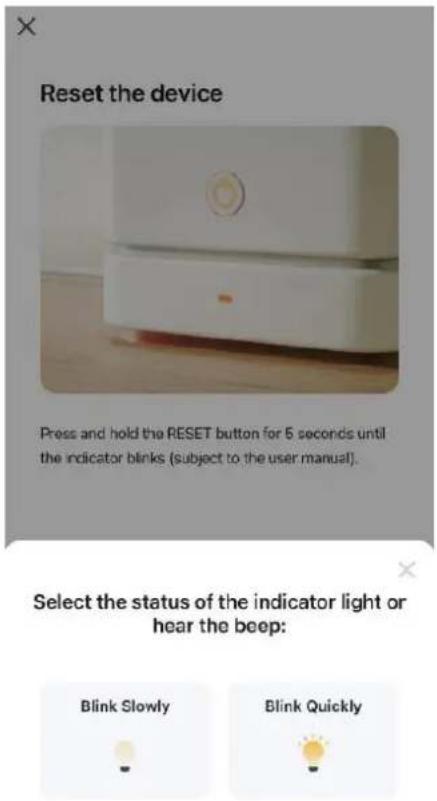
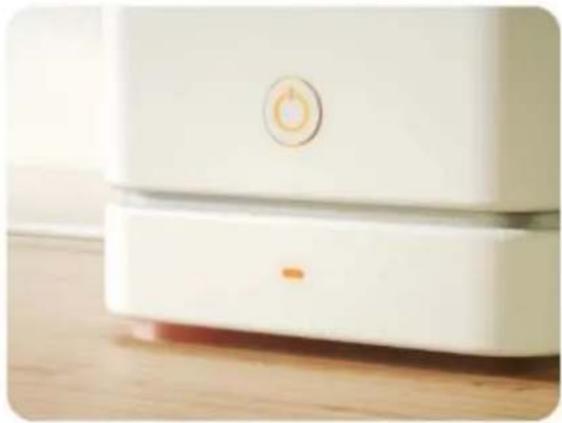
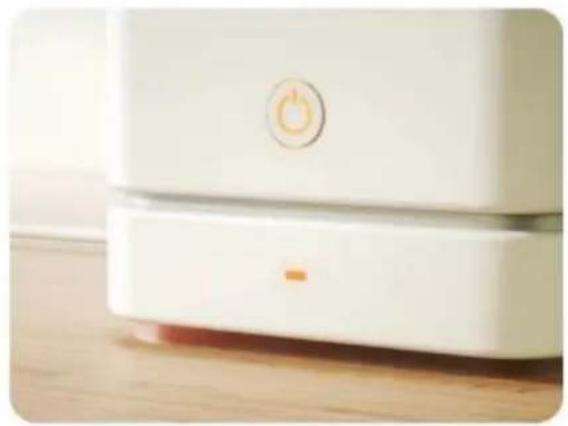
There are two ways to do the net pairing. Press and hold the button “SPEED” on the control panel for approx. 10 seconds until the Wi-Fi indicator light blinks quickly (way 1). Continue to press and hold the button “SPEED” until the Wi-Fi indicator light blinks slowly (way 2).
It is recommended to use way 1; if failed please use way 2.
Way 1:
1) Press and hold the button "SPEED" on the control panel for approx. 10 seconds until the Wi-Fi indicator light blinks quickly.
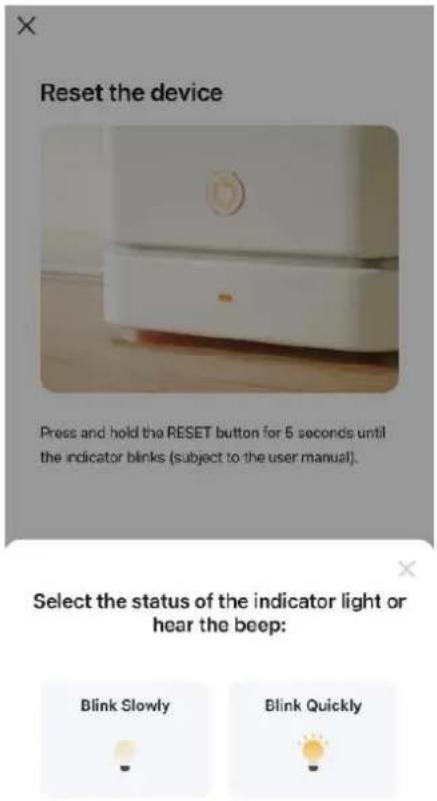
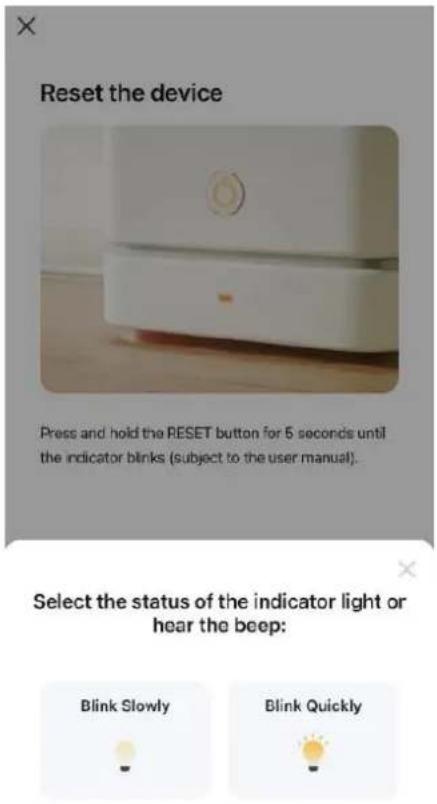
2) Tap "Confirm the indicator is blinking" in Fig.4. You will get Fig.5 that asks you to select the status of the indicator light. Tap "Blink Quickly".
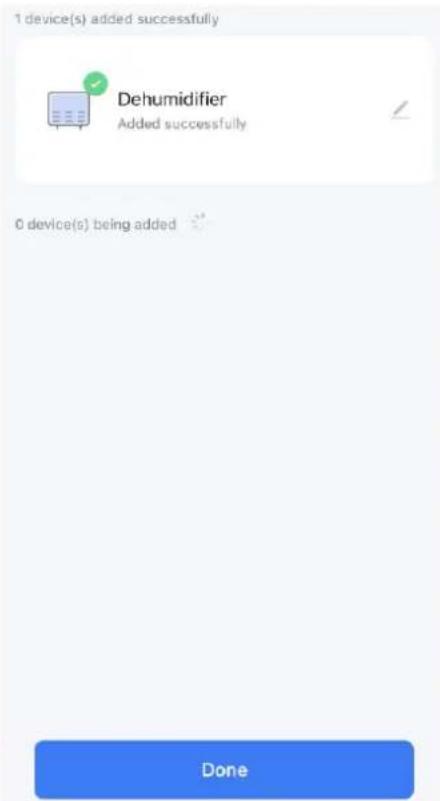
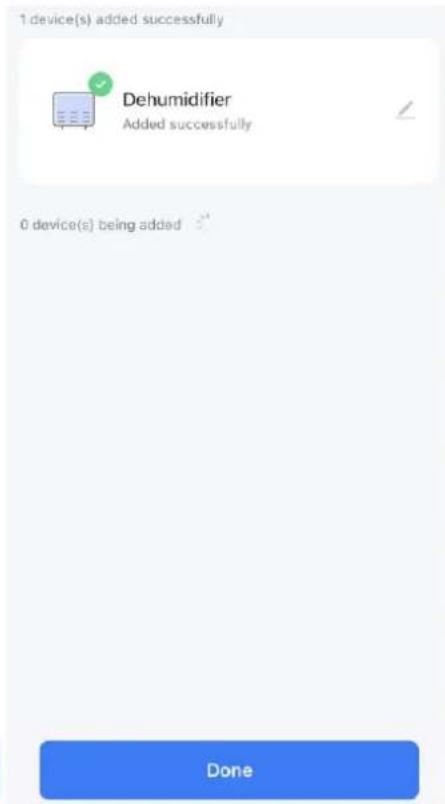
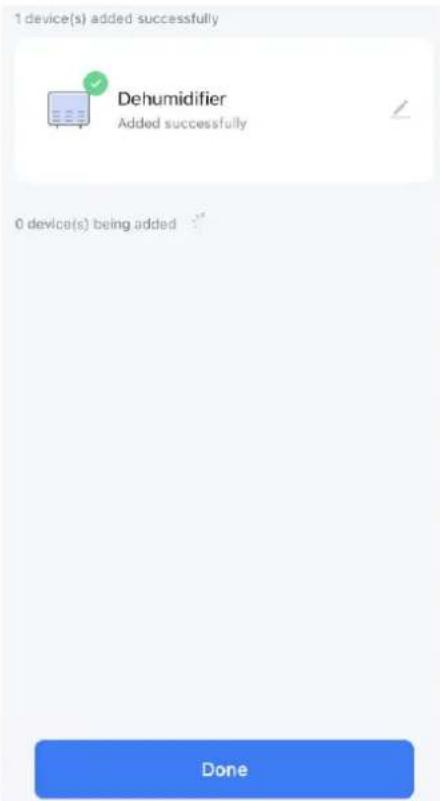
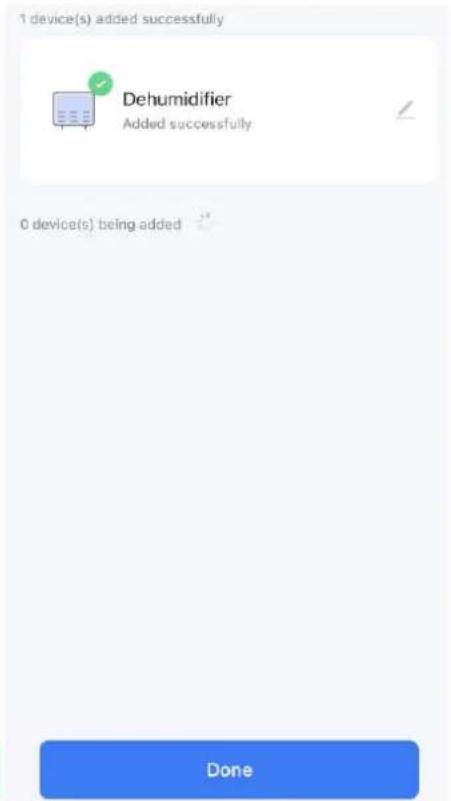
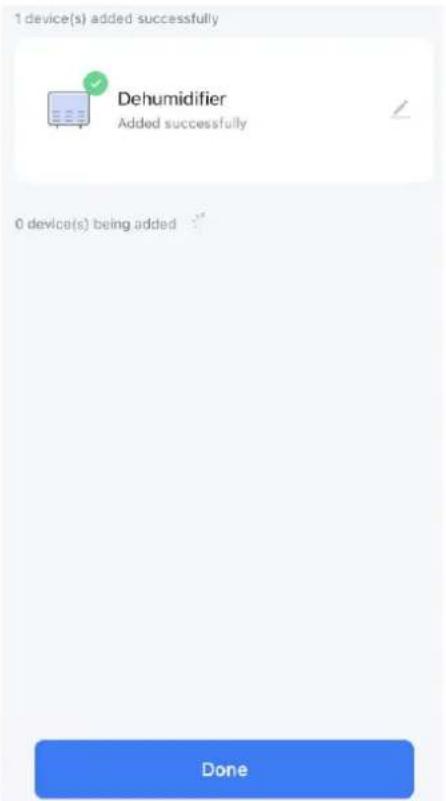
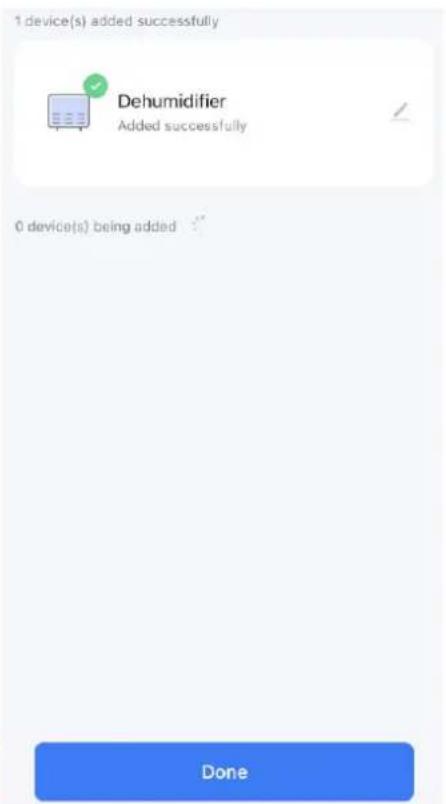
3) Wait until you get Fig.7 and then tap "Done".
4) Now you can operate your device in the control interface. Tap buttons to set your appliance.
Way 2:
1) Press and hold the button "SPEED" on the control panel for approx. 10 seconds until the Wi-Fi indicator light blinks quickly. Continue to press and hold the Wi-Fi button until the Wi-Fi indicator light blinks slowly.
2) Tap "Confirm the indicator is blinking" in Fig.4. You will get Fig.5 that asks you to select the status of the indicator light. Tap "Blink Slowly".
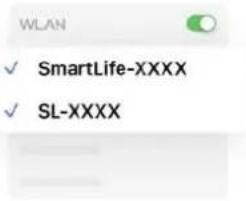
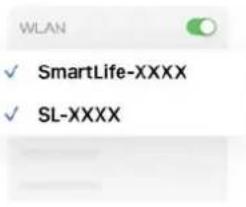
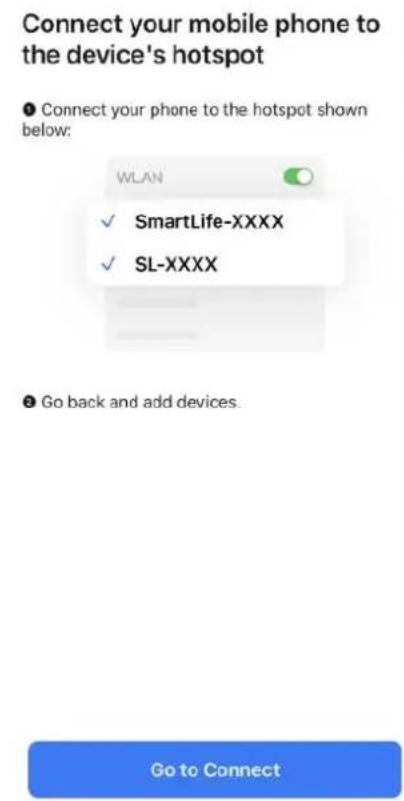
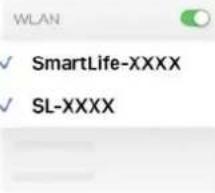
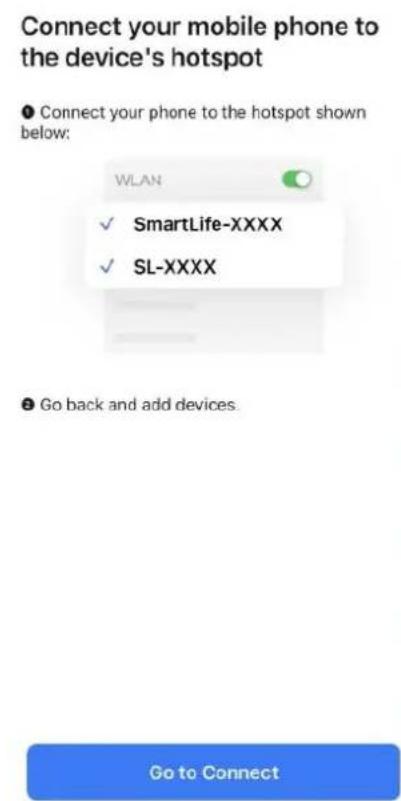
Continue to tap "Go to Connect" in Fig.6 to connect your mobile phone to the device's hotspot "SmartLife-XXXX". After the hotspot has been connected, go back to the App.
3) Wait until you get Fig.7 and then tap "Done".
4) Now you can operate your device in the control interface. Tap buttons to set your appliance.
Note: The appliance is compatible with Alexa and Google Assistant.
text_image
No devices Add DeviceFig.1

text_image
Sensors Large Home Appliances Small Home Appliances Kitchen Appliances Exercise & Health Camera & Lock Gateway Control Air Purifier (BLE+Wi-Fi) Humidifier (BLE+Wi-Fi) Diffuser (BLE+Wi-Fi) Disinfection machine Air Purifier (Wi-Fi) Humidifier (Wi-Fi) Diffuser (Wi-Fi) Dehumidifier (Wi-Fi) Air Purifier (BLE) Humidifier (BLE) Diffuser (Wi-Fi) Air Box (Wi-Fi)Fig.2
Select 2.4 GHz Wi-Fi Network and enter password.
If your Wi-Fi is 5GHz, please set it to be 2.4GHz.
Common router setting method

text_image
× Wi-Fi - 5Ghz ✓ Wi-Fi - 2.4Ghz
emerio

Password
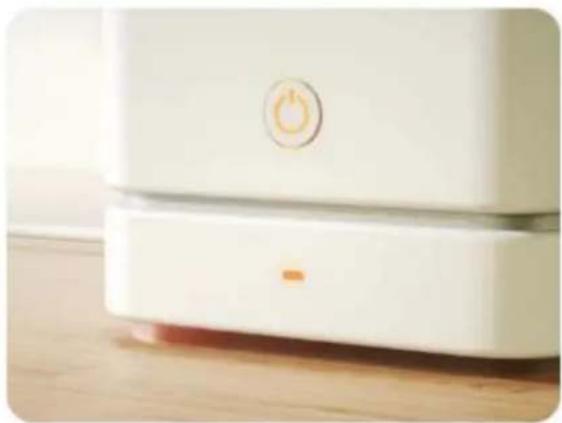
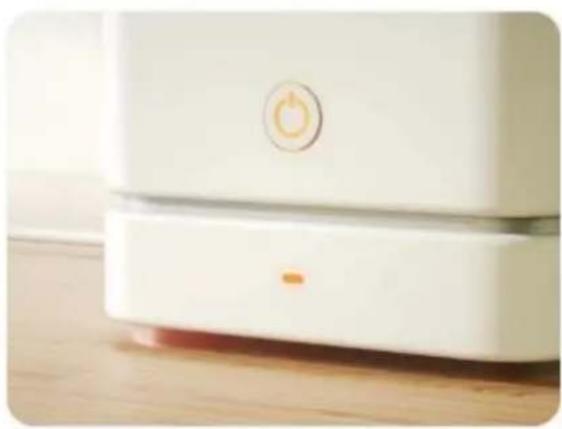
Reset the device
natural_image
Close-up of a white appliance with a circular button and orange button, placed on a wooden surface (no text or symbols visible)Press and hold the RESET button for 5 seconds until the indicator blinks (subject to the user manual).

text_image
NextFig.3

text_image
Confirm the indicator is blinkingReset Device Step by Step
Fig.4

text_image
Reset the device Press and hold the RESET button for 5 seconds until the indicator blinks (subject to the user manual). Select the status of the indicator light or hear the beep: Blink Slowly Blink QuicklyFig.5
Connect your mobile phone to the device's hotspot
- Connect your phone to the hotspot shown below:

text_image
WLAN ✓ SmartLife-XXXX ✓ SL-XXXX Go back and add devices Go to ConnectFig.6

text_image
1 device(s) added successfully Dehumidifier Added successfully 0 device(s) being added DoneFig.7
Control interface
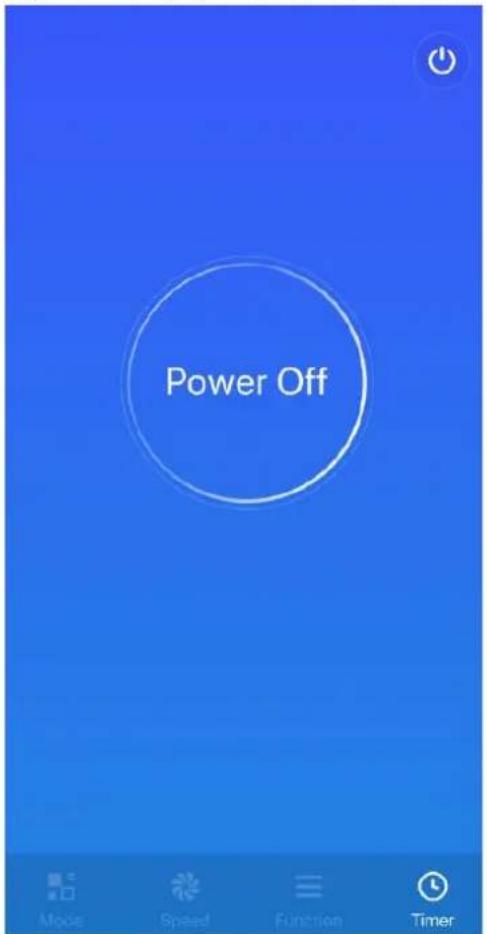
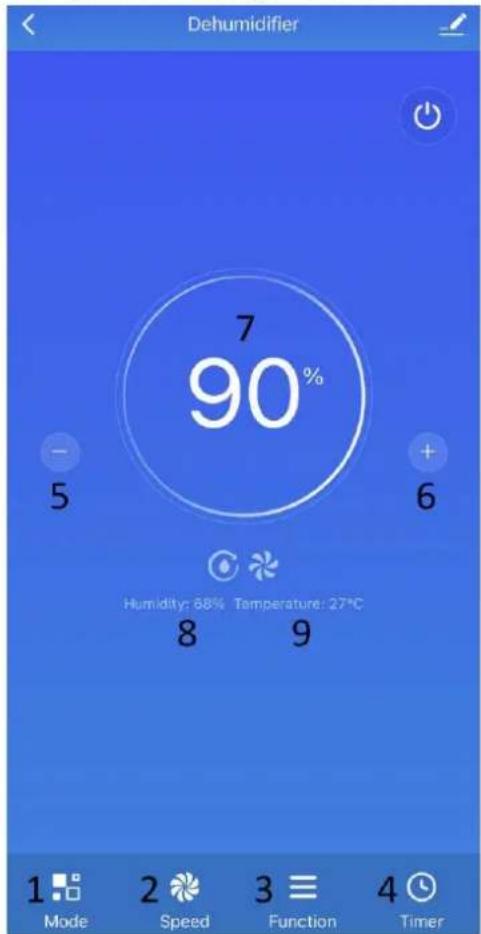
Tap “⏻” in Fig.8, the interface will turn to Fig.9 and the appliance will begin to work.
text_image
Power Off Mode Speed Function TimerFig.8
text_image
Dehumidifier 7 90% - 5 6 Humidity: 88% Temperature: 27°C 8 9 1 Mode 2 Speed 3 Function 4 TimerFig.9

text_image
Mode 10 Dehumidify 11 Laundry 12 Silence Mode Speed Function Timer
bar
| Category | Value | |---|---| | Low | 13 | | High | 14 | Mode Speed Function Timer
text_image
Function 15 UV 16 Ions Mode Speed Function Timer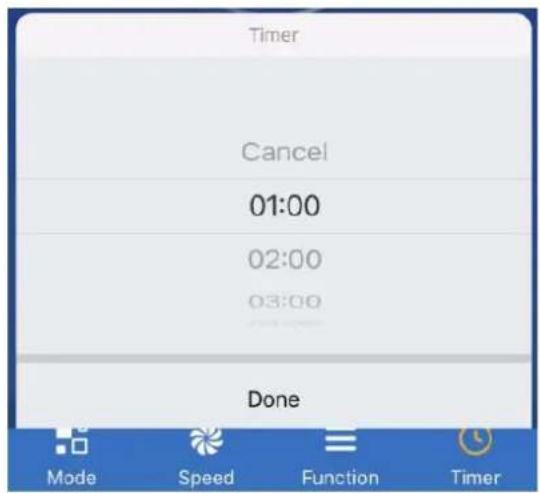
text_image
Timer Cancel 01:00 02:00 03:00 Done Mode Speed Function Timer- Mode button (10. Dehumidification mode / 11. Clothes drying mode / 12. Silence mode)
- Fan speed button (13. Low fan speed / 14. High fan speed)
- Function button (15. UV function, not valid for this model / 16. Ions function, not valid for this model)
- Timer button (To add an off timer while the unit is running, or an on timer while the unit is in standby.)
- Decreasing setting button
- Increasing setting button
- Set humidity display
- Room humidity display
- Room temperature display
DRAIN THE COLLECTED WATER
When the water tank is full, the water tank full indicator light will illuminate. The operation will stop automatically and the buzzer will beep 15 times to alert the user that the water needs to be emptied from the water tank.
Empty the water tank
- Draw out the water tank gently by holding at the both sides.
- Discard the collected water.
- Install the water tank back by pushing it horizontally and gently.

natural_image
Three technical diagrams showing mechanical components with red arrows indicating motion, no text or symbols present.Caution:
1) Do not remove the float from the water tank. The water full sensor will no longer be able to detect the water level correctly without the float and water may leak from the water tank.
natural_image
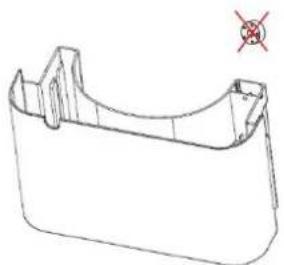
Technical line drawing of a U-shaped mechanical part with a red cross mark indicating a defect or explosion (no text or symbols present)2) Do not use the detergents, steel velvet, chemical treated dusting cloth, gasoline, benzene, thinner or other solvents to clean the water tank.
3) Put the water tank back into the appliance tightly with both hands. If the water tank is not placed in the right position, the water full sensor will still be activated, and the dehumidifier will not work.
Continuous water drainage
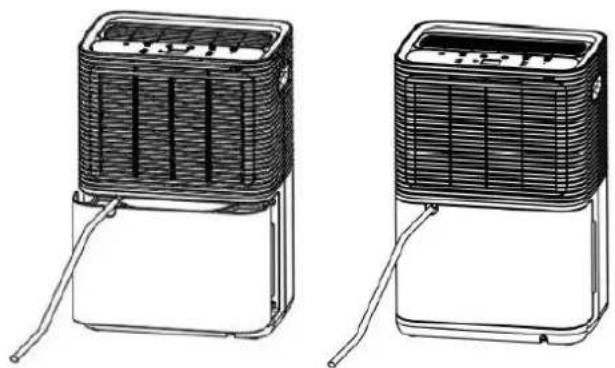
Plug the provided plastic pipe to the continuous drainage outlet, and the condensed water will be continuously drained out through this outlet instead of collection in the water tank. Make sure the pipe is installed at a downhill way to let the water continuously flow out.
natural_image
Two identical line drawings of a portable air conditioner unit with ventilation grilles and coiled leads (no text or symbols)CLEANING AND MAINTENANCE
The appliance must be regularly cleaned to prolong its life and keep it function properly.
Warning: Before performing any cleaning, turn off the unit and unplug it to avoid electrical shocks. Do not use hot water or chemical solvents for cleaning.
- Regularly, clean the water tank with cold or warm water and dry with a soft cloth to avoid any mildew.
- Clean the surface of the appliance using a moist cloth. Do not use detergents or abrasive sponges that can cause damage to the plastic surface.
- Clean the filter as described in the following section.
- When the unit will not be used for a long time:
1) Empty and dry the water tank, and then install it back.
2) Clean the filter.
3) Place the appliance upright and avoid the direct sunlight.
Filter
There is a filter set at the back of the appliance that must be removed and cleaned regularly. The dehumidifying capacity may reduce when the filter set is clogged.
• Pull out the air inlet grille from the top to take it off the appliance. Detach the filter from the grille.
• It is recommended to wash at least once every two weeks of continuous use.
• If the filter is not dirty, just vacuum the dust off it.
- If the filter is dirty, simply wash with cold water or warm water not exceeding 40 degrees; do not use chemical solvents or hot water.
• Dry the filter well before assembly.

text_image
Diagram illustrating the installation and cleaning process of a solar air conditioner system, showing components before and after installation.Notice:
In order to prevent the filter from being deformed, it needs to be air-dried naturally after cleaning. Never use a dryer or heater of any kind. Do not use alcohol, gasoline, benzene or other chemical solvents to clean the filter.
TROUBLE SHOOTING
| Status | Possible reason | Solutions |
| Dehumidifier is not working | Is the power plug unplugged? | Insert the power plug into the socket. |
| Is the water tank full? Or is the water tank placed in the wrong position? | Drain the standing water in the tank and put the tank back in the correct position. | |
| Is the room temperature above 35°C or under 5°C? | The protection device is started and the machine cannot work. | |
| Dehumidification function does not work | Is the air filter blocked? | Clean the air filter. |
| Are the air outlets or air inlets blocked? | Clean up any items that block the air outlet or air inlet. | |
| No wind | Is the air filter blocked? | Clean the air filter. |
| Too much noise when the machine is running | Is it improperly placed so that the machine is tilted or unstable? | Please prevent the machine from being used on unstable ground. |
| Is the air filter blocked? | Clean the air filter. | |
| E1 Code | Coil sensor short circuit or open circuit | Contact after-sales service. |
TECHNICAL DATA
| Dehumidify Capacity | 10L/day (30°C, 80%RH) |
| Rated Voltage | AC 220-240 V |
| Rated Frequency | 50 Hz |
| Rated power input | 250 W |
| Rated Current | 1.4 A |
| Refrigerant | R290 |
GUARANTEE AND CUSTOMER SERVICE
Before delivery our devices are subjected to rigorous quality control. If, despite all care, damage has occurred during production or transportation, please return the device to your dealer.
For the purchased device we provide 2 years guarantee, commencing from the day of sale. If you have a defective product, you can directly go back to the point of purchase.
Defects which arise due to improper handling of the device and malfunctions due to interventions and repairs by third parties or the fitting of non-original parts are not covered by this guarantee. Always keep your receipt, without the receipt you can't claim any form of warranty. Damage caused by not following the instruction manual, will lead to a void of warranty, if this results in consequential damages then we will not be liable. Neither can we hold responsible for material damage or personal injury caused by improper use or if the instruction manual are not properly executed. Damage to accessories does not mean free replacement of the whole appliance. In such case please contact our service department. Broken glass or breakage of plastic parts is always subject to a charge. Defects to consumables or parts subjected to wearing, as well as cleaning, maintenance or the replacement of said parts are not covered by the warranty and are to be paid.
ENVIRONMENT FRIENDLY DISPOSAL
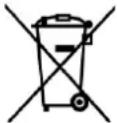
Recycling – European Directive 2012/19/EU
This marking indicates that this product should not be disposed with other household wastes. To prevent possible harm to the environment or human health from uncontrolled waste disposal, recycle it responsibly to promote the sustainable reuse of material resources. To return your used device,
please use the return and collection systems or contact the retailer where the product was purchased. They can take this product for environmental safe recycling.
Emerio B.V.
Oudeweg 115
2031 CC Haarlem
The Netherlands
Customer service:
T: +31 (0) 23 3034369
www.emerio.eu/service
Kundeninformation:
T: +49 (0) 3222 1097 600
www.emerio.eu/service
Klantenservice:
T: +31 (0) 23 3034369
www.emerio.eu/service
Looking for spare parts? Have a look at https://spareparts.emerio.eu
INSTRUCTIONS FOR REPAIRING APPLIANCES CONTAINING R290
1. Servicing
1) Checks to the area
Prior to beginning work on systems containing flammable refrigerants, safety checks are necessary to ensure that the risk of ignition is minimised. For repair to the refrigerating system, the following precautions shall be complied with prior to conducting work on the system.
2) Work procedure
Work shall be undertaken under a controlled procedure so as to minimise the risk of a flammable gas or vapour being present while the work is being performed.
3) General work area
All maintenance staff and others working in the local area shall be instructed on the nature of work being carried out. Work in confined spaces shall be avoided. The area around the workspace shall be sectioned off. Ensure that the conditions within the area have been made safe by control of flammable material.
4) Checking for presence of refrigerant
The area shall be checked with an appropriate refrigerant detector prior to and during work, to ensure the technician is aware of potentially flammable atmospheres. Ensure that the leak detection equipment being used is suitable for use with flammable refrigerants, i.e. non-sparking, adequately sealed or intrinsically safe.
5) Presence of fire extinguisher
If any hot work is to be conducted on the refrigeration equipment or any associated parts, appropriate fire extinguishing equipment shall be available to hand. Have a dry powder or CO_2 fire extinguisher adjacent to the charging area.
6) No ignition sources
No person carrying out work in relation to a refrigeration system which involves exposing any pipe work that contains or has contained flammable refrigerant shall use any sources of ignition in such a manner that it may lead to the risk of fire or explosion. All possible ignition sources, including cigarette smoking, should be kept sufficiently far away from the site of installation, repairing, removing and disposal, during which flammable refrigerant can possibly be released to the surrounding space. Prior to work taking place, the area around the equipment is to be surveyed to make sure that there are no flammable hazards or ignition risks. “No Smoking” signs shall be displayed.
7) Ventilated area
Ensure that the area is in the open or that it is adequately ventilated before breaking into the system or conducting any hot work. A degree of ventilation shall continue during the period that the work is carried out. The ventilation should safely disperse any released refrigerant and preferably expel it externally into the atmosphere.
8) Checks to the refrigeration equipment
Where electrical components are being changed, they shall be fit for the purpose and to the correct specification. At all times the manufacturer's maintenance and service guidelines shall be followed. If in doubt consult the manufacturer's technical department for assistance.
The following checks shall be applied to installations using flammable refrigerants:
- The charge size is in accordance with the room size within which the refrigerant containing parts are installed;
– The ventilation machinery and outlets are operating adequately and are not obstructed;
- If an indirect refrigerating circuit is being used, the secondary circuit shall be checked for the presence of refrigerant;
- Marking to the equipment continues to be visible and legible. Markings and signs that are illegible shall be corrected;
- Refrigeration pipe or components are installed in a position where they are unlikely to be exposed to any substance which may corrode refrigerant containing components, unless the components are constructed of materials which are inherently resistant to being corroded or are suitably protected against being so corroded.
9) Checks to electrical devices
Repair and maintenance to electrical components shall include initial safety checks and component inspection procedures. If a fault exists that could compromise safety, then no electrical supply shall be connected to the circuit until it is satisfactorily dealt with. If the fault cannot be corrected immediately but it is necessary to continue operation, an adequate temporary solution shall be used. This shall be reported to the owner of the equipment so all parties are advised. Initial safety checks shall include:
- That capacitors are discharged: this shall be done in a safe manner to avoid possibility of sparking;
- That there no live electrical components and wiring are exposed while charging, recovering or purging the system;
- That there is continuity of earth bonding.
2. Repairs to sealed components
1) During repairs to sealed components, all electrical supplies shall be disconnected from the equipment being worked upon prior to any removal of sealed covers, etc. If it is absolutely necessary to have an electrical supply to equipment during servicing, then a permanently operating form of leak detection shall be located at the most critical point to warn of a potentially hazardous situation.
2) Particular attention shall be paid to the following to ensure that by working on electrical components, the casing is not altered in such a way that the level of protection is affected. This shall include damage to cables, excessive number of connections, terminals not made to original specification, damage to seals, incorrect fitting of glands, etc.
Ensure that apparatus is mounted securely. Ensure that seals or sealing materials have not degraded such that they no longer serve the purpose of preventing the ingress of flammable atmospheres. Replacement parts shall be in accordance with the manufacturer's specifications.
NOTE: The use of silicon sealant may inhibit the effectiveness of some types of leak detection equipment. Intrinsically safe components do not have to be isolated prior to working on them.
3. Repair to intrinsically safe components
Do not apply any permanent inductive or capacitance loads to the circuit without ensuring that this will not exceed the permissible voltage and current permitted for the equipment in use. Intrinsically safe components are the only types that can be worked on while live in the presence of a flammable atmosphere. The test apparatus shall be at the correct rating. Replace components only with parts specified by the manufacturer. Other parts may result in the ignition of refrigerant in the atmosphere from a leak.
4. Cabling
Check that cabling will not be subject to wear, corrosion, excessive pressure, vibration, sharp edges or any other adverse environmental effects. The check shall also take into account the effects of aging or continual vibration from sources such as compressors or fans.
5. Detection of flammable refrigerants
Under no circumstances shall potential sources of ignition be used in the searching for or detection of refrigerant leaks. A halide torch (or any other detector using a naked flame) shall not be used.
6. Leak detection methods
The following leak detection methods are deemed acceptable for systems containing flammable refrigerants. Electronic leak detectors shall be used to detect flammable refrigerants, but the sensitivity may not be adequate, or may need re-calibration. (Detection equipment shall be calibrated in a refrigerant-free area.) Ensure that the detector is not a potential source of ignition and is suitable for the refrigerant used. Leak detection equipment shall be set at a percentage of the LFL of the refrigerant and shall be calibrated to the refrigerant employed and
the appropriate percentage of gas (25 % maximum) is confirmed. Leak detection fluids are suitable for use with most refrigerants but the use of detergents containing chlorine shall be avoided as the chlorine may react with the refrigerant and corrode the copper pipe-work. If a leak is suspected, all naked flames shall be removed/extinguished. If a leakage of refrigerant is found which requires brazing, all of the refrigerant shall be recovered from the system, or isolated (by means of shut off valves) in a part of the system remote from the leak. Oxygen free nitrogen (OFN) shall then be purged through the system both before and during the brazing process.
7. Removal and evacuation
When breaking into the refrigerant circuit to make repairs – or for any other purpose – conventional procedures shall be used. However, it is important that best practice is followed since flammability is a consideration. The following procedure shall be adhered to:
- Remove refrigerant;
- Purge the circuit with inert gas;
- Evacuate;
- Purge again with inert gas;
- Open the circuit by cutting or brazing.
The refrigerant charge shall be recovered into the correct recovery cylinders. The system shall be “flushed” with OFN to render the unit safe. This process may need to be repeated several times. Compressed air or oxygen shall not be used for this task. Flushing shall be achieved by breaking the vacuum in the system with OFN and continuing to fill until the working pressure is achieved, then venting to atmosphere, and finally pulling down to a vacuum. This process shall be repeated until no refrigerant is within the system. When the final OFN charge is used, the system shall be vented down to atmospheric pressure to enable work to take place. This operation is absolutely vital if brazing operations on the pipe-work are to take place. Ensure that the outlet for the vacuum pump is not close to any ignition sources and there is ventilation available.
8. Charging procedures
In addition to conventional charging procedures, the following requirements shall be followed.
- Ensure that contamination of different refrigerants does not occur when using charging equipment. Hoses or lines shall be as short as possible to minimise the amount of refrigerant contained in them.
– Cylinders shall be kept upright.
- Ensure that the refrigeration system is earthed prior to charging the system with refrigerant.
- Label the system when charging is complete (if not already).
- Extreme care shall be taken not to overfill the refrigeration system.
Prior to recharging the system it shall be pressure tested with OFN. The system shall be leak tested on completion of charging but prior to commissioning. A follow up leak test shall be carried out prior to leaving the site.
9. Decommissioning
Before carrying out this procedure, it is essential that the technician is completely familiar with the equipment and all its detail. It is recommended good practice that all refrigerants are recovered safely. Prior to the task being carried out, an oil and refrigerant sample shall be taken in case analysis is required prior to re-use of reclaimed refrigerant. It is essential that electrical power is available before the task is commenced.
a) Become familiar with the equipment and its operation.
b) Isolate system electrically.
c) Before attempting the procedure ensure that:
- Mechanical handling equipment is available, if required for handling refrigerant cylinders;
- All personal protective equipment is available and being used correctly;
- The recovery process is supervised at all times by a competent person;
- Recovery equipment and cylinders conform to the appropriate standards.
d) Pump down refrigerant system, if possible.
e) If a vacuum is not possible, make a manifold so that refrigerant can be removed from various parts of the system.
f) Make sure that cylinder is situated on the scales before recovery takes place.
g) Start the recovery machine and operate in accordance with manufacturer's instructions.
h) Do not overfill cylinders. (No more than 80 % volume liquid charge).
i) Do not exceed the maximum working pressure of the cylinder, even temporarily.
j) When the cylinders have been filled correctly and the process completed, make sure that the cylinders and the equipment are removed from site promptly and all isolation valves on the equipment are closed off.
k) Recovered refrigerant shall not be charged into another refrigeration system unless it has been cleaned and checked.
10. Labelling
Equipment shall be labelled stating that it has been de-commissioned and emptied of refrigerant. The label shall be dated and signed. Ensure that there are labels on the equipment stating the equipment contains flammable refrigerant.
11. Recovery
When removing refrigerant from a system, either for servicing or decommissioning, it is recommended good practice that all refrigerants are removed safely. When transferring refrigerant into cylinders, ensure that only appropriate refrigerant recovery cylinders are employed. Ensure that the correct number of cylinders for holding the total system charge is available. All cylinders to be used are designated for the recovered refrigerant and labelled for that refrigerant (i.e. special cylinders for the recovery of refrigerant). Cylinders shall be complete with pressure relief valve and associated shut-off valves in good working order. Empty recovery cylinders are evacuated and, if possible, cooled before recovery occurs. The recovery equipment shall be in good working order with a set of instructions concerning the equipment that is at hand and shall be suitable for the recovery of flammable refrigerants. In addition, a set of calibrated weighing scales shall be available and in good working order. Hoses shall be complete with leak-free disconnect couplings and in good condition. Before using the recovery machine, check that it is in satisfactory working order, has been properly maintained and that any associated electrical components are sealed to prevent ignition in the event of a refrigerant release. Consult manufacturer if in doubt. The recovered refrigerant shall be returned to the refrigerant supplier in the correct recovery cylinder, and the relevant Waste Transfer Note arranged. Do not mix refrigerants in recovery units and especially not in cylinders. If compressors or compressor oils are to be removed, ensure that they have been evacuated to an acceptable level to make certain that flammable refrigerant does not remain within the lubricant. The evacuation process shall be carried out prior to returning the compressor to the suppliers. Only electric heating to the compressor body shall be employed to accelerate this process. When oil is drained from a system, it shall be carried out safely.
Competence of service personnel
General
Special training additional to usual refrigerating equipment repair procedures is required when equipment with flammable refrigerants is affected.
In many countries, this training is carried out by national training organisations that are accredited to teach the relevant national competency standards that may be set in legislation.
The achieved competence should be documented by a certificate.
Training
The training should include the substance of the following:
Information about the explosion potential of flammable refrigerants to show that flammables may be dangerous when handled without care.
Information about potential ignition sources, especially those that are not obvious, such as lighters, light switches, vacuum cleaners, electric heaters.
Information about the different safety concepts:
Unventilated – Safety of the appliance does not depend on ventilation of the housing. Switching off the appliance or opening of the housing has no significant effect on the safety. Nevertheless, it is possible that leaking refrigerant may accumulate inside the enclosure and flammable atmosphere will be released when the enclosure is opened.
Ventilated enclosure – Safety of the appliance depends on ventilation of the housing. Switching off the appliance or opening of the enclosure has a significant effect on the safety. Care should be taken to ensure a sufficient ventilation before.
Ventilated room – Safety of the appliance depends on the ventilation of the room. Switching off the appliance or opening of the housing has no significant effect on the safety. The ventilation of the room shall not be switched off during repair procedures.
Information about the concept of sealed components and sealed enclosures according to IEC 60079-15:2010. Information about the correct working procedures:
a) Commissioning
- Ensure that the floor area is sufficient for the refrigerant charge or that the ventilation hose is assembled in a correct manner.
- Connect the pipes and carry out a leak test before charging with refrigerant.
- Check safety equipment before putting into service.
b) Maintenance - Portable equipment shall be repaired outside or in a workshop specially equipped for servicing units with flammable refrigerants.
- Ensure sufficient ventilation at the repair place.
- Be aware that malfunction of the equipment may be caused by refrigerant loss and a refrigerant leak is possible.
- Discharge capacitors in a way that won't cause any spark. The standard procedure to short circuit the capacitor terminals usually creates sparks.
- Reassemble sealed enclosures accurately. If seals are worn, replace them.
- Check safety equipment before putting into service.
c) Repair - Portable equipment shall be repaired outside or in a workshop specially equipped for servicing units with flammable refrigerants.
- Ensure sufficient ventilation at the repair place.
- Be aware that malfunction of the equipment may be caused by refrigerant loss and a refrigerant leak is possible.
- Discharge capacitors in a way that won't cause any spark.
- When brazing is required, the following procedures shall be carried out in the right order:
- Remove the refrigerant. If the recovery is not required by national regulations, drain the refrigerant to the outside. Take care that the drained refrigerant will not cause any danger. In doubt, one person should guard the outlet. Take special care that drained refrigerant will not float back into the building.
- Evacuate the refrigerant circuit.
- Purge the refrigerant circuit with nitrogen for 5 min.
- Evacuate again.
- Remove parts to be replaced by cutting, not by flame.
– Purge the braze point with nitrogen during the brazing procedure. - Carry out a leak test before charging with refrigerant.
- Reassemble sealed enclosures accurately. If seals are worn, replace them.
- Check safety equipment before putting into service.
d) Decommissioning
- If the safety is affected when the equipment is put out of service, the refrigerant charge shall be removed before decommissioning.
- Ensure sufficient ventilation at the equipment location.
- Be aware that malfunction of the equipment may be caused by refrigerant loss and a refrigerant leak is possible.
- Discharge capacitors in a way that won't cause any spark.
- Remove the refrigerant. If the recovery is not required by national regulations, drain the refrigerant to the outside. Take care that the drained refrigerant will not cause any danger. In doubt, one person should guard the outlet. Take special care that drained refrigerant will not float back into the building.
- Evacuate the refrigerant circuit.
- Purge the refrigerant circuit with nitrogen for 5 min.
- Evacuate again.
- Fill with nitrogen up to atmospheric pressure.
- Put a label on the equipment that the refrigerant is removed.
e) Disposal
- Ensure sufficient ventilation at the working place.
- Remove the refrigerant. If the recovery is not required by national regulations, drain the refrigerant to the outside. Take care that the drained refrigerant will not cause any danger. In doubt, one person should guard the outlet. Take special care that drained refrigerant will not float back into the building.
• Evacuate the refrigerant circuit. - Purge the refrigerant circuit with nitrogen for 5 min.
- Evacuate again.
- Cut out the compressor and drain the oil.
Transportation, marking and storage for units that employ flammable refrigerants
Transport of equipment containing flammable refrigerants
Attention is drawn to the fact that additional transportation regulations may exist with respect to equipment containing flammable gas. The maximum number of pieces of equipment or the configuration of the equipment, permitted to be transported together will be determined by the applicable transport regulations.
Marking of equipment using signs
Signs for similar appliances used in a work area generally are addressed by local regulations and give the minimum requirements for the provision of safety and/or health signs for a work location.
All required signs are to be maintained and employers should ensure that employees receive suitable and sufficient instruction and training on the meaning of appropriate safety signs and the actions that need to be taken in connection with these signs.
The effectiveness of signs should not be diminished by too many signs being placed together.
Any pictograms used should be as simple as possible and contain only essential details.
Disposal of equipment using flammable refrigerants
See national regulations.
Storage of equipment/appliances
The storage of equipment should be in accordance with the manufacturer's instructions.
Storage of packed (unsold) equipment
Storage package protection should be constructed such that mechanical damage to the equipment inside the package will not cause a leak of the refrigerant charge.
The maximum number of pieces of equipment permitted to be stored together will be determined by local regulations.
SICHERHEITSHINWEISE
natural_image
Close-up of a white appliance with ventilation grilles and a curved handle (no visible text or symbols)BEDIENFELD
text_image
11° 12° 13° 14 10 15° 9° 7 8 TIMER 6 MODE 5 - 4 + 3 SPEED 2 1text_image
No devices Add DeviceAbb. 1
text_image
Sensors Large Home Appliances Small Home Appliances Kitchen Appliances Exercise & Health Camera & Lock Gateway Control Air Purifier (BLE+Wi-Fi) Humidifier (BLE+Wi-Fi) Diffuser (BLE+Wi-Fi) Disinfection machine Air Purifier (Wi-Fi) Humidifier (Wi-Fi) Diffuser (Wi-Fi) Dehumidifier (Wi-Fi) Air Purifier (BLE) Humidifier (BLE) Humidifier (Wi-Fi) Diffuser (Wi-Fi) Air Box (Wi-Fi)Abb. 2
Select 2.4 GHz Wi-Fi Network and enter password.
If your Wi-Fi is 5GHz, please set it to be 2.4GHz. Common router setting method

text_image
× Wi-Fi - 5Ghz ✓ Wi-Fi - 2.4Ghz
emerio


Password
Reset the device

natural_image
Close-up of a white smart appliance with a power button and orange indicator lights, placed on a wooden floor (no text or symbols visible)Press and hold the RESET button for 5 seconds until the indicator blinks (subject to the user manual).

text_image
NextAbb. 3

text_image
Confirm the indicator is blinkingReset Device Step by Step
Abb. 4

text_image
Reset the device Press and hold the RESET button for 5 seconds until the indicator blinks (subject to the user manual). Select the status of the indicator light or hear the beep: Blink Slowly Blink QuicklyAbb. 5
Connect your mobile phone to the device's hotspot
- Connect your phone to the hotspot shown below:
text_image
WLAN ✓ SmartLife-XXXX ✓ SL-XXXX② Go back and add devices.

Abb. 6
text_image
1 device(s) added successfully Dehumidifier Added successfully 0 device(s) being added DoneAbb. 7
Steuerschnittstelle
natural_image
Three technical diagrams showing mechanical assembly with red arrows indicating motion, no text or symbols present.Achtung:
natural_image
Technical line drawing of a U-shaped mechanical part with a red cross mark indicating a defect or explosion (no text or symbols present)natural_image
Two identical illustrations of a portable air conditioner unit with cooling fins and ventilation slots (no text or symbols visible)text_image
Diagram illustrating the installation and cleaning process of an air conditioner system, showing components before and after installation.Hinweis:
Looking for spare parts? Have a look at https://spareparts.emerio.eu
natural_image
Close-up of a white toilet fan with ventilation grille and handle (no visible text or symbols)PANNEAU DE COMMANDE
text_image
11° 12° 13° 10 15° 9° 7° 8° TIMER 6 MODE 5 - 4 + 3 SPEED 2 1text_image
No devices Add DeviceSchéma 1

text_image
Sensors Large Home Appliances Small Home Appliances Kitchen Appliances Exercise & Health Camera & Lock Gateway Control Air Purifier (BLE+Wi-Fi) Air Purifier (Wi-Fi) Air Purifier (BLE) Humidifier (BLE+Wi-Fi) Humidifier (Wi-Fi) Humidifier (BLE) Diffuser (BLE+Wi-Fi) Diffuser (Wi-Fi) Diffuser (BLE) Disinfection machine Dehumidifier (Wi-Fi) Air Box (Wi-Fi)Schéma 2
Select 2.4 GHz Wi-Fi Network and enter password.
If your Wi-Fi is 5GHz, please set it to be 2.4GHz. Common router setting method
text_image
Wi-Fi - 5Ghz ✓ Wi-Fi - 2.4Ghz
emerio


Password
Reset the device
natural_image
Close-up of a white appliance with a power button and orange indicator lights, placed on a wooden floor (no text or symbols visible)Press and hold the RESET button for 5 seconds until the indicator blinks (subject to the user manual).

text_image
NextSchéma 3

text_image
Confirm the indicator is blinkingReset Device Step by Step
Schéma 4
text_image
Reset the device Press and hold the RESET button for 5 seconds until the indicator blinks (subject to the user manual). Select the status of the indicator light or hear the beep: Blink Slowly Blink QuicklySchéma 5
Connect your mobile phone to the device's hotspot
- Connect your phone to the hotspot shown below:
text_image
WLAN ✓ SmartLife-XXXX ✓ SL-XXXX② Go back and add devices

Schéma 6
text_image
1 device(s) added successfully Dehumidifier Added successfully 0 device(s) being added DoneSchéma 7
natural_image
Three technical diagrams showing a device interior with red arrows indicating movement, no text or symbols present.Attention :
natural_image
Technical line drawing of a mechanical part with a red cross mark indicating a specific feature (no text or symbols present)natural_image
Two identical line drawings of a portable air conditioner unit with cooling fins and ventilation ducts (no text or symbols)NETTOYAGE ET ENTRETIEN
natural_image
Diagram showing the installation of a heat exchanger unit into a multi-unit air conditioner unit, with no text or symbols present.
natural_image
Illustration showing two solar panels: one with a spray gun spraying water, the other pouring liquid from a container (no text or symbols)Remarque :
Looking for spare parts? Have a look at https://spareparts.emerio.eu
text_image
Diagram of a white electronic device with labeled components, showing front and side views with numbered parts.natural_image
Close-up of a white air conditioner unit with ventilation grilles and a partially visible cord (no text or symbols)KONTROLLPANEL
text_image
14 11° 12° 13° 10 15° 9° 7 8 TIMER 6 MODE 5 - 4 + 3 SPEED 2 1text_image
No devices Add DeviceBild 1

text_image
Sensors Large Home Appliances Small Home Appliances Kitchen Appliances Exercise & Health Camera & Lock Gateway Control Air Purifier (BLE+Wi-Fi) Air Purifier (Wi-Fi) Air Purifier (BLE) Humidifier (BLE+Wi-Fi) Humidifier (Wi-Fi) Humidifier (BLE) Diffuser (BLE+Wi-Fi) Diffuser (Wi-Fi) Diffuser (BLE) Disinfection machine Dehumidifier (Wi-Fi) Air Box (Wi-Fi)Bild 2
Select 2.4 GHz Wi-Fi Network and enter password.
If your Wi-Fi is 5GHz, please set it to be 2.4GHz. Common router setting method
text_image
× Wi-Fi - 5Ghz ✓ Wi-Fi - 2.4Ghz
emerio


Password
Reset the device
natural_image
Close-up of a white appliance with a circular button and orange flame, placed on a wooden floor (no visible text or symbols)Press and hold the RESET button for 5 seconds until the indicator blinks (subject to the user manual).

text_image
NextBild 3

text_image
Confirm the indicator is blinkingReset Device Step by Step
Bild 4
text_image
Reset the device Press and hold the RESET button for 6 seconds until the indicator blinks (subject to the user manual). Select the status of the indicator light or hear the beep: Blink Slowly Blink QuicklyBild 5
Connect your mobile phone to the device's hotspot
- Connect your phone to the hotspot shown below:

text_image
WLAN ✓ SmartLife-XXXX ✓ SL-XXXX② Go back and add devices.

Bild 6
text_image
1 device(s) added successfully Dehumidifier Added successfully 0 device(s) being added DoneBild 7
Kontrollgränssnitt
natural_image
Three technical diagrams showing mechanical components with red arrows indicating directional movement (no text or symbols present)Försiktighet:
natural_image
Technical line drawing of a mechanical part with a red X mark indicating a defect or explosion (no text or symbols present)natural_image
Two identical line drawings of a portable air conditioner unit with ventilation grilles and coiled leads (no text or symbols)RENGÖRING OCH UNDERHÅLL
text_image
Diagram illustrating the installation and cleaning process of a solar air conditioner system, showing components before and after installation.Notering:
Looking for spare parts? Have a look at https://spareparts.emerio.eu
text_image
Diagram of a white electronic device with labeled components, showing front and side views with numbered parts.natural_image
Close-up of a white appliance with ventilation grilles and a curved handle (no visible text or symbols)BEDIENINGSPANEEEL

text_image
14 11° 12° 13° 10 15° 9° 7 8 TIMER 6 MODE 5 - 4 + 3 SPEED 2 1text_image
No devices Add DeviceFig.1

text_image
Sensors Large Home Appliances Small Home Appliances Kitchen Appliances Exercise & Health Camera & Lock Gateway Control Air Purifier (BLE+Wi-Fi) Humidifier (BLE+Wi-Fi) Diffuser (BLE+Wi-Fi) Disinfection machine Air Purifier (Wi-Fi) Humidifier (Wi-Fi) Diffuser (Wi-Fi) Dehumidifier (Wi-Fi) Air Purifier (BLE) Humidifier (BLE) Diffuser (Wi-Fi) Air Box (Wi-Fi)Fig.2
Select 2.4 GHz Wi-Fi Network and enter password.
If your Wi-Fi is 5GHz, please set it to be 2.4GHz.
Common router setting method

text_image
× Wi-Fi - 5Ghz ✓ Wi-Fi - 2.4Ghz
text_image
emerio
Reset the device

natural_image
Close-up of a white appliance with a power button and orange indicator lights, placed on a wooden floor (no text or symbols visible)Press and hold the RESET button for 5 seconds until the indicator blinks (subject to the user manual).

text_image
NextFig.3

text_image
Confirm the indicator is blinkingReset Device Step by Step
Fig.4
text_image
Reset the device Press and hold the RESET button for 5 seconds until the indicator blinks (subject to the user manual). Select the status of the indicator light or hear the beep: Blink Slowly Blink QuicklyFig.5
text_image
Connect your mobile phone to the device's hotspot ● Connect your phone to the hotspot shown below: WLAN ✓ SmartLife-XXXX ✓ SL-XXXX ● Go back and add devices. Go to ConnectFig.6
text_image
1 device(s) added successfully Dehumidifier Added successfully 0 device(s) being added DoneFig.7
Besturingsinterface
HET OPGEVANGEN WATER AFVOEREN
natural_image
Three technical diagrams showing mechanical components with red arrows indicating motion, no text or symbols present.Opgelet:
natural_image
Technical line drawing of a mechanical part with a red cross mark indicating a warning symbol (no text or labels present)natural_image
Two identical line drawings of a portable air conditioner unit with ventilation grilles and base, shown from different angles (no text or symbols)REINIGING EN ONDERHOUD
text_image
Diagram illustrating the installation and cleaning process of a solar air conditioner system, showing components before and after installation.Opmerking:
Looking for spare parts? Have a look at https://spareparts.emerio.eu
natural_image
Close-up of a white appliance with ventilation grilles and a curved handle (no visible text or symbols)PANEL STEROWANIA

text_image
14 11° 12° 13° 10 15° 9° 7 8 TIMER 6 MODE 5 - 4 3 SPEED 2 1text_image
No devices Add DeviceRys.1
text_image
Sensors Large Home Appliances Small Home Appliances Kitchen Appliances Exercise & Health Camera & Lock Gateway Control Air Purifier (BLE+Wi-Fi) Humidifier (BLE+Wi-Fi) Diffuser (BLE+Wi-Fi) Disinfection machine Air Purifier (Wi-Fi) Humidifier (Wi-Fi) Diffuser (Wi-Fi) Dehumidifier (Wi-Fi) Air Purifier (BLE) Humidifier (BLE) Humidifier (Wi-Fi) Diffuser (Wi-Fi) Air Box (Wi-Fi)Rys. 2
Select 2.4 GHz Wi-Fi Network and enter password.
If your Wi-Fi is 5GHz, please set it to be 2.4GHz.
Common router setting method

text_image
× Wi-Fi - 5Ghz ✓ Wi-Fi - 2.4Ghz

Reset the device
natural_image
Close-up of a white appliance with a circular button and orange indicator light, placed on a wooden surface (no text or symbols visible)Press and hold the RESET button for 5 seconds until the indicator blinks (subject to the user manual).

text_image
NextRys. 3

text_image
Confirm the indicator is blinkingReset Device Step by Step
Rys. 4

text_image
Reset the device Press and hold the RESET button for 6 seconds until the indicator blinks (subject to the user manual). Select the status of the indicator light or hear the beep: Blink Slowly Blink QuicklyRys. 5
Connect your mobile phone to the device's hotspot
- Connect your phone to the hotspot shown below:
text_image
WLAN ✓ SmartLife-XXXX ✓ SL-XXXX② Go back and add devices

Rys. 6
text_image
1 device(s) added successfully Dehumidifier Added successfully 0 device(s) being added DoneRys. 7
natural_image
Three technical diagrams showing mechanical components with red arrows indicating motion, no text or symbols present.Ostrożnie:
natural_image
Technical line drawing of a mechanical part with a red cross mark indicating a defect or explosion (no text or symbols present)natural_image
Two identical line drawings of a portable air conditioner unit with cooling fins and ventilation ducts (no text or symbols)CZYSZCZENIE I KONSERWACJA
natural_image
Diagram showing the installation of a heat exchanger unit into three different storage compartments (no text or labels present)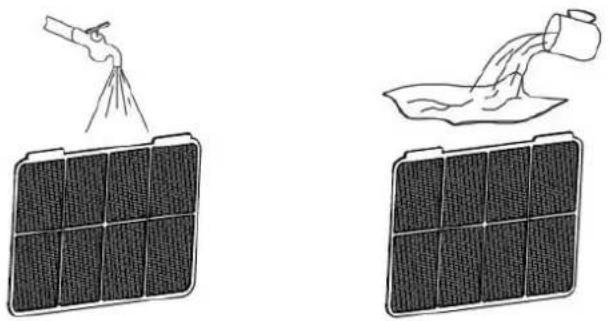
natural_image
Illustration showing two solar panels: one with a spray gun spraying water, the other pouring liquid from a container (no text or symbols)Informacja:
Looking for spare parts? Have a look at https://spareparts.emerio.eu
text_image
Diagram of a white electronic device with labeled components, showing front and side views with numbered labels.natural_image
Close-up of a white toilet with ventilation grille and side seat (no visible text or symbols)PANEL DE CONTROL
text_image
11° 12° 13° 14 10 15° 9° 7 8 TIMER 6 MODE 5 - 4 + 3 SPEED 2 1text_image
No devices Add DeviceFig. 1
text_image
Sensors Large Home Appliances Small Home Appliances Kitchen Appliances Exercise & Health Camera & Lock Gateway Control Air Purifier (BLE+Wi-Fi) Air Purifier (Wi-Fi) Air Purifier (BLE) Humidifier (BLE+Wi-Fi) Humidifier (Wi-Fi) Humidifier (BLE) Diffuser (BLE+Wi-Fi) Diffuser (Wi-Fi) Diffuser (BLE) Disinfection machine Dehumidifier (Wi-Fi) Air Box (Wi-Fi)Fig. 2
Select 2.4 GHz Wi-Fi Network and enter password.
If your Wi-Fi is 5GHz, please set it to be 2.4GHz.
Common router setting method

text_image
× Wi-Fi - 5Ghz ✓ Wi-Fi - 2.4Ghz
text_image
emerio
Reset the device

natural_image
Close-up of a white appliance with a circular button and orange button, placed on a wooden floor (no visible text or symbols)Press and hold the RESET button for 5 seconds until the indicator blinks (subject to the user manual).

text_image
NextFig. 3

text_image
Confirm the indicator is blinkingReset Device Step by Step
Fig. 4

text_image
Reset the device Press and hold the RESET button for 5 seconds until the indicator blinks (subject to the user manual). Select the status of the indicator light or hear the beep: Blink Slowly Blink QuicklyFig. 5
Connect your mobile phone to the device's hotspot
Connect your phone to the hotspot shown below:

text_image
WLAN ✓ SmartLife-XXXX ✓ SL-XXXX Go back and add devices. Go to ConnectFig. 6
text_image
1 device(s) added successfully Dehumidifier Added successfully 0 device(s) being added DoneFig. 7
Interfaz de control
natural_image
Three technical diagrams showing a device's internal structure and airflow direction, with red arrows indicating movement or force (no text or symbols present)Atención:
natural_image
Technical line drawing of a U-shaped mechanical part with a red cross symbol at the top (no text or labels)natural_image
Line drawings of two different air purifiers with ventilation grilles and coiled cables (no text or symbols)LIMPIEZA Y MANTENIMIENTO
text_image
Diagram illustrating the installation and cleaning process of a solar air conditioner system, showing components before and after installation.Nota:
Looking for spare parts? Have a look at https://spareparts.emerio.eu
text_image
Diagram of a white portable air conditioner unit with labeled components including front, side, and interior views.natural_image
Close-up of a white air conditioner unit with a coiled tube, no visible text or symbolsPANNELLO DI CONTROLLO

text_image
11° 12° 13° 14 10 15° 9° 7 8 TIMER 6 MODE 5 - 4 3 SPEED 2 1text_image
No devices Add DeviceFig. 1
text_image
Sensors Large Home Appliances Small Home Appliances Kitchen Appliances Exercise & Health Camera & Lock Gateway Control Air Purifier (BLE+Wi-Fi) Air Purifier (Wi-Fi) Air Purifier (BLE) Humidifier (BLE+Wi-Fi) Humidifier (Wi-Fi) Humidifier (BLE) Diffuser (BLE+Wi-Fi) Diffuser (Wi-Fi) Diffuser (BLE) Disinfection machine Dehumidifier (Wi-Fi) Air Box (Wi-Fi)Fig. 2
Select 2.4 GHz Wi-Fi Network and enter password.
If your Wi-Fi is 5GHz, please set it to be 2.4GHz. Common router setting method
text_image
× Wi-Fi - 5Ghz ✓ Wi-Fi - 2.4Ghz

Reset the device
natural_image
Close-up of a white appliance with a circular button and orange indicator lights on a wooden floor (no text or symbols visible)Press and hold the RESET button for 5 seconds until the indicator blinks (subject to the user manual).

text_image
NextFig. 3

text_image
Confirm the indicator is blinkingReset Device Step by Step
Fig. 4

text_image
Reset the device Press and hold the RESET button for 5 seconds until the indicator blinks (subject to the user manual). Select the status of the indicator light or hear the beep: Blink Slowly Blink QuicklyFig. 5
text_image
Connect your mobile phone to the device's hotspot ● Connect your phone to the hotspot shown below: WLAN ✓ SmartLife-XXXX ✓ SL-XXXX ● Go back and add devices. Go to ConnectFig. 6

text_image
1 device(s) added successfully Dehumidifier Added successfully 0 device(s) being added DoneFig. 7
natural_image
Three technical diagrams showing mechanical components with red arrows indicating directional movement (no text or symbols present)Attenzione!
natural_image
Technical line drawing of a mechanical part with a red cross mark indicating a specific feature (no text or symbols present)natural_image
Line drawings of two different air purifiers with ventilation grilles and cooling fins (no text or symbols)text_image
Diagram illustrating the installation and cleaning process of a solar air conditioner system, showing components before and after installation.Nota
Looking for spare parts? Have a look at https://spareparts.emerio.eu