TSF 1912 - Safe Sistec - Free user manual and instructions
Find the device manual for free TSF 1912 Sistec in PDF.


| Product type | Safe |
| Brand | Sistec |
| Model | TSF 1912 |
| Power supply | 9V battery (non-rechargeable) |
| Number of code digits | 6 |
| Programmable codes | Master code and user code |
| Anti-tamper lockout | After 4 incorrect codes, 5-minute lockout |
| Opening delay | Programmable from 1 to 99 minutes |
| Timeout duration | Programmable from 1 to 19 minutes |
| Opening | Turn the handle within 3 seconds after a valid code |
| Closing | Automatic by turning the handle |
| Indicators | Indicator light and audible signal |
| Code change | Possible with the door open |
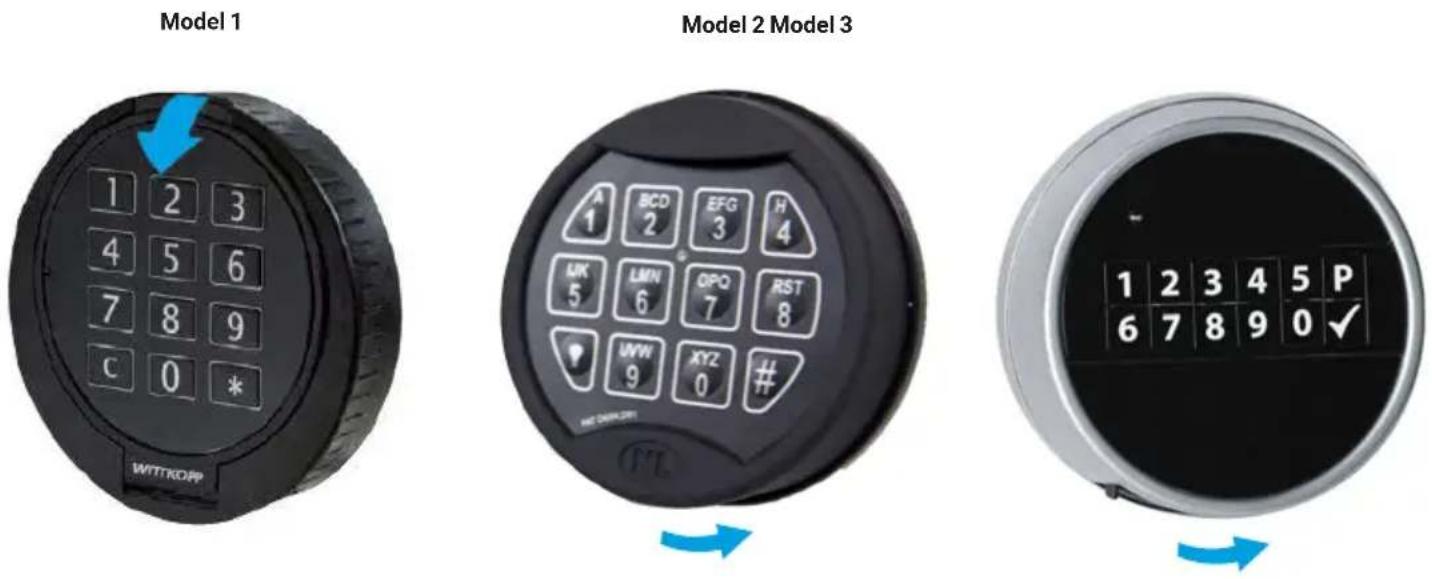
| Battery location | Behind the keypad (model 1) or under the keypad (models 2 and 3) |
| Maintenance | Replace the battery as soon as the indicator flashes; use a high-quality 9V battery |
| Security | Change the factory code immediately; do not use personal data |
| Repairability | Contact the point of sale in case of malfunction |
Frequently Asked Questions - TSF 1912 Sistec
User questions about TSF 1912 Sistec
0 question about this device. Answer the ones you know or ask your own.
Ask a new question about this device
Download the instructions for your Safe in PDF format for free! Find your manual TSF 1912 - Sistec and take your electronic device back in hand. On this page are published all the documents necessary for the use of your device. TSF 1912 by Sistec.
USER MANUAL TSF 1912 Sistec
This publication, including all photographs, and illustrations, is protected under international copyright laws, with all rights reserved. Neither this manual, nor any of the material contained herein, may be reproduced without written consent of the author. © Copyright 2019
Disclaimer
The information in this document is subject to change without notice. The manufacturer makes no representations or warranties with respect to the contents hereof and specifically disclaims any implied warranties of merchantability or fitness for any particular purpose. The manufacturer reserves the right to revise this publication and to make changes from time to time in the content here of without obligation of the manufacturer to notify any person of such revision or changes.

natural_image
Four circular flags of the Netherlands, France, United Kingdom, and Germany arranged vertically (no text or symbols beyond national names)GEBRUIKERSHANDLEIDING 4
MANUEL D'UTILISATION 9
USER MANUAL 14
natural_image
Simple clock face diagram with hour and minute hands (no numbers or text)Intoetsen code - start openingsvertraging
natural_image
Simple clock face diagram with hour and minute hands (no numbers or text)1. Important instructions!

1.1 Code entry
The electronic lock operates with a six digit code. You can programme a second opening code. Each input is confirmed by a beep and the light illuminates.
After entering a valid code, a double signal sounds. If the code is an invalid code, you will hear a long beep. If you wait more than ten seconds, the entered code disappears and you have to enter it again.
1.2 Opening the safe
Enter the six digit code (factory code 123456) and unlock the door within three seconds using the handgrip or knob. If you do not open the lock within three seconds, the lock closes again automatically.
1.3 Closing the safe
Close the door and turn the handle or knob into the closed position. The lock is automatically locked. You can test whether the lock is locked by turning the handle to the open position.
1.4 Blocking
If incorrect codes are entered four times in a row, the keypad blocks automatically for five minutes. The light flashes every ten seconds during this period. And if you try to use the keypad, you will hear a long signal. Entering a wrong code twice after the blocking period ends will start a new delay time of five minutes.
1.5 Security advice
Once you start using the safe, change the standard factory code into your own personal access code immediately. When choosing a code, avoid obvious combinations such as numbers related to your birth date, part of your telephone number or postcode. Remember the code and keep it to yourself. If you feel the need to write it down, keep it in a safe place.
2. Master- or user code
2.1 Changing the master and user code
Make sure that the safe door is open when you change the code. Key in a six digit code (or factory code 123456 if you use the lock for the first time).
| Step Action Key | √ | × | ||
| 1. | Press and hold the '0' button until the light stays on | 0 | ■■ | — |
| 2. | Key in the code (or factory code 123456 for the first time) | 123456 | ■■ | — |
| 3. | Enter a new code, for example 567891 567891 | ■■ | — | |
| 4. | Repeat the new code, for example 567891(the light goes out) | 567891 | ■■ | — |
If the new code is not accepted, you hear a long signal. In that case, start again at step 1 for changing the code.
After changing the code, it is best to test the new code several times with the door open.
2.2 Setting the user code
Make sure that the safe door is open when you change the code (key in the master code).
| Step Action Key | √ | × | ||
| 1. | Press and hold the '1' button until the light stays on | 1 | ■■ | ■■ |
| 2. | Key in the master code, for example 567891 567891 | ■■ | ■■ | |
| 3. | Key in new user code, for example 111111 111111 | ■■ | ■■ | |
| 4. | Repeat the new user code, for example 111111(the light goes out) | 111111 | ■■ | ■■ |
If the new code is not accepted, you hear a long signal. In that case, start again at step 1 for changing the user code. After changing the code, it is best to test the new code several times with the door open.
2.3 Deleting user
| Step Action Key | √ | × | ||
| 1. | Press and hold the '3' button until the light stays on | 3 | ■■ | — |
| 2. | Key in the master code, for example 567891(the light goes out) | 567891 | ■■ | — |
The user code has been deleted. Only the master code remains valid. If the user code deletion is unsuccessful, you hear a long signal. In that case, start again at step 1 for deleting the user code.
3. Opening delay and opening window
The opening delay can be 1 to 99 minutes:
This the waiting time before you can open the lock.
The opening window time can be 1 to 19 minutes:
You have to enter the code again to open the safe during this window (the period in which you can open it).

natural_image
Simple clock face diagram with hour and minute hands (no numbers or text)Key in code - start opening delay
Waiting time opening delay
Opening window - re-enter your code
3.1 Programming the opening delay and opening window
Make sure that the safe door is open while you change the opening delay and window (key in seven digit code).
| Step Action Key | √ | × | ||
| 1. Press and hold the '9' button until the light stays on 9 | ■■ | ■■ | ||
| 2. Key in the master code, for example 567891 567981 | ■■ | ■■ | ||
| 3. | Enter the opening delay using two digits, for example 5 minutes | 05 | ||
| 4. | Enter the opening window using two digits, for example 1 minute | 01 | ■■ | |
| 5. Repeat the opening delay time 05 | ||||
| 6. | Repeat the opening window time (the light goes out) | 01 | ■■ | ■■ |
If the light goes out during programming, you have waited too long to make an entry. In that case, start again at step 1.
3.2 Opening with opening delay and opening window
| Step Action Key | √ | × | ||
| 1. | Enter the user or master code, for example 567891 | 567891 | ■■ | ■■ |
| 2. | The opening delay time starts, the light illuminates every few seconds | |||
| 3. | When the opening delay has elapsed, you will hear an audible signal and the opening window begins. The light illuminates every few seconds. | ■ | ||
| 4. | Enter the user or master code, for example 567891 567891 | ■■ | ■■ | |
| 5. | Open the handgrip within 3 seconds, and the safe is open | |||
3.3 Changing the opening delay
You can only change the opening delay during the opening window.
| Step Action Key | √ | × | ||
| 1. Enter the user or master code, for example 567891 567891 | ■■ | ■■ | ||
| 2. | The opening delay time starts, the light illuminates every few seconds | |||
| 3. | When the opening delay has elapsed, you will hear an audible signal and the opening window begins. The light illuminates every few seconds. | ■ | ||
| 4. Press and hold the '9' button until the light stays on 9 | ■■ | ■■ | ||
| 5. Key in the master code, for example 567891 567891 | ■■ | ■■ | ||
| 6. | Enter the opening delay time using two digits, for example 20 minutes | 20 | ||
| 7. | Enter the opening window time using two digits, for example 2 minutes | 02 | ■■ | ■■ |
| 8. Repeat the new opening delay time 20 | ||||
| 9. | Repeat new opening window time. The opening delay has now been changed. | 02 | ■■ | ■■ |
3.4 Deactivating the opening delay
You can only change the opening delay during the opening window.
| Step Action Key | √ | × | ||
| 1. Enter the user or master code, for example 567891 567891 | ■■ | ■■ | ||
| 2. | The opening delay time starts, the light illuminates every few seconds | |||
| 3. | When the opening delay has elapsed, you will hear an audible signal and the opening window begins. The light illuminates every few seconds. | ■ | ||
| 4. Press and hold the '9' button until the light stays on 9 | ■■ | ■■ | ||
| 5. Key in the master code, for example 567891 567891 | ■■ | ■■ | ||
| 6. Key in 00 (= 0 minutes) to deactivate the opening delay 00 | ||||
| 7. Key in 01 to deactivate opening window 01 | ■■ | ■■ | ||
| 8. Repeat 00 to deactivate the opening delay 00 | ||||
| 9. | Repeat 01 to deactivate opening window.The opening delay is now disabled. | 01 | ■■ | ■■ |
4. Power supply
4.1 Changing the battery
As soon as the battery is almost empty (and the voltage becomes too low), the light will flash and a warning signal will sound several times when you open the door. This is the warning that you need to change the battery.
Do not use rechargeable batteries, only high quality 9V batteries.
Model 1
The battery compartment is located behind the keyboard. You can open the lock at the top of the keyboard.
Model 2 and 3
The integrated battery compartment in the bottom of the entry unit opens by moving a slider.
Attention! You must firmly attach the battery clip to the battery.
Do you have questions about your safe, the electronic lock or is there an unexpected malfunction?
Please contact your local dealer.