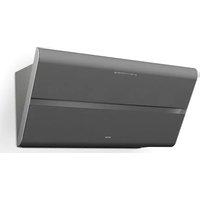
BKH 90 ST - Range hood BERBEL - Free user manual and instructions
Find the device manual for free BKH 90 ST BERBEL in PDF.


| Product Type | Inclined cooker hood |
| Brand | Berbel |
| Model | BKH 90 ST |
| Width | 900 mm |
| Depth | 420 mm |
| Height | 389 mm |
| Net weight | 29.5 kg (31.0 kg with permalyt filter) |
| Connection voltage | 230 V / 50 Hz |
| Nominal power | 186 W / 311 W (with permalyt filter) |
| Fan power consumption | 170 W |
| Lighting | LED 15.6 W, luminous intensity 387 lx |
| Number of power levels | 3 |
| Timer function | Yes (10 minutes, level 2) |
| Operating mode | Air recirculation |
| Grease separation technology | Back-Flow with Capillar Trap |
| Filter type | Air recirculation filter (BUF-BDL or permalyt BUR BKH ST) |
| Filter lifespan | Up to 2 years, replacement according to usage (12–24 months) |
| Cleaning of Capillar Traps | Every 3 weeks max, dishwasher-safe |
| Surface cleaning | After each cooking, with a soft damp cloth |
| Minimum safety distance | 450 mm recommended, 650 mm for gas hob |
| Mounting type | Wall-mounted (hanging) |
| Fixing material supplied | 2 nylon wall plugs 8 mm, 2 Torx screws TX30 |
| Automatic shut-off | After 6 hours of operation without use |
| Protection rating | Domestic use only |
Frequently Asked Questions - BKH 90 ST BERBEL
User questions about BKH 90 ST BERBEL
0 question about this device. Answer the ones you know or ask your own.
Ask a new question about this device
Download the instructions for your Range hood in PDF format for free! Find your manual BKH 90 ST - BERBEL and take your electronic device back in hand. On this page are published all the documents necessary for the use of your device. BKH 90 ST by BERBEL.
USER MANUAL BKH 90 ST BERBEL
EN Operating and installation instructions for the models
■ BKH 80 ST
■ BKH 80 ST permalyt
■ BKH 90 ST
■ BKH 90 ST permalyt
Zentrifugalkraft
Sicherheitsabstand(x):
Mauerkasten
Force centrifuge
Caisson mural
Fermer le panneau frontal.
ATTENTION!
Risque de dommages en cas de manipulation incorrecte!
Forza centrifuga
Cassetta a muro
Centrifugale kracht
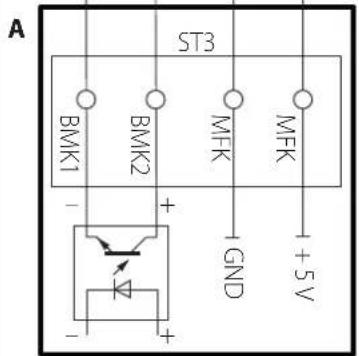
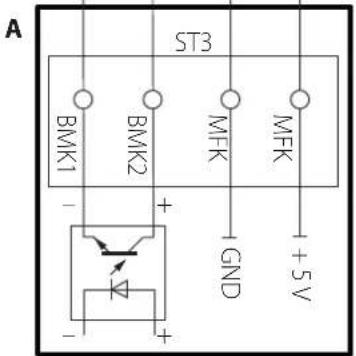
A Schakelkast
- BMK1: Contact wandkast, collector optocoupler, max. 12 mA / 12 V DC, veilig galv. gescheiden
- BMK2: Contact wandkast, emitter optocoupler, max. 12 mA / 12 V DC, veilig galv. gescheiden
Wandkast
- De zekering is geactiveerd of is defect.
Operating and installation instructions for:
• Headroom hood BKH 80 ST
• Headroom hood BKH 80 ST permalyt
• Headroom hood BKH 90 ST
• Headroom hood BKH 90 ST permalyt
Descriptions are identical for all models.
Differences are noted separately.
Illustrations show:
• Headroom hood BKH 90 ST
• Originalinstructions.
• Part of the product.
• Copyrightprotected.
- Duplications, re-printing and distribution only with permission.
- Subject to alteration.
Safety information
DANGER!
Notes with the word DANGER warn of a hazardous situation that results in serious injuries or death.
⚠ WARNING!
Notes with the word WARNING warn of a hazardous situation that could result in serious injuries or death.
CAUTION!
Notes with the word CAUTION warn of a situation that could result in minor injuries.
ATTENTION!
Notes with the word ATTENTION warn of a situation that could result in damage to property or to the environment.
Symbol clarification - text
Handling requirement
- Listing
→ Reference to another point in this document
Reference to other documents that should be observed
Symbol clarification - illustrations
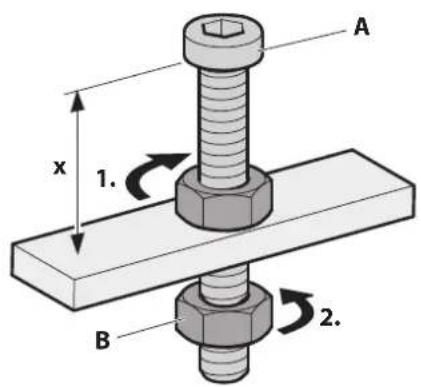
Highlighting of the parts involved in the action with shading
- Handling steps with numbering
A Part designations with upper case characters
x Dimensions with lower case characters or units in mm
C Movement and direction arrows
Table of contents
1. Safety information 92
1.1 Proper intended use 92
1.2 Authorised target groups....92
1.3 General safety instructions .....92
2. Product information....93
2.1 Functional principle .93
2.2 Recirculated air mode . . . . . . . . . . . . . . . . . . . . . . . . . . . . . . . . . . . . . . . . . . 93
2.3 Product overview....93
2.4 Scope of delivery .94
2.5 Technical data....94
3. Installation....95
3.1 Safety instructions for installation. . . . . . . . . . . . . . . . . . . . .95
3.2 Requirements for the installation location .....95
3.3 Requirements for recirculated air mode. . . . . . . . 95
3.4 Installation procedure . . . . . . . . . . . . . . . . . . . . . . . . . . . . . . . . . . . . . . . 96
3.4.1 Preparation for installation 96
3.4.2 Unpack the device 96
3.4.3 Remove inside parts 97
3.4.4 Hang the device in place....98
3.4.5 Connect accessories 100
3.4.6 Establish electrical power supply....101
3.4.7 Installing the recirculated air filter permalyt 101
3.4.8 Insert inside parts 102
3.4.9 Check and carry out commissioning ..... 103
4. Operation....104
4.1 Safety information for operation 104
4.2 Control panel 104
4.3 Normal operation....104
4.3.1 Run-on function 105
4.3.2 Hob lighting 105
5. Cleaning 106
5.1 Safety information for cleaning 106
5.2 Cleaning procedures....106
6. Maintenance 108
6.1 Safety instructions for maintenance ..... 108
6.2 Maintenance....108
6.2.1 Replacing filter filling.... 108
6.2.2 Changing the lamps 109
6.3 Fault rectification .....109
7. Dismounting 110
8. Disposal....110
8.1 Dispose of packaging 110
8.2 Dispose of the device 111
9. Annex....111
9.1 Contact....111
1. Safety information
1.1 Proper intended use
The device serves to extract cooking vapours.
The device is intended exclusively for private domestic use. The device must only be used with original filters from the manufacturer.
It is only permitted to use the device when it is in technically flawless condition and after correct installation.
Any other use shall be considered improper use.
The reading and observance of this manual are also included in the proper use of the device.
1.2 Authorised target groups
Electrical work only to be undertaken by qualified electricians per DIN VDE 0100. Requirements on qualified electricians:
• Knowledge of the basics of electrics.
- Knowledge of country-specific regulations and standards (e.g. in Germany, DIN VDE 0100, part 701).
• Knowledge of the applicable safety regulations.
- Knowledge of the relevant legal requirements for gas installations (e.g. in Germany the technical rules for gas installations TRGI).
• Knowledge of this manual.
Installation and repair only by qualified specialist personnel. Requirements on qualified specialist personnel:
• Knowledge of the regulations on safety at work.
• Knowledge of fastening systems.
• Basic knowledge of ventilation systems.
• Experienced in using electrical and mechanical tools.
• Ability to read technical drawings.
• Knowledge of this manual.
Operation, cleaning and maintenance by the user. Requirements for the user:
• Knowledge of this manual.
There are separate requirements for the following users:
• Children from 8 years and older.
- Persons with restricted physical, sensory or mental capabilities.
• Persons with a lack of experience and knowledge.
These users are only permitted to carry out operation, cleaning and maintenance. Special requirements:
- Users are supervised.
- Users are instructed with regard to safe use of the device.
- Users understand the hazards involved with the device.
• Children may not play with the device.
1.3 General safety instructions
⚠ WARNING!
Hazard through a disregard of the operating and installation instructions!
This manual contains important information for the safe handling of the device. Separate reference is made to possible hazards.
Read through this manual thoroughly.
Follow the safety instructions in this manual.
Store the manual in an accessible location.
Naked flames can damage the device and can cause fires.
- Gas operation only with low gas flames (not rising above the edge of the base of the pots).
- Do not flambé underneath the device.
• No unattended deep frying underneath the device.
The use of the device is forbidden under the following circumstances:
- If necessary safety devices are missing (e.g. low-pressure monitor whilst using a heating point which uses air from the room as its oxygen supply).
- If essential approvals are missing (e.g. from chimneysweeps).
• In potentially explosive atmospheres.
• If the device or individual components are damaged. - In the event of unauthorised alterations or changes to the device.
• If liquid has penetrated the device. - When heavily soiled.
- For children under 8 years old and persons who would not be able to properly assess the hazards associated with handling the device.
The manufacturer accepts no liability for damage occurring in the following circumstances:
• Disregard of this manual.
- Improper use of the device.
• Improper installation and handling of the device.
• Use of the device by unauthorised target groups.
- Bypassing safety equipment on the device.
- Use of replacement parts that were not produced or approved by the manufacturer.
Further safety instructions can be found in the respective relevant chapters of this manual.
→ "3.1 Safety instructions for installation" (page 95).
→ "4.1 Safety information for operation" (page 104).
→ "5.1 Safety information for cleaning" (page 106).
→ "6.1 Safety instructions for maintenance" (page 108).
2. Product information
2.1 Functional principle
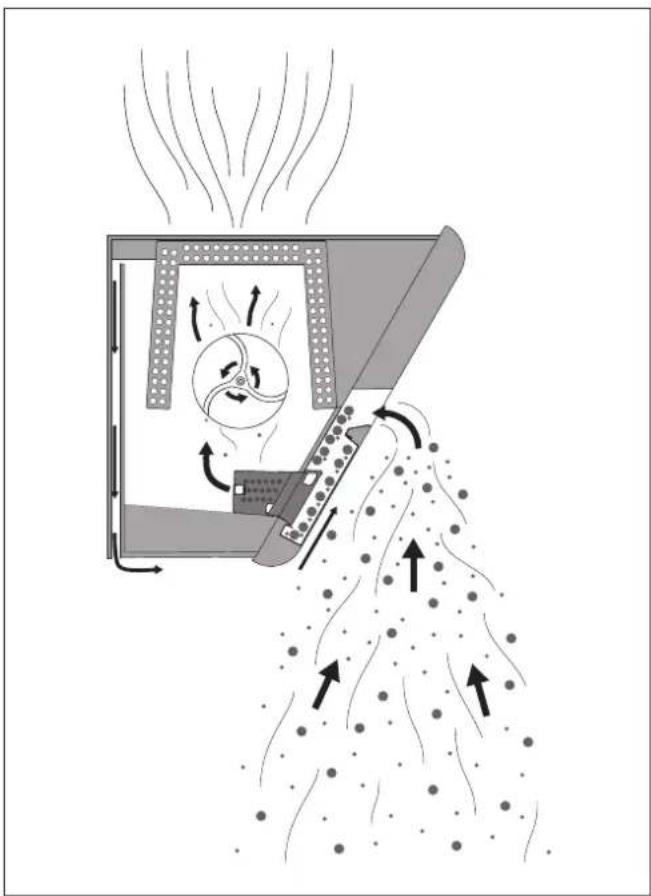
Centrifugal force
- Cooking vapours are drawn through a gap and into the hood where they are accelerated and routed through bends.
- The resultant centrifugal force ejects particles of dirt (e.g. particles or grease and oil) out of the air.
- The dirt particles are separated out and collected on the upper and lower section as well as a catchment screen ("Capillar Trap").
Back-flow technology
- Condensate or droplet formation on the front panel or the underside (e.g. if steam touches the cold surface) is prevented by a vent installed from the bottom to the top.
- Part of the vented air quantity is fed to the back of the extractor hood, blown over the underside to the front and directed into the suction gap.
2.2 Recirculated air mode
The device is used in recirculated air mode.
The filter filling in the recirculated air filter neutralises any smelly odours present. The odour-free, cleaned room air is fed back into the room. The humidity in the room can be reduced with the fresh air feed.
In recirculated air mode, it is necessary to use the run-on function so that the device can remove the remaining odours. Using the run-on function increases the life of the filter filling. The filter filling must be replaced at regular intervals.
2.3 Product overview
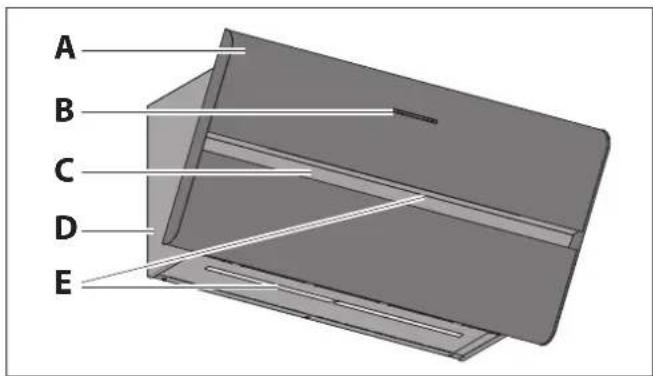
A Front panel
B Control panel
→ "4.2 Control panel" (page 104).
C Suction gap
D Hood body
E Hob lighting
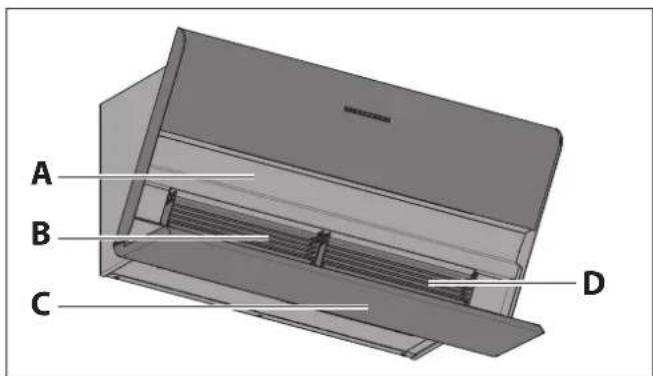
A Upper section
B 2 Capillar Traps (removable)
C Lower section (inside, removable)
D Type plate - on the hood body behind the Capillar Trap
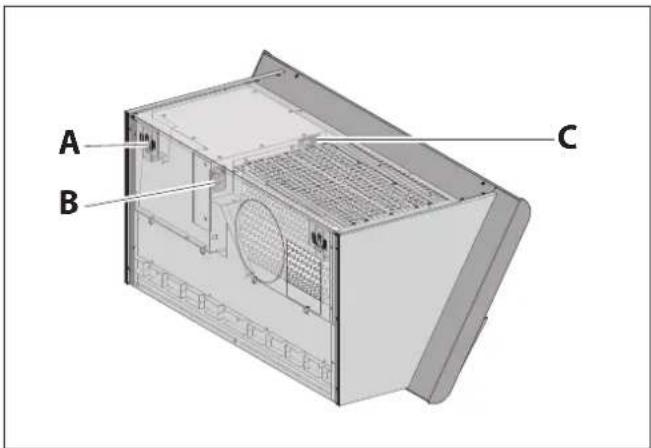
A Adjusting screws for alignment
B Connector for mains cable
C Connection terminals for wall box, window contact switch (multifunction contact) and bus connection
2.4 Scope of delivery
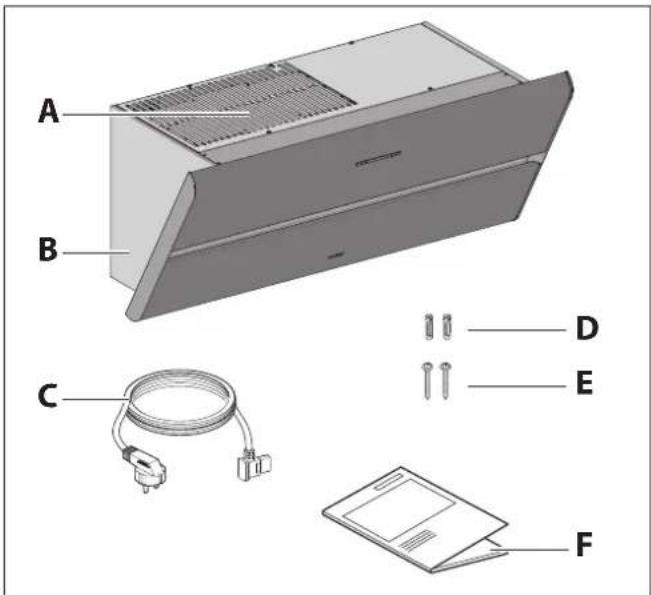
A Recirculated air filter (in the hood body). The model is dependent on the version:
• BUF-BDL recirculated air filter
• Recirculated air filter permalyt BUR BKH ST
B Hood body with front panel
C Cold device cable
D 2 nylon wall plugs 8 mm
E 2 Torx screws TX30 with integrated washers
F Operating and installation instructions
The fastening materials are only suitable for solid walls.
2.5 Technical data
| BKH 80 ST | BKH 90 ST | |
| Connection voltage 230 V/50 Hz | 230 V/50 Hz | |
| Total power | 186 W,311 W 1 | 186 W,311 W 1 |
| Fan power consumption 170 W 170 W | ||
| Lighting LED 15.6 W LED 15.6 W | ||
| Illumination on the hob surface | 387 lx | 387 lx |
| Width | 800 mm | 900 mm |
| Depth | 420 mm | 420 mm |
| Height | 389 mm | 389 mm |
| Net weight | 28.5 kg,30.0 kg 1 | 29.5 kg,31.0 kg 1 |
1 Version with recirculated air filter permalyt
Information on the model (e.g. serial number, year of construction) is quoted on the front panel.
→ "2.3 Product overview" (page 93).
3. Installation
3.1 Safety instructions for installation
⚠ WARNING!
Hazard through disregard of the installation instructions!
This chapter contains important information for the safe installation of the device.
Read through this chapter carefully before installing the device.
Follow the safety instructions.
Carry out the installation as described.
• Installation only by qualified specialist personnel.
→ "1.2 Authorised target groups" (page 92).
- Electrical work only to be undertaken by qualified electricians.
→ "1.2 Authorised target groups" (page 92).
• Installation requires two persons.
- When working at heights, ensure good stable footing (e.g. stable stepladder).
- The hob and other parts that can be touched must be allowed to cool prior to installation.
- Store the film or other parts of the packaging in a location which is inaccessible to children.
- The device must be in an undamaged and fault-free condition prior to installation.
• Cables must not be kinked, crushed or damaged.
• Never open the fan housing.
- The power supply voltage must match the voltage information quoted on the ratings plate.
→ "2.5 Technical data" (page 94).
- Ensure that the power supply is stable and remains so prior to the installation. Connect the power supply only when instructed to do so in the installation instructions.
3.2 Requirements for the installation location
⚠ WARNING!
Risk of death due to improper installation!
Disregard of the ambient conditions can lead to hazardous situations, e.g. in the handling of electrical power or gas.
Make sure that the requirements for the installation location are complied with.
- Do not install in potentially explosive atmospheres.
- With simultaneous use of a heating point which uses air from the room as its oxygen supply (e.g. chimneys):
• A safety device is absolutely essential. - The safety device (e.g. under-pressure monitor P4, inspected in accordance with DIN 18841:2005-12 TÜV and in accordance with DVGW-VP121) must prevent gases being drawing to the room.
- An approval for commissioning (e.g. from a chimneysweep) must be available.
• Installation is only permitted on structural building elements capable of bearing the load (solid structure).
- If installed above fireplaces that use solid fuels (e.g. coal stove):
The fireplace must have a sealed cover which cannot be removed. Otherwise there is a fire risk due to flying sparks. Applicable legal and country-specific regulations must be observed.
- The air flowing out must be able to dissipate unimpeded. Do not impede the air flow, e.g. through the installation of objects on or above the device.
• Make sure that the building electrical supply is properly earthed.
- The power supply voltage present must match the voltage information quoted on the ratings plate.
- There must be an electrical power outlet in the vicinity of the device installation.
- The mains plug must be accessible after the installation of the hood.
Country-specific, legal provisions must be observed.
3.3 Requirements for recirculated air mode
• Filter filling freely accessible for changing.
3.4 Installation procedure
Short overview:
- Preparation for installation
- Unpack the device
- Remove inside parts
- Hang the device in place
- Connect accessories
- Establish electrical power supply
- Installing the recirculated air filter permalyt
- Insert inside parts
- Check and carry out commissioning
3.4.1 Preparation for installation
Familiarise yourself with the installation situation and the associated documents.
• Device and instructions.
• Installation location.
• Intended operating mode.
Assemble the tools and materials required:
- Stable stepladder
• Folding rule or measuring tape - Pencil
- Spirit level
• Phillips head screwdriver, size 2
• Hexagon socket screwdriver, size 4
• Ring spanner SW10, angled - ∅ 8 mm masonry bit
- Hammer drill
- Protective material (e.g. thick cardboard) for the hob and the worktops
Keep the installation area free of objects that could be in the way or that could be damaged.
Make sure that the hob and other parts that could be touched have cooled down.
Protect the hob and other surfaces in the installation area (e.g. with thick cardboard).
Ensure that the power supply is switched off and remains so. Connect the power supply only when instructed to do so in the installation instructions.
3.4.2 Unpack the device
ATTENTION!
Hazard of glass breaking or other damage due to incorrect handling!
The device and its surfaces can be damaged when being unpacked or transported.
Do not cut into the protective cardboard packaging.
Keep objects that could scratch the device far away from it (e.g. tools, belt buckles).
Unpack the device and all accompanying parts carefully.
Place the device on its back on a firm, clean and protective surface (e.g. thick cardboard).
Check the device and its constituent parts for damage.
Check the delivery is complete.
→ "2.4 Scope of delivery" (page 94).
If parts are missing or damaged:
Please consult your dealer or customer services.
Remove the packaging material.
→ "8.1 Dispose of packaging" (page 110).
3.4.3 Remove inside parts
ATTENTION!
Danger of property damage through falling parts!
When moving the device, the front panel may open and parts lying inside could fall out.
Remove the parts lying inside before installation.
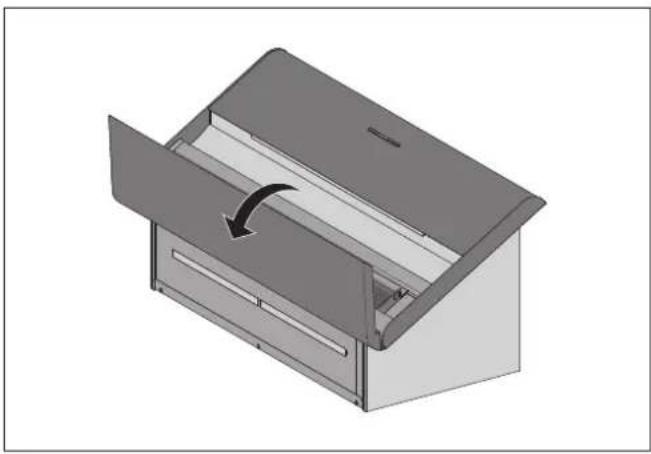
Open the front panel.
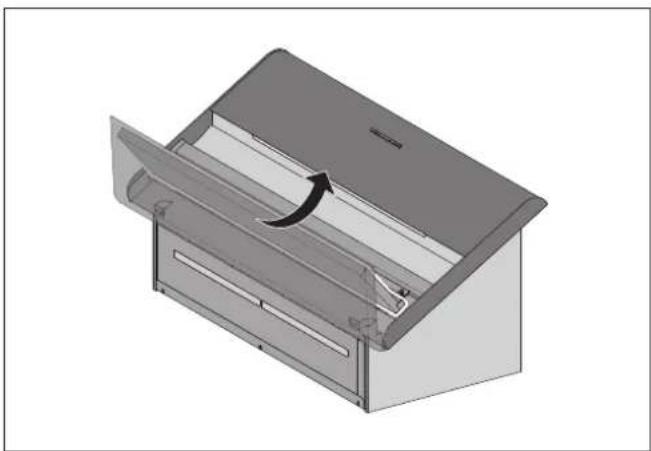
Lift the lower section out at the rear edge.
Take hold of the lower section at the sides to remove it.
The Capillar Traps are inserted and held in place in the device by magnets.
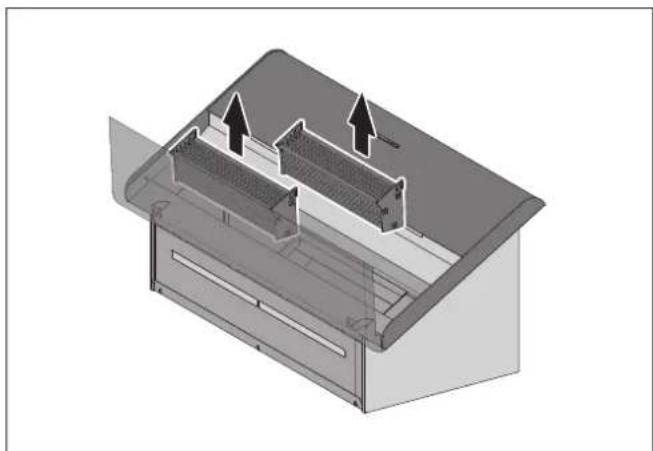
Grasp the Capillar Traps on the sides with both hands.
Pull the Capillar Traps out.
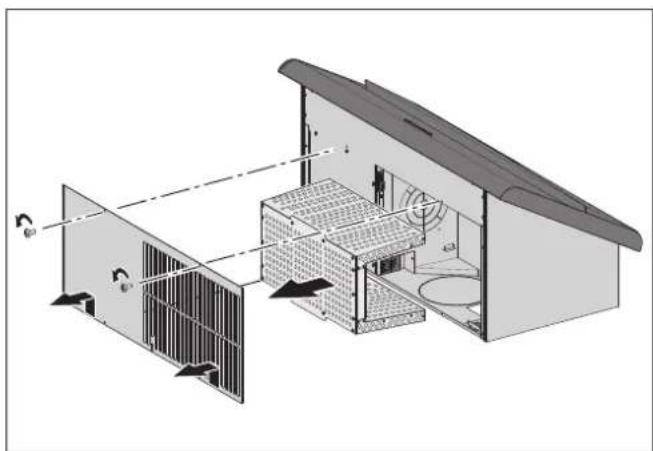
Remove the two screws.
Remove the cover.
Remove the filter.
If the recirculated air filter permalyt is used:
Unplug the connection cable.
3.4.4 Hang the device in place
The device is designed to be hung on walls.
When mounting on a solid wall:
Make sure that the wall has sufficient load bearing capacity.
Use the fastening materials provided.
With different installation situations:
Enquire about alternative fastening systems (e.g. consult with your architect).
Only use fastening hardware suitable for the type of wall.
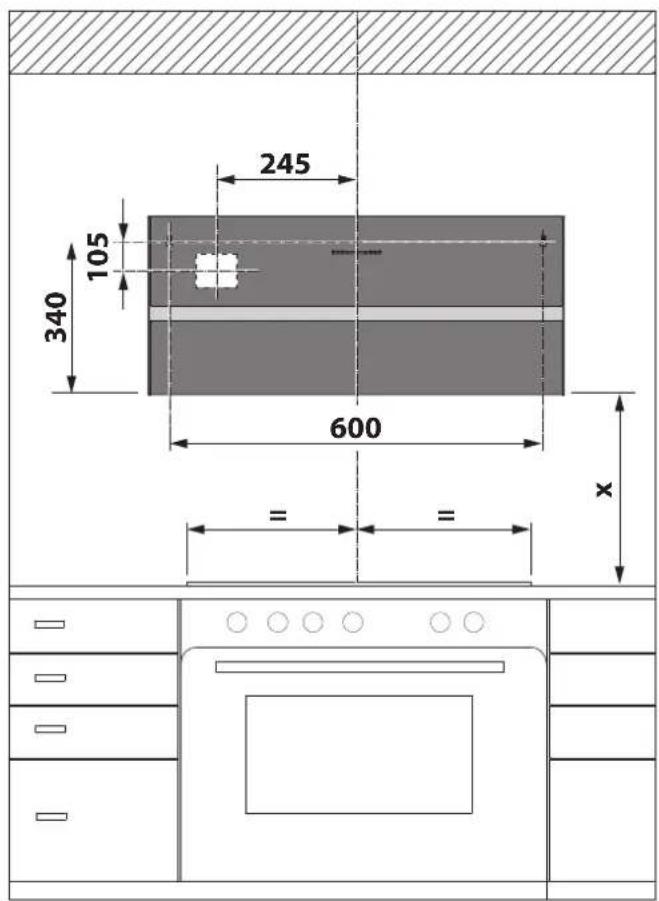
Safety distance (x):
• Recommendation 450 mm.
• With gas hobs, at least 650 mm.
Distances from the centre point of the socket opening on the device rear:
• Top 105 mm from the left fastening point.
• Side 245 mm from the hood centre axis.
Determine the hanging position.
Make sure that the safety distance is complied with.
⚠ WARNING
Risk of death due to explosions or electric shock!
Drilling through gas, water or electrical lines can lead to hazardous situations.
Ensure that there are no lines in the wall at the fastening points.
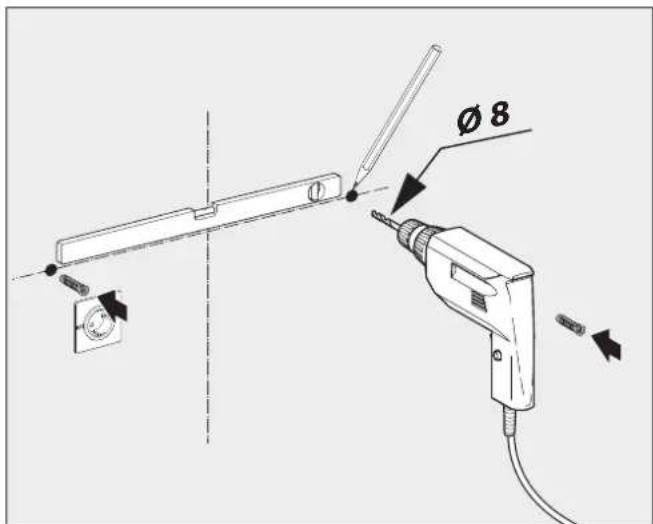
Determine the locations of the fastening points and mark them.
Drill the holes in the wall.
Insert the wall plugs into the holes.
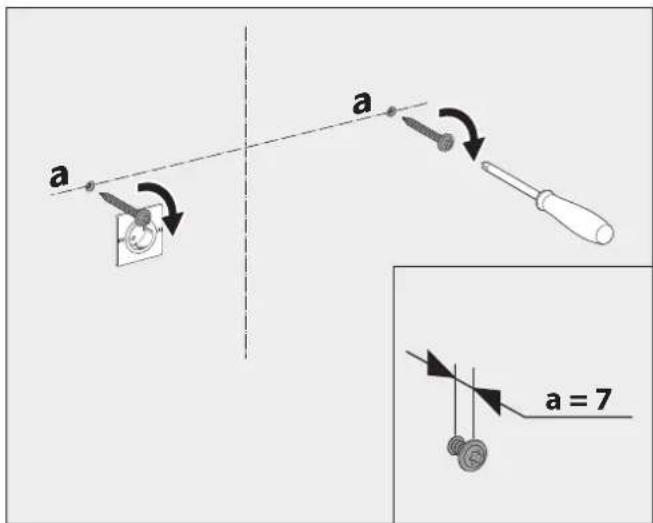
The fastening screws are only tightened once the device has been aligned.
Tighten the mounting screws appropriately.
⚠ WARNING!
Danger of injuries through improper handling!
Hanging the device requires a great deal of physical exertion due to its size and weight. If the device falls down, serious injuries are possible.
Two persons are required to hang the device.
Ensure stable footing when hanging the device.
Ensure that no other people are in the working area.
ATTENTION!
Danger of property damage through improper handling!
Hanging the device requires a great deal of physical exertion due to its size and weight. If the device falls, the device, kitchen furnishings and other objects could be damaged.
Cover the cooled hob.
Keep the installation area clear.
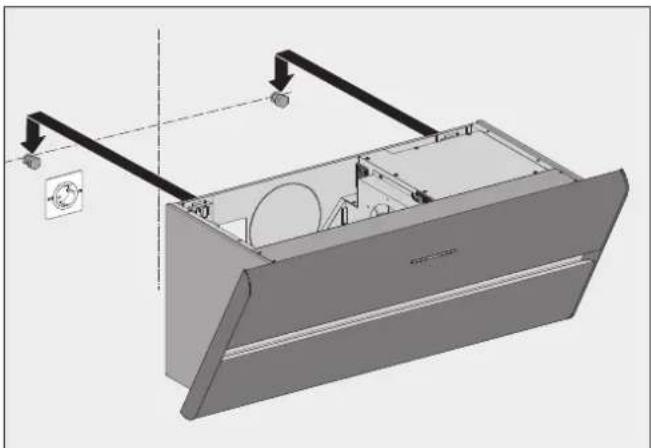
Hang the device on the mounting points.
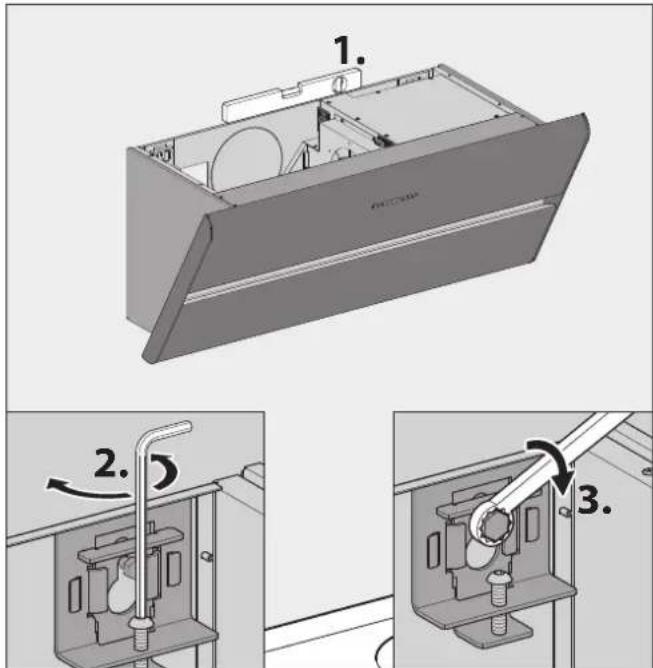
Check the horizontal alignment of the device.
Align the device with the adjusting screws.
Tighten the mounting screws.
3.4.5 Connect accessories
Depending on the installation situation, accessories may be connected to the hood:
- Wall box
• Window contact switch
• Under-pressure monitor
Observe the instructions for the accessories.
![graph TD subgraph A A1["BMK1"] -->|+| B1["ST3"] A2["BMK2"] -->|-| B1 A3["BF"] -->|-| B1 A4["GND"] -->|-| B1 A5["BF"] -->|-| B1 A6["BF"] -->|-| B1 A7["BF"] -->|-| B1 A8["BF"] -->|-| B1 A9["BF"] -->|-| B1 A10["BF"] -->|-| B1 A11["BF"] -->|-| B1 A12["BF"] -->|-| B1 A13["BF"] -->|-| B1 A14["BF"] -->|-|…](/content/2026/04/646464/images/005e6c50f048671a97ea8bee5cb8ddae03714974f7c772719f94674a5c464559.jpg)
A Control box
- BMK1: Wall sleeve contact, optocoupler collector, max. 12 mA / 12 V DC, safe galvanic separated
- BMK2: Wall sleeve contact, optocoupler emitter, max. 12 mA / 12 V DC, safe galvanic separated
B Terminal "BMK-F" for the wall box connection
C Terminal "F-K" (multifunction contact) for the window contact switch or under-pressure monitor connection
D Control line from the wall box
EWall box
F Wall box power unit
G Window contact switch
H Control line from the window contact switch
Connection is implemented via cable terminals on a detachable connector on the fan housing.
ATTENTION!
Risk of damage through incorrect connection!
A mix-up of the control wires can result in damage to the electronics.
Be careful not to mix up connections when connecting the control wires: Core 1 on terminal 1, core 2 on terminal 2.
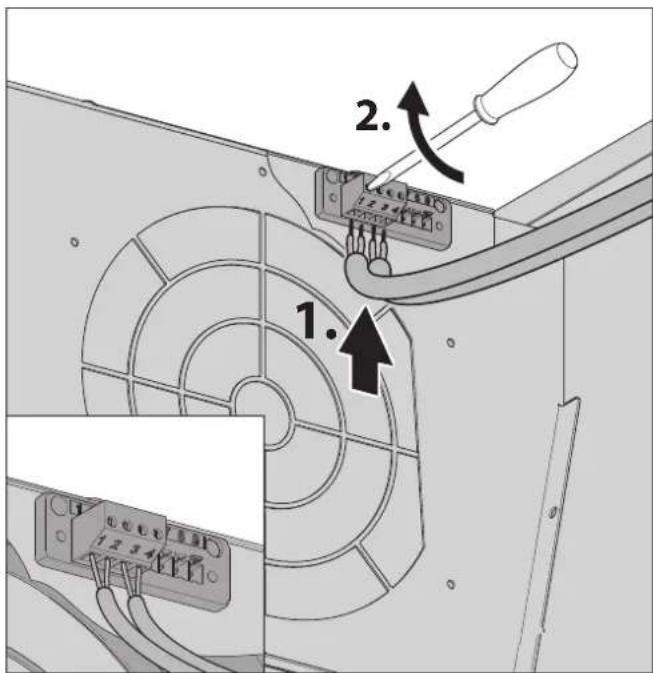
Wall box
Connect the wall box as follows:
- Core 1 on terminal 1
-
Core 2 on terminal 2
-
The wall box is closed when the control contacts are open.
- The wall box is open when the control contacts are closed.
Window contact switch
Connect the window contact switch as follows:
• Blue/white core to terminal 3
• Brown/green core to terminal 4
- The hood's fan is only operational when the window is open.
Under-pressure monitor
- The hood's fan is only operational when no critical under-pressure is determined in the room.
3.4.6 Establish electrical power supply
Observe the voltage specifications on the rating plate.
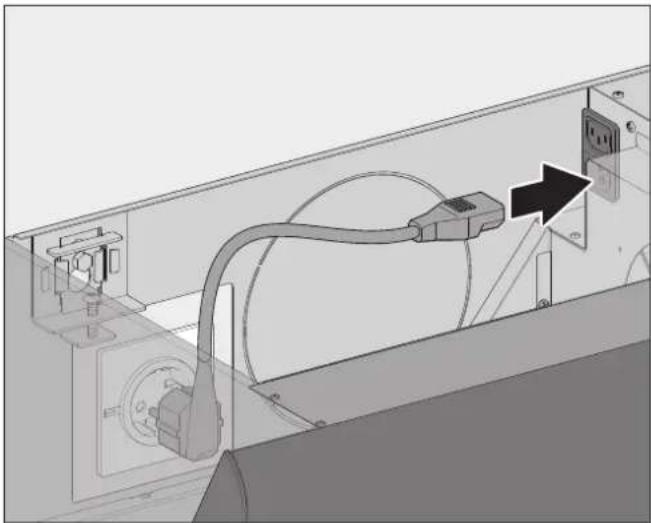
Plug the connecting cable mains plug into the socket.
Route the cable such that it is not kinked, crushed or damaged and so that it will not get in the way when replacing the filter filling.
Make sure the device can be disconnected from the electricity supply after installation.
3.4.7 Installing the recirculated air filter permalyt
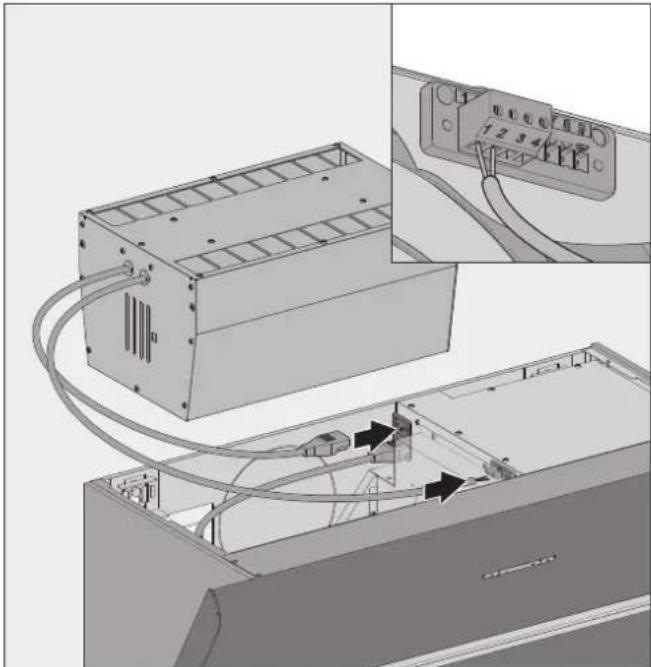
Connect the recirculated air filter permalyt as follows:
- Wire 1 on terminal 1
- Wire 2 on terminal 2
Plug the cold device plug into the socket on the fan housing.
A connection check takes place automatically:
- If the device is not connected correctly, five beeps will sound.
Correct the connection of the wires to terminals 1 and 2. - If the device is connected correctly, three will beeps sound.
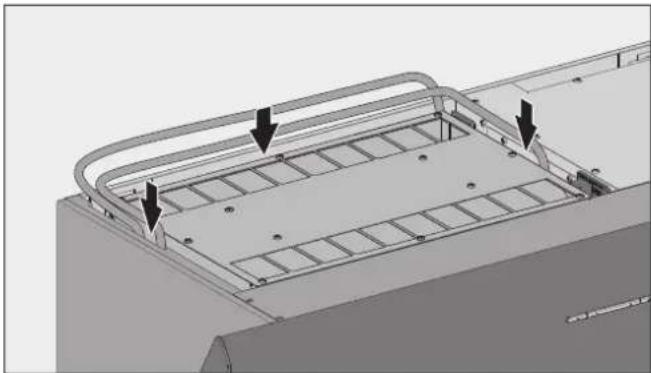
Insert the recirculated air filter permalyt.
Lay the cable from the recirculated air filter permalyt through the guide channel.
3.4.8 Insert inside parts
After the installation, the parts lying inside should be re-fitted.
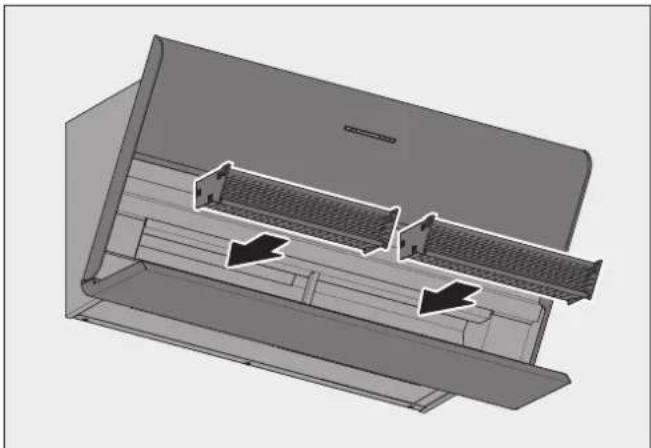
Insert the Capillar Traps into the mounting slot with both hands.
Slide the Capillar Traps in up to the stop. Magnets hold the Capillar Traps in the device.
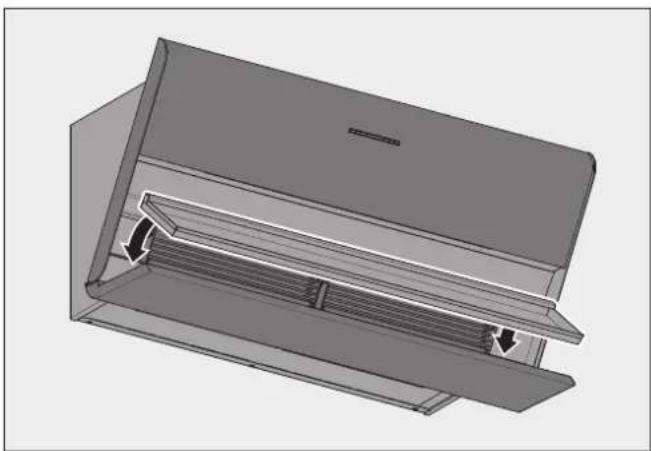
Insert the lower section flush in the flap of the front cover.
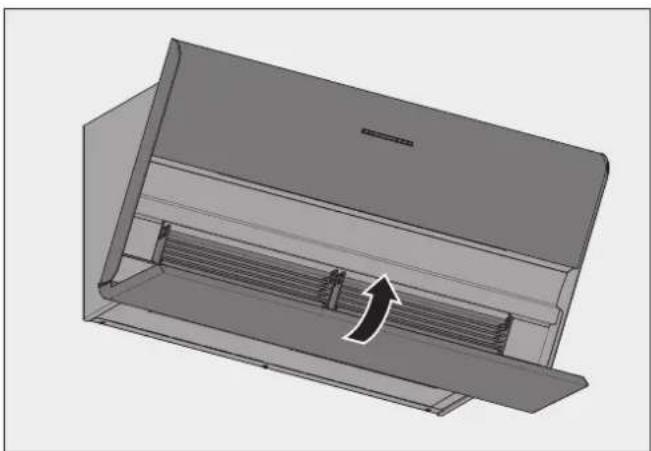
Close the front panel.
ATTENTION!
Danger of property damage through improper handling! When inserting the filter in the device, the cables may become damaged.
Carefully insert the filter in the device.
Make sure that the filter is not placed on a cable.
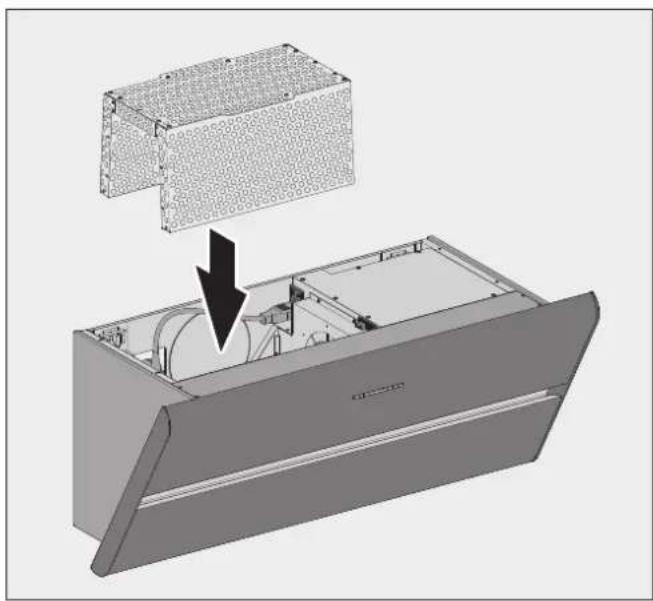
Insert the filer again.
If the recirculated air filter permalyt is used:
Plug the connection cable back in.
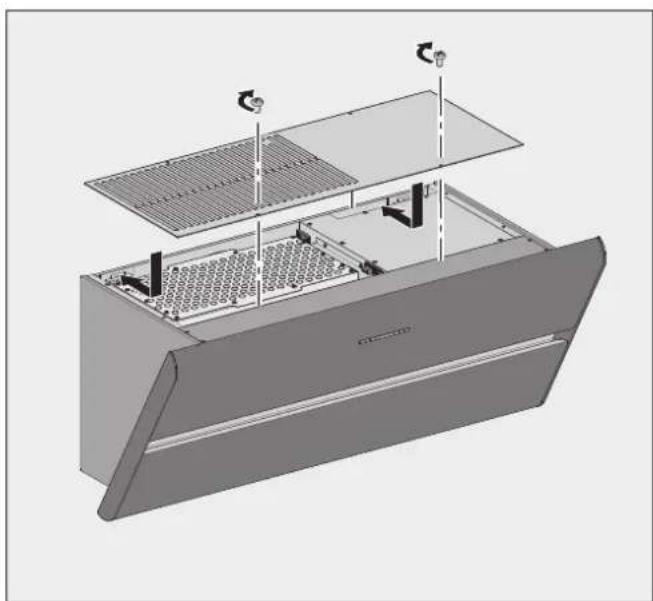
Fit the cover.
Screw the cover on.
The device is ready for operation.
3.4.9 Check and carry out commissioning
ATTENTION!
Risk of disruptions due to moisture in the device!
If the device is moved from a cold environment into a hot one, condensation may form inside.
Wait about 2-3 hours before bringing the device into service.
Check that the mains plug is freely accessible.
Check that the mains cable and the electrical connection cable are not kinked, crushed or damaged.
Ensure that air outlets are not closed or covered.
Make sure that the ventilation slots are free.
Check the correct functioning of the device.
→ "4. Operation" (page 104).
4. Operation
4.1 Safety information for operation
⚠ WARNING!
Hazard through a disregard of the operating instructions!
This chapter contains important information for the safe operation of the device.
Read through this chapter carefully before operating the device.
Follow the safety instructions.
- Operation only by authorised users. ⇒ "1.2 Authorised target groups" (page 92).
- No operation permitted by children under 8 years old and persons who would not be able to properly assess the hazards associated with handling the device.
- Do not use during a fire or when there is an imminent danger of fire (e.g. a smell of gas).
- Gas operation only with low gas flames (not rising above the edge of the base of the pots). Naked flames can damage the device and can cause fires.
- Do not flambé underneath the device. Fire hazard.
• No unattended deep frying underneath the device. - When in use, the hob and other parts that could be touched can become very hot. There is a risk of burning.
- Grease residues should be removed. Grease residues pose a fire hazard.
• No moisture in the device.
- Avoid dripping or splashing water.
- Containers with liquids (e.g. vases, bottles) must not be placed on the device.
• Do not impede the air flow.
- Do not impede the air channel on the underside of the device.
• Only use with the lower section fitted.
- Do not cover the air outlets (e.g. glasses/plates on or in front of the ventilation slots). Out-flowing air must be able to escape through the ventilation slots without impediment. Otherwise backpressure may form. If the cooking vapours are no longer able to escape there is a danger of fire.
4.2 Control panel
The device is controlled via the control panel.
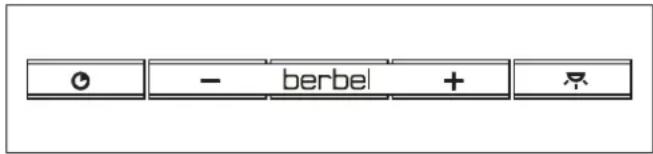
Pressing a button executes the corresponding function.
| Button Function | |
| Run-on function | |
| — | OFF, change power setting down |
| + | ON, change power setting up |
| Hob lighting | |
4.3 Normal operation
| Button Function | |
| + | The device is turned off. press button 1x.The device switches on with power setting 1.The device is turned off. press button for 2 seconds.The device switches on with power setting 3.The device is switched on. press button 1x.The device changes up one power setting. |
| - | The device is switched on with power setting 2 or 3. press button 1x.The device changes down one power setting.The device is switched on with power setting 2 or 3. Press button for 2 seconds.The device switches off.The device is switched on with power setting 1. Press button 1x.The device switches off. |
The active power setting is displayed by the LEDs illuminated beneath the buttons:
• 1 LED lights up = Power setting 1
• 2 LEDs light up = Power setting 2
• 3 LEDs light up = Power setting 3
To achieve an optimal efficiency in removing cooking fumes:
Turn the device on 1-2 minutes before you start cooking. This allows the flow of air to build up, and the fumes are removed at an early stage.
In order to collect the cooking fumes effectively, use the rear hob plates for intensive cooking.
During the cooking process, switch to a power level that is appropriate for the intensity of the cooking vapours:
• Power level 1 - lowest fan power
• Power level 2 - medium fan power
• Power level 3 - high fan power
If the intensity of the cooking vapours does not subside, switch to a higher power level.
Switch to power setting 3 if frying.
Turn on the run-on function when you have finished cooking.
→ "4.3.1 Run-on function" (page 105).
Check the fresh air supply at regular intervals.
Use the device also to reduce other unpleasant smells. Such as from:
- Onions and garlic
- Oven, microwave and steamer
- Fondue and raclette
⚠ WARNING
Fire hazard due to grease residue!
In operation grease residue, which is highly inflammable, collects in and on the device.
Clean the device properly.
→ "5. Cleaning" (page 106).
If you switch the machine on and hear an unusually loud fan noise:
Clean the device.
Observe the stipulations for cleaning.
→ "5. Cleaning" (page 106).
If you switch the machine on and notice a smell:
Change the filter filling.
Observe the stipulations for changing the filter filling.
→ "6.2.1 Replacing filter filling" (page 108).
After 6 hours without operation, the device (including lighting) automatically switches off.
4.3.1 Run-on function
The device comes with a run-on function. If this function is used, the device will work for a further 10 minutes at power setting 2.
In recirculated air mode, it is necessary to use the run-on function so that the device can remove the remaining odours. Using the run-on function increases the life of the filter filling. The filter filling must be replaced at regular intervals.
| Button Function | |
| The device is turned off. press button 1x.The device switches on the run-on function with power setting 2.The run-on function is switched on. press button 1x.The run-on time starts again (10 minutes).When the power stage changes, the run-on function is ended.During the run-on time (10 minutes), the LEDs for power settings 1 and 2 will flash. | |
4.3.2 Hob lighting
The hob lighting is fitted with energy-saving LED lighting.
The lighting can be used at any time and independently of the fan.
| Button Function | |
| Press button 1x, in order to switch the hob lighting on or off. | |
5. Cleaning
5.1 Safety information for cleaning
⚠ WARNING!
Hazard through a disregard of the cleaning instructions!
This chapter contains important information for the safe cleaning of the device.
Read through this chapter carefully before cleaning the device.
Follow the safety instructions.
• Cleaning only by authorised users.
→ "1.2 Authorised target groups" (page 92).
- No cleaning permitted by children under 8 years old and persons who would not be able to properly assess the hazards associated with handling the device.
• After use, the hob and other parts that could be touched may still be hot. There is a risk of burning.
- Grease residues should be removed. Grease residues pose a fire hazard.
The device should be cleaned regularly:
- Control panel, surface, upper section and lower section each time after cooking.
- With daily use, check the Capillar Traps after three weeks at the latest.
5.2 Cleaning procedures
The device draws in dirt particles (e.g. grease and oil particles) with the air from the room. The dirt particles are separated off and collected in the upper section, the lower section and in the Capillar Traps.
Before every cleaning:
Turn off the device.
Make sure that the hob and other parts that could be touched have cooled down.
ATTENTION!
Danger of damage through improper cleaning!
Sharp-edged objects, abrasive or unsuitable cleaning agents can damage the device.
The following cleaning agents are unsuitable and must not be used:
- Acetone
- Trichloroethylene
- Solutions on a cellulose basis (e.g. cellulose thinner)
• Artificial resin thinner - Abrasive media
• Polishes containing silicone
• Polishes containing oil - Wax
- Water vapour
• On painted surfaces: Microfibre cloth
Keep objects that could scratch the device away from it (e.g. rings).
Use mild household cleaner (e.g. alkali-free, pH-neutral, multipurpose cleaner).
Use a soft, damp cloth.
Clean without exercising excessive pressure.
The instructions and information on the cleaning agent should be observed.
Control panel
Clean the control panel with a lint-free, slightly damp cloth.
Dry the control panel with a lint-free, soft cloth.
Surfaces
Clean the surfaces with a soft, damp cloth and a mild household cleaner.
Dry the surfaces with a soft cloth.
Upper and lower sections
The lower section is inserted in the lower front panel.
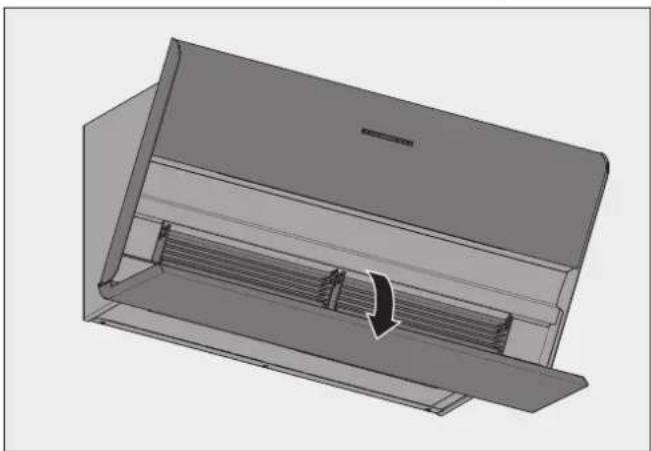
Fold the lower front panel down.
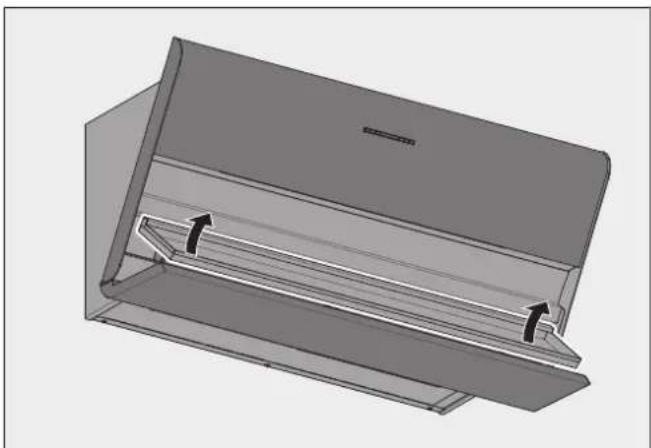
Lift the lower section out at the rear edge.
Take hold of the lower section at the sides to remove it.
Clean the upper section with a soft, moist cloth.
Clean the lower section with a soft, moist cloth or in a dishwasher.
Dry the upper and lower sections with a soft cloth.
Re-attach the lower section.
→ "3.4.8 Insert inside parts" (page 102).
Capillar Trap
The Capillar Traps are inserted and held in place in the device by magnets.
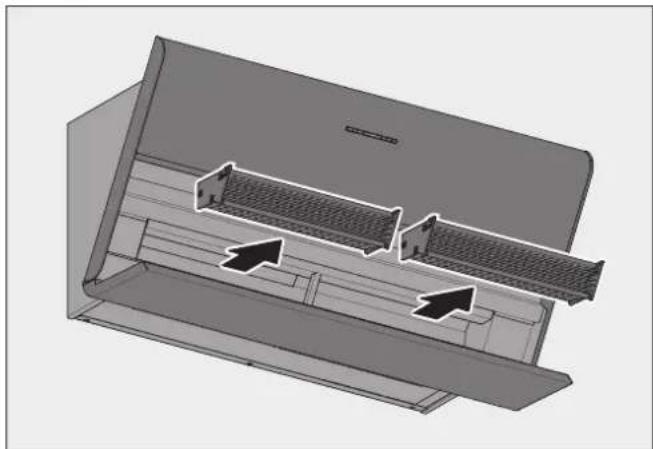
Grasp the Capillar Traps on the sides with both hands.
Pull the Capillar Traps out.
Clean the Capillar Traps, e.g. in a dishwasher.
Clean the surfaces and edges on the mounting slot for the Capillar Traps with a soft, damp cloth.
Make sure that the Capillar Traps are completely dry.
Insert the Capillar Traps again.
→ "3.4.8 Insert inside parts" (page 102).
6. Maintenance
6.1 Safety instructions for maintenance
⚠ WARNING!
Hazard through a disregard of the maintenance instructions!
This chapter contains important information for the safe maintenance of the device.
Read through this chapter carefully before carrying out maintenance work on the device.
Follow the safety instructions.
Carry out the maintenance work as described.
-
Repairs only by qualified specialist personnel. ⇒ "1.2 Authorised target groups" (page 92).
• Electrical work only to be undertaken by qualified electricians.
→ "1.2 Authorised target groups" (page 92). -
Maintenance only by authorised users.
→ "1.2 Authorised target groups" (page 92). - No maintenance work permitted by children under 8 years old and persons who would not be able to properly assess the hazards associated with handling the device.
- When working at heights, ensure good stable footing (e.g. stable stepladder).
- The hob and other parts that can be touched must be cooled down.
• Never open the fan housing.
6.2 Maintenance
6.2.1 Replacing filter filling
Odours are trapped in the filter filling in the recirculated air filter. The odour-free, cleaned room air is fed back into the room.
Recirculated air filters are maintenance-free for up to two years. Then filter filling must be replaced at regular intervals.
Maintenance intervals
• Daily use: With odours in the exhaust air or after 12 months at the latest.
• Occasional use: With odours in the exhaust air or after 24 months at the latest.
ATTENTION!
Danger of property damage through falling parts!
When working on the device, parts of the device or tools could fall and damage the kitchen equipment.
Protect the cooled hob and other surfaces in the cooking area (e.g. with thick cardboard).
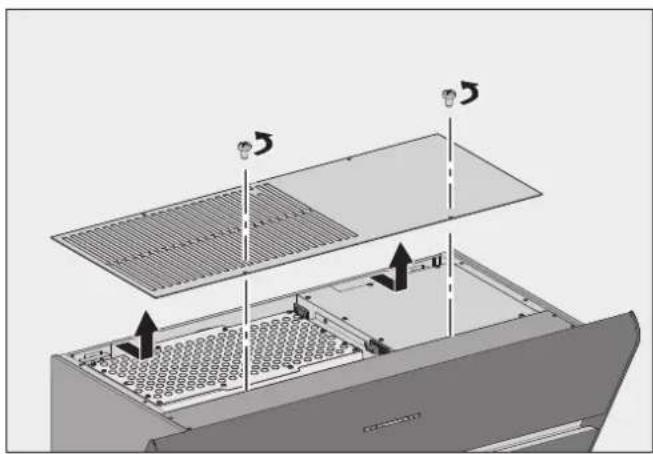
Remove the two screws.
Remove the cover.
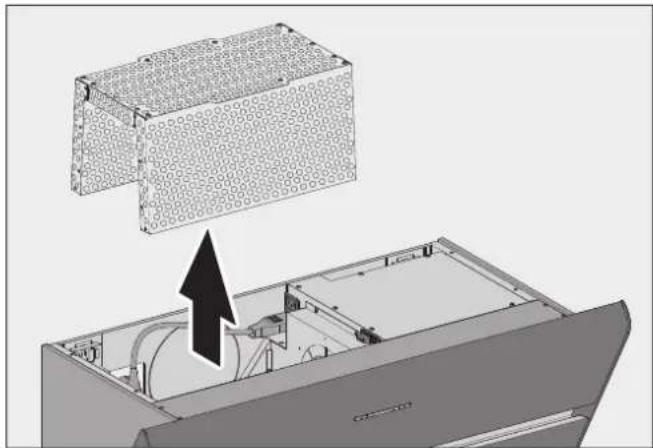
Remove the filter to the top.
The replacement of the filter filling is carried out as described in the associated instructions.
Change the filter filling.
Clean the filter from the outside (e.g. through extraction with a vacuum cleaner).
Insert the filer again.
→ "3.4.8 Insert inside parts" (page 102).
6.2.2 Changing the lamps
The device is fitted with maintenance-free LED lighting. In the event of a fault:
Please consult your dealer or customer services.
6.3 Fault rectification
Possible faults are described below:
Description of the fault.
- Possible cause.
Remedy.
Fan and lighting do not work.
- No power supply.
Check that the all-pole mains switch is connected.
Switch the mains switch on.
• The breaker may have been tripped or is defective.
Check to see if the breaker has tripped.
If you use electric circuit breakers, turn the circuit breaker on again.
For other types of fuse, consult a qualified electrician.
The fan does not work.
• The device is not switched on.
Check all power levels.
→ "4.3 Normal operation" (page 104).
- The device is connected to a window contact switch and the window is closed.
Open the window.
- The device is connected to an under-pressure monitor. The under-pressure monitor detects a critical under-pressure.
Open a window.
Wait until the air pressure returns to normal.
The lighting does not work.
• The lamp has blown.
Please consult your dealer or customer services.
Smells occur during operation.
• The filter filling is used up.
Change the filter filling.
→ "6.2.1 Replacing filter filling" (page 108).
Poor device performance.
• The recirculated air filter is clogged.
Replace the filter filling of the recirculated air filter.
→ "6.2.1 Replacing filter filling" (page 108).
Control panel does not react after being touched several times.
• The control panel is soiled.
Clean the control panel.
→ "5. Cleaning" (page 106).
• The device software requires a restart.
Briefly disconnect the mains power supply.
Moisture in the device.
• Dripping or splashing water has penetrated the device.
- Liquid (e.g. from vases, bottles on the device) has penetrated the device.
Immediately shut off the power supply, by removing the fuse.
Make sure that the power supply cannot be unintentionally reconnected. For example by tasking a person with ensuring that the fuse/breaker is not restored/switched on.
Ensure that no more liquid can penetrate the device.
Allow the device to dry.
Have the device checked and repaired by qualified, specialist personnel prior to using the device again.
If a fault persists:
Please consult your dealer or customer services.
7. Dismounting
⚠ WARNING!
Danger of injuries through improper handling!
Taking the device down requires a great deal of physical exertion due to its size and weight. If the device falls down, serious injuries are possible.
■ Two persons are required to take the device down.
■ Ensure stable footing when taking the device down.
Ensure that no other people are in the working area.
ATTENTION!
Danger of property damage through improper handling!
Taking the device down requires a great deal of physical exertion due to its size and weight. If the device falls, the device, kitchen furnishings and other objects could be damaged.
Cover the cooled hob.
Keep the installation area clear.
Disconnect all poles of the power supply for the device.
Pull out the mains plug.
Loosen the mounting screws by approx. one turn.
Lift the device with two persons.
Lift the device off, forwards.
Set the device down on a firm and protective surface.
8. Disposal
8.1 Dispose of packaging
ATTENTION!
Risk of environmental damage due to improper disposal of the packaging!
Do not put the packaging into the normal household waste.
Take the packaging for environmentally friendly and proper recycling.
The packaging provides protection from transport damage.
Only the original packaging guarantees sufficient protection during transportation.
Store the packaging in a location which is inaccessible to children.
The packaging materials have been selected from an environmentally friendly perspective and are made from re-usable materials. The packaging materials can be returned to the raw materials cycle after use. This saves valuable raw materials.
• The outer packaging is made from cardboard.
- The filling material and the insets are made from cardboard or styrofoam.
- The protective film and bags are made from polythene (PE).
- Dispose of the packaging in an environmentally friendly manner, separated by materials.

8.2 Dispose of the device
ATTENTION!
Risk of environmental damage due to improper disposal of the device!
The device is subject to the European Directive 2012/19/EU and should not be disposed of with household waste.
Do not put the device into the normal household waste at the end of its service life.
Enquire about the disposal options or environmentally friendly and proper recycling opportunities with your municipal or regional authorities.
Render the device unusable after dismounting it, e.g. by cutting the de-energised mains cable.
Disposition of the device in accordance with the legal provisions via a professional disposal centre or your local disposal facility.

9. Annex
9.1 Contact
If you have any questions or suggestions, please select from the following options:
Telephone: +49 (0) 5971/80 809-0 Mon to Thu 8:00 – 17:30 hrs and Fri 8:00 – 16:30 hrs
Fax: +49 (0) 5971/80 80 9-10
Internet: www.berbel.de
Email: info@berbel.de
Contact the manufacturer's customer support department
There are several ways for you to contact our customer service. Please select from the following options:
Telephone: +49 (0) 5971/80 809-660 Mon to Thu 8:00 – 17:30 hrs and Fri 8:00 – 16:30 hrs
Fax: +49 (0) 5971/80 80 9-10
Email: service@berbel.de



- ZENTRIFUGALKRAFT
- MAUERKASTEN
- FORCE CENTRIFUGE
- CAISSON MURAL
- ATTENTION
- RISQUE DE DOMMAGES EN CAS DE MANIPULATION INCORRECTE
- FORZA CENTRIFUGA
- CASSETTA A MURO
- CENTRIFUGALE KRACHT
- WANDKAST
- SAFETY INFORMATION
- DANGER
- ⚠ WARNING
- CAUTION
- SYMBOL CLARIFICATION - TEXT
- SYMBOL CLARIFICATION - ILLUSTRATIONS
- TABLE OF CONTENTS
- SAFETY INFORMATION 92
- PRODUCT INFORMATION....93
- INSTALLATION....95
- OPERATION....104
- CLEANING 106
- MAINTENANCE 108
- DISMOUNTING 110
- DISPOSAL....110
- ANNEX....111
- 1.1 PROPER INTENDED USE
- 1.2 AUTHORISED TARGET GROUPS
- 1.3 GENERAL SAFETY INSTRUCTIONS
- HAZARD THROUGH A DISREGARD OF THE OPERATING AND INSTALLATION INSTRUCTIONS
- PRODUCT INFORMATION
- 2.1 FUNCTIONAL PRINCIPLE
- CENTRIFUGAL FORCE
- BACK-FLOW TECHNOLOGY
- 2.2 RECIRCULATED AIR MODE
- 2.3 PRODUCT OVERVIEW
- 2.4 SCOPE OF DELIVERY
- 2.5 TECHNICAL DATA
- INSTALLATION
- 3.1 SAFETY INSTRUCTIONS FOR INSTALLATION
- HAZARD THROUGH DISREGARD OF THE INSTALLATION INSTRUCTIONS
- 3.2 REQUIREMENTS FOR THE INSTALLATION LOCATION
- RISK OF DEATH DUE TO IMPROPER INSTALLATION
- 3.3 REQUIREMENTS FOR RECIRCULATED AIR MODE
- 3.4 INSTALLATION PROCEDURE
- SHORT OVERVIEW
- 3.4.1 PREPARATION FOR INSTALLATION
- 3.4.2 UNPACK THE DEVICE
- HAZARD OF GLASS BREAKING OR OTHER DAMAGE DUE TO INCORRECT HANDLING
- 3.4.3 REMOVE INSIDE PARTS
- DANGER OF PROPERTY DAMAGE THROUGH FALLING PARTS
- 3.4.4 HANG THE DEVICE IN PLACE
- RISK OF DEATH DUE TO EXPLOSIONS OR ELECTRIC SHOCK
- DANGER OF INJURIES THROUGH IMPROPER HANDLING
- DANGER OF PROPERTY DAMAGE THROUGH IMPROPER HANDLING
- 3.4.5 CONNECT ACCESSORIES
- A CONTROL BOX
- RISK OF DAMAGE THROUGH INCORRECT CONNECTION
- WALL BOX
- WINDOW CONTACT SWITCH
- UNDER-PRESSURE MONITOR
- 3.4.6 ESTABLISH ELECTRICAL POWER SUPPLY
- 3.4.7 INSTALLING THE RECIRCULATED AIR FILTER PERMALYT
- 3.4.8 INSERT INSIDE PARTS
- 3.4.9 CHECK AND CARRY OUT COMMISSIONING
- RISK OF DISRUPTIONS DUE TO MOISTURE IN THE DEVICE
- OPERATION
- 4.1 SAFETY INFORMATION FOR OPERATION
- HAZARD THROUGH A DISREGARD OF THE OPERATING INSTRUCTIONS
- 4.2 CONTROL PANEL
- 4.3 NORMAL OPERATION
- FIRE HAZARD DUE TO GREASE RESIDUE
- 4.3.1 RUN-ON FUNCTION
- 4.3.2 HOB LIGHTING
- CLEANING
- 5.1 SAFETY INFORMATION FOR CLEANING
- HAZARD THROUGH A DISREGARD OF THE CLEANING INSTRUCTIONS
- 5.2 CLEANING PROCEDURES
- DANGER OF DAMAGE THROUGH IMPROPER CLEANING
- CONTROL PANEL
- SURFACES
- MAINTENANCE
- 6.1 SAFETY INSTRUCTIONS FOR MAINTENANCE
- HAZARD THROUGH A DISREGARD OF THE MAINTENANCE INSTRUCTIONS
- 6.2 MAINTENANCE
- 6.2.1 REPLACING FILTER FILLING
- MAINTENANCE INTERVALS
- 6.2.2 CHANGING THE LAMPS
- 6.3 FAULT RECTIFICATION
- DISMOUNTING
- DISPOSAL
- 8.1 DISPOSE OF PACKAGING
- RISK OF ENVIRONMENTAL DAMAGE DUE TO IMPROPER DISPOSAL OF THE PACKAGING
- 8.2 DISPOSE OF THE DEVICE
- RISK OF ENVIRONMENTAL DAMAGE DUE TO IMPROPER DISPOSAL OF THE DEVICE
- ANNEX
- 9.1 CONTACT
- CONTACT THE MANUFACTURER'S CUSTOMER SUPPORT DEPARTMENT
Brand : BERBEL
Model : BKH 90 ST
Category : Range hood