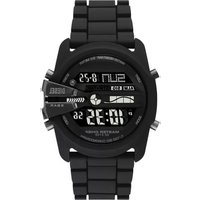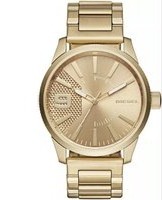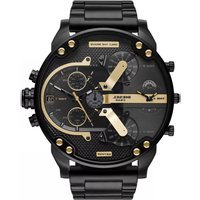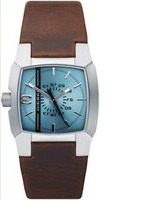
Cliffhanger - Watch Diesel - Free user manual and instructions
Find the device manual for free Cliffhanger Diesel in PDF.


User questions about Cliffhanger Diesel
0 question about this device. Answer the ones you know or ask your own.
Ask a new question about this device
Download the instructions for your Watch in PDF format for free! Find your manual Cliffhanger - Diesel and take your electronic device back in hand. On this page are published all the documents necessary for the use of your device. Cliffhanger by Diesel.
USER MANUAL Cliffhanger Diesel
DIGITAL MOVEMENT GUIDE....2
INSTRUCTION
English 4
Italiano 16
Deutsch 29
Français 42
Español 55
Português. 68
Svenska 81
Русский....94
日本語 107
中文 121
繁體中文 133
한국어....145
WARRANTY
English....157
Italiano 159
Deutsch 160
Français 162
Español 164
Português....167
Svenska 169
Русский....170
日本語 172
中文 174
繁體中文 ..... 175
한국어....177
Service Centers 179
Certificate of Warranty 185
NOTICES 187
DIGITAL MOVEMENT GUIDE / GUIDA AL MOVIMENTO DIGITALE / DIGITALES UHRWERK - LEITFADEN / GUIDE DU MOUVEMENT NUMÉRIQUE / GUÍA DE MOVIMIENTO DIGITAL / GUIA DIGITAL DE MOVIMENTO / ANVISNINGAR FÖR ANVÄNDNING AV DIGITALA FUNKTIONER / ИНСТРУКЦИЯ ДЛЯ ЦИФРОВЫХ МОДЕЛЕЙ / デジタルムーヴメントガイド / 数字型机芯指南 / 數位顯示機芯之説明 / 디지털 무브먼트 가이드

FL137AX, QFOX21CA
DZ7125 - DZ7127, DZ7193, DZ7194, DZ7214, DZ7221, DZ7223, DZ7234, DZ7246, DZ7247, DZ7250, DZ7260
(for digital display only)
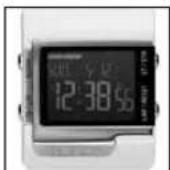
QFL226
DZ7130, DZ7131, DZ7150
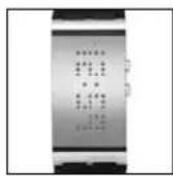
MLL-045
DZ7092
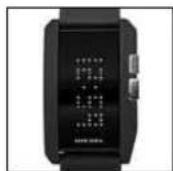
QFL631
DZ7164
ENGLISH
IMPORTANT TO KNOW!
- When the watch is underwater or wet, never use the pushers/bezels, or set the time. Watch cases and metal bracelets should be rinsed thoroughly in fresh water after being in salt water.
- No hot tub/sauna. Please do not take your DIESEL watch into the hot tub/sauna. The combination of extreme heat and water may cause your watch to lose some of its water-resistance.
- No backward hand, or date, adjustments should be made when the analog hands read between 8pm and 3am. At these times, the gears are too close together and such a change could cause damage.
- Tighten screwlock crown completely.
• Always set the crown in the normal position.
Resistance to Water
| Depth | WATER-RESISTANT 3 BAR (30 M) | WATER-RESISTANT 5 BAR (50 M) | WATER-RESISTANT 10 BAR (100 M) |
| Caseback marking 3 ATM | 5 ATM 10 ATM | ||
| Light spray, perspiration, light rain, etc. | OK OK OK | ||
| Bathing, etc. | NO OK OK | ||
| Swimming, etc. | NO NO OK | ||
| Skin diving (diving without oxygen cylinder) | NO NO OK | ||
| Water-resistant characteristics | Normal daily water contact. | Suitable for bathing, but cannot be worn for swimming or diving. | Suitable for skin diving. |
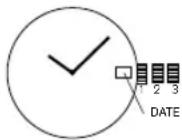
Date Watch VJ22A31, 505.2-3, 515.2-3, 585.2, 2115, 2117, 2315
Date Setting
- Pull crown out to position 2.
- Turn counter-clockwise and set date for previous day.
time Setting
- Pull crown out to setting 3.
- Turn counter-clockwise to advance time and continue until day/date changes to present day.
- Set correct time.
- Push crown back to position 1.
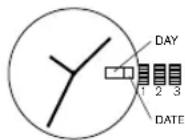
Day/Date Watch 2805
Date Setting
- Pull crown out to position 2.
- Turn clockwise and set date for previous day.
Day Setting
With crown still in position 2, turn counter-clockwise and set day for previous day.
time Setting
- Pull crown out to setting 3.
- Turn counter-clockwise to advance time and continue until day/date changes to present day.
- Set correct time.
- Push crown back to position 1.
Multifunction 6P25
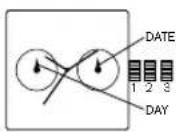
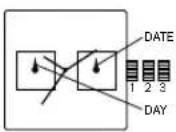
Date Setting
-
Pull crown out to position 2.
-
Turn counter-clockwise to select date.
Day and time Setting
- To set time, pull crown out to position 3.
- Turn clockwise to set hour and minute hands. The hand showing days of the week will also move with the hour and minute hands. Keep turning until you have reached the desired day.
- Push crown back to position 1.
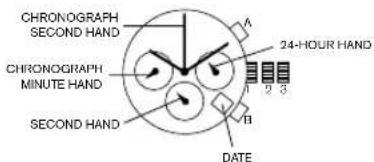
Chronograph with Date FS20
text_image
CHRONOGRAPH SECOND HAND A 24-HOUR HAND 1 2 3 B DATE CHRONOGRAPH MINUTE HAND SECOND HANDtime Setting
- Pull crown out to position 3. Chronograph second hand will return to zero position. Do not return the crown to its normal position while the hands are returning to zero, or else the position the hands are at when this is done will be recognized as the new zero position.
- Turn to set hour, minute and 24 hour hands.
- Return crown to position 1.
Date Setting
- Pull crown out to position 2.
- Turn clockwise to set the date.
- Return crown to position 1
CHRONgRaPH OPeRatiOn
- Push A to start/stop the chronograph.
- Push B to reset the chronograph.
CHROnOgRaPH ZeRO ReSet
- Pull crown out to position 3.
- Press A to set the chronograph second hand to 12:00 (zero) position. Each press advances the chronograph second hand one mark. If A is held down for over 2 seconds, the chronograph second hand advances continuously.
- Return crown to position 1.
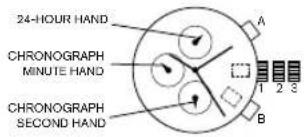
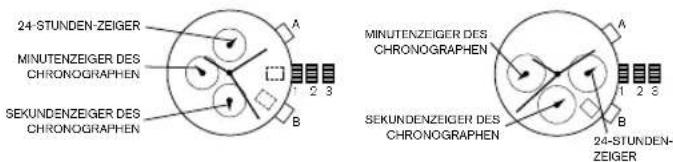
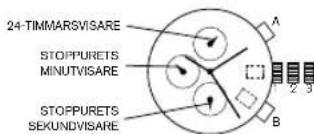
Chronograph JS15, JS16, JS25
text_image
24-HOUR HAND CHRONOGRAPH MINUTE HAND CHRONOGRAPH SECOND HAND A 1 2 3 B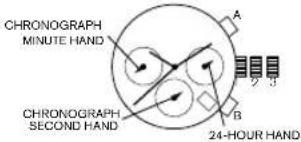
text_image
CHRONOGRAPH MINUTE HAND CHRONOGRAPH SECOND HAND A B 24-HOUR HANDTIME AND DATE SETTING
-
Pull crown out to position 2.
-
Rotate crown clockwise until the previous day's date is shown in the date window.
-
Pull crown out to position 3.
-
Rotate crown clockwise until the correct date is shown in the date window.
-
Continue to rotate crown to set correct am/pm time.
NOTE: The movement of the 24-hour hand corresponds to the hour and minute hands. When setting the time be sure to check that the 24-hour hand is set properly.
- Return crown to position 1
NOTE: When the crown is in position 2, do not press the pushers. Otherwise the chronograph hands will move.
NOTE: Do not set the date between 9:00 p.m. and 1:00 a.m. to ensure accuracy.
CHRONOGRAPH
-
Press A to start/stop the chronograph.
-
Press B to reset to zero.
CHRONOGRAPH ZERO RESET
-
If either of the chronograph hands is not at the zero (12:00) position, pull crown out to position 3.
-
Press A to move hands clockwise; press B to move hands counter-clockwise. Each press of A or B will move the chronograph hands by one increment/decrement. Or press and hold A or B for fast increment/decrement.
-
When both hands are in the zero position, reset time and return crown to position 1.
NOTE: Chronograph minute hand will synchronize with chronograph second hand during chronograph zero reset.
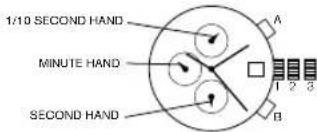
Chronograph Stopwatch VD57B, VD57B1B
text_image
1/10 SECOND HAND MINUTE HAND SECOND HAND A B 1 2 3TIME SETTING
- Pull crown out to position 3.
- Set time by turning the crown clockwise.
- Push back to position 1 to start the watch.
USING THE STOPWATCH
- Press A to start/stop the stopwatch.
- Press B to control the split time and reset.
STOPWATCH HAND ADJUSTMENT
- Pull crown out to position 3.
- Press A to reset the stopwatch 1/10 second hand to the "0" position.
- Press B to reset the second and minute hands. The hands only move clockwise.
- With each press of A or B, the hands move one position. They move quickly if the pushers are held down.
NOTE: If the stopwatch hands function improperly, pull out crown and press A and B at the same time for over 2 seconds. When the pushers are released, the stopwatch second and 1/10 second hands will spin around and return to "0." This will indicate that the internal circuit has been reset.
DATE SETTING (on some models only)
- Pull crown out to position 2.
- Turn clockwise until desired date appears in window.
- Push crown back to position 1
Chronograph Stopwatch VD53, VD53B
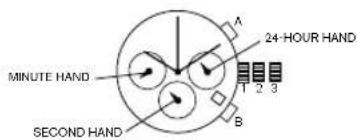
text_image
MINUTE HAND SECOND HAND A 24-HOUR HAND 1 2 3 Btime and Date Setting
-
Before setting the time, make sure the chronograph is stopped and set to zero (12:00) position.
-
Pull crown out to position 2.
-
Turn crown clockwise until the previous day's date is displayed.
-
Pull crown out to position 3 when the second hand is at the 12:00 position.
-
Turn crown to set time.
NOTE: The movement of the 24-hour hand corresponds to the hour and minute hands. When setting the time be sure to check that the 24-hour hand is set properly.
- Return crown to position 1.
NOTE: When the crown is in position 2, do not press the pushers. Otherwise the chronograph hands will move.
CHROnOgRaPH
-
Press A to start/stop the chronograph.
-
Press B to reset to zero.
Split time
- Press B while the chronograph is running.
- Press B again to return to the chronograph.
- Press A to finalize timing.
- Press B to reset.
CHRONgRaPH ZeRO ReSet
- If either of the chronograph hands is not at the zero (12:00) position, pull crown out to position 3.
- Press A to move hands clockwise; press B to move hands counter-clockwise.
- Return crown to position 1.
Digital FL137AX, FL137AB, QFOX21CA, QFOX21CB
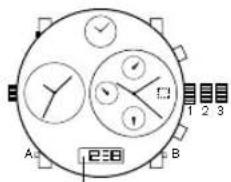
text_image
A 238 B 1 2 3Digital FL137AX / QFOX21CA / QFOX21CB
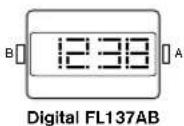
nORmal time DiSPlay
- Press A to change display. Display sequence is time, calendar, seconds.
- Press B to toggle 12/24-hour format.
time and Date Setting
- Press and hold B for 2 seconds to enter setting mode; year will begin flashing.
- Press A to advance digit; press and hold A for fast advance.
- Press B to set and advance to next setting value.
- Setting sequence is year, month, date, hour, minute.
- Press B to exit setting mode.
N OTE: Hour will be displayed in 24-hour format in time setting mode. NOTE: If no pusher/button is operated for 30 seconds, all changes will be saved and the setting will automatically return to display mode.
Digital QFL226DB
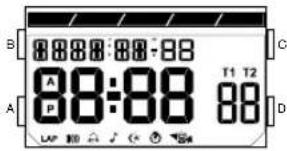
text_image
B 8888:88:88 A 88:88 P T1 T2 88 A DAlarm on
Hourly chime on
8 Count stop
Automatic EL
Count repeat
Key tone
Count up
Chronograph
| MODE | A SET/EL | B MODE | C START/STOP | D LAP/RESET |
| REAL TIME | SET (hold for 2 seconds) | TO CHRONOGRAPH | TOGGLE TIME1/TIME2 | KEY TONE ON/OFF |
| TIME SETTING | EXIT NEXT | ADVANCE DECREMENT | ||
| CHRONOGRAPH | MEMORY RECALL | TO TIMER START/STOP LAP/RESET | ||
| MEMORY RECALL | NEXT LAP TO | TIMER | TO CHRONOGRAPH | TO CHRONOGRAPH |
| TIMER | SET (hold for 2 seconds) | TO ALARM START/STOP RESET | ||
| TIMER SETTING | EXIT NEXT | ADVANCE DECREMENT | ||
| ALARM TIME | SET (hold for 2 seconds) | TO REAL TIME NEXT ALARM ALARM ON/OFF | ||
| ALARM SETTING | EXIT NEXT | ADVANCE DECREMENT | ||
OVERVIEW
Features include DUAL TIME/DATE, CHRONO, TIMER, ALARM, and LIGHT UP EL.
LIGHT-UP EL
Press A to activate light-up function for 3 seconds.
TIME OF DAY MODE
- Press C to toggle between Time 1 and Time 2.
12 13
- Hold C for two seconds to set Time 1 or 2 as default.
- Press D to turn on/off key tone.
Time 1
- To set Time, press A until hour flashes. Press B to select the setting item. Use C and D buttons to adjust the values up or down. Press A to exit set mode.
Time 2
- To set Time, press A until hour flashes. Press B to select the setting item. Use C and D buttons to adjust
the values up or down. Press A to exit set mode - The range difference between Time 1 and Time 2 is 23 hours.
CHRONO MODE
- Press C to start and stop chronograph.
- Press D to Split/Reset the chronograph.
- Press A to recall the memory if Chronograph is stopped.
- Press A again to view the next lap.
- Press C or D to exit Recall mode and go back to Chronograph mode.
- There are a total of 10 lap memories.
TIMER MODE
- There are 3 different modes of timer: Count Down-Stop, Count Down-Repeat, Count Down-and Up.
- Press C to start/stop the timer counting.
- Press D to reset the counter to the preset value if timer is stopped.
- Press and hold A for 2 seconds to enter Timer Setting Mode.
Timer Setting Mode
- Press B to cycle around the setting item: timer-type, hour, minute, second and to back timer-type again.
- Press C and D to increase/decrease the setting value.
- Press A to exit the setting mode.
Timer Alarm
- Timer alarm will beep 2 times a second for 30 seconds.
ALARM MODE
- Press C to select the alarm.
- Press D to enable/disable the alarm.
- Press B to change to Time mode again.
Alarm Setting Mode
- Press and hold A for 2 seconds to enter the alarm settings mode.
- Press C and D to increase or decrease the settings value.
- Press A to exit the settings mode.
Curved LED Digital MLL-045
nORmal time DiSPlay
- Press B for time display and animation.
- Press B again to toggle time/date mode.
- When time or date is displayed, press and hold B for 3 seconds to toggle horizontal/vertical display.
time and Date Setting
- From time display, press and hold A; 12/24 hour format will begin flashing.
- Press B to select 12/24 hour format.
NOTE: In 12 hour format, a small dot will be shown in the upper left hand corner of the display to indicate p.m. time. - Press A to set and advance to hour.
- Press B to advance digit.
- Press A to set and advance to next setting value.
- Setting sequence is: 12/24 hour format, hour, minutes, date, month.
- Press A to save and exit setting mode.
NOTE: If no pusher is operated for 7 seconds, settings will be saved and the display will return to normal time display.
PeRSOnal meSSage Setting
- Press B to display time, press B again to display date, press and hold A; first letter of message will begin flashing.
- Press B to select character.
- Press A to set and advance to the next character.
- Repeat steps until desired message. Please note there are only ten spaces available.
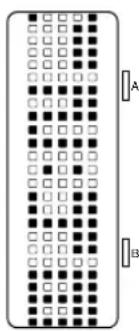
text_image
Diagram showing a grid of dots with labeled positions A and B, likely representing a pattern or data layout.Curved LED QFL631
nORmal time DiSPlay
- Press B for time display.
- Press B again immediately for date display.
- After time or date display, message will scroll. Display will automatically turn off after message scrolling is complete.
time and Date Setting
- Press and hold A for 2 seconds to enter setting mode; 12/24-hour format will begin flashing.
- Press B to select 12/24 hour format.
- Press A to advance to hour.
- Press B to increase digits; press and hold B for fast advance.
- Press A to advance to next setting value
- Setting sequence is: 12/24-hour format, hour, minutes, year, month, date
- Press A to save and exit setting mode.
NOTE: If no pusher is operated for 7 seconds, settings will be saved and the display will automatically turn off.
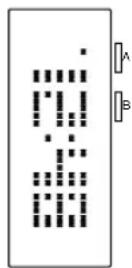
meSSage Setting
- In calendar mode, press and hold A for 2 seconds to enter setting mode; first character will begin flashing.
- Press B to change the character.
- Press A to advance to next character. NOTE: Maximum message length is 10 characters.
ITALIANO
INFORMAZIONI IMPORTANT!
ImPOSTaZiOne Della Data
imPOSTaZiOne Della Data
imPOSTaZiOne Dell'ORaRiO
imPOSTaZiOne Della Data
ViSUaliZZaZiOne ORaRiO nORmale
text_image
B A 88:88 P T1 T2 88 LAP 50natural_image
Pure electrical circuit lines without any symbolsLED Curvo QFL631
ViSUaliZZaZiOne Dell'ORa nORmale
Chronograph JS15, JS16, JS25
text_image
24-STUNDEN-ZEIGER MINUTENZEIGER DES CHRONOGRAPHEN SEKUNDENZEIGER DES CHRONOGRAPHEN A 1 2 3 B MINUTENZEIGER DES CHRONOGRAPHEN A 1 2 3 B 24-STUNDEN- ZEIGERtext_image
B 88:88:88:88 A 88:88 P T1 T2 88 D LAP 80 7 6 5 4Wecker ein
Stundenschlag ein
text_image
Diagram showing a vertical grid of black and white squares with labeled sections A and B, likely representing a pattern or layout.Gewölbte LED QFL631
text_image
B 88:88:88 A 88:88 T1 T2 88 A Dnatural_image
Pure electrical circuit lines without any symbolsDel incurvée QFL631
aFFiCHage nORmal De l'HeURe
natural_image
Pure electrical circuit lines without any symbolsLED Curvo QFL631
Pantalla De HORa nORmal
text_image
B A P T1 T2 LAP C DAlarme ligado
text_image
Diagram showing a vertical grid of squares with labeled positions A and B, likely representing a digital or logic layout.Stoppur JS15, JS16, JS25
text_image
24-TIMMARSVISARE STOPPURETS MINUTVISARE STOPPURETS SEKUNDVISARE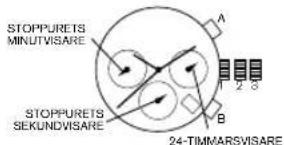
text_image
STOPPURETS MINUTVISARE STOPPURETS SEKUNDVISARE A B 24-TIMMARSVISAREtext_image
B A T1 T2 88:88 88 P LAP 300 J C S M A D CAlarm på
text_image
Diagram of a grid-based electronic component with labeled terminals A and B, showing alternating black and white squares.text_image
B 88:88:88:88 A 88:88 T1 T2 P 88 DБудильник включен
text_image
Diagram showing a grid of 24 numbered blocks with labeled vertical bars A and B, likely representing a digital logic or signal pattern.text_image
B A 88:88 T1 T2 A P 88 Dアラームオン
時報オン
カウントストップ
自動ELバックライト
カウントリビート
五一操作音
84 カウントアップ
クロノグラフ
text_image
B 8888:88:88 A 88:88 T1 T2 P 88 LAP 34 7 0 24闹钟开启
text_image
Image showing a vertical column of black and white square patterns with alternating dots, possibly representing a pattern or data visualization.曲面型 LED QFL631 手表
正常时间显示
natural_image
Pure electrical circuit lines without any symbols曲面型 LED 腕錶 QFL631
標準時間顯示
디지털 FL137AX,FL137AB,QFOX21CA,QFOX21CB
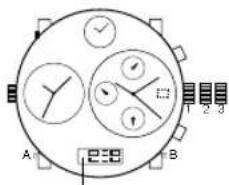
text_image
A 2:8 B 1 2 3디지털 FL137AX/QFOX21CA/QFOX21CB
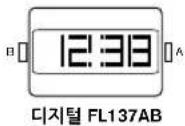
정상 시간 표시
natural_image
Pure electrical circuit lines without any symbols커브형 LED QFL631
정상 시간 표시
Your DIESEL watch is warranted by Diesel Watches* for a period two (2) years from the original date of purchase under the terms and conditions of this warranty. The Diesel warranty covers materials and manufacturing defects. A copy of the receipt or dealer stamp in the warranty booklet is required for proof of purchase.
During the warranty period the watch movement, hands and dial are the only components covered under this warranty. A covered component will be repaired or the watch will be replaced free of repair charges, if it proves to be defective in material or workmanship under normal use.
In case of replacement, Diesel cannot guarantee that you will receive the same model watch. If your model is not available, a watch of equal value and similar style will be provided. The warranty for the replacement watch ends two (2) years from the date the replacement watch is received.
tHiS WaRRanty DOeS nOt COVeR:
- Any defects in materials and workmanship of battery, case, crystal, strap or bracelet.
- Damage resulting from improper handling, lack of care, accidents, or normal wear and tear.
- Water damage unless marked water-resistant.
This warranty is void if the watch has been damaged by accident, negligence of persons other than authorized Diesel sales or services agents, unauthorized service, or other factors not due to defects in materials or workmanship.
The foregoing warranties and remedies are exclusive and in lieu of all other warranties, terms or conditions, express, implied or statutory, as to any matter whatsoever, including, without limitation, warranties of merchantability, fitness for a particular purpose, accuracy, satisfactory quality, title, and non-infringement, all of which are expressly disclaimed by Diesel. Diesel shall not be liable for incidental, consequential, indirect, special or punitive damages or liabilities of any kind arising out of or in connection with the sale or use of this product, whether based in contract, tort (including negligence), strict product liability or any other theory, even if Diesel has been advised of the possibility of such damages and even if any limited remedy specified herein is deemed to have failed of its essential purpose. Diesel's entire liability shall be limited to replacement or repair of the purchase price paid, at Diesel's sole option.
Some countries, states, or provinces do not allow the exclusion or limitation of implied warranties or the limitation of incidental or consequential damages so the above limitations and exclusions may be limited in their application to you. When implied warranties may not be excluded in their entirety, they will be limited to the duration of the applicable written warranty. This warranty gives you specific legal rights; you may have other rights that may vary depending on local law. Your statutory rights are not affected.
FOR AUSTRALIAN CUSTOMERS:
Our goods come with guarantees that cannot be excluded under the Australian Consumer Law. You are entitled to a replacement or refund for a major failure and for compensation for any other reasonable foreseeable loss or damage. You are also entitled to have the goods repaired or replaced if the goods fail to be of acceptable quality and the failure does not amount to a major failure.
ReQUeSting WaRRanty and OtheR WatCH RePaiR:
Should you require work under warranty, please send in your watch, a copy of your sales receipt and/or the warranty booklet with dealer stamp and a description of the problem to the authorized international watch service center closest to you (see enclosed list of addresses).
For service work that is not covered under this warranty, the service center may perform the services you request for a charge dependent on watch style and type of work requested. These charges are subject to change.
Do not send original packaging, as it will not be returned. Diesel highly recommends you insure your parcel and adequately protect the watch during shipment. Diesel is not responsible for product lost or damaged during shipment.
For repairs of your Diesel watch we recommend that you contact an authorized Diesel dealer or the authorized international watch service center closest to you (see enclosed list of addresses).
*10615 Sanden Drive, Dallas, Texas 75238 USA
ITALIANO
Col. Pio XII, Santa Catarina N.L.
C.P. 66362 México
Tel: (0181) 88 88 70 00 Fax: Ext 102
Fossil Australia Service Centre
P.O. Box 6277
Frencha Forest 2086
Australia
Phone: 02 8977 8086
Toll Free Phone: 1800 618 653
Fax: 02 8977 8038
E-Mail: customercare.au@fossil.com
aUStRia
DHL Express (Austria) GmbH
Fossil Repairs Service
Gewerbestrasse 9
A-5102 Anthering
Service-Hotline: 0810 300 450
Attn. Warranty & Repairs
Woluwelaan 151
1831 Diegen
Tel: +31 (0) 314 799062
Email: customerservice@fossil.nl
BellZe
Bentrani Watches
6660 NW 20 Street Suite A&B
Miami, FL 33172
Telephone: 305-377-3660
BOLiVia
Bentrani Watches
c/o Eurochronos S.R.L
Av. Velarde 113 Esc. Irala
Santa Cruz
Telephone: (5913) 336-8762
BOSnia - HeRZegOVina
Watch Line D.O.O.
Muhameda ef. Pandze 4D
71000 Sarajevo
Telephone: +387 33 273 950
Telefax:+387 33 273 951
E-mail: watchlin@bih.net.ba
BRaZil
Dumont Saab do Brasil
Rua Santa Cruz, 231
CEP - 04121-000 Vila Mariana
Metro Service Centre - Canada
214 King Street West - Suite #601
Toronto, Ontario
M5H 3S6
Tel: 1-866-636-7745
canadarcp@fossil.com
CHile
Bentrani Watches
Tecnico en Relojes
Rut:10895935-5
Santiago centro
CHILE
Telephone: 02-6380475
CHina
Fossil Trading (Shanghai) Co., Ltd.
Rm 2608, Grand Gateway Tower II
3 Hong Qiao Road
Xu Hui District, Shanghai 200030
China
Tel: (86)400-820-3126
Fax:(8621)-6448-2733
COlOmBia - 1
Bentrani Watches IIc
La Riviera S.A.S
Bentrani Watches llc
Joveria Kronos
Junin No. 50-26
Medellin
Telephone: + (574) 231-6929
COIOmBia - 3
Bentrani Watches llc
Pausanías Giron Reyes
Calle 100 No. 16-72 local 03
Bogota
Tel: + (571)601-0147
COSta RICa
Bentrani Watches llc
Joyeria Wien
Carretera a Pava, Toyota 25
Oeste Bodega 42
San Jose
Telephone: + (506) 223-16478
CROatia
HORA PLUS D.O.O.
Vlaska 55
10000 Zagreb / Croatia
Telephone: +385 1 4697 787
E-Mail: zeljka.tomljenovic@korum.hr
CZeCH RePUBLIC
Klenoty Aurum
Hodinářsky servis - 1. patro
Telephone: (593) 2-2464475
eCUaDOR - 3
FOSSIL
C.C. Mall del Sol
Telephone (593) 2-2980018
egyPt
Link Watches
17 El Shaheed Mahmoud El
Ashry St.
Triumph Sq - Holipolis, Cairo, Egypt
Tel: (20) 2 2690 0001 / 2
Fax: (20) 2 2690 0003
Email: linkwatches@linkwatches.com
el SalVaDOR
Bentrani Watches
8880 NW 20 Street Suite A&B
Miami, FL 33172
Telephone: 305-377-3660
eStOnia/latVia
Oü Megafort
Vanemuise 64-15
50410 Tartu
Telephone: +372 7 337030
E-Mail: megafort@megafort.ee
FinlanD
Oy Perkko
Rässintie 6
00720 Helainki
Telephone: +358 9 4780 5414
c/o King's Jewelry World
King's Plaza 141 Quamina St.
South Cummingsburg
Georgetown
Telephone: (592) 226-0704
HOnDURaS
Bentrani Watches
c/o Jorge Handal
Colonia Lomas del Mayab
Calle Ixchel #1002
Teguacigalpa
Telephone: (504) 231-2220
HONG KONG
Fossil Hong Kong Limited
Unit C&D, 6/F CDW Buildling
388 Castle Peak Road
Tauen Wan, N.T.
Hong Kong
Tel: (852) 2416 2710
HungaRy
KZM LTD.
Király u. 52
1068 Budapest
Telephone: +36 1 4133865
E-Mail: azerviz@chrono-kft.com
iCelanD
Mari Time EHF.
Skipholti 50 B
105 Reykjavik
Telephone: +354 511 5500
E-Mail: thomar@maritime.is
InDia
Fossil India Pvt. Ltd.
621, 12th Main
HAL II Stage, Indiranagar
Bangalore 580 008
India
P: +91 80 25196402
F: +91 80 2521 6399
service.in@fossil.com
iRaQ
Al Yasra Gen Trading CO
140/2/24 Locality 301. Lane16
AZDI-ERBIL-IRAQ
Telephone: 00962 795345619
iSRael
Icon Fashion Accessories Ltd.
Kinneret St. 13
51201 Bnei-Brak
Telephone: +972 3 6161718
E-Mail: gala@be-icon.com
Italy
For information about the closest
Authorized FOSSIL Service Center
please contact:
Fossil Japan Repair Center
Yasuda A building 2F, 3-9
Moriya-cho Kanagawa-ku
Yokohama, 221-0022
Japan
TEL:03-5992-4611
FAX:045-450-6243
www.fossil.co.jp
JORDan
Abu Shakra Trading Agency
PO Box 6971
11118 Amman
Telephone: +962-6-581-7173
E-Mail: gm.off@abushakra.com
KaZaKHStan
Peregrine Co. LTD.
Abilay Khan Ave. 27 - 52
050091 Almaty
Telephone: +7 7327 272 90 00
E-Mail: peregrine.wtg@peregrine.kz
KORea
Fossil (Korea) Limited
6F Samik B/D,50
Nonhyun-dong, Kangnam-ku
Seoul, Korea
Tel: 02-2158-0600
KOSOVO
IAS Group
Bulovardi I Pavaresise
60000 Gjilan
Kosovo
Telephone: +377 44 870 590
KUWalt
Al Yasra Fashion (ONTIME)
Block No - 11; Sabhan
Industrial Area
South Sabhan
Telephone: +965 22244515
E-Mail: a.baset@alyasra.com
leBanOn
Romance
P.O. Box 773
Fattal building, Jisr el-Wati (Sin el-Fil)
Lebanon / Beirut
Telephone: +861 1 512002
Extension: 337 - 340
E-Mail: gkairouz@fattal.com.lb
lltHUanla
UAB Krol Watch Group
Pransiskonu q. 8/Sv. Mykaloiaus
7-23
01017 Vilnius
Lithuania
Telephone: +370 636 85867;
+370 5 261 0550
E-Mail: agne@krol.lt
maCeDOnia
On Time Group D.O.O.E.L
Crvena Voda 10 / lokal 1
1000 Skopje
Telephone: +389 2 3231 500 /
Mobile: +389 76 444 223
E-Mail: ontime@t-home.mk
malta
DIESEL Store
- Merchants Street
Valletta VLT 1171
Telephone: +356 2258 4442
E-Mail: info@raca.com.mt
maURItIUS
Mad's Watch Company LTD
Sunset Boulevard
Grand Bay
Telephone: +230 211 9873
E-Mail: dorine@isen.mu
meXiCO - 1
GLOBAL TIME
Hidalgo #480, PTE L-3
Cto. Com. Plaza Dorada
Col Centro
64000 Monterrey, N.L.
Tel. (81).89.89.86.93
(800).727.86.54
Email: servicio@fossil.com.mx
meXiCO - 2
GLOBAL TIME
Ejercito Nacional #539 Piao 8
Col. Granada
Del Miguel Hidalgo
11520 Mexico, DF
16 Kassar Street Maarif
20000 Casablanca
Telephone: +212 61 08 54 76
E-Mail: 2nie.ma@gmail.com
neDeRlanD
Team for Logistics
Attn. Warranty & Repairs
Bockweitstraat 8
Unit G, 45 Arrenway Drive
Rosedale 0632
Auckland
New Zealand
Telephone: 64-9-477-0159
niCaRagUa
Bentrani Watches
8880 NW 20 Street Suite A&B
Miami, FL 33172
Telephone: 305-377-3660
nORWay
Fossil Scandinavia AB
P.O. Box 5193
SE - 402 26 Göteborg
Sweden
Tel. +46 31 719 45 00
Fax +46 31 719 45 99
service@fossil.se
Panama
Bentrani Watches
Servicentro
Shopping Mariscal Lopez,
Planta Baja, Local 25
Quezada Esq. Charles de Gaulle
Asuncion - Paraguay
Telephone: (595) 214-5960
PeRU
Bentrani Watches
Stella Maris Universal
Time Check Service Center
G/F 6750 Retail Arcade
Ayala Center
Ayala Avenue, Makati City
Philippines
Tel: (632) 478-6167
Fax: (632) 478-6169
mailto: timecheck.6750@gmail.com
POlanD
Anyro & Co. Sp. z o.o.
Poleczki 13
02-822 Warszawa
Telephone: + 48 22 46 45 907
E-Mail: serwis@anyro.eu
PORtUgal
CADARSO GESTAO E SERVICOS
Suhaim Bin Hamad Street
Doha
Telephone: + 874 44 66 111
E-Mail: r.a.mansoori@bluesalon.com
RÖmania
Bl. E6, Ap. 54, 3rd district
030571 Bucharest
Romania
Telephone: +40 21 327 4477
E-Mail: office@bbcollection.ro
T100.00
RUSSla
Fortuna Ltd.
Pererva St. 45/1
109369 Moscow
Russia
Tel: +7 495 967 1927
Email: info@fortuna-time.ru
SaUDi aRaBia
Alyasra Fashion (OnTime)
Prince Naser Bin Abdul Aziz Street
Behind Guthmi Furniture
Khurais Road, Rawda Dist.
Riyadh, KSA
Telephone: +966 1 2572095
Email: anwarul@alyasra.com
SeRBia + mOntenegRO
BPM Export - Import
Kneza Milosa 16
11120 Belgrade 35
Telephone: +381 11 362 0427
E-Mail: bpm@bpmwatches.com
Fossil Singap
51 Bras Basah Road
08-07 Manulife Centre
Singapore 189554
Tel: 65 6431 8100
SIOVaKia
Montre S.R.O
Drienova 34
82102 Bratislava
Telephone:+421 243 631 303
E-Mail: info@montre.sk
SIOVenla
Bioline Plus D.O.O.
Peruzzijeva Ulica 63
1000 Ljubl
Telephone: +386 1 428 84 93 / 94
E-Mail: bioline@siol.net
SOUTH aFRiCa
S. Keren Watch Group cc
7 Liddle St, Victoria Junction
Green Point
8005 Cape Town
Telephone: +27 21 418 0045 204
E-Mail: contact@keren.co.za
SPain
GESTISER 2002,S.L - SERV.
TECNICO
Pol. Ind. Sota el Moli
c/o Timeless Jewelry, N.V
Fossil Switzerland GmbH
Kägenstrasse 18
CH-4153 Reinac
Tel. +41 61 560 99 00
Fax +41 61 560 99 02
customerservice-ch@fossil.com
taiWan
Fossil (Asia) Holdings Ltd.
Taiwan Branch
5F, NO.221, Zhongxiao East Rd.,
Sec.4,
Taipei, Taiwan
Tel: (886)2 8773 9911
Fax: (886)2 8771 4477
tHallanD
Time Deco Corporation Limited
9 Raminthra 55/8, Raminthra Road,
Tarsong, Bangkok
Taraong, Bangkok Bangkok 19930
Bangkok 10230 Tel: 02-347-0180
Tel: 02-347-6188
tUniSia
ABCO Distribution
Bis Avenue de L'uma 62
Dubai Airport Free Zone, Unit G21
PO 293706 Dubai
Telephone: +971 4 299 33 00
Fax: + 971 4 299 33 11
E-mail: info@timebridge.ae
UniteD KingDOM
FOSSIL UK SERVICE CENTRE
PO Box 7296
Milton Keynes
MK13 9ZH
Tel: 08444 123 280
United States
OF ameRiCa
Metro Service Center - Attn: Repairs
10815 Sanden Drive
Dallas. Texas 75238-1720
Tel: 800-842-8621
URUgUay
Cheline S.A.
Juncal 1327 D Of 2202
11000 Montevideo
Uruguay
59829162894
VeneZUela
Bentrani Watches
Distribuidora Yabimodas, C.A.
Av. Urdaneta - La Candelaria
Torre Centro Financiero Latino
3rd floor, COPAC building
12 Ton Dan street, Ward 13
District 4, HCMC
Vietnam
Tel: +84 (8) 3941 5001
email: watch_customercare@
thanbacgroup.com
CERTIFICATE OF WARRANTY
The CERTIFICATE OF WARRANTY which follows below is to be completed at time of purchase by the retail store where you purchased your watch.
The symbol indicates that this product shall not be mixed with unsorted municipal waste when disposed of. There is a separate collection system for waste electrical and electronic equipment. Usually old electrical and electronic equipment can be returned free of charge. For further information please contact the competent municipal authorities or the shop where you purchased the product. Correct disposal ensures that waste electrical and electronic equipment is recycled and reused appropriately. It helps avoid potential damage for the environment and human health and to preserve natural resources.


entSORgUng VOn altem eleKtRiSCHen UnD eleKtROniSCHen mateRial
NOTE: Certain watch styles are fitted with lithium batteries which may contain perchlorate material - special handling may apply, see www.dtsc.ca.gov/hazardouswaste/perchlorate for more information.