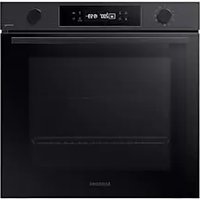
NV7B41304CB - Pan SAMSUNG - Free user manual and instructions
Find the device manual for free NV7B41304CB SAMSUNG in PDF.


| Product type | Built-in oven |
| Brand | Samsung |
| Model | NV7B41304CB |
| Dimensions (W x H x D) | 595 x 596 x 570 mm (main unit) |
| Recessed dimensions (W x H x D) | 560 x 579 x 549 mm |
| Weight | 36.7 kg |
| Power supply | 230-240 V ~ 50 Hz |
| Maximum power | 3500-3850 W |
| Capacity | 76 L |
| Energy efficiency | Class A+ |
| Cooking modes | Convection, Classic, Top heat+Convection, Bottom heat+Convection, Bottom heat, Eco Convection, Keep warm, Large grill, Eco grill, Fan grill, Natural steam |
| Automatic programs | 20 auto-cooking programs (gratin, lasagna, meats, fish, etc.) |
| Temperature probe | Yes (for meats) |
| Cleaning | Steam cleaning and Pyrolysis (on applicable models) |
| Special functions | Quick preheat, Keep warm, Defrost |
| Interior light | Halogen bulb 25-40 W / 220-240 V |
| Door closing | Soft closing (damped) |
| Locking | Mechanical (door lock) and child safety (control panel) |
| Connectivity | Built-in Wi-Fi and Bluetooth |
| Included accessories | Metal grid, grid for tray, baking tray, universal tray, deep tray, temperature probe, steam tray |
| Maintenance | Removable glass panes (3-4 layers), removable side rails, water collector |
Frequently Asked Questions - NV7B41304CB SAMSUNG
User questions about NV7B41304CB SAMSUNG
0 question about this device. Answer the ones you know or ask your own.
Ask a new question about this device
Download the instructions for your Pan in PDF format for free! Find your manual NV7B41304CB - SAMSUNG and take your electronic device back in hand. On this page are published all the documents necessary for the use of your device. NV7B41304CB by SAMSUNG.
USER MANUAL NV7B41304CB SAMSUNG
natural_image
Simple line drawing of a rectangular tray with slats and two circular ends (no text or symbols)Horno (mm)
| A 560 G 503 | ||
| B 165 H 481 | ||
| C 383 I 21 | ||
| D 45 J 549 | ||
| E 596 K 579 | ||
| F 595 L 559 |
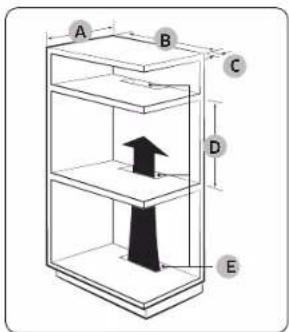
Armario empotrado (mm)
| A Min. 550 |
| B Min. 560 |
| C Min. 50 |
| D Min. 590 - Max. 600 |
| E Min. 460 x Min. 50 |
NOTA
natural_image
Pure technical line drawing of a mechanical assembly without any text, numbers, or symbolsnatural_image
Diagram showing a circular object with a labeled section A, surrounded by diagonal lines and shaded areas (no text or symbols)natural_image
Architectural line drawing of a window frame with a magnified inset showing internal components (no text or symbols)natural_image
Line drawing of a door handle with a black clip and handle, no text or symbols presentDesinstalación
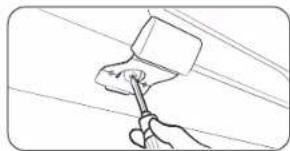
natural_image
Line drawing of a hand using a hammer to apply paint on wires (no text or symbols)Bloqueo/desbloqueo
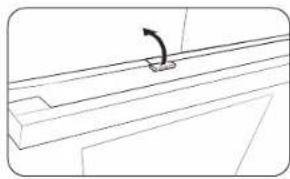
natural_image
Pure technical line drawing of a mechanical component with no text or symbolsCaso 2
PRECAUCIÓN
natural_image
Illustration of a hand pouring liquid into a tray inside an oven (no text or symbols)natural_image
Simple line drawing of a two-tier appliance with mountain-like top (no text or symbols)natural_image
Simple line drawing of a hand pouring liquid into a container (no text or symbols)natural_image
Illustration of a hand cleaning a tiled room with a cloth (no text or symbols)natural_image
Illustration of a hand cleaning a tiled surface with a cloth (no text or symbols)natural_image
Diagram showing a hand holding a device inside a container, with no visible text or symbolsnatural_image
Diagram of a kitchen appliance with an open door and directional arrows indicating motion (no text or symbols)natural_image
Diagram showing a hand gripping a car seat with a magnified inset highlighting the seat area (no text or symbols present)natural_image
Diagram of a mechanical component with an inset close-up showing a hand holding a tool (no text or symbols present)natural_image
Diagram of a mechanical assembly with a ruler and a flat plate, no visible text or symbolsnatural_image
Diagram of a rectangular frame with a central square and an arrow, no text or symbols presentnatural_image
Technical line drawing of a mechanical assembly with a magnified inset showing internal components (no text or symbols)natural_image
Technical line drawing of a door or panel with a labeled component '01' (no other text or symbols)01 Colector de agua
natural_image
Diagram of a mechanical assembly with an inset showing a bracket and force arrows (no text or symbols)natural_image
Diagram of a ladder-like structure with an arrow indicating rotational motion (no text or symbols)natural_image
Simple line drawing of a hand holding a small object inside a circular frame (no text or symbols)Notas
natural_image
Line drawing of a rectangular tray with ribbed pattern and two circular ends (no text or symbols)www.samsung.com/uk/aboutsamsung/sustainability/environment/our-commitment/data/

Four (mm)
| A 560 G 503 | ||
| B 166 H 481 | ||
| C 383 I 21 | ||
| D 45 J 549 | ||
| E 596 K 579 | ||
| F 595 L 559 |
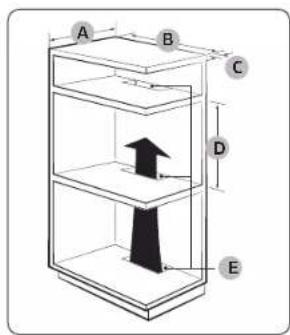
Meuble encastré (mm)
| A 550 minimum |
| B 560 minimum |
| C 50 minimum |
| D 590 minimum - 600 maximum |
| E 460 minimum x 50 minimum |
REMARQUE
natural_image
Pure technical line drawing of a rectangular frame with a small circular component above it, no text or symbols present.natural_image
Diagram showing a circular object with a shaded region and labeled point A, connected to diagonal lines (no text or symbols beyond label)natural_image
Technical line drawing of a structural frame with diagonal braces and an inset magnified detail (no text or symbols)natural_image
Line drawing of a door handle with a black clip and handle, no text or symbols presentDémontage
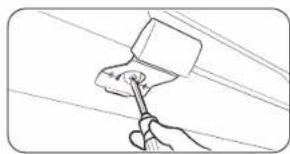
natural_image
Line drawing of a hand using a tool to apply paint on a surface (no text or symbols)natural_image
Pure technical line drawing of a mechanical component with no text or symbols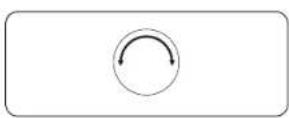
natural_image
Illustration of a hand pouring liquid into a tray inside an oven (no text or symbols)natural_image
Line drawing of an oven with two tiered shelves and one dish on the lower shelf (no text or symbols)natural_image
Simple line drawing of a hand pouring liquid into a container (no text or symbols)natural_image
Hand cleaning a tiled room with a cloth (no text or symbols visible)natural_image
Illustration of a hand cleaning a rectangular container with a cloth (no text or symbols)natural_image
Diagram showing a hand gripping a car seat inside a vehicle lift (no text or symbols present)natural_image
Diagram of a kitchen appliance with an open oven and directional arrows indicating motion (no text or symbols)natural_image
Diagram showing a mechanical component with an arrow indicating rotation, and a magnified inset highlighting a specific section (no text or symbols present)natural_image
Technical line drawing of a mechanical component with an inset close-up showing a hand holding a tool (no text or symbols present)natural_image
Diagram of a mechanical assembly with a ruler and a flat plate, no text or symbols presentnatural_image
Diagram of a rectangular frame with a central square and an arrow, no text or symbols presentnatural_image
Technical line drawing of a mechanical assembly with a magnified inset showing internal components (no text or symbols)natural_image
Technical line drawing of a door frame with a labeled component '01' (no text or symbols beyond label)01 Collecteur d'eau
AVERTISSEMENT
natural_image
Diagram of a mechanical assembly with an inset showing a bracket and force arrows (no text or symbols)natural_image
Diagram of a ladder-like structure with an arrow indicating rotational motion (no text or symbols)natural_image
Simple line drawing of a hand holding a small object inside a circular frame (no text or symbols)Notes
UNE QUESTION ? DES COMMENTAIRES ?
| PAYS APPELEZ LE OU CONTACTEZ-NOUS EN LIGNE SUR | ||
| AUSTRIA 0800 72 67 864 (0800 SAMSUNG) www.samsung.com/at/support | ||
| BELGIUM 02 201 24 18 | www.samsung.com/be/support (Dutch)www.samsung.com/be_fr/support (French) | |
| DENMARK 707 019 70 www.samsung.com/dk/support | ||
| FINLAND 030-6227 515 www.samsung.com/fi/support | ||
| FRANCE 01 48 63 00 00 www.samsung.com/fr/support | ||
| GERMANY 06196 77 555 77 www.samsung.com/de/support | ||
| ITALIA 800 SAMSUNG (800.7267864) www.samsung.com/it/support | ||
| CYPRUS | 8009 4000 only from landline, toll free | www.samsung.com/gr/support |
| CREECE | 80111-SAMSUNG (80111 726 7864) only from land line(+30) 210 6897691 from mobile and land line | www.samsung.com/gr/support |
| LUXEMBURG | 261 03 710 | www.samsung.com/be_fr/support |
| NETHERLANDS | 088 90 90 100 | www.samsung.com/nl/support |
| NORWAY | 21629099 | www.samsung.com/no/support |
| PORTUCAL | 210 608 098Chamada para a rede fixa nacional Dias úteis das 9h às 20h | www.samsung.com/pt/support |
| SPAIN | 91 175 00 15 | www.samsung.com/cs/support |
| SWEDEN | 0771-400 300 | www.samsung.com/se/support |
| SWITZERLAND | 0800 726 786 | www.samsung.com/ch/support (German)www.samsung.com/ch_fr/support (French) |
| UK | 0333 000 0333 | www.samsung.com/uk/support |
| IRELAND (EIRE) | 0818 717100 | www.samsung.com/ie/support |

DG68-01414A-04
Inbouwoven
natural_image
Simple line drawing of a rectangular tray with ribbed pattern and two circular ends (no text or symbols)01 Bedieningspancel
02 Deurhandgreep
03 Deur
Accessoires
Oven (mm)
| A 560 G 503 | ||
| B 166 H 481 | ||
| C 383 I 21 | ||
| D 45 J 549 | ||
| E 596 K 579 | ||
| F 595 L 559 |
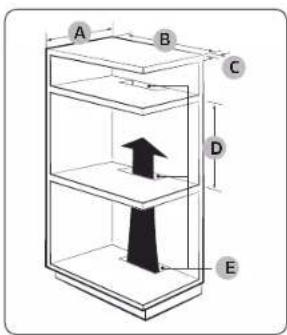
Inbouwkast (mm)
| A Min. 550 |
| B Min. 560 |
| C Min. 50 |
| D Min. 590 - max. 600 |
| E Min. 460 x min. 50 |
OPMERKING
natural_image
Pure technical line drawing of a rectangular frame with a circular indicator symbol at the top (no text or labels)De oven monteren
natural_image
Diagram showing a circular object with a shaded region and an arrow labeled 'A' pointing to it, surrounded by diagonal lines (no text or symbols beyond the label)natural_image
Technical line drawing of a structural frame with an inset showing a magnified detail (no text or symbols)natural_image
Line drawing of a door handle with a black clip, no text or symbols presentVerwijderen
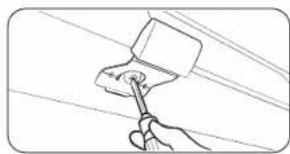
natural_image
Line drawing of a hand using a tool to apply paint on a surface (no text or symbols)Vergrendelen/ontgrendelen
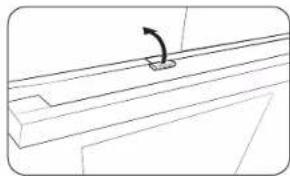
natural_image
Pure technical line drawing of a mechanical component with no text or symbols⚠ WAARSCHUWING in verband met acrylamide
natural_image
Illustration of a hand pouring liquid into a tray inside an oven (no text or symbols)natural_image
Simple line drawing of a storage tray with two piles of food, no text or symbols presentnatural_image
Simple line drawing of a hand pouring liquid into a container (no text or symbols)natural_image
Hand cleaning a tiled room with a cloth (no text or symbols visible)natural_image
Illustration of a hand cleaning a tiled surface with a cloth (no text or symbols)⚠ WAARSCHUWING in verband met acrylamide
natural_image
Diagram showing a hand gripping a car seat inside a vehicle lift (no text or symbols present)natural_image
Diagram of a kitchen appliance with an oven and directional arrows indicating motion (no text or symbols)natural_image
Diagram showing a hand adjusting a car seatbelt, with an inset close-up of the seatbelt (no text or symbols present)natural_image
Technical line drawing of a mechanical component with an inset close-up showing a hand holding a tool (no text or symbols present)natural_image
Diagram of a mechanical assembly with a ruler and a flat plate, no text or symbols presentnatural_image
Diagram of a rectangular frame with a central square and an arrow, no text or symbols presentnatural_image
Technical line drawing of a mechanical assembly with a magnified inset showing internal components (no text or symbols)natural_image
Technical line drawing of a door or panel with a labeled component '01' (no other text or symbols)01 Wateropvangbak
natural_image
Diagram of a mechanical assembly with an inset showing a bracket and force arrows (no text or symbols)natural_image
Diagram of a ladder-like structure with an arrow indicating rotational motion (no text or symbols)natural_image
Simple line drawing of a hand holding a small object inside a container (no text or symbols)Memo
VRAGEN OF OPMERKINGEN?
| LAND BEL OF BEZOEK ONS ONLINE OP | ||
| AUSTRIA 0800 72 67 | 864 (0800 SAMSUNG) www.samsung.com/at/support | |
| BELGIUM 02-201-24 | 18 | www.samsung.com/be/support (Dutch)www.samsung.com/be_fr/support (French) |
| DENMARK 707 019 70 | www.samsung.com/dk/support | |
| FINLAND 030-6227 5 | 15 www.samsung.com/fi/support | |
| FRANCE 01 48 63 00 | 00 www.samsung.com/fr/support | |
| GERMANY 06196 77 | 555 77 www.samsung.com/de/support | |
| ITALIA 800 SAMSUNG (800.7267864) www.samsung.com/it/support | ||
| CYPRUS 8009 4000 | only from landline, toll freewww.samsung.com/gr/support | |
| GREECE | 80111-SAMSUNG (80111 726 7864) only from land line(+30) 210 6897691 from mobile and land line | www.samsung.com/gr/support |
| LUXEMBURG | 261 03 710 | www.samsung.com/be_fr/support |
| NETHERLANDS | 088 90 90 100 | www.samsung.com/nl/support |
| NORWAY | 21629099 | www.samsung.com/no/support |
| PORTUCAL | 210 608 098Chamada para a rede fixa nacional Dias úteis das 9h às 20h | www.samsung.com/pt/support |
| SPAIN | 91 175 00 15 | www.samsung.com/cs/support |
| SWEDEN | 0771-400 300 | www.samsung.com/se/support |
| SWITZERLAND | 0800 726 786 | www.samsung.com/ch/support (German)www.samsung.com/ch_fr/support (French) |
| UK | 0333 000 0333 | www.samsung.com/uk/support |
| IRELAND (EIRE) | 0818 717100 | www.samsung.com/ie/support |

DG68-01414A-04
Einbaubackofen
natural_image
Line drawing of a rectangular tray with slatted edges and two circular ends (no text or symbols)Gerät (mm)
| A 560 G 503 | ||
| B 166 H 481 | ||
| C 383 I 21 | ||
| D 45 J 549 | ||
| E 596 K 579 | ||
| F 595 L 559 |
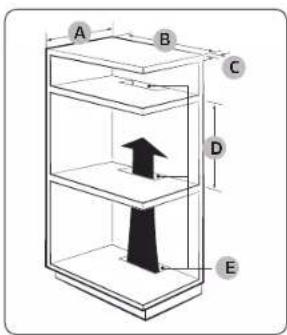
Einbauschrank (mm)
| A Min. 550 |
| B Min. 560 |
| C Min. 50 |
| D Min. 590 / Max. 600 |
| E Min. 460 x Min. 50 |
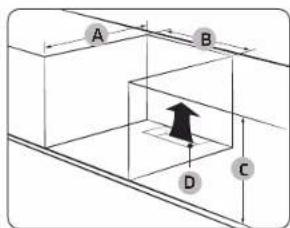
HINWEIS
natural_image
Pure technical line drawing of a rectangular frame with a circular indicator symbol at the top (no text or labels)Einbauen des Geräts
natural_image
Diagram showing a circular object with a shaded region and an arrow labeled 'A' pointing to it, surrounded by diagonal lines (no text or symbols beyond the label)natural_image
Technical line drawing of a structural frame with diagonal braces and an inset magnified detail (no text or symbols)natural_image
Pure technical line drawing of a door or cabinet with no text, numbers, or symbolsDemontage
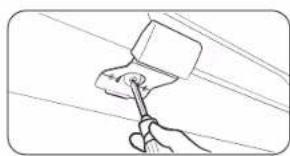
natural_image
Hand using a tool to clean or paint the ceiling (no text or symbols visible)natural_image
Pure technical line drawing of a mechanical component with an arrow indicating direction (no text or symbols)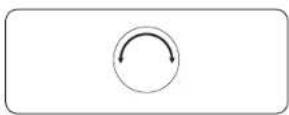
natural_image
Illustration of a hand pouring liquid into a tray inside an oven (no text or symbols)natural_image
Simple line drawing of a storage tray with two piles of food, no text or symbols presentnatural_image
Simple line drawing of a hand pouring liquid into a container (no text or symbols)natural_image
Illustration of a hand cleaning a tiled room with a cloth (no text or symbols)natural_image
Illustration of a hand cleaning a rectangular container with a cloth (no text or symbols)Bedienung
VORSICHT
natural_image
Diagram showing a hand holding a tool inside a circular frame, with no visible text or symbols.natural_image
Diagram of a kitchen oven with an open door and directional arrows indicating motion (no text or symbols)natural_image
Diagram showing a mechanical component with an arrow indicating rotation, and a magnified inset highlighting a specific section (no text or symbols present)natural_image
Technical line drawing of a mechanical component with an inset close-up showing a hand holding a tool (no text or symbols present)natural_image
Diagram of a mechanical assembly with a wooden ruler and a flat plate, no text or symbols presentnatural_image
Diagram of a square frame with an arrow and label '02' indicating a specific area, no readable text or symbols present.natural_image
Technical line drawing of a mechanical assembly with a magnified inset showing internal components (no text or symbols)natural_image
Diagram of a door frame with a labeled component '01' (no text or symbols beyond label)01 Wasserkollektor
WARNING
natural_image
Diagram of a mechanical assembly with an inset showing a bracket and force arrows (no text or symbols)natural_image
Diagram of a ladder inside a rectangular frame with an arrow indicating rotation (no text or symbols)natural_image
Simple line drawing of a hand holding a small object inside a circular frame (no text or symbols)Notizen
natural_image
Line drawing of a rectangular tray with slats and two circular ends (no text or symbols)www.samsung.com/uk/aboutsamsung/sustainability/environment/our-commitment/data/
Ugn (mm)
| A 560 G 503 | ||
| B 166 H 481 | ||
| C 383 I 21 | ||
| D 45 J 549 | ||
| E 596 K 579 | ||
| F 595 L 559 |
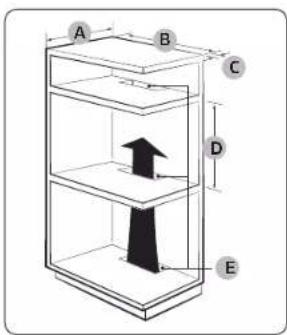
Inbyggt skåp (mm)
| A Min. 550 |
| B Min. 560 |
| C Min. 50 |
| D Min. 590 - Max. 600 |
| E Min. 460 x Min. 50 |

natural_image
Pure technical line drawing of a rectangular frame with a circular indicator symbol at the top (no text or labels)Montering av ugnen
natural_image
Diagram showing a circular object with a shaded region and labeled point A, connected to diagonal lines (no text or symbols beyond label)natural_image
Technical line drawing of a structural frame with an inset magnified detail (no text or symbols)natural_image
Pure technical line drawing of a door or cabinet component without any text, numbers, or symbolsnatural_image
Line drawing of a hand using a tool to clean or brush the power line (no text or symbols)natural_image
Pure technical line drawing of a mechanical component with no text or symbols
natural_image
Illustration of a hand pouring liquid into a tray inside a microwave oven (no text or symbols)natural_image
Illustration of a double-door oven with two tiered shelves and one dish on top (no text or symbols)natural_image
Simple line drawing of a container with liquid being poured into it (no text or symbols)natural_image
Hand cleaning a tiled room with a cloth (no text or symbols visible)natural_image
Illustration of a hand cleaning a tiled surface with a cloth (no text or symbols)Drift

FÖRSIKTIGHET
natural_image
Diagram showing a hand operating a device inside a rack, with an arrow indicating rotation (no text or symbols present)natural_image
Diagram of a kitchen appliance with an oven and drawer, showing directional arrows indicating movement (no text or symbols)natural_image
Diagram showing a mechanical component with an arrow indicating rotation, and a magnified inset highlighting a specific section (no text or symbols present)natural_image
Technical line drawing of a mechanical component with an inset close-up showing a hand holding a tool (no text or symbols present)natural_image
Diagram of a mechanical assembly with labeled components and a ruler, no readable text or symbols present.natural_image
Diagram of a rectangular frame with a central square and an arrow, no text or symbols presentnatural_image
Technical line drawing of a mechanical assembly with a magnified inset showing internal components (no text or symbols)natural_image
Technical line drawing of a door or panel with a labeled component '01' (no other text or symbols)01 Vattenuppsamlare
WARNING
natural_image
Diagram of a mechanical assembly with an inset showing a bracket and force arrows (no text or symbols)natural_image
Diagram of a ladder-like structure with an arrow indicating rotational motion (no text or symbols)natural_image
Simple line drawing of a hand holding a small object inside a container (no text or symbols)Notering
FRÅGOR ELLER KOMMENTARER?
| LAND RING ELLER BESÖK OSS PÅ NÄTET PÅ | ||
| AUSTRIA 0800 72 67 | 864 (0800 SAMSUNG) www.samsung.com/at/support | |
| BELGIUM 02 201-24 | 18 | www.samsung.com/be/support (Dutch)www.samsung.com/be_fr/support (French) |
| DENMARK 707 019 70 | www.samsung.com/dk/support | |
| FINLAND 030-6227 5 | 15 www.samsung.com/fi/support | |
| FRANCE 01 48 63 00 | 00 www.samsung.com/fr/support | |
| GERMANY 06196 77 | 555 77 www.samsung.com/de/support | |
| ITALIA 800 SAMSUNG (800.7267864) www.samsung.com/it/support | ||
| CYPRUS 8009 4000 | only from landline, toll free www.samsung.com/gr/support | |
| GREECE | 80111-SAMSUNG (80111 726 7864) only from land line(+30) 210 6897691 from mobile and land line | www.samsung.com/gr/support |
| LUXEMBURG | 261 03 710 | www.samsung.com/be_fr/support |
| NETHERLANDS | 088 90 90 100 | www.samsung.com/nl/support |
| NORWAY | 21629099 | www.samsung.com/no/support |
| PORTUCAL | 210 608 098Chamada para a rede fixa nacional Dias úteis das 9h às 20h | www.samsung.com/pt/support |
| SPAIN | 91 175 00 15 | www.samsung.com/cs/support |
| SWEDEN | 0771-400 300 | www.samsung.com/se/support |
| SWITZERLAND | 0800 726 786 | www.samsung.com/ch/support (German)www.samsung.com/ch_fr/support (French) |
| UK | 0333 000 0333 | www.samsung.com/uk/support |
| IRELAND (EIRE) | 0818 717100 | www.samsung.com/ie/support |

DG68-01414A-04
Indbygget ovn
natural_image
Line drawing of a rectangular plate with slats and two circular ends (no text or symbols)www.samsung.com/uk/aboutsamsung/sustainability/environment/our-commitment/data/
Automatisk energibesparende funktion
Ovn (mm)
| A 560 G 503 | ||
| B 166 H 481 | ||
| C 383 I 21 | ||
| D 45 J 549 | ||
| E 596 K 579 | ||
| F 595 L 559 |
Indbygget skab (mm)
| A Min. 550 |
| B Min. 560 |
| C Min. 50 |
| D Min. 590 - Maks. 600 |
| E Min. 460 x Min. 50 |
BEMÆRK
natural_image
Pure technical line drawing of a rectangular frame with a circular indicator symbol at the top (no text or labels)Montering af ovnen
natural_image
Diagram showing a circular object with a shaded region and labeled point A, connected to diagonal lines (no text or symbols beyond label)natural_image
Technical line drawing of a structural frame with an inset showing a mechanical component (no text or symbols)natural_image
Line drawing of a door handle with a black clip, no text or symbols presentAfinstallation
natural_image
Line drawing of a hand using a tool to lift a block on a utility pole (no text or symbols)Lãs/lãs op
natural_image
Pure technical line drawing of a mechanical bracket with a curved arrow indicating rotation (no text or symbols)natural_image
Illustration of a hand pouring liquid into a tray inside an oven (no text or symbols)natural_image
Illustration of a two-tiered storage unit with mountain-like structures on the top (no text or symbols)natural_image
Simple line drawing of a hand pouring liquid into a container (no text or symbols)natural_image
Hand cleaning a tiled room with a cloth (no text or symbols visible)natural_image
Illustration of a hand cleaning a tiled surface with a cloth (no text or symbols)natural_image
Diagram showing a hand operating a device inside a rack, with no visible text or symbolsnatural_image
Diagram of a kitchen appliance with an open oven and a diagonal rack, showing directional arrows (no text or symbols)natural_image
Diagram showing a mechanical component with an arrow indicating rotation, and a magnified inset highlighting a specific section (no text or symbols present)natural_image
Technical line drawing of a mechanical component with an inset close-up showing a hand operating a workpiece (no text or symbols present)natural_image
Diagram of a mechanical assembly with labeled components and a ruler, no readable text or symbols present.natural_image
Diagram of a rectangular frame with a central square and an arrow, no text or symbols presentnatural_image
Technical line drawing of a mechanical assembly with a magnified inset showing internal components (no text or symbols)natural_image
Technical line drawing of a door frame with a labeled component '01' (no text or symbols beyond label)ADVARSEL
natural_image
Diagram of a mechanical assembly with an inset showing a bracket and force arrows (no text or symbols)natural_image
Diagram of a ladder-like structure with an arrow indicating rotational motion (no text or symbols)natural_image
Simple line drawing of a hand holding a small object inside a container (no text or symbols)Notater
SP∅RCSMÅL ELLER KOMMENTARER?
| LAND RING ELLER BESOG OS ONLINE PÅ | ||
| AUSTRIA 0800 72 67 | 864 (0800 SAMSUNG) www.samsung.com/at/support | |
| BELGIUM 02 201-24 | 18 | www.samsung.com/be/support (Dutch)www.samsung.com/be_fr/support (French) |
| DENMARK 707 019 70 | www.samsung.com/dk/support | |
| FINLAND 030-6227 5 | 15 www.samsung.com/fi/support | |
| FRANCE 01 48 63 00 | 00 www.samsung.com/fr/support | |
| GERMANY 06196 77 | 555 77 www.samsung.com/de/support | |
| ITALIA 800 SAMSUNG (800.7267864) www.samsung.com/it/support | ||
| CYPRUS | 8009 4000 only from landline, toll free | www.samsung.com/gr/support |
| CREECE | 80111-SAMSUNG (80111 726 7864) only from land line(+30) 210 6897691 from mobile and land line | www.samsung.com/gr/support |
| LUXEMBURG | 261 03 710 | www.samsung.com/be_fr/support |
| NETHERLANDS | 088 90 90 100 | www.samsung.com/nl/support |
| NORWAY | 21629099 | www.samsung.com/no/support |
| PORTUCAL | 210 608 098Chamada para a rede fixa nacional Dias úteis das 9h às 20h | www.samsung.com/pt/support |
| SPAIN | 91 175 00 15 | www.samsung.com/cs/support |
| SWEDEN | 0771-400 300 | www.samsung.com/se/support |
| SWITZERLAND | 0800 726 786 | www.samsung.com/ch/support (German)www.samsung.com/ch_fr/support (French) |
| UK | 0333 000 0333 | www.samsung.com/uk/support |
| IRELAND (EIRE) | 0818 717100 | www.samsung.com/ie/support |

DG68-01414A-04
Innebygget ovn
natural_image
Simple line drawing of a rectangular tray with vertical lines and two circular handles at the bottom (no text or symbols)Grillrist Grillristinnsats * Bakeform *
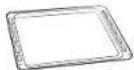
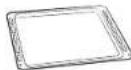
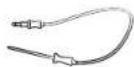
Universalform * Ekstra dyp form * Steketermometer *
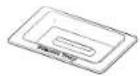

Dampbrett * 2 skruer (M4 L25)
MERK
Ovn (mm)
| A 560 G 503 | ||
| B 166 H 481 | ||
| C 383 I 21 | ||
| D 45 J 549 | ||
| E 596 K 579 | ||
| F 595 L 559 |
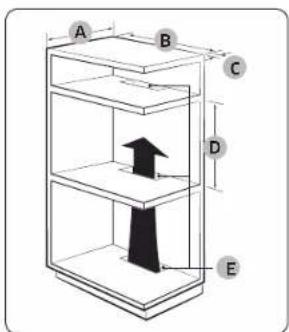
Innebygd skap (mm)
| A Min. 550 |
| B Min. 560 |
| C Min. 50 |
| D Min. 590 - Maks. 600 |
| E Min. 460 x Min. 50 |
MERK
natural_image
Diagram showing a circular object with a shaded region and labeled point A, surrounded by diagonal lines (no text or symbols beyond label)natural_image
Architectural line drawing of a structural frame with an inset showing a pipe fitting (no text or symbols)natural_image
Line drawing of a door handle with a black clip and metal bracket (no text or symbols)natural_image
Line drawing of a hand using a tool to clean or brush the power (no text or symbols)natural_image
Pure technical line drawing of a mechanical component with no text or symbols- Sett pluggen for steketermometeret inn i kontakten på veggen på venstre side. Sørg for at du ser indikatoren Steketermometer satt inn, när termomelerkontakten er tilkoblet.
natural_image
Illustration of a hand pouring liquid into a tray inside a microwave oven (no text or symbols)natural_image
Simple line drawing of a two-tier appliance with mountain-like top (no text or symbols)- Sett maten i ovnen på hvilken som helst rist, og start matlagingen.
MERK
natural_image
Simple line drawing of a hand pouring liquid into a container (no text or symbols)natural_image
Hand cleaning a tiled room with a cloth (no text or symbols visible)natural_image
Illustration of a hand cleaning a tiled surface with a cloth (no text or symbols)- Når det er gjort, må del ventes til ovnen er avkjølt, og deretter tørkes døren langs kantene med en våt klut.
Bruk

FORSIKTIG
natural_image
Diagram showing a hand operating a device inside a rack, with no visible text or symbolsnatural_image
Diagram of a kitchen appliance with an oven and drawer, showing directional arrows indicating movement (no text or symbols)natural_image
Diagram showing a mechanical component with an arrow indicating rotation, and a magnified inset highlighting a specific section (no text or symbols present)natural_image
Technical line drawing of a mechanical component with an inset close-up showing a hand holding a tool (no text or symbols present)natural_image
Diagram of a mechanical assembly with labeled components and a ruler, no readable text or symbols present.natural_image
Diagram of a rectangular frame with a central square and an arrow, no text or symbols presentnatural_image
Technical line drawing of a mechanical assembly with a magnified inset showing internal components (no text or symbols)natural_image
Technical line drawing of a door frame with a labeled component '01' (no text or symbols beyond label)01 Vannoppsamler
natural_image
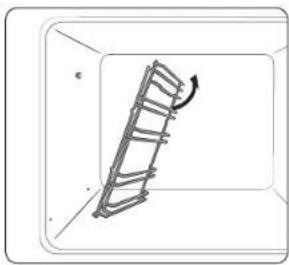
Diagram of a mechanical assembly with an inset showing a bracket and force arrows (no text or symbols)- Press den øverste delen av venstre sidestativ og senk det omlrent 45°.
natural_image
Diagram of a ladder inside a rectangular frame with an arrow indicating rotation (no text or symbols)natural_image
Simple line drawing of a hand holding a small object inside a circular frame (no text or symbols)Notat
HAR DU SP∅RSMÅL ELLER KOMMENTARER?
| LAND RING ELLER BESOK OSS ONLINE PÅ | ||
| AUSTRIA 0800 72 67 | 864 (0800 SAMSUNG) www.samsung.com/at/support | |
| BELGIUM 02 201-24 | 18 | www.samsung.com/be/support (Dutch)www.samsung.com/be_fr/support (French) |
| DENMARK 707 019 70 | www.samsung.com/dk/support | |
| FINLAND 030-6227 | 515 www.samsung.com/fi/support | |
| FRANCE 01 48 63 00 | 00 www.samsung.com/fr/support | |
| GERMANY 06196 77 | 555 77 www.samsung.com/de/support | |
| ITALIA 800 SAMSUNG (800.7267864) www.samsung.com/it/support | ||
| CYPRUS | 8009 4000 only from landline, toll free | www.samsung.com/gr/support |
| CREECE | 80111-SAMSUNG (80111 726 7864) only from land line(+30) 210 6897691 from mobile and land line | www.samsung.com/gr/support |
| LUXEMBURG | 261 03 710 | www.samsung.com/be_fr/support |
| NETHERLANDS | 088 90 90 100 | www.samsung.com/nl/support |
| NORWAY | 21629099 | www.samsung.com/no/support |
| PORTUCAL | 210 608 098Chamada para a rede fixa nacional Dias úteis das 9h às 20h | www.samsung.com/pt/support |
| SPAIN | 91 175 00 15 | www.samsung.com/cs/support |
| SWEDEN | 0771-400 300 | www.samsung.com/se/support |
| SWITZERLAND | 0800 726 786 | www.samsung.com/ch/support (German)www.samsung.com/ch_fr/support (French) |
| UK | 0333 000 0333 | www.samsung.com/uk/support |
| IRELAND (EIRE) | 0818 717100 | www.samsung.com/ie/support |

DG68-01414A-04
Kalusteuuni
natural_image
Line drawing of a rectangular tray with slats and two circular ends (no text or symbols)www.samsung.com/uk/aboutsamsung/sustainability/environment/our-commitment/data/
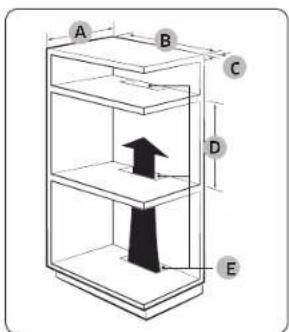
Uuni (mm)
| A 560 G 503 | ||
| B 166 H 481 | ||
| C 383 I 21 | ||
| D 45 J 549 | ||
| E 596 K 579 | ||
| F 595 L 559 |
natural_image
Pure technical diagram of a door frame with no text, numbers, or symbolsnatural_image
Diagram showing a circular object with a shaded region and labeled point A, surrounded by diagonal lines (no text or symbols beyond label)natural_image
Technical line drawing of a structural frame with an inset magnified detail (no text or symbols)natural_image
Pure technical line drawing of a door or cabinet component without any text, numbers, or symbolsPoistaminen
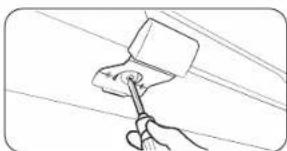
natural_image
Line drawing of a hand using a tool to brush or mark a surface, with no text or symbols present.Lukitus/avaus
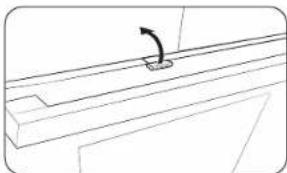
natural_image
Pure technical line drawing of a mechanical component with no text or symbols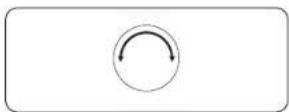
natural_image
Illustration of a hand pouring liquid into a tray inside a microwave oven (no text or symbols)natural_image
Line drawing of a double-door oven with two tiered shelves filled with mountains (no text or symbols)natural_image
Simple line drawing of a hand pouring liquid into a container (no text or symbols)natural_image
Illustration of a hand cleaning a tiled room with a cloth (no text or symbols)natural_image
Illustration of a hand cleaning a surface with a cloth (no text or symbols)Toiminnot

HUOMIO
natural_image
Diagram showing a hand operating a device inside a vehicle cabin (no text or symbols present)natural_image
Diagram of a kitchen appliance with an open oven and a diagonal rack, showing directional arrows (no text or symbols)natural_image
Diagram showing a hand gripping a car seat with a magnified inset highlighting the seat area (no text or symbols present)natural_image
Technical line drawing of a mechanical component with an inset close-up showing a hand operating a tool (no text or symbols present)natural_image
Diagram of a mechanical assembly with a ruler and a flat plate, no text or symbols presentnatural_image
3D diagram of a rectangular frame with a central square and an arrow, no text or symbols presentnatural_image
Technical line drawing of a mechanical assembly with a magnified inset showing internal components (no text or symbols)natural_image
Technical line drawing of a door frame with a labeled component '01' (no text or symbols beyond label)natural_image
Diagram of a mechanical assembly with an inset showing a bracket and force arrows (no text or labels)natural_image
Diagram of a ladder-like structure with an arrow indicating rotational motion (no text or symbols)natural_image
Simple line drawing of a hand holding a small object inside a circular frame (no text or symbols)Muistiinpanoja
KY5YMYKSIÄ TAI KOMMENTTEJA?
| MAA SOITA TAI VIERAILE VERKOSSA OSOITTEESSA | ||
| AUSTRIA 0800 72 67 864 (0800 SAMSUNG) www.samsung.com/at/support | ||
| BELGIUM 02 201-24 18 | www.samsung.com/be/support (Dutch)www.samsung.com/be_fr/support (French) | |
| DENMARK 707 019 70 www.samsung.com/dk/support | ||
| FINLAND 030-6227 515 www.samsung.com/fi/support | ||
| FRANCE 01 48 63 00 00 www.samsung.com/fr/support | ||
| GERMANY 06196 77 555 77 www.samsung.com/de/support | ||
| ITALIA 800 SAMSUNG (800.7267864) www.samsung.com/it/support | ||
| CYPRUS | 8009 4000 only from landline, toll free | www.samsung.com/gr/support |
| CREECE | 80111-SAMSUNG (80111 726 7864) only from land line(+30) 210 6897691 from mobile and land line | www.samsung.com/gr/support |
| LUXEMBURG | 261 03 710 | www.samsung.com/be_fr/support |
| NETHERLANDS | 088 90 90 100 | www.samsung.com/nl/support |
| NORWAY | 21629099 | www.samsung.com/no/support |
| PORTUCAL | 210 608 098Chamada para a rede fixa nacional Dias úteis das 9h às 20h | www.samsung.com/pt/support |
| SPAIN | 91 175 00 15 | www.samsung.com/cs/support |
| SWEDEN | 0771-400 300 | www.samsung.com/se/support |
| SWITZERLAND | 0800 726 786 | www.samsung.com/ch/support (German)www.samsung.com/ch_fr/support (French) |
| UK | 0333 000 0333 | www.samsung.com/uk/support |
| IRELAND (EIRE) | 0818 717100 | www.samsung.com/ie/support |

DG68-01414A-04
Built-in Oven
User & Installation manual
NV7B411**** / NV7B412**** / NV7B413**** / NV7B414**** /
NV7B415**** / NV7B411**C* / NV7B412**C* / NV7B414**C*
Contents
Using this manual 3
The following symbols are used in this User Manual: 3
Safety instructions 3
Important safety precautions 3
Correct Disposal of This Product (Waste Electrical & Electronic Equipment) 6
Auto energy saving function 6
Installation 6
What's included 6
Power connection 7
Cabinet mount 8
Before you start 10
Initial settings 10
New oven smell 10
Smart safety mechanism 10
Soft closing door 11
Accessories 11
Mechanical lock 12
Operations 13
Control panel 13
Common settings 14
Cooking modes (except for Grill) 17
Cooking modes (Grill) 18
To stop cooking 20
Special function 20
Natural Steam 21
Auto Cook 22
Cleaning 22
Timer 24
Sound On/Off 24
Wi-Fi On/Off 24
Cooking smart 25
Manual cooking 25
Auto Cook programmes 28
Test Dishes 30
Collection of frequent Auto cook recipes 31
Maintenance 34
Cleaning 34
Replacement 37
Troubleshooting 38
Checkpoints 38
Information codes 40
Technical specifications 41
Appendix 41
Product data sheet 41
Open Source Announcement 42
Using this manual
Thank you for choosing SAMSUNG Built-In Oven.
This User Manual contains important information on safety and instructions intended to assist you in the operation and maintenance of your appliance. Please take the time to read this User Manual before using your oven and keep this book for future reference.
The following symbols are used in this User Manual:
WARNING
Hazards or unsafe practices that may result in severe personal injury, death and/or property damage.
CAUTION
Hazards or unsafe practices that may result in personal injury and/or property damage.
NOTE
Useful tips, recommendations, or information that helps users manipulate the product.
Safety instructions
Installation of this oven must be performed only by a licensed electrician. The installer is responsible for connecting the appliance to the mains power supply in observance of the relevant safety recommendations.
IMPORTANT SAFETY PRECAUTIONS
WARNING
This appliance is not intended for use by persons (including children) with reduced physical, sensory or mental capabilities, or lack of experience and knowledge, unless they have been given supervision or instruction concerning use of the appliance by a person responsible for their safety.
Children should be supervised to ensure that they do not play with the appliance.
The means for disconnection must be incorporated in the fixed wiring in accordance with the wiring rules.
This Appliance should be allowed to disconnection from the supply after installation. The disconnection may be achieved by having the plug accessible or by incorporating a switch in the fixed wiring in accordance with the wiring rules.
If the supply cord is damaged, it must be replaced by the manufacturer, its service agent or similarly qualified persons in order to avoid a hazard.
Safety instructions
The method of fixing stated is not to depend on the use of adhesives since they are not considered to be a reliable fixing means.
This appliance can be used by children aged from 8 years and above and persons with reduced physical, sensory or mental capabilities or lack of experience and knowledge if they have been given supervision or instruction concerning use of the appliance in a safe way and understand the hazards involved. Children shall not play with the appliance. Cleaning and user maintenance shall not be made by children without supervision. Keep the appliance and its cord out of reach of children less than 8 years.
During use the appliance becomes hot. Care should be taken to avoid touching heating elements inside the oven.
WARNING: Accessible parts may become hot during use. Young children should be kept away.
Do not use harsh abrasive cleaners or sharp metal scrapers to clean the oven door glass since they can scratch the surface, which may result in shattering of the glass.
If this appliance has cleaning function, excess spillage must be removed before cleaning and all utensils should not be left in the oven during steam cleaning or self cleaning. The cleaning function depends on the model.
If this appliance has cleaning function, during cleaning conditions the surfaces may get hotter than usual and children should be kept away. For appliances with pyrolytic cleaning process, Some animals, particularly birds, can be sensitive to the fumes and local temperature fluctuations during the pyrolytic cleaning process and should be moved to an appropriate well ventilated area during this process.
Ventilate the room during and after the pyro cleaning process.
The cleaning function depends on the model.
Only use the temperature probe recommended for this oven. (Meat probe model only)
A steam cleaner is not to be used.
WARNING: Ensure that the appliance is switched off before replacing the lamp to avoid the possibility of electric shock.
The appliance must not be installed behind a decorative door in order to avoid overheating.
WARNING: The appliance and its accessible parts become hot during use. Care should be taken to avoid touching heating elements.
Children less than 8 years of age shall be kept away unless continuously supervised.
CAUTION: The cooking process has to be supervised. A short term cooking process has to be supervised continuously.
The door or the outer surface may get hot when the appliance is operating.
The temperature of accessible surfaces may be high when the appliance is operating. The surfaces are liable to get hot during use.
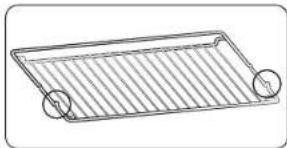
natural_image
Simple line drawing of a rectangular tray with vertical lines and two circular handles (no text or symbols)Insert the wire rack into position with the protruding parts (stoppers on both sides) towards the front so that the wire rack supports the rest position for large loads.
CAUTION
If the oven has been damaged in transport, do not connect it.
This appliance must be connected to the mains power supply only by a specially licensed electrician.
In the event of a fault or damage to the appliance, do not attempt to operate it. Repairs should be performed by a licensed technician only. Improper repair may result in considerable danger to you and others. If your oven needs repair, contact a SAMSUNG Service center or your dealer.
Electrical leads and cables should not be allowed to touch the oven.
The oven should be connected to the mains power supply by means of an approved circuit breaker or fuse. Never use multiple plug adapters or extension leads.
The power supply of the appliance should be turned off when it is being repaired or cleaned.
Take care when connecting electrical appliances to sockets near the oven.
If this appliance has a vapour or steam cooking function, do not operate this appliance when the water supply cartridge is damaged. (Vapour or steam function model only)
When the cartridge is cracked or broken, do not use it and contact your nearest service center. (Vapour or steam function model only)
This oven has been designed only for the cooking of household foods.
During use, the oven interior surfaces become hot enough to cause burns. Do not touch heating elements or interior surfaces of the oven until they have had time to cool.
Never store flammable materials in the oven.
The oven surfaces become hot when the appliance is operated at a high temperature for an extended period of time.
When cooking, take care when opening the oven door as hot air and steam can escape rapidly.
When cooking dishes that contain alcohol, the alcohol may evaporate due to the high temperatures and the Vapour can catch fire if it comes into contact with a hot part of the oven.
For your safety, do not use high-pressure water cleaners or steam jet cleaners.
Children should be kept at a safe distance when the oven is in use.
Frozen foods such as pizzas should be cooked on the big grid. If the baking tray is used, it may become deformed due to the great variation in temperatures.
Do not pour water into the bottom of the oven when it is hot. This could cause damage to the enamel surface.
The oven door must be closed during cooking.
Do not line the bottom of the oven with aluminum foil and do not place any baking trays or tins on it. The aluminum foil blocks the heat, which may result in damage to the enamel surfaces and cause poor cooking results.
Fruit juices will leave stains, which can become permanent on the enamel surfaces of the oven.
When cooking very moist cakes, use the deep pan.
Do not rest bakeware on the open oven door.
Keep children away from the door when opening or closing it as they may bump themselves on the door or catch their fingers in the door.
Do not step. lean, sit or place heavy items on the door.
Do not open the door with unnecessarily strong force.
WARNING: Do not disconnect the appliance from the main power supply even after the cooking process is completed.
WARNING: Do not leave the door open while oven is cooking.
Safety instructions
Correct Disposal of This Product (Waste Electrical & Electronic Equipment)
(Applicable in countries with separate collection systems)
This marking on the product, accessories or literature indicates that the product and its electronic accessories (e.g. charger, headset, USB cable) should not be disposed of with other household waste at the end of their working life. To prevent possible harm to the environment or human health from uncontrolled waste disposal, please separate these items from other types of waste and recycle them responsibly to promote the sustainable reuse of material resources.
Household users should contact either the retailer where they purchased this product, or their local government office, for details of where and how they can take these items for environmentally safe recycling.
Business users should contact their supplier and check the terms and conditions of the purchase contract. This product and its electronic accessories should not be mixed with other commercial wastes for disposal.
For information on Samsung's environmental commitments and product-specific regulatory obligations, e.g. REACH, WEEE, Batteries, visit : www.samsung.com/uk/aboutsamsung/sustainability/environment/our-commitment/data/
Auto energy saving function
Light: During cooking process, you can switch off Oven lamp by pressing 'Oven light' button. For energy saving, the oven lighting is switched off a few minutes after cooking program has started.
Installation
WARNING
This product is dedicated to built-in products.
This oven must be installed by a qualified technician. The installer is responsible for connecting the oven to the main power, while observing the relevant safety regulations of your area.
What's included
Make sure all parts and accessories are included in the product package. If you have a problem with the oven or accessories, contact a local Samsung customer centre or the retailer.
Oven at a glance
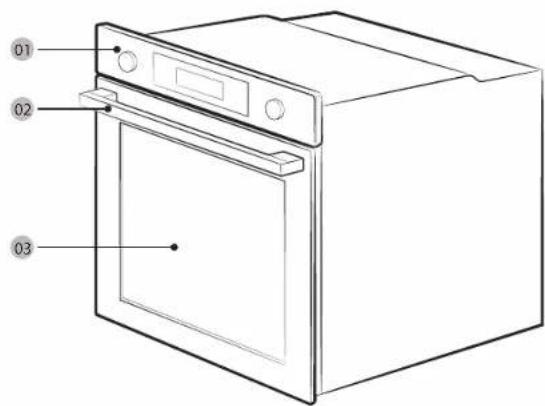
01 Control panel
02 Door handle
03 Door
Accessories
The oven comes with different accessories that help you prepare different types of food.
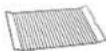
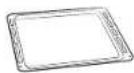
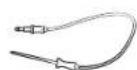
Wire rack Wire rack insert * Baking tray *
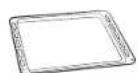
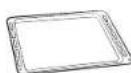
Universal tray * Extra-deep tray * Meat probe *
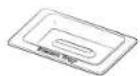

Steam tray ^ 2 screws (M4 L25)

NOTE.
Availability of accessories with an asterisk (*) depends on the oven model.
Power connection
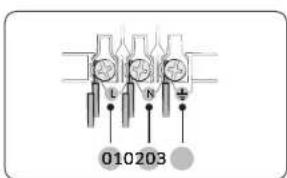
Plug the oven into an electrical socket. If a plug-type socket is not available due to allowable current limitations, use a multi-pole isolator switch (with at least 3 mm spacing in-between) in order to meet safety regulations. Use a power cord of sufficient length that supports the specification H05 RR-F or H05 VV-F, min. 1.5-2.5 mm ^2 .
01 BROWN or BLACK
02 BLUE or WHITE
03 YELLOW and GREEN
| Rated current(A) Minimum cross-sectional area | |
| 10 < A ≤ 16 1.5 mm2 | |
| 16 < A ≤ 25 2.5 mm2 |
Check the output specifications on the label attached to the oven. Open the rear cover of the oven using a screwdriver, and remove the screws on the cord clamp. Then, connect the power lines to the relevant connection terminals. The (↓)terminal is designed for earthgrounding. First connect the yellow and green lines (earthgrounding), which must be longer than the others. If you use a plug-type socket, the plug must remain accessible after the oven is installed. Samsung is not responsible for accidents caused by missing or faulty earthgrounding.

WARNING
Do not step on or twist the wires during installation, and keep them away from heat-emitting parts of the oven.
Installation
Cabinet mount
If installing the oven in a built-in cabinet, the cabinet must have its plastic surfaces and adhesive parts resistant up to 90 °C. Samsung is not responsible for damage to furniture from the oven's heat emission.
The oven must be properly ventilated. For ventilation, leave a gap of about 50 mm between the lower shelf of the cabinet and the supporting wall. If you install the oven under a cooktop, follow the cooktop's installation instructions.
Required Dimensions for Installation
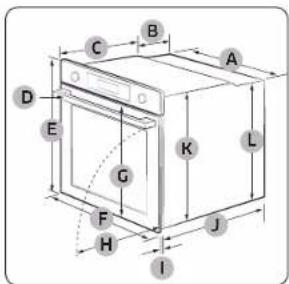
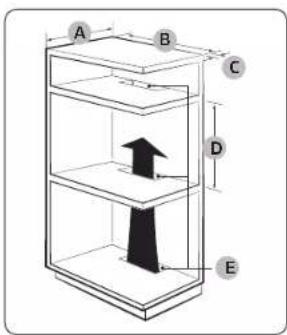
Oven (mm)
| A 560 G 503 | ||
| B 166 H 481 | ||
| C 383 I 21 | ||
| D 45 J 549 | ||
| E 596 K 579 | ||
| F 595 L 559 |
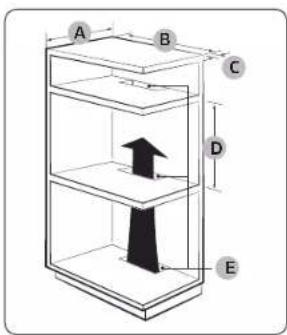
Built-in cabinet (mm)
| A Min. 550 |
| B Min. 560 |
| C Min. 50 |
| D Min. 590 - Max. 600 |
| E Min. 460 × Min. 50 |
NOTE
The built-in cabinet must have vents (E) to ventilate heat and circulate the air.
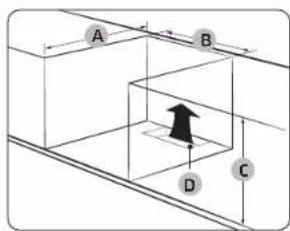
Under-sink cabinet (mm)
| A Min. 550 |
| B Min. 560 |
| C Min. 600 |
| D Min. 460 x Min. 50 |
NOTE
The built-in cabinet must have vents (D) to ventilate heat and circulate the air.
natural_image
Pure technical line drawing of a mechanical assembly without any text, numbers, or symbolsMounting the oven
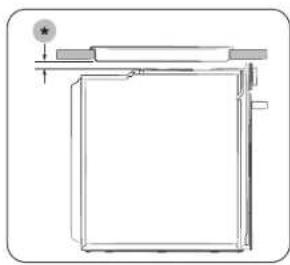
Installing with a hob
To install a hob on top of the oven, check the installation guide of the hob for the installation space requirement (4).
natural_image
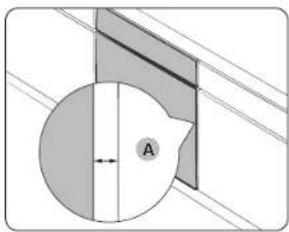
Diagram showing a circular object with a shaded region and labeled point A, connected to diagonal lines (no text or symbols beyond label)Make sure to leave a gap (A) of at least
5 mm between the oven and each side of the cabinet.
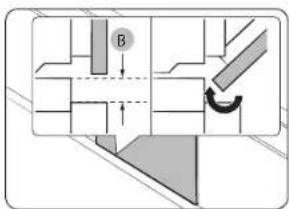
Secure at least 3 mm of gap (B) so that the door opens and closes smoothly.
natural_image
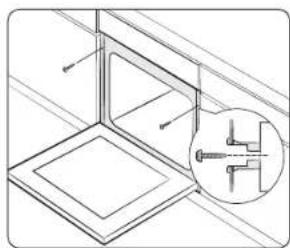
Technical line drawing of a structural frame with an inset showing a mechanical component (no text or symbols)Fit the oven into the cabinet and fix the oven firmly on both sides using 2 screws.
After installation is complete, remove the protective film, tape, and other packing material, and take out the provided accessories from inside the oven. To remove the oven from the cabinet, first disconnect power to the oven and remove 2 screws on both sides of the oven.
WARNING
The oven requires ventilation for normal operation. Do not block the vents under any circumstance.
NOTE
The actual appearance of the oven may differ with the model.
Before you start
Initial settings
When you power on the oven for the first time, the default time of "12:00" appears on the display where the hour element ("12") blinks. Follow the steps below to set the current time.
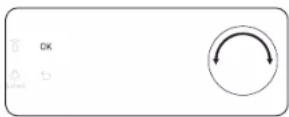
- With the hour element blinking, turn the value dial (right-sided dial) to set the hour, and then press OK to move to the minute element.
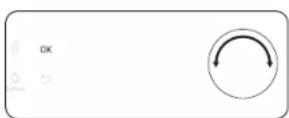
- With the minute element blinking, turn the value dial to set the minute, and then press OK.
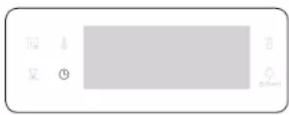
To change the current time after this initial setting, hold down the Button for 3 seconds and follow the above steps.
New oven smell
Before using the oven for the first time, clean inside the oven to remove the new oven smell.
-
Remove all accessories from inside the oven.
-
Run the oven with Convection 200 °C or Conventional 200 °C for an hour. This will burn any remaining production substances in the oven.
-
When complete, turn off the oven.
NOTE
- At the first-time use, you may see some smoke inside the oven while it is operating. However, this is not a product failure.
- As the temperature of the cooking room increases at an initial period, you may find some spots on the inner glass of the door. If this is the case, turn off the oven and wait until it cools down. Then, use kitchen paper or neutral detergent with a clean cloth to wipe up the inner glass.
- It is also important to make sure that you operate the oven in a well-ventilating kitchen environment.
Smart safety mechanism
If you open the door while the oven is operating, the oven light turns on and both the fan and the heating elements stop operation. This is to prevent physical injuries such as burns as well as to prevent unnecessary energy loss. When this happens, simply close the door and the oven continues to operate normally because this is not a system failure.
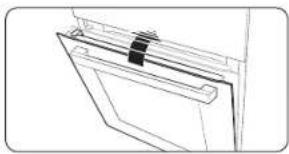
Soft closing door (applicable models only)
The Samsung Built-in Oven features a soft closing door that gently, safely, and silently closes.
When closing the door, the specially designed hinges catch the door a few centimetres before the final position. This is the perfect touch for added comfort, allowing the door to be closed silently and gently. (Availability of this feature depends on the oven model.)
natural_image
Line drawing of a door handle with a black clip attached (no text or symbols)The door starts to be closed softly at about 15 degrees and completely closed within approx. 5 seconds.
Accessories
For first time use, clean the accessories thoroughly with warm water, detergent and a soft clean cloth.
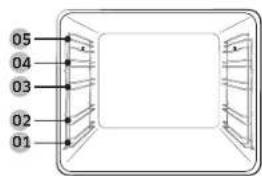
01 Level 1
02 Level 2
03 Level 3
04 Level 4
05 Level 5
- Insert the accessory to the correct position inside of the oven.
- Allow at least a 1 cm space from the accessory and the bottom of the oven, and from any other accessory.
• Take caution in removing cookware and/or accessories out of the oven. Hot meals or accessories can cause burns. - The accessories may be deformed while they are gaining heat. Once they have cooled down, they will recover their original appearance and performance.
Before you start
Basic use
For better cooking experience, familiarise yourself with how to use each accessory.
| Wire rack The wire rack is designed for grilling and roasting. Insert the wire rack into position with the protruding parts (stoppers on both sides) towards the front |
| Wire rack insert *The wire rack insert is used with the tray, and prevents liquid from dropping onto the bottom of the oven. |
| Baking tray *The baking tray (depth: 20 mm) is used to bake cakes, cookies, and other pastries. Put the slanted side to the front. |
| Universal tray *The universal tray (depth: 30 mm) is used for cooking and roasting. Use the wire-tray insert to prevent liquid from dropping onto the bottom of the oven.Put the slanted side to the front. |
| Extra-deep tray *The extra-deep tray (depth: 50 mm) is used for roasting with or without the wire-tray insert. Put the slanted side to the front. |
| Meat probe *The meat probe measures the internal temperature of the meat to cook. Use only the meat probe that comes with your oven. |
| Telescopic rails *Use the telescopic rail plate to insert the tray as follows:1. Stretch the rail plate out from the oven.2. Put the tray on the rail plate and slide the rail plate into the oven.3. Close the oven door. |
| Steam tray *Use the steam tray only in Natural Steam mode. Put the tray in the bottom center of the compartment and fill it with clean water. As the tray becomes hot during or immediately after cooking, be sure to use oven gloves or wait until the oven cools down completely to remove the tray. |

NOTE
Availability of accessories with an asterisk (*) depends on the oven model.
Mechanical lock (applicable models only)
Installation
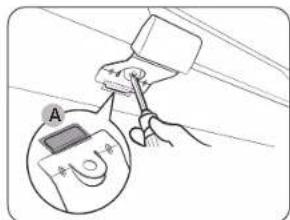
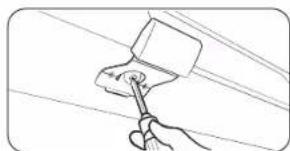
Uninstallation
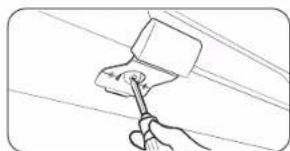
natural_image
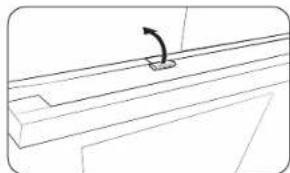
Illustration of a hand using a tool to clean or paint the surface (no text or symbols)Lock/unlock
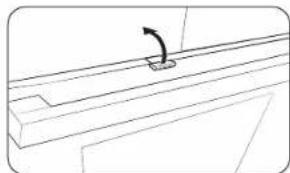
natural_image
Pure technical line drawing of a mechanical component with no text or symbols- Insert the thin part (A) of the mechanical lock into the corresponding slot of the lock handle as shown.
- Tighten the screw on the lock handle.
- Loosen and remove the screw from the lock handle.
• To open the door, slightly lift up the lock handle to unlock the door. Then, open the door.
• To lock the door, simply close the door.
The mechanical lock automatically locks the door.

English
Operations
Control panel
The front panel comes in a wide range of materials and colours. For improved quality, the actual appearance of the oven is subject to change without notice.
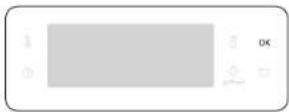
03 05 08 10
01
0402 06 07 09 11 12
01 Power
Turn left/right to turn on/off the oven.
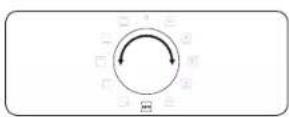
02 Mode selector
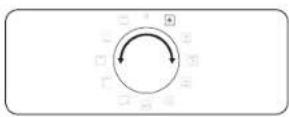
Turn left/right to select a cooking mode or function.
03 Fast preheat
Fast Preheat heats the oven fast to a set temperature.
- Touch on or off the Fast Preheat option.
• Available only with Single mode.
(Convection, Conventional, Top heat + Convection, Bottom heat + Convection)
- Disabled for temperatures set at less than 100^ .
04 Timer
Helps you check the time or operating duration while cooking.
05 Temperature
Use to set the temperature.
06 Cooking Time
Use to set the cooking time.
07 Display
Shows necessary information about a selected mode or current settings.
08 Smart Control
Press 3 seconds to enable/disable the Smart Control function.
09 Oven light
(Child lock)
Press to turn the internal light on or off. The oven light turns on automatically when the door is open or when the oven operation starts. And it turns off automatically after a certain period of inactivity in order to save power.
Child lock: To prevent accidents, Child Lock disables all controls. Hold down for 3 seconds to activate, or hold down for 3 seconds again to deactivate the lock on the control panel.
10 OK Press to confirm your settings.
11 Back
Cancel the current settings, and return to the default.
12 Value dial Use the value dial to:
- Set the cooking time or temperature.
- Choose a sub item of top-level menus: Cleaning, Auto Cook, Special function, or Grill.
- Choose a serving size for Auto Cook programmes.
NOTE
Tapping on the display while wearing plastic or oven gloves may not operate properly.
Operations
Common settings
It is common to change the default temperature and/or cooking time across all cooking modes. Follow the steps below to adjust the temperature and/or cooking time for the selected cooking mode.
Temperature
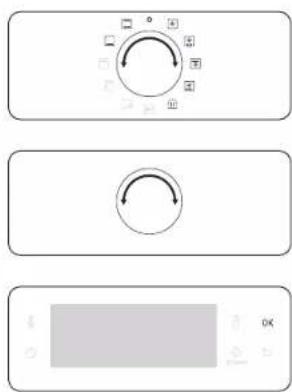
-
Turn the mode selector to choose a mode or function. The default temperature of each selection appears.
-
Turn the value dial to set a desired temperature.
-
Press OK to confirm your changes.
NOTE
- If you do not make any further settings within a few seconds, the oven starts cooking automatically with the default settings.
• To change the set temperature, press the button and follow the above steps. - The exact temperature inside the oven can be measured with authorized thermometer and method defined by an authorized institution.
Using other thermometers may cause a measuring error.
Cooking time
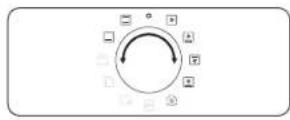
- Turn the mode selector to choose a mode or function.
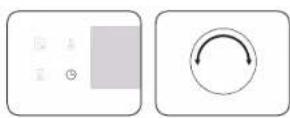
- Press the Ⓑ button, and then turn the value dial to set a desired time up to 23 hours 59 minutes.
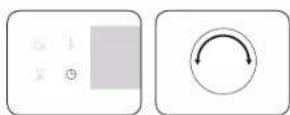
- Optionally, you can delay the end time of your cooking to a desired point. Press the Button, and use the value dial to set an end point. See Delay End for more information.
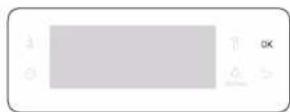
- Press OK to confirm your changes.
NOTE
- You can cook without setting the cooking time if you want to. In this case, the oven starts cooking at set temperatures without time information, and you must stop the oven manually when cooking is complete.
- To change the set cooking time, press ⏻ button and follow the above steps.
End time
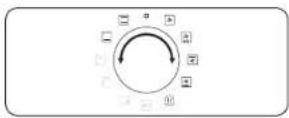
- Turn the mode selector to choose a mode or function.
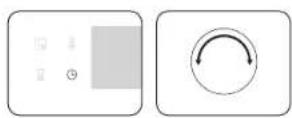
- Press ① twice, and turn the value dial to set a desired end time.
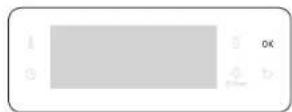
- Press OK to confirm your changes.
NOTE
- You can cook without setting the end time if you want to. In this case, the oven starts cooking at set temperatures without time information, and you must stop the oven manually when cooking is complete.
• To change the end time, press ☑ twice, and follow the above steps.
Delay End
Delay End is designed to make cooking more convenient.
Case 1
Suppose you select a one-hour recipe at 2:00 PM and you want the oven to finish cooking at 6:00 PM. To set the end time, change the Ready At time to 6:00 PM. The oven will start cooking at 5:00 PM and end at 6:00 PM as you set.
Current time: 2 pm Set cooking time: 1 hour Set Delay End time: 6 pm
The oven will start cooking at 5:00 PM and end at 6:00 PM automatically.

Case 2
Current time: 2 pm Set cooking time: 2 hour Set Delay End time: 5 pm
The oven will start cooking at 3:00 PM and end at 5:00 PM automatically.

CAUTION
Do not keep cooked food in the oven too long. The food may spoil.
Operations
To clear the cooking time
You can clear the cooking time. This is useful if you want to stop the oven manually at any time during the process.
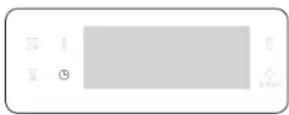
- While the oven is cooking, press the ⏻ button to display the default cooking time.
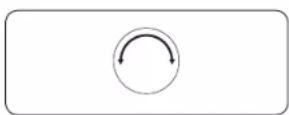
- Turn the value dial to set the cooking time to "0:00". Alternatively, simply press
- Press OK.
To clear the end time
You can clear the end time. This is useful if you want to stop the oven manually at any time during the process.
- While the oven is cooking, press twice to display the set end time.
- Turn the value dial to set the end time to the current time. Alternatively, simply press
- Press OK.
Cooking modes (except for Grill)
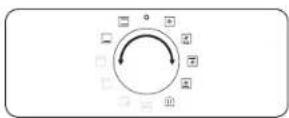
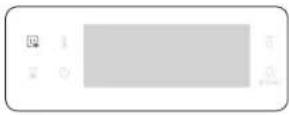
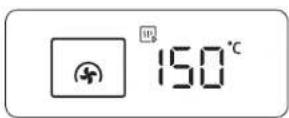
- Turn the mode selector to select an cooking mode.
- Set the cooking time and/or temperature if necessary. See the Common settings section for details.
- Optionally, you can fast preheat the oven. To do this, press the button and set the target temperature.
The corresponding indicator appears on the display.
The oven starts preheating with icon until the internal temperature reaches the target temperature.
When preheating is complete, the indicator disappears with a beep.
Preheating is recommended for all cooking modes unless otherwise specified in the Cooking smart.
NOTE
You can change the cooking time and/or temperature during cooking.
Cooking modes (except for Grill)
The cooking modes with an asterisk (*) are available for fast preheating and disabled for temperatures set at less than 100 °C.
| Mode Temperature range (°C) Suggested temperature (°C) | |||
| (D2D3) | Convection | * 30-250 160 | |
| The rear heating element generates heat, which is evenly distributed by the convection fan. Use this mode for baking and roasting on different levels at the same time. | |||
| (365D) | Conventional | * 30-250 180 | |
| The heat is generated from the top and bottom heating elements. This function should be used for standard baking and roasting for most types of dishes. | |||
| (2WTS) | Top heat + Convection | * 40-250 180 | |
| The top heating element generates heat, which is evenly distributed by the convection fan. Use this mode for roasting that requires a crispy top (for example, meat or lasagne). | |||
| (Y476) | Bottom heat + convection | * 40-250 200 | |
| The bottom heating element generates heat, which is evenly distributed by the convection fan. Use this mode for pizza, bread, or cake. | |||
| (4XZ8) | Bottom heat | 100-230 150 | |
| The bottom heating element generates heat. Use this mode at the end of baking or cooking to brown the bottoms of a quiche or pizza. | |||
Operations
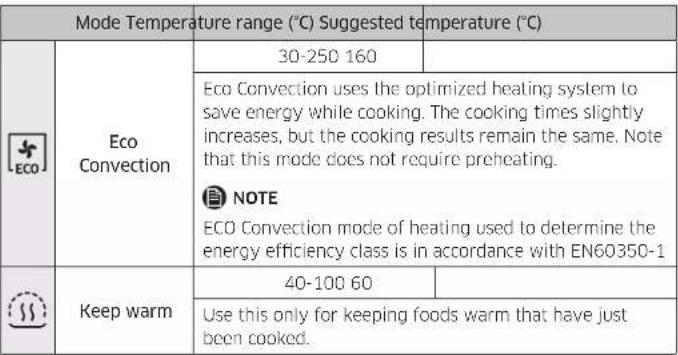 |
Cooking modes (Grill)
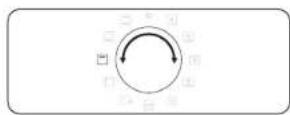
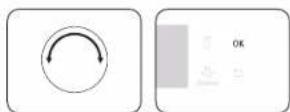
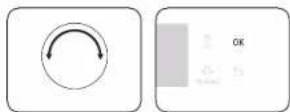
-
Turn the mode selector to select ☐
-
Use the value dial to select a Large grill (G 1) or Eco grill (G 2) or Fan grill (G 3). and then press OK.
-
Use the value dial to set the temperature, and then press OK.
Cooking modes (Grill)
| Mode Temperature range (°C) Suggested temperature (°C) | ||
| G 1 Large grill | 100-270 220 | |
| The large-area grill emits heat. Use this mode for browning the tops of food (for example, meat, lasagne, or gratin). | ||
| G 2 Eco grill | 100-270 220 | |
| The small-area grill emits heat. Use this mode for food that requires less heat, such as fish and filled baguettes. | ||
| G 3 Fan grill | 100-250 180 | |
| Two top heating elements generate heat, which is distributed by the fan. Use this mode for grilling meat or fish. | ||
Cooking with the meat probe (applicable models only)
The meat probe measures the internal temperature of meat while it's cooking. When the temperature reaches the target temperature, the oven stops and finishes cooking.
- Use only the meat probe that comes with your oven.
- You cannot set the cooking time if the meat probe is plugged in.
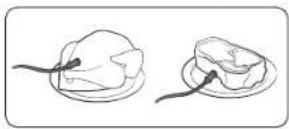
- On the feature panel, press to choose a cooking mode and temperature.
- Insert the tip of the meat probe into the centre of the meat to cook. Make sure the rubber handle is not inserted.
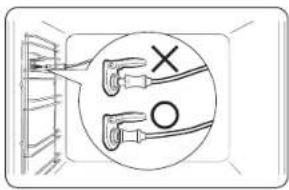
- Plug the probe connector into the socket on the left-sided wall. Make sure you see the Meat Probe inserted indicator when the probe connector is connected.
- Press button again and turn the value dial (right-sided dial) to set the internal temperature of the meat.
- Press OK to start cooking. The oven completes cooking with a melody when the internal temperature of the meat reaches the set temperature.
WARNING on acrylamide
- To prevent damage, do not use the meat probe with the spit accessory.
- When cooking is complete, the meat probe becomes very hot. To prevent burns, use oven gloves to take out the food.
NOTE
Not all modes support using the meat probe. If you use the meat probe with inapplicable modes, the current mode indicator blinks. When this happens, remove the meat probe instantly.
Operations
To stop cooking
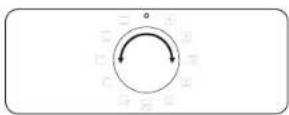
While cooking is in process, turn the mode selector to "The oven turns off in a few seconds. This is because, to avoid accepting incorrect commands by users, the oven waits a few seconds so that they can correct their selection.
Special function
Add special or additional functions to improve your cooking experience.
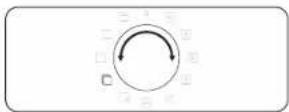
- Turn the mode selector to select ☐
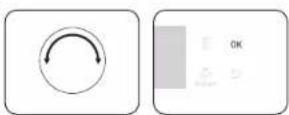
- Turn the value dial to select a function, and then press OK. The default temperature appears.
- Set the cooking temperature if necessary. See the Common settings section for details.
- Press OK to start the function.
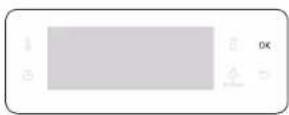
| Mode | Temperature range (°C) | Suggested temperature (°C) | Instructions | |
| F 1 | Plate warm 30 | 80 50 | Use this for warming dishes or ovenware. | |
| F 2 | Defrost 30 60 | 30 | This mode uses for defrosting frozen products, baking goods, fruit, cake, cream and chocolate. The defrosting time is depending on the type, size and quantity of the food. | |
Natural Steam (applicable models only)
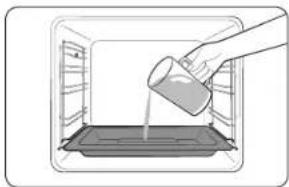
With Natural Steam, you can bake bread that is crispy on the outside and moist inside. We recommended preheat the oven for the best results.
natural_image
Illustration of a hand pouring liquid into a tray inside an oven (no text or symbols)- Insert steam tray on the bottom of compartment.
- Fill the tray with water 250 ml only when the oven is cold.
- Set Convection mode and select Natural Steam
- Turn the value dial to set the temperature.
- Press OK to start preheating.
natural_image
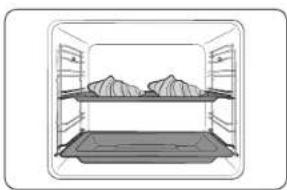
Simple line drawing of a storage tray with two piles of food, no text or symbols present- Put the food in the oven on any rack and start cooking.

NOTE
- Do not refill the water during cooking or when the oven is hot.
- When the oven cools down completely after using the Natural Steam function, use a wet cloth to wipe the bottom of the compartment.
- To remove water scale that forms after using the oven for an extended time, use a soft cloth with dedicated detergent.
The Natural Steam 🎨 works only with the Convection ✦ mode.
| Food | Accessory | Level | Temp. (°C) | Time (min.) |
| Croissants, 4-6 pieces | Universal tray | 3 | 190 | 20-25 |
| Apple puff pastry Universal tray 3 190 20-25 | ||||
| Danish pastry Universal tray 3 190 20-30 | ||||
| Bread roll Universal tray 3 180 20-30 | ||||
| White bread Wire rack 2 180 30-40 | ||||
Operations
Auto Cook
For inexperienced cooks, the oven offers a total of 20 auto cooking recipes. Take advantage of this feature to save you time or shorten your learning curve. The cooking time and temperature will be adjusted according to the selected recipe.
- Turn the mode selector to select AUTO
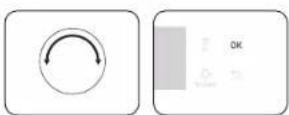
- Turn the value dial to select a programme, and then press OK.
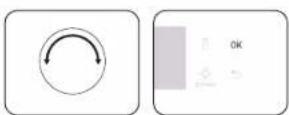
-
Turn the value dial to select a serving size. The weight range depends on the programme.
-
Press OK to start cooking.
NOTE
- Some of the items in the Auto Cook programmes include preheating. For those items the preheating progress is displayed. Please put the food in the oven after preheating beep. Then, press Cooking time to start Auto Cook.
- For more information, see the Auto Cook programmes section in this manual.
Cleaning
Two cleaning modes are available for you. This function saves you time by removing the need for regular manual cleaning. The remaining time appears on the display during this process.
| Function Instructions | ||
| C 1 Steam Clean This is useful for cleaning light soiling with steaming. | ||
| C 2 Pyrolytic * | Pyrolytic features high temperature thermal cleaning.It burns off oily leftovers to facilitate manual cleaning.1 h 50 m (default setting) / 2 h 10 m / 2 h 30 m | |
NOTE
The function with an asterisk (*) is available with applicable models only.
Steam Clean
This is useful for cleaning light soiling with steaming. This function saves you time by removing the need for regular manual cleaning. The remaining time appears on the display during this process.
natural_image
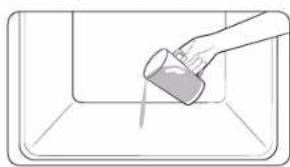
Simple line drawing of a hand pouring liquid into a container (no text or symbols)- Pour 400 ml (3/4 pint) of water onto the bottom of the oven and close the oven door.
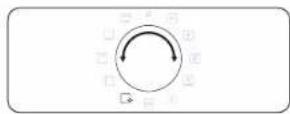
- Turn the mode selector to select ☐
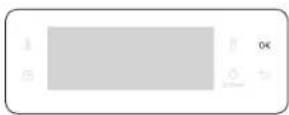
- Turn the Value Dial to select C 1, and then press OK. Steam cleaning runs for 26 minutes.
natural_image
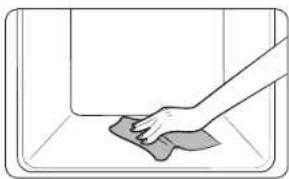
Hand cleaning a tiled room with a cloth (no text or symbols visible)- Use a dry cloth to clean inside the oven.
WARNING
Do not open the door before the cycle is complete. The water inside the oven is very hot, and it can cause a burn.
NOTE
- If the oven is heavily soiled with grease, for example, after roasting or grilling, it is recommended to remove stubborn soils manually using a cleaning agent before activating Steam cleaning.
- Leave the oven door ajar when the cycle is complete. This is to allow the interior enamel surface to dry thoroughly.
- If the oven is hot inside, cleaning is not activated. Wait until the oven cools down, and try again.
- Do not pour water onto the bottom by force. Do it gently. Otherwise, the water overflows to the front.
Pyrolytic
Pyrolytic features high temperature thermal cleaning. It burns off oily leftovers to facilitate manual cleaning.
NOTE
The Pyrolytic function is available with applicable models only.
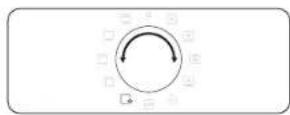
- Remove all accessories, including the side runners, and wipe out large pieces of impurities manually from inside the oven. Otherwise, they may cause flames during the cleaning cycle, resulting in a fire.
- Turn the mode selector to select
- Turn the Value Dial to select C 2, and then press OK.
- Turn the Value Dial to select a cleaning time from 3 levels: 1 hr 50 min (default setting), 2 hr 10 min, and 2 hr 30 min.
- Press OK to start cleaning.
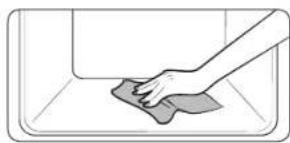
natural_image
Illustration of a hand cleaning a tiled surface with a cloth (no text or symbols)- When complete, wait until the oven cools down, and then wipe the door along its edges using a wet cloth.
Operations
CAUTION
- Do not touch the oven because the oven becomes very hot during the cycle.
• To avoid accidents, keep children away from the oven. - After the cycle is complete, do not power off while the cooling fan is operating to cool the oven down.
NOTE
- Once the cycle starts, the oven becomes hot inside. Then, the door will be locked for safety. When the cycle is complete and the oven cools down, the door will be unlocked.
- Make sure you empty the oven before cleaning. Accessories can be deformed due to high temperatures inside the oven.
Timer
Timer helps you check the time or operating duration while cooking.
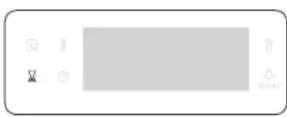
1. Press
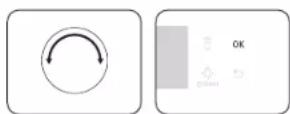
- Turn the value dial to set the time, and then press OK.
You can set the time to a max of 23 hours and 59 minutes.
NOTE
- When the time has elapsed, the oven beeps with a blinking message of "0:00" on the display.
- You can change the timer settings at any time.
Sound On/Off
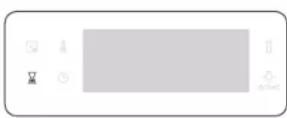
- To mute the sound, press and hold down for 3 seconds. Then 1 is blinking.
- Select 1 and press OK. And turn the value dial to set On and press OK.
- To unmute the sound, repeat step 1. 2, set Off and press OK.
Wi-Fi On/Off
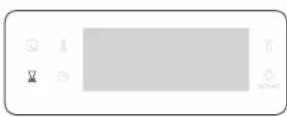
- To set the Wi-Fi on, press and hold down for 3 seconds. Then 1 is blinking.
- Select 2 and press OK. And turn the value dial to set On and press OK.
- To set the Wi-Fi off, repeat step 1, 2, set Off and press OK.
Cooking smart
Manual cooking
⚠ WARNING on acrylamide
Acrylamide produced while baking starch-contained food such as potato chips, French fries, and bread may cause health problems. It is recommended to cook these foods at low temperatures and avoid overcooking, heavy crisping, or burning.
NOTE
- Pre-heating is recommended for all cooking modes unless otherwise specified in the Cooking smart.
- When using Eco Grill, put food in the centre of the accessory tray.
Accessory tips
Your oven comes with a different number or kind of accessories. You may find that some accessories are missing from the table below. However, even if you are not provided with the exact accessories specified in this Cooking smart, you can follow along with what you already have, and achieve the same results.
• The Baking tray and the Universal tray are interchangeable.
- When cooking oily foods, it is recommended to put a tray under the Wire rack to collect oil residue. If you are provided with the Wire rack insert, you can use it together with the tray.
- If you are provided with the Universal tray or Extra deep tray, or both, it is better to use whichever is deeper for cooking oily foods.
Baking
We recommend to preheat the oven for best results.
| Food Accessory Level | Type of heating | Temp. (°C) | Time (min.) | ||
| Sponge cake | Wire rack,∅ 25-26 cm tin | 2 160-170 | 35-40 | ||
| Marble cake | Wire rack,Gugelhopf tin | 3 175-185 | 50-60 | ||
| Tart | Wire rack,∅ 20 cm tart tin | 3 190-200 | 50-60 | ||
| Yeast cake on tray with fruits and crumbles | Universal tray 2 | 160-180 | 40-50 | ||
| Fruit crumble | Wire rack,22-24 cm oven dish | 3 170-180 | 25-30 | ||
| Scones Universal | tray 3 180-190 30-35 | ||||
| Lasagne | Wire rack,22-24 cm oven dish | 3 190-200 | 25-30 | ||
| Meringues Universal | tray 3 80-100 100-150 | ||||
| Soufflé | Wire rack,soufflé cups | 3 170-180 | 20-25 | ||
| Apple yeast tray cake | Universal tray 3 | 150-170 | 60-70 | ||
| Homemade pizza, 1-1.2 kg | Universal tray 2 | 190-210 | 10-15 | ||
| Frozen puff pastry, filled | Universal tray 2 | 180-200 | 20-25 | ||
Cooking smart
| Food Accessory Level | Type of heating | Temp. (°C) | Time (min.) | ||
| Quiche | Wire rack, 22-24 cm oven dish | 2 180-195 | 35 | ||
| Apple pie | Wire rack, ∅ 20 cm tin | 2 160-175 | 75 | ||
| Chilled pizza Universal tray 3 180-200 | 5-10 | ||||
Roasting
| Food Accessory Level | Type of heating | Temp. (°C) | Time (min.) | ||
| Meat(Beef/Pork/Lamb) | |||||
| Sirloin of beef, 1 kg | Wire rack + Universal tray | 31 | 160-180 | 50-70 | |
| Boned loin of veal, 1.5 kg | Wire rack + Universal tray | 31 | 160-180 | 90-120 | |
| Pork roast, 1 kg | Wire rack + Universal tray | 31 | 200-210 | 50-60 | |
| Joint of pork, 1 kg | Wire rack + Universal tray | 31 | 160-180 | 100-120 | |
| Leg of lamb on the bone, 1 kg | Wire rack + Universal tray | 31 | 170-180 | 100-120 | |
| Poultry(Chicken/Duck/Turkey) | |||||
| Chicken, Whole, 1.2 kg * | Wire rack + Universal tray | 31 | 205 80 | 100 | |
| Chicken pieces | Wire rack + Universal tray | 31 | 200-220 | 25-35 | |
| Food Accessory Level | Type of heating | Temp. (°C) | Time (min.) | ||
| Duck breast | Wire rack + Universal tray | 31 | 180-200 | 20-30 | |
| Small turkey, Whole, 5 kg | Wire rack + Universal tray | 31 | 180-200 | 120-150 | |
| Vegetables | |||||
| Vegetables, 0.5 kg | Wire rack + Universal tray | 31 | 220-230 | 15-20 | |
| Baked potato halves, 0.5 kg | Wire rack + Universal tray | 31 | 200-45 | 50 | |
| Fish | |||||
| Fish fillet, baked | Wire rack + Universal tray | 31 | 200-230 | 10-15 | |
| Roast fish | Wire rack + Universal tray | 31 | 180-200 | 30-40 | |
* Turnover after half of time.
Grilling
We recommend preheat the oven for 5-10 minutes using large grill mode. Turn over after half of time.
| Food Accessory Level | Type of heating | Temp. (°C) | Time (min.) | ||
| Bread | |||||
| Toast | Wire rack | 5 | (A4637) | 240-250 | 2-4 |
| Cheese toast | Universal tray | 4 | 200 | 4-8 | |
| Beef | |||||
| Steak * | Wire rack + Universal tray | 41 | 230-250 | 15-20 | |
| Burgers * | Wire rack + Universal tray | 41 | 230-250 | 15-20 | |
| Pork | |||||
| Pork chops | Wire rack + Universal tray | 41 | 230-250 | 20-30 | |
| Sausages | Wire rack + Universal tray | 41 | 230-250 | 10-15 | |
| Poultry | |||||
| Chicken, breast | Wire rack + Universal tray | 41 | 230-240 | 30-35 | |
| Chicken, drumstick | Wire rack + Universal tray | 41 | 230-240 | 25-35 | |
Frozen ready-meal
| Food Accessory Level | Type of heating | Temp. (°C) | Time (min.) | ||
| Frozen pizza Wire rack 3 200-220 | 15-25 | ||||
| Frozen oven chips | Universal tray | 3 | 220-225 | 20-25 | |
| Frozen croquettes | Universal tray | 3 | 220-230 | 25-30 | |
Pro-Roasting
This mode includes an automatic heating-up cycle up to 220 °C. The top heater and the convection fan are operating during the process of searing the meat. After this stage the food is cooked gently by the low temperature of pre-selection. This process is done while the top and the bottom heaters are operating. This mode is suitable for meat roasts and poultry.
| Food Accessory Level Temp. (°C) Time (hrs.) | ||||
| Roast beef Wire rack + Universal tray | 31 | 80-100 | 3-4 | |
| Pork roast | Wire rack + Universal tray | 31 | 80-100 | 4-5 |
| Lamb roast | Wire rack + Universal tray | 31 | 80-100 | 3-4 |
| Duck breast | Wire rack + Universal tray | 31 | 80-100 | 2-3 |
^^ Turnover after 2/3 of the cooking time.
Cooking smart
ECO convection
This mode uses the optimized heating system so that you save the energy during cooking your dishes. The times of this category are suggested to not be preheated before cooking for saving more energy.
You can increase or decrease the cooking time and/or temperature to your preference.
| Food | Accessory | Level | Temp. (°C) | Time (min.) |
| Fruit crumble, 0.8-1.2 kg | Wire rack | 2 | 160-180 | 40-60 |
| Jacket potatoes, 0.4-0.8 kg | Universal tray | 2 | 190-200 | 50-70 |
| Sausages, 0.3-0.5 kg | Wire rack + Universal tray | 31 | 160-180 | 15-25 |
| Frozen oven chips, 0.3-0.5 kg | Universal tray | 3 | 180-200 | 20-30 |
| Frozen potato wedges, 0.3-0.5 kg | Universal tray | 3 | 190-210 | 20-30 |
| Fish fillets, baked, 0.4-0.8 kg | Wire rack + Universal tray | 31 | 200-220 | 20-30 |
| Crispy fish fillets, breaded, 0.4-0.8 kg | Wire rack + Universal tray | 31 | 200-220 | 20-30 |
| Roast sirloin of beef, 0.8-1.2 kg | Wire rack + Universal tray | 21 | 180-200 | 50-70 |
| Roast vegetables, 0.4-0.6 kg | Universal tray | 3 | 200-220 | 20-30 |
Auto Cook programmes
The following table presents 20 auto programmes for cooking, roasting and baking.
It contains its quantities, weight ranges and appropriate recommendations. Cooking modes and times have been pre-programmed for your convenience. You will find some recipes for the auto programmes in your instruction book. Auto Cook programmes 1 to 8, 18 and 19 include preheating and display the preheating progress. Please put the food in the oven after preheating beep. Then, press Cooking time to start Auto Cook.
WARNING
Always use oven gloves while taking out food.
| Code | Food Weight (kg) | Accessory Level | ||
| A 1 | Potato gratin | 1.0-1.5 Wire | rack 3 | |
| Prepare fresh potato gratin using an ovenproof dish, 22-24 cm. Start programme, after preheating beep sounds, put dish in the centre of rack. | ||||
| A 2 | Vegetable gratin | 0.8-1.2 Wire | rack 3 | |
| Prepare fresh vegetable gratin using an ovenproof dish, 22-24 cm. Start programme, after preheating beep sounds, put dish in the centre of rack. | ||||
| A 3 | Lasagne | 1.0-1.5 Wire | rack 3 | |
| Prepare homemade lasagne using a 22-24 cm ovenproof dish. Start programme, after preheating beep sounds, put dish in the centre of rack. | ||||
| A 4 | Apple pie | 1.2-1.4 Wire | rack 2 | |
| Prepare apple pie using a 24-26 cm round metal baking tin. Start programme, after preheating beep sounds, put tin in the centre of rack. | ||||
| A 5 | Quiche Lorraine | 1.2-1.5 Wire rack 2 | ||
| Prepare quiche dough, put in a round quiche dish with 25 cm diameter. Start programme, after preheating beep sounds add filling and put dish in the centre of rack. | ||||
| A 6 | Sponge cake | 0.5-0.6 Wire rack 3 | ||
| Prepare dough and put into a black metal round baking tin with 26 cm diameter. Start programme, after preheating beep sounds, put tin in the centre of rack. | ||||
| A 7 | Marble cake | 0.7-0.8 Wire rack 2 | ||
| Prepare dough and put into a metal round gugelhopf or bundt tin. Start programme, after preheating beep sounds, put tin in the centre of rack. | ||||
| A 8 | Dutch loaf cake | 0.7-0.8 Wire rack 2 | ||
| Prepare dough and put into a black metal rectangular baking dish (length 25 cm). Start programme, after preheating beep sounds, put tin in the centre of rack. | ||||
| A 9 | Roast sirloin of beef | 0.9-1.1 | Wire rack + Universal tray | 21 |
| 1.1-1.3 | ||||
| Season the beef and leave in refrigerator for 1 hour. Put on the wire rack with fat-side-up. | ||||
| A 10 | Herb roasted lamb chops | 0.4-0.6 | Wire rack + Universal tray | 41 |
| 0.6-0.8 | ||||
| Marinate the lamb chops with herbs and spices and put them on wire rack. | ||||
| Code | Food Weight (kg) | Accessory Level | ||
| A 11 | Chicken, whole | 0.9-1.1 | Wire rack + Universal tray | 21 |
| 1.1-1.3 | ||||
| Rinse and clean chicken. Brush chicken with oil and spices. Put it breast side down on the wire rack and turn over, as soon as the oven beeps. | ||||
| A 12 | Chicken, breast | 0.4-0.6 | Wire rack + Universal tray | 41 |
| 0.6-0.8 | ||||
| Marinate breasts and put on the wire rack. | ||||
| A 13 | Trout | 0.3-0.5 | Wire rack + Universal tray | 41 |
| 0.5-0.7 | ||||
| Rinse and clean the fish and put head to tail on the wire rack. Add lemon juice, salt and herbs inside fish. Cut skin surface with knife. Brush oil and salt. | ||||
| A 14 | Salmon fillet | 0.4-0.6 | Wire rack + Universal tray | 41 |
| 0.6-0.8 | ||||
| Rinse and clean fillets of steaks. Put fillets skin side up on wire rack. | ||||
| A 15 | Roasted vegetables | 0.4-0.6 | Universal tray 4 | |
| 0.6-0.8 | ||||
| Rinse and prepare slices of courgette, eggplant, pepper, onion and cherry tomatoes. Brush with olive oil, herbs and spices. Distribute evenly on tray. | ||||
| A 16 | Baked potato halves | 0.6-0.8 | Universal tray 3 | |
| 0.8-1.0 | ||||
| Cut large potatoes (each 200 g) into halves lengthways. Put with cut side up on tray and brush with olive oil, herbs and spices. | ||||
Cooking smart
| Code | Food | Weight (kg) | Accessory | Level |
| A 17 | Frozen oven chips | 0.3-0.5 | Universal tray | 3 |
| 0.5-0.7 | ||||
| Distribute frozen oven chips evenly on tray. | ||||
| A 18 | Frozen pizza | 0.3-0.6 | Wire rack | 3 |
| 0.6-0.9 | ||||
| Put the frozen pizza in the middle of the wire rack.Start programme, after preheating beep sounds, insert rack. The first setting is for thin Italian pizza, the second setting for thick pan pizza. | ||||
| A 19 | Homemade pizza | 0.8-1.0 | Universal tray | 2 |
| 1.0-1.2 | ||||
| Prepare homemade pizza with the yeast dough and put it on the tray. The weight include dough and topping such as sauce, vegetables, ham and cheese. Start programme, after preheating beep sounds, insert tray. | ||||
| A 20 | Fermentation yeast dough | 0.5-0.6 | Wire rack | 2 |
| 0.7-0.8 | ||||
| Prepare dough in bowl, cover with cling film. Put in centre of rack. The first setting is for pizza and cake dough, the second setting for bread dough. | ||||
Test Dishes
According to standard EN 60350-1
1. Baking
The recommendations for baking refer to a preheated oven. Do not use the fast preheat function. Always put trays the slanted side to the door front.
| Type of food | Accessory Level | Type of heating | Temp. (°C) | Time (min.) | |
| Small cakes | Universal tray 3 165 25-30 | ||||
| 2 165 | 28-57 | ||||
| 1+4 155 | 35-40 | ||||
| Shortbread | Universal tray + Universal tray | 1+4 140 | 28-57 | ||
| Fatless sponge cake | Wire rack + Spring form cake tin (Dark coated, ∅ 26 cm) | 2 165 | 30-57 | ||
| 2 160 | 30-57 | ||||
| 1+4 155 | 35-40 | ||||
| Apple pie W | Wire rack + 2 Spring form cake tins * (Dark coated, ∅ 20 cm) | 1 placed diagonally | 160 70-80 | ||
| Universal tray + Wire rack + 2 Spring form cake tins ** (Dark coated, ∅ 20 cm) | 1+3 160 | 80-90 | |||
* Increase the cooking time by 5 minutes if you are cooking in Conventional mode using a glass ovenware (∅ 26 cm).
** Two cakes are arranged on the grid at the back left and at the front right.
*** Two cakes are arranged in the center on top of each other.
2. Grilling
Preheat the empty oven for 5 minutes using Large Grill function.
| Type of food | Accessory Level | Type of heating | Temp. (°C) | Time (min.) | |
| White bread toast | Wire rack 5-270 | (max) | 1-2 | ||
| Beef burgers * (12 ea) | Wire rack + Universal tray (to catch drippings) | 41 | 270 (max) | 1st 15-18 2nd 5-8 |
^ Turn over after 2/3 of the cooking time.
- Roasting
| Type of food | Accessory Level | Type of heating | Temp. (°C) | Time (min.) | |
| Whole chicken * | Wire rack + Universal tray (to catch drippings) | 31 | 205 80-100 |
* Turnover after half of time.
Collection of frequent Auto cook recipes
Potato gratin
Ingredients 800 g potatoes, 100 ml milk, 100 ml cream, 50 g beaten whole egg, 1 tbsp each of salt, pepper, nutmeg, 150 g grated cheese, butter, thyme
Directions Peel potatoes and slice them to 3 mm thickness. Rub the butter all over the surface of a gratin dish (22-24 cm). Spread the slices on a clean towel and keep them covered with the towel while you prepare the rest of the ingredients. Mix the rest of the ingredients except for grated cheese into a large bowl and stir well. Layer the potato slices in the dish slightly overlapping and pour the mixture over the potatoes. Spread the grated cheese over the top and bake. After cooking, serve sprinkled with a few fresh thyme leaves.
Vegetable gratin
Ingredients 800 g vegetables (courgette, tomato, onion, carrot, pepper, pre-cooked potatoes), 150 ml cream, 50 g beaten whole egg, 1 tbsp each of salt, herb (pepper, parsley or rosemary), 150 g grated cheese, 3 tbsp olive oil, some thyme leaves
Directions Wash the vegetables and slice them to 3-5 mm thickness. Layer the slices on a gratin dish (22-24 cm) and pour the oil on the vegetables. Mix the rest of the ingredients except for grated cheese and pour on the vegetables. Spread the grated cheese over the top and bake. Then serve sprinkled with a few fresh thyme leaves.
Cooking smart
Lasagne
Ingredients 2 tbsp olive oil, 500 g minced beef, 500 ml tomato sauce, 100 ml beef stock, 150 g dried lasagne sheets, 1 onion (chopped), 200 g grated cheese, 1 tsp each of dried parsley flakes, oregano, basil
Directions
Prepare tomato meat sauce. Heat the oil in a frying pan, then cook the minced beef and chopped onion for about 10 min until browned all over. Pour over the tomato sauce and beef stock, add the dried herbs. Bring up to the boil, then simmer for 30 min.
Cook lasagne noodles according to package directions. Layer the lasagne noodle, meat sauce, and cheese then repeat. Then sprinkle evenly with remaining cheese on the top of layer of noodles and bake.
Apple pie
Ingredients • Pastry: 275 g flour, 12 tbsp salt, 125 g white castor sugar, 8 g vanilla sugar, 175 g cold butter, 1 egg(beaten)
- Filling: 750 g firm whole apples, 1 tbsp lemon juice, 40 g sugar, 12 tbsp cinnamon, 50 g seedless raisins, 2 tbsp bread crumbs
Directions Sift the flour with the salt above a big bowl. Sift the castor sugar and vanilla sugar with it. Cut with 2 knives the butter through the flour in small cubes. Add 34 of the beaten egg. Knead all the ingredients in the food processor until a crumbly mass appears. Form the dough into a ball with your hands. Wrap it in plastic foil and leave it chilled for about 30 min.
Grease the spring tin (24-26 cm diameter) and dust the surface with flour. Roll out 34 of the dough till 5 mm thickness. Put it in the tin (bottom and sides).
Peel and core the apples. Cut them in cubes of about 34 x 24 cm. Sprinkle the apples with lemon juice and mix well. Wash and dry the currants and raisins. Add sugar, cinnamon, raisins and currants. Mix well and sprinkle the bottom of dough with bread crumbs. Press slightly.
Roll out the rest of the dough. Cut the dough in small strips and put them cross wise on the filling. Brush the pie evenly with the rest of the beaten egg.
Quiche Lorraine
Ingredients • Pastry: 200 g plain flour, 80 g butter, 1 egg
- Filling: 75 g cubed fatless bacon, 125 ml cream. 125 g crème fraîche, 2 eggs, beaten, 100 g grated cheese from Switzerland, salt and pepper
Directions To make the pastry, put the flour, butter and egg in a bowl and mix to a soften pastry and then rest it in the refrigerator for 30 min. Roll out the pastry and placed in the greased ceramic dish for quiche (25 cm diameter). Prick the bottom with a fork. Mix the egg, cream, crème fraîche, cheese, salt and pepper. Pour it on the pastry just before baking.
Fruit crumbles
Ingredients • Topping: 200 g flour, 100 g butter, 100 g sugar, 2 g salt, 2 g cinnamon powder
• Fruit: 600 g mixed fruits
Directions Mix all ingredients until to be crumble for making topping. Spread the mixed fruits into an oven dish and sprinkle the crumble.
Homemade pizza
Ingredients - Pizza dough: 300 g flour, 7 g dried yeast, 1 tbsp olive oil, 200 ml warm water, 1 tbsp sugar and salt - Topping: 400 g sliced vegetable (aubergine, courgette, onion, tomato), 100 g ham or bacon(chopped), 100 g grated cheese
Directions Put the flour, yeast, oil, salt, sugar and warm water in a bowl and mix to a wettish dough. Knead in a mixer or by hand about 5-10 min. Cover with lid and place in oven for 30 min at 35 °C to prove. Roll out the dough on a floured surface into a rectangle shape and put on the tray or pizza pan. Spread the tomato puree on the dough and place ham, mushroom, olive and tomato. Sprinkle evenly with cheese on the top and bake.
Roast sirloin of beef
Ingredients 1 kg sirloin of beef joint, 5 g salt, 1 g pepper, 3 g each of rosemary, thyme
Directions Season the beef with salt, pepper and rosemary and leave in refrigerator for 1 hour. Put on the Wire rack. Put it in the oven and cook.
Herb roasted lamb chops
Ingredients 1 kg lamb chops (6 pieces), 4 large garlic cloves (pressed), 1 tbsp fresh thyme (crushed), 1 tbsp fresh rosemary(crushed), 2 tbsp salt, 2 tbsp olive oil
Directions Mix the salt, garlic, herbs and oil and add the lamb. Turn to coat and leave at a room temperature at least 30 min to 1 hour.
Cooking smart
Rack of Pork rib
Ingredients 2 racks pork spare ribs, 1 tbsp black peppercorns, 3 bay leaves, 1 onion (chopped), 3 garlic cloves (chopped), 85 g brown sugar, 3 tbsp Worcestershire sauce, 2 tbsp Tomato puree, 2 tbsp olive oil
Directions Make a barbecue sauce. Heat oil in a sauce pan and add the onion. Cook until softened and add remaining ingredients. Broil and reduce heat and simmer for 30 min until thickened. Marinate the rib with the barbecue sauce at least 30 min to 1 hour.
Maintenance
Cleaning
WARNING
- Make sure the oven and accessories are cool before cleaning.
- Do not use abrasive cleaning agents, hard brushes, scouring pads or cloths, steel wool, knives or any other abrasive materials.
Oven interior
- For cleaning the interior of the oven, use a clean cloth and a mild cleaning agent or warm soapy water.
- Do not hand-clean the door seal.
- To avoid damaging the enamelled oven surfaces, only use standard oven cleaners.
- To remove stubborn soils, use a special oven cleaner.
- As the temperature of the cooking room increases at an initial period, you may find some spots on the inner glass of the door. If this is the case, turn off the oven and wait until it cools down. Then, use kitchen paper or neutral detergent with a clean cloth to wipe up the inner glass.
Oven exterior
For cleaning the exterior of the oven such as the oven door, handle, and display, use a clean cloth and a mild cleaning detergent or warm soapy water, and dry with a kitchen roll or dry towel.
Grease and dirt can remain, especially around the handle because of the hot air coming from inside. It is recommended to clean the handle after each use.
Accessories
Wash the accessories after every use, and dry it with a tea towel. To remove stubborn impurities, soak the used accessories in warm soapy water for about 30 minutes before washing.
Catalytic enamel surface (applicable models only)
The removable parts are coated with dark grey catalytic enamel. They can be soiled with oil and fat spattered by the circulating air during convection heating. However, these impurities burn off at oven temperatures of 200 °C or above.
- Remove all accessories from the oven.
- Clean the interior of the oven.
- Select Convection mode with max temperature, and run the cycle for an hour.
Door
Do not remove the oven door unless for cleaning purposes. To remove the door for cleaning, follow these instructions.
WARNING
The oven door is heavy.
- Open the door and lip open the clips at both hinges.
- Close the door approximately 70°. Hold the oven door by the sides using both hands, and lift and pull upwards until the hinges are removed.
-
Clean the door with soapy water and a clean cloth.
-
When done, follow steps 1 to 2 above in the reverse order to reinstall the door. Make sure the clips are hinged on both sides.
Door glass
Depending on the model, the oven door is equipped with 3-4 sheets of glass placed against each other. Do not remove the door glass unless for cleaning purposes. To remove the door glass for cleaning, follow these instructions.
- Use a screwdriver to remove the screws on the left and right sides.
- Detach the coverings in the arrow directions
- Remove the first sheet from the door.
01
Maintenance
02
- Remove the second sheet from the door in the arrow direction.
-
Clean the glass with soapy water and a clean cloth.
-
When done, reinsert the sheets as follows:
- Insert sheet 2 between support clip 1 and 2, and sheet 1 into support clip 3 in this order.
Water collector
- Check if the glass rubbers it into and secure the glass sheet properly.
- Follow steps 1-2 above in the reverse order to reinstall the door.
WARNING
To prevent heat leaks, make sure you properly reinsert the glass sheets.
02
03
01
The water collector collects not only excess moisture from cooking but also food residue. Regularly empty and clean the water collector.
WARNING
If you encounter a water leak from the water collector, contact us at a local Samsung service center.
01 Support clip 1
02 Support clip 2
03 Support clip 3
Side runners (applicable models only)
- Press the top line of the left side runner, and lower by approximately 45°.
Replacement
Bulbs
- Remove the glass cap by turning anti-clockwise.
- Replace the oven light.
- Clean the glass cap.
-
When done, follow step 1 above in the reverse order to reinsert the glass cap.
-
Pull and remove the bottom line of the left side runner.
- Remove the right side runner in the same way.
- Clean both side runners.
- When done, follow steps 1 to 2 above in the reverse order to reinsert the side runners.
NOTE
The oven operates without the side runners and racks in position.
WARNING
- Before replacing a bulb, turn off the oven and unplug the power cord.
- Use only 25-40 W/220-240 V, 300 °C heat-resistant bulbs. You can purchase approved bulbs at a local Samsung service center.
• Always use a dry cloth when handling a halogen bulb. This is to prevent the bulb from being tampered with fingerprints or sweat, resulting in a shortened lifecycle.
Troubleshooting
Checkpoints
If you encounter a problem with the oven, first check the table below and try the suggestions. If the problem continues, contact a local Samsung service centre.
| Problem Cause | Action | |
| The buttons cannot be pressed properly. | · If there is foreign matter caught between the buttons | · Remove the foreign matter and try again. |
| · Touch model: if there is moisture on the exterior | · Remove the moisture and try again. | |
| · If the lock function is set · Check whether the lock function is set. | ||
| The time is not displayed. | · If there is no power supplied | · Check whether there is power supplied. |
| The oven does not work. | · If there is no power supplied | · Check whether there is power supplied. |
| The oven stops while in operation. | · If it is unplugged from the power socket | · Reconnect the power. |
| The power turns off during operation. | · If continuous cooking takes a long time | · After cooking for a long time, let the oven cool. |
| · If the cooling fan does not work | · Listen for the sound of the cooling fan. | |
| · If the oven is installed in a place without good ventilation | · Keep the gaps specified in the product installation guide. | |
| · When using several power plugs in the same socket | · Use a single plug. | |
| There is no power to the oven. | · If there is no power supplied | · Check whether there is power supplied. |
| Problem Cause | Action | |
| The oven exterior is too hot during operation. | ·If the oven is installed in a place without good ventilation | ·Keep the gaps specified in the product installation guide. |
| The door cannot be opened properly. | ·If there is food residue stuck between the door and product interior | ·Clean the oven well and then open the door again. |
| The interior light is dim or does not turn on. | ·If the lamp turns on and then off | ·The lamp automatically turns off after a certain amount of time to save power. You can turn it on again by pressing the oven light button. |
| ·If the lamp is covered by foreign matter during cooking | ·Clean the inside of the oven and then check. | |
| Electric shock occurs on the oven. | ·If the power is not properly grounded·If you are using a socket without grounding | ·Check whether the power supply is properly grounded. |
| There is water dripping. | ·There may be water or steam in some cases depending on the food. This is not a product malfunction. | ·Let the oven cool and then wipe with a dry dish towel. |
| There is steam through a crack in the door. | ||
| There is water remaining in the oven. | ||
| The brightness inside the oven varies. | • The brightness changes depending on power output changes. | • Power output changes during cooking are not malfunctions, so there is no need to worry. |
| Cooking is finished, but the cooling fan is still running. | • The fan automatically runs for a certain amount of time to ventilate inside the oven. | • This is not a product malfunction, so there is no need to worry. |
| The oven does not heat. | • If the door is open • Close the door and restart. | |
| • If oven controls are not correctly set | • Refer to the chapter on oven operation and reset the oven. | |
| • If the household fuse has been blown or the circuit breaker has been tripped. | • Replace the fuse or reset the circuit. If it happens repeatedly, call an electrician. | |
| Smoke comes out during operation. | • During initial operation • Smoke may come from the heater when you first use the oven. This is not a malfunction, and if you run the oven 2-3 times, it should stop happening. | |
| • If there is food on the heater | • Let the oven cool sufficiently and remove the food from the heater. | |
| There is a burning or plastic smell when using the oven. | • If using plastic or other containers that are not heat-resistant | • Use glass containers suitable for hot temperatures. |
| Problem Cause | Action | |
| The oven does not cook properly. | · If the door is often opened during cooking | · Do not frequently open the door unless you are cooking things that need to be turned. If you frequently open the door, the interior temperature will be lower and this may affect the results of your cooking. |
| Steam cleaning does not work. | · This is because the temperature is too high. | · Let the oven cool and then use. |
| Single cook mode does not work. | · If the divider is inserted in the oven. | · Take out the divider and use. |
Troubleshooting
Information codes
If the oven fails to operate, you may see an information code on the display. Check the table below and try the suggestions.
| Code | Meaning Action | |
| C-d1 | Door lock malfunctions | Turn off the oven and then restart. If the problem continues, turn off all power for 30 seconds or more and then reconnect. If the problem is not fixed, please contact a service centre. |
| C-20 | Sensor malfunctions | |
| C-21 | ||
| C-22 | ||
| C-23 | ||
| C-F1 | Only occurs during EEPROM Read/Write | |
| C-F0 | If there is no communication between the main PCB and sub PCB | |
| C-F2 | Occurs when a communication problem is maintained between the Touch IC <-> Main or Sub micom | Turn off the oven and then restart. If the problem continues, turn off all power for 30 seconds or more and then reconnect. If the problem is not fixed, please contact a service centre. |
| C-d0 | Button problemOccurs when a button is pressed and held for a period of time. | Clean the buttons and make sure there is no water on/around them. Turn off the oven and try again. If the problem continues, contact a local Samsung service centre. |
| Code | Meaning Action | |
| S-01 | Safety shutoffOven has continued operating at a set temperature for an extended time.Under 100 °C - 16 hoursFrom 105 °C to 240 °C - 8 hoursFrom 245 °C to Max - 4 hours | This is not system failure. Turn off the oven and remove food.Then try again normally. |
Technical specifications
SAMSUNG strives to improve its products at all times. Both the design specifications and these user instructions are thus subject to change without notice.
Connection voltage 230-240 V \~ 50 Hz
Maximum connected load power 3500-3850 W
Dimensions Main unit 595 x 596 x 570 mm
(W x H x D) Built-in 560 x 579 x 549 mm
Volume 76 liter
* This product contains a light source of energy efficiency class
Appendix
Product data sheet
SAMSUNG SAMSUNG
| Model identification | NV7B411****, NV7B412****, NV7B413****, NV7B414****, NV7B415****, NV7B411**C*, NV7B412**C*, NV7B414**C* |
Energy Efficiency Index per cavity (EEI casty) 81.6
Energy Efficiency Class per cavity A+
Energy consumption (electricity) required
to heat a standardised load in a cavity
of an electric heated oven during a
cycle in conventional mode per cavity
(electric final energy) (EC electric cavity)
Energy consumption required to heat a
standardised load in a cavity of an electric
heated oven during a cycle in fan-forced mode
per cavity (electric lnal energy) (EC electric only)
Number of cavities 1
Heat source per cavity (electricity or gas) electricity
Volume per cavity (V) 76 L.
Type of oven Built-in
Mass of the appliance (M) NV7B411****: 31.7 kg
NV7B412****: 31.7 kg NV7B411**C*: 33.7 kg
NV7B413****: 36.7 kg NV7B412**C*: 33.7 kg
NV7B414****: 31.7 kg NV7B414**C*: 33.7 kg
NV7B415****: 36.7 kg
Data determined according to standard EN 60350-1, EN 50564, Commission Regulations (EU) No 65/2014 and (EU) No 66/2014, and Regulation (EC) NO 1275/2008.
Appendix
| Overall Standby Power consumption (W)(All network ports is "on" condition) | 1.9 W | |
| Period of time for the power management (min) | 20 min. | |
| Wi-Fi Standby | -mode Power Consumption (W) 1.9 W | |
| Period of time for the power management (min.) 20 min. | ||
| Stand-By Mode | Power consumption 1.0 W | |
| Period of time for the power management (min.) 30 min. | ||
Energy saving tips
- During cooking, the oven door should remain closed except for turning food over. Do not open the door frequently during cooking to maintain the oven temperature and to save energy.
- Plan oven use to avoid turning the oven off between cooking one item and the next to save energy and reduce the time for re-heating the oven.
- If cooking time is more than 30 minutes, the oven may be switched off 5-10 minutes before the end of the cooking time to save energy. The residual heat will complete the cooking process.
- Wherever possible cook more than one item at a time.
NOTE
Hereby, Samsung declares that this radio equipment is in compliance with Directive 2014/53/EU and with the relevant statutory requirements in the UK. The full text of the EU declaration of conformity and the UK declaration of conformity is available at the following internet address: The official Declaration of conformity may be found at http://www.samsung.com. go to Support > Search Product Support and enter the model name.
| Frequency range Transmitter power (Max) | ||
| Wi-Fi 24 | 12-2472 MHz 20 dBm | |
| Bluetooth | 2402-2480 MHz 10 dBm | |
Open Source Announcement
The software included in this product contains open source software. The following URL http://opensource.samsung.com/opensource/SMART_TP1_0/ seq/0 leads to open source license information as related to this product.

Memo
QUESTIONS OR COMMENTS?
| COUNTRY CALL OR VISIT US ONLINE AT | ||
| AUSTRIA 0800 72 67 864 (0800 SAMSUNG) www.samsung.com/al/support | ||
| BELGIUM 02-201-24-18 | www.samsung.com/be/support (Dutch)www.samsung.com/be_fr/support (French) | |
| DENMARK 707 019 70 www.samsung.com/dk/support | ||
| FINLAND 030-6227 515 www.samsung.com/fi/support | ||
| FRANCE 01 48 63 00 00 www.samsung.com/fr/support | ||
| CERMANY 06196 77 555 77 www.samsung.com/de/support | ||
| ITALIA 800 SAMSUNG (800.7267864) www.samsung.com/it/support | ||
| CYPRUS | 8009 4000 only from landline, toll free | www.samsung.com/gr/support |
| GREECE | 80111-SAMSUNG (80111 726 7864) only from land line(+30) 210 6897691 from mobile and land line | www.samsung.com/gr/support |
| LUXEMBURG | 261 03 710 | www.samsung.com/be_fr/support |
| NETHERLANDS | 088 90 90 100 | www.samsung.com/nl/support |
| NORWAY | 21629099 | www.samsung.com/no/support |
| PORTUGAL | 210 608 098Chamada para a rede fixa nacional Dias úteis das 9h às 20h | www.samsung.com/pt/support |
| SPAIN | 91 175 00 15 | www.samsung.com/es/support |
| SWEDEN | 0771-400 300 | www.samsung.com/se/support |
| SWITZERLAND | 0800 726 786 | www.samsung.com/ch/support (German)www.samsung.com/ch_fr/support (French) |
| UK | 0333 000 0333 | www.samsung.com/uk/support |
| IRELAND (EIRE) | 0818 717100 | www.samsung.com/ie/support |

DG68-01414A-04


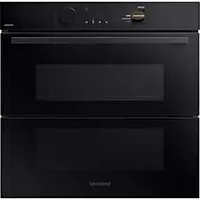
- NOTA
- Desinstalación
- Bloqueo/desbloqueo
- Caso 2
- PRECAUCIÓN
- REMARQUE
- Démontage
- AVERTISSEMENT
- Inbouwoven
- Accessoires
- OPMERKING
- Verwijderen
- Vergrendelen/ontgrendelen
- ⚠ WAARSCHUWING in verband met acrylamide
- Einbaubackofen
- HINWEIS
- Demontage
- Bedienung
- VORSICHT
- WARNING
- Drift
- FÖRSIKTIGHET
- Indbygget ovn
- Automatisk energibesparende funktion
- BEMÆRK
- Afinstallation
- Lãs/lãs op
- ADVARSEL
- Innebygget ovn
- MERK
- Bruk
- FORSIKTIG
- Kalusteuuni
- Poistaminen
- Lukitus/avaus
- Toiminnot
- HUOMIO
- Built-in Oven
- User & Installation manual
- Contents
- Using this manual 3
- Safety instructions 3
- Installation 6
- Before you start 10
- Operations 13
- Cooking smart 25
- Maintenance 34
- Troubleshooting 38
- Technical specifications 41
- Appendix 41
- Using this manual
- The following symbols are used in this User Manual:
- Safety instructions
- IMPORTANT SAFETY PRECAUTIONS
- CAUTION
- Correct Disposal of This Product (Waste Electrical & Electronic Equipment)
- Auto energy saving function
- Installation
- What's included
- Accessories
- NOTE.
- Power connection
- Cabinet mount
- NOTE
- Before you start
- Initial settings
- New oven smell
- Smart safety mechanism
- Soft closing door (applicable models only)
- Mechanical lock (applicable models only)
- English
- Operations
- Control panel
- Common settings
- End time
- Delay End
- Case 1
- Case 2
- To clear the cooking time
- To clear the end time
- Cooking modes (except for Grill)
- Cooking modes (Grill)
- Cooking with the meat probe (applicable models only)
- WARNING on acrylamide
- To stop cooking
- Special function
- Natural Steam (applicable models only)
- Auto Cook
- Cleaning
- Steam Clean
- Pyrolytic
- Timer
- Sound On/Off
- Wi-Fi On/Off
- Cooking smart
- Manual cooking
- ⚠ WARNING on acrylamide
- Accessory tips
- Grilling
- Pro-Roasting
- ECO convection
- Auto Cook programmes
- Test Dishes
- Baking
- Grilling
- Collection of frequent Auto cook recipes
- Potato gratin
- Vegetable gratin
- Lasagne
- Directions
- Apple pie
- Quiche Lorraine
- Fruit crumbles
- Homemade pizza
- Roast sirloin of beef
- Herb roasted lamb chops
- Maintenance
- Oven interior
- Oven exterior
- Troubleshooting
- Checkpoints
- Information codes
- Technical specifications
- Appendix
- Energy saving tips
- Open Source Announcement
Brand : SAMSUNG
Model : NV7B41304CB
Category : Pan