
NV7B6699ACA - Pan SAMSUNG - Free user manual and instructions
Find the device manual for free NV7B6699ACA SAMSUNG in PDF.


Pick your language and provide your email: we'll send you a specifically translated version.
| Product type | Built-in oven |
| Brand | Samsung |
| Model | NV7B6699ACA |
| Dimensions (W x H x D) | 595 x 596 x 570 mm (exterior) 560 x 579 x 549 mm (recess) |
| Net weight | Approximately 44.2 kg |
| Volume | 76 L |
| Power supply | 230-240 V ~50 Hz |
| Maximum connected power | 3650-3950 W |
| Energy efficiency class | A+ |
| Energy consumption (convection) | 0.71 kWh/cycle |
| Energy consumption (conventional) | 1.05 kWh/cycle |
| Cooking modes | Convection, Conventional, Eco Convection, Large Grill, Eco Grill, Fan Grill, Top Heat + Convection, Bottom Heat + Convection, Bottom Heat, Professional Roasting, Air Fry, Air Sous Vide |
| Steam modes | Steam cooking, Steam Convection, Steam Top Heat + Convection, Steam Bottom Heat + Convection |
| Special functions | Keep warm, Warm plates, Defrost, Dough proofing, Pizza cooking, Slow cooking, Drying |
| Auto cooking | 128 or 148 programs (depending on version) |
| Healthy cooking | 20 programs |
| Cleaning | Pyrolytic, Steam cleaning, Descaling, Drain |
| Included accessories | Grid, grid support, drip tray, baking tray (20 mm), universal tray (30 mm), deep tray (50 mm), divider, meat probe, steamer, Air Fry tray, door opener |
| Safety | Child lock, smart safety (stop when door opened), soft closing door, mechanical lock |
| Connectivity | Wi-Fi, SmartThings, remote control |
| Display | Non-touch LCD screen with rotary knob and touch keys |
| Lighting | LED (not replaceable by user) |
| Standby power (Wi-Fi active) | 1.9 W |
| Standby power (off) | 0.5 W |
Frequently Asked Questions - NV7B6699ACA SAMSUNG
How to use the steam function?
Fill the water tank (500 ml max) with drinking water, select a steam mode (Steam cooking, Steam Convection, etc.) and follow the on-screen instructions. Use the provided steamer placed at the designated level (steam level). Do not exceed the MAX line.
How to clean the oven?
You can use the pyrolytic (high temperature) or steam cleaning function. Remove all accessories before pyrolytic cleaning. For regular cleaning, use a damp cloth and mild detergent. Do not use steam cleaners.
How to connect the oven to Wi-Fi?
Go to Settings > Connections > Simple connection. Follow the on-screen instructions and use the SmartThings app on your smartphone to complete the connection. Ensure your router is within range.
What to do if the oven does not heat up?
Check that the door is properly closed, that settings are correct, that the fuse has not blown, and that Demo mode is disabled. If the problem persists, contact a Samsung service center.
How to use the meat probe?
Insert the probe into the thickest part of the meat, plug it into the socket on the left side of the cavity. The oven will display the internal temperature. Set the target temperature: the oven will automatically stop at that temperature.
What is the water tank capacity?
The tank has a maximum capacity of 500 ml. Use only drinking water and do not exceed the MAX line. Clean the tank regularly.
How to use the Air Fry mode?
Place food on the Air Fry tray, insert the divider at level 4, and select Air Fry mode (temperature between 150 and 250 °C). No preheating required. Turn food halfway through for optimal results.
How to open the door manually if it does not open automatically?
Use the provided door opener: insert it into the gap between the door and the control panel, then lift. Caution: the door may be hot. Use oven mitts.
What do error codes mean?
Codes such as C-d1 (lock), C-20 (sensor), C-F0 (communication) indicate a malfunction. Turn off the oven, unplug for 30 seconds, then plug back in. If the code persists, contact Samsung customer service.
How to replace the oven light bulb?
The top LED lights are not user-replaceable (contact technical service). The side bulb (halogen 25-40 W, 300 °C) can be replaced: turn off the oven, unplug, remove the cover with a flat tool, replace the bulb and replace the cover. Use a dry cloth to handle the bulb.
User questions about NV7B6699ACA SAMSUNG
0 question about this device. Answer the ones you know or ask your own.
Ask a new question about this device
No questions yet. Be the first to ask one.
Download the instructions for your Pan in PDF format for free! Find your manual NV7B6699ACA - SAMSUNG and take your electronic device back in hand. On this page are published all the documents necessary for the use of your device. NV7B6699ACA by SAMSUNG.
USER MANUAL NV7B6699ACA SAMSUNG
natural_image
Line drawing of a rectangular tray with ribbed pattern and two circular ends (no text or symbols)Horna (mm)
| A 560 G 503 | ||
| B 166 H 481 | ||
| C 383 I 21 | ||
| D 45 J 549 | ||
| E 596 K 579 | ||
| F 595 L 559 |
Horno (mm)
| A 560 G 503 | ||
| B 166 H 481 | ||
| C 383 I 21 | ||
| D - J 549 | ||
| E 546 K 579 | ||
| F 595 L 559 |
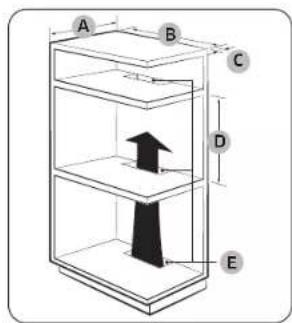
Armario empotrado (mm)
| A M in. 550 |
| B M in. 560 |
| C M in. 50 |
| D M in. 590 - Máx. 600 |
| E M in. 460 x M in. 50 |
NOTA
natural_image
Pure technical diagram of a rectangular frame with a small circular component and dimension line (no text or symbols)natural_image
Pure geometric diagram showing a circle intersected by two diagonal lines, with a labeled point A (no text or symbols beyond label)natural_image
Architectural line drawing of a window frame structure with an inset showing a mechanical component (no text or symbols)natural_image
Technical diagram of a rectangular device with four components and a small tool, no text or symbols present.natural_image
Close-up of a mechanical component with a magnified inset showing a threaded screw (no text or symbols)natural_image
Illustration of a transparent container with internal mesh and six circular patterns inside (no text or symbols)natural_image
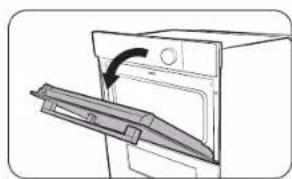
Line drawing of a hand inserting a small object into a device (no text or symbols)- Presione completamente la palanca del tirador.
natural_image
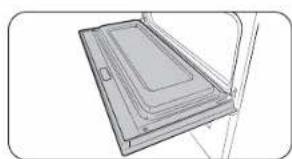
Diagram of a door with a handle and arrow indicating direction (no text or symbols)- Tire de la palanca.
natural_image
Technical line drawing of a rectangular electronic component or panel assembly (no text or symbols)natural_image
Line drawing of a hand using a tool to adjust or install a component on a cabinet (no text or symbols)natural_image
Simple line drawing of a rectangular panel or tray with internal compartments, no text or symbols present.PRECAUCIÓN
natural_image
Illustration of a hand inserting a small electronic component into a door (no text or symbols)natural_image
Illustration of a hand pouring liquid into a container with a ring (no text or symbols)natural_image
Technical diagram of a mechanical component with labeled section A (no text or symbols beyond label)natural_image
Hand holding a tool with a rectangular object above a grid of wires (no text or symbols visible)natural_image
Pure technical line drawing of a mechanical component with no text or symbolsnatural_image
Diagram of a vehicle interior with a circular inset showing a vehicle (no text or symbols)PRECAUCIÓN
natural_image
Line drawing of an open oven with a door and lid, showing the interior and exterior view (no text or symbols)natural_image
Simple line drawing of a cabinet with doors and a central tray, no text or symbols presentnatural_image
Diagram of a two-tier dormitory cabinet or bunk bed structure (no text or symbols)natural_image
Illustration of a bag with a cut open showing internal texture (no text or symbols)natural_image
Diagram of a parking garage with an open garage and a horizontal bar (no text or symbols)
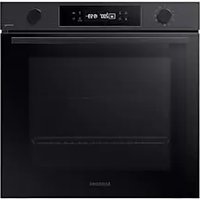
Table of contents
Click a title to access it
Manual assistant
Powered by Anthropic
Waiting for your message
Product information
Brand : SAMSUNG
Model : NV7B6699ACA
Category : Pan