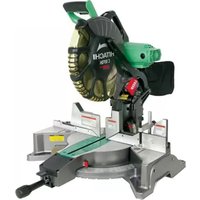
C12FDH - Saw HITACHI - Free user manual and instructions
Find the device manual for free C12FDH HITACHI in PDF.



| Product Type | Compound Miter Saw |
| Brand | Hitachi |
| Model | C12FDH |
| Blade Diameter | 305 mm (12") |
| Blade Bore | 25.4 mm (1") |
| No-Load Speed | 4000 tr/min |
| Motor Type | Series commutator motor |
| Net Weight | 21.0 kg (46.3 lbs) |
| Power Supply | 120 V ~, 50/60 Hz |
| Insulation | Double insulation |
| Laser Marking | Laser class II, <1 mW, 400-700 nm |
| Digital Display | No |
| Cutting Capacity (0°) | Max. height 70 mm, max. width 203 mm |
| Miter Range | Left 0°-52°, Right 0°-52° |
| Bevel Range | Left 0°-48°, Right 0°-48° |
| Included Accessories | TCT blade 32 teeth, dust bag, vise, 17 mm socket wrench, 4 mm bar wrench |
| Maintenance | Regular cleaning, carbon brush replacement, monthly lubrication |
| Safety | Lower guard, secondary guards, switch lock |
Frequently Asked Questions - C12FDH HITACHI
User questions about C12FDH HITACHI
0 question about this device. Answer the ones you know or ask your own.
Ask a new question about this device
Download the instructions for your Saw in PDF format for free! Find your manual C12FDH - HITACHI and take your electronic device back in hand. On this page are published all the documents necessary for the use of your device. C12FDH by HITACHI.
USER MANUAL C12FDH HITACHI
natural_image
Technical line drawing of a cutting machine with no visible text or symbolsSAFETY INSTRUCTIONS AND INSTRUCTION MANUAL
WARNING
IMPROPER OR UNSAFE use of this power tool can result in death or serious bodily injury! This manual contains important information about product safety. Please read and understand this manual BEFORE operating the power tool. Please keep this manual available for other users and owners before they use the power tool. This manual should be stored in safe place.
INSTRUCTIONS DE SECURITE ET MODE D'EMPLOI
⚠ AVERTISSEMENT
IMPORTANT SAFETY INFORMATION .... 3
MEANINGS OF SIGNAL WORDS 3
SAFETY....3
IMPORTANT SAFETY INSTRUCTIONS FOR USING ALL POWER TOOLS .... 3
REPLACEMENT PARTS....6
USE PROPER EXTENSION CORD 7
PRACTICAL APPLICATIONS 17
SAW BLADE MOUNTING AND DISMOUNTING 23
MAINTENANCE AND INSPECTION.... 24
SERVICE AND REPAIRS.... 26
TABLE DES MATIERES
Français
PAGE
INFORMATIONS IMPORTANTES DE SÉCURITÉ .... 27
SIGNIFICATION DES MOTS D'AVERTISSEMENT ...... 27
SECURITE....27
CONSIGNES DE SECURITE RELATIVES AUX OUTILS ÉLECTRIQUES ...... 27
PIECES DE RECHANGE 31
UTILISER LE CORDON DE RALLONGE APPROPRIÉ.... 31
DOUBLE ISOLATION POUR UN FONCTIONNEMENT PLUS SUR.... 31
UTILISATION ET ENTRETIEN 33
NOM DES PIÈCES 33
PAGE
SPÉCIFICATIONS 34
ACCESSOIRES 34
APPLICATIONS 35
PRÉPARATION AVANT L'UTILISATION .... 35
APPLICATIONS PRATIQUES.... 42
INSTALLATION ET RETRAIT DE LA LAME...... 49
ENTRETIEN ET INSPECTION 50
SERVICE APRÈS-VENTE ET RÉPARATIONS...... 52
ÍNDICE
Español
PÁGINA
IMPORTANT SAFETY INFORMATION
Read and understand all of the safety precautions, warnings and operating instructions in the Instruction Manual before operating or maintaining this power tool.
Most accidents that result from power tool operation and maintenance are caused by the failure to observe basic safety rules or precautions. An accident can often be avoided by recognizing a potentially hazardous situation before it occurs, and by observing appropriate safety procedures.
Basic safety precautions are outlined in the “SAFETY” section of this Instruction Manual and in the sections which contain the operation and maintenance instructions.
Hazards that must be avoided to prevent bodily injury or machine damage are identified by WARNINGS on the power tool and in this Instruction Manual.
NEVER use this power tool in a manner that has not been specifically recommended by HITACHI.
MEANINGS OF SIGNAL WORDS
WARNING indicates a potentially hazardous situations which, if ignored, could result in death or serious injury.
CAUTION indicates a potentially hazardous situations which, if not avoided, may result in minor or moderate injury, or may cause machine damage.
NOTE emphasizes essential information.
SAFETY
IMPORTANT SAFETY INSTRUCTIONS FOR USING ALL POWER TOOLS
READ ALL OF THE WARNINGS AND OPERATING INSTRUCTIONS IN THIS MANUAL BEFORE OPERATING OR MAINTAINING THIS TOOL:

WARNING: When using this electric tool, take all necessary precautions to minimize the risk of electric shock or other personal injury. In particular, always comply with the following safety rules:
- ALWAYS KEEP GUARDS IN PLACE and in working order.
- ALWAYS REMOVE ADJUSTING KEYS AND WRENCHES BEFORE STARTING TOOL.
Always confirm that all keys and adjusting wrenches have been removed from the tool before it is turned on. - ALWAYS KEEP WORK AREA CLEAN. Avoid injuries by not cluttering the work areas and work benches.
- NEVER USE TOOL IN HAZARDOUS ENVIRONMENTS. Never use the power tool in damp or wet places and never expose it to rain. Always keep the work area well lighted.
- NEVER PERMIT CHILDREN OR OTHERS TO LOITER NEAR THE WORK AREA. Keep all people (especially children) away from the work area. Always unplug unattended tools and keep the work place tamper-proof by installing locks on the doors and on the master switches.
- NEVER FORCE THE TOOL. It will do the job better and more safely if it is operated at the rate for which it was designed.
- ALWAYS USE THE RIGHT TOOLS. Never force a tool or an attachment to do a job for which it was not designed.
-
ALWAYS WEAR PROPER APPAREL WHEN WORKING WITH THE TOOL. Never wear loose clothing, gloves, neckties, rings, bracelets or other jewelry which may get caught in the moving parts. Always wear non-slip footwear, preferably with steel toes. Wear protective hair covering to contain long hair.
-
ALWAYS USE EYE PROTECTION WHEN WORKING WITH THE TOOL TO PREVENT EYE INJURY. Ordinary eyeglasses do not provide adequate protection because the lenses are not made of safety glass. Also, use a face mask for additional safety and wear a dust mask if the cutting operation produces dust.
- ALWAYS SECURE THE WORKPIECE TO THE FENCE OR THE TABLE. Use clamps or a vise to hold the workpiece in place. It is safer than using your hand and it frees both hands to operate the tool.
- NEVER OVERREACH. Always keep proper footing and balance when working with the tool.
- ALWAYS MAINTAIN TOOLS WITH CARE. Always keep tools sharp and clean for the best and safest performance. Always follow instructions for lubricating the tool and for changing accessories.
- ALWAYS DISCONNECT THE TOOL before servicing and before changing blades or other accessories.
- NEVER RISK UNINTENTIONAL STARTING WHEN PLUGGING IN THE TOOL. Always confirm that the switch is in the OFF position before inserting the power plug into the receptacle.
- ALWAYS USE RECOMMENDED ACCESSORIES ONLY WHEN OPERATING THIS TOOL. Consult this instruction manual for descriptions of recommended accessories. To avoid personal injuries, use only recommended accessories in conjunction with this tool.
- NEVER STAND ON THE TOOL. Prevent serious injury by not tipping the tool and by not risking unintentional contact with the saw blade.
- ALWAYS CHECK FOR DAMAGED PARTS BEFORE USING THE TOOL. Always check the guard and all other components for damage before using the tool to assure that they will function properly. Check all moving parts for proper alignment, freedom from binding and other conditions that might affect proper operation. Always repair or replace any damaged guards or other damaged components before using the tool.
- ALWAYS CONFIRM THE ROTATION DIRECTION OF THE BLADE BEFORE USING THE TOOL. Always feed work into the tool against the rotation direction of the blade in order to prevent possible injury.
- NEVER LEAVE THE TOOL RUNNING WHILE UNATTENDED. TURN POWER OFF. Do not leave tool until it comes to a complete stop. Always turn the power off when the tool is not in use. Always unplug the power cord when the tool is not in use.
- This tool was not designed to be used for mass-production applications and should not be used in mass-production environments.
- When servicing this tool, use only authorized replacement parts.
- Apply 120 volts AC only to this tool. Applying the wrong voltage or applying DC power can cause the POWER TOOL to operate improperly and cause serious personal injury or damage to the tool.
- Never raise the saw blade from the workpiece until it has first come to a complete stop.
- Always use outboard stands to provide support for long workpieces that overhang the table of the compound miter saw.
- Always return the carriage to the full rear position after each crosscut operation in order to reduce the risk of injury.
- POLARIZED PLUGS To reduce the risk of electric shock, this equipment has a polarized plug (one blade is wider than the other). This plug will fit in a polarized outlet only one way. If the plug does not fit fully in the outlet, reverse the plug. If it still does not fit, contact a qualified electrician to install the proper outlet. Do not change the plug in any way.
Specific Safety Rules for Use of this Power Tool
⚠ WARNING: The following specific operating instructions must be observed when using this POWER TOOL in order to avoid injury:
DO's
ALWAYS OBSERVE THE FOLLOWING RULES TO ASSURE SAFE USE OF THIS TOOL:
-
Review this Manual and familiarize yourself with the safety rules and operating instructions for this POWER TOOL before attempting to use it.
-
Always confirm that the POWER TOOL is clean before using it.
- Always wear snug-fitting clothing, non-skid footwear (preferably with steel toes) and eye protection when operating the POWER TOOL.
- Always handle the POWER TOOL carefully. If the POWER TOOL falls or strikes against a hard object, it might become deformed or cracked or sustain other damage.
- Always cease operating the saw at once, if you notice any abnormality whatsoever.
- Always confirm that all components are mounted properly and securely before using the tool.
- When replacing the saw blade, always confirm that the rpm rating of the new blade is correct for use on this tool.
- Always shut off the power and wait for the saw blade to completely stop rotating before doing any maintenance or adjustments.
- Always clamp or otherwise secure the workpiece to the fence; otherwise the workpiece might be thrust form the table and cause bodily harm.
- During miter or bevel cutting, always wait for the rotation of the blade to stop completely before lifting the saw blade.
- Always make a trial run first before attempting any new use of the saw.
- Always handle the saw blade with care when dismounting and mounting it.
- Always confirm that the workpiece is free of nails or other foreign objects before beginning a cut.
- Always keep your hands out of the path of the saw blade.
- Always confirm that the lower guard is in the proper place before using the saw.
- Inspect the tool power cords periodically.
- Always confirm that the proper lengths and types of extension cords are being utilized, if necessary, before starting the tool.
- Always confirm that the motor air vents are fully open before using the tool.
- Always wait until the motor has reached full speed before starting a cut.
- Always keep the handles dry, clean and free of oil and grease. Hold the tool firmly when in use.
- Always use outboard stands to provide support for long workpieces that overhang the table of the compound miter saw.
- Always operate the tool after ensuring the workpiece is fixed properly with a vise assembly.
- The operating instructions provided with the tool shall direct the user to secure the tool to supporting structure if, during normal operation, there is a tendency for the tool to tip over, slide, or walk on the supporting surface.
DON'Ts
NEVER VIOLATE THE FOLLOWING RULES TO ASSURE SAFE USE OF THIS TOOL:
- Never operate the POWER TOOL unless you fully understand the operating instructions contained in this Manual.
- Never leave the POWER TOOL unattended without first unplugging the power cord.
- Never operate the POWER TOOL when you are tired, after you have taken any medications, or have consumed any alcoholic beverages.
- Never use the POWER TOOL for applications not specified in the instruction manual.
- Never operate the tool while wearing loose clothing, a necktie or jewelry, or while your hair is uncovered, to protect against getting caught in the moving machinery.
- Never reach around the saw blade.
- Never touch any moving parts, including the blade, while the saw is in use.
- Never remove any safety devices or blade guards; use of the tool without them would be hazardous.
- Never lock the lower guard; always confirm that it slides smoothly before using the tool.
-
Never damage the power cord of the tool.
-
Never attempt to move a plugged-in POWER TOOL while your finger is on the starting switch.
- Never use the POWER TOOL if the starting switch does not turn on and off properly.
- Never use the POWER TOOL if the plastic housing or the handle is cracked or deformed.
- Never use the POWER TOOL near flammable liquids or gases because sparking can cause an explosion.
- Never clean plastic components with solvents because the plastic may dissolve.
- Never operate the saw unless all the lower guards are in place.
- Never raise the saw blade from the workpiece until it has first come to a complete stop.
- When slide cutting, never pull the handle toward the operator, since this could cause the saw blade to kick up from the workpiece. Always push the handle away from the operator in a single, smooth motion.
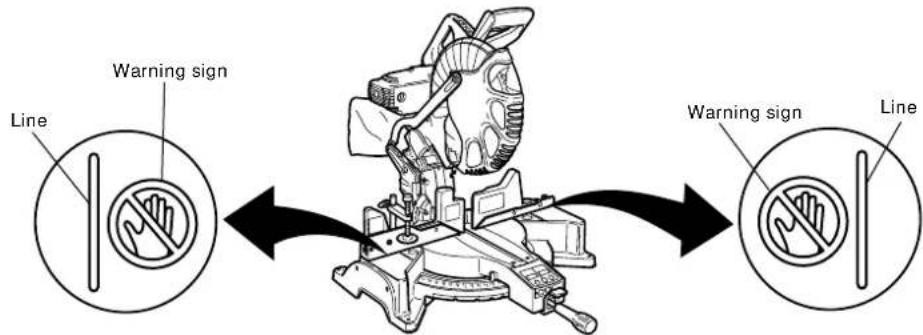
- Never place your limbs inside of the line next to warning sign " 🔍" while the tool is being operated. This may cause hazardous conditions.
- Never use abrasive type blades on this saw.
- Never expose to rain or use in damp locations.
- Never cut ferrous metals or masonry.
WARNING
FOR YOUR OWN SAFETY READ THIS INSTRUCTION MANUAL BEFORE OPERATING THE COMPOUND MITER SAW
- Always wear eye protection when using the compound miter saw.
- Always keep hands out of the path of the saw blade.
- Never operate the saw without the guards in place.
- Never perform any freehand operation with the compound miter saw.
- Never reach around the saw blade.
- Always turn off tool and wait for saw blade to stop before moving workpiece or changing settings.
- Always disconnect power before changing blade or servicing.
- Saw blade diameter is 12" (305 mm).
- No load speed is 4,000/min.
- To reduce the risk of injury, return carriage to the full rear position after each crosscut operation.
REPLACEMENT PARTS
When servicing use only identical replacement parts.
Repairs should be conducted only by a Hitachi authorized service center.
USE PROPER EXTENSION CORD
Make sure your extension cord is in good condition. When using an extension cord, be sure to use one heavy enough to carry the current your product will draw. An undersized cord will cause a drop in line voltage resulting in loss of power and overheating. Table shows the correct size to use depending on cord length and nameplate ampere rating. If in doubt, use the next heavier gage. The smaller the gage number, the heavier the cord.
MINIMUM GAGE FOR CORD SETS
| Total Length of Cord in Feet (Meter) | ||||
| 0 - 25 26 - 50 51 - 100 101 - 150(0 - 7.6) (7.9 - 15.2) (15.5 - 30.5) (30.8 - 45.7) | ||||
| Ampere Rating AWGMore Not MoreThan Than | ||||
| 0 - 6 | 18 | 16 | 16 | 14 |
| 6 - 10 | 18 | 16 | 14 | 12 |
| 10 - 12 | 16 | 16 | 14 | 12 |
| 12 - 16 | 14 | 12 | Not Recommended | |
WARNING: Avoid electrical shock hazard. Never use this tool with a damaged or frayed electrical cord or extension cord.
Inspect all electrical cords regularly. Never use in or near water or in any environment where electric shock is possible.
To ensure safer operation of this power tool, HITACHI has adopted a double insulation design. "Double insulation" means that two physically separated insulation systems have been used to insulate the electrically conductive materials connected to the power supply from the outer frame handled by the operator. Therefore, either the symbol "☐or the words and "Double insulation" appear on the power tool or on the nameplate.
Although this system has no external grounding, you must still follow the normal electrical safety precautions given in this Instruction Manual, including not using the power tool in wet environments.
To keep the double insulation system effective, follow these precautions:
* Only HITACHI AUTHORIZED SERVICE CENTER should disassemble or assemble this power tool, and only genuine HITACHI replacement parts should be installed.
* Clean the exterior of the power tool only with a soft cloth moistened with soapy water and dry thoroughly.
* Never use solvents, gasoline or thinners on plastic components; otherwise the plastic may dissolve.
SAVE THESE INSTRUCTIONS
AND
MAKE THEM AVAILABLE TO
OTHER USERS
AND
OWNERS OF THIS TOOL!
NOTE: The information contained in this Instruction Manual is designed to assist you in the safe operation and maintenance of the power tool. Some illustrations in this Instruction Manual may show details or attachments that differ from those on your own power tool.
NAME OF PARTS
text_image
Switch (for digital display) (for C12LDH) Gear case Motor Dust bag Laser marker Vise assembly Sub fence (C) Fence (B) Sub fence (B) Turntable Head Switch (for laser marker) Handle Saw blade Lower guard Rotation direction Sub fence (A) Fence (A) Table insert Digital display (for C12LDH) Lever Side handle Indicator (A) (for miter scale)Fig. 1

text_image
Trigger switch Nameplate Pully cover Locking pin Knob (A) Set pin Clamp lever Holder (B) Base 17mm box wrench 4mm hex. bar wrenchFig. 2-a Fig. 2-b
SPECIFICATIONS
| Item Model C12LDH C12FDH | |||||
| Motor Type Series commutator motor | |||||
| Digital Display | Precision ±0.5° Yes No | ||||
| Laser Marker Yes Yes | |||||
| Maximum output <1mW CLASS II Laser Product | |||||
| Wave length | 400~700 nm | ||||
| Laser medium | Laser Diode | ||||
| Applicable saw blade | Outside Dia. 12" (305mm) Hole Dia. 1" (25.4mm) | ||||
| No load speed | 4000/min | ||||
| Max. sawing dimension | Head | Turntable | Max. sawing dimension | ||
| Miter | 0 | 0 | Max. Height 2-3/4" (70mm) Max. Width 8" (203mm) or Max. Height 3-1/2" (89mm) Max. Width 7-1/2" (190mm) | ||
| 0 | Left Right 45° | Max. Height 2-3/4" (70mm) Max. Width 5-1/2" (140mm) | |||
| 0 | Left Right 52° | Max. Height 2-3/4" (70mm) Max. Width 4-3/4" (120mm) | |||
| Bevel | Left 45° | 0 | Max. Height 1-31/32" (50mm) Max. Width 8" (203mm) | ||
| Right 45° | 0 | Max. Height 1-1/2" (38mm) Max. Width 7-1/2" (190mm) | |||
| Compound | Left 45° | Left Right 45° | Max. Height 1-31/32" (50mm) Max. Width 5-1/2" (140mm) | ||
| Right 45° | Left Right 45° | Max. Height 1-1/2" (38mm) Max. Width 5-1/8" (130mm) | |||
| Miter sawing range | Left 0° - 52° Right 0° - 52° | ||||
| Bevel sawing range | Left 0° - 48° Right 0° - 48° | ||||
| Compound sawing range | Left and Right (Bevel) 0° - 45°, Left and Right (Miter) 0° - 45° | ||||
| Net weight | 47.4 lbs. (21.5 kg) | 46.3 lbs. (21.0 kg) | |||
| Cord | 2 Conductor type cable 6.7 ft. (2.0m) | ||||
ACCESSORIES

WARNING: Accessories for this power tool are mentioned in this Instruction Manual. The use of any other attachment or accessory can be dangerous and could cause injury or mechanical damage.
STANDARD ACCESSORIES
1 12" (305mm) TCT Saw blade (1 piece) (For wood)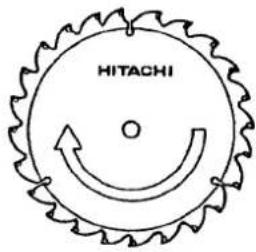 (No. of teeth 32 Code No. 323522) (No. of teeth 32 Code No. 323522) | 2 Dust bag (1 piece) For how to use, refer to page 23. For how to use, refer to page 23. | 4 17mm BOX wrench (1 piece) |
3 Vise Assembly w/knob bolt (1 piece) For how to use, refer to page 17. For how to use, refer to page 17. | 5 4mm Hex. bar wrench For how to use, refer to page 15. For how to use, refer to page 15. |
Fig. 3
OPTIONAL ACCESSORIES...sold separately
① Extension Holder and Stopper (Code No. 323523)
② Crown molding Vise Ass'y (Code No. 323545) (Include Crown molding Stopper (L))
③ Crown molding Stopper (L) (Code No. 323546)
④ Crown molding Stopper (R) (Code No. 323547)
NOTE: Accessories are subject to change without any obligation on the part of the HITACHI.
APPLICATIONS
Wood and aluminum sash.
Make the following preparations before operating the power tool:
1. Installation

text_image
11/32" (9mm) 4 Holes 22-3/4" (578mm) 12-19/32" (320mm)
text_image
Base 5/16" (8mm) bolt Work bench 5/16" (8mm) nut 1" (25mm) Thick benchFig. 4
Attach the power tool to a level, horizontal work bench in accordance with Fig. 4. Select 5/16" (8mm) diameter bolts suitable in length for the thickness of the work bench. Bolt length should be at least 1-3/8" (35mm) plus the thickness of the work bench. For example, use 2-11/32" (60mm) or larger bolts for a 1" (25mm) thick work bench. The holder attached to the rear of the base helps stabilize the power tool.

text_image
Holder (B) Adjust the holder until its bottom surface contacts the work bench surface. 6mm bolt MoveFig. 5
Holder (B) adjustment:
Loosen the 6mm bolt with the supplied 10mm box wrench. Adjust the holder (B) until its bottom surface contacts the work bench surface. After adjustment, firmly tighten the 6mm bolt.
CAUTION:
Attach the power tool to a work bench with bolts (6mm), and if the turntable has been swiveled 45° degrees or more, be careful not to let the hand that is holding the side handle get caught between the side handle and heads of bolts (6mm). Injuries could result.
2. Releasing the locking pin

text_image
Handle Pin Locking pinFig. 6
When the power tool is prepared for shipping, its main parts are secured by a locking pin.
Move the handle slightly so that the locking pin can be disengaged.
NOTE: Lowering the handle slightly will enable you to disengage the locking pin more easily and safely.
The lock position of the locking pin is for carrying and storage only.
3. Installing the dust bag, holder, stopper and vises
(The holder and stopper are optional accessories.)
Attach the dust bag and vise assembly as indicated in Fig. 1 and Fig. 2.
BEFORE USING
- Make sure the power source is appropriate for the tool.
⚠ WARNING: Never connect the power tool unless the available AC power source is of the same voltage as that specified on the nameplate of the tool. Never connect this power tool to a DC power source.
- Make sure the trigger switch is turned OFF.
⚠ WARNING: If the power cord is connected to the power source with the trigger switch turned ON the power tool will start suddenly and can cause a serious accident.
- Check the saw blade for visible defects.
Confirm that the saw blade is free of cracks or other visible damage.
- Confirm that the saw blade is attached securely to the power tool.
Using the supplied 17mm box wrench, tighten the bolt on the saw blade spindle to secure the saw blade.
For details, see Fig. 44-a, Fig. 44-b, Fig. 44-c and Fig. 44-d in the section on “SAW BLADE MOUNTING AND DISMOUNTING”.
- Check the lower guard for proper operation.

text_image
Lower guardFig. 7
Lower guard is designed to protect the operator from coming into contact with the saw blade during operation of the tool.
Always check that the lower guard moves smoothly and covers the saw blade properly.
⚠ WARNING: NEVER OPERATE THE POWER TOOL if the safety cover does not function smoothly.
- Confirm the position of the spindle lock before using the tool.
After installing the saw blade, confirm that the spindle lock has been returned to the retract position before using the power tool (see Fig. 44-b).
7. Check the Power Receptacle.
To prevent overheating, accidental stopping or intermittent operation, confirm that the power cord plug fits properly in the electrical receptacle and does not fall out after it is inserted. Repair or replace the receptacle if it is faulty.
8. Confirm the tool's power cord is not damaged.
Repair or replace the power cord if an inspection indicates that it is damaged.
AFTER CONNECTING THE POWER PLUG TO AN APPROPRIATE AC POWER SOURCE, CHECK THE OPERATION OF THE TOOL AS FOLLOWS:
9. Trial Run
After confirming that no one is standing behind, the power tool start and confirm that no operating abnormalities exist before attempting a cutting operation.
10. Inspect the rotating stability of the saw blade.
For precise cutting, rotate the saw blade and check for deflection to confirm that the blade is not noticeably unstable; otherwise vibrations might occur and cause an accident.
BEFORE CUTTING
1. Oblique angle
Before the power tool is shipped from the factory, it is adjusted for 0°, right angle, left 45° bevel cutting angle and right 45° bevel cutting angle with the 8mm bolt (A), 8mm bolt (B) and the 8mm bolt (C).
When changing the adjustment, change the height of the 8mm bolt (A), 8mm bolt (B) or the 8mm bolt (C) by turning them.
When changing the bevel angle to the right 45^ , pull the set pin on the direction shown in Fig. 8-b and incline the motor head to the right.
When adjusting the motor head to 0^ , always return the set pin to its initial position as shown in Fig. 8-a.
NOTE: Do not adjust the 8mm bolt with bevel plates (Fig. 30) pulled.

text_image
Set pin Return Indicator (for right bevel scale) 8mm bolt (C) (stopper for right 45° bevel angle)Fig. 8-a Fig. 8-b

text_image
8mm Bolt (A) (stopper for 0°) Indicator (for left bevel scale) Pull Set pin 8mm Bolt (B) (stopper for left 45° bevel angle)2. Securing the workpiece
WARNING: Always clamp or vise to secure the workpiece to the fence; otherwise the workpiece might be thrust from the table and cause bodily harm.
3. Installing the holders ... (Optional accessory)
text_image
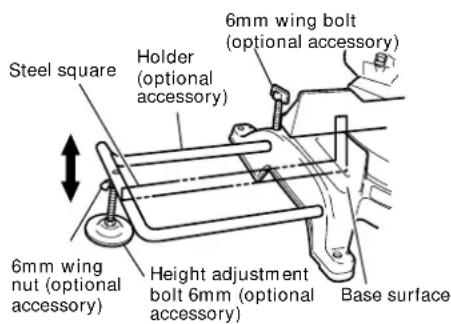
Steel square Holder (optional accessory) 6mm wing bolt (optional accessory) 6mm wing nut (optional accessory) Height adjustment bolt 6mm (optional accessory) Base surfaceFig. 9
The holders help keep longer workpieces stable and in place during the cutting operation.
(1) As indicated in Fig. 9, use a steel square for aligning the upper edge of the holders with the base surface. Loosen the 6mm wing nut. Turn a height adjustment bolt 6mm, and adjust the height of the holder.
(2) After adjustment, firmly tighten the wing nut and fasten the holder with the 6mm wing bolt (optional accessory). If the length of Height Adjustment Bolt 6mm is insufficient, spread a thin plate beneath. Make sure the end of Height Adjustment Bolt 6mm does not protrude from the holder.
4. Stopper for precision cutting ... (Stopper and holder are optional accessory)

text_image
Workpiece Stopper (optional accessory) Holder (optional accessory) 6mm wing nut (optional accessory) 6mm wing bolt (optional accessory) Height adjustment bolt 6mm (optional accessory) The stopper fac 11" to 17-3/4" (2 To install the st bolt as shown inFig. 10
The stopper facilitates continuous precision cutting in lengths of 11" to 17-3/4" (280mm to 450mm).
To install the stopper, attach it to the holder with the 6mm wing bolt as shown in Fig. 10.
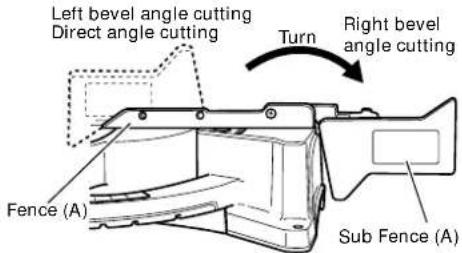
5. Confirmation for use of sub fence (A)
⚠ WARNING: In the case of right bevel cutting, turn the sub fence (A) clockwise. Unless it is turned clockwise, the main body or saw blade may contact the sub fence (A), resulting in an injury.
text_image
Left bevel angle cutting Direct angle cutting Turn Right bevel angle cutting Fence (A) Sub Fence (A)Fig. 11
This power tool is equipped with a sub fence (A).
In the case of direct angle cutting and left bevel angle cutting, use the sub fence (A). Then, you can realize stable cutting of the material with a wide back face.
In the case of right bevel cutting, raise the sub fence (A) up as illustrated in Fig. 11 and then turn it clockwise.
6. Confirmation for use of sub fence (B)
⚠ WARNING: In the case of left bevel cutting, turn the sub fence (B) counterclockwise. Unless it is turned counterclockwise, the main body or saw blade may contact the sub fence (B), resulting in an injury.

text_image
Left bevel angle cutting Turn Right bevel angle cutting Direct angle cutting Sub fence (B) Fence (B) Fig. 12This power tool is equipped with a sub fence (B). In the case of direct angle cutting and right bevel angle cutting, use the sub fence (B). Then, you can realize stable cutting of the material with a wide back face. In the case of left bevel cutting, raise the sub fence (B) up as illustrated in Fig.12 and turn it counterclockwise.
7. Confirmation for use of sub fence (C)
⚠ WARNING: In the case of left bevel angle cutting, remove the sub fence (C). If the sub fence (C) is not removed, the sub fence (C) will contact the main unit or saw blade and result in injury.

text_image
Sub fence (C) Fence (B)Fig. 13
This power tool is equipped with a sub fence (C).
In the case of direct angle cutting and right bevel angle cutting, use the sub fence (C).
Then, you can realize stable cutting of the material with a wide back face.

text_image
Sub fence (C) Fence (B) Knob (B)Fig. 14
In the case of left bevel angle cutting, remove the sub fence (C) by sliding to the side and removing from the top as shown in Fig. 13. Loosen knob (B) then remove the sub fence (C) (Fig. 14)
⚠ WARNING: To attach the sub fence (C), insert then securely tighten knob (B). If knob (B) is loose, the sub fence (C) may move during cutting and result in injury.
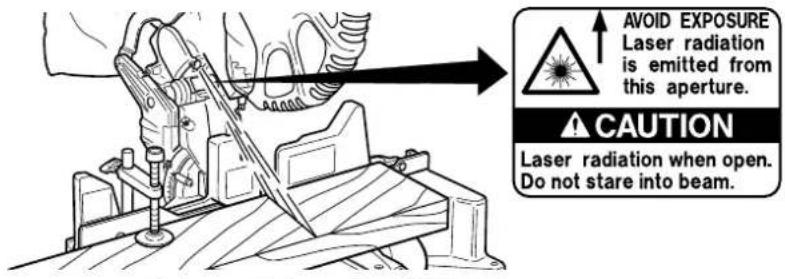
8. Position adjustment of laser line
WARNING: * Make sure before plugging the power plug into the receptacle that the main body and the laser marker are turned off.
* Exercise utmost caution in handling a switch trigger for the position adjustment of the laser line, as the power plug is plugged into the receptacle during operation. If the switch trigger is pulled inadvertently, the saw blade can rotate and result in unexpected accidents.
* Do not remove the laser marker to be used for other purposes.
CAUTION:

text_image
CAUTION LASER RADIATION-DO NOT STARE INTO BEAM Maximum Output: <1mW, Wavelength: 400~700nm, Laser Medium: Laser Diode CLASS II LASER PRODUCT. Complies with 21 CFR, Chapter 1, Subchapter J. Laser radiation on work table. DPC DO NOT STARE INTO BEAM. C329113Fig. 15
text_image
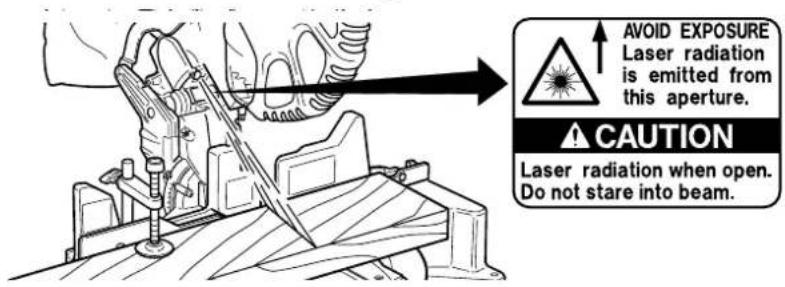
AVOID EXPOSURE Laser radiation is emitted from this aperture. CAUTION Laser radiation when open. Do not stare into beam.Fig. 16
* Laser radiation- Do not stare into beam.
* Laser radiation on work table. Do not stare into beam.
If your eye is exposed directly to the laser beam, it can be hurt.
* Do not dismantle it.
* Do not give strong impact to the laser marker (main body of tool); otherwise, the position of a laser line can go out of order, resulting in the damage of the laser marker as well as a shortened service life.
* Keep the laser marker lit only during a cutting operation. Prolonged lighting of the laser marker can result in a shortened service life.
* Use of controls or adjustments or performance of procedures other than those specified herein may result in hazardous radiation exposure.
NOTE: * Perform cutting by overlapping the ink line with the laser line.
* When the ink line and the laser line are overlapped, the strength and weakness of light will change, resulting in a stable cutting operation because you can easily discern the conformity of lines. This ensures the minimum cutting errors.
* In outdoor or near-the-window operations, it may become difficult to observe the laser line due to the sunlight. Under such circumstances, move to a place that is not directly under the sunlight and engage in the operation.
* Do not tug on the cord behind the motor head or hook your finger, wood and the like around it; otherwise, the cord may come off and the laser marker may not be lit up.
* The laser marker will not light up if the digital display switch is turned off. (only on C12LDH)
* When the ink line and the laser line are overlapped, the strength and weakness of light will change, resulting in a stable cutting operation because you can easily discern the conformity of lines. This ensures the minimum cutting errors. * In outdoor or near-the-window operations, it may become difficult to observe the laser line due to the sunlight. Under such circumstances, move to a place that is not directly under the sunlight and engage in the operation. * Do not tug on the cord behind the motor head or hook your finger, wood and the like around it; otherwise, the cord may come off and the laser marker may not be lit up. * The laser marker will not light up if the digital display switch is turned off. (only on C12LDH)

text_image
Digital display switch Laser marker switch Fig. 17Ink lining can be easily made on this tool to the laser marker. A switch lights up the laser marker. (Fig. 17)
Turning on the laser marker switch while the digital display switch is on, light up the laser marker. (On the C12FDH, only the laser marker switch.)
Depending upon your cutting choice, the laser line can be aligned with the left side of the cutting width (saw blade) or the ink line on the right side.
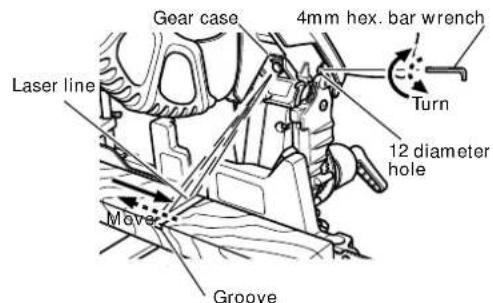
The laser line is adjusted to the width of the saw blade at the time of factory shipment. Adjust the positions of the saw blade and the laser line taking the following steps to suit the use of your choice.

text_image
Workpiece Saw blade Marking (pre-marked) Cutting width Fig. 18(1) Light up the laser marker and make a groove of about 3/16" (5mm) deep on the workpiece that is about 1-1/2" (38mm) in height and 3-1/2"(89mm) in width. Hold the grooved workpiece by vise as it is and do not move it. (Fig. 18)
text_image
Gear case 4mm hex. bar wrench Turn 12 diameter hole Laser line Move Groove(2) Then insert a 4mm hex. bar wrench in the 12 diameter hole on the side of the gear case, turn the hex. socket set screw to move the laser line. (If you turn the Hex. socket screw clockwise, the laser line will shift to the right and if you turn it counterclockwise, the laser line will shift to the left.) When you work with the ink line aligned with the left side of the saw blade, align the laser line with the left end of the groove. (Fig. 19) When you align it with the right side of the saw blade, align the laser line with the right side of the groove.
Fig. 19

text_image
Laser line Marking (pre-marked) Fig. 20(3) After adjusting the position of the laser line, draw a right-angle ink line on the workpiece and align the ink line with the laser line. When aligning the ink line, slide the workpiece little by little and secure it by vise at a position where the laser line overlaps with the ink line. Work on the grooving again and check the position of the laser line. If you wish to change the laser line's position, make adjustments again following the steps from (1) to (3).
NOTE: Check and make sure on a periodic basis if the position of the laser line is in order. As regards the checking method, draw a right-angle ink line on the workpiece with the height of about 1-1/2" (38mm) and the width of 3-1/2" (89mm), and check that the laser line is in line with the ink line [The deviation between the ink line and the laser line should be less than the ink line width (0.5mm)]. (Fig. 20)
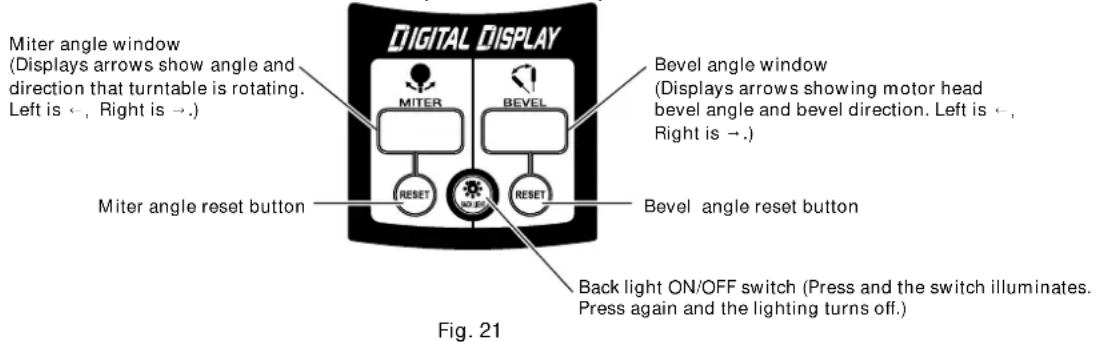
9. DIGITAL DISPLAY PANEL (for C12LDH)
text_image
Miter angle window (Displays arrows show angle and direction that turntable is rotating. Left is ←, Right is →.) Digital Display MITER BEVEL Bevel angle window (Displays arrows showing motor head bevel angle and bevel direction. Left is ←, Right is →.) Miter angle reset button RESET RESET Bevel angle reset button Back light ON/OFF switch (Press and the switch illuminates. Press again and the lighting turns off.) Fig. 21
text_image
Digital display switch (for C12LDH) (Also serves as laser marker power switch.) Laser marker switchFig. 22-a
(1) Turning on the digital display switch shows 0^ for both miter and bevel angle, regardless of main unit angle.
(2) Align the main unit angle with the tilt angle (0°) and miter angle (0°) and hold down their reset buttons for at least 0.2 second.
(3) Turning on the laser marker switch while the digital display switch is on, lights up the laser marker. (On the C12FDH, only the laser marker switch.)
⚠️CAUTION: When operating the digital panel, have the motor head section at the top limit position and the blade stopped.
Note: • Before starting to cut, align the main unit to the miter angle 0^ and the bevel angle 0^ and hold down thier reset buttons for at least 0.2 second. If you press the digital display switch to ON without aligning the main unit to 0^ , then the figures appearing on the digital display and the main unit angle will not match.
- The laser marker will not light up if the digital display switch is turned off. (only on C12LDH)
- Do not use the main unit near equipment that generates electrical noise such as generators. Electrical noise might cause faulty readings or operation on the digital display.
⚠️CAUTION: When operating the digital panel, have the motor head section at the top limit position and the blade stopped.

text_image
Reset button Side handleMove the turntable left and right with the side handle loosened and set it to the correct position.
Fig. 22-b
⚠️CAUTION: If the figure shown on the miter angle digital display is different from the positive stop angle (for example, 45.0^ 45.5^ , 31.6^ 32.0^ ) then the positive stop has probably deviated slightly from its correct position. If this happens, do as follows.
(1) Move the turntable left and right with the side handle loosened, and set the turntable to the correct position.
(2) If the figures on the display and positive stop still do not match, then return the turntable to the 0^ position. Next move the turntable left and right with the side handle loosened as shown in Fig. 22-b. After setting it to the correct position 0^ , press the reset button again.
PRACTICAL APPLICATIONS

WARNING: * To avoid personal injury, never remove or place a workpiece on the table while the tool is being operated.
* Never place your limbs inside of the line next to warning sign while the tool is being operated. This may cause hazardous conditions (see Fig. 23).
text_image
Warning sign Line Warning sign LineFig. 23
1. Switch operation

text_image
Hole Trigger switchFig. 24
Pull the trigger to turn on the switch, release it to shut it off. After releasing the trigger, make sure the trigger has gone all the way back and the switch is turned off.

WARNING: This will ensure that the power tool cannot be turned on accidentally or by someone (especially a child) who is not qualified to use the power tool.
To prevent unauthorized operation of this tool, insert a padlock through the hole in the switch trigger.
2. Using the Vise Assembly (Standard accessory)
text_image
6mm wing bolt (B) Fence Vise shaft 6mm wing bolt (A) Screw holder Knob Vise plate WorkpieceFig. 25
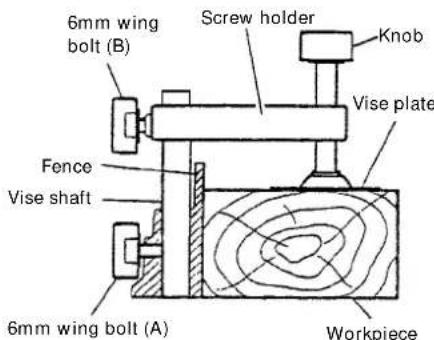
(1) The vise assembly can be mounted on either the left fence {Fence (B)} or the right fence {Fence (A)} by loosening the 6mm wing bolt (A).
(2) The screw holder can be raised or lowered according to the height of the workpiece by loosening the 6mm wing bolt (B). After the adjustment, firmly tighten the 6mm wing bolt (B) and fix the screw holder.
(3) Turn the upper knob and securely fix the workpiece in position (Fig. 25).

WARNING: Always firmly clamp or vise to secure the workpiece to the fence; otherwise the workpiece might be thrust from the table and cause bodily harm.

CAUTION: Always confirm that the motor head (see Fig. 1) does not contact the vise assembly when it is lowered for cutting. If there is any danger that it may do so, loosen the 6 mm wing bolt (B) and move the vise assembly to a position where it will not contact the saw blade.
3. Cutting Operation
text_image
Adjusting line Marking (pre-marked) Marking (pre-marked) (Front view)Fig. 26
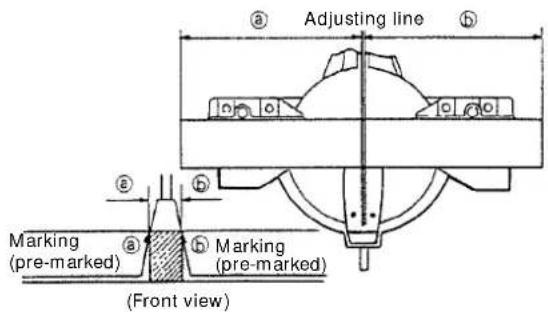
(1) As shown in Fig. 26 the width of the saw blade is the width of the cut. Therefore, slide the workpiece to the right (viewed from the operator's position) when length is desired, or to the left when length is desired.
If a laser marker is used, align the laser line with the left side of the saw blade, and then align the ink line with the laser line.
(2) Once the saw blade reaches maximum speed, push the handle down carefully until the saw blade approaches the workpiece.
(3) Once the saw blade contacts the workpiece, push the handle down gradually to cut into the workpiece.
(4) After cutting the workpiece to the desired depth, turn the power tool OFF and let the saw blade stop completely before raising the handle from the workpiece to return it to the full retract position.
⚠ WARNING: * Confirm that the trigger switch is turned OFF and the power plug has been removed from the receptacle whenever the tool is not in use.
* When you cut the workpiece, avoid any cutoff thinner than the clearance between the cutting edge and the saw blade. Otherwise, the cut-off material can enter the clearance between the cutting edge and the saw blade and scatter around you, resulting in an injury.
⚠️CAUTION: * Increased pressure on the handle will not increase the cutting speed. On the contrary, too much pressure may result in overload of the motor and/or decreased cutting efficiency.
*If the handle is pressed down with excessive or lateral force, the saw blade may vibrate during the cutting operation and cause unwanted cutting marks on the workpiece, thus reducing the quality of the cut. Accordingly, press the handle down gently and carefully.
4. Miter cutting procedures

text_image
Miter scale Turn the turntable Indicator (for miter scale) Loosen Tighten side handle Turnable Lever PushFig. 27
(1) Loosen the side handle and push the lever for angle stoppers. Then, adjust the turntable until the indicator aligns with desired setting on the miter scale (Fig. 27).
(2) Re-tighten the side handle to secure the turntable in the desired position.
NOTE: * Positive stops are provided at the right and left of the 0° center setting, at 15°, 22.5°, 31.6° and 45° settings.
Check that the miter scale and the tip of the indicator are properly aligned.
Use the positive stop position as the yardstick operations.
* Operation of the saw with the miter scale and indicator out of alignment, or with the side handle not properly tightened, will result in poor cutting precision.
⚠️CAUTION: Never remove the side handle; use of the tool without it would be hazardous. To prevent an accident or personal injury always firmly tighten the miter handle.
5. Bevel cutting procedures
text_image
Set pin Pull Tighten Loosen Clamp lever Indicator (for bevel scale) Indicator (for right bevel scale)Fig. 28
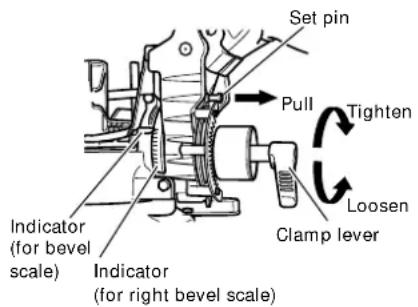
(1) Loosen the clamp lever and bevel the saw blade to the left or to the right.
When tilting the motor head to the right pull the set pin towards the rear.
(2) Adjust the bevel angle to the desired setting while watching the bevel angle scale and indicator, then secure the clamp lever.
WARNING:
When the workpiece is secured on the left or right side of the blade, the short cut-off portion will come to rest on the right or left side of the saw blade. Always turn the power off and let the saw blade stop completely before raising the handle from the workpiece.
If the handle is raised while the saw blade is still rotating, the cut-off piece may become jammed against the saw blade causing fragments to scatter about dangerously.
When stopping the bevel cutting operation halfway, start cutting after pulling back the motor head to the initial position.
Starting from halfway, without pulling back, causes the lower guard to be caught in the cutting groove of the workpiece and to contact the saw blade.
6. Bevel angle fine adjustment

text_image
Handle Knob (A) Clamp lever 8 mm bolt (B) Fig. 29
text_image
Right bevel angle Knob (A) Hinge Left bevel angle Clamp lever Pull 8 mm bolt (A) Bevel plateFig. 30
(1) Grip the handle on the motor head and position it at the bevel angle you need. Temporarily tighten the clamp lever.
⚠️CAUTION: If not tightened firmly enough the motor head might suddenly move or slip, causing injuries. Be sure to tighten the motor head section enough so it will not move.
(2) Make fine adjustments to the bevel angle by gripping the handle and moving the knob (A).
NOTE: Turning knob (A) clockwise, allows fine adjustment of the main unit to the left (as seen from front).
Turning knob (A) counterclockwise, allows fine adjustment of the main unit to the right (as seen from front).
If you wish to cut left bevel angle 48^ or right bevel angle 48^ , pull the bevel plate backwards until the hinge contacts either the 8mm bolt (A) or the 8mm bolt (B) then cut diagonally left or right. Setting to cut left bevel angle 48^ or right bevel angle 48^ can be done easily.
(3) After adjusting to the desired angle, tighten the clamp lever and clamp the motor head.
⚠️CAUTION: Always check that the clamp lever is secured and the motor head is clamped. If you attempt angle cutting without clamping the motor head, then the motor head might shift unexpectedly causing injuries.
7. Compound cutting procedures
Compound cutting can be performed by following the instructions in 4 and 5 above. For maximum dimensions for compound cutting, refer to “SPECIFICATIONS” table on page 9.
⚠️CAUTION: Always secure the workpiece with the right hand side for compound cutting. Never rotate the table to the right for compound cutting, because the saw blade might then contact the clamp or vise that secures the workpiece, and cause personal injury or damage. 19
8. Crown molding cutting procedures
Fig. 31 shows two common crown molding types having angles of (θ) 38° and 45°. For the typical crown molding fittings, see Fig. 32.

text_image
A upper surface Ceiling B lower surface WaltFig. 31 Fig. 32

text_image
Ceiling Wall Inside corner Outside cornerThe table below shows the miter angle and the bevel angle settings that are ideal for the two crown molding types.
NOTE: For convenience, positive stops are provided for the miter setting (left and right 31.6°) positions.
For miter cut setting
If the turntable has been set to either of the angles described, move the turntable adjusting side handle a little to the right and left to stabilize the position and to properly align the miter angle scale and the tip of the indicator before the operation starts.
For bevel cut setting
Move handle on bevel section to the left and check that the position is stable and that the bevel angle scale and the tip of the indicator are properly aligned. Then tighten the clamp lever.
| Type of Crown Molding | To process crown molding at positions 1 and 4 in Fig. 32. | To process crown molding at positions 2 and 3 in Fig. 32. | ||
| Miter Angle Setting | Bevel Angle Setting | Miter Angle Setting | Bevel Angle Setting | |
| 45° Type | right 35.3°( ↓mark) | left 30°( ↓mark) | left 35.3°( ↓mark) | left 30°( ↓mark) |
| 38° Type | right 31.6°( ↓mark) | left 33.9°( ↓mark) | left 31.6°( ↓mark) | left 33.9°( ↓mark) |
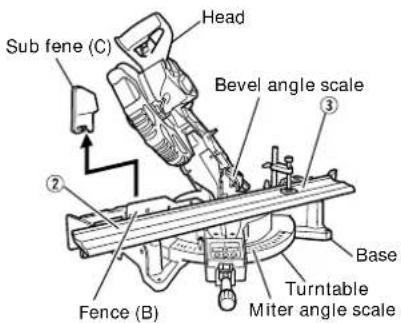
(1) Setting to cut crown moldings at positions ① and ④ in Fig. 32 (see Fig. 33; tilt the head to the left):
① Turn the turntable to the right and set the Miter Angle as follows:
* For 45° type crown moldings: 35.3° ( mark)
* For 38° type crown moldings: 31.6° ( mark)
② Tilt the motor head to the left and set the Bevel Angle as follows:
* For 45° type crown moldings: 30° ( mark)
* For 38° type crown moldings: 33.9° ( mark)
③ Position the crown molding so that the upper surface (A in Fig. 31) contacts the fence as indicated in Fig. 35.
(2) Setting to cut crown moldings at positions ② and ③ in Fig. 32 (see Fig. 34; tilt the head to the left):
① Turn the turntable to the left and set the Miter Angle as follows:
* For 45° type crown moldings: 35.3° ( mark)
* For 38° type crown moldings: 31.6° ( mark)
② Tilt the head to the left and set the Bevel Angle as follows:
* For 45° type crown moldings: 30° ( mark)
* For 38° type crown moldings: 33.9° ( mark)
③ Position the crown molding so that the lower surface (B in Fig. 31) contacts the fence as in Fig. 36.
⚠️ CAUTION: In the case of left bevel angle cutting, remove the sub fence (C) before operation. (Fig. 33 and 34)

text_image
Sub fence (C) Head Bevel angle scale Fence (A) Miter angle scale Turntable BaseFig. 33 Fig. 34
text_image
Sub fene (C) Head Bevel angle scale Base Turntable Miter angle scale Fence (B)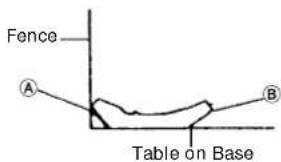
text_image
Fence A B Table on Base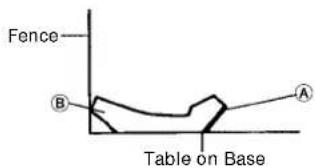
text_image
Fence B A Table on BaseFig. 35 Fig. 36
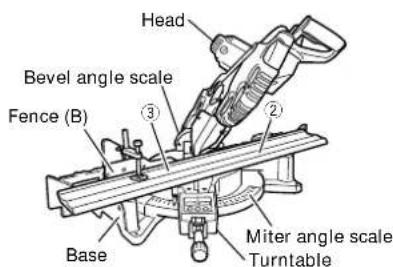
(1) Setting to cut crown moldings at positions ① and ④ in Fig. 32 (see Fig. 37; tilt the head to the right):
① Turn the turntable to the right and set the Miter Angle as follows:
* For 45° type crown moldings: 35.3° ( mark)
* For 38° type crown moldings: 31.6° (mark)
② Tilt the head to the right and set the Bevel Angle as follows:
* For 45° type crown moldings: 30° ( mark)
* For 38° type crown moldings: 33.9° ( mark)
③ Position the crown molding so that the upper surface (B) in Fig. 31) contacts the fence as indicated Fig. 39.
(2) Setting to cut crown moldings at positions ② and ③ in Fig. 32 (see Fig. 38; tilt the head to the right):
① Turn the turntable to the left and set the Miter Angle as follows:
* For 45° type crown moldings: 35.3° ( mark)
* For 38° type crown moldings: 31.6° ( mark)
② Tilt the head to the right and set the Bevel Angle as follows:
* For 45° type crown moldings: 30° ( mark)
* For 38° type crown moldings: 33.9° ( mark)
③ Position the crown molding so that the lower surface (A) in Fig. 31) contacts the fence as in Fig. 40.

text_image
Head Bevel angle scale ④ Fence (A) Miter angle scale Turntable BaseFig. 37 Fig. 38
text_image
Head Bevel angle scale Fence (B) Base Miter angle scale Turntable
text_image
Fence B A Table on base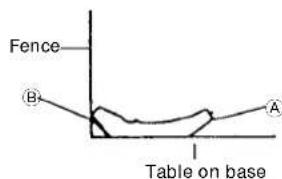
text_image
Fence B A Table on baseFig. 39 Fig. 40
Cutting method of crown molding without tilting the saw blade
text_image
Crown molding vise ass'y (Optional accessories) 6mm wing bolt 6mm wing bolt 6mm wing bolt 6mm wing bolt 6mm wing bolt 6mm wing bolt 6mm wing bolt 6mm wing bolt 6mm wing bolt 6mm wing bolt 6mm wing bolt 6mm wing bolt 6mm wing bolt 6mm wing bolt 6mm wing bolt 6mm wing bolt 6mm wing bolt 6mm wing bolt 6mm wing bolt 6mm wing bolt 6mm wing bolt 6mm wing Bolt 6mm Wing Bolt 6mm Wing Bolt 6mm Wing Bolt 6mm Wing Bolt 6mm Wing Bolt 6mm Wing Bolt 6mm Wing Bolt 6mm Wing Bolt 6mm Wing Bolt 6mm Wing Bolt 6mm Wing Bolt 6mm Wing Bolt 6mm Wing Bolt 6mm Wing Bolt 6mm Wing Bolt 6mm Wing Bolt 6mm Wing Bolt 6mm Wing Bolt 6mm Wing Bolt 6mm Wing Bolt 6mm Ring Bolt 6mm Ring Bolt 6mm Ring Bolt 6mm Ring Bolt 6mm Ring Bolt 6mm Ring Bolt 6mm Ring Bolt 6mm Ring Bolt 6mm Ring Bolt 6mm Ring Bolt 6mm Ring Bolt 6mm Ring Bolt 6mm Ring Bolt 6mm Ring Bolt 6mm Ring Bolt 6mm Ring Bolt 6mm Ring Bolt 6mm Ring BoltFig. 41-a
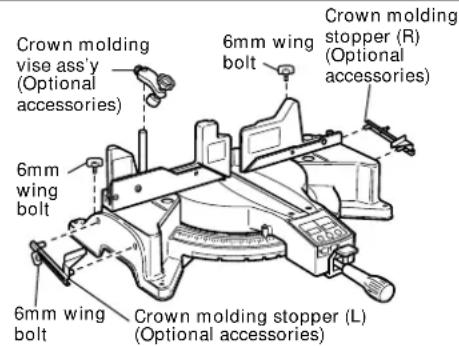
(1) Crown molding Stopper (L) and (R) (optional accessories) allow easier cuts of crown molding without tilting the saw blade. Install them in the base both-sides side to be shown in Fig. 41-a. After inserting Tighten the 6mm wing bolts to secure the crown molding Stoppers.
[Optional accessories used]
- Crown molding Vise Ass'y (Include Crown molding Stopper (L))
• Crown molding Stopper (L)
• Crown molding Stopper (R)
text_image
Crown molding vise ass'y (Optional accessories) 6mm knob bolt Knob Fence 6mm wing bolt Crown moldingCrown molding stopper (L)
Crown molding stopper (R)
(Optional accessories)
Fig. 41-b
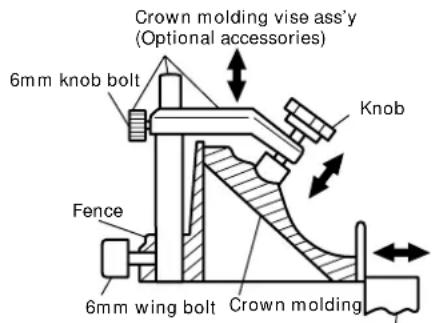
(2) The crown molding vise (B) (Optional accessory) can be mounted on either the left fence (Fence (B)) or the right fence (Fence (A)). It can unite with the slope of the crown molding and vice can be pressed down.
Then turn the upper knob, as necessary, to securely attach the crown molding in position. To raise or lower the vise assembly, first loosen the 6mm knob bolt.
After adjusting the height, firmly tighten the 6mm wing bolt; then turn the upper knob, as necessary, to securely attach the crown molding in position. (See Fig. 41-b)
WARNING: Always firmly clamp or vise to secure the crown molding to the fence; otherwise the crown molding might be thrust from the table and cause bodily harm. Do not bevel cutting. The main body or saw blade may contact the sub fence, resulting in an injury.
⚠️CAUTION: Always confirm that the motor head (see Fig. 1) does not contact the crown molding vise ass'y when it is lowered for cutting. If there is any danger that it may do so, loosen the 6mm knob bolt and move the crown molding vise ass'y to a position where it will not contact the saw blade.
Position crown molding with its WALL CONTACT EDGE against the guide fence and its CEILING CONTACT EDGE against the crown molding Stoppers as shown in Fig. 41-b.
Adjust the crown molding Stoppers according to the size of the crown molding.
Tighten the 6mm wing bolt to secure the crown molding Stoppers.
- Cutting easily-deformed materials, such as aluminum sash
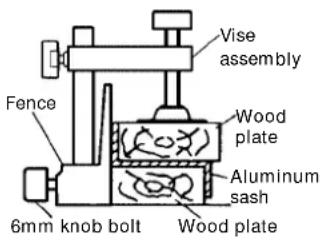
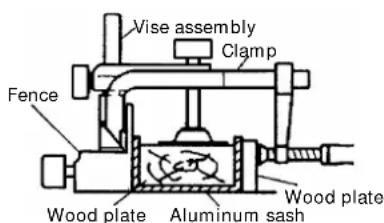
Materials such as aluminum sash can easily deform when tightened too much in a vise assembly. This will cause inefficient cutting and possible overload of the motor.
When cutting such materials, use a wood plate to protect the workpiece as shown in Fig. 42-a. Set the wood plate near the cutting section.
When cutting aluminum materials, coat the saw blade with cutting oil (non-combustible) to achieve smooth cutting and a fine finish.
In addition, in case of a U-shaped workpiece, use the wood plate as shown in Fig. 42-b to ensure stability in the lateral direction, and clamp it near the cutting section of the workpiece and tighten it using both the vise assembly and the clamp available in the market.
text_image
Vise assembly Fence Wood plate Aluminum sash 6mm knob bolt Wood plateFig. 42-a Fig. 42-b
text_image
Vise assembly Clamp Fence Wood plate Aluminum sash Wood plate10. How to use the dust bag (Standard accessory)

text_image
Dust bag Duct Right angle BaseFig. 43
(1) When the dust bag has become full of sawdust, dust will be blown out of the dust bag when the saw blade rotates. Check the dust bag periodically and empty it before it becomes full.
(2) During bevel and compound cutting, attach the dust bag at a right angle to the base surface as shown in Fig. 43.
⚠️CAUTION: Empty the dust bag frequently to prevent the duct and the safety cover from becoming clogged. Sawdust will accumulate more quickly than normal during bevel cutting.
SAW BLADE MOUNTING AND DISMOUNTING
⚠ WARNING: * To prevent an accident or personal injury, always turn off the trigger switch and disconnect the power plug from the receptacle before removing or installing a saw blade. If cutting work is done in a state where the bolt is not sufficiently tightened, the bolt can get loose, the blade can come off, and the lower guard can get damaged, resulting in injuries. Also, check that the bolts are properly tightened before plugging the power plug into the receptacle. * If the bolts are attached or detached using tools other than the 10mm box wrench (standard accessory), excessive or improperly tightening occurs, resulting in injury.
1. Mounting the saw blade (Fig. 44-a, Fig. 44-b, Fig. 44-c and Fig. 44-d)
(1) Rotate the lower guard (plastic) to the top position.
(2) Use the driver to loosen the 5mm screw fastening the spindle cover and then remove the spindle cover.
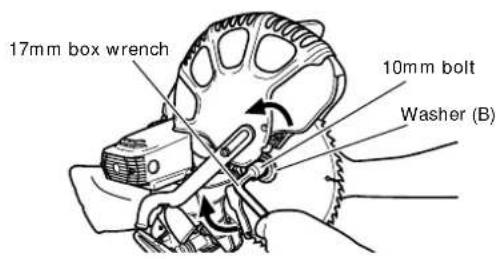
(3) Press in spindle lock and loosen 10mm bolt with 17mm box wrench (standard accessory). Since the bolt is left-hand threaded, loosen by turning it to the right as shown in Fig. 44-c.
NOTE: If the spindle lock cannot be easily pressed in to lock the spindle, turn the 10mm bolt with 17mm box wrench (standard accessory) while applying pressure on the spindle lock. The saw blade spindle is locked when the spindle lock is pressed inward.
(4) Remove the 10mm bolt and washer (B).

text_image
5mm machine screw Spindle coverFig. 44-a Fig. 44-b

text_image
Spindle lock(5) Lift the lower guard and mount the saw blade.
⚠ WARNING: When mounting the saw blade, confirm that the rotation indicator mark on the saw blade and the rotation direction of the gear case (see Fig. 1) are properly matched.
(6) Thoroughly clean washer (A), (B) and the 10mm bolt, and install them onto the saw blade spindle.
text_image
17mm box wrench 10mm bolt Washer (B)Fig. 44-c Fig. 44-d

text_image
Saw blade 10mm bolt 1" (25.4mm) 21/32" (17mm) Washer (B) Washer (A)(7) Press in the spindle lock and tighten the 10mm bolt by turning it to the left by standard accessorie's wrench (17mm box wrench) as indicated in Fig. 44-c.
⚠️CAUTION: * Confirm that the spindle lock has returned to the retract position after installing or removing the saw blade.
* Tighten the 10mm bolt so it does not come loose during operation. Confirm the 10mm bolt has been properly tightened before the power tool is started.
2. Dismounting the saw blade
Dismount the saw blade by reversing the mounting procedures described in paragraph 1 above. The saw blade can easily be removed after lifting the safety cover.
CAUTION: Never attempt to install saw blades larger than 12" (305mm) in diameter. Always install saw blades that are 12" (305mm) in diameter or less.
MAINTENANCE AND INSPECTION
WARNING: To avoid an accident or personal injury, always confirm that the trigger switch is turned OFF and the power plug has been disconnected from the receptacle before performing any maintenance or inspection of this tool.
1. Inspecting the saw blade
Always replace the saw blade immediately upon the first sign of deterioration or damage. A damaged saw blade can cause personal injury and a worn saw blade can cause ineffective operation and possible overload to the motor.
⚠️CAUTION: Never use a dull saw blade. When a saw blade is dull, its resistance to the hand pressure applied by the tool handle tends to increase, making it unsafe to operate the power tool.
2. Inspecting the lever
If the M8 hexagonal head bolts (2) are loose, align the sides of the fence and saw blade with the steel square. After adjusting the saw blade and fence to a ninety-degree angle, tighten the lever securing hexagonal head bolts (2).

text_image
Lever Hex. head bolt (2)Fig. 45-a Fig. 45-b

text_image
Saw blade Fence Steel square3. Inspecting the carbon brushes (Fig. 46 and Fig. 47)
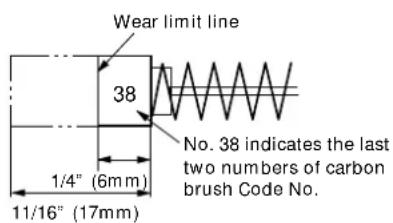
The carbon brushes in the motor are expendable parts.
If the carbon brushes become excessively worn, motor trouble might occur.
Therefore, inspect the carbon brushes periodically and replace them when they have become worn to the wear limit line as shown in Fig. 46.
Also, keep the carbon brushes clean so that they will slide smoothly within the brush holders.
The carbon brushes can easily be removed after removal of the brush caps (see Fig. 47) with a slotted (minus) screwdriver.
text_image
Wear limit line 38 1/4" (6mm) 11/16" (17mm) No. 38 indicates the last two numbers of carbon brush Code No.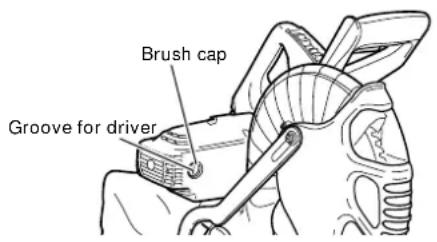
text_image
Brush cap Groove for driverFig. 46 Fig. 47
4. About Handling the Motor (see Fig. 1)
Winding of the motor is said to be the heart of this tool. Exercise utmost caution not to damage the winding by exposing it to wash oil or water.
NOTE: Accumulation of dust and the like inside the motor can result in a malfunction.
After using the motor for 50 hours or so, carry out no-load running, and blow in the dry air from a wind hole at the motor's rear. Such action is effective to discharge dust and the like.
5. Inspecting the screws
Regularly inspect each component of the power tool for looseness.
Re-tighten screws on any loose part.
⚠ WARNING: To prevent personal injury, never operate the power tool if any components are loose.
6. Inspecting the lower guard for proper operation
Before each use of the tool, test the lower guard (see Fig. 7) to assure that it is in good condition and that it moves smoothly.
Never use the tool unless the lower guard operates properly and it is in good mechanical condition.
7. Storage
After operation of the tool has been completed, check that the following has been performed:
(1) Trigger switch is in OFF position,
(2) Power plug has been removed from the receptacle,
(3) To prevent unauthorized operation of this tool, insert a padlock through the hole in the switch trigger.
When the tool is not in use, keep it stored in a dry place out of the reach of children.
8. Replacement of Poly-V-Belt

text_image
Poly-V-belt Pulley (A) Pulley (B)Fig. 48
The power of the motor is transmitted to the saw blade by a Poly-V-Belt. When the Poly-V-Belt is broken or damaged, remove the pulley cover by loosening the three 5 mm screws (see Fig. 2) and replace the damaged one with the new one.
When connecting the belt on pulleys, first connect 2 or 3 teeth of Poly-V-Belt to the grooves of the pulley (A) and pulley (B). Then turning the pulley (A) and pulley (B), connect all teeth of the belt to the pulleys.
9. Lubrication
Lubricate the following sliding surfaces once a month to keep the power tool in good operating condition for a long time (see Fig. 1 and Fig. 2). Use of machine oil is recommended.
Oil supply points:
* Rotary portion of hinge
* Rotary portion of vise assembly
10. Cleaning
Periodically remove chips, dust and other waste material from the surface of the power tool, especially from the inside of the lower guard with a damp, soapy cloth. To avoid a malfunction of the motor, protect it from contact with oil or water.
If the laser line becomes invisible due to chips and the like adhered onto the window of the laser marker's light-emitting section, wipe and clean the window with a dry cloth or a soft cloth moistened with soapy water, etc.
SERVICE AND REPAIRS
All quality power tools will eventually require servicing or replacement of parts because of wear from normal use. To assure that only authorized replacement parts will be used and that the double insulation system will be protected, all service (other than routine maintenance) must be performed by an AUTHORIZED HITACHI POWER TOOL REPAIR CENTER ONLY.
NOTE: Specifications are subject to change without any obligation on the part of HITACHI.
INFORMATIONS IMPORTANTES DE SÉCURITÉ
CHOSES A NE PAS FAIRE
POUR GARANTIR UNE UTILISATION EN TOUTE SÉCURITÉ, NE JAMAIS VIOLER LES CONSIGNES SUIVANTES :
text_image
CAUTION LASER RADIATION-DO NOT STARE INTO BEAM Maximum Output: <1mW, Wavelength: 400~700nm, Laser Medium: Laser Diode CLASS II LASER PRODUCT. Complies with 21 CFR, Chapter 1, Subchapter J. Laser radiation on work table. DPC DO NOT STARE INTO BEAM. C329113Fig. 15

text_image
AVOID EXPOSURE Laser radiation is emitted from this aperture. CAUTION Laser radiation when open. Do not stare into beam. Fig. 16APPLICATIONS PRATIQUES
Make the following preparations before operating the power tool:
1. Installation

text_image
11/32" (9mm), 4 orificios 22-3/4" (598mm) 12-19/32" (320mm)
text_image
CAUTION LASER RADIATION-DO NOT STARE INTO BEAM Maximum Output: <1mW, Wavelength: 400~700nm, Laser Medium: Laser Diode CLASS II LASER PRODUCT. Complies with 21 CFR, Chapter 1, Subchapter J. Laser radiation on work table. DPC DO NOT STARE INTO BEAM. C329113Fig. 15
text_image
AVOID EXPOSURE Laser radiation is emitted from this aperture. CAUTION Laser radiation when open. Do not stare into beam.Fig. 16
text_image
Techo Pared Esquina interior Esquina exteriorSome dust created by power sanding, sawing, grinding, drilling, and other construction activities contains chemicals known to the State of California to cause cancer, birth defects or other reproductive harm. Some examples of these chemicals are:
- Lead from lead-based paints,
●Crystalline silica from bricks and cement and other masonry products, and
●Arsenic and chromium from chemically-treated lumber.
Your risk from these exposures varies, depending on how often you do this type of work. To reduce your exposure to these chemicals: work in a well ventilated area, and work with approved safety equipment, such as those dust masks that are specially designed to filter out microscopic particles.
AVERTISSEMENT:
Shinagawa Intercity Tower A,
15-1, Konan 2-chome, Minato-ku, Tokyo 108-6020, Japan
Distributed by

Hitachi Koki U.S.A., Ltd.
3950 Steve Reynolds Blvd.
Norcross, GA 30093

Hitachi Koki Canada Co.
6395 Kestrel Road
Mississauga ON L5T 1Z5