WG163.8 - Grass trimmer WORX - Free user manual and instructions
Find the device manual for free WG163.8 WORX in PDF.



User questions about WG163.8 WORX
0 question about this device. Answer the ones you know or ask your own.
Ask a new question about this device
Download the instructions for your Grass trimmer in PDF format for free! Find your manual WG163.8 - WORX and take your electronic device back in hand. On this page are published all the documents necessary for the use of your device. WG163.8 by WORX.
USER MANUAL WG163.8 WORX
natural_image
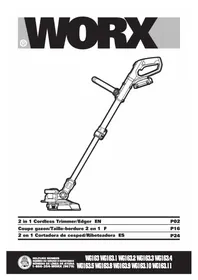
Line drawing of a handheld vacuum cleaner with lever mechanism (no text or symbols)2 in 1 Cordless Trimmer/Edger EN P02
Coupe gazon/Taille-bordure 2 en 1 F P16
WARNING: This product can expose you to chemicals including lead and
Di(2-ethylhexyl)phthalate (DEHP) which are known to the State of California to cause cancer and birth defects or other reproductive harm. For more information go to www.P65Warnings.ca.gov.
Important Safety Instructions

WARNING: Read all safety warnings and instructions. Failure to follow the
warnings and instructions may result in electric shock, fire and/or serious injury.
FOR ALL APPLIANCES
1) Avoid Dangerous Environment - Don't use appliances in damp or wet locations.
2) Don't Use In Rain.
3) Keep Children Away - All visitors should be kept at a distance from work area.
4) Dress Properly - Do not wear loose clothing or jewelry. They can be caught in moving parts. Use of rubber gloves and substantial footwear is recommended when working outdoors. Wear protective hair covering to contain long hair.
5) Use Safety Glasses - Always use face or dust mask if operation is dusty.
6) Use Right Appliance - Do not use appliance for any job except that for which it is intended.
7) Don't Force Appliance - It will do the job better and with less likelihood of a risk of injury at the rate for which it was designed.
8) Don't Overreach - Keep proper footing and balance at all times.
9) Stay Alert - Watch what you are doing. Use common sense. Do not operate appliance when you are tired.
10) Store Idle Appliances Indoors - When not in use, appliances should be stored indoors in dry, and high or locked-up place - out of reach of children.
11) Maintain Appliance With Care - Keep cutting edge sharp and clean for best performance and to reduce the risk of injury. Follow instructions for lubricating and changing accessories. Keep handles dry, clean, and free from oil and grease.
12) Check Damaged Parts - Before further use of the appliance, a guard or other part that is damaged should be carefully checked to determine that it will operate properly and perform its intended function. Check for alignment of moving parts, binding of moving parts, breakage of parts, mounting, and any other condition that may affect its operation. A guard or other part that is damaged should be properly repaired or replaced by an authorized service center unless indicated elsewhere in this manual.
FOR ALL BATTERY - OPERATED GARDENING APPLIANCES
- Prevent unintentional starting. Ensure the switch is in the off-position before connecting to battery pack, picking up or carrying the appliance. Carrying the appliance with your finger on the switch or energizing appliance that have the switch on invites accidents.
- Disconnect the battery pack from the appliance before making any adjustments, changing accessories, or storing appliance. Such preventive safety measures reduce the risk of starting the appliance accidentally.
- Recharge only with the charger specified by the manufacturer. A charger that is suitable for one type of battery pack may create a risk of fire when used with another battery pack.
- Use appliances only with specifically designated battery packs. Use of any other battery packs may create a risk of injury and fire.
- When battery pack is not in use, keep it away from other metal objects, like paper clips, coins, keys, nails, screws or other small metal objects, that can make a connection from one terminal to another. Shorting the battery terminals together may cause burns or a fire.
- Under abusive conditions, liquid may be ejected from the battery; avoid contact. If contact accidentally occurs, flush with water. If liquid contacts eyes, additionally seek medical help. Liquid ejected from the battery may cause irritation or burns.
- Do not use a battery pack or appliance that is damaged or modified. Damaged or modified batteries may exhibit unpredictable behavior resulting in fire, explosion or risk of injury.
- Do not expose a battery pack or appliance to fire or excessive temperature. Exposure to fire or temperature above 130^ C may cause explosion.
- Follow all charging instructions and do not charge the battery pack or appliance outside of the temperature range specified in the instructions. Charging improperly or at temperatures outside of the specified range may damage the battery and increase the risk of fire.
- Have servicing performed by a qualified repair person using only identical replacement parts. This will ensure that the safety of the product is maintained.
- Do not modify or attempt to repair the appliance or the battery pack (as applicable) except as indicated in the instructions for use and care.
ADDITIONAL SAFETY RULES FOR LAWN TRIMMER AND EDGE TRIMMER
- Keep guards in place and in good working order.
- Keep hands and feet away from cutting area.
- Do not use heavier lines than recommended in this manual.
- Do not use line materials of other types – for example, metal wire, rope, and the like.
SAFETY WARNINGS FOR BATTERY PACK
a) Do not dismantle, open or shred battery pack.
b) Do not expose battery pack to heat or fire. Avoid storage in direct sunlight.
c) Do not short-circuit a battery pack. Do not store battery packs haphazardly in a box or drawer where they may short-circuit each other or be short-circuited by other metal objects. When battery pack is not in use, keep it away from other metal objects, like paper clips, coins, keys, nails, screws or other small metal objects, that can make a connection from one terminal to another. Shorting the battery terminals together may cause burns or fire.
d) Do not remove battery pack from its original packaging until required for use.
e) Do not subject battery pack to mechanical shock.
f) In the event of battery leaking, do not allow the liquid to come in contact with the skin or eyes. If contact has been made, wash the affected area with copious amounts of water and seek medical advice.
g) Observe the plus (+) and minus (−) marks on the battery back and equipment and ensure correct use.
h) Do not use any battery pack which is not designed for use with the equipment.
i) Keep battery pack out of the reach of children.
j) Seek medical advice immediately if a cell or battery has been swallowed.
k) Always purchase the battery pack recommended by the device manufacturer for the equipment.
I) Keep battery pack clean and dry.
m) Wipe the battery pack terminals with a clean dry cloth if they become dirty.
n) Battery pack need to be charged before use. Always use the correct charger and refer to the manufacturer's instructions or equipment manual for proper charging instructions.
o) Do not leave battery pack on prolonged charge when not in use.
p) After extended periods of storage, it may be necessary to charge and discharge the battery pack several times to obtain maximum performance.
q) Battery pack gives its best performance when it is operated at normal room temperature (20 °C ± 5 °C).
r) When disposing of battery packs, keep battery packs of different electrochemical systems separate from each other.
s) Recharge only with the charger specified by WORX. Do not use any charger other than that specifically provided for use with the equipment. A charger that is suitable for one type of battery pack may create a risk of fire when used with another battery pack.
t) Retain the original product literature for future reference.
u) Use only the battery pack in the application for which it was intended.
v) Remove the battery pack from the equipment when not in use.
w) Dispose of properly.
SAVE THESE INSTRUCTIONS
2 in 1 Cordless Trimmer/Edger EN
SYMBOLS
| To reduce the risk of injury, user must read instruction manual | |
| Wear ear protection | |
| Wear eye protection | |
| Do not burn | |
| Batteries may enter water cycle if disposed improperly, which can be hazardous for ecosystem. Do not dispose of waste batteries as unsorted municipal waste. | |
| Li-lon battery, battery must be recycled | |
| call2recyclePOSITEC Inc. has established a partnership with the RBRC Corporation to recycle any Positec batteries with the RBRC-call2recycle seal. For environmental protection, please do not discard batteries in the trash. After the batteries' life cycle is ended, then please call 1-800-822-8837 for a free service that will properly dispose of the battery. | |
| Edging | |
| Trimming | |
| Lock | |
| Unlock |
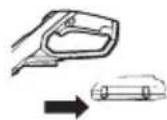
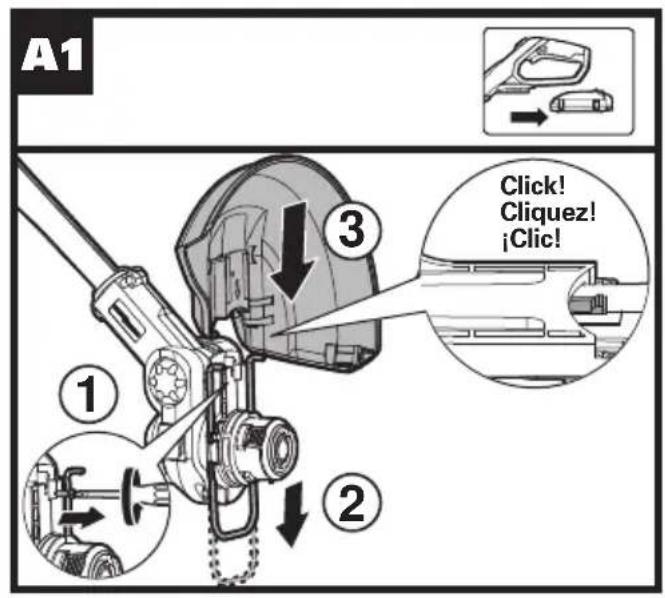
Make sure the battery is removed prior to changing accessories
text_image
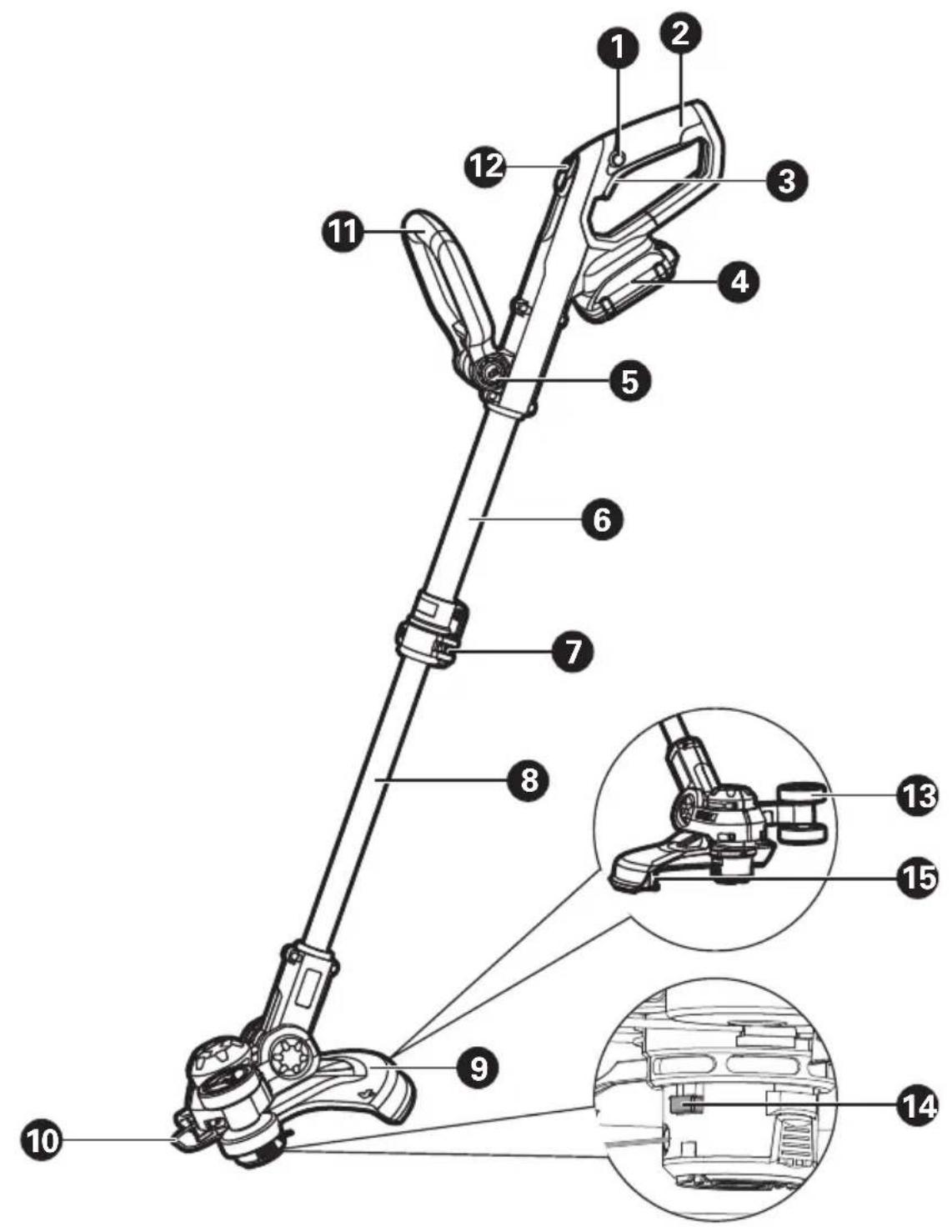
Technical diagram of a mechanical linkage system with numbered components and close-ups of internal components2 in 1 Cordless Trimmer/Edger EN
- LOCK OFF BUTTON
- REAR HANDLE
- ON/OFF SWITCH
- BATTERY PACK *
- HANDLE UNLOCK BUTTON
- UPPER SHAFT
- LOCKING COLLAR
- LOWER SHAFT
- SAFETY GUARD
- FLOWER GUARD
- AUXILIARY HANDLE
- COMMAND FEED BUTTON
- EDGER WHEEL
- LINE FEED BUTTON
- LINE CUTTER
* Not all the accessories illustrated or described are included in standard delivery.
TECHNICAL DATA
| WG163 WG163.1 WG163.2 WG163.3 WG163.4 WG163.5 WG163.8 | WG163.9 WG163.10 WG163.11 | ||
| Voltage 20V MAX.* --- | |||
| No Load Speed 7600/min | |||
| Cutting Diameter 12inch (30cm) | |||
| Line Diameter 0.065inch (1.65mm) | |||
| Machine Weight 5.3 lbs (2.4 kg) 4.6 lbs (2.1 kg) 5.3 lbs (2.4 kg) | 6.0lbs (2.7 kg) | ||
*Voltage measured without workload. Initial battery voltage reaches maximum of 20 volts. Nominal voltage is 18 volts.
ACCESSORIES
| WG163 | WG163.1 | WG163.2 | WG163.3 | WG163.4 | WG163.5 | WG163.8 | WG163.9 | WG163.10 | WG163.11 | |
| Safety guard | 1 1 | 1 1 1 | 1 1 1 1 | |||||||
| Flower guard | 1 1 | 1 1 1 | 1 1 1 1 | |||||||
| Charger | 1(WA3742) | 1(WA3742) | 1(WA3742) | 1(WA3742) | 1(WA3875) | 1(WA3742) | 1(WA3881) | / | 1(WA3881) | 1(WA3881) |
| Battery pack | 2(WA3525) | 2(WA3525) | 1(WA3575) | 2(WA3525 | 3(WA3525) | 2(WA3577) | 1(WA3525) | / | 2(WA3525) | 1(WA3578) |
| Edger wheel | 1 1 | 1 1 1 | 1 1 1 1 | |||||||
| Spool (WA0004) | 1 6 | 1 1 1 2 | 1 1 1 1 | |||||||
| wall mount (WA0138) | / | / | / | 1 | / | / | / | / | / | / |
| spool holder (WA0044) | / | / | / | 1 | / | 1 | / | / | / | / |
Only use the appropriate accessories intended for this tool. Accessory information can be found on the product packaging, at a WORX dealer or on our website at www.worx.com

WARNING: any other accessory or attachment may increase the risk of injury.
text_image
A1 ① ② ③ Click! Cliquez! ¡Clic!
text_image
Technical diagram of a mechanical device with labeled parts and an inset showing tool insertion instructions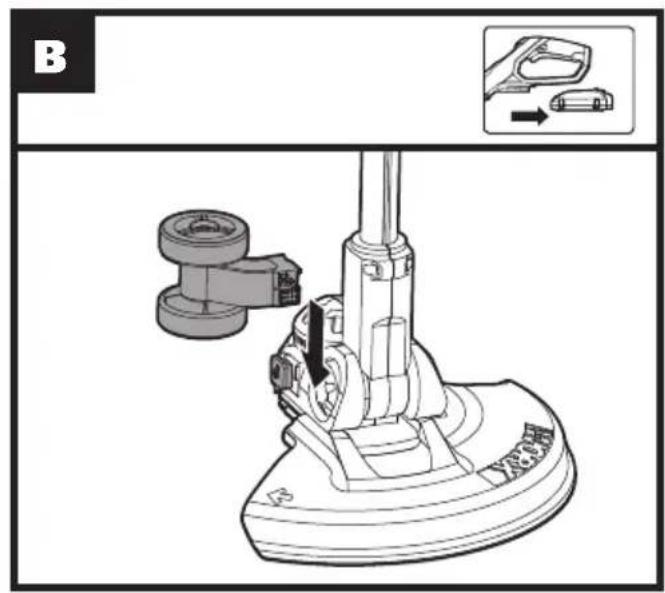
text_image
B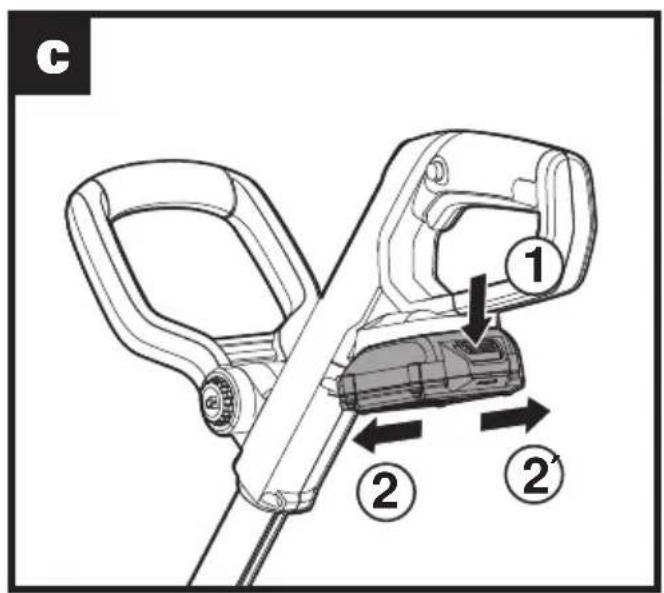
text_image
c 1 2 2'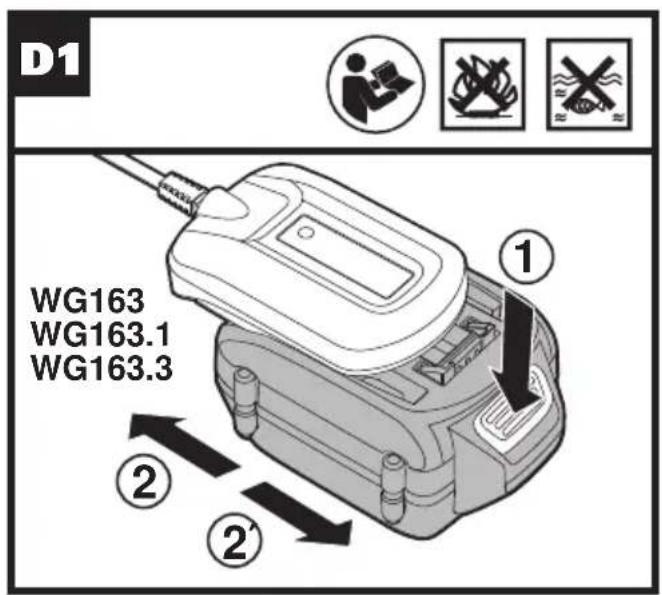
text_image
D1 WG163 WG163.1 WG163.3 ① ② ②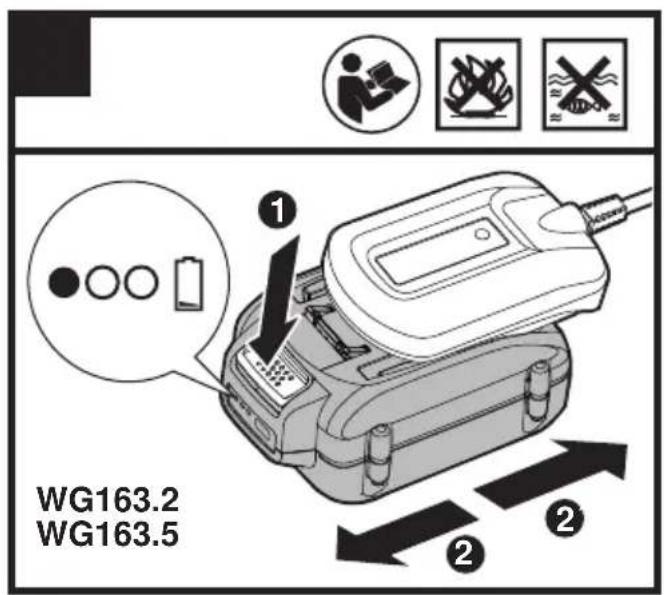
text_image
WG163.2 WG163.5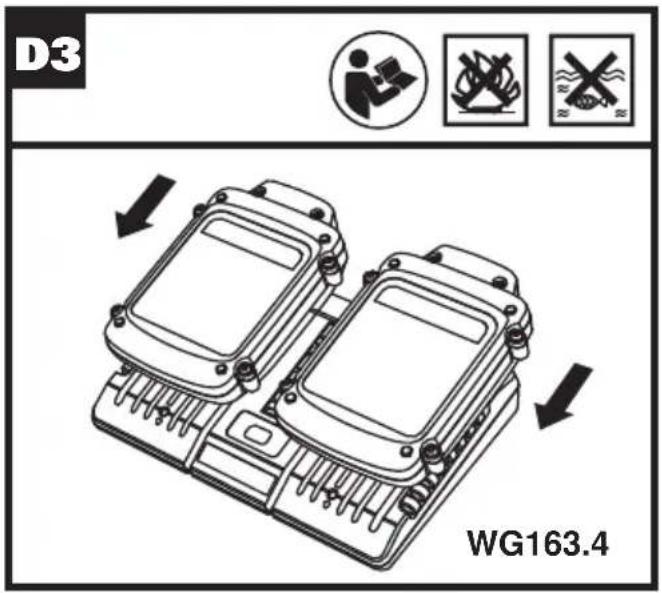
text_image
D3 WG163.4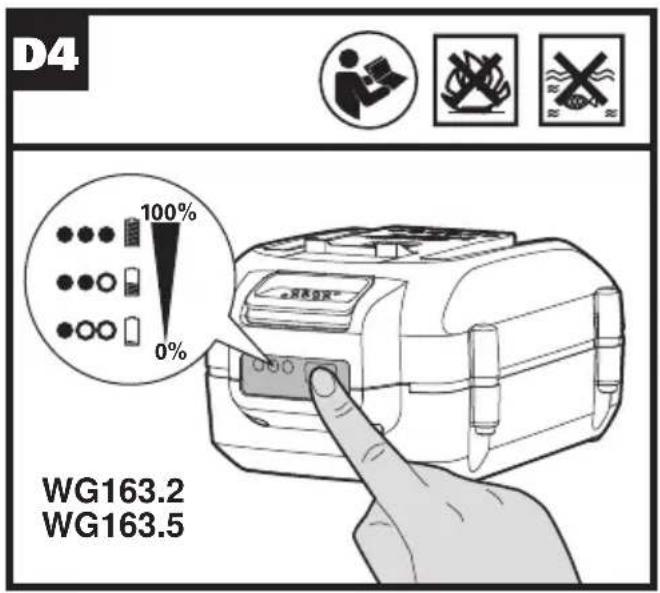
text_image
D4 100% 0% WG163.2 WG163.5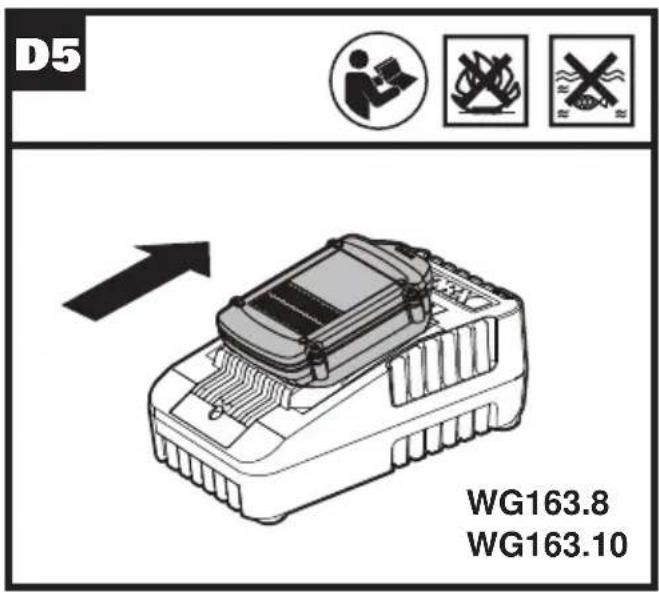
text_image
D5 WG163.8 WG163.10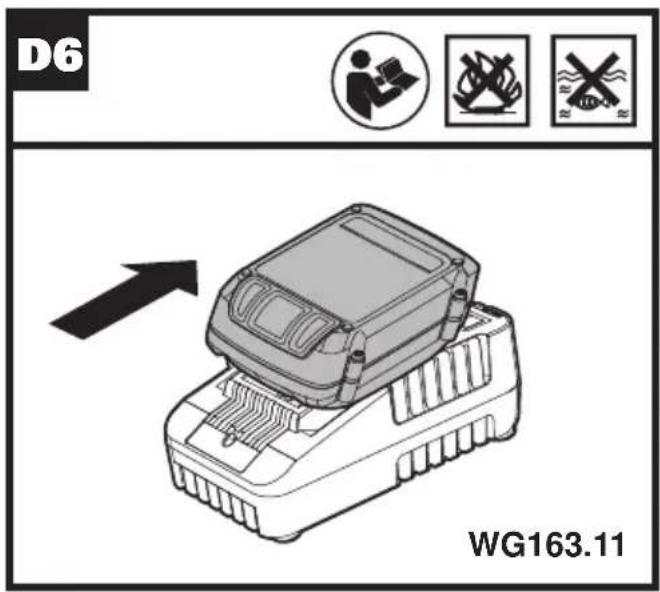
text_image
D6 WG163.11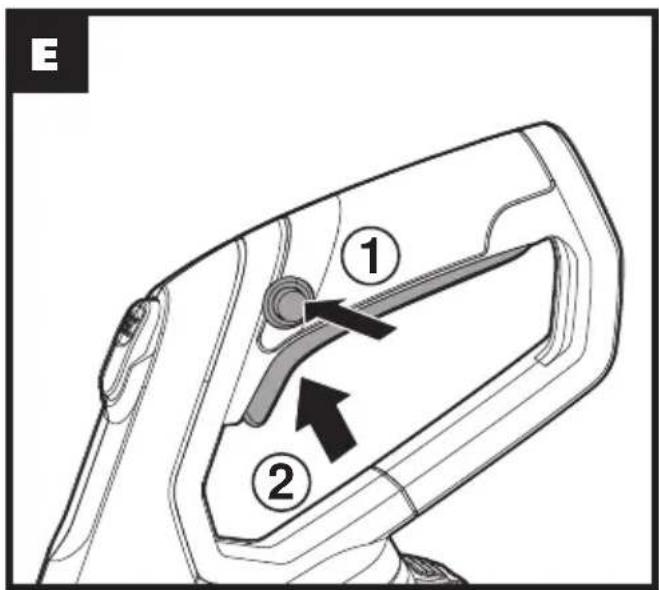
text_image
E ① ②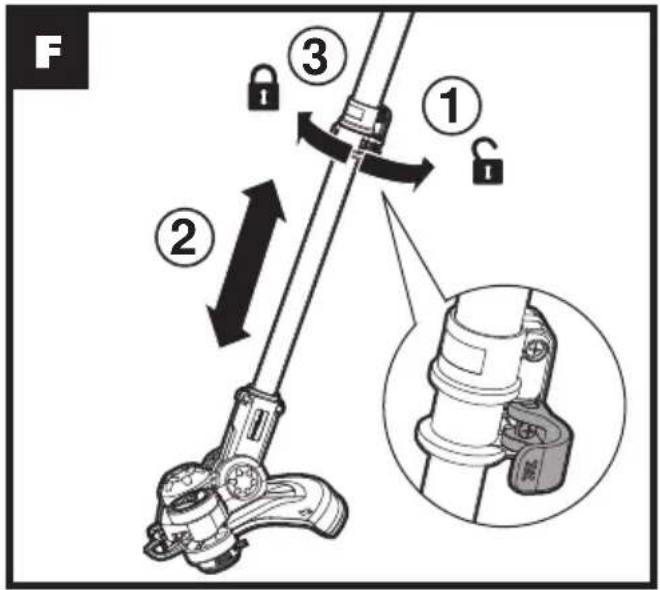
text_image
F ① ② ③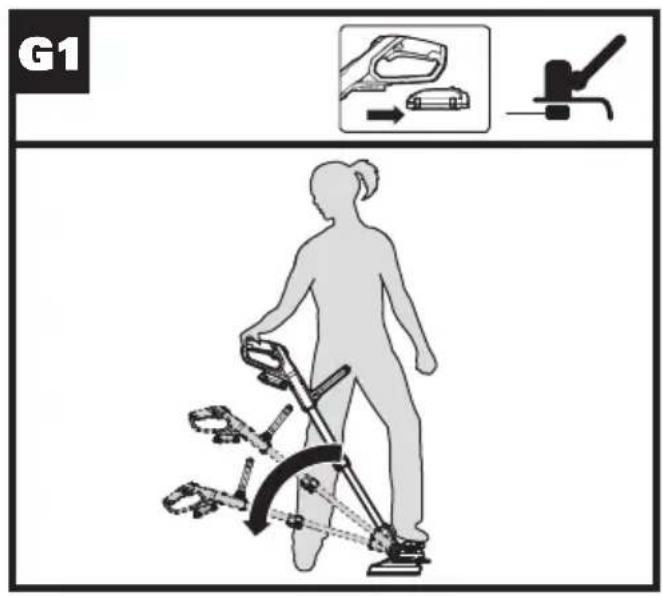
text_image
G1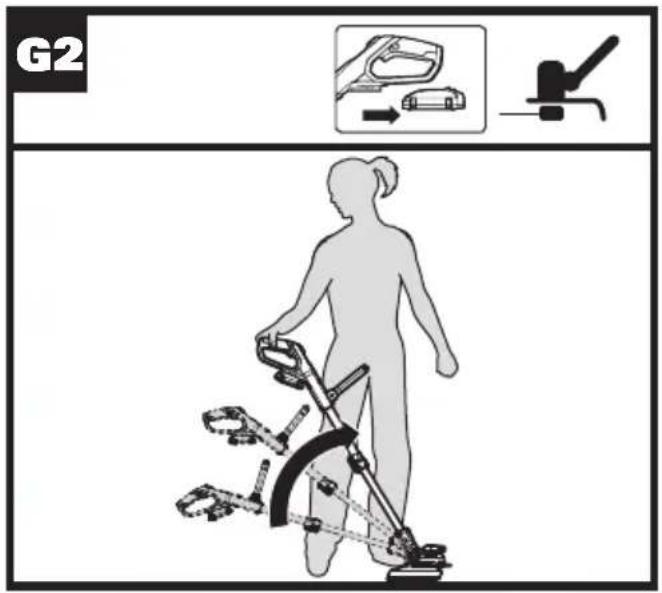
text_image
G2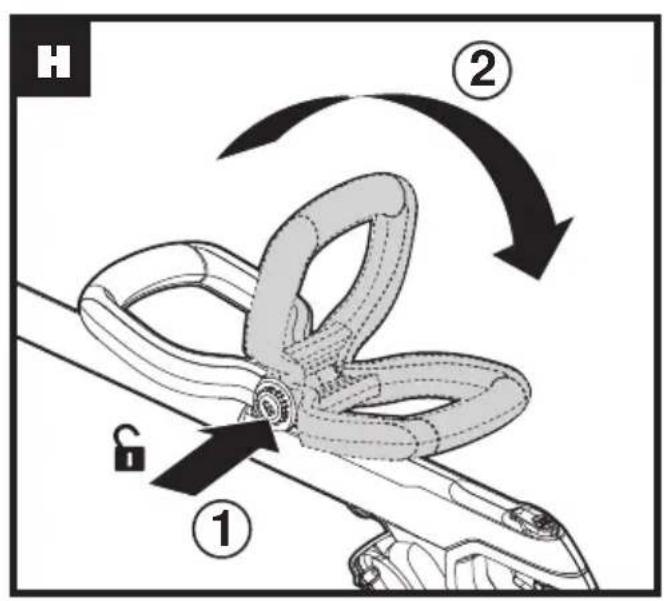
text_image
H ① ② G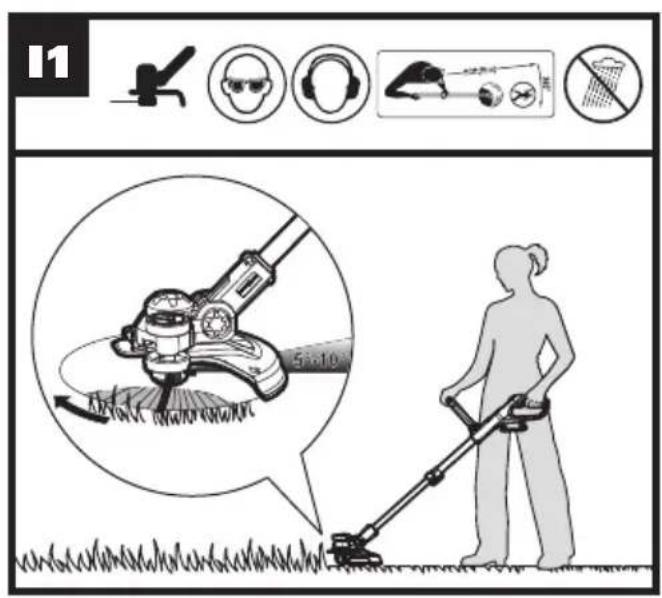
text_image
11 5-10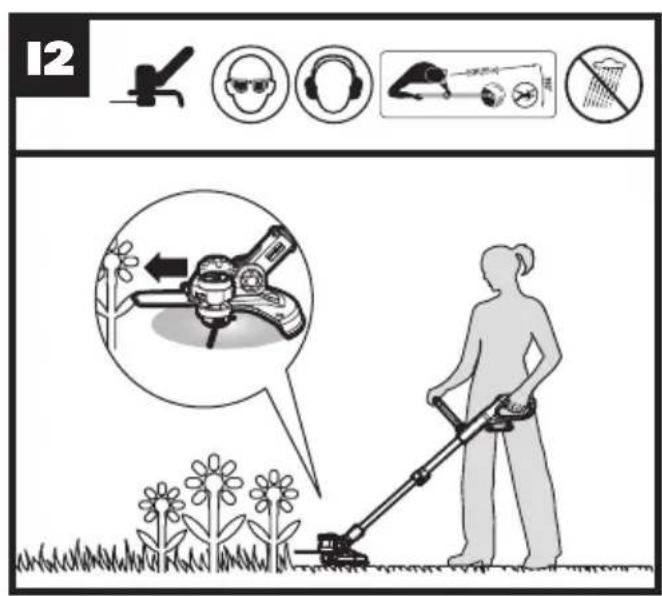
text_image
12 #12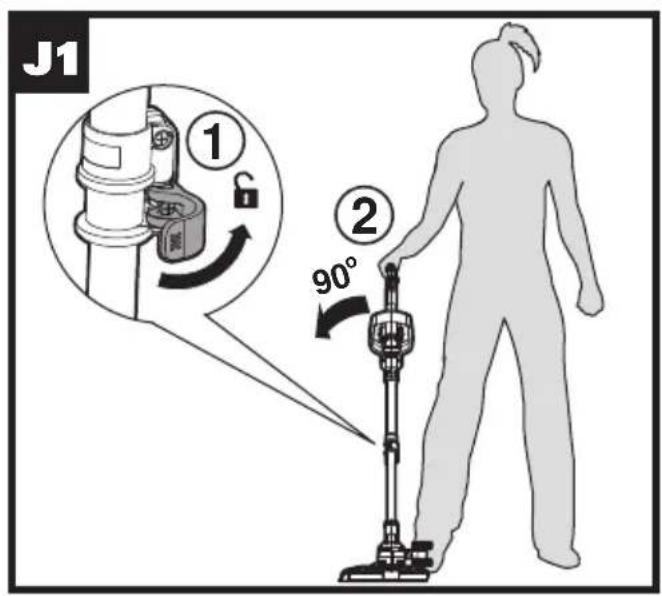
text_image
J1 ① ② 90°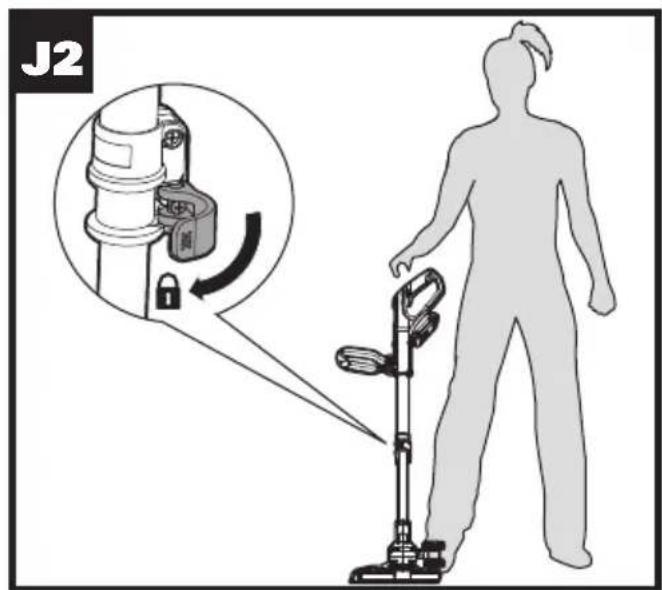
text_image
J2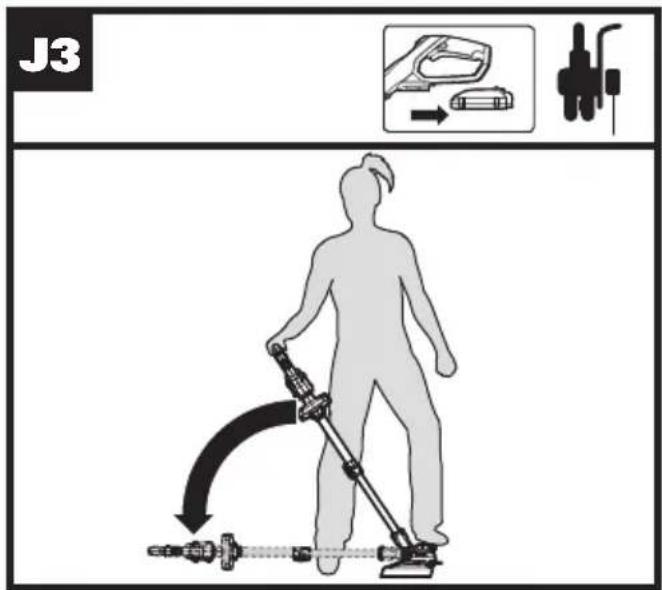
text_image
J3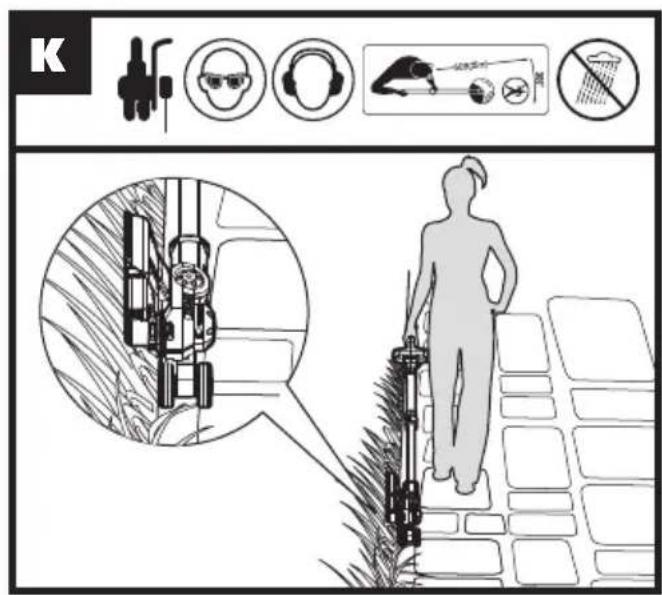
text_image
K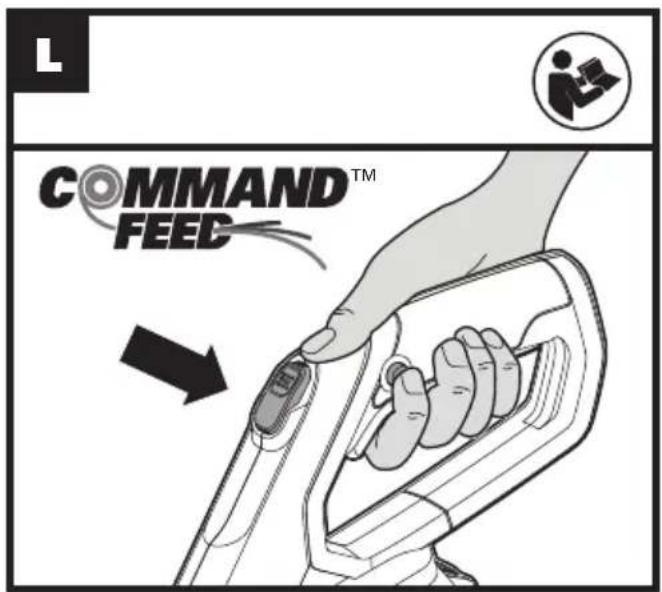
text_image
COMMAND™ FEED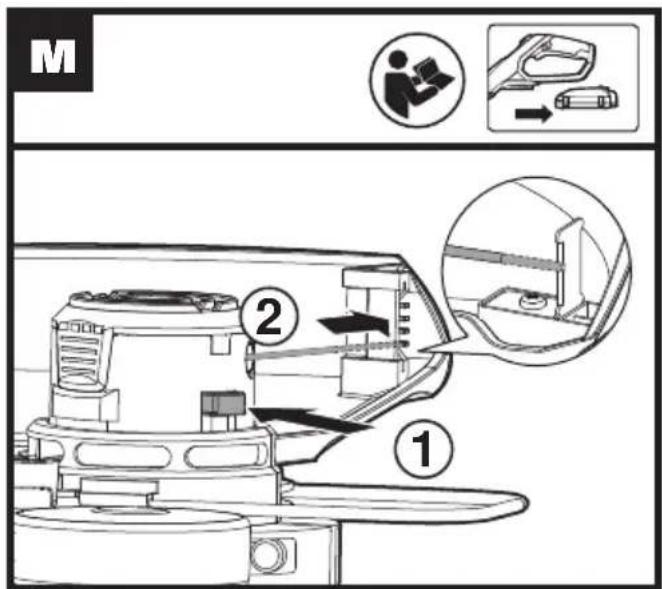
text_image
M ① ②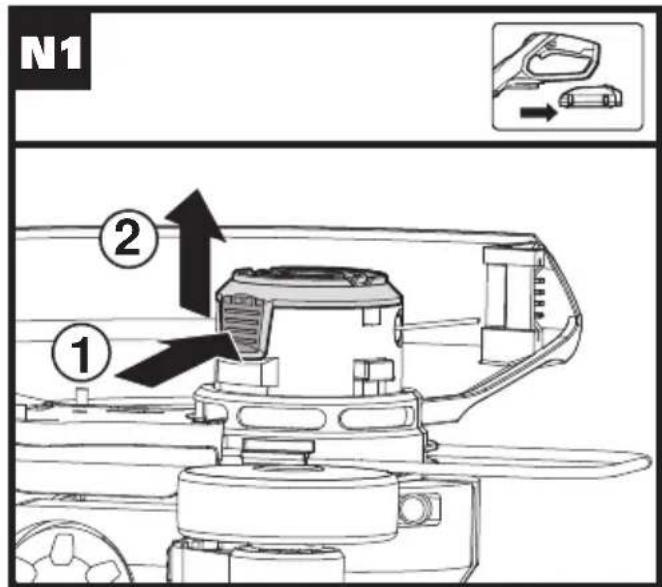
text_image
N1 ① ②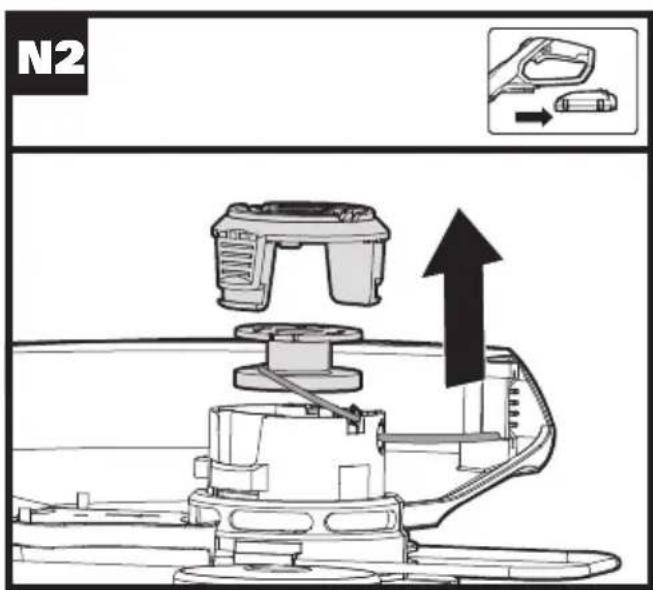
text_image
N2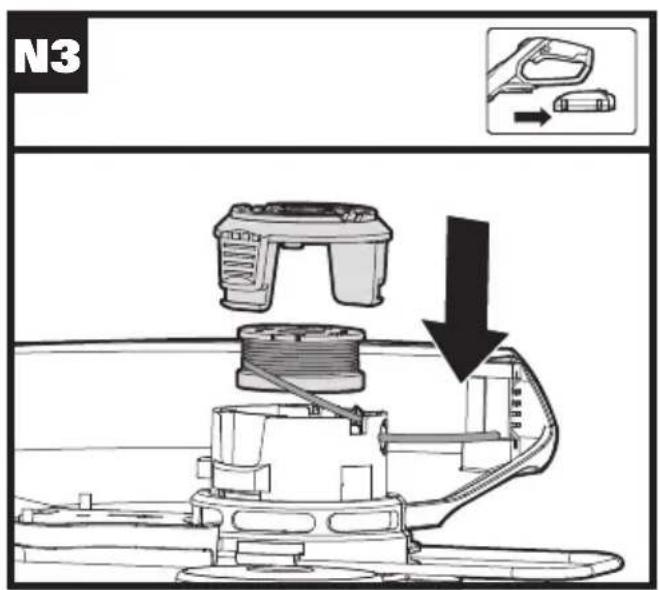
text_image
N3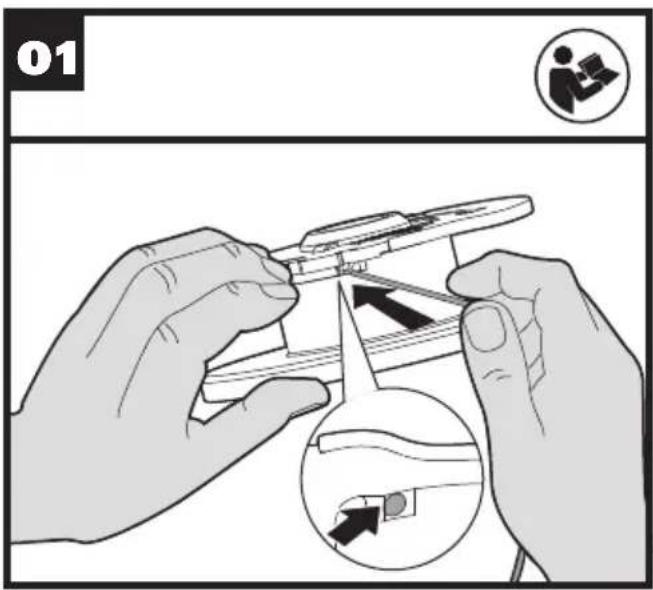
text_image
01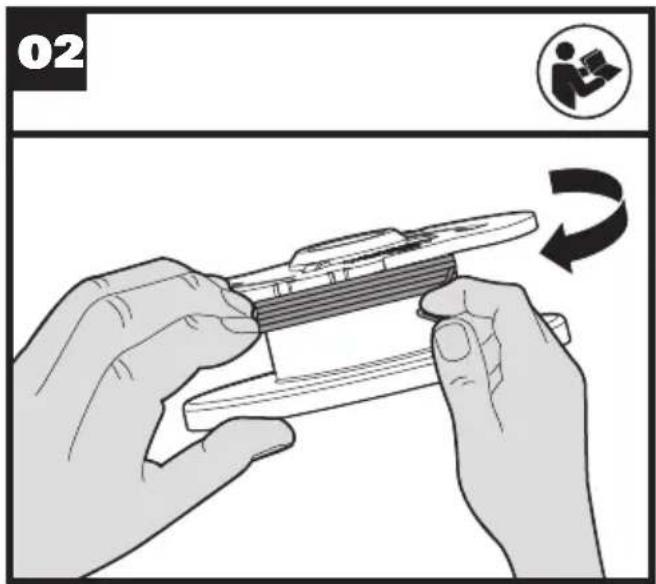
text_image
02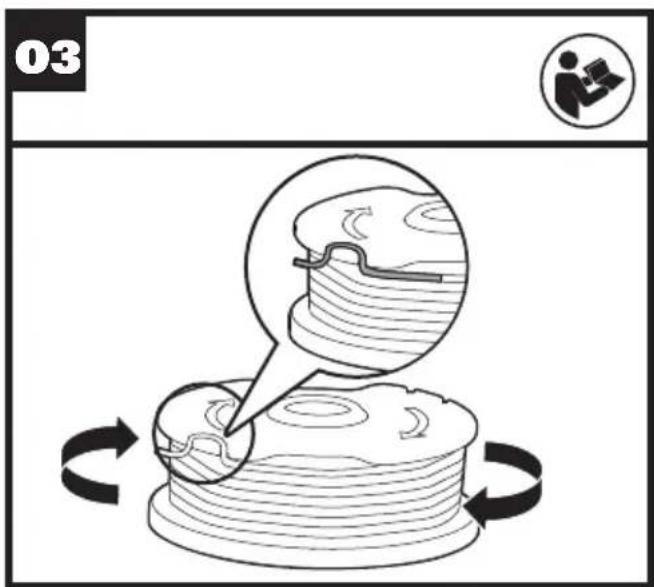
text_image
03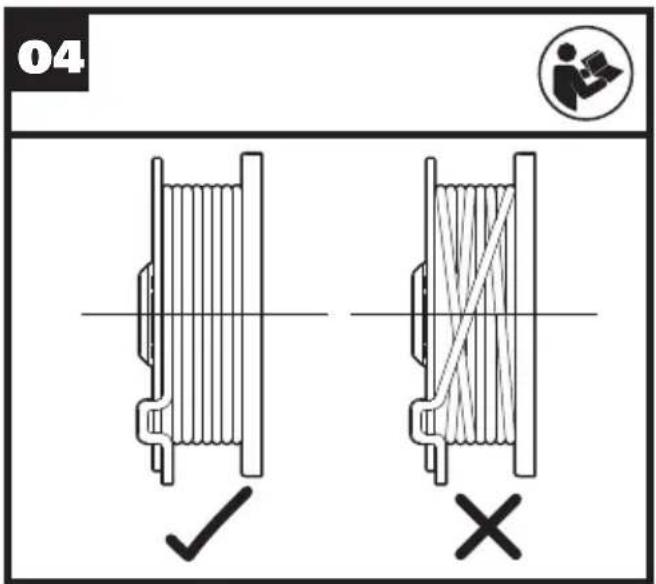
text_image
04 ✓ ×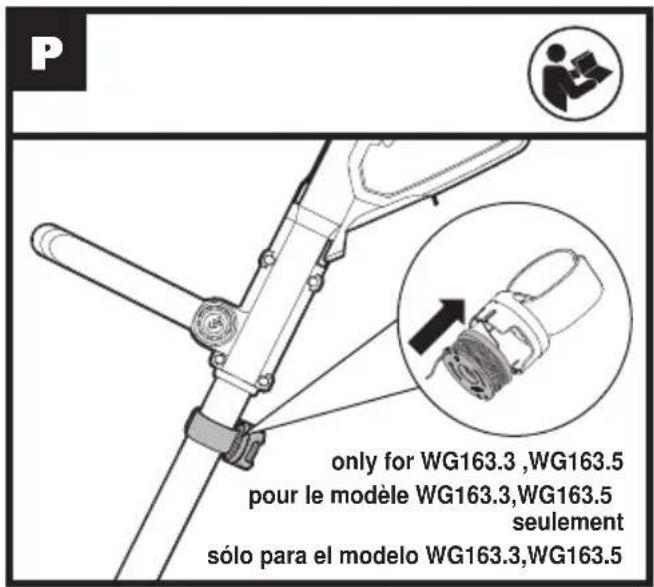
text_image
P only for WG163.3 ,WG163.5 pour le modèle WG163.3,WG163.5 seulement sólo para el modelo WG163.3,WG163.5ASSEMBLY & OPERATION LINE FEEDING/WINDING
| Action Figure | |
| ASSEMBLY | |
| Assembling the Safety Guard See | Fig. A1, A2 |
| Mounting the Edger Wheel See Fig. B | |
| Installing and Removing the Battery Pack | See Fig. C |
Charging the battery pack More details can be found in charger's manualWarning! The charger and  battery pack are specially designed to work together so do not attempt to use any other devices. Never insert or allow metallic objects into your charger or battery pack connections because of an electrical failure and hazard will occur. battery pack are specially designed to work together so do not attempt to use any other devices. Never insert or allow metallic objects into your charger or battery pack connections because of an electrical failure and hazard will occur. | See Fig. D1, D2, D3, D4, D5, D6 |
| OPERATION | |
| Safety ON/OFF Switch See Fig. E | |
| Trimming | |
| - Adjusting the Shaft See Fig. F | |
| - Adjusting the Trimmer Head See | Fig. G1, G2 |
| - Adjusting the Auxiliary handle See Fig. H | |
| - Trimming See Fig. I1 | |
| - Using the Flower Guard See Fig. I2 | |
| Edging | |
| - Changing the tool into the Edging mode | See Fig. J1, J2, J3 |
| - Edging | See Fig. K |
| Command feeding the line -Note:Press as needed. | See Fig. L |
| Manually feeding the line | See Fig. M |
| Replacing the trimmer Spool | See Fig. N1, N2, N3 |
| Manually winding the line | See Fig. O1, O2, O3, O4 |
| Spool holder (Only for WG163.3,WG163.5) Note: Allows for an additional spool to be stored on the tool. | See Fig. P |
1. Automatic line feed system
When initially switching on the trimmer, a small length of line is fed out. Each time the tool is started from rest it will advance about 0.25 inches of trimmer line.
A 'clattering' noise will be heard when the lines hit the Line Cutter. DO NOT BE ALARMED. This is quite normal. After about 5 seconds the line will be cut to the correct length and the noise will reduce as the motor gains full speed.
If the noise of the line being cut can't be heard, more line will need to be fed out.
To feed more line, it is first necessary to allow the trimmer to stop completely; it must come to a complete rest, then restart, allowing the motor to reach full speed.
Repeat above until you hear the line hitting against the Line Cutter.

(See Fig. L)
Your trimmer is equipped with a Command Feed System. For efficiently feeding the line, just press the command feed button while the machine is running until you hear the 'clattering' noise of the line cutting. The motor will shut off when pressing the Command Feed button and will restart when releasing the button. During that process the line will automatically feed additional line for cutting.
3. Manually feeding the line (See Fig. M)
Turn off the trimmer and remove the battery. If required, line can be fed out manually. To operate, press and release manual Line Feed Button, while gently pulling out the line until it is long enough to reach the Line Cutter. If the line extends past the Line Cutter, too much line has been fed out. If too much line is fed out, remove the Spool Cap and turn Spool counter-clockwise until the line is at the desired length.
4. Manually winding the line
( See Fig. 01, 02, 03, 04)
Take approximately 10ft (3m) of line. Insert 5/8 inch (15mm) of line into the Spool holes and wind line in the direction of the arrows on the top of the Spool. Leave approximately 4 inches (100mm) of line unwound and place into the cleat. Ensure that the line is neatly coiled on the Spool. Failure to do so will impair the efficiency of the automatic line feed. Then fit the Spool as shown in Fig. N1, N2, N3
MAINTENANCE
After use, disconnect the battery from the tool and check for damage.
Your power tool requires no additional lubrication or maintenance. There are no user serviceable parts in your power tool. Never use water or chemical
cleaners to clean your power tool. Wipe clean with a dry cloth. Always store your power tool in a dry place, and out of the reach of children. Keep the motor ventilation slots clean. Keep all working controls free of dust.
For Battery tools
The ambient temperature range for the use and storage of tool and battery is 0^ C- 45^ C.
The recommended ambient temperature range for the charging system during charging is 0^ C- 40^ C.
TROUBLESHOOTING
The following table gives problems and actions that you can perform if your machine does not operate correctly. If these do not identify and correct the problem, contact your WORX Customer Service at 1-866-354-WORX.

WARNING: Switch the machine off and remove the battery prior to any troubleshooting.
| Problems Possible Causes Corrective Action | ||
| Trimmer fails to Battery operate. | y discharged.Battery too hot/cold.Motor is broken.Internal wiring of machine damaged. | Recharge battery; also see the content in charger manualAllow to cool/warm.Contact Service Agent.Contact Service Agent. |
| Trimmer runs intermittently. | Motor is broken.Battery not fully charged.On/Off switch defective. | Contact Service Agent.Recharge battery.Contact Service Agent. |
| Excessive vibrations/noise. | Machine defective.Line spool is not wound well. | Contact Service Agent.Rewind the line. See “MANUALLY WINDING THE LINE” (Fig. 01, 02, 03, 04). |
| Cutting time per battery charge too short. | Battery has not been used for long period or only charged for short term.Grass too high.Battery defective. | Recharge battery; also see the content in charger manual.Cut in stages.Replace the battery. |
| Machine does not cut. | Line broken.Battery not fully charged.Motor is broken (speed is too low).Grass entangled around cutting head. | Replace the lineRecharge battery; also see the content in charger manual.Contact Service Agent.Remove grass. |
| Continuous lighting of the battery charge indicator.No charging procedure possible. | Battery not (properly) inserted.Battery contacts contaminated.Battery defective. | Properly insert battery into battery charger.Clean the battery contacts or replace the battery.Replace the battery. |
| Battery charge indicator does not light up. | Plug of battery charger not plugged in (properly).Socket outlet, mains cable or battery charger defective. | Insert mains plug (fully) into the socket outlet.Check the mains voltage; have the battery charger checked by an authorized after-sales service agent. |
| Command feed does not work | Cutting line is not wound well.The line is tangled.Line is used up. | Manually feed the line, if still cannot feed out, remove the Spool out and rewind the line.Replace with a new spool of line. |
SÉCURITÉ DU PRODUIT
text_image
Technical diagram of a mechanical linkage system with numbered components and close-ups of internal componentstext_image
Technical diagram of a mechanical linkage system with numbered components and close-ups of internal componentsCopyright © 2020, Positec. All Rights Reserved.