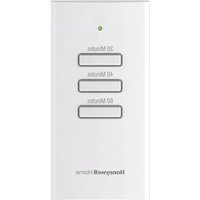
HVC20A1000/U - Remote control HONEYWELL - Free user manual and instructions
Find the device manual for free HVC20A1000/U HONEYWELL in PDF.


| Product Type | Wireless remote control for ventilation boost and filtration boost |
| Brand | Honeywell (Resideo Technologies, Inc.) |
| Model | HVC20A1000/U |
| Dimensions (H x W x D) | 74 x 48 x 24 mm |
| Power Supply | 1 CR2450 lithium button cell battery |
| Main Functions | 3 timer buttons (20, 40, 60 min) to boost ventilation and filtration |
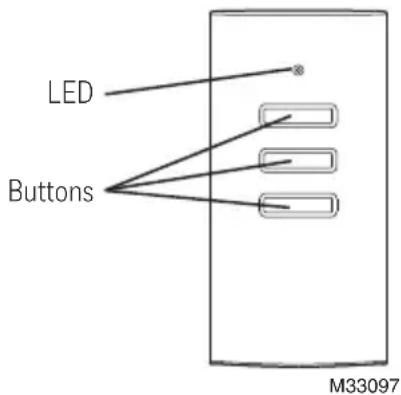
| LED Indicator | Green (normal operation), red flashing (low battery), slow orange (not connected to thermostat) |
| Operating Temperature | 1.7 to 45.6 °C |
| Operating Humidity | 5% to 90% non-condensing |
| Warranty | 2 years (replacement or repair by Resideo) |
| Replacement Parts | CR2450 battery |
| Compatibility | Compatible Honeywell/Resideo ventilation and filtration systems |
| After-Sales Service | Contact your heating/cooling contractor or Resideo Customer Service (1-800-468-1502) |
| Package Contents | Remote control, pre-installed CR2450 battery, user manual |
| Country of Manufacture | United States |
Frequently Asked Questions - HVC20A1000/U HONEYWELL
User questions about HVC20A1000/U HONEYWELL
0 question about this device. Answer the ones you know or ask your own.
Ask a new question about this device
Download the instructions for your Remote control in PDF format for free! Find your manual HVC20A1000/U - HONEYWELL and take your electronic device back in hand. On this page are published all the documents necessary for the use of your device. HVC20A1000/U by HONEYWELL.
USER MANUAL HVC20A1000/U HONEYWELL
Wireless Vent and Filter Boost Remote
20/40/60 Minute Ventilation and Filtration Timer
69-2676EFS-05
Operating Manual
How it works
The Wireless Vent and Filter Boost Remote provides one-touch control of your ventilation and filtration system from bathrooms, laundry rooms, or any location in your home or building.
The remote has three buttons: 20, 40, and 60 minutes. The ventilation and filtration can be temporarily boosted for 20, 40, or 60 minutes, depending on the button pressed.
This device contains a Lithium battery which may contain Perchlorate material. Special handling may be required.
See www.dtsc.ca.gov/hazardouswaste/perchlorate.
Quick reference
Pressing one of these buttons temporarily boosts the ventilation and filtration for either the time on the button or the current run time at the thermostat, whichever is greater. Vent boost can be cancelled from the thermostat.
natural_image
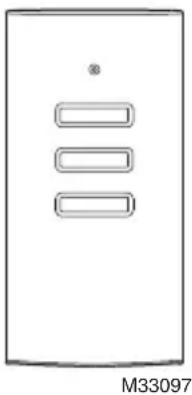
Simple diagram of a rectangular device with three horizontal bars and a small circle on top (no text or symbols)Maintenance
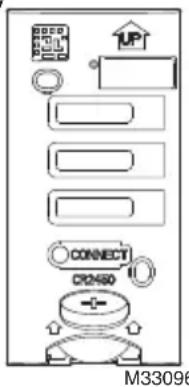
Replace Battery
When a button is pressed, the LED will quickly flash red if the battery needs to be replaced.
1 Remove the cover.
2 Insert a new CR2450 coin cell battery into the slot at the bottom of the remote. See polarity marking on the remote.
3 Press one of the buttons. The LED will show green for about 2 seconds after the button is released.
a If it quickly flashes red, battery is low.
b If no LED appears then the battery has failed.
4 Replace the cover.
LED Operation
During normal operation the LED will be off when the remote is idle. If the LED remains off when a button is pressed then the battery has failed.
After a button press the LED will function as follows:
- Green when a button is pressed.
- Quickly flashing red when the battery needs to be replaced.
- Slowly flashing amber when the remote is disconnected from the thermostat. Contact your heating and cooling contractor for assistance.
Troubleshooting
| Symptom Possible Cause Action | ||
| No LED. Normal operation while remote is idle. No action needed. | ||
| No LED when button is pressed. | The battery has failed. Replace the CR2450 coin cell battery. | |
| LED quickly flashes red when button is pressed. | The battery is low. Replace the CR2450 coin cell battery. | |
| LED slowly flashes amber when button is pressed. | The remote is not connected to the thermostat. | Contact your heating and cooling contractor for assistance. |
| The thermostat does not change when a button is pressed. | Please allow up to 15 seconds for change to show up on the thermostat.1 The battery has failed.2 The remote has lost communication. | 1 Verify that the LED shows green when a button is pressed on the remote. If there is no LED, replace the CR2450 coin cell battery.2 Contact your heating and cooling contractor for assistance. |
Operating Manual
Specifications
Operating Ambient Temperature
35 to 114° F (1.7 to 45.6° C)
Operating Relative Humidity
5% to 90% (non-condensing)
Physical Dimensions (height, width, depth)
2-7/8 x 1-7/8 x 15/16 inches (74 x 48 x 24 mm)
2-year warranty
Resideo warrants this product to be free from defects in workmanship or materials, under normal use and service, for a period of two (2) years from the date of first purchase by the original purchaser. If at any time during the warranty period the product is determined to be defective due to workmanship or materials, Resideo shall repair or replace it (at Resideo's option).
If the product is defective,
(i) return it, with a bill of sale or other dated proof of purchase, to the place from which you purchased it; or
(ii) call Resideo Customer Care at 1-800-468-1502. Customer Care will make the determination whether the product should be returned to the following address: Resideo Return Goods, 1985 Douglas Dr. N., Golden Valley, MN 55422, or whether a replacement product can be sent to you.
This warranty does not cover removal or reinstallation costs. This warranty shall not apply if it is shown by Resideo that the defect was caused by damage which occurred while the product was in the possession of a consumer.
Resideo's sole responsibility shall be to repair or replace the product within the terms stated above. RESIDEO SHALL NOT BE LIABLE FOR ANY LOSS OR DAMAGE OF ANY KIND, INCLUDING ANY INCIDENTAL OR CONSEQUENTIAL DAMAGES RESULTING, DIRECTLY OR INDIRECTLY, FROM ANY BREACH OF ANY WARRANTY, EXPRESS OR IMPLIED, OR ANY OTHER FAILURE OF THIS PRODUCT.
Some states do not allow the exclusion or limitation of incidental or consequential damages, so this limitation may not apply to you.
THIS WARRANTY IS THE ONLY EXPRESS WARRANTY RESIDEO MAKES ON THIS PRODUCT. THE DURATION OF ANY IMPLIED WARRANTIES, INCLUDING THE WARRANTIES OF MERCHANTABILITY AND FITNESS FOR A PARTICULAR PURPOSE, IS HEREBY LIMITED TO THE TWO YEAR DURATION OF THIS WARRANTY. Some states do not allow limitations on how long an implied warranty lasts, so the above limitation may not apply to you.
This warranty gives you specific legal rights, and you may have other rights which vary from state to state. If you have any questions concerning this warranty, please write Resideo Customer Care, 1985 Douglas Dr, Golden Valley, MN 55422 or call 1-800-468-1502.
Need Help?
For assistance with this product please visit http://honeywellhome.com

resideo
Resideo Technologies Inc.
1985 Douglas Drive North, Golden Valley, MN 55422
69-2676EFS-05 M.S. Rev. 05-20 | Printed in United States www.resideo.com
© 2020 Resideo Technologies, Inc. All rights reserved.
The Honeywell Home trademark is used under license from Honeywell International, Inc. This product is manufactured by Resideo Technologies, Inc. and its affiliates.
natural_image
Simple line drawing of a rectangular panel with three horizontal slots and a small dot at the top (no text or symbols)Entretien
1 Retirez le couvercle.
Resideo Technologies Inc.
1985 Douglas Drive North, Golden Valley, MN 55422
© 2020 Resideo Technologies, Inc. All rights reserved.
The Honeywell Home trademark is used under license from Honeywell International, Inc. This product is manufactured by Resideo Technologies, Inc. and its affiliates.
natural_image
Simple line drawing of a rectangular panel with three horizontal slots and a small dot at the top (no text or symbols)Mantenimiento
2-7/8 × 1-7/8 × 15/16 in (74 × 48 × 24 mm)
Garantía de 2 años
Resideo Technologies Inc.
1985 Douglas Drive North, Golden Valley, MN 55422
© 2020 Resideo Technologies, Inc. All rights reserved.
The Honeywell Home trademark is used under license from Honeywell International, Inc. This product is manufactured by Resideo Technologies, Inc. and its affiliates.