THI27200 - Cooker THOMSON - Free user manual and instructions
Find the device manual for free THI27200 THOMSON in PDF.


| Brand | Thomson |
| Model | THI27200 |
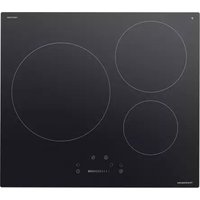
| Product type | Built-in induction hob |
| Number of cooking zones | 3 induction cooking zones |
| Dimensions (L x W x H) | 590 x 520 x 62 mm |
| Net weight | 8.71 kg |
| Voltage / Frequency | 220-240 V~ / 380-415 V 3N~, 50/60 Hz |
| Total nominal power | 7400 W |
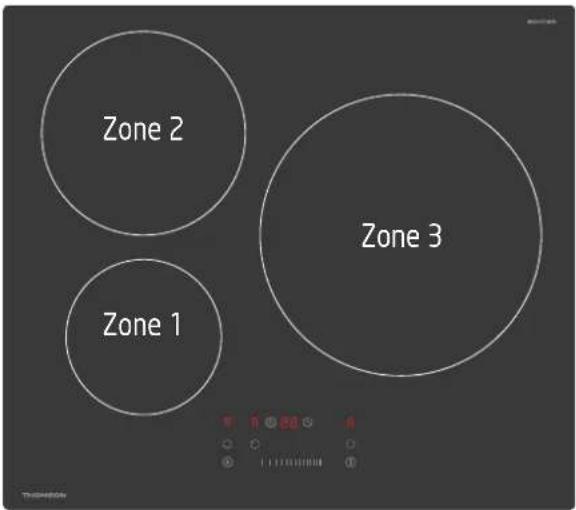
| Diameters of cooking zones | Zone 1: 16 cm, Zone 2: 21 cm, Zone 3: 29 cm |
| Energy consumption | 182.6 Wh/kg (according to EU standard) |
| Turbo function | Maximum power for 5 minutes on each cooking zone |
| Timer | Up to 99 minutes, automatic shutdown possible |
| Child lock | Yes, lock key |
| Automatic shutdown | Yes, according to power level (2h to 8h) |
| Residual heat indicator | "H" display for hot cooking zones |
| Utensil detection | Automatic detection of compatible pans |
| Cleaning | Ceramic glass cleaner, scraper included |
| Installation | Built-in, cutout 560x490 mm, ventilation required |
| Electrical connection | By qualified electrician, 5-wire cable |
| Spare parts | Contact after-sales service for power cable and components |
| Repairability | Index not specified, repair by approved technician |
Frequently Asked Questions - THI27200 THOMSON
User questions about THI27200 THOMSON
0 question about this device. Answer the ones you know or ask your own.
Ask a new question about this device
Download the instructions for your Cooker in PDF format for free! Find your manual THI27200 - THOMSON and take your electronic device back in hand. On this page are published all the documents necessary for the use of your device. THI27200 by THOMSON.
USER MANUAL THI27200 THOMSON
natural_image
Three white circles on a black background with a digital timer and scale bar at the bottom (no text or symbols on the circles)Table des matières
AVERTISSEMENTS....2
INSTRUCTIONS IMPORTANTES DE SÉCURITÉ....3
DESCRIPTION....4
PRINCIPE DE FONCTIONNEMENT DE L'INDUCTION....4
INSTALLATION....5
BRANCHEMENT ÉLECTRIQUE ....6
UTILISATION 7
QUALITE DES USTENSILES DE CUISSON....7
DIMENSIONS DE L'USTENSILE DE CUISSON....8
UTILISATION DU PANNEAU DE CONTROLE....9
CUISSON A INDUCTION 9
CONSEILS DE CUISSON....12
FONCTIONS DE SÉCURITÉ ....12
NETTOYAGE ET ENTRETIEN....13
GUIDE DE DÉPANNAGE....14
SPÉCIFICATIONS TECHNIQUES....15
MISE AU REBUT....16
MERCI DE BIEN VOULOIR LIRE LES CONSIGNES DE SÉCURITÉ ATTENTIVEMENT AVANT D'UTILISER L'APPAREILET CONSERVER POUR CONSULTATION ULTÉRIEURE.
AVERTISSEMENTS
Marron & Noir = Sous tension
natural_image
Three identical 3D-rendered kitchen utensils with a crossed handle, shown in circular frames and one labeled 'OK' (no text or symbols on the utensils themselves)natural_image
Three hand-drawn illustrations showing a cooking pot, a cooking pot with a lid, and a finger pressing a button (no text or symbols)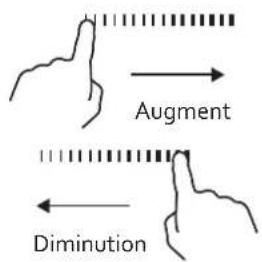
Hotline Darty France
IMPORTANT SAFETY INSTRUCTIONS 20
OVERVIEW....20
THE INDUCTION PRINCIPLE 20
INSTALLATION 21
ELECTRICAL CONNECTION 23
OPERATION....24
PAN QUALITY 24
PAN DIMENSION 25
USING THE CONTROL PANEL 25
INDUCTION COOKING 25
COOKING TIPS....28
SAFETY FEATURES 29
CLEANING AND MAINTENANCE 29
TROUBLESHOOTING 30
TECHNICAL DATA SHEET 31
DISPOSAL....32
PLEASE READ THE FOLLOWING INSTRUCTIONS CAREFULLY BEFORE USING THE APPLIANCE AND KEEP FOR FUTURE REFERENCE.
WARNINGS
- This appliance is intended to be used in household and similar applications such as:
– staff kitchen areas in shops, offices and other working environments;
- farm houses;
– by clients in hotels, motels and other residential type environments;
– bed and breakfast type environments.
- This appliance can be used by children aged from 8 years and above and persons with reduced physical, sensory or mental capabilities or lack of experience and knowledge if they have been given supervision or instruction concerning use of the appliance in a safe way and understand the hazards involved. Children shall not play with the appliance. Cleaning and user maintenance shall not be made by children without supervision.
- The means for disconnection must be incorporated in the fixed wiring in accordance with the wiring rules.
- The appliance shall be installed in accordance with national wiring regulations NF C 15-100.
- Regarding the instructions for the all necessary spaces with dimensions, the method of fixing and how the appliance is to be fixed to its support, refer to the section "INSTALLATION".
- Regarding the detailed instructions for the safe use of the appliance, the precautions during user maintenance, refer to the sections "OPERATION" and "CLEANING AND MAINTENANCE".
- Regarding the method of fixing and cables connection, refer to the section "ELECTRICAL CONNECTION".
- WARNING: If the surface is cracked, switch off the appliance to avoid the possibility of electric shock.
- WARNING: The appliance and its accessible parts become hot during use. Care should be taken to avoid touching heating elements. Children less than 8 years of age shall be kept away unless continuously supervised.
- WARNING: Accessible parts may become hot during use. Young children should be kept away.
- A steam cleaner is not to be used.
- Metallic objects such as knives, forks, spoons and lids should not be placed on the hob surface since they can get hot.
- After use, switch off the hob element by its control and do not rely on the pan detector.
- The appliance is not intended to be operated by means of an external timer or separate remote-control system.
- WARNING: Unattended cooking on a hob with fat or oil can be dangerous and may result in fire. NEVER try to extinguish a fire with water, but switch off the appliance and then cover flame e.g. with a lid or a fire blanket.
- CAUTION: The cooking process has to be supervised. A short term cooking process has to be supervised continuously.
- WARNING: Danger of fire: do not store items on the cooking surface.
- The temperature of accessible surfaces may be high when the appliance is operating.
- If the supply cord is damaged, it must be replaced by the manufacturer, its service agent or similarly qualified persons in order to avoid a hazard.
IMPORTANT SAFETY INSTRUCTIONS
- Do not place combustible material or products on the hob at any time.
- Do not use the hob outdoors.
- Never use this hob for warming or heating the room.
- Turn the power off and remove the plug when the hob is not in use, left unattended and before cleaning. Allow to cool down before cleaning or storing the hob.
- Do not touch hot surfaces.
- Never use the hob as a work or storage surface.
- Never leave any objects or utensils other than suitable cookware on the appliance.
- Do not stand on the hob.
- Do not use pans with jagged edges or drag pans across the ceramic glass surface as this can scratch the glass.
- Do not clean the hob with abrasive cleaners.
- Never heat foods in sealed containers, such as compressed products, cans, or coffee pots, to avoid explosion caused by heat expansion.
- To avoid danger, do not insert any foreign objects, such as iron wires, to block the air ventilation openings or air entry port.
- People with heart pacemakers should consult a doctor. Only use the appliance after confirming that it does not affect the pacemaker.
- The hob cannot be overloaded. Overloading the hob may cause damage to the cooktop.
- To avoid danger, do not place paper, aluminium foil, cloth or other unsuitable articles onto the induction hob heating plate for indirect heating.
- Do not use the induction hob in narrow spaces. To avoid hindering release of heat, do not cover the ventilation opening.
- Do not use the induction hob by putting it onto a carpet, tablecloth or thin paper to avoid blocking the air inlet or outlet opening, which may result in influencing heat emission.
- When using the induction hob or after use, please keep it clean. Protect the induction hob from bugs, dust and humidity. Avoid letting cockroaches etc. fall into the internal parts of the induction hob and causing a short circuit of the electrical board. When not in use for a long period, please clean and put it into a plastic bag for storage.
- When operating the appliance or after moving the pot, the cooking area will remain hot. Do not touch it; be careful of scalding caused by the high temperature.
OVERVIEW
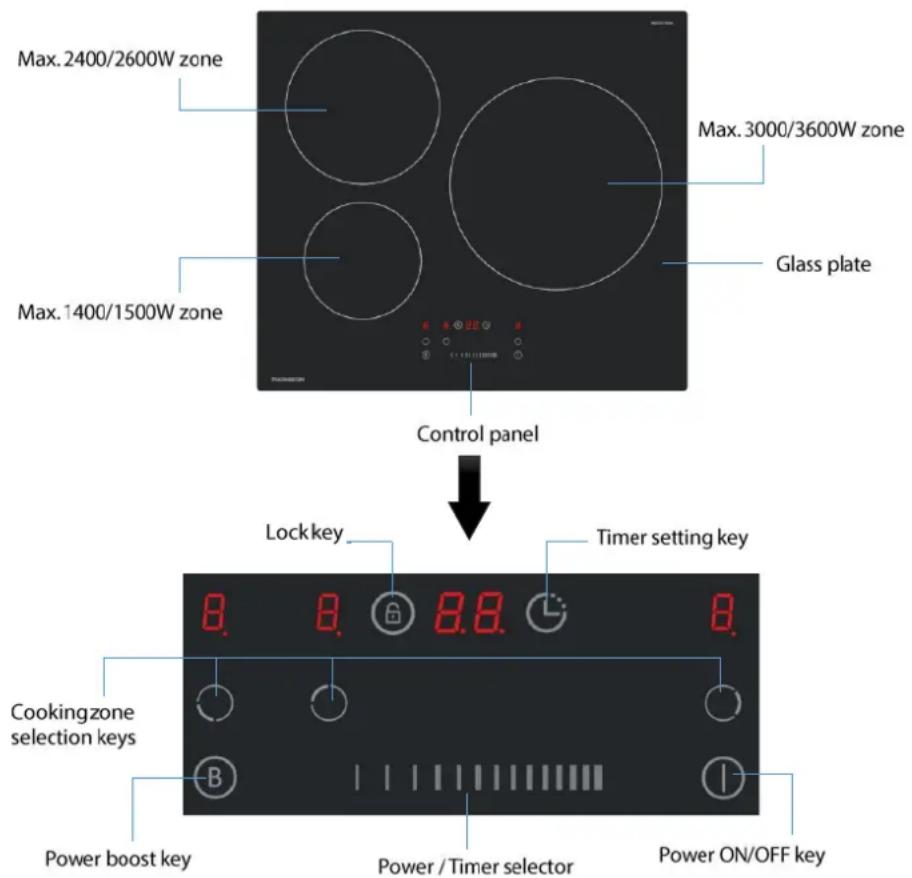
THE INDUCTION PRINCIPLE
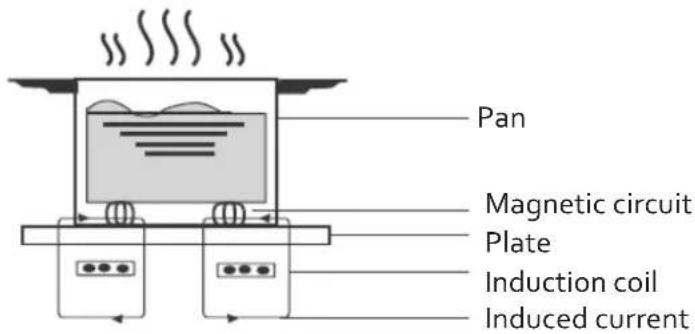
An induction coil is located under each cooking zone. When a cooking zone is switched on, this coil creates a magnetic field which impacts directly on the base of the suitable cookware, which causes an instant build-up of heat to cook the food.
INSTALLATION
Cut a hole in the worktop of the dimension shown in the diagram below. A minimum of 50 mm space should be left around the hole. The worktop should be at least 30 mm thick and made of heat-resistant material.

Note: The safety distance between the sides of the hob and the inner surfaces of the worktop should be at least 3 mm.
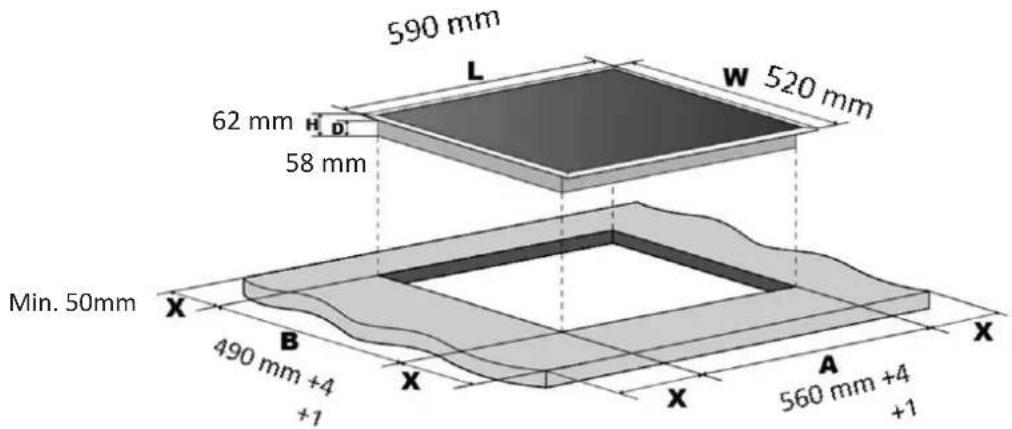
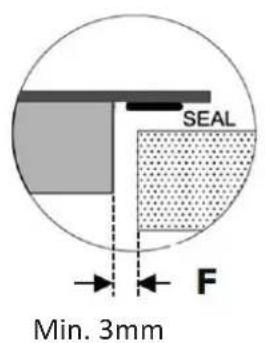
It is essential that the induction hob is well ventilated and that the air intake and exit are not blocked.
Make sure the hob is correctly installed as shown.
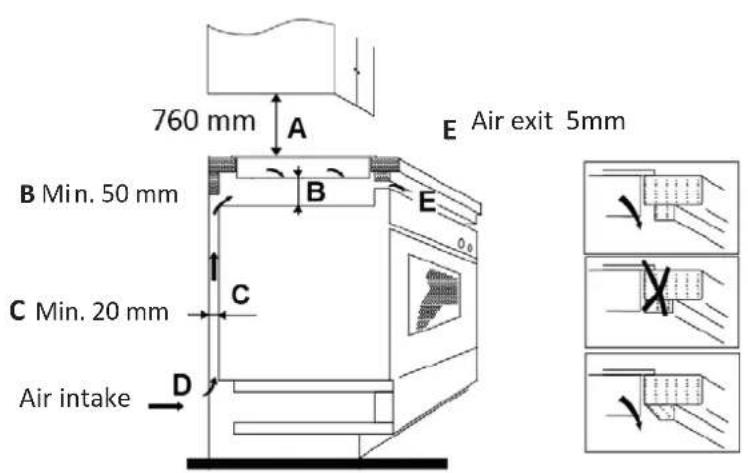
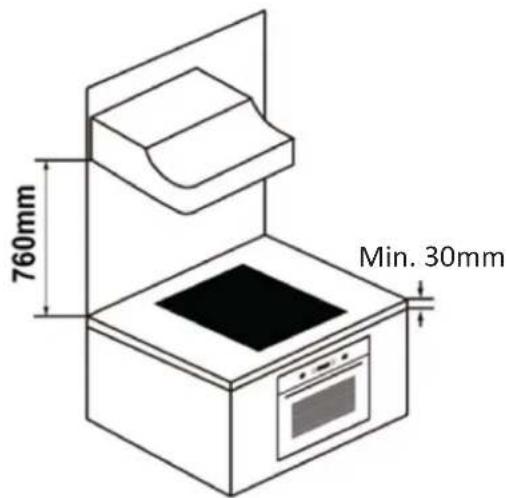

For safety, the gap between the hob and any cupboard above it should be last 760 mm.
WARNING: Ensuring Adequate Ventilation
Make sure the induction hob is well ventilated and the air inlet and outlet are not blocked. If drawers are fitted below the hob sometimes the underneath of the hob may get hot. To prevent items accidentally touching the base of the hob, it is necessary to put a wooden insert, fixed by screws, at a minimum distance of 50mm from the bottom of the hob. Follow the requirements below.
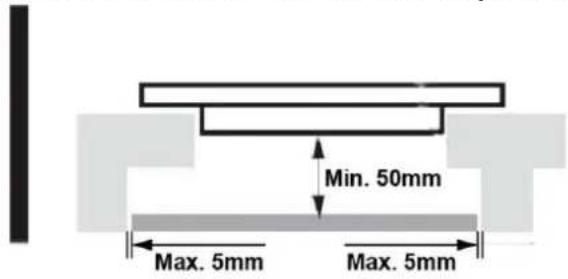

There are ventilation holes around outside of the hob. YOU MUST ensure these holes are not blocked by the worktop when you put the hob into position.

Make sure that the glue that joins the plastic or wooden material to the cabinet is able to resist temperatures up to 150^ C.
The rear wall, adjacent and surrounding surfaces must be able to withstand a temperature of 90^ C .
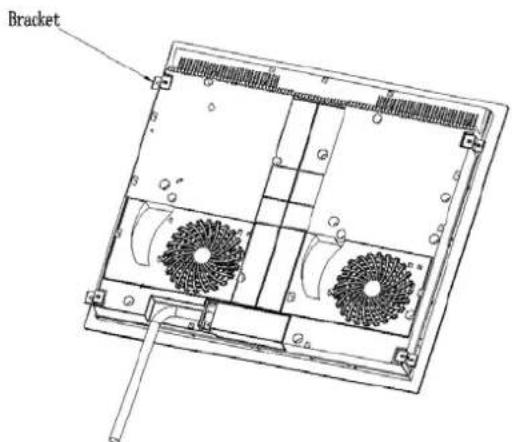
Installing the brackets
Fix the hob to the worktop using 4 brackets on the base of the hob.
Cautions:
- The induction hob must be installed by a qualified authorised person. Never try to install the appliance by yourself.
- Incorrect installation may cause harm and damage to people or property, for which the manufacturer accepts no responsibility.
- The induction hob must not be installed above refrigerators, freezers, dishwashers or tumble dryers.
• Install the induction hob away from heat sources such as ovens or direct sunlight.
- The induction hob should be installed into a working surface in such a way that the fan positioned at the bottom of the induction hob has a minimum distance of at least 5cm from any installation to avoid overheating.
ELECTRICAL CONNECTION
Attention!
- The hob must be installed by a qualified electrician in line with all local standards and regulations for electrical wiring.
- Before any work on the electrical section of the appliance, it must be disconnected from the mains.
- Connection to a good earth wiring system is absolutely essential.
- All supply current and earth conductors must be able to withstand an ambient temperature of 75^ C.
• After the hob is installed, the power switch must always be in an accessible position.
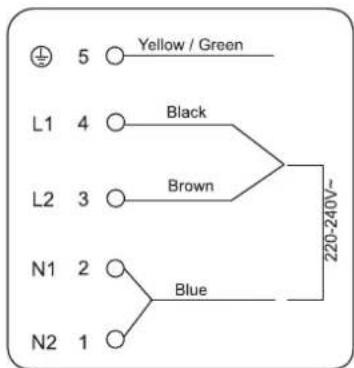
The wires in the mains lead are coloured in accordance with the following code:
Green & Yellow = Earth
Blue = Neutral
Brown & Black= LINE
The appliance is equipped with a pre-connected electricity supply cable without plug. Separate the wires of the supply cable and connect them in accordance with the instructions given in the below diagram.
1) The wire which is coloured green and yellow must be connected to the terminal marked with the letter E (Earth) or with the earth symbol 1= or coloured green and yellow.
2) The wire which is coloured blue must be connected to the terminal marked N (Neutral).
3) The Brown and Black wires must be connected to the terminal marked L (Line).
- If the appliance is being connected directly to the electricity mains, an omnipolar circuit breaker with a minimum opening of 3 mm between contacts must be fitted between the appliance and the electricity supply in compliance with the load and current regulations.
- The installer must ensure that the correct electrical connection has been made and that it is fully compliant with safety regulations.
WARNINGS:
• Before connecting the appliance to the power supply, make sure that:
- The appliance is earthed and the plug is compliant with the law.
- The socket can withstand the voltage and maximum power of the appliance, which are indicated on the data plate located on the bottom of the appliance.
- Once the appliance has been installed, the power supply cable and the electrical socket must be easily accessible.
• The cable must not be bent or compressed. - The cable must be checked regularly and replaced by authorised technicians only.
OPERATION
Pan Quality
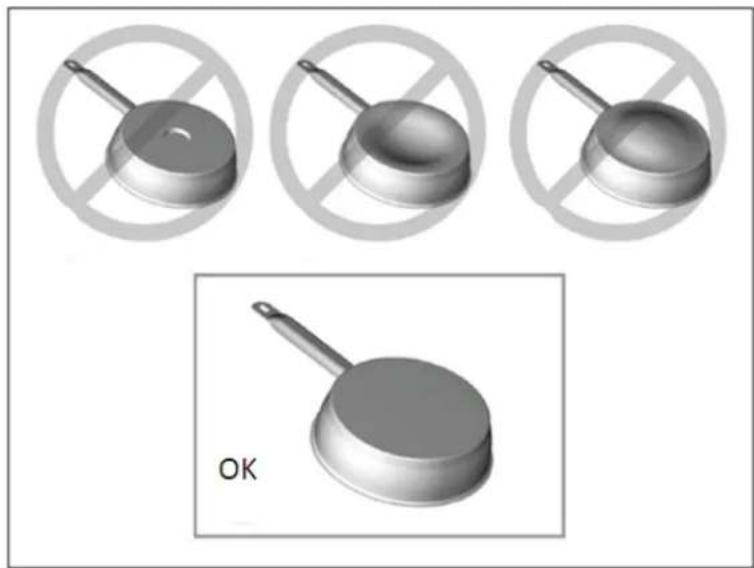
Compatible materials: steel, enamelled steel, cast iron, ferromagnetic stainless-steel, aluminium with ferromagnetic bottom.
Non compatible materials: aluminium and stainless-steel without ferromagnetic bottom, copper, brass, glass, ceramic, porcelain.
Pan manufacturers specify if their products are compatible with induction appliances.
To check if pans are compatible:
- Put a little water in a pan placed on an induction cooking zone set at the maximum power level. This water must heat in a few seconds.
• A magnet sticks on the bottom of the pan.
Certain pans can make noise when they are placed on an induction cooking zone. This noise does not mean any failure on the appliance and does not influence the cooking operation.
natural_image
Three identical 3D-rendered kitchen utensils with a crossed handle, shown in three circular frames (no text or symbols)Pan Dimension
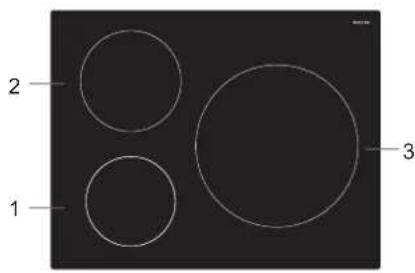
The cooking zone, up to a limit, automatically adapts to the diameter of the pan. However the bottom of this pan must have a minimum diameter corresponding to the size of the cooking zone.
To obtain the best efficiency of your hob, please place the pan in the centre of the cooking zone.
Which cooking zone should be used according to the diameter of the pan?
| Cooking zone The minimum diameter of the pan | |
| 1 16 cm | 14 cm |
| 2 21 cm | 14 cm |
| 3 29 cm | 18 cm |
Using the Control Panel
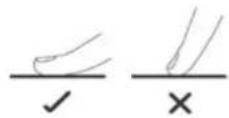
- The keys are touch-sensitive, so you do not need to apply any pressure.
Use the ball of your finger, not its tip.
• You will hear a beep each time a touch is registered. - Make sure the keys are always clean, dry, and that there is no object (e.g. a utensil or a cloth) covering them. Even a thin film of water may make the keys difficult to operate.
Induction Cooking
To start cooking
-
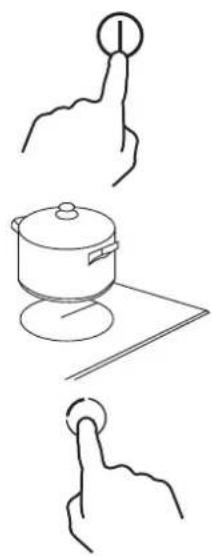
Touch Ⓘ.
-
A beep will sound and all displays will show “—” or “——”, indicating that the induction hob has entered the standby state.
-
If there is no operation within 1 minute, the hob will automatically switch off.
-
Put a suitable pan containing food on the cooking zone that you wish to use.
-
Never place an empty pan on the cooking zone when the appliance is turned on.
• Make sure the bottom of the pan and the surface of the cooking zone are clean and dry. -
Touch the desired cooking zone selection key.
- The number "5" next to the key will flash.
- While "o" is flashing, select a heat setting (1 to 9).
• To select a heat setting, slide your finger along the selector.
- You can modify the power level at any time during cooking.
natural_image
Three hand-drawn diagrams showing a cooking pot, a cooking pot with a lid, and a finger pressing a button (no text or symbols)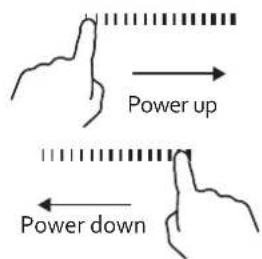
Heat setting guideline
The heat settings below are for reference only. The exact setting will depend on several factors, including your cookware and the amount of food you are cooking. Experiment with the induction hob to find the settings that best suit you.
| Heat Setting Suitable for | |
| 1~2 | Warming small quantities of foodMelting chocolate and butterGentle simmeringSlow warming |
| 3~4 | ReheatingRapid simmeringCooking rice |
| 5~6 Pancakes | |
| 7~8 | SautéingCooking pasta |
| 9 | Stir-fryingSearingBringing soup to a boilBoiling water |
When you have finished cooking
To switch off one cooking zone
-
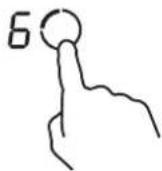
Touch the cooking zone you want to switch off.
-
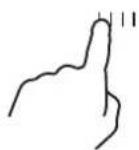
Decrease the heat setting until the display shows "o".
To switch off all cooking zones
Touch①
Beware of hot surfaces.
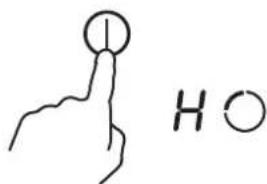
The letter H will flash on the display of the cooking zone which is hot to touch. It will disappear when the surface has cooled down to a safe temperature. It can also be used as an energy saving function if you want to heat further pans on this cooking zone that is still hot.
Boost function
-
Touch the desired cooking zone selection key.
-
Touch and hold Ⓑ for about 3 seconds.
- The display will show the letter P and the cooking zone will reach the maximum heat setting.
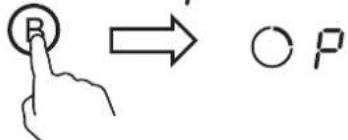
- The boost function will only operate for about 5 minutes and then the cooking zone will return to the original heat setting.
- If the original heat setting is 0, it will return to 9 after 5 minutes.
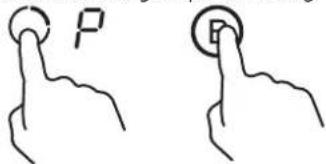
To cancel this function, touch the cooking zone selection key to cancel the boost function and then touch The cooking zone will return to the original power setting.
Timer control
The timer can be used for two different functions:
To set the minute minder
To set a cooking zone to switch off automatically.
To set the minute minder
-
Turn on the hob. Ensure that no cooking zones have been selected.
-
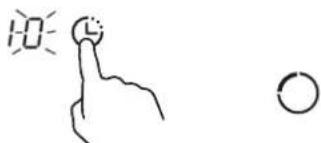
Touch Ⓤ.
- The display will show "10" whilst the number "o" will flash.
- Whilst "o" is flashing, set the required time by touching the selector.
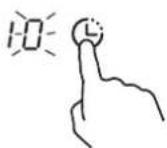
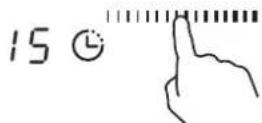
- Touch Ⓛ and "1" will flash.
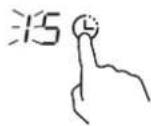
- Whilst "1" is flashing, set the required time by touching the selector.
• The maximum time that can be set is 99 minutes.
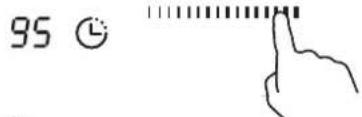
-
Touch ⏻ and the timer begins counting down. The display will show the remaining time.
-
When the timer is up, the hob will beep.
To switch a cooking zone off automatically
- Touch the cooking zone selection key you want to set the timer for.
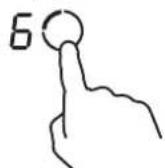
- Touch
- The display will show "10" whilst the number "o" will flash.
- A red dot will appear next to the heat setting display to indicate that the cooking zone is selected.
natural_image
Simple line drawing of a hand pointing at a circular target with a small circle nearby (no text or symbols)3- Whilst "o" is flashing, set the required time by touching the selector.
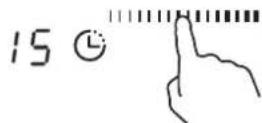
- Touch Ⓛ and "1" will flash.
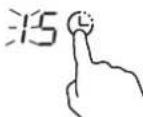
- Whilst "1" is flashing, set the required time by touching the selector.
• The maximum time that can be set is 99 minutes.
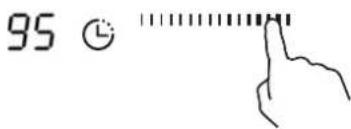
- Touch and the timer begins counting down.
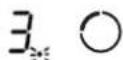
• The display will show the remaining time.
- The red dot next to the heat setting display will flash.
- When the timer is up, the hob will beep. The cooking zone will automatically be switched off.
To cancel a timer setting
- Select a heating zone selection key that you want to cancel the timer.
- Touch Ⓤ and one digit of the time will flash on the display.
- While this digit is flashing, set the selector until "0" is displayed.
- Touch Ⓛ and the other digit will flash on the display.
- While this digit is flashing, set the selector until "0" is displayed.
- Touch to confirm.
- The red dot next to the heat setting control will disappear.
COOKING TIPS
- When food comes to the boil, reduce the temperature setting.
• Using a lid will reduce cooking times and save energy by retaining the heat. - Minimise the amount of liquid or fat to reduce cooking times.
- Start cooking on a high heat setting and then a lower one when the food has thoroughly heated.
Simmering, cooking rice
- Simmering occurs below boiling point, at around 85^ , when bubbles are just rising occasionally to the surface of the cooking liquid. It is important to make soup delicious and meat stew tender because the flavours develop without overcooking the food. You should also cook egg-based and flour thickened sauces below boiling point.
- Some tasks, including cooking rice by the absorption method, may require a higher heat setting to ensure the food is cooked properly in the time recommended.
Searing steak
To cook juicy, flavourful steaks:
- Leave the meat at room temperature for about 20 minutes before cooking.
- Heat up a heavy-based frying pan.
- Brush both sides of the steak with oil. Drizzle a small amount of oil into the hot pan and then lower the meat onto the hot pan.
- Turn the steak only once during cooking. The exact cooking time will depend on the thickness of the steak and how you like it cooked. Times may vary from about 2 to 8 minutes per side. Press the steak to gauge how cooked it is – the firmer it feels the more 'well done' it will be.
- Leave the steak to rest on a warm plate for a few minutes to allow it to relax and become tender before serving.
For stir-frying
- Choose an induction compatible flat bottom pan.
- Have all the ingredients and equipment ready. Stir-frying should be quick. If cooking large quantities, cook the food in several smaller batches.
- Preheat the pan briefly and add two tablespoons of oil.
- Cook any meat first and then put it aside and keep warm.
- Stir-fry the vegetables. When they are hot but still crisp, turn the cooking zone to a lower setting, return the meat to the pan and add your sauce.
- Stir the ingredients gently to make sure they are heated through.
- Serve immediately.
SAFETY FEATURES
Lock
You can lock the controls to prevent unintended use (for example, children accidentally turning on the cooking zone).
- Touch, the display will show "Lo". The induction hob enters the locking state with the keys disabled except the ON/OFF key ①.
- To unlock the controls, touch and hold ⏻ for about 2 seconds and the induction hob will return to normal working mode.
Detection of Small Non-magnetic Items
When an unsuitable size or non-magnetic pan (e.g. aluminium), or some other small item (e.g. knife, fork, key) has been left on the cooking zone, the symbol U will flash and the cooking zone will automatically enter the standby state after 1-2 minutes.
Auto Shut Down
The feature occurs whenever you forget to switch off a cooking zone.
The default shutdown times are shown in the table below:
| Power level The cooking zones shut down automatically after | |
| 1~3 | 8 hours |
| 4~6 | 4 hours |
| 7~9 2 hours | |
When the pot is removed, the induction hob will stop heating immediately and then be automatically switched off after 1-2 minutes.
CLEANING AND MAINTENANCE
| What? How? Important! | ||
| Everyday soiling on glass (fingerprints, marks, stains left by non-sugary spillages on the glass) | 1. Switch the hob off.2. Apply a hob cleaner while the glass is still warm (but not hot!).3. Rinse and wipe dry with a clean cloth or paper towel.4. Switch the hob back on. | When the hob is unplugged from the mains socket, there will be no 'hot surface' warning but the cooking zone may still be hot! Take extreme care.Heavy-duty scourers, some nylon scourers and harsh/abrasive cleaning agents may scratch the glass. Always read the label to check if your cleaner or scourer is suitable.Never leave cleaning residue on the hob: the glass may become stained. |
| Burt-on food or grease, melts, sugary spillage on glass | Remove these immediately with a razor blade scraper suitable for ceramic glass cook tops, but beware of hot cooking zone surfaces:1. Switch the hob off.2. Hold the blade at a 30° angle and scrape the soiling or spill to a cool area of the cooktop.3. Clean the soiling or spill up with a dish cloth or paper towel.4. As soon as the hob has cooled enough to safely touch, clean with cooktop cleaner following the instructions for 'Everyday soiling on glass' above.5. Switch the hob back on. | Remove stains left by melts and sugary food or spillages as soon as possible. If left to burn on or cool, they may be difficult to remove or even permanently damage the glass surface.Cut hazard: when the safety cover is retracted, the blade in a scraper is razor-sharp. Use with extreme care and always store safely and out of reach of children.Be aware not to damage the glass with the scraper. |
| Spillage on the touch controls | 1. Switch the hob off.2. Soak up the spill.3. Wipe the touch control area with a clean damp sponge or cloth.4. Wipe the area completely dry with a paper towel.5. Switch the hob back on. | The hob may beep and turn itself off and the touch controls may not function while there is a liquid on them. Make sure you wipe the touch control area dry before turning the cooktop back on. |
TROUBLESHOOTING
| Problem | Possible causes | Possible solution |
| The hob cannot be turned on. | No power. | Make sure the hob is connected to the power supply and that it is switched on at the mains socket. Check whether there is a power outage in your home or area. If you have checked everything and the problem persists, consult a qualified technician. |
| The touch-sensitive keys are unresponsive. | The keys are locked. | Unlock the keys. See the section 'Lock' for instructions. |
| The touch-sensitive keys are difficult to operate. | You may be using the tip of your finger when touching the keys. | Use the ball of your finger when touching the keys. |
| The glass is being scratched. | Rough-edged cookware. | Use cookware with flat and smooth bases. See 'Pan Quality'. |
| Unsuitable, abrasive scourer being used. | See "Cleaning and Maintenance". | |
| Some pans make crackling or clicking noises. | This may be caused by the construction of your cookware (layers of different metals vibrating differently). | This is normal for cookware and does not indicate a fault. |
| The induction hob makes a low humming noise when used on a high heat setting. | This is caused by the technology of induction cooking. | This is normal, but the noise should quieten down or disappear completely when you decrease the heat setting. |
| Pans do not become hot and "U" appears on the display. | The induction hob cannot detect the pan because it is not suitable for induction cooking. | Use cookware suitable for induction cooking. See section 'Cookware'. |
| The induction hob cannot detect the pan because it is too small for the cooking zone or not properly centred on it. | Centre the pan on the cooking zone and make sure that its bottom matches the size of the cooking zone. |
Error codes
These error codes are for guidance only and all faults should be diagnosed and repaired by a qualified technician.
| Display Possible Cause Possible Solution | ||
| E1 | Glass plate temperature sensor failure – open circuit | Check the connection or replace the glass plate temperature sensor.Contact the after-sales service. |
| E2 | Glass plate temperature sensor failure – short circuit. | |
| Eb | Glass plate temperature sensor failure | |
| E3 | High temperature of glass plate sensor | Wait for the temperature of glass plate return to normal.Touch the ON/OFF button to restart the hob. |
| E4 | Temperature sensor of the IGBT failure – open circuit | Replace the power board.Contact the after-sales service. |
| E5 | Temperature sensor of the IGBT failure – short circuit | |
| E6 | High temperature of IGBT | Wait for the temperature of glass plate return to normal.Touch the ON/OFF button to restart the hob. |
| E7 /E8 | Abnormal supply voltage | Inspect whether power supply is normal and then turn the hob on. |
| U1 | Communication error. Reinsert the connection between the display board and the power board.Replace the power board or the display board. | |
IGBT: Insulated Gate Bipolar Transistor
TECHNICAL DATA SHEET
Below is the sheet of household induction hob according to EU regulation No. 66 / 2014.
| Information for domestic electric hobs | |||
| Symbol Value Unit | |||
| Model identification | THI27200 | ||
| Type of hob | Built-in hob | ||
| Number of cooking zones and/or areas | 3 | ||
| Heating technology (induction cooking zonesand cooking areas, radiant cooking zones,solid plates) | Induction cooking zones | ||
| For circular cooking zones or area: diameterof useful surface area per electric heatedcooking zone, round- ed to the nearest 5 mm | ∅ | Zone 1: 16,0Zone 2: 21,0Zone 3: 29,0 | cm |
| Energy consumption per cooking zone or area calculated per kg | EC electric cooking | Zone 1: 187,8Zone 2: 182,5Zone 3: 177,5 | Wh/kg |
| Energy consumption for the hob calculated per kg | EC electric hob | 182,6 | Wh/kg |
Note: Ecodesign requirements according to EU regulation No. 66 / 2014
| Measured value (Wh/kg) | Requirement | Verdict |
| 182,6 | From 1 year after entry into force(20 February 2015) EC_electric hob < 210 | Pass |
| From 3 years after entry into force(20 February 2017) EC_electric hob < 200 | Pass | |
| From 5 years after entry into force(20 February 2019) EC_electric hob < 195 | Pass |
The testing method is in compliance with the requirements of EN 60350-2:2013+A11.
| Brand | Thomson |
| Reference | TH127200 |
| Category | 3-zone induction hob |
| Voltage/frequency V / Hz | 220-240V ~/ 380-415 V 3N~ 50Hz or 60Hz |
| Rated – Total power (W) | 7400W |
| Product Size (mm)(L*W*H) | 590 x 520 x 62 |
| Product Net weight (kg) | 8,71kg |
| Made in | PRC |
Thomson and the Thomson logo are trademarks of Technicolor (S.A.) or its affiliates and are used under license by Ets Darty et Fils (S.A.).
DISPOSAL
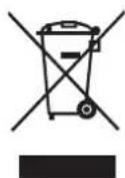
As a responsible retailer we care about the environment. As such we urge you to follow the correct disposal procedure for the appliance and packaging materials. This will help conserve natural resources and ensure that it is recycled in a manner that protects health and the environment.
You must dispose of this appliance and its packaging according to local laws and regulations.
Because this appliance contains electronic components, the appliance and its accessories must be disposed of separately from household waste when the appliance reaches its end of life.
Contact your local authority to learn about disposal and recycling.
The appliance should be taken to your local collection point for recycling. Some collection points accept appliance free of charge.
We apologise for any inconvenience caused by minor inconsistencies in these instructions, which may occur as a result of product improvement and development.
WAARSCHUWINGEN....34
BELANGRIJKE VEILIGHEIDSVOORSCHRIFTEN....35
BESCHRIJVING VAN DE ONDERDELEN 36
PRINCIPE VAN INDUCTIE....36
INSTALLATIE 37
ELEKTRISCHE AANSLUITING....39
BEDIENING....40
KWALITEIT VAN DE PAN....40
AFMETING VAN DE PAN....41
HET BEDIENINGSPANEEL GEBRUIKEN 41
INDUCTIEKOKEN....41
KOOKTIPS 44
VEILIGHEIDSEIGENSCHAPPEN....44
REINIGING EN ONDERHOUD 45
PROBLEMEN OPLOSSEN 46

natural_image
Three identical 3D-rendered kitchen utensils with a crossed handle, shown in three circular frames (no text or symbols)Afmeting van de pan
natural_image
Three hand-drawn illustrations showing a cooking pot, a lid, and a button on a surface (no text or symbols)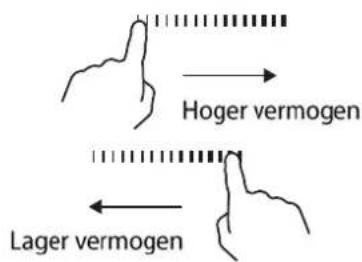
flowchart
graph TD
    A["Hoger vermogen"] --> B["Lager vermogen"]
    B --> C["Arrow pointing inward"]
EU Declaration of Conformity
Product Description:
natural_image
Black industrial stove burner with three circular ventricles and a control panel at the bottom (no text or symbols visible)Marque –
Brand /Merk /Marca:
THOMSON
The object of the declaration described above is in conformity with the relevant Union harmonisation legislation:
Low Voltage Directive (LVD)
Eco design requirements for energy-related products (ErP)
RoHS
EMC:
EN 55014-1:2017+A11:2020
EN 55014-2:2015
EN 61000-3-2:2014
EN 61000-3-3:2013+A1:2019
LVD :
EN 60335-1:2012+A11:2014+A13:2017+A1:2019+A14:2019+A2:2019
EN 60335-2-6:2015
EN 62233:2008
ErP :
(EU) No 66/2014
(EC) No 1275/2008
EN 60350-2:2013+A11
EN 50564:2011
This declaration of conformity is drawn up under the sole responsibility of the manufacturer.
The person responsible for this declaration is:
Place, Date / Lieu :
Ivry-sur-Seine, mars 8, 2022
DocuSigned by:
Prdrag Petricevic
EA30F3FB8F314D0...
CE