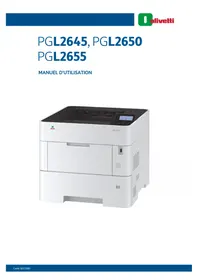
PG L2655 - Printer OLIVETTI - Free user manual and instructions
Find the device manual for free PG L2655 OLIVETTI in PDF.


| Product type | Monochrome laser printer |
| Brand and model | Olivetti PG L2655 |
| Main functions | Automatic duplex printing, EcoPrint, Silent mode, Printing from custom box and USB |
| Connectivity | Wired network (10/100/1000 Base-T), USB 2.0, Wi-Fi (optional), Wi-Fi Direct, AirPrint, Google Cloud Print |
| Print speed | Up to 55 pages per minute (A4) |
| Print resolution | 1,200 x 1,200 dpi |
| Supported paper sizes | A4, A5, A6, B5, Letter, Legal, Envelopes, Postcards, Custom paper |
| Standard paper capacity | Tray 1: 500 sheets, MF tray: 100 sheets |
| Maximum paper capacity | Up to 2,100 sheets with options |
| Power supply | 220‑240 V AC, 50/60 Hz |
| Energy consumption | Sleep mode: < 1 W (estimated) |
| Noise level | Low (Silent mode available) |
| Weight | Approximately 22 kg |
| Dimensions (W × D × H) | 380 × 415 × 470 mm |
| Maintenance and cleaning | Regular cleaning, replacement of toner cartridge and waste toner bottle |
| Security | ID card authentication, encryption and SSD overwrite, anti-theft lock |
| Spare parts and repairability | Toner cartridge, waste toner bottle, wireless network kit, paper feeder, SSD, etc. |
| General information | User manual provided (293 pages), manuals on DVD, CE compliance |
Frequently Asked Questions - PG L2655 OLIVETTI
User questions about PG L2655 OLIVETTI
0 question about this device. Answer the ones you know or ask your own.
Ask a new question about this device
Download the instructions for your Printer in PDF format for free! Find your manual PG L2655 - OLIVETTI and take your electronic device back in hand. On this page are published all the documents necessary for the use of your device. PG L2655 by OLIVETTI.
USER MANUAL PG L2655 OLIVETTI
PGL2645, PGL2650 PGL2655
MANUEL D'UTILISATION

natural_image
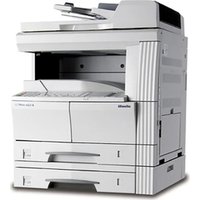
White PGL 265S printer with control panel and power button (no visible text or symbols on body)PUBLICATION EMISE PAR:
Olivetti S.p.A.
Copyright © 2021 Olivetti
Safety Instructions Regarding the Disconnection of Power 1-7
Compliance and Conformity 1-7
Other precautions (for users in California, the United States) 1-8
EN ISO 7779 1-8
EK1-ITB 2000 1-8
Wireless Connection (Mexico only) 1-8
Configuration Wi-Fi Direct 2-24
Safety Instructions Regarding the Disconnection of Power 1-7
Compliance and Conformity 1-7
Other precautions (for users in California, the United States) 1-8
EN ISO 7779 1-8
EK1-ITB 2000 1-8
Wireless Connection (Mexico only) 1-8
CLASS 1 LASER PRODUCT
KLASSE 1 LASER PRODUKT
SAFETY OF LASER BEAM (USA)
1. Safety of laser beam
This machine has been certified by the manufacturer to Class 1 level under the radiation performance standards established by the U.S.DHHS (Department of Health and Human Services) in 1968. This indicates that the product is safe to use during normal operation and maintenance. The laser optical system, enclosed in a protective housing and sealed within the external covers, never permits the laser beam to escape.
2. The CDRH Act
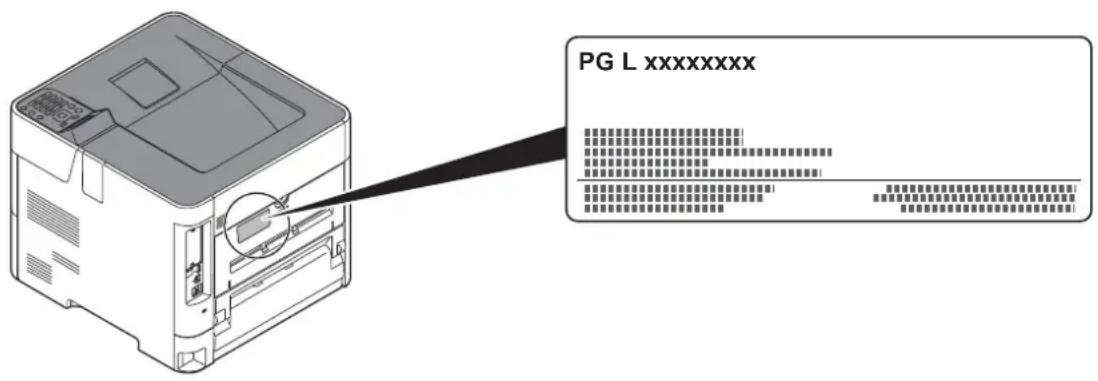
A laser-product-related act was implemented on Aug. 2, 1976, by the Center for Devices and Radiological Health (CDRH) of the U.S. Food and Drug Administration (FDA). This act prohibits the sale of laser products in the U.S. without certification, and applies to laser products manufactured after Aug. 1, 1976. The label shown below indicates compliance with the CDRH regulations and must be attached to laser products marketed in the United States. On this machine, the label is on the rear.
3. Maintenance
For safety of the service personnel, follow the maintenance instructions in the other section of this manual.
4. Safety switch
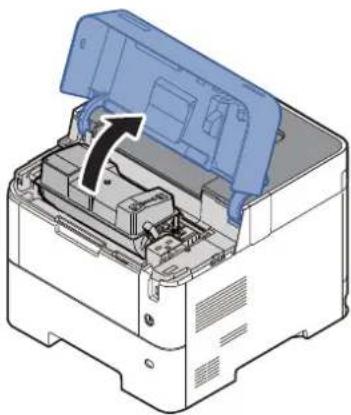
The power to the laser unit is cut off when the front cover is opened.
Safety Instructions Regarding the Disconnection of Power
Caution: The power plug is the main isolation device! Other switches on the equipment are only functional switches and are not suitable for isolating the equipment from the power source.
Compliance and Conformity
This equipment has been tested and found to comply with the limits for a Class B digital device, pursuant to Part 15 of the FCC Rules.
These limits are designed to provide reasonable protection against harmful interference in a residential installation. This equipment generates, uses and can radiate radio frequency energy and, if not installed and used in accordance with the instructions, may cause harmful interference to radio communications. However, there is no guarantee that interference will not occur in a particular installation. If this equipment does cause harmful interference to radio or television reception, which can be determined by turning the equipment off and on, the user is encouraged to try to correct the interference by one or more of the following measures:
- Reorient or relocate the receiving antenna.
- Increase the separation between the e equipment and receiver.
- Connect the equipment into an outlet on a circuit different from that to which the receiver is connected.
- Consult the dealer or an experienced radio/TV technician for help.
- The use of a non-shielded interface cable with the referenced device is prohibited.
CAUTION — The changes or modifications not expressly approved by the party responsible for compliance could void the user's authority to operate the equipment.
This device complies with Part 15 of FCC Rules.
Operation is subject to the following two conditions; (1) this device may not cause harmful interference, and (2) this device must accept any interference received, including interference that may cause undesired operation.
This device complies with Industry Canada licence-exempt RSS standard(s). Operation is subject to the following two conditions: (1) this device may not cause interference, and (2) this device must accept any interference, including interference that may cause undesired operation of the device.
The antenna(s) used for this transmitter must be installed to provide a separation distance of at least 20 cm from all persons and must not be co-located or operating in conjunction with any other transmitter.
* The above statements are valid only in the United States of America and Canada.
NOTE — Use shielded interface cables.
Other precautions (for users in California, the United States)
Perchlorate Material - special handling may apply. See www.dtsc.ca.gov/hazardouswaste/perchlorate.
EN ISO 7779
Wireless Connection (Mexico only)
The operation of this equipment is subject to the following two conditions:
(1) it is possible that this equipment or device may not cause harmful interference, and (2) this equipment or device must accept any interference, including interference that may cause undesired operation.
Sólo México (Mexico only)
Copyright (c) 1998-2006 OpenSSL Project. All rights reserved.
Redistribution and use in source and binary forms, with or without modification, are permitted provided that the following conditions are met:
- Redistributions of source code must retain the above copy right notice, this list of conditions and the following disclaimer.
- Redistributions in binary form must reproduce the above copyright notice, this list of conditions and the following disclaimer in the documentation and/or other materials provided with the distribution.
- All advertising materials mentioning features or use of this software must display the following acknowledgment: "This product includes software developed by the OpenSSL Project for use in the OpenSSL Toolkit. (http://www.openssl.org/)"
- The names "OpenSSL Toolkit" and "OpenSSL Project" must not be used to endorse or promote products derived from this software without prior written permission. For written permission, please contact openssl-core@openssl.org.
- Products derived from this software may not be called "Open nSSL" nor may "OpenSSL" appear in their names without prior written permission of the OpenSSL Project.
- Redistributions of any form whatsoever must retain the following acknowledgment: "This product includes software developed by the OpenSSL Project for use in the OpenSSL Toolkit (http://www.openssl.org/)
THIS SOFTWARE IS PROVIDED BY THE OpenSSL PROJECT "AS IS" AND ANY EXPRESSED OR IMPLIED WARRANTIES, INCLUDING, BUT NOT LIMITED TO, THE IMPLIED WARRANTIES OF MERCHANTABILITY AND FITNESS FOR A PARTICULAR PURPOSE ARE DISCLAIMED. IN NO EVENT SHALL THE OpenSSL PROJECT OR ITS CONTRIBUTORS BE LIABLE FOR ANY DIRECT, INDIRECT, INCIDENTAL, SPECIAL, EXEMPLARY, OR CONSEQUENTIAL DAMAGES (INCLUDING, BUT NOT LIMITED TO, PROCUREMENT OF SUBSTITUTE GOODS OR SERVICES; LOSS OF USE, DATA, OR PROFITS; OR BUSINESS INTERRUPTION) HOWEVER CAUSED AND ON ANY THEORY OF LIABILITY, WHETHER IN CONTRACT, STRICT LIABILITY, OR TORT (INCLUDING NEGLIGENCE OR OTHERWISE) ARISING IN ANY WAY OUT OF THE USE OF THIS SOFTWARE, EVEN IF ADVISED OF THE POSSIBILITY OF SUCH DAMAGE.
Original SSLeay License
This package is an SSL implementation written by Eric Young (eay@cryptsoft.com). The implementation was written so as to conform with Netscapes SSL.
This library is free for commercial and non-commercial use as long as the following conditions are adhered to. The following conditions apply to all code found in this distribution, be it the RC4, RSA, Ihash, DES, etc., code; not just the SSL code. The SSL documentation included with this distribution is covered by the same copyright terms except that the holder is Tim Hudson (tjh@cryptsoft.com).
Copyright remains Eric Young's, and as such any Copyright notices in the code are not to be removed.
If this package is used in a product, Eric Young should be given attribution as the author of the parts of the library used.
This can be in the form of a textual message at program startup or in documentation (online or textual) provided with the package.
Redistribution and use in source and binary forms, with or without modification, are permitted provided that the following conditions are met:
- Redistributions of source code must retain the copyright notice, this list of conditions and the following disclaimer.
- Redistributions in binary form must reproduce the above copyright notice, this list of conditions and the following disclaimer in the documentation and/or other materials provided with the distribution.
- All advertising materials mentioning features or use of this software must display the following acknowledgement: "This product includes cryptographic software written by Eric Young (eay@cryptsoft.com)"
The word 'cryptographic' can be left out if the routines from the library being used are not cryptographic related :-). - If you include any Windows specific code (or a derivative thereof) from the apps directory (application code) you must include an acknowledgement: "This product includes software written by Tim Hudson (tjh@cryptsoft.com)"
THIS SOFTWARE IS PROVIDED BY ERIC YOUNG "AS IS" AND ANY EXPRESS OR IMPLIED WARRANTIES, INCLUDING, BUT NOT LIMITED TO, THE IMPLIED WARRANTIES OF MERCHANTABILITY AND FITNESS FOR A PARTICULAR PURPOSE ARE DISCLAIMED. IN NO EVENT SHALL THE AUTHOR OR CONTRIBUTORS BE LIABLE FOR ANY DIRECT, INDIRECT, INCIDENTAL, SPECIAL, EXEMPLARY, OR CONSEQUENTIAL DAMAGES (INCLUDING, BUT NOT LIMITED TO, PROCUREMENT OF SUBSTITUTE GOODS OR SERVICES; LOSS OF USE, DATA, OR PROFITS; OR BUSINESS INTERRUPTION) HOWEVER CAUSED AND ON ANY THEORY OF LIABILITY, WHETHER IN CONTRACT, STRICT LIABILITY, OR TORT (INCLUDING NEGLIGENCE OR OTHERWISE) ARISING IN ANY WAY OUT OF THE USE OF THIS SOFTWARE, EVEN IF ADVISED OF THE POSSIBILITY OF SUCH DAMAGE.
The licence and distribution terms for any publicly available version or derivative of this code cannot be changed. i.e. this code cannot simply be copied and put under another distribution licence [including the GNU Public Licence.]
Monotype Imaging License Agreement
1 Software shall mean the digitally encoded, machine readable, scalable outline data as encoded in a special format as well as the UFST Software.
2 You agree to accept a non-exclusive license to use the Software to reproduce and display weights, styles and versions of letters, numerals, characters and symbols (Typefaces) solely for your own customary business or personal purposes at the address stated on the registration card you return to Monotype Imaging. Under the terms of this License Agreement, you have the right to use the Fonts on up to three printers. If you need to have access to the fonts on more than three printers, you need to acquire a multiuser license agreement which can be obtained from Monotype Imaging. Monotype Imaging retains all rights, title and interest to the Software and Typefaces and no rights are granted to you other than a License to use the Software on the terms expressly set forth in this Agreement.
3 To protect proprietary rights of Monotype Imaging, you agree to maintain the Software and other proprietary information concerning the Typefaces in strict confidence and to establish reasonable procedures regulating access to and use of the Software and Typefaces.
4 You agree not to duplicate or copy the Software or Typefaces, except that you may make one backup copy. You agree that any such copy shall contain the same proprietary notices as those appearing on the original.
5 This License shall continue until the last use of the Software and Typefaces, unless sooner terminated. This License may be terminated by Monotype Imaging if you fail to comply with the terms of this License and such failure is not remedied within thirty (30) days after notice from Monotype Imaging. When this License expires or is terminated, you shall either return to Monotype Imaging or destroy all copies of the Software and Typefaces and documentation as requested.
6 You agree that you will not modify, alter, disassemble, decrypt, reverse engineer or decompile the Software.
7 Monotype Imaging warrants that for ninety (90) days after delivery, the Software will perform in accordance with Monotype Imaging-published specifications, and the diskette will be free from defects in material and workmanship. Monotype Imaging does not warrant that the Software is free from all bugs, errors and omissions.
The parties agree that all other warranties, expressed or implied, including warranties of fitness for a particular purpose and merchantability, are excluded.
8 Your exclusive remedy and the sole liability of Monotype Imaging in connection with the Software and Typefaces is repair or replacement of defective parts, upon their return to Monotype Imaging.
In no event will Monotype Imaging be liable for lost profits, lost data, or any other incidental or consequential damages, or any damages caused by abuse or misapplication of the Software and Typefaces.
9 Massachusetts U.S.A. law governs this Agreement.
10 You shall not sublicense, sell, lease, or otherwise transfer the Software and/or Typefaces without the prior written consent of Monotype Imaging.
11 Use, duplication or disclosure by the Government is subject to restrictions as set forth in the Rights in Technical Data and Computer Software clause at FAR 252-227-7013, subdivision (b)(3)(ii) or subparagraph (c)(1)(ii), as appropriate. Further use, duplication or disclosure is subject to restrictions applicable to restricted rights software as set forth in FAR 52.227-19 (c)(2).
12 You acknowledge that you have read this Agreement, understand it, and agree to be bound by its terms and conditions. Neither party shall be bound by any statement or representation not contained in this Agreement. No change in this Agreement is effective unless written and signed by properly authorized representatives of each party. By opening this diskette package, you agree to accept the terms and conditions of this Agreement.
natural_image
Diagram of a computer monitor with an attached power outlet cable (no text or symbols)
IMPORTANT
natural_image
Diagram of a printer with a power button icon pointing to its left side (no text or symbols present)
IMPORTANT
natural_image
Diagram of a printer with a power button icon and an arrow pointing to it (no text or symbols present)natural_image
Illustration of a hand holding a CD with an open screen, next to a laptop (no text or symbols visible)
REMARQUE
natural_image
Illustration of a hand holding a CD next to a laptop displaying a blank document (no text or symbols visible)REMARQUE
natural_image
Illustration of a hand holding a CD next to a laptop displaying a small diagram (no text or symbols present)
REMARQUE
natural_image
Illustration of a hand holding a CD to open a laptop screen (no text or symbols visible)
REMARQUE
natural_image
Illustration of a hand holding a CD next to a laptop displaying a small diagram (no text or symbols present)natural_image
Illustration showing two hand gestures: one folding a sheet of paper with an arrow, the other holding a closed book with a striped pattern (no text or symbols)natural_image
Diagram showing a printer's internal structure being processed into a paper airplane (no text or symbols present)
REMARQUE
REMARQUE
natural_image
3D CAD model of a mechanical housing component with internal blue fluid flow path (no text or symbols)
IMPORTANT
natural_image
Illustration of a printer with a paper airplane icon and control panel (no text or symbols)natural_image
Technical illustration of a printer's internal structure and external casing, showing part assembly and alignment (no text or symbols)
REMARQUE
natural_image
Two technical diagrams showing a device inside a plastic housing, with a magnified inset highlighting the internal structure (no text or symbols present)natural_image
Illustration of a hand holding a blue control knob labeled 'A5' with arrows indicating motion (no text or symbols beyond label)
IMPORTANT
natural_image
Illustration of a printer with a paper lid and control panel, showing no text or symbols on the device itself.natural_image
3D mechanical assembly diagram showing internal components before and after assembly, with no visible text or symbolsnatural_image
Illustration of a printer with a paper feed into the main body (no text or symbols visible)natural_image
Illustration of a printer with a paper airplane being inserted (no text or symbols visible)natural_image
Illustration of a printer with an open lid and paper feed, showing internal structure without any text or symbols.→ Printing System Driver User Guide
natural_image
Diagram of a printer interior showing the lid, tray, and control panel (no text or symbols)natural_image
Two 3D printer diagrams showing internal structure before and after processing, with no visible text or symbols.natural_image
Illustration of a printer with a paper roll inserted, showing internal components and no text or symbols.6 Lancer l'impression
→ Printing System Driver User Guide

Onglet [Général]
Onglet [Publication]
→ Printing System Driver User Guide
→ Printing System Driver User Guide
• Embedded Web Server RX
→ Printing System Driver User Guide
Impression de documents
natural_image
Illustration of a printer with a magnified inset showing the internal components (no text or symbols)
REMARQUE
natural_image
Two leaf icons with a red play button, no text or symbols presentRecto verso
Card Authentication Kit(B) "Card Authentication Kit" (page 11-3)
1 Afficher l'écran.
1 Touche [Menu] > touche [▲] [▼] > [NomUtil/CptaTrav] > touche [OK]

REMARQUE
2

natural_image
Two views of a printer internal structure showing internal components and a close-up view of the printer's internal mechanism (no text or symbols visible)Orifices
natural_image
Two views of a printer showing internal components and external casing (no text or symbols visible)natural_image
Two technical line drawings of a mechanical component housing (no text or symbols visible)1
natural_image
3D diagram of an open printer with a blue cover and internal components, showing no text or symbols2

natural_image
Illustration of hands operating a printer with a blue plastic box and an inset showing the printer's internal structure (no text or symbols)3
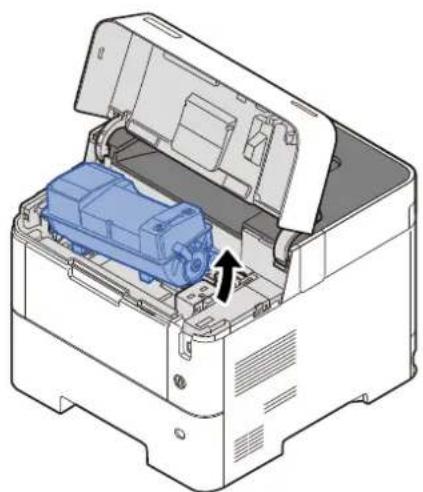
natural_image
3D diagram of an open industrial machine with a blue internal component and a black arrow indicating a component (no text or symbols present)
REMARQUE
natural_image
Illustration of a blue mechanical component with a black arrow indicating a force or stress, enclosed in a white plastic bag (no text or symbols)5

flowchart
graph TD
    A["Initial Component"] --> B{Assembly Step}
    B --> C["Recovery"]
    C --> D["Final Assembly"]

IMPORTANT
6

7

natural_image
Technical illustration of an open printer with a blue internal component and an arrow indicating a location (no text or symbols present)8
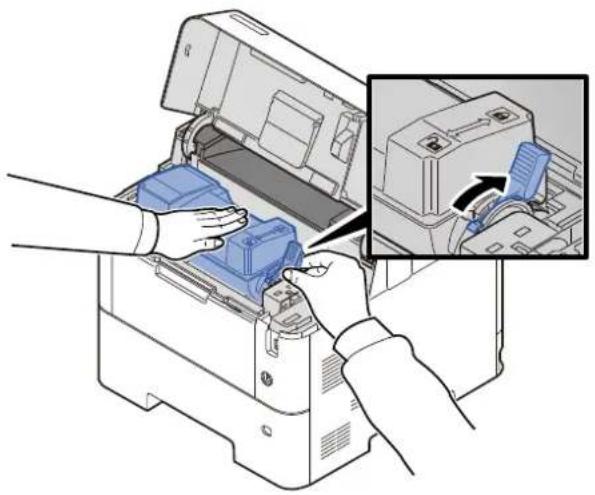
natural_image
Illustration of hands operating a printer with an inset showing the internal components (no text or symbols visible)9
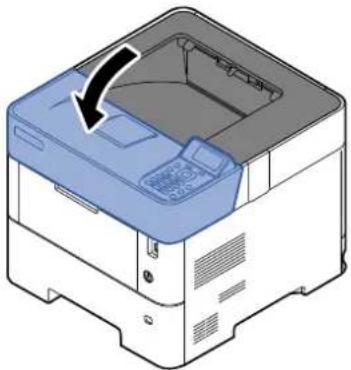
natural_image
Illustration of a printer with a paper tray and cover, showing a black arrow indicating rotation (no text or symbols present)
REMARQUE
natural_image
Illustration of a printer with a blue paper clip inserted into the main body (no text or symbols visible)2

3

natural_image
Three-step diagram showing a blue 3D object interacting with a wireframe box and then moving on a stepped platform (no text or symbols)4

natural_image
Illustration of a printer with an open door and blue plastic bag inserted, showing internal components (no text or symbols)

natural_image
Illustration of a printer with an open door and internal components, showing no text or symbols.5

natural_image
Illustration of a printer with a blue cover and scroll wheel, showing internal components (no text or symbols)
REMARQUE
natural_image
Illustration of a printer with paper feed and control panel (no text or symbols)2

natural_image
Illustration of a printer with a paper airplane being inserted (no text or symbols visible)
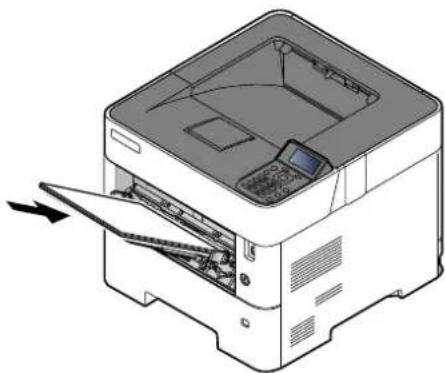
natural_image
Illustration of a printer with an open lid and paper feed being inserted (no text or symbols visible)Magasins 1 à 5
natural_image
Illustration of a printer with a paper lid and control panel, showing no text or symbols on the device itself.Unité recto-verso
1
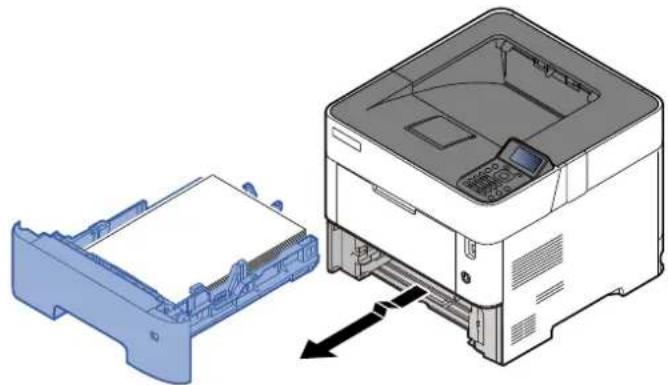
natural_image
Diagram showing a printer's internal structure being inserted into a blue plastic housing, with no visible text or symbols.2

natural_image
Diagram of a printer internal structure showing paper layout and print area (no text or symbols)

natural_image
Diagram of a printer internal structure showing paper feed, paper sheet, and paper holder (no text or labels)3

natural_image
Diagram of a printer internal structure showing paper feed, paper tray, and paper holder (no text or labels)

natural_image
Illustration of a printer with a paper roll and control panel, showing no text or symbols on the device itself.2

natural_image
Two views of a printer internal structure showing internal components and a close-up view of the printer's internal casing (no text or symbols visible)3

natural_image
Technical illustration of a printer internal structure showing paper feeding into a printer (no text or symbols visible)natural_image
3D diagram of an open industrial machine with internal components and a blue component, showing no text or symbols.

natural_image
Illustration of a printer with a paper airplane and control panel (no text or symbols)2

natural_image
Diagram of a printer with a blue cloth being inserted, showing internal structure and cable routing (no text or symbols)3
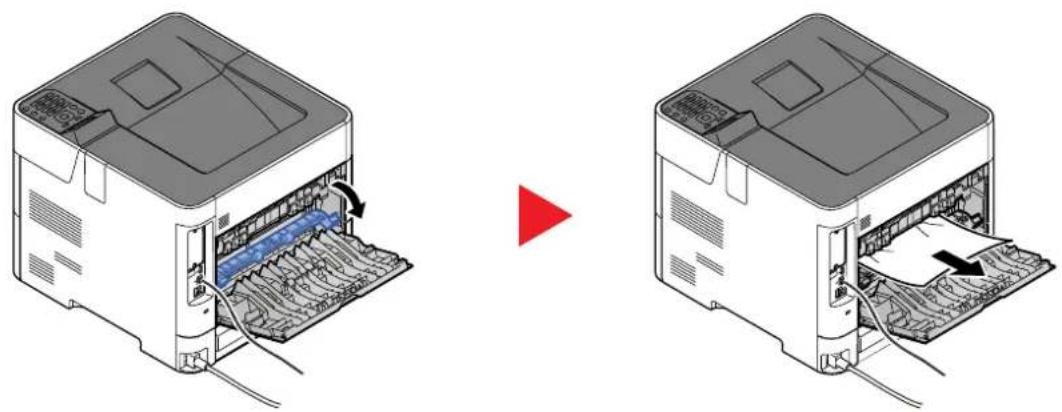
natural_image
Two technical diagrams showing a printer's internal structure before and after assembly, with no visible text or symbols.Bac G.C.
1

natural_image
Illustration of a printer being inserted into a machine, showing paper feeding into a blue box (no text or symbols present)2

natural_image
Illustration of a printer's internal structure with a hand inserting a cable (no text or symbols visible)3

natural_image
Illustration of a printer or printer unit being inserted into a base, with hands performing the operation (no text or symbols visible)4
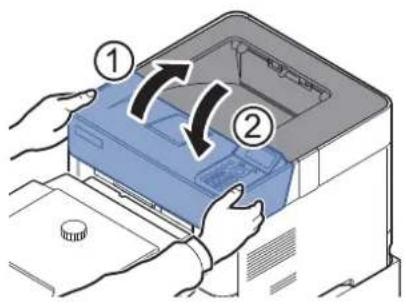
natural_image
Diagram of a printer or printer with an open lid and internal compartments, showing no text or symbols.2

3

natural_image
Diagram showing a printer's internal structure being inserted into a paper holder, with no visible text or symbols.4

natural_image
Diagram of a printer internal structure showing paper feed and paper layout (no text or symbols)

natural_image
Diagram of a printer internal structure showing paper feed, paper sheet, and paper holder (no text or labels)5

natural_image
Diagram of a printer internal structure showing paper feed, paper tray, and paper holder (no text or labels)
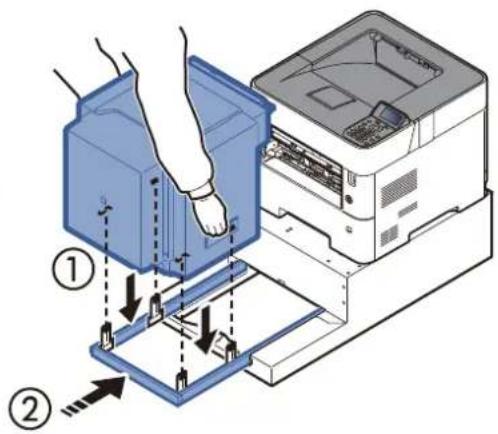
6

11 Annexe
(1) Card Authentication Kit(B) "Card Authentication Kit"
→ Card Authentication Kit(B) Operation Guide
natural_image
Technical line drawing of a printer internal structure showing ports and cables (no text or symbols)(9) Parallel Interface Kit (IB-32B)
natural_image
Two technical diagrams showing a blue plastic component being inserted into a metal frame, with arrows indicating direction (no text or symbols present)natural_image
Illustration of a computer tower with hands inserting a blue plastic tray into the case (no text or symbols)DHCP (Dynamic Host Configuration Protocol)
KPDL (Kyocera Page Description Language)
NetBEUI (NetBIOS Extended User Interface)
TWAIN (Technology Without Any Interested Name)
WIA (Windows Imaging Acquisition)
Support stockage 4-22
Suppr. stockage travaux 4-22
Boîte perso. 11-25
Boîte personnalisée
Monotype Imaging License Agreement 1-12
N
NetBEUI 11-27
Card Authentication Kit 11-3
Carte SD 11-4
Wireless Connection 1-8
WSD amélioré
Strada Monte Navale 2/C 10015 IVREA (TO) Italy
www.olivetti.com
Copyright © 2021 Olivetti
All rights reserved
The manufacturer reserves the right to make changes to the product described in this manual at any moment and without giving prior warning.
No part of this document may be copied, reproduced or transmitted
in any form or by any means, electronic or mechanical, including photocopying,
recording or other, without obtaining prior written authorisation from the publisher.
- PGL2645, PGL2650 PGL2655
- PUBLICATION EMISE PAR:
- SAFETY OF LASER BEAM (USA)
- Safety of laser beam
- The CDRH Act
- Maintenance
- Safety switch
- Safety Instructions Regarding the Disconnection of Power
- Compliance and Conformity
- Other precautions (for users in California, the United States)
- EN ISO 7779
- Wireless Connection (Mexico only)
- Sólo México (Mexico only)
- Original SSLeay License
- Monotype Imaging License Agreement
- IMPORTANT
- REMARQUE
- → Printing System Driver User Guide
- Lancer l'impression
- Onglet [Général]
- Onglet [Publication]
- • Embedded Web Server RX
- Impression de documents
- Recto verso
- Afficher l'écran.
- Orifices
- Magasins 1 à 5
- Unité recto-verso
- Bac G.C.
- Annexe
- Card Authentication Kit(B) "Card Authentication Kit"
- Parallel Interface Kit (IB-32B)
- DHCP (Dynamic Host Configuration Protocol)
- KPDL (Kyocera Page Description Language)
- NetBEUI (NetBIOS Extended User Interface)
- TWAIN (Technology Without Any Interested Name)
- WIA (Windows Imaging Acquisition)
- N
Brand : OLIVETTI
Model : PG L2655
Category : Printer