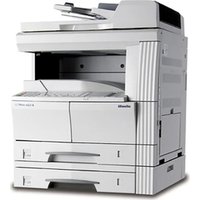
d-Color MF250 - Printer OLIVETTI - Free user manual and instructions
Find the device manual for free d-Color MF250 OLIVETTI in PDF.


Pick your language and provide your email: we'll send you a specifically translated version.
| Product Type | Multifunction Color Printer |
| Model | d-Color MF250 |
| Brand | Olivetti |
| Dimensions (W x D x H) | 587 x 655 x 812 mm (23.1 x 25.8 x 32.0 in) |
| Weight | Approximately 73 kg (161 lb) |
| Power Supply | AC 100-240V, 50/60Hz |
| Power Consumption | Max 1.5 kW (printing), 0.5 W (sleep) |
| Main Functions | Print, Copy, Scan, Fax (optional) |
| Print Speed (Color) | Up to 25 ppm (A4) |
| Print Speed (Monochrome) | Up to 25 ppm (A4) |
| Maximum Paper Size | A3 (297 x 420 mm) |
| Paper Input Capacity | Standard: 500 sheets + 100 bypass |
| Paper Output Capacity | 250 sheets |
| Scanner Type | Color flatbed with ADF |
| Scan Resolution | Up to 600 x 600 dpi |
| Maintenance & Cleaning | Regular cleaning of glass and corona wires; replace toner and waste toner box as needed |
| Security Features | User authentication, secure print, network security (IPsec, SNMPv3) |
| Spare Parts & Repairability | Toner cartridges (CMYK), drum units, fuser unit, transfer belt, waste toner box; rated for 200k-300k pages |
| General Information | Touchscreen control panel, USB and Ethernet connectivity, compatible with Windows, Mac, Linux |
Frequently Asked Questions - d-Color MF250 OLIVETTI
How do I load paper into the bypass tray?
Open the bypass tray on the front of the printer, adjust the guides to the paper size, and insert up to 100 sheets. Make sure to select the correct paper type on the control panel.
What should I do if a paper jam occurs?
Open the front cover and remove the drum unit carefully. Pull out any jammed paper from the rollers. Also check the fuser area (hot) and the paper exit. Refer to the manual for detailed positions.
How often do I need to replace toner cartridges?
Toner life depends on coverage. Standard black toner yields about 5,000 pages, color yields 3,000 pages. The printer will warn you when toner is low.
Can I print from a mobile device?
Yes, the d-Color MF250 supports AirPrint and Google Cloud Print. You can also use the Olivetti Mobile app for direct printing.
How do I connect the printer to a wireless network?
Go to the Settings menu on the touchscreen, select Network, then Wireless. Choose your SSID, enter the password, and confirm. You may need to install a wireless adapter if not built-in.
What is the recommended way to clean the scanner glass?
Use a soft, lint-free cloth slightly dampened with water or a mild glass cleaner. Avoid abrasive materials. Gently wipe the glass and the white strip.
How can I set up secure printing?
Enable Secure Print in the printer settings. Assign a PIN code to each print job from your computer. At the printer, enter the PIN to release the job.
What does the 'Replace Waste Toner Box' message mean?
The waste toner box is full and needs to be replaced. Open the front cover, locate the waste toner box on the right side, pull it out, and install a new one.
Can I use third-party toner cartridges?
While third-party cartridges may work, Olivetti recommends using genuine Olivetti toner to ensure print quality and avoid damage to the printer.
How do I perform a factory reset?
Press the Menu button, go to Admin Settings, then Maintenance, and select Factory Reset. Confirm the reset. This will erase all custom settings.
User questions about d-Color MF250 OLIVETTI
0 question about this device. Answer the ones you know or ask your own.
Ask a new question about this device
No questions yet. Be the first to ask one.
Download the instructions for your Printer in PDF format for free! Find your manual d-Color MF250 - OLIVETTI and take your electronic device back in hand. On this page are published all the documents necessary for the use of your device. d-Color MF250 by OLIVETTI.
USER MANUAL d-Color MF250 OLIVETTI
Manual assistant
Powered by Anthropic
Waiting for your message
Product information
Brand : OLIVETTI
Model : d-Color MF250
Category : Printer