EasyManual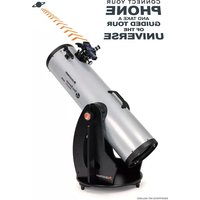
StarSense Explorer 10 - Telescope CELESTRON - Free user manual and instructions
Find the device manual for free StarSense Explorer 10 CELESTRON in PDF.


User questions about StarSense Explorer 10 CELESTRON
0 question about this device. Answer the ones you know or ask your own.
Ask a new question about this device
Download the instructions for your Telescope in PDF format for free! Find your manual StarSense Explorer 10 - CELESTRON and take your electronic device back in hand. On this page are published all the documents necessary for the use of your device. StarSense Explorer 10 by CELESTRON.
USER MANUAL StarSense Explorer 10 CELESTRON
Base handle Eyepiece rack Rubber bumper Optical tube assembly with dust cover 25mm Omni Plössl eyepiece (8” and 10” Dobs) 32mm Omni Plössl eyepiece (12” Dob only) 2”-to1.25” eyepiece adapter with 1.25” cover cap 2” focuser extension tube Collimation cap with 2mm and 2.5mm hex keys* *2.5mm hex key included with 8” Dob only NOTE: For collimating your telescope’s optics, refer to page 14 Altitude tensioning knob Cosmetic knob Screwdriver StarSense dock StarPointer red dot finderscope Crescent wrenches (x2) Hex keys (x2) Rack Screws (x2) Altitude bearing cylinders (x4) Bearing screws (x4) Handle screws (x2) Feet screw covers (x3) Feet screws (x3) Bolt Nut Steel washers (x2) Hollow plastic cylinder Teflon washer Right side panel Front panel Top plate Bottom plate Side supports (x2) Base assembly screws (x22 for 8” & 10” Dobs) (x27 for 12” Dob)4 I ENGLISH
Box 3 - Primary Mirror (12” Dob only) Primary mirror in mirror cell BACKFRONT Mirror cell screws (x6)ENGLISH I 5
Figure 1A: Exploded view of the StarSense Explorer Dobsonian base.6 I ENGLISH Figure 1B: Exploded view of the StarSense Explorer Optical Tube Assembly Refer to Figure 1 to see how the parts of the SSE Dob fi t together. For detailed assembly instructions, refer to the printed Quick Setup Guide included in the box, or on the SSE Dob product page at www.celestron.com TELESCOPE ASSEMBLY
Dobsonian bases are altazimuth mounts. This means that the telescope moves in two directions: up-and-down (i.e. altitude), and left-to-right (i.e. azimuth) (Figure 2). ALTITUDE AZIMUTH Figure 2: The StarSense Explorer Dobsonians have two axes of motion: altitude (up-and-down) and azimuth (left-to-right). Pointing your Dob at an object is easy. Simply move the telescope tube up-and-down and left-to-right until the telescope is pointed toward the desired object and the object appears in the telescope’s eyepiece. The panning knob at the front of the telescope tube provides a convenient place to grasp the tube for pointing (Figure 3). Using this knob also prevents heat from your hand from entering the optical path, which can temporarily distort the view. Figure 3: The panning knob provides an excellent place for your fingers to grasp when pointing the telescope. You can adjust the tension along the altitude axis by turning the knob located on the same side as the telescope’s focuser—the altitude tensioning knob (Figure 4). Figure 4: The tension of the altitude motion can be adjusted with the altitude tensioning knob. (NOTE: the other knob on the opposite side does not function for adjusting altitude tension.) Turn the knob to add enough tension to provide a smooth up-and-down motion. Under most circumstances you won’t need to add much tension. The telescope is balanced for normal use. However, if you are using a heavy eyepiece or a larger smartphone, you may need to add more tension so that the telescope remains still when not touched.8 I ENGLISH FOCUSING The SSE Dobs come with a 2” Crayford focuser, a 2” extension tube, and a 2”-to-1.25” eyepiece adapter. With these three items, you can use virtually any telescope eyepiece with the SSE Dob. For most eyepieces, make sure the 2” extension tube is in place in the focuser. If it’s not, the eyepiece will not reach focus. If you’re using an eyepiece that requires a lot of inward focus travel, remove the 2” extension tube. You may need to remove the tube if attempting to use your Dob with an astronomical imaging camera. If you wish to use a 1.25” format eyepiece, you’ll need to use the 2”-to-1.25” eyepiece adapter. Simply place it in the focuser (with 2” extension tube attached), and then place the 1.25” eyepiece in the adapter. Tighten the thumbscrew on the adapter to secure the eyepiece in place. The adapter uses an internal brass compression ring so your eyepiece barrel won’t be scratched or marred. To focus, turn the focus knobs clockwise or counterclockwise until the object in the telescope eyepiece is in sharp focus. To lock the focuser position in place once you have achieved sharp focus, tighten the focus lock thumbscrew (Figure 5). If you need to adjust the focus knob’s tension, you can tighten or loosen the focuser tensioning set screw using the provided hex key. FOCUS LOCK THUMBSCREW FOCUSER TENSIONING SET SCREW Figure 5: The focus lock thumbscrew locks the focuser in place once focus has been achieved. The focus tensioning set screw adjusts the tension of the focusing knobs. Since the SSE Dob is a Newtonian refl ector, the images you’ll see will appear upside-down as compared to the naked eye (Figure 6). While this has little impact on astronomical observing, it can be a bit confusing when you are viewing land-based objects. Figure 6: Like all Newtonian refl ectors, the SSE Dobs produce images that appear upside-down as compared to the naked eye.
Although you won’t need to rely on the StarPointer red-dot fi nder when you are using the StarSense Explorer app, it can help you align the app with the telescope. The StarPointer also comes in handy when you are locating objects during the day, since the app only works under the stars at night. To align the StarPointer, fi rst point the telescope at an object that is at least ¼ mile away. We recommend aligning during the day. Choose a distant tree, sign, building, or other landmark. If you are aligning at night, you can use a streetlight, the Moon, or a bright star or planet. Once you have pointed the telescope at the object, check to ensure that it appears in the eyepiece. Next, turn the StarPointer on using the LED dial (Figure 7). LED DIAL
ALTITUDE KNOB AZIMUTH KNOB
Figure 7: The StarPointer red-dot fi nderscope. Turn up the brightness level until you can easily see the red dot. Now, without moving the telescope, use the StarPointer’s altitude and azimuth adjustment knobs to center the red dot on the same object that you centered in the telescope eyepiece. When you’re fi nished, check to make sure the object is still centered in the telescope eyepiece. If it is, you are done aligning the StarPointer. If not, move the telescope so the object in the telescope’s eyepiece is centered again. Continue using StarPointer’s altitude and azimuth adjustment knobs to center the red dot on the object again. Turn off the StarPointer when you aren’t using it to conserve its battery. While the StarPonter’s battery should last a long time, eventually it will need to be replaced with a CR2032 3V Lithium button cell battery. These are very common and available from a wide variety of retailers. To replace the battery:
1. Use a Phillips-head screwdriver to remove the battery
cover securing screw (Figure 8). Figure 8: To open the StarPointer’s battery cover, fi rst remove the securing screw.
2. Remove the discharged battery from the battery compart-
ment. You may need to use a knife or screwdriver to pry the battery out of its holder.
3. Insert the new battery so that the positive side is visible to
you. Make sure the battery is properly seated within the battery compartment (Figure 9). Figure 9: When the battery is properly seated in the compartment as shown, the battery cover should be easy to reinstall.
4. Close the battery compartment and reinstall the securing
AND APP Perhaps the most exciting feature of the StarSense Explorer Dobsonian is the StarSense Explorer dock and the StarSense Explorer smartphone app. With the app to guide you, you’ll spend more time observing objects instead of struggling to find them among myriad stars overhead! The Celestron StarSense Explorer is the only Dobsonian that includes this incredible feature. To begin, download and install the app from the Apple App Store (iOS) or Google Play (Android). You’ll also find the minimum system requirements there. If you have any questions about whether your smartphone is compatible with the app, please visit celestron.com/SSE Once you have downloaded the app, use the app unlock code that you’ll find on the printed card that came with your telescope (Figure 10). Download the app from the before your first observing session .or When prompted, enter the unique unlock code below to enable telescope control on your device. Figure 10: The StarSense Explorer App unlock code is printed on the card included with your telescope. Each code can enable up to five devices to use the StarSense Explorer functionality. If you use the code all five times and need to unlock the app on more devices, please contact Celestron Technical Support at celestron.com/ pages/technical-support for options. With the app unlocked, you are ready to begin. Place your smartphone into the StarSense Explorer dock and press the StarSense icon at the bottom of the planetarium screen (Figure 11). Choose the “NEEDS ALIGNMENT” option and follow the on-screen prompts to align the smartphone’s camera with the telescope. Once this procedure is complete, you can use the app to locate objects. Select an object to view from the planetarium or the “Tonight’s Best” list (i.e. press the star icon). Arrows will appear on screen, guiding you to the object. Follow the arrows until the bullseye turns green and the object is in your telescope’s field of view. It’s that easy! While you observe, you can read detailed information about the object. Hundreds of the most popular objects also offer an audio presentation. To listen, press the bar at the bottom of the screen that contains the object’s name (Figure 12). STARSENSE ICON Figure 11: Once you have unlocked the StarSense Explorer app, press the StarSense icon to begin finding objects. Figure 12: Press the Object Info bar to receive additional information about the selected object, including images and audio presentations for many objects.ENGLISH I 11 DETERMINING MAGNIFICATION
AND SELECTING EYEPIECES
To change the magnifi cation of the telescope, you’ll need to change the eyepiece in the telescope’s focuser. To calculate the magnifi cation you can achieve with a given eyepiece, use this formula: Focal length of telescope ÷ Focal length of eyepiece = Magnifi cation The 8” and 10” SSE Dobs have a focal length of 1200mm and come with a 25mm Omni Plössl eyepiece. Using the formula, we can calculate that this combination yields a magnification of 48x (1200mm ÷ 25mm = 48x). The 12” SSE Dob has a focal length of 1500mm and comes with a 32mm Omni Plössl eyepiece – this provides a magnification of 47x (1500mm ÷ 32mm = 47x). This is an excellent magnification for locating and observing wide-field deep space objects. You may want to consider purchasing a higher-magnifi cation eyepiece, like a 10mm Omni Plössl, for higher-power views of the Moon and planets. Do not increase magnifi cation too much though, or the view may degrade due to atmospheric seeing conditions (i.e. air turbulence). The maximum magnifi cation for any telescope is about 60 times per inch, which equates to 480x for the 8” SSE Dob, 600x for the 10” SSE Dob , and 720x for the 12” SSE Dob. In many locations, however, it will be diffi cult to achieve sharp images much over 100x magnifi cation due to turbulence in the air above you. If you notice that the stars overhead are twinkling heavily, seeing conditions are poor. You should stick to lower magnifi cation. If the stars appear to shine steadily, seeing conditions are good. You can try using higher- magnifi cation eyepieces. The SSE Dobs can accept both 1.25” and 2” format eyepieces. 2” eyepieces generally provide a wider fi eld of view but can cost signifi cantly more. To use a 2” eyepiece, remove the 2”-to-1.25” adapter from the focuser and insert the eyepiece directly into the 2” extension tube. Secure the eyepiece with the thumbscrews on the 2” extension tube. The eyepiece rack located on the front of the base provides a convenient place to put eyepieces when they are not in use. It can accept three 1.25” eyepieces and one 2” eyepiece (Figure 13). Figure 13: The eyepiece rack is a convenient place to store additional eyepieces during your observing session. COOLING YOUR
You’ll get the best views through your telescope when it has reached thermal equilibrium with the ambient air. If the telescope is warmer than the outside air, the mirror will acclimate to the temperature and its fi gure will be changing. The images you see through a telescope that has not cooled will not appear as sharp as they otherwise would. If you are taking your telescope from a heated house to the outdoors, allow around one hour before expecting it to produce sharp images. For this reason, we recommend storing your telescope in a dry but unheated area like a garage or storage shed. We also recommend taking the telescope out at sunset, so it will already be acclimated by the time it gets dark. For the 10” and 12” SSE Dobs, there is an optional USB Cooling Fan for Dobsonians available. It mounts onto the rear of the mirror cell and blows air on the mirror to expedite cool- ing (Figure 14). The fan will help the optics reach thermal equilibrium faster. (The 8” SSE Dob does not have a fan mount so it is not compatible with the Cooling Fan.) Figure 14: The optional USB Cooling Fan for Dobsonians is compatible with the 10” and 12” SSE Dobs.12 I ENGLISH
You can observe literally thousands of objects with the larger aperture of the SSE Dobs: The Moon Observing the lunar surface is a great place to start. You’ll easily see craters, maria, lacus, valleys, mountains, and other features. The Moon is so bright that you might want to consider using an optional Moon filter. It threads onto bottom of the eyepiece to dim the view. We also recommend a higher-power eyepiece to help you explore the Moon up-close. Planets The best planets to view are Jupiter, Saturn, Mars, and Venus. A higher-power eyepiece will help bring out the fine details. You’ll be able to see the rings of Saturn, surface detail on Jupiter along with its moons, the phases of Venus, and perhaps some surface detail on Mars if it is near opposition (i.e. when it is closest to the Earth). Stars and Double Stars Stars will appear like points of light regardless of the magnification used. However, a telescope can reveal a star’s color and also “split” double stars using higher magnifications. For variable stars, see if you can detect a star’s change in brightness over a period of days or weeks. Open Star Clusters These are star groups that formed together within our Milky Way galaxy. They can appear spectacular in the telescope eyepiece, even from somewhat light-polluted skies. Astronomers often describe star clusters as resembling “crushed diamonds on black velvet” in the telescope’s eyepiece. Clusters are generally best viewed with low- power eyepieces, as they usually require a wide field of view to see the entire cluster. Globular Star Clusters These are tight clusters of hundreds of thousands of stars that coalesced early in our galaxy’s formation. These clusters appear like globes of light. The brighter ones can be resolved into individual stars in good conditions. Most globular clusters are best viewed with a medium-power eyepiece, as they are not nearly as wide as open clusters, yet not bright enough for high power either. Nebulae You’ll generally need to be under dark skies to see gaseous nebulae, which appear as a faint glow around stars. Don’t expect to see any nebulosity from urban skies except for perhaps the brightest ones, like the Orion Nebula and Lagoon Nebula. Galaxies Perhaps the most fascinating of all objects to view, galaxies are like “island universes” unto themselves. While you can detect the brightest galaxies, like the Andromeda Galaxy, from somewhat light-polluted skies, they are best observed from dark skies. Literally hundreds of galaxies are well within the observing reach of the SSE Dobs. The best ones display fine details like faint spiral arms and dust lanes. Many, however, will just appear as non-stellar “streaks” or “blobs.” Even so, just being able to detect the light from another galaxy outside our own is rewarding in itself. One thing to keep in mind is that the SSE Dobs are not motorized. This means that they will not automatically track celestial objects as the Earth rotates. As a result, you will notice that objects drift a bit as you observe them and will exit the eyepiece’s field of view within a minute or two, depending on the magnification you are using. Objects will drift out of the field of higher-power eyepieces faster, since their field of view is narrower. You will need to manually push the Dob along to keep objects centered over time. This is easy to do. Grab hold of the telescope’s panning knob and move it slightly up-and-down and left-to-right as needed.ENGLISH I 13
LIGHT POLLUTION It takes at least a half-hour for the human eye to become dark- adapted, so don’t immediately expect to see subtle detail in faint deep-sky objects as soon as you get outside. While you are observing, avoid any bright lights (like going from outside to inside a lighted house) or else your dark adaption will need time to reset. Use red flashlights designed for astronomical use, as the red light will not greatly affect your night vision. The Moon will also affect your dark adaptation, so if you directly observe the Moon expect it to take time to regain your night vision. Local light pollution will greatly diminish the appearance and contrast of fainter deep-sky objects in the telescope. Do not expect to see much detail from urban skies. You’ll get your best views from dark sky locations away from city or suburban night lighting. Bright objects such as the Moon, planets, double stars, and bright open star clusters are not affected by light pollution as much, so they make good objects for backyard viewing regardless of where you are. Also keep in mind that the Moon itself can light up much of the night sky, preventing views of faint objects even from dark sites. So schedule deep sky observing when the Moon won’t be visible.
Experiment with adding optional filters to your setup to help improve the view. Astronomical filters thread onto the bottom of your eyepiece and usually come in both 1.25” and 2” formats. Simply remove the eyepiece from the focuser, thread the filter onto the bottom of the eyepiece’s barrel, and then reinsert it into the focuser. There are many useful filters to choose from: Moon Filter – An essential for viewing lunar details, this filter cuts down on glare and makes bright objects dimmer. Variable Polarizer – Like a Moon filter, a polarizer dims your view. The key difference is that you can customize the extent of the dimming effect by rotating the polarizer. Color Filters – Available in a variety of colors, these can improve contrast when observing planetary details. Light Pollution Filters – If you are viewing deep-space objects from urban or suburban skies, these improve contrast by blocking the “bad” light from local light pollution and transmitting the “good light” from deep-sky objects. You’ll notice the greatest improvement in contrast when observing nebulae NOTE ABOUT SMARTPHONE POWER Before going out for a night of observing with your StarSenese Explorer Dobsonian, be sure your smartphone is well-charged. While running the StarSense Explorer app, the smartphone’s camera is constantly looking at the sky and its processor is continuously determining the current sky location, so it uses significant power. If your smartphone is fully-charged it should last several hours but if you plan to observe all night, we recommend bringing along a charger for your smartphone. Celestron offers a very handy portable charger called the PowerTank Glow 5000, which also has a built-in red LED flashlight. The SSE Dobs have a specific mounting location for the PowerTank Glow 5000 that utilizes the connecting bands which come with the PowerTank (Figure 14a). Simply mount the PowerTank onto the posts on the base of the StarSense dock, then connect the PowerTank to your smartphone with your charging cable while it is in the StarSense dock. This will provide plenty of power to your smartphone for longer observing sessions. Figure 14a: The PowerTank Glow 5000 mounts onto the posts on the base of the StarSense dock using the bands included with the PowerTank.14 I ENGLISH
COLLIMATING THE OPTICS
Collimation is the process of aligning the telescope’s optics. Dobsonians use the Newtonian refl ector optical design, which consists of a parabolic primary mirror and a fl at secondary mirror. To ensure best performance, you should periodically check the alignment of the optics. To help with this, we have included a special “collimation cap” you can use. In addition, the primary mirror is center-marked with an adhesive ring label to aid in collimation. To check alignment of the mirrors, fi rst remove any eyepieces. Make sure the 2”-to-1.25” adapter is installed in the focuser. Then, place the collimation cap in the focuser (Figure 15). Figure 15: To check the alignment of the mirrors, use the included collimation cap in the focuser. Look through the small hole in the center of the collimation cap. The view should look like Figure 16. If it does not, you’ll need to make some adjustments to the mirrors’ alignment. Bottom edge of focuser drawtube Refl ection of your eye Edge of secondary mirror Secondary mirror holder Primary mirror clip Refl ection of secondary mirror holder Figure 16: If your telescope is properly aligned, the view through the collimation cap should look like the drawing above. It is easiest to collimate a telescope during the day with the telescope pointed toward a blank wall. This will provide a high-contrast view, making it easier to determine which adjustments should be made. Use the supplied hex key(s) to make adjustments. The 8” SSE Dob comes with 2mm and 2.5mm hex keys. The 10” and 12” SSE Dobs come with a single 2mm hex key. For the 8” SSE Dob, you’ll also need to use the supplied Phillips head screwdriver. First, adjust the secondary mirror at the front of the telescope using the 2mm hex key. While making adjustments, we recommend positioning the tube horizontally. This prevents anything from falling onto the primary mirror.
1. You should be able to see the refl ection of the entire primary
mirror centered within the secondary mirror as shown in Figure 16. If you can’t (like in Figure 17, for example), use the three socket-head set screws in the secondary mirror holder to adjust the tilt of the secondary mirror (Figure 18). Edge of secondary mirror Refl ection of primary mirror Figure 17: If the refl ection of the primary mirror is not centered within the secondary mirror as shown above, you will need to adjust the tilt of the secondary mirror. 2mm Hex key Figure 18: The three socket head set screws in the secondary mirror holder adjust the tilt of the secondary mirror. a. Adjust one set screw at a time. Make only small adjustments. Refl ection of primary mirrorENGLISH I 15 b. If one set screw becomes too tight or too loose, make adjustments to the other set screws to compensate.
2. Continue adjusting the set screws until the primary mirror
appears centered within the secondary mirror (Figure 19). When you are fi nished, make sure all three of the set screws are snug. Edge of secondary mirror Refl ection of primary mirror Refl ection of secondary mirror Figure 19: Continue making tilt adjustments to the secondary mirror until the primary mirror refl ection is centered as shown in the drawing above.
3. Next, adjust the tilt of the primary mirror until the refl ection
of the secondary mirror is centered within the refl ection of the primary mirror. For the 8” Dobsonian, use the 2.5mm hex key and Phillips head screwdriver to tilt the primary mirror. There are three pairs of collimation screws. Each pair works together to adjust the tilt. a. Adjust one pair of screws at a time. Start by loosening one of the screws in the pair and tightening the other (Figure 20). Figure 20: For the 8” Dob, there are three sets of push-pull screws in the mirror cell that adjust the tilt of the primary mirror. Loosen one screw in the pair and tighten the other to adjust the tilt. b. If the mirror tilts opposite the desired direction, loosen the screw that you previously tightened, and tighten the other screw in the pair. c. Once you have adjusted one pair of screws as much as you can, move onto another pair of screws. d. Continue adjusting until the refl ection of the secondary mirror is centered within the refl ection of the primary mirror. When you are fi nished, the view through the collimation cap should look like Figure 16.16 I ENGLISH For the 10” and 12” Dobsonians, you won’t need any tools to tilt the primary mirror. Instead, simply adjust the thumbscrews. Three of the thumbscrews are locking screws, while the other three thumbscrews adjust the tilt. a. Start by loosening all three of the locking thumbscrews (Figure 21). 10 INCH DOB LOCKING THUMBSCREWS 12 INCH DOB LOCKING THUMBSCREWS Figure 21: For the 10” and 12” Dobs, there are three spring-loaded collimation thumbscrews that adjust the tilt of the primary mirror. The other three thumbscrews lock the mirror in place once tilt adjustments are completed. b. Adjust the collimation thumbscrews one at a time. Each collimation thumbscrew is spring-loaded, so you can rotate it clockwise or counterclockwise. c. Continue adjusting the screws until the refl ection of the secondary mirror is centered within the refl ection of the primary mirror. d. Re-tighten the three locking thumbscrews until snug. e. When you are fi nished, the view through the collimation cap should look like Figure 16. Your telescope’s optics are now aligned and ready for use. You can also confi rm a telescope’s alignment at night by pointing the telescope at a bright star at high magnifi cation. Center the star in the fi eld of view and slightly defocus the star—it should appear like a circle with a hole in the middle. (The “hole” is the shadow from the secondary mirror.) If the hole is not centered within the circle, you’ll need to make additional adjustments to collimation (Figure 22).
GOOD COLLIMATION NEEDS ADJUSTMENT
Figure 22: You can check collimation by defocusing a bright star centered in the fi eld of view and checking to see if the “hole” is centered. If it is not centered, some adjustment is needed. TRANSPORTING Transporting the StarSense Explorer Dobsonian is easy, especially considering its size. First, remove the telescope tube from the base by loosening the altitude tensioning knob and lifting the telescope tube. You can carry the tube and the base separately by their integrated carry handles. The handles are positioned to balance the load, so neither component should be awkward to carry. The 12” Dob optical tube weighs nearly 50 lbs. so make sure to bend your knees when lifting and do not overexert yourself! If it is too heavy for you to carry alone, we recommend having another person assist.ENGLISH I 17
CARE AND MAINTENANCE
Store the telescope indoors in a dry place. A garage is ideal; it will keep the optics near the ambient outdoor temperature so the optics won’t take as long to acclimate. Keep the dust cover on the front of the telescope and the cover cap on the focuser when the telescope is not in use. Otherwise, dust and particles can accumulate on the optics. If the telescope is wet from dew, dry the exterior of the telescope tube and base with a towel prior to storage. While a small amount of water on the exterior of the tube and base won’t harm the telescope, storing it wet long- term could cause corrosion or water damage. The wooden base has sealed melamine surfaces. Still, water can seep into cracks if left wet during storage. It is normal for some dust and particles to accumulate on the primary mirror over time. They will not have any effect on optical performance. However, if the primary mirror gets excessively dirty, you should clean it. To clean the primary mirror:
1. Remove the primary mirror cell from the telescope
tube by removing the screws on the tube just above the mirror cell (Figure 23). You’ll need the Phillips head screwdriver to do this.
2. Carefully pull the mirror cell off of the tube.
3. The mirror surface is now exposed for cleaning.
We recommend leaving the primary mirror in its cell during cleaning.
4. Use a blower bulb and optics cleaning brush to
remove larger particles and dust. In some instances, this will be all the cleaning necessary. Figure 23: To remove the primary mirror from the telescope tube for cleaning, fi rst remove the screws located just above the mirror cell.
5. To remove marks and oils, use lens cleaning fl uid
and lens cleaning tissue to clean the mirror surface. Apply the fl uid to the tissue and gently wipe the mirror surface. Use radial strokes (i.e. from the center of the mirror to the edge). Use a new tissue for every wipe. Avoid rubbing; this typically just spreads oils around instead of removing them.
6. Once the mirror is clean, reinstall the mirror cell into
the telescope tube and replace the screws. The secondary mirror will not get dirty often, as its optical surface is pointed downward. However, if it does require cleaning, it can be cleaned in the same manner as the primary mirror. You do not need to remove the secondary mirror from the telescope to clean it. Point the telescope horizontally during cleaning to prevent anything from falling onto the primary mirror. You may clean the exposed optical surfaces of your eyepieces in the same manner described above.18 I ENGLISH #22470 StarSense Explorer 8” Dobsonian Optical Design Newtonian reflector Aperture 8” (203mm) Focal Length 1200mm Focal Ratio F/5.9 Optical Coatings XLT reflective coatings with silicon dioxide and tantalum pentoxide protective overcoatings for primary and secondary mirrors Mirror Material Pyrex equivalent for primary and secondary mirrors Primary mirror thickness 25mm (approx. 1:8 thickness ratio) Secondary mirror thickness 8.5mm Minor axis of secondary mirror 47mm Tube material Steel Focuser 2” Crayford, includes 2” extension tube and 2”-to-1.25” adapter Eyepiece / Magnification 25mm Plössl, 48x Finderscope StarPointer red-dot finderscope Other Accessories StarSense Explorer dock, eyepiece rack, collimation cap, carry handles for OTA and base, pointing knob, dust covers Tripod Altazimuth Dobsonian base, adjustable altitude tensioning Optical Tube Dimensions 44” x 9.5” diameter Optical Tube Weight 20.6 lbs. Base dimensions 27” x 19” x 19” Base weight 22.8 lbs. Total Telescope Kit Weight 43.4 lbs. SPECIFICATIONSENGLISH I 19 #22470 StarSense Explorer 8” Dobsonian Optical Design Newtonian reflector Aperture 8” (203mm) Focal Length 1200mm Focal Ratio F/5.9 Optical Coatings XLT reflective coatings with silicon dioxide and tantalum pentoxide protective overcoatings for primary and secondary mirrors Mirror Material Pyrex equivalent for primary and secondary mirrors Primary mirror thickness 25mm (approx. 1:8 thickness ratio) Secondary mirror thickness 8.5mm Minor axis of secondary mirror 47mm Tube material Steel Focuser 2” Crayford, includes 2” extension tube and 2”-to-1.25” adapter Eyepiece / Magnification 25mm Plössl, 48x Finderscope StarPointer red-dot finderscope Other Accessories StarSense Explorer dock, eyepiece rack, collimation cap, carry handles for OTA and base, pointing knob, dust covers Tripod Altazimuth Dobsonian base, adjustable altitude tensioning Optical Tube Dimensions 44” x 9.5” diameter Optical Tube Weight 20.6 lbs. Base dimensions 27” x 19” x 19” Base weight 22.8 lbs. Total Telescope Kit Weight 43.4 lbs. #22471 StarSense Explorer 10” Dobsonian Optical Design Newtonian reflector Aperture 10” (254mm) Focal Length 1200mm Focal Ratio F/4.7 Optical Coatings XLT reflective coatings with silicon dioxide and tantalum pentoxide protective overcoatings for primary and secondary mirrors Mirror Material Pyrex equivalent for primary and secondary mirrors Primary mirror thickness 30mm (approx. 1:8.5 thickness ratio) Secondary mirror thickness 11.5mm Minor axis of secondary mirror 64mm Tube material Steel Focuser 2” Crayford, includes 2” extension tube and 2”-to-1.25” adapter Eyepiece / Magnification 25mm Plössl, 48x Finderscope StarPointer red-dot finderscope Other Accessories StarSense Explorer dock, eyepiece rack, collimation cap, carry handles for OTA and base, pointing knob, dust covers Tripod Altazimuth Dobsonian base, adjustable altitude tensioning Optical Tube Dimensions 44” x 11.5” diameter Optical Tube Weight 29.2 lbs. Base dimensions 26.5” x 21” x 21” Base weight 25.6 lbs. Total Telescope Kit Weight 54.8 lbs.
SPECIFICATIONS20 I ENGLISH
#22472 StarSense Explorer 12” Dobsonian Optical Design Newtonian reflector Aperture 12” (305mm) Focal Length 1500mm Focal Ratio F/4.9 Optical Coatings XLT reflective coatings with silicon dioxide and tantalum pentoxide protective overcoatings for primary and secondary mirrors Mirror Material Pyrex equivalent for primary and secondary mirrors Primary mirror thickness 37mm (approx. 1:8 thickness ratio) Secondary mirror thickness 11mm Minor axis of secondary mirror 70mm Tube material Steel Focuser 2” Crayford, includes 2” extension tube and 2”-to-1.25” adapter Eyepiece / Magnification 32mm Omni Plössl, 47x Finderscope StarPointer red-dot finderscope Other Accessories StarSense Explorer dock, eyepiece rack, collimation cap, carry handles for OTA and base, pointing knob, dust covers Tripod Altazimuth Dobsonian base, adjustable altitude tensioning Optical Tube Dimensions 56” x 14” diameter Optical Tube Weight 49.8 lbs. Base dimensions 25” x 25” x 29” Base weight 33.8 lbs. Total Telescope Kit Weight 83.6 lbs. SPECIFICATIONSENGLISH I 21
- Never look directly at the Sun with the naked eye or with a telescope (unless you have the proper solar fi lter). Permanent and irreversible eye damage may result.
- Never use your telescope to project an image of the Sun onto any surface. Internal heat build-up can damage the telescope and any accessories attached to it.
- Never use an eyepiece solar fi lter or a Herschel wedge. Internal heat build-up inside the telescope can cause these devices to crack or break, allowing unfi ltered sunlight to pass through to the eye.
- Never leave the telescope unsupervised. Make sure an adult who is familiar with the correct operating procedures is with your telescope at all times, especially when children are present. SOLAR WARNING NEED ASSISTANCE? Contact Celestron Technical Support celestron.com/pages/technical-support ©2023 Celestron. Celestron and Symbol are trademarks of Celestron, LLC. All rights reserved. Celestron.com • 2835 Columbia Street, Torrance, CA 90503 USA Product design and specifi cations are subject to change without prior notifi cation. This product is designed and intended for use by those 14 years of age and older Made in China | 06/23 www.celestron.com/pages/warranty FCC NOTICE: This device complies with Part 15 of the FCC Rules. Operation is subject to the following two conditions: (1) This device may not cause harmful interference, and (2) this device must accept any interference received, including interference that may cause undesired operation. FCC IDENTIFIER: 2A2FG-93974 FCC certifi cation is for the Bluetooth Remote Control included with this product. Model # 93974 CAUTION: Changes or modifi cations not expressly approved by the party responsible for compliance could void the user’s authority to operate the equipment. NOTE: This equipment has been tested and found to comply with the limits for a Class B digital device, pursuant to part 15 of the FCC Rules. These limits are designed to provide reasonable protection against harmful interference in a residential installation. This equipment generates, uses and can radiate radio frequency energy and, if not installed and used in accordance with the instructions, may cause harmful interference to radio communications. However, there is no guarantee that interference will not occur in a particular installation. Frequency Band(s) in which radio equipment operates:
LOW- 2402MHZ |• MED- 2440MHZ • HIGH- 2480MHZ
Maximum radio frequency power transmitted in the frequency band(s) in which the radio equipment operates: 1.015 If this equipment does cause harmful interference to radio or television reception, which can be determined by turning the equipment off and on, the user is encouraged to try to correct the interference by one or more of the following measures:
- Reorient or relocate the receiving antenna.
- Increase the separation between the equipment and receiver.
- Connect the equipment into an outlet on a circuit different from that to which the receiver is connected.
- Consult the dealer or an experienced radio/TV technician for help.22 I FRANÇAIS MODE D'EMPLOI