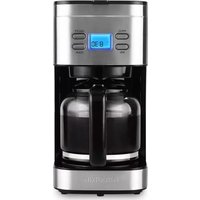
CM 47250 SS - Coffee machine KALORIK - Free user manual and instructions
Find the device manual for free CM 47250 SS KALORIK in PDF.



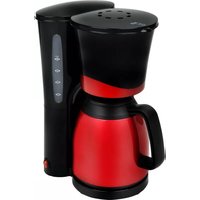
| Product type | Drip coffee maker |
| Brand | Kalorik |
| Model | CM 47250 SS |
| Water tank capacity | 1500 mL (max 12 cups) |
| Carafe type | Glass carafe with handle |
| Filter | Removable nylon filter |
| Functions | Delay programming, automatic shut-off (2 h), keep warm |
| Power supply | 120 V, 60 Hz |
| Power | Not specified (estimated 800-1000 W) |
| Dimensions (approx.) | 30 x 20 x 35 cm |
| Weight (approx.) | 2 kg |
| Housing material | Plastic and stainless steel |
| Cleaning | Carafe, filter, and funnel are dishwasher safe (top rack) |
| Descaling | With white vinegar (1 part vinegar, 3 parts water) every 1 to 3 months |
| Safety | Polarized plug, automatic shut-off, anti-overflow protection |
| Warranty | 1 year (USA and Canada) |
| Use | Household use only |
Frequently Asked Questions - CM 47250 SS KALORIK
User questions about CM 47250 SS KALORIK
0 question about this device. Answer the ones you know or ask your own.
Ask a new question about this device
Download the instructions for your Coffee machine in PDF format for free! Find your manual CM 47250 SS - KALORIK and take your electronic device back in hand. On this page are published all the documents necessary for the use of your device. CM 47250 SS by KALORIK.
USER MANUAL CM 47250 SS KALORIK
- Water tank
- Lid
- Programmable display
-
Glass carafe
-
Carafe handle
- Funnel
- Removable nylon filter
- Measuring spoon
ESPAÑOL:
When using electrical appliances, basic safety precautions should always be followed, including the following:
- READ ALL INSTRUCTIONS BEFORE USE.
- Do not touch hot surfaces. Use handles and knobs. Do not touch the keep warm plate while appliance is on or hot.
- To protect against fire, electric shock and injury do not immerse cord, plugs or appliance in water or other liquid.
- Close supervision is necessary when any appliance is used by or near children.
- Unplug from outlet when not in use and before cleaning.
- Allow to cool before putting on or taking off parts and before cleaning the appliance.
- Do not operate any appliance with a damaged cord or plug, or after the appliance malfunctions or has been damaged in any manner. Contact Consumer Support at the number listed in this manual or return appliance to nearest authorized service center for examination, repair, or adjustment.
- The use of accessory attachments not recommended by the appliance manufacturer may result in fire, electric shock, or injury.
- Do not use outdoors.
- Do not let cord hang over edge of table or counter or touch hot surfaces.
- To reduce the risk of injury, do not drape cord over the countertop or tabletop where it can be pulled on by children or tripped over unintentionally.
- Do not place on or near a hot gas or electric burner, or in a heated oven.
- Always attach plug to appliance first, then plug cord into the wall outlet. To disconnect, make sure brew indicator light is off by pressing ON/OFF button, then remove plug from wall outlet.
- Do not use this appliance for other than intended use.
-
Keep lid on the carafe when in use. Do not open the lid when the appliance is operating. Scalding may occur if the lid is removed during the brewing cycles.
-
The carafe is designed for use with this appliance. It must never be used on a range top.
- Do not set a hot carafe on a wet or cold surface.
- Do not use a cracked carafe or a carafe having a loose or weakened handle.
- Do not clean carafe with cleansers, steel wool pads or other abrasive material.
- This appliance is not intended for use by persons (including children) with reduced physical, sensory or mental capabilities, or lack of experience and knowledge, unless they have been given supervision or instruction concerning use of the appliance by a person responsible for their safety.
- Children should be supervised to ensure that they do not play with the appliance.
- If the supply cord is damaged, it must be replaced by the manufacturer, its service agent or similarly qualified persons in order to avoid a hazard.
- Cleaning or similar servicing by the user should be done with the appliance disconnected from the supply circuit.
- This appliance is intended to be used in household and similar applications.
- The appliance must not be immersed.
- The appliance must not be placed in a cabinet when in use.
- Cleaning and user maintenance shall not be made by children without supervision.
- The heating element surface is subject to residual heat after use.
SAVE THESE INSTRUCTIONS HOUSEHOLD USE ONLY
POLARIZED PLUG INSTRUCTIONS
This appliance is equipped with a polarized plug (one blade is wider than the other). To reduce the risk of electric shock, this plug will fit into the polarized outlet only one way. If the plug does not properly fit into
the outlet at first, reverse it. If it still does not fit, contact a competent qualified electrician. Do not attempt to modify the plug in any way.
SHORT CORD INSTRUCTIONS
A short power supply cord is provided to reduce the hazards resulting from becoming entangled in, or tripping over a longer cord. An extension cord may be used if care is exercised in its use.
- The electrical rating of the extension cord should be at least that of the appliance. If the electrical rating of the extension cord is too low, it could overheat and burn.
- The resulting extended cord should be arranged so that it will not drape over the counter top or tabletop where it can be pulled on by children or tripped over.
PARTS DESCRIPTION
See page 2.
BEFORE THE FIRST USE
- Remove all packing material, any stickers, and the plastic band around the power plug.
- Wash the removable parts as instructed in CARE AND CLEANING.
- Pour fresh cold water up to the MAX mark (1500 mL) into the coffee maker.
- Place the drip carafe on the Keep Warm plate and the detachable filter with its cup in place by opening the top of the coffee machine and placing it in until it fits neatly in place.
- Plug cord into standard electrical outlet. The display will show "12:00".
- Press ON/OFF button once. The button will illuminate in red and start the brewing process automatically.
-
Brew water through appliance without adding coffee grounds. This removes any dust or residue that may remain in the system during the manufacturing process.
-
Once no more water drips out, discard water and clean the carafe thoroughly with warm, soapy water.
- Turn off appliance, unplug and allow to cool down. Your coffee maker is ready for brewing!
OPERATION
- Open the tank cover. Fill water reservoir with cold tap or filtered water. Use lines on side of reservoir as a guide. Do not fill past "MAX" line.
Important: If too much water is added it will leak from the back of the coffee maker as protection against over-fill. If this happens, pour out some of the water until you are no longer past the MAX line.
- Add ground coffee to nylon filter with a measuring spoon. We suggest about one tablespoon per cup of water, but you can adjust depending on preference. Be careful not to overfill. Place nylon mesh filter into the funnel and secure in place.
- Flip lid closed.
- Set carafe on warm plate, paying attention that the center line of the carafe aligns with that of the funnel. The brewing will not work unless the coffee pot is properly aligned to prevent spilling or dripping.
Programmable function
1st press: Time adjust
2nd press: programming

- Plug cord into an outlet. Press ON/OFF once to turn on automatic brewing. The button will light up in red and start the brewing process.
NOTE: You can remove the coffee pot from its place at any time to serve, but do not exceed 30 seconds to prevent any dripping or overflow from the edge of the funnel. - The coffee maker will turn on Keep Warm function automatically once the brewing process is finished. Once you are finished, you can turn off the power by pressing the power button and unplugging the appliance. The coffee maker will turn off automatically 2 hours after the brewing process is finished.
- When coffee grounds are cool, carefully remove and discard used grounds.
- Unplug appliance when not in use.
Note: The brewing cycle can be paused at any time by removing the coffee pot. To resume, simply reinsert the coffee pot.
Programmable function
This coffee maker comes with a programmable feature, letting your coffee be ready for you when you need it.
- To program your coffee maker, plug it in and press PROG button. The small screen will light up in blue. Press it once and TIMER will appear. Press again and CLOCK will appear on the screen. Use this mode to set clock to current time. Use the HOUR button to change the hour, and MINUTE button to change the minute. Note that pressing the HOUR button 12 times will switch it from AM to PM.
- Once your clock is set, press PROG button again to go into TIMER mode, which will allow you to program the machine to turn on at a set time. Select time you wish to program.
- In order to launch the machine into its programmable mode, press the ON/OFF button twice. The first time, the ON/OFF button will turn red. Upon the second press, the PROG button will turn on in blue, but the small screen will remain unlit. This indicates that you have set the machine to start at its programmed time.
Note: Make sure that the AM and PM time matches your desired programming time.
- Make sure your coffee maker is unplugged and cool.
- Clean the housing of the coffee maker along with its water tank with a damp sponge or soft dish towel. Dry thoroughly. Be careful not to immerse cord or housing in water.
Note: Do not clean with alcohol or solvent cleanser. Neer immerse the housing in water for cleaning.
- Detach the remove the plastic funnel and the nylon filter. Remove any coffee grounds or residue. Clean with a mild cleanser and rinse thoroughly with clean water.
- You can also wash nylon filter, plastic funnel and carafe in dishwasher (top-rack) or by hand in hot, soapy water.
Note: Do not use abrasive cleansers or scouring pads. Never immerse the coffee maker in water.
- To clean the inside of the lid, open the cover and leave in the open position; wipe with a damp cloth.
- Allow all parts to dry thoroughly.
DESCALING WITH VINEGAR
To keep your coffee maker operating efficiently, you can remove mineral deposits left by water every three months, according to the water quality in your area and the frequency with which you use the appliance. With regular use, minerals and hard water can clog your coffee maker. A full cleaning with vinegar is recommended once a month.
- Fill carafe with one part white vinegar and three parts cold water. Pour the water and vinegar mixture into the coffee maker's water tank.
- With no coffee in the coffee maker, press the ON/OFF button once so that it lights in red. Allow the mixture to go through the coffee maker in brewing mode (as per the “Before First Use” instructions).
- Pour out mixture and repeat until no yellow liquid comes out, as necessary.
- Brew clean tap or filtered water to get rid of any vinegar residue or odor.
GET MORE OUT OF YOUR PRODUCT
Browse Chef-created recipes specifically made for your Kalorik products. Visit our website www.kalorik.com to see our extensive recipe library and start cooking. Sign up for the Kalorik email mailing list to receive special offers and recipes, and connect with us on social media for daily inspiration.
| PROBLEM | POSSIBLE CAUSE | SOLUTION |
| Coffee maker does not turn on. | Coffee maker is not plugged in. | Make sure appliance is plugged into a working outlet. |
| Coffee maker is leaking. | Water reservoir may be overfilled. | Make sure water reservoir has not been filled beyond the MAX line. |
| Cover may not be correctly placed on carafe. | Make sure lid is correctly placed and tightened on carafe. | |
| Carafe may not be correctly placed on the carafe plate. | Make sure carafe is placed securely onto the carafe plate so that the hole on the lid is aligned perfectly with the drip of the coffee maker. | |
| The brew basket overflows. | Excessive amount of coffee is used. | Reduce the amount of coffee grounds used. |
| Coffee sediment in brewed cup of coffee. | The paper filter and/or the brew basket are not properly placed. | Insert basket-shaped paper filter into brew basket and insert basket properly into holder. |
| The coffee maker brews slowly. | Nylon filter is dirty | Thoroughly clean nylon filter to remove excess buildup |
| The coffee grounds are too coarse | Use finer coffee grounds | |
| The coffee maker needs cleaning. | Follow the instructions in the “Cleaning with Vinegar” section. |
Do not take appliance apart yourself. If additional servicing is necessary, contact a certified servicing center for help.
We suggest that you complete and return the enclosed Product Registration Card promptly to facilitate verification of the date of original purchase. However, return of the Product Registration Card is not a condition of these warranties. You can also fill out this warranty card online, at the following address: www.KALORIK.com
This KALORIK product is warranted in the U.S.A. and in Canada for 1 year from the date of purchase against defects in material and workmanship. This warranty is not transferable. Keep the original sales receipt. Proof of purchase is required to obtain warranty performance.
During this period, if the KALORIK product, upon inspection by KALORIK, is proven defective, it will be repaired or replaced, at Kalorik's option, without charge to the customer. If a replacement product is sent, it will carry the remaining warranty of the original product.
This warranty does not apply to any defect arising from a buyer's or user's misuse of the product, negligence, failure to follow KALORIK instructions noted in the user's manual, use on current or voltage other than that stamped on the product, wear and tear, alteration or repair not authorized by KALORIK, or use for commercial purposes. There is no warranty for glass parts, glass containers, filter basket, blades and agitators, and accessories in general. There is also no warranty for parts lost by the user.
ANY WARRANTY OF MERCHANTABILITY OR FITNESS WITH RESPECT TO THIS PRODUCT IS ALSO LIMITED TO THE ONE YEAR LIMITED WARRANTY PERIOD.
Some states do not allow limitation on how long an implied warranty lasts or do not allow the exclusion of incidental or consequential damages, so the above limitations may not apply to you. This warranty gives you specific legal rights, and you may also have other rights which vary from state to state.
If the appliance should become defective within the warranty period and more than 30 days after date of purchase, do not return the appliance to the store: often, our Customer Service Representatives can help solve the problem without having the product serviced. If
servicing is needed, a Representative can confirm whether the product is under warranty and direct you to the nearest service location.
If this is the case, bring the product, or send it, postage prepaid by the user (all Kalorik customers are responsible for the initial shipment back to the warranty center), along with proof of purchase and a return authorization number indicated on the outer package, given by our Customer Service Representatives. Send to the authorized KALORIK Service Center (please visit our website at www.KALORIK.com or call our Customer Service Department for the address of our authorized KALORIK Service Center).
When sending the product, please include a letter explaining the nature of the claimed defect.
If you have additional questions, please call our Customer Service Department (please see below for complete contact information), Monday through Thursday from 9:00am - 5:00pm (EST) and Friday from 9:00am - 4:00pm (EST). Please note hours are subject to change.
If you would like to write, please send your letter to:
KALORIK Customer Service Department
Team International Group of America Inc.
16175 NW 49th Avenue
Miami Gardens, FL 33014 USA
Or call:
Toll Free: +1 888-521-TEAM / +1 888-KALORIK
Only letters can be accepted at this address above. Shipments and packages that do not have a return authorization number will be refused.
OBTENGA MÁS DE SU PRODUCTO
Team International Group of America Inc.
16175 NW 49th Avenue
Miami Gardens, FL 33014 USA
O llame gratuitamente (U.S.A.) al +1 888-521-TEAM / +1 888-KALORIK
Team International Group of America Inc.
16175 NW 49th Avenue
Miami Gardens, FL 33014 USA
For questions please contact:
Team International Group of America Inc.
16175 NW 49th Avenue
Miami Gardens, FL 33014 USA
User manual content and recipes courtesy of Team International Group – Do not reproduce without consent of the authors - All rights reserved.

- ESPAÑOL
- WHEN USING ELECTRICAL APPLIANCES, BASIC SAFETY PRECAUTIONS SHOULD ALWAYS BE FOLLOWED, INCLUDING THE FOLLOWING
- SAVE THESE INSTRUCTIONS HOUSEHOLD USE ONLY
- POLARIZED PLUG INSTRUCTIONS
- SHORT CORD INSTRUCTIONS
- PARTS DESCRIPTION
- BEFORE THE FIRST USE
- OPERATION
- PROGRAMMABLE FUNCTION
- DESCALING WITH VINEGAR
- GET MORE OUT OF YOUR PRODUCT
- KALORIK CUSTOMER SERVICE DEPARTMENT
- OBTENGA MÁS DE SU PRODUCTO
Brand : KALORIK
Model : CM 47250 SS
Category : Coffee machine